Media Redundancy Protocol

Media Redundancy Protocol

A Media Redundancy Protocol (MRP) is a network protocol for industrial automation that ensures fast convergence in ring network topologies.

  • Ensures fast convergence in ring network topologies for industrial automation

  • Operates under the IEC standard 62439-2

  • Supports recovery times of 30 ms, 200 ms, and 500 ms

Supported Switches and Feature History for MRP

List of Cisco Catalyst IE9300 Rugged Series Switches that support MRP:

  • IE-9310-26S2C-E and IE-9310-26S2C-A

  • IE-9320-26S2C-E and IE-9320-26S2C-A

  • IE-9320-22S2C4X-E and IE-9320-22S2C4X-A

  • IE-9320-24T4X-E and IE-9320-24T4X-A

  • IE-9320-24P4X-E and IE-9320-24P4X-A

  • IE-9320-16P8U4X-E and IE-9320-16P8U4X-A

  • IE-9320-24P4S-E and IE-9320-24P4S-A

  • IE-9310-16P8S4X-E and IE-9310-16P8S4X-A

Table 1. Feature history table

Feature

Release information

Feature description

Enhanced ring convergence profiles for standalone IE9300 switches

Release 17.18.1

From Cisco IOS-XE 17.18.1 onwards, 12 rings of 30ms is also supported on a standalone IE9300 switch.

PTP over MRP

Release 17.18.1

From Cisco IOS-XE 17.18.1 onwards, PTP support over Media Redundancy Protocol (MRP) is introduced.

MRP on an IE9300 Stack

Release 17.17.1

From Cisco IOS-XE 17.17.1 onwards, stack support for Media Redundancy Protocol (MRP) is introduced.

Media Redundancy Protocol (MRP)

Release 17.13.1

From Cisco IOS-XE 17.13.1 onwards, 12 rings of 200 ms or 500 ms convergence profiles are supported on a standalone IE9300 switch.

MRP modes

MRP modes are operating configurations that define how the switch interacts with the MRP network. Each mode has a distinct management interface and a specific compatibility with external frameworks.

  • Only one MRP mode can be enabled at a time on the switch.

  • Each mode offers a unique management interface and integration capability.

Types of MRP modes and their characteristics

The switch supports two MRP modes, each with specific management and compatibility features.

  • PROFINET MRP mode : Designed for integration with Siemens' Totally Integrated Automation (TIA) framework. This mode is primarily managed through the TIA framework and does not utilize the CLI or WebUI for MRP configuration. This mode is the default when the MRP is activated via the web interface or command line.

  • MRP CLI mode : Managed using Cisco IOS XE CLI or WebUI. This mode is incompatible with Siemens TIA and does not support downloading MRP configurations from Siemens TIA.

MRP roles and states

The roles and states of the MRP ring define how network redundancy is managed in a ring topology. They distinguish operational behaviors for preventing loops, managing failures, and ensuring recovery.

  • MRP roles include MRA (default node role), MRM (manages the ring and coordinates recovery), and MRC (operates under MRM control).

  • MRP ring port states are Disabled, Blocked, Forwarding, and Not Connected. Each state determines how frames are handled.

  • MRP control frames (Test, TopoChange, LinkChange) are used for monitoring, failure detection, and recovery coordination.

MRP roles, states, and protocol interoperation

MRP (Media Redundancy Protocol) operates with defined roles and port states to manage network redundancy and recovery in ring topologies. MRP also interoperates with Spanning Tree Protocol (STP) to prevent loops and maintain network stability.

MRP node roles:

  • MRA (Media Redundancy Automanager) : Default for all nodes, uses a voting protocol to select one MRM based on priority; remaining nodes become MRCs.

  • MRM (Media Redundancy Manager) : Manages the ring, monitors status, blocks ports to prevent loops, and coordinates recovery during failures.

  • MRC (Media Redundancy Client) : Operates under MRM control, forwarding or blocking traffic as instructed.

MRP ring port states:

  • Disabled : Ports drop all received frames.

  • Blocked : Ports drop all frames except MRP control frames and some standard frames like LLDP.

  • Forwarding : Ports forward all received frames.

  • Not Connected: Ports are physically disconnected or down (distinct from Disabled , which is manually configured).

Network operation in normal (Ring-Closed) state:

  • During normal operation, the network operates in a Ring-Closed state.

  • One of the MRM’s ring ports is blocked. The other forwards traffic to prevent loops.

  • MRCs typically have both ports in the Forwarding state, resulting in a logical stub topology.

Network behavior during failures (Ring-Open state):

  • When a failure occurs, the network transitions to a Ring-Open state.

    For example: If a link between two MRCs fails, both MRM ports switch to Forwarding , while MRCs adjacent to the failure have one port Disabled and the other Forwarding .

MRP control frames:

  • Test Frames : Sent by the MRM to monitor ring status.

  • TopoChange Frames : Sent by the MRM upon failure or recovery detection.

  • LinkChange Frames : Sent by MRCs to the MRM during local port failure or recovery (Linkdown or Linkup events).

MRP-STP interoperation:

  • MRP-STP interoperation enables MRP and Spanning Tree Protocol (STP) to work together to maintain network stability and prevent broadcast loops.

  • Interoperability is managed in MRP CLI mode; no additional CLI configuration is required for MRP and STP to interoperate.

  • MRP works with STP to prevent broadcast loops caused by devices not participating in the MRP ring but accidentally connected to the network.

  • STP Bridge Protocol Data Units (BPDUs) are not sent on MRP-enabled ports. When ports are unconfigured from the MRP ring, they are automatically added back to the STP network.

MRP recovery performance:

  • MRP ensures efficient switchover during failures to avoid loss of Layer 2 Ethernet frames. This results in a logical stub topology.

  • Recovery time profiles (for example: 200 ms) dictate the maximum recovery time during topology convergence.

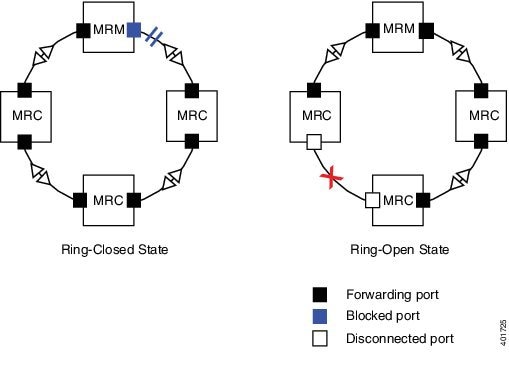
Figure 1. MRP Ring States

Example: MRP ring operation and recovery

The figure displays two rings: the Left and Right rings. In the Left Ring, the connection on the MRM is in a blocked state because no ports are disconnected. In the Right Ring, two MRC connections are in the disabled state because the link between them is broken, as marked by a red “x”.

Guidelines and limitations of MRP

General guidelines and limitations

This section outlines MRP support, compatibility, port and ring configurations, convergence profiles, scalability, interface behavior, and access port setup.

  • MRP Support and Compatibility:

    • Starting Cisco Catalyst IE9300 Rugged Series Switches release 17.13.1, MRP is supported.

    • Support for multiple MRP rings is available only through the CLI or WebUI.

    • You cannot configure MRP on the port running these features: Resilient Ethernet Protocol (REP), Spanning Tree Protocol (STP), Flex Links, MACsec, Dot1x, or TrustSec.

  • Ring and port configurations:

    • Each IE9300 node must include two interfaces as members of an MRP ring. Partial rings or ring segments are not supported.

    • MRP ports cannot be configured as SPAN destination ports, Private VLAN ports, Tunnel ports, or on EtherChannels (or individual ports in EtherChannels).

    • Each MRP ring has one Admin VLAN by default. You can override this using a CLI command. To prevent traffic flooding, the Admin VLAN must be unique for each ring on the same device. VLANs only include interfaces from a single MRP ring.

  • Convergence profiles and scalability:

    • The switch supports up to 12 rings in standalone IE9300 switch. Each ring uses standard convergence profiles of 30 ms, 200 ms, or 500 ms.

    • Each ring can support up to 50 Media Redundancy Clients (MRCs).

  • MRP interface behavior:

    • MRP interfaces start in a forwarding state and remain in this state until they receive notification to block. The ring state transitions to Ring-Closed during normal operation.

  • Access port configuration:

    • To configure MRP interfaces as access ports, assign them to the appropriate VLAN using the switchport mode access and switchport access vlan x commands.

Guidelines and limitations for MRP CLI mode

This section focuses on key configuration requirements, such as ensuring interface mode consistency, handling VLAN mismatches, reconfiguring rings, and supported convergence profiles.

  • After using the CLI to configure the MRP ring, you must attach it to a pair of ports that support MRP.

  • Both MRP ports must have the same interface mode, either access or trunk.

  • To change the MRP ring configuration or to switch the interface mode of the ring ports between access and trunk, you must delete the existing ring configuration and recreate it with the desired settings.

  • Access VLAN matching:

    • When both MRP ports are in access mode, their access VLANs must match.

    • If the configured MRP VLAN does not match the ports' access VLAN, the MRP VLAN is automatically updated to match the access VLAN of the MRP ports.

  • VLAN mismatch error handling:

    • If the ports in an MRP ring do not belong to the same access VLAN during ring creation, or if the VLAN of one port changes after ring creation, MRP ring operation is suspended.

    • A system error message is displayed:
      ERROR% The ring 1 ports don't belong to the same access VLAN. The MRP ring will not function until the issue has been fixed.
    • To resolve this, ensure that both ring ports have the same access VLAN.

Guidelines and limitations to MRA

Media Redundancy Automanager (MRA) is a temporary administrative role in Cisco Catalyst IE9300 Rugged Series Switches that facilitates the selection of the Media Redundancy Manager (MRM) through a voting protocol during the startup phase of a Media Redundancy Protocol (MRP) ring. After the voting process, the MRA transitions to either the MRM or Media Redundancy Client (MRC) role.

MRA can be activated through the CLI. For configuration details, see the section MRP CLI configuration parameters in this configuration guide.

  • MRA is not an operational role. It is used specifically at device startup to facilitate the MRM selection process.

  • All nodes begin as MRAs at power-up. After the MRM is selected, the remaining MRAs automatically transition to the MRC role.

  • Manual configuration of an MRM and MRA in the same ring is not supported.

  • MRAs use a voting protocol based on a configured priority value to select the MRM. They sends MRP_Test frames on both ring ports.

    Manual configuration of an MRC role is not allowed; the role is automatically determined after the voting process.

  • MRAs compare their own priority with the priority values in the received MRP_Test frames:

    • If the MRA's priority is higher, it sends an MRP_TestMgrNAck (negative acknowledgment) frame with the remote manager's MAC address.

    • If the MRA receives an MRP_TestMgrNAck containing its own MAC address, it transitions to the MRC role.

  • Once the MRM is selected, the remaining MRAs transition to the MRC role. MRP_TestPropagate frames are sent to inform other MRAs in the client role about the role change and the new higher-priority MRM.

    These frames ensure that clients monitor the higher-priority manager and remain in the client role if the manager's role changes.

Guidelines and limitations to PROFINET MRP mode configuration

Before configuring the Cisco switch with PROFINET MRP through Siemens TIA or STEP7, ensure the following:

  • The PROFINET MRP feature does not support the MRC role.

  • Use the TIA portal to configure or modify the MRA role.

  • Avoid using the CLI for configuration when TIA is in use. MRP CLI mode and PROFINET MRP mode are mutually exclusive.

  • If the switch is connected to the PROFINET PLC, the output of show profinet status | include Connected should display Yes . If it displays No , the switch is not connected to the PROFINET PLC.

  • Ensure that the GSD file version matches the Cisco IOS release to avoid compatibility issues. Refer to the PROFINET Protocol Configuration Guide for detailed configuration instructions.

MRP features in IE9300 stacks

MRP features in IE9300 stacks are network protocol capabilities that

  • enable Media Redundancy Protocol across stacked Cisco IE9300 switches,

  • support up to 4-member stacks (starting in Cisco IOS-XE 17.17.1), and

  • enhance system stability and integration, with specific differences in support for modes such as PROFINET.

Key benefits of MRP on an IE9300 stack

Supported configurations and

The functionality and behavior of MRP remain consistent in both standalone and stacked configurations, with MRP stack setups supporting up to 4 members. For more information on Switch Stacks, see Managing Switch Stacks .

Key benefits of deploying MRP in a stacked IE9300 setup include:

  • Supports up to 16 rings with 200 ms and 500 ms convergence profiles in IE9300 stack setups. The 30ms convergence profile is not supported in IE9300 stack setups.

  • Reduces the risk of single points of failure by ensuring the system stays operational, even if a stack member or the active switch fails.

  • Provides seamless integration and reliability across the network.

  • The stack setup offers greater port density, enabling the accommodation of more devices without compromising performance.

PTP over Media Redundancy Protocol

PTP over Media Redundancy Protocol (MRP) enables Precision Time Protocol (PTP) time synchronization across networks that use MRP. This feature was introduced in IOS XE 17.18.1.

  • PTP is a time synchronization protocol for distributed network nodes.

  • PTP over MRP is supported according to IEC standard 62439-2. This support enables fast convergence in ring network topologies for Industrial Automation networks.

  • Supported on

    • IE9300-Manager (up to 12 rings, each with 20 nodes over 20 km),

    • networks using QoS (COS 6 / DSCP EF 46),

    • copper and SFP ports, and

    • the system provides a time error deviation of less than 10 microseconds at 50% link utilization during an MRP ring break

Supported Configurations for PTP over MRP

The table lists the supported configurations for PTP over MRP.

Table 2. PTP over MRP Supported Configurations

Device

PTP clock

PTP profile

MRP mode

MRP convergence

IE9300

Boundary/Grand Master Boundary (GMC-BC)

Default (IEEE 1588 v2)

Manager

  • 200ms

  • 500ms

Configure PTP over MRP

Use this task to configure PTP over MRP.

Procedure


Step 1

Enter global configuration mode using the configure command.

Example:

switch# configure terminal

Step 2

Enable PTP boundary mode by entering the ptp clock boundary domain domain_number profile profile-type-name command.

Example:

switch(config)#ptp clock boundary domain 44  profile default
            switch(config-ptp-clk)#
          

Step 3

Display the details of the PTP clock configuration property using the ? command.

Example:

switch(config-ptp-clk)#?
            PTP Clock Configuration commands:
            clock-port     Configure clock port
            default        Set a command to its defaults
            exit           Exit clock sub mode
            gmc-default    Grand Master Clock - Boundary Clock mode with default source
            ip             PTP IP configuration
            no             Negate a command or set its defaults
            priority1      Set priority1
            priority2      Set priority2
            time-property  Control Local Clock's time properties
            transfer       Set the PTP clock's time transfer algorithm
            utc-offset     Override the UTC offset for this clock
          

Step 4

Use the ? command with ptp clock configuration property to display its details.

Example:

switch(config-ptp-clk)#ip ?
            dscp  Configure DSCP Value for PTP Messages
            ttl   Configure IP TTL value to be set on locally originated PTP messages
            switch(config-ptp-clk)#ip tt
            switch(config-ptp-clk)#ip ttl ?
            <1-255>  Time to Live value
            switch(config-ptp-clk)#ip ds  
            switch(config-ptp-clk)#ip dscp ?
            <0-63>  Configure IP DSCP value
            switch(config-ptp-clk)#ip dscp 43 ?
            message  Configure IP DSCP Value for PTP Messages
            switch(config-ptp-clk)#ip dscp 43 message ?
            event    Configure IP DSCP value for PTP Event Messages
            general  Configure IP DSCP value for PTP General Messages
          

Step 5

Optional: Use the dscp dscp_value message [ event | general ] command in BC mode to set the IP Differentiated Services Code Point (DSCP) value for messages.

Example:

PTP-Stacking(config-ptp-clk)#ip dscp 43 message 
          

Note

 
  • dscp_value—a number from 0 to 63,

  • message event—configures the DSCP value for event messages., with a default value of 59,

  • message general—configures the DSCP value for general messages, with a default value of 47.

Step 6

Use the end command to save the configuration and exit the privileged EXEC mode.


The PTP is configured with DSCP values for messages over MRP.

What to do next

You can configure Quality of Service (QoS) settings.

Configure the PROFINET MRP

This task guides you through configuring PROFINET MRP to ensure proper network operation and redundancy.

Before you begin

Disconnect an MRP Ethernet port from the ring (open ring) to discover all neighboring devices by using the LLDP protocol. Complete this step before you deploy PROFINET MRP to the network. This method helps prevent unnecessary flooding if you encounter configuration issues.

  • Use the show lldp neighbor command to confirm all neighbor devices are correctly discovered before continuing with PROFINET MRP setup.

  • Check that the PROFINET status shows connected-state.

Procedure


Step 1

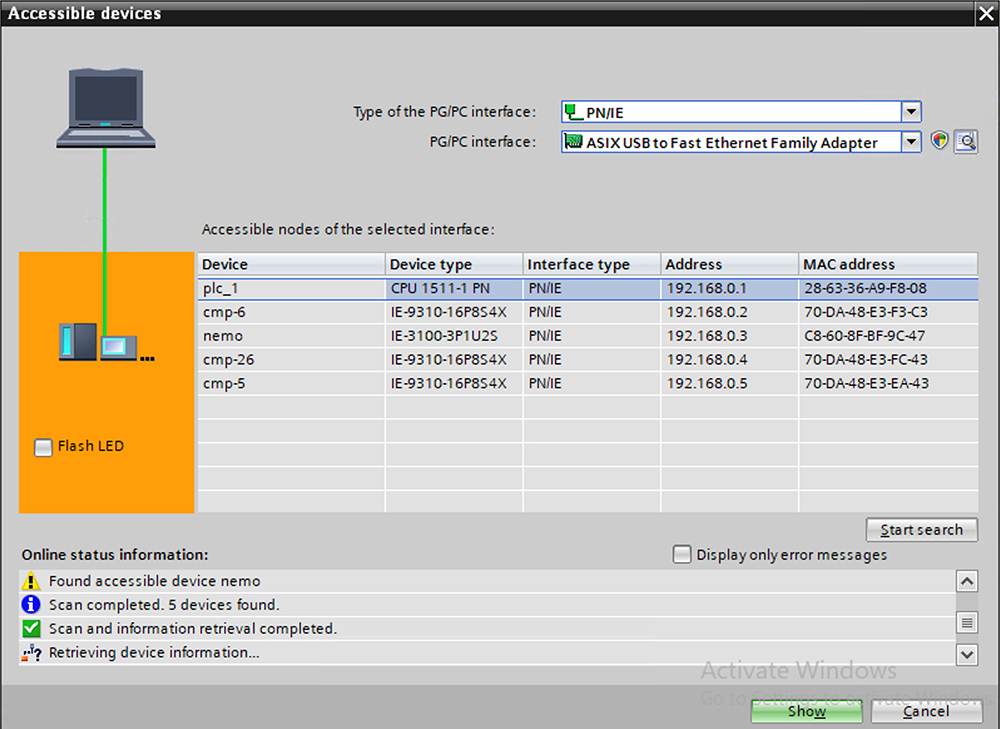
Access the PROFINET Device Discovery (DCP) window.

Open the PROFINET DCP window to identify and manage devices in the network.

Figure 2. PROFINET Device Discovery (DCP) window before configuring MRP

Step 2

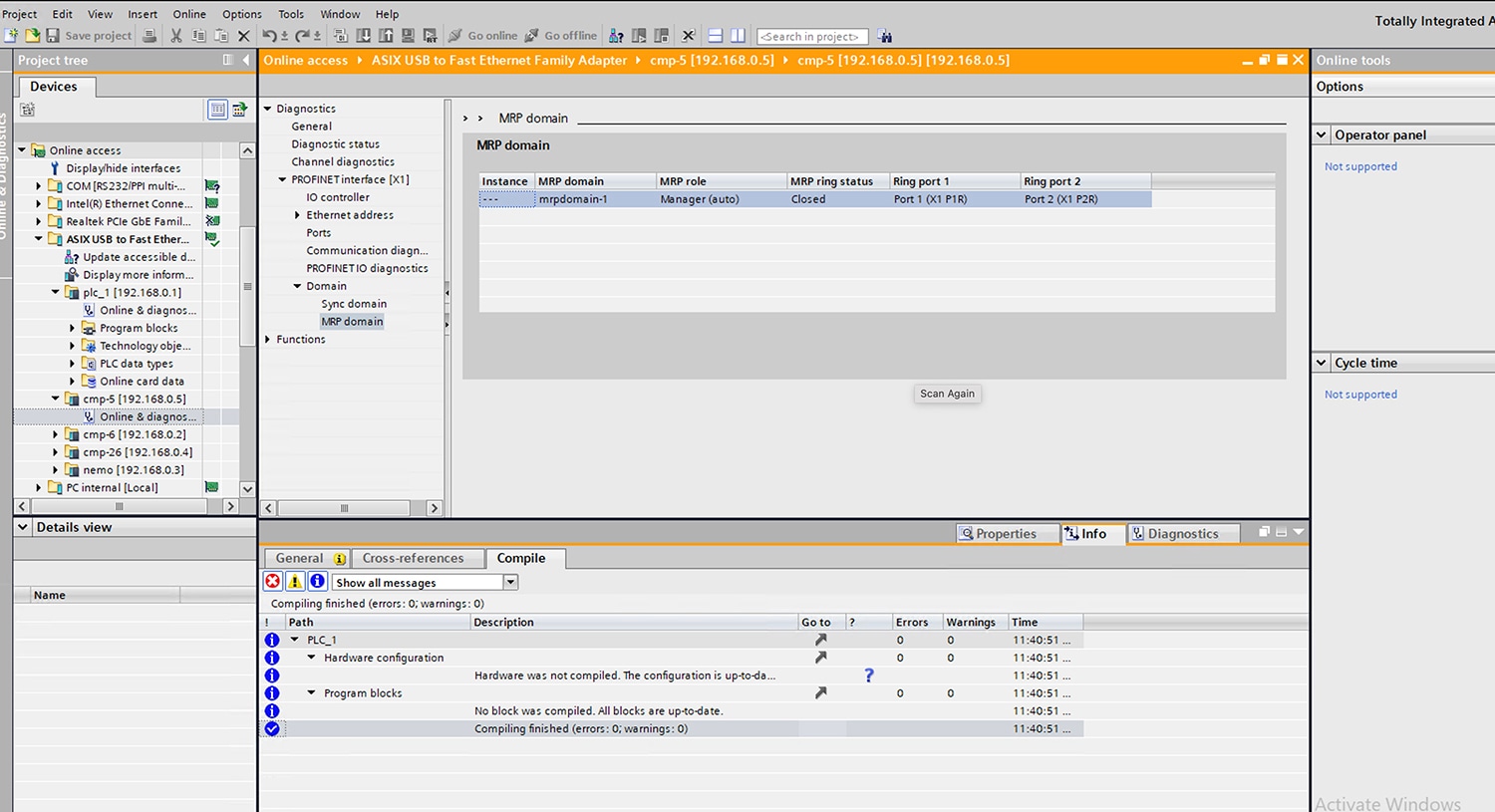
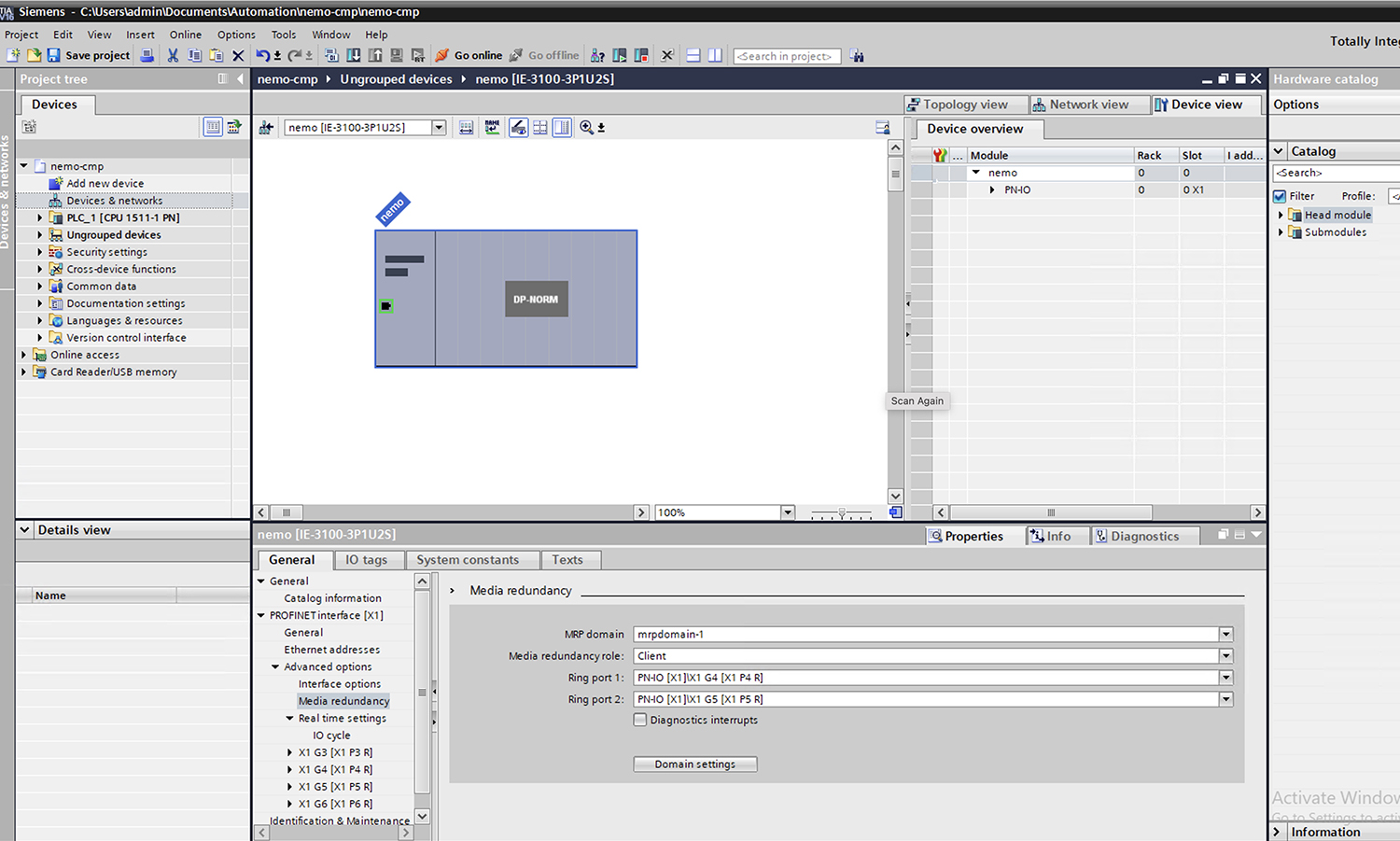
Assign PROFINET MRP manager role and domain name on the device.

Figure 3. PROFINET MRP manager role and MRP domain name

Step 3

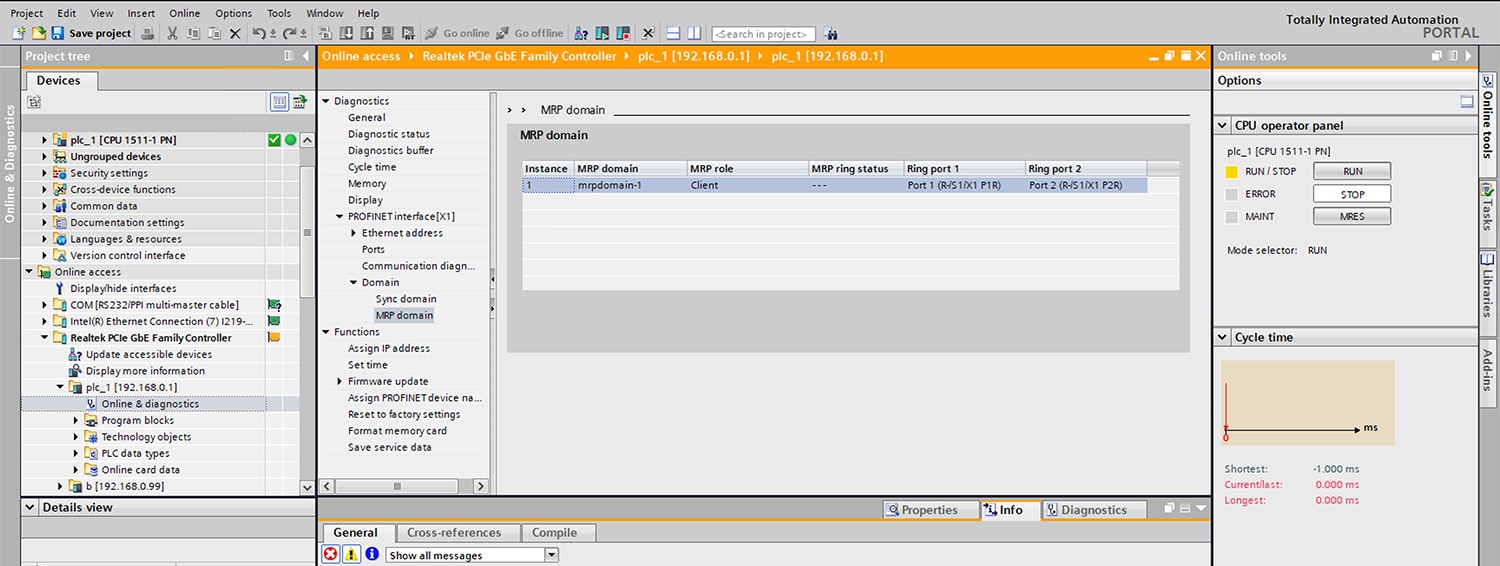
Define the PROFINET MRP client and MRP domain name on client devices.

Figure 4. PROFINET MRP and MRP domain on client

Step 4

If you use MRA mode, configure all devices and domain details.

Step 5

Configure the PROFINET MRP interfaces on each device in the ring.

Figure 5. PROFINET MRP interfaces

Step 6

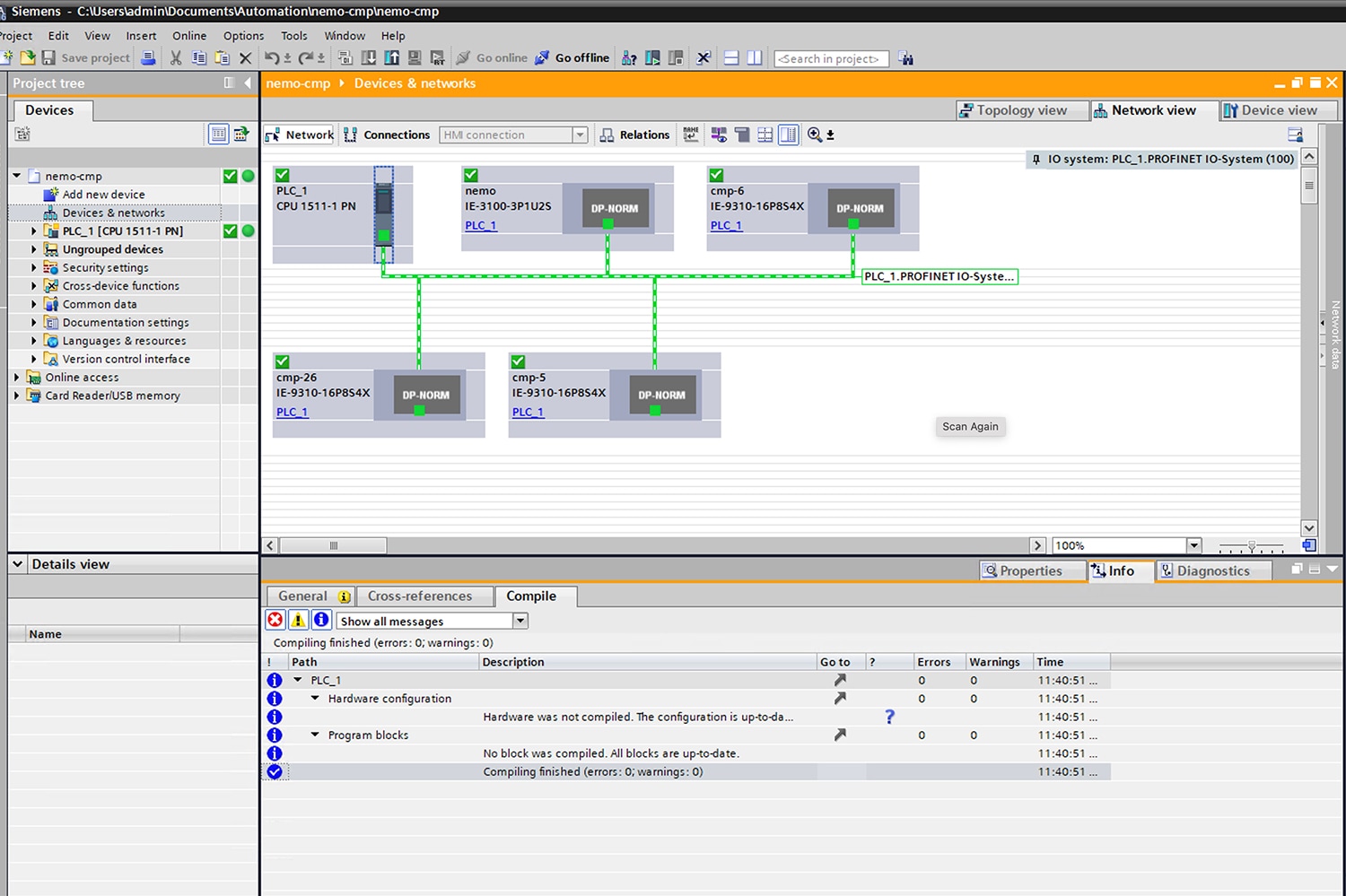
Compile the configuration, and then download it to the PLC device.

Step 7

Verify that all devices are connected and the MRP ring is closed.

Figure 6. PROFINET MRP network configuration diagram

Prerequisites to MRP CLI mode configuration

To prevent network storms when configuring or unconfiguring the MRP feature in a physical ring topology, follow these steps:

  • Ensure that one physical connection between two nodes in each ring remains open.

  • Issue the shut command on the connecting interfaces or physically disconnect the cable.

  • After completing the configuration of all MRMs, issue the no shut command on the port or reconnect the cable between the nodes.

  • MRP CLI is disabled by default.

    The default mode is PROFINET MRP

    The default VLAN is VLAN 1

  • If using a non-default VLAN for MRP, create the VLAN before assigning it to MRP Ring 1.

MRP CLI configuration parameters

The MRP CLI configuration parameters are a category for configuring the MRP on a network device. These optional parameters help provide both redundancy and resiliency in network communication.

  • domain-id: A unique identifier that represents the MRP ring and ensures correct recognition and communication within the ring.

  • domain-name: This is a logical name assigned to the MRP domain ID to make management and identification easier.

  • profile: This setting defines the timing parameter (default 200 ms), which controls how quickly the ring responds to topology changes.

  • vlan-id: This is the VLAN used for transmitting MRP frames, which separates MRP traffic from other network data.

Key components of MRP CLI configuration

The main components of MRP CLI configuration include node setup and ring count limits.

  • Node setup: Configure the device as an MRA (Media Redundancy Auto Manager) node and associate it with two MRP ports.

  • Ring count limits:

    • Up to 16 rings can be configured in a stack setup.

    • Up to 12 rings can be configured on a standalone node.

Configure the Switch as MRA in MRP CLI mode

To configure a switch as an MRA in MRP CLI mode, ensure proper ring and interface configurations for redundancy. MRP CLI mode is the default mode.

Before you begin

  • Ensure the switch is connected and accessible via CLI.

  • If the device is connected to a PLC module, select the option no device in the ring for MRP.

Procedure


Step 1

Enter the global configuration mode and enable MRP on the switch.

Example:


            Switch#
            configure terminal
          

Configure the MRP ring with the specified ring ID using the mrp ring <mrp_id> command.

Example:


            Switch(config-mrp)#
            mrp ring 1
          

Step 2

Set the switch to auto-manage mode.

Use the mode auto-manager command.

Example:


            Switch(config-mrp)#
            mode auto-manager
          

Step 3

Optional: Configure the recovery profile.

Use the profile <value> command.

Choose a value for maximum recovery time: 30, 200, or 500 ms. Default: 200 ms.

Example:


            Switch(config-mrp-auto-manager)#
            profile 30
          

Step 4

Optional: Configure the MRA priority

Use the priority <value> command.

Set a priority within 36864–61440 . The default is 40960 .

Example:


            Switch(config-mrp-auto-manager)#
            priority 40955
          

Step 5

(Optional) Configure the VLAN ID:

Use the vlan-id vlan command. Use within 1–4094 , default is 1 .

Example:


            Switch(config-mrp-auto-manager)#
            vlan-id 2025
          

Step 6

(Optional for single MRP ring) Configure the domain name.

Use the domain-name <name> command. Provide a name that can be up to 32 characters long.

Example:


            Switch(config-mrp-auto-manager)#
            domain-name Cisco MRP Ring 1
          

Step 7

(Optional for single MRP ring) Configure the domain ID.

Use the domain-id <value> command.

where:

<value> is a UUID string of 32 hexadecimal digits in five groups separated by hyphens.

domain-id for MRP ring 1 is FFFFFFFF-FFFF-FFFF-FFFF-FFFFFFFFFFFE (by default).

Example:


            Switch(config-mrp-auto-manager)#
            domain-id FFFFFFFF-FFFF-FFFF-FFFF-FFFFFFFFFFFE
          

Assign a unique domain ID to each ring:

  • The default domain ID for ring 1 is FFFFFFFF-FFFF-FFFF-FFFF-FFFFFFFFFFFE.

  • The default domain ID for ring 2 is FFFFFFFF-FFFF-FFFF-FFFF-FFFFFFFFFFFD.

The domain ID as FFFFFFFF-FFFF-FFFF-FFFF-FFFFFFFFFFFF should be avoided.

Step 8

(Optional) Set the Interval.

Use the interval <interval> command.

Specify the interval options in milliseconds:

  • 3 : Default interval for 30 ms recovery profile.

  • 20 : Default interval for 200 ms recovery profile.

  • 50 : Default interval for 500 ms recovery profile.

Note


The interval field is not displayed in WebUI for MRP.

Example:


            Switch(config-mrp-auto-manager)#
            interval 3
          

Step 9

Exit global configuration mode.

Example:


            Switch(config-mrp-auto-manager)#
            end
          

Configure the ring ports and modes for MRP

Configure the ring ports and modes for MRP on network switches.

Procedure


Step 1

Enter the global configuration mode and configure the interface mode.

Example:


            Switch#
            configure terminal
          

Specify the interface where you want to configure the ring ports and modes.

Example:


            Switch(config)#
            interface GigabitEthernet1/0/22
          

Step 2

Configure the interface mode.

Use the switchport mode { access | trunk } command.

Example:

For default VLAN ID 1 :


            Switch(config-if)#
            switchport mode access
          

For other VLAN IDs:


            Switch(config-if)#
            switchport mode access VLAN <ID>
          

Step 3

Associate the interface to the MRP ring.

Use the mrp ring 1 command.

Example:


            Switch(config-if)#
            mrp ring 1
          

Step 4

Return to the Global Configuration mode.

Use the exit command.

Example:


            Switch(config-if)#
            end
          

Step 5

To configure multiple rings, repeat steps 1 to 4 for each additional ring.


Configuration examples for MRP CLI mode

This section provides a configuration example for MRP auto-manager.

This section demonstrates how to configure auto-manager for MRP CLI mode.


            Switch#
            configure terminal
            Switch# no profinet mrp
            Enter configuration commands, one per line. End with CNTL/Z.
            Switch(config)#
            mrp ring 1
            Switch(config-mrp)#
            mode auto-manager
            Switch(config-mrp-auto-manager)#
            domain-id FFFFFFFF-FFFF-FFFF-FFFF-FFFFFFFFFFFE
            Switch(config-mrp-auto-manager)#
            priority 40960
            Switch(config-mrp-auto-manager)#
            end
         

This section demonstrates how to configure interface mode for MRP CLI mode.


            Switch#
            configure terminal
            Enter configuration commands, one per line. End with CNTL/Z.
            Switch(config)#
            interface GigabitEthernet1/0/22
            Switch(config-if)#
            switchport mode trunk
            Switch(config-if)#
            mrp ring 1
            WARNING% Enabling MRP automatically set STP FORWARDING. It is recommended to shutdown all interfaces which are not currently in use to prevent potential bridging loops.
            Switch(config-if)#
            exit
         

Examples of configuration verification commands and outputs

A verification procedure is a systematic process that

  • confirms whether a configuration has been applied as intended,

  • detects discrepancies between the expected and actual system state, and

  • ensures that operational objectives are met after changes or deployments.

MRP CLI Mode Configuration Verification

Verify the MRP CLI mode configuration:


                Switch#
                show  mrp ring  1
                MRP ring 1
                Profile         : 30 ms
                Mode            : Auto-Manager
                Priority        : 40955
                Operational Mode: Manager
                From            : CLI
                License         : Not Applicable
                Gateway         :
                Status         : Disabled
                Best Manager    :
                MAC Address    : 70:DA:48:3B:B3:95
                Priority       : 40955
                Network Topology: Ring
                Network Status  : CLOSED
                Port1:                                     Port2:
                MAC Address    :70:DA:48:3B:B3:96          MAC Address    :70:DA:48:3B:B3:95
                Interface      :Tw1/0/22                   Interface      :Tw1/0/21
                Status         :Forwarding                 Status         :Blocked
                VLAN ID     : 2025
                Domain Name : Cisco MRP Ring 1
                Domain ID   : FFFFFFFF-FFFF-FFFF-FFFF-FFFFFFFFFFFE
                Topology Change Request Interval        : 0ms
                Topology Change Repeat Count            : 3
                Short Test Frame Interval               : 1ms
                Default Test Frame Interval             : 3ms
                Operational Test Frame Interval         : 3ms
                Test Monitoring Interval Count          : 3
                Test Monitoring Extended Interval Count : N/A
            

MRP CLI Mode Configuration Summary

This section presents the summary of the MRP CLI mode configuration.


                Switch#
                show  platform mrp summary
                MRP ring Summary
                Total number of rings configured    : 1
                Total number of rings Closed        : 1
                Total number of rings Open          : 0
                Total number of rings Idle          : 0
                Total number of rings Undefined     : 0
                Ring instance 1
                status       : CLOSED
                port 1       : Tw1/0/21, SECONDARY
                port 2       : Tw1/0/22, PRIMARY
            

PROFINET MRP Mode Configuration Verification

Verify the PROFINET MRP mode configuration:


                Switch#
                show profinet mrp ring 1
            
MRP ring 1
                Mode            : Client
                From            : Profinet
                License         : Not Applicable
                Gateway         :
                Status         : Disabled
                Best Manager    :
                MAC Address    : 28:63:36:A9:F8:08
                Priority       : 40960
                Network Topology: Ring
                Network Status  : CLOSED
                PNPORT 0:(126/53540)                            PNPORT 0:(126/53540)
                MAC Address    :70:DA:48:E4:86:01          MAC Address    :70:DA:48:E4:86:10
                Interface      :Gi1/0/1                    Interface      :Gi1/0/16
                Status         :Forwarding                 Status         :Forwarding
                VLAN ID     : 1
                Domain Name : mrpdomain-1
                Domain ID   : C3D687FE789E3A1ACDBE5BFCBBC27B6
                Link Down Timer Interval        : 20 ms
                Link Up Timer Interval          : 20 ms
                Link Change (Up or Down) count  :  4