Layer 2 Network Address Translation

Layer 2 network address translations

Layer 2 network address translation (L2 NAT) enables communication between private and public subnets by assigning unique public IP addresses to private endpoints. L2NAT:

  • translates IPv4 addresses in both directions: public to private and private to public using a hardware-based table, and

  • assigns a unique public IP address to a private endpoint. This assignment enables communication across private and public subnets. A NAT-enabled device maintains the public alias in hardware for this service.

  • supports wire-speed performance and multiple Virtual Local Area Networks (VLAN)s for enhanced network segmentation.

Layer 2 NAT operation and configuration

Layer 2 NAT uses a table to translate IPv4 addresses both public-to-private and private-to-public at line rate. It is a hardware-based implementation that provides wire-speed performance and supports multiple VLANs through the NAT boundary for enhanced network segmentation.

For large numbers of nodes, subnet-based translations allow all devices in a subnet to be translated with a single command, reducing the number of required layer 2 NAT rules. The switch has limits on the number of layer-₹2 NAT rules, so using subnet-based rules optimizes resource usage.

  • layer 2 NAT is implemented on a NAT-enabled device, which maintains the public alias in hardware.

  • Subnet-based translations save on layer 2 NAT rules by allowing multiple end devices to be translated with a single rule.

  • Interfaces can support multiple layer 2 NAT instance definitions for different VLAN subnets.

Comparison of address translation approaches:

Table 1. Comparison of layer 2 NAT approaches

Attributes

Host-based NAT

Subnet-based NAT

Translation granularity

Per device

Per subnet

Rule efficiency

Requires many rules

Fewer rules needed


Note


TIP: Use subnet-based translation rules to optimize layer 2 NAT scalability and reduce configuration complexity.


How inside-outside address translation works

This process describes how subnet-based layer 2 NAT rules enable efficient address translation for multiple devices across overlapping internal address spaces. The NAT device allocates unique outside subnets, creates translation rules, and translates addresses during communication to resolve duplicate IP address conflicts while optimizing rule usage.

Summary

The key components involved in inside-outside address translation are:

  • Inside Network 1: Uses 192.168.1.x addresses.

  • Inside Network 2: Uses 192.168.1.x addresses (duplicate address space).

  • Outside Network: Provides unique address spaces for each internal network

  • NAT device: Performs address translation using hardware-based tables.

Workflow

Figure 1. Inside-outside address translation

This image shows the inside-outside address translation process.
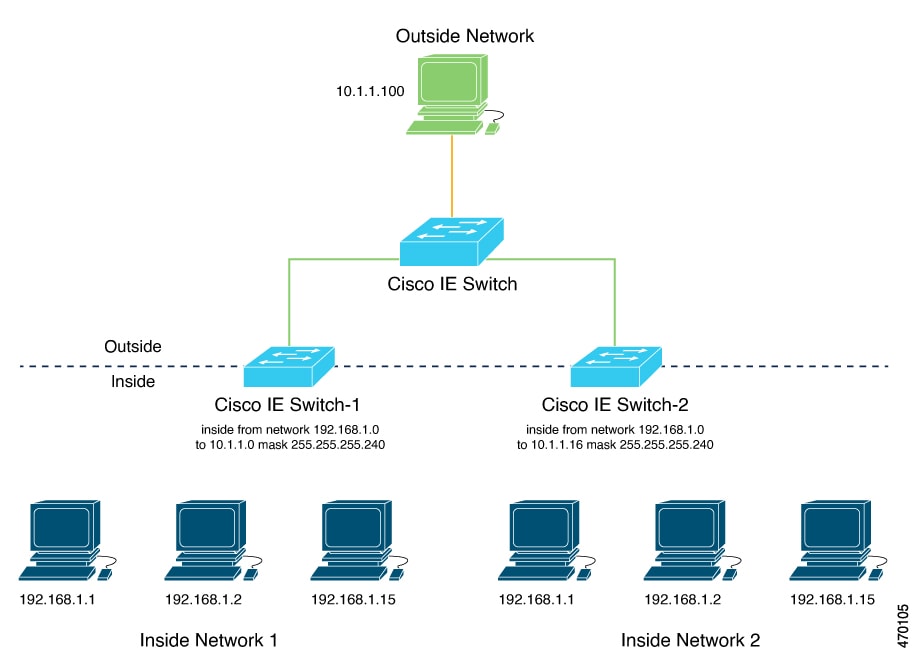
Diagram of inside-outside address translation

These stages describe how inside-outside address translation works:

  1. The NAT device allocates unique outside subnet addresses to each internal network.
    • Inside network 1 receives the 10.1.1.0/28 subnet with usable addresses from 10.1.1.1 through 10.1.1.14.
    • Inside network 2 receives the 10.1.1.16/28 subnet with usable addresses from 10.1.1.17 through 10.1.1.30.
  2. The administrator creates subnet-based translation rules using a single network command for each subnet. A single network command translates all devices within a subnet, reducing the total number of layer 2 NAT rules required.
  3. The NAT device translates addresses when devices communicate with external networks. Each device from either internal network uses its translated outside address for external communication. This approach resolves duplicate IP address conflicts while optimizing NAT rule usage within the switch's hardware limitations.

Result

Subnet-based translations enable efficient layer 2 NAT deployment by allowing multiple devices to share a single translation rule, reducing hardware resource consumption while maintaining network segmentation across overlapping address spaces.

Enabling inside-to-outside communications

This process enables communication between an inside device (A1) and an outside device (LC) by translating addresses and facilitating ARP exchanges through the Cisco switch.

In this example, A1 must communicate with a logic controller (LC) that is directly connected to the uplink port. A layer 2 NAT instance is configured to provide an address for A1 on the outside network (10.1.1.1) and an address for the LC on the inside network (192.168.1.250).


Note


The management interface of the switch must be on a different VLAN from the inside network 192.168.1.x.


Summary

  • A1: Initiates communication from the inside network.

  • Logic Controller (LC): Receives requests and responds from the outside network.

  • Cisco Switch A: Performs layer 2 NAT address fixup for Address Resolution Protocol (ARP) requests and responses.

Workflow
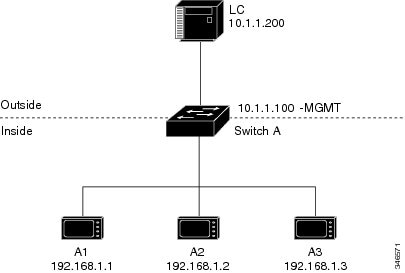
Figure 2. Basic inside-to-outside communications
Diagram of inside-to-outside network communications

These stages describe the ARP and address translation process for inside-to-outside communications.

  1. A1 sends an ARP request to the logic controller (LC) on the inside network.
    • Source Address: 192.168.1.1
    • Destination Address: 192.168.1.250
  2. Cisco Switch A performs layer 2 NAT fixup on the ARP request.
    • Source Address: 10.1.1.1
    • Destination Address: 10.1.1.200
  3. LC receives the ARP request and learns the MAC address of 10.1.1.1.
    • LC updates its ARP table with the MAC address for 10.1.1.1.
  4. LC sends an ARP response to A1 via the Cisco switch.
    • Source Address: 10.1.1.200
    • Destination Address: 10.1.1.1
  5. Cisco Switch A performs layer 2 NAT fixup on the ARP response.
    • Source Address: 192.168.1.250
    • Destination Address: 192.168.1.1
  6. A1 learns the MAC address for 192.168.1.250, and communication starts.
    • A1 can now communicate with the LC using the translated addresses.
Configure inside-to-outside communications

You can configure inside-to-outside communications by creating a layer 2 NAT instance, adding two translation entries, and applying the instance to the interface. ARP fixups are enabled by default.

Before you begin

Ensure that you read and understand Enabling inside-to-outside communications .

Procedure

Step 1

Use the configure command to enter configuration mode.

Example:
Switch# configure

Step 2

Use the l2nat instance A-LC command to create a new layer 2 NAT instance called A-LC.

Example:
Switch(config)# l2nat instance A-LC

Step 3

Use the inside from host ip_address-1 to ip_address-2 command to translate A1’s inside address to an outside address.

Example:
Switch(config-l2nat)# inside from host 192.168.1.1 to 10.1.1.1

Step 4

Use the inside from host ip_address-1 to ip_address-2 command to translate A2’s inside address to an outside address.

Example:
Switch(config-l2nat)# inside from host 192.168.1.2 to 10.1.1.2

Step 5

Use the inside from host ip_address-1 to ip_address-2 command to translate A3’s inside address to an outside address.

Example:
Switch(config-l2nat)# inside from host 192.168.1.3 to 10.1.1.3

Step 6

Use the outside from host ip_address-1 to ip_address-2 command to translate the LC outside address to an inside address.

Example:
Switch(config-l2nat)# outside from host 10.1.1.200 to 192.168.1.250

Step 7

Use the exit command to exit config-l2nat mode.

Example:
Switch(config-l2nat)# exit

Step 8

Use the interface Gi1/1 command to access interface configuration mode for the uplink port.

Example:
Switch(config)# interface Gi1/1

Step 9

Use the l2nat A-LC command to apply this layer 2 NAT instance to the native VLAN on this interface.

Example:
Switch(config-if)# l2nat A-LC

Note


For tagged traffic on a trunk, use the l2nat <instance> vlan <vlan-id> command to apply the instance to a specific VLAN.

Switch(config-if)# l2nat A-LC vlan 100

Use the end command to return to privileged EXEC mode.


How layer 2 NAT works

This process demonstrates how layer 2 NAT translates addresses between sensors on a 192.168.1.x internal network and a line controller on a 10.1.1.x external network.

Summary

The key components involved in the process are:

  • Sensor: Initiates communication by sending packets from the internal network (for example, a device with IP address 192.168.1.1).

  • Layer 2 NAT device: Sits between the internal and external networks, translating IP addresses in both outbound and inbound directions to enable communication.

  • Line controller: Receives and responds to packets on the external network (for example, a device with IP address 10.1.1.100).

Workflow
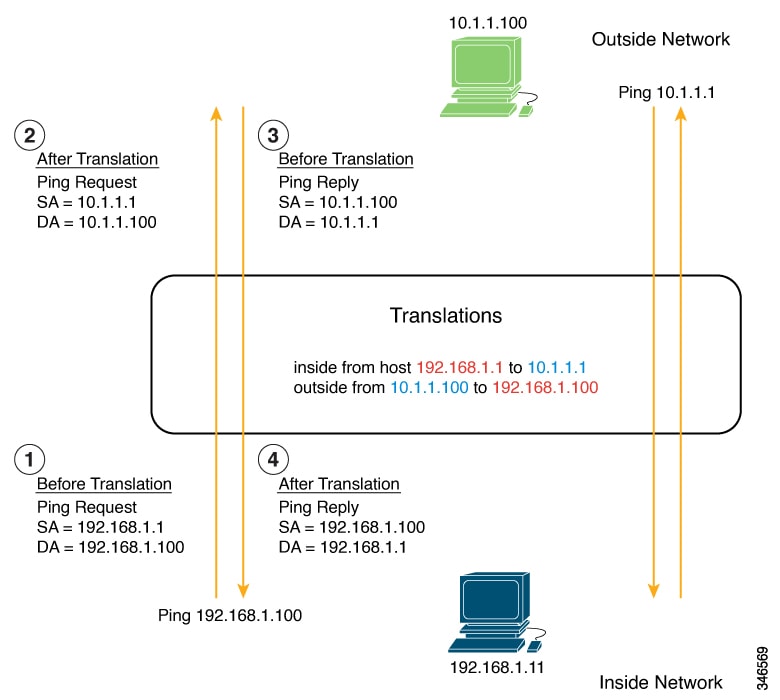
Figure 3. Translating addresses between networks
  1. Packet initiation
    • The sensor at IP address 192.168.1.1 sends a ping request to the line controller using the inside address 192.168.1.100.
  2. Outbound translation Before the packet leaves the internal network, layer 2 NAT translates:
    • Source address (SA): from 192.168.1.1 to 10.1.1.1
    • Destination address (DA): from 192.168.1.100 to 10.1.1.100
  3. Response initiation The line controller receives the translated packet and sends a ping reply to 10.1.1.1.
  4. Inbound translation When the reply packet enters the internal network, layer 2 NAT translates:
    • Source address: from 10.1.1.100 to 192.168.1.100
    • Destination address: from 10.1.1.1 to 192.168.1.1

Result

Bidirectional communication is established between devices on different IP address spaces through NAT translation.

How layer 2 NAT on switches works

This process describes how layer 2 NAT centralizes address translation at the aggregation layer, enabling efficient address management and inter-VLAN communication across large-scale networks. The aggregation switch performs NAT translation using subnet-based rules, while downstream access-layer switches forward traffic without performing translation.

Summary

NAT on switches centralizes network address translation at the aggregation layer, enabling efficient address management and inter-VLAN communication while keeping downstream access-layer switches unaware of NAT.

The key components involved in centralized NAT operation are:

  • Aggregation switch: Performs layer 2 NAT translation at wire speed for multiple VLANs and maintains translation tables for bidirectional address mapping.

  • Switch: Acts as layer 3 gateway for all subnets and VLANs, with its gateway addresses translated by the NAT device.

  • Access-layer switches: Forward traffic to the aggregation switch without performing NAT and rely entirely on the upstream aggregation switch for address translation.

The NAT on switch process involves configuring subnet-based NAT instances using the network command, which enables translation of multiple devices within a subnet using a single rule. The aggregation switch applies these instances to trunk interfaces, performs translation based on VLAN membership, and forwards translated packets through the uplink. This centralized approach optimizes hardware resources by reducing the number of NAT translation records required.

Workflow
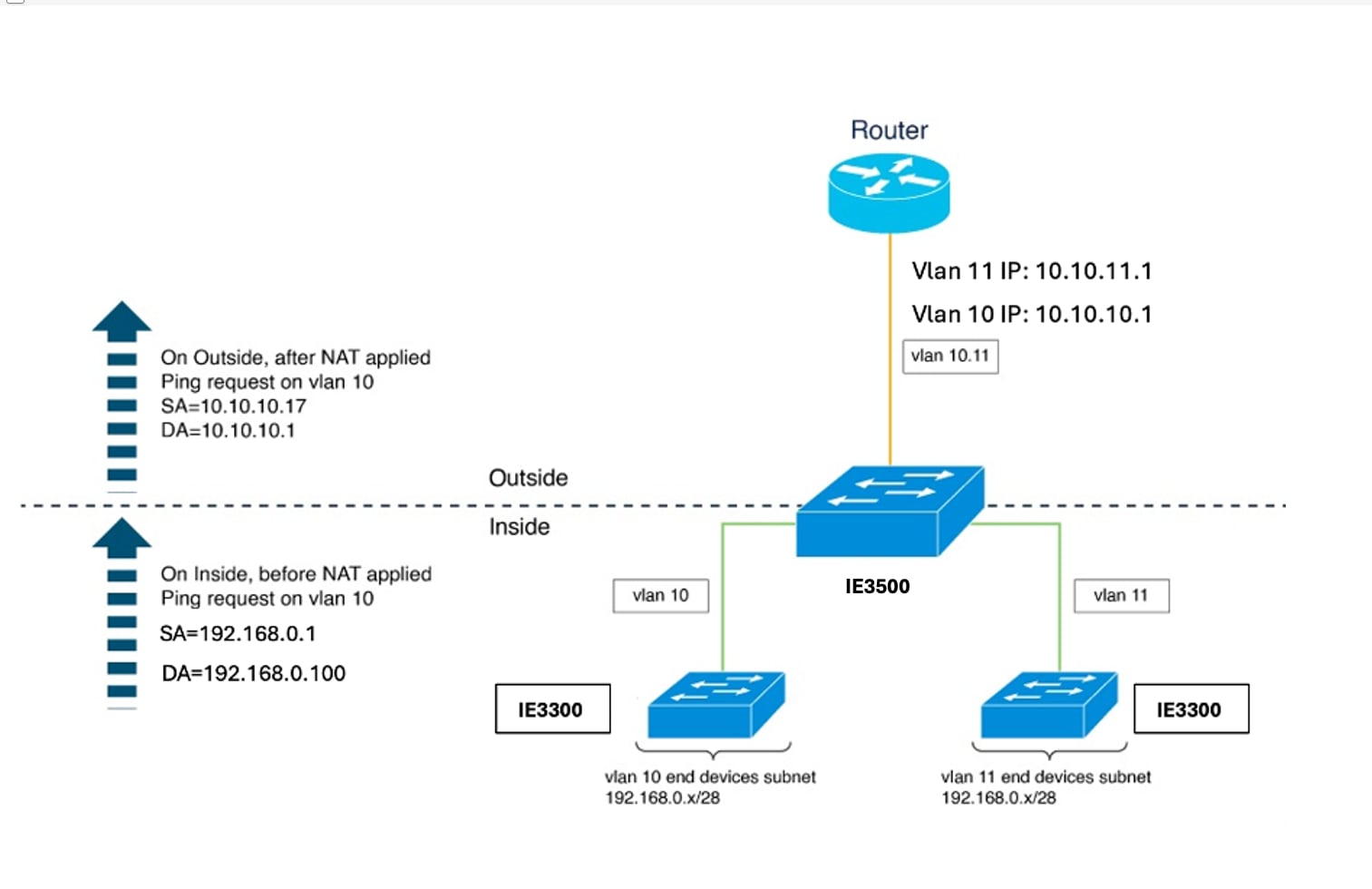
Figure 4. NAT on the switch

These stages describe how layer 2 NAT on switches works:

  1. The network administrator configures subnet-based NAT instances for each VLAN. The administrator creates NAT instances for VLAN 10 and VLAN 11 using the network command to define translation rules:
    • VLAN 10 outside subnet: 10.10.10.16/28 (addresses 10.10.10.16 through 10.10.10.31)
    • VLAN 11 outside subnet: 10.10.11.16/28 (addresses 10.10.11.16 through 10.10.11.31)
    • Inside network for both VLANs: 192.168.0.0 address space
    The network command translates an entire subnet of hosts with a single rule, significantly reducing layer 2 NAT translation records. The /28 subnet configuration covers addresses where the last byte ranges from 16 to 31.
  2. The network administrator configures gateway translations for routing. The administrator defines outside host translation for the router gateway to enable proper routing between networks:
    • VLAN 10 gateway: 10.10.10.1 (translated from inside address 192.168.0.100)
    • VLAN 11 gateway: 10.10.11.1 (translated from inside address 192.168.0.100)
    The gateway for each VLAN uses the router address with the last byte ending in .1.
  3. The network administrator applies NAT instances to the uplink interface on the aggregation switch. The administrator attaches both NAT instances to the Gi1/1 uplink interface operating in trunk mode:
    • Subnet10-NAT instance associates with VLAN 10
    • Subnet11-NAT instance associates with VLAN 11
    Interfaces can support multiple layer 2 NAT instance definitions simultaneously. The switch uses VLAN tags to determine which NAT instance to apply for incoming packets.
  4. The access switches forward VLAN-tagged packets to the aggregation switch. Access switches receive packets on downstream ports from end devices and forward them upstream to the aggregation switch. Packets arrive tagged with their respective VLAN identifiers (VLAN 10 or VLAN 11). The access-layer switches do not perform any NAT operations.
  5. The aggregation switch translates addresses and forwards packets through the uplink. The aggregation switch processes packets based on their VLAN tag and applies the appropriate NAT instance: For outbound traffic:
    • Source addresses from the inside network (192.168.0.x) translate to addresses in the appropriate outside subnet (10.10.10.x or 10.10.11.x).
    • Destination addresses translate according to outside host translation rules.
    For inbound traffic:
    • Source addresses from the outside network translate to inside addresses.
    • Destination addresses translate back to original inside addresses.
  6. The aggregation switch translates router gateway addresses bidirectionally. When devices communicate with the gateway, the aggregation switch translates the gateway address.
    • Inside gateway address (192.168.0.100) translates to outside addresses (10.10.10.1 for VLAN 10, 10.10.11.1 for VLAN 11).
    • Outside gateway addresses translate back to the inside gateway address for return traffic.

Result

Centralized NAT at the aggregation switch enables efficient, scalable address translation across multiple VLANs with minimal NAT rule records. This approach streamlines network management, reduces configuration and maintenance complexity on access-layer switches, and optimizes hardware resource utilization within the switch's NAT rule capacity limitations.
Guidelines and limitations for layer 2 NAT configuration

Layer 2 NAT platform guidelines

  • Deploy layer 2 NAT only on standalone switches.

  • Configure layer 2 NAT only on uplink ports.

  • Use Network Essentials or Network Advantage licenses.


Note


For scale information, see the section Layer 2 NAT performance and scalability in this guide.


Layer 2 NAT interface configuration guidelines

  • Apply layer 2 NAT only to uplink interfaces in access or trunk mode.

  • Configure multiple layer 2 NAT instance definitions for different VLAN subnets on the same interface.

Layer 2 NAT translation guidelines

  • Use one-to-one mapping between external and internal IP addresses.

  • Translate only IPv4 addresses for layer 2 traffic.

  • Use only /24, /25, /26, /27, /28, and /32 subnet masks for inside network translations.

  • Configure only host addresses for outside translation rules.

  • Translate only unicast traffic. Untranslated unicast, multicast, and IGMP traffic is not supported.

  • Use only /24, /25, /26, /27, /28, and /32 subnet masks for inside network translation.

  • Use subnet-based translations for large numbers of nodes to reduce the number of required layer 2 NAT rules and optimize resource usage.

Layer 2 NAT traffic handling guidelines

  • Apply layer 2 NAT only to unicast traffic. Untranslated unicast traffic, multicast traffic, and IGMP traffic are permitted.

  • Use layer 2 NAT only for layer 2 traffic. Do not use it for packets undergoing routing.

Layer 2 NAT address management guidelines

  • Do not configure addresses from the same subnet as both outside and inside addresses, as layer 2 NAT is designed to separate outside and inside addresses.

  • Do not expect to save on public IP addresses, as public-to-private translation is strictly 1:1, not 1:N NAT.

  • Ensure that translated inside addresses are not accessible in the global network.

Layer 2 NAT management interface placement guidelines

  • Place the management interface outside the private network VLAN because the management interface is behind the layer 2 NAT function.

  • If the management interface must be on the private network VLAN, assign an inside address and configure an inside translation.

  • Ensure management traffic is on a different VLAN from the private network VLAN, as layer 2 NAT does not translate packets destined for or coming from the CPU.

Layer 2 NAT monitoring and statistics guidelines

  • Use debugging statistics to monitor translation entries for each translation, total translated ingress and egress for each instance and for each interface, ARP fixup statistics, and hardware-allocated translation entries.

  • Layer 2 NAT counters are not port-based. Applying the same layer 2 NAT instance to multiple interfaces displays the same counters for all those interfaces.

Layer 2 NAT DHCP restrictions

Do not configure a layer 2 NAT host as a DHCP client if you are translating that host.

Layer 2 NAT ARP behavior restriction

ARP does not work transparently across layer 2 NAT. The switch modifies IP addresses in packet payloads for protocols to function, but does not translate embedded IP addresses.

Layer 2 NAT performance and scalability

Layer 2 NAT translation and forwarding occur in hardware at line rate. The number of translation rules is limited by the available hardware entries.

The supported scale depends on the combination of inside and outside rules.

Table 2. Layer 2 NAT scale limits

Configuration scenario

Maximum supported scale

Single instance with only inside rules

128 translation rules

Multiple instances with one inside rule

128 instances across 128 VLANs

Instances with both inside and outside rules

64 instances

Single instance with one outside rule

100 inside rules


Note


We recommended that you use network translation rules to save hardware entries. Adding more outside rules reduces the number of supported inside rules.


Configure layer 2 NAT

You must configure layer 2 NAT instances that specify the address translations. Attach layer 2 NAT instances to physical Ethernet interfaces, and configure which VLAN or VLANs the instances will be applied to. layer 2 NAT instances can be configured from management interfaces (CLI/SNMP). You can view detailed statistics about the packets that are sent and received. See the section Layer 2 NAT commands in this guide.

To configure layer 2 NAT, perform these steps. Refer to the examples in Enabling inside-to-outside communications and How layer 2 NAT handles duplicate IP addresses in this guide for more details.

Procedure


Step 1

Use the configure terminal command to enter global configuration mode:

Example:

Switch# configure terminal

Step 2

Use the l2nat instance instance_name command to create a new layer 2 NAT instance.

Example:

Switch(config)# l2nat instance l2nat1

After creating an instance, use this same command to enter the submode for that instance.

Step 3

Use the inside from [ host | range | network ] original ip to translated ip [ mask |number | mask] command to translate an inside address to an outside address.

Example:

Switch(config-l2nat)# inside from 10.10.10.200 to 192.168.1.200

You can translate a single host address, a range of host addresses, or all the addresses in a subnet. Translate the source address for outbound traffic and the destination address for inbound traffic.

Step 4

Use the outside from [ host | range | network ] original ip to translated ip [ mask |number | mask] command to translate an outside address to an inside address:

Example:

Switch(config-l2nat)# outside from 10.10.10.200 to 192.168.1.200

You can translate a single host address, a range of host addresses, or the addresses in a subnet. Translate the destination address for outbound traffic and the source address for inbound traffic.

Step 5

Use the exit command to exit config-l2nat mode.

Example:

Switch(config-l2nat)# exit

Step 6

Use the interface interface-id command to access interface configuration mode for the specified interface (uplink ports only on the IE 3400).

Example:

Switch(config)# interface Gi1/1 

Step 7

Use the l2nat instance_name [vlan vlan_range ] command to apply the specified layer 2 NAT instance to a VLAN or VLAN range. If this parameter is missing, the layer 2 NAT instance applies to the native VLAN.

Example:

Switch(config-if)# l2nat l2nat1 vlan 10

Step 8

Use the end command to exit interface configuration mode.

Example:

Switch# end

Configure layer 2 NAT on a port channel

Link Aggregation Control Protocol (LACP) groups physical Ethernet ports into a single logical port-channel interface. layer 2 NAT is supported only on the logical port-channel interface and not on individual member interfaces. This configuration ensures consistent traffic handling and redundancy across bundled links.

Procedure


Step 1

Use the configure terminal command to enter global configuration mode.

Example:

Switch# configure terminal

Step 2

Use the l2nat instance A-LC command to create a new layer 2 NAT instance called A-LC.

Example:

Switch# l2nat instance A-LC

Step 3

Use the inside from host <ipaddress_1> to <ipaddress_2> command to translate A1’s inside address to an outside address.

Example:

Switch(config-l2nat)# inside from host 192.168.1.1 to 10.1.1.1

Step 4

Use the inside from host <ipaddress_1> to <ipaddress_2> command to translate A2’s inside address to an outside address.

Example:

Switch(config-l2nat)# inside from host 192.168.1.2 to 10.1.1.2

Step 5

Use the inside from host <ipaddress_1> to <ipaddress_2> command to translate A3’s inside address to an outside address.

Example:

Switch(config-l2nat)# inside from host 192.168.1.3 to 10.1.1.3

Step 6

Use the outside from host <ipaddress_1> to <ipaddress_2> command to translate A3’s inside address to an outside address.

Example:

Switch(config-l2nat)# outside from host 10.1.1.200 to 192.168.1.250

Step 7

Use the exit command to exit config-l2nat mode.

Example:

Switch(config-l2nat)# exit

Step 8

Use the interface port-channel command to access interface configuration mode for the port channel.

Example:

Switch(config)# interface port-channel

Step 9

Use the l2nat A-LC command to apply this layer 2 NAT instance to the native VLAN on this interface.

Example:


 Switch(config)# l2nat A-LC

Note


For tagged traffic on a trunk, use the l2nat <instance> vlan <vlan-id> command to apply the instance to a specific VLAN.

Switch(config-if)# l2nat A-LC vlan 100

Use the end command to return to privileged EXEC mode.


Layer 2 NAT commands

Execute these commands to verify the layer 2 NAT configuration.

Table 3. Layer 2 NAT verification commands

Command

Purpose

show l2nat instance

Displays the configuration details for a specified layer 2 NAT instance.

show l2nat interface

Displays the configuration details for layer 2 NAT instances on one or more interfaces.

show l2nat statistics

Displays the layer 2 NAT statistics for all interfaces.

show l2nat statistics interface

Displays the layer 2 NAT statistics for a specified interface.

debug l2nat

Enables showing real-time layer 2 NAT configuration details when the configuration is applied.

show platform hardware fed switch 1 fwd-asic resource tcam table pbr record 0 format 0 -

Displays the hardware entries.

-show platform hardware fed switch active fwd-asic resource tcam utilization | in PBR

Displays the hardware resource utilization.

Examples for the show l2nat instance and the show l2nat statistics commands:

Switch# show l2nat instance 
l2nat instance test
fixup  : all
outside from host    10.10.10.200 to 192.168.1.200
inside  from host    192.168.1.1 to 10.10.10.1
l2nat instance test2
fixup  : all
inside  from host    1.1.1.1 to 2.2.2.2
outside from host    2.2.2.200 to 1.1.1.200
Switch# show l2nat interface 
FOLLOWING INSTANCE(S) AND VLAN(s) ATTACHED TO ALL INTERFACES
==============================================================
l2nat Gi1/1 test 
==============================================================
Switch# show l2nat statistics 
STATS FOR INSTANCE: test (IN PACKETS)
TRANSLATED STATS (IN PACKETS)
=============================================================================
INTERFACE DIRECTION VLAN   TRANSLATED
Gi1/1     EGRESS    50    0         
Gi1/1     INGRESS   50    0         
-------------------------------------------------------------------------------
PROTOCOL FIXUP STATS (IN PACKETS)
=============================================================================
INTERFACE DIRECTION VLAN    ARP       
Gi1/1     REPLY    50    0      
Gi1/1     REQUEST   50    0
-------------------------------------------------------------------------------
PER TRANSLATION STATS (IN PACKETS)
=============================================================================
TYPE    DIRECTION SA/DA ORIGINAL IP     TRANSLATED IP   COUNT
OUTSIDE INGRESS   SA    10.10.10.200    192.168.1.200   0         
OUTSIDE EGRESS    DA    192.168.1.200   10.10.10.200    0         
INSIDE  EGRESS    SA    192.168.1.1     10.10.10.1      0         
INSIDE  INGRESS   DA    10.10.10.1      192.168.1.1     0         
-------------------------------------------------------------------------------
=============================================================================
TOTAL TRANSLATIONS ENTRIES IN HARDWARE: 4
TOTAL INSTANCES ATTACHED : 1
=============================================================================
GLOBAL NAT STATISTICS
=============================================================================
Total Number of TRANSLATED NAT  Packets   = 0
Total Number of ARP      FIX UP Packets   = 0
=============================================================================

Configure NAT on switch

Switch# configure terminal
Switch(config)# l2nat instance Subnet10-NAT
Switch(config-l2nat)# instance-id 1
Switch(config-l2nat)# permit all
Switch(config-l2nat)# fixup all
Switch(config-l2nat)# outside from host 10.10.10.1 to 192.168.0.100
Switch(config-l2nat)# inside from network 192.168.0.0 to 10.10.10.16 mask 255.255.255.240
Switch(config-l2nat)# exit
Switch(config)# l2nat instance Subnet11-NAT
Switch(config-l2nat)# instance-id 1
Switch(config-l2nat)# permit all
Switch(config-l2nat)# fixup all
Switch(config-l2nat)# outside from host 10.10.11.1 to 192.168.0.100
Switch(config-l2nat)# inside from network 192.168.0.0 to 10.10.11.16 mask 255.255.255.240
Switch(config-l2nat)# exit
Switch(config)# interface GigabitEthernet1/1
Switch(config-if)# switchport mode trunk
Switch(config-if)# l2nat Subnet10-NAT 10
Switch(config-if)# l2nat Subnet11-NAT 11
Switch(config-if)# exit
Switch(config)# interface vlan 1
Switch(config-if)# ip address 10.10.1.2 255.255.255.0
Switch(config-if)# end

Layer 2 protocol tunneling configuration

Switch(config)# interface Gig 1/0/1
Switch(config-if)# switchport mode access
Switch(config-if)# l2protocol-tunnel stp
Switch(config-if)# end 

BPDU filter for spanning tree configuration


Switch(config)# interface Gig 1/0/1
Switch(config-if)# switchport mode trunk
Switch(config-if)# switchport vlan mapping 10 20
Switch(config-if)# spanning-tree bpdufilter enable
Switch(config-if)# end 

How layer 2 NAT handles duplicate IP addresses

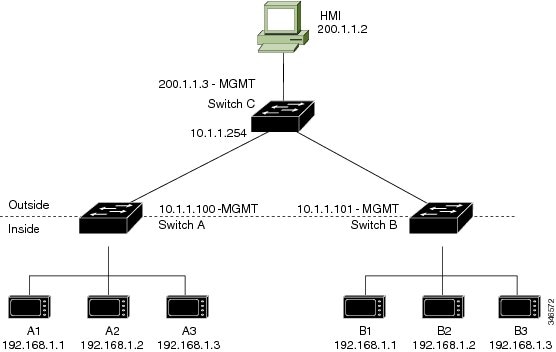
In this scenario, two machine nodes are preconfigured with addresses in the 192.168.1.x space. Layer 2 NAT translates these addresses to unique addresses on separate subnets of the outside network. In addition, for machine-to-machine communications, the Node A machines need unique addresses on the Node B space and the Node B machines need unique addresses in the Node A space.

  • Switch C needs an address in the 192.168.1.x space. When packets come into Node A or Node B, the 10.1.1.254 address of Switch C is translated to 192.168.1.254. When packets leave Node A or Node B, the 192.168.1.254 address of Switch C is translated to 10.1.1.254.

  • Node A and Node B machines need unique addresses in the 10.1.1.x space. For quick configuration and ease of use, the 10.1.1.x space is divided into subnets: 10.1.1.0, 10.1.1.16, 10.1.1.32, and so on. Each subnet can then be used for a different node. In this example, 10.1.1.16 is used for Node A, and 10.1.1.32 is used for Node B.

  • Node A and Node B machines need unique addresses to exchange data. The available addresses are divided into subnets. For convenience, the 10.1.1.16 subnet addresses for the Node A machines are translated to 192.168.1.16 subnet addresses on Node B. The 10.1.1.32 subnet addresses for the Node B machines are translated to 192.168.1.32 addresses on Node A.

  • Machines have unique addresses on each network.

Summary

This process involves these key components:

  • Node A: Machine node using 192.168.1.x address space.

  • Node B: Machine node using 192.168.1.x address space (duplicate of Node A).

  • Switch C: Gateway device requiring address translation between 10.1.1.254 and 192.168.1.254.

  • Layer 2 NAT: Translates addresses between internal and external subnets to ensure unique addressing.

Layer 2 NAT enables communication between nodes with duplicate IP addresses by translating addresses to unique subnets, allowing seamless data exchange and network segmentation.

Workflow

Figure 5. Duplicate IP addresses

These stages describe how layer 2 NAT handles duplicate IP addresses between Node A and Node B, ensuring unique addressing and communication.

  1. The NAT device translates Switch C addresses bidirectionally between Node A and Node B.
    • When packets enter Node A or Node B, the NAT device translates the 10.1.1.254 address of Switch C to 192.168.1.254.
    • When packets leave Node A or Node B, the NAT device translates the 192.168.1.254 address of Switch C to 10.1.1.254.
  2. The administrator allocates unique outside subnet addresses to each node.
    • The 10.1.1.x address space is divided into subnets: 10.1.1.0, 10.1.1.16, 10.1.1.32, and so on.
    • Node A receives the 10.1.1.16 subnet for outside addressing.
    • Node B receives the 10.1.1.32 subnet for outside addressing.
  3. The NAT device translates addresses for machine-to-machine communication between nodes.
    • The NAT device translates 10.1.1.16 subnet addresses for Node A machines to 192.168.1.16 subnet addresses visible to Node B.
    • The NAT device translates 10.1.1.32 subnet addresses for Node B machines to 192.168.1.32 subnet addresses visible to Node A.
  4. This table shows the unique addresses assigned to each machine across all networks.
    Table 4. Translated IP addresses

    Node

    Address in Node A

    Address in Outside Network

    Address in Node B

    Switch A network address

    192.168.1.0

    10.1.1.16

    192.168.1.16

    A1

    192.168.1.1

    10.1.1.17

    192.168.1.17

    A2

    192.168.1.2

    10.1.1.18

    192.168.1.18

    A3

    192.168.1.3

    10.1.1.19

    192.168.1.19

    Cisco Switch B network address

    192.168.1.32

    10.1.1.32

    192.168.1.0

    B1

    192.168.1.33

    10.1.1.33

    192.168.1.1

    B2

    192.168.1.34

    10.1.1.34

    192.168.1.2

    B3

    192.168.1.35

    10.1.1.35

    192.168.1.3

    Switch C

    192.168.1.254

    10.1.1.254

    192.168.1.254

Result

Layer 2 NAT enables communication between nodes with duplicate IP addresses by translating addresses to unique subnets. This allows seamless machine-to-machine data exchange while maintaining network segmentation.

Configure duplicate IP addresses for Switch A

Configure layer 2 NAT to translate duplicate IP addresses of two machine nodes to unique addresses on separate subnets of the outside network for Switch A.

Perform these steps to configure layer 2 NAT and translate a duplicated inside IP address to a unique address on the outside subnet. This procedure is for Switch A in the section How layer 2 NAT handles duplicate IP addresses.

Before you begin

Ensure that you read and understand How layer 2 NAT handles duplicate IP addresses.

Procedure


Step 1

Use the configure command to enter global configuration mode.

Example:

Switch# configure

Step 2

Use the l2nat instance A-Subnet command to create a new layer 2 NAT instance called A-Subnet.

Example:

Switch(config)# l2nat instance A-Subnet

Step 3

Use the inside from network ip_address-1 to ip_address-2 mask 255.255.255.240 command to translate the Node A machines’ inside addresses to addresses in the 10.1.1.16 255.255.255.240 subnet.

Example:

Switch(config-l2nat)# inside from network 192.168.1.0 to 10.1.1.16 mask 255.255.255.240

Step 4

Use the outside from host ip_address-1 to ip_address-2 command to translate the outside address of Switch C to an inside address.

Example:

Switch(config-l2nat)# outside from host 10.1.1.254 to 10.1.1.16 mask 192.168.1.254

Step 5

Use the outside from host ip_address-1 to ip_address-n to translate the Node B machines’ outside addresses to their inside addresses.

Example:

Switch(config-l2nat)# outside from host 10.1.1.32 to 192.168.1.32
                        outside from host 10.1.1.33 to 192.168.1.33
                        outside from host 10.1.1.34 to 192.168.1.34
                        outside from host 10.1.1.35 to 192.168.1.35

Step 6

Use the exit command to exit config-l2nat mode.

Example:

Switch(config-l2nat)# exit

Step 7

Use the interface interface_name command to access interface configuration mode for the uplink port.

Example:

Switch(config)# interface Gi1/1

Step 8

Use the l2nat A-Subnet command to apply this layer 2 NAT instance to the native VLAN on this interface.

Example:

Switch(config-if)# l2nat A-Subnet

Note


For tagged traffic on a trunk, add the VLAN number when attaching the instance to an interface as follows:

l2nat instance vlan

Step 9

Use the end command to return to privileged EXEC mode.

Example:

Switch# end

What to do next

Configure layer 2 NAT to translate the duplicated IP address of Switch B in the section How layer 2 NAT handles duplicate IP addresses . See Configure duplicate IP addresses for Switch B .

Configure duplicate IP addresses for Switch B

You can configure layer 2 NAT and translate a duplicated inside IP address to a unique address on the outside subnet. This procedure is for Switch B in the section How layer 2 NAT handles duplicate IP addresses .

Before you begin

Ensure that you have read and understand How layer 2 NAT handles duplicate IP addresses .

Procedure


Step 1

Configuration

  1. Use the enable command to enter privileged EXEC mode.

    Example:

    Switch> enable
  2. Use the configure command to enter global configuration mode.

    Example:

    Switch# configure
  3. Use the l2nat instance B-Subnet command to create a new layer 2 NAT instance called B-Subnet.

    Example:

    Switch(config)# l2nat instance B-Subnet
  4. Use the inside from network ip_address-1 to ip_address-2 255.255.255.240 command to translate the Node B machines’ inside addresses to addresses in the 10.1.1.32 255.255.255.240 subnet.

    Example:

    Switch(config-l2nat)# inside from network 192.168.1.0 to 10.1.1.32 255.255.255.240
  5. Use the outside from host ip_address-1 to command to translate the outside address of Switch C to an inside address.

    Example:

    Switch(config-l2nat)# outside from host 10.1.1.254 to 10.1.1.32 255.255.255.240
  6. Use the outside from host 10.1.1.16 to 192.168.1.16 command to translate the Node A machines’ outside addresses to their inside addresses.

    Example:

    Switch(config-l2nat)# outside from host 10.1.1.16 to 192.168.1.16
                            outside from host 10.1.1.17 to 192.168.1.17
                            outside from host 10.1.1.18 to 192.168.1.18
                            outside from host 10.1.1.19 to 192.168.1.19
    
  7. Use the exit command to exit config-l2nat mode.

    Example:

    Switch(config-l2nat)# exit
  8. Use the interface interface_name command to access interface configuration mode for the uplink port.

    Example:

    Switch(config)# interface Gi1/1Gi1/1
  9. Use the l2nat <nat_name> command to apply this layer 2 NAT instance to the native VLAN on this interface.

    Example:

    Switch(config-if)# l2nat name1 

    Note


    For tagged traffic on a trunk, add the VLAN number when attaching the instance to an interface as follows:

    l2nat instance vlan

Step 2

Verification

  1. (Optional) Use the show l2nat instance name1 command to show the configuration details for the specified layer 2 NAT instance.

    Example:

    Switch# show l2nat instance name1
  2. (Optional) Use the show l2nat statistics command to show layer 2 NAT statistics.

    Example:

    Switch# show l2nat statistics
  3. (Optional) Use the end command to return to privileged EXEC mode.

    Example:

    Switch# end