Precision Time Protocol

PTP

Precision Time Protocol (PTP) is a network protocol that enables precise time synchronization across distributed device clocks in packet-based networks.

  • Synchronizes clocks in packet-based networks with distributed device clocks of varying precision and stability.

  • Supports industrial networked measurement and control systems.

  • Optimizes performance in distributed systems by requiring minimal bandwidth and processing overhead.

PTP for smart grid

PTP for smart grid is a protocol that provides extremely precise time accuracy and synchronization for power automation applications, improving network monitoring and troubleshooting. It

  • enables peak-hour billing, virtual power generators, and outage monitoring and management through precise timing.

  • can be implemented on packet-based networks such as Ethernet, and

  • improves network monitoring accuracy and troubleshooting ability.

Benefits and implementation of PTP in smart grid networks

PTP provides time accuracy and synchronization for smart grid applications and can be implemented on Ethernet networks.

  • Low cost and easy setup in existing Ethernet networks

  • Limited bandwidth is required for PTP data packets

PTP clocks

A PTP network includes both PTP-enabled devices and devices that do not use PTP.

PTP-enabled devices typically consist of these clock types.

Grandmaster Clock

The Grandmaster Clock (GMC) is the primary synchronization point in a PTP domain, connecting directly to the server time source and distributing accurate time to all clocks. GMC

  • acts as the main time source for synchronization using PTP.

  • typically relies on a highly accurate time source, such as GPS or atomic clock.

  • can operate freely for internal synchronization if no external time reference is required.

Boundary Clock

A Boundary Clock (BC) is a network device in a PTP network that replaces a standard switch or router and manages multiple PTP ports, each supporting a separate PTP communication path. BC

  • acts as an interface between PTP domains by intercepting and processing all PTP messages.

  • uses the BMCA to identify the best clock from any port and sets the selected port to non-master mode for synchronization with the upstream master clock, and

  • master port synchronizes all downstream clocks while passing other network traffic.

Transparent Clock

A transparent clock is a device in a PTP network that updates the time-interval field in PTP event messages to compensate for switch delays with up to one-picosecond accuracy.

Types and operation of Transparent Clocks

Transparent clocks are categorized as End-to-end (E2E) and Peer-to-peer (P2P).

  • E2E transparent clocks: Measure the transit time (resident time) of PTP event messages such as Sync and Delay_Req , and add the measured transit time to the correction field of the corresponding messages.

    • For Sync messages, the transit time is added to the correction field of the Sync or Follow_Up message.

    • For Delay_Req messages, the transit time is added to the correction field of the Delay_Resp message.

    E2E transparent clocks do not provide the propagation delay of the link itself.

  • P2P transparent clocks: Measure the message transit time and the upstream link delay, which is the estimated packet propagation delay between the upstream neighbor P2P transparent clock and the P2P transparent clock under consideration. Both values are added to the correction field of the PTP event message.

    The correction field received by the time recipient contains the total of all link delays in P2P mode.

Theoretically, this is the total end-to-end delay of the Sync packet from the source time to the recipient.

In the preceding illustration, M signifies master port, and S signifies nonmaster, or subordinate port.

PTP clock hierarchy

This figure illustrates PTP clocks in a time source-time recipient hierarchy within a PTP network
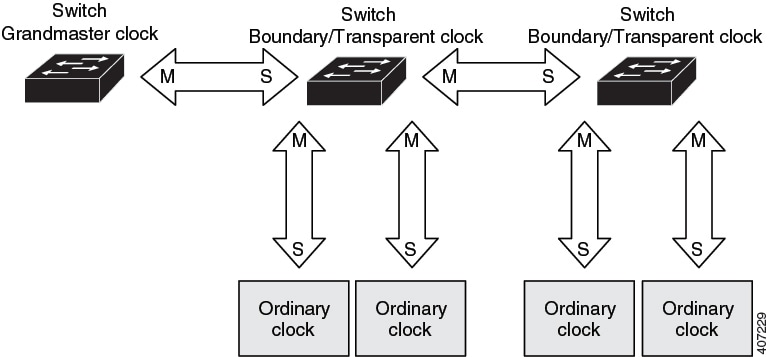
Figure 1. PTP clock hierarchy

PTP VLAN and synchronization

The key aspects of PTP VLAN functionality and synchronization include:

  • All PHY PTP clocks synchronize to the GC.

  • The router system clock does not synchronize as part of PTP configuration and processes.

  • When VLAN is enabled on the GMC, it must be in the same VLAN as the native VLAN of the PTP port on the router.

  • GMC can drop untagged PTP messages when a VLAN is configured on the GMC.

  • To ensure the router sends tagged packets to the GMC, use the vlan dot1q tag native command in the global configuration mode.

Message-based PTP synchronization

Message-based PTP synchronization is a method that synchronizes clocks across network devices by exchanging messages, measuring path delays, and adjusting time information for accuracy. It

  • exchanges messages between the time source (Grandmaster Clock) and the time recipient to synchronize clocks.

  • measures the precise transmit and receive times of these messages to calculate the communication path delay, and

  • adjusts the current time information in network data based on the calculated delay to achieve highly accurate time synchronization.

Delay measurement in PTP synchronization

The delay measurement calculates the path delay between devices on the network and adjusts local clocks accordingly. It uses a series of messages exchanged between the time source and time recipient devices. The one-way delay is determined by averaging the path delay of the transmit and receive messages. This calculation assumes a symmetrical communication path, but switched networks may not have symmetrical paths due to the buffering process.

PTP uses transparent clocks to measure and account for the delay in the time-interval field of network timing packets. This approach makes switches temporarily transparent to the time source and time recipient nodes on the network. An end-to-end transparent clock forwards all messages across the network similar to a switch.


Note


Cisco PTP supports multicast PTP messages only.

A PTP port may experience one or two timestamp retrieval failures when a 1G fiber SFP transceiver is removed and reinserted. Use the show ptp lan port interface Gig1/0/1 counters errors command to check PTP errors. To prevent this issue, ensure that all SFPs are installed before the system boots. Alternatively, you can insert the SFP during system boot and connect the fiber cable later when you need to bring up.


For more details on synchronization messages, refer to PTP event message sequences .

For more details on calculation of network delays, refer to Transparent Clock.

Distributing precise timings

The key components involved in the process are:

  • Time Source 1 (Grandmaster): The primary, high-quality source of time and frequency that initiates the timing distribution.

  • Time Source 2: A secondary, lower-quality source of time and frequency, potentially serving as a backup or alternative.

  • Boundary Clock 1: A network device (example: a switch) that synchronizes its internal clock with the Grandmaster and then acts as a time source for downstream devices.

  • Boundary Clock 2: A network device that synchronizes its internal clock with Boundary Clock 1 and distributes the precise timing to the end-point recipients.

  • IED (Intelligent Electronic Device) or recipient: End devices that receive and utilize the precise timing information for their operations.

Summary

PTP networks distribute precise timing information from a highly accurate source to various network devices, ensuring synchronization across the system.

  • Time Source 1 (Grandmaster): Initiates timing distribution.

  • Time Source 2: Backup or alternative time source.

  • Boundary Clock 1: Synchronizes with Grandmaster and distributes timing downstream.

  • Boundary Clock 2: Synchronizes with Boundary Clock 1 and distributes timing to recipients.

  • IED (Recipient): Receives and uses precise timing.

Synchronization is achieved through a series of stages, ensuring all devices operate with coordinated timing.

Workflow
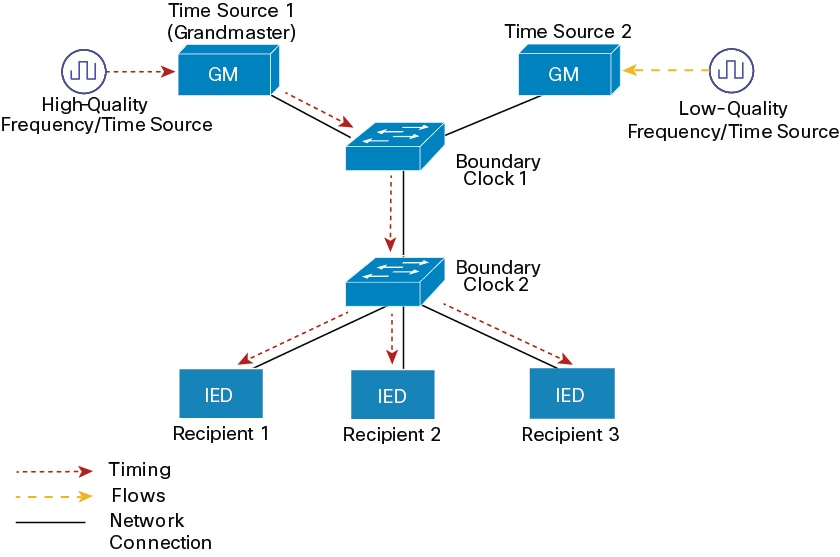
Figure 2. PTP network topology

These stages describe the distribution of timing information in a PTP network.

  1. Grandmaster Initialization: A high-quality frequency or time source provides highly accurate timing to Time Source 1, which functions as the Grandmaster.
  2. Grandmaster to Boundary Clock 1 distribution: The Grandmaster transmits its precise timing information to Boundary Clock 1 over a network connection.
  3. Boundary Clock 1 to Boundary Clock 2 synchronization: Boundary Clock 1 synchronizes its clock with the Grandmaster and then forwards the timing information to Boundary Clock 2.
  4. Boundary Clock 2 to recipient distribution: Boundary Clock 2 synchronizes its clock with Boundary Clock 1 and distributes the precise timing to the connected IEDs (Recipient 1, Recipient 2, and Recipient 3).

Result

All connected IEDs (Recipients) receive synchronized and precise timing information, enabling coordinated and time-sensitive operations across the network.

PTP event message sequences

This section explains the sequence of PTP event messages during synchronization.

Boundary Clocks synchronization

The key components involved in the process are:

  • Time Source: The entity that provides the reference time.

  • Time Recipient: The entity that seeks to synchronize its clock with the Time Source.

  • Sync message: A message sent by the Time Source to initiate synchronization.

  • Follow-Up message: A message sent by the Time Source to provide the precise departure timestamp (t1) of the Sync message.

  • Delay-Req message: A message sent by the Time Recipient to the Time Source to request delay measurement.

  • Delay-Resp message: A message sent by the Time Source to the Time Recipient, containing the arrival timestamp (t4) of the Delay-Req message.

  • Path-Delay: The calculated one-way network latency between the Time Source and Time Recipient.

  • Offset from Time Source: The calculated time difference between the Time Recipient's clock and the Time Source's clock.

Summary

Network time synchronization ensures that different devices or systems maintain a consistent and accurate understanding of time, which is crucial for logging, data correlation, and distributed operations.

Workflow
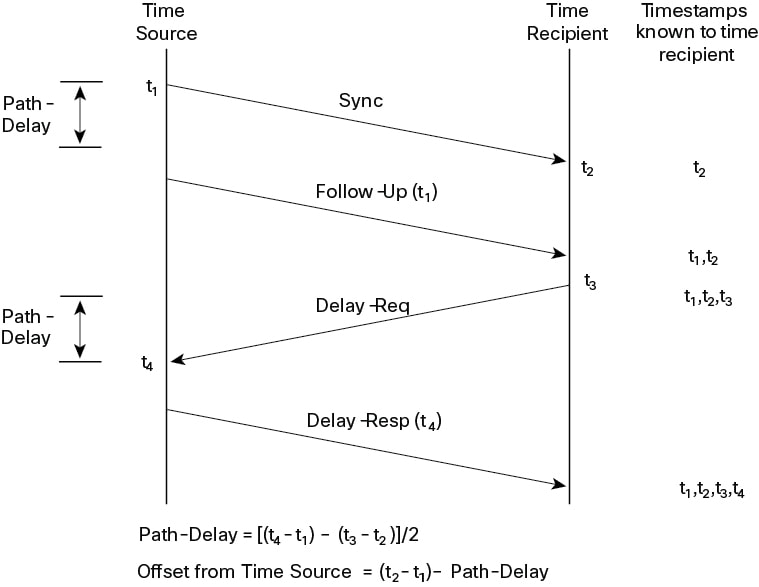
Figure 3. Boundary Clock Synchronization

The network time synchronization process involves these stages:

  1. Sync message transmission: The Time Source sends a Sync message to the Time Recipient and notes the time (t1) it sends the message.
  2. Sync message reception: The Time Recipient receives the Sync message and notes the time (t2) it receives the message.
  3. Follow-Up message transmission: The Time Source sends the timestamp t1 to the Time Recipient in a Follow-Up message.
  4. Delay request transmission: The Time Recipient sends a Delay-Req message to the Time Source and notes the time (t3) it sends the message.
  5. Delay request reception: The Time Source receives the Delay-Req message and notes the time of reception (t4).
  6. Delay response transmission: The Time Source sends the timestamp t4 to the Time Recipient in a Delay-Resp message.
  7. Path-Delay calculation: The Time Recipient calculates the Path-Delay using the formula [(t4 - t1) - (t3 - t2)] / 2 .
  8. Offset calculation: The Time Recipient calculates the offset from the Time Source using the formula (t2 - t1) - Path-Delay .

Result

This process enables the Time Recipient to obtain all four necessary timestamps (t1, t2, t3, t4) to calculate the network path delay and its clock's offset relative to the Time Source. This allows the Time Recipient to adjust its clock for precise synchronization. It is important to note that the calculation assumes symmetrical propagation time between the source and recipient; however, this assumption may not hold true on all networks, such as Ethernet, due to asymmetrical packet delay times.

Peer-to-Peer Transparent Clock synchronization

Peer link delay measurement is a mechanism used to precisely determine the communication delay over a direct link between two network devices. This process is essential for accurate time synchronization protocols like PTP.

  • It enables devices to compensate for propagation delays and achieve highly precise time synchronization across the network.

Summary

The key components involved in the process are:

  • Switch 1: The initiating device that sends delay requests and calculates the peer link delay.

  • Switch 2: The responding device that receives delay requests, sends responses, and provides its internal timestamps.

  • Pdelay_Req: A message sent by Switch 1 to initiate the delay measurement process.

  • Pdelay-Resp: A message sent by Switch 2 in response to a Pdelay_Req , containing the timestamp of its reception ( t2 ).

  • Pdelay-Resp_followup: A subsequent message sent by Switch 2 that provides the precise timestamp of when it transmitted the Pdelay-Resp message ( t3 ).

  • Timestamps (t1, t2, t3, t4): Specific points in time recorded by the switches during the message exchange to measure transmission and reception times.

This process is essential for accurate time synchronization protocols like PTP.

Workflow
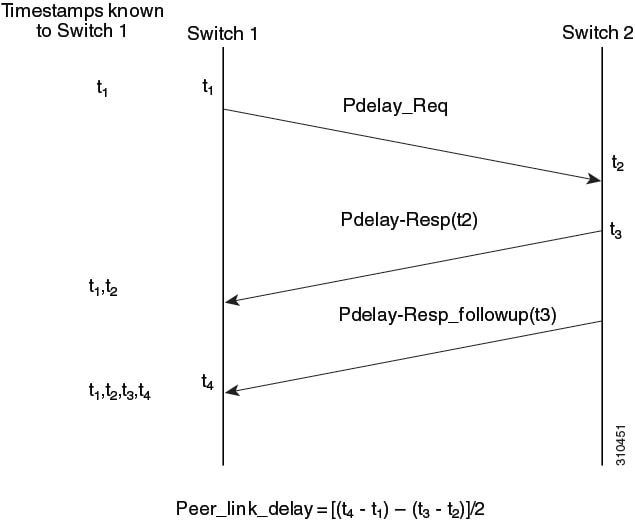
Figure 4. Peer-to-Peer transparent clock synchronization

These stages describe the sequence of message exchanges and timestamp recordings for peer link delay measurement:

  1. Request initiation: Switch 1 sends a Pdelay_Req message to Switch 2 and records the precise time of transmission as t1 .
    • Switch 1 generates timestamp t1 for a Pdelay_Req message.
    Switch 1 initiates the process by sending the delay request. The result is the recording of the transmission time (t1) for the request message.
  2. Request reception: Switch 2 receives the Pdelay_Req message from Switch 1 and records the precise time of reception as t2 .
    • Switch 2 receives Pdelay_Req and generates timestamp t2 for this message.
    Switch 2 prepares to respond by recording the reception time. The result is the recording of the reception time (t2) for the request message.
  3. Response transmission: Switch 2 prepares and sends a Pdelay-Resp message back to Switch 1. This message includes the t2 timestamp. Switch 2 also records the precise time of transmitting this Pdelay-Resp message as t3 .
    • Switch 2 generates timestamp t3 for a Pdelay_Resp message.
    • To minimize errors due to any frequency offset between the two switches, Switch 2 returns the Pdelay_Resp message as quickly as possible after the receipt of the Pdelay_Req message.
    Switch 2 responds promptly to reduce timing errors. The result is the transmission of the response message and recording of t3.
  4. Follow-up transmission: Shortly after sending the Pdelay-Resp , Switch 2 sends a Pdelay-Resp_followup message to Switch 1. This Follow-up message contains the t3 timestamp, providing a precise record of the Pdelay-Resp 's transmission time.
    • Switch 2 returns timestamps t1, t2, and t3 in the Pdelay_Resp and Pdelay_Resp_Follow_Up messages respectively.
    Switch 2 provides additional timing information for accuracy. The result is the delivery of the follow-up message with the transmission timestamp.
  5. Response reception and calculation: Switch 1 receives both the Pdelay-Resp and Pdelay-Resp_followup messages. It records the precise time of receiving these messages as t4 . Switch 1 then calculates the peer link delay using the formula: Peer_link_delay = [(t4 - t1) - (t3 - t2)]/2 .
    • Switch 1 generates timestamp t4 after receiving the Pdelay_Resp message. Switch 1 then uses the four timestamps (t1, t2, t3, and t4) to calculate the mean link delay between Switch 1 and Switch 2.
    Switch 1 completes the calculation using all four timestamps. The result is the accurate determination of the peer link delay.

Result

The process accurately determines the one-way communication delay over a specific network link, allowing devices to compensate for propagation delays and achieve highly precise time synchronization across the network.

Synchronize the local clock

Synchronizing the local clock ensures that the device's clock aligns with the time source by correcting drift using PTP timestamp information and FollowUp messages.

Best Master Clock Algorithm

The Best Master Clock Algorithm (BMCA) is a process that continuously selects the best time source clock in a PTP network subdomain from all visible clocks, including itself. The BMCA identifies the best time source clock in the subdomain based on:

  • clock quality (example: GPS is considered the highest quality),

  • accuracy of the clock's time base,

  • stability of the local oscillator, and

  • proximity to the grandmaster clock.

BMCA operation

The BMCA operates continuously on the network and adapts quickly to changes in network configuration.

  • BMCA prevents clocks from negotiating with one another.

  • BMCA avoids misconfigurations, such as multiple or missing time source clocks, during the identification process.

PTP profiles

IEEE 1588 defines a PTP profile as a set of allowed PTP features for a device, tailored to a specific application or environment.

Cisco Catalyst IE9300 Rugged Series Switches supports these PTP profiles:

  • Default

  • Power

Cisco IOS-XE Release 17.7.1 supports Power Profile-2011, defined in the PC37.238-2011 IEEE Draft Standard Profile for using IEEE 1588 PTP in Power System Applications.


Note


This documentation uses the terms Power Profile mode and Default Profile mode to refer to the IEEE 1588 profile and its configuration values.


Starting from Cisco IOS-XE Release 17.8.1, Cisco Catalyst IE9300 Rugged Series Switches supports Power Profile-2017 in Transparent clock. Power Profile-2017 is defined in IEEE Standard C37.238™-2017 (a Revision of IEEE Std C37.238-2011) for use of IEEE 1588 PTP in Power System Applications.

PTP profiles specify these values:

  • BMCA options

  • Configuration management options

  • Path delay mechanisms (peer delay or delay request-response)

  • Range and default values of all PTP configurable attributes and data set members

  • Transport mechanisms that are required, permitted, or prohibited

  • Node types that are required, permitted, or prohibited

  • Options that are required, permitted, or prohibited

Default profile mode

The Default profile mode is the default PTP profile for Cisco Catalyst IE9300 Rugged Series Switches. It

  • supports Grand Master boundary clock, Boundary Clock (BC), Transparent Clock (TC), and PTP forward mode (PTP passthrough) on the default profile.

  • does not support Ordinary Clock (OC), and

  • does not support all PTP profiles over bundles or port-channels.

Power profile mode (2011 and 2017)

The IEEE Power Profile mode is a set of configuration values and operational guidelines that optimize PTP networks for use in power substations, ensuring consistent and reliable time distribution. It

  • specifies optimal physical layer and higher-level protocol for PTP messages.

  • ensures consistent time distribution within and between substations, and across wide geographic areas, and

  • defines preferred BMCA and configuration values.

Power profile mode and configuration

The switch is optimized for PTP in these ways:

  • Hardware —The switch uses FPGA and PHY for the PTP function. The PHY timestamps the Fast Ethernet and Gigabit Ethernet ports.

  • Software —In Power Profile mode, the switch uses the configuration values defined in the IEEE 1588 Power Profile standard.

This table displays the IEEE 1588 power profile configuration values and shows how the Cisco Catalyst IE9300 Rugged Series Switches apply them for each PTP profile mode.

Table 1. Configuration values for the IEEE PTP Power profile and Default profile modes

PTP field

Power profile modes (2011 and 2017)

Default profile mode

Message transmission

Access Ports –Untagged Layer 2 packets.

Trunk Ports –802.1Q tagged Layer 2 packets. PTP packets are tagged with the PTP VLAN. If the PTP VLAN is not configured, packets go untagged over the native VLAN.

Layer 3 packets. By default, 802.1Q tagging is disabled.

MAC address–Non-peer delay messages

01-00-5e-00-01-81.

Default profile uses L3 transport multicast address 224.0.1.129 for all PTP messages. Equivalent MAC address is 01-00-5e-00-01-81

MAC address-Peer delay messages

01-80-C2-00-00-0E.

Not applicable to this mode.

Domain number

0.

0.

Path delay calculation

Peer-to-peer transparent clocks using the peer_delay mechanism.

End-to-end transparent clocks using the delay_request mechanism.

BMCA

Enabled.

Enabled.

Clock type

Two-step.

Two-step.

Time scale

Epoch.

Epoch.

Grandmaster ID and local time determination

  • 16-bit grandmasterID and configurability:

    • Power 2011: 0x0003 – 0x00FE [2 bytes wide but limited to this range]

    • Power 2017: 0x0000 – 0xFFFF [Full 2 bytes]

  • organizationSubType:

    • 0x01 indicates the 2011 profile

    • 0x02 identifies the 2017 revision

PTP-specific type, length, and value to indicate Grandmaster ID.

Time accuracy over network hops

Over 16 hops, slave device synchronization accuracy is within 1 usec (1 microsecond).

Not applicable in this mode.

PTP profile comparison

This table provides the comparison of different PTP power profiles on IE switches.

Table 2. PTP profiles comparison on IE switches

Profile

Default (*)

Power profile-2011

Power profile-2017

Standard

IEEE1588 v2 (J.3)

IEEE C37.238-2011

IEEE C37.238-2017

Mode

Boundary

End-to-End transparent

Boundary

Peer-to-Peer transparent

Peer-to-Peer transparent

Path Delay

Delay req/res

Delay req/res

Peer delay req/res

Peer delay req/res

Peer delay req/res

Non-PTP device allowed in PTP domain

Yes

Yes

No

No

No

Transport

UDP over IP (multicast)

L2 Multicast

L2 Multicast


Note


* Delay Request-Response Default PTP profile (as defined in IEEE1588 J.3).


PTP profile switch tag behavior

This table describes the switch tagging behavior in Power profile and Default profile mode.

Table 3. Switch behavior for PTP tags in Power and Default profile modes

Switch Port Mode

Configuration

Power Profile Modes (2011 and 2017)

Power Profile Modes (2011 and 2017)

Default Profile Mode

Default Profile Mode

Behavior

Priority

Behavior

Priority

Trunk Port

vlan dot1q tag native enabled

Switch tags packets

7

Switch tags packets

7

Trunk Port

vlan dot1q tag native disabled

PTP software tags packets

4

Untagged

None

Access Port

N/A

Untagged

None

Untagged

None

Boundary Clock Synchronization algorithm

The Boundary Clock Synchronization algorithm (BCSA) is a method for configuring PTP clocks to prioritize either filtering packet delay variation (PDV) or achieving faster convergence.

BCSA details

You can configure the BCSA based on your PTP use case, prioritizing either filtering input time errors or achieving faster convergence. A PTP algorithm that filters packet delay variation (PDV) converges more slowly than one without filtering.

  • By default, the BC uses a linear feedback controller (servo) to adjust its time output to the next clock. The linear servo offers minimal PDV filtering and achieves average convergence time.

  • For faster convergence, the BC can use the TC feedforward algorithm, which measures the delay introduced by the network elements' forwarding plane (the disturbance) and uses this delay to control the time output.

  • The feedforward BC significantly improves BC performance but does not filter PDV.

  • The adaptive PDV filter ensures high-quality time synchronization even when wireless access points (APs) and enterprise switches, which do not support PTP, introduce significant PDV.

BC synchronization supports three options which are compliant with IEEE 1588-2008:

  • Feedforward—For very fast and accurate convergence but does not filter PDV.

  • Adaptive—Adaptive filters maximize PDV filtering based on assumptions about PDV characteristics, hardware configuration, and environmental conditions.


    Note


    With the adaptive filter, the switch does not meet the time performance requirements specified in ITU-T G.8261.


  • Linear—Provides simple linear filtering which is the default.

Adaptive mode ptp transfer filter adaptive is not available in Power Profile mode.

NTP to PTP time conversion

NTP to PTP time conversion is a feature that allows you to use NTP as a time source for PTP, enabling precise synchronization within a site and broader synchronization across sites where high precision is not required.

Example of NTP to PTP time conversion

NTP is the traditional method to synchronize clocks in packet-based networks, using a two-way time transfer mechanism between a time source and an end device. NTP synchronizes a device within a few hundred milliseconds over the internet and within a few milliseconds in a controlled LAN. Using NTP as a PTP time source lets you correlate data from your PTP network with data in enterprise data centers running NTP.

NTP to PTP conversion

Time synchronization in industrial networks relies on a layered approach, beginning with a global UTC source and progressing through various network zones to reach end devices. This ensures accurate and reliable time for both IT and OT systems.

This process enables precise time synchronization across all network zones, culminating in NTP to PTP conversion for industrial automation equipment.

Summary

The key actors and components involved in this process are:

Time sources and network zones

  • UTC Time: Provides the global reference for accurate time synchronization.

  • NTP Time Server Pool: Acquires time from UTC sources and distributes it via NTP.

  • Internet: Connects the NTP Time Server Pool to the Enterprise WAN.

  • Enterprise WAN: Connects enterprise infrastructure to the internet.

  • Enterprise zone: Main network segment for enterprise operations.

  • Demilitarized zone (DMZ): Secure buffer hosting the NTP Time Mirror.

  • Manufacturing zone: Dedicated to manufacturing operations requiring accurate time.

Network infrastructure and end device

  • NTP time mirror: Local NTP server in the DMZ synchronizing with external NTP sources.

  • Core switches: Backbone of the network, connecting zones and distributing traffic.

  • Distribution switch: Aggregates connections and distributes to lower-level segments.

  • Layer 2 switch: Provides connectivity to end devices within local segments.

  • Industrial Devices: PLCs and HMIs in the Cell/Area Zone requiring precise time via PTP.

Workflow
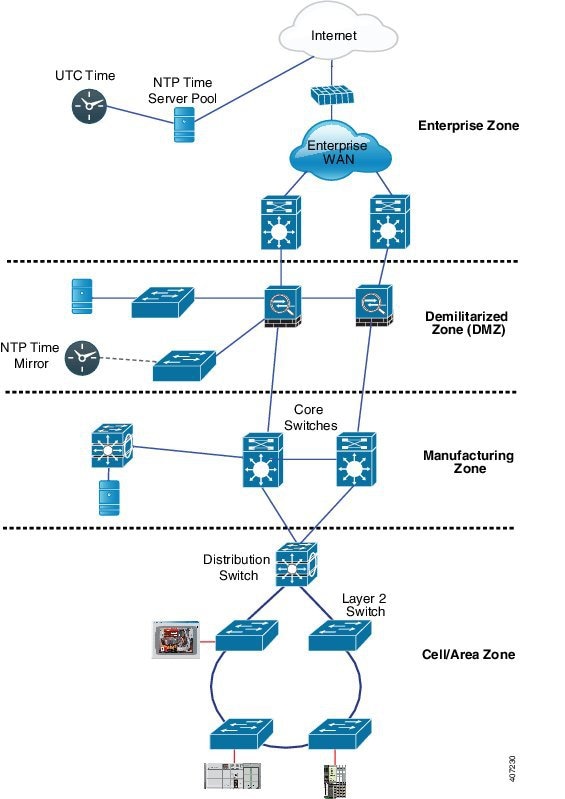
Figure 5. Industrial network with NTP and PTP

The process involves these stages:

  1. Global time source acquisition: The NTP Time Server Pool obtains highly accurate time from a UTC time source over the internet, ensuring a precise global time reference.
    • UTC time is acquired by NTP Time Server Pool.
    • Internet provides connectivity for time acquisition.
    The NTP Time Server Pool ensures the network has a reliable global time reference. Result: Accurate UTC time is available for distribution.
  2. Enterprise network distribution: The NTP Time Server Pool distributes synchronized NTP time to the Enterprise Zone, including the Enterprise WAN and core network infrastructure.
    • Enterprise WAN receives NTP time from the server pool.
    • Core switches distribute NTP time within the enterprise zone.
    General IT systems are synchronized with accurate NTP time. Result: Enterprise zone maintains consistent time across IT systems.
  3. DMZ time mirroring: An NTP Time Mirror in the DMZ synchronizes with the external NTP Time Server Pool, providing a secure and reliable local NTP time source.
    • NTP Time Mirror synchronizes with external NTP sources.
    • DMZ acts as a secure buffer for time distribution.
    Internal networks gain a secure, reliable NTP time source. Result: DMZ provides trusted NTP time to internal zones.
  4. Manufacturing zone synchronization: Core switches and devices in the Manufacturing Zone obtain time from the NTP Time Mirror in the DMZ.
    • Core switches distribute NTP time to manufacturing devices.
    • Manufacturing zone relies on synchronized time for process control.
    Operational consistency is maintained for manufacturing processes. Result: Manufacturing zone devices are synchronized for accurate operations.
  5. Industrial network connectivity: The Distribution Switch connects the Manufacturing Zone's core network to the Cell/Area Zone, which contains critical industrial control systems and devices. Layer 2 switches further distribute network connectivity within this zone to the industrial equipment.
    • Distribution Switch links manufacturing core to Cell/Area Zone.
    • Layer 2 switches connect end devices within the Cell/Area Zone.
    Industrial equipment receives network connectivity and NTP time. Result: Cell/Area Zone is ready for precise time synchronization.
  6. PTP conversion enablement: Within the cell or area zone, distributed NTP time serves as a reference for devices that convert NTP to PTP, providing extremely precise time synchronization for industrial automation equipment.
    • Specialized devices convert NTP to PTP.
    • PLCs and HMIs use PTP for coordinated operations.
    Industrial automation equipment achieves high-fidelity timing. Result: NTP to PTP conversion enables precise, synchronized operations in industrial environments.

Result

This hierarchical time synchronization process ensures that all network zones, from enterprise IT to critical industrial operational technology (OT), receive accurate and consistent time. This enables precise timestamping, synchronized operations, and the high-fidelity timing required for sensitive industrial control applications through the enablement of NTP to PTP conversion at the network edge.

Clock manager

The clock manager is a software component that tracks various time services, selects the active clock providing time, and notifies time services of key changes such as state changes, leap seconds, or daylight saving time. It

  • prioritizes NTP or manually set clock first, then PTP, and finally the real-time clock if NTP is inactive.

  • ensures the time displayed in show ptp clock and show clock commands match under normal conditions.

Clock manager selection

The clock manager determines which time source is active and ensures synchronization between Cisco IOS and PTP clocks, with specific behaviors in certain configurations.

The following table shows the results of the clock selection process based on the status of NTP, PTP, and the real-time clock:

Table 4. Time Service Selection

NTP (Active) or Manually Set

PTP (Active)

Real-Time Clock

Selected Output

True

Don’t care

Don’t care

NTP or Manually Set

False

True

Don’t care

PTP

False

False

True

Real-Time Clock

There are two corner cases where the show ptp clock time may differ from the show clock command output:

  • The switch acts as a TC or BC with no other active reference on the network. In this case, the TC and BC take their time only from the network’s PTP GMC, not from the clock manager. If no active PTP GMC exists, the show clock and show ptp clock command outputs may differ.

  • The switch is a syntonizing TC, a BC with a subordinate port, or a GMC-default with a subordinate port, and the time from the PTP GMC does not match the time from NTP or the user (manually set). In this case, the PTP clock must forward the time from the PTP GMC. If the PTP clock does not follow the PTP GMC, the PTP network has two different time bases, disrupting control loops or sequence-of-event applications that rely on PTP.

This table shows how the Cisco IOS and PTP clocks behave given various configurations. Most of the time, the two clocks match. Occasionally, the two clocks are different; those configurations are highlighted in the table.

Table 5. Expected time flow

IOS Clock Configuration

PTP Clock Configuration

IOS Clock Source

PTP Clock Source

Calendar

PTP BC, E2E TC, or GMC-BC in BC Mode

PTP

PTP

Manual

PTP BC, E2E TC, or GMC-BC in BC Mode

Manual

PTP

NTP

PTP BC, E2E TC, or GMC-BC in BC Mode

NTP

PTP

Calendar

GMC-BC in GM Mode

Calendar

Calendar

Manual

GMC-BC in GM Mode

Manual

Manual

NTP

GMC-BC in GM Mode

NTP

NTP

Grandmaster clock

The Grandmaster clock (GMC) is a network security feature that prevents rogue GMC devices from synchronizing with devices inside the network. GMC

  • allows only egress Announce , Sync , and Follow_Up PTP packets while dropping all ingress packets of these types on the interface. This prevents the port state from transitioning to a time recipient.

  • supports all PTP clock modes except forward mode, and

  • detects rogue GMC devices and generates Syslog messages, relay minor alarms, and SNMP traps for notification.

Grandmaster clock block operation and notifications

The GMC block feature operates by filtering PTP packets and providing mechanisms to identify and notify about rogue devices.

  • Information about rogue GMCs is retrieved from their packets before being dropped.

  • Details such as IP address and clock ID of rogue devices are stored and displayed for the interface.

  • Two Syslog messages are generated to notify both the detection and clearance of rogue devices.

  • Per-port Syslog messages are displayed 30 seconds after receiving rogue packets and 180–240 seconds after the packets stop.

  • Relay minor alarms and SNMP traps are generated to notify about the presence of foreign rogue devices.

Packet flow with GMC block

The PTP network topology with GMC block figure shows an example of a PTP network topology with the GMC Block feature configured on an interface.

Summary

The key components are the Grandmaster Clock (GMC) of the foreign network, the local GMC, and the port configured with GMC Block.

  • The GMC of the foreign network attempts to sync with the existing network by sending PTP packets.

  • The port configured with GMC Block drops incoming PTP packets from the foreign network after retrieving required information.

  • The local GMC in the existing system maintains synchronization.

  • PTP packets originated on the port with GMC Block are allowed to egress, enabling devices in the existing network to be GMC.

This process ensures that only the local GMC is used for synchronization, restricting packets from the foreign network while allowing local devices to act as GMC.

Workflow
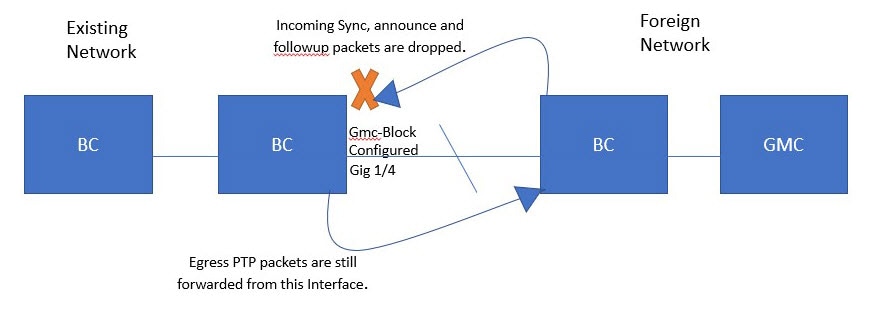
Figure 6. PTP network topology with GMC block

These stages describe the packet flow and synchronization behavior when GMC Block is configured on an interface.

  1. Stage 1: PTP packets originate in the GMC of the foreign network and attempt to sync with the existing network.
    • Foreign GMC sends PTP packets to the network.
    • Packets reach the port configured with GMC Block.
    When the PTP packets reach the port configured with GMC Block, the packets are dropped after the system retrieves the required information from them. The system restricts packets from the foreign network, ensuring synchronization with the local GMC.
  2. Stage 2: PTP packets originated on the port configured with GMC Block are allowed to egress from this interface.
    • Local devices send PTP packets from the port with GMC Block.
    • Packets egress from the interface, allowing devices in the existing network to be GMC.
    This allows devices in the existing network to act as GMC, maintaining proper synchronization within the local system.

PTP restrictions

Follow these guidelines to avoid unsupported configurations and ensure reliable PTP operation.

General PTP guidelines

  • The Cisco PTP implementation supports only two-step clock operation in BC mode. One-step clock is not supported.

  • Cisco PTP supports multicast PTP messages only.

  • Cisco PTP supports only PTP version2.

  • Power Profile-2017 supports only transparent clock mode.

PTP mode and profile

  • The switch and the grandmaster clock must be in the same PTP domain.

  • When Power Profile mode is enabled, the switch drops PTP announce messages that do not include the Organization_extension and Alternate_timescale TLV message extensions.

    If the GMC is not compliant with PTP and sends announce messages without these TLVs, configure the switch to process the announce message by entering this command:

    ptp clock boundary domain 1 profile {power | power-2017}allow-without-tlv
  • When the switch is in Power Profile mode, only the peer_delay mechanism is supported.

    To enable Power Profile boundary mode and associate interfaces using the clock-port suboption, enter these commands:

    ptp clock boundary domain 1 profile {power | power-2017}
    clock-port 1
    transport ethernet multicast interface gi0/1/1
  • To disable power profile transparent mode, enter this command, which returns the switch to forward mode.

    no ptp clock transparent domain x profile {power | power-2017}
  • To enable the E2E transparent clock, use this command:

    ptp clock transparent domain x profile default
  • In Default Profile mode, only the delay_request mechanism is supported.

    To enable Default Profile BC mode and interfaces associated with clock-port suboption, enter this command:

    ptp clock boundary domain 1 profile default
    clock-port 1
    transport ipv4 multicast interface gi0/1/1

Packet format

  • PTP messages can use 802.1Q tagged packets or untagged packets.

  • The switch does not support 802.1Q QinQ tunneling.

  • In Power Profile mode:

    • When the PTP interface is configured as an access port, PTP messages are sent as untagged Layer 2 packets.

    • When the PTP interface is configured as a trunk port, PTP packets are sent as 802.1Q tagged Layer 2 packets over the port's native VLAN.

  • Time recipient IEDs must support tagged and untagged packets.

  • In E2E TC mode, PTP packets sent on the native VLAN are untagged. To send them as tagged packets, use thevlan dot1q tag native command in global configuration mode.

NTP to PTP conversion

The NTP to PTP feature supports the default E2E profile and Power profile.

PTP interaction with other features

  • The Cisco IE9300 Series Switches support PTP over Parallel Redundancy Protocol (PRP) beginning with the Cisco IOS XE Cupertino 17.9.1 release.

  • PTP is not supported over Port Channels, stacking, or Cisco Resilient Ethernet Protocol (REP) on the Cisco IE9300 Series Switches.

  • The e2etransparent and p2ptransparent PTP clock modes only operate on a single VLAN.

Supported and unsupported PTP interactions

These list outlines the supported and unsupported PTP interactions with other features on the Cisco IE9300 Series Switches.

  • The Cisco IE9300 Series Switches support PTP over PRP starting with Cisco IOS XE Cupertino 17.9.1. For more information, see the Redundancy Protocol Configuration Guide, Cisco Catalyst IE9300 Rugged Series Switches .

  • PTP is not supported over Port Channels.

  • PTP is not supported over stacking.

  • PTP is not supported over Cisco Resilient Ethernet Protocol (REP).

  • The e2etransparent and p2ptransparent PTP clock modes only operate on a single VLAN.

Default settings

By default, the switch is configured with these PTP settings.

  • PTP is enabled.

  • Default profile mode is enabled, using configuration values defined in the Default profile.

  • The PTP clock mode is set to End-to-End (E2E) Transparent Clock mode.

  • The Boundary Clock (BC) synchronization algorithm is set to the linear filter.

PTP VLAN characteristics

Key details and considerations for configuring PTP VLANs and related settings include:

  • Set the PTP VLAN on a trunk port. The range is from 1 to 4094, with the default VLAN being the native VLAN of the trunk port.

  • In Boundary mode, the device processes only PTP packets in the PTP VLAN and drops packets from other VLANs.

  • Before configuring the PTP VLAN on an interface, ensure the PTP VLAN is created and allowed on the trunk port.

  • Most GMC use the default VLAN 0.

  • In Power Profile mode, the switch defaults to VLAN 1, while VLAN 0 is reserved.

  • When changing the default GMC VLAN, ensure it is set to a VLAN other than 0.

  • If VLAN is disabled on the GMC, configure the PTP interface as an access port.

Configure GMC mode

The following sections provide steps for configuring GMC mode for default and power profiles:

Procedure


Step 1

Use the enable command to enable the privileged EXEC mode.

Example:

Switch> enable

Enter your password if prompted.

Step 2

Use the configure terminal command to enter global configuration mode.

Example:

Switch# configure terminal

Step 3

Use the ptp clock gmc-default command to configure PTP clock as GMC mode.

Example:

Switch(config)# ptp clock gmc-default

Step 4

Use the interface interface-id command to enter interface configuration mode.

Example:

Switch(config)# interface gi1/0/1

Step 5

Use the no ptp enable command to disable PTP on the interface.

Example:

Switch(config)# no ptp enable

Step 6

Use the ptp mode forward command to configure the interface to forward PTP packets as normal multicast traffic.

Example:

Switch(config)# ptp mode forward

Step 7

Use the gmc-block command to enable GMC Block on the interface.

Example:

Switch(config)# gmc-block

Step 8

Use the end command to exit global configuration mode and returns to privileged EXEC mode.

Example:

Switch(config)# end

Configure GMC mode for a default profile

Perform these steps to configure GMC mode for a default profile.

Procedure


Step 1

Use the ptp clock boundary domain domain number profile default command to enable the default profile boundary mode

Example:

Switch(config)#ptp clock boundary domain 0 profile default

Step 2

Use the gmc-default command to enable the GMC Boundary Clock.

Example:

Switch(config-ptp-clk)# gmc-default

Step 3

Use the clock-port port name command to define a new clock port.

Example:

Switch(config-ptp-clk)# clock-port port1

Step 4

Use the transport ipv4 multicast interface type interface number command to specify the transport mechanism for clocking traffic.

Example:

Switch(config-ptp-port)# transport ipv4 multicast interfaceGi1/0/1

Configure GMC mode for a Power profile

Perform these steps in this section to configure GMC mode for a power profile.

Procedure


Step 1

Use the enable command to enable the privileged EXEC mode.

Example:

Switch> enable

Enter your password if prompted.

Step 2

Use the configure terminal command to enter global configuration mode.

Example:

Switch# configure terminal

Step 3

Use the ptp clock boundary domain domain number profile power command to enable the power profile boundary mode.

Example:

Switch(config)# ptp clock boundary domain 0 profile power

Step 4

Use the gmc-default command to enable the GMC boundary clock.

Example:

Switch(config-ptp-clk)# gmc-default

Step 5

Use the clock-port port name command to define a new clock port.

Example:

Switch(config-ptp-clk)# clock-port port1

Step 6

Use the transport ethernet multicast interface type interface number command to specify the transport mechanism for clocking traffic.

Example:

Switch(config-ptp-port)# transport ethernet multicast interface gi1/0/1

Configure PTP default profile

Configure a Boundary Clock

If an interface is not added as part of BC clock, it will be in forward mode exchanging PTP packets, which will cause instability in PTP operation. To avoid this, it is recommended to disable PTP on all such interfaces using the no ptp enable command.

Follow these steps to configure the switch as a boundary clock:

Procedure


Step 1

Use the enable command to enable the privileged EXEC mode.

Example:

Switch> enable

Enter your password if prompted.

Step 2

Use the configure terminal command to enter global configuration mode.

Example:

Switch# configure terminal

Step 3

Use the ptp clock boundary domain domain number profile default command to enable the power profile boundary mode.

Example:

Switch(config)# ptp clock boundary domain 0 profile power

Step 4

ptp clock boundary domain domain-number profile default command to configure the boundary type PTP clock, which terminates the PTP session from the grandmaster clock and acts as a PTP server or client clock downstream.

Example:

Switch(config)#ptp clock boundary domain 0  profile default

Step 5

Use the clock-port port-name command to define a new clock port.

Example:

Switch(config-ptp-clk)# clock-port dyn1

Step 6

Use the transport ipv4 multicast interface interface-number command to specify the transport mechanism for clocking traffic.

Example:

Switch(config-ptp-port)# transport ipv4 multicast interface Gi1/0/1

Step 7

(Optional) Use the vlan vlan-id command to configure VLAN for tagged packets.

Example:

Switch(config-ptp-port)# vlan 100

Configure the Transparent Clock

All interfaces are part of TC mode once configured.

Perform these steps to configure the switch as a transparent clock.

Procedure


Step 1

Use the enable command to enable the privileged EXEC mode.

Example:

Switch> enable

Enter your password if prompted.

Step 2

Use the configure terminal command to enter global configuration mode.

Example:

Switch# configure terminal

Step 3

Use the ptp clock boundary domain domain number profile default command to configure the transparent type PTP clock, which updates the PTP time correction field to account for the delay in forwarding the traffic.

Example:

Switch(config)# ptp clock boundary domain 0 profile default

Step 4

(Optional) Use the vlanvlan-id command to configure VLAN for tagged packets.

Example:

Switch(config-ptp-port)# vlan 100

Configure PTP power profile

This section describes how to configure the switch to use the PTP power profile.

The power Profile defines a subset of PTP which is intended to run over layer 2 networks, that is, Ethernet, but no internet protocol.


Note


Power Profile-2017 is supported only in Transparent Clock mode.


Configure the Boundary Clock

If an interface is not added as part of BC clock, it remains in forward mode exchanging PTP packets, which causes instability in PTP operation. To avoid this, disable PTP on all such interfaces using the no ptp enable command.

Perform these steps to configure the switch as a boundary clock:

Procedure


Step 1

Use the enable command to enable the privileged EXEC mode.

Example:

Switch> enable

Enter your password if prompted.

Step 2

Use the configure terminal command to enter global configuration mode.

Example:

Switch# configure terminal

Step 3

Use the ptp clock boundary domain domain number profile power command to configure the boundary type PTP clock, which stops the PTP session from the grandmaster clock and acts as a PTP server or client clock downstream.

Example:

Switch(config)# ptp clock boundary domain 0 profile power

Example:

Note


Use the ptp clock boundary domain 0 profile power allow-without-tlv command to configure without TLV extensions.

Step 4

Use the clock-port port-name command to define a new clock port.

Example:

Switch(config-ptp-clk)# clock-port dyn1

Step 5

Use the transport ethernet multicast interface interface-number command to specify the transport mechanism for clocking traffic.

Example:

Switch(config-ptp-port)# transport ethernet multicast interface Gi1/0/1

Step 6

(Optional) Use the vlan vlan-id command to configure VLAN for tagged packets.

Example:

Switch(config-ptp-port)# vlan 100

Configure Transparent Clock

Follow these steps to configure the switch as a transparent clock.

Procedure


Step 1

Use the enable command to enable the privileged EXEC mode.

Example:

Switch> enable

Enter your password if prompted.

Step 2

Use the configure terminal command to enter global configuration mode.

Example:

Switch# configure terminal

Step 3

Use the ptp clock transparent domain domain number profile power command to configure the transparent type PTP clock, which updates the PTP time correction field to account for the delay in forwarding the traffic.

Example:

Switch(config)# ptp clock transparent domain 0  profile power

Step 4

(Optional) Use the vlanvlan-id command to configure VLAN for tagged packets.

Example:

Switch(config-ptp-port)# vlan 100

Step 5

(Optional) Use the vlanvlan-id command to configure VLAN for tagged packets.

Example:

Switch(config-ptp-clk)# vlan 100

Example of Untagged

ptp clock transparent domain 0 profile power
            

Example of Tagged

ptp clock transparent domain 0 profile power
                vlan 100
            

Example of not Including TLV Extensions: Power Profile-2011

ptp clock transparent domain 0 profile power
                allow-without-tlv

Example of not Including TLV Extensions: Power Profile-2017

ptp clock transparent domain 0 profile power-2017
                allow-without-tlv

Enable PTP forward mode

Perform these steps to enable PTP forward mode.

To enable PTP forward mode, delete the current PTP clock configuration. All interfaces then automatically revert to forward mode.


Note


Forward mode supports only the default profile.


Procedure


Step 1

Use the enable command to enable the privileged EXEC mode.

Example:

Switch> enable

Enter your password if prompted.

Step 2

Use the configure terminal command to enter global configuration mode.

Example:

Switch# configure terminal

Step 3

Use the ptp clock boundary domain domain-number profile default command to configure the boundary type PTP clock.

Example:

Switch(config)# ptp clock boundary domain 0 profile default

This configuration terminates the PTP session from the grandmaster clock and acts as a PTP server or client clock downstream.

Step 4

Use the clock-port port-name command to define a new clock port.

Example:

Switch(config-ptp-clk)# clock-port 1

Step 5

Use the transport ipv4 multicast interface interface number command to specify the transport mechanism for clocking traffic..

Example:

Switch(config-ptp-port)# transport ipv4 multicast interface Gi1/0/3

Step 6

Use the exit command to return to global configuration mode.

Example:

Switch(config-ptp-port)# exit

Step 7

Use the no ptp clock boundary domain domain-number profile default command to remove the PTP clock configuration.

Example:

Switch(config)# no ptp clock boundary domain 0 profile default

Step 8

Use the end command to exit global configuration mode and returns to privileged EXEC mode.

Example:

Switch(config)# end

Remove the PTP Forward Mode

Perform these steps to remove PTP forward mode.

Enable a PTP clock to remove forward PTP forward mode configuration.


Note


Forward mode supports only the default profile.


Procedure


Step 1

Use the enable command to enable the privileged EXEC mode.

Example:

Switch> enable

Enter your password if prompted.

Step 2

Use the configure terminal command to enter global configuration mode.

Example:

Switch# configure terminal

Step 3

Use the no ptp clock boundary domain domain-number profile default command to remove the PTP clock configuration.

Example:

Switch(config)# no ptp clock boundary domain 0 profile default

This configuration terminates the PTP session from the grandmaster clock and acts as a PTP server or client clock downstream.

Step 4

Use the end command to exit global configuration mode and returns to privileged EXEC mode.

Example:

Switch(config)# end

Disable PTP on an interface

Perform these steps to disable PTP on an interface.


Note


This procedure applies to both default and power modes.


Procedure


Step 1

Use the enable command to enable the privileged EXEC mode.

Example:

Switch> enable

Enter your password if prompted.

Step 2

Use the configure terminal command to enter global configuration mode.

Example:

Switch# configure terminal

Step 3

Use the interface interface-id command to enter interface configuration mode.

Example:

Switch(config)# interface gi1/0/1

Step 4

Use the no ptp enable command to disable PTP on the interface.

Example:

Switch(config-if)# no ptp enable

Enable the GMC block in boundary mode

Perform these steps to enable GMC Block in boundary mode.

Procedure


Step 1

Use the enable command to enable the privileged EXEC mode.

Example:

Switch> enable

Enter your password if prompted.

Step 2

Use the configure terminal command to enter global configuration mode.

Example:

Switch# configure terminal

Step 3

Use the ptp clock transparent domain domain number profile default command to configure the boundary type PTP clock.

Example:

Switch(config)# ptp clock transparent domain 0 profile default

This configuration terminates the PTP session from the grandmaster clock and acts as a PTP server or client clock downstream.

Step 4

Use the clock-port port-name command to define a new clock port.

Example:

Switch(config-ptp-clk)# clock-port 1

Step 5

Use the transport ipv4 multicast interface interface type interface number command to configure transport type and multicast interfaces.

Example:

Switch(config-ptp-port)# transport ipv4 multicast interface Gi1/0/3

Step 6

Use the gmc-block command to enable GMC block.

Example:

Switch(config-ptp-clk)# gmc-block

Enable the GMC block in transparent mode

Perform these steps to enable GMC block in transparent mode.

Procedure


Step 1

Use the enable command to enable the privileged EXEC mode.

Example:

Switch> enable

Enter your password if prompted.

Step 2

Use the configure terminal command to enter global configuration mode.

Example:

Switch# configure terminal

Step 3

Use the ptp clock transparent domain domain number profile power command to configure the transparent type PTP clock.

Example:

Switch(config)# ptp clock transparent domain 0 profile power

This configuration updates the PTP time correction field to account for the delay in forwarding the traffic. The transparent clock can update some fields in the PTP packets to ensure that the client has greater time accuracy.

Step 4

Use the gmc-block command to enable GMC block.

Example:

Switch(config-ptp-clk)# gmc-block

GNSS as a reference for PTP

Use the gmc-default command to source time from GNSS for Cisco Catalyst IE9300 Rugged Series switches,.

Configure gmc-default for the PTP clock

Switch(config)# ptp clock boundary domain 0 profile default
Switch(config-ptp-clk)# gmc-default
Switch(config-ptp-clk)# clock-port master
Switch(config-ptp-port)# transport ipv4 multicast interface GigabitEthernet 0/1/6

Verify the GNSS status

Use the show gnss status to verify the GNSS status.

Switch# show gnss status
GNSS status:
GNSS status: Enable
Clock Progress: Locked
GNSS Fix Type: time only fix
Receiver Status: OD
Survey Progress: 100
Cable-delay: 100
Constellation: GLONASS
Satellite count: 9
PDOP: 2.76  TDOP: 1.00
HDOP: 1.18  VDOP: 2.49
Major Alarm: False
Minor Alarm: False

Verify PTP clock dataset

Use the show ptp clock dataset default command to verify the dataset default.

Switch# show ptp clock dataset default
CLOCK [Boundary Clock, domain 0]
Profile: default
Two Step Flag: Yes
Clock Identity: 0xDC:0B:09:FF:FE:3F:5E:3F
Number Of Ports: 1
Priority1: 128
Priority2: 128
Domain Number: 0
Slave Only: No
Clock Quality:
Class: 6
Accuracy: Within 100ns
Offset (log variance): 20061

Use the show ptp clock dataset time-properties to verify the time-properties.

Switch# show ptp clock dataset time-properties
CLOCK [Boundary Clock, domain 0]
Current UTC Offset Valid: FALSE
Current UTC Offset: 0
Leap 59: FALSE
Leap 61: FALSE
Time Traceable: TRUE
Frequency Traceable: TRUE
PTP Timescale: FALSE
Time Source: GPS

PTP alarms

PTP alarms are system notifications that help you manage and monitor PTP on the switch by alerting you to specific events or state changes related to PTP operation. PTP alarms:

  • can be configured to trigger external alarm relay outputs and send system messages to a syslog server.

  • are raised only once for the first 5-minute interval after bootup and subsequently once every 30 minutes.

  • are disabled by default and are damped during continuous state changes such as port or parent flapping.

PTP alarm timing and types

PTP alarm monitoring starts 5 minutes after bootup. The alarm is raised only once for the first 5-minute interval and subsequently once for an interval of 30 minutes. Alarms are damped when there is continuous state change, such as PTP port state flapping or PTP parent flapping.

This table describes the types of PTP alarms:

Table 6. PTP alarms

Alarm

Alarm Type

Clock Mode Supported

Description

PTP SLAVE port state change

Minor

Boundary and transparent clock modes

This alarm is raised when the PTP port state changes from “SLAVE” to any of the following PTP port states: Initializing, Faulty, Disabled, Listening, Pre_Master, Master, Passive, or Uncalibrated. A system message is generated when the PTP port state transitions between Slave and Passive Slave. This alarm remains raised until you clear the alarm.

PTP PASSIVE_SLAVE port state change

Minor

Boundary and transparent clock modes

This alarm is raised when the PTP port state changes from “PASSIVE-SLAVE” to any of the following PTP port states: Initializing, Faulty, Disabled, Listening, Pre_Master, Master, Passive, or Uncalibrated. A system message is generated when the PTP port state transitions between Slave and Passive Slave.

PTP Parent change

Minor

Boundary clock mode

This alarm is raised when there is a change in PTP parent. This alarm remains raised until you clear the alarm.

PTP Time Property Clock Synchronized

Minor

Transparent clock mode

This alarm is raised when the PTP Clock Time Property “Clock Syntonized” field changes from TRUE to FALSE. This alarm is cleared when the “Clock Syntonized” field changes from FALSE to TRUE.

Configure the PTP alarms

To enable and configure the global PTP alarms:

Procedure


Step 1

Use the enable command to enable the privileged EXEC mode.

Example:

Switch> enable

Enter your password if prompted.

Step 2

Use the configure terminal command to enter global configuration mode.

Example:

Switch# configure terminal

Step 3

Use the alarm facility ptp enable command to enable PTP alarms.

Example:

Switch(config)# alarm facility ptp enable

Step 4

Use the alarm facility ptp notifies command to enable notifications to be sent to an SNMP server.

Example:

Switch(config)# alarm facility ptp notifies

Step 5

Use the alarm facility ptp relay major command to configure the association of PTP alarms to a relay.

Example:

Switch(config)# alarm facility ptp relay major

Step 6

Use the alarm facility ptp relay major command to send PTP alarm traps to a syslog server.

Example:

Switch(config)# alarm facility ptp syslog

Switch# configure terminal
                Switch(config)# alarm facility ptp enable
                Switch(config)# alarm facility ptp syslog
                Switch(config)# end
                Switch# show alarm settings
                …..
                …..
                …..
                PTP
                Alarm     Enabled
                Relay     MIN
                Notifies  Enabled
                Syslog    Enabled
                Switch# show facility-alarm status
                Source                   Severity Description                         Relay    Time
                Switch                   MINOR    32 PTP Clock Parent change          NONE     Mar 09 2022 01:23:45
                GigabitEthernet1/0/21    MINOR    5 PTP SLAVE port state changed      NONE     Mar 09 2022 01:23:45
                GigabitEthernet1/0/21    MINOR    6 PTP PASSIVE_SLAVE port state chan NONE     Mar 09 2022 01:23:45
            

SNMP for PTP MIBs

  • Beginning with Cisco IOS XE Dublin 17.12.x, certain Cisco IE9300 Series switches support SNMP MIBs for Precision Time Protocol (PTP), including CISCO-PTP-MIB.

  • The feature enables remote retrieval of PTP-related information from a switch and is supported in both boundary clock and transparent clock modes, as well as in default and power profiles.

  • SNMP is an application-layer protocol that provides a standardized framework for monitoring and managing network devices through communication between SNMP managers and agents.

SNMP components and supported switches

SNMP networks include several key components that facilitate device management and monitoring.

  • SNMP Manager: A system that controls and monitors the activities of network hosts using SNMP. The most common managing system is a network management system (NMS). This can be a dedicated device used for network management or the applications used on such a device.

  • SNMP Agent: The software component within a managed device that maintains the data for the device and reports this data, as needed, to managing systems. The agent resides on the switch. To enable an SNMP agent on a Cisco switch, you must define the relationship between the manager and the agent.

  • SNMP MIB: An SNMP agent contains MIB variables. The SNMP manager can request information from an agent or store information in the agent. The agent gathers data from the SNMP MIB, the repository for information about device parameters and network data. The agent can also respond to manager requests to get or set data.


Note


Supported Switches: IE-9310-26S2C-E/A, IE-9320-26S2C-E/A, and IE-9320-22S2C4X-E/A switches are supported for SNMP MIBs for PTP.

Limitation: PTP over REP or HSR is not supported on any IE9300 Series switches.


Prerequisites

Before you configure SNMP PTP MIBs, you should be familiar with the PTP protocol and configurations. See other sections in this chapter for more information.

You should also be familiar with the Cisco SNMP Object Navigator , which translates an object identifier (OID) into object name or an object name into OID, enabling you to receive PTP object details. OIDs identify managed objects in an MIB.

SNMP MIBs with PTP modes

This section lists the SNMP MIBs supported in different PTP modes.

MIBs for PTP Boundary Clock mode

These MIBs are supported when the switch is configured with PTP boundary clock mode.

Table 7. PTP Boundary Clock mode MIBs

MIB

OID

cPtpClockNodeTable

1.3.6.1.4.1.9.9.760.1.1.3

cPtpClockCurrentDSTable

1.3.6.1.4.1.9.9.760.1.2.1

cPtpClockParentDSTable

1.3.6.1.4.1.9.9.760.1.2.2

cPtpClockDefaultDSTable

1.3.6.1.4.1.9.9.760.1.2.3

cPtpClockTimePropertiesDSTable

1.3.6.1.4.1.9.9.760.1.2.5

cPtpClockPortTable

1.3.6.1.4.1.9.9.760.1.2.7

cPtpClockPortRunningTable

1.3.6.1.4.1.9.9.760.1.2.9

Supported MIBs for PTP Transparent clock mode

The following MIBs are supported when the switch is configured with PTP transparent clock mode:

Table 8. PTP Transparent clock mode MIBs

MIB

OID

cPtpClockNodeTable

1.3.6.1.4.1.9.9.760.1.1.3

cPtpClockParentDSTable

1.3.6.1.4.1.9.9.760.1.2.2

cPtpClockDefaultDSTable

1.3.6.1.4.1.9.9.760.1.2.3

cPtpClockPortTable

1.3.6.1.4.1.9.9.760.1.2.7

cPtpClockPortRunningTable

1.3.6.1.4.1.9.9.760.1.2.9

cPtpClockSystemTimePropertiesTable

1.3.6.1.4.1.9.9.760.1.2.12

Prerequisites to configure SNMP PTP MIBs

Before you configure SNMP PTP MIBs, you should be familiar with the PTP protocol and configurations.

See other sections in this chapter for more information.

You should also be familiar with the Cisco SNMP Object Navigator , which translates an object identifier (OID) into object name or an object name into OID, enabling you to receive PTP object details. OIDs identify managed objects in an MIB.

Verifying the configuration

You can use the following commands to verify the PTP configuration.

PTP Configuration

You can use these commands to verify the PTP configuration:

Command

Description

show ptp clock dataset parent

Displays the dataset describing the PTP parent clock properties.

show ptp clock dataset current

Shows the current dataset of the PTP clock, including offset and path delay.

show ptp clock dataset time-properties

Displays the time properties dataset of the PTP clock, such as UTC offset and leap second information.

show ptp clock dataset default

Shows the default dataset configuration of the PTP clock.

show ptp clock running

Displays the running status and profile of the PTP clock, including state, ports, and packet statistics.

show ptp port dataset port

Shows the dataset and properties of a specified PTP port, including port state and timing intervals.

show ptp lan clock

Displays PTP LAN clock information, typically for boundary clocks in a LAN environment.

show ptp lan port counters messages

Shows message counters for PTP LAN ports, detailing packets sent and received.

show ptp lan port counters errors

Displays error counters for PTP LAN ports, indicating any message errors.

show ptp lan foreign-master-record

Lists foreign master clock records known to the PTP process on LAN ports.

show ptp lan rogue-master-record

Displays records of rogue master clocks detected on the PTP LAN.

show ptp lan histogram ?

delay—Show PTP histogram of mean path delay

offset—Show PTP histogram of offset

time-error—Show PTP history of time error (last 15 days)

show ptp lan history ?

delay—Show PTP history of mean path delay (last 15 days)

offset—Show PTP history of offset (last 15 days)

time-error—Show PTP history of time error (last 15 days)

Default profile configuration

Use the sh run | sec ptp command to view the default profile configuration.

Switch# sh run | sec ptp
                ptp clock boundary domain 0  profile default
                clock-port 1
                transport ipv4 multicast interface Gi1/0/17
                Switch#
                Switch#sh ptp clock run
                PTP Boundary Clock [Domain 0]  [Profile: default]
                State          Ports          Pkts sent      Pkts rcvd      Redundancy Mode
                FREERUN        1              140            30             Hot standby
                PORT SUMMARY
                PTP Master
                Name  Tx Mode      Role         Transport    State         Sessions     Port Addr
                1     mcast        negotiated   Gi1/0/17     Master        1            UNKNOWN
Switch# sh ptp lan port
                PTP PORT DATASET: GigabitEthernet1/0/17
                Port identity: clock identity: 0x84:eb:ef:ff:fe:d2:e0:3f
                Port identity: port number: 1
                PTP version: 2
                Port state: MASTER
                Delay request interval(log mean): 0
                Announce receipt time out: 3
                Announce interval(log mean): 1
                Sync interval(log mean): 0
                Delay Mechanism: End to End
                Peer delay request interval(log mean): 0
                Sync fault limit: 500000
                Rogue master block: FALSE
                Ingress phy latency: 590
                Egress phy latency: 0
Switch# sh run | sec ptp
                ptp clock boundary domain 0  profile default
                clock-port 1
                transport ipv4 multicast interface Gi1/0/17
                Switch#
                Switch#sh ptp clock run
                PTP Boundary Clock [Domain 0]  [Profile: default]
                State          Ports          Pkts sent      Pkts rcvd      Redundancy Mode
                PHASE_ALIGNED  1              72             272            Hot standby
                PORT SUMMARY
                PTP Master
                Name  Tx Mode      Role         Transport    State         Sessions     Port Addr
                1     mcast        negotiated   Gi1/0/17     Slave         1            UNKNOWN
Switch# sh ptp lan port 
                PTP PORT DATASET: GigabitEthernet1/0/17
                Port identity: clock identity: 0x84:eb:ef:ff:fe:d2:e5:3f
                Port identity: port number: 0
                PTP version: 2
                Port state: SLAVE
                Delay request interval(log mean): 0
                Announce receipt time out: 3
                Announce interval(log mean): 1
                Sync interval(log mean): 0
                Delay Mechanism: End to End
                Peer delay request interval(log mean): 0
                Sync fault limit: 500000
                Rogue master block: FALSE
                Ingress phy latency: 590
                Egress phy latency: 0

Power profile configuration

Use the show run | sec ptp command to view the power profile configuration.

Switch# show run | sec ptp
                ptp clock boundary domain 0  profile power
                clock-port 1
                transport ethernet multicast interface Gi1/0/17 
Switch# sh ptp clock running 
                PTP Boundary Clock [Domain 0]  [Profile: power]
                State          Ports          Pkts sent      Pkts rcvd      Redundancy Mode
                FREERUN        1              875328         1578627        Hot standby
                PORT SUMMARY
                PTP Master
                Name  Tx Mode      Role         Transport    State         Sessions     Port Addr
                1     mcast        negotiated   Ethernet     Master        1            UNKNOWN
Switch# sh ptp lan port       
                PTP PORT DATASET: GigabitEthernet1/0/17
                Port identity: clock identity: 0x84:eb:ef:ff:fe:d2:e0:3f
                Port identity: port number: 1
                PTP version: 2
                Port state: MASTER
                Delay request interval(log mean): 0
                Announce receipt time out: 3
                Peer mean path delay(ns): 35
                Announce interval(log mean): 0
                Sync interval(log mean): 0
                Delay Mechanism: Peer to Peer
                Peer delay request interval(log mean): 0
                Sync fault limit: 10000
                Rogue master block: FALSE
                Ingress phy latency: 590
                Egress phy latency: 0
Switch# show run | sec ptp
                ptp clock boundary domain 0  profile power
                clock-port 1
                transport ethernet multicast interface Gi1/0/17
Switch# show ptp clock run
                PTP Boundary Clock [Domain 0]  [Profile: power]
                State          Ports          Pkts sent      Pkts rcvd      Redundancy Mode
                PHASE_ALIGNED  1              57056          113937         Hot standby
                PORT SUMMARY
                PTP Master
                Name  Tx Mode      Role         Transport    State         Sessions     Port Addr
                1     mcast        negotiated   Ethernet     Slave         1            UNKNOWN
Switch# show ptp lan port
                PTP PORT DATASET: GigabitEthernet1/0/17
                Port identity: clock identity: 0x84:eb:ef:ff:fe:d2:e5:3f
                Port identity: port number: 0
                PTP version: 2
                Port state: SLAVE
                Delay request interval(log mean): 0
                Announce receipt time out: 3
                Peer mean path delay(ns): 35
                Announce interval(log mean): 0
                Sync interval(log mean): 0
                Delay Mechanism: Peer to Peer
                Peer delay request interval(log mean): 0
                Sync fault limit: 10000
                Rogue master block: FALSE
                Ingress phy latency: 590
                Egress phy latency: 0

PTP alarm configuration

Use the show facility-alarm status command to view the PTP alarm configuration for PTP over PRP.

Switch# show facility-alarm status 
                        Source                   Severity   Description                           Relay    Time
                        GigabitEthernet1/0/21    MINOR      5 PTP SLAVE port state changed        MIN      Jan 01 1970 21:17:59
                        GigabitEthernet1/0/21    MINOR      6 PTP PASSIVE_SLAVE port state chan   MIN      Jan 01 1970 21:18:00
                        GigabitEthernet1/0/22    MINOR      6 PTP PASSIVE_SLAVE port state chan   MIN      Jan 01 1970 21:17:59

Use the show ptp clock running command to view the PTP clock configuration for PTP over PRP.

Switch# show ptp clock running 
                        PTP Boundary Clock [Domain 10]  [Profile: power]
                        State          Ports          Pkts sent      Pkts rcvd      Redundancy Mode
                        PHASE_ALIGNED  2              1806           2615           Hot standby
                        PORT SUMMARY
                        PTP Master
                        Name  Tx Mode      Role         Transport    State          Sessions     Port Addr
                        21    mcast        negotiated   Ethernet     Slave          1            UNKNOWN
                        22    mcast        negotiated   Ethernet     Passive Slave  1            UNKNOWN

Use the show ptp clock running command to view the PTP clockconfiguration.

Switch# show ptp clock running 
                        PTP Boundary Clock [Domain 10]  [Profile: power]
                        State          Ports          Pkts sent      Pkts rcvd      Redundancy Mode
                        PHASE_ALIGNED  2              1806           2615           Hot standby
                        PORT SUMMARY
                        PTP Master
                        Name  Tx Mode      Role         Transport    State         Sessions     Port Addr
                        21    mcast        negotiated   Ethernet     Slave         1            UNKNOWN
                        switch#
                    

Troubleshooting PTP

Troubleshooting PTP involves a series of steps to ensure the Transparent Clock is functioning correctly, communicating with the GMC, verifying packet message and error counters, and running debug commands.

Verify Transparent Clock syntonization

You can verify the Transparent Clock is syntonized to the Grand Master Clock (Transparent Clock is logged to the Grand Master Clock) or not. The subordinate clocks in the PTP network do not synchronize with the Grand Master Clock if the Transparent Clock is not syntonized.

Procedure


Verify that the Transparent Clock is syntonized.

Example:

Switch# show ptp clock dataset time-properties
Clock Syntonized: TRUE

The command output is TRUE if the Transparent Clock is syntonized and FALSE if it is not. You also can check counters to see if PTP messages are being received.


Verify PTP messages

You can verify whether messages are being received from the Grandmaster Clock.

Verify PTP LAN port packet message

Use the show ptp lan port counters messages command to verify PTP LAN port packet messages

Switch# show ptp lan port counters messages
GigabitEthernet1/0/1    
            Transmit                           Receive
                250    Announce                    0    Announce
                248    Sync                        0    Sync
                248    Follow_Up                   0    Follow_Up
                0     Delay_Req                   0    Delay_Req
                0     Delay_Resp                  0    Delay_Resp
                251    Pdelay_Req                 251   Pdelay_Req
                251    Pdelay_Resp                251   Pdelay_Resp
                251    Pdelay_Resp_Follow_Up      251   Pdelay_Resp_Follow_Up
                0     Signaling                   0    Signaling
                0     Management                  0    Management

The preceding example shows that all the packets are being received.

The command output varies depending on which packets are not received. The following example shows output if follow-ups are not received.

GigabitEthernet1/0/3
                Transmit Receive
                0 Announce 1359 Announce
                0 Sync 1359 Sync
                0 Follow_Up 0 Follow_Up <<<
                0 Delay_Req 0 Delay_Req
                0 Delay_Resp 0 Delay_Resp
                1362 Pdelay_Req 1359 Pdelay_Req
                1359 Pdelay_Resp 1360 Pdelay_Resp
                1359 Pdelay_Resp_Follow_Up 1360 Pdelay_Resp_Follow_Up
                0 Signaling 0 Signaling
                0 Management 0 Management
            

Note


Use the clear ptp all all-clocks command to reset the counters.


Verify PTP error counters

You can check if the error counters are continuously increasing, which indicates that messages from the Grandmaster Clock are not being received

Verify PTP LAN port

Use the show ptp lan port counters errors command to view the PTP vLAN port details.

Switch# show ptp lan port counters errors
GigabitEthernet1/0/1
0   Sanity check failed      0   Blocked port
0   Timestamp get failed     0   ParentId invalid
0   Vlan mismatch            0   Gmcld invalid
0   Domain mismatch          0   SequenceId invalid
0   Sync fault               0   Unmatched Follow_Up
0   Duplicate Sync           0   Unmatched Delay_Resp
0   Duplicate Announce       0   Unmatched Pdelay_Resp
0   Send error               0   Unmatched Pdelay_Resp_Follow_Up
0   Misc error               0   Rogue master Sync0   Rogue master Follow-Up   0   Rogue master Announce 

This example shows how errors increment when the VLAN in the ingress PTP message is different from the PTP VLAN used on the port.

Switch# sh ptp lan port counters errors | beg 1/0/28
GigabitEthernet1/0/28
0 Sanity check failed 0 Blocked port
0 Timestamp get failed 0 ParentId invalid
1482 Vlan mismatch 0 GmcId invalid
0 Domain mismatch 0 SequenceId invalid
0 Sync fault 0 Unmatched Follow_Up
0 Duplicate Sync 0 Unmatched Delay_Resp
0 Duplicate Announce 0 Unmatched Pdelay_Resp
0 Send error 0 Unmatched Pdelay_Resp_Follow_Up
0 Misc error 0 Rogue master Sync
0 Rogue master Follow_Up 0 Ro

Note


Use the clear ptp all all-clocks command to reset the counters.


Debug commands

The debugging feature collects logs that can be analyzed to resolve any issues on the switch. You can enable debugging on the switch, which logs debugging lists to a file on the switch or to a boot device.

The debugging feature collects logs that can be analyzed to resolve any issues on the switch. You can enable debugging on the switch, which logs debugging lists to a file on the switch or to a boot device.


Note


  • We recommend that you save the debugging information to a boot device rather than to an internal file.

    Make sure that you have enough space on the boot device for the debugging logs.

  • Enable debugging only when you are troubleshooting and disable debugging when you finish. Disabling debugging when not troubleshooting reduces CPU overhead.


Enable debugging

Enter both of the following commands to enable debugging on the switch:

  • Switch# set platform software trace timingd switch active R0 iot-ptp debug
  • Switch# set platform software trace timingd switch active R0 timingd debug

Note


When you use thesecommands, debugging information is not printed on the screen and will be logged to an internal file. You cannot access the file directly, but you can store the debugging information to a boot device, which you can access.


Store debug information on a boot device

Use this command to store the debugging information in the internal file to a boot device:


Note


You can give the debug file any name you choose. The following example uses timing-logs as the filename.


Switch# show log process timingd internal to-file bootflash:timing-logs

When you use the preceding command, the debugging information is printed on the screen in addition to being saved to the boot device.

Check debugging

Enter both of the following commands to see if debugging information is being collected:

Switch# sh platform software trace level timingd switch active R0  | inc iot-ptp iot-ptp 
Switch# sh platform software trace level timingd switch active R0  | inc timingd timingd

Disable debugging

Enter these commands to disable debugging on the switch:

  • Switch# set platform software trace timingd switch active R0 iot-ptp notice
  • Switch# set platform software trace timingd switch active R0 timingd notice

Feature History for Precision Time Protocol

The following table provides release and related information for the features that are documented in this guide. The features are available in all the releases after the one they were introduced in, unless noted otherwise.

Release

Feature

Feature Information

Cisco IOS XE Cupertino 17.7.x

Precision Time Protocol (PTP)

This feature was available on Cisco Catalyst IE9300 Rugged Series Switches beginning with the platform release.

Cisco IOS XE Cupertino 17.8.1a

PTP Power Profile 2017

This release supports the power profile standard power-2017 in 17.8.1 - IEEE Std C37.238™-2017 (Revision of IEEE Std C37.238-2011).

Only transparent clock mode is supported with this profile.

Cisco IOS XE Cupertino 17.10.1

PTP alarms

This release supports PTP alarms on Cisco Catalyst IE9300 Rugged Series Switches.

Cisco IOS XE Dublin 17.12.1

SNMP MIB support for PTP

This release supports SNMP management information bases (MIBs) for Precision Time Protocol (PTP). These bases include CISCO-PTP-MIB. The feature enables you to get PTP-related information from a switch remotely.