Security Group ACL

Feature History for SGACL

This table provides release and platform support information for the features explained in this module.

These features are available in all the releases subsequent to the one they were introduced in, unless noted otherwise.

Release

Feature Name and Description

Supported Platform

Cisco IOS XE 17.18.1

SGACL:

Security Group Access Control Lists (SGACLs) enable administrators to enforce policies that control what operations users can perform based on their assigned security groups and the resources they are accessing.

Cisco C9350 Series Smart Switches

Cisco C9610 Series Smart Switches

Security Group ACL

Security Group Access Control Lists (SGACLs) enable administrators to enforce policies that control what operations users can perform based on their assigned security groups and the resources they are accessing.

SGACLs provide a stateless access control mechanism, relying on security group tags rather than traditional IP addresses and filters.

There are three primary ways to provision SGACL policies:

  • Static Policy Provisioning:

    Administrators manually define SGACL policies using the cts role-based permission command.

  • Dynamic Policy Provisioning:

    SGACL policies are centrally managed and configured through Cisco Secure ACS or Cisco Identity Services Engine (ISE) policy management functions.

  • Change of Authorization (CoA):

    When an SGACL policy is updated on Cisco ISE, the new policy is pushed to the TrustSec device via CoA. The device’s data plane applies the new policy to the CoA packets, which are then forwarded to the control plane for further enforcement.

Role-Based Access Control with SGACL Policies

SGACLs enable precise control over the actions users can perform, based on their assigned security groups and the resources they access.

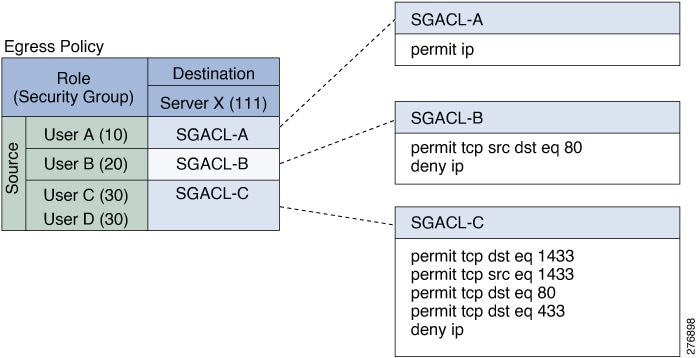
Within the Cisco TrustSec domain, policy enforcement is managed through a permissions matrix: source security group numbers are listed on one axis and destination security group numbers on the other. Each cell in the matrix holds an ordered list of SGACLs, specifying which permissions apply to packets traveling from a given source security group to a particular destination security group.

The following figure shows an example of a Cisco TrustSec permissions matrix for a simple domain with three defined user roles and one defined destination resource. Three SGACL policies control access to the destination server based on the role of the user.

Figure 1. SGACL Policy Matrix Example

Benefits of SGACLs in Cisco TrustSec

By assigning users and devices to security groups and controlling access between these groups, Cisco TrustSec provides role-based, topology-independent access control. Unlike traditional access control lists (ACLs) that rely on IP addresses, SGACLs use device identities. This means devices can move or change IP addresses anywhere in the network, and security policies remain unchanged as long as their roles and permissions stay the same. When a new user or device is added, simply assign it to the appropriate security group and it immediately inherits the group’s permissions.

Simplified Policy Management and Resource Efficiency

SGACLs streamline access control by reducing the number and complexity of access control entries (ACEs). The total number of ACEs is determined by the number of distinct permissions, which is typically much lower than in traditional IP-based ACLs. This role-based approach not only simplifies ongoing maintenance but also makes more efficient use of hardware resources, such as TCAM, on network devices. Cisco TrustSec supports up to 5,000 SGACL policies.

SGACL - Layer 2 Enforcement

Enforcement at Layer 2 is done by applying SGACL policies on interfaces or VLANs, filtering traffic based on SGTs carried in the packets. This allows segmentation and control within the same Layer 2 domain.

SGACL Enforcement on Routed and Switched Traffic

SGACL enforcement is applied only on IP traffic, but enforcement can be applied to either routed or switched traffic.

  • Routed Traffic:

    SGACL enforcement applies only to IP traffic and is performed by an egress switch (for esample a distribution switch or an access switch with a routed port). When globally enabled, it's automatic on Layer 3 interfaces (except SVI).

  • Switched Traffic:

    Enforcement is on traffic within a single switching domain without routing. It can apply to packets switched within a VLAN or forwarded to an SVI associated with a VLAN, but must be explicitly enabled per VLAN.

Ingress Tagging and Egress Enforcement in Cisco TrustSec

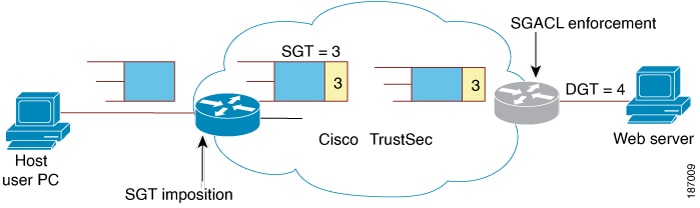
Cisco TrustSec enforces access control through a combination of ingress tagging and egress enforcement. When traffic enters the Cisco TrustSec domain, the ingress device tags the packets with a SGT that identifies the security group number of the source. This SGT remains with the traffic as it traverses the TrustSec domain. At the egress point, the egress device evaluates both the source SGT and the security group number of the destination (also known as the destination group tag or DGT). Using this information, the egress device references the SGACL policy matrix to determine and enforce the appropriate access policy for the traffic.

The following figure shows how the SGT assignment and the SGACL enforcement operate in a Cisco TrustSec domain.

Figure 3. SGT and SGACL in a Cisco TrustSec Domain

This is how packet flow with SGT and SGACL enforcement works:

  1. The host PC sends a packet to the web server. While neither the PC nor the web server are members of the Cisco TrustSec domain, the packet’s path passes through the Cisco TrustSec network.

  2. The Cisco TrustSec ingress device receives the packet and adds a SGT with security group number 3, as assigned to the host PC by the authentication server.

  3. The Cisco TrustSec egress device examines the packet and applies the SGACL policy that governs traffic from source group 3 (host PC) to destination group 4 (web server), with group 4 being the security group assigned to the web server by the authentication server.

  4. If the SGACL permits the traffic, the Cisco TrustSec egress switch removes the SGT from the packet and forwards it to the web server.

SGACL Logging

SGACL Logging in Cisco TrustSec records detailed information about traffic matching SGACLs. When SGACL logging is enabled, the device logs the following details:

  • The source and destination Security Group Tags (SGTs)

  • The name of the SGACL policy

  • The protocol type of the packet

  • The action taken on the packet

The logging option can be applied to individual ACEs, so only packets matching those ACEs will be logged. The first packet that triggers the log keyword generates a syslog message. After that, log messages are reported every five minutes. If the same ACE logs another packet with identical characteristics, the device increments the match counter and includes this information in the next report.

To enable logging, use the log keyword in front of the ACE definition in the SGACL configuration. For example, permit ip log .

When SGACL logging is enabled, ICMP Request messages from the device to the client are not logged for IPv4 and IPv6 protocols. However; ICMP Response messages from the client to the device are logged.

The following is a sample log, displaying source and destination SGTs, ACE matches (for a permit or deny action), and the protocol, that is, TCP, UDP, IGMP, and ICMP information:

*Jun 2 08:58:06.489: %C4K_IOSINTF-6-SGACLHIT: list deny_udp_src_port_log-30 Denied
udp 24.0.0.23(100) -> 28.0.0.91(100), SGT8 DGT 12

SGACL Logging and Message Control

Devices can generate logging messages for packets that are permitted or denied by a standard IP access list or an SGACL. Whenever a packet matches an SGACL entry, an informational message is sent to the console. The volume of messages displayed on the console is managed using the logging console command, which controls syslog output.

SGACL logging has been enhanced to use NetFlow hardware, which allows much larger logging rates.

When the first packet triggers an SGACL entry, a flow is created, and logging occurs based on NetFlow timeouts: 30 seconds for inactive flows and 1 minute for active flows. After this initial period, subsequent packets are counted and summarized, with logging messages generated every 5 minutes.

Each log message includes:

  • The access list number

  • Whether the packet was permitted or denied

  • The source and destination IP addresses

  • The ingress interface

  • The number of packets permitted or denied from the same source during the previous 5-minute interval

SGACL Cell Statistics

SGACL Cell Statistics provide granular visibility into the enforcement of SGACL policies. The enforcement matrix is organized by source and destination SGT pairs, with each cell representing the permissions applied between those groups. Administrators can view per-cell statistics showing how many packets were allowed or denied by the SGACLs for each SGT pair.

In addition to the existing ‘per cell’ SGACL statistics, which can be displayed using the show cts role-based counters command, you can also display ACE statistics, by using the show ip access-list sgacl_name command. No additional configuration is required for this.

The following example shows how you can use the show ip access-list command to display the ACE count:

Device# show ip access-control deny_udp_src_port_log-30
Role-based IP access list deny_udp_src_port_log-30 (downloaded)
10 deny udp src eq 100 log (283 matches)
20 permit ip log (50 matches)

SGACL Monitor Mode

SGACL Monitor Mode is designed for the pre-deployment phase of Cisco TrustSec, allowing administrators to test security policies without enforcing them. This mode helps verify that policies behave as expected before actual enforcement begins. If any policies do not work as intended, monitor mode makes it easy to identify and correct issues, ensuring that security requirements, such as denying unauthorized access, are met before enforcement is enabled.

Monitoring operates at the SGT-DGT (Source Group Tag–Destination Group Tag) pair level. When SGACL monitor mode is enabled, any deny action in the policy is treated as a permit on the device’s line cards. This ensures that SGACL counters and logging provide visibility into policy behavior, showing how traffic would be handled if enforcement were active. Since all monitored traffic is allowed, there is no disruption of service during the testing phase.

Restrictions for SGACL

These restrictions are applicable to all switches:

  • Due to hardware limitations, Cisco TrustSec SGACLs cannot be enforced for punt (CPU bound) traffic in hardware. SGACL enforcement in software is bypassed for CPU-bound traffic for switch virtual interface (SVI) and Layer 2 and Layer 3 Location Identifier Separation Protocol (LISP), and loopback interfaces.

  • When configuring SGACL policies, if you change the IP version dynamically from IPv4 or IPv6 to Agnostic (applies to both IPv4 and IPv6) and vice-versa, the corresponding SGACL policies for IPv4 and IPv6 are not downloaded completely through the management VRF interface.

  • When configuring SGACL policies, if you change the existing IP version to any other version (IPv4, IPv6, or Agnostic) and vice-versa, Change of Authorization (CoA) from Cisco Identity Services Engine (ISE) cannot be performed using RADIUS. Instead, use SSH and run the cts refresh policy command to perform a manual policy refresh.

  • When using an allowed SGT model with default action as deny all , in some cases, Cisco TrustSec policies are only partially downloaded from the ISE server after a device reload.

    To prevent this, define a static policy on the device. Even if the deny all option is applied, the static policy permits traffic that allows the device to download policies from the ISE server and overwrite the defined static policies. For device SGT, configure the following commands in global configuration mode:

    • cts role-based permissions from sgt_num to unknown

    • cts role-based permissions from unknown to sgt_num

These restrictions are applicable to Cisco C9610 Series Smart Switches.

  • The same set of ACLs cannot be used for both regular SGACL cell permissions and SGACL default permissions. Use a unique set of ACLs for default permission instead.

  • Cell permit and deny counters are supported only for the first 511 cells.

  • Counters are not supported for default permissions.

How to Configure SGACLs

These sections provide configuration information about SGACLs.

SGACL Policy Configuration Process

Follow these steps to configure and enable SGACL policies:

Procedure


Step 1

Configuration of SGACL policies should be done primarily through the Policy Management function of the Cisco Secure Access Control Server (ACS) or the Cisco Identity Services Engine (ISE).

If you are not using AAA on a Cisco Secure ACS or a Cisco ISE to download the SGACL policy configuration, you can manually configure the SGACL mapping and policies.

Note


An SGACL policy that is downloaded dynamically from the Cisco Secure ACS or a Cisco ISE will override any conflicting locally-defined policy.

Step 2

To enable SGACL policy enforcement on egress traffic on routed ports, enable SGACL policy enforcement globally as described in the Enabling SGACL Policy Enforcement Globally section.

Step 3

To enable SGACL policy enforcement on switched traffic within a VLAN, or on traffic that is forwarded to an SVI that is associated with a VLAN, enable SGACL policy enforcement for specific VLANs, as described in the Enabling SGACL Policy Enforcement on VLANs section.


Enable SGACL Policy Enforcement Globally

You must enable SGACL policy enforcement globally for Cisco TrustSec-enabled routed interfaces.

To enable SGACL policy enforcement on routed interfaces, perform this task:

Procedure

Step 1

enable

Example:
Device# enable

Enables privileged EXEC mode.

Enter your password, if prompted.

Step 2

configure terminal

Example:
Device# configure terminal

Enters global configuration mode.

Step 3

cts role-based enforcement

Example:
Device(config)# cts role-based enforcement

Enables Cisco TrustSec SGACL policy enforcement on routed interfaces.

Step 4

end

Example:
Device(config)# end

Exits global configuration mode and returns to privileged EXEC mode.


Enable SGACL Policy Enforcement Per Interface

You must enable SGACL policy enforcement globally for Cisco TrustSec-enabled routed interfaces.

To enable SGACL policy enforcement on routed interfaces, perform this task:

Procedure

Step 1

enable

Example:
Device# enable

Enables privileged EXEC mode.

Enter your password, if prompted.

Step 2

configure terminal

Example:
Device# configure terminal

Enters global configuration mode.

Step 3

interface type slot/port

Example:
Device(config)# interface gigabitethernet 6/2

Configures an interface and enters interface configuration mode.

Step 4

cts role-based enforcement

Example:
Device(config-if)# cts role-based enforcement

Enables Cisco TrustSec SGACL policy enforcement on routed interfaces.

Step 5

end

Example:
Device(config-if)# end

Exits interface configuration mode and returns to privileged EXEC mode.


Enable SGACL Policy Enforcement on VLANs

You must enable SGACL policy enforcement on specific VLANs to apply access control to switched traffic within a VLAN, or to traffic that is forwarded to an SVI associated with a VLAN.

To enable SGACL policy enforcement on a VLAN or a VLAN list, perform this task:

Procedure

Step 1

enable

Example:
Device# enable

Enables privileged EXEC mode.

Enter your password, if prompted.

Step 2

configure terminal

Example:
Device# configure terminal

Enters global configuration mode.

Step 3

cts role-based enforcement vlan-list vlan-list

Example:
Device(config)# cts role-based enforcement vlan-list 31-35,41

Enables Cisco TrustSec SGACL policy enforcement on the VLAN or VLAN list.

Step 4

end

Example:
Device(config)# end

Exits global configuration mode and returns to privileged EXEC mode.


Configure SGACL Monitor Mode

To configure SGACL monitor mode, follow this procedure:

Before you begin

Before configuring SGACL monitor mode, ensure the following:

  • Cisco TrustSec is enabled

  • Counters are enabled

Procedure

Step 1

enable

Example:
Device# enable

Enables privileged EXEC mode.

Enter your password, if prompted.

Step 2

configure terminal

Example:
Device# configure terminal

Enters global configuration mode.

Step 3

cts role-based monitor all

Example:
Device(config)# cts role-based monitor all

Enables global monitor mode.

Step 4

cts role-based monitor permissions from {sgt_num} to {dgt_num} [ipv4 | ipv6]

Example:
Device(config)# cts role-based permissions from 2 to 3 ipv4

Enables monitor mode for IPv4 or IPv6 Role-Based Access Control List (RBACL).

  • sgt_num : Security Group Tag

  • dgt_num : Destination Group Tag

Step 5

end

Example:
Device(config)# end

Exits global configuration mode and returns to privileged EXEC mode.


Configure SGACL policies manually

A role-based access control list (ACL) that is applied to a range of Source Group Tags (SGTs) and Destination Group Tags (DGTs) becomes an SGACL, which is a Cisco TrustSec policy enforced on egress traffic. The recommended approach for configuring SGACL policies is to use the policy management features of Cisco Identity Services Engine (ISE) or Cisco Secure ACS.

For local (manual) configuration, you can create a role-based ACL and bind it to a specific range of SGTs. This allows you to define and enforce access control policies directly on the device.


Note


An SGACL policy downloaded dynamically from Cisco ISE or Cisco ACS overrides conflicting manually configured policies, if any.


Configure and Apply IPv4 SGACL Policies

To configure and apply IPv4 SGACL policies, perform this procedure:

Before you begin

When configuring SGACLs and RBACLs, the named access control lists (ACLs) must start with an alphabet.

Procedure


Step 1

enable

Example:

Device# enable

Enables privileged EXEC mode.

Enter your password, if prompted.

Step 2

configure terminal

Example:

Device# configure terminal

Enters global configuration mode.

Step 3

ip access-list role-based rbacl-name

Example:

Device(config)# ip access-list role-based allow_webtraff

Creates an RBACL and enters Role-based ACL configuration mode.

Step 4

{[sequence-number] | default | permit | deny | remark}

Example:

Device(config-rb-acl)# 10 permit tcp dst allowed in extended named access list eq 80 dst eq 20

Specifies the access control entries (ACEs) for the RBACL.

You can use most of the commands and options allowed in extended named access list configuration mode, with the source and destination fields omitted.

The following ACE keywords are not supported:

  • reflect

  • evaluate

  • time-range

Step 5

exit

Example:

Device(config-rb-acl)# exit

Creates an RBACL and enters Role-based ACL configuration mode.

Step 6

ip access-list role-based rbacl-name

Example:

Device(config)# ip access-list role-based allow_webtraff

Exits role-based ACL configuration mode and returns to global configuration mode.

Step 7

cts role-based permissions {default | [from { sgt_num | unknown} to {dgt_num | unknown}] {rbacls ipv4 rbacls}

Example:

Device(config)# cts role-based permissions from 55 to 66 allow_webtraff

Binds SGTs and DGTs to the RBACL. The configuration is analogous to populating the permissionmatrix configured on Cisco ISE or Cisco Secure ACS.

  • default : Default permissions list.

  • sgt_num : 0 to 65,519. Source Group Tag.

  • dgt_num : 0 to 65,519. Destination Group Tag.

  • unknown : SGACL applies to packets where the security group (source or destination) cannot be determined.

  • ipv4 : Indicates the RBACLs are IPv4.

  • rbacls: Names of RBACLs.

Step 8

end

Example:

Device(config)# end

Exits global configuration mode and returns to privileged EXEC mode.


Configure IPv6 SGACL Policies

To manually configure IPv6 SGACL policies, perform this task:

Procedure


Step 1

enable

Example:

Device# enable

Enables privileged EXEC mode.

Enter your password, if prompted.

Step 2

configure terminal

Example:

Device# configure terminal

Enters global configuration mode.

Step 3

ipv6 access-list role-based sgacl-name

Example:

Device(config)# ipv6 access-list role-based sgaclname

Creates a named IPv6 SGACL and enters IPv6 role-based ACL configuration mode.

Step 4

{permit | deny} protocol [dest-option | dest-option-type {doh-number | doh-type}] [dscp cp-value] [flow-label fl-value] [mobility | mobility-type {mh-number | mh-type}] [routing | routing-type routing-number] [fragments] [log | log-input] [sequence seqno]

Example:

Device(config-ipv6rb-acl)# permit 33 dest-option dscp af11

Specifies the access control entries (ACEs) for the RBACL.

You can use most of the commands and options allowed in extended named access list configuration mode, with the source and destination fields omitted.

The following ACE keywords are not supported:

  • reflect

  • evaluate

  • time-range

Step 5

end

Example:

Device(config-ipv6rb-acl)# end

Exits IPv6 role-based ACL configuration mode and returns to privileged EXEC mode.


Apply SGACL policies manually

To manually apply SGACL policies, perform this task:

Procedure


Step 1

enable

Example:

Device# enable

Enables privileged EXEC mode.

Enter your password, if prompted.

Step 2

configure terminal

Example:

Device# configure terminal

Enters global configuration mode.

Step 3

cts role-based permissions default [ipv4 | ipv6] [sgacl-name1 [sgacl-name2 [sgacl-name3 ...]]]

Example:

Device(config)# cts role-based permissions default MYDEFAULTSGACL

Specifies the default SGACL. The default policies are applied when no explicit policy exists between the source and destination security groups.

Step 4

cts role-based permissions from {source-sgt | unknown} to {dest-sgt | unknown} [ipv4 | ipv6] sgacl-name1 [sgacl-name2 [sgacl-name3 ...]]]

Example:

Device(config)# cts role-based permissions from 3 to 5 SRB3 SRB5

Specifies the SGACLs to be applied for an SGT anda DGT.

  • source-sgt : The range is from 1 to 65533.

  • dest-sgt : The range is from 1 to 65533.

  • from : Specifies the source SGT.

  • to : Specifies the destination security group.

  • unknown : SGACL applies to packets where the security group (source or destination) cannot be determined.

Note

 
  • By default, SGACLs are considered to be IPv4.

  • An SGACL policy downloaded dynamically from the ACS will override conflicting manual policies, if any.

Step 5

end

Example:

Device(config)# end

Exits global configuration mode and returns to privileged EXEC mode.


Refresh the SGACL Policies

To refresh the SGACL policies, perform this task.

Procedure

  Command or Action Purpose

Step 1

enable

Example:

Device# enable

Enables privileged EXEC mode.

Enter your password, if prompted.

Step 2

cts refresh policy {peer [peer-id] | sgt [sgt_number | default | unknown]}

Example:

Device# cts refresh policy peer my_cisco_ise

Performs an immediate refresh of the SGACL policies from the authentication server.

  • If a peer-id is specified, only the policies related to the specified peer connection are refreshed.

    To refresh all the peer policies, press Enter without specifying an ID.

  • If an SGT number is specified, only the policies related to that SGT are refreshed.

    • To refresh all the SGT policies, press Enter without specifying an SGT number.

    • Select default to refresh the default policy.

    • Select unknown to refresh an unknown policy.

Step 3

exit

Example:

Device# exit

Exits privileged EXEC mode

Monitoring and Viewing SGACL Policies

Command

Description

show cts interface

Displays Cisco TrustSec states and statistics per interface.

show cts role-based counters [ipv4 | ipv6]

Displays all the SGACL enforcement statistics for IPv4 and IPv6 events.

show cts role-based permissions

Displays permission to RBACL configurations.

show cts role-based permissions from {source-sgt | unknown} to {dest-sgt | unknown}] [ipv4 | ipv6 | details]

Displays the SGACL policies and details about the monitor mode functionality foreach pair.

The command output displays if per-cell monitor mode is enabled for the SGT-DGT pair.

  • By using or omitting keywords, you can display all or part of the permissions matrix:

    • If the from keyword is omitted, a column from the permissions matrix is displayed.

    • If the to keyword is omitted, a row from the permissions matrix is displayed.

    • If the from and to keywords are omitted, the entire permissions matrix is displayed.

    • If the from and to keywords are specified, a single cell from the permissions matrix is displayed, and the details keyword is available. When details is entered, the ACEs of the SGACL of the single cell are displayed.

show ip access-lists {rbacls | ipv4 rbacls}

Displays ACEs of all RBACLs or a specified RBACL.

show cts role-based permissions default [ipv4 | ipv6 | details]

Displays the list of SGACL, of the default policy.

Configuration Examples for Security Group ACL Policies

The following sections provide examples of various SGACL policy configurations.

Example: Enable SGACL Policy Enforcement Globally

The following example shows how to enable SGACL policy enforcement globally:

Device> enable
Device# configure terminal
Device(config)# cts role-based enforcement

Example: Enable SGACL Policy Enforcement Per Interface

The following example shows how to enable SGACL policy enforcement per interface:

Device> enable
Device# configure terminal
Device(config)# interface gigabitethernet 1/0/2 
Device(config-if)# cts role-based enforcement
Device(config-if)# end

Example: Enable SGACL Policy Enforcement on VLANs

The following example shows how to enable SGACL policy enforcement on VLANs:

Device> enable
Device# configure terminal
Device(config)# cts role-based enforcement vlan-list 31-35,41
Device(config)# exit

Example: Configure SGACL Monitor Mode

The following example shows how to configure SGACL monitor mode:

Device# configure terminal
Device(config)# cts role-based monitor enable
Device(config)# cts role-based permissions from 2 to 3 ipv4
Device# show cts role-based permissions from 2 to 3 ipv4

IPv4 Role-based permissions from group 2:sgt2 to group 3:sgt3 (monitored):
        denytcpudpicmp-10
        Deny IP-00

Device# show cts role-based permissions from 2 to 3 ipv4 details

IPv4 Role-based permissions from group 2:sgt2 to group 3:sgt3 (monitored):
        denytcpudpicmp-10
        Deny IP-00
Details:
Role-based IP access list denytcpudpicmp-10 (downloaded)        
        10 deny tcp
        20 deny udp
        30 deny icmp
Role-based IP access list Permit IP-00 (downloaded)
        10 permit ip

Device# show cts role-based counters ipv4

Role-based IPv4 counters
From     To     SW-Denied  HW-Denied  SW-Permitt  HW_Permitt  SW-Monitor  HW-Monitor
*         *     0          0          8           18962       0           0
2         3     0          0          0           0           0           341057

Example: Configure SGACL Policies Manually

Device# configure terminal
Device(config)# ip access role allow_webtraff
Device(config-rb-acl)# 10 permit tcp dst eq 80
Device(config-rb-acl)# 20 permit tcp dst eq 443
Device(config-rb-acl)# 30 permit icmp
Device(config-rb-acl)# 40 deny ip
Device(config-rb-acl)# exit
Device(config)# cts role-based permissions from 55 to 66 allow_webtraff
Device# show ip access allow_webtraff

Role-based IP access list allow_webtraff
    10 permit tcp dst eq www
    20 permit tcp dst eq 443
    30 permit icmp
    40 deny ip
Device# show show cts role-based permissions from 50 to 70

Example: Apply SGACLs Manually

The following example shows how to manually apply SGACL policies:

Device# configure terminal
Device(config)# cts role-based permissions default MYDEFAULTSGACL
Device(config)# cts role-based permissions from 3 to 5 SRB3 SRB5
Device(config)# exit

Example: View SGACL Policies

This example shows how to display the content of the SGACL policies permissions matrix for traffic sourced from security group 3:
Device# show cts role-based permissions from 3

Role-based permissions from group 3 to group 5:
        SRB3
        SRB5
Role-based permissions from group 3 to group 7:
        SRB4