Stateful firewall

The Stateful Firewall solution uses the Cisco Catalyst 9350 Series Switch application-hosting infrastructure to run the ASAc container alongside standard switching functions. The solution supports use cases that include inter-VLAN traffic inspection, Internet traffic inspection, and branch office network segmentation, all managed through Cisco Defense Orchestrator (CDO) and Cisco Catalyst Center.

This guide covers these topics:

  • Overview: Describes the solution architecture, capabilities, use cases, and key components.

  • Prerequisites and requirements: Describes the prerequisites, restrictions, supported platforms, solution requirements, and ASAc interface mapping.

  • Installation and configuration: Describes the end-to-end installation and configuration workflow, including IOx setup, application hosting, and CDO integration.

  • Post-installation management: Describes how to manage and monitor the ASAc application after installation, including policy management through Cisco ASAv and Cisco Catalyst Center.

  • Onboarding and licensing: Describes how to onboard ASA devices, configure Smart Software Licensing, set the container management IP address, upgrade the ASAc application, and understand the auto-restart capability.

  • Verification and troubleshooting: Provides show commands and examples to verify the solution configuration and access ASAc configuration, core, and log files for troubleshooting.

Overview

This chapter introduces the Stateful Firewall solution architecture, its core capabilities, the security use cases it supports, and the components that make up the solution on Cisco Catalyst 9350 Series Switches.

This chapter covers these topics:

  • Stateful Firewall on Cisco Catalyst 9350 Series Switches: Provides a solution overview and architecture description.

  • Capabilities of the Stateful Firewall solution: Describes the stateful inspection and security enforcement capabilities of the ASAc.

  • Use case 1 — Distributed firewalls for IT-OT networks: Describes how to use the solution to segment and protect IT and OT traffic.

  • Use case 2 — Zone-based security for factory networks: Describes how to apply zone-based policies in factory network environments.

  • Use case 3 — Secure IT-OT connectivity with IPSec: Describes how to establish encrypted connectivity between IT and OT zones using IPSec.

  • Use case 4 — Secure remote management with VPN: Describes how to enable secure remote access to managed devices using VPN.

  • Components of the solution: Describes the hardware, software, and management components that make up the Stateful Firewall solution.

Stateful Firewall on Cisco Catalyst 9350 Series Switches

The Stateful Firewall solution integrates the Cisco Adaptive Security Virtual Appliance (ASAc) with the application-hosting infrastructure on Cisco Catalyst 9350 Series Switches to provide stateful inspection of network traffic without changing the network architecture. The app-hosting infrastructure on these Catalyst switches seamlessly adds ASAc instances to the existing network by using a USB SSD to host ASAc on Cisco Catalyst 9350 Series Switches.

Solution background and benefits

Previously, operational technology (OT) systems were isolated from external networks, making them less vulnerable to cyber threats. With Industry 4.0, digital transformation and smart manufacturing have accelerated the convergence of information technology (IT) and OT networks in the process industry. While this integration can bring significant benefits, such as increased efficiency, improved visibility, and better decision-making, it can also increase the risk of cyberattacks.

IoT (Internet of Things) devices and sensors are proliferating into IT networks, and these devices are managed under a single IT network infrastructure to build smarter and safer workspaces. However, these IoT devices introduce several security threats to IT networks because these devices often have limited processing power and memory, making it challenging to implement robust security features, and most of these devices are not up to date on security updates. Attackers exploit these vulnerabilities to pivot from compromised IoT devices to critical systems and data.

By hosting the containerized Secure Firewall ASA on Catalyst 9350 Series Switches, organizations can benefit from enhanced security and simplified network deployment. This solution reduces the complexity of steering traffic to centralized firewalls through complex tunnels, and eliminates the need for additional hardware.

Positioning the firewall services nearer to the source provides a cost-effective and highly efficient way of securing IT-OT converged networks. It also minimizes the latency for time-sensitive SOS applications by enforcing the policies near the source, where the devices connect to the network.

The redundant links and power supplies of the Catalyst 9350 Series Switches are leveraged by the virtual firewall instances hosted on these switches, reducing the need for additional servers and physical firewall appliances, and saving on rack space, cooling requirements, and operational costs.

By leveraging these capabilities, organizations can simplify their network design, reduce costs, and improve their security posture.

Capabilities of the Stateful Firewall solution

The Stateful Firewall solution provides these capabilities:

The ASAc firewall hosted on Catalyst 9350 Series Switches is a containerized form of ASAv. It has feature parity with ASAv with few exceptions.

  • Powerful stateful inspection firewall.

  • Layer 3 and Layer 4 firewall policies.

  • Support for Security Group Tags (SGTs).

  • Separation of the security operations (SecOps) and network operations (NetOps) at the network level.

  • Routed mode (Layer 3) firewall.

  • Transport encryption with IPSec tunnels.

  • Secure remote management with VPN.

Supported capacity and integration benefits

The Stateful Firewall solution supports up to:

  • 10 logical interfaces.

  • 900 Mbps of firewall throughput (450-byte packet) with C9350X (4 vCPUs/8 GB RAM).

  • 500 Mbps of firewall throughput (450-byte packet) with C9350 (2 vCPUs/2 GB RAM).

  • 250 IPSec VPN tunnels.

  • 8000 connections per session.

Integrating ASAc on Cisco Catalyst 9350 Series Switches simplifies the network design by providing the flexibility to plug in small-form-factor firewalls in the network closer to the source. This design lowers the total cost of ownership by reducing the number of physical firewall appliances in the network.

The Stateful Firewall AppHosting solution hosts a virtual firewall or ASAc on Cisco Catalyst 9350 Series Switches. All physical firewalls next to a switch can be virtualized and deployed on the switch itself. The SecOps team manages the ASAc firewalls deployed on the Catalyst switches, and the NetOps team instantiates the application and performs lifecycle management using Cisco Catalyst Center (formerly known as Digital Network Architecture [DNA] Center). The SecOps team controls policy management using Cisco Defense Orchestrator. Both the SecOps and NetOps teams can seamlessly manage the network without any disruptions.

Use case 1 — Distributed firewalls for IT-OT networks

A distributed firewall architecture deploys firewalls directly on access switches to enforce firewall policy at IT-OT convergence points, minimizing latency and eliminating the need for complex tunnels.

For security compliance, OT or IoT traffic is tunneled to a centralized firewall for policy enforcement. The distributed firewall architecture simplifies the network design and increases network performance by enforcing the firewall policy at the IT-OT convergence points.

Deployment scenario diagram
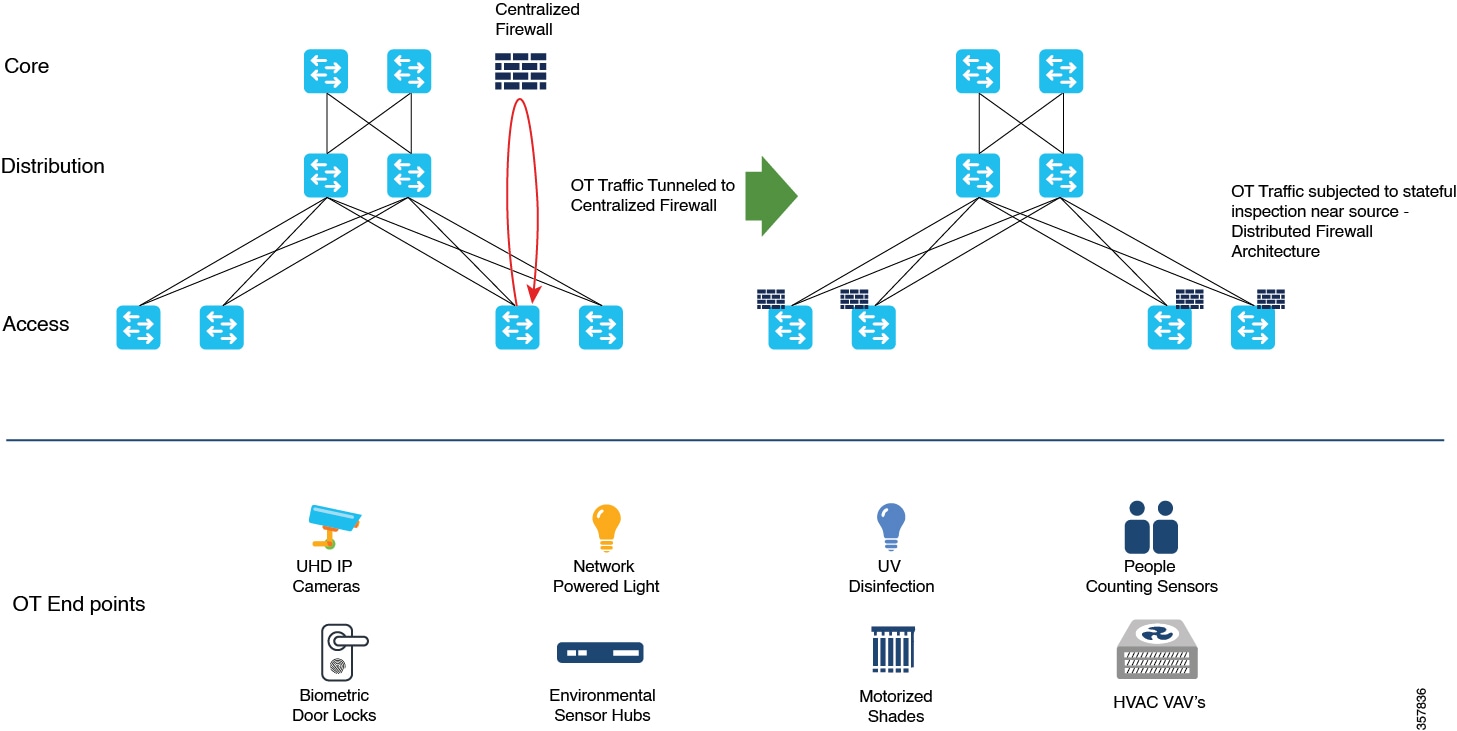
Figure 1. Use case 1 — Distributed firewalls for IT-OT networks
Distributed firewalls on Cisco Catalyst 9350 switches at IT-OT convergence points for policy enforcement and low latency.

Use case 2 — Zone-based security for factory networks

Zone-based security for factory networks uses ASAc hosted on Cisco Catalyst 9350 Series Switches to inspect and control traffic between different zones, eliminating the need for separate physical firewalls at every switch location.

Zone-based firewall scenario

In a factory that has different zones, crossing between zones requires a firewall. This means the factory requires the same number of physical firewalls as the number of switches deployed in the network to inspect traffic between different zones and groups of users. Both the firewalls and switches need physical power redundancy and redundant link management. To allow user mobility, for example, an engineer moving from the carpeted space into the factory floor, firewalls must be placed at multiple locations.

The Cisco Catalyst 9350 Series Switches provide application hosting capabilities that easily combine the physical firewall with the virtual container available on the switch. By using the ASAc firewall hosted on Cisco Catalyst 9350 Series Switches, the factory can be maintained and operated without compromising on security.
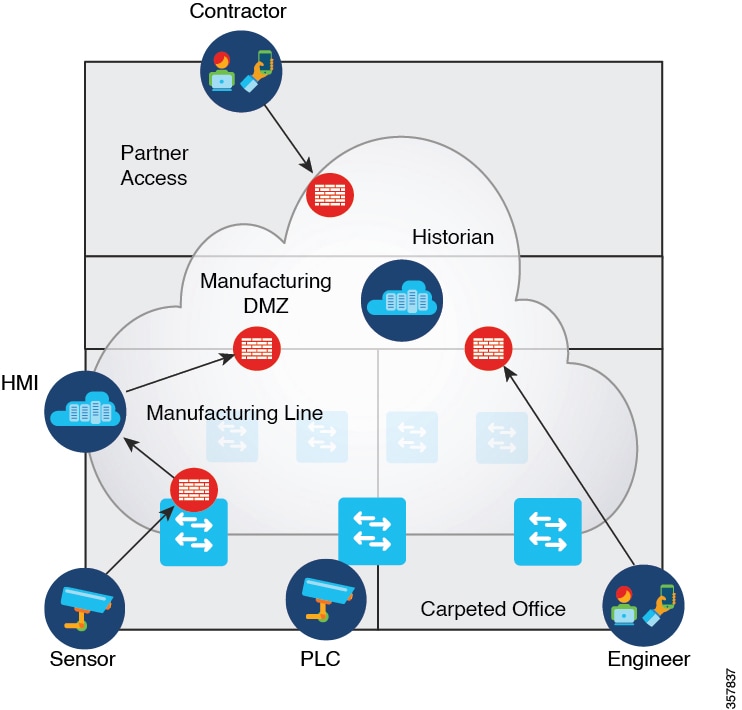
Figure 2. Use case 2 — Zone-based security for factory networks
ASAc hosted on Cisco Catalyst 9350 Series switches providing zone-based security across factory zones with redundancy.

Use case 3 — Secure IT-OT connectivity with IPSec

Secure IT-OT connectivity with IPSec uses ASAc hosted on Cisco Catalyst 9350 Series Switches to create encrypted tunnels between critical OT system components, protecting traffic across shared IT networks.

Airport baggage management IPSec scenario

In an airport ecosystem, various vendors share a common network. The baggage management system is one of the critical systems in this network. The baggage management system regulates the operation of the baggage conveyor belts through Programmable Logic Controllers (PLCs) that are distributed across airport terminals, often separated by vast distances.

The complex network in between incorporates numerous network devices, making the security of the baggage management system traffic a primary concern. To address this issue, IPSec tunnels are created between the ASAc instances hosted on Cisco Catalyst 9350 Series Switches connecting the baggage management system and PLC, to provide a secure passage for baggage traffic and reduce the risk of data breaches.

The ASAc allows different vendors to create their own IPSec tunnels, offering flexibility and control over their traffic in a shared network. This ensures the efficient operation of critical systems while maintaining the security and integrity of the network.
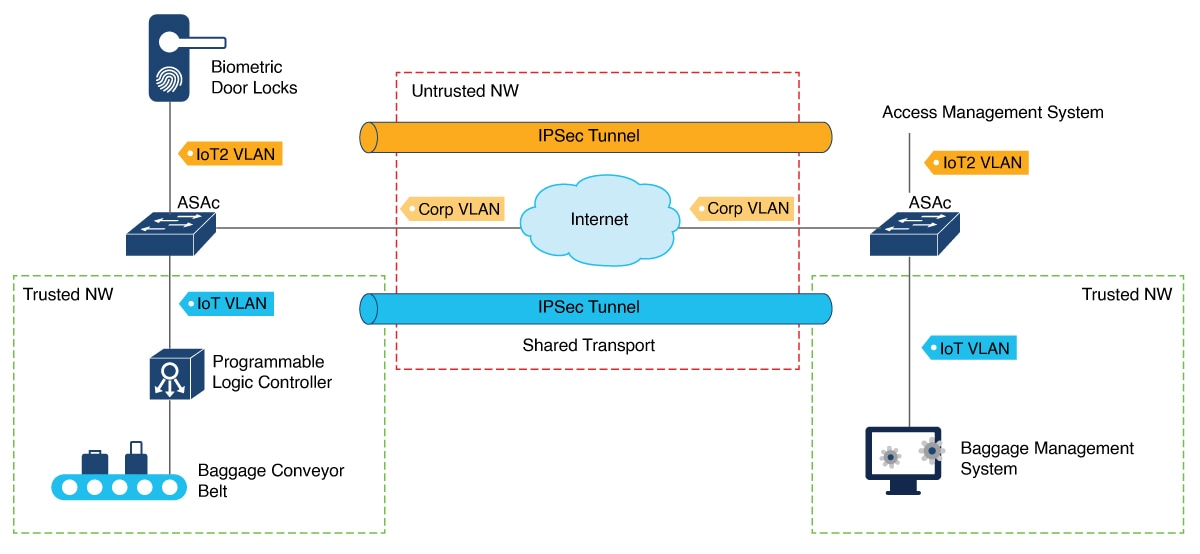
Figure 3. Use case 3 — Secure IT-OT connectivity with IPSec tunnels
IPSec tunnels between ASAc instances on Cisco Catalyst 9350 Series switches connecting systems across an airport IT network.

Use case 4 — Secure remote management with VPN

Secure remote management with VPN uses ASAc hosted on Cisco Catalyst 9350 Series Switches to establish VPN tunnels, enabling operators to securely access operational cameras connected to the switches in a manufacturing environment.

Within the manufacturing sector, operational cameras play a pivotal role in monitoring critical processes continuously. These cameras are directly connected to Cisco Catalyst 9350 Series Switches and can be remotely accessed by operators. This remote access is made secure by establishing VPN tunnels to the ASAc hosted on Cisco Catalyst 9350 Series Switches.

Components of the solution

This diagram shows the components of the Stateful Firewall solution.

Solution components diagram
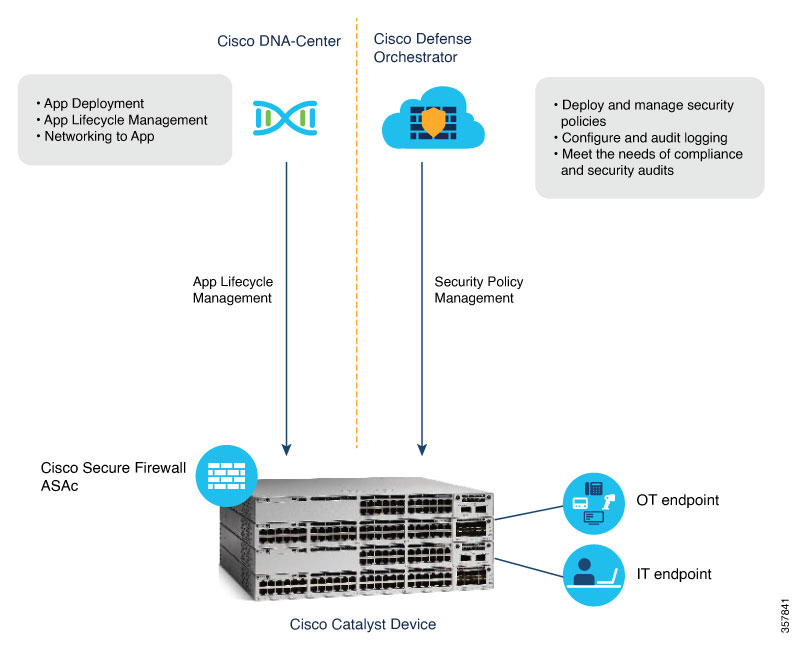
Figure 4. Stateful Firewall solution components
Solution components: Cisco Defense Orchestrator, Catalyst Center, and ASAc hosted on Cisco Catalyst 9350 Series switches.

Prerequisites and requirements

This chapter provides the reference information you need before deploying the Stateful Firewall solution, including prerequisites, known restrictions, supported hardware, solution requirements, and interface mapping between the Cisco Catalyst 9350 Series Switch and the ASAc container.

This chapter covers these topics:

  • Prerequisites for the stateful firewall solution: Lists the hardware, software, and licensing requirements that must be met before deployment.

  • Restrictions for the stateful firewall solution: Describes known limitations and constraints that apply to the solution.

  • Supported platforms: Identifies the Cisco Catalyst switch models and software releases that support the Stateful Firewall solution.

  • Solution requirements: Describes the network and infrastructure requirements for a successful deployment.

  • ASAc interface mapping: Provides the mapping between Cisco Catalyst 9350 Series Switch guest interfaces and ASAc interfaces.

Prerequisites for the stateful firewall solution

These are the prerequisites for the Stateful Firewall solution.

Ensure these hardware, storage, licensing, and software management components are available before deploying the solution:

  • Cisco Catalyst 9350, 9350L, 9350LM, or 9350X Series Switches are up and running.

  • Cisco pluggable USB 3.0 SSD-120G or SSD-240G storage is available.

  • A Cisco Catalyst or DNA-Advantage subscription license is available.

  • One of these ASAc licenses is required:

    • ASAc5 (L-ASA-C-5S-K9=) — 1 Core-License (100M)

    • ASAc10 (L-ASA-C-10S-K9=) — 2 Core-License (1G)

    • ASAv5 (L-ASA-V-5S-K9=) — 1 Core-License (100M)

    • ASAv10 (L-ASA-V-10S-K9=) — 2 Core-License (1G)

  • ASAc supports two types of licenses: ASAc Smart License and ASAc Permanent License Reservation (PLR) mode. You can use either the existing ASAv5/ASAv10 license or a new ASAc5/ASAc10 license.

  • The Cisco Catalyst Center application-hosting workflow expects that VLANs are created on the switch before these VLANs are allowed on the AppGigabitEthernet interface.

  • The minimum resources required to host ASAc are 1 vCPU, 2 GB RAM, and 40 GB free disk space.

  • Cisco recommends Cisco Catalyst Center to automate the ASAc lifecycle management at scale.

  • Cisco recommends Cisco Defense Orchestrator for ASAc security policy management and event logging at scale.

Restrictions for the stateful firewall solution

These restrictions apply to the Stateful Firewall solution.

These restrictions apply to ASAc hosted on Cisco Catalyst 9350 Series Switches:

  • Transparent mode is not supported on ASAc when hosted on Cisco Catalyst 9350 Series Switches; only routed mode is supported.

  • On-premises management of ASAc instances with Cisco Security Manager is not supported.

  • Jumbo frames are not supported.

  • Stateful high availability is not supported. However, IOx synchronizes the ASAc application configuration data every 15 minutes to the standby device.

    • After a failover, ASAc on the standby device boots up with the configuration that is copied from the old active device.

    • It takes around 90 seconds for ASAc on the new active device to start sending and receiving traffic.

    ASAc supports stateless high availability on the Cisco Catalyst 9350 switch stack. It takes around 90 to 120 seconds for ASAc on the standby device to start processing traffic after a failover.

  • No other application can be hosted on Cisco Catalyst 9350, 9350L, and 9350LM Series Switches when ASAc is hosted.

    Cisco Catalyst 9350X Series Switches can host another application, such as ThousandEyes, along with ASAc; however, the performance of these two applications may vary when both are run simultaneously.

  • The ASAc interface IP configurations and Day 0 configurations must be passed as files in the Cisco Catalyst Center application hosting workflow. The ASAc interface IP configurations in the Cisco Catalyst Center UI are ignored.

  • ASAc clustering is not supported.

Supported platforms

These platforms support the Stateful Firewall solution.

These platforms support the Stateful Firewall solution:

  • Cisco Catalyst 9350, 9350L, 9350LM, and 9350X Series Switches

Solution requirements

This table describes the supported release versions for the software and hardware required for the Stateful Firewall solution.

Supported release versions

Table 1. Supported release versions for the stateful firewall solution

Component

Release

Cisco ASAc

9.20.2 or later

Cisco Catalyst 9350, 9350L, 9350LM, and 9350X Series Switches

Cisco IOS XE Dublin 17.12.2 or later

Cisco Defense Orchestrator

Cloud Base (latest version)

Cisco Catalyst Center Appliance

44 or 56 cores

Cisco Catalyst Center Platform

2.3.7.0 or later

Cisco Identity Services Engine (ISE)

3.1

Software License

  • C9350 Catalyst or DNA Advantage license (C9350-DNA-A)

  • L-ASA-C-5S-K9=: Cisco ASAc License PID

    • L-ASA-C-5S-1Y

    • L-ASA-C-5S-3Y

    • L-ASA-C-5S-5Y

  • L-ASA-C-10S-K9=: Cisco ASAc License PID

    • L-ASA-C-10S-1Y

    • L-ASA-C-10S-3Y

    • L-ASA-C-10S-5Y

  • Licenses required on Cisco Defense Orchestrator to manage ASAc instances:

    • Cisco Defense Orchestrator Base license (CDO-SEC-SUB)

    • Cisco Defense Orchestrator license to manage ASAc (L-ASAV-P=)

    Note


    Cisco Defense Orchestrator is optional.

External Solid State Drive (SSD)

Cisco SSD-240G: Cisco Catalyst 9350, 9350L, 9350LM, and 9350X Series Switches

Note


Cisco does not ship Cisco SSD-120G; however, existing devices that have Cisco SSD-120G can use it for ASAc app hosting.

ASAc interface mapping

This table shows the mapping between Catalyst switch guest interfaces and the corresponding ASAc interfaces.

Table 2. Mapping between Catalyst switch guest interfaces and ASAc interfaces

Guest interface

ASAc interface

eth0 (guest-interface 0)

Management 0/0

eth1 (guest-interface 1)

GigabitEthernet 0/0

eth2 (guest-interface 2)

GigabitEthernet 0/1

eth3 (guest-interface 3)

GigabitEthernet 0/2

eth4 (guest-interface 4)

GigabitEthernet 0/3

eth5 (guest-interface 5)

GigabitEthernet 0/4

eth6 (guest-interface 6)

GigabitEthernet 0/5

eth7 (guest-interface 7)

GigabitEthernet 0/6

eth8 (guest-interface 8)

GigabitEthernet 0/7

eth9 (guest-interface 9)

GigabitEthernet 0/8

Installation and configuration

This chapter provides the end-to-end installation and configuration workflow for the ASAc Stateful Firewall solution, from initial IOx enablement through application hosting setup, ASAc deployment, and Cisco Defense Orchestrator integration.

This chapter covers these topics:

  • How to configure the solution: Provides a high-level overview of the configuration steps in the required order.

  • How ASAc installation and policy management work: Explains the installation process flow and how policy management operates after deployment.

  • Install SSD and enable Cisco IOx: Describes how to install the required SSD and enable the Cisco IOx framework on the switch.

  • Configure the app resource Docker profile: Describes how to allocate CPU, memory, and storage resources for the ASAc Docker container.

  • Enable application hosting on VLAN ports: Describes how to configure AppGigabitEthernet interfaces and trunk VLANs to support application hosting.

  • Install and run the ASAc application: Describes how to install the ASAc application package and start the application on the switch.

  • Install ASAc through Cisco Catalyst Center: Describes the alternative installation path using Cisco Catalyst Center.

  • Cisco Defense Orchestrator: Describes the role of Cisco Defense Orchestrator in managing ASAc security policies.

  • Requesting a Cisco Defense Orchestrator account: Describes how to request access to Cisco Defense Orchestrator.

  • Deploying a Secure Device Connector: Describes how to deploy the Secure Device Connector to enable CDO communication with the ASAc.

  • Connect to the ASAc console from the Catalyst switch: Describes how to open a console session to the ASAc container directly from the Cisco Catalyst 9350 Series Switch.

How to configure the solution

This topic describes how to configure all components of the Stateful Firewall solution.

This topic assumes these devices are already installed and working in the network:

  • A Cisco Catalyst 9350, 9350L, 9350LM, or 9350X Series Switch

  • Cisco Catalyst Center

  • Cisco Adaptive Security Device Manager (ASDM)

How ASAc installation and policy management work

This topic provides a high-level workflow of how the ASAc application is installed and security policies are managed at scale for large deployments using Cisco Catalyst Center and Cisco Defense Orchestrator.

Summary

These are the key actors in the ASAc deployment workflow:

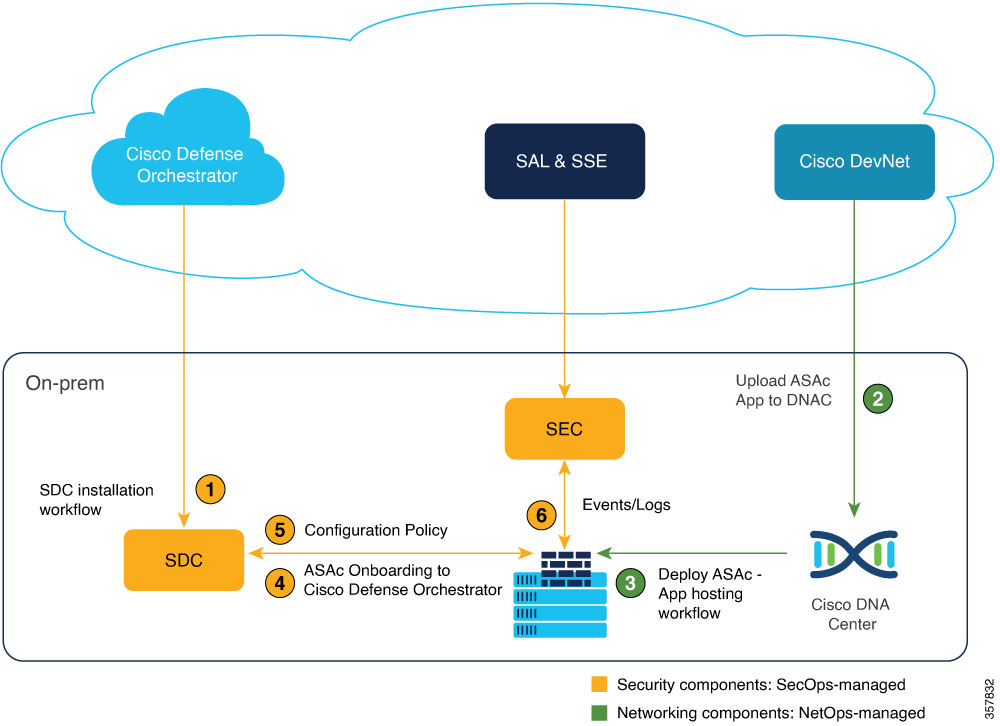
  • Network engineer: Installs SDC and SEC on premises, uploads ASAc application files and configurations, and manually onboards ASAc instances to Cisco Defense Orchestrator.

  • Cisco Catalyst Center: Deploys and manages the ASAc application on Cisco Catalyst 9350 Series Switches.

  • Cisco Defense Orchestrator: Applies common security policies and configurations across all onboarded ASAc instances and collects events for compliance and reporting.

This workflow describes how the ASAc application is installed and security policies are managed at scale across large deployments.

Workflow

Figure 5. High-level workflow for ASAc deployment and policy management
Workflow for deploying ASAc on Cisco Catalyst 9350 series switches and managing policies using Catalyst Center and CDO.

These are the stages of the ASAc deployment and policy management workflow:

  1. Stage 1 — Installing SDC and SEC: The network engineer installs the Secure Device Connector (SDC) and the Secure Event Connector (SEC) on premises, and bootstraps both with Cisco Defense Orchestrator.
  2. Stage 2 — Installing ASAc on Cisco Catalyst Center: Cisco Catalyst Center installs ASAc on the Cisco Catalyst Center appliance by using YANG models or app-hosting CLIs.
  3. Stage 3 — Uploading ASAc files and configuration: The network engineer uploads the ASAc application, Day 0 configuration, and the ASAc interface configuration including interface IP addresses to Cisco Catalyst Center.
  4. Stage 4 — Deploying ASAc on Catalyst 9350 Series Switches: Cisco Catalyst Center deploys the ASAc application on Cisco Catalyst 9350 Series Switches. Cisco Catalyst Center can scale to multiple access switches and deploy them simultaneously.
  5. Stage 5 — Onboarding ASAc to Cisco Defense Orchestrator: After ASAc is deployed, the network engineer manually onboards each ASAc instance to Cisco Defense Orchestrator.
  6. Stage 6 — Applying common policies: After all ASAc instances are onboarded, Cisco Defense Orchestrator applies common policies and configurations across all ASAc instances.
  7. Stage 7 — Collecting events for compliance: Events are collected through the SEC for compliance and reporting.

What’s next

In smaller deployment scenarios, such as a deployment with only 10 Catalyst switches, you can use YANG models or Cisco IOS CLIs to deploy ASAc instances on Cisco Catalyst switches. For smaller deployments, Cisco recommends that you use the Adaptive Security Device Manager (ASDM), a web UI bundled in the ASAc container package, to manage the ASAc security policy.

Install SSD and enable Cisco IOx

Use this procedure to install the Solid State Drive (SSD) and enable Cisco IOx on the Cisco Catalyst 9350 Series Switch. Completing this procedure prepares the switch for ASAc application hosting.

Procedure


Step 1

Install the Solid State Drive (SSD).

On stackable switches, Cisco recommends installing the SSD on both the preferred active and standby devices.

For more information, refer to Installing a USB 3.0 SSD.

Step 2

Format the SSD.

For more information, refer to Formatting USB 3.0 SSD.

Step 3

Use the iox command in global configuration mode to enable Cisco IOx on the device, then save the configuration.

Step 4

Use the show iox command to verify that the Cisco IOx services are running:

Device# show iox

IOx Infrastructure Summary:
---------------------------
IOx service (CAF)              : Running
IOx service (HA)               : Running
IOx service (IOxman)           : Running
IOx service (Sec storage)      : Running
Libvirtd 5.5.0                 : Running
Dockerd v19.03.13-ce           : Running
Sync Status                    : Disabled

Step 5

Use the show app-hosting infra command to verify the application hosting infrastructure mounted on the SSD:

Device# show app-hosting infra

IOX version: 2.8.0.0
App signature verification: enabled
CAF Health: Stable
Internal working directory: /vol/usb1/iox

Application Interface Mapping
AppGigabitEthernet Port #  Interface Name                 Port Type            Bandwidth
           1               AppGigabitEthernet1/0/1        KR Port - Internal   1G

CPU:
  Quota: 25(Percentage)
  Available: 25(Percentage)
  Quota: 7400(Units)
  Available: 7400(Units)

Cisco IOx is enabled and the application hosting infrastructure is mounted on the SSD. The switch is ready for ASAc installation.

Configure the app resource Docker profile

Use this procedure to configure the Docker resource profile for ASAc to control CPU, memory, device file access, and the paths to interface and Day 0 configuration files.

For app hosting resource changes to take effect, first stop and deactivate the app using app-hosting stop and app-hosting deactivate , then restart it using app-hosting activate and app-hosting start .


Note


Additional CPU and memory can be allocated on Cisco Catalyst switches. Cisco recommends:

  • 2 vCPU and 2 GB memory on Cisco Catalyst 9350 Series Switches

  • 4 vCPU and 8 GB memory on Cisco Catalyst 9350X Series Switches


Procedure


Step 1

enable

Example:

Device> enable

Enables privileged EXEC mode. Enter your password if prompted.

Step 2

configure terminal

Example:

Device# configure terminal

Enters global configuration mode.

Step 3

app-hosting appid application-name

Example:

Device(config)# app-hosting appid asac_app

Configures an application and enters application-hosting configuration mode.

Step 4

app-resource docker

Example:

Device(config-app-hosting)# app-resource docker

Configures the Docker custom application and enters custom application resource profile configuration mode.

Step 5

run-opts options

Example:

Device(config-app-hosting-docker)# run-opts 2 "--cap-add=NET_ADMIN --device=/dev/net/tun:/dev/net/tun"

Configures the capability to run the Docker container, specifically the NET_ADMIN capability and the device file (/dev/net/tun) that is created when the container boots up.

Note


By default, running a Docker container on a Catalyst device requires non-privileged (non-root) access rights.

Step 6

run-opts options

Example:

Device(config-app-hosting-docker)# run-opts 3 "-v /usbflash1:/iox_host_data_share/:/mnt/disk0/interface-config
-v /usbflash1:/iox_host_data_share:/asac-day0-config"

Configures the paths to the interface-config and day0-config (startup configuration) files.

Step 7

run-opts options

Example:

Device(config-app-hosting-docker)# run-opts 4 "-e ASAC_MEMORY=2048M -e ASAC_CPUS=2 -e ASA_DOCKER=1 -e ASAC_CAT9K=1 -e \
ASAC_DEALER_ENDPOINT=localhost:5555"

Sets the environment variables required to run the ASAc container and the core-file size limit for storing crash logs.

Note


For 4 vCPU and 8 GB memory on Cisco Catalyst 9350X Series Switches, use these options instead: ASAC_MEMORY=8192M and ASAC_CPUS=4.

Step 8

end

Example:

Device(config-app-hosting-docker)# end

Exits custom application resource profile configuration mode and returns to privileged EXEC mode.


Enable application hosting on VLAN ports

Use this procedure to configure the trunk interface and VLAN-to-guest-interface mappings required to enable ASAc application hosting on Cisco Catalyst 9350 Series Switches.


Note


A DNA-Advantage license on the Cisco Catalyst 9350 Series Switch is required for application hosting.


Procedure


Step 1

Enter privileged EXEC mode and global configuration mode.

  1. enable

    Example:

    Device> enable

    Enables privileged EXEC mode. Enter your password if prompted.

  2. configure terminal

    Example:

    Device# configure terminal

    Enters global configuration mode.

Step 2

interface AppGigabitEthernet number

Example:

Device(config)# interface AppGigabitEthernet 1/0/1

Configures the AppGigabitEthernet interface and enters interface configuration mode.

For stackable switches, the number argument is switch-number /0/1.

Step 3

Configure the trunk VLAN list and trunking mode on the interface.

  1. switchport trunk allowed vlan vlan-ID

    Example:

    Device(config-if)# switchport trunk allowed vlan 10-12,20

    Configures the list of VLANs allowed on the trunk.

  2. switchport mode trunk

    Example:

    Device(config-if)# switchport mode trunk

    Sets the interface into permanent trunking mode and negotiates to convert the neighboring link into a trunk link.

Step 4

exit

Example:

Device(config-if)# exit

Exits interface configuration mode and returns to global configuration mode.

Step 5

app-hosting appid application-name

Example:

Device(config)# app-hosting appid asac_app

Configures an application and enters application-hosting configuration mode.

Step 6

app-vnic AppGigabitEthernet port port_number trunk

Example:

Device(config-app-hosting)# app-vnic AppGigabitEthernet port 1 trunk

Configures a trunk port as the front-panel port for an application and enters application-hosting trunk-configuration mode.

Configure port_number based on the switch model:

  • 1: On the 9350, 9350L, and 9350LM switches, which have one AppGigabitEthernet interface.

  • 1 or 2: On the 9350X switches, which have two AppGigabitEthernet interfaces.

Step 7

app-vnic management guest-interface guest-interface-number

Example:

Device(config-config-app-hosting-trunk)# app-vnic management guest-interface 0

Configures the management interface. The management interface must always be configured as guest-interface 0.

Note


Configuring the management interface on any other VLAN is not supported.

Step 8

vlan vlan-ID guest-interface guest-interface-number

Example:

Device(config-config-app-hosting-trunk)# vlan 10
guest-interface 1
Device(config-config-app-hosting-trunk)# vlan 11
guest-interface 2

Configures the VLAN-to-guest interface mappings. Configure guest-interface-number as 1 for the inside VLAN and 2 for the outside VLAN.

Note


Up to 10 logical interfaces can be configured including the management interface.

Step 9

end

Example:

Device(config-config-app-hosting-vlan-access-ip)# end

Exits application-hosting VLAN-access IP configuration mode and returns to privileged EXEC mode.


Install and run the ASAc application

Use this procedure to install, activate, and start the ASAc application on the Cisco Catalyst 9350 Series Switch using app-hosting CLI commands.

Procedure


Step 1

enable

Example:

Device> enable

Enables privileged EXEC mode. Enter your password if prompted.

Step 2

app-hosting install appid application-name package package-path

Example:

Device# app-hosting install appid asac_app package usbflash1:ASAc-9.18.2.150-app-SPA.tar

Installs the ASAc application from the specified location.

Step 3

app-hosting activate appid application-name

Example:

Device# app-hosting activate appid asac_app

asac_app activated successfully
Current state is: ACTIVATED

Activates the application. This command validates all application resource requests. If all resources are available, the application is activated; if not, the activation fails.

Step 4

app-hosting start appid application-name

Example:

Device# app-hosting start appid asac_app

asac_app started successfully
Current state is: RUNNING

Starts the application. Application start-up scripts are activated.

Step 5

app-hosting connect appid application-name session

Example:

Device# app-hosting connect appid asac_app session

Connects to the ASAc CLI session.

Step 6

exit

Example:

Device# exit

Exits privileged EXEC mode and returns to user EXEC mode.


The ASAc application is installed, activated, and running on the Cisco Catalyst 9350 Series Switch.

Install ASAc through Cisco Catalyst Center

Use this procedure to configure and install ASAc on Cisco Catalyst 9350 Series Switches using Cisco Catalyst Center, and to upgrade ASAc to a newer version when required.

Before you begin

  • The Cisco Catalyst 9350 Series Switch must be onboarded on Cisco Catalyst Center.

  • The ASAc app must be uploaded on Cisco Catalyst Center.

  • The interface and Day 0 configuration files must be named interface-config and day0-config respectively, with no file extension.

Procedure


Step 1

On Cisco Catalyst Center, configure the ASAc interfaces using the Configure App tab.

  1. Enter the interface name in the Interface Name field.

  2. Select the Address Type as Dynamic.

Note


Adding static IP addresses in the Configure App menu is not supported.

The interface configuration of ASAc, including IP addresses, must be passed as a Day 0 configuration (day0-config ) file.

Step 2

Upload the interface and Day 0 configuration files using the Upload App Data button.

Step 3

To upgrade ASAc to the latest version, upload the new ASAc package to Cisco Catalyst Center, then select the Upgrade App button in the ASAc Manage tab.

The app goes through these states while upgrading: Running > Stopped > Deployed > Uninstalled & removed > Deployed > Activated > Running.

Note


The upgrade package version must be higher than the running ASAc package version. To downgrade, uninstall ASAc and then install the required version.


Cisco Defense Orchestrator

Cisco Defense Orchestrator is a cloud-based management solution that allows you to centrally manage security policies and device configurations across multiple Cisco products that include the Cisco Adaptive Security Appliance (ASA), both on-premises and virtual.

Cisco Defense Orchestrator capabilities and resources

Cisco Defense Orchestrator deploys and manages security policies, meets the needs of compliance and security audits, and logs configuration and audit messages. Cisco Defense Orchestrator helps optimize your security policies by identifying inconsistencies and providing tools to fix these issues. You can share objects and policies, and create configuration templates to promote policy consistency across devices using Cisco Defense Orchestrator.

A per-device license is required for Cisco Defense Orchestrator.

For more information about Cisco Defense Orchestrator, refer to these resources:

Requesting a Cisco Defense Orchestrator account

You can request a Cisco Defense Orchestrator account by filling out the Account Request form. With this form, you can request a 30-day free trial or start using the Cisco Defense Orchestrator licenses that you have already paid for.

Account request resources

For more information on how to request a Cisco Defense Orchestrator account, refer to any of these resources:

Deploying a Secure Device Connector

When using device credentials to connect Cisco Defense Orchestrator to a device, downloading and deploying an SDC in your network is a best practice to manage the communication between Cisco Defense Orchestrator and the device. Typically, these devices are non-perimeter-based, do not have a public IP address, or have an open port to the outside interface. An ASAc can be onboarded to Cisco Defense Orchestrator using an SDC.

More information

For more information on deploying a Secure Device Connector, refer to Deploying a Secure Device Connector using a CDO VM image.

Connect to the ASAc console from the Catalyst switch

Use this procedure to connect to the ASAc console from a Cisco Catalyst 9350 Series Switch for direct ASAc management and troubleshooting.

Procedure


Step 1

enable

Example:

Device> enable

Enables privileged EXEC mode. Enter your password if prompted.

Step 2

app-hosting connect appid application-name session

Example:

Device# app-hosting connect appid asac_app session

Connects to the ASAc Docker container shell.

Step 3

lina_cli

Example:

sh-5.1# lina_cli

Connects to the ASAc console.

Note


To detach from the ASAc console, perform these steps: press Ctrl+A, then press D. The ASAc console closes and returns to the Catalyst switch prompt.


Post-installation management

This chapter describes the management tools and runtime integration mechanisms available after the ASAc Stateful Firewall solution is installed and running on the Cisco Catalyst 9350 Series Switch.

This chapter covers these topics:

  • Cisco Adaptive Security Virtual Appliance: Describes how Cisco ASAv is used to manage security policies for the ASAc container.

  • Cisco Catalyst Center: Describes how Cisco Catalyst Center provides lifecycle management and monitoring capabilities for the ASAc application.

  • Files shared with ASAc: Describes the configuration files that the Cisco Catalyst 9350 Series Switch shares with the ASAc container at startup and during operation.

Cisco Adaptive Security Virtual Appliance

The container version of the Cisco ASA (ASAc) provides full firewall functionality to secure IT, OT, and IoT converged networks. ASAc uses Layer 3 firewall policies and performs stateful inspection of traffic.

ASAc deployment and management

In this solution, ASAc runs on a 240G external Solid State Drive (SSD) that is mounted on a Cisco Catalyst switch. Cisco Catalyst Center deploys ASAc on these Catalyst switches, and ASAc is then onboarded to Cisco Defense Orchestrator for security policy management.

For more information, refer to Managing ASA with Cisco Defense Orchestrator.

Cisco Catalyst Center

Cisco Catalyst Center is a set of software solutions that manage your network devices and automate your services.

Role of Cisco Catalyst Center in the stateful firewall solution

The NetOps team uses Cisco Catalyst Center to install the ASAc application, transfer the Day 0 configuration for network connectivity, manage the lifecycle of the ASAc application hosting, and upgrade ASAc versions.

Files shared with ASAc

Cisco Catalyst 9350, 9350L, 9350LM, and 9350X Series Switches share the interface-config and day0-config files with ASAc. Both files must be created on the Cisco device in the specified folder with the specified contents. The filenames must be interface-config and day0-config .

Interface configuration file

On the Catalyst device, create the interface configuration file (interface-config ) in the usbflash1:iox_host_data_share folder. This folder is shared between the Cisco device and ASAc. If this file is missing, ASAc cannot detect any Network Interface Cards (NICs) and does not boot up. This file must specify the three interfaces and the drivers used to operate these interfaces. Only the afpacket driver is compatible with ASAc.

On ASAc, the interface-config file must be available in the /mnt/disk0/interface-config folder. To share the file, use this command when configuring Docker options:

run-opts 3 "-v /vol/usb1/iox_host_data_share/:/mnt/disk0/interface-config
 -v /vol/usb1/iox_host_data_share:/asac-day0-config"

This is a sample interface-config file:


[interface0]
iface_id = eth0;
uio_driver = afpacket;
[interface1]
iface_id = eth1;
uio_driver = afpacket;
[interface2]
iface_id = eth2;
uio_driver = afpacket;

Day Zero configuration file

The Day Zero configuration file (day0-config ) must be created in the usbflash1:iox_host_data_share folder. This folder is shared between the Catalyst device and ASAc.

This is a sample day0-config file:


interface management 0/0
 nameif management
 ip address dhcp setroute
 security-level 100
 no shutdown
 username admin password password1
 aaa authentication ssh console LOCAL
 aaa authentication http console LOCAL
 aaa authentication telnet console LOCAL
 ssh 0.0.0.0 0.0.0.0 management
 no ssh stack ciscossh
 telnet 0.0.0.0 0.0.0.0 management
 http server enable
 http 0.0.0.0 0.0.0.0 management
 crypto key generate rsa modulus 2048

Note


To enable an SSH connection to the ASAc management IP, the no ssh stack ciscossh command must be in the day0 configuration file.


Note


Any files that must be retained during ASAc deactivation or activation must be copied to the disk0:/interface-config/ folder, which maps to usbflash1:/iox_host_data_share/ on the Catalyst switch. Files outside of the disk0:/interface-config/ folder are cleared during ASAc deactivation or activation.


Onboarding and licensing

This chapter describes the device onboarding, licensing, and operational management tasks required to keep the ASAc Stateful Firewall solution running correctly after initial deployment.

This chapter covers these topics:

  • Onboarding an ASA device: Describes how to onboard the ASAc device to Cisco Defense Orchestrator for centralized management.

  • Configuring Smart Software Licensing: Describes how to register and configure Smart Software Licensing for the ASAc application.

  • Setting the ASAc container management IP address: Describes how to configure the IP address used to manage the ASAc container.

  • Upgrading the ASAc application: Describes how to upgrade the ASAc application to a newer software version.

  • Auto-restarting ASAc: Describes the auto-restart capability that automatically recovers the ASAc container after an unexpected crash or failure.

Onboarding an ASA device

You can onboard both live devices and model devices to Cisco Defense Orchestrator. Model devices are uploaded configuration files that you can view and edit using Cisco Defense Orchestrator.

Most live devices and services require an open HTTPS connection so that the SDC can connect Cisco Defense Orchestrator to the device or service.

More information

For more information on onboarding an ASA device, refer to Onboarding an ASA device to Cisco Defense Orchestrator.

Setting the ASAc container management IP address

You can configure the IP address of the management network of an ASAc using these methods:

The ASAc management IP address must be in the same network as the Catalyst switch management network.

Static IP configuration

The ASAc static IP address can be passed through the Day 0 configuration file. Alternatively, configure it through the ASAc console manually.

To connect to the ASAc console:

  1. Use the app-hosting connect appid application-name session command to connect to the ASAc Docker container shell:

    Device# app-hosting connect appid asac_app session
  2. Use the lina_cli command to connect to the ASAc console:

    sh-5.1# lina_cli

Dynamic IP configuration

For dynamic IP, configure DHCP in the ASAc Day 0 configuration file. Include the ip address dhcp setroute command in the Day 0 configuration file to configure DHCP on the management interface.

Upgrading the ASAc application

To upgrade the ASAc application, use the app-hosting upgrade appid application-name package usbflash0:package-name command.

Upgrade state sequence

During the upgrade, the ASAc application goes through these states:

running > stopped > deployed > uninstall > deployed > activated > running

Auto-restarting ASAc

The ASAc application package contains a health script that runs at regular intervals and starts the firewall application if it is not already running. The health script performs these operations every five seconds:

  • Checks the application health.

  • If the application is having issues, checks for core files and moves them to the folder shared between the Cisco device and ASAc. This folder also contains the day0-configuration and interface-configuration files.

  • Records the total number of restarts in the file named num_restarts , stored in the /asac-day0-config/ directory in ASAc.

  • Restarts the ASAc firewall application.

Verifying the auto-restart capability

To verify the auto-restart capability, use this command to force ASAc to crash:

ciscoasa# crashinfo force watchdog

After the crash, once the core file is available in the shared directory and the num_restarts file is updated, the ASAc firewall application restarts. It can be accessed using the same management IP address that was used before the crash.

Verification and troubleshooting

This chapter provides the show commands and file access procedures needed to confirm that the Stateful Firewall solution is operating correctly and to collect diagnostic data when problems occur.

This chapter covers these topics:

  • Verifying the configuration on the ASAc: Provides show command examples to verify interface status, traffic drops, and statistics on the ASAc.

  • Verifying the configuration on a Cisco Catalyst 9350 Series Switch: Provides show command examples to verify application hosting status, IOx services, and AppGigabitEthernet interface configuration on the switch.

  • Accessing the ASAc configuration files: Describes how to access the ASAc interface configuration and day-zero configuration files from the switch and from the ASAc container shell.

  • Accessing the ASAc core files: Describes how to locate and export ASAc core files from the switch for use in crash analysis.

  • Collecting ASAc log files: Describes how to access ASAc DPDK logs and console logs from the switch and from the ASAc container shell.

Verifying the configuration on the ASAc

Use these commands on the ASAc to verify the Stateful Firewall solution configuration.

Use the show tech-support command to display information used for diagnosis by technical support analysts. The output includes all show commands and their output:

ciscoasa# show tech-support

Note


The show tech-support command lists information that technical support analysts need to diagnose problems. This command combines the output from the show commands that provide the most information to a technical support analyst.


This sample output shows brief information about the interfaces:

ciscoasa# show interface ip brief

Interface                  IP-Address      OK? Method Status                Protocol
GigabitEthernet0/0         10.1.1.1        YES CONFIG up                    up
GigabitEthernet0/1         192.0.2.1       YES CONFIG up                    up
Internal-Data0/0           192.168.0.4     YES unset  up                    up
Management0/0              172.16.0.2      YES CONFIG up                    up

This sample output shows information regarding traffic drops in ASAc:

ciscoasa# show asp drop

Frame drop:
  Interface is down (interface-down)                                           3
Last clearing: Never
Flow drop:
Last clearing: Never

This sample output shows statistics information:

ciscoasa# show controller

Management0/0:
   DPDK Statistics
                  rx_good_packets : 6226555
                  tx_good_packets : 49277
                    rx_good_bytes : 703290932
                    tx_good_bytes : 24249530
                 rx_missed_errors : 0
                        rx_errors : 0
                        tx_errors : 0
        rx_mbuf_allocation_errors : 0
                    rx_q0_packets : 6226555
                      rx_q0_bytes : 703290932
                     rx_q0_errors : 0
                    tx_q0_packets : 49277
                      tx_q0_bytes : 24249530
GigabitEthernet0/0:
   DPDK Statistics
.

Verifying the configuration on a Cisco Catalyst 9350 Series Switch

Use these commands on the Cisco Catalyst 9350 Series Switch to verify the Stateful Firewall solution configuration.

This sample output shows the apps running on the Cisco Catalyst 9350 Series Switch:

Device# show app-hosting list

App id                                   State
---------------------------------------------------------
asac_app                                 RUNNING

This sample output shows the IOx services:


Note


If the IOx service is not enabled, enable it using the iox command in global configuration mode.


Device# show iox

IOx Infrastructure Summary:
---------------------------
IOx service (CAF)              : Running
IOx service (HA)               : Running
IOx service (IOxman)           : Running
IOx service (Sec storage)      : Running
Libvirtd 5.5.0                 : Running
Dockerd v19.03.13-ce           : Running
Sync Status                    : Disabled

This sample output shows the app hosting infrastructure details:

Device# show app-hosting infra

IOX version: 2.11.0.0
App signature verification: disabled
CAF Health: Stable
Internal working directory: /vol/usb1/iox

Application Interface Mapping
AppGigabitEthernet Port #  Interface Name                 Port Type            Bandwidth
           1               AppGigabitEthernet1/0/1        KR Port - Internal   10G
           2               AppGigabitEthernet1/0/2        KR Port - Internal   10G

CPU:
  Quota: 25(Percentage)
  Available: 0(Percentage)
  Quota: 7400(Units)
  Available: 0(Units)

This sample output shows the running configuration on the AppGigabitEthernet interface:

Device# show running-config interface AppGigabitEthernet 1/0/1

Building configuration...

Current configuration : 156 bytes
!
interface AppGigabitEthernet1/0/1
 switchport trunk allowed vlan 1,10-20
 switchport mode trunk
 mtu 2048
end

This example shows how to add VLANs to the AppGigabitEthernet interface:

Device> enable
Device# configure terminal
Device(config)# interface appGigabitEthernet 1/0/1
Device(config-if)# switchport trunk allowed vlan 21,23
Device(config-if)# end

Note


You can also use the show tech-support command to collect common data from commands such as show version and debugging information. However, running the show tech-support command stops the application temporarily. Rebooting the Catalyst switch resumes application activity.


Accessing the ASAc configuration files

These examples show how to access the ASAc configuration files from the ASAc CLI or from the ASAc container shell.

This example shows how to access the interface-config configuration file:

ciscoasa# dir disk0:interface-config/interface-config

Directory of disk0:/interface-config/interface-config
4194311  -rw-  158          07:03:52 Aug 30 2023  interface-config
1 file(s) total size: 158 bytes
117951578112 bytes total (108889169920 bytes free/92% free)

This example shows how to access the day0-config configuration file:

ciscoasa# dir disk0:interface-config/day0-config

Directory of disk0:/interface-config/day0-config
4194317  -rw-  2174         12:30:25 Aug 10 2023  day0-config
1 file(s) total size: 2174 bytes
117951578112 bytes total (108889169920 bytes free/92% free)

If ASAc is not accessible, connect to the ASAc container shell to access config files:

sh-5.1# ls -l /mnt/disk0/interface-config/
-rw-r--r-- 1 nobody nogroup     2174 Aug 10 12:30 day0-config
-rw-r--r-- 1 nobody nogroup      158 Aug 30 07:03 interface-config

Accessing the ASAc core files

These examples show how to access and export ASAc core files from the Cisco Catalyst 9350 Series Switch and from the ASAc disk.

If ASAc crashes, access the core file in the usbflash1:/iox_host_data_share/ directory on the Cisco Catalyst 9350 Series Switch:

Device# dir usbflash1:iox_host_data_share

Directory of usbflash1:/iox_host_data_share/
4194311  -rw-              158  Aug 30 2023 07:03:52 +00:00  interface-config
4194323  -rw-                2  Aug 30 2023 05:43:59 +00:00  num_restarts
4194319  -rw-         88762999  Aug 30 2023 05:43:54 +00:00  7d8c57b49014_lina_440_20230123-095208-UTC.core.gz

Export the ASAc core file from the Cisco Catalyst 9350 Series Switch using the copy command:

Device# copy usbflash1:/iox_host_data_share/<core file> scp:

View the ASAc core files in the disk0:interface-config folder:

ciscoasa# dir disk0:interface-config

4194324  -rw-  95894782     12:21:39 Nov 01 2023  ee3a29cb9f63_lina_383_20231101-122117-UTC.core.gz

Collecting ASAc log files

These examples show how to access ASAc log files from the ASAc CLI or from the ASAc container shell.

Access the ASAc driver Data Plane Development Kit (DPDK) logs from this location:

ciscoasa# dir disk0:dpdk.log

Directory of disk0:/dpdk.log
3165668  -rw-  10521        06:54:36 Oct 16 2023  dpdk.log
1 file(s) total size: 10521 bytes
117951578112 bytes total (108889157632 bytes free/92% free)

If ASAc is not accessible from the Catalyst switch, connect to the ASAc container shell to access the logs:

Device# app-hosting connect appid asac_app session
sh-5.1# ls /var/log/lina_console.log -l

-rw-r--r-- 1 root root 30836 Oct 16 06:53 /var/log/lina_console.log
sh-5.1# ls -l /mnt/disk0/dpdk.log
-rw------- 1 root root 3628 Oct 30 10:07 /mnt/disk0/dpdk.log