The documentation set for this product strives to use bias-free language. For the purposes of this documentation set, bias-free is defined as language that does not imply discrimination based on age, disability, gender, racial identity, ethnic identity, sexual orientation, socioeconomic status, and intersectionality. Exceptions may be present in the documentation due to language that is hardcoded in the user interfaces of the product software, language used based on RFP documentation, or language that is used by a referenced third-party product. Learn more about how Cisco is using Inclusive Language.
iPXE is an enhanced version of the Pre-boot eXecution Environment (PXE), which is an open
standard for network booting. This module describes the iPXE feature and how to
configure it.
Feature Information for iPXE
The following table provides release information about the feature or features described in this module. This table lists
only the software release that introduced support for a given feature in a given software release train. Unless noted otherwise,
subsequent releases of that software release train also support that feature.
Use Cisco Feature Navigator to find information about platform support and Cisco software image support. To access Cisco
Feature Navigator, go to www.cisco.com/go/cfn. An account on Cisco.com is not required.
Table 1. Feature Information for iPXE
Feature Name
Release
Feature Information
iPXE
Cisco IOS XE 17.18.1
Network Bootloaders support booting from an IPv4/IPv6
device-based or network-based source. A network boot source must
be detected automatically by using an iPXE-like solution.
This feature was implemented on the following platforms:
Catalyst 9350 Series Switches
Catalyst 9610 Series Switches
IPXE IPv6 Support
Cisco IOS XE 17.8.1
IPXE supports the IPv6 protocol.
This feature was implemented on the following platforms:
Catalyst 9350 Series Switches
Information About iPXE
About iPXE
iPXE is an enhanced version of the Pre-boot eXecution Environment (PXE), which is an open
standard for network booting.
iPXE netboot provides:
IPv4 and IPv6 protocols
FTP/HTTP/TFTP boot image download
Embedded scripts into the image
Stateless and stateful address auto-configuration (SLAAC) using Dynamic Host
Configuration Protocol Version 4 (DHCPv4) and/or DHCPv6, boot URI, and
parameters for DHCPv6 options depending on the IPv6 router advertisement.
Netboot Requirements
The following are the primary requirements for netbooting:
DHCP server with proper configuration.
Boot image available on the FTP/HTTP/TFTP server.
Device configured to boot from a network-based source.
iPXE Overview
Network bootloaders support booting from a network-based source. The bootloaders boot an
image located on an HTTP, FTP, or TFTP server. A network boot source is detected
automatically by using an iPXE-like solution.
iPXE enables network boot for a device that is offline. The following are the three
types of boot modes:
iPXE Timeout—Boots through iPXE network boot. Configures a timeout in seconds
for iPXE network boot by using the IPXE_TIMEOUT rommon variable. Use the
bootipxetimeout command to configure iPXE timeout. When the timeout expires, device boot
is activated.
iPXE Forever—Boots through iPXE network boot. The device sends DHCP requests
forever, when the bootipxeforevercommand is configured. This is an iPXE-only boot (which means that the
bootloader will not fall back to a device boot or a command prompt, because it
will send DHCP requests forever until it receives a valid DHCP response.)
Device—Boots using the local device BOOT line configured on it. When device boot
is configured, the configured IPXE_TIMEOUT rommon variable is ignored. You can
activate device boot as specified below:
If BOOTMODE=ipxe-forever, device boot is not activated without user
intervention (this is possible only if ENABLE_BREAK=yes).
If BOOTMODE=ipxe-timeout, device boot is activated when the specified
IPXE_TIMEOUT variable (in seconds) has elapsed.
If BOOTMODE=device, device boot is activated. This is the default active
mode.
Device boot can also be activated through the CLI.
Note
Device boot is the default boot mode.
Note
Manual boot is another term used in this document. Manual boot is a flag that
determines whether to do a rommon reload or not. When the device is in rommon mode,
you have to manually issue the boot command.
If manual boot is set to YES, the rommon or device prompt is activated. If manual
boot is set to NO, the autoboot variable is executed; this means that the value set
in the BOOT variable is followed.
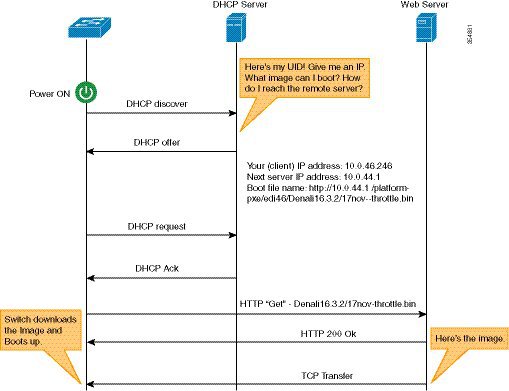
The following section describes how an iPXE bootloader works:
Figure 1. iPXE Bootloader Workflow
Bootloader sends a DHCP discover message, and when the server replies, the
Bootloader sends a DHCP request.
The DHCP response includes the IP address and boot file name. The boot file name
indicates that the boot image is to be retrieved from a TFTP server
(tftp://server/filename), FTP server (ftp://userid:password@server/filename), or
an HTTP server (http://server/filename).
Bootloader downloads and boots the image from the network source.
If no DHCP response is received, the bootloader keeps sending DHCP requests
forever or for a specified period of time, based on the boot mode configured.
When a timeout occurs, the bootloader reverts to a device-based boot. The device
sends DHCP requests forever only if the configured boot mode is
ipxe-forever. If the ipxe-timeout
boot mode command is configured, DHCP requests are sent for
the specified amount of time, and when the timeout expires, device boot mode is
activated.
Note
Because the current iPXE implementation works only via the management port
(GigabitEthernet0/0), DHCP requests sent through the front panel ports are not
supported.
When using a static network configuration to network boot, ROMMON uses the following
environment variables (and all of them are required):
BOOT—URLs separated by semicolon (;) to boot from.
IP_ADDRESS—Statically assigned IP address of a device.
DEFAULT_GATEWAY—Default gateway of the device.
IP_SUBNET_MASK—IPv4 or IPv6 prefix information.
IPv4—Subnet mask of the device in the format WWW.XXX.YYY.ZZZ eg.
255.255.255.0.
IPv6—Subnet prefix length of the device in the format NNN eg. 64 or 112.
When manual boot is disabled, the bootloader determines whether to execute a device boot
or a network boot based on the configured value of the rommon iPXE variable.
Irrespective of whether manual boot is enabled or disabled, the bootloader uses the
BOOTMODE variable to determine whether to do a device boot or a network boot. Manual
boot means that the user has configured the boot manual
switch command. When manual boot is disabled, and when
the device reloads, the boot process starts automatically.
When iPXE is disabled, the contents of the existing BOOT variable are used to determine
how to boot the device. The BOOT variable may contain a network-based uniform resource
identifier (URI) (for example, http://, ftp://, tftp://), and a network boot is
initiated; however DHCP is not used to get the network image path. The static network
configuration is taken from the IP_ADDRESS, DEFAULT_GATEWAY, and IP_SUBNET_MASK
variables. The BOOT variable may also contain a device filesystem-based path, in which
case, a device filesystem-based boot is initiated.
The DHCP server used for booting can identify a device through the Product ID (PID)
(available in DHCP Option 60), chassis serial number (available in DHCP option 61), or
the MAC address of the device. The showinventory and showswitch commands also display these values on the device.
The following is sample output from the show inventory command:
The following is sample output from the show switch
command:
Device# show switch

Switch/Stack Mac Address : 046c.9d01.7d80 - Local Mac Address
Mac persistency wait time: Indefinite
                                             H/W   Current
Switch#   Role    Mac Address     Priority Version  State
-------------------------------------------------------------------------------------
 1       Member   046c.9d1e.1a00     1              Ready
 2       Standby  046c.9d01.7d80     1              Ready
*3       Active   f8b7.e24e.9a00     1      P2B     Ready
The following rommon variables should be configured for iPXE:
BOOTMODE = ipxe-forever | ipxe-timeout | device
IPXE_TIMEOUT = seconds
IPv6 iPXE Network Boot
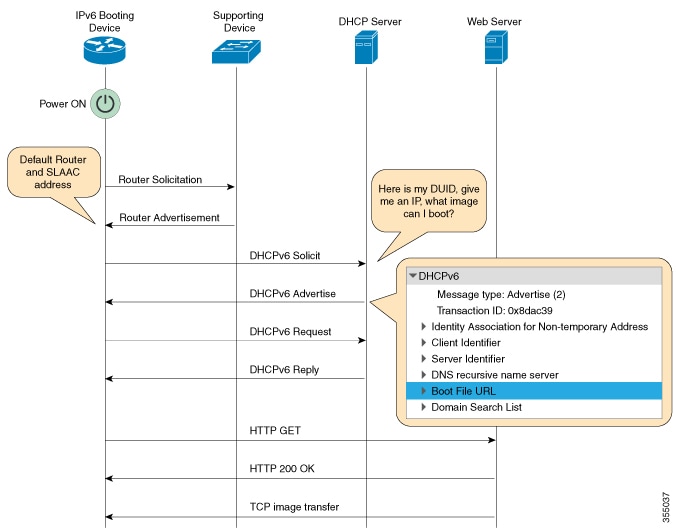
This illustration displays how IPv6 iPXE network boot works on a Cisco device:
The four elements in the above illustration are described below:
IPv6 Booting Device—The device that is booting through iPXE boot.
Supporting Device—A Cisco device that is configured with an IPv6 address to
generate Router Advertisement (RA) messages.
Note
In this illustration, the IPv6 booting device, the supporting device, and the
DHCP server are on the same subnet. However; if the supporting device and
the DHCP server are on different subnets, then there must be a relay agent
in the network.
DHCP server—Any DHCP server.
Web server—Any web server.
This section describes the IPv6 iPXE boot process:
The device sends a router solicitation Internet Control Message Protocol IPv6
(ICMPv6) type 133 packet to the IPv6 device on the local subnet.
The IPv6 device on the local subnet replies with a router advertisement (RA)
message, ICMPv6 type 134 packet. The device that sent the router solicitation
message, gets the default router and prefix information for Stateless Address
AutoConfiguration (SLAAC) address completion from the RA packet.
The device sends a DHCPv6 solicit message to the multicast group address of
ff02::1:2 for all DHCP agents.
The following sample displays the fields in a DHCPv6 solicit packet during iPXE
boot:
DHCPv6
 Message type: Solicit (1)
 Transaction ID: 0x36f5f1
 Client Identifier
 Vendor Class
 Identity Association for Non-Temporary Address
 Option Request
 User Class
 Vendor-specific Information
The DHCPv6 solicit message contains the following information:
DHCP Unique Identifier (DUID)—Identifies the client. iPXE supports
DUID-EN. EN stands for Enterprise Number, and this DUID is based on the
vendor-assigned unique identifier.
DHCP and DHCPv6 Options
If the DHCPv6 server is configured, it responds with a DHCPv6 advertise packet
that contains the 128 Bit IPv6 address, the boot file Uniform Resource
Identifier (URI), the Domain Name System (DNS) server and domain search list,
and the client and server IDs. The client ID contains the DUID of the client (In
this illustration, the IPv6 Booting Device), and the Server ID contains the DUID
of the DHCPv6 server.
The client then sends a DHCPv6 request packet to the multicast group address
ff02::1:2, requesting for advertised parameters.
The server responds with a unicast DHCPv6 reply to the Link Local (FE80::) IPv6
address of the client. The following sample displays the fields in a DHCPv6
reply packet:
DHCPv6
 Message type: Reply (7)
 Transaction ID: 0x790950
 Identity Association for Non-Temporary Address
 Client Identifier
 Server Identifier
 DNS recursive name server
 Boot File URL
 Domain Search List
The device then sends an HTTP GET request to the web server.
If the requested image is available at the specified path, the web server
responds with an OK for the HTTP GET request.
The TCP image transfer copies the image, and the device boots up.
IPv6 Address Assignment in Rommon Mode
The DHCP client uses the following order-of-precedence to decide which IPv6 address to
use in rommon mode:
The device uses the DHCP server-assigned address to boot an image. If the DHCPv6 server
fails to assign an address, the device tries to use the SLAAC address. If both the DHCP
server-assigned address and the SLAAC address are not available, the device uses the
link-local address. However, the remote FTP/HTTP/TFTP servers must be on the same local
subnet as that of the device for the image copy to succeed.
If the first three addresses are not available, the device uses the automatically
generated site-local address.
Supported ROMMON Variables
The following ROMMON variables are supported in Cisco IOS XE 17.8.1:
BAUD: Changes the device console BAUD rate to one of the Cisco standard baud
rate; such as 1200, 2400, 4800, 9600, 19200, 38400, 57600, and 115200). Any
invalid value will be rejected. If the BAUD variable is not set, the default
will be 9600. The corresponding CLI command is
ENABLE_BREAK: Enables a rommon break. The default value is NO.
MANUAL_BOOT: If manual boot is set to 1, the rommon or device prompt is
activated. If manual boot is set to 0, the device is reloaded; but rommon mode
is not activated.
SWITCH_IGNORE_STARTUP_CFG: If the value is 1, it causes the device to ignore the
startup configuration. If the value is not set, the value is treated as zero.
This is a read-only variable, and can only be modified by IOS.
iPXE-Supported DHCP Options
iPXE boot supports the following DHCPv4 and DHCPv6 options in rommon mode.
Note
Catalyst 9000 Series Switches support DHCP Option 60, Option 77, DHCPv6 Options 1,
Option 15, and Option 16. DHCP Option 61 is only supported on Catalyst 9350 Series
Switches.
DHCP Option 60—Vendor Class Identifier. This option is populated with the value
of the ROMMON environment variable MODEL_NUM.
DHCP Option 61—Client Identifier. This option is populated with the value of
theROMMON environment variable SYSTEM_SERIAL_NUM.
Note
This option is not supported on Catalyst 9400 Series Switches.
DHCP Option 77—User Class Option. This option is added to a DHCP Discover packet,
and contains the value equal to the string iPXE. This option helps to
isolate iPXE DHCP clients looking for an image to boot from a DHCP server.
The following is sample DHCPv4 configuration from the ISC DHCP Server that
displays the use of Option 77. The if condition in this sample implies
that if Option 77 exists, and is equal to the string iPXE, then advertise
the Boot File URI for the image.
host Switch2 {
     fixed-address 192.168.1.20 ;
     hardware ethernet CC:D8:C1:85:6F:11 ;
           #user-class = length of string + ASCII code for iPXE
     if exists user-class and option user-class = 04:68:50:58:45 {
         filename "http://192.168.1.146/test-image.bin"
     }
}
DHCPv6 Option 1—Client Identifier Option. This option is populated with the value
of the ROMMON environment variable SYSTEM_SERIAL_NUM as specified in RFC 3315.
The recommended format for the ROMMON environment variable is MAC_ADDR.
DHCPv6 Option 15—User Class Option. This option is the IPv6 User Class option in
a DHCPv6 solicit message, and is populated with the string, iPXE. The following
sample shows Option 15 defined in the ISC DHCP server:
option dhcp6.user-class code 15 = string ;
The following is a sample DHCP Server configuration that uses the DHCPv6 Option
15:
#Client-specific parameters
host switch1 {
     #assigning a fixed IPv6 address
     fixed-address6 2001:DB8::CAFE ;
     #Client DUID in hexadecimal format contains: DUID-type"2" + "EN=9" + "Chassis serial number"
     host-identifier option dhcp6.client-id       00:02:00:00:00:09:46:4F:43:31:38:33:
31:58:31:41:53;
    #User class 00:04:69:50:58:45 is len 4 + "iPXE"
    if option dhcp6.user-class = 00:04:69:50:58:45 {
       option dhcp6.bootfile-url "http://[2001:DB8::461/platform-pxe/edi46/test-image.bin";
    }
}
DHCPv6 Option 16—Vendor Class Option. Contains the device product ID (PID). The
PID can be determined from the output of the show
inventory command or from the MODEL_NUM rommon variable.
Option 16 is not a default option in the ISC DHCP Server and can be defined as
follows:
option dhcp6.vendor-class-data code 16 = string;
The following sample configuration illustrates the use of DHCPv6 Option 16:
The table below describes the significant fields shown in the display.
Table 2. Sample Output Field Descriptions
Field
Description
dhcp6.client-id
DHCP Unique Identifier (DUID) to identify the client.
dhcp6.user-class
DHCPv6 Option 15, the User Class option
dhcp6.vendor-class-data
DHCPv6 Option 16, the Vendor Class option that contains the
switch Product ID (PID).
dhcp6.bootfile-url
DHCPv6 Option 6 to request for the Boot File URI
DHCPv6 Unique Identifiers
There are three types of DHCPv6 Identifiers (DUIDs) defined by RFC 3315; these are:
DUID-LLT—DUID Link Layer address plus time, this is the link layer address of the
network interface connected to the DHCP device plus the time stamp at which it
is generated.
DUID-EN—EN stands for Enterprise Number, this DUID is based on vendor-assigned
unique ID.
DUID-LL—DUID formed using the Link Layer address of any network interface that is
permanently connected to the DHCP (client/server) device.
Cisco devices that support this feature use the DUID-EN (DUID Type 2) to identify the
DHCP client (that is the device in the DHCPv6 Solicit packet). Catalyst 9000 Series
Switches support not only DUID-EN, but also DUID-LL (DUID Type 3). DUID-EN is the
preferred type; however, if switches are unable to create it, then DUID-LL is
constructed and used.
The following example shows how to configure the boot mode to ipxe-timeout. The
configured timeout is 200 seconds. If an iPXE boot failure occurs after the
configured timeout expires, the configured device boot is activated. In this
example, the configured device boot is http://[2001:db8::1]/image-filename.
Device# configure terminal
Device(config)# boot ipxe timeout 200 switch 2
Device(config)# boot system http://[2001:db8::1]/image-filename
Device(config)# end
Sample iPXE Boot Logs
The following are sample boot logs from a device in rommon mode. Here, manual boot using
the ipxe-timeout command is configured:
The following is a sample DHCPv6 server configuration taken from an Internet Systems
Consortium (ISC) DHCP Server for reference. The lines preceded by the character #,
are comments that explain the configuration that follows.
Default-least-time 600;
max-lease-time-7200;
log-facility local7;

#Global configuration
#domain search list
option dhcp6.domain-search "cisco.com" ;
#User-defined options:new-name code new-code = definition ;
option dhcp6.user-class code 15 = string ;
option dhcp6.vendor-class-data code 16 = string;

subnet6 2001:db8::/64 {
 #subnet range for clients requiring an address
 range6 2001:db8:0000:0000::/64;

#DNS server options
option dhcp6.name-servers 2001:db8::46;

}
#Client-specific parameters
host switch1 {
    #assigning a fixed IPv6 address
    fixed-address6 2001:DB8::CAFE ;
    #Client DUID in hexadecimal that contains: DUID-type "2" + "EN=9" + "Chassis serial number"
    host-identifier option dhcp6.client-id 00:02:00:00:00:09:46:4F:43:31:38:33:
31:58:31:41:53;
   option dhcp6.bootfile-url "http://[2001:DB8::461/platform-pxe/edi46/test-image.bin";
}
For more information on DHCP server commands, see the ISC DHCP
Server website.
In this sample configuration, the dhcp6.client-id option identifies the switch, and
it is followed by the Enterprise Client DUID. The client DUID can be broken down for
understanding as 00:02 + 00:00:00:09 + chassis serial number in hexadecimal format,
where 2 refers to the Enterprise Client DUID Type, 9 refers to the reserved code for
Cisco’s Enterprise DUID, followed by the ASCII code for the Chassis serial number in
hexadecimal format. The chassis serial number for the switch in this sample is
FOC1831X1AS.
The Boot File URI is advertised to the switch only using the specified DUID.
The DHCPv6 Vendor Class Option 16 can also be used to identify the switch on the DHCP
Server. To define Option 16 as a user-defined option, configure the following:
option dhcp6.vendor-class-data code 16 = string;
The following is a sample DHCP server configuration that identifies the
switch based on the DHCPv6 Vendor Class Option 16 that is formed by using the switch
Product ID:
In this sample configuration, the dhcp6.vendor-class-data option refers to the DHCPv6
Option 16. In the dhcp6.vendor-class-data, 00:00:00:09 is Cisco’s Enterprise DUID,
0E is the length of the PID, and the rest is the PID in hexadecimal format. The PID
can also be found from the output of the show inventory
command or from the CFG_MODEL_NUM rommon variable. The PID used in this sample
configuration is WS-C3850-24P-L.
DHCPv6 options and DUIDs in the server configuration must be specified in the
hexadecimal format, as per the ISC DHCP server guidelines.
Dynamic Host Configuration Protocol for IPv6 (DHCPv6)
RFC 3986
Uniform Resource Identifier (URI): Generic Syntax
Technical Assistance
Description
Link
The Cisco Support website provides extensive online resources,
including documentation and tools for troubleshooting and
resolving technical issues with Cisco products and technologies.
To receive security and technical information about your
products, you can subscribe to various services, such as the
Product Alert Tool (accessed from Field Notices), the Cisco
Technical Services Newsletter, and Really Simple Syndication
(RSS) Feeds.
Access to most tools on the Cisco Support website requires a
Cisco.com user ID and password.
When iPXE boot is enabled on power up, the device first attempts to send a DHCPv6
Solicit message, followed by a DHCPv4 Discover message. If boot mode is
ipxe-forever the device keeps iterating
between the two forever.
If the boot-mode is iPXE timeout, the device first sends a DHCPv6 Solicit
message, and then a DHCPv4 Discover message, and the device falls back to device
boot after the timeout expires.
To interrupt iPXE boot, send a serial break to the console.
When using a UNIX telnet client, type CTRL-] and then send break. When you are
using a different TELNET client, or you are directly attached to a serial port,
sending a break may be triggered by a different keystroke or command.
If the DHCP server responds with an image, but the DNS server cannot resolve the
hostname, enable DNS debugs.
Note
We recommend the use of ISC DHCP server. This feature has not been verified
on IOS DHCP.
To test the HTTP server connectivity, use HTTP copy to copy a small sample file
from your HTTP server to your device. For example, at the rommon prompt, enter
copy http://192.168.1.1/test null: (the flash is
normally locked and you need to use the null device for testing) or
http://[2001:db8::99]/test.
When manual boot is enabled, and boot mode is ipxe-timeout, the device will not
automatically boot on power up. Issue the boot command
in rommon mode. To automate the boot process on power up, disable manual boot.
Use the net6-show command to display the current IPv6
parameters, including IPv6 addresses and the default router in rommon mode
Note
On Catalyst 9000 Series Switches, use the net-show show
command.
Use the net-dhcp or the
net6-dhcp commands based on your configuration,
The net-dhcp command is a test command for DHCPv4 and
the net6-dhcp command is for DHCPv6.
Note
On Catalyst 9000 Series Switches, use the net-dhcp
-6 command for DHCPv6.
Use the dig command to resolve names.
Note
On Catalyst 9000 Series Switches, use the
dns-lookup commmand to resolve names.
Enable HTTP debug logs to view the HTTP response code from the web server.
If Stateless Address Auto-Configuration (SLAAC) addresses are not generated,
there is no router that is providing IPv6 RA messages. iPXE boot for IPv6 can
still work but only with link or site-local addresses.
Troubleshooting Tips for iPXE
This section provides troubleshooting tips.
When iPXE boot is enabled on power up, the device first attempts to send a DHCPv6 Solicit message, followed by a DHCPv4 Discover
message. If boot mode is ipxe-forever the device keeps iterating between the two forever.
If the boot-mode is iPXE timeout, the device first sends a DHCPv6 Solicit message, and then a DHCPv4 Discover message, and
the device falls back to device boot after the timeout expires.
To interrupt iPXE boot, send a serial break to the console.
When using a UNIX telnet client, type CTRL-] and then send break. When you are using a different TELNET client, or you are
directly attached to a serial port, sending a break may be triggered by a different keystroke or command.
If the DHCP server responds with an image, but the DNS server cannot resolve the hostname, enable DNS debugs.
Note
We recommend the use of ISC DHCP server. This feature has not been verified on IOS DHCP.
To test the HTTP server connectivity, use HTTP copy to copy a small sample file from your HTTP server to your device. For
example, at the rommon prompt, enter copy http://192.168.1.1/test null: (the flash is normally locked and you need to use the null device for testing) or http://[2001:db8::99]/test.
When manual boot is enabled, and boot mode is ipxe-timeout, the device will not automatically boot on power up. Issue the
boot command in rommon mode. To automate the boot process on power up, disable manual boot.
Use the net6-show command to display the current IPv6 parameters, including IPv6 addresses and the default router in rommon mode
Note
On Catalyst 9000 Series Switches, use the net-show show command.
Use the net-dhcp or the net6-dhcp commands based on your configuration, The net-dhcp command is a test command for DHCPv4 and the net6-dhcp command is for DHCPv6.
Note
On Catalyst 9000 Series Switches, use the net-dhcp -6 command for DHCPv6.
Use the dig command to resolve names.
Note
On Catalyst 9000 Series Switches, use the dns-lookup commmand to resolve names.
Enable HTTP debug logs to view the HTTP response code from the web server.
If Stateless Address Auto-Configuration (SLAAC) addresses are not generated, there is no router that is providing IPv6 RA
messages. iPXE boot for IPv6 can still work but only with link or site-local addresses.

 Feedback