Configuring Multicast Routing over GRE Tunnel

Feature history for multicast routing over GRE tunnel

This table provides release and related information for the features explained in this module.

These features are available in all the releases subsequent to the one they were introduced in, unless noted otherwise.

Release

Feature Name and Description

Supported Platform

Cisco IOS XE 17.18.1

Multicast Routing over GRE Tunnel: Multicast routing over GRE tunnel allows IP multicast traffic to be sent from a source to a multicast group, over an area where IP multicast is not supported.

Cisco C9350 Series Smart Switches

Cisco C9610 Series Smart Switches

Prerequisites for multicast routing over GRE tunnels

Before configuring multicast routing over a GRE tunnel, ensure that you understand IP multicast routing technology, are familiar with GRE tunneling concepts.

Restrictions for configuring multicast routing over GRE tunnel

The following are the restrictions for configuring multicast routing over GRE tunnel:

  • IPv6 multicast over GRE tunnel is not supported.

  • The total number of supported multicast routes (mroutes) is 32000, across all tunnels.

  • Use the formula 8000/(((Number of tunnels)/4) + 1) to derive the number of mroutes.

  • Bidirectional PIM is not supported.

  • Multicast routing should be configured on the first hop router (FHR), the rendezvous point (RP) and the last hop router (LHR) to support multicast over the GRE tunnel.

  • The tunnel source can be a loopback, physical, or L3 EtherChannel interface.

  • No feature interactions such as IPSec, ACL, Tunnel counters, Crypto support, Fragmentation, Cisco Discovery Protocol (CDP), QoS, GRE keepalive, Multipoint GRE, etc. are supported on the GRE Tunnel.

  • Tunnel source cannot be a subinterface.

Multicast routing over GRE tunnels

A multicast routing over GRE tunnel is a tunneling mechanism that

  • transports IP multicast packets between network areas that do not support IP multicast natively,

  • enables multicast traffic from source to multicast groups across incompatible segments, and

  • supports both sparse mode and PIM SSM mode, as well as static RP and auto-RP configurations.

Benefits of tunneling to connect non-IP multicast areas

Allows multicast traffic to reach group members even if direct IP multicast routing is unavailable between source and destination.

Configure a GRE tunnel for IP multicast packets

Enable the transport of IP multicast packets between devices across a medium that does not support multicast routing.

Use this task to configure a GRE tunnel on a Cisco device to encapsulate and transport IP multicast traffic.

Before you begin

  • Have the required tunnel source and destination IP addresses or interfaces.

  • Ensure you have privileged EXEC access to the device.

Procedure

  Command or Action Purpose

Step 1

enable

Example:


Device> enable

Enables privileged EXEC mode.

  • Enter your password if prompted.

Step 2

configure terminal

Example:


Device# configure terminal

Enters global configuration mode.

Step 3

ip multicast-routing

Example:


Device(config)# ip multicast-routing

Enables IP multicast routing.

Step 4

interface tunnel number

Example:


Device(config)# interface tunnel 0

Enters tunnel interface configuration mode.

Step 5

ip address ip_address subnet_mask

Example:


Device(config-if)# ip address 192.168.24.1 255.255.255.252

Configures IP address and IP subnet.

Step 6

ip pim sparse-mode

Example:


Device(config-if)# ip pim sparse-mode

Enables sparse mode of operation of Protocol Independent Multicast (PIM) on the tunnel interface with one of the following mode of operation:

Step 7

tunnel source { ip-address | interface-name }

Example:


Device(config-if)# tunnel source 100.1.1.1

Configures the tunnel source.

Step 8

tunnel destination { hostname | ip-address }

Example:


Device(config-if)# tunnel destination 100.1.5.3

Configures the tunnel destination.

Step 9

end

Example:


Device(config-if)# end

Ends the current configuration session and returns to privileged EXEC mode.

show interface type number

Device# show interface tunnel 0

Displays tunnel interface information.

Configure multicast routing over GRE tunnel

This section provides steps for configuring multicast routing over GRE tunnel.

Configuring a GRE Tunnel to Connect Non-IP Multicast Areas

To configure a GRE tunnel to transport IP multicast packets between a source and destination that are connected by a medium that does not support multicast routing.

Procedure

  Command or Action Purpose

Step 1

enable

Example:


Device> enable

Enables privileged EXEC mode.

  • Enter your password if prompted.

Step 2

configure terminal

Example:


Device# configure terminal

Enters global configuration mode.

Step 3

ip multicast-routing

Example:


Device(config)# ip multicast-routing

Enables IP multicast routing.

Step 4

interface tunnel number

Example:


Device(config)# interface tunnel 0

Enters tunnel interface configuration mode.

Step 5

ip address ip_address subnet_mask

Example:


Device(config-if)# ip address 192.168.24.1 255.255.255.252

Configures IP address and IP subnet.

Step 6

ip pim sparse-mode

Example:


Device(config-if)# ip pim sparse-mode

Enables sparse mode of operation of Protocol Independent Multicast (PIM) on the tunnel interface with one of the following mode of operation:

Step 7

tunnel source { ip-address | interface-name }

Example:


Device(config-if)# tunnel source 100.1.1.1

Configures the tunnel source.

Step 8

tunnel destination { hostname | ip-address }

Example:


Device(config-if)# tunnel destination 100.1.5.3

Configures the tunnel destination.

Step 9

end

Example:


Device(config-if)# end

Ends the current configuration session and returns to privileged EXEC mode.

Step 10

show interface type number

Example:


Device# show interface tunnel 0

Displays tunnel interface information.

What to do next

Tunneling to connect non-IP multicast areas

This topic provides tunneling examples to connect non-IP multicast areas.

Tunneling to connect non-IP multicast areas is a network interoperability technique that

  • uses GRE tunneling to transport multicast routing packets between devices across non-multicast-enabled IP clouds,

  • enables multicast group communication between separated network segments, and

  • leverages PIM sparse mode to efficiently forward multicast traffic through tunnel interfaces.

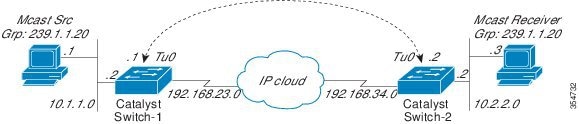
The following example shows multicast-routing between a Catalyst switch through a GRE tunnel.

Figure 1. Tunnel Connecting Non-IP Multicast Areas

In the figure above, the multicast source (10.1.1.1) is connected to Catalyst Switch-1 and is configured for multicast group 239.1.1.20. The multicast receiver (10.2.2.3) is connected to Catalyst Switch-2 and is configured to receive multicast packets for group 239.1.1.20. Separating Switch-1 and Switch-2 is an IP cloud, which is not configured for multicast routing.

A GRE tunnel is configured between Switch-1 to Switch-2 sourced with their loopback interfaces. Multicast-routing is enabled on Switch-1 and Switch-2. The ip pim sparse-mode command is configured on tunnel interfaces to support PIM in the sparse mode. Sparse mode configuration on the tunnel interfaces allows sparse-mode packets to be forwarded over the tunnel depending on rendezvous point (RP) configuration for the group.

Switch-1 Configuration:


Device(config)# ip multicast-routing 
Device(config)# interface Loopback0   //Tunnel source interface 
Device(config-if)# ip address 2.2.2.2 255.255.255.255 

Device(config)# interface Tunnel 10     //Tunnel interface configured for PIM traffic
Device(config-if)# ip address 192.168.24.1 255.255.255.252
Device(config-if)# ip pim sparse-mode
Device(config-if)# ip nhrp map 192.168.24.3  4.4.4.4  //NHRP may optionally be configured to dynamically discover tunnel end points.
Device(config-if)# ip nhrp map multicast 4.4.4.4
Device(config-if)# ip nhrp network-id 1
Device(config-if)# ip nhrp nhs 192.168.24.3
Device(config-if)# tunnel source Loopback0
Device(config-if)# tunnel destination 4.4.4.4

Device(config)# interface GigabitEthernet 0/0/0       //Source interface
Device(config-if)# ip address 10.1.1.2 255.255.255.0 
Device(config-if)# ip pim sparse-mode


Switch-2 Configuration:

Device(config)# ip multicast-routing
Device(config)# interface Loopback0   	//Tunnel source interface
Device(config-if)# ip address 4.4.4.4 255.255.255.255 

Device(config)# interface Tunnel 10 	    //Tunnel interface configured for PIM traffic
Device(config-if)# ip address 192.168.24.2 255.255.255.252
Device(config-if)# ip nhrp map 192.168.24.4 2.2.2.2 	//NHRP may optionally be configured to dynamically discover tunnel end points.
Device(config-if)# ip nhrp map multicast 2.2.2.2
Device(config-if)# ip nhrp network-id 1
Device(config-if)# ip nhrp nhs 192.168.24.4
Device(config-if)# ip pim sparse-mode
Device(config-if)# tunnel source Loopback0
Device(config-if)# tunnel destination 2.2.2.2

Device(config)# interface GigabitEthernet 0/0/0      //Receiver interface
Device(config-if)# ip address 10.2.2.2 255.255.255.0 
Device(config-if)# ip pim sparse-mode