IPv6 over IPv4 GRE Tunnels

Feature history for IPv6 over IPv4 GRE tunnels

This table provides release and related information for the features explained in this module.

These features are available in all the releases subsequent to the one they were introduced in, unless noted otherwise.

Release

Feature Name and Description

Supported Platform

Cisco IOS XE 17.18.1

IPv6 over IPv4 GRE Tunnels: GRE tunnels are links between two points, with a separate tunnel for each link. The tunnels are not tied to a specific passenger or transport protocol, but in this case carry IPv6 as the passenger protocol with the GRE as the carrier protocol and IPv4 or IPv6 as the transport protocol.

Cisco C9350 Series Smart Switches

Cisco C9610 Series Smart Switches

Tunnel modes for IPv6 over IPv4 GRE deployment

The following sections provide information about tunnel models for IPv6 over IPv4 GRE deployment:

GRE IPv4 tunnels for IPv6 traffic

A GRE IPv4 tunnel is a tunneling mechanism that

  • encapsulates IPv6 traffic within IPv4 GRE packets,

  • enables point-to-point connections between dual-stack devices, and

  • provides protocol-independent transport over IPv4 networks.

The primary use of GRE tunnels is for stable connections that require regular secure communication between two edge devices or between an edge device and an end system. The edge devices and the end systems must be dual-stack implementations.

IPv6 overlay tunnels

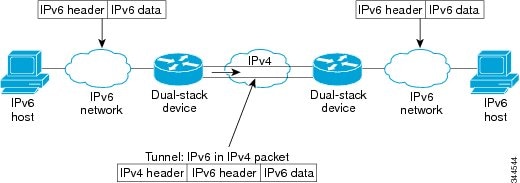
An overlay tunnel is a network tunneling technique that

  • encapsulates one protocol (such as IPv6) within another (such as IPv4) for network transport

  • enables communication between isolated networks without modifying the intermediate infrastructure, and

  • requires tunnel endpoints to support both protocol stacks.

Figure 1. Overlay Tunnels
The figure shows overlay tunnels.

Note


Overlay tunnels reduce the maximum transmission unit (MTU) of an interface by 20 octets (assuming that the basic IPv4 packet header does not contain optional fields). A network that uses overlay tunnels is difficult to troubleshoot. Therefore, overlay tunnels that connect isolated IPv6 networks should not be considered a final IPv6 network architecture. The use of overlay tunnels should be considered as a transition technique toward a network that supports both the IPv4 and IPv6 protocol stacks or just the IPv6 protocol stack.


IPv6 supports GRE type of overlay tunneling. IPv6 over IPv4 GRE Tunnels can carry IPv6, Connectionless Network Service (CLNS), and many other types of packets.

Configure GRE IPv6 tunnels

Establish a GRE tunnel over an IPv6 network to enable transport of IPv4 or IPv6 packets across IPv6 infrastructure.

Use GRE IPv6 tunnels to support routing protocols across IPv6 networks or interconnect remote IPv6 networks over intermediate IPv6 infrastructure.

Before you begin

Ensure the device supports both IPv4 and IPv6 protocol stacks.

  • Verify reachability between tunnel source and destination.

  • Decide on the tunnel numbers and IPv6 addresses to use.

Procedure

  Command or Action Purpose

Step 1

enable

Example:


Device> enable 

Enables privileged EXEC mode.

Enter your password if prompted.

Step 2

configure terminal

Example:


Device# configure terminal

Enters global configuration mode.

Step 3

interface tunnel tunnel-number

Example:


Device(config)# interface tunnel 0

Specifies a tunnel interface and number, and enters interface configuration mode.

Step 4

ipv6 address ipv6-prefix / prefix-length [eui-64 ]

Example:


Device(config-if)# ipv6 address 3ffe:b00:c18:1::3/127

Specifies the IPv6 network assigned to the interface and enables IPv6 processing on the interface.

Step 5

tunnel source {ip-address | ipv6-address | interface-type interface-number }

Example:


Device(config-if)# tunnel source ethernet 0

Specifies the source IPv4 address or the source interface type and number for the tunnel interface.

  • If an interface is specified, the interface must be configured with an IPv4 address.

Step 6

tunnel destination {host-name | ip-address | ipv6-address }

Example:


Device(config-if)# tunnel destination 2001:DB8:1111:2222::1/64

Specifies the destination IPv6 address or hostname for the tunnel interface.

Step 7

tunnel mode {aurp | cayman | dvmrp | eon | gre | gre multipoint | gre ipv6 | ipip [decapsulate-any ] | iptalk | ipv6 | mpls | nos

Example:


Device(config-if)# tunnel mode gre ipv6

Specifies a GRE IPv6 tunnel.

Note


The tunnel mode gre ipv6 command specifies GRE as the encapsulation protocol for the tunnel.

Example: IPv6 tunnel destination address configuration

To provide an example configuration for setting the tunnel destination address in an IPv6 tunnel.
Device> enable
Device# configure terminal
Device(config)# interface Tunnel 0
Device(config-if)# ipv6 address 2001:1:1::1/48
Device(config-if)# tunnel source GigabitEthernet 0/0/0
Device(config-if)# tunnel destination 10.0.0.2
Device(config-if)# tunnel mode gre ipv6
Device(config-if)# exit
!
Device(config)# interface GigabitEthernet0/0/0
Device(config-if)# ip address 10.0.0.1 255.255.255.0
Device(config-if)# exit
!
Device(config)# ipv6 unicast-routing
Device(config)# router isis
Device(config-router)# net 49.0000.0000.000a.00