Configure Tenant Routed Multicast

This chapter contains these sections:

Tenant Routed Multicast

A Tenant Routed Multicast (TRM) is a VXLAN EVPN multicast forwarding solution that

  • enables efficient multicast delivery across a multi-tenant VXLAN fabric using a BGP-based EVPN control plane

  • supports multicast forwarding between senders and receivers within the same or different subnets and VTEPs, and

  • improves Layer-3 overlay multicast scalability and efficiency for modern data center networks.

Tenant routed multicast brings standards-based multicast capabilities to the VXLAN overlay network by leveraging next generation multicast VPN (ngMVPN) as described in IETF RFC 6513 and 6514. TRM allows each edge device (VTEP) with a distributed IP Anycast Gateway to also act as a Designated Router (DR) for multicast forwarding. Bridged multicast forwarding is optimized through IGMP snooping, ensuring only interested receivers at the edge receive the multicast traffic, while all non-local multicast traffic is routed for efficient delivery.

When TRM is enabled, multicast forwarding in the underlay network is used to replicate VXLAN-encapsulated routed multicast traffic. A Default Multicast Distribution Tree (Default-MDT) is built per VRF, which supplements the existing multicast groups for Layer-2 VNI Broadcast, Unknown Unicast, and multicast replication. Overlay multicast groups are mapped to corresponding underlay multicast addresses for scalable transport. The BGP-based approach allows the fabric to distribute the rendezvous point (RP) functionality, making every VTEP an RP for multicast.

TRM enables seamless integration with existing multicast-enabled networks, supporting external multicast rendezvous points and tenant-aware external connectivity through Layer-3 physical or subinterfaces.

In a data center fabric using TRM, multicast sources and receivers can be located within the data center, in a separate campus network, or reachable externally via the WAN. TRM ensures multicast traffic reaches only interested receivers, even across different sites and tenants, while using underlay multicast replication to optimize bandwidth and resiliency.
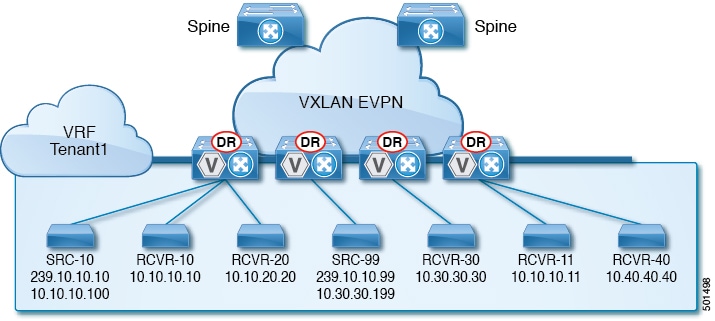
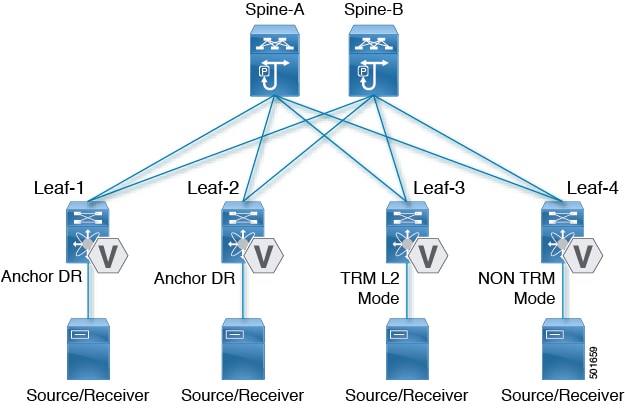
Figure 1. VXLAN EVPN TRM
VXLAN EVPN TRM

Tenant routed multicast mixed modes

A tenant routed multicast mixed mode is a VXLAN multicast network feature that:

  • enables TRM-capable and non-TRM-capable edge devices to coexist on the same fabric

  • allows multicast traffic to be partially routed by TRM-capable devices but primarily bridged by legacy devices, and

  • assigns one or more TRM-capable edge devices as gateways to translate multicast traffic between TRM and non-TRM domains.

This mixed mode approach ensures backward compatibility and simplifies migration to newer hardware across the fabric.

A network with both TRM-capable and non-TRM-capable devices uses mixed mode to ensure seamless multicast communication across the fabric.

Figure 2. TRM Layer 2/Layer 3 Mixed Mode

Guidelines and Limitations for Tenant Routed Multicast

Tenant Routed Multicast (TRM) has the following guidelines and limitations:

  • Tenant Routed Multicast is not supported on Cisco Nexus 9500 platform switches with -R line cards.

  • The Guidelines and Limitations for VXLAN also apply to TRM

  • With TRM enabled, SVI as a core link is not supported.

  • With TRM enabled, Multicast Source/Receiver behind FEX is not supported.

  • If TRM is configured, ISSU is disruptive.

  • TRM supports IPv4 multicast only.

  • TRM requires an IPv4 multicast-based underlay using PIM Any Source Multicast (ASM) which is also known as sparse mode.

  • TRM supports overlay PIM ASM and PIM SSM only. PIM BiDir is not supported in the overlay.

  • RP has to be configured either internal or external to the fabric.

  • The internal RP must be configured on all TRM-enabled VTEPs including the border nodes.

  • The external RP must be external to the border nodes.

  • The RP must be configured within the VRF pointing to the external RP IP address (static RP). This ensures that unicast and multicast routing is enabled to reach the external RP in the given VRF.

  • TRM supports multiple border nodes. Beginning with Cisco NX-OS Release 9.2(3), reachability to an external RP via multiple border leaf switches is supported (ECMP). In prior releases, the external RP could only be reachable via a single border leaf (non-ECMP).

  • Within EVPN Multi-Site, TRM enabled East-West multicast traffic is not supported. In case the same external RP is used for multiple sites, overlapping multicast groups between sites must be avoided.

Supported features and limitations of Layer 3 TRM

Layer 3 Tenant Routed Multicast (TRM) has these configuration guidelines and limitations:

  • When configuring TRM VXLAN BGP EVPN, the following platforms are supported:

    • Cisco Nexus 9200, 9332C, 9364C, 9300-EX, and 9300-FX/FX2/FX3/FXP platform switches.

    • Cisco Nexus 9300-GX platform switches.

    • Cisco Nexus 9500 platform switches with 9700-EX line cards, 9700-FX line cards, or a combination of both line cards.

  • Layer 3 TRM and VXLAN EVPN Multi-Site are supported on the same physical switch. For more information, see Configure Multi-Site.

  • TRM with vPC border leafs is supported only for Cisco Nexus 9200, 9300-EX, and 9300-FX/FX2 platform switches and Cisco Nexus 9500 platform switches with -EX/FXline cards. The advertise-pip and advertise virtual-rmac commands must be enabled on the border leafs to support this functionality. For configuration information, see the "Configuring VIP/PIP" section.

  • To support any Layer 3 source behind one of the vPC peers, whether physical or virtual MCT, a physical link configured as VRF-lite is required between the vPC peers. This setup is necessary to accommodate a receiver located behind the vPC peer, especially if it is the sole receiver in the fabric. This requirement applies to all scenarios where the vPC functions as a BGW, border Leaf, or an internal Leaf.

    On the receiving vPC peer, the VRF-lite link must have a superior reachability metric to the L3 source compared to any other paths (iBGP or eBGP) to be selected as the RPF towards the L3 source. In this configuration, traffic will flow directly to the receiver without traversing the EVPN fabric.

  • Well-known local scope multicast (224.0.0.0/24) is excluded from TRM and is bridged.

  • When an interface NVE is brought down on the border leaf, the internal overlay RP per VRF must be brought down.

ISSU

TRM Flow Path Visualization support

Layer 3 TRM supported platforms and release

  • Layer 3 TRM is supported for Cisco Nexus 9200, 9300-EX, and 9300-FX/FX2/FX3/FXP and 9300-GX platform switches.

Support for combination of Layer 3 TRM and EVPN Multi-Site

Support on Nexus 9800 Series switches

Support on -R/RX linecards

Supported features and platforms for Layer 2/Layer 3 TRM (Mixed Mode)

Layer 2/Layer 3 Tenant Routed Multicast (TRM) in Mixed Mode supports the following configurations, platforms, and guidelines:

  • All TRM Layer 2/Layer 3 configured switches must be Anchor DR. This is because in TRM Layer 2/Layer 3, you can have switches configured with TRM Layer 2 mode that co-exist in the same topology. This mode is necessary if non-TRM and Layer 2 TRM mode edge devices (VTEPs) are present in the same topology. 


  • Anchor DR is required to be an RP in the overlay.

  • An extra loopback is required for anchor DRs.

  • Non-TRM and Layer 2 TRM mode edge devices (VTEPs) require an IGMP snooping querier configured per multicast-enabled VLAN. Every non-TRM and Layer 2 TRM mode edge device (VTEP) requires this IGMP snooping querier configuration because in TRM multicast control-packets are not forwarded over VXLAN.

  • The IP address for the IGMP snooping querier can be re-used on non-TRM and Layer 2 TRM mode edge devices (VTEPs).

  • The IP address of the IGMP snooping querier in a VPC domain must be different on each VPC member device.

  • When interface NVE is brought down on the border leaf, the internal overlay RP per VRF should be brought down.

  • The NVE interface must be shut and unshut while configuring the ip multicast overlay-distributed-dr command.

  • Beginning with Cisco NX-OS Release 9.2(1), TRM with vPC border leafs is supported. Advertise-PIP and Advertise Virtual-Rmac need to be enabled on border leafs to support with functionality. For configuring advertise-pip and advertise virtual-rmac, see the "Configuring VIP/PIP" section.

Supported platforms

Anchor DR is supported only on these platforms:

  • Cisco Nexus 9200, 9300-EX, and 9300-FX/FX2 platform switches

  • Cisco Nexus 9500 platform switches with 9700-EX line cards, 9700-FX line cards, or a combination of both line cards

Unsupported features and platforms

Supported rendezvous point options by TRM mode

With TRM enabled Internal and External RP is supported. These tables provide information about which TRM modes support internal and external rendezvous point (RP) options, along with the minimum supported NX-OS release for each combination. This information helps network designers and administrators determine the appropriate TRM modes and software versions needed for specific RP deployments.

Table 1. TRM RP support

Mode

RP Internal

RP External

PIM-Based RP Everywhere

TRM L2 Mode

N/A

N/A

N/A

TRM L3 Mode

7.0(3)I7(1), 9.2(x)

7.0(3)I7(4), 9.2(3)

Supported in 7.0(3)I7(x) releases starting from 7.0(3)I7(5)

Not supported in 9.2(x)

TRM L2L3 Mode

7.0(3)I7(1), 9.2(x)

N/A

N/A

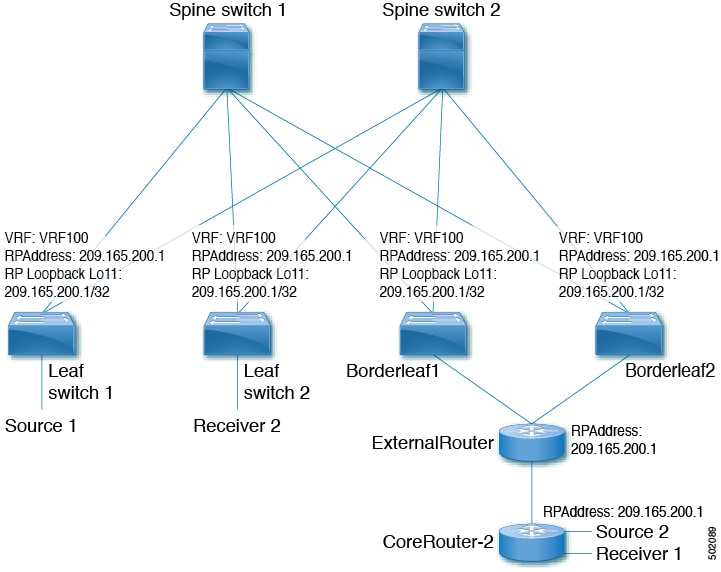
Configure a rendezvous point inside the VXLAN fabric

Configure the loopback interface and related parameters for TRM VRFs on all VTEPs. This ensures multicast traffic is managed correctly and efficiently throughout the fabric. The loopback address must be reachable and advertised in EVPN.

Follow these steps to configure the rendezvous point inside the VXLAN fabric:

Before you begin

  • Verify that all devices (VTEPs) support TRM VRFs.

  • Ensure network connectivity so the loopback address is reachable in EVPN.

  • Plan and reserve the loopback IP address for the RP.

Procedure


Step 1

Enter global configuration mode.

Example:

switch# configure terminal

Step 2

Configure the loopback interface for use with multicast RP on all TRM-enabled nodes.

Example:

switch(config)# interface loopback 11

Step 3

Assign the loopback interface to the correct VRF.

Example:

switch(config-if)# vrf member vrf100

Step 4

Specify the IP address for the loopback interface.

Example:

switch(config-if)# ip address 209.165.200.1/32

Step 5

Enable PIM sparse-mode on the loopback interface.

Example:

switch(config-if)# ip pim sparse-mode

Step 6

Create the VXLAN tenant VRF if it does not already exist.

Example:

switch(config-if)# vrf context vrf100

Step 7

Configure the RP address and group-list for multicast.

Example:

switch(config-vrf# ip pim rp-address 209.165.200.1 group-list 224.0.0.0/4

Use the same RP IP address for all edge devices (VTEPs) to enable a fully distributed RP.


The rendezvous point for multicast is configured and distributed across all VTEPs in the VXLAN fabric, allowing for efficient multicast routing and group communication.

Configure an external rendezvous point

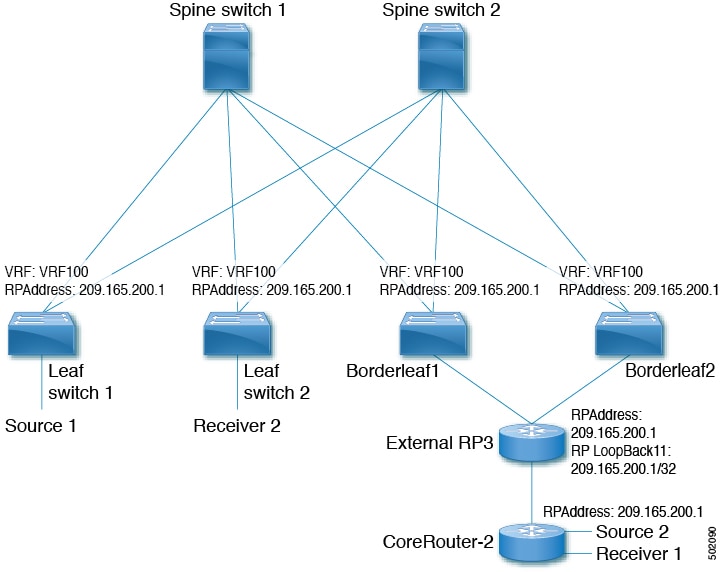
Configure the external rendezvous point (RP) IP address within the TRM VRFs on all devices (VTEP). In addition, ensure reachability of the external RP within the VRF via the border node.

Follow these steps to configure an external rendezvous point:

Before you begin

Ensure TRM is enabled.

  • Identify the RP IP address to use.

  • Confirm all relevant VTEP and border node devices are reachable.

  • Ensure only one routing path (non-ECMP) is active between the TRM fabric and the external RP via a single border leaf.

Procedure


Step 1

Enter configuration mode.

Example:

switch# configure terminal

Step 2

Enter the target TRM VRF context.

Example:

switch(config)# vrf context vrf100

Step 3

Configure the multicast RP address for the VRF.

Example:

switch(config-vrf)# ip pim rp-address 209.165.200.1 group-list 224.0.0.0/4

Use the same RP IP address on all edge devices (VTEPs) for a distributed RP setup.


The external rendezvous point is configured for multicast in the TRM fabric. All devices in the specified VRFs use the designated RP, and multicast routing traverses a single, controlled border node as intended.

Configure Layer 3 Tenant Routed Multicast

This procedure enables the Tenant Routed Multicast (TRM) feature. TRM operates primarily in the Layer 3 forwarding mode for IP multicast by using BGP MVPN signaling. TRM in Layer 3 mode is the main feature and the only requirement for TRM enabled VXLAN BGP EVPN fabrics. If non-TRM capable edge devices (VTEPs) are present, the Layer 2/Layer 3 mode and Layer 2 mode have to be considered for interop.

To forward multicast between senders and receivers on the Layer 3 cloud and the VXLAN fabric on TRM vPC border leafs, the VIP/PIP configuration must be enabled. For more information, see Configuring VIP/PIP.


Note


TRM follows an always-route approach and hence decrements the Time to Live (TTL) of the transported IP multicast traffic.


Follow these steps to configure Layer 3 Tenant Routed Multicast:

Before you begin

  • Ensure VXLAN EVPN (feature nv overlay, nv overlay evpn) is enabled.

  • Confirm the rendezvous point (RP) is configured.

  • Enable PIM v4/v6 if TRM v4/v6 is needed.

Procedure


Step 1

Enable the Next-Generation Multicast VPN (ngMVPN) control plane.

Example:

switch# configure terminal
switch(config)# feature ngmvpn

New address family commands become available in BGP.

Step 2

Configure IGMP snooping for VXLAN VLANs.

Example:

switch(config)# ip igmp snooping vxlan

Step 3

Configure the NVE (Network Virtualization Edge) interface and associate the Layer 3 VNI with the VRF.

Example:

switch(config)# interface nve 1
switch(config-if-nve)# member vni 200100 associate-vrf
switch(config-if-nve-vni)# mcast-group 225.3.3.3

The range of vni-range is from 1 to 16,777,214.

Builds the default multicast distribution tree for the VRF VNI (Layer 3 VNI).

The multicast group is used in the underlay (core) for all multicast routing within the associated Layer 3 VNI (VRF).

Note


We recommend that underlay multicast groups for Layer 2 VNI, default MDT, and data MDT not be shared. Use separate, non-overlapping groups.

Step 4

Set up BGP and enable multicast VPN for the peer

Example:

switch(config)# router bgp 100
switch(config-router)# neighbor 1.1.1.1
switch(config-router-neighbor)# address-family ipv4 mvpn
switch(config-router-neighbor-af)# send-community extended

Enables ngMVPN for address family signalization. The send community extended command ensures that extended communities are exchanged for this address family.

Step 5

Specify the rendezvous point (RP) address for multicast traffic.

Example:

switch(config-vrf)# ip pim rp-address 209.165.201.1 group-list 226.0.0.0/8

Ensure that the same RP IP address and group range are configured on all VXLAN VTEPs to enable a fully distributed RP.

For overlay RP placement options, see the Options for rendezvous points in TRM deployments section.

Step 6

Configure SVI for Layer 2 and Layer 3 VNIs, assign VRF membership, and enable PIM as required.

Example:

switch(config)# interface vlan11
switch(config-if)# no shutdown
switch(config-if)# vrf member vrf100
switch(config-if)# ip address 11.1.1.1/24
switch(config-if)# ip pim sparse-mode
switch(config-if)# ip pim neighbor-policy route-map1 !if preventing PIM neighborship on L2VNI SVI
switch(config-if)# fabric forwarding mode anycast-gateway !as needed
switch(config-if)# ip forward !for L3VNI SVI

Configures the first-hop gateway (distributed anycast gateway for the Layer 2 VNI. No router PIM peering must ever happen with this interface.

Creates an IP PIM neighbor policy with a suitable route-map to deny any IPv4 addresses, preventing PIM from establishing PIM neighborship on the L2VNI SVI.

Note


Do not use Distributed Anycast Gateway for PIM Peerings.

Step 7

Configure the BGP address family for unicast and set the auto route-target for multicast VPN.

Example:

switch(config-vrf)# address-family ipv4 unicast
switch(config-vrf-af-ipv4)# route-target both auto mvpn
switch(config)# ip multicast overlay-spt-only

Defines the BGP route target that is added as an extended community attribute to the customer multicast (C_Multicast) routes (ngMVPN route type 6 and 7).

Auto route targets are constructed by the 2-byte Autonomous System Number (ASN) and Layer 3 VNI.

Gratuitously originate (S,A) route when the source is locally connected. The ip multicast overlay-spt-only command is enabled by default on all MVPN-enabled Cisco Nexus 9000 Series switches (typically leaf node).


Layer 3 Tenant Routed Multicast is enabled, providing IP multicast forwarding for tenants over the VXLAN BGP EVPN fabric.

Configure TRM on the VXLAN EVPN spine

This procedure enables Tenant Routed Multicast (TRM) on a VXLAN EVPN spine switch.

Follow these steps to configure TRM on the VXLAN EVPN spine:

Before you begin

  • Confirm that the VXLAN BGP EVPN spine configuration is complete. For more information see Configure iBGP for EVPN on the spine.

  • Ensure you know your BGP autonomous system numbers and neighbor IP addresses.

Procedure


Step 1

Enter configuration mode.

Example:

switch# configure terminal

Step 2

Create a route-map to retain the next-hop for EVPN routes.

Example:

switch(config)# route-map permitall permit 10

Note


The route-map keeps the next-hop unchanged for EVPN routes

  • Required for eBGP

  • Options for iBGP

Step 3

Retain the next-hop attribute in the route-map.

Example:

switch(config-route-map)# set ip next-hop unchanged
switch(config-route-map)# exit
switch(config)#

Note


The route-map keeps the next-hop unchanged for EVPN routes

  • Required for eBGP

  • Options for iBGP

Step 4

Enter BGP router configuration mode using your AS number.

Example:

switch(config)# router bgp 65002

Specify BGP.

Step 5

Configure the address family IPv4 MVPN under the BGP.

Example:

switch(config-router)# address-family ipv4 mvpn

Step 6

Configure retain route-target all under address-family IPv4 MVPN [global].

Example:

switch(config-router-af)# retain route-target all

Note


Required for eBGP. Allows the spine to retain and advertise all MVPN routes when there are no local VNIs configured with matching import route targets.

Step 7

Configure your BGP multicast VPN neighbor.

Example:

switch(config-router-af)# neighbor 100.100.100.1 

Step 8

Under the neighbor’s IPv4 MVPN address-family, apply TRM-specific settings:

Example:

switch(config-router-neighbor)# address-family ipv4 mvpn
  1. If using eBGP, enter:

    Example:

    switch(config-router-neighbor-af)# disable-peer-as-check
    switch(config-router-neighbor-af)# rewrite-rt-asn
    switch(config-router-neighbor-af)# send-community extended
    switch(config-router-neighbor-af)# route-map permitall out

    Configure disable-peer-as-check parameter on the spine for eBGP when all leafs are using the same AS but the spines have a different AS than leafs.

    The rewrite-rt-asn command is required if the route target auto feature is being used to configure EVPN route targets.

  2. If using iBGP with route reflectors, enter:

    Example:

    switch(config-router-neighbor-af)# route-reflector-client

Step 9

Exit configuration and save your changes.


TRM is enabled on the VXLAN EVPN spine, supporting multicast routing for tenant networks.

Configure TRM in Layer 2 and Layer 3 mixed mode

This procedure enables the Tenant Routed Multicast (TRM) feature. This enables both Layer 2 and Layer 3 multicast BGP signaling. This mode is only necessary if non-TRM edge devices (VTEPs) are present in the Cisco Nexus 9000 Series switches (1st generation) . Only the Cisco Nexus 9000-EX and 9000-FX switches can do Layer 2/Layer 3 mode (Anchor-DR).

To forward multicast between senders and receivers on the Layer 3 cloud and the VXLAN fabric on TRM vPC border leafs, the VIP/PIP configuration must be enabled. For more information, see Configuring VIP/PIP.

All Cisco Nexus 9300-EX and 9300-FX platform switches must be in Layer 2/Layer 3 mode.

Follow these steps to configure Tenant Routed Multicast (TRM) in Layer 2/Layer 3 mixed mode:

Before you begin

  • Ensure VXLAN EVPN is configured.

  • Ensure the rendezvous point (RP) is configured for multicast.

Procedure


Step 1

Enter configuration mode.

Example:

switch# configure terminal

Step 2

Enable ngMVPN and advertise EVPN multicast.feature ngmvpn

Example:

switch(config)# feature ngmvpn
switch(config)# advertise evpn multicast

Step 3

Enable IGMP snooping for VXLAN VLANs.

Example:

switch(config)# ip igmp snooping vxlan

Step 4

Enable multicast overlay SPT-only and distributed anchor DR.

Example:

switch(config)# ip multicast overlay-spt-only
switch(config)# ip multicast overlay-distributed-dr

Gratuitously originate (S,A) route when source is locally connected. The ip multicast overlay-spt-only command is enabled by default on all MVPN-enabled Cisco Nexus 9000 Series switches (typically leaf nodes).

Note


You must shut and unshut the NVE interface after configuring ip multicast overlay-distributed-dr .

Step 5

Configure the NVE interface, associate Layer 3 VNIs, and assign multicast groups.

Example:

switch(config)# interface nve 1
switch(config-if-nve)# member vni 200100 associate-vrf
switch(config-if-nve-vni)# mcast-group 225.3.3.3

The range of vni-range is from 1 to 16,777,214.

Step 6

Set up loopback interface on all anchor DR devices, and configure OSPF and PIM.

Example:

switch(config-if-nve)# interface loopback 10
switch(config-if)# ip address 100.100.1.1/32
switch(config-if)# ip router ospf 100 area 0.0.0.0
switch(config-if)# ip pim sparse-mode

The IP address must be the same on all distributed anchor DRs.

Step 7

Configure multicast routing to override the source-interface on every TRM-enabled VTEP (Anchor DR).

Example:

switch(config-if)# interface nve1
switch(config-if-nve)# mcast-routing override source-interface loopback 10

The loopback10 variable must be configured on every TRM-enabled VTEP (Anchor DR) in the underlay with the same IP address. This loopback and the respective override command are needed to serve TRM VTEPs in co-existence with non-TRM VTEPs.

Step 8

Configure BGP for multicast VPN and send extended communities and set route-targets.

Example:

switch(config)# router bgp 100
switch(config-router)# neighbor 1.1.1.1
switch(config-router-neighbor)# address-family ipv4 mvpn
switch(config-router-neighbor-af)# send-community extended
switch(config-vrf-af-ipv4)# route-target both auto mvpn

Step 9

Configure Layer 2/Layer 3 VNI VLAN interfaces with IP, PIM, and anycast gateway settings.

Example:

switch(config)# interface vlan11  ! Layer 2 VNI
switch(config-if)# vrf member vrf100
switch(config-if)# ip address 11.1.1.1/24
switch(config-if)# ip pim sparse-mode
switch(config-if)# fabric forwarding mode anycast-gateway
switch(config-if)# ip pim neighbor-policy route-map1
switch(config-if)# exit
switch(config)# interface vlan100   !Layer 3 VNI
switch(config-if)# vrf member vrf100
switch(config-if)# ip forward
switch(config-if)# ip pim sparse-mode
switch(config-if)# exit
switch(config)# vrf context vrf100
switch(config-vrf)# ip pim rp-address 209.165.201.1 group-list 226.0.0.0/8
switch(config-vrf)# address-family ipv4 unicast

For overlay RP placement options, see the Options for rendezvous points in TRM deployments.

To prevent PIM neighborship on the L2VNI SVI, create an IP PIM neighbor policy with a suitable route map to deny IPv4 addresses.

Ensure that the same RP IP address and group range are configured on all VXLAN VTEPs to enable a fully distributed RP.


Tenant Routed Multicast is enabled in Layer 2/Layer 3 mixed mode, allowing multicast traffic forwarding between senders and receivers across the fabric and external Layer 3 networks.

Configure Layer 2 Tenant Routed Multicast

Before you begin

VXLAN EVPN must be configured.

TRM allows multicast traffic optimization by signaling Layer 2 multicast routes. This procedure activates TRM features and configures IGMP snooping querier settings on required switches.

Follow these steps to configure Layer 2 Tenant Routed Multicast:

Before you begin

  • VXLAN EVPN must be configured.

  • You must configure IGMP snooping querier per multicast-enabled VXLAN VLAN on all Layer-2 TRM leaf switches.

Procedure


Step 1

Enter configuration mode.

Example:

switch# configure terminal

Step 2

Enable the EVPN/MVPN feature.

Example:

switch(config)# feature ngmvpn

Step 3

Advertise Layer 2 multicast capability for EVPN.

Example:

switch(config)# advertise evpn multicast

Step 4

Enable IGMP snooping for VXLANs.

Example:

switch(config)# ip igmp snooping vxlan

Step 5

Enter VLAN configuration mode for each multicast-enabled VXLAN VLAN.

Example:

switch(config)# vlan configuration 101

Step 6

Configure the IGMP snooping querier by specifying its IP address for each relevant VLAN.

Example:

switch(config-vlan-config)# ip igmp snooping querier 2.2.2.2

TRM is enabled with Layer 2 multicast and IGMP snooping querier configured, ensuring proper multicast routing and signaling within the VXLAN EVPN fabric.

Configure TRM with vPC support

You can onfigure TRM Multisite with vPC support on Cisco NX-OS. Beginning with Cisco NX-OS Release 10.1(2), TRM Multisite with vPC BGW is supported.

Follow these steps to configure TRM with vPC support:

Procedure


Step 1

Enter global configuration mode.

Example:

switch# configure terminal 

Step 2

Enable required features:

Example:

switch(config)# feature vpc
switch(config)# feature interface-vlan
switch(config)# feature lacp
switch(config)# feature pim
switch(config)# feature ospf

Step 3

Configure PIM RP address for the multicast group range:

Example:

switch(config)# ip pim rp-address 100.100.100.1 group-list 224.0.0/4

Step 4

Configure the vPC domain and basic vPC parameters.

Example:

switch(config)# vpc domain 1
switch(config-vpc-domain)# peer switch
switch(config-vpc-domain)# peer gateway
switch(config-vpc-domain)# peer-keepalive destination 172.28.230.85

There is no default for vPC domain. The range is from 1 to 1000.

To enable Layer 3 forwarding for packets destined to the gateway MAC address of the virtual port channel (vPC), use the peer-gateway command.

The peer-keepalive destination ipaddress command configures the IPv4 address for the remote end of the vPC peer-keepalive link.

Note


The system does not form the vPC peer link until you configure a vPC peer-keepalive link.

The management ports and VRF are the defaults.

Note


We recommend that you configure a separate VRF and use a Layer 3 port from each vPC peer device in that VRF for the vPC peer-keepalive link.

For more information about creating and configuring VRFs, see the Cisco Nexus 9000 NX-OS Series Unicast Routing Config Guide, 9.3(x).

Step 5

(Optional) Set the delay restore timer for SVIs as needed.

Example:

switch(config-vpc-domain)# delay restore interface-vlan 45

We recommend tuning this value when the SVI/VNI scale is high. For example, when the SCI count is 1000, we recommend that you set the delay restore for interface-vlan to 45 seconds.

Step 6

Enable ARP and IPv6 ND synchronization for faster recovery.

Example:

switch(config-vpc-domain)# ip arp synchronize
switch(config-vpc-domain)# ipv6 nd synchronize

Step 7

Create the vPC peer-link port-channel interface and add member interfaces.

Example:

switch(config)# interface port-channel 1
                        switch(config)# switchport
                        switch(config)# switchport mode trunk
                        switch(config)# switchport trunk allowed vlan 1,10,100-200
                        switch(config)# mtu 9216
                        switch(config)# vpc peer-link
                        switch(config)# no shut
                        
                        switch(config)# interface Ethernet 1/1, 1/21
                        switch(config)# switchport
                        switch(config)# mtu 9216
                        switch(config)# channel-group 1 mode active
                        switch(config)# no shutdown
                    

Step 8

Define the infra-VLAN and create the required VLAN.

Example:

switch(config)# system nve infra-vlans 10
switch(config)# vlan 10

Step 9

Configure the SVI for the infra-VLAN and enable underlay routing.

Example:

switch(config)# interface vlan 10
switch(config)# ip address 10.10.10.1/30
switch(config)# ip router ospf process UNDERLAY area 0
switch(config)# ip pim sparse-mode
switch(config)# no ip redirects
switch(config)# mtu 9216
switch(config)# no shutdown