Configuring Proportional Multipath for VNF

This chapter contains the following sections:

Proportional Multipaths for VNF

In Network Function Virtualization Infrastructures (NFVi) and containerized environments, anycast services networks are advertised from multiple Virtual Network Functions (VNFs) and Container Network Functions (CNFs). The Proportional Multipath for VNF/CNF feature enables advertising all available next hops to a given destination network. This feature enables the switch to consider all paths to a given route as equal-cost multipath (ECMP), allowing traffic to be forwarded using all available links stretched across multiple ToRs. You can also choose to use only eBGP or only iBGP options to select the ECMP paths.

Figure 1. Sample Topology (North-South Traffic)

In the preceding diagram, North-South traffic that enters the VXLAN fabric at a border leaf is sent across all egress endpoints with the traffic forwarded proportional to the number of links from the egress top of rack (ToR) to the destination network.
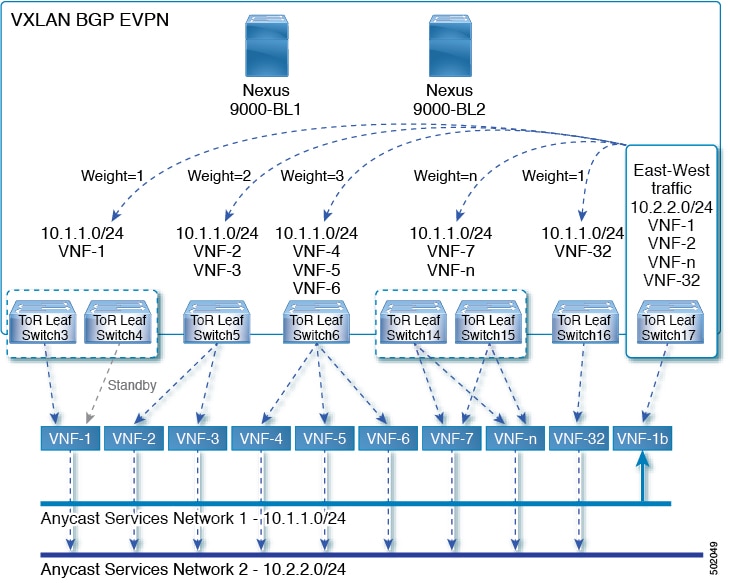
Figure 2. Sample Topology (East-West Traffic)

East-West traffic is forwarded between the VXLAN Tunnel Endpoints (VTEPs) proportional to the number of next hops advertised by each ToR switch to the destination network.

The switch uses BGP to advertise reachability within the fabric using the Layer 2 VPN (L2VPN)/Ethernet VPN (EVPN) address family. If all ToR switches and border leafs are within the same Autonomous System (AS), a full internal BGP (iBGP) mesh is configured by using route reflectors or by having each BGP router peer with every other router.

Each ToR and border leaf constitutes a VTEP in the VXLAN fabric. You can use a BGP route reflector to reduce the full mesh BGP sessions across the VTEPs to a single BGP session between a VTEP and the route reflector. Virtual Network Identifiers (VNIs) are globally unique within the overlay. Each Virtual Routing and Forwarding (VRF) instance is mapped to a unique VNI. The inner destination MAC address in the VXLAN header belongs to the receiving VTEP that does the routing of the VXLAN payload. This MAC address is distributed as a BGP attribute along with the EVPN routes.

Advertisement of Customer Networks

Customer networks are configured statically or learned locally by using an interior gateway protocol, (IGP) or external BGP (eBGP), over a Provider Edge(PE)-Customer Edge(CE) link. These networks are redistributed into BGP and advertised to the VXLAN fabric.

The networks advertised to the ToRs by the virtual machines (VMs) attached to them are advertised to the VXLAN fabric as EVPN Type-5 routes with the following:

  • The route distinguisher (RD) will be the Layer 3 VNI's configured RD.

  • The gateway IP field will be populated with the next hop.

  • The next hop of the EVPN route will continue to be the VTEP IP.

  • The export route targets of the routes will be derived from the configured export route targets of the associated Layer 3 VNI.

Multiple VRF routes may generate the same Type-5 Network Layer Reachability Information (NLRI) differentiated only by the gateway IP field. The routes are advertised with the L3VNI’s RD, and the gateway IP isn't part of the Type-5 NLRI’s key. The NLRI is exchanged between BGP routers using update messages. These routes are advertised to the EVPN AF by extending the BGP export mechanism to include ECMPs and using the addpath BGP feature in the EVPN AF.

Each Type-5 route within the EVPN AF that is created by using the Proportional Multipath for VNF feature may have multiple paths that are imported into the corresponding VRF based on the matching of the received route targets and by having ECMP enabled within the VRF and in the EVPN AF. Within the VRF, the route is a single prefix with multiple paths. Each path represents a Type-5 EVPN path or those learned locally within the VRF. The EVPN Type-5 routes that are enabled for the Proportional Multipath for VNF feature will have their next hop in the VRF derived from their gateway IP field. Use the export-gateway-ip command to enable BGP to advertise the gateway IP in the EVPN Type-5 routes.

Use the maximum-paths mixed command to enable BGP and the Unicast Routing Information Base (URIB) to consider the following paths as ECMP:

  • iBGP paths

  • eBGP paths

  • Paths from other protocols (such as static) that are redistributed or injected into BGP

The paths can be either local to the device (static, iBGP, or eBGP) or remote (eBGP or iBGP learned over BGP-EVPN). This overrides the default route selection behavior in which local routes are preferred over remote routes. URIB downloads all next hops of the route, including locally learned and user-configured routes, to the Unicast FIB Distribution Module (uFDM)/Forwarding Information Base (FIB).

When the maximum-paths mixed command is enabled , BGP ignores the AS-path length, and URIB ignores the administrative distance when choosing ECMPs.

Use the advertise-gw-ip command to advertise EVPN Type-5 routes with the gateway IP set. ToRs then advertise the gateway IP in the Type-5 NLRI. However, legacy peers running on NX-OS version older than Cisco NX-OS Release 9.2(1) can't process the gateway IP which might lead to unexpected behavior. To prevent this scenario from occurring, use the no advertise-gw-ip command to disable the Proportional Multipath for VNF feature for a legacy peer. BGP sets the gateway IP field of the Type-5 NLRI to zero even if the path being advertised has a valid gateway IP.

The no advertise-gw-ip command flaps the specified peer session as gracefully as possible. The remote peer triggers a graceful restart if the peer supports this capability. When the session is re-established, the local peer advertises EVPN Type-5 routes with the gateway IP set or with the gateway IP as zero depending on whether the advertise-gw-ip command has been used. By default, this knob is enabled and the gateway IP field is populated with the appropriate next hop value.

You can configure next-hop filtering to exclude temporarily silent next-hops, but you should know the subnet IPs, SVI, and interfaces to which the VNF is attached. You can configure next-hop filtering and use this as a safeguard when a VNF does not exist. However, activate the next-hop filtering only when the VNF's IP ARP is resolved.

Guidelines and Limitations for Proportional Multipath for VNF

General Guidelines and Limitations

Proportional Multipath for VNF has the following guidelines and limitations:

  • If the Proportional Multipath for VNF feature is enabled, maintenance mode isolation doesn't work because BGP installs all the paths in mixed multipath mode. Alternatively, a route-map is used to deny outbound BPG updates when a switch goes into maintenance mode by using user-defined profiles.

  • This feature is supported for Cisco Nexus 9364C, 9300-EX, and 9300-FX/FX2 platform switches.

  • Static and direct routes have to be redistributed into the BGP when the Proportional Multipath for VNF feature is enabled.

Additional Guidelines and Limitations

  • If OSPF or EIGRP is being used as an IGP, routes can't be redistributed into BGP.

  • If Proportional Multipath for VNF is enabled and routes aren't redistributed into BGP, asymmetric load balancing of traffic may occur as the local routes from URIB may not show up in BGP and on remote TORs as EVPN paths.

  • Devices on which mixed-multipath is enabled must support the same load-balancing algorithm.

  • If a VNF instance is multi-homed to multiple TORs, policies have to be configured or BGP routes have to be originated using a network command. As a result, each TOR connection to the VNF is displayed in the BGP routing table. Each TOR can now see the VNF's direct routes to the other TORs in which the VNF is multi-homed. Consequently, each TOR can advertise paths to the Gateway IPs through other TORs leading to a next hop resolution loop.

    • Consider a scenario in which a VNF is multi-homed to two TORs, TOR1 and TOR2. Individual links to the TORs are addressed as 1.1.1.1 and 2.2.2.2. If the VNF advertises a service 192.168.1.0/24 through the TORs, the TORs advertise EVPN routes to 192.168.1.0/24 with Gateway IPs of 1.1.1.1 and 2.2.2.2 respectively.

    • As a result, an issue occurs with the Recursive Next Hop (RNH) resolution on a remote TOR (for example, TOR3). The gateway IP is resolved to a /24 route pointing to another gateway IP. That second gateway IP is resolved by a route pointing to the first gateway IP. So, in our scenario, the gateway IP 1.1.1.1 is resolved by 1.1.1.0/24 which points to 2.2.2.2. And 2.2.2.2 is resolved by 2.2.2.0/24 which points to 1.1.1.1.

    • This condition occurs as both TORs connected to the VNF are advertising the VNF’s connected routes. TOR1 is advertising 1.1.1.0/24 and 2.2.2.0/24. However, 1.1.1.0 is advertised without a gateway IP as it's a connected subnet on TOR1. Also, 2.2.2.0 is an OSPF route pointing to 1.1.1.1 which is the VNF’s address connected to TOR1.

    • Similarly, TOR2 advertises both subnets and 2.2.2.0/24 is sent without a gateway IP as it is directly connected to TOR2. 1.1.1.0 is learned via OSPF and is sent with a gateway IP of 2.2.2.2 which is the VNF’s address connected to TOR2. 1.1.1.1/32 and 2.2.2.2/32 won't be advertised as they are Adjacency Manager (AM) routes on each TOR.

    • This issue doesn't have a resolution when Type-5 routes are involved. However, this scenario can be avoided if the TORs advertise the gateway IP’s /32 address using a network command. And if the gateway IPs are being resolved by Type-2 EVPN MAC/IP routes, this scenario can be avoided as the gateway IP will be resolved by the /32 IP route.

Configure the Spine or Route Reflector

Procedure


Step 1

Use the configure terminal command to enter global configuration mode.

Example:

switch# configure terminal

Step 2

Use the router bgp number command to configure BGP.

Example:

switch(config)# router bgp 2 

Step 3

Use the address-family l2vpn evpn command to configure address family Layer 2 VPN EVPN under router bgp context.

Example:

switch(config-router)# address-family l2vpn evpn 

Step 4

Use the additional-paths send command to configure additional-paths for sending.

Example:

switch(config-router-af)# additional-paths send 

Step 5

Use the additional-paths receive command to configure additional-paths for receiving.

Example:

switch(config-router-af)# additional-paths receive 

Step 6

Use the additional-paths selection route-map passall command to apply the route map to additional-paths configuration.

Example:

switch(config-router-af)# additional-paths selection route-map passall 

Step 7

Use the route-map passall permit seq-num command to configure the route map.

Example:

switch(config)# route-map passall permit 10

Step 8

Use the set path-selection all advertise command to set the route-map related to the additional-paths feature.

Example:

switch(config-route-map)# set path-selection all advertise

Configure the Leaf or ToR

This procedure describes how to configure the ToR.

Procedure


Step 1

Configure BGP and address families.

  1. Use the configure terminal command to enter global configuration mode.

    Example:

    switch# configure terminal
  2. Use the router bgp number command to configure BGP.

    Example:

    switch(config)# router bgp 2 
  3. Use the address-family l2vpn evpn command to configure address family Layer 2 VPN EVPN under router bgp context.

    Example:

    switch(config-router)# address-family l2vpn evpn 
  4. Use the maximum-paths eBGP max-paths |mixed mpath-count command to configure BGP maximum paths.

    Example:

    switch(config-router-af)# maximum-paths ?
      <1-64>  Number of parallel paths        
              *Default value is 1
      eibgp   Configure multipath for both EBGP and IBGP paths
      ibgp    Configure multipath for IBGP paths
      local   Configure multipath for local paths
      mixed   Configure multipath for local and remote paths
    switch(config-router-af)# maximum-paths mixed 32
  5. Use the additional-paths send command to configure additional-paths for sending.

    Example:

    switch(config-router-af)# additional-paths send 
  6. Use the additional-paths receive command to configure additional-paths for receiving.

    Example:

    switch(config-router-af)# additional-paths receive 
  7. Use the additional-paths selection route-map passall command to apply the route map to additional-paths selection.

    Example:

    switch(config-router-af)# additional-paths selection route-map passall 
  8. Use the exit command to exit command mode.

    Example:

    switch(config-router-af)# exit

Step 2

Configure VRF and IPv4 address family.

  1. Use the vrf vrf-name command to switch to the VRF configuration mode.

    Example:

    switch(config-router)# vrf evpn-tenant-1001
  2. Use the address-family ipv4 unicast command to configure address family for IPv4.

    Example:

    switch(config-router)# address-family ipv4 unicast
  3. Use the export-gateway-ip command to enable BGP to advertise the gateway IP in the EVPN Type-5 routes.

    Example:

    switch(config-router-vrf-af)# export-gateway-ip
  4. Use the maximum-paths eBGP max-paths |mixed mpath-count command to configure BGP maximum paths for the VRF address family.

    Example:

    switch(config-router-vrf-af)# maximum-paths ?
      <1-64>  Number of parallel paths        
              *Default value is 1
      eibgp   Configure multipath for both EBGP and IBGP paths
      ibgp    Configure multipath for IBGP paths
      local   Configure multipath for local paths
      mixed   Configure multipath for local and remote paths
    switch(config-router-vrf-af)# maximum-paths mixed 32
  5. Use the redistribute static route-map route-map-name command to preserve the next-hop of the redistributed paths.

    Example:

    switch(config-router-vrf-af)# redistribute static route-map redist-rtmap
  6. Use the exit command to exit command mode.

    Example:

    switch(config-router-vrf-af)# exit

Step 3

Configure IPv6 address family for the VRF.

  1. Use the address-family ipv6 unicast command to configure address family for IPv6.

    Example:

    switch(config-router-vrf)# address-family ipv6 unicast
  2. Use the export-gateway-ip command to enable BGP to advertise the gateway IP in the EVPN Type-5 routes.

    Example:

    switch(config-router-vrf-af)# export-gateway-ip
  3. Use the maximum-paths eBGP max-paths |mixed mpath-count command to configure BGP maximum paths for the VRF IPv6 address family.

    Example:

    switch(config-router-vrf-af)# maximum-paths ?
      <1-64>  Number of parallel paths        
              *Default value is 1
      eibgp   Configure multipath for both EBGP and IBGP paths
      ibgp    Configure multipath for IBGP paths
      local   Configure multipath for local paths
      mixed   Configure multipath for local and remote paths
    switch(config-router-vrf-af)# maximum-paths mixed 32
  4. Use the redistribute static route-map route-map-name command to preserve the next-hop of the redistributed paths.

    Example:

    switch(config-router-vrf-af)# redistribute static route-map redist-rtmap
  5. Use the exit command to exit command mode.

    Example:

    switch(config-router-vrf-af)# exit

Step 4

Configure the route map for additional-paths.

  1. Use the route-map passall permit seq-num command to configure the route map.

    Example:

    switch(config)# route-map passall permit 10
  2. Use the set path-selection all advertise command to set the route-map related to the additional-paths feature.

    Example:

    switch(config-route-map)# set path-selection all advertise

Step 5

Configure the unicast FIB load-sharing algorithm for data traffic.

Example:

ip load-sharing address source-destination rotate 32 universal-id 1

Configure the Border Leaf or Border Gateway

This procedure describes how to configure the border leaf.

Procedure


Step 1

Configure global BGP and EVPN settings.

  1. Use the configure terminal command to enter global configuration mode.

    Example:

    switch# configure terminal
  2. Use the router bgp number command to configure BGP.

    Example:

    switch(config)# router bgp 2 
  3. Use the address-family l2vpn evpn command to configure address family Layer 2 VPN EVPN under router bgp context.

    Example:

    switch(config-router)# address-family l2vpn evpn 
  4. Use the maximum-paths eBGP max-paths |mixed mpath-count command to configure BGP maximum paths.

    Example:

    switch(config-router-af)# maximum-paths ?
      <1-64>  Number of parallel paths        
              *Default value is 1
      eibgp   Configure multipath for both EBGP and IBGP paths
      ibgp    Configure multipath for IBGP paths
      local   Configure multipath for local paths
      mixed   Configure multipath for local and remote paths
    switch(config-router-af)# maximum-paths mixed 32
    • eBGP max-path –Enables the eBGP maximum paths. The range is from 1 to 64 parallel paths. The default value is 1.

    • Enables BGP and the Unicast Routing Information Base (URIB) to consider the following paths as Equal Cost Multi Path (ECMP):

      • eBGP paths

      • eiBGP paths

      • iBGP paths

      • Paths from other protocols (such as static) that are redistributed or injected into BGP

    • local –Enables the multipath for local paths.

  5. Use the additional-paths send command to configure additional-paths sending.

    Example:

    switch(config-router-af)# additional-paths send 
  6. Use the additional-paths receive command to configure additional-paths receiving.

    Example:

    switch(config-router-af)# additional-paths receive 
  7. Use the additional-paths selection route-map passall command to enable the additional-paths feature.

    Example:

    switch(config-router-af)# additional-paths selection route-map passall 
  8. Use the exit command to exit command mode.

    Example:

    switch(config-router-af)# exit

Step 2

Configure VRF and IPv4 address family settings.

  1. Use the vrf vrf-name command to switch to the VRF configuration mode.

    Example:

    switch(config-router)# vrf evpn-tenant-1001
  2. Use the address-family ipv4 unicast command to configure address family for IPv4.

    Example:

    switch(config-router)# address-family ipv4 unicast
  3. Use the export-gateway-ip command to enable BGP to advertise the gateway IP in the EVPN Type-5 routes.

    Example:

    switch(config-router-vrf-af)# export-gateway-ip

    It exports the gateway IP for all prefixes in that VRF.

  4. Use the maximum-paths eBGP max-paths |mixed mpath-count command to configure BGP maximum paths for the VRF.

    Example:

    switch(config-router-vrf-af)# maximum-paths ?
      <1-64>  Number of parallel paths        
              *Default value is 1
      eibgp   Configure multipath for both EBGP and IBGP paths
      ibgp    Configure multipath for IBGP paths
      local   Configure multipath for local paths
      mixed   Configure multipath for local and remote paths
    switch(config-router-vrf-af)# maximum-paths mixed 32
    • eBGP max-path –Enables the eBGP maximum paths. The range is from 1 to 64 parallel paths. The default value is 1.

    • Enables BGP and the Unicast Routing Information Base (URIB) to consider the following paths as Equal Cost Multi Path (ECMP):

      • eBGP paths

      • eiBGP paths

      • iBGP paths

      • Paths from other protocols (such as static) that are redistributed or injected into BGP

    • local –Enables the multipath for local paths.

  5. Use the redistribute static route-map route-map-name command to preserve the next-hop of the redistributed paths.

    Example:

    switch(config-router-vrf-af)# redistribute static route-map redist-rtmap

Step 3

Configure IPv6 address family settings for the VRF.

  1. Use the address-family ipv6 unicast command to configure address family for IPv6.

    Example:

    switch(config-router-vrf)# address-family ipv6 unicast
  2. Use the export-gateway-ip command to enable BGP to advertise the gateway IP in the EVPN Type-5 routes.

    Example:

    switch(config-router-vrf-af)# export-gateway-ip

    It exports the gateway IP for all prefixes in that VRF.

  3. Use the maximum-paths eBGP max-paths |mixed mpath-count command to configure BGP maximum paths for the IPv6 address family.

    Example:

    switch(config-router-vrf-af)# maximum-paths ?
      <1-64>  Number of parallel paths        
              *Default value is 1
      eibgp   Configure multipath for both EBGP and IBGP paths
      ibgp    Configure multipath for IBGP paths
      local   Configure multipath for local paths
      mixed   Configure multipath for local and remote paths
    switch(config-router-vrf-af)# maximum-paths mixed 32
    • eBGP max-path –Enables the eBGP maximum paths. The range is from 1 to 64 parallel paths. The default value is 1.

    • Enables BGP and the Unicast Routing Information Base (URIB) to consider the following paths as Equal Cost Multi Path (ECMP):

      • eBGP paths

      • eiBGP paths

      • iBGP paths

      • Paths from other protocols (such as static) that are redistributed or injected into BGP

    • local –Enables the multipath for local paths.

  4. Use the redistribute static route-map route-map-name command to preserve the next-hop of the redistributed paths.

    Example:

    switch(config-router-vrf-af)# redistribute static route-map redist-rtmap
  5. Use the exit command to exit command mode.

    Example:

    switch(config-router-vrf-af)# exit

Step 4

Configure the route map for additional-paths.

  1. Use the route-map passall permit seq-num command to configure the route map.

    Example:

    switch(config)# route-map passall permit 10
  2. Use the set path-selection all advertise command to set the route-map related to the additional-paths feature.

    Example:

    switch(config-route-map)# set path-selection all advertise

Step 5

Configure the unicast FIB load-sharing algorithm for data traffic.

Example:

ip load-sharing address source-destination rotate 32 universal-id 1

The universal-id option sets the random seed for the hash algorithm and shifts the flow from one link to another.

You do not need to configure the universal ID. Cisco NX-OS chooses the Universal ID if you do not configure it. The seed range is from 1 to 4294967295.

The rotate option causes the hash algorithm to rotate the link picking selection so that it does not continually choose the same link across all nodes in the network. It does so by influencing the bit pattern for the hash algorithm. This option shifts the flow from one link to another and load balances the already load-balanced (polarized) traffic from the first ECMP level across multiple links.

If you specify a rotate value, the 64-bit stream is interpreted starting from that bit position in a cyclic rotation. The rotate range is from 1 to 63, and the default is 32.

Note


With multi-tier Layer 3 topology, polarization is possible. To avoid polarization, use a different rotate bit at each tier of the topology.

Note


To configure a rotation value for port channels, use the port-channel load-balance src-dst ip-l4port rotate rotate command. For more information on this command, see the Cisco Nexus 9000 Series NX-OS Interfaces Configuration Guide, Release 9.x.


Configure the BGP Legacy Peer

If you are running a Cisco Nexus Release prior to 9.2(1), follow this procedure to disable sending the gateway IP address to that peer.

Procedure


Step 1

Use the configure terminal command to enter global configuration mode.

Example:

switch# configure terminal

Step 2

Use the router bgpnumber command to configure BGP.

Example:

switch(config)# router bgp 2000000

Step 3

Use the neighboraddressremote-asnumber command to define neighbor.

Example:

switch(config-router)# neighbor 8.8.8.8 remote-as 2000000

Step 4

Use the address-family l2vpn evpn command to configure address family Layer 2 VPN EVPN.

Example:

switch(config-router-neighbor)# address-family l2vpn evpn 

Step 5

Use the no advertise-gw-ip command to disable the BGP EVPN Mixed-path and Proportional Layer-3 Multipath feature for a legacy peer.

Example:

switch(config-router-neighbor-af)# no advertise-gw-ip

Configure a User-Defined Profile for Maintenance Mode

Procedure


Step 1

Use the configure terminal command to enter global configuration mode.

Example:

switch# configure terminal

Step 2

Use the configure maintenance profile maintenance-mode command to configure the maintenance mode profile.

Example:

switch(config)# configure maintenance profile maintenance-mode

Step 3

Use the route-map name deny sequence command to configure a route map.

Example:

switch(config-mm-profile)# route-map GIR deny 5

The value of sequence is from 0 to 65535. Default is 10.


Configure a User-Defined Profile for Normal Mode

Procedure


Step 1

Use the configure terminal command to enter global configuration mode.

Example:

switch# configure terminal

Step 2

Use the configure maintenance profile normal-mode command to configure maintenance mode.

Example:

switch(config)# configure maintenance profile normal-mode 

Step 3

Use the route-map name permit sequence command to configure a route map.

Example:

switch(config-mm-profile)# route-map GIR permit 5

The value of sequence is from 0 to 65535. Default is 10.


Configure a Default Route Map

Procedure


Step 1

Use the configure terminal command to enter global configuration mode.

Example:

switch# configure terminal

Step 2

Use the route-map name permit sequence command to configure a route map.

Example:

switch(config-mm-profile)# route-map GIR permit 5

The value of sequence is from 0 to 65535. Default is 10.


Apply a Route Map to a Route Reflector

Procedure


Step 1

Use the configure terminal command to enter global configuration mode.

Example:

switch# configure terminal

Step 2

Use the router bgpnumber command to configure BGP.

Example:

switch(config)# router bgp 2 

Step 3

Use the neighborip-address command to configure the IP address of a BGP neighbor which is the route reflector.

Example:

switch(config-router)# neighbor 10.1.1.1 

ip-address can be an IPv4 or IPv6 address or prefix.

Step 4

Use the address-family l2vpn evpn command to configure a Layer 2 VPN EVPN address family.

Example:

switch(config-router-neighbor)# address-family l2vpn evpn 

Step 5

Use the route-mapnameout command to apply the route map to the neighbor route reflector.

Example:

switch(config-router-neighbor-af)# route-map GIR out 

Verify the Proportional Multipath for VNF

Procedure


Step 1

Use the show bgp ipv4 unicast command to display Border Gateway Protocol (BGP) information for the IPv4 unicast address family.

Example:

switch# show bgp ipv4 unicast 11.1.1.0 vrf cust_1
BGP routing table information for VRF cust_1, address family IPv4 Unicast
BGP routing table entry for 11.1.1.0/24, version 4
Paths: (3 available, best #1)
Flags: (0x80080012) on xmit-list, is in urib, is backup urib route, is in HW
  vpn: version 1093, (0x100002) on xmit-list
Multipath: eBGP iBGP

  Advertised path-id 1, VPN AF advertised path-id 1
  Path type: external, path is valid, is best path, in rib
             Imported from 13.13.13.13:3:[5]:[0]:[0]:[24]:[11.1.1.0]/224 
  AS-Path: 2000000 500000 , path sourced external to AS
    11.1.1.100 (metric 5) from 102.102.102.102 (102.102.102.102)
      Origin incomplete, MED not set, localpref 100, weight 0
      Received label 22001
      Received path-id 1
      Extcommunity: RT:23456:22001 Route-Import:22.22.22.22:2001 ENCAP:8
          Router MAC:e00e.da4a.62a5

  Path type: external, path is valid, not best reason: Neighbor Address, multipath, in rib
             Imported from 13.13.13.13:3:[5]:[0]:[0]:[24]:[11.1.1.0]/224 
  AS-Path: 2000000 100 , path sourced external to AS
    11.1.1.233 (metric 5) from 102.102.102.102 (102.102.102.102)
      Origin incomplete, MED not set, localpref 100, weight 0
      Received label 22001
      Received path-id 2
      Extcommunity: RT:23456:22001 Route-Import:33.33.33.33:2001 ENCAP:8
          Router MAC:e00e.da4a.589d

  Path type: external, path is valid, not best reason: Neighbor Address, multipath, in rib
             Imported from 13.13.13.13:3:[5]:[0]:[0]:[24]:[11.1.1.0]/224 
  AS-Path: 2000000 100000 , path sourced external to AS
    11.1.1.133 (metric 5) from 102.102.102.102 (102.102.102.102)
      Origin incomplete, MED not set, localpref 100, weight 0
      Received label 22001
      Received path-id 3
      Extcommunity: RT:23456:22001 Route-Import:11.11.11.11:2001 ENCAP:8
          Router MAC:003a.7d7d.1dbd

  VRF advertise information:
  Path-id 1 not advertised to any peer

  VPN AF advertise information:
  Path-id 1 not advertised to any peer

Step 2

Use the show bgp l2vpn evpn command to display BGP information for the Layer-2 Virtual Private Network (L2VPN) Ethernet Virtual Private Network (EVPN) address family.

Example:

switch# show bgp l2vpn evpn 11.1.1.0
BGP routing table information for VRF default, address family L2VPN EVPN
Route Distinguisher: 13.13.13.13:3       //     Remote route
BGP routing table entry for [5]:[0]:[0]:[24]:[11.1.1.0]/224, version 1341
Paths: (3 available, best #1)
Flags: (0x000002) on xmit-list, is not in l2rib/evpn, is not in HW
Multipath: eBGP

  Advertised path-id 1
  Path type: external, path is valid, is best path
             Imported to 2 destination(s)
  Gateway IP: 11.1.1.133
  AS-Path: 2000000 100000 , path sourced external to AS
    11.11.11.11 (metric 5) from 102.102.102.102 (102.102.102.102)
      Origin incomplete, MED not set, localpref 100, weight 0
      Received label 22001
      Received path-id 3
      Extcommunity: RT:23456:22001 Route-Import:11.11.11.11:2001 ENCAP:8
          Router MAC:003a.7d7d.1dbd

  Path type: external, path is valid, not best reason: Neighbor Address, multipath
             Imported to 2 destination(s)
  Gateway IP: 11.1.1.233
  AS-Path: 2000000 100 , path sourced external to AS
    33.33.33.33 (metric 5) from 102.102.102.102 (102.102.102.102)
      Origin incomplete, MED not set, localpref 100, weight 0
      Received label 22001
      Received path-id 2
      Extcommunity: RT:23456:22001 Route-Import:33.33.33.33:2001 ENCAP:8
          Router MAC:e00e.da4a.589d

  Path type: external, path is valid, not best reason: Neighbor Address, multipath
             Imported to 2 destination(s)
  Gateway IP: 11.1.1.100
  AS-Path: 2000000 500000 , path sourced external to AS
    22.22.22.22 (metric 5) from 102.102.102.102 (102.102.102.102)
      Origin incomplete, MED not set, localpref 100, weight 0
      Received label 22001
      Received path-id 1
      Extcommunity: RT:23456:22001 Route-Import:22.22.22.22:2001 ENCAP:8
          Router MAC:e00e.da4a.62a5

  Path-id 1 not advertised to any peer

Route Distinguisher: 4.4.4.4:3    (L3VNI 22001)       //   Local L3VNI
BGP routing table entry for [5]:[0]:[0]:[24]:[11.1.1.0]/224, version 3465
Paths: (3 available, best #1)
Flags: (0x000002) on xmit-list, is not in l2rib/evpn, is not in HW
Multipath: eBGP

  Advertised path-id 1
  Path type: external, path is valid, is best path
             Imported from 13.13.13.13:3:[5]:[0]:[0]:[24]:[11.1.1.0]/224 
  Gateway IP: 11.1.1.100
  AS-Path: 2000000 500000 , path sourced external to AS
    22.22.22.22 (metric 5) from 102.102.102.102 (102.102.102.102)
      Origin incomplete, MED not set, localpref 100, weight 0
      Received label 22001
      Received path-id 1
      Extcommunity: RT:23456:22001 Route-Import:22.22.22.22:2001 ENCAP:8
          Router MAC:e00e.da4a.62a5

  Path type: external, path is valid, not best reason: newer EBGP path, multipat
h
             Imported from 13.13.13.13:3:[5]:[0]:[0]:[24]:[11.1.1.0]/224 
  Gateway IP: 11.1.1.233
  AS-Path: 2000000 100 , path sourced external to AS
    33.33.33.33 (metric 5) from 102.102.102.102 (102.102.102.102)
      Origin incomplete, MED not set, localpref 100, weight 0
      Received label 22001
      Received path-id 2
      Extcommunity: RT:23456:22001 Route-Import:33.33.33.33:2001 ENCAP:8
          Router MAC:e00e.da4a.589d

  Path type: external, path is valid, not best reason: newer EBGP path, multipat
h
             Imported from 13.13.13.13:3:[5]:[0]:[0]:[24]:[11.1.1.0]/224 
  Gateway IP: 11.1.1.133
  AS-Path: 2000000 100000 , path sourced external to AS
    11.11.11.11 (metric 5) from 102.102.102.102 (102.102.102.102)
      Origin incomplete, MED not set, localpref 100, weight 0
      Received label 22001
      Received path-id 3
      Extcommunity: RT:23456:22001 Route-Import:11.11.11.11:2001 ENCAP:8
          Router MAC:003a.7d7d.1dbd

  Path-id 1 not advertised to any peer

Step 3

Use the show ip route command to display routes from the unicast RIB.

Example:

switch# show ip route 1.1.1.0 vrf cust_1
IP Route Table for VRF "cust_1"
…
1.1.1.0/24, ubest/mbest: 22/0, all-best (0x300003d)
    *via 3.0.0.1, [1/0], 08:13:17, static
         recursive next hop: 3.0.0.1/32
    *via 3.0.0.2, [1/0], 08:13:17, static
         recursive next hop: 3.0.0.2/32
    *via 3.0.0.3, [1/0], 08:13:16, static
         recursive next hop: 3.0.0.3/32
    *via 3.0.0.4, [1/0], 08:13:16, static
         recursive next hop: 3.0.0.4/32
    *via 2.0.0.1, [200/0], 06:09:19, bgp-2, internal, tag 2 (evpn) segid: 3003802 tunnelid: 0x300003e encap: VXLAN
          BGP-EVPN: VNI=3003802 (EVPN)
         client-specific data: 3b      
         recursive next hop: 2.0.0.1/32
         extended route information: BGP origin AS 2 BGP peer AS 2
    *via 2.0.0.2, [200/0], 06:09:19, bgp-2, internal, tag 2 (evpn) segid: 3003802 tunnelid: 0x300003e encap: VXLAN
          BGP-EVPN: VNI=3003802 (EVPN)
         client-specific data: 3b      
         recursive next hop: 2.0.0.2/32
         extended route information: BGP origin AS 2 BGP peer AS 2

Step 4

Use the show maintenance profile maintenance-mode command to display the GIR user-defined profile for the maintenance mode.

Example:

switch# show maintenance profile maintenance-mode
  [Maintenance Mode]
  ip pim isolate  
  router bgp 2
   isolate
  router isis 1
   isolate
  route-map GIR deny 5

Step 5

Use the show maintenance profile normal-mode command to display the GIR user-defined profile for the normal mode.

Example:

switch# show maintenance profile normal-mode 
  [Normal Mode]  
  no ip pim isolate
  router bgp 2
   no isolate
  router isis 1
   no isolate
  route-map GIR permit 5