Using the Cisco Nexus 9000 Switch as the Default Gateway

This chapter includes the following sections:

Routing for VNIs That Have a HW-VTEP Binding

When an NSX logical switch is connected to a HW-VTEP using OVSDB, it cannot be attached to the Distributed Logical Router (DLR) at the same time. This limitation exists with all NSX implementations of this feature regardless of the hardware vendor providing the HW-VTEP functionality. Traditionally this meant that the default gateway for the VMs and bare-metal devices attached to the VNI/VLAN combination had be an external device. This device could be an Edge Services Gateway (ESG) VM attached to the VNI or a traditional router connected to the VLAN (or a physical firewall or another service device). These legacy options are depicted in the following figures.
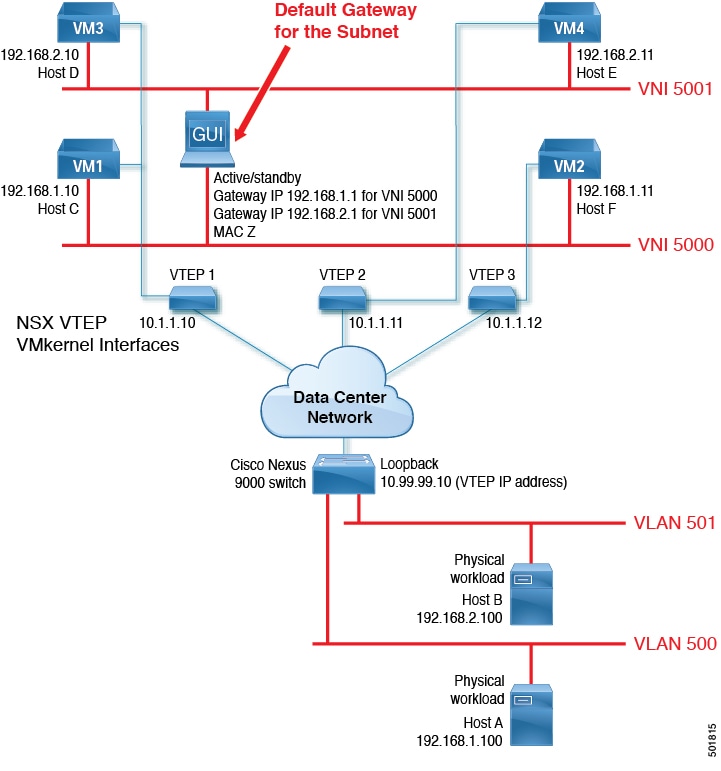
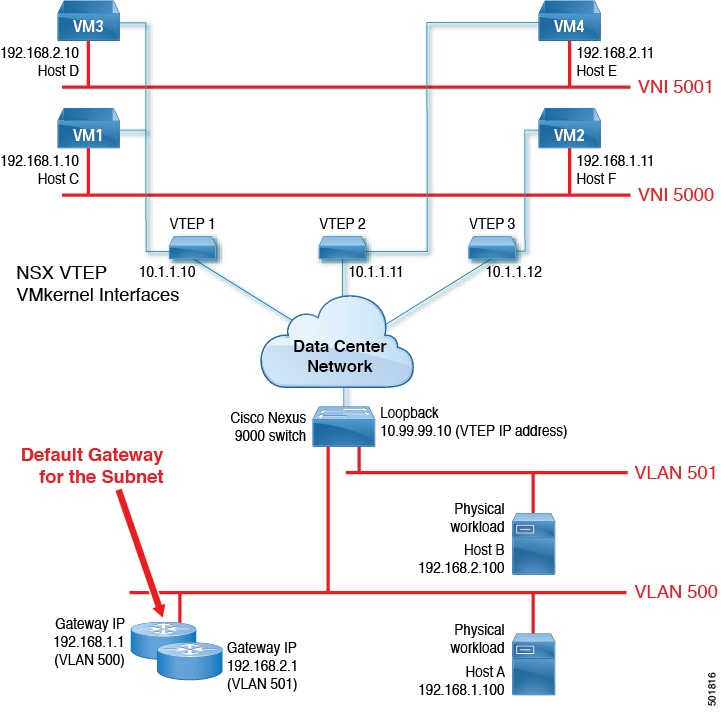
Figure 1. Legacy Option 1: Using an ESG VM as the Default Gateway
Figure 2. Legacy Option 2: Using an External Router as the Default Gateway

With the Cloud-Scale ASICs available in the Cisco Nexus 9300-EX switches, it is now possible for the Cisco Nexus 9000 switches doing the OVSDB integration to also be the default gateway for the subnet being extended. This capability allows for CAPEX savings because an external physical router is no longer necessary. By providing the default gateway and routing capabilities using the switched virtual interface (SVI) feature, the Cisco Nexus 9000 switch can perform routing in the hardware while also providing OPEX savings. Redundancy can be achieved by using a first-hop redundancy protocol such as the Hot Standby Router Protocol (HSRP) or Virtual Router Redundancy Protocol (VRRP). This new capability is depicted in the following figure.
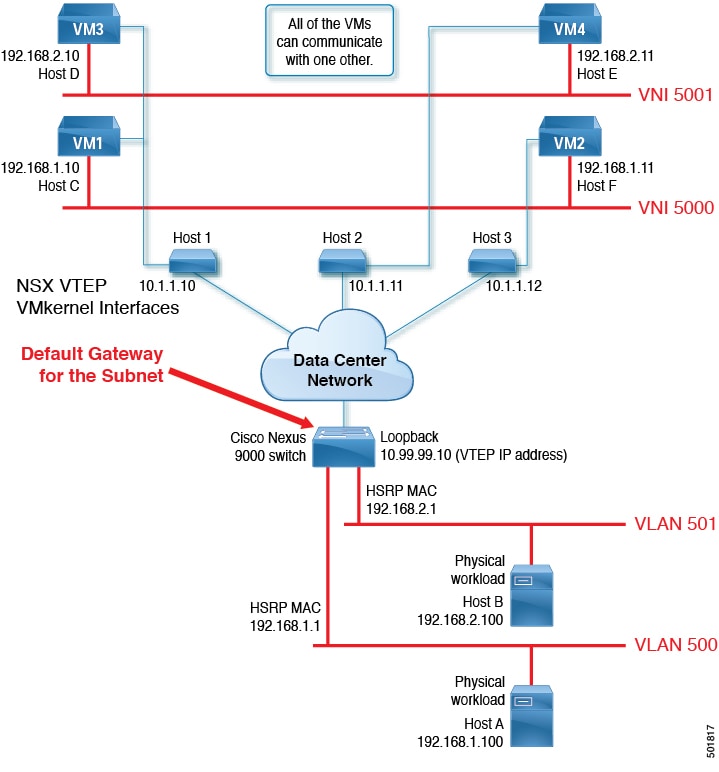
Figure 3. Using the Cisco Nexus 9000 Switch as the Default Gateway

Prerequisites for Default Gateway Integration

The following components are required for default gateway integration:

  • One of the following switches running Cisco NX-OS Release 7.0(3)I7(1) or a later release:

    • Cisco Nexus 93108TC-EX switch

    • Cisco Nexus 93180LC-EX switch

    • Cisco Nexus 93180YC-EX switch


Note

Switches that meet the minimum requirements for NSX OVSDB integration but do not meet the requirements for the gateway feature cannot use both features at the same time.


Configuring a Redundant Default Gateway on Two vPC Switches Acting as HW-VTEPs Using HSRP

You can take advantage of HSRP when configuring a default gateway on a pair of switches running vPC for redundant HW-VTEP connectivity. HSRP is a first-hop redundancy protocol that allows a transparent failover of the first-hop IP router. For more information on HSRP, see the Cisco Nexus 9000 Series NX-OS Unicast Routing Configuration Guide.

Procedure


Step 1

Assign a VLAN to the controller.

Example:

switch# configure terminal
switch(config)# controller type l2-vxlan identifier 1
switch(config)# assign vlan 600-602 dedicated <<VLANs assigned to the controller

We recommend that the SVIs are created after the VLANs are assigned to the controller.

Note 

A mapping of the logical switch/VNI to the VLAN does not have to be done in the NSX Manager before the SVI for the VLAN is created.

Step 2

Enable HSRP on both vPC switches.

Example:

switch# configure terminal
switch(config)# feature hsrp

Using a basic HSRP configuration on the two vPC switches provides default gateway redundancy.

Step 3

Create an SVI and assign it a unique IP address on each switch.

Example:

switch# configure terminal
switch(config)# feature interface-vlan
switch(config)# interface vlan 600
switch(config-if)# no shut

Step 4

Configure a matching unique HSRP group number and virtual IP address (IPv4 and/or IPv6) under the SVI on both switches.

Example:

switch(config-if)# ip address 10.10.10.2/24
switch(config-if)# hsrp version 2
switch(config-if)# hsrp 1
switch(config-if-hsrp)# ip 10.10.10.1

When you configure HSRP on a network segment, you provide a virtual MAC address and a virtual IP address for the HSRP group. The virtual MAC address is advertised to the NSX controllers using OVSDB. You configure the same virtual address on each HSRP-enabled interface in the group. You also configure a unique IP address on each interface that acts as the real address.

Note 

We recommend using a unique HSRP group address for each SVI because the group address is used to derive the MAC address for the virtual IP address. Using a unique group number (from 0 to 4095) for each HSRP group creates a unique MAC address for each virtual IP address.


Example

The following example configuration is for vPC switch 1:

switch# configure terminal
switch(config)# feature hsrp <<Enable the HSRP feature
switch(config)# feature interface-vlan
switch(config)# interface vlan 600 <<Create the SVI for VLAN 600
switch(config-if)# no shut
switch(config-if)# ip address 10.10.10.2/24 <<Assign a unique IP address to the SVI
switch(config-if)# hsrp version 2 <<Set the HSRP version
switch(config-if)# hsrp 1 <<Enter a unique HSRP group configuration
switch(config-if-hsrp)# ip 10.10.10.1 <<Enter the virtual IP to be used as the subnet gateway
switch(config-if-hsrp)# end

The following example configuration is for vPC switch 2:

switch# configure terminal
switch(config)# feature hsrp
switch(config)# feature interface-vlan
switch(config)# interface vlan 600
switch(config-if)# no shut
switch(config-if)# ip address 10.10.10.3/24 <<Assign a unique IP address to the SVI
switch(config-if)# hsrp version 2
switch(config-if)# hsrp 1
switch(config-if-hsrp)# ip 10.10.10.1
switch(config-if-hsrp)# end

In these examples, IP address 10.10.10.1 is used as the default gateway for VLAN 600 and whichever logical switch/VNI is mapped to it in the NSX Manager. Both IPv4 and IPv6 addressing are supported for this feature.

A separate SVI and HSRP configuration is created for each VNI/VLAN pair for which the switches will be the default gateway. If the vPC pair of switches is to be used as the default gateway for a logical switch/VNI but the pair does not have a physical workload attached to the vPCs to be mapped to that VNI, a spare vPC and VLAN can be created and assigned to the controller. The vPC must be set up as a trunk in both switches using the switchport mode trunk command, but it is not required to have any physical interfaces assigned to it. This vPC and VLAN can then be connected to the logical switch using the hardware binding configuration in the NSX Manager. This association allows the vPC pair of switches to be a redundant external default gateway for the VNI. The same spare vPC can be connected to several VNIs as long as a different VLAN is used for each VNI.