Overview of NXDB

This chapter includes the following sections:

About NXDB

Nexus Database (NXDB) is a subfeature of NX-API that enables the JavaScript Object Notation Remote Procedure Calls (JSON-RPC) processing functionality of NX-API. It ultimately enables you to configure a Cisco Nexus 9300 or 9300-EX Series switch for Layer 2 VXLAN from an external controller using JSON-RPC NX-API calls. NXDB must be enabled on the switch using Cisco NX-OS in order for the switch to be managed by third-party controllers such as NSXv.

NX-API

Cisco Nexus 9000 Series switches already support NX-API as a programmatic way of interacting with the switch. Traditionally, NX-API improves the accessibility of the Cisco NX-OS command line interface (CLI) by making it available outside of the switch using HTTP. When you enable NX-API on the switch, it starts a web server that enables the switch to start accepting and processing the HTTP requests as they come down from a client (for example, a browser). You can choose to have the output returned in either an XML or JSON format.

NXDB extends the functionality of NX-API. When you enable NXDB, you are enabling NX-API to start accepting and processing JSON-RPC API calls. With this functionality, you can write remote procedure calls (for Layer 2 VXLAN configuration), encapsulate them into HTTP/HTTPs, and send them to the switch. You can write scripts using a programming language such as Python and hence no longer need to have familiarity with the Cisco NX-OS CLI commands to configure Layer 2 VXLAN overlay functionality on the switch.

OVSDB Protocol

The Open vSwitch Database (OVSDB) management protocol is a configuration protocol that allows an external controller and the Cisco Nexus 9300 or 9300-EX Series switch to communicate with one another. External controllers also use the OVSDB Protocol to communicate with hardware VXLAN tunnel endpoints (VTEPs). OVSDB-based communication uses the VXLAN tunnel endpoint (VTEP) Version 5 schema, which defines the data format for the communication between the external controller and the switch.

Cisco NX-OS does not natively support the OVSDB Protocol, so an intermediate agent is needed to accept the OVSDB messages sent from the external controller and make the appropriate JSON-RPC NX-API calls. For this purpose, a separate OVSDB plugin is available that can be run in the Guest Shell container or on an individual Linux server that is connected to the switch.

The OVSDB plugin has OVSDB as its northbound interface (toward the external controller) and the JSON-RPC NX-API as its southbound interface (toward the switch). You must have the OVSDB plugin when trying to establish communication between the external controller, which communicates with the switch using the OVSDB protocol, and the Cisco Nexus switch, which has NXDB enabled.

Object Store

Communication with an external controller not only requires the switch to accept the configuration from the controller but also requires the switch to notify the controller of certain events that take place on the switch. Such events might include port notifications (for example, if the user issues the shut or no shut command on a port) or MAC notifications (for example, when the switch learns the MAC addresses of hosts that are connected to it). The switch must report these events to the external controller, and the controller may choose to take some action against them (for example, in the case of MAC notifications, the controller might distribute the MAC addresses to other switches in the network).

The NXDB subfeature enables Cisco NX-OS to send the event notifications from the switch. The external controller must register for specific events on the switch. Any time such an event is generated on the switch, Cisco NX-OS notifies the external controller of its occurrence. The OVSDB plugin is registered against events such as port events and MAC events. When such an event occurs, Cisco NX-OS informs the OVSDB plugin about this event in a JSON format. The OVSDB plugin formats this information into an OVSDB-based notification and sends it to the external controller.

In order to allow for this event-notification capability, Cisco NX-OS has introduced the object store. The object store is a shared database that is accessible by Cisco NX-OS components. It contains managed network elements (such as ports, MAC addresses, VLANs, and so on) represented as objects. When an event is generated on the switch, the objects in the object store are updated accordingly. This update triggers an event notification to all registered clients, such as the OVSDB plugin, which can then choose to take some action on the basis of the event.

About VXLAN and NXDB

Virtual Extensible LAN (VXLAN) is an IP overlay technology that allows the creation of virtual IP tunnels between two devices.

With NXDB, the external controller can configure VXLAN on the switch. The external controller maps the VXLAN segments to the traditional VLAN segments on the switch and pushes this configuration to the switch. In addition, the external controller uses the OVSDB management protocol to configure the VXLAN tunnel endpoints (VTEPs).

VXLAN Overview

Cisco Nexus 9000 switches are designed for hardware-based VXLAN function. It provides Layer 2 connectivity extension across the Layer 3 boundary and integrates between VXLAN and non-VXLAN infrastructures. This can enable virtualized and multitenant data center designs over a shared common physical infrastructure.

VXLAN provides a way to extend Layer 2 networks across Layer 3 infrastructure using MAC-in-UDP encapsulation and tunneling. VXLAN enables flexible workload placements using the Layer 2 extension. It can also be an approach to building a multitenant data center by decoupling tenant Layer 2 segments from the shared transport network.

When deployed as a VXLAN gateway, Cisco Nexus 9000 switches can connect VXLAN and classic VLAN segments to create a common forwarding domain so that tenant devices can reside in both environments.

VXLAN has the following benefits:

  • Flexible placement of multitenant segments throughout the data center.

    It provides a way to extend Layer 2 segments over the underlying shared network infrastructure so that tenant workloads can be placed across physical pods in the data center.

  • Higher scalability to address more Layer 2 segments.

    VXLAN uses a 24-bit segment ID, the VXLAN network identifier (VNID). This allows a maximum of 16 million VXLAN segments to coexist in the same administrative domain. (In comparison, traditional VLANs use a 12-bit segment ID that can support a maximum of 4096 VLANs.)

  • Utilization of available network paths in the underlying infrastructure.

    VXLAN packets are transferred through the underlying network based on its Layer 3 header. It uses equal-cost multipath (ECMP) routing and link aggregation protocols to use all available paths.

VXLAN Tunnel Endpoint

VXLAN uses VXLAN tunnel endpoint (VTEP) devices to map tenants’ end devices to VXLAN segments and to perform VXLAN encapsulation and de-encapsulation. Each VTEP has two types of interfaces. One type is a switch interface on the LAN segment to support local endpoint communication through bridging. The other is an IP interface on the northbound segment to encapsulate traffic in VXLAN communications with the VXLAN cloud.

The IP interface has a unique IP address that identifies the VTEP device on the transport IP network known as the infrastructure VLAN. The VTEP device uses this IP address to encapsulate Ethernet frames and transmits the encapsulated packets to the transport network through the IP interface. A VTEP device also discovers the remote VTEPs for its VXLAN segments and learns remote MAC Address-to-VTEP mappings through its IP interface.

The VXLAN segments are independent of the underlying network topology; conversely, the underlying IP network between VTEPs is independent of the VXLAN overlay. It routes the encapsulated packets based on the outer IP address header, which has the initiating VTEP as the source IP address and the terminating VTEP as the destination IP address.

BFD over VXLAN

Bidirectional Forwarding Detection (BFD) is an essential feature to provide fast failure detection of a replication node. It can be enabled or disabled on the NSXv GUI on a global basis for all defined replication nodes in the configuration. It provides fast forwarding path failure detection times between the NSXv replication nodes and the hardware VTEP (the Cisco Nexus switch).


Note

The terms "replication nodes" and "replication servers" are used interchangeably in this document. However, "replication server" is used in the context of the switch CLI whereas the NSXv terminology is "replication node."


This feature is essentially BFD over VXLAN. The BFD session is hosted on the Cisco switch and on all the replication nodes in the NSXv configuration. The BFD control packets are encapsulated and deencapsulated by the Cisco switch. In vPC mode, the BFD session is hosted only on the vPC primary device, and the vPC secondary device can receive the encapsulated BFD control frames. In such cases, the vPC secondary device deencapsulates the VXLAN packet and sends the deencapsulated packet over the vPC peer link to the vPC primary device (the BFD hosting device).

Explicit TCAM carving is needed on the Cisco switch by way of enabling the redirect-tunnel region. For more information on TCAM carving, see Enabling BFD over VXLAN.

On a BFD-enabled setup, the VNIs are hashed to only those replication nodes that have BFD enabled and are in a session UP state. When a BFD session goes down to a replication node, the VNIs are rehashed dynamically to available replication nodes that have BFD enabled and are in the BFD session UP state. This functionality provides dynamic rebalancing of broadcast, unknown unicast, and multicast (BUM) traffic flows upon fast forwarding path failure detection.

Configuring VXLAN on the External Controller

The following VXLAN configurations can be programmed on the external controller and pushed down to the switch:

  • VLAN to VXLAN VNI mapping

  • Port VLAN mapping

  • Peer IP addresses

  • Remote MAC addresses

  • BFD configuration for replication nodes


Note

To configure the required VXLAN settings on the switch, see Configuring VXLAN on the Switch.


NXDB Topology

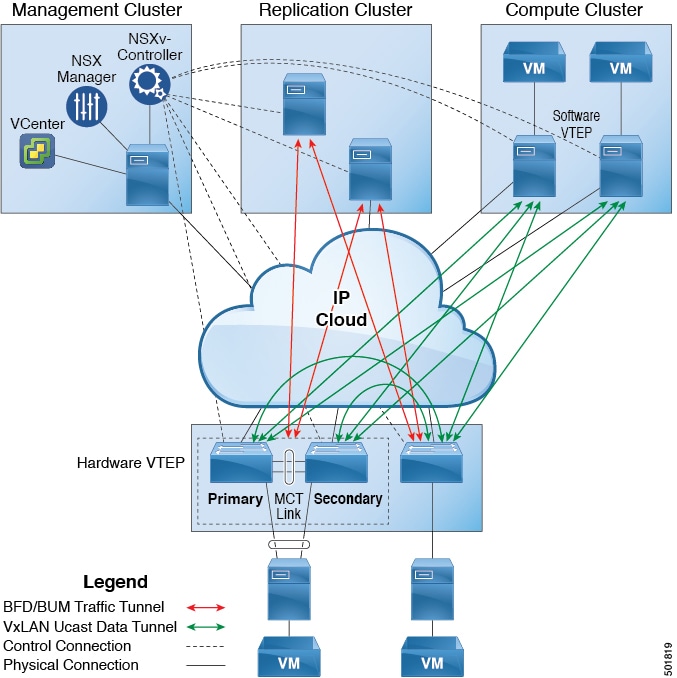
The following figure shows an NSXv controller-based topology for Layer 2 VXLAN communication between hardware and software VTEPs. A typical topology consists of the following:

  • Management cluster

    • vSphere VCenter VM—The front-end GUI interface for managing the configuration of several components in the setup.

    • NSXv Manager VM—Manages the VXLAN-related configuration.

    • NSXv Controller VMs (three controller VMs)—Pushes the configuration and distributes MAC/peer information to the hardware GW VTEP using OVSDB and uses the Netcpa connection to push configurations to the software VTEP.

  • Replication cluster

    • A collection of ESX hosts (called replication nodes) that replicates broadcast, unknown unicast, and multicast (BUM) traffic to other VTEPs in the network.

    • Each replication node hosts BFD sessions to hardware VTEPs.

  • Compute cluster

    • A collection of ESX hosts that acts as software VTEPs and encapsulates or de-encapsulates traffic from VMs destined from/to other VTEPs in the network.

  • IP core

    • A collection of network devices that forms an IP core responsible for IP routing.

  • Hardware VTEP

    • A pair of switches in a vPC or a single switch acting as a VTEP is supported. A VTEP encapsulates traffic from attached hosts and de-encapsulates traffic received from remote VTEPs.

    • Hosts BFD sessions to the replication nodes.

    • Also hosts the OVSDB plugin that connects to the controller. The OVSDB plugin may connect to the controller through either an out-of-band or in-band connection.

Figure 1. Nexus 9000 NXDB NSXv Topology