Contents

Configuring and Managing Zones

This chapter contains the following sections:

Configuring and Managing Zones

Zoning enables you to set up access control between storage devices or user groups. If you have administrator privileges in your fabric, you can create zones to increase network security and to prevent data loss or corruption. Zoning is enforced by examining the source-destination ID field.

Advanced zoning capabilities specified in the FC-GS-4 and FC-SW-3 standards are supported. You can use either the existing basic zoning capabilities or the advanced, standards-compliant zoning capabilities.

Information About Zoning

Zoning Features

Zoning includes the following features:

  • A zone consists of multiple zone members.

    • Members in a zone can access each other; members in different zones cannot access each other.

    • If zoning is not activated, all devices are members of the default zone.

    • If zoning is activated, any device that is not in an active zone (a zone that is part of an active zone set) is a member of the default zone.

    • Zones can vary in size.

    • Devices can belong to more than one zone.

    • A physical fabric can have a maximum of 16,000 members. This includes all VSANs in the fabric.

  • A zone set consists of one or more zones.

    • A zone set can be activated or deactivated as a single entity across all switches in the fabric.

    • Only one zone set can be activated at any time.

    • A zone can be a member of more than one zone set.

    • A zone switch can have a maximum of 500 zone sets.

  • Zoning can be administered from any switch in the fabric.

    • When you activate a zone (from any switch), all switches in the fabric receive the active zone set. Additionally, full zone sets are distributed to all switches in the fabric, if this feature is enabled in the source switch.

    • If a new switch is added to an existing fabric, zone sets are acquired by the new switch.

  • Zone changes can be configured nondisruptively.

    • New zones and zone sets can be activated without interrupting traffic on unaffected ports or devices.

  • Zone membership can be specified using the following identifiers:

    • Port world wide name (pWWN)—Specifies the pWWN of an N port attached to the switch as a member of the zone.

    • Fabric pWWN—Specifies the WWN of the fabric port (switch port’s WWN). This membership is also referred to as port-based zoning.

    • FC ID—Specifies the FC ID of an N port attached to the switch as a member of the zone.

    • Interface and switch WWN (sWWN)—Specifies the interface of a switch identified by the sWWN. This membership is also referred to as interface-based zoning.

    • Interface and domain ID—Specifies the interface of a switch identified by the domain ID.

    • Domain ID and port number—Specifies the domain ID of a Cisco switch domain and additionally specifies a port belonging to a non-Cisco switch.


Note


For N ports attached to the switch over a virtual Fibre Channel interface, you can specify zone membership using the pWWN of the N port, the FC ID of the N port, or the fabric pWWN of the virtual Fibre Channel interface.


  • Default zone membership includes all ports or WWNs that do not have a specific membership association. Access between default zone members is controlled by the default zone policy.

  • You can configure up to 8000 zones per VSAN and a maximum of 8000 zones for all VSANs on the switch.


Note


Interface-based zoning only works with Cisco SAN switches. Interface-based zoning does not work for VSANs configured in interop mode.


Zoning Example

The following figure shows a zone set with two zones, zone 1 and zone 2, in a fabric. Zone 1 provides access from all three hosts (H1, H2, H3) to the data residing on storage systems S1 and S2. Zone 2 restricts the data on S3 to access only by H3. H3 resides in both zones.
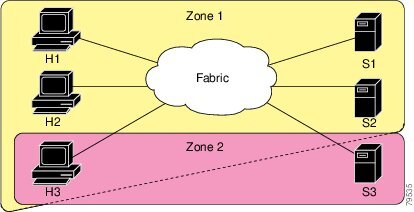
Figure 1. Fabric with Two Zones

You can use other ways to partition this fabric into zones. The following figure shows another possibility. Assume that there is a need to isolate storage system S2 for the purpose of testing new software. To achieve this, zone 3 is configured, which contains only host H2 and storage S2. You can restrict access to only H2 and S2 in zone 3, and to H1 and S1 in zone 1.
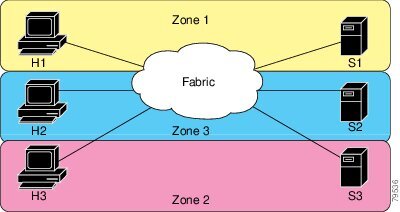
Figure 2. Fabric with Three Zones

Zone Implementation

Cisco Nexus 5000 Series switches automatically support the following basic zone features (no additional configuration is required):

  • Zones are contained in a VSAN.

  • Hard zoning cannot be disabled.

  • Name server queries are soft-zoned.

  • Only active zone sets are distributed.

  • Unzoned devices cannot access each other.

  • A zone or zone set with the same name can exist in each VSAN.

  • Each VSAN has a full database and an active database.

  • Active zone sets cannot be changed, without activating a full zone database.

  • Active zone sets are preserved across switch reboots.

  • Changes to the full database must be explicitly saved.

  • Zone reactivation (a zone set is active and you activate another zone set) does not disrupt existing traffic.

If required, you can additionally configure the following zone features:

  • Propagate full zone sets to all switches on a per VSAN basis.

  • Change the default policy for unzoned members.

  • Interoperate with other vendors by configuring a VSAN in the interop mode. You can also configure one VSAN in the interop mode and another VSAN in the basic mode in the same switch without disrupting each other.

  • Bring E ports out of isolation.

Active and Full Zone Set Configuration Guidelines

Before configuring a zone set, consider the following guidelines:

  • Each VSAN can have multiple zone sets but only one zone set can be active at any given time.

  • When you create a zone set, that zone set becomes a part of the full zone set.

  • When you activate a zone set, a copy of the zone set from the full zone set is used to enforce zoning, and is called the active zone set. An active zone set cannot be modified. A zone that is part of an active zone set is called an active zone.

  • The administrator can modify the full zone set even if a zone set with the same name is active. However, the modification will be enforced only upon reactivation.

  • When the activation is done, the active zone set is automatically stored in persistent configuration. This enables the switch to preserve the active zone set information across switch resets.

  • All other switches in the fabric receive the active zone set so they can enforce zoning in their respective switches.

  • Hard and soft zoning are implemented using the active zone set. Modifications take effect during zone set activation.

  • An FC ID or Nx port that is not part of the active zone set belongs to the default zone and the default zone information is not distributed to other switches.


Note


If one zone set is active and you activate another zone set, the currently active zone set is automatically deactivated. You do not need to explicitly deactivate the currently active zone set before activating a new zone set.


The following figure shows a zone being added to an activated zone set.
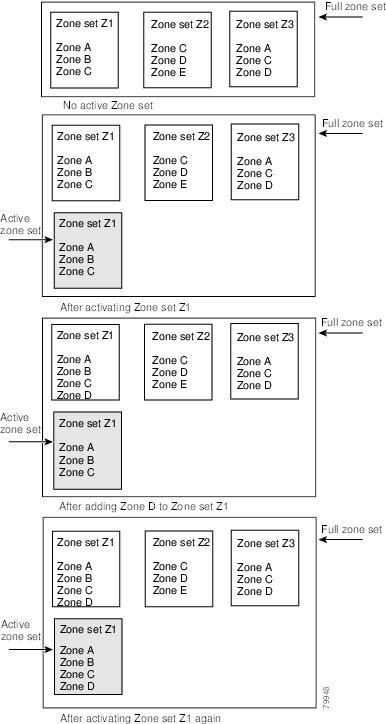
Figure 3. Active and Full Zone Sets

Configuring Zones

To configure a zone and assign a zone name, perform this task:

SUMMARY STEPS

    1.    switch# configuration terminal

    2.    switch(config)# zone name zone-name vsan vsan-id

    3.    switch(config-zone)# member type value


DETAILED STEPS
     Command or ActionPurpose
    Step 1 switch# configuration terminal
     

    Enters configuration mode.

     
    Step 2 switch(config)# zone name zone-name vsan vsan-id
     

    Configures a zone in the specified VSAN.

    Note   

    All alphanumeric characters or one of the following symbols ($, -, ^, _) are supported.

     
    Step 3 switch(config-zone)# member type value
     

    Configures a member for the specified zone based on the type (pWWN, fabric pWWN, FC ID, fcalias, domain ID, or interface) and value specified.

    Caution   

    You must only configure pWWN-type zoning on all SAN switches running Cisco NX-OS if there is a Cisco MDS 9020 switch running FabricWare in the same fabric.

    Tip   

    Use a relevant display command (for example, show interface or show flogi database) to obtain the required value in hex format.


    Configuring Zones Example

    Table 1 Type and Value Syntax for the member Command

    Domain ID

    member domain-id domain-id portnumber number

    FC alias

    member fcalias fc-alias-name

    FC ID

    member fcid fcid

    Fabric pWWN

    member fwwn fwwn-id

    Local sWWN interface

    member interface type slot/port

    Domain ID interface

    member interface type slot/port domain-id domain-id

    Remote sWWN interface

    member interface type slot/port swwn swwn-id

    pWWN

    member pwwn pwwn-id

    Tip


    Use the show wwn switch command to retrieve the sWWN. If you do not provide a sWWN, the software automatically uses the local sWWN.


    The following examples show how to configure zone members:

    switch(config)# zone name MyZone vsan 2
    

    pWWN example:

    switch(config-zone)# member pwwn 10:00:00:23:45:67:89:ab
    

    Fabric pWWN example:

    switch(config-zone)# member fwwn 10:01:10:01:10:ab:cd:ef
    

    FC ID example:

    switch(config-zone)# member fcid 0xce00d1
    

    FC alias example:

    switch(config-zone)# member fcalias Payroll
    

    Domain ID example:

    switch(config-zone)# member domain-id 2 portnumber 23
    

    Local sWWN interface example:

    switch(config-zone)# member interface fc 2/1
    

    Remote sWWN interface example:

    switch(config-zone)# member interface fc 2/1 swwn 20:00:00:05:30:00:4a:de
    

    Domain ID interface example:

    switch(config-zone)# member interface fc 2/1 domain-id 25
    

    Zone Sets

    In the following figure, two separate sets are created, each with its own membership hierarchy and zone members.
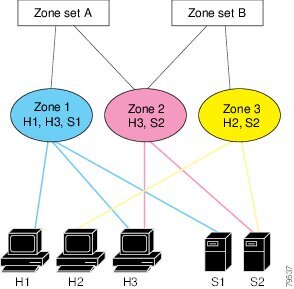
    Figure 4. Hierarchy of Zone Sets, Zones, and Zone Members

    Zones provide a method for specifying access control, while zone sets are a grouping of zones to enforce access control in the fabric. Either zone set A or zone set B can be activated (but not together).


    Tip


    Zone sets are configured with the names of the member zones and the VSAN (if the zone set is in a configured VSAN).


    Activating a Zone Set

    Changes to a zone set do not take effect in a full zone set until you activate it.

    To activate or deactivate an existing zone set, perform this task:

    SUMMARY STEPS

      1.    switch# configuration terminal

      2.    switch(config)# zoneset activate name zoneset-name vsan vsan-id

      3.    switch(config)# no zoneset activate name zoneset-name vsan vsan-id


    DETAILED STEPS
       Command or ActionPurpose
      Step 1 switch# configuration terminal
       

      Enters configuration mode.

       
      Step 2 switch(config)# zoneset activate name zoneset-name vsan vsan-id
       

      Activates the specified zone set.

       
      Step 3 switch(config)# no zoneset activate name zoneset-name vsan vsan-id
       

      Deactivates the specified zone set.


      About the Default Zone

      Each member of a fabric (in effect a device attached to an Nx port) can belong to any zone. If a member is not part of any active zone, it is considered to be part of the default zone. Therefore, if no zone set is active in the fabric, all devices are considered to be in the default zone. Even though a member can belong to multiple zones, a member that is part of the default zone cannot be part of any other zone. The switch determines whether a port is a member of the default zone when the attached port comes up.


      Note


      Unlike configured zones, default zone information is not distributed to the other switches in the fabric.


      Traffic can either be permitted or denied among members of the default zone. This information is not distributed to all switches; it must be configured in each switch.


      Note


      When the switch is initialized for the first time, no zones are configured and all members are considered to be part of the default zone. Members are not permitted to communicate with each other.


      Configure the default zone policy on each switch in the fabric. If you change the default zone policy on one switch in a fabric, be sure to change it on all the other switches in the fabric.


      Note


      The default settings for default zone configurations can be changed.


      The default zone members are explicitly listed when the default policy is configured as permit or when a zone set is active. When the default policy is configured as deny, the members of this zone are not explicitly enumerated when you view the active zone set.

      Configuring the Default Zone Access Permission

      To permit or deny traffic to members in the default zone, perform this task:

      SUMMARY STEPS

        1.    switch# configuration terminal

        2.    switch(config)# zone default-zone permit vsan vsan-id

        3.    switch(config)# no zone default-zone permit vsan vsan-id


      DETAILED STEPS
         Command or ActionPurpose
        Step 1 switch# configuration terminal
         

        Enters configuration mode.

         
        Step 2 switch(config)# zone default-zone permit vsan vsan-id
         

        Permits traffic flow to default zone members.

         
        Step 3 switch(config)# no zone default-zone permit vsan vsan-id
         

        Denies (default) traffic flow to default zone members.


        About FC Alias Creation

        You can assign an alias name and configure an alias member using the following values:

        • pWWN—The WWN of the N port is in hex format (for example, 10:00:00:23:45:67:89:ab).

        • fWWN—The WWN of the fabric port name is in hex format (for example, 10:00:00:23:45:67:89:ab).

        • FC ID—The N port ID is in 0xhhhhhh format (for example, 0xce00d1).

        • Domain ID—The domain ID is an integer from 1 to 239. A mandatory port number of a non-Cisco switch is required to complete this membership configuration.

        • Interface—Interface-based zoning is similar to port-based zoning because the switch interface is used to configure the zone. You can specify a switch interface as a zone member for both local and remote switches. To specify a remote switch, enter the remote switch WWN (sWWN) or the domain ID in the particular VSAN.


        Tip


        The switch supports a maximum of 2048 aliases per VSAN.


        Creating FC Aliases

        To create an alias, perform this task:

        SUMMARY STEPS

          1.    switch# configuration terminal

          2.    switch(config)# fcalias name AliasSample vsan vsan-id

          3.    switch(config-fcalias)# member type value


        DETAILED STEPS
           Command or ActionPurpose
          Step 1 switch# configuration terminal
           

          Enters configuration mode.

           
          Step 2 switch(config)# fcalias name AliasSample vsan vsan-id
           

          Configures an alias name (AliasSample).

           
          Step 3 switch(config-fcalias)# member type value
           

          Configures a member for the specified fcalias (AliasSample) based on the type (pWWN, fabric pWWN, FC ID, domain ID, or interface) and value specified.

          Note   

          Multiple members can be specified on multiple lines.

           
          Creating FC Aliases Example

          Table 2 Type and Value Syntax for the member Command

          Device alias

          member device-alias device-alias

          Domain ID

          member domain-id domain-id portnumber number

          FC ID

          member fcid fcid

          Fabric pWWN

          member fwwn fwwn-id

          Local sWWN interface

          member interface type slot/port

          Domain ID interface

          member interface type slot/port domain-id domain-id

          Remote sWWN interface

          member interface type slot/port swwn swwn-id

          pWWN

          member pwwn pwwn-id

          The following example shows how to configure different types of member alias:

          switch(config)# fcalias name AliasSample vsan 3
          

          pWWN example:

          switch(config-fcalias)# member pwwn 10:00:00:23:45:67:89:ab
          

          fWWN example:

          switch(config-fcalias)# member fwwn 10:01:10:01:10:ab:cd:ef
          

          FC ID example:

          switch(config-fcalias)# member fcid 0x222222
          

          Domain ID example:

          switch(config-fcalias)# member domain-id 2 portnumber 23
          

          Local sWWN interface example:

          switch(config-fcalias)# member interface fc 2/1
          

          Remote sWWN interface example:

          switch(config-fcalias)# member interface fc 2/1 swwn 20:00:00:05:30:00:4a:de
          

          Domain ID interface example:

          switch(config-fcalias)# member interface fc2/1 domain-id 25
          

          Device alias example:

          switch(config-fcalias)# member device-alias devName
          

          Creating Zone Sets and Adding Member Zones

          To create a zone set to include several zones, perform this task:

          SUMMARY STEPS

            1.    switch# configuration terminal

            2.    switch(config)# zone set name zoneset-name vsan vsan-id

            3.    switch(config-zoneset)# member name

            4.    switch(config-zoneset)# zone name zone-name

            5.    switch(config-zoneset-zone)# member fcid fcid


          DETAILED STEPS
             Command or ActionPurpose
            Step 1 switch# configuration terminal
             

            Enters configuration mode.

             
            Step 2 switch(config)# zone set name zoneset-name vsan vsan-id
             

            Configures a zone set with the configured zoneset-name.

            Tip   

            To activate a zone set, you must first create the zone and a zone set.

             
            Step 3 switch(config-zoneset)# member name
             

            Adds a zone as a member of the previously specified zone set.

            Tip   

            If the specified zone name was not previously configured, this command will return a "zone not present" error message:

             
            Step 4 switch(config-zoneset)# zone name zone-name
             

            Adds a zone to the specified zone set.

            Tip   

            Execute this step only if you need to create a zone from a zone set prompt.

             
            Step 5 switch(config-zoneset-zone)# member fcid fcid
             

            Adds a new member to the new zone.

            Tip   

            Execute this step only if you need to add a member to a zone from a zone set prompt.


            Tip


            You do not have to copy the running configuration to the startup configuration to store the active zone set. However, you need to copy the running configuration to the startup configuration to explicitly store full zone sets.


            Zone Enforcement

            Zoning can be enforced in two ways: soft and hard. Each end device (N port) discovers other devices in the fabric by querying the name server. When a device logs in to the name server, the name server returns the list of other devices that can be accessed by the querying device. If an N port does not know about the FC IDs of other devices outside its zone, it cannot access those devices.

            In soft zoning, zoning restrictions are applied only during interaction between the name server and the end device. If an end device somehow knows the FC ID of a device outside its zone, it can access that device.

            Hard zoning is enforced by the hardware on each frame sent by an N port. As frames enter the switch, source-destination IDs are compared with permitted combinations to allow the frame at wire speed. Hard zoning is applied to all forms of zoning.


            Note


            Hard zoning enforces zoning restrictions on every frame, and prevents unauthorized access.


            Cisco Nexus 5000 Series switches support both hard and soft zoning.

            Zone Set Distribution

            You can distribute full zone sets using one of two methods: one-time distribution using the zoneset distribute vsan command at the EXEC mode level or full zone set distribution using the zoneset distribute full vsan command at the configuration mode level. The following table lists the differences between the methods.

            Table 3 Zone Set Distribution Differences

            One-Time Distribution

            zoneset distribute vsan Command (EXEC Mode)

            Full Zone Set Distribution

            zoneset distribute full vsan Command(Configuration Mode)

            Distributes the full zone set immediately.

            Does not distribute the full zone set immediately.

            Does not distribute the full zone set information along with the active zone set during activation, deactivation, or merge process.

            Remembers to distribute the full zone set information along with the active zone set during activation, deactivation, and merge processes.

            Enabling Full Zone Set Distribution

            All switches in the Cisco Nexus 5000 Series distribute active zone sets when new E port links come up or when a new zone set is activated in a VSAN. The zone set distribution takes effect while sending merge requests to the adjacent switch or while activating a zone set.

            To enable full zone set and active zone set distribution to all switches on a per VSAN basis, perform this task:

            SUMMARY STEPS

              1.    switch# configuration terminal

              2.    switch(config)# zoneset distribute full vsan vsan-id


            DETAILED STEPS
               Command or ActionPurpose
              Step 1 switch# configuration terminal
               

              Enters configuration mode.

               
              Step 2 switch(config)# zoneset distribute full vsan vsan-id
               

              Enables sending a full zone set along with an active zone set.


              Enabling a One-Time Distribution

              You can perform a one-time distribution of inactive, unmodified zone sets throughout the fabric.

              Use the zoneset distribute vsan vsan-id command in EXEC mode to perform this distribution.

              switch# zoneset distribute vsan 2
              
              Zoneset distribution initiated. check zone status

              This command only distributes the full zone set information, as it does not save the information to the startup configuration. You must explicitly enter the copy running-config startup-config command to save the full zone set information to the startup configuration.


              Note


              The one-time distribution of the full zone set is supported in interop 2 and interop 3 modes, and not in interop 1 mode.


              Use the show zone status vsan vsan-id command to check the status of the one-time zone set distribution request.

              switch# show zone status vsan 3
              
              VSAN: 3 default-zone: permit distribute: active only Interop: 100
                  mode:basic merge-control:allow 
                  session:none
                  hard-zoning:enabled
              Default zone:
                  qos:none broadcast:disabled ronly:disabled
              Full Zoning Database :
                  Zonesets:0  Zones:0 Aliases: 0
              Active Zoning Database :
                  Name: nozoneset  Zonesets:1  Zones:2
              Status: Zoneset distribution completed at 04:01:06 Aug 28 2004

              About Recovering from Link Isolation

              When two switches in a fabric are merged using a TE or E port, these TE and E ports may become isolated when the active zone set databases are different between the two switches or fabrics. When a TE port or an E port become isolated, you can recover that port from its isolated state using one of three options:

              • Import the neighboring switch’s active zone set database and replace the current active zone set (see the figure below).

              • Export the current database to the neighboring switch.

              • Manually resolve the conflict by editing the full zone set, activating the corrected zone set, and then bringing up the link.
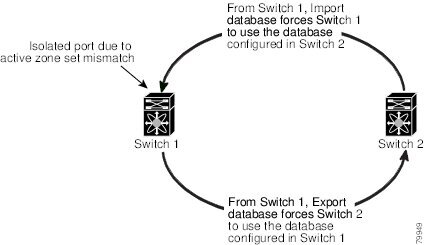
              Figure 5. Importing and Exporting the Database

              Importing and Exporting Zone Sets

              To import or export the zone set information from or to an adjacent switch, perform this task:

              SUMMARY STEPS

                1.    switch# zoneset import interface fc slot/port vsan vsan-id

                2.    switch# zoneset import interface fc slot/port vsan vsan-id

                3.    switch# zoneset export vsan vsan-id

                4.    switch# zoneset export vsan vsan-id


              DETAILED STEPS
                 Command or ActionPurpose
                Step 1 switch# zoneset import interface fc slot/port vsan vsan-id
                 

                Imports the zone set from the adjacent switch connected through the specified interface for the VSAN .

                 
                Step 2 switch# zoneset import interface fc slot/port vsan vsan-id
                 

                Imports the zone set from the adjacent switch connected through the specified interface for the VSAN range.

                 
                Step 3 switch# zoneset export vsan vsan-id
                 

                Exports the zone set to the adjacent switch connected through the specified VSAN.

                 
                Step 4 switch# zoneset export vsan vsan-id
                 

                Exports the zone set to the adjacent switch connected through the specified range of VSANs.


                Zone Set Duplication

                You can make a copy and then edit it without altering the existing active zone set. You can copy an active zone set from the bootflash: directory, volatile: directory, or slot0 to one of the following areas:

                • To the full zone set

                • To a remote location (using FTP, SCP, SFTP, or TFTP)

                The active zone set is not part of the full zone set. You cannot make changes to an existing zone set and activate it if the full zone set is lost or is not propagated.


                Caution


                Copying an active zone set to a full zone set may overwrite a zone with the same name if it already exists in the full zone set database.


                Copying Zone Sets

                On Cisco Nexus 5000 Series switches, you cannot edit an active zone set. However, you can copy an active zone set to create a new zone set that you can edit.

                To make a copy of a zone set, perform this task:

                SUMMARY STEPS

                  1.    switch# zone copy active-zoneset full-zoneset vsan vsan-id

                  2.    switch# zone copy vsan vsan-id active-zoneset scp://guest@myserver/tmp/active_zoneset.txt


                DETAILED STEPS
                   Command or ActionPurpose
                  Step 1 switch# zone copy active-zoneset full-zoneset vsan vsan-id
                   

                  Makes a copy of the active zone set in the specified VSAN to the full zone set.

                   
                  Step 2 switch# zone copy vsan vsan-id active-zoneset scp://guest@myserver/tmp/active_zoneset.txt
                   

                  Copies the active zone in the specified VSAN to a remote location using SCP.


                  Renaming Zones, Zone Sets, and Aliases

                  To rename a zone, zone set, fcalias, or zone-attribute-group, perform this task:

                  SUMMARY STEPS

                    1.    switch# configuration terminal

                    2.    switch(config)# zoneset rename oldname newname vsan vsan-id

                    3.    switch(config)# zone rename oldname newname vsan vsan-id

                    4.    switch(config)# fcalias rename oldname newname vsan vsan-id

                    5.    switch(config)# zone-attribute-group rename oldname newname vsan vsan-id

                    6.    switch(config)# zoneset activate name newname vsan vsan-id


                  DETAILED STEPS
                     Command or ActionPurpose
                    Step 1 switch# configuration terminal
                     

                    Enters configuration mode.

                     
                    Step 2 switch(config)# zoneset rename oldname newname vsan vsan-id
                     

                    Renames a zone set in the specified VSAN.

                     
                    Step 3 switch(config)# zone rename oldname newname vsan vsan-id
                     

                    Renames a zone in the specified VSAN.

                     
                    Step 4 switch(config)# fcalias rename oldname newname vsan vsan-id
                     

                    Renames a fcalias in the specified VSAN.

                     
                    Step 5 switch(config)# zone-attribute-group rename oldname newname vsan vsan-id
                     

                    Renames a zone attribute group in the specified VSAN.

                     
                    Step 6 switch(config)# zoneset activate name newname vsan vsan-id
                     

                    Activates the zone set and updates the new zone name in the active zone set.


                    Cloning Zones, Zone Sets, FC Aliases, and Zone Attribute Groups

                    To clone a zone, zone set, fcalias, or zone-attribute-group, perform this task:

                    SUMMARY STEPS

                      1.    switch# configuration terminal

                      2.    switch(config)# zoneset clone oldname newname vsan vsan-id

                      3.    switch(config)# zone clone oldname newname vsan number

                      4.    switch(config)# fcalias clone oldname newname vsan vsan-id

                      5.    switch(config)# zone-attribute-group clone oldname newname vsan vsan-id

                      6.    switch(config)# zoneset activate name newname vsan vsan-id


                    DETAILED STEPS
                       Command or ActionPurpose
                      Step 1 switch# configuration terminal
                       

                      Enters configuration mode.

                       
                      Step 2 switch(config)# zoneset clone oldname newname vsan vsan-id
                       

                      Clones a zone set in the specified VSAN.

                       
                      Step 3 switch(config)# zone clone oldname newname vsan number
                       

                      Clones a zone in the specified VSAN.

                       
                      Step 4 switch(config)# fcalias clone oldname newname vsan vsan-id
                       

                      Clones a fcalias in the specified VSAN.

                       
                      Step 5 switch(config)# zone-attribute-group clone oldname newname vsan vsan-id
                       

                      Clones a zone attribute group in the specified VSAN.

                       
                      Step 6 switch(config)# zoneset activate name newname vsan vsan-id
                       

                      Activates the zone set and updates the new zone name in the active zone set.


                      Clearing the Zone Server Database

                      You can clear all configured information in the zone server database for the specified VSAN.

                      To clear the zone server database, use the following command:

                      switch# clear zone database vsan 2
                      

                      Note


                      After entering a clear zone database command, you must explicitly enter the copy running-config startup-config to ensure that the running configuration is used when the switch reboots.


                      Note


                      Clearing a zone set only erases the full zone database, not the active zone database.


                      Verifying Zone Information

                      You can view any zone information by using the show command. If you request information for a specific object (for example, a specific zone, zone set, VSAN, or alias, or keywords such as brief or active), only information for the specified object is displayed.

                      The following example shows how to display zone information for all VSANs:

                      switch# show zone
                      

                      The following example shows how to display zone information for a specific VSAN:

                      switch# show zone vsan 1
                      

                      The following example shows how to display the configured zone sets for a range of VSANs:

                      switch# show zoneset vsan 2-3
                      

                      The following example shows how to display the members of a specific zone:

                      switch# show zone name Zone1
                      

                      The following example shows how to display fcalias configuration:

                      switch# show fcalias vsan 1
                      

                      The following example shows how to display all zones to which a member belongs:

                      switch# show zone member pwwn 21:00:00:20:37:9c:48:e5
                      

                      The following example shows how to display the number of control frames exchanged with other switches:

                      switch# show zone statistics 
                      

                      The following example shows how to display the active zone set:

                      switch# show zoneset active
                      

                      The following example shows how to display the active zones:

                      switch# show zone active
                      

                      The following example shows how to display the zone status:

                      switch# show zone status
                      

                      Enhanced Zoning

                      The zoning feature complies with the FC-GS-4 and FC-SW-3 standards. Both standards support the basic zoning functionalities explained in the previous section and the enhanced zoning functionalities described in this section.

                      About Enhanced Zoning

                      The following table lists the advantages of the enhanced zoning feature in all switches in the Cisco Nexus 5000 Series.

                      Table 4  Advantages of Enhanced Zoning

                      Basic Zoning

                      Enhanced Zoning

                      Enhanced Zoning Advantages

                      Administrators can make simultaneous configuration changes. Upon activation, one administrator can overwrite another administrator’s changes.

                      Performs all configurations within a single configuration session. When you begin a session, the switch locks the entire fabric to implement the change.

                      One configuration session for the entire fabric to ensure consistency within the fabric.

                      If a zone is part of multiple zone sets, you create an instance of this zone in each zone set

                      References to the zone are used by the zone sets as required once you define the zone.

                      Reduced payload size as the zone is referenced. The size is more pronounced with bigger databases.

                      The default zone policy is defined per switch. To ensure smooth fabric operation, all switches in the fabric must have the same default zone setting.

                      Enforces and exchanges the default zone setting throughout the fabric.

                      Fabric-wide policy enforcement reduces troubleshooting time.

                      To retrieve the results of the activation on a per switch basis, the managing switch provides a combined status about the activation. It does not identify the failure switch.

                      Retrieves the activation results and the nature of the problem from each remote switch.

                      Enhanced error reporting eases the troubleshooting process

                      To distribute the zoning database, you must reactivate the same zone set. The reactivation may affect hardware changes for hard zoning on the local switch and on remote switches.

                      Implements changes to the zoning database and distributes it without reactivation.

                      Distribution of zone sets without activation avoids hardware changes for hard zoning in the switches.

                      The Cisco-specific zone member types (symbolic node name, and other types) may be used by other non-Cisco switches. During a merge, the Cisco-specific types can be misunderstood by the non-Cisco switches.

                      Provides a vendor ID along with a vendor-specific type value to uniquely identify a member type.

                      Unique vendor type.

                      The fWWN-based zone membership is only supported in Cisco interop mode.

                      Supports fWWN-based membership in the standard interop mode (interop mode 1).

                      The fWWN-based member type is standardized.

                      Changing from Basic Zoning to Enhanced Zoning

                      To change to the enhanced zoning mode from the basic mode, perform this task:

                      SUMMARY STEPS

                        1.    Verify that all switches in the fabric are capable of working in the enhanced mode.

                        2.    If one or more switches are not capable of working in enhanced mode, then your request to move to enhanced mode is rejected.

                        3.    Set the operation mode to enhanced zoning mode.


                      DETAILED STEPS
                        Step 1   Verify that all switches in the fabric are capable of working in the enhanced mode.
                        Step 2   If one or more switches are not capable of working in enhanced mode, then your request to move to enhanced mode is rejected.
                        Step 3   Set the operation mode to enhanced zoning mode.

                        Changing from Enhanced Zoning to Basic Zoning

                        Cisco SAN switches allow you to change from enhanced zoning to basic zoning to enable you to downgrade and upgrade to other Cisco NX-OS releases.

                        To change to the basic zoning mode from the enhanced mode, perform this task:

                        SUMMARY STEPS

                          1.    Verify that the active and full zone set do not contain any configuration that is specific to the enhanced zoning mode.

                          2.    If such configurations exist, delete them before proceeding with this procedure. If you do not delete the existing configuration, the switch software automatically removes them.

                          3.    Set the operation mode to basic zoning mode.


                        DETAILED STEPS
                          Step 1   Verify that the active and full zone set do not contain any configuration that is specific to the enhanced zoning mode.
                          Step 2   If such configurations exist, delete them before proceeding with this procedure. If you do not delete the existing configuration, the switch software automatically removes them.
                          Step 3   Set the operation mode to basic zoning mode.

                          Enabling Enhanced Zoning

                          By default, the enhanced zoning feature is disabled in all switches in the Cisco Nexus 5000 Series.

                          To enable enhanced zoning in a VSAN, perform this task:

                          SUMMARY STEPS

                            1.    switch# configuration terminal

                            2.    switch(config)# zone mode enhanced vsan vsan-id

                            3.    switch(config)# no zone mode enhanced vsan vsan-id


                          DETAILED STEPS
                             Command or ActionPurpose
                            Step 1 switch# configuration terminal
                             

                            Enters configuration mode.

                             
                            Step 2 switch(config)# zone mode enhanced vsan vsan-id
                             

                            Enables enhanced zoning in the specified VSAN.

                             
                            Step 3 switch(config)# no zone mode enhanced vsan vsan-id
                             

                            Disables enhanced zoning in the specified VSAN.


                            Modifying the Zone Database

                            Modifications to the zone database is done within a session. A session is created at the time of the first successful configuration command. On creation of a session, a copy of the zone database is created. Any changes done within the session are performed on this copy of the zoning database. These changes in the copy zoning database are not applied to the effective zoning database until you commit the changes. Once you apply the changes, the session is closed.

                            If the fabric is locked by another user and for some reason the lock is not cleared, you can force the operation and close the session. You must have permission (role) to clear the lock in this switch and perform the operation on the switch from where the session was originally created.

                            To commit or discard changes to the zoning database in a VSAN, perform this task:

                            SUMMARY STEPS

                              1.    switch# configuration terminal

                              2.    switch(config)# zone commit vsan vsan-id

                              3.    switch(config)# zone commit vsan vsan-id force

                              4.    switch(config)# no zone commit vsan vsan-id

                              5.    switch(config)# no zone commit vsan vsan-id force


                            DETAILED STEPS
                               Command or ActionPurpose
                              Step 1 switch# configuration terminal
                               

                              Enters configuration mode.

                               
                              Step 2 switch(config)# zone commit vsan vsan-id
                               

                              Applies the changes to the enhanced zone database and closes the session.

                               
                              Step 3 switch(config)# zone commit vsan vsan-id force
                               

                              Forcefully applies the changes to the enhanced zone database and closes the session created by another user.

                               
                              Step 4 switch(config)# no zone commit vsan vsan-id
                               

                              Discards the changes to the enhanced zone database and closes the session.

                               
                              Step 5 switch(config)# no zone commit vsan vsan-id force
                               

                              Forcefully discards the changes to the enhanced zone database and closes the session created by another user.


                              Releasing Zone Database Locks

                              To release the session lock on the zoning database on the switches in a VSAN, use the no zone commit vsan command from the switch where the database was initially locked.

                              switch# configuration terminal
                              
                              switch(config)# no zone commit vsan 2
                              

                              If session locks remain on remote switches after using the no zone commit vsan command, you can use the clear zone lock vsan command on the remote switches.

                              switch# clear zone lock vsan 2
                              

                              Note


                              We recommend using the no zone commit vsan command first to release the session lock in the fabric. If that fails, use the clear zone lock vsan command on the remote switches where the session is still locked.


                              Merging the Database

                              The merge method depends on the fabric-wide merge control setting:

                              • Restrict—If the two databases are not identical, the ISLs between the switches are isolated.

                              • Allow—The two databases are merged using the merge rules specified in the following table.

                              Table 5 Database Zone Merge Status

                              Local Database

                              Adjacent Database

                              Merge Status

                              Results of the Merge

                              The databases contain zone sets with the same nameIn the enhanced zoning mode, the active zone set does not have a name in interop mode 1. The zone set names are only present for full zone sets. but different zones, aliases, and attributes groups.

                              Successful.

                              ISLs are isolated.

                              The databases contains a zone, zone alias, or zone attribute group object with same name1 but different members.

                              Failed.

                              The adjacent database information populates the local database.

                              Empty.

                              Contains data.

                              Successful.

                              The union of the local and adjacent databases.

                              Contains data.

                              Empty.

                              Successful.

                              The local database information populates the adjacent database.

                              The merge process operates as follows:

                              • The software compares the protocol versions. If the protocol versions differ, then the ISL is isolated.

                              • If the protocol versions are the same, then the zone policies are compared. If the zone policies differ, then the ISL is isolated.

                              • If the zone merge options are the same, then the comparison is implemented based on the merge control setting.

                                • If the setting is restrict, the active zone set and the full zone set should be identical. Otherwise, the link is isolated.

                                • If the setting is allow, then the merge rules are used to perform the merge.

                              Configuring Zone Merge Control Policies

                              To configure merge control policies, perform this task:

                              SUMMARY STEPS

                                1.    switch# configuration terminal

                                2.    switch(config)# zone merge-control restrict vsan vsan-id

                                3.    switch(config)# no zone merge-control restrict vsan vsan-id

                                4.    switch(config)# zone commit vsan vsan-id


                              DETAILED STEPS
                                 Command or ActionPurpose
                                Step 1 switch# configuration terminal
                                 

                                Enters configuration mode.

                                 
                                Step 2 switch(config)# zone merge-control restrict vsan vsan-id
                                 

                                Configures a restricted merge control setting for this VSAN.

                                 
                                Step 3 switch(config)# no zone merge-control restrict vsan vsan-id
                                 

                                Defaults to using the allow merge control setting for this VSAN.

                                 
                                Step 4 switch(config)# zone commit vsan vsan-id
                                 

                                Commits the changes made to the specified VSAN.


                                Default Zone Policies

                                To permit or deny traffic in the default zone, perform this task:

                                SUMMARY STEPS

                                  1.    switch# configuration terminal

                                  2.    switch(config)# zone default-zone permit vsan vsan-id

                                  3.    switch(config)# no zone default-zone permit vsan vsan-id

                                  4.    switch(config)# zone commit vsan vsan-id


                                DETAILED STEPS
                                   Command or ActionPurpose
                                  Step 1 switch# configuration terminal
                                   

                                  Enters configuration mode.

                                   
                                  Step 2 switch(config)# zone default-zone permit vsan vsan-id
                                   

                                  Permits traffic flow to default zone members.

                                   
                                  Step 3 switch(config)# no zone default-zone permit vsan vsan-id
                                   

                                  Denies traffic flow to default zone members and reverts to factory default.

                                   
                                  Step 4 switch(config)# zone commit vsan vsan-id
                                   

                                  Commits the changes made to the specified VSAN.


                                  Configuring System Default Zoning Settings

                                  You can configure default settings for default zone policies and full zone distribution for new VSANs on the switch. To configure switch-wide default settings, perform this task:

                                  SUMMARY STEPS

                                    1.    switch# configuration terminal

                                    2.    switch(config)# system default zone default-zone permit

                                    3.    switch(config)# no system default zone default-zone permit

                                    4.    switch(config)# system default zone distribute full

                                    5.    switch(config)# no system default zone distribute full


                                  DETAILED STEPS
                                     Command or ActionPurpose
                                    Step 1 switch# configuration terminal
                                     

                                    Enters configuration mode.

                                     
                                    Step 2 switch(config)# system default zone default-zone permit
                                     

                                    Configures permit as the default zoning policy for new VSANs on the switch.

                                     
                                    Step 3 switch(config)# no system default zone default-zone permit
                                     

                                    Configures deny (default) as the default zoning policy for new VSANs on the switch.

                                     
                                    Step 4 switch(config)# system default zone distribute full
                                     

                                    Enables full zone database distribution as the default for new VSANs on the switch.

                                     
                                    Step 5 switch(config)# no system default zone distribute full
                                     

                                    Disables (default) full zone database distribution as the default for new VSANs on the switch. Only the active zone database is distributed.


                                    Verifying Enhanced Zone Information

                                    The following example shows how to display the zone status for a specified VSAN:

                                    switch# show zone status vsan 2
                                    

                                    Compacting the Zone Database

                                    You can delete excess zones and compact the zone database for the VSAN.


                                    Note


                                    A merge failure occurs when a switch supports more than 2000 zones per VSAN but its neighbor does not. Also, zone set activation can fail if the switch has more than 2000 zones per VSAN and not all switches in the fabric support more than 2000 zones per VSAN.


                                    To delete zones and compact the zone database for a VSAN, perform this task:

                                    SUMMARY STEPS

                                      1.    switch# configuration terminal

                                      2.    switch(config)# no zone name zone-name vsan vsan-id

                                      3.    switch(config)# zone compact vsan vsan-id


                                    DETAILED STEPS
                                       Command or ActionPurpose
                                      Step 1 switch# configuration terminal
                                       

                                      Enters configuration mode.

                                       
                                      Step 2 switch(config)# no zone name zone-name vsan vsan-id
                                       

                                      Deletes a zone to reduce the number of zones to 2000 or fewer.

                                       
                                      Step 3 switch(config)# zone compact vsan vsan-id
                                       

                                      Compacts the zone database for the specified VSAN to recover the zone ID released when a zone was deleted.


                                      Zone and Zone Set Analysis

                                      To better manage the zones and zone sets on your switch, you can display zone and zone set information using the show zone analysis command.

                                      The following example shows how to display full zoning analysis:

                                      switch# show zone analysis vsan 1
                                      

                                      The following example shows how to display active zoning analysis:

                                      switch# show zone analysis active vsan 1
                                      

                                      See the Cisco Nexus 5000 Series Switch Command Reference for the description of the information displayed in the command output.

                                      Default Basic Zone Settings

                                      The following table lists the default settings for basic zone parameters.

                                      Table 6 Default Basic Zone Parameters

                                      Parameters

                                      Default

                                      Default zone policy

                                      Denied to all members.

                                      Full zone set distribute

                                      The full zone set(s) is not distributed.

                                      Enhanced zoning

                                      Disabled.


                                      Configuring and Managing Zones

                                      Contents

                                      Configuring and Managing Zones

                                      This chapter contains the following sections:

                                      Configuring and Managing Zones

                                      Zoning enables you to set up access control between storage devices or user groups. If you have administrator privileges in your fabric, you can create zones to increase network security and to prevent data loss or corruption. Zoning is enforced by examining the source-destination ID field.

                                      Advanced zoning capabilities specified in the FC-GS-4 and FC-SW-3 standards are supported. You can use either the existing basic zoning capabilities or the advanced, standards-compliant zoning capabilities.

                                      Information About Zoning

                                      Zoning Features

                                      Zoning includes the following features:

                                      • A zone consists of multiple zone members.

                                        • Members in a zone can access each other; members in different zones cannot access each other.

                                        • If zoning is not activated, all devices are members of the default zone.

                                        • If zoning is activated, any device that is not in an active zone (a zone that is part of an active zone set) is a member of the default zone.

                                        • Zones can vary in size.

                                        • Devices can belong to more than one zone.

                                        • A physical fabric can have a maximum of 16,000 members. This includes all VSANs in the fabric.

                                      • A zone set consists of one or more zones.

                                        • A zone set can be activated or deactivated as a single entity across all switches in the fabric.

                                        • Only one zone set can be activated at any time.

                                        • A zone can be a member of more than one zone set.

                                        • A zone switch can have a maximum of 500 zone sets.

                                      • Zoning can be administered from any switch in the fabric.

                                        • When you activate a zone (from any switch), all switches in the fabric receive the active zone set. Additionally, full zone sets are distributed to all switches in the fabric, if this feature is enabled in the source switch.

                                        • If a new switch is added to an existing fabric, zone sets are acquired by the new switch.

                                      • Zone changes can be configured nondisruptively.

                                        • New zones and zone sets can be activated without interrupting traffic on unaffected ports or devices.

                                      • Zone membership can be specified using the following identifiers:

                                        • Port world wide name (pWWN)—Specifies the pWWN of an N port attached to the switch as a member of the zone.

                                        • Fabric pWWN—Specifies the WWN of the fabric port (switch port’s WWN). This membership is also referred to as port-based zoning.

                                        • FC ID—Specifies the FC ID of an N port attached to the switch as a member of the zone.

                                        • Interface and switch WWN (sWWN)—Specifies the interface of a switch identified by the sWWN. This membership is also referred to as interface-based zoning.

                                        • Interface and domain ID—Specifies the interface of a switch identified by the domain ID.

                                        • Domain ID and port number—Specifies the domain ID of a Cisco switch domain and additionally specifies a port belonging to a non-Cisco switch.


                                      Note


                                      For N ports attached to the switch over a virtual Fibre Channel interface, you can specify zone membership using the pWWN of the N port, the FC ID of the N port, or the fabric pWWN of the virtual Fibre Channel interface.


                                      • Default zone membership includes all ports or WWNs that do not have a specific membership association. Access between default zone members is controlled by the default zone policy.

                                      • You can configure up to 8000 zones per VSAN and a maximum of 8000 zones for all VSANs on the switch.


                                      Note


                                      Interface-based zoning only works with Cisco SAN switches. Interface-based zoning does not work for VSANs configured in interop mode.


                                      Zoning Example

                                      The following figure shows a zone set with two zones, zone 1 and zone 2, in a fabric. Zone 1 provides access from all three hosts (H1, H2, H3) to the data residing on storage systems S1 and S2. Zone 2 restricts the data on S3 to access only by H3. H3 resides in both zones.

                                      Figure 1. Fabric with Two Zones

                                      You can use other ways to partition this fabric into zones. The following figure shows another possibility. Assume that there is a need to isolate storage system S2 for the purpose of testing new software. To achieve this, zone 3 is configured, which contains only host H2 and storage S2. You can restrict access to only H2 and S2 in zone 3, and to H1 and S1 in zone 1.

                                      Figure 2. Fabric with Three Zones

                                      Zone Implementation

                                      Cisco Nexus 5000 Series switches automatically support the following basic zone features (no additional configuration is required):

                                      • Zones are contained in a VSAN.

                                      • Hard zoning cannot be disabled.

                                      • Name server queries are soft-zoned.

                                      • Only active zone sets are distributed.

                                      • Unzoned devices cannot access each other.

                                      • A zone or zone set with the same name can exist in each VSAN.

                                      • Each VSAN has a full database and an active database.

                                      • Active zone sets cannot be changed, without activating a full zone database.

                                      • Active zone sets are preserved across switch reboots.

                                      • Changes to the full database must be explicitly saved.

                                      • Zone reactivation (a zone set is active and you activate another zone set) does not disrupt existing traffic.

                                      If required, you can additionally configure the following zone features:

                                      • Propagate full zone sets to all switches on a per VSAN basis.

                                      • Change the default policy for unzoned members.

                                      • Interoperate with other vendors by configuring a VSAN in the interop mode. You can also configure one VSAN in the interop mode and another VSAN in the basic mode in the same switch without disrupting each other.

                                      • Bring E ports out of isolation.

                                      Active and Full Zone Set Configuration Guidelines

                                      Before configuring a zone set, consider the following guidelines:

                                      • Each VSAN can have multiple zone sets but only one zone set can be active at any given time.

                                      • When you create a zone set, that zone set becomes a part of the full zone set.

                                      • When you activate a zone set, a copy of the zone set from the full zone set is used to enforce zoning, and is called the active zone set. An active zone set cannot be modified. A zone that is part of an active zone set is called an active zone.

                                      • The administrator can modify the full zone set even if a zone set with the same name is active. However, the modification will be enforced only upon reactivation.

                                      • When the activation is done, the active zone set is automatically stored in persistent configuration. This enables the switch to preserve the active zone set information across switch resets.

                                      • All other switches in the fabric receive the active zone set so they can enforce zoning in their respective switches.

                                      • Hard and soft zoning are implemented using the active zone set. Modifications take effect during zone set activation.

                                      • An FC ID or Nx port that is not part of the active zone set belongs to the default zone and the default zone information is not distributed to other switches.


                                      Note


                                      If one zone set is active and you activate another zone set, the currently active zone set is automatically deactivated. You do not need to explicitly deactivate the currently active zone set before activating a new zone set.


                                      The following figure shows a zone being added to an activated zone set.

                                      Figure 3. Active and Full Zone Sets

                                      Configuring Zones

                                      To configure a zone and assign a zone name, perform this task:

                                      SUMMARY STEPS

                                        1.    switch# configuration terminal

                                        2.    switch(config)# zone name zone-name vsan vsan-id

                                        3.    switch(config-zone)# member type value


                                      DETAILED STEPS
                                         Command or ActionPurpose
                                        Step 1 switch# configuration terminal
                                         

                                        Enters configuration mode.

                                         
                                        Step 2 switch(config)# zone name zone-name vsan vsan-id
                                         

                                        Configures a zone in the specified VSAN.

                                        Note   

                                        All alphanumeric characters or one of the following symbols ($, -, ^, _) are supported.

                                         
                                        Step 3 switch(config-zone)# member type value
                                         

                                        Configures a member for the specified zone based on the type (pWWN, fabric pWWN, FC ID, fcalias, domain ID, or interface) and value specified.

                                        Caution   

                                        You must only configure pWWN-type zoning on all SAN switches running Cisco NX-OS if there is a Cisco MDS 9020 switch running FabricWare in the same fabric.

                                        Tip   

                                        Use a relevant display command (for example, show interface or show flogi database) to obtain the required value in hex format.


                                        Configuring Zones Example

                                        Table 1 Type and Value Syntax for the member Command

                                        Domain ID

                                        member domain-id domain-id portnumber number

                                        FC alias

                                        member fcalias fc-alias-name

                                        FC ID

                                        member fcid fcid

                                        Fabric pWWN

                                        member fwwn fwwn-id

                                        Local sWWN interface

                                        member interface type slot/port

                                        Domain ID interface

                                        member interface type slot/port domain-id domain-id

                                        Remote sWWN interface

                                        member interface type slot/port swwn swwn-id

                                        pWWN

                                        member pwwn pwwn-id

                                        Tip


                                        Use the show wwn switch command to retrieve the sWWN. If you do not provide a sWWN, the software automatically uses the local sWWN.


                                        The following examples show how to configure zone members:

                                        switch(config)# zone name MyZone vsan 2
                                        

                                        pWWN example:

                                        switch(config-zone)# member pwwn 10:00:00:23:45:67:89:ab
                                        

                                        Fabric pWWN example:

                                        switch(config-zone)# member fwwn 10:01:10:01:10:ab:cd:ef
                                        

                                        FC ID example:

                                        switch(config-zone)# member fcid 0xce00d1
                                        

                                        FC alias example:

                                        switch(config-zone)# member fcalias Payroll
                                        

                                        Domain ID example:

                                        switch(config-zone)# member domain-id 2 portnumber 23
                                        

                                        Local sWWN interface example:

                                        switch(config-zone)# member interface fc 2/1
                                        

                                        Remote sWWN interface example:

                                        switch(config-zone)# member interface fc 2/1 swwn 20:00:00:05:30:00:4a:de
                                        

                                        Domain ID interface example:

                                        switch(config-zone)# member interface fc 2/1 domain-id 25
                                        

                                        Zone Sets

                                        In the following figure, two separate sets are created, each with its own membership hierarchy and zone members.

                                        Figure 4. Hierarchy of Zone Sets, Zones, and Zone Members

                                        Zones provide a method for specifying access control, while zone sets are a grouping of zones to enforce access control in the fabric. Either zone set A or zone set B can be activated (but not together).


                                        Tip


                                        Zone sets are configured with the names of the member zones and the VSAN (if the zone set is in a configured VSAN).


                                        Activating a Zone Set

                                        Changes to a zone set do not take effect in a full zone set until you activate it.

                                        To activate or deactivate an existing zone set, perform this task:

                                        SUMMARY STEPS

                                          1.    switch# configuration terminal

                                          2.    switch(config)# zoneset activate name zoneset-name vsan vsan-id

                                          3.    switch(config)# no zoneset activate name zoneset-name vsan vsan-id


                                        DETAILED STEPS
                                           Command or ActionPurpose
                                          Step 1 switch# configuration terminal
                                           

                                          Enters configuration mode.

                                           
                                          Step 2 switch(config)# zoneset activate name zoneset-name vsan vsan-id
                                           

                                          Activates the specified zone set.

                                           
                                          Step 3 switch(config)# no zoneset activate name zoneset-name vsan vsan-id
                                           

                                          Deactivates the specified zone set.


                                          About the Default Zone

                                          Each member of a fabric (in effect a device attached to an Nx port) can belong to any zone. If a member is not part of any active zone, it is considered to be part of the default zone. Therefore, if no zone set is active in the fabric, all devices are considered to be in the default zone. Even though a member can belong to multiple zones, a member that is part of the default zone cannot be part of any other zone. The switch determines whether a port is a member of the default zone when the attached port comes up.


                                          Note


                                          Unlike configured zones, default zone information is not distributed to the other switches in the fabric.


                                          Traffic can either be permitted or denied among members of the default zone. This information is not distributed to all switches; it must be configured in each switch.


                                          Note


                                          When the switch is initialized for the first time, no zones are configured and all members are considered to be part of the default zone. Members are not permitted to communicate with each other.


                                          Configure the default zone policy on each switch in the fabric. If you change the default zone policy on one switch in a fabric, be sure to change it on all the other switches in the fabric.


                                          Note


                                          The default settings for default zone configurations can be changed.


                                          The default zone members are explicitly listed when the default policy is configured as permit or when a zone set is active. When the default policy is configured as deny, the members of this zone are not explicitly enumerated when you view the active zone set.

                                          Configuring the Default Zone Access Permission

                                          To permit or deny traffic to members in the default zone, perform this task:

                                          SUMMARY STEPS

                                            1.    switch# configuration terminal

                                            2.    switch(config)# zone default-zone permit vsan vsan-id

                                            3.    switch(config)# no zone default-zone permit vsan vsan-id


                                          DETAILED STEPS
                                             Command or ActionPurpose
                                            Step 1 switch# configuration terminal
                                             

                                            Enters configuration mode.

                                             
                                            Step 2 switch(config)# zone default-zone permit vsan vsan-id
                                             

                                            Permits traffic flow to default zone members.

                                             
                                            Step 3 switch(config)# no zone default-zone permit vsan vsan-id
                                             

                                            Denies (default) traffic flow to default zone members.


                                            About FC Alias Creation

                                            You can assign an alias name and configure an alias member using the following values:

                                            • pWWN—The WWN of the N port is in hex format (for example, 10:00:00:23:45:67:89:ab).

                                            • fWWN—The WWN of the fabric port name is in hex format (for example, 10:00:00:23:45:67:89:ab).

                                            • FC ID—The N port ID is in 0xhhhhhh format (for example, 0xce00d1).

                                            • Domain ID—The domain ID is an integer from 1 to 239. A mandatory port number of a non-Cisco switch is required to complete this membership configuration.

                                            • Interface—Interface-based zoning is similar to port-based zoning because the switch interface is used to configure the zone. You can specify a switch interface as a zone member for both local and remote switches. To specify a remote switch, enter the remote switch WWN (sWWN) or the domain ID in the particular VSAN.


                                            Tip


                                            The switch supports a maximum of 2048 aliases per VSAN.


                                            Creating FC Aliases

                                            To create an alias, perform this task:

                                            SUMMARY STEPS

                                              1.    switch# configuration terminal

                                              2.    switch(config)# fcalias name AliasSample vsan vsan-id

                                              3.    switch(config-fcalias)# member type value


                                            DETAILED STEPS
                                               Command or ActionPurpose
                                              Step 1 switch# configuration terminal
                                               

                                              Enters configuration mode.

                                               
                                              Step 2 switch(config)# fcalias name AliasSample vsan vsan-id
                                               

                                              Configures an alias name (AliasSample).

                                               
                                              Step 3 switch(config-fcalias)# member type value
                                               

                                              Configures a member for the specified fcalias (AliasSample) based on the type (pWWN, fabric pWWN, FC ID, domain ID, or interface) and value specified.

                                              Note   

                                              Multiple members can be specified on multiple lines.

                                               
                                              Creating FC Aliases Example

                                              Table 2 Type and Value Syntax for the member Command

                                              Device alias

                                              member device-alias device-alias

                                              Domain ID

                                              member domain-id domain-id portnumber number

                                              FC ID

                                              member fcid fcid

                                              Fabric pWWN

                                              member fwwn fwwn-id

                                              Local sWWN interface

                                              member interface type slot/port

                                              Domain ID interface

                                              member interface type slot/port domain-id domain-id

                                              Remote sWWN interface

                                              member interface type slot/port swwn swwn-id

                                              pWWN

                                              member pwwn pwwn-id

                                              The following example shows how to configure different types of member alias:

                                              switch(config)# fcalias name AliasSample vsan 3
                                              

                                              pWWN example:

                                              switch(config-fcalias)# member pwwn 10:00:00:23:45:67:89:ab
                                              

                                              fWWN example:

                                              switch(config-fcalias)# member fwwn 10:01:10:01:10:ab:cd:ef
                                              

                                              FC ID example:

                                              switch(config-fcalias)# member fcid 0x222222
                                              

                                              Domain ID example:

                                              switch(config-fcalias)# member domain-id 2 portnumber 23
                                              

                                              Local sWWN interface example:

                                              switch(config-fcalias)# member interface fc 2/1
                                              

                                              Remote sWWN interface example:

                                              switch(config-fcalias)# member interface fc 2/1 swwn 20:00:00:05:30:00:4a:de
                                              

                                              Domain ID interface example:

                                              switch(config-fcalias)# member interface fc2/1 domain-id 25
                                              

                                              Device alias example:

                                              switch(config-fcalias)# member device-alias devName
                                              

                                              Creating Zone Sets and Adding Member Zones

                                              To create a zone set to include several zones, perform this task:

                                              SUMMARY STEPS

                                                1.    switch# configuration terminal

                                                2.    switch(config)# zone set name zoneset-name vsan vsan-id

                                                3.    switch(config-zoneset)# member name

                                                4.    switch(config-zoneset)# zone name zone-name

                                                5.    switch(config-zoneset-zone)# member fcid fcid


                                              DETAILED STEPS
                                                 Command or ActionPurpose
                                                Step 1 switch# configuration terminal
                                                 

                                                Enters configuration mode.

                                                 
                                                Step 2 switch(config)# zone set name zoneset-name vsan vsan-id
                                                 

                                                Configures a zone set with the configured zoneset-name.

                                                Tip   

                                                To activate a zone set, you must first create the zone and a zone set.

                                                 
                                                Step 3 switch(config-zoneset)# member name
                                                 

                                                Adds a zone as a member of the previously specified zone set.

                                                Tip   

                                                If the specified zone name was not previously configured, this command will return a "zone not present" error message:

                                                 
                                                Step 4 switch(config-zoneset)# zone name zone-name
                                                 

                                                Adds a zone to the specified zone set.

                                                Tip   

                                                Execute this step only if you need to create a zone from a zone set prompt.

                                                 
                                                Step 5 switch(config-zoneset-zone)# member fcid fcid
                                                 

                                                Adds a new member to the new zone.

                                                Tip   

                                                Execute this step only if you need to add a member to a zone from a zone set prompt.


                                                Tip


                                                You do not have to copy the running configuration to the startup configuration to store the active zone set. However, you need to copy the running configuration to the startup configuration to explicitly store full zone sets.


                                                Zone Enforcement

                                                Zoning can be enforced in two ways: soft and hard. Each end device (N port) discovers other devices in the fabric by querying the name server. When a device logs in to the name server, the name server returns the list of other devices that can be accessed by the querying device. If an N port does not know about the FC IDs of other devices outside its zone, it cannot access those devices.

                                                In soft zoning, zoning restrictions are applied only during interaction between the name server and the end device. If an end device somehow knows the FC ID of a device outside its zone, it can access that device.

                                                Hard zoning is enforced by the hardware on each frame sent by an N port. As frames enter the switch, source-destination IDs are compared with permitted combinations to allow the frame at wire speed. Hard zoning is applied to all forms of zoning.


                                                Note


                                                Hard zoning enforces zoning restrictions on every frame, and prevents unauthorized access.


                                                Cisco Nexus 5000 Series switches support both hard and soft zoning.

                                                Zone Set Distribution

                                                You can distribute full zone sets using one of two methods: one-time distribution using the zoneset distribute vsan command at the EXEC mode level or full zone set distribution using the zoneset distribute full vsan command at the configuration mode level. The following table lists the differences between the methods.

                                                Table 3 Zone Set Distribution Differences

                                                One-Time Distribution

                                                zoneset distribute vsan Command (EXEC Mode)

                                                Full Zone Set Distribution

                                                zoneset distribute full vsan Command(Configuration Mode)

                                                Distributes the full zone set immediately.

                                                Does not distribute the full zone set immediately.

                                                Does not distribute the full zone set information along with the active zone set during activation, deactivation, or merge process.

                                                Remembers to distribute the full zone set information along with the active zone set during activation, deactivation, and merge processes.

                                                Enabling Full Zone Set Distribution

                                                All switches in the Cisco Nexus 5000 Series distribute active zone sets when new E port links come up or when a new zone set is activated in a VSAN. The zone set distribution takes effect while sending merge requests to the adjacent switch or while activating a zone set.

                                                To enable full zone set and active zone set distribution to all switches on a per VSAN basis, perform this task:

                                                SUMMARY STEPS

                                                  1.    switch# configuration terminal

                                                  2.    switch(config)# zoneset distribute full vsan vsan-id


                                                DETAILED STEPS
                                                   Command or ActionPurpose
                                                  Step 1 switch# configuration terminal
                                                   

                                                  Enters configuration mode.

                                                   
                                                  Step 2 switch(config)# zoneset distribute full vsan vsan-id
                                                   

                                                  Enables sending a full zone set along with an active zone set.


                                                  Enabling a One-Time Distribution

                                                  You can perform a one-time distribution of inactive, unmodified zone sets throughout the fabric.

                                                  Use the zoneset distribute vsan vsan-id command in EXEC mode to perform this distribution.

                                                  switch# zoneset distribute vsan 2
                                                  
                                                  Zoneset distribution initiated. check zone status

                                                  This command only distributes the full zone set information, as it does not save the information to the startup configuration. You must explicitly enter the copy running-config startup-config command to save the full zone set information to the startup configuration.


                                                  Note


                                                  The one-time distribution of the full zone set is supported in interop 2 and interop 3 modes, and not in interop 1 mode.


                                                  Use the show zone status vsan vsan-id command to check the status of the one-time zone set distribution request.

                                                  switch# show zone status vsan 3
                                                  
                                                  VSAN: 3 default-zone: permit distribute: active only Interop: 100
                                                      mode:basic merge-control:allow 
                                                      session:none
                                                      hard-zoning:enabled
                                                  Default zone:
                                                      qos:none broadcast:disabled ronly:disabled
                                                  Full Zoning Database :
                                                      Zonesets:0  Zones:0 Aliases: 0
                                                  Active Zoning Database :
                                                      Name: nozoneset  Zonesets:1  Zones:2
                                                  Status: Zoneset distribution completed at 04:01:06 Aug 28 2004

                                                  About Recovering from Link Isolation

                                                  When two switches in a fabric are merged using a TE or E port, these TE and E ports may become isolated when the active zone set databases are different between the two switches or fabrics. When a TE port or an E port become isolated, you can recover that port from its isolated state using one of three options:

                                                  • Import the neighboring switch’s active zone set database and replace the current active zone set (see the figure below).

                                                  • Export the current database to the neighboring switch.

                                                  • Manually resolve the conflict by editing the full zone set, activating the corrected zone set, and then bringing up the link.

                                                  Figure 5. Importing and Exporting the Database

                                                  Importing and Exporting Zone Sets

                                                  To import or export the zone set information from or to an adjacent switch, perform this task:

                                                  SUMMARY STEPS

                                                    1.    switch# zoneset import interface fc slot/port vsan vsan-id

                                                    2.    switch# zoneset import interface fc slot/port vsan vsan-id

                                                    3.    switch# zoneset export vsan vsan-id

                                                    4.    switch# zoneset export vsan vsan-id


                                                  DETAILED STEPS
                                                     Command or ActionPurpose
                                                    Step 1 switch# zoneset import interface fc slot/port vsan vsan-id
                                                     

                                                    Imports the zone set from the adjacent switch connected through the specified interface for the VSAN .

                                                     
                                                    Step 2 switch# zoneset import interface fc slot/port vsan vsan-id
                                                     

                                                    Imports the zone set from the adjacent switch connected through the specified interface for the VSAN range.

                                                     
                                                    Step 3 switch# zoneset export vsan vsan-id
                                                     

                                                    Exports the zone set to the adjacent switch connected through the specified VSAN.

                                                     
                                                    Step 4 switch# zoneset export vsan vsan-id
                                                     

                                                    Exports the zone set to the adjacent switch connected through the specified range of VSANs.


                                                    Zone Set Duplication

                                                    You can make a copy and then edit it without altering the existing active zone set. You can copy an active zone set from the bootflash: directory, volatile: directory, or slot0 to one of the following areas:

                                                    • To the full zone set

                                                    • To a remote location (using FTP, SCP, SFTP, or TFTP)

                                                    The active zone set is not part of the full zone set. You cannot make changes to an existing zone set and activate it if the full zone set is lost or is not propagated.


                                                    Caution


                                                    Copying an active zone set to a full zone set may overwrite a zone with the same name if it already exists in the full zone set database.


                                                    Copying Zone Sets

                                                    On Cisco Nexus 5000 Series switches, you cannot edit an active zone set. However, you can copy an active zone set to create a new zone set that you can edit.

                                                    To make a copy of a zone set, perform this task:

                                                    SUMMARY STEPS

                                                      1.    switch# zone copy active-zoneset full-zoneset vsan vsan-id

                                                      2.    switch# zone copy vsan vsan-id active-zoneset scp://guest@myserver/tmp/active_zoneset.txt


                                                    DETAILED STEPS
                                                       Command or ActionPurpose
                                                      Step 1 switch# zone copy active-zoneset full-zoneset vsan vsan-id
                                                       

                                                      Makes a copy of the active zone set in the specified VSAN to the full zone set.

                                                       
                                                      Step 2 switch# zone copy vsan vsan-id active-zoneset scp://guest@myserver/tmp/active_zoneset.txt
                                                       

                                                      Copies the active zone in the specified VSAN to a remote location using SCP.


                                                      Renaming Zones, Zone Sets, and Aliases

                                                      To rename a zone, zone set, fcalias, or zone-attribute-group, perform this task:

                                                      SUMMARY STEPS

                                                        1.    switch# configuration terminal

                                                        2.    switch(config)# zoneset rename oldname newname vsan vsan-id

                                                        3.    switch(config)# zone rename oldname newname vsan vsan-id

                                                        4.    switch(config)# fcalias rename oldname newname vsan vsan-id

                                                        5.    switch(config)# zone-attribute-group rename oldname newname vsan vsan-id

                                                        6.    switch(config)# zoneset activate name newname vsan vsan-id


                                                      DETAILED STEPS
                                                         Command or ActionPurpose
                                                        Step 1 switch# configuration terminal
                                                         

                                                        Enters configuration mode.

                                                         
                                                        Step 2 switch(config)# zoneset rename oldname newname vsan vsan-id
                                                         

                                                        Renames a zone set in the specified VSAN.

                                                         
                                                        Step 3 switch(config)# zone rename oldname newname vsan vsan-id
                                                         

                                                        Renames a zone in the specified VSAN.

                                                         
                                                        Step 4 switch(config)# fcalias rename oldname newname vsan vsan-id
                                                         

                                                        Renames a fcalias in the specified VSAN.

                                                         
                                                        Step 5 switch(config)# zone-attribute-group rename oldname newname vsan vsan-id
                                                         

                                                        Renames a zone attribute group in the specified VSAN.

                                                         
                                                        Step 6 switch(config)# zoneset activate name newname vsan vsan-id
                                                         

                                                        Activates the zone set and updates the new zone name in the active zone set.


                                                        Cloning Zones, Zone Sets, FC Aliases, and Zone Attribute Groups

                                                        To clone a zone, zone set, fcalias, or zone-attribute-group, perform this task:

                                                        SUMMARY STEPS

                                                          1.    switch# configuration terminal

                                                          2.    switch(config)# zoneset clone oldname newname vsan vsan-id

                                                          3.    switch(config)# zone clone oldname newname vsan number

                                                          4.    switch(config)# fcalias clone oldname newname vsan vsan-id

                                                          5.    switch(config)# zone-attribute-group clone oldname newname vsan vsan-id

                                                          6.    switch(config)# zoneset activate name newname vsan vsan-id


                                                        DETAILED STEPS
                                                           Command or ActionPurpose
                                                          Step 1 switch# configuration terminal
                                                           

                                                          Enters configuration mode.

                                                           
                                                          Step 2 switch(config)# zoneset clone oldname newname vsan vsan-id
                                                           

                                                          Clones a zone set in the specified VSAN.

                                                           
                                                          Step 3 switch(config)# zone clone oldname newname vsan number
                                                           

                                                          Clones a zone in the specified VSAN.

                                                           
                                                          Step 4 switch(config)# fcalias clone oldname newname vsan vsan-id
                                                           

                                                          Clones a fcalias in the specified VSAN.

                                                           
                                                          Step 5 switch(config)# zone-attribute-group clone oldname newname vsan vsan-id
                                                           

                                                          Clones a zone attribute group in the specified VSAN.

                                                           
                                                          Step 6 switch(config)# zoneset activate name newname vsan vsan-id
                                                           

                                                          Activates the zone set and updates the new zone name in the active zone set.


                                                          Clearing the Zone Server Database

                                                          You can clear all configured information in the zone server database for the specified VSAN.

                                                          To clear the zone server database, use the following command:

                                                          switch# clear zone database vsan 2
                                                          

                                                          Note


                                                          After entering a clear zone database command, you must explicitly enter the copy running-config startup-config to ensure that the running configuration is used when the switch reboots.


                                                          Note


                                                          Clearing a zone set only erases the full zone database, not the active zone database.


                                                          Verifying Zone Information

                                                          You can view any zone information by using the show command. If you request information for a specific object (for example, a specific zone, zone set, VSAN, or alias, or keywords such as brief or active), only information for the specified object is displayed.

                                                          The following example shows how to display zone information for all VSANs:

                                                          switch# show zone
                                                          

                                                          The following example shows how to display zone information for a specific VSAN:

                                                          switch# show zone vsan 1
                                                          

                                                          The following example shows how to display the configured zone sets for a range of VSANs:

                                                          switch# show zoneset vsan 2-3
                                                          

                                                          The following example shows how to display the members of a specific zone:

                                                          switch# show zone name Zone1
                                                          

                                                          The following example shows how to display fcalias configuration:

                                                          switch# show fcalias vsan 1
                                                          

                                                          The following example shows how to display all zones to which a member belongs:

                                                          switch# show zone member pwwn 21:00:00:20:37:9c:48:e5
                                                          

                                                          The following example shows how to display the number of control frames exchanged with other switches:

                                                          switch# show zone statistics 
                                                          

                                                          The following example shows how to display the active zone set:

                                                          switch# show zoneset active
                                                          

                                                          The following example shows how to display the active zones:

                                                          switch# show zone active
                                                          

                                                          The following example shows how to display the zone status:

                                                          switch# show zone status
                                                          

                                                          Enhanced Zoning

                                                          The zoning feature complies with the FC-GS-4 and FC-SW-3 standards. Both standards support the basic zoning functionalities explained in the previous section and the enhanced zoning functionalities described in this section.

                                                          About Enhanced Zoning

                                                          The following table lists the advantages of the enhanced zoning feature in all switches in the Cisco Nexus 5000 Series.

                                                          Table 4  Advantages of Enhanced Zoning

                                                          Basic Zoning

                                                          Enhanced Zoning

                                                          Enhanced Zoning Advantages

                                                          Administrators can make simultaneous configuration changes. Upon activation, one administrator can overwrite another administrator’s changes.

                                                          Performs all configurations within a single configuration session. When you begin a session, the switch locks the entire fabric to implement the change.

                                                          One configuration session for the entire fabric to ensure consistency within the fabric.

                                                          If a zone is part of multiple zone sets, you create an instance of this zone in each zone set

                                                          References to the zone are used by the zone sets as required once you define the zone.

                                                          Reduced payload size as the zone is referenced. The size is more pronounced with bigger databases.

                                                          The default zone policy is defined per switch. To ensure smooth fabric operation, all switches in the fabric must have the same default zone setting.

                                                          Enforces and exchanges the default zone setting throughout the fabric.

                                                          Fabric-wide policy enforcement reduces troubleshooting time.

                                                          To retrieve the results of the activation on a per switch basis, the managing switch provides a combined status about the activation. It does not identify the failure switch.

                                                          Retrieves the activation results and the nature of the problem from each remote switch.

                                                          Enhanced error reporting eases the troubleshooting process

                                                          To distribute the zoning database, you must reactivate the same zone set. The reactivation may affect hardware changes for hard zoning on the local switch and on remote switches.

                                                          Implements changes to the zoning database and distributes it without reactivation.

                                                          Distribution of zone sets without activation avoids hardware changes for hard zoning in the switches.

                                                          The Cisco-specific zone member types (symbolic node name, and other types) may be used by other non-Cisco switches. During a merge, the Cisco-specific types can be misunderstood by the non-Cisco switches.

                                                          Provides a vendor ID along with a vendor-specific type value to uniquely identify a member type.

                                                          Unique vendor type.

                                                          The fWWN-based zone membership is only supported in Cisco interop mode.

                                                          Supports fWWN-based membership in the standard interop mode (interop mode 1).

                                                          The fWWN-based member type is standardized.

                                                          Changing from Basic Zoning to Enhanced Zoning

                                                          To change to the enhanced zoning mode from the basic mode, perform this task:

                                                          SUMMARY STEPS

                                                            1.    Verify that all switches in the fabric are capable of working in the enhanced mode.

                                                            2.    If one or more switches are not capable of working in enhanced mode, then your request to move to enhanced mode is rejected.

                                                            3.    Set the operation mode to enhanced zoning mode.


                                                          DETAILED STEPS
                                                            Step 1   Verify that all switches in the fabric are capable of working in the enhanced mode.
                                                            Step 2   If one or more switches are not capable of working in enhanced mode, then your request to move to enhanced mode is rejected.
                                                            Step 3   Set the operation mode to enhanced zoning mode.

                                                            Changing from Enhanced Zoning to Basic Zoning

                                                            Cisco SAN switches allow you to change from enhanced zoning to basic zoning to enable you to downgrade and upgrade to other Cisco NX-OS releases.

                                                            To change to the basic zoning mode from the enhanced mode, perform this task:

                                                            SUMMARY STEPS

                                                              1.    Verify that the active and full zone set do not contain any configuration that is specific to the enhanced zoning mode.

                                                              2.    If such configurations exist, delete them before proceeding with this procedure. If you do not delete the existing configuration, the switch software automatically removes them.

                                                              3.    Set the operation mode to basic zoning mode.


                                                            DETAILED STEPS
                                                              Step 1   Verify that the active and full zone set do not contain any configuration that is specific to the enhanced zoning mode.
                                                              Step 2   If such configurations exist, delete them before proceeding with this procedure. If you do not delete the existing configuration, the switch software automatically removes them.
                                                              Step 3   Set the operation mode to basic zoning mode.

                                                              Enabling Enhanced Zoning

                                                              By default, the enhanced zoning feature is disabled in all switches in the Cisco Nexus 5000 Series.

                                                              To enable enhanced zoning in a VSAN, perform this task:

                                                              SUMMARY STEPS

                                                                1.    switch# configuration terminal

                                                                2.    switch(config)# zone mode enhanced vsan vsan-id

                                                                3.    switch(config)# no zone mode enhanced vsan vsan-id


                                                              DETAILED STEPS
                                                                 Command or ActionPurpose
                                                                Step 1 switch# configuration terminal
                                                                 

                                                                Enters configuration mode.

                                                                 
                                                                Step 2 switch(config)# zone mode enhanced vsan vsan-id
                                                                 

                                                                Enables enhanced zoning in the specified VSAN.

                                                                 
                                                                Step 3 switch(config)# no zone mode enhanced vsan vsan-id
                                                                 

                                                                Disables enhanced zoning in the specified VSAN.


                                                                Modifying the Zone Database

                                                                Modifications to the zone database is done within a session. A session is created at the time of the first successful configuration command. On creation of a session, a copy of the zone database is created. Any changes done within the session are performed on this copy of the zoning database. These changes in the copy zoning database are not applied to the effective zoning database until you commit the changes. Once you apply the changes, the session is closed.

                                                                If the fabric is locked by another user and for some reason the lock is not cleared, you can force the operation and close the session. You must have permission (role) to clear the lock in this switch and perform the operation on the switch from where the session was originally created.

                                                                To commit or discard changes to the zoning database in a VSAN, perform this task:

                                                                SUMMARY STEPS

                                                                  1.    switch# configuration terminal

                                                                  2.    switch(config)# zone commit vsan vsan-id

                                                                  3.    switch(config)# zone commit vsan vsan-id force

                                                                  4.    switch(config)# no zone commit vsan vsan-id

                                                                  5.    switch(config)# no zone commit vsan vsan-id force


                                                                DETAILED STEPS
                                                                   Command or ActionPurpose
                                                                  Step 1 switch# configuration terminal
                                                                   

                                                                  Enters configuration mode.

                                                                   
                                                                  Step 2 switch(config)# zone commit vsan vsan-id
                                                                   

                                                                  Applies the changes to the enhanced zone database and closes the session.

                                                                   
                                                                  Step 3 switch(config)# zone commit vsan vsan-id force
                                                                   

                                                                  Forcefully applies the changes to the enhanced zone database and closes the session created by another user.

                                                                   
                                                                  Step 4 switch(config)# no zone commit vsan vsan-id
                                                                   

                                                                  Discards the changes to the enhanced zone database and closes the session.

                                                                   
                                                                  Step 5 switch(config)# no zone commit vsan vsan-id force
                                                                   

                                                                  Forcefully discards the changes to the enhanced zone database and closes the session created by another user.


                                                                  Releasing Zone Database Locks

                                                                  To release the session lock on the zoning database on the switches in a VSAN, use the no zone commit vsan command from the switch where the database was initially locked.

                                                                  switch# configuration terminal
                                                                  
                                                                  switch(config)# no zone commit vsan 2
                                                                  

                                                                  If session locks remain on remote switches after using the no zone commit vsan command, you can use the clear zone lock vsan command on the remote switches.

                                                                  switch# clear zone lock vsan 2
                                                                  

                                                                  Note


                                                                  We recommend using the no zone commit vsan command first to release the session lock in the fabric. If that fails, use the clear zone lock vsan command on the remote switches where the session is still locked.


                                                                  Merging the Database

                                                                  The merge method depends on the fabric-wide merge control setting:

                                                                  • Restrict—If the two databases are not identical, the ISLs between the switches are isolated.

                                                                  • Allow—The two databases are merged using the merge rules specified in the following table.

                                                                  Table 5 Database Zone Merge Status

                                                                  Local Database

                                                                  Adjacent Database

                                                                  Merge Status

                                                                  Results of the Merge

                                                                  The databases contain zone sets with the same nameIn the enhanced zoning mode, the active zone set does not have a name in interop mode 1. The zone set names are only present for full zone sets. but different zones, aliases, and attributes groups.

                                                                  Successful.

                                                                  ISLs are isolated.

                                                                  The databases contains a zone, zone alias, or zone attribute group object with same name1 but different members.

                                                                  Failed.

                                                                  The adjacent database information populates the local database.

                                                                  Empty.

                                                                  Contains data.

                                                                  Successful.

                                                                  The union of the local and adjacent databases.

                                                                  Contains data.

                                                                  Empty.

                                                                  Successful.

                                                                  The local database information populates the adjacent database.

                                                                  The merge process operates as follows:

                                                                  • The software compares the protocol versions. If the protocol versions differ, then the ISL is isolated.

                                                                  • If the protocol versions are the same, then the zone policies are compared. If the zone policies differ, then the ISL is isolated.

                                                                  • If the zone merge options are the same, then the comparison is implemented based on the merge control setting.

                                                                    • If the setting is restrict, the active zone set and the full zone set should be identical. Otherwise, the link is isolated.

                                                                    • If the setting is allow, then the merge rules are used to perform the merge.

                                                                  Configuring Zone Merge Control Policies

                                                                  To configure merge control policies, perform this task:

                                                                  SUMMARY STEPS

                                                                    1.    switch# configuration terminal

                                                                    2.    switch(config)# zone merge-control restrict vsan vsan-id

                                                                    3.    switch(config)# no zone merge-control restrict vsan vsan-id

                                                                    4.    switch(config)# zone commit vsan vsan-id


                                                                  DETAILED STEPS
                                                                     Command or ActionPurpose
                                                                    Step 1 switch# configuration terminal
                                                                     

                                                                    Enters configuration mode.

                                                                     
                                                                    Step 2 switch(config)# zone merge-control restrict vsan vsan-id
                                                                     

                                                                    Configures a restricted merge control setting for this VSAN.

                                                                     
                                                                    Step 3 switch(config)# no zone merge-control restrict vsan vsan-id
                                                                     

                                                                    Defaults to using the allow merge control setting for this VSAN.

                                                                     
                                                                    Step 4 switch(config)# zone commit vsan vsan-id
                                                                     

                                                                    Commits the changes made to the specified VSAN.


                                                                    Default Zone Policies

                                                                    To permit or deny traffic in the default zone, perform this task:

                                                                    SUMMARY STEPS

                                                                      1.    switch# configuration terminal

                                                                      2.    switch(config)# zone default-zone permit vsan vsan-id

                                                                      3.    switch(config)# no zone default-zone permit vsan vsan-id

                                                                      4.    switch(config)# zone commit vsan vsan-id


                                                                    DETAILED STEPS
                                                                       Command or ActionPurpose
                                                                      Step 1 switch# configuration terminal
                                                                       

                                                                      Enters configuration mode.

                                                                       
                                                                      Step 2 switch(config)# zone default-zone permit vsan vsan-id
                                                                       

                                                                      Permits traffic flow to default zone members.

                                                                       
                                                                      Step 3 switch(config)# no zone default-zone permit vsan vsan-id
                                                                       

                                                                      Denies traffic flow to default zone members and reverts to factory default.

                                                                       
                                                                      Step 4 switch(config)# zone commit vsan vsan-id
                                                                       

                                                                      Commits the changes made to the specified VSAN.


                                                                      Configuring System Default Zoning Settings

                                                                      You can configure default settings for default zone policies and full zone distribution for new VSANs on the switch. To configure switch-wide default settings, perform this task:

                                                                      SUMMARY STEPS

                                                                        1.    switch# configuration terminal

                                                                        2.    switch(config)# system default zone default-zone permit

                                                                        3.    switch(config)# no system default zone default-zone permit

                                                                        4.    switch(config)# system default zone distribute full

                                                                        5.    switch(config)# no system default zone distribute full


                                                                      DETAILED STEPS
                                                                         Command or ActionPurpose
                                                                        Step 1 switch# configuration terminal
                                                                         

                                                                        Enters configuration mode.

                                                                         
                                                                        Step 2 switch(config)# system default zone default-zone permit
                                                                         

                                                                        Configures permit as the default zoning policy for new VSANs on the switch.

                                                                         
                                                                        Step 3 switch(config)# no system default zone default-zone permit
                                                                         

                                                                        Configures deny (default) as the default zoning policy for new VSANs on the switch.

                                                                         
                                                                        Step 4 switch(config)# system default zone distribute full
                                                                         

                                                                        Enables full zone database distribution as the default for new VSANs on the switch.

                                                                         
                                                                        Step 5 switch(config)# no system default zone distribute full
                                                                         

                                                                        Disables (default) full zone database distribution as the default for new VSANs on the switch. Only the active zone database is distributed.


                                                                        Verifying Enhanced Zone Information

                                                                        The following example shows how to display the zone status for a specified VSAN:

                                                                        switch# show zone status vsan 2
                                                                        

                                                                        Compacting the Zone Database

                                                                        You can delete excess zones and compact the zone database for the VSAN.


                                                                        Note


                                                                        A merge failure occurs when a switch supports more than 2000 zones per VSAN but its neighbor does not. Also, zone set activation can fail if the switch has more than 2000 zones per VSAN and not all switches in the fabric support more than 2000 zones per VSAN.


                                                                        To delete zones and compact the zone database for a VSAN, perform this task:

                                                                        SUMMARY STEPS

                                                                          1.    switch# configuration terminal

                                                                          2.    switch(config)# no zone name zone-name vsan vsan-id

                                                                          3.    switch(config)# zone compact vsan vsan-id


                                                                        DETAILED STEPS
                                                                           Command or ActionPurpose
                                                                          Step 1 switch# configuration terminal
                                                                           

                                                                          Enters configuration mode.

                                                                           
                                                                          Step 2 switch(config)# no zone name zone-name vsan vsan-id
                                                                           

                                                                          Deletes a zone to reduce the number of zones to 2000 or fewer.

                                                                           
                                                                          Step 3 switch(config)# zone compact vsan vsan-id
                                                                           

                                                                          Compacts the zone database for the specified VSAN to recover the zone ID released when a zone was deleted.


                                                                          Zone and Zone Set Analysis

                                                                          To better manage the zones and zone sets on your switch, you can display zone and zone set information using the show zone analysis command.

                                                                          The following example shows how to display full zoning analysis:

                                                                          switch# show zone analysis vsan 1
                                                                          

                                                                          The following example shows how to display active zoning analysis:

                                                                          switch# show zone analysis active vsan 1
                                                                          

                                                                          See the Cisco Nexus 5000 Series Switch Command Reference for the description of the information displayed in the command output.

                                                                          Default Basic Zone Settings

                                                                          The following table lists the default settings for basic zone parameters.

                                                                          Table 6 Default Basic Zone Parameters

                                                                          Parameters

                                                                          Default

                                                                          Default zone policy

                                                                          Denied to all members.

                                                                          Full zone set distribute

                                                                          The full zone set(s) is not distributed.

                                                                          Enhanced zoning

                                                                          Disabled.