Contents

Configuring Domain Parameters

This chapter contains the following sections:

Configuring Domain Parameters

The Fibre Channel domain (fcdomain) feature performs principal switch selection, domain ID distribution, FC ID allocation, and fabric reconfiguration functions as described in the FC-SW-2 standards. The domains are configured on a per-VSAN basis. If you do not configure a domain ID, the local switch uses a random ID.


Caution


Changes to fcdomain parameters should not be performed on a daily basis. These changes should be made by an administrator or individual who is completely familiar with switch operations.


When you change the configuration, be sure to save the running configuration. The next time you reboot the switch, the saved configuration is used. If you do not save the configuration, the previously saved startup configuration is used.

Information About Fibre Channel Domains

This section describes each fcdomain phase:

  • Principal switch selection—This phase guarantees the selection of a unique principal switch across the fabric.

  • Domain ID distribution—This phase guarantees each switch in the fabric obtains a unique domain ID.

  • FC ID allocation—This phase guarantees a unique FC ID assignment to each device attached to the corresponding switch in the fabric.

  • Fabric reconfiguration—This phase guarantees a resynchronization of all switches in the fabric to ensure they simultaneously restart a new principal switch selection phase.

The following figure illustrates an example fcdomain configuration.
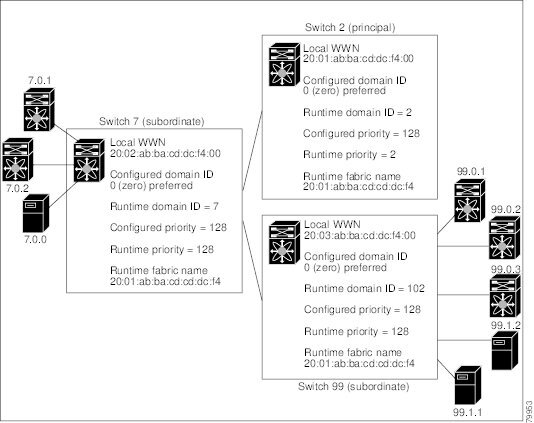
Figure 1. Sample fcdomain Configuration

About Domain Restart

Fibre Channel domains can be started disruptively or nondisruptively. If you perform a disruptive restart, reconfigure fabric (RCF) frames are sent to other switches in the fabric and data traffic is disrupted on all the switches in the VSAN (including remotely segmented ISLs). If you perform a nondisruptive restart, build fabric (BF) frames are sent to other switches in the fabric and data traffic is disrupted only on the switch.

If you are attempting to resolve a domain ID conflict, you must manually assign domain IDs. A disruptive restart is required to apply most configuration changes, including manually assigned domain IDs. Nondisruptive domain restarts are acceptable only when changing a preferred domain ID into a static one (and the actual domain ID remains the same).


Note


A static domain is specifically configured by the user and may be different from the runtime domain. If the domain IDs are different, the runtime domain ID changes to take on the static domain ID after the next restart, either disruptive or nondisruptive.


If a VSAN is in interop mode, you cannot disruptively restart the fcdomain for that VSAN.

You can apply most of the configurations to their corresponding runtime values. Each of the following sections provide further details on how the fcdomain parameters are applied to the runtime values.

The fcdomain restart command applies your changes to the runtime settings. Use the disruptive option to apply most of the configurations to their corresponding runtime values, including preferred domain IDs.

Restarting a Domain

To restart the fabric disruptively or nondisruptively, perform this task:

SUMMARY STEPS

    1.    switch# configuration terminal

    2.    switch(config)# fcdomain restart vsan vsan-id

    3.    switch(config)# fcdomain restart disruptive vsan vsan-id


DETAILED STEPS
     Command or ActionPurpose
    Step 1 switch# configuration terminal
     

    Enters configuration mode.

     
    Step 2 switch(config)# fcdomain restart vsan vsan-id
     

    Forces the VSAN to reconfigure without traffic disruption.

     
    Step 3 switch(config)# fcdomain restart disruptive vsan vsan-id
     

    Forces the VSAN to reconfigure with data traffic disruption.


    About Domain Manager Fast Restart

    When a principal link fails, the domain manager must select a new principal link. By default, the domain manager starts a build fabric (BF) phase, followed by a principal switch selection phase. Both of these phases involve all the switches in the VSAN, and together take at least 15 seconds to complete. To reduce the time required for the domain manager to select a new principal link, you can enable the domain manager fast restart feature.

    When fast restart is enabled and a backup link is available, the domain manager needs only a few milliseconds to select a new principal link to replace the one that failed. Also, the reconfiguration required to select the new principal link only affects the two switches that are directly attached to the failed link, not the entire VSAN. When a backup link is not available, the domain manager reverts to the default behavior and starts a BF phase, followed by a principal switch selection phase. The fast restart feature can be used in any interoperability mode.

    Enabling Domain Manager Fast Restart

    To enable the domain manager fast restart feature, perform this task:

    SUMMARY STEPS

      1.    switch# configuration terminal

      2.    switch(config)# fcdomain optimize fast-restart vsan vsan-id

      3.    switch(config)# fcdomain optimize fast-restart vsan vsan-id - vsan-id

      4.    switch(config)# no fcdomain optimize fast-restart vsan vsan-id


    DETAILED STEPS
       Command or ActionPurpose
      Step 1 switch# configuration terminal
       

      Enters configuration mode.

       
      Step 2 switch(config)# fcdomain optimize fast-restart vsan vsan-id
       

      Enables domain manager fast restart in the specified VSAN.

       
      Step 3 switch(config)# fcdomain optimize fast-restart vsan vsan-id - vsan-id
       

      Enables domain manager fast restart in the specified range of VSANs.

       
      Step 4 switch(config)# no fcdomain optimize fast-restart vsan vsan-id
       

      Disables (default) domain manager fast restart in the specified VSAN.


      About Switch Priority

      By default, the configured priority is 128. The valid range to set the priority is between 1 and 254. Priority 1 has the highest priority. Value 255 is accepted from other switches, but cannot be locally configured.

      Any new switch cannot become the principal switch when it joins a stable fabric. During the principal switch selection phase, the switch with the highest priority becomes the principal switch. If two switches have the same configured priority, the switch with the lower world-wide name (WWN) becomes the principal switch.

      The priority configuration is applied to runtime when the fcdomain is restarted. This configuration is applicable to both disruptive and nondisruptive restarts.

      Configuring Switch Priority

      To configure the priority for the principal switch, perform this task:

      SUMMARY STEPS

        1.    switch# configuration terminal

        2.    switch(config)# fcdomain priority number VSAN vsan-id

        3.    switch(config)# no fcdomain priority number VSAN vsan-id


      DETAILED STEPS
         Command or ActionPurpose
        Step 1 switch# configuration terminal
         

        Enters configuration mode.

         
        Step 2 switch(config)# fcdomain priority number VSAN vsan-id
         

        Configures the specified priority for the local switch in the specified VSAN.

         
        Step 3 switch(config)# no fcdomain priority number VSAN vsan-id
         

        Reverts the priority to the factory default (128) in the specified VSAN.


        About fcdomain Initiation

        By default, the fcdomain feature is enabled on each switch. If you disable the fcdomain feature in a switch, that switch can no longer participate with other switches in the fabric. The fcdomain configuration is applied to runtime through a disruptive restart.

        Disabling or Reenabling fcdomains

        To disable or reenable fcdomains in a single VSAN or a range of VSANs, perform this task:

        SUMMARY STEPS

          1.    switch# configuration terminal

          2.    switch(config)# no fcdomain vsan vsan-id - vsan-id

          3.    switch(config)# fcdomain vsan vsan-id


        DETAILED STEPS
           Command or ActionPurpose
          Step 1 switch# configuration terminal
           

          Enters configuration mode.

           
          Step 2 switch(config)# no fcdomain vsan vsan-id - vsan-id
           

          Disables the fcdomain configuration in the specified VSAN range.

           
          Step 3 switch(config)# fcdomain vsan vsan-id
           

          Enables the fcdomain configuration in the specified VSAN.


          Configuring Fabric Names

          To set the fabric name value for a disabled fcdomain, perform this task:

          SUMMARY STEPS

            1.    switch# configuration terminal

            2.    switch(config)# fcdomain fabric-name 20:1:ac:16:5e:0:21:01 vsan vsan-id

            3.    switch(config)# no fcdomain fabric-name 20:1:ac:16:5e:0:21:01 vsan vsan-id


          DETAILED STEPS
             Command or ActionPurpose
            Step 1 switch# configuration terminal
             

            Enters configuration mode.

             
            Step 2 switch(config)# fcdomain fabric-name 20:1:ac:16:5e:0:21:01 vsan vsan-id
             

            Assigns the configured fabric name value in the specified VSAN.

             
            Step 3 switch(config)# no fcdomain fabric-name 20:1:ac:16:5e:0:21:01 vsan vsan-id
             

            Changes the fabric name value to the factory default (20:01:00:05:30:00:28:df) in VSAN 3010.


            About Incoming RCFs

            You can configure the rcf-reject option on a per-interface, per-VSAN basis. By default, the rcf-reject option is disabled (that is, RCF request frames are not automatically rejected).

            The rcf-reject option takes effect immediately.

            No fcdomain restart is required.


            Note


            You do not need to configure the RFC reject option on virtual Fibre Channel interfaces, because these interfaces operate only in F port mode.


            Rejecting Incoming RCFs

            To reject incoming RCF request frames, perform this task:

            SUMMARY STEPS

              1.    switch# configuration terminal

              2.    switch(config)# interface fc slot/port

              3.    switch(config-if)# fcdomain rcf-reject vsan vsan-id

              4.    switch(config-if)# no fcdomain rcf-reject vsan vsan-id


            DETAILED STEPS
               Command or ActionPurpose
              Step 1 switch# configuration terminal
               

              Enters configuration mode.

               
              Step 2 switch(config)# interface fc slot/port
               

              Configures the specified interface.

               
              Step 3 switch(config-if)# fcdomain rcf-reject vsan vsan-id
               

              Enables the RCF filter on the specified interface in the specified VSAN.

               
              Step 4 switch(config-if)# no fcdomain rcf-reject vsan vsan-id
               

              Disables (default) the RCF filter on the specified interface in the specified VSAN.


              About Autoreconfiguring Merged Fabrics

              By default, the autoreconfigure option is disabled. When you join two switches belonging to two different stable fabrics that have overlapping domains, the following situations can occur:

              • If the autoreconfigure option is enabled on both switches, a disruptive reconfiguration phase is started.

              • If the autoreconfigure option is disabled on either or both switches, the links between the two switches become isolated.

              The autoreconfigure option takes immediate effect at runtime. You do not need to restart the fcdomain. If a domain is currently isolated due to domain overlap, and you later enable the autoreconfigure option on both switches, the fabric continues to be isolated. If you enabled the autoreconfigure option on both switches before connecting the fabric, a disruptive reconfiguration (RCF) will occur. A disruptive reconfiguration may affect data traffic. You can nondisruptively reconfigure the fcdomain by changing the configured domains on the overlapping links and eliminating the domain overlap.

              Enabling Autoreconfiguration

              To enable automatic reconfiguration in a specific VSAN (or range of VSANs), perform this task:

              SUMMARY STEPS

                1.    switch# configuration terminal

                2.    switch(config)# fcdomain auto-reconfigure vsan vsan-id

                3.    switch(config)# no fcdomain auto-reconfigure vsan vsan-id


              DETAILED STEPS
                 Command or ActionPurpose
                Step 1 switch# configuration terminal
                 

                Enters configuration mode.

                 
                Step 2 switch(config)# fcdomain auto-reconfigure vsan vsan-id
                 

                Enables the automatic reconfiguration option in the specified VSAN.

                 
                Step 3 switch(config)# no fcdomain auto-reconfigure vsan vsan-id
                 

                Disables the automatic reconfiguration option and reverts it to the factory default in the specified VSAN.


                Domain IDs

                Domain IDs uniquely identify a switch in a VSAN. A switch may have different domain IDs in different VSANs. The domain ID is part of the overall FC ID.

                About Domain IDs

                The configured domain ID can be preferred or static. By default, the configured domain ID is 0 (zero) and the configured type is preferred.


                Note


                The 0 (zero) value can be configured only if you use the preferred option.


                If you do not configure a domain ID, the local switch sends a random ID in its request. We recommend that you use static domain IDs.

                When a subordinate switch requests a domain, the following process takes place (see the figure below):

                • The local switch sends a configured domain ID request to the principal switch.

                • The principal switch assigns the requested domain ID if available. Otherwise, it assigns another available domain ID.
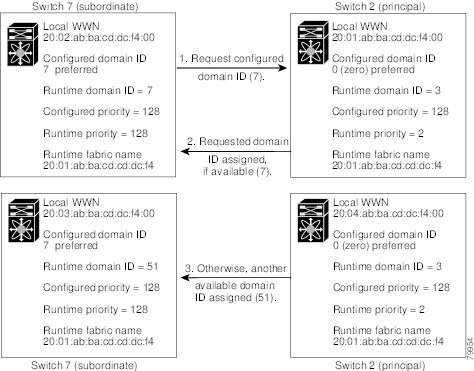
                Figure 2. Configuration Process Using the Preferred Option

                The operation of a subordinate switch changes based on three factors:

                • The allowed domain ID lists.

                • The configured domain ID.

                • The domain ID that the principal switch has assigned to the requesting switch.

                In specific situations, the changes are as follows:

                • When the received domain ID is not within the allowed list, the requested domain ID becomes the runtime domain ID and all interfaces on that VSAN are isolated.

                • When the assigned and requested domain IDs are the same, the preferred and static options are not relevant, and the assigned domain ID becomes the runtime domain ID.

                • When the assigned and requested domain IDs are different, the following cases apply:

                  • If the configured type is static, the assigned domain ID is discarded, all local interfaces are isolated, and the local switch assigns itself the configured domain ID, which becomes the runtime domain ID.

                  • If the configured type is preferred, the local switch accepts the domain ID assigned by the principal switch and the assigned domain ID becomes the runtime domain ID.

                If you change the configured domain ID, the change is only accepted if the new domain ID is included in all the allowed domain ID lists currently configured in the VSAN. Alternatively, you can also configure zero-preferred domain ID.


                Caution


                You must enter the fcdomain restart command if you want to apply the configured domain changes to the runtime domain.


                Note


                If you have configured an allow domain ID list, the domain IDs that you add must be in that range for the VSAN.


                Related Information
                About Allowed Domain ID Lists

                Specifying Static or Preferred Domain IDs

                When you assign a static domain ID type, you are requesting a particular domain ID. If the switch does not obtain the requested address, it will isolate itself from the fabric. When you specify a preferred domain ID, you are also requesting a particular domain ID; however, if the requested domain ID is unavailable, then the switch will accept another domain ID.

                While the static option can be applied at runtime after a disruptive or nondisruptive restart, the preferred option is applied at runtime only after a disruptive restart.


                Note


                Within a VSAN all switches should have the same domain ID type (either static or preferred). If a configuration is mixed (some switches with static domain types and others with preferred), you may experience link isolation.


                To specify a static or preferred domain ID, perform this task:

                SUMMARY STEPS

                  1.    switch# configuration terminal

                  2.    switch(config)# fcdomain domain domain-id static vsan vsan-id

                  3.    switch(config)# no fcdomain domain domain-id static vsan vsan-id

                  4.    switch(config)# fcdomain domain domain-id preferred vsan vsan-id

                  5.    switch(config)# no fcdomain domain domain-id preferred vsan vsan-id


                DETAILED STEPS
                   Command or ActionPurpose
                  Step 1 switch# configuration terminal
                   

                  Enters configuration mode.

                   
                  Step 2 switch(config)# fcdomain domain domain-id static vsan vsan-id
                   

                  Configures the switch in the specified VSAN to accept only a specific value and moves the local interfaces in the specified VSAN to an isolated state if the requested domain ID is not granted.

                   
                  Step 3 switch(config)# no fcdomain domain domain-id static vsan vsan-id
                   

                  Resets the configured domain ID to factory defaults in the specified VSAN. The configured domain ID becomes 0 preferred.

                   
                  Step 4 switch(config)# fcdomain domain domain-id preferred vsan vsan-id
                   

                  Configures the switch in the specified VSAN to request a preferred domain ID 3 and accepts any value assigned by the principal switch. The domain is range is 1 to 239.

                   
                  Step 5 switch(config)# no fcdomain domain domain-id preferred vsan vsan-id
                   

                  Resets the configured domain ID to 0 (default) in the specified VSAN. The configured domain ID becomes 0 preferred.


                  About Allowed Domain ID Lists

                  By default, the valid range for an assigned domain ID list is from 1 to 239. You can specify a list of ranges to be in the allowed domain ID list and separate each range with a comma. The principal switch assigns domain IDs that are available in the locally configured allowed domain list.

                  Use allowed domain ID lists to design your VSANs with nonoverlapping domain IDs. This helps you in the future if you need to implement IVR without the NAT feature.

                  If you configure an allowed list on one switch in the fabric, we recommend that you configure the same list in all other switches in the fabric to ensure consistency or use CFS to distribute the configuration.

                  An allowed domain ID list must satisfy the following conditions:

                  • If this switch is a principal switch, all the currently assigned domain IDs must be in the allowed list.

                  • If this switch is a subordinate switch, the local runtime domain ID must be in the allowed list.

                  • The locally configured domain ID of the switch must be in the allowed list.

                  • The intersection of the assigned domain IDs with other already configured domain ID lists must not be empty.

                  Configuring Allowed Domain ID Lists

                  To configure the allowed domain ID list, perform this task:

                  SUMMARY STEPS

                    1.    switch# configuration terminal

                    2.    switch(config)# fcdomain allowed domain-id range vsan vsan-id

                    3.    switch(config)# no fcdomain allowed domain-id range vsan vsan-id


                  DETAILED STEPS
                     Command or ActionPurpose
                    Step 1 switch# configuration terminal
                     

                    Enters configuration mode.

                     
                    Step 2 switch(config)# fcdomain allowed domain-id range vsan vsan-id
                     

                    Configures the list to allow switches with the domain ID range in the specified VSAN.

                     
                    Step 3 switch(config)# no fcdomain allowed domain-id range vsan vsan-id
                     

                    Reverts to the factory default of allowing domain IDs from 1 through 239 in the specified VSAN.


                    About CFS Distribution of Allowed Domain ID Lists

                    You can enable the distribution of the allowed domain ID list configuration information to all Cisco SAN switches in the fabric using the Cisco Fabric Services (CFS) infrastructure. This feature allows you to synchronize the configuration across the fabric from the console of a single switch. Because the same configuration is distributed to the entire VSAN, you can avoid possible misconfiguration and the possibility that two switches in the same VSAN have configured incompatible allowed domains.

                    Use CFS to distribute the allowed domain ID list to ensure consistency in the allowed domain ID lists on all switches in the VSAN.


                    Note


                    We recommend configuring the allowed domain ID list and committing it on the principal switch.


                    Related Information
                    Using Cisco Fabric Services

                    Enabling Distribution

                    CFS distribution of allowed domain ID lists is disabled by default. You must enable distribution on all switches to which you want to distribute the allowed domain ID lists.

                    To enable (or disable) allowed domain ID list configuration distribution, perform this task:

                    SUMMARY STEPS

                      1.    switch# configuration terminal

                      2.    switch(config)# fcdomain distribute

                      3.    switch(config)# no fcdomain distribute


                    DETAILED STEPS
                       Command or ActionPurpose
                      Step 1 switch# configuration terminal
                       

                      Enters configuration mode.

                       
                      Step 2 switch(config)# fcdomain distribute
                       

                      Enables domain configuration distribution.

                       
                      Step 3 switch(config)# no fcdomain distribute
                       

                      Disables (default) domain configuration distribution.


                      Locking the Fabric

                      The first action that modifies the existing configuration creates the pending configuration and locks the feature in the fabric. After you lock the fabric, the following conditions apply:

                      • No other user can make any configuration changes to this feature.

                      • A pending configuration is created by copying the active configuration. Subsequent modifications are made to the pending configuration and remain there until you commit the changes to the active configuration (and other switches in the fabric) or discard them.

                      Committing Changes

                      To apply the pending domain configuration changes to other SAN switches in the VSAN, you must commit the changes. The pending configuration changes are distributed and, on a successful commit, the configuration changes are applied to the active configuration in the SAN switches throughout the VSAN and the fabric lock is released.

                      To commit pending domain configuration changes and release the lock, perform this task:

                      SUMMARY STEPS

                        1.    switch# configuration terminal

                        2.    switch(config)# fcdomain commit vsan vsan-id


                      DETAILED STEPS
                         Command or ActionPurpose
                        Step 1 switch# configuration terminal
                         

                        Enters configuration mode.

                         
                        Step 2 switch(config)# fcdomain commit vsan vsan-id
                         

                        Commits the pending domain configuration changes.


                        Discarding Changes

                        At any time, you can discard the pending changes to the domain configuration and release the fabric lock. If you discard (abort) the pending changes, the configuration remains unaffected and the lock is released.

                        To discard pending domain configuration changes and release the lock, perform this task:

                        SUMMARY STEPS

                          1.    switch# configuration terminal

                          2.    switch(config)# fcdomain abort vsan vsan-id


                        DETAILED STEPS
                           Command or ActionPurpose
                          Step 1 switch# configuration terminal
                           

                          Enters configuration mode.

                           
                          Step 2 switch(config)# fcdomain abort vsan vsan-id
                           

                          Discards the pending domain configuration changes.


                          Clearing a Fabric Lock

                          If you have performed a domain configuration task and have not released the lock by either committing or discarding the changes, an administrator can release the lock from any switch in the fabric. If the administrator performs this task, your pending changes are discarded and the fabric lock is released.

                          The pending changes are only available in the volatile directory and are discarded if the switch is restarted.

                          To release a fabric lock, enter theclear fcdomain session vsan command in EXEC mode using a login ID that has administrative privileges.

                          switch# clear fcdomain session vsan 10
                          

                          Displaying CFS Distribution Status

                          You can display the status of CFS distribution for allowed domain ID lists using the show fcdomain status command.

                          switch# show fcdomain status
                          
                          CFS distribution is enabled

                          Displaying Pending Changes

                          You can display the pending configuration changes using the show fcdomain pending command.

                          switch# show fcdomain pending vsan 10
                          
                          Pending Configured Allowed Domains
                          ----------------------------------
                          VSAN 10
                          Assigned or unallowed domain IDs: 1-9,24,100,231-239.
                          [User] configured allowed domain IDs: 10-230.

                          You can display the differences between the pending configuration and the current configuration using the show fcdomain pending-diff command.

                          switch# show fcdomain pending-diff vsan 10
                          
                          Current Configured Allowed Domains
                          ----------------------------------
                          VSAN 10
                          Assigned or unallowed domain IDs: 24,100.
                          [User] configured allowed domain IDs: 1-239.
                          Pending Configured Allowed Domains
                          ----------------------------------
                          VSAN 10
                          Assigned or unallowed domain IDs: 1-9,24,100,231-239.
                          [User] configured allowed domain IDs: 10-230.

                          Displaying Session Status

                          You can display the status of the distribution session using the show fcdomain session-status vsan command.

                          switch# show fcdomain session-status vsan 1
                          
                          Last Action: Distribution Enable
                          Result: Success

                          About Contiguous Domain ID Assignments

                          By default, the contiguous domain assignment is disabled. When a subordinate switch requests the principal switch for two or more domains and the domains are not contiguous, the following situations can occur:

                          • If the contiguous domain assignment is enabled in the principal switch, the principal switch locates contiguous domains and assigns them to the subordinate switches. If contiguous domains are not available, the switch software rejects this request.

                          • If the contiguous domain assignment is disabled in the principal switch, the principal switch assigns the available domains to the subordinate switch.

                          Enabling Contiguous Domain ID Assignments

                          To enable contiguous domains in a specific VSAN (or a range of VSANs), perform this task:

                          SUMMARY STEPS

                            1.    switch# configuration terminal

                            2.    switch(config)# fcdomain contiguous-allocation vsan vsan-id - vsan-id

                            3.    switch(config)# no fcdomain contiguous-allocation vsan vsan-id


                          DETAILED STEPS
                             Command or ActionPurpose
                            Step 1 switch# configuration terminal
                             

                            Enters configuration mode.

                             
                            Step 2 switch(config)# fcdomain contiguous-allocation vsan vsan-id - vsan-id
                             

                            Enables the contiguous allocation option in the specified VSAN range.

                            Note   

                            The contiguous-allocation option takes immediate effect at runtime. You do not need to restart the fcdomain.

                             
                            Step 3 switch(config)# no fcdomain contiguous-allocation vsan vsan-id
                             

                            Disables the contiguous allocation option and reverts it to the factory default in the specified VSAN.


                            FC IDs

                            When an N port logs into a Cisco Nexus 5000 Series switch, it is assigned an FC ID. By default, the persistent FC ID feature is enabled. If this feature is disabled, the following situations can occur:

                            • An N port logs into a Cisco Nexus 5000 Series switch. The WWN of the requesting N port and the assigned FC ID are retained and stored in a volatile cache. The contents of this volatile cache are not saved across reboots.

                            • The switch is designed to preserve the binding FC ID to the WWN on a best-effort basis. For example, if one N port disconnects from the switch and its FC ID is requested by another device, this request is granted and the WWN with the initial FC ID association is released.

                            • The volatile cache stores up to 4000 entries of WWN to FC ID binding. If this cache is full, a new (more recent) entry overwrites the oldest entry in the cache. In this case, the corresponding WWN to FC ID association for the oldest entry is lost.

                            • N ports receive the same FC IDs if disconnected and reconnected to any port within the same switch (as long as it belongs to the same VSAN).

                            About Persistent FC IDs

                            When persistent FC IDs are enabled, the following occurs:

                            • The current FC IDs in use in the fcdomain are saved across reboots.

                            • The fcdomain automatically populates the database with dynamic entries that the switch has learned about after a device (host or disk) is plugged into a port interface.


                            Note


                            If you connect to the switch from an AIX or HP-UX host, be sure to enable the persistent FC ID feature in the VSAN that connects these hosts.


                            Note


                            When persistent FC IDs are enabled, FC IDs cannot be changed after a reboot. FC IDs are enabled by default, but can be disabled for each VSAN.


                            A persistent FC ID assigned to an F port can be moved across interfaces and can continue to maintain the same persistent FC ID.

                            Enabling the Persistent FC ID Feature

                            To enable the persistent FC ID feature, perform this task:

                            SUMMARY STEPS

                              1.    switch# configuration terminal

                              2.    switch(config)# fcdomain fcid persistent vsan vsan-id

                              3.    switch(config)# no fcdomain fcid persistent vsan vsan-id


                            DETAILED STEPS
                               Command or ActionPurpose
                              Step 1 switch# configuration terminal
                               

                              Enters configuration mode.

                               
                              Step 2 switch(config)# fcdomain fcid persistent vsan vsan-id
                               

                              Activates (default) persistency of FC IDs in the specified VSAN.

                               
                              Step 3 switch(config)# no fcdomain fcid persistent vsan vsan-id
                               

                              Disables the FC ID persistency feature in the specified VSAN.


                              Persistent FC ID Configuration Guidelines

                              When the persistent FC ID feature is enabled, you can enter the persistent FC ID submode and add static or dynamic entries in the FC ID database. By default, all added entries are static. Persistent FC IDs are configured on a per-VSAN basis.

                              When manually configuring a persistent FC ID, follow these requirements:

                              • Ensure that the persistent FC ID feature is enabled in the required VSAN.

                              • Ensure that the required VSAN is an active VSAN. Persistent FC IDs can only be configured on active VSANs.

                              • Verify that the domain part of the FC ID is the same as the runtime domain ID in the required VSAN. If the software detects a domain mismatch, the command is rejected.

                              • Verify that the port field of the FC ID is 0 (zero) when configuring an area.

                              Configuring Persistent FC IDs

                              To configure persistent FC IDs, perform this task:

                              SUMMARY STEPS

                                1.    switch# configuration terminal

                                2.    switch(config)# fcdomain fcid database

                                3.    switch(config-fcid-db)# vsan vsan-id wwn 33:e8:00:05:30:00:16:df fcid fcid

                                4.    switch(config-fcid-db)# vsan vsan-id wwn 11:22:11:22:33:44:33:44 fcid fcid dynamic

                                5.    switch(config-fcid-db)# vsan vsan-id wwn 11:22:11:22:33:44:33:44 fcid fcid area


                              DETAILED STEPS
                                 Command or ActionPurpose
                                Step 1 switch# configuration terminal
                                 

                                Enters configuration mode.

                                 
                                Step 2 switch(config)# fcdomain fcid database
                                 

                                Enters FC ID database configuration submode.

                                 
                                Step 3 switch(config-fcid-db)# vsan vsan-id wwn 33:e8:00:05:30:00:16:df fcid fcid
                                 

                                Configures a device WWN (33:e8:00:05:30:00:16:df) with the FC ID 0x070128 in the specified VSAN.

                                Note   

                                To avoid assigning a duplicate FC ID, use the show fcdomain address-allocation vsan command to display the FC IDs in use.

                                 
                                Step 4 switch(config-fcid-db)# vsan vsan-id wwn 11:22:11:22:33:44:33:44 fcid fcid dynamic
                                 

                                Configures a device WWN (11:22:11:22:33:44:33:44) with the FC ID 0x070123 in the specified VSAN in dynamic mode.

                                 
                                Step 5 switch(config-fcid-db)# vsan vsan-id wwn 11:22:11:22:33:44:33:44 fcid fcid area
                                 

                                Configures a device WWN (11:22:11:22:33:44:33:44) with the FC IDs 0x070100 through 0x701FF in the specified VSAN.

                                Note   

                                To secure the entire area for this fcdomain, assign 00 as the last two characters of the FC ID.


                                About Unique Area FC IDs for HBAs


                                Note


                                Only read this section if the Host Bus Adapter (HBA) port and the storage port are connected to the same switch.


                                Some HBA ports require a different area ID than for the storage ports when they are both connected to the same switch. For example, if the storage port FC ID is 0x6f7704, the area for this port is 77. In this case, the HBA port’s area can be anything other than 77. The HBA port’s FC ID must be manually configured to be different from the storage port’s FC ID.

                                Cisco Nexus 5000 Series switches facilitate this requirement with the FC ID persistence feature. You can use this feature to preassign an FC ID with a different area to either the storage port or the HBA port.

                                Configuring Unique Area FC IDs for an HBA

                                The following task uses an example configuration with a switch domain of 111(6f hex). The server connects to the switch over FCoE. The HBA port connects to interface vfc20/1 and the storage port connects to interface fc2/3 on the same switch.

                                To configure a different area ID for the HBA port, perform this task:

                                SUMMARY STEPS

                                  1.    Obtain the port WWN (Port Name field) ID of the HBA using the show flogi database command.

                                  2.    Shut down the HBA interface in the Cisco Nexus 5000 Series switch.

                                  3.    Verify that the FC ID feature is enabled using the show fcdomain vsan command.

                                  4.    Enable the persistent FC ID feature in the Cisco Nexus 5000 Series switch.

                                  5.    Assign a new FC ID with a different area allocation. In this example, replace 77 with ee.

                                  6.    Enable the HBA interface in the Cisco Nexus 5000 Series switch.

                                  7.    Verify the pWWN ID of the HBA by using the show flogi database command.


                                DETAILED STEPS
                                  Step 1   Obtain the port WWN (Port Name field) ID of the HBA using the show flogi database command.
                                  switch# show flogi database 
                                  ------------------------------------------------------------------------------------------
                                  INTERFACE   VSAN    FCID        PORT NAME                   NODE NAME
                                  ------------------------------------------------------------------------------------------
                                   vfc10/1    3       0x6f7703    50:05:08:b2:00:71:c8:c2     50:05:08:b2:00:71:c8:c0
                                   fc2/3      3       0x6f7704    50:06:0e:80:03:29:61:0f     50:06:0e:80:03:29:61:0f
                                  Note   

                                  Both FC IDs in this setup have the same area 77 assignment.

                                  Step 2   Shut down the HBA interface in the Cisco Nexus 5000 Series switch.
                                  switch# configuration terminal
                                  
                                  switch(config)# interface vfc20/1 
                                  switch(config-if)# shutdown 
                                  switch(config-if)# end 
                                  Step 3   Verify that the FC ID feature is enabled using the show fcdomain vsan command.
                                  switch# show fcdomain vsan 1
                                  
                                  ...
                                  Local switch configuration information:
                                          State: Enabled
                                          FCID persistence: Disabled

                                  If this feature is disabled, continue to the next step to enable the persistent FC ID.

                                  If this feature is already enabled, skip to the following step.

                                  Step 4   Enable the persistent FC ID feature in the Cisco Nexus 5000 Series switch.
                                  switch# configuration terminal
                                  
                                  switch(config)# fcdomain fcid persistent vsan 1
                                  
                                  switch(config)# end
                                  
                                  Step 5   Assign a new FC ID with a different area allocation. In this example, replace 77 with ee.
                                  switch# configuration terminal
                                  
                                  switch(config)# fcdomain fcid database
                                  
                                  switch(config-fcid-db)# vsan 3 wwn 50:05:08:b2:00:71:c8:c2 fcid 0x6fee00 area
                                  
                                  Step 6   Enable the HBA interface in the Cisco Nexus 5000 Series switch.
                                  switch# configuration terminal
                                  
                                  switch(config)# interface vfc20/1
                                  
                                  switch(config-if)# no shutdown 
                                  switch(config-if)# end 
                                  Step 7   Verify the pWWN ID of the HBA by using the show flogi database command.
                                  switch# show flogi database 
                                  ------------------------------------------------------------------------------------------
                                  INTERFACE   VSAN    FCID        PORT NAME                   NODE NAME
                                  ------------------------------------------------------------------------------------------
                                   vfc20/1    3       0x6fee00    50:05:08:b2:00:71:c8:c2     50:05:08:b2:00:71:c8:c0
                                   fc2/3      3       0x6f7704    50:06:0e:80:03:29:61:0f     50:06:0e:80:03:29:61:0f
                                  Note   

                                  Both FC IDs now have different area assignments.


                                  About Persistent FC ID Selective Purging

                                  Persistent FC IDs can be purged selectively. Static entries and FC IDs currently in use cannot be deleted. The table below identifies the FC ID entries that are deleted or retained when persistent FC IDs are purged.

                                  Table 1  Purged FC IDs

                                  Persistent FC ID state

                                  Persistent Usage State

                                  Action

                                  Static

                                  In use

                                  Not deleted

                                  Static

                                  Not in use

                                  Not deleted

                                  Dynamic

                                  In use

                                  Not deleted

                                  Dynamic

                                  Not in use

                                  Deleted

                                  Purging Persistent FC IDs

                                  To purge persistent FC IDs, perform this task:

                                  SUMMARY STEPS

                                    1.    switch# purge fcdomain fcid vsan vsan-id

                                    2.    switch# purge fcdomain fcid vsan vsan-id - vsan-id


                                  DETAILED STEPS
                                     Command or ActionPurpose
                                    Step 1 switch# purge fcdomain fcid vsan vsan-id
                                     

                                    Purges all dynamic and unused FC IDs in the specified VSAN.

                                     
                                    Step 2 switch# purge fcdomain fcid vsan vsan-id - vsan-id
                                     

                                    Purges dynamic and unused FC IDs in the specified VSAN range.


                                    Verifying fcdomain Information


                                    Note


                                    If the fcdomain feature is disabled, the runtime fabric name in the display is the same as the configured fabric name.


                                    This example shows how to display information about fcdomain configurations:

                                    switch# show fcdomain vsan 2
                                    

                                    Use the show fcdomain domain-list command to display the list of domain IDs of all switches belonging to a specified VSAN. This list provides the WWN of the switches owning each domain ID. The next example uses the following values:

                                    • A switch with WWN of 20:01:00:05:30:00:47:df is the principal switch and has domain 200.

                                    • A switch with WWN of 20:01:00:0d:ec:08:60:c1 is the local switch (the one where you typed the CLI command to show the domain-list) and has domain 99.

                                    • The IVR manager obtained virtual domain 97 using 20:01:00:05:30:00:47:df as the WWN for a virtual switch.

                                    switch# show fcdomain domain-list vsan 76
                                    
                                    Number of domains: 3
                                    Domain ID              WWN
                                    ---------    -----------------------
                                    0xc8(200)    20:01:00:05:30:00:47:df [Principal]
                                     0x63(99)    20:01:00:0d:ec:08:60:c1 [Local]
                                     0x61(97)    50:00:53:0f:ff:f0:10:06 [Virtual (IVR)]

                                    Use the show fcdomain allowed vsan command to display the list of allowed domain IDs configured on this switch..

                                    switch# show fcdomain allowed vsan 1
                                    
                                    Assigned or unallowed domain IDs: 1-96,100,111-239.
                                    [Interoperability Mode 1] allowed domain IDs: 97-127.
                                    [User] configured allowed domain IDs: 50-110.

                                    Ensure that the requested domain ID passes the switch software checks, if interop 1 mode is required in this switch.

                                    The following example shows how to display all existing, persistent FC IDs for a specified VSAN. You can also specify the unused option to view only persistent FC IDs that are still not in use.

                                    switch# show fcdomain fcid persistent vsan 1000

                                    The following example shows how to display frame and other fcdomain statistics for a specified VSAN or SAN port channel:

                                    switch# show fcdomain statistics vsan 1
                                    
                                    VSAN Statistics
                                            Number of Principal Switch Selections: 5
                                            Number of times Local Switch was Principal: 0
                                            Number of 'Build Fabric's: 3
                                            Number of 'Fabric Reconfigurations': 0

                                    The following example shows how to display FC ID allocation statistics including a list of assigned and free FC IDs:

                                    switch# show fcdomain address-allocation vsan 1
                                    

                                    The following example shows how to display the valid address allocation cache. The cache is used by the principal switch to reassign the FC IDs for a device (disk or host) that exited and reentered the fabric. In the cache content, VSAN refers to the VSAN that contains the device, WWN refers to the device that owned the FC IDs, and mask refers to a single or entire area of FC IDs.

                                    switch# show fcdomain address-allocation cache
                                    

                                    Default Fibre Channel Domain Settings

                                    The table below lists the default settings for all fcdomain parameters.

                                    Table 2  Default fcdomain Parameters

                                    Parameters

                                    Default

                                    fcdomain feature

                                    Enabled

                                    Configured domain ID

                                    0 (zero)

                                    Configured domain

                                    Preferred

                                    auto-reconfigure option

                                    Disabled

                                    contiguous-allocation option

                                    Disabled

                                    Priority

                                    128

                                    Allowed list

                                    1 to 239

                                    Fabric name

                                    20:01:00:05:30:00:28:df

                                    rcf-reject

                                    Disabled

                                    Persistent FC ID

                                    Enabled

                                    Allowed domain ID list configuration distribution

                                    Disabled


                                    Configuring Domain Parameters

                                    Contents

                                    Configuring Domain Parameters

                                    This chapter contains the following sections:

                                    Configuring Domain Parameters

                                    The Fibre Channel domain (fcdomain) feature performs principal switch selection, domain ID distribution, FC ID allocation, and fabric reconfiguration functions as described in the FC-SW-2 standards. The domains are configured on a per-VSAN basis. If you do not configure a domain ID, the local switch uses a random ID.


                                    Caution


                                    Changes to fcdomain parameters should not be performed on a daily basis. These changes should be made by an administrator or individual who is completely familiar with switch operations.


                                    When you change the configuration, be sure to save the running configuration. The next time you reboot the switch, the saved configuration is used. If you do not save the configuration, the previously saved startup configuration is used.

                                    Information About Fibre Channel Domains

                                    This section describes each fcdomain phase:

                                    • Principal switch selection—This phase guarantees the selection of a unique principal switch across the fabric.

                                    • Domain ID distribution—This phase guarantees each switch in the fabric obtains a unique domain ID.

                                    • FC ID allocation—This phase guarantees a unique FC ID assignment to each device attached to the corresponding switch in the fabric.

                                    • Fabric reconfiguration—This phase guarantees a resynchronization of all switches in the fabric to ensure they simultaneously restart a new principal switch selection phase.

                                    The following figure illustrates an example fcdomain configuration.

                                    Figure 1. Sample fcdomain Configuration

                                    About Domain Restart

                                    Fibre Channel domains can be started disruptively or nondisruptively. If you perform a disruptive restart, reconfigure fabric (RCF) frames are sent to other switches in the fabric and data traffic is disrupted on all the switches in the VSAN (including remotely segmented ISLs). If you perform a nondisruptive restart, build fabric (BF) frames are sent to other switches in the fabric and data traffic is disrupted only on the switch.

                                    If you are attempting to resolve a domain ID conflict, you must manually assign domain IDs. A disruptive restart is required to apply most configuration changes, including manually assigned domain IDs. Nondisruptive domain restarts are acceptable only when changing a preferred domain ID into a static one (and the actual domain ID remains the same).


                                    Note


                                    A static domain is specifically configured by the user and may be different from the runtime domain. If the domain IDs are different, the runtime domain ID changes to take on the static domain ID after the next restart, either disruptive or nondisruptive.


                                    If a VSAN is in interop mode, you cannot disruptively restart the fcdomain for that VSAN.

                                    You can apply most of the configurations to their corresponding runtime values. Each of the following sections provide further details on how the fcdomain parameters are applied to the runtime values.

                                    The fcdomain restart command applies your changes to the runtime settings. Use the disruptive option to apply most of the configurations to their corresponding runtime values, including preferred domain IDs.

                                    Restarting a Domain

                                    To restart the fabric disruptively or nondisruptively, perform this task:

                                    SUMMARY STEPS

                                      1.    switch# configuration terminal

                                      2.    switch(config)# fcdomain restart vsan vsan-id

                                      3.    switch(config)# fcdomain restart disruptive vsan vsan-id


                                    DETAILED STEPS
                                       Command or ActionPurpose
                                      Step 1 switch# configuration terminal
                                       

                                      Enters configuration mode.

                                       
                                      Step 2 switch(config)# fcdomain restart vsan vsan-id
                                       

                                      Forces the VSAN to reconfigure without traffic disruption.

                                       
                                      Step 3 switch(config)# fcdomain restart disruptive vsan vsan-id
                                       

                                      Forces the VSAN to reconfigure with data traffic disruption.


                                      About Domain Manager Fast Restart

                                      When a principal link fails, the domain manager must select a new principal link. By default, the domain manager starts a build fabric (BF) phase, followed by a principal switch selection phase. Both of these phases involve all the switches in the VSAN, and together take at least 15 seconds to complete. To reduce the time required for the domain manager to select a new principal link, you can enable the domain manager fast restart feature.

                                      When fast restart is enabled and a backup link is available, the domain manager needs only a few milliseconds to select a new principal link to replace the one that failed. Also, the reconfiguration required to select the new principal link only affects the two switches that are directly attached to the failed link, not the entire VSAN. When a backup link is not available, the domain manager reverts to the default behavior and starts a BF phase, followed by a principal switch selection phase. The fast restart feature can be used in any interoperability mode.

                                      Enabling Domain Manager Fast Restart

                                      To enable the domain manager fast restart feature, perform this task:

                                      SUMMARY STEPS

                                        1.    switch# configuration terminal

                                        2.    switch(config)# fcdomain optimize fast-restart vsan vsan-id

                                        3.    switch(config)# fcdomain optimize fast-restart vsan vsan-id - vsan-id

                                        4.    switch(config)# no fcdomain optimize fast-restart vsan vsan-id


                                      DETAILED STEPS
                                         Command or ActionPurpose
                                        Step 1 switch# configuration terminal
                                         

                                        Enters configuration mode.

                                         
                                        Step 2 switch(config)# fcdomain optimize fast-restart vsan vsan-id
                                         

                                        Enables domain manager fast restart in the specified VSAN.

                                         
                                        Step 3 switch(config)# fcdomain optimize fast-restart vsan vsan-id - vsan-id
                                         

                                        Enables domain manager fast restart in the specified range of VSANs.

                                         
                                        Step 4 switch(config)# no fcdomain optimize fast-restart vsan vsan-id
                                         

                                        Disables (default) domain manager fast restart in the specified VSAN.


                                        About Switch Priority

                                        By default, the configured priority is 128. The valid range to set the priority is between 1 and 254. Priority 1 has the highest priority. Value 255 is accepted from other switches, but cannot be locally configured.

                                        Any new switch cannot become the principal switch when it joins a stable fabric. During the principal switch selection phase, the switch with the highest priority becomes the principal switch. If two switches have the same configured priority, the switch with the lower world-wide name (WWN) becomes the principal switch.

                                        The priority configuration is applied to runtime when the fcdomain is restarted. This configuration is applicable to both disruptive and nondisruptive restarts.

                                        Configuring Switch Priority

                                        To configure the priority for the principal switch, perform this task:

                                        SUMMARY STEPS

                                          1.    switch# configuration terminal

                                          2.    switch(config)# fcdomain priority number VSAN vsan-id

                                          3.    switch(config)# no fcdomain priority number VSAN vsan-id


                                        DETAILED STEPS
                                           Command or ActionPurpose
                                          Step 1 switch# configuration terminal
                                           

                                          Enters configuration mode.

                                           
                                          Step 2 switch(config)# fcdomain priority number VSAN vsan-id
                                           

                                          Configures the specified priority for the local switch in the specified VSAN.

                                           
                                          Step 3 switch(config)# no fcdomain priority number VSAN vsan-id
                                           

                                          Reverts the priority to the factory default (128) in the specified VSAN.


                                          About fcdomain Initiation

                                          By default, the fcdomain feature is enabled on each switch. If you disable the fcdomain feature in a switch, that switch can no longer participate with other switches in the fabric. The fcdomain configuration is applied to runtime through a disruptive restart.

                                          Disabling or Reenabling fcdomains

                                          To disable or reenable fcdomains in a single VSAN or a range of VSANs, perform this task:

                                          SUMMARY STEPS

                                            1.    switch# configuration terminal

                                            2.    switch(config)# no fcdomain vsan vsan-id - vsan-id

                                            3.    switch(config)# fcdomain vsan vsan-id


                                          DETAILED STEPS
                                             Command or ActionPurpose
                                            Step 1 switch# configuration terminal
                                             

                                            Enters configuration mode.

                                             
                                            Step 2 switch(config)# no fcdomain vsan vsan-id - vsan-id
                                             

                                            Disables the fcdomain configuration in the specified VSAN range.

                                             
                                            Step 3 switch(config)# fcdomain vsan vsan-id
                                             

                                            Enables the fcdomain configuration in the specified VSAN.


                                            Configuring Fabric Names

                                            To set the fabric name value for a disabled fcdomain, perform this task:

                                            SUMMARY STEPS

                                              1.    switch# configuration terminal

                                              2.    switch(config)# fcdomain fabric-name 20:1:ac:16:5e:0:21:01 vsan vsan-id

                                              3.    switch(config)# no fcdomain fabric-name 20:1:ac:16:5e:0:21:01 vsan vsan-id


                                            DETAILED STEPS
                                               Command or ActionPurpose
                                              Step 1 switch# configuration terminal
                                               

                                              Enters configuration mode.

                                               
                                              Step 2 switch(config)# fcdomain fabric-name 20:1:ac:16:5e:0:21:01 vsan vsan-id
                                               

                                              Assigns the configured fabric name value in the specified VSAN.

                                               
                                              Step 3 switch(config)# no fcdomain fabric-name 20:1:ac:16:5e:0:21:01 vsan vsan-id
                                               

                                              Changes the fabric name value to the factory default (20:01:00:05:30:00:28:df) in VSAN 3010.


                                              About Incoming RCFs

                                              You can configure the rcf-reject option on a per-interface, per-VSAN basis. By default, the rcf-reject option is disabled (that is, RCF request frames are not automatically rejected).

                                              The rcf-reject option takes effect immediately.

                                              No fcdomain restart is required.


                                              Note


                                              You do not need to configure the RFC reject option on virtual Fibre Channel interfaces, because these interfaces operate only in F port mode.


                                              Rejecting Incoming RCFs

                                              To reject incoming RCF request frames, perform this task:

                                              SUMMARY STEPS

                                                1.    switch# configuration terminal

                                                2.    switch(config)# interface fc slot/port

                                                3.    switch(config-if)# fcdomain rcf-reject vsan vsan-id

                                                4.    switch(config-if)# no fcdomain rcf-reject vsan vsan-id


                                              DETAILED STEPS
                                                 Command or ActionPurpose
                                                Step 1 switch# configuration terminal
                                                 

                                                Enters configuration mode.

                                                 
                                                Step 2 switch(config)# interface fc slot/port
                                                 

                                                Configures the specified interface.

                                                 
                                                Step 3 switch(config-if)# fcdomain rcf-reject vsan vsan-id
                                                 

                                                Enables the RCF filter on the specified interface in the specified VSAN.

                                                 
                                                Step 4 switch(config-if)# no fcdomain rcf-reject vsan vsan-id
                                                 

                                                Disables (default) the RCF filter on the specified interface in the specified VSAN.


                                                About Autoreconfiguring Merged Fabrics

                                                By default, the autoreconfigure option is disabled. When you join two switches belonging to two different stable fabrics that have overlapping domains, the following situations can occur:

                                                • If the autoreconfigure option is enabled on both switches, a disruptive reconfiguration phase is started.

                                                • If the autoreconfigure option is disabled on either or both switches, the links between the two switches become isolated.

                                                The autoreconfigure option takes immediate effect at runtime. You do not need to restart the fcdomain. If a domain is currently isolated due to domain overlap, and you later enable the autoreconfigure option on both switches, the fabric continues to be isolated. If you enabled the autoreconfigure option on both switches before connecting the fabric, a disruptive reconfiguration (RCF) will occur. A disruptive reconfiguration may affect data traffic. You can nondisruptively reconfigure the fcdomain by changing the configured domains on the overlapping links and eliminating the domain overlap.

                                                Enabling Autoreconfiguration

                                                To enable automatic reconfiguration in a specific VSAN (or range of VSANs), perform this task:

                                                SUMMARY STEPS

                                                  1.    switch# configuration terminal

                                                  2.    switch(config)# fcdomain auto-reconfigure vsan vsan-id

                                                  3.    switch(config)# no fcdomain auto-reconfigure vsan vsan-id


                                                DETAILED STEPS
                                                   Command or ActionPurpose
                                                  Step 1 switch# configuration terminal
                                                   

                                                  Enters configuration mode.

                                                   
                                                  Step 2 switch(config)# fcdomain auto-reconfigure vsan vsan-id
                                                   

                                                  Enables the automatic reconfiguration option in the specified VSAN.

                                                   
                                                  Step 3 switch(config)# no fcdomain auto-reconfigure vsan vsan-id
                                                   

                                                  Disables the automatic reconfiguration option and reverts it to the factory default in the specified VSAN.


                                                  Domain IDs

                                                  Domain IDs uniquely identify a switch in a VSAN. A switch may have different domain IDs in different VSANs. The domain ID is part of the overall FC ID.

                                                  About Domain IDs

                                                  The configured domain ID can be preferred or static. By default, the configured domain ID is 0 (zero) and the configured type is preferred.


                                                  Note


                                                  The 0 (zero) value can be configured only if you use the preferred option.


                                                  If you do not configure a domain ID, the local switch sends a random ID in its request. We recommend that you use static domain IDs.

                                                  When a subordinate switch requests a domain, the following process takes place (see the figure below):

                                                  • The local switch sends a configured domain ID request to the principal switch.

                                                  • The principal switch assigns the requested domain ID if available. Otherwise, it assigns another available domain ID.

                                                  Figure 2. Configuration Process Using the Preferred Option

                                                  The operation of a subordinate switch changes based on three factors:

                                                  • The allowed domain ID lists.

                                                  • The configured domain ID.

                                                  • The domain ID that the principal switch has assigned to the requesting switch.

                                                  In specific situations, the changes are as follows:

                                                  • When the received domain ID is not within the allowed list, the requested domain ID becomes the runtime domain ID and all interfaces on that VSAN are isolated.

                                                  • When the assigned and requested domain IDs are the same, the preferred and static options are not relevant, and the assigned domain ID becomes the runtime domain ID.

                                                  • When the assigned and requested domain IDs are different, the following cases apply:

                                                    • If the configured type is static, the assigned domain ID is discarded, all local interfaces are isolated, and the local switch assigns itself the configured domain ID, which becomes the runtime domain ID.

                                                    • If the configured type is preferred, the local switch accepts the domain ID assigned by the principal switch and the assigned domain ID becomes the runtime domain ID.

                                                  If you change the configured domain ID, the change is only accepted if the new domain ID is included in all the allowed domain ID lists currently configured in the VSAN. Alternatively, you can also configure zero-preferred domain ID.


                                                  Caution


                                                  You must enter the fcdomain restart command if you want to apply the configured domain changes to the runtime domain.


                                                  Note


                                                  If you have configured an allow domain ID list, the domain IDs that you add must be in that range for the VSAN.


                                                  Related Information

                                                  Specifying Static or Preferred Domain IDs

                                                  When you assign a static domain ID type, you are requesting a particular domain ID. If the switch does not obtain the requested address, it will isolate itself from the fabric. When you specify a preferred domain ID, you are also requesting a particular domain ID; however, if the requested domain ID is unavailable, then the switch will accept another domain ID.

                                                  While the static option can be applied at runtime after a disruptive or nondisruptive restart, the preferred option is applied at runtime only after a disruptive restart.


                                                  Note


                                                  Within a VSAN all switches should have the same domain ID type (either static or preferred). If a configuration is mixed (some switches with static domain types and others with preferred), you may experience link isolation.


                                                  To specify a static or preferred domain ID, perform this task:

                                                  SUMMARY STEPS

                                                    1.    switch# configuration terminal

                                                    2.    switch(config)# fcdomain domain domain-id static vsan vsan-id

                                                    3.    switch(config)# no fcdomain domain domain-id static vsan vsan-id

                                                    4.    switch(config)# fcdomain domain domain-id preferred vsan vsan-id

                                                    5.    switch(config)# no fcdomain domain domain-id preferred vsan vsan-id


                                                  DETAILED STEPS
                                                     Command or ActionPurpose
                                                    Step 1 switch# configuration terminal
                                                     

                                                    Enters configuration mode.

                                                     
                                                    Step 2 switch(config)# fcdomain domain domain-id static vsan vsan-id
                                                     

                                                    Configures the switch in the specified VSAN to accept only a specific value and moves the local interfaces in the specified VSAN to an isolated state if the requested domain ID is not granted.

                                                     
                                                    Step 3 switch(config)# no fcdomain domain domain-id static vsan vsan-id
                                                     

                                                    Resets the configured domain ID to factory defaults in the specified VSAN. The configured domain ID becomes 0 preferred.

                                                     
                                                    Step 4 switch(config)# fcdomain domain domain-id preferred vsan vsan-id
                                                     

                                                    Configures the switch in the specified VSAN to request a preferred domain ID 3 and accepts any value assigned by the principal switch. The domain is range is 1 to 239.

                                                     
                                                    Step 5 switch(config)# no fcdomain domain domain-id preferred vsan vsan-id
                                                     

                                                    Resets the configured domain ID to 0 (default) in the specified VSAN. The configured domain ID becomes 0 preferred.


                                                    About Allowed Domain ID Lists

                                                    By default, the valid range for an assigned domain ID list is from 1 to 239. You can specify a list of ranges to be in the allowed domain ID list and separate each range with a comma. The principal switch assigns domain IDs that are available in the locally configured allowed domain list.

                                                    Use allowed domain ID lists to design your VSANs with nonoverlapping domain IDs. This helps you in the future if you need to implement IVR without the NAT feature.

                                                    If you configure an allowed list on one switch in the fabric, we recommend that you configure the same list in all other switches in the fabric to ensure consistency or use CFS to distribute the configuration.

                                                    An allowed domain ID list must satisfy the following conditions:

                                                    • If this switch is a principal switch, all the currently assigned domain IDs must be in the allowed list.

                                                    • If this switch is a subordinate switch, the local runtime domain ID must be in the allowed list.

                                                    • The locally configured domain ID of the switch must be in the allowed list.

                                                    • The intersection of the assigned domain IDs with other already configured domain ID lists must not be empty.

                                                    Configuring Allowed Domain ID Lists

                                                    To configure the allowed domain ID list, perform this task:

                                                    SUMMARY STEPS

                                                      1.    switch# configuration terminal

                                                      2.    switch(config)# fcdomain allowed domain-id range vsan vsan-id

                                                      3.    switch(config)# no fcdomain allowed domain-id range vsan vsan-id


                                                    DETAILED STEPS
                                                       Command or ActionPurpose
                                                      Step 1 switch# configuration terminal
                                                       

                                                      Enters configuration mode.

                                                       
                                                      Step 2 switch(config)# fcdomain allowed domain-id range vsan vsan-id
                                                       

                                                      Configures the list to allow switches with the domain ID range in the specified VSAN.

                                                       
                                                      Step 3 switch(config)# no fcdomain allowed domain-id range vsan vsan-id
                                                       

                                                      Reverts to the factory default of allowing domain IDs from 1 through 239 in the specified VSAN.


                                                      About CFS Distribution of Allowed Domain ID Lists

                                                      You can enable the distribution of the allowed domain ID list configuration information to all Cisco SAN switches in the fabric using the Cisco Fabric Services (CFS) infrastructure. This feature allows you to synchronize the configuration across the fabric from the console of a single switch. Because the same configuration is distributed to the entire VSAN, you can avoid possible misconfiguration and the possibility that two switches in the same VSAN have configured incompatible allowed domains.

                                                      Use CFS to distribute the allowed domain ID list to ensure consistency in the allowed domain ID lists on all switches in the VSAN.


                                                      Note


                                                      We recommend configuring the allowed domain ID list and committing it on the principal switch.


                                                      Related Information

                                                      Enabling Distribution

                                                      CFS distribution of allowed domain ID lists is disabled by default. You must enable distribution on all switches to which you want to distribute the allowed domain ID lists.

                                                      To enable (or disable) allowed domain ID list configuration distribution, perform this task:

                                                      SUMMARY STEPS

                                                        1.    switch# configuration terminal

                                                        2.    switch(config)# fcdomain distribute

                                                        3.    switch(config)# no fcdomain distribute


                                                      DETAILED STEPS
                                                         Command or ActionPurpose
                                                        Step 1 switch# configuration terminal
                                                         

                                                        Enters configuration mode.

                                                         
                                                        Step 2 switch(config)# fcdomain distribute
                                                         

                                                        Enables domain configuration distribution.

                                                         
                                                        Step 3 switch(config)# no fcdomain distribute
                                                         

                                                        Disables (default) domain configuration distribution.


                                                        Locking the Fabric

                                                        The first action that modifies the existing configuration creates the pending configuration and locks the feature in the fabric. After you lock the fabric, the following conditions apply:

                                                        • No other user can make any configuration changes to this feature.

                                                        • A pending configuration is created by copying the active configuration. Subsequent modifications are made to the pending configuration and remain there until you commit the changes to the active configuration (and other switches in the fabric) or discard them.

                                                        Committing Changes

                                                        To apply the pending domain configuration changes to other SAN switches in the VSAN, you must commit the changes. The pending configuration changes are distributed and, on a successful commit, the configuration changes are applied to the active configuration in the SAN switches throughout the VSAN and the fabric lock is released.

                                                        To commit pending domain configuration changes and release the lock, perform this task:

                                                        SUMMARY STEPS

                                                          1.    switch# configuration terminal

                                                          2.    switch(config)# fcdomain commit vsan vsan-id


                                                        DETAILED STEPS
                                                           Command or ActionPurpose
                                                          Step 1 switch# configuration terminal
                                                           

                                                          Enters configuration mode.

                                                           
                                                          Step 2 switch(config)# fcdomain commit vsan vsan-id
                                                           

                                                          Commits the pending domain configuration changes.


                                                          Discarding Changes

                                                          At any time, you can discard the pending changes to the domain configuration and release the fabric lock. If you discard (abort) the pending changes, the configuration remains unaffected and the lock is released.

                                                          To discard pending domain configuration changes and release the lock, perform this task:

                                                          SUMMARY STEPS

                                                            1.    switch# configuration terminal

                                                            2.    switch(config)# fcdomain abort vsan vsan-id


                                                          DETAILED STEPS
                                                             Command or ActionPurpose
                                                            Step 1 switch# configuration terminal
                                                             

                                                            Enters configuration mode.

                                                             
                                                            Step 2 switch(config)# fcdomain abort vsan vsan-id
                                                             

                                                            Discards the pending domain configuration changes.


                                                            Clearing a Fabric Lock

                                                            If you have performed a domain configuration task and have not released the lock by either committing or discarding the changes, an administrator can release the lock from any switch in the fabric. If the administrator performs this task, your pending changes are discarded and the fabric lock is released.

                                                            The pending changes are only available in the volatile directory and are discarded if the switch is restarted.

                                                            To release a fabric lock, enter theclear fcdomain session vsan command in EXEC mode using a login ID that has administrative privileges.

                                                            switch# clear fcdomain session vsan 10
                                                            

                                                            Displaying CFS Distribution Status

                                                            You can display the status of CFS distribution for allowed domain ID lists using the show fcdomain status command.

                                                            switch# show fcdomain status
                                                            
                                                            CFS distribution is enabled

                                                            Displaying Pending Changes

                                                            You can display the pending configuration changes using the show fcdomain pending command.

                                                            switch# show fcdomain pending vsan 10
                                                            
                                                            Pending Configured Allowed Domains
                                                            ----------------------------------
                                                            VSAN 10
                                                            Assigned or unallowed domain IDs: 1-9,24,100,231-239.
                                                            [User] configured allowed domain IDs: 10-230.

                                                            You can display the differences between the pending configuration and the current configuration using the show fcdomain pending-diff command.

                                                            switch# show fcdomain pending-diff vsan 10
                                                            
                                                            Current Configured Allowed Domains
                                                            ----------------------------------
                                                            VSAN 10
                                                            Assigned or unallowed domain IDs: 24,100.
                                                            [User] configured allowed domain IDs: 1-239.
                                                            Pending Configured Allowed Domains
                                                            ----------------------------------
                                                            VSAN 10
                                                            Assigned or unallowed domain IDs: 1-9,24,100,231-239.
                                                            [User] configured allowed domain IDs: 10-230.

                                                            Displaying Session Status

                                                            You can display the status of the distribution session using the show fcdomain session-status vsan command.

                                                            switch# show fcdomain session-status vsan 1
                                                            
                                                            Last Action: Distribution Enable
                                                            Result: Success

                                                            About Contiguous Domain ID Assignments

                                                            By default, the contiguous domain assignment is disabled. When a subordinate switch requests the principal switch for two or more domains and the domains are not contiguous, the following situations can occur:

                                                            • If the contiguous domain assignment is enabled in the principal switch, the principal switch locates contiguous domains and assigns them to the subordinate switches. If contiguous domains are not available, the switch software rejects this request.

                                                            • If the contiguous domain assignment is disabled in the principal switch, the principal switch assigns the available domains to the subordinate switch.

                                                            Enabling Contiguous Domain ID Assignments

                                                            To enable contiguous domains in a specific VSAN (or a range of VSANs), perform this task:

                                                            SUMMARY STEPS

                                                              1.    switch# configuration terminal

                                                              2.    switch(config)# fcdomain contiguous-allocation vsan vsan-id - vsan-id

                                                              3.    switch(config)# no fcdomain contiguous-allocation vsan vsan-id


                                                            DETAILED STEPS
                                                               Command or ActionPurpose
                                                              Step 1 switch# configuration terminal
                                                               

                                                              Enters configuration mode.

                                                               
                                                              Step 2 switch(config)# fcdomain contiguous-allocation vsan vsan-id - vsan-id
                                                               

                                                              Enables the contiguous allocation option in the specified VSAN range.

                                                              Note   

                                                              The contiguous-allocation option takes immediate effect at runtime. You do not need to restart the fcdomain.

                                                               
                                                              Step 3 switch(config)# no fcdomain contiguous-allocation vsan vsan-id
                                                               

                                                              Disables the contiguous allocation option and reverts it to the factory default in the specified VSAN.


                                                              FC IDs

                                                              When an N port logs into a Cisco Nexus 5000 Series switch, it is assigned an FC ID. By default, the persistent FC ID feature is enabled. If this feature is disabled, the following situations can occur:

                                                              • An N port logs into a Cisco Nexus 5000 Series switch. The WWN of the requesting N port and the assigned FC ID are retained and stored in a volatile cache. The contents of this volatile cache are not saved across reboots.

                                                              • The switch is designed to preserve the binding FC ID to the WWN on a best-effort basis. For example, if one N port disconnects from the switch and its FC ID is requested by another device, this request is granted and the WWN with the initial FC ID association is released.

                                                              • The volatile cache stores up to 4000 entries of WWN to FC ID binding. If this cache is full, a new (more recent) entry overwrites the oldest entry in the cache. In this case, the corresponding WWN to FC ID association for the oldest entry is lost.

                                                              • N ports receive the same FC IDs if disconnected and reconnected to any port within the same switch (as long as it belongs to the same VSAN).

                                                              About Persistent FC IDs

                                                              When persistent FC IDs are enabled, the following occurs:

                                                              • The current FC IDs in use in the fcdomain are saved across reboots.

                                                              • The fcdomain automatically populates the database with dynamic entries that the switch has learned about after a device (host or disk) is plugged into a port interface.


                                                              Note


                                                              If you connect to the switch from an AIX or HP-UX host, be sure to enable the persistent FC ID feature in the VSAN that connects these hosts.


                                                              Note


                                                              When persistent FC IDs are enabled, FC IDs cannot be changed after a reboot. FC IDs are enabled by default, but can be disabled for each VSAN.


                                                              A persistent FC ID assigned to an F port can be moved across interfaces and can continue to maintain the same persistent FC ID.

                                                              Enabling the Persistent FC ID Feature

                                                              To enable the persistent FC ID feature, perform this task:

                                                              SUMMARY STEPS

                                                                1.    switch# configuration terminal

                                                                2.    switch(config)# fcdomain fcid persistent vsan vsan-id

                                                                3.    switch(config)# no fcdomain fcid persistent vsan vsan-id


                                                              DETAILED STEPS
                                                                 Command or ActionPurpose
                                                                Step 1 switch# configuration terminal
                                                                 

                                                                Enters configuration mode.

                                                                 
                                                                Step 2 switch(config)# fcdomain fcid persistent vsan vsan-id
                                                                 

                                                                Activates (default) persistency of FC IDs in the specified VSAN.

                                                                 
                                                                Step 3 switch(config)# no fcdomain fcid persistent vsan vsan-id
                                                                 

                                                                Disables the FC ID persistency feature in the specified VSAN.


                                                                Persistent FC ID Configuration Guidelines

                                                                When the persistent FC ID feature is enabled, you can enter the persistent FC ID submode and add static or dynamic entries in the FC ID database. By default, all added entries are static. Persistent FC IDs are configured on a per-VSAN basis.

                                                                When manually configuring a persistent FC ID, follow these requirements:

                                                                • Ensure that the persistent FC ID feature is enabled in the required VSAN.

                                                                • Ensure that the required VSAN is an active VSAN. Persistent FC IDs can only be configured on active VSANs.

                                                                • Verify that the domain part of the FC ID is the same as the runtime domain ID in the required VSAN. If the software detects a domain mismatch, the command is rejected.

                                                                • Verify that the port field of the FC ID is 0 (zero) when configuring an area.

                                                                Configuring Persistent FC IDs

                                                                To configure persistent FC IDs, perform this task:

                                                                SUMMARY STEPS

                                                                  1.    switch# configuration terminal

                                                                  2.    switch(config)# fcdomain fcid database

                                                                  3.    switch(config-fcid-db)# vsan vsan-id wwn 33:e8:00:05:30:00:16:df fcid fcid

                                                                  4.    switch(config-fcid-db)# vsan vsan-id wwn 11:22:11:22:33:44:33:44 fcid fcid dynamic

                                                                  5.    switch(config-fcid-db)# vsan vsan-id wwn 11:22:11:22:33:44:33:44 fcid fcid area


                                                                DETAILED STEPS
                                                                   Command or ActionPurpose
                                                                  Step 1 switch# configuration terminal
                                                                   

                                                                  Enters configuration mode.

                                                                   
                                                                  Step 2 switch(config)# fcdomain fcid database
                                                                   

                                                                  Enters FC ID database configuration submode.

                                                                   
                                                                  Step 3 switch(config-fcid-db)# vsan vsan-id wwn 33:e8:00:05:30:00:16:df fcid fcid
                                                                   

                                                                  Configures a device WWN (33:e8:00:05:30:00:16:df) with the FC ID 0x070128 in the specified VSAN.

                                                                  Note   

                                                                  To avoid assigning a duplicate FC ID, use the show fcdomain address-allocation vsan command to display the FC IDs in use.

                                                                   
                                                                  Step 4 switch(config-fcid-db)# vsan vsan-id wwn 11:22:11:22:33:44:33:44 fcid fcid dynamic
                                                                   

                                                                  Configures a device WWN (11:22:11:22:33:44:33:44) with the FC ID 0x070123 in the specified VSAN in dynamic mode.

                                                                   
                                                                  Step 5 switch(config-fcid-db)# vsan vsan-id wwn 11:22:11:22:33:44:33:44 fcid fcid area
                                                                   

                                                                  Configures a device WWN (11:22:11:22:33:44:33:44) with the FC IDs 0x070100 through 0x701FF in the specified VSAN.

                                                                  Note   

                                                                  To secure the entire area for this fcdomain, assign 00 as the last two characters of the FC ID.


                                                                  About Unique Area FC IDs for HBAs


                                                                  Note


                                                                  Only read this section if the Host Bus Adapter (HBA) port and the storage port are connected to the same switch.


                                                                  Some HBA ports require a different area ID than for the storage ports when they are both connected to the same switch. For example, if the storage port FC ID is 0x6f7704, the area for this port is 77. In this case, the HBA port’s area can be anything other than 77. The HBA port’s FC ID must be manually configured to be different from the storage port’s FC ID.

                                                                  Cisco Nexus 5000 Series switches facilitate this requirement with the FC ID persistence feature. You can use this feature to preassign an FC ID with a different area to either the storage port or the HBA port.

                                                                  Configuring Unique Area FC IDs for an HBA

                                                                  The following task uses an example configuration with a switch domain of 111(6f hex). The server connects to the switch over FCoE. The HBA port connects to interface vfc20/1 and the storage port connects to interface fc2/3 on the same switch.

                                                                  To configure a different area ID for the HBA port, perform this task:

                                                                  SUMMARY STEPS

                                                                    1.    Obtain the port WWN (Port Name field) ID of the HBA using the show flogi database command.

                                                                    2.    Shut down the HBA interface in the Cisco Nexus 5000 Series switch.

                                                                    3.    Verify that the FC ID feature is enabled using the show fcdomain vsan command.

                                                                    4.    Enable the persistent FC ID feature in the Cisco Nexus 5000 Series switch.

                                                                    5.    Assign a new FC ID with a different area allocation. In this example, replace 77 with ee.

                                                                    6.    Enable the HBA interface in the Cisco Nexus 5000 Series switch.

                                                                    7.    Verify the pWWN ID of the HBA by using the show flogi database command.


                                                                  DETAILED STEPS
                                                                    Step 1   Obtain the port WWN (Port Name field) ID of the HBA using the show flogi database command.
                                                                    switch# show flogi database 
                                                                    ------------------------------------------------------------------------------------------
                                                                    INTERFACE   VSAN    FCID        PORT NAME                   NODE NAME
                                                                    ------------------------------------------------------------------------------------------
                                                                     vfc10/1    3       0x6f7703    50:05:08:b2:00:71:c8:c2     50:05:08:b2:00:71:c8:c0
                                                                     fc2/3      3       0x6f7704    50:06:0e:80:03:29:61:0f     50:06:0e:80:03:29:61:0f
                                                                    Note   

                                                                    Both FC IDs in this setup have the same area 77 assignment.

                                                                    Step 2   Shut down the HBA interface in the Cisco Nexus 5000 Series switch.
                                                                    switch# configuration terminal
                                                                    
                                                                    switch(config)# interface vfc20/1 
                                                                    switch(config-if)# shutdown 
                                                                    switch(config-if)# end 
                                                                    Step 3   Verify that the FC ID feature is enabled using the show fcdomain vsan command.
                                                                    switch# show fcdomain vsan 1
                                                                    
                                                                    ...
                                                                    Local switch configuration information:
                                                                            State: Enabled
                                                                            FCID persistence: Disabled

                                                                    If this feature is disabled, continue to the next step to enable the persistent FC ID.

                                                                    If this feature is already enabled, skip to the following step.

                                                                    Step 4   Enable the persistent FC ID feature in the Cisco Nexus 5000 Series switch.
                                                                    switch# configuration terminal
                                                                    
                                                                    switch(config)# fcdomain fcid persistent vsan 1
                                                                    
                                                                    switch(config)# end
                                                                    
                                                                    Step 5   Assign a new FC ID with a different area allocation. In this example, replace 77 with ee.
                                                                    switch# configuration terminal
                                                                    
                                                                    switch(config)# fcdomain fcid database
                                                                    
                                                                    switch(config-fcid-db)# vsan 3 wwn 50:05:08:b2:00:71:c8:c2 fcid 0x6fee00 area
                                                                    
                                                                    Step 6   Enable the HBA interface in the Cisco Nexus 5000 Series switch.
                                                                    switch# configuration terminal
                                                                    
                                                                    switch(config)# interface vfc20/1
                                                                    
                                                                    switch(config-if)# no shutdown 
                                                                    switch(config-if)# end 
                                                                    Step 7   Verify the pWWN ID of the HBA by using the show flogi database command.
                                                                    switch# show flogi database 
                                                                    ------------------------------------------------------------------------------------------
                                                                    INTERFACE   VSAN    FCID        PORT NAME                   NODE NAME
                                                                    ------------------------------------------------------------------------------------------
                                                                     vfc20/1    3       0x6fee00    50:05:08:b2:00:71:c8:c2     50:05:08:b2:00:71:c8:c0
                                                                     fc2/3      3       0x6f7704    50:06:0e:80:03:29:61:0f     50:06:0e:80:03:29:61:0f
                                                                    Note   

                                                                    Both FC IDs now have different area assignments.


                                                                    About Persistent FC ID Selective Purging

                                                                    Persistent FC IDs can be purged selectively. Static entries and FC IDs currently in use cannot be deleted. The table below identifies the FC ID entries that are deleted or retained when persistent FC IDs are purged.

                                                                    Table 1  Purged FC IDs

                                                                    Persistent FC ID state

                                                                    Persistent Usage State

                                                                    Action

                                                                    Static

                                                                    In use

                                                                    Not deleted

                                                                    Static

                                                                    Not in use

                                                                    Not deleted

                                                                    Dynamic

                                                                    In use

                                                                    Not deleted

                                                                    Dynamic

                                                                    Not in use

                                                                    Deleted

                                                                    Purging Persistent FC IDs

                                                                    To purge persistent FC IDs, perform this task:

                                                                    SUMMARY STEPS

                                                                      1.    switch# purge fcdomain fcid vsan vsan-id

                                                                      2.    switch# purge fcdomain fcid vsan vsan-id - vsan-id


                                                                    DETAILED STEPS
                                                                       Command or ActionPurpose
                                                                      Step 1 switch# purge fcdomain fcid vsan vsan-id
                                                                       

                                                                      Purges all dynamic and unused FC IDs in the specified VSAN.

                                                                       
                                                                      Step 2 switch# purge fcdomain fcid vsan vsan-id - vsan-id
                                                                       

                                                                      Purges dynamic and unused FC IDs in the specified VSAN range.


                                                                      Verifying fcdomain Information


                                                                      Note


                                                                      If the fcdomain feature is disabled, the runtime fabric name in the display is the same as the configured fabric name.


                                                                      This example shows how to display information about fcdomain configurations:

                                                                      switch# show fcdomain vsan 2
                                                                      

                                                                      Use the show fcdomain domain-list command to display the list of domain IDs of all switches belonging to a specified VSAN. This list provides the WWN of the switches owning each domain ID. The next example uses the following values:

                                                                      • A switch with WWN of 20:01:00:05:30:00:47:df is the principal switch and has domain 200.

                                                                      • A switch with WWN of 20:01:00:0d:ec:08:60:c1 is the local switch (the one where you typed the CLI command to show the domain-list) and has domain 99.

                                                                      • The IVR manager obtained virtual domain 97 using 20:01:00:05:30:00:47:df as the WWN for a virtual switch.

                                                                      switch# show fcdomain domain-list vsan 76
                                                                      
                                                                      Number of domains: 3
                                                                      Domain ID              WWN
                                                                      ---------    -----------------------
                                                                      0xc8(200)    20:01:00:05:30:00:47:df [Principal]
                                                                       0x63(99)    20:01:00:0d:ec:08:60:c1 [Local]
                                                                       0x61(97)    50:00:53:0f:ff:f0:10:06 [Virtual (IVR)]

                                                                      Use the show fcdomain allowed vsan command to display the list of allowed domain IDs configured on this switch..

                                                                      switch# show fcdomain allowed vsan 1
                                                                      
                                                                      Assigned or unallowed domain IDs: 1-96,100,111-239.
                                                                      [Interoperability Mode 1] allowed domain IDs: 97-127.
                                                                      [User] configured allowed domain IDs: 50-110.

                                                                      Ensure that the requested domain ID passes the switch software checks, if interop 1 mode is required in this switch.

                                                                      The following example shows how to display all existing, persistent FC IDs for a specified VSAN. You can also specify the unused option to view only persistent FC IDs that are still not in use.

                                                                      switch# show fcdomain fcid persistent vsan 1000

                                                                      The following example shows how to display frame and other fcdomain statistics for a specified VSAN or SAN port channel:

                                                                      switch# show fcdomain statistics vsan 1
                                                                      
                                                                      VSAN Statistics
                                                                              Number of Principal Switch Selections: 5
                                                                              Number of times Local Switch was Principal: 0
                                                                              Number of 'Build Fabric's: 3
                                                                              Number of 'Fabric Reconfigurations': 0

                                                                      The following example shows how to display FC ID allocation statistics including a list of assigned and free FC IDs:

                                                                      switch# show fcdomain address-allocation vsan 1
                                                                      

                                                                      The following example shows how to display the valid address allocation cache. The cache is used by the principal switch to reassign the FC IDs for a device (disk or host) that exited and reentered the fabric. In the cache content, VSAN refers to the VSAN that contains the device, WWN refers to the device that owned the FC IDs, and mask refers to a single or entire area of FC IDs.

                                                                      switch# show fcdomain address-allocation cache
                                                                      

                                                                      Default Fibre Channel Domain Settings

                                                                      The table below lists the default settings for all fcdomain parameters.

                                                                      Table 2  Default fcdomain Parameters

                                                                      Parameters

                                                                      Default

                                                                      fcdomain feature

                                                                      Enabled

                                                                      Configured domain ID

                                                                      0 (zero)

                                                                      Configured domain

                                                                      Preferred

                                                                      auto-reconfigure option

                                                                      Disabled

                                                                      contiguous-allocation option

                                                                      Disabled

                                                                      Priority

                                                                      128

                                                                      Allowed list

                                                                      1 to 239

                                                                      Fabric name

                                                                      20:01:00:05:30:00:28:df

                                                                      rcf-reject

                                                                      Disabled

                                                                      Persistent FC ID

                                                                      Enabled

                                                                      Allowed domain ID list configuration distribution

                                                                      Disabled