Cisco Secure Networking Cloud-Managed Campus Deployment Guide
Available Languages
Bias-Free Language
The documentation set for this product strives to use bias-free language. For the purposes of this documentation set, bias-free is defined as language that does not imply discrimination based on age, disability, gender, racial identity, ethnic identity, sexual orientation, socioeconomic status, and intersectionality. Exceptions may be present in the documentation due to language that is hardcoded in the user interfaces of the product software, language used based on RFP documentation, or language that is used by a referenced third-party product. Learn more about how Cisco is using Inclusive Language.
- US/Canada 800-553-2447
- Worldwide Support Phone Numbers
- All Tools
 Feedback
 Feedback
Cisco Cloud-Managed Secure Networking provides a validated deployment model for organizations modernizing campus operations through centralized cloud orchestration, scalable segmentation, and policy-driven security. Built on the Cisco Secure Network Reference Architecture (SNRA), this deployment guide uses the Cisco Meraki Dashboard as the operational control plane and Cisco Cloud Fabric as the validated foundation for scalable campus networking. The architecture also aligns to Cisco’s Future-Proofed Workplaces and Cisco Secure Networking strategy by enabling secure, adaptable, and operationally efficient workplace environments that support evolving business and workforce requirements.
Enterprise campus networks have evolved from traditional three-tier architectures to fabric-based designs that better support mobility, cloud applications, IoT, real-time collaboration, and modern security requirements. Conventional Layer 2-centric models introduced operational complexity, scalability limitations, and slower convergence, while modern campus fabrics address these challenges through routed underlays, overlay segmentation, centralized orchestration, and policy-driven operations that improve resiliency, scalability, and user experience across wired and wireless environments.
This validated deployment combines a Layer 3 routed underlay, VXLAN-based overlays, MP-BGP EVPN control-plane operations, and VRF-based segmentation into a cohesive architecture designed to simplify deployment while preserving enterprise-grade resiliency, scalability, and security. Modern campus fabrics use VXLAN overlays with a BGP EVPN control plane to deliver scalable Layer 2 and Layer 3 virtualization across a routed Layer 3 underlay, while fabric edge, spine, and border nodes provide endpoint connectivity, transport, and external network integration. Cisco Cloud Fabric extends Meraki’s cloud-managed operational model by orchestrating fabric services through the dashboard, reducing the complexity traditionally associated with campus fabric deployments while maintaining Cisco best practices for modular design, deterministic routing, segmentation, and lifecycle management. The architecture incorporates redundant spines and borders, dynamic routing with OSPF and BGP, VRF-aware upstream handoff devices, automated eBGP border peering, and resilient convergence to support predictable and scalable growth across campus environments.
From architecture to deployment
This guide translates the Cisco Secure Networking Reference Architecture into a validated, cloud-managed campus implementation. The Architecture guide defines how to make the network an active part of enterprise defense through three main pillars:
· Trust the Infrastructure
· Protect Every Flow
· Assure Every Experience
It also defines how security is built into the infrastructure, enforced wherever traffic moves, and continuously verified through four integrated security functions:
· Secure Infrastructure
· Identify and Authorize
· Segment and Protect
· Detect and Respond
· Extended Integrations
This deployment guide translates the architectural pillars and security functions into tactical and logical layers of implementation. Each layer is an implementation step that builds on the previous:
1. Establish Secure Infrastructure
2. Deploy fabric and control reachability
3. Enable segmentation and policy
4. Enable threat detection and response processes
5. Integrate security and extended services
The Detect and Respond functions are grouped into one deployment step for implementation and validation sequencing but remain separate functions in the architecture mapping. Unified Management and Agentic Operations provides the cross-cutting operating model, Common Policy Context carries shared identity, posture, group, workload, application, risk, telemetry, and policy facts, and Extended Integrations extend policy, telemetry, shared context, threat intelligence, and governed automation beyond the core deployment.
This deployment guide provides architectural guidance, deployment sequencing, operational workflows, and validation procedures for a medium-scale cloud-managed campus deployment. The workflow establishes a secure infrastructure, implements identity, authorization, segmentation, and protection policies, and enables threat detection with response at scale. Customer experience is assured through centralized management, telemetry, policy verification, and end-to-end service testing. Additional guidance is included for underlay conversion, wireless deployment, access integration, DHCP design, Adaptive Policy/TrustSec, and multi-VRF segmentation, security-service integration, and lifecycle operations.
This guide is intended for audiences familiar with, or evaluating, the Cisco components described herein.
The deployment uses Cisco Catalyst 9300 switches as fabric leaf and access nodes, Catalyst 9500 switches as border and spine nodes, Cisco Wireless 9170 Access Points for wireless connectivity, and Cisco 8000 Series Secure Routers and Meraki MX appliances for WAN, branch, and external network integration. A manually prepared Layer 3 OSPF underlay provides resilient transport and reachability, while VXLAN EVPN, MP-BGP, VRFs, VLANs, and routed subnets provide scalable overlay connectivity and segmentation.
Cisco ISE supplies identity, authentication, endpoint profiling, authorization, and Security Group Tag assignments through 802.1X and MAB. TrustSec, Adaptive Policy, SD-WAN segmentation, and Secure Firewall controls use that context to enforce least-privilege access and limit unnecessary communication.
Cisco Secure Network Analytics, Secure Firewall telemetry, Cisco XDR, threat intelligence, and ISE containment support detection, correlation, and governed response. Meraki Dashboard, Cisco Catalyst Center, SD-WAN Manager, Security Cloud Control, Cisco Data Fabric, pxGrid, APIs, and ThousandEyes provide centralized orchestration, shared policy context, telemetry, assurance, lifecycle management, and integration across the deployment.
This guide provides validated deployment guidance for implementing a cloud-managed Secure Network Reference Architecture (SNRA) campus deployment using Cisco Meraki Dashboard and Cisco Cloud Fabric technologies. The document combines architectural guidance, operational workflows, and implementation sequencing into a single deployment-focused reference that enables organizations to deploy scalable, policy-driven campus networking using cloud-managed operations.
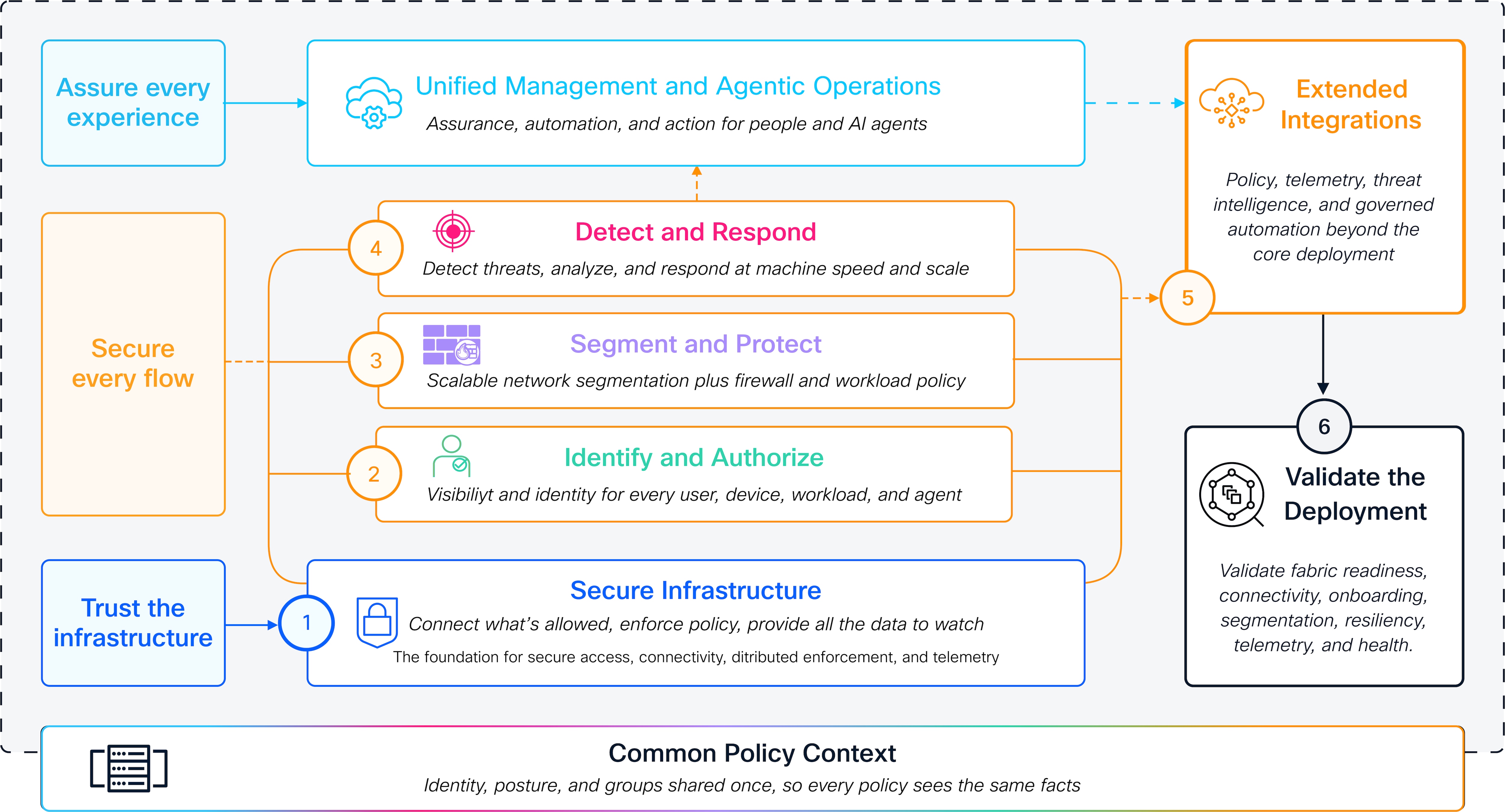
Architecture-to-deployment alignment
The Cisco Secure Networking Reference Architecture (SNRA) and this Deployment guide serve different purposes.
● The Architecture guide defines the design intent and the customer outcomes by explaining what the deployment must accomplish and why.
● This Deployment guide translates that intent into a validated medium-scale cloud-managed campus implementation. It explains how the validated Cisco Cloud Fabric design establishes the infrastructure, applies identity and segmentation policy, enables detection and response, integrates supporting services, and verifies the resulting security and digital experience.
This guide organizes implementation into deployment layers that are grouped into logical steps for deployment sequencing and validation but that remain separate functions in the Architecture guide for logical understanding.
Unified Management and Agentic Operations spans the deployment layers through centralized management, governed automation, and continuous assurance. Common Policy Context carries shared identity, posture, role, workload, application, risk, telemetry, and policy facts across enforcement points. Extended Integrations extend the deployment to networks, security platforms, observability systems, identity providers, APIs, and operational workflows.
This deployment assumes:
● Cisco Meraki Dashboard as the management and orchestration platform
● Cisco Cloud Fabric for campus fabric orchestration
● Layer 3 routed underlay connectivity using OSPF
● VXLAN EVPN overlay services using MP-BGP EVPN
● VRF-based macro segmentation
● Adaptive Policy and TrustSec integration
● Wired and wireless access infrastructure
● Medium-scale campus operational requirements with centralized lifecycle management
The architecture can scale upward through modular expansion and distributed fabric growth while maintaining operational consistency and policy alignment.
The deployment model emphasizes operational simplicity through centralized orchestration while preserving advanced enterprise networking capabilities including Layer 3 routed underlays, VXLAN EVPN overlays, VRF-based macro segmentation, Adaptive Policy integration, and unified lifecycle management.
See Cisco SNRA Architecture Guide or visit the References section to explore additional resources.
Note: The Secure Network Reference Architecture does not replace existing Cisco Validated Designs. Instead, it modernizes and unifies validated Cisco networking and security architectures into a cohesive framework that provides consistent design guidance, operational alignment, and scalable deployment models across enterprise environments.
The scope of this guide covers the step-by-step deployment of Cisco Secure Campus and Secure Branch networks, specifically for cloud-managed operations.
The initial version of this guide covers medium-scale Secure Network deployments, as this size is representative of most common designs. Future revisions are focused on Small and Large-sized deployments.
The scope of this document includes the following:
● Management plane onboarding, licensing, and centralized administration
● Underlay transport, LAN switching, and WAN routing readiness
● Wired and wireless access infrastructure deployment
● Overlay connectivity enablement for campus and branch topologies
● Support for single-site deployments with all core components integrated
● Support for limited multi-site interconnection and distributed locations
● Segmentation and access policy implementation
● Security services integration across users, devices, and traffic flows
● Repeatable deployment workflows for consistent rollout and operations
● Operational validation, health checks, and service readiness verification
● Day-2 lifecycle operations, monitoring, and change management guidance
● Scaling, expansion, and future growth considerations
The scope does not include the following:
● Deep customization for specific deployments
● Large-scale automation frameworks
● Integrations between cloud-managed and other operational types.
Cisco Cloud Fabric deployment overview
Cisco Cloud Fabric is a SaaS-based, cloud-managed campus fabric architecture that combines a Layer 3 routed underlay with a BGP EVPN VXLAN overlay to deliver scalable segmentation, rapid convergence, and operational simplicity. The validated design follows a two-tier model with combined border-on-spine nodes and leaf nodes. OSPF provides deterministic IP transport across point-to-point routed links in the underlay, while MP-BGP EVPN distributes endpoint reachability, and VXLAN encapsulates overlay traffic. VRFs enable macro segmentation, and Adaptive Policy with SGT propagation supports identity-based micro-segmentation across wired and wireless domains.
Border nodes provide dynamic eBGP integration with upstream networks, preserving segmentation beyond the fabric edge in recommended VRF-aware deployments. The validated Layer 3 underlay is prepared manually before the fabric workflow is run. The Cisco Meraki Dashboard then orchestrates the overlay fabric parameters, VRFs, fabric subnets, and eBGP border integration over the prepared underlay. The result is a resilient, scalable campus architecture that unifies transport, segmentation, and policy under centralized cloud management.
Secure Networking deployment model
Cisco Cloud Fabric is deployed as a technical implementation of the Cisco Secure Networking Reference Architecture. The Architecture guide describes the outcomes and capabilities that the deployment must deliver; this guide describes where those capabilities are implemented, how they are sequenced, and how they are validated.
The validated deployment uses six implementation steps:
Secure Infrastructure: The trusted, resilient foundation consisting of the physical topology, routed Layer 3 underlay, OSPF transport, device reachability, MTU consistency, redundancy, and foundational telemetry.
Identify and Authorize: Identity- and context-aware access control using Cisco ISE, 802.1X, MAB, endpoint profiling, authorization profiles, and Security Group Tag assignment.
Segment and Protect: Least-privilege reachability control using VLANs, VRFs, VXLAN EVPN, SGTs, TrustSec, Adaptive Policy, SD-WAN segmentation, and distributed firewall enforcement.
Detect and Respond: Detection, correlation, and governed containment using network telemetry, encrypted traffic analytics, firewall inspection, threat intelligence, XDR, and distributed response actions.
Unified Management and Agentic Operations, Common Policy Context, and Extended Integrations: Policy, telemetry, threat intelligence, and governed automation beyond the core deployment.
Validate the Deployment: Validate fabric readiness, connectivity, onboarding, segmentation, resiliency, telemetry, and health.
These steps provide a deployment-oriented view of the architecture, showing where capabilities are implemented without redefining the architecture itself. The unified operating model spans all implementation steps to coordinate management, governed agentic operations, and continuous assurance. Shared policy context connects the layers by carrying identity, posture, workload, application, risk, telemetry, and policy information across the architectural layers. External integrations extend the deployment to networks, security platforms, observability systems, identity providers, APIs, and operational workflows beyond the core environment. To learn more review Secure Networking Overview.
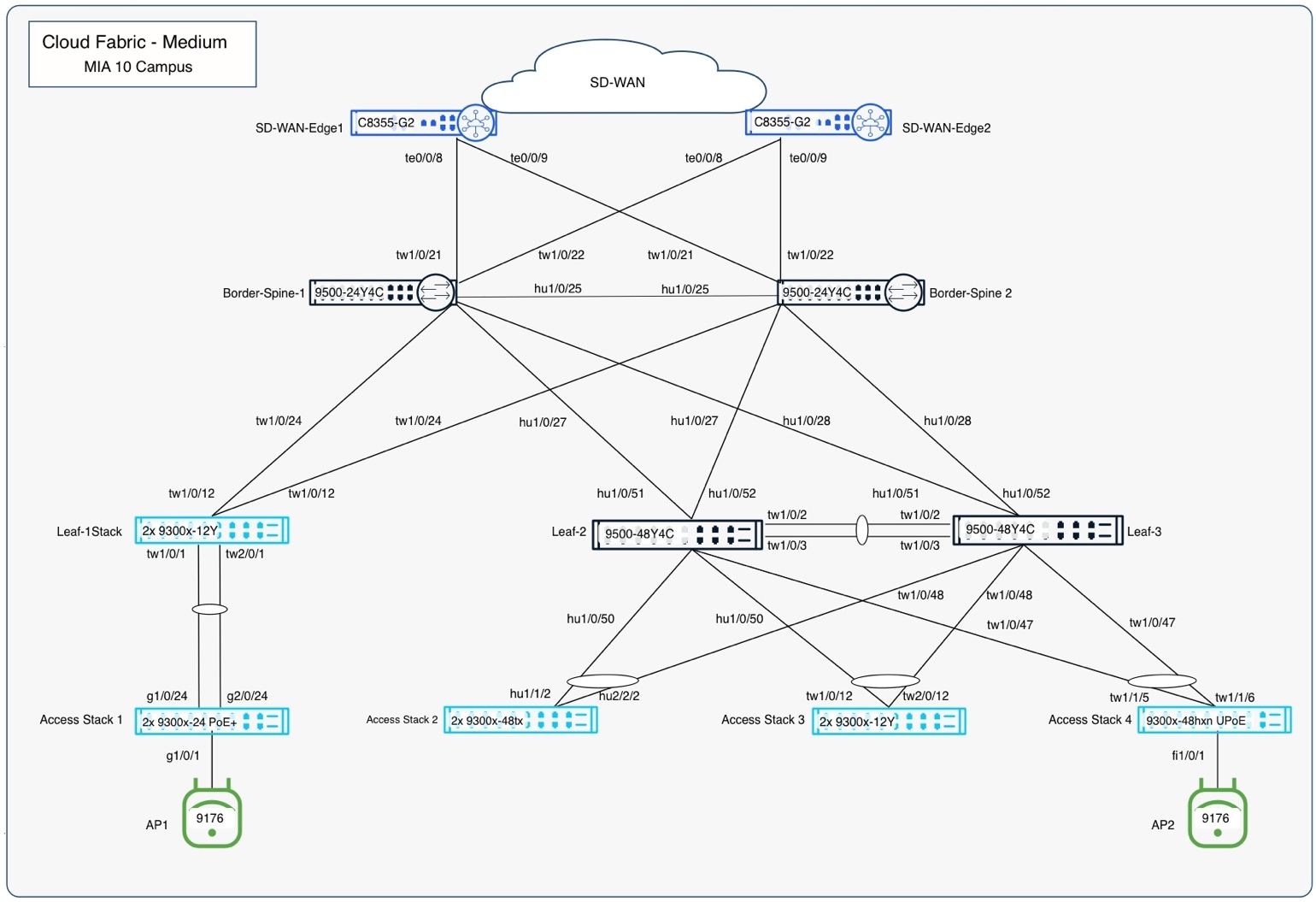
In this validated use case, a two-tier border/spine and leaf campus fabric deploys with redundant spines, leaves, and dedicated border devices. A Layer 3 routed underlay using OSPF provides fast convergence and predictable connectivity, while VXLAN overlays deliver scalable segmentation across multiple VRFs. Border devices use automated eBGP peering to integrate the fabric with upstream networks, maintaining VRF separation beyond the fabric edge.
This approach allows Cisco customers to:
● Simplify campus fabric deployment through UI-driven workflows
● Reduce operational risk by eliminating manual overlay CLI configuration
● Maintain Cisco-recommended Layer 3 design best practices
● Scale segmentation using VRFs without redesigning the physical network
● Integrate access, wireless, DHCP, and Adaptive Policy/TrustSec consistently across the fabric
The validated design demonstrates how Cisco Cloud Fabric enables network architects and operators to deploy and operate a modern campus fabric that combines the architectural rigor of traditional Cisco campus designs with the simplicity and automation of cloud-managed operations, all while remaining aligned with Cisco enterprise networking standards and lifecycle practices.
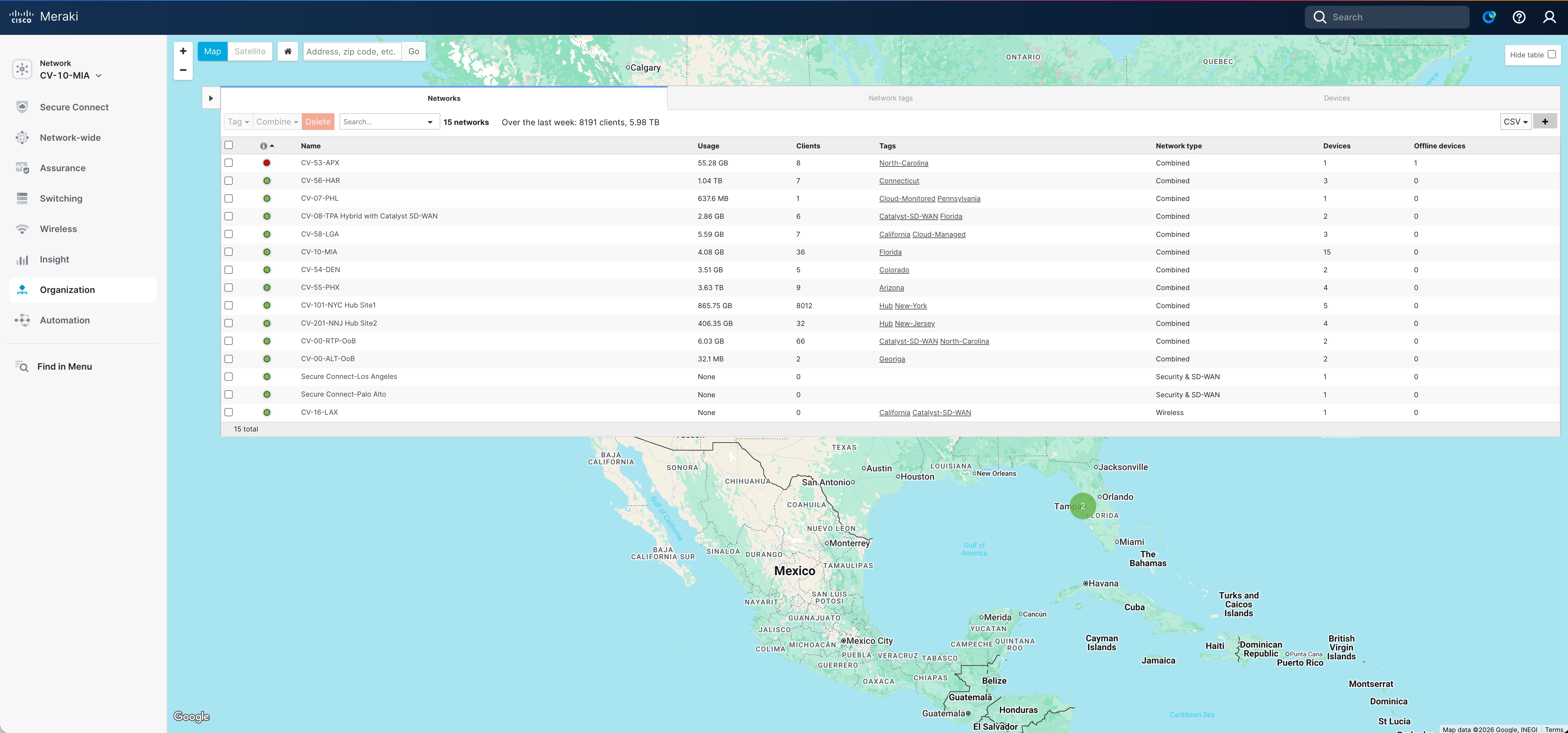
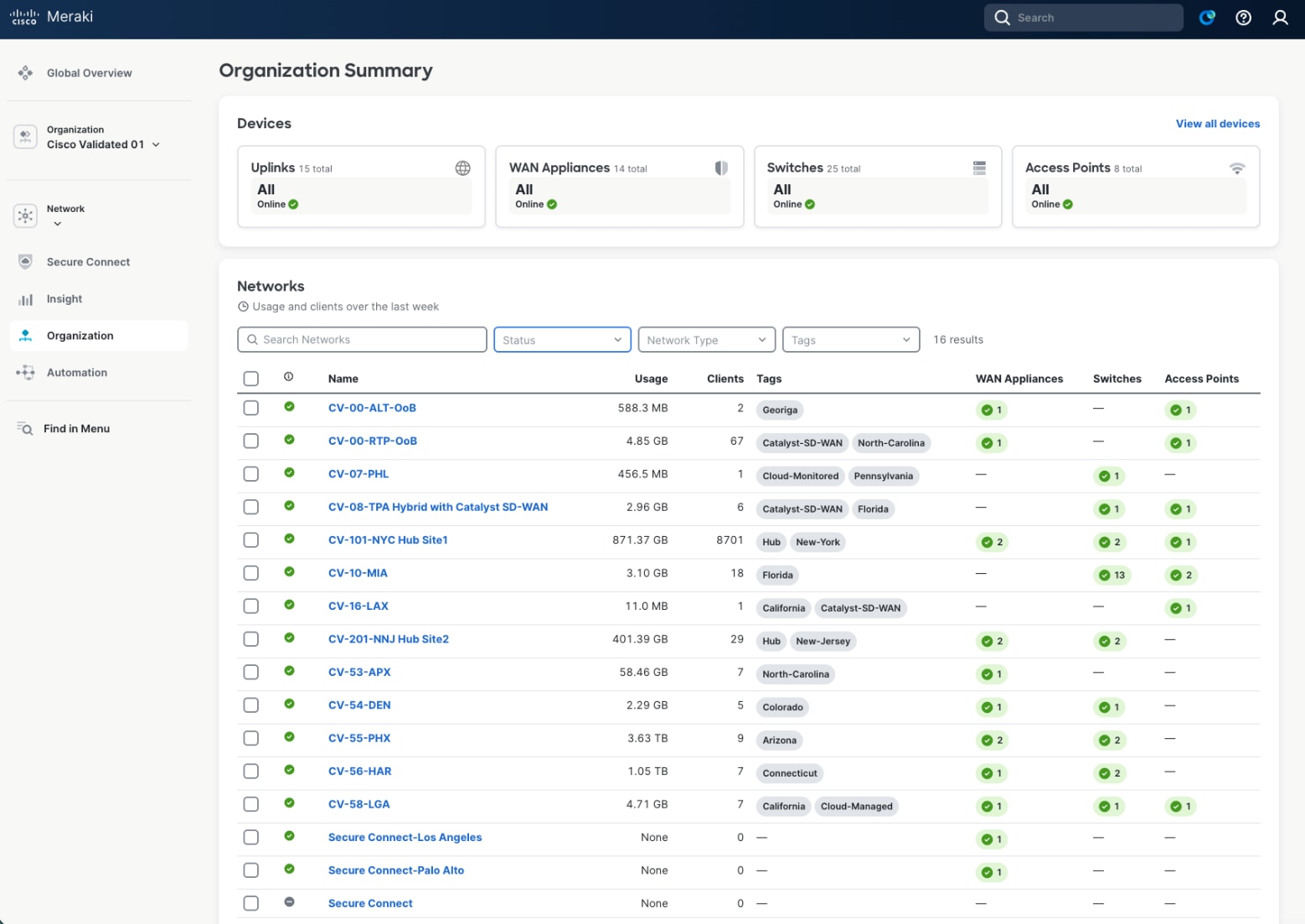
The solution includes:
● Cisco Catalyst 9300 and 9500 Series switches for campus core and access connectivity
● Cisco cloud-managed wireless platforms for mobility and wireless access
● Cisco 8200, 8300, and 8500 Series Secure Routers for WAN edge and SD-WAN services
Cisco Meraki MX security appliances for Unified Branch deployments
● Cisco Identity Services Engine (ISE) for identity-based policy enforcement
● Cisco Secure Firewall 1200 and 3100 Series platforms for mesh firewalling and IPS
● Cisco security integrations for DNS security, SSE, analytics, and observability
● Cisco MX Routers: MX85/95/105
For a detailed list of equipment, refer to the Appendix.
● Template-driven deployment consistency: Standardized templates, policy constructs, and automated workflows enable repeatable deployments, secure zero-touch onboarding, and consistent operational and security outcomes across distributed sites.
● Unified campus and branch management: Wired, wireless, and branch connectivity are managed through a common platform that delivers coordinated policy enforcement, secure WAN integration, and consistent user access across locations.
● Granular operational governance: Role-based administrative access supports secure delegated management and separation of duties while maintaining centralized operational control.
● API-enabled extensibility: Open APIs enable integration with automation tools, IT service platforms, monitoring systems, and custom operational workflows.
● Operational visibility and scalable growth: Real-time telemetry, dashboards, alerts, and reporting provide end-to-end visibility into network health, client experience, and policy outcomes while supporting incremental expansion of users, devices, sites, and services.
This validated deployment delivers the following outcomes, aligned with SNRA design objectives:
● Secure-by-design infrastructure: Security is embedded across all layers of the architecture, with segmentation and policy enforcement integrated into the fabric design.
● Scalable segmentation: VRF-based macro segmentation and EVPN-enabled overlays support scalable isolation of users, devices, and applications.
● Identity-driven access control: Access decisions are enforced based on identity and context, enabling consistent policy application across wired and wireless environments.
● Operational simplicity with visibility: Centralized management and telemetry provide clear visibility into network state and simplify ongoing operations and troubleshooting.
Fabrics - Fabrics are built using an underlay and overlay model.
Fabric Device Roles – Fabrics are typically deployed following a Clos architecture using a spine-and-leaf approach. The Cisco Cloud Fabric architecture uses a three-tier model like traditional Core–Distribution–Access layer designs, with spines at the core, leaves at the distribution layer, and traditional switches and Access Points at the access layer. The border function is deployed on a limited number of devices within the fabric to connect the fabric to external networks. Cisco Cloud Fabric supports both dedicated border deployments and border-on-spine deployments.
Fabric Underlay - In campus fabric environments, the underlay uses an IGP with Layer 3 point-to-point links to eliminate spanning tree, enable rapid convergence, and support equal-cost multi-pathing (ECMP). Cisco Cloud Fabric uses Routed Ports and OSPF to establish underlay reachability. The fabric control plane runs MP-BGP EVPN (AFI 25 / SAFI 70) over the underlay to distribute overlay endpoint reachability, with BGP peering established using OSPF reachability. The data plane uses VXLAN encapsulation to transport overlay traffic. The underlay is manually configured in the current Cisco Cloud Fabric solution. The fabric underlay connects to external handoff devices through OSPF routing.
Fabric Overlay(s) – An overlay is a logical network in which traffic is encapsulated and transported between underlay devices. Cisco Cloud Fabric uses IP-based underlay packets sourced and destined to devices within the underlay routing domain, with overlay traffic carried using VXLAN encapsulation. Virtual Network Identifier (VNI) and Security Group Tag (SGT) information is conveyed in the VXLAN header. VRFs define logical overlays on fabric devices, including leaves and borders, where VXLAN tunnels terminate. Fabric borders use eBGP for dynamic routing into and out of overlay networks. Overlay eBGP peering on fabric borders toward external handoff devices is fully automated, while external handoff devices are manually configured to interoperate.
Secure Network deployment mapping
The Cisco Secure Networking topology follows a hierarchical design adapted to deployment size. For medium-scale environments, the validated design implements a balanced architecture with fewer network layers based on role and scale. This approach aligns with SNRA decision trees that prioritize simplified operational models and reduced failure domains while maintaining high availability through redundant spine nodes.
The Cisco Secure Networking topology identifies several distinct operational domains, aligned to specific network functions, deployment locations, and security services:
● Cisco Secure Campus
Provides wired and wireless LAN connectivity, switching, routing, segmentation, and policy enforcement for medium and large multi-tier campus environments.
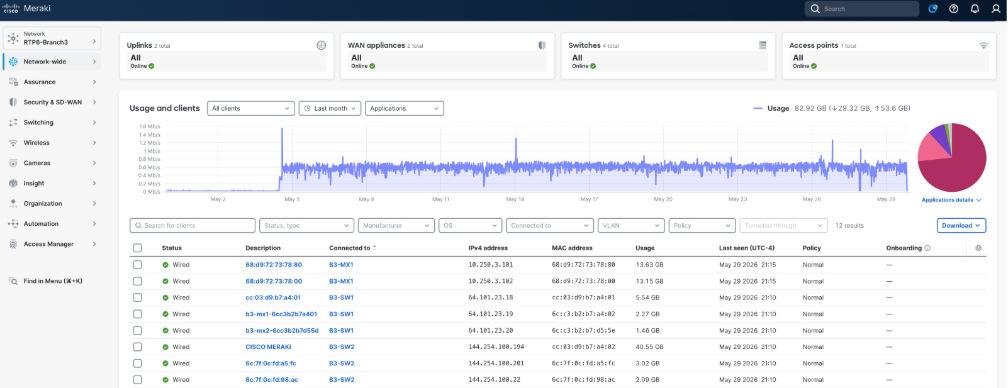
● Cisco Unified Branch
Provides integrated wired, wireless, secure routing, SD-WAN, and security services that enable resilient branch connectivity, cloud integration, policy-based traffic steering, and simplified operations across campus, branch, and remote environments.
● Cisco Secure Access Service Edge (SASE)
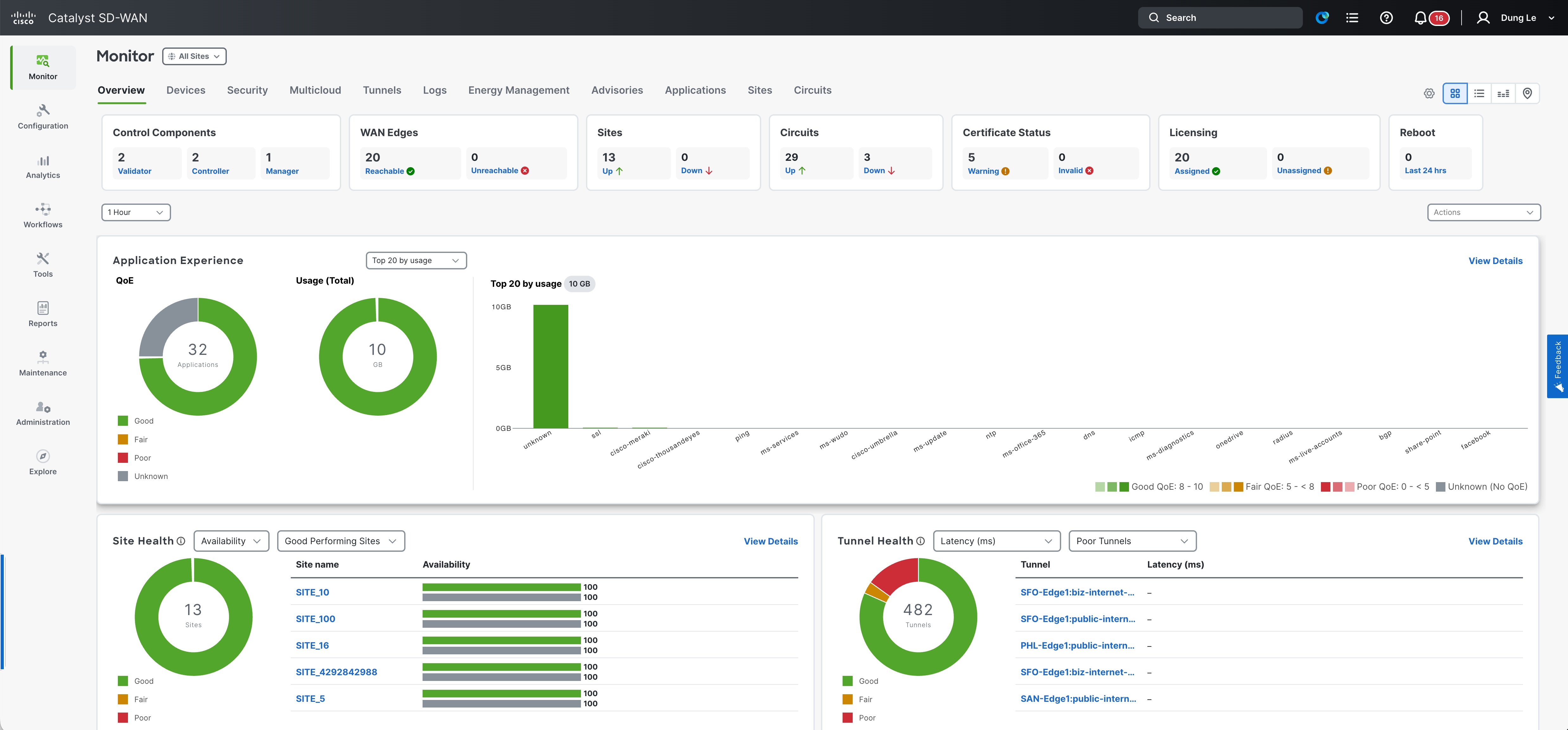
Extends secure connectivity to remote users and distributed locations through cloud-delivered security, Cisco SD-WAN integration, Secure Service Edge (SSE) services, and distributed secure access points of presence (POPs).
● Cisco Secure AI Factory and Secure Data Center
Supports AI, application, and data center environments through integrated segmentation, identity, analytics, and workload security services, including Cisco Identity Services Engine (ISE), Cisco XDR, Secure Workload, and Cisco Splunk Enterprise Security.
● Cisco Security Cloud Control
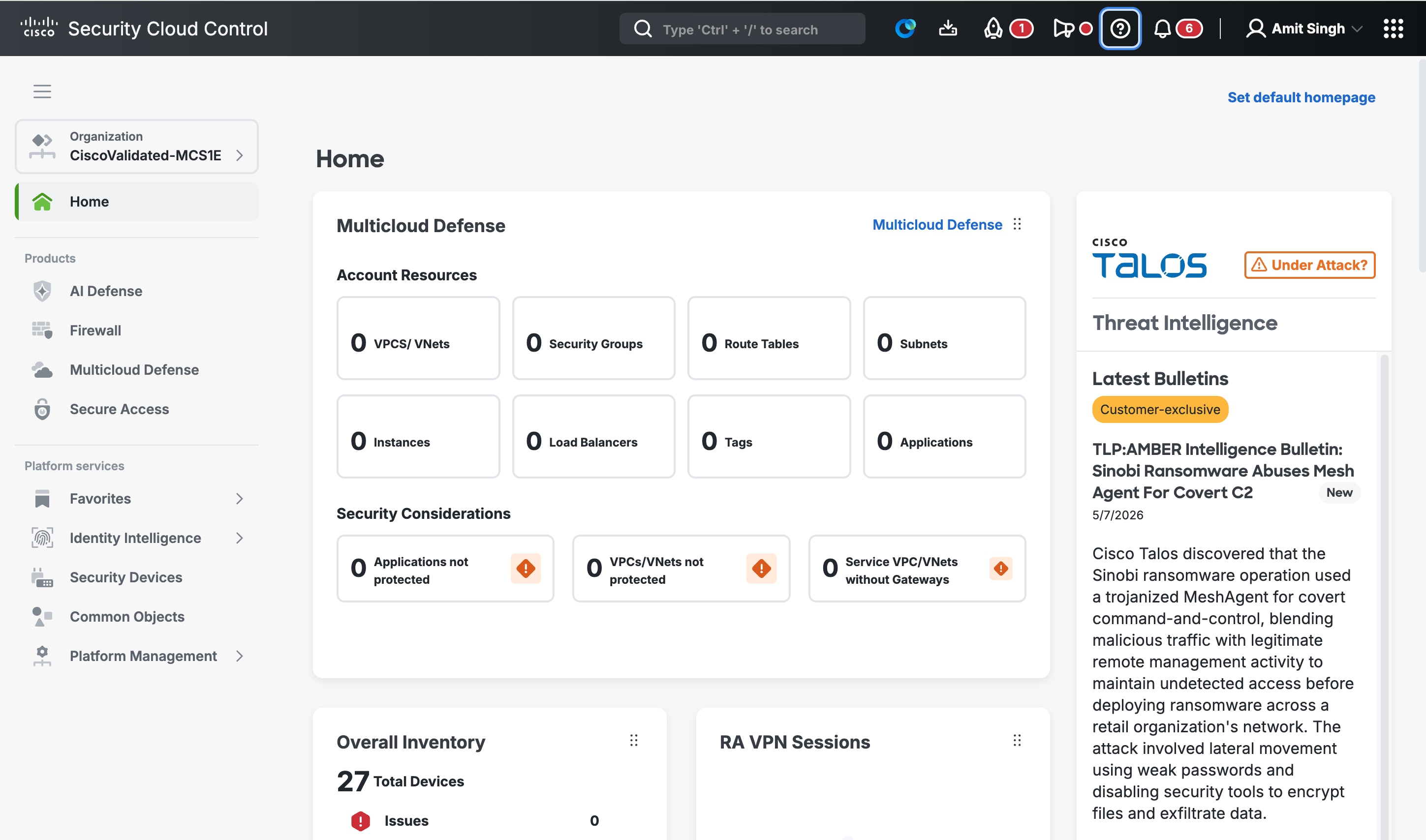
Provides centralized security operations, cloud-based administration, and Common Policy Context management through Secure Firewall and Secure Router platforms, Cisco ISE integration, and unified operational visibility and governance.
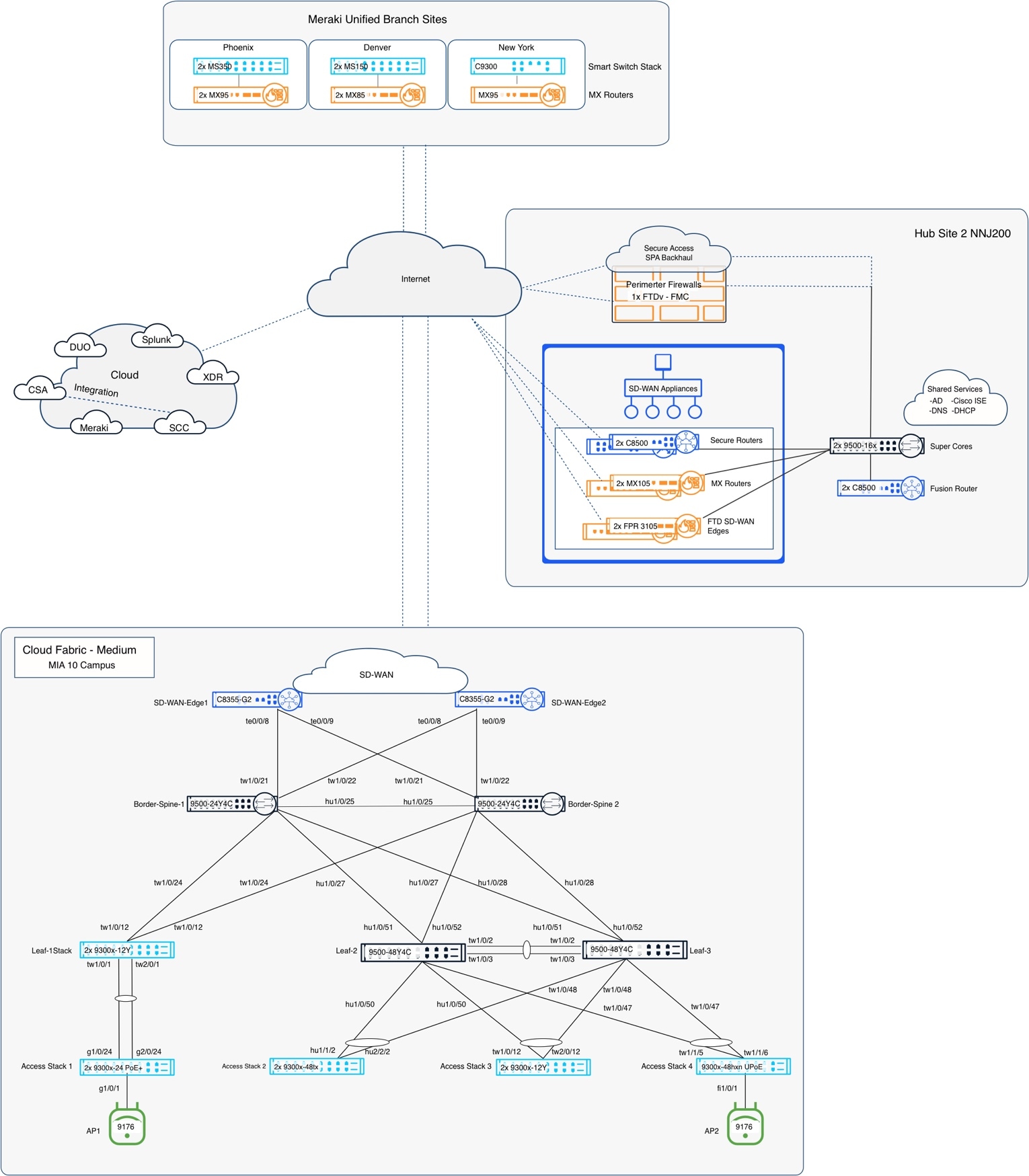
The validated Cisco Secure Campus design implements a two-tier architecture with collapsed core and distribution functions integrated into spine nodes and end-point connectivity through leaf nodes. Leaf switches function as fabric edge devices and VXLAN tunnel endpoints (VTEPs), delivering endpoint access, segmentation policy enforcement, and overlay connectivity. The routed Layer 3 underlay uses point-to-point links to eliminate Layer 2 dependencies while enabling equal-cost multipath (ECMP) forwarding and fast, predictable convergence.
External connectivity to Cisco SD-WAN, Internet edge, and upstream networks is provided through fabric border nodes. These borders establish eBGP adjacencies to external routing domains while preserving VRF-based macro segmentation beyond the campus fabric through VRF-aware handoffs. This ensures secure integration with WAN, Internet, and data center environments while allowing centralized and/or distributed egress models based on operational and policy requirements.
The deployment uses the Meraki Dashboard as the centralized cloud management and orchestration platform. Fabric provisioning, policy deployment, monitoring, and lifecycle operations are managed through the dashboard, aligning with the SNRA operational model for centralized management and automation. Devices maintain secure outbound cloud connectivity to support zero-touch provisioning, continuous synchronization, telemetry collection, and operational visibility without requiring inbound management access.
The architecture aligns SNRA design decisions to a repeatable deployment model optimized for medium-scale campus environments. The collapsed core topology simplifies operations and scalability, the routed fabric provides resilient transport and segmentation, and the cloud-managed operational model delivers centralized visibility, automation, and policy consistency across the environment.
Within the cloud-managed deployment model, the SNRA framework is implemented as a coordinated system in which each deployment step is realized through specific components and operational roles.
· A Secure Infrastructure establishes trusted transport and enforcement points
· Applying identity, segmentation, detection, and response policies Protect Every Flow
· Unified Management and Agentic Operations, Common Policy Context, and Extended Integrations connect these capabilities across the environment.
This mapping illustrates how each deployed component implements SNRA functions and cross-cutting capabilities within the validated architecture.
| Deployment step |
Representative implementation components |
Role |
| Secure Infrastructure |
C9K and MS Switches, CW and cloud-managed access points, Cisco Secure Routers, MX appliances, OSPF routed underlay, SDWAN Edges, redundant fabric nodes |
Provides trusted, resilient transport, reachability, and foundational telemetry |
| Identify and Authorize |
Cisco ISE, 802.1X, MAB, endpoint profiling, authorization profiles, SGT assignment |
Discovers and classifies identities and grants minimum required access |
| Segment and Protect |
VXLAN EVPN, VRFs, VLANs, routed subnets, TrustSec, SGTs, Adaptive Policy, SD-WAN segmentation, Secure Firewall |
Reduces unnecessary reachability and enforces least-privilege policy |
| Detect and Respond |
Secure Network Analytics, Secure Firewall telemetry, XDR, threat intelligence, ISE containment, distributed enforcement |
Detects abnormal activity and applies governed, reversible containment |
| Unified Management and Agentic Operations, Common Policy Context, and Extended Integrations |
Cisco Meraki Dashboard, Cisco Catalyst Center, Cisco SD-WAN Manager, Cisco Security Cloud Control, Cisco Data Fabric, Cisco ISE, pxGrid, SGTs, posture and telemetry data, APIs, automation, assurance, and connected external platforms |
Coordinates configuration, visibility, policy, assurance, and governed action by sharing relevant context across domains and extending intent, evidence, telemetry, and automation beyond the core deployment. |
| Validate Deployment |
Cisco Meraki Dashboard assurance and health views, Cisco Catalyst Center Assurance, Cisco SD-WAN Manager analytics, Cisco Security Cloud Control, Cisco Secure Network Analytics, Cisco ThousandEyes, packet capture, telemetry, failover testing, and application and user-experience validation |
Confirms reachability, policy enforcement, resiliency, telemetry, operational workflows, application performance, and user experience across the deployment |
Secure Infrastructure is the trusted, resilient foundation of the network deployment. In this validated case study, it is implemented through Cisco Catalyst switching, cloud-managed wireless infrastructure, Cisco Secure Routers, MX appliances, redundant spine and border nodes, and a manually prepared Layer 3 routed underlay using OSPF. Together, these components provide connectivity, transport, and edge services. The underlay provides predictable reachability, rapid convergence, ECMP forwarding, cloud-management connectivity, and the transport required by overlay services, policy, telemetry, and assurance functions.
MX appliances and Cisco Secure Routers operate at the network edge, providing WAN and Internet connectivity while anchoring external communication paths. In this role, they serve as the transition point between internal fabric operations and upstream networks.
It defines how traffic moves through the environment. Its purpose is to ensure that transport is stable, predictable, and secure so that segmentation and policy enforcement can be applied consistently across all endpoints and locations.
Infrastructure trust also includes secure device onboarding, software and image integrity, controlled administrative access, encryption, lifecycle management, and evidence that the infrastructure remains available and uncompromised.
This layer establishes who or what is requesting access and determines the minimum access required. In this deployment, Cisco ISE provides authentication, endpoint profiling, authorization profiles, 802.1X and MAB workflows, and Security Group Tag assignment for wired and wireless endpoints.
Identity and authorization decisions use available identity, device, posture, location, and policy context. The resulting VLAN, SGT, downloadable ACL, or related authorization attributes are carried to the appropriate enforcement points. This changes access control from a location-based decision to a continuously informed, identity-aware decision.
This layer applies the identity and context established by Identify and Authorize to define and enforce access permissions. Cisco ISE authenticates and profiles endpoints and assigns identity attributes and SGTs. MS switches and cloud-managed access points enforce policy at the point of entry, while MX appliances and Cisco Secure Firewalls enforce MX Adaptive Policy and Meraki group policy at the edge. This allows access decisions to follow the user or device regardless of where the connection originates.
The layer shifts the network from location-based control to identity-based enforcement and shifts the business intent and identity context into least-privilege reachability. VRFs and VLANs provide macro-segmentation, while VXLAN EVPN, routed subnets, TrustSec, Adaptive Policy, SD-WAN segmentation, and firewall controls extend enforcement across campus, branch, WAN, Internet, and data center environments. These controls refine broad trust domains into granular communication policies for users, devices, workloads, and applications.
This deployment layer operationalizes the separate Detect and Respond functions. By using pervasive telemetry, encrypted traffic analytics, firewall inspection, DNS signals, endpoint and workload behavior, and threat intelligence, anomalous communication and improper behavior are quickly identified across the deployment.
The deployment correlates evidence and applies governed, reversible action through distributed enforcement points. Depending on the event and operational policy, a response may include containment of an identity, endpoint, segment, workload, or flow through Cisco XDR, SOAR workflows, Cisco ISE containment, Adaptive Network Control, Secure Firewall policy, or related enforcement mechanisms. Responsive actions preserve essential services, maintain auditability, and include approval, rollback, and exception handling where appropriate.
Unified Management and Agentic Operations, Common Policy Context, and Extended Integrations
This cross-cutting operating model coordinates network and security operations through platforms such as Cisco Meraki Dashboard, Cisco Catalyst Center, Cisco ThousandEyes, Cisco SD-WAN Manager, and Cisco Security Cloud Control (SCC). These platforms provide centralized configuration, monitoring, assurance, policy management, telemetry, guided workflows, zero-touch provisioning, templates, APIs, and lifecycle operations. At the branch, Cisco Unified Branch combines routing, firewall, wireless, and switching into a single cloud-managed platform.
Agentic operations can accelerate investigation and recommend bounded actions, subject to guardrails, approvals, auditability, rollback, and human control.
In this layer, the network becomes part of a larger ecosystem rather than a standalone domain. Integration extends the value of the deployment by enabling cross-platform visibility, automation, and coordination.
Successful deployment begins with comprehensive planning and validation of business, operational, and infrastructure requirements before onboarding devices or enabling production services. Early planning reduces deployment delays, minimizes redesign during implementation, and ensures alignment with the cloud-managed fabric architecture.
Planning activities should define user scale, endpoint density, wireless coverage requirements, application prioritization needs, guest and IoT access requirements, WAN connectivity models, and segmentation policies across business units or device groups. Security and compliance planning should identify authentication sources, administrative access controls, encryption requirements, logging and retention policies, and policy enforcement boundaries for both wired and wireless access.
Infrastructure readiness should validate Internet connectivity for cloud management access, WAN transport availability, structured cabling, PoE capacity, rack space, UPS protection, DNS and NTP reachability, and IP addressing allocations for both underlay and overlay services. External services such as DHCP must support VRF-aware operation and maintain IP reachability to fabric underlay loopback addresses used for DHCP relay workflows.
Integration planning should also validate upstream handoff requirements, external routing dependencies, and segmentation preservation beyond the fabric boundary through VRF-aware border connectivity. Migration planning should determine whether deployment occurs as a greenfield implementation, phased migration, or coexistence with an existing network, including review of current VLANs, SSIDs, DHCP scopes, WAN circuits, and firewall policies prior to cutover.
Deployment planning prerequisites and considerations
The following information should be gathered in advance of any configuration work.
Allocate sufficient IP address space accounting for the following:
● Underlay point-to-point links - Each leaf connects to each spine; the spines connect to each other, and if dedicated borders are used, each border connects to each spine. Additionally, the border handoff links must be considered in the underlay design. Links between fabric devices are converted to Layer 3 links, and /31 subnets are recommended. The links from the borders to the handoff devices remain trunks, only carry specific underlay and overlay VLANs, and function as routed interconnects using SVIs.
● Underlay IP address range entered during the fabric workflow – The automation uses IP addresses from the selected range for the underlay loopback 100 interface on each fabric device. Additional IP addresses from this range include the loopback 600 address on each spine for MSDP peering and the loopback 300 address on each spine, which is the PIM anycast RP address. Assume an additional 32 host addresses must be reserved for other infrastructure SVI IPs allocated from this pool. Ensure sufficient IP address space is provided for current and future needs, including adding new leaves.
Note: Changing this IP address range requires rebuilding the fabric.
● Temporary DHCP pools – Pools are used when converting fabric devices with default configurations to a Layer 3 underlay configuration. These devices initially obtain addresses via DHCP on VLAN 1 and are then manually converted to routed interconnects. In the event of an RMA or new fabric device addition, this pool or a similar temp pool must be activated to facilitate the onboarding and conversion to Layer 3 underlay. This is also necessary if a fabric device is reset to factory default settings.
● Permanent DHCP pools for access layer devices – Access layer devices are managed in VLAN 1 by default. Cisco’s best practice recommendation is to use a different VLAN. VLAN 2 was used in the Cisco Validated setup. Management traffic routes on an SVI that is manually created as part of normal setup. SVIs for access-layer devices terminate on their upstream leaf, requiring a unique subnet per leaf, which must be sized to support current and future downstream devices, including switches, access points, and cameras that require UAC control-plane connectivity to the cloud.
● Optional traditional subnets and VLANs – Subnets can be routed on a leaf that is not part of the fabric, which are no different than the management network required on each leaf. Subnets must be unique per leaf and manually configured. If traditional subnets are created, they will be part of the underlay routing domain, which may be relevant in a migration scenario. And existing deployment can be migrated in stages:
◦ First to a traditional three-tier design with unique subnets per distribution switch,
◦ Then to Layer 3 links between core and distribution, and
◦ Finally, to fabric.
Subnets can then be gradually transitioned from underlay SVI routing to fabric overlay SVI routing. If a traditional subnet is configured on a fabric leaf, a corresponding VLAN is required. The same VLAN number can be used across leaves if required, as those VLANs are discrete broadcast containers and are not connected over the routed connections between the spines and leaves. This assumes the use of a best practice Layer 3 underlay.
Note: It is ideal if all the underlay networks can be summarized into a single prefix for summarization at the handoff devices out to the rest of the Intranet.
● Underlay OSPF information – It is important to plan a unique OSPF Area number for this handoff for the underlay between the borders and handoff devices. OSPF Area 0 is used between the spines and leaves, and spines and borders. Be prepared to match the interface MTU and media type on the handoff devices. The validation setup used OSPF Area 1 between the borders and handoff devices.
● Overlay networking IP and VLAN information – The subnets and associated VLAN numbers are entered in the fabric workflow. The planning depends on the options being configured:
◦ Routed – 1 Subnet and VLAN number for each leaf selected (the VLAN number can be reused if desired and can be beneficial in certain wireless scenarios)
◦ Routed DAG – 1 subnet and VLAN number per set of selected leaves
◦ Bridged DAG – 1 subnet and VLAN number per set of selected leaves
Note: Multiple instances of each option can be deployed; options may be combined in any manner, and the target leaf or leaves are selected independently for each deployment. For example, two routed subnets can be defined, with one existing only on a subset of leaves. Less-preferred DAG options should be deployed only on the leaves required.
● BGP information – A new BGP AS number is required for the fabric and is specified during the fabric workflow; a private AS may be used if needed. The workflow also collects handoff device BGP details, including the remote AS number and any MD5 authentication strings to automate border eBGP configuration.
Design decisions and deployment considerations
Architectural decisions within SNRA should balance security, operational efficiency, scalability, resiliency, and user experience. The following considerations reflect common enterprise design priorities and demonstrate how infrastructure, segmentation, policy, and operations decisions influence architectural outcomes.
● Control plane placement
Centralized control models are commonly selected to simplify policy consistency, operational visibility, and lifecycle management across distributed environments. This approach is common in cloud-managed and controller-based architectures.
Distributed control models may be appropriate for environments requiring localized operational autonomy or independent site operations. This decision affects operational workflows, resiliency planning, and scalability.
● Identity source selection
A centralized identity source such as Cisco ISE is typically preferred to provide consistent authentication, device profiling, and policy enforcement across wired, wireless, and remote access domains. Localized identity services may also be deployed to support high availability designs, high resiliency, and continuity during connectivity disruptions.
This decision impacts Zero Trust enforcement, operational consistency, and lifecycle management.
● Segmentation strategy
Macro-segmentation using VLANs and VRFs is commonly used to separate trust zones, organizational groups, and business services. Micro-segmentation extends policy enforcement through identity-aware controls between users, devices, and workloads using Security Group Tags (SGTs), TrustSec, and distributed policy models.
Most enterprise environments use both approaches, combining broad traffic separation with granular least-privilege enforcement.
Segmentation strategy should align to business requirements, security objectives, threat containment, operational scale, and Hybrid mesh firewall policy distribution principles.
● Enforcement point placement
Policy enforcement can be applied at the access layer, within the fabric, at WAN edges, or at security boundaries. Enforcement closer to the user or workload can improve threat containment and reduce lateral movement risk. Centralized enforcement may simplify operational administration and inspection consistency.
Enforcement placement should be driven by business outcomes, application communication patterns, operational ownership, scalability requirements, and security objectives. Hybrid mesh firewall principles allow enforcement to be distributed strategically across the environment while maintaining consistent policy and operational visibility.
Reference deployment information
The following section documents the pre-planning details for the validated campus fabric deployment in the Cisco Validated Network in Miami (MIA10).
| Subnet |
Description |
Fabric Leaf/ Leaves |
VLAN |
DHCP Server Location |
| 10.10.0.0/16 |
Assigned range for this location / network |
|
|
|
|
|
|
|
|
|
| 10.10.0.0/18 |
Underlay and any traditional access layer subnets |
|
|
|
|
|
|
|
|
|
| 10.10.0.0/24 |
Initial DHCP pool for default underlay |
|
|
WAN-Edge-01 Te0/0/8 |
|
|
|
|
|
|
| 10.10.1.0/24 |
Manually configured /31s between spines and leaves/borders and Borders Handoffs |
|
|
|
|
|
|
|
|
|
| 10.10.2.0/23 |
Underlay Subnet for Fabric workflow |
|
|
|
|
|
|
|
|
|
| 10.10.5.0/24 |
leaf-01 access layer UAC Management |
|
VLAN 2 |
leaf-01 |
| 10.10.6.0/24 |
leaf-02 access layer UAC Management |
|
VLAN 2 |
leaf-02 |
| 10.10.7.0/24 |
leaf-03 access layer UAC Management |
|
VLAN 2 |
leaf-03 |
|
|
|
|
|
|
| 10.10.21.0/24 |
leaf-01 traditional user subnet |
|
VLAN 21 |
Corp Server 10.100.0.5 via Underlay |
| 10.10.22.0/24 |
leaf-02 traditional user subnet |
|
VLAN 22 |
Corp Server 10.100.0.5 via Underlay |
| 10.10.23.0/24 |
leaf-03 traditional user subnet |
|
VLAN 23 |
Corp Server 10.100.0.5 via Underlay |
|
|
|
|
|
|
| 10.10.64.0/18 |
Overlay Range - Campus VRF |
|
|
|
|
|
|
|
|
|
| 10.10.64.0/24 |
leaf-01 routed fabric subnet - no DAG |
leaf-01 |
VLAN 200 |
Corp Server 10.100.0.5 with VRF via Underlay |
| 10.10.65.0/24 |
leaf-02 routed fabric subnet - no DAG |
leaf-02 |
VLAN 200 |
Corp Server 10.100.0.5 with VRF via Underlay |
| 10.10.66.0/24 |
leaf-03 routed fabric subnet - no DAG |
leaf-03 |
VLAN 200 |
Corp Server 10.100.0.5 with VRF via Underlay |
|
|
|
|
|
|
| 10.10.74.0/24 |
1st routed DAG fabric subnet |
leaf-01, leaf-02 |
VLAN 274 |
Corp Server 10.100.0.5 with VRF via Underlay |
| 10.10.75.0/24 |
2nd routed DAG fabric subnet |
leaf-02, leaf-03 |
VLAN 275 |
Corp Server 10.100.0.5 with VRF via Underlay |
|
|
|
|
|
|
| 10.10.84.0/24 |
1st Bridged DAG fabric subnet |
leaf-02, leaf-03 |
VLAN 284 |
Corp Server 10.100.0.5 with VRF via Underlay |
|
|
|
|
|
|
| 10.10.127.0/24 |
/31 routed interconnects for Handoff links |
|
VLANs 6-9 |
|
|
|
|
|
|
|
| 10.10.192.0/19 |
Overlay Range - Guest VRF |
|
|
|
|
|
|
|
|
|
| 10.10.192.0/24 |
leaf-01 routed fabric subnet - no DAG |
leaf-01 |
VLAN 300 |
Corp Server 10.100.0.5 with VRF via Underlay |
| 10.10.193.0/24 |
leaf-02 routed fabric subnet - no DAG |
leaf-02 |
VLAN 300 |
Corp Server 10.100.0.5 with VRF via Underlay |
| 10.10.194.0/24 |
leaf-03 routed fabric subnet - no DAG |
leaf-03 |
VLAN 300 |
Corp Server 10.100.0.5 with VRF via Underlay |
|
|
|
|
|
|
| 10.10.223.0/24 |
/31 routed interconnects for Handoff links |
|
VLANs 10-13 |
|
OSPF (Underlay - Extended out to WAN-Edges)
| WAN-Edge Description |
Border Interface |
WAN-Edge Interface |
VLAN SVI |
Subnet |
Trunk Interface |
OSPF Area |
MTU |
| Border-Spine-01 to WAN-Edge-01 |
10.10.1.0 |
10.10.10.1 |
VLAN 2 |
10.10.1.0/31 |
Border tw1/0/21 to WAN-Edge te0/0/8 |
1 |
9100 |
| Border-Spine-01 to WAN-Edge-02 |
10.10.10.2 |
10.10.10.3 |
VLAN 3 |
10.10.1.2/31 |
Border tw1/0/22 to WAN-Edge te0/0/8 |
1 |
9100 |
| Border-Spine-02 to WAN-Edge-01 |
10.10.10.4 |
10.10.10.5 |
VLAN 4 |
10.10.1.4/31 |
Border tw1/0/21 to WAN-Edge te0/0/9 |
1 |
9100 |
| Border-Spine-02 to WAN-Edge-02 |
10.10.10.6 |
10.10.10.7 |
VLAN 5 |
10.10.1.6/31 |
Border tw1/0/22 to WAN-Edge te0/0/9 |
1 |
9100 |
| OSPF Area Number |
Name |
Type |
| 0 |
backbone |
normal |
| 1 |
WAN-Edges |
normal |
| 11 |
leaf1 |
stub |
| 12 |
leaf2 |
stub |
| 13 |
leaf3 |
stub |
| Routing Domain |
BGP Autonomous System Number / ASN |
| External SD-WAN WAN-Edge VRFs 100,200 |
65207 |
| MIA 10 Fabric overlays |
65208 |
| WAN-Edge Description |
Border Interface |
WAN-Edge Interface |
VLAN SVI |
Subnet |
Trunk Interface |
BGP MD5 Password |
MTU |
| Border-Spine-01 to WAN-Edge-01 |
10.10.127.0 |
10.10.127.1 |
VLAN 6 |
10.10.127.0/31 |
Border tw1/0/21 to WAN-Edge te0/0/8 |
C1sco12345 |
9100 |
| Border-Spine-01 to WAN-Edge-02 |
10.10.127.2 |
10.10.127.3 |
VLAN 7 |
10.10.127.2/31 |
Border tw1/0/22 to WAN-Edge te0/0/8 |
C1sco12345 |
9100 |
| Border-Spine-02 to WAN-Edge-01 |
10.10.127.4 |
10.10.127.5 |
VLAN 8 |
10.10.127.4/31 |
Border tw1/0/21 to WAN-Edge te0/0/9 |
C1sco12345 |
9100 |
| Border-Spine-02 to WAN-Edge-02 |
10.10.127.6 |
10.10.127.7 |
VLAN 9 |
10.10.127.6/31 |
Border tw1/0/22 to WAN-Edge te0/0/9 |
C1sco12345 |
9100 |
| WAN-Edge Description |
Border Interface |
WAN-Edge Interface |
VLAN SVI |
Subnet |
Trunk Interface |
BGP MD5 Password |
MTU |
| Border-Spine-01 to WAN-Edge-01 |
10.10.223.0 |
10.10.223.1 |
VLAN 10 |
10.10.223.0/31 |
Border tw1/0/21 to WAN-Edge te0/0/8 |
C1sco12345 |
9100 |
| Border-Spine-01 to WAN-Edge-02 |
10.10.223.2 |
10.10.223.3 |
VLAN 11 |
10.10.223.2/31 |
Border tw1/0/22 to WAN-Edge te0/0/8 |
C1sco12345 |
9100 |
| Border-Spine-02 to WAN-Edge-01 |
10.10.223.4 |
10.10.223.5 |
VLAN 12 |
10.10.233.4/31 |
Border tw1/0/21 to WAN-Edge te0/0/9 |
C1sco12345 |
9100 |
| Border-Spine-02 to WAN-Edge-02 |
10.10.223.6 |
10.10.223.7 |
VLAN 13 |
10.10.233.6/31 |
Border tw1/0/22 to WAN-Edge te0/0/9 |
C1sco12345 |
9100 |
RPVST+ Spanning Tree priorities
| Fabric Device |
Bridge Priority |
VLAN List |
Notes |
| spine1 |
4096 |
1-4094 |
Just for underlay conversion and RMA or new leaf add |
| spine2 |
8192 |
1-4094 |
Just for underlay conversion and RMA or new leaf add |
|
|
|
|
|
| leaf1 |
0 |
2,21,200,274 |
should match the trunk allow list between leaf and access devices |
| leaf2 |
0 |
2,22,200,274-275,284 |
should match the trunk allow list between leaf and access devices |
| leaf3 |
0 |
2,23,200,275,284 |
should match the trunk allow list between leaf and access devices |
This deployment workflow provides a structured, repeatable sequence for implementing a cloud-managed Secure Network using Meraki Dashboard, cloud-based SD-WAN Manager, Security Cloud Control, and related tools. The sequence follows the architectural flow: establish trusted infrastructure, apply identity and least-privilege protection, integrate detection and response, implement threat and response processes, extend the deployment through supporting services, and validate the resulting security and digital experience. Unified Management and Agentic Operations and Common Policy Context span the sequence.
Each step represents a logical progression in building the network, ensuring that dependencies are met before identity enforcement, segmentation, detection, response, automation, and ecosystem integrations are introduced.
Step 1. Establish a secure, trusted, resilient infrastructure
This step establishes the physical, routed, and management foundation for the validated fabric. It prepares cloud-management connectivity, the Layer 3 routed underlay, OSPF, MTU consistency, STP behavior, redundant uplinks, addressing, and device reachability. These elements provide reliable transport and secure operations while enabling identity-aware access, segmentation, security monitoring, response, and centralized lifecycle management.
Step 2. Deploy the cloud fabric and control reachability
This step extends the trusted routed foundation into the Cloud Fabric by provisioning VXLAN EVPN services, overlays, VRFs, fabric subnets, distributed routing domains, and eBGP border handoffs. These constructs isolate traffic and constrain communication across the environment. Cisco Meraki Dashboard provides centralized orchestration, validation, and lifecycle control, while subsequent access-control and security-monitoring integrations build on the infrastructure and segmentation established here.
Step 3. Apply identity-aware access and segmentation policies
This step uses Cisco ISE to authenticate and classify users and devices and assign the appropriate access attributes. VRFs, VLANs, SGTs, TrustSec, Adaptive Policy, SD-WAN segmentation, and firewall controls then enforce least-privilege communication across wired, wireless, campus, and connected domains.
Step 4. Enable threat detection and response processes
This step implements the Detect and Respond functions by integrating Cisco Secure Network Analytics, Cisco XDR, Cisco ISE, Secure Firewall, and related telemetry sources. Network, identity, endpoint, firewall, and threat-intelligence data are collected and correlated to identify abnormal behavior, lateral movement, command-and-control activity, and potential data loss. Shared identity and policy context supports investigation, incident prioritization, and governed, reversible containment while centralized management coordinates response across the deployment.
Step 5. Integrate security analytics, response, and supporting services
This step connects telemetry, analytics, threat intelligence, identity, firewall, observability, and response systems across the deployment. Shared context from Cisco ISE and related services supports consistent visibility and event correlation, while centralized orchestration extends governed containment and operational response into external security and management domains.
Step 6. Verify security, resilience, and user experience
This step validates the completed deployment by testing connectivity, resilient forwarding, failover, identity-based access, segmentation, policy enforcement, monitoring, operational workflows, application reachability, and end-user experience. The results confirm that the infrastructure, security controls, management processes, and response capabilities are operating as intended and are ready for production.
Step 1: Establish secure infrastructure
The validated setup is a greenfield deployment built on top of a manually configured Layer 3 underlay. It is important to have the underlay network complete with stable routing before attempting the fabric workflow. This section outlines building the CV underlay by following recommended best practices.
Secure Network Architecture alignment
Within the SNRA framework, this step establishes Secure Infrastructure by building the routed Layer 3 underlay, resilient spine-leaf transport, OSPF routing foundation, STP optimization, MTU consistency, and redundant uplink connectivity required for scalable fabric operations.
| SNRA Function or Capability |
Cloud Deployment Components |
| Secure Infrastructure |
Provides trusted, resilient transport, reachability, and foundational telemetry |
| Identify and Authorize |
Discovers and classifies identities and grants the minimum required access |
| Segment and Protect |
Reduces unnecessary reachability and enforces least-privilege policy |
| Detect and Respond |
Detects abnormal activity and applies governed, reversible containment |
| Unified Management and Agentic Operations, Common Policy Context, and Extended Integrations |
Coordinates configuration, visibility, policy, assurance, and governed action by sharing context across domains and extending intent, evidence, telemetry, and automation beyond the core deployment |
It also supports segmentation through VLAN, SVI, and IP addressing preparation, while leveraging Unified Operations for centralized orchestration and lifecycle management through the Meraki Dashboard. The step further prepares the environment for Common Policy Context enforcement and Extended Integration with external WAN, DHCP, cloud management, and identity services.
The routed underlay deployment and conversion workflow is implemented using Cisco Catalyst switching platforms operating in a spine-leaf campus fabric architecture, with integrated WAN edge and wireless infrastructure supporting cloud-managed operations, resilient Layer 3 transport, segmentation readiness, and policy enforcement. The primary Cisco hardware platforms used in this deployment include:
● Cisco Catalyst 9300 Series Switches
Used as fabric leaf/access switches providing routed underlay connectivity, SVIs, OSPF participation, access-layer aggregation, dot1x enforcement, CTS inline tagging, and downstream device connectivity.
● Cisco Catalyst 9500 Series Switches
Used as border/spine switches supporting the Layer 3 routed underlay, OSPF routing, upstream handoff connectivity, redundancy, and fabric transport services.
● Cisco Wireless 9170 Series Access Points
Referenced as cloud-managed wireless infrastructure integrated into the access layer and policy framework, including Peer SGT support.
● Cisco 8000 Series Secure Router Platforms
Used as WAN-edge/handoff routing platforms providing upstream connectivity, DHCP services, and external routing integration for the underlay.
This phase prepares the operational environment before infrastructure deployment begins by establishing the foundational management plane, organizational hierarchy, cloud onboarding workflows, and shared network services required for the cloud-managed campus deployment. It also defines centralized orchestration, licensing alignment, dashboard structure, identity integration, management access, IP services, and governance models, including prerequisites such as IP addressing and VLAN design that directly influence segmentation and policy boundaries.
At a high level, this step includes the following procedures:
1. Prepare the Meraki Dashboard organization, licensing, RBAC, identity integration, and management access.
2. Claim switches, access points, and security appliances into the Dashboard inventory.
3. Create logical networks and assign devices, licenses, templates, tags, and firmware policies.
4. Validate device registration, cloud connectivity, telemetry, and operational health.
5. Confirm the initial Layer 2 onboarding topology and temporary management VLAN.
6. Configure network-wide STP, MTU, and OSPF settings.
7. Identify the active UAC uplink before converting redundant links.
8. Convert the alternate fabric links from Layer 2 trunks to Layer 3 routed interfaces.
9. Enable OSPF on routed interfaces and preserve cloud management reachability.
10. Complete the underlay conversion and validate OSPF neighbors, routing, redundancy, and STP reduction.
11. Enable access-layer trunks, SVIs, DHCP, preferred uplinks, and EtherChannels.
12. Configure dot1x readiness, CTS inline tagging, and Peer SGT settings.
13. Confirm that all devices are stable and ready for overlay fabric provisioning.
Initial setup includes all devices be in the default configuration:
● All interfaces are trunks with a native VLAN of 1 and an allowlist of 1-1000.
● All switches run MST.
● The upstream handoff devices are fully configured and out of scope in this document (their final configs are available in the appendices).
● A temporary initial DHCP pool is configured in VLAN 1 on WAN-Edge-01.
● All devices have UAC control plan management connectivity to the cloud and have been added to a network called CV-10-MIA.
● All switches running IOS-XE 17.18.2.
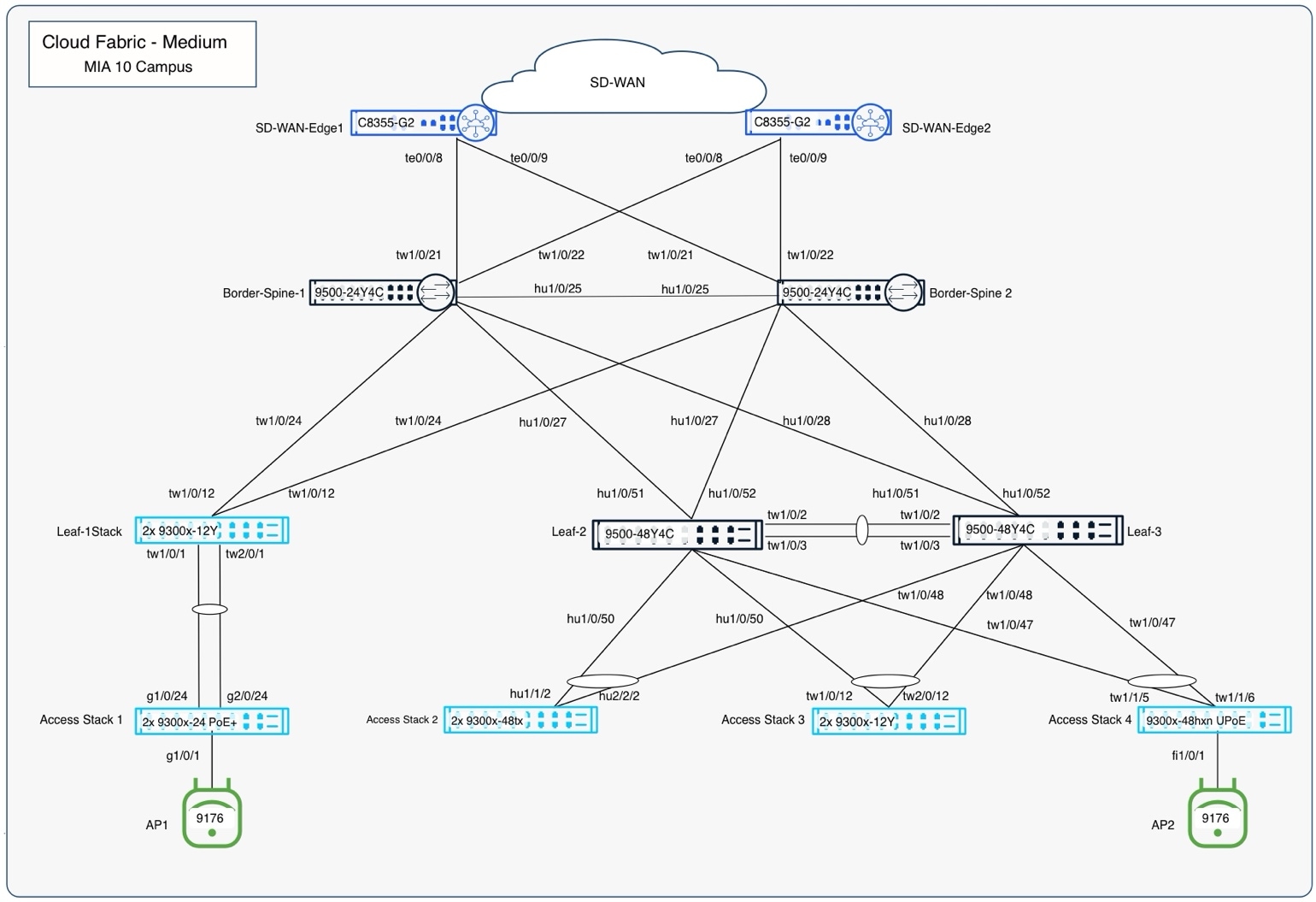
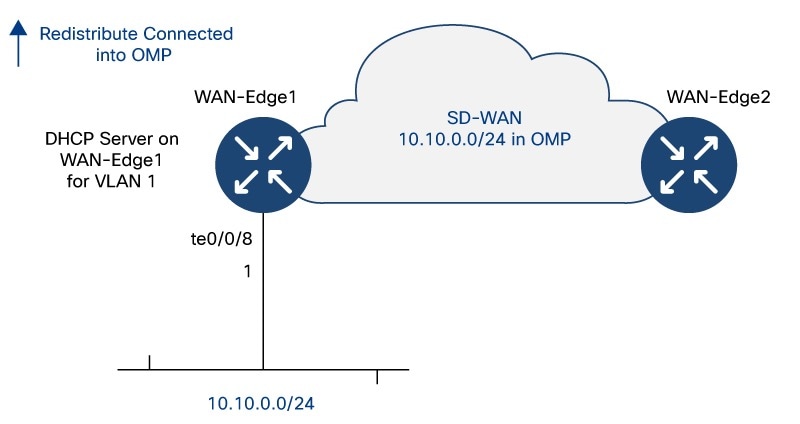
Care must be taken when converting fabric links from Layer 2 trunks to Layer 3 routed interfaces. The process assumes a two-tier fabric topology with combined border-on-spine nodes and leaf nodes, where each leaf is redundantly connected to the border/spine layer. Each border-on-spine node provides upstream connectivity to external handoffs, ensuring consistent integration with the network edge.
This design delivers fully redundant physical paths across the fabric while maintaining alignment with a Layer 3 routed underlay using OSPF. Using an outside-in approach, begin with the handoff-to-border links and convert one side of each redundant link to Layer 3 with OSPF routing, enabling a controlled transition while preserving stability and reachability throughout the fabric.
Note: The first link being converted to Layer 3 on a given switch will automatically become the new UAC link. As links are converted from the borders/spines to leaves, OSPF routing must provide reachability to the Internet. Once all fabric switches are using Layer 3 and OSPF routing for their UAC connectivity, the other half of the redundant links can be converted to complete the Layer 3 underlay.
Use the Dashboard UI to adjust the Spanning Tree settings according to current planning.
Note: Before changing the settings, it is critical to shut down all ports on the leaves except for their uplinks to the spines.
VLAN 1 is needed for temporary management. In the validation setup, underlay VLANs 2-5 were required for the border to handoff trunks. The goal is to reduce the required instances of STP to the minimum required before switching to RPVST+ to avoid traffic disruptions.
Note: It is also important to then adjust the trunk allowlist on the remaining active links on all fabric devices to only include the required VLANs.
1. Navigate to Switching > Switch Settings.
2. In the STP configuration section set the following parameters:
a. Select Enable Spanning Tree.
b. Select Enable Rapid Per-VLAN Spanning Tree Plus (RPVST+).
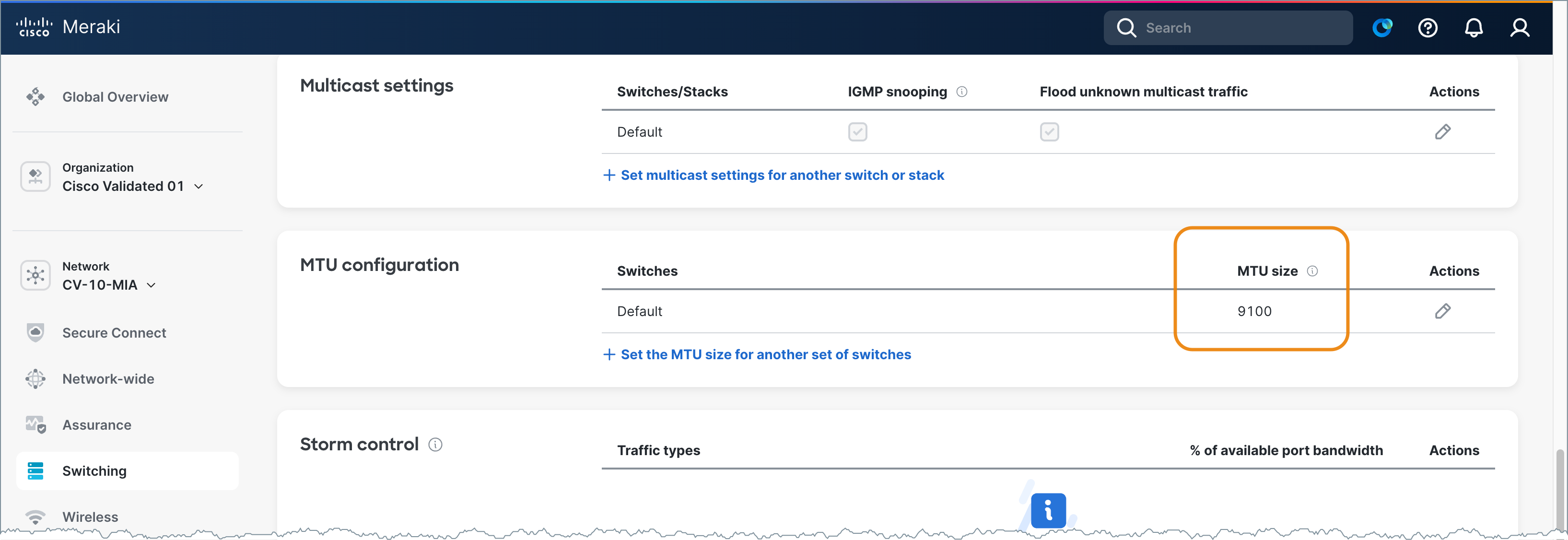
3. On the Switch Settings screen, scroll to MTU configuration.
4. Set the MTU Size value is 9100.
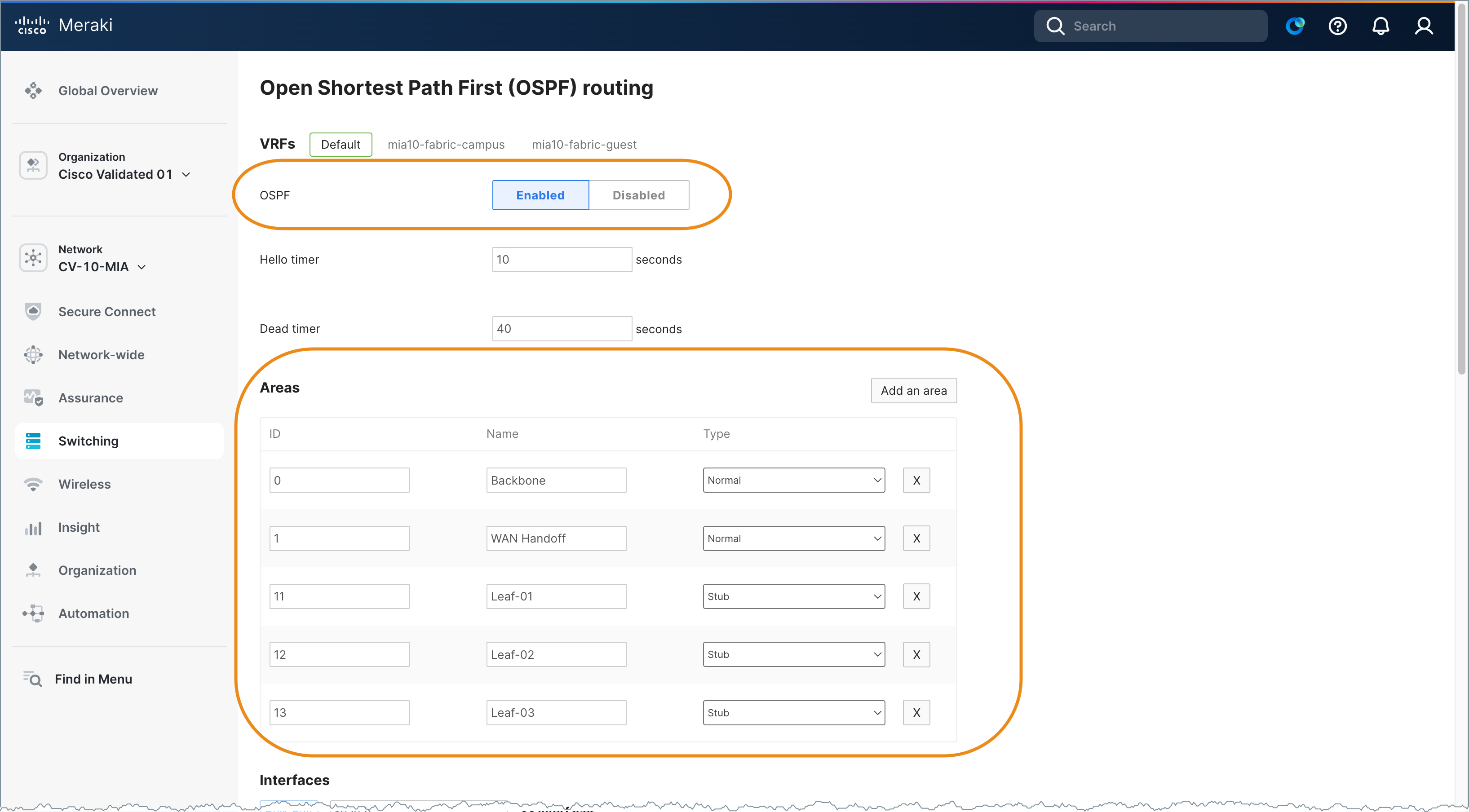
5. Navigate to Switching > OSPF Routing to set the network-wide OSPF settings according to current planning.
6. Select Enabled.
7. Add the following Areas values:
8. Ensure the initial temporary UAC is in VLAN 1.
9. Verify there are two uplink trunks on each switch carrying VLAN 1.
10. Ensure that the link not currently used for UAC is chosen for modification.
11. Use the show uac uplink command using the Cloud CLI capability to quickly determine which link is currently used for UAC.
Note: Since the bridge priority of border/spine1 was set to 4096, the root port for VLAN 1 should be very predictable and that should align with the Port Used: field in the UAC display.
MIA10-Leaf-01>show uac uplink
Uplink Autoconfig: Enable
Uplink Allow-list enforce: IPV4:No IPv6:No
Configured IPv4 Uplink interface: Vlan 1 (Default)
Uplink IPv4 interface: Vlan 1
IP Address: 10.10.0.18/255.255.255.0
DHCP
SVI: Configured
Port Used: GigabitEthernet1/0/13
GW IP: 10.10.0.1
GW MAC: cc03.d9ff.5d81
Score: 7
Configured IPv6 Uplink interface: Vlan 1 (Default)
Uplink IPv6 interface: None
Uplink Reachable: IPv4
MIA10-Leaf-01>show int trunk
Port Mode Encapsulation Status Native vlan
Gi1/0/13 on 802.1q trunking 1
Gi1/0/14 on 802.1q trunking 1
Port Vlans allowed on trunk
Gi1/0/13 1
Gi1/0/14 1
Port Vlans allowed and active in management domain
Gi1/0/13 1
Gi1/0/14 1
Port Vlans in spanning tree forwarding state and not pruned
Gi1/0/13 1
Gi1/0/14 none
MIA10-Leaf-01>show span
VLAN0001
Spanning tree enabled protocol rstp
Root ID Priority 4097
Address 24d5. e41d.6300
Cost 20000
Port 13 (GigabitEthernet1/0/13)
Hello Time 2 sec Max Age 20 sec Forward Delay 15 sec
Bridge ID Priority 32769 (priority 32768 sys-id-ext 1)
Address 246c.847a.fc80
Hello Time 2 secMax Age 20 sec Forward Delay 15 sec
Aging Time 300 sec
Interface Role Sts Cost Prio.Nbr Type
--------- ---- --- ---- --------- ---------
Gi1/0/13 Root FWD 20000 128.13 P2p
Gi1/0/14 Altn BLK 20000 128.14 P2p
12. Navigate to Switching > Switches to convert the “alternate” port that is not currently the UAC uplink to Layer 3.
Note: When the change is saved, it will automatically navigate the user to the Layer 3 settings for this port.
13. Click the name of the desired switch.
14. Click on a port and click Edit.
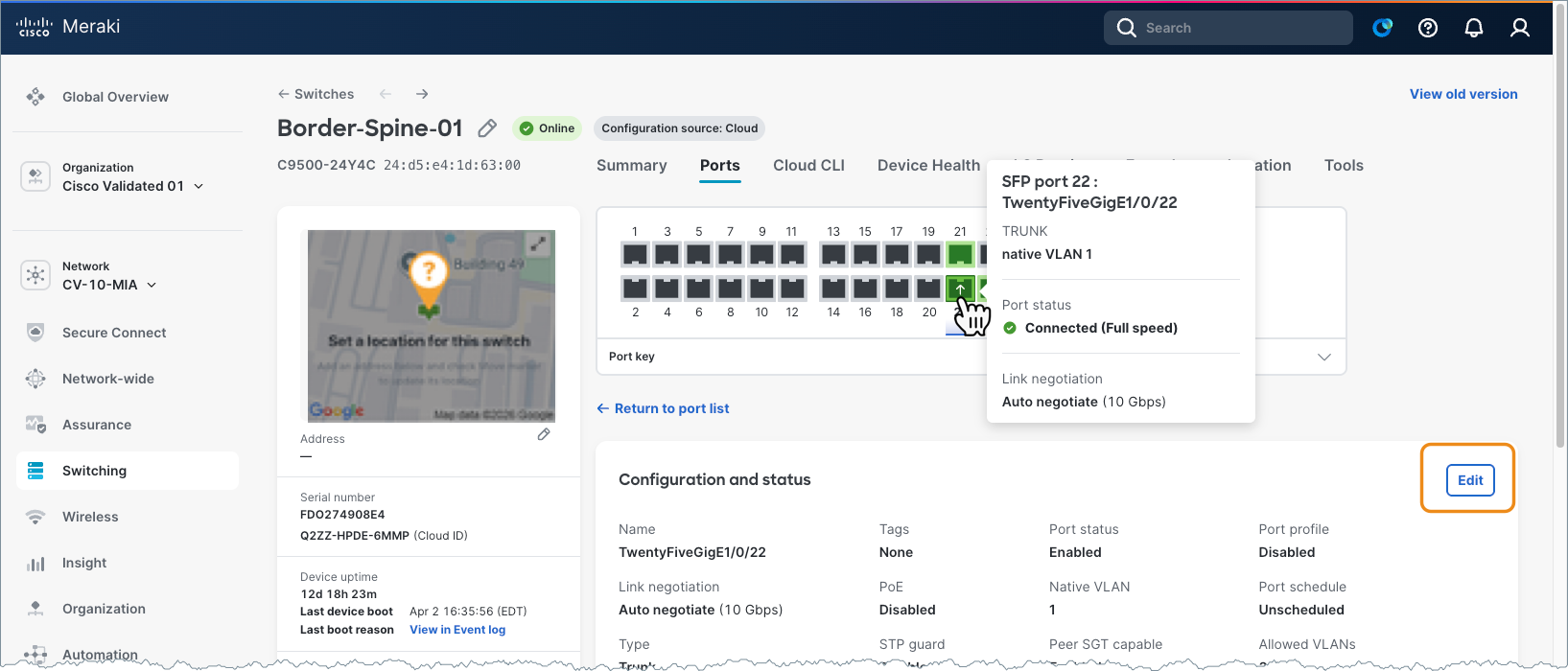
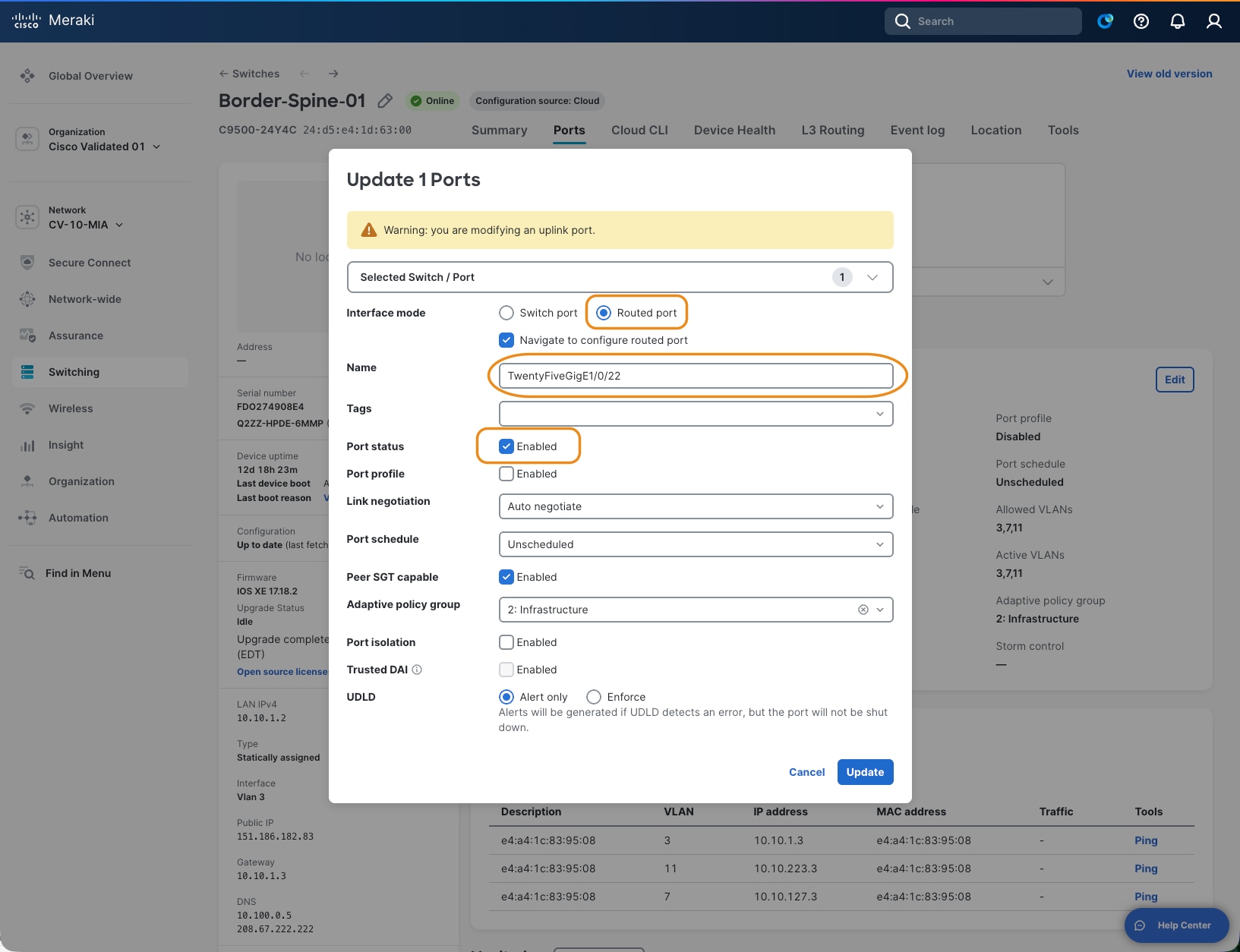
15. Select Routed Port.
Note: When the port is switched from Switch port to Routed port, the system automatically enables Layer 3 configuration and redirects to the routing screen with relevant fields pre-populated, which reduces input errors and streamlines deployment.
16. Check the Navigate to configure routed port checkbox.
17. Name the port. For example: TwentyFiveGigE1/0/22
18. Set Port status to Enabled.
19. Leave the remaining settings as their default values.
Because this is the first Layer 3 interface configured on this switch, the Preferred Uplink > IPv4 Preferred Management Connectivity setting is automatically selected and must remain enabled to save the configuration. If additional interfaces are later converted to Layer 3, the management uplink designation can be reassigned, as necessary. A static default route is automatically created according to the configured next-hop gateway.
There are also configuration options for DHCP and OSPF. Because OSPF provides Layer 3 management routing in the underlay, it must be enabled, and the interface assigned to the appropriate OSPF area defined during planning. A point-to-point network type is recommended to avoid unnecessary DR/BFR elections. DHCP is typically disabled on fabric links but may be temporarily enabled to support day-two RMA procedures or the addition of new leaf devices.
The resulting Layer 3 interface and static route definitions can be found by navigating to Switching > Routing and DHCP in the UI.
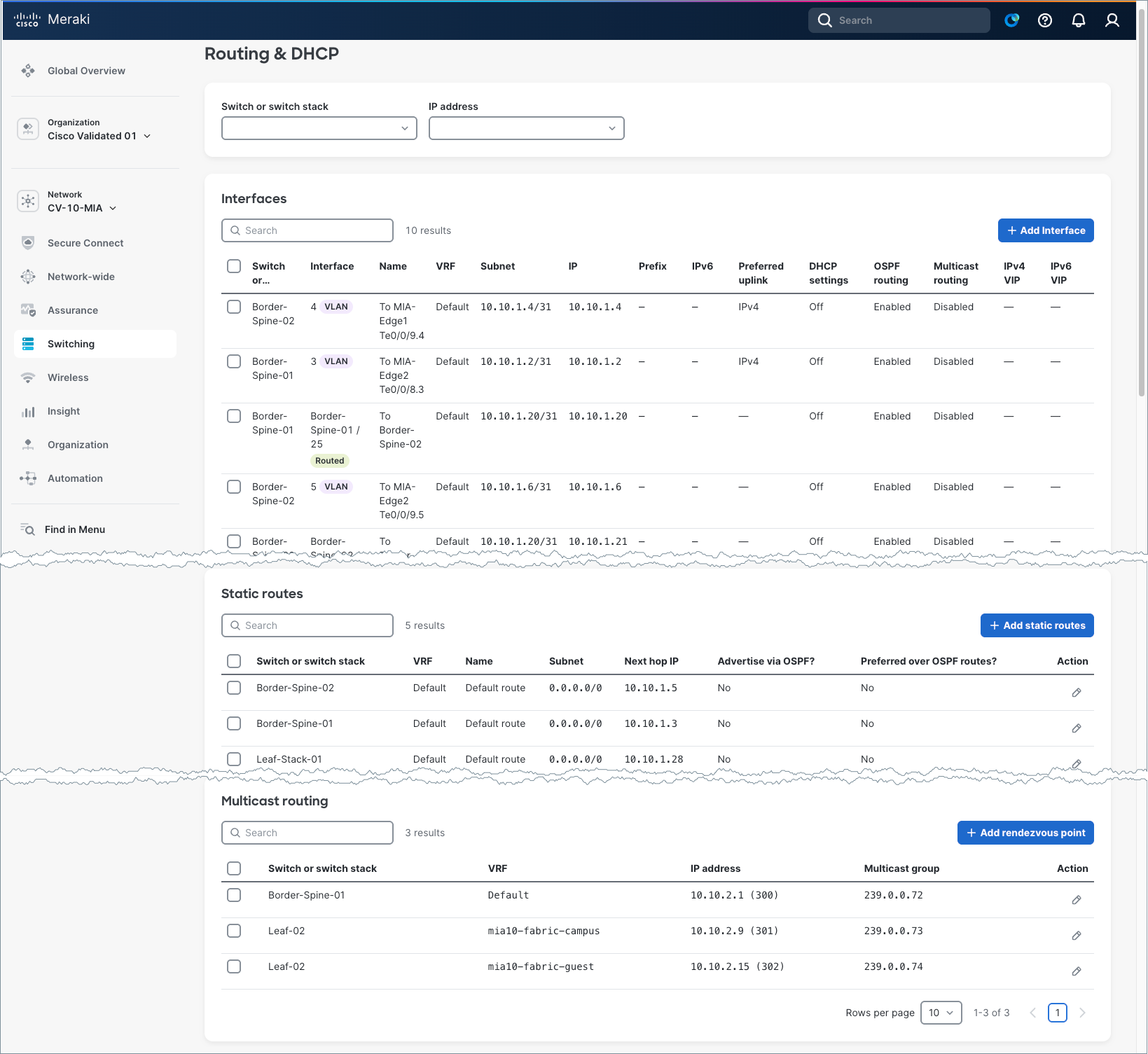
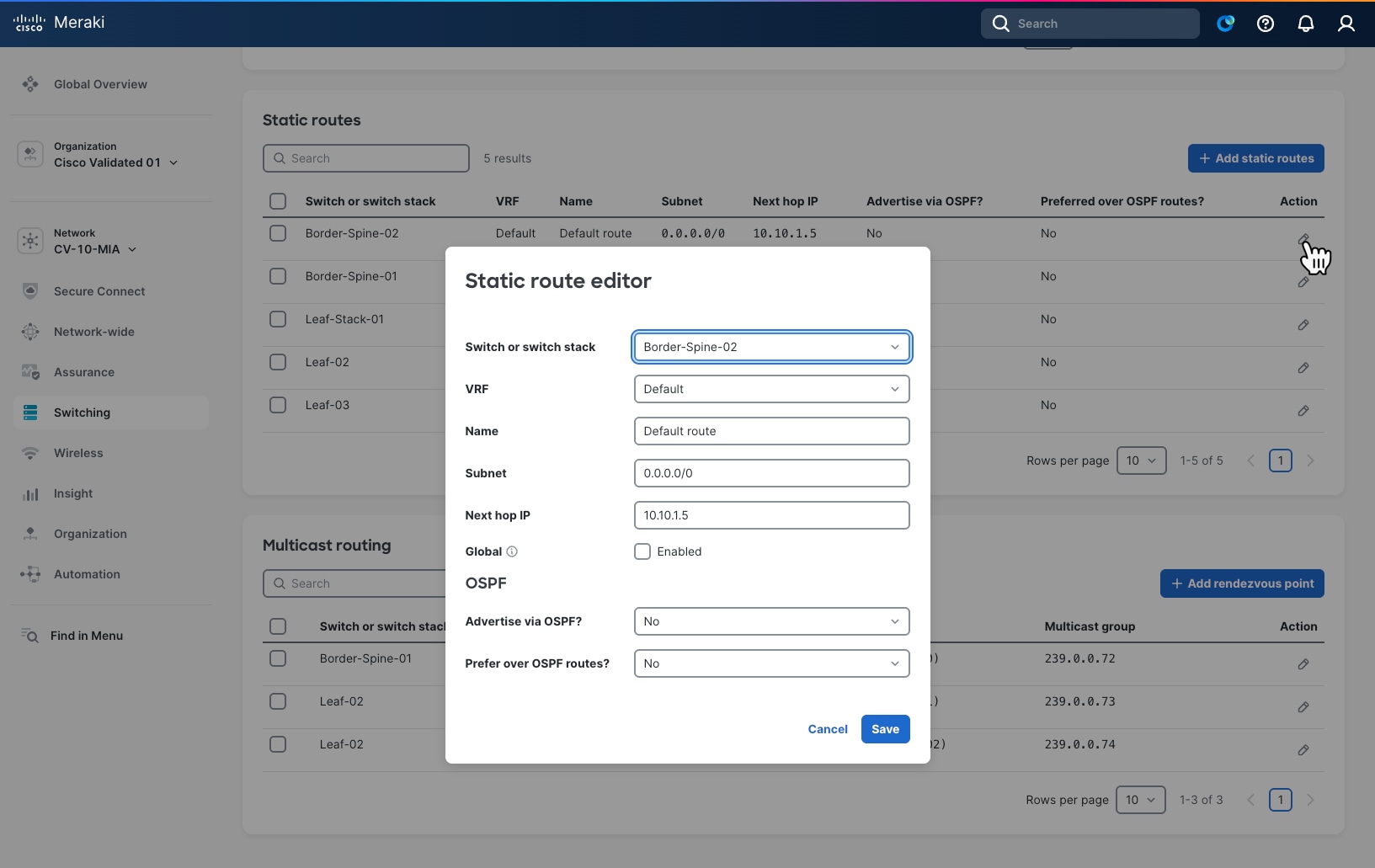
Note: The default behavior for the static route that is automatically created, is to have the available additional OSPF settings both set to No. This is important, aligned to best practice, and will result in a static route being added to the configuration with an administrative distance (AD) of 120 and not redistributed into OSPF. Since OSPF uses an AD of 110, the OSPF learned default route advertised from the handoff devices into the borders will be preferred in the active routing table. The static route is a floating static backup route.
Upon completion of the Layer 3 underlay conversion, the underlay routing table (global routing table) will contain OSPF-learned or directly connected routes for all the fabric links, along with a default route toward the borders for external reachability. Access to layer management subnets and any traditional non-fabric subnets will also reside in the underlay routing domain.
This can be reviewed by selecting the configuration icon of a switch in the Static routes table.
Note: When an interface is converted from a routed port back to a switched port, any associated Layer 3 configuration is automatically removed.
Welcome to the interactive CLI IOS XE terminal
You are in Read-only Mode
Establishing connection to your device. Please wait...
Connection established successfully
MIA10-Leaf-02>show run | inc ip route
ip route 0.0.0.0 0.0.0.0 10.10.1.34 120
MIA10-Leaf-02>show ip route
Codes: L - local, C - connected, S - static, R - RIP, M - mobile, B - BGP
D - EIGRP, EX - EIGRP external, O - OSPF, IA - OSPF inter area
N1 - OSPF NSSA external type 1, N2 - OSPF NSSA external type 2
E1 - OSPF external type 1, E2 - OSPF external type 2, m - OMP
n - NAT, Ni - NAT inside, No - NAT outside, Nd - NAT DIA
i - IS-IS, su - IS-IS summary, L1 - IS-IS level-1, L2 - IS-IS level-z
ia - IS-IS inter area, * - candidate default, U - per-user static route
N - NHRP, G - NHRP registered, g - NHRP registration summary
o - ODR, P - periodic downloaded static route, 1 - LISP
a - application route
+ - replicated route, % - next hop override, p - overrides from Pfr
& - replicated local route overrides by connected
Gateway of last resort is 10.10.1.34 to network 0.0.0.0
0*E1 0.0.0.0/0 [110/3] via 10.10.1.30, 4d18h, HundredGigE1/0/52
[110/13] via 10.10.1.24, 4d18h, HundredGigE1/0/51
Complete the conversion of all underlay links to Layer 3 and confirm.
On each fabric device, verify the correct number of OSPF neighbors, IP routing including redundant default routes, and minimal spanning trees. There should be no STPs on the border/spines.
1. At this stage, the DHCP scope for VLAN 1 on WAN-Edge-01 can be removed but is often retained to support a day-two RMAs or factory resets. If a border/spine is replaced or reset, a temporary DHCP pool must be created on a WAN-Edge, and one border interface temporarily converted back to Layer 2 to support the onboarding of the returned border/spine.
A similar process is required for a leaf with the DHCP and the temporary Layer 2 link living on the spine and is the most common scenario when adding new leaves. In all cases, the objective is to use a temporary VLAN 1 for initial cloud connectivity and then convert to Layer 3 connectivity.
2. Once the routed underlay is stable, the leaf-to-access layer trunks can be enabled. These trunk links carry the UAC management VLAN for all downstream cloud-managed devices.
VLAN 2 was used for this in the validation setup. Before activating the ports, clear the VLAN allowlist to include just the management of VLAN and any other traditional subnets if present.
The access layer devices will run MST initially until they connect to the cloud and are configured to run RPVST+. These devices require DHCP, and these DHCP scopes will remain in place.
3. Add Layer 3 SVI for the access layer VLANs on each leaf and set the DHCP settings as required. Remember these VLANS are unique broadcast domains and not connected between leaves allowing for the same VLAN numbers to be used if desired.
4. Unique IP subnets are required. Remember to enable OSPF on the SVIs in the desired non-zero OSPF Area. Set them to OSPF Passive as there will be no downstream OSPF neighbors in the access layer.
It is best practice to enable automatic fallback to preferred uplink in the global switch settings and set the preferred uplink VLAN on the access switches. This ensures the UAC traffic remains in the underlay as intended.
5. Set up EtherChannels for increased throughput and redundancy.
6. Set up access ports and enable dot1x for desired access devices.
7. Enable CTS in-line tagging using the Peer SGT capable setting on both sides of the leaf ports facing the access layer devices and border ports facing the handoff devices. Any APs attached to access switch ports must also have Peer SGT enabled.
8. Always select Adaptive policy group 2: Infrastructure when enabling the CMD header for infrastructure-to-infrastructure links.
When complete underlay connectivity is in place, all devices are registered in the UI and stable; the setup is ready for the fabric workflow to create the desired fabrics and related configurations.
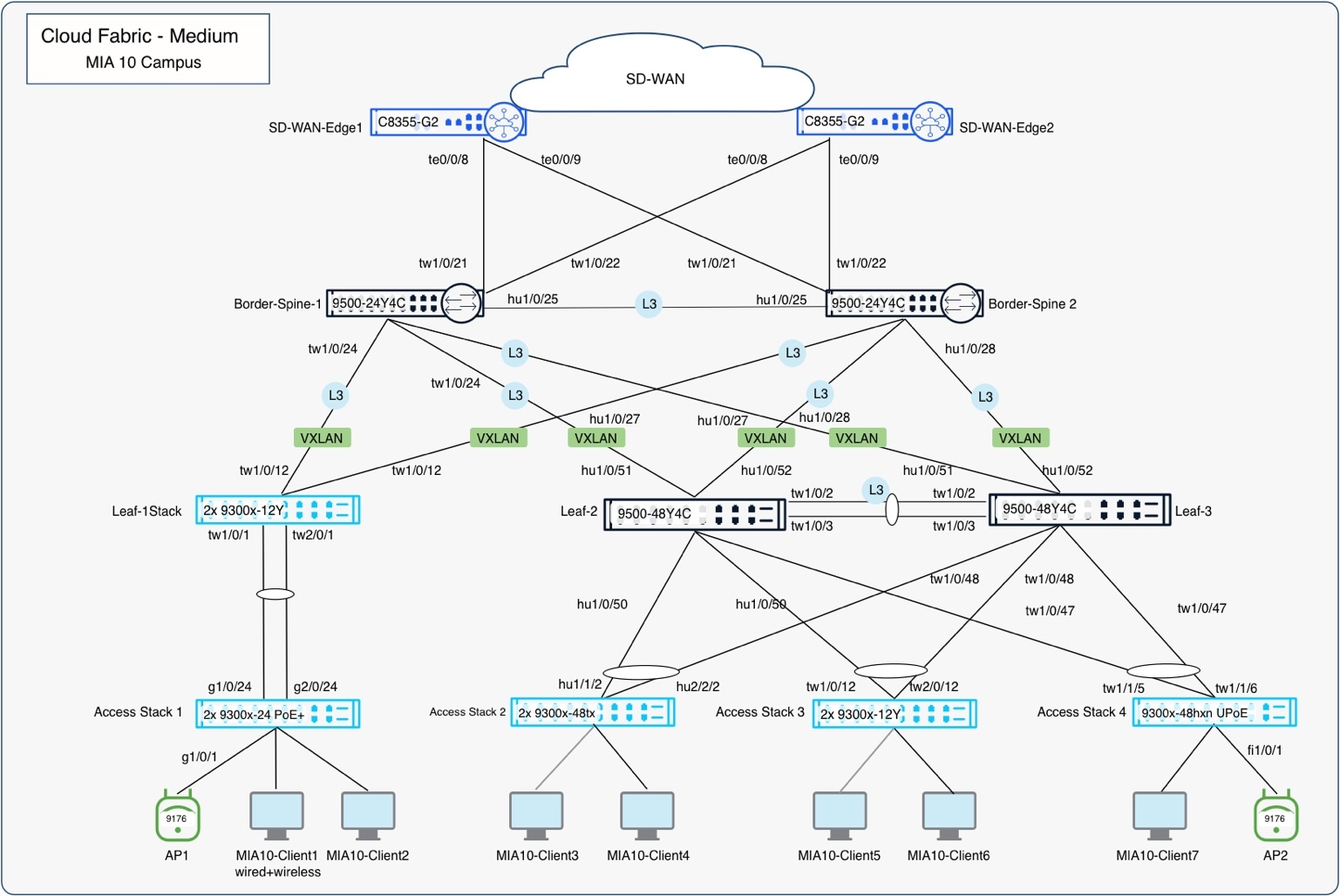
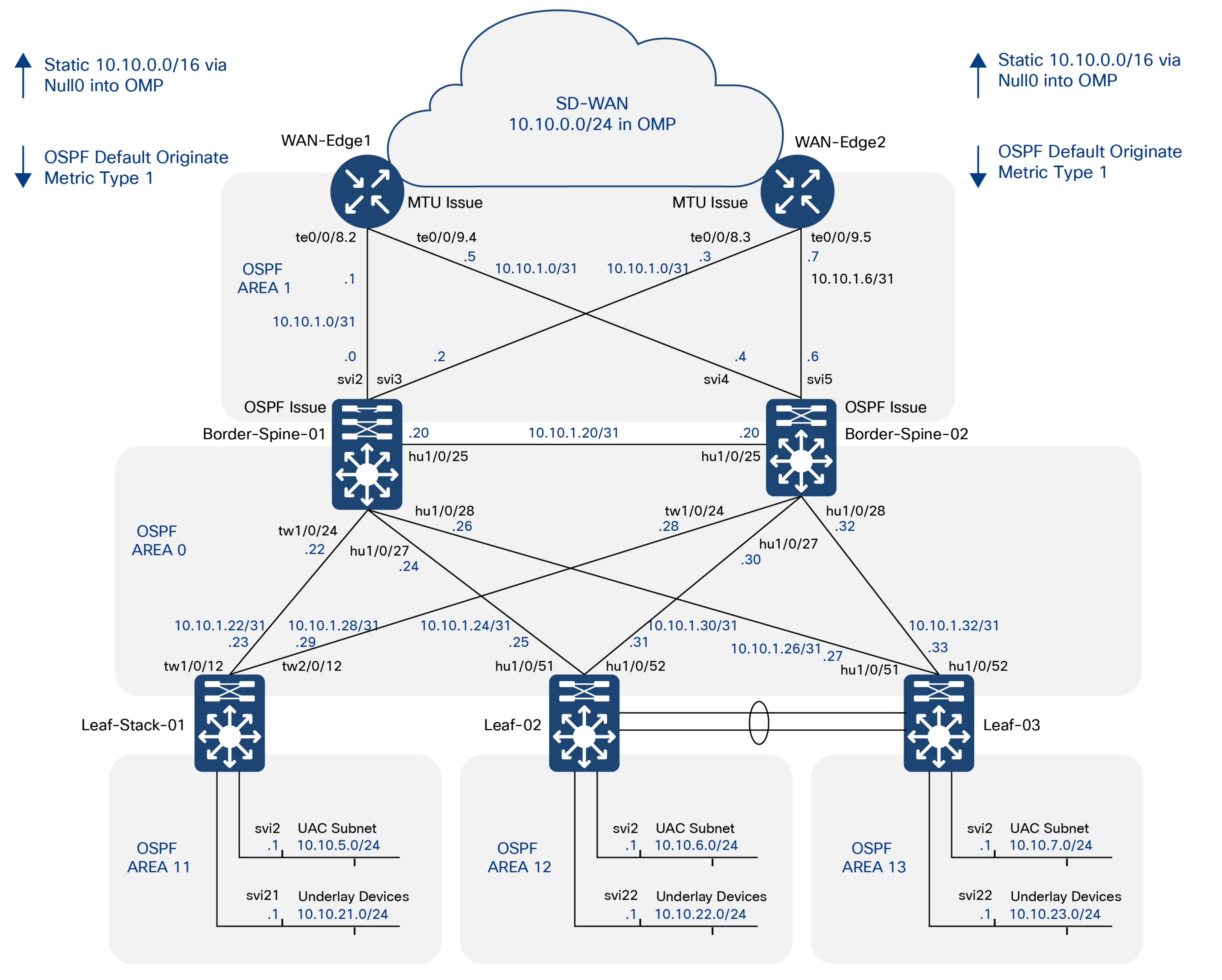
The underlay is now ready for overlay provisioning via the fabric workflow.
Step 2: Deploy fabric and control reachability
With the routed underlay established, this step deploys the cloud-managed campus fabric and defines the reachability boundaries used by users, devices, workloads, and services. Cisco Meraki Dashboard provisions the VXLAN EVPN fabric, VRFs, fabric VLANs and routed subnets, Layer 3 border handoffs, and eBGP peering. These constructs provide resilient inter-leaf forwarding, logical traffic isolation, and controlled connectivity to external domains. Identity authentication and authorization are configured in Step 3; detection, response, and broader assurance integrations follow in subsequent steps
Architecture alignment and scope
Within the SNRA framework, this step in the deployment builds on the trusted routed underlay established in Step 1 and primarily aims to implement the components necessary for Segment and Protect (Step 3). The VXLAN EVPN overlay, VRFs, VLANs, routed subnets, Distributed Anycast Gateway options, Layer 3 handoffs, and eBGP peering establish the required for resilient transport and scalable segmentation across the campus fabric and connected domains.
These constructs provide the transport and enforcement points required for subsequent identity-aware policy. Cisco ISE, 802.1X, MAB, endpoint profiling, authorization profiles, and dynamic SGT assignment are configured in Step 3. The overlay can carry the resulting policy context, but it does not independently authenticate endpoints or make authorization decisions.
| SNRA Function or Capability |
Cloud Deployment Components |
| Secure Infrastructure |
Provides trusted, resilient transport, reachability, and foundational telemetry |
| Identify and Authorize |
Discovers and classifies identities and grants the minimum required access |
| Segment and Protect |
Reduces unnecessary reachability and enforces least-privilege policy |
| Detect and Respond |
Detects abnormal activity and applies governed, reversible containment |
| Unified Management and Agentic Operations, Common Policy Context, and Extended Integrations |
Coordinates configuration, visibility, policy, assurance, and governed action by sharing context across domains and extending intent, evidence, telemetry, and automation beyond the core deployment |
Cisco Meraki Dashboard provides the cross-cutting operating model for fabric orchestration, automation, deployment validation, monitoring, and lifecycle management. Step 2 also prepares the access and routing paths through which identity and policy context can be applied. WAN, Internet, DHCP, data-center, and other external connections are treated as Extended Integrations beyond the core fabric; they are not additional sequential architectural layers.
The primary Cisco components used to deploy and operate the overlay fabric networks in this validated cloud-managed campus fabric architecture include:
● Cisco Catalyst 9300 Series Switches
Operate as fabric leaf nodes providing VXLAN tunnel endpoint (VTEP) functions, routed and DAG subnet hosting, VLAN-to-VN mapping, policy enforcement, SGT propagation, and endpoint attachment within the overlay.
● Cisco Catalyst 9500 Series Switches
Operate as border and spine nodes supporting MP-BGP EVPN control-plane functions, inter-fabric routing, VXLAN transport, external handoff connectivity, and overlay route propagation.
● Cisco 8000 Series Secure Routers
Provide upstream WAN and external routing integration through VRF-aware Layer 3 handoffs and eBGP peering with the fabric borders.
● Cisco Wireless 9170 Series Access Points
Extend segmented wireless connectivity into the overlay fabric while supporting identity-aware wireless access policies and SGT propagation.
● Cisco Meraki Dashboard
Provides centralized cloud orchestration for the fabric workflow, including VRF creation, subnet deployment, eBGP peering automation, fabric provisioning, monitoring, validation, and lifecycle management.
At a high level, this step includes the following procedures:
1. Prepare the Meraki Dashboard environment, cloud onboarding, and fabric prerequisites.
2. Define the fabric architecture, device roles, underlay settings, and BGP parameters.
3. Create VRFs and segmentation domains for the campus fabric.
4. Configure fabric subnets, VLANs, SVIs, and DHCP integration.
5. Configure Layer 3 border handoffs and eBGP peering to external networks.
6. Deploy and automate the VXLAN EVPN fabric through the Meraki Dashboard workflow.
7. Configure wireless integration, access-layer connectivity, high availability, and operational settings.
8. Enable identity-based access control, TrustSec, SGT propagation, and Adaptive Policy.
9. Validate routing, segmentation, resiliency, failover, and fabric forwarding operations.
10. Verify deployment health, telemetry, packet flows, and lifecycle management operations.
● Handoff considerations
The border role must be present on at least one fabric device to connect the fabric to the outside world. Fabrics are typically configured with two borders for high availability. As stated in the Case Study Context section, Cisco Cloud Fabric supports designs with dedicated border devices and border-on-spine deployments (border-on-leaf is not currently supported). In either case, one or more upstream devices are required at the other end of the border handoff.
● DHCP considerations
When the Cisco Cloud Fabric creates fabric overlay subnets, DHCP is automatically configured to relay requests to external DHCP servers. These relayed packets are sourced from an underlay loopback address on the fabric leaf where the requesting client’s IP gateway resides. As a result, IP reachability is required from the DHCP infrastructure outside the fabric environment to the underlay loopback range inside the fabric, and the DHCP infrastructure must be VRF-aware.
● Cloud-managed reachability considerations
In environments where additional cabling and IP reachability to the Meraki Cloud infrastructure is available, it is convenient to use that for device to cloud management communications. Currently, this requires the use of additional “front panel” ports to connect to the dedicated cabling, and that IP connectivity and related routing is in the global routing table of the managed devices. In the Cisco Cloud Fabric solution, the UAC (Uplink Auto Configuration) and the resulting IP connectivity to the cloud-delivered control plane are in-band in the fabric underlay network. This validated deployment does not use additional dedicated cables for UAC traffic. This is relevant during the conversion from the default Layer 2 trunks to the recommended Layer 3 routed connections between the devices that will become fabric devices.
Note: It is important not to break UAC management's connectivity to the cloud during that conversion. Dedicated management cabling makes that simpler but is not always an option.
● Fabric design and subnet-placement best practices
The Cisco Cloud Fabric solution is based on a 3-tier architecture with access layer routing occurring at SVIs configured on the fabric leaves at tier-2. The leaf routing can be deployed in one of three ways:
In order of preference
◦ Routed SVI on leaf with unique subnet(s) per leaf
◦ Routed SVI on leaf as Distributed Anycast Gateway (DAG) - same subnet on multiple leaves
◦ Routed SVI on leaf as DAG with bridging - same subnet and bridging on multiple leaves
The ideal situation will have unique subnets deployed off each leaf which does not require a DAG. This approach provides the greatest scalability and is preferred whenever possible. When the same subnet is required on multiple leaves, a DAG routed configuration is used, and when bridging is required, a DAG bridged configuration is used. These options can be combined within a fabric; however, Cisco best practice is to route unique subnets and use DAG routed or DAG bridged designs only when necessary, minimizing the use of less preferred options. These best-practice recommendations are based on years of large-scale campus fabric customer deployment experience.
One additional Cisco best practice recommendation is to use a Layer 3 routed underlay, which currently requires some manual configuration. Layer 2 trunks, STP and SVIs can be used and may be advantageous in some brownfield migration scenarios, particularly when no spare cabling exists between fabric devices. However, a Layer 3 underlay is the preferred and proven approach with years of customer proven scalability and reliability and should always be the target end state.
● Dot1x/TrustSec/Adaptive policy
The VXLAN EVPN overlay transports fabric VLANs and routed subnets across the Layer 3 underlay. VRFs provide macro-segmentation by maintaining separate routing and forwarding domains, while VLANs, SVIs, and subnet assignments define endpoint and workload networks within those domains. Layer 3 handoffs and firewall boundaries control connectivity between the fabric and external routing domains.
Identity-aware controls refine this reachability model. Cisco ISE authenticates and profiles users and devices and can assign authorization attributes, including dynamic VLAN and Security Group Tag (SGT) assignments. TrustSec carries policy context across supported links, while Adaptive Policy and firewall controls apply more granular decisions based on identity, role, device type, or other policy attributes.
Step 2 establishes the routing, overlay, segmentation, and enforcement paths required by these controls. The authentication, authorization, dynamic assignment, and identity-based policy procedures are implemented and validated in Step 3.
Note: Border handoffs must be trunks with SVIs. The option to include the CMD header on routed port traffic is not currently supported, and the automation assumes the handoff links are trunks with SVIs.
● Access layer to leaf EtherChannel
In Cisco Cloud Fabric, the access layer devices are not fabric-aware and operate unchanged and typically have trunks connecting to their upstream device. In a cloud-managed fabric, the upstream device is a leaf that acts as the fabric edge and functions as a VXLAN Tunnel Endpoint (VTEP); border nodes also operate as VTEPs. EtherChannels are supported between access-layer devices and their upstream leaf to provide increased bandwidth and redundancy.
● Access layer to leaf high availability
High availability for access devices connecting to fabric leaves is provided through Multi-Chassis EtherChannel (MEC). Back-panel stacking forms a leaf stack, with multiple links from different stack members to the access device bundled into an EtherChannel using the aggregate function in the UI. This can be to a single access switch or an access switch stack providing even greater redundancy with a stack on both ends of the connection. Currently, an access device can only be connected to a single leaf or leaf stack. EVPN Multihoming provides High availability when the Leaf devices are standalone nodes. Aggregate function in the UI helps bundling the ports on two Leaf devices operating as EVPN-MH peer.
● MTU considerations
The UI defaults the system MTU to 9198, which maps to the system MTU command; however, the recommended best practice is an MTU of 9100, configured at the network level and applied to all switches in the network.
Note: All the devices at a given site are grouped together and referred to as a single network in the UI.
Fabric automation configures EBGP peer SVIs with an IP MTU of 9100 by default, which can be overridden if required. External devices connected to border nodes must be configured with matching MTUs for both underlay and overlay traffic. With an MTU of 9100, underlay traffic remains unfragmented up to 9100 bytes, while IPv4 VXLAN encapsulation adds 50 bytes of overhead, allowing unfragmented overlay payloads up to 9050 bytes.
● Spanning tree considerations
Meraki deploys Multiple Spanning Tree (MST) by default. The best practice recommendation for Cisco Cloud Fabric is to use Rapid Per VLAN Spanning Tree (RPVST+). STP is configured at the network level in the UI, ensuring all switches at a site use the same STP version; this is part of the Layer 3 underlay preparation performed before running the fabric workflow.
Note: Care must be taken when changing this setting so as not to disrupt UAC connectivity.
The Routed Underlay deployment steps in this document provide guidance for this configuration. During the Layer 3 underlay conversion process, RPVST+ is enabled; spine bridge priorities are set to 4096 (spine1) and 8192 (spine2), and most interfaces are shut down with remaining trunks tightly restricted. After migration, STP no longer runs between fabric nodes, and leaf bridge priorities are set to 0, resulting in a leaf being the root bridge for accessing VLANs on the trunks to the downstream access devices.
● Wireless considerations
The access layer operates as it traditionally does and is not fabric aware. Access Points will trunk to an access switch, while wireless capabilities and outcomes vary according to the physical environment and the fabric options deployed.
● Unique routed subnets per distribution block (leaf)
Using unique routed subnets in each distribution block (leaf), as recommended best practice, clients are required to obtain a new IP address when roaming between APs on different distribution blocks. An SSID may bridge to the same VLAN name or number; however, the VLAN represents a unique broadcast domain on each distribution block (leaf). For clarity, fabric VLAN 100 (leaf1) is a separate broadcast domain and subnet from VLAN 100 (leaf2). This design is best suited for deployments where a leaf or leaf stack serves a single building or space, and seamless wireless coverage between buildings or spaces is not required.
● Common subnet on two or more leaves
When seamless roaming is required between buildings or spaces with contiguous wireless coverage, a routed DAG is used. This design routes the same IP subnet on multiple leaves, with each participating leaf using the same VLAN number and the SSID bridging to that VLAN. As a client roams between APs on different leaves, the client's IP address remains unchanged. The upstream fabric detects client movement and updates routing to forward traffic to the new servicing leaf, effectively enabling a fabric leaf roam.
● Bridging is required
For VLANs where non IP end points are expected and rely on bridging, the routed DAG could include the bridge option and thus become a bridged DAG. This is the least preferred deployment option and should only be used when necessary and judiciously.
Reference cloud campus (MIA10)
Once the underlay is prepared and stable, the fabric workflow is used to create and maintain the fully automated campus fabric. The first portion of the workflow collects the information required for the infrastructure including the name of the fabric, the fabric BGP AS, and the underlay type and subnet.
The best practice recommendation is to use a Layer 3 underlay, which is known as a Custom underlay in the UI. As the workflow progresses, VRF and eBGP handoff information are added along with one or more fabric subnets, which can be Routed, Routed DAG, and/or Bridged DAG subnets in any combination and leaf distribution.
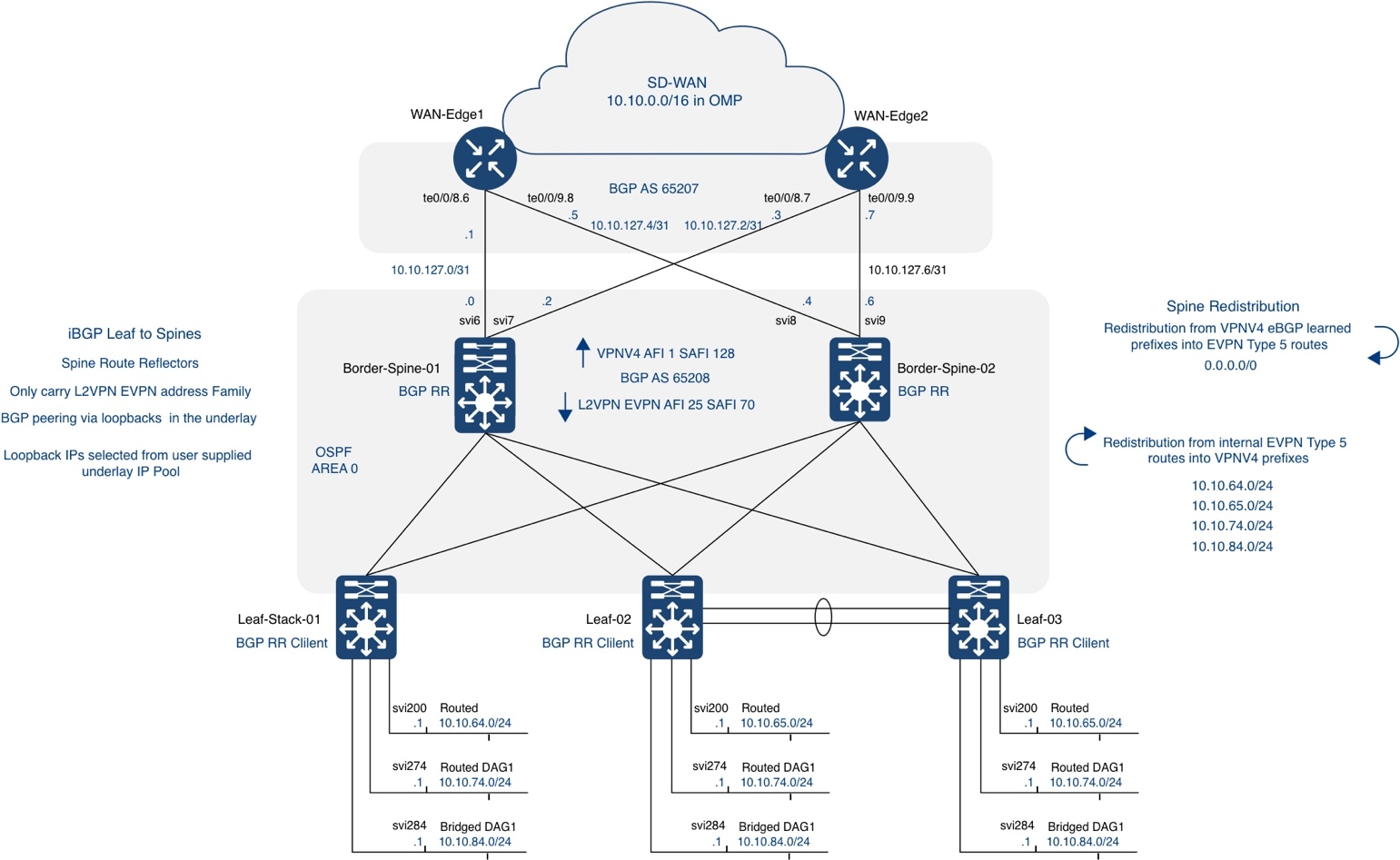
| Field |
Value |
| Fabric Name |
MIA10-fabric |
| Fabric BGP AS |
65208 |
| BGP Auth Key |
C1sco12345 |
| Selected Networks |
CV-10-MIA |
| Underlay Loopback IP Pool |
10.10.2.0/23 |
| Underlay core IP Pool |
N/A as setup is using L3 Underlay |
| Custom Underlay |
"Enabled" |
| VRF |
mia10-fabric-campus |
| Device |
Fabric Role |
| MIA10-Border-Spine-01 |
Spine, Border |
| MIA10-Border-Spine-02 |
Spine, Border |
| MIA10-Leaf-01 |
Leaf |
| MIA10-Leaf-02 |
Leaf |
| MIA10-Leaf-03 |
Leaf |
| Subnet Name |
VLAN Name |
Type |
VLAN ID |
SVI IP and Mask |
DHCP Server(s) |
VRF |
Leaves |
Anycast Gateway |
Broadcast Replication |
| leaf1-routed |
leaf1-routed |
routed (no DAG) |
200 |
10.10.64.1/24 |
10.100.0.5 |
mia10-fabric-campus |
leaf-01 |
unchecked |
unchecked |
| leaf2-routed |
leaf2-routed |
routed (no DAG) |
200 |
10.10.65.1/24 |
10.100.0.5 |
mia10-fabric-campus |
leaf-02 |
unchecked |
unchecked |
| leaf3-routed |
leaf3-routed |
routed (no DAG) |
200 |
10.10.66.1/24 |
10.100.0.5 |
mia10-fabric-campus |
leaf-03 |
unchecked |
unchecked |
|
|
|
|
|
|
|
|
|
|
|
| routed-dag1 |
routed DAG |
274 |
10.10.74.1/24 |
10.100.0.5 |
mia10-fabric-campus |
leaf-01, leaf-02 |
checked |
unchecked |
|
| routed-dag2 |
routed DAG |
275 |
10.10.75.1/24 |
10.100.0.5 |
mia10-fabric-campus |
leaf-02, leaf-03 |
checked |
unchecked |
|
|
|
|
|
|
|
|
|
|
|
|
| bridged-dag1 |
bridged-dag1 |
Bridged DAG |
284 |
10.10.84.1/24 |
10.100.0.5 |
mia10-fabric-campus |
leaf-02, leaf-03 |
checked |
checked |
BGP Layer 3 connection information
| Switch |
Name |
VRF |
VLAN |
MTU |
IP/Mask |
| Border-Spine-01 |
WAN-Edge-01 |
mia10-fabric-campus |
6 |
1500 |
10.10.127.0/31 |
| Border-Spine-01 |
WAN-Edge-02 |
mia10-fabric-campus |
7 |
9100 |
10.10.127.2/31 |
| Border-Spine-02 |
WAN-Edge-01 |
mia10-fabric-campus |
8 |
9100 |
10.10.127.4/31 |
| Border-Spine-02 |
WAN-Edge-02 |
mia10-fabric-campus |
9 |
9100 |
10.10.127.6/31 |
| Neighbor IP |
Remote AS |
VRF |
Source Int |
Example MD5 Key |
| Peers on Border-Spine-01 |
|
|
|
|
| 10.10.127.1 |
65207 |
mia10-fabric-campus |
10.10.127.0/31 |
C1sco12345 |
| 10.10.127.3 |
65207 |
mia10-fabric-campus |
10.10.127.2/31 |
C1sco12345 |
| Peers on Border-Spine-02 |
|
|
|
|
| 10.10.0.127.5 |
65207 |
mia10-fabric-campus |
10.10.127.4/31 |
C1sco12345 |
| 10.10.0.127.7 |
65207 |
mia10-fabric-campus |
10.10.127.6/31 |
C1sco12345 |
The Fabric Workflow in the Cisco Meraki Dashboard provides the orchestration mechanism and structured, automated process for defining fabric infrastructure parameters, creating VRFs and subnets, configuring border handoffs and eBGP peering, and deploying the complete campus fabric configuration to the validated environment. The screen captures and information below outlines the current reference deployment of campus fabric workflow.
From a Secure Network Reference Architecture (SNRA) perspective, this workflow primarily operationalizes the Secure Infrastructure and Segment and Protect layers by establishing the physical and logical fabric constructs that enable segmentation, routing, and transport across the campus.
In the validated environment, the fabric workflow was exercised as part of early-stage functional validation to confirm end-to-end client connectivity across the campus fabric prior to enabling advanced access controls such as 802.1X.
1. Navigate to Organization > Fabric.
2. Click Create a fabric.
3. Enter a Fabric name in lower case. This is not the VRF name, which will be addressed later.
4. Enter the BGP autonomous system (AS) number and auth key.
5. This AS will be used with automated BGP configurations for the Layer 2 VPN EVPN address family inside the fabric.
6. Use the dropdown to select network/network group.
7. Enter the Underlay loopback IP pool.
Note: Be sure to allocate sufficient address space initially as the pool cannot be expanded without redeploying the fabric. This pool is used for all underlay loopbacks, including VTEPs and spine functions such as Anycast RP and MSDP, and is consumed dynamically by automation.
8. Enable Custom Underlay.
Default underlay uses SVIs. Enabling custom underlay implements a recommended Layer 3 routed underlay (manual configuration required), which removes the dependency on the underlay core pool
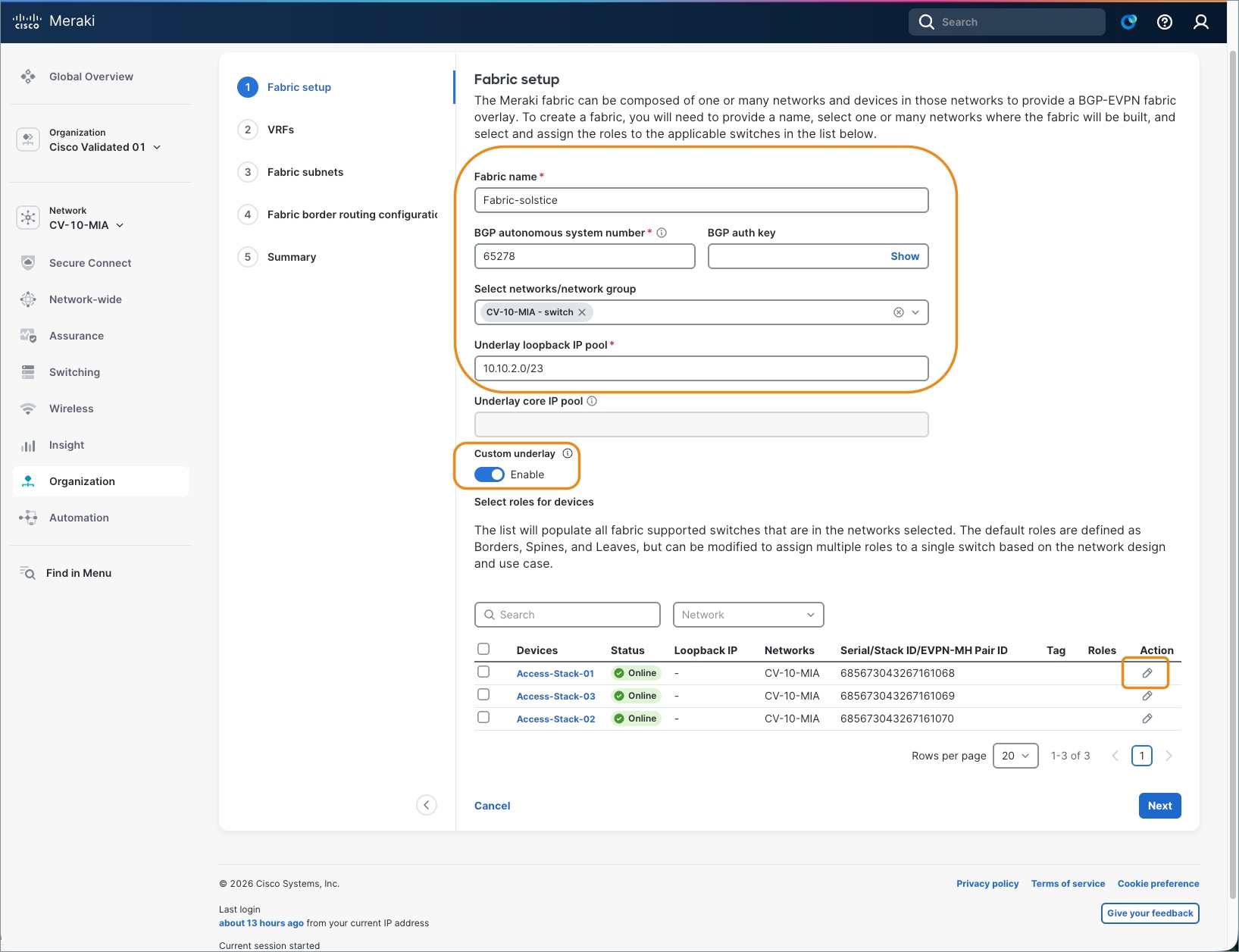
9. Click the edit icon for each device.
10. Mark the Border and Spine options for border/spine devices.
11. Mark the Leaf option for leaf devices.
12. Click Save on each assignment.
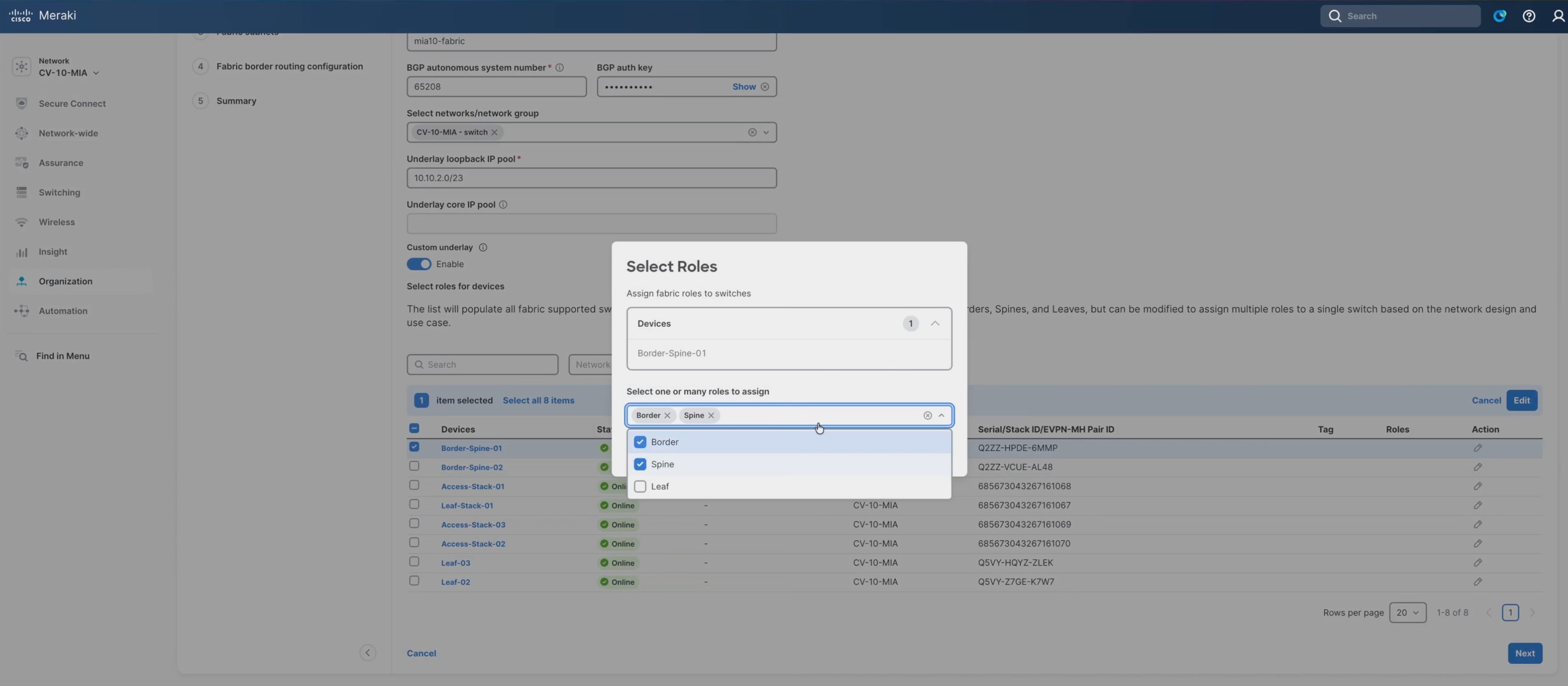
13. When finished, click Next.
The creation of VRFs implements Segment and Protect by enabling logical isolation of traffic domains over the shared Secure Infrastructure.
Note: There is one VRF called Fabric that will be created by default as part of the workflow; however, users can define a custom VRF (e.g., mia10-fabric-campus). Be sure to use a consistent naming convention, keeping in mind longer names increase CLI command length.
14. Click Add VRF.
15. Enter a name and click Next.
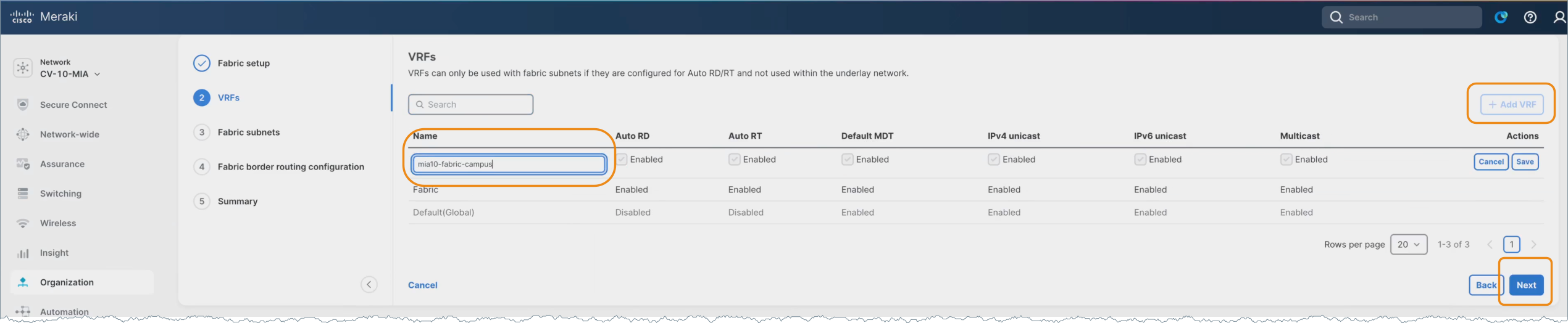
Note: Other VRFs created outside the fabric workflow will display, but they are not eligible for use in the workflow. Ensure the DHCP server supports VRF-aware options, as requests are sourced from the underlay loopback. DHCP scopes must be configured using the selected VRF.
One or more fabric subnets are added, and the leaves where the subnet should be deployed are selected.
Fabric subnets and their association to specific leaf nodes represent the distributed instantiation of Segment and Protect policy.
16. Click Add subnet.
17. Enter a Subnet name.
Subnets can be added or modified at any time. Create the initial subnet (e.g., leaf1-routed), assign the VLAN (e.g., ID 200), and allow the system to auto-assign the L2 VN ID.
18. Enter a VLAN ID.
19. Enter an Interfaced IP/Mask.
20. Enter a DHCP server IP.
21. Select a VRF.
22. Uncheck the Anycast Gateway option to disable the routed DAG and deploy unique routed subnets per leaf, even if using the same VLAN ID.
This aligns with best practice to route everywhere and avoid stretching subnets unless required.
23. Select only the target leaf for deployment and deselect the others as this is a unique routed subnet.
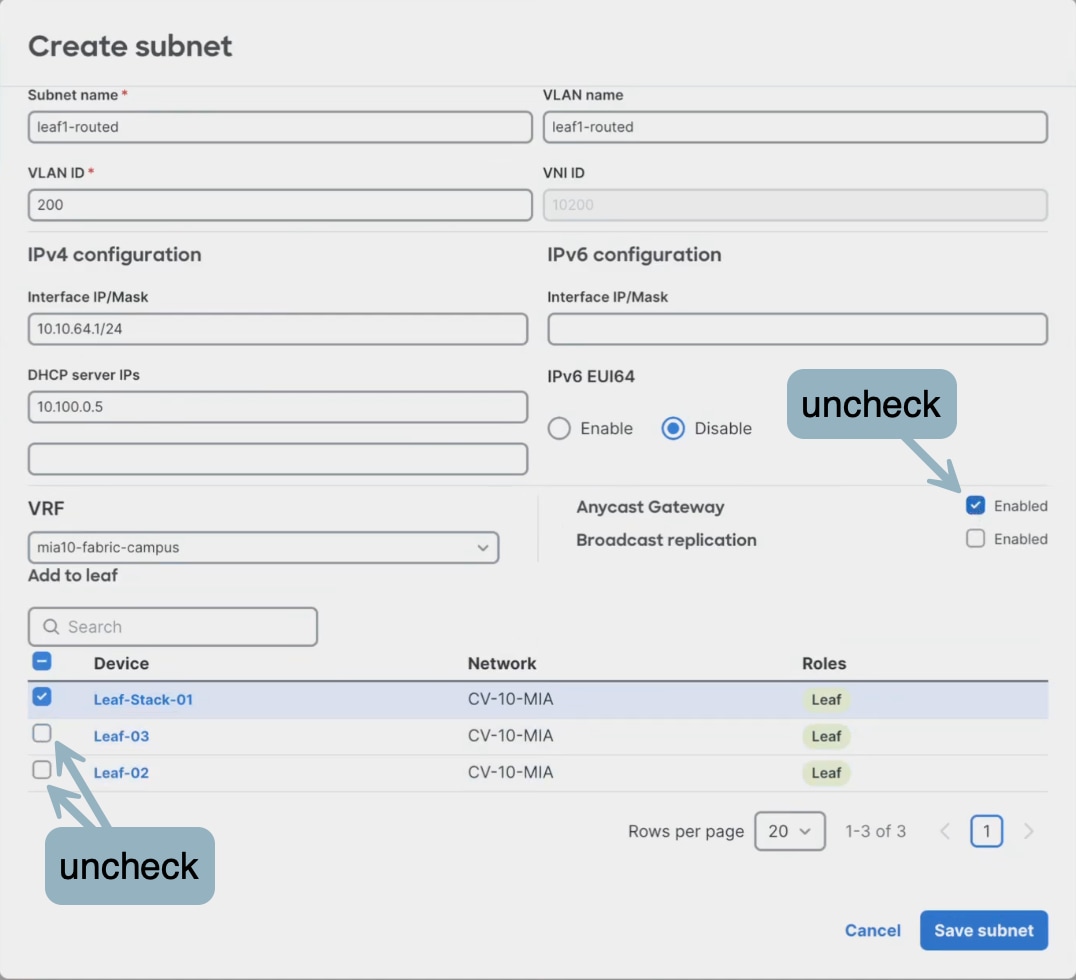
Anycast Gateway and forwarding mode selections define how traffic is handled within Secure Infrastructure and influence Segment and Protect policy enforcement.
24. Click Save subnet.
25. Repeat the same steps for each of the subnets.
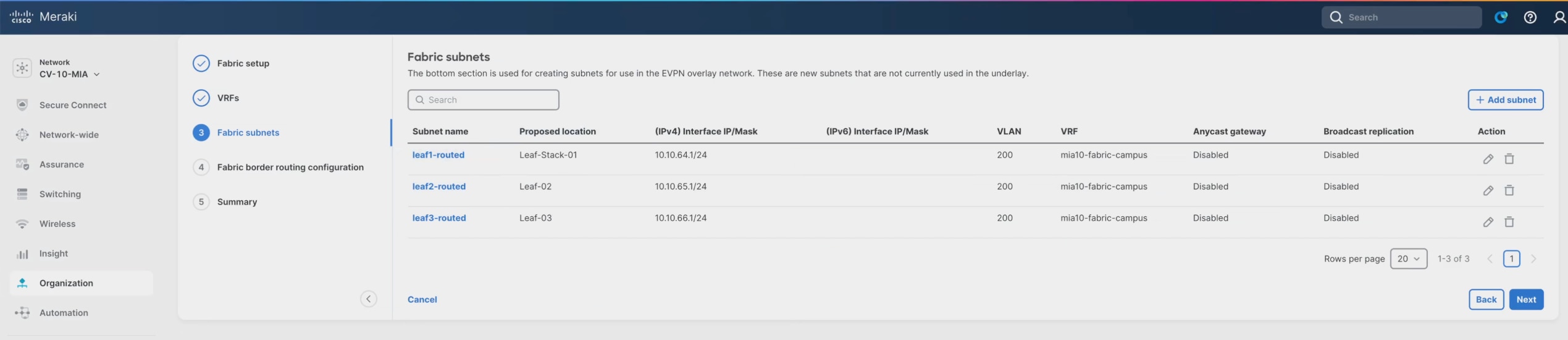
26. Click Next when finished.
27. Select the Create L3 Interface option to add the settings for each Layer 3 handoff link.
The validation setup process is repeated for each handoff link in the fabric VRF. Layer 3 handoff configuration extends Secure Infrastructure beyond the fabric boundary and provides integration points for Extended Integrations and northbound connectivity.
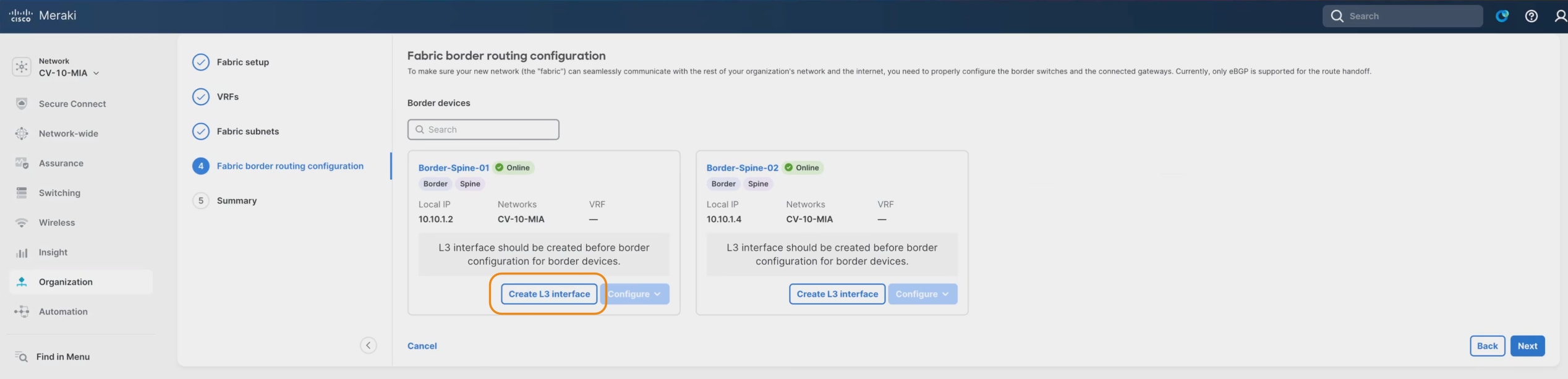
28. Select a Switch from the dropdown.
29. Enter the Name, VLAN, MTU, and Interface IP/mask.
Note: For this validation, the MTU was set at 1500, however, best practice MTU recommendations for Cisco Meraki is to use 9100, which was set at the network level earlier in this workflow and is therefore the default setting here.
30. Click Save and repeat for each device.
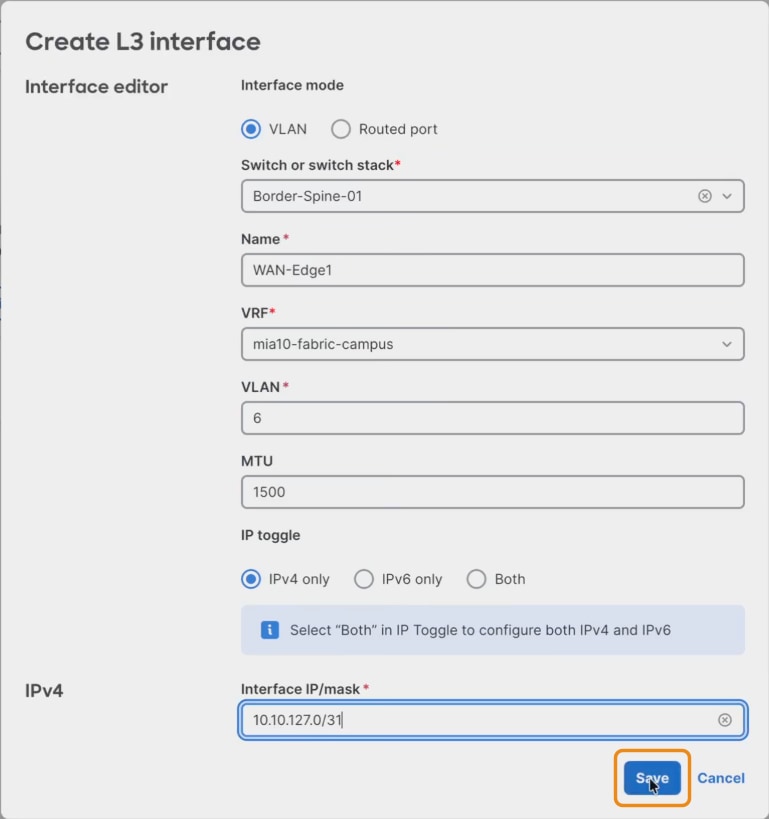
The validation setup process is repeated for each handoff link in the fabric VRF. Layer 3 handoff configuration extends Secure Infrastructure beyond the fabric boundary and provides integration points for Extended Integrations and northbound connectivity.
During validation testing, Layer 3 handoff resiliency was also verified by disabling one of the uplinks from a leaf to a spine node. This ensured that traffic continued to forward correctly over the remaining active path, validating proper failover behavior within the fabric.
31. After adding the Layer 3 link information, click Configure > Create eBGP Peer to add the corresponding eBGP peering information for each link.
eBGP peering establishes dynamic routing exchange between the fabric and external domains, reinforcing Secure Infrastructure and enabling Extended Integrations.
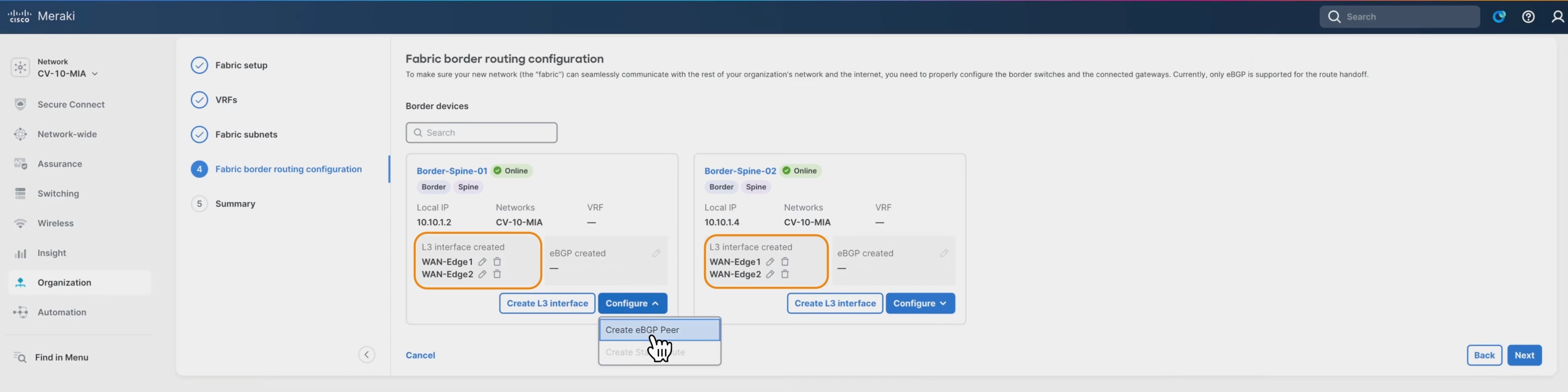
This is done uniquely on each border resulting in two peers on each border in the validated setup.
32. Click Add eGBP instance to allow adding both peers at once.
33. Select the VRF and Source interface in both entries, adding the fabric first to ensure correct interface selection and reduce input errors.
34. Enter the Neighbor IPv4, Remote AS, MD5 password for each instance.
35. Click Save.
36. Repeat the same steps for the additional border/spine.
eBGP peering stability and convergence were implicitly validated during live traffic testing by maintaining continuous client-to-client communication flows while topology changes (such as uplink shutdown) were introduced.
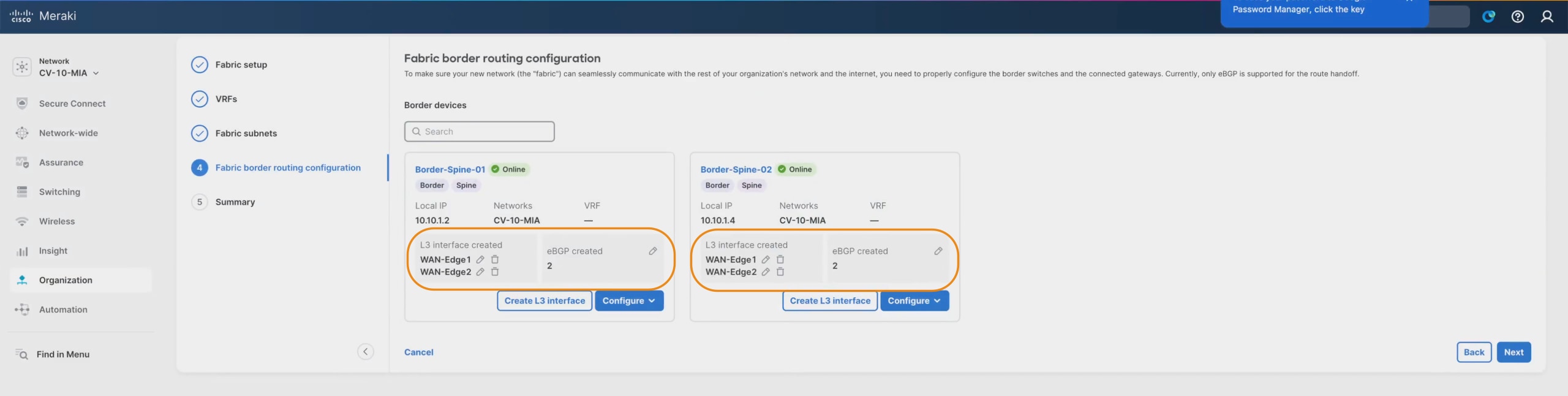
37. Click Next and review the Summary screen.
This page displays the completed border configuration, which can be updated at any time if the border configurations require modification.
38. Click Save to staging once the values are set as intended.
Notice that the Status is Staged at this point.

39. Click the Fabric name for the option to deploy.
40. Click Preview changes to review high-level configuration logic and deployment targets. This option does not display CLI commands. Use CLI programmability if command-level visibility is required.
The staging, preview, and deployment workflow is part of the cross-cutting Unified Management and Agentic Operations model, providing centralized orchestration, validation, and lifecycle control of the fabric.
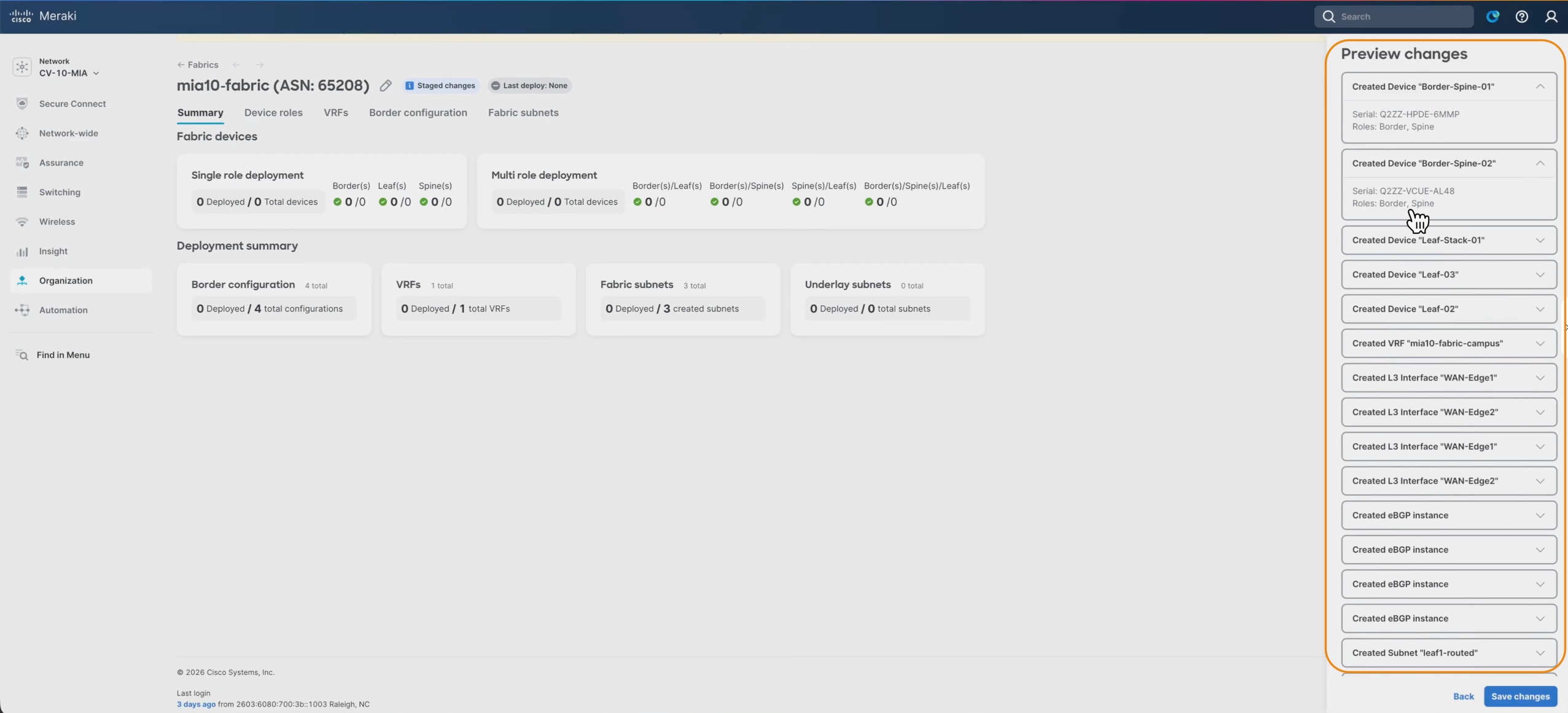
41. Click through the page tabs to review the configuration and make any necessary changes.
42. Click Deploy and Proceed to start the deployment. Allow time for deployment and removal operations and validate device configurations post-deployment to ensure consistency.
Note: Ensure all changes are saved before deployment, allow time for configurations to propagate to devices, and verify successful updates at the switch level. After deployment, additional subnets and VRFs can be added or modified. Thorough pre-deployment planning of underlay and overlay addressing is critical.
43. Click Back to fabric.
Within a few minutes the configurations will be delivered to the devices from the cloud, and the fabric subnets and related capabilities are ready for use.
44. To prove the deployment was successful, navigate to Switching > Switches and see that the Configuration displays Up to date.
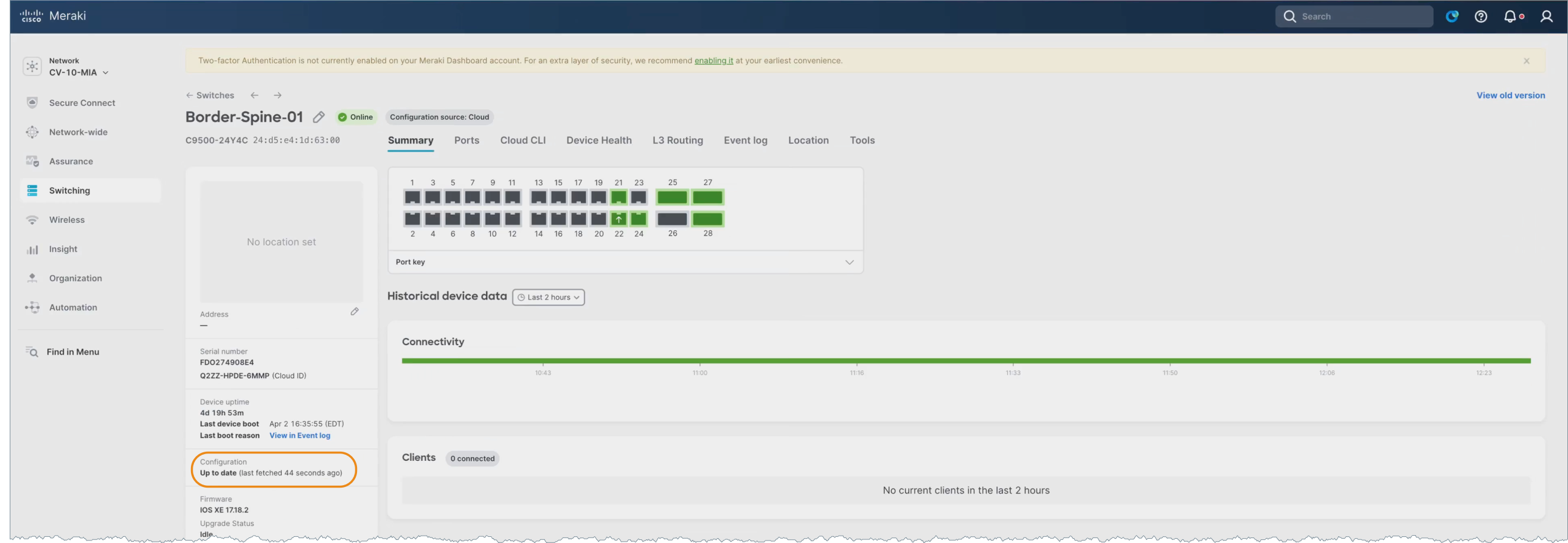
This cloud-driven deployment model exemplifies Unified Management and Agentic Operations by abstracting configuration complexity and enabling consistent, automated provisioning across the fabric.
Following deployment, validation testing included continuous ICMP traffic between endpoints connected to different access switches to confirm that inter-leaf routing and fabric forwarding were operating as expected.
Packet-level verification was performed using the Meraki Dashboard packet capture tool at the leaf and border layers to confirm correct forwarding behavior and validate that traffic paths aligned with the intended fabric design.
The entire fabric can be deleted with a fully automated cleanup using the Delete option.
Automated teardown further demonstrates lifecycle management within Unified Management and Agentic Operations.
Fabric validation and policy enablement workflow
Following deployment of the fabric, a structured validation and policy enablement process was performed to confirm correct forwarding behavior, resiliency, segmentation, and identity-based access control.
Perform baseline client connectivity validation:
1. After initial fabric deployment, verify end-to-end connectivity between clients across different leaves and subnets using continuous ICMP testing.
This ensures that the infrastructure is secure and the foundations are functioning correctly before introducing additional identity and policy controls.
2. Use the Meraki Dashboard packet capture capability at leaf and border nodes to inspect live traffic flows and confirm proper forwarding behavior across the fabric.
This validation ensures that encapsulation, routing, and segmentation policies are operating as designed within the Secure Infrastructure layer.
3. Administratively disable one or more uplinks (for example, a leaf-to-spine connection) to validate convergence and failover behavior.
4. Confirm that traffic continues to flow over alternate paths without disruption to active client sessions.
5. Validate segmentation behavior across VLANs, VRFs, and SGT-based policy by testing connectivity between endpoints in the same and different VLANs and VRFs to confirm expected communication and isolation behavior.
6. After confirming stable fabric connectivity, enable 802.1X authentication on the SSID or wired access ports to transition from open or PSK-based access control.
This staged approach ensures that any connectivity issues can be isolated between infrastructure and policy layers.
Configure dynamic VLAN and SGT assignments:
1. Integrate Access Manager with Cisco ISE to dynamically assign VLANs and Security Group Tags based on user or device identity during 802.1X authentication.
2. This step implements Identify and Authorize and Segment and Protect by extending identity-based segmentation into the fabric.
3. Test environments where both statically assigned ports (manual VLAN/SGT) and dynamically assigned ports (802.1X) coexist.
4. Confirm consistent policy enforcement and interoperability across both access models.
5. Authenticated users receive the correct VLAN and SGT.
6. Policy enforcement behaves as expected (allowed/denied communication).
7. Fallback or default access behavior operates correctly.
8. Iterate validation during incremental configuration changes.
9. As additional features (VRFs, policies, authentication methods) are introduced, repeat validation testing to ensure no regression in connectivity, segmentation, or policy enforcement.
This iterative validation approach reflects the stepwise testing methodology observed across all transcripts.
The Layer 2 topology reflects the physical instantiation of the Secure Infrastructure foundation.
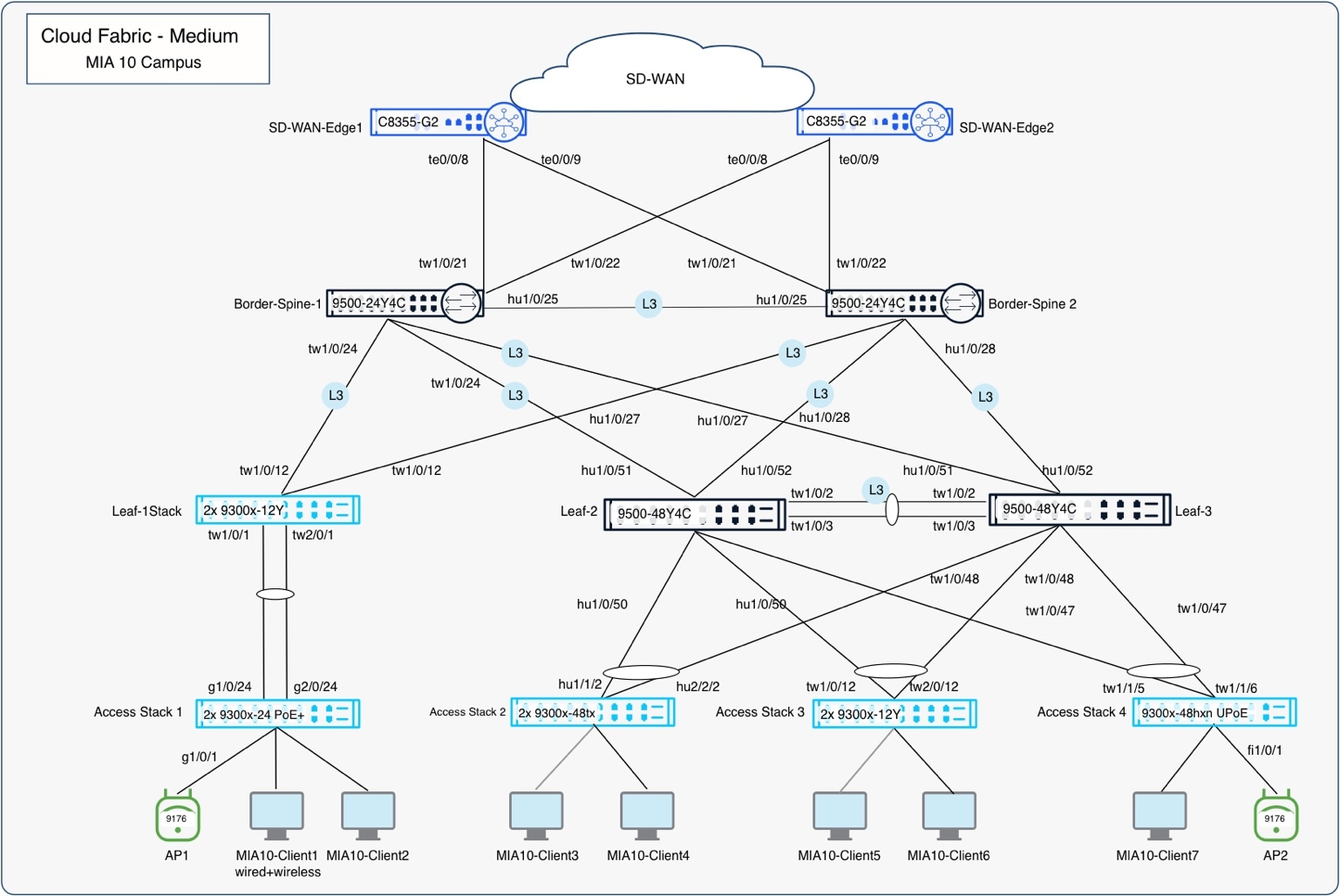
The Layer 3 topology highlights routing domains, VRFs, and segmentation boundaries.
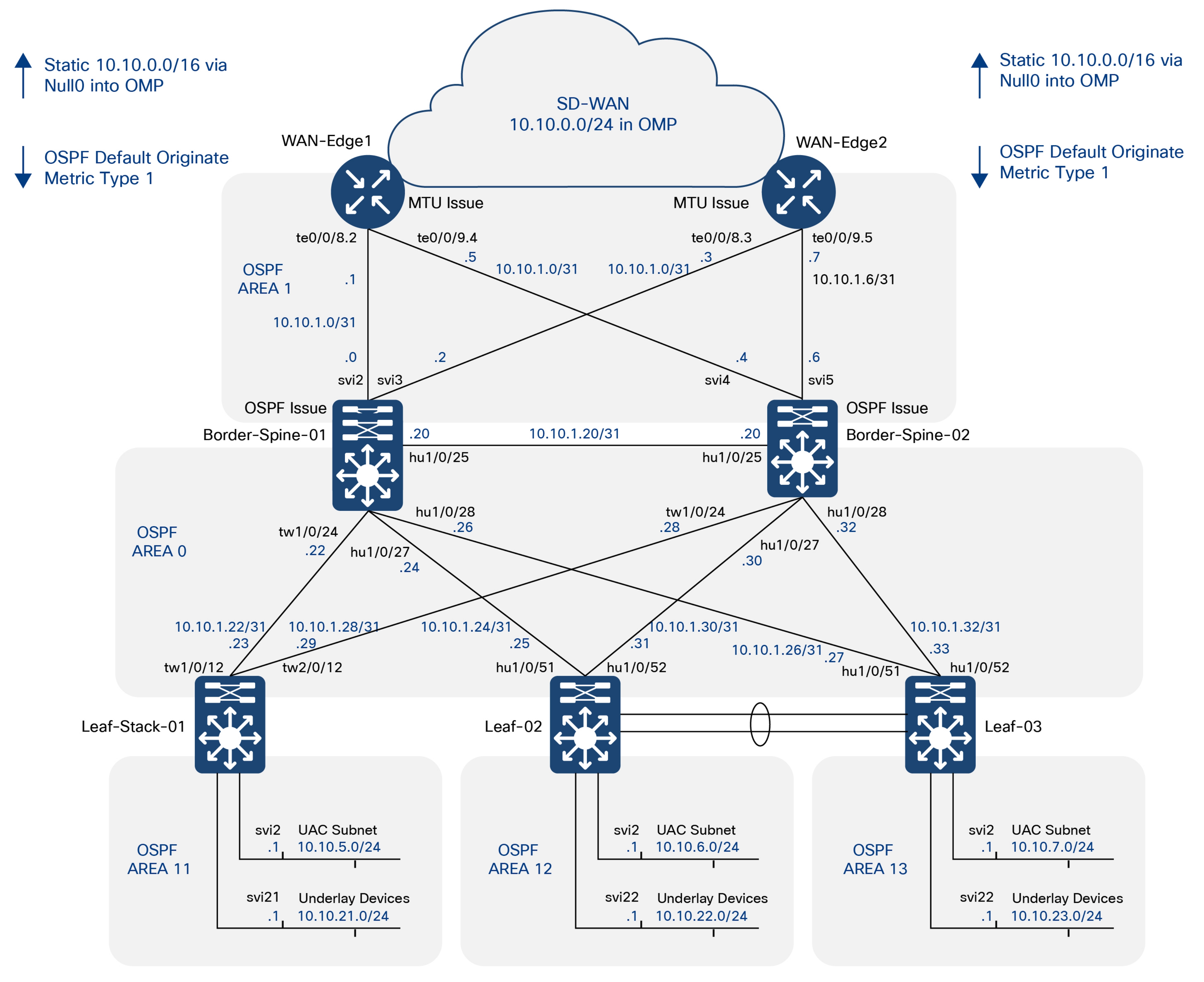
Reference Hub Sites (NYC100 & NNJ200)
This section introduces the reference hub-site architecture, showing how NYC100 and NNJ200 integrate campus fabric, SD-WAN, Secure Access, firewall, data center, and shared services into a resilient, policy-driven SNRA cloud-managed deployment.
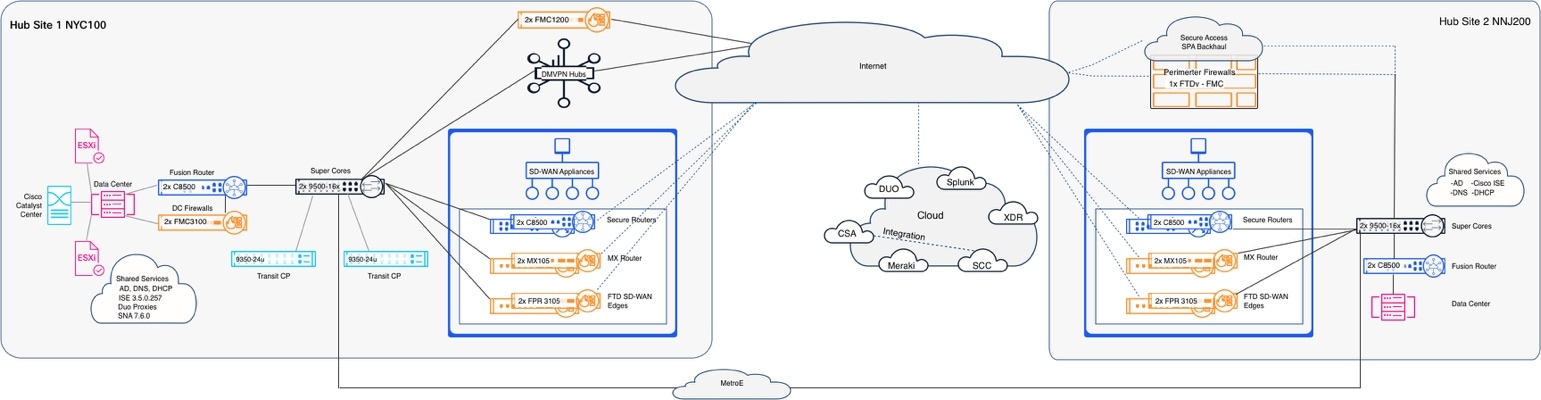
This diagram illustrates the logical relationship between the reference hub sites, NYC100 and NNJ200, paired within the cloud-managed SNRA deployment. It shows how the two hubs work together to provide resilient paths for WAN connectivity, secure Internet and cloud access, shared services, data center access, and centralized security enforcement.
At a high level, the flow demonstrates how enterprise traffic can move between hub sites, cloud services, branch environments, and internal resources while maintaining consistent segmentation, policy control, and operational visibility across the architecture.
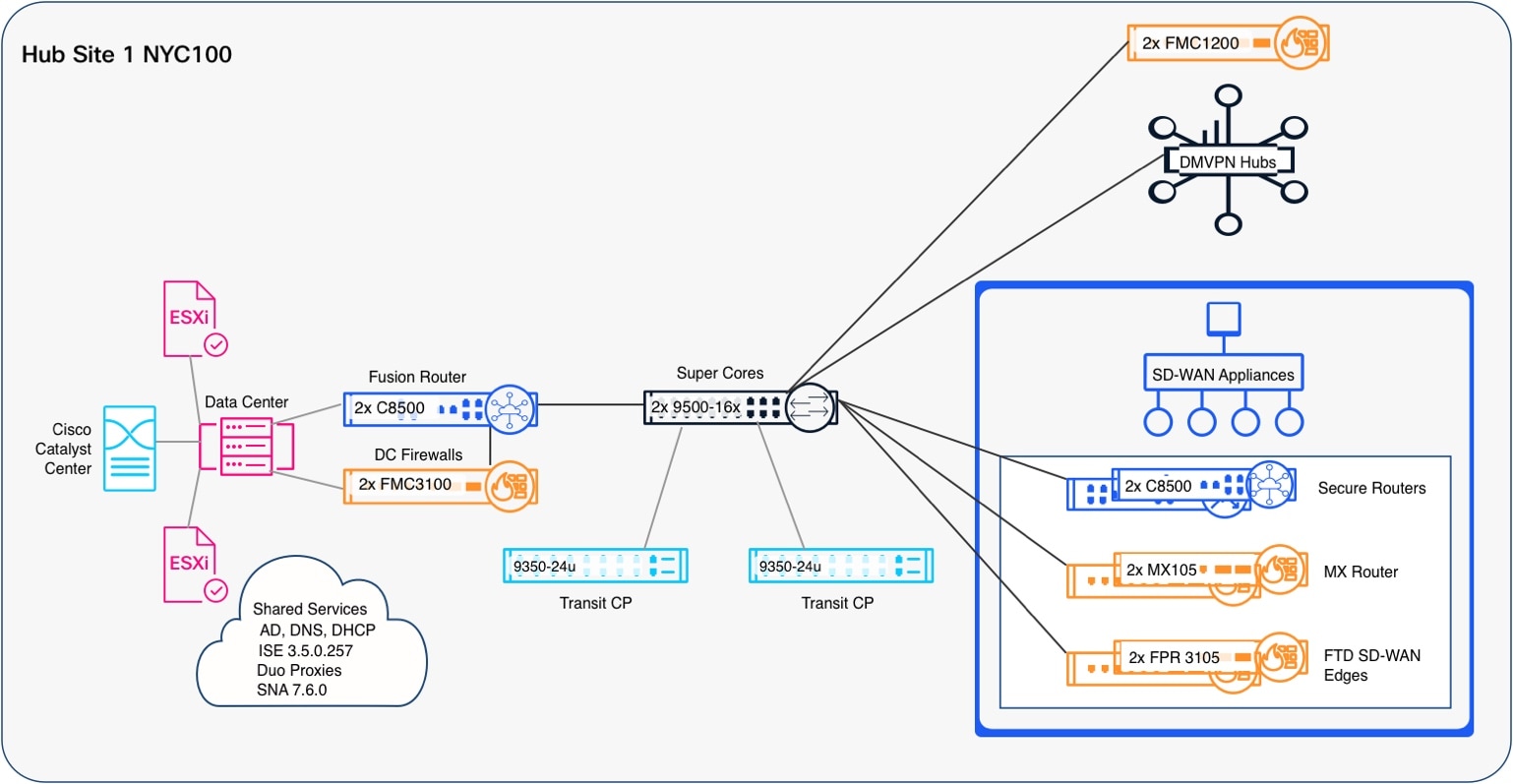
This diagram illustrates the logical role of NYC100 as a primary hub within the cloud-managed SNRA architecture. It shows how shared services, data center resources, WAN transport, security services, and management functions converge at the hub to support enterprise-wide connectivity.
At a high level, NYC100 acts as an integration point between the campus/fabric environment and external WAN, branch, DMVPN, SD-WAN, firewall, and security-management domains. The flow emphasizes how the architecture extends segmentation, policy, and secure transport beyond the local fabric into broader enterprise and cloud-connected services.
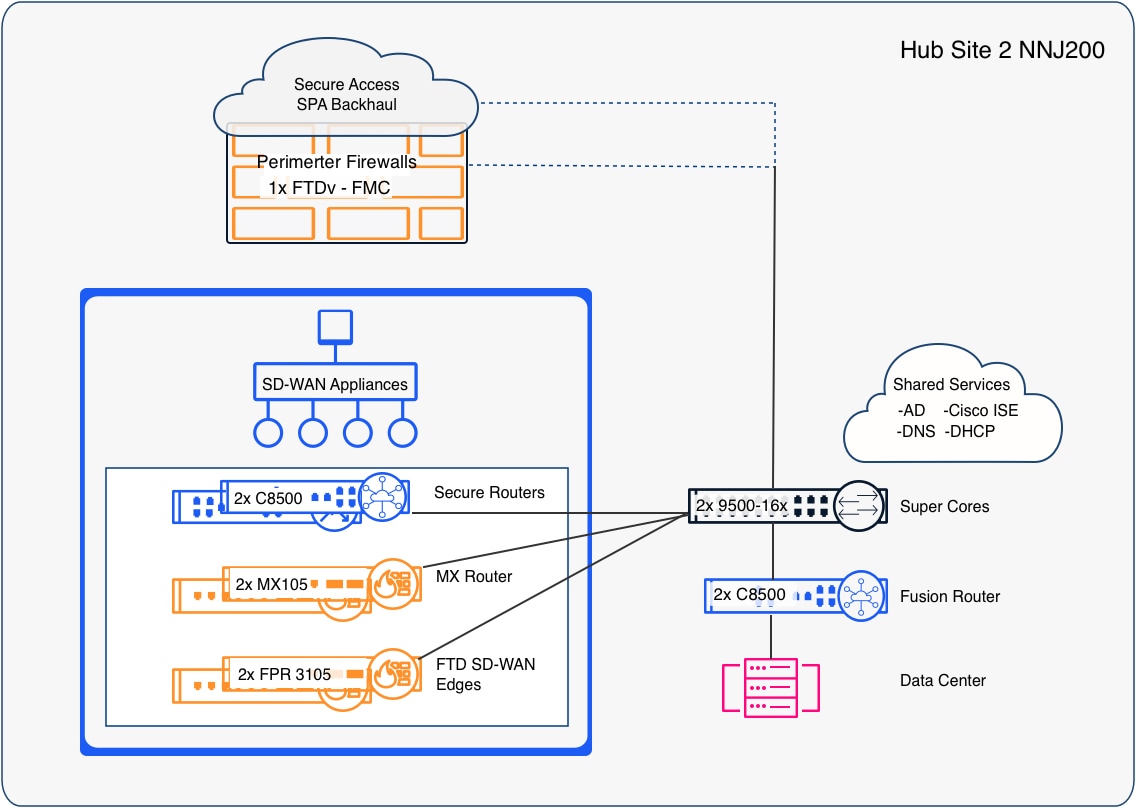
This diagram illustrates the logical role of NNJ200 as a secondary hub that brings together WAN connectivity, security enforcement, shared services, and data center access. The flow shows how traffic can move from branch, campus, or cloud-connected environments through centralized hub services while preserving segmentation, policy control, and secure access paths.
At a high level, NNJ200 extends the overall SNRA design by providing another resilient hub location for SD-WAN, firewall, Secure Access, and shared-service integration, helping distribute connectivity and security functions across the enterprise architecture.
Reference Unified SD-WAN Branch (BOS) Deployment
The reference topology below shows the two hub sites, the dual-Internet overlay fabric, the branch sites, and the cloud SaaS/management stack.
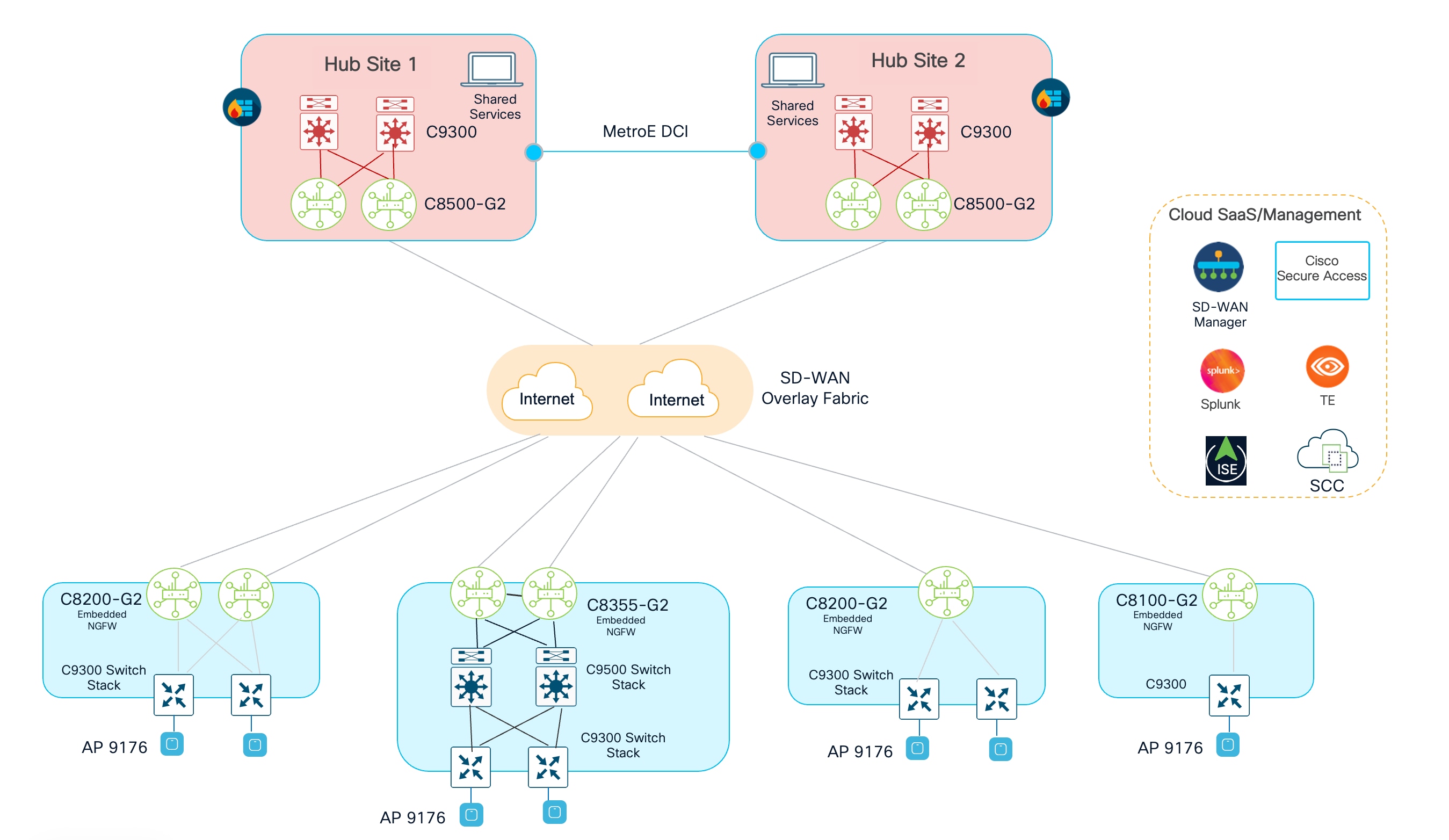
This section describes the end-to-end process for onboarding Cisco 8000 Series Secure Routers (for example, C8355-G2) as SD-WAN branch edge devices within the Cisco Secure Networking Framework. The procedure covers device provisioning in the SD-WAN management platform, bootstrap and Zero-Touch Provisioning (ZTP), control-plane bring-up, data-plane tunnel establishment to hub routers, and post-onboarding validation.
In the reference lab topology, two C8355-G2 Secure Routers are deployed at the branch, connected to a campus/cloud fabric via 10G interfaces (te0/0/8 and te0/0/9). The branch routers form SD-WAN overlay tunnels across the Internet and MPLS transport to Secure Routers located at Hub Site. SD-WAN fabric connectivity to Cisco Security Cloud Control (SCC) for centralized management and policy distribution is established over the Internet path.
● Two redundant hub sites: each hub site has a pair of C8500-G2 Secure Routers for WAN aggregation, interconnected by a Metro Ethernet (MetroE) Data Center Interconnect (DCI).
● Dual Internet transports: form the SD-WAN overlay fabric, providing transport-independent, encrypted connectivity between every site.
● Hub-and-spoke forwarding: branches connect to the hubs and reach other branches through the hubs, simplifying the data plane and centralizing inspection and shared services.
● A graduated branch portfolio: large/medium branch (dual C8355-G2 with TLOC extension and a Catalyst 9500 stack), standard branches (C8200-G2), and a small branch (C8100-G2), all with embedded next-generation firewall (NGFW).
● Integrated cloud security and assurance: Cisco Secure Access, Cisco Identity Services Engine (ISE), Security Cloud Control (SCC), ThousandEyes (TE), and Splunk.
Branch Secure Router onboarding follows six sequential steps, from initial provisioning in the SD-WAN management platform through full overlay validation. Each step should be completed and verified before proceeding to the next.
1. Log in to Cisco SD-WAN Manager (vManage) or Cisco Security Cloud Control (SCC) to add devices to the inventory.
2. Navigate to Configuration > Devices > WAN Edge List.
3. Add each Secure Router using its chassis serial number. The serial number is printed on the physical device and also available in the Cisco Smart Account portal.
Configuration Groups define the baseline configuration applied to each branch router, including system parameters, VPN/interface settings, transport colors, and security policies.
4. Navigate to Configuration > Configuration Groups to create and assign configuration groups.
Configuration Groups define the baseline configuration applied to each branch router, including system parameters, VPN/interface settings, transport colors, and security policies.
5. Create or select existing configuration groups and system profiles.
6. Install the C8355-G2 Secure Routers at the branch site following standard rack-and-stack procedures.
In the reference topology, each router connects to the campus/cloud fabric and WAN transports.
Zero-Touch Provisioning (ZTP) – Automated Onboarding
If the branch site has Internet access before the SD-WAN router is deployed (for example, via an existing broadband connection), Cisco's Zero-Touch Provisioning (ZTP) service can automate the initial bring-up. The router contacts the Cisco ZTP servers upon first boot, retrieves its SD-WAN Validator address, authenticates, and downloads its full configuration from SD-WAN Manager.
ZTP requires the device serial number to be registered in the Cisco PnP/ZTP portal and present in the SD-WAN Manager WAN Edge List before the device is powered on. The router establishes a DTLS connection to the SD-WAN Validator, which redirects it to the SD-WAN Controller and SD-WAN Manager. SD-WAN Manager pushes the assigned configuration groups or device templates.
1. In Cisco PnP Connect (software.cisco.com), confirm the new device’s serial/UUID is associated to the proper Smart/Virtual Account and that the controller profile points to the proper Validator.
2. In SD-WAN Manager, navigate to Configuration > Devices > WAN Edge List add the device to PnP and sync the WAN edge list.
3. Click Sync Smart Account. The new device appears in the WAN Edge inventory with its chassis ID and certificate serial.
4. Click Send to Controllers so the validator and controllers are programmed to expect (and authorize) this device.
5. Once the router is onboarded and a configuration has been applied, verify that all SD-WAN control-plane sessions are established. Control-plane health is a prerequisite for data-plane tunnel bring-up.
With control-plane sessions established, the SD-WAN controller distributes TLOC information to all edges. The branch secure routers will automatically initiate BFD-monitored IPsec data-plane tunnels to other branch routers on different branch sites and hub sites.
6. apply a centralized control policy on the SD-WAN controllers to enforce hub-and-spoke forwarding so branches reach other branches through the hubs. By default, the fabric is full-mesh. The policy is built in SD-WAN Manager and activated to the controllers, which apply it in the outbound direction toward the spoke sites.
Two common, equivalent approaches:
● Built-in Hub-and-Spoke topology: in Centralized Policy > Topology, add a Hub-and-Spoke topology, define the hub site list (Hub Site 1 and Hub Site 2) and the spoke (branch) site list, and bind it to the corporate VPN list.
● Custom control policy: for each spoke’s OMP routes, set the next-hop TLOC to the hub’s TLOC before the Controller re-advertises them to other spokes. This forces spoke-to-spoke traffic to transit a hub.
1. Define site lists: a Hubs list (Site IDs 100, 200) and a Branches/Spokes list (1001–1004).
2. Define a VPN list for the user segments to constrain (e.g., VPN 10, 30).
3. Navigate to Configuration > Policies > Centralized Policy.
4. Add a Topology of type Hub-and-Spoke (or a custom control policy that rewrites the spoke next-hop TLOC to the hubs).
5. Apply the policy to the spoke site list in the outbound direction.
6. Activate the policy
7. SD-WAN Manager pushes it to all Controllers, which enforce it toward the spokes.
SD-WAN Controller will share the TLOCs between routers and SD-WAN tunnel will come up between the hub and spoke routers.
8. To verify the tunnels status, navigate to Monitor > Devices > WAN-Tunnel.
After tunnels are up and hub and spoke policy is activated, a spoke’s OMO table will show remote branch prefixes with a next-hop TLOC pointing at hub routers rather than directly at the remote branch.
Monitor Organization and health check through the Overview page.
Licensing model details for Secure Routers and SD-WAN
● Cisco Networking Subscription Data Sheet
● Cisco 8000 Series Secure Routers WAN and Routing License Feature Matrices
● Cisco DNA Software for SD-WAN Feature Matrix
Reference Unified Branch (DEN) Deployment
This topology depicts a branch (Branch 2/Site 2) composed of:
● 2 MX routers in an HA pair (MX85s)
● 1 switch stack consisting of 2 MS layer-2 LAN switches (MS150-24P-4Gs)
● 2 access point (CW9172)
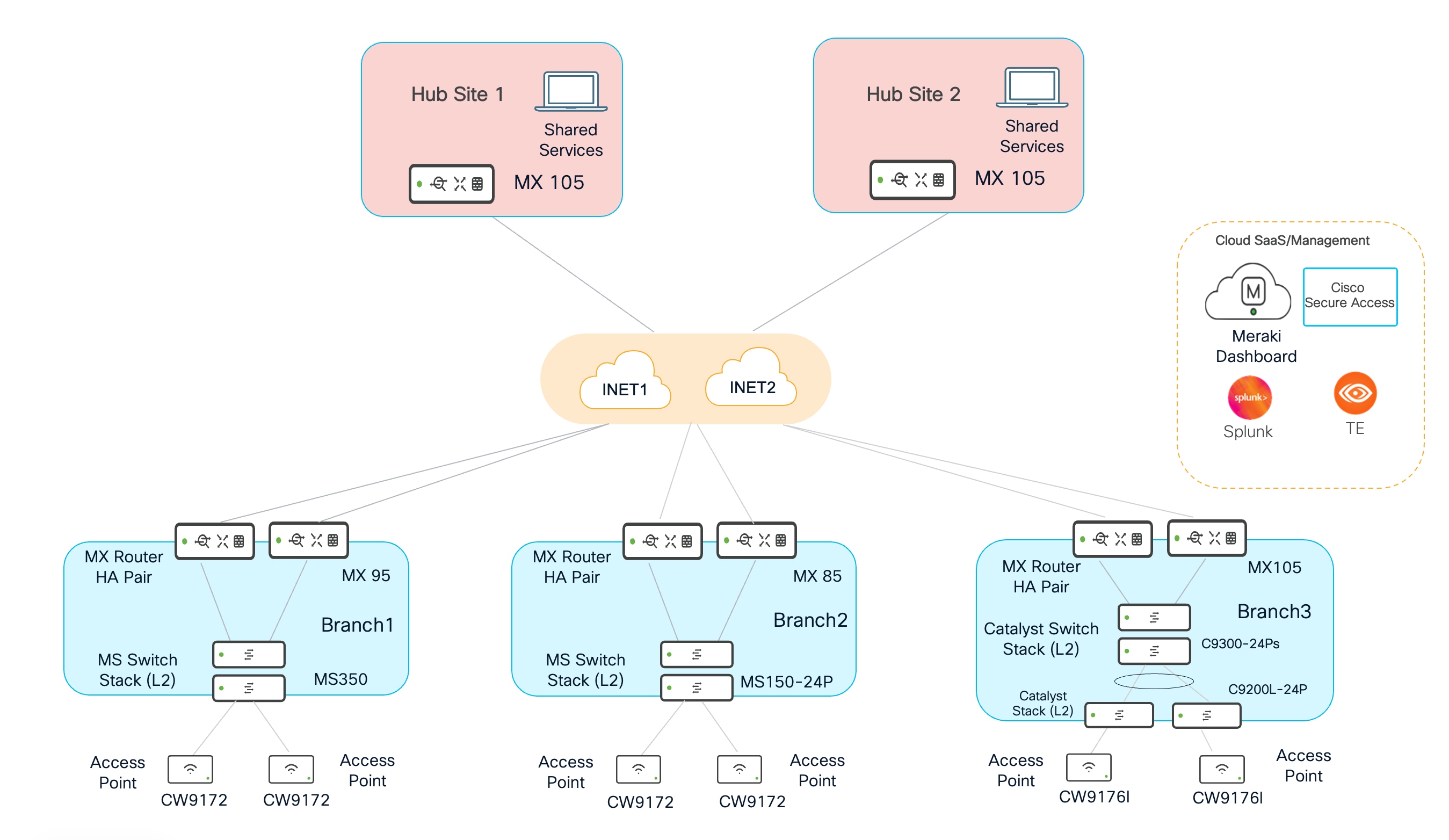
Each MX has two WAN interfaces, and each interface connects to an Internet transport. The branch uses a hub-and-spoke topology, with Hub Site 1 serving as the primary hub and Hub Site 2 as the secondary hub. Cisco Secure Access provides secure Internet access (SIA) for most branch traffic. The data center hosts multiple shared services, including DNS, DHCP, RADIUS, and management platforms for SNMP, syslog, and NetFlow. For SNMP, the design includes traps from the dashboard and polling to both the dashboard and devices. An external RADIUS server is used to assign VLANs and SGT tags. The diagram above shows a logical view of the topology.
In this example, the MX routers operate in active/passive mode and share access to both Internet transports. Only one MX router is active at a time. The Layer 2 switch stack is repurposed to front-end the Internet transports, so the router pair requires only one connection to each transport. A dedicated VLAN, VLAN 901, is provisioned for one transport, and VLAN 902 is provisioned for the other. These VLANs are not carried on the LAN-side trunks.
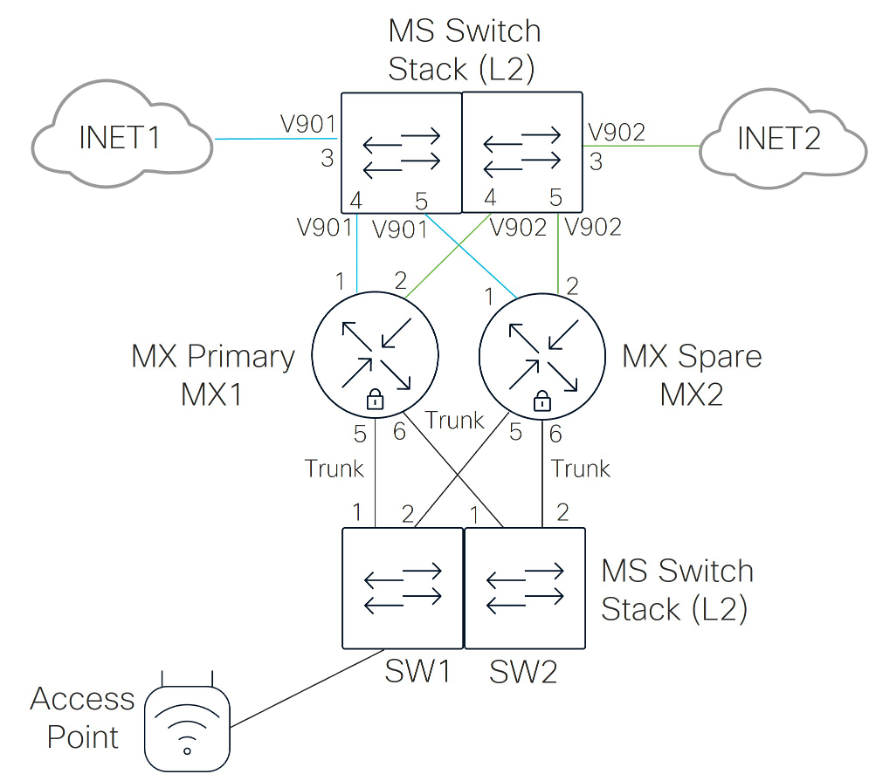
This table lists the ports used in this example:
| Device |
Port # |
Device |
Port # |
Device |
Port # |
Device |
Port # |
Port configuration |
| SW1 |
3 |
INET1 |
N/A |
SW2 |
3 |
INET2 |
N/A |
Access Port (VLAN 901 or 902) |
| SW1 |
4 |
MX1 |
1 or 3 |
SW2 |
4 |
MX1 |
2 or 4 |
Access Port (VLAN 901 or 902) |
| SW1 |
5 |
MX2 |
1 or 3 |
SW2 |
5 |
MX2 |
2 or 4 |
Access Port (VLAN 901 or 902) |
| SW1 |
1 |
MX1 |
5 |
SW2 |
1 |
MX1 |
6 |
Trunk Port (VLANs 1 (NATIVE),10,20,30,40,50,999) |
| SW1 |
2 |
MX2 |
5 |
SW2 |
2 |
MX2 |
6 |
Trunk Port (VLANs 1(NATIVE),10,20,30,40,50,999) |
| SW1 |
9 |
Access Point |
0 |
|
|
|
|
Trunk Port (VLANs 1,10,20,30,40,50,999(NATIVE)) |
The MX routers at the hub and branch sites are deployed in routed mode.
Each site uses an active/passive MX pair. One MX operates as the active router, while the other remains passive. Each MX connects to a switch, allowing both MX routers to access the same Internet transports through shared VLANs.
In this design, the MX routers use a shared virtual uplink IP address for Internet-bound traffic. This virtual IP address must be in the same subnet as the physical MX uplink IP addresses and must be unique from both MX uplink addresses.
The MX router defines seven interface VLANs. The subnet structure is designed to help minimize the number of global firewall rules required across sites.
In this example, SITE# refers to Branch/Site 2. DHCP can be provided locally at the branch or relayed to a centralized DHCP server in the data center. DNS can be provided from the Internet or from the data center. VLANs marked as Disabled under VPN Mode are not advertised across the Auto VPN overlay.
| VLAN |
Purpose |
Subnet Structure |
DHCP Location |
DNS Location |
VPN Mode |
| VLAN 1 |
Default |
192.168.128.0/24 |
Local |
Internet, using OpenDNS |
Disabled |
| VLAN 10 |
Data |
10.<VLAN#>.<SITE#>.0/24 |
Data Center |
Data Center |
Enabled |
| VLAN 20 |
Voice |
10.<VLAN#>.<SITE#>.0/24 |
Data Center |
Data Center |
Enabled |
| VLAN 30 |
IoT |
10.<VLAN#>.<SITE#>.0/24 |
Data Center |
Data Center |
Enabled |
| VLAN 40 |
PCI |
10.<VLAN#>.<SITE#>.0/24 |
Data Center |
Data Center |
Enabled |
| VLAN 50 |
Guest |
172.16.99.0/24 |
Local |
Internet, using OpenDNS |
Disabled |
| VLAN 999 |
Infrastructure |
10.250.<SITE#>.0/24 |
Local |
Data Center |
Enabled |
VLAN 1 is used only for initial onboarding to the Meraki dashboard. After onboarding, device management is moved to tagged VLAN 999, which provides unique infrastructure addressing and access to data center services such as syslog, NetFlow, and SNMP.
The exception is access point management. Switch trunks connected to access points use VLAN 999 as the native VLAN, allowing AP management traffic to reach the infrastructure network.
Inter-VLAN traffic is generally blocked by firewall rules. Exceptions are allowed for required shared services.
The DATA subnet can access printer services within the branch. The DATA, IoT, VOICE, PCI, and INFRA subnets can access shared services in the data center.
Guest and Default VLAN traffic, along with selected DATA and INFRA VLAN traffic, is permitted to use Direct Internet Access (DIA).
WAN, VPN, and Internet breakout
MX WAN uplinks are rate-limited based on the provider sub-line rate. VPN tunnels are established across both WAN transports.
Direct Internet traffic is not load-balanced. Internet breakout is limited to Guest and Default VLAN traffic, selected corporate SaaS applications, and Meraki dashboard traffic for downstream infrastructure devices, such as switches and access points.
All other Internet-bound traffic is sent through Cisco Secure Access tunnels at the site.
Active/standby tunnels are established from the active MX router to Cisco Secure Access.
One active/standby tunnel pair is sourced from WAN transport INET1, and another active/standby tunnel pair is sourced from WAN transport INET2. Tunnel health checks are used, and traffic is load-balanced across the active tunnels by default.
Performance-based routing is enabled for selected traffic types.
Corporate SaaS traffic uses Internet breakout. VoIP, video conferencing, custom critical applications, and default traffic use the Auto VPN overlay.
All switch trunk connections carry only the VLANs defined on the MX router, including native VLAN 1.
Trunk ports connected to access points use VLAN 999 as the native VLAN.
Each MX router has one trunk connection to each switch in the two-switch stack. All unused MX ports, ports 7 through 14, are disabled.
On each switch, unused infrastructure ports, ports 6 through 8 in this example, are shut down. AP ports are configured as trunks, and unused AP trunk ports are disabled.
Remaining switch ports are configured as access ports with BPDU Guard and 802.1X/MAB enabled. Rapid Spanning Tree Protocol and storm control are enabled on all ports.
Adaptive Policy is enabled.
Four groups are defined within DATA VLAN 10:
| Group |
| Finance_User_Group |
| Marketing_User_Group |
| Finance_Server_Group |
| Marketing_Server_Group |
In this example, servers are assumed to reside in the data centers, while users reside at the branch. A policy defines the allowed communication between these groups.
The configuration ensures that SGT tags are trusted and propagated across Auto VPN, between the MX and switch, and between the switch and access point.
802.1X is enabled on switch access ports using an external RADIUS server for authentication and accounting.
Multi-Auth mode is used with hybrid authentication. If 802.1X authentication is not available, MAC Authentication Bypass may be used. Voice authentication is also enabled.
If both 802.1X and MAB authentication fail, network access is denied.
When authentication succeeds, the RADIUS server returns a VLAN assignment, placing the endpoint into the DATA, VOICE, IoT, or PCI VLAN. The RADIUS server also returns an SGT tag.
In this example, Cisco ISE 3.4 is used as the external RADIUS server.
On each switch, DSCP markings from the GUEST VLAN are not trusted and are reset to DSCP 0. DSCP markings from other VLANs are trusted.
On the MX router, default traffic rules are used. Additional rules are added for guest traffic and custom critical application traffic.
Guest Wi-Fi uses open authentication with no encryption. Mandatory DHCP is enabled, and users must acknowledge a click-through splash page before accessing the network.
DHCP is provided by the MX router, and guest traffic is tagged to the GUEST VLAN, VLAN 50.
Layer 2 LAN isolation is enabled so guest clients cannot communicate with one another. Per-client and per-SSID bandwidth limits are also enabled.
SSID availability follows a custom schedule. Guest Wi-Fi uses the 2.4 GHz and 5 GHz bands, with AI-RRM enabled.
Corporate Wi-Fi uses 802.1X Enterprise authentication with RADIUS authentication and accounting.
WPA3 transition mode is enabled, along with fast roaming and protected management frames. Protected management frames are configured to allow unsupported clients.
DHCP is provided by the MX router. By default, traffic is tagged to the DATA VLAN, although Override VLAN tag is enabled. The RADIUS server returns a group policy name, such as DATA, VOICE, IoT, or PCI, which determines the VLAN assignment based on user identity. An SGT tag is also returned separately.
SSID availability follows a custom schedule. Corporate Wi-Fi uses the 2.4 GHz, 5 GHz, and 6 GHz bands, with band steering and AI-RRM enabled.
Wi-Fi 7 is not enabled for Corporate Wi-Fi in this design because current security requirements require a separate access point from Guest Wi-Fi.
Per-group SSID configuration is available starting in MR 32.1.4. This allows Wi-Fi 7-compliant SSIDs and non-Wi-Fi 7-compliant SSIDs to coexist on the same access point, as long as they are assigned to separate SSID groups.
As of MR 32.1.5, this feature remains in Beta status, so it is not included in the Unified Branch design. Refer to the WPA3_Encryption and Configuration Guide.
Step 1. Onboard the MX router:
Ensure the MX router can obtain a DHCP lease and internet connectivity from at least one of the WAN connections so the MX can connect to the dashboard.
If IP addressing to the service provider must be manual, connect locally to the MX:
1. Add an IP address, netmask, gateway, and DNS information to Internet 1 (physical port 1 (SFP) or 3 (RJ45)) or Internet 2 (physical port 2 (SFP) or 4 (RJ45)).
Note: Refer to Cisco Meraki Local Status Page: Overview and Cisco Meraki Local Status Page: Security and SD-WAN for additional information. This example assumes DHCP is available from both internet service providers.
2. Power the primary MX router on and connect WAN interface 1 (SFP port 1 in this example) to its WAN transport.
3. When it reaches the dashboard, a firmware upgrade may take place to update the device to the latest stable release. When the LED on the router turns solid white, the MX is connected to the dashboard, and its default configuration should be downloaded.
Step 2. Onboard the switches:
After the MX router is fully on board and while the switches are still powered off, cable the switches together using their stacking cables.
● Stack port 1 switch 1 > stack port 2 switch 2
● Stack port 2 switch 1 > stack port 1 switch 2
● Refer to Switch Stacks if needed for additional information.
◦ Connect the uplink of switch 1 (port 1) to the proper port on the primary MX router (port 5).
◦ Connect the uplink of switch 2 (port 1) to the proper port on the primary MX router (port 6).
◦ Power on the switch stack.
Wait for both switches to be completely onboarded. When the switch management traffic reaches the dashboard, a firmware upgrade may take place to update the devices to the latest stable release. When the LED on the switch is solid white, the switch is connected to the dashboard, and its default configuration should be downloaded.
Step 3. Onboard the Access Point (AP):
After both switches in the switch stack are fully onboard, connect the uplink of the AP to the proper port on the switch (switch 1 port 9 in this example).
Through PoE, the AP is powered on. After AP management traffic reaches the dashboard, a firmware upgrade may take place to update the device to the latest stable release. When the LED on the AP is solid white, the AP is connected to the dashboard, and its default configuration should be downloaded.
Ensure that the switches are recognized as part of a stack on the dashboard.
1. Under the newly created branch (RTP6-Branch2), navigate to Switching > Monitor > Switch Stacks.
2. If the stack was auto-provisioned by the dashboard, it shows up as a Stack Name with the listed Stack Members in mac addresses form.
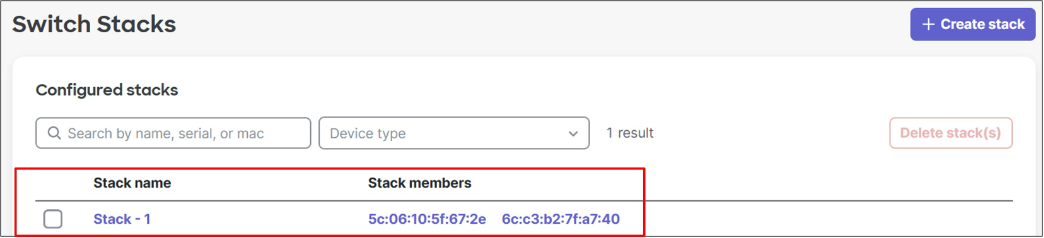
3. To change the stack name, click the Stack name (Stack – 1), then click the edit icon next to the stack name.
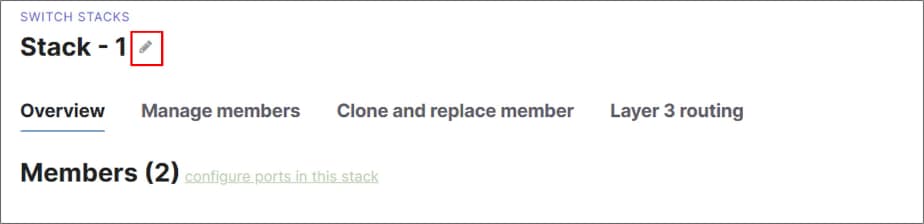
4. Edit the name (B2-SW-STACK1) then click Save.
5. Navigate back to the Switching > Monitor > Switch Stacks page.
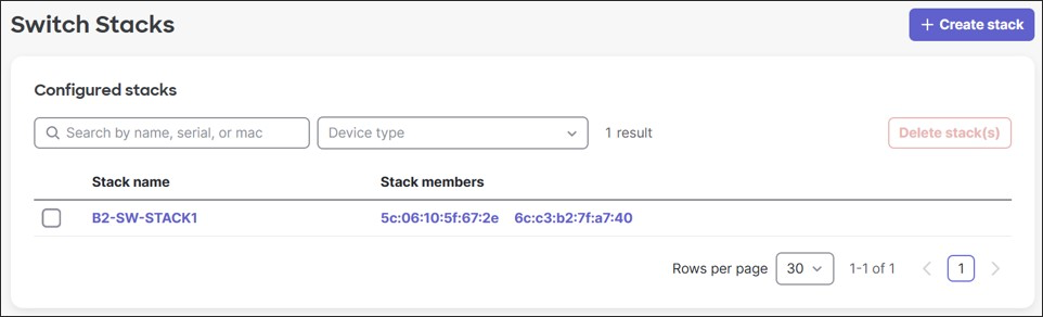
6. (Optional) If the switch stack was not detected automatically, the stack can be manually created by:
a. Click Create stack.
b. Enter the Stack name.
c. Select the stack members.
d. Click Create.
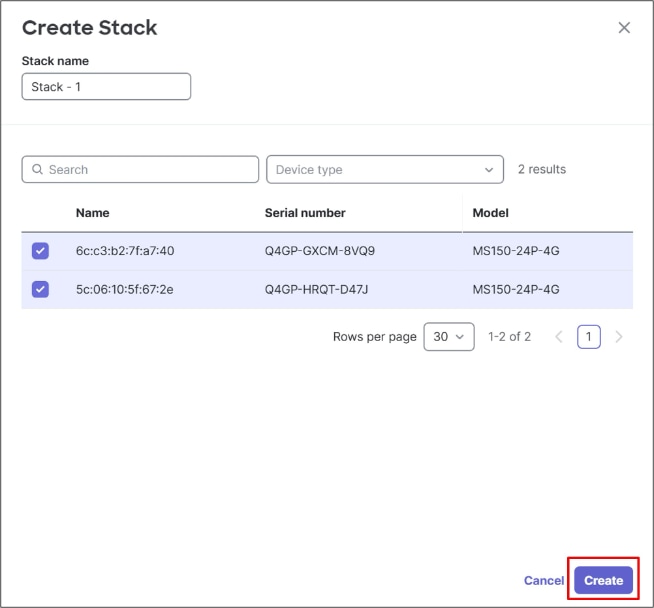
Allowed VLANs trunk configuration
By default, switches carry all VLANs on trunks.
● In the MS models, the Allowed VLANs on trunks are configured as “all”, which equates to VLANs 1-4094.
● In the C9300/C9200 models, allowed VLANs are represented on trunks as 1-<# of active VLANs>.
For some switch models, active VLANs are 1000. For some switches, it is less.
● In the case of the 9200L-M, the number of active VLANs supported when spanning-tree is enabled is 512. VLANs above 512 cannot be added unless other VLANs are pruned off the trunks.
● In this section, for any switches supporting less than 999 VLANs, all ports are configured as trunks carrying VLANs 1,10,20,30,40,50,999. Individual ports may be modified later.
To modify VLANs allowed on trunk ports:
1. Navigate to Switching > Monitor > Switch Ports.
2. If all switches have trunks with an Allowed VLANs setting of “all”, or “1-N”, where N is greater than or equal to 999, skip to Transport configuration.
3. For any switches that support active VLANS < 999, pick a switch one at a time, select all ports on the switch, then click Edit.
4. Next to Allowed VLANs, type in 1,10,20,30,40,50,999 then click Update.
Note: There are no switches to update in this example.
5. Navigate to Switching > Monitor > Switch Ports to modify switch configurations to accommodate the WAN transport connections.
6. On the switch connected to the first WAN transport (B2-SW1), select ports 3, 4, and 5, then at the top of the page, click Edit.
7. Enter the Name (INET1).
8. Select Type Access and enter the VLAN (901).
9. Click Update.
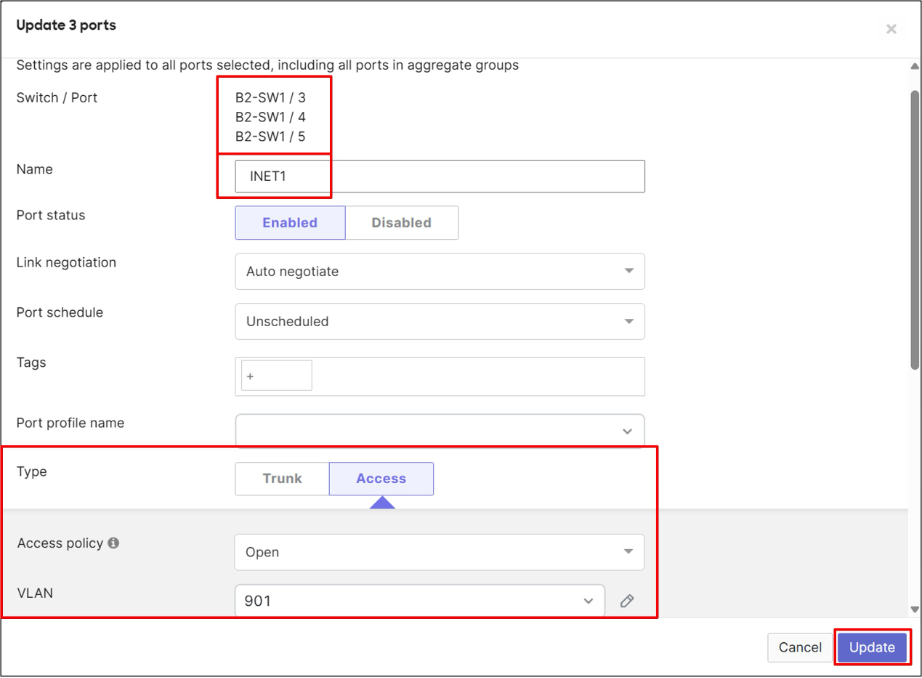
10. Remove VLAN 901 from the trunk ports going to the MX routers on B2-SW1.
11. On this same page, select ports 1 and 2, then at the top of the page, click Edit.
12. Enter the Name (Uplink to Router) and next to Allowed VLANs, enter the VLANs to be configured on the MX router (1, 10, 20, 30, 40, 50, 999).
13. Click Update.
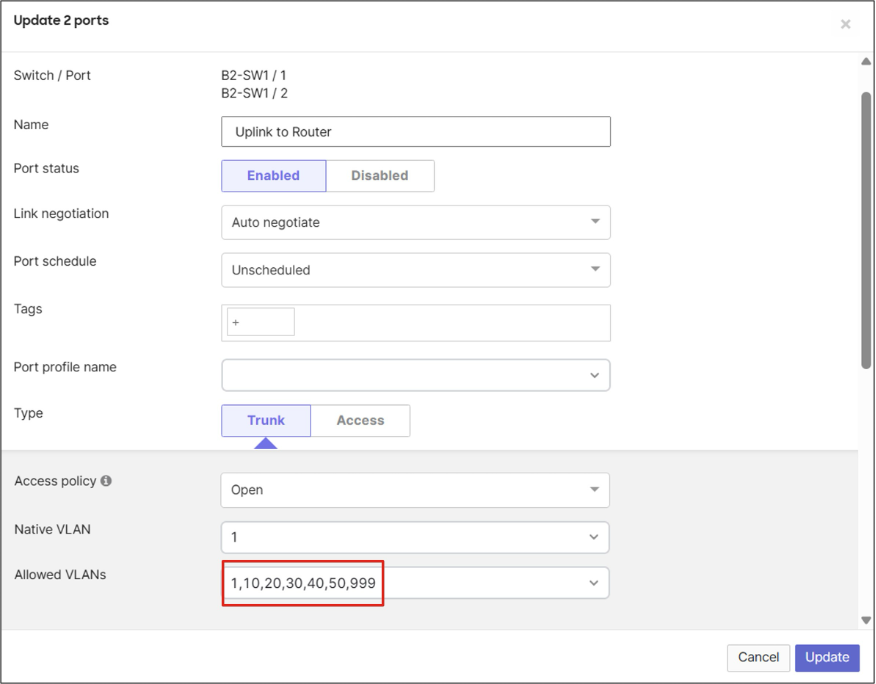
14. Repeat for the second switch (B2-SW2). For ports 3, 4, and 5, the port Name should be set to INET2, the Type to Access, and the VLAN to 902.
15. Remove VLAN 902 from the trunk ports going to the MX routers on B3-SW2.
16. On this same page, select ports 1 and 2, then at the top of the page, click Edit.
17. Enter the Name (Uplink to Router) and next to Allowed VLANs, type in the VLANs to be configured on the MX router (1, 10, 20, 30, 40, 50, 999).
18. Click Update.

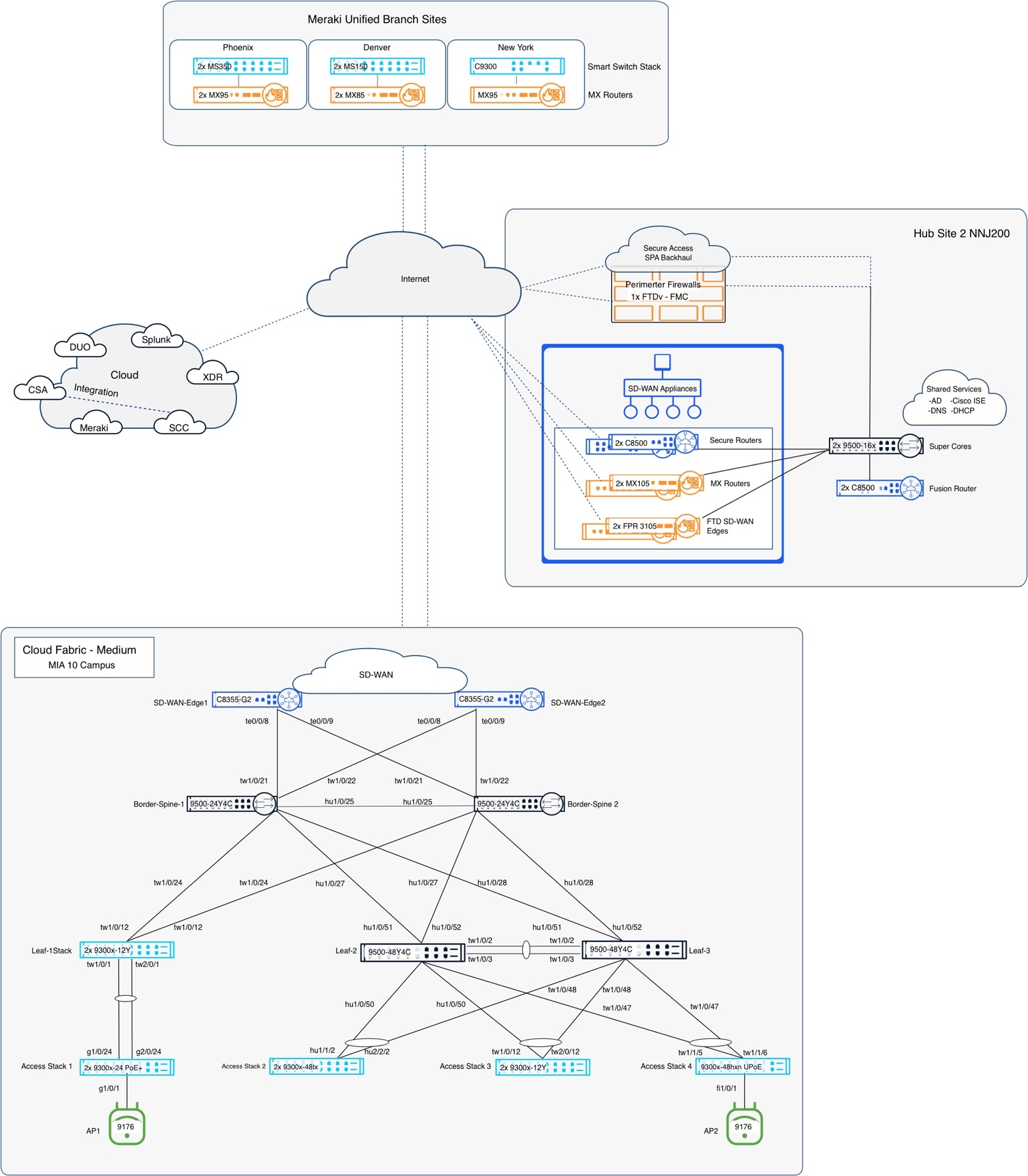
Step 3: Enable segmentation and policy
Segmentation is implemented through VRFs, VLANs, Security Group Tags (SGTs), and policy constructs that extend consistently across wired, wireless, WAN, and cloud-connected domains. Centralized orchestration and policy management through Cisco Identity Services Engine (ISE), Cisco Secure Access, and SD-WAN integration enable scalable enforcement, operational consistency, and reduced policy complexity across distributed enterprise environments.
Within the SNRA framework, this step implements Identify and Authorize and Segment and Protect through identity-based access control, SGT-driven segmentation, and centralized policy enforcement across campus, branch, Internet, and data-center environments. It also leverages Unified Management and Agentic Operations for centralized orchestration and policy administration across the enterprise fabric.
| SNRA Function or Capability |
Cloud Deployment Components |
| Secure Infrastructure |
Establishes trusted, resilient transport, connectivity, distributed enforcement, and foundational telemetry for the deployment. |
| Identify and Authorize |
Discovers, profiles, and classifies identities, assesses context, and grants the minimum required access. |
| Segment and Protect |
Translates identity and business intent into least-privilege segmentation and enforces policy close to resources. |
| Detect and Respond |
Implements the separate Detect and Respond functions through telemetry, analytics, threat intelligence, and governed, reversible containment. |
| Unified Management and Agentic Operations, Common Policy Context, and Extended Integrations |
Coordinates management, assurance, shared context, and governed action while extending policy, telemetry, threat intelligence, and automation beyond the core deployment. |
It also relies on Secure Infrastructure to transport and enforce policy across the fabric and uses Common Policy Context to carry identity and policy facts to the relevant enforcement points. The step further extends policy enforcement through Extended Integrations with Internet, WAN, cloud security, and data-center firewall domains.
The primary Cisco components used to enable segmentation and policy in the SNRA cloud-managed deployment include:
● Cisco Identity Services Engine
Provides centralized identity-based access control, 802.1X authentication, MAB, profiling, authorization profiles, Security Group Tag (SGT) assignment, TrustSec policy enforcement, and dynamic segmentation services.
● Cisco Catalyst 9300 Series Switches
Operate as fabric edge and access-layer switches enforcing VLAN segmentation, TrustSec policies, CTS inline tagging, SGT propagation, and identity-aware access control.
● Cisco Catalyst 9500 Series Switches
Operate as border and spine nodes supporting VRF segmentation, policy-aware transport, and segmentation propagation across the fabric and external handoffs.
● Cisco Wireless 9170 Series Access Points
Extend identity-based wireless segmentation and SGT-aware policy enforcement to wireless clients and IoT devices.
● Cisco 8000 Series Secure Routers
Provide SD-WAN integration, VRF-to-VPN mapping, and policy extension between campus and branch environments.
● Cisco Secure Access
Extends Zero Trust policy enforcement to Internet and cloud-bound traffic through secure access control, inspection, and policy orchestration.
● Cisco Secure Firewall
Provides application-aware inspection, permit/deny enforcement, and segmentation controls for data center and north-south traffic flows.
● Cisco Meraki Dashboard
Provides centralized cloud orchestration, visibility, policy deployment workflows, and operational monitoring across the fabric environment.
At a high level, this step includes the following procedures:
1. Configure VRF-to-VPN mappings between the campus fabric and SD-WAN environments.
2. Configure VLAN, subnet, and Security Group Tag (SGT) mappings across wired and wireless access domains.
3. Enable TrustSec, Adaptive Policy, and SGT propagation across the fabric.
4. Configure 802.1X authentication and identity-based policy enforcement using Cisco ISE.
5. Configure inter-site and intra-site segmentation policies for campus and branch traffic flows.
6. Configure Cisco Secure Access policies for Internet-bound traffic enforcement.
7. Configure data center firewall policies for application access control and inspection.
8. Validate segmentation boundaries, identity-based access, and permitted or denied traffic flows across the deployment.
Topology and policy objectives
This deployment implements a Zero Trust security model aligned to NIST 800-207 principles, replacing implicit trust based on network location with identity-driven, policy-based access control. Segmentation and policy enforcement are extended consistently across campus, branch, wireless, Internet, and data center environments through VRFs, Security Group Tags (SGTs), 802.1X authentication, and centralized policy orchestration. This approach enables scalable least-privilege access while reducing the operational impact and blast radius of compromised users or devices.
This design ensures that the enterprise moves away from a "Flat Network" architecture. By leveraging the integration of ISE, SD-WAN, and Secure Access, the organization achieves:
● Visibility: Knowing every device and user on the network.
● Continuity: Providing a seamless security experience regardless of the user's physical location.
● Resiliency: Limiting the "Blast Radius" of a compromise through SGT-based micro-segmentation and ZTNA cloaking.
Following these guidelines ensures compliance with modern security frameworks and provides a scalable foundation for future enterprise growth.
Step 4: Enable threat detection and response processes
This step integrates identity, security, analytics, telemetry, threat intelligence, firewall inspection, observability, and response services into the cloud-managed deployment. It defines how users, devices, and applications are authenticated and authorized, how decisions are enforced across wired, wireless, remote, and cloud-connected environments, and how shared context from Cisco ISE and related systems supports visibility and event correlation. Centralized orchestration extends governed containment and operational response into external security and management domains.
Within the SNRA framework, this step completes the Detect and Respond functions and extends them through Extended Integrations. It depends on Secure Infrastructure for transport and telemetry paths, Segment and Protect for policy boundaries and enforcement points, and Unified Management and Agentic Operations and Common Policy Context for orchestration and shared security context. Extended assurance, ThousandEyes deployment, cross-domain policy extension, and ITSM integration are addressed in Step 5.
| SNRA Function or Capability |
Cloud Deployment Components |
| Secure Infrastructure |
Provides the routed transport, fabric reachability, distributed enforcement points, and telemetry paths required to collect security data and apply response actions. |
| Identify and Authorize |
Uses Cisco ISE, 802.1X, MAB, endpoint profiling, authorization profiles, and Security Group Tag context to identify users and devices and enrich detection and response decisions. |
| Segment and Protect |
Applies VRFs, VLANs, Security Group Tags, TrustSec, Adaptive Policy, SD-WAN segmentation, and Cisco Secure Firewall controls to limit exposure and enforce policy during normal operations and containment. |
| Detect and Respond |
Uses Cisco Secure Network Analytics, Cisco XDR, Secure Firewall telemetry, threat intelligence, pxGrid, and ISE containment to detect abnormal activity, correlate events, prioritize incidents, and apply governed, reversible response. |
| Unified Management and Agentic Operations, Common Policy Context, and Extended Integrations |
Uses Meraki Dashboard, Cisco ISE, pxGrid, APIs, shared identity and Security Group Tag context, telemetry, and security platforms to coordinate visibility, analytics, investigation, and response across domains. |
It also relies on Secure Infrastructure for routed transport, WAN connectivity, and fabric reachability required for distributed security enforcement and telemetry exchange across campus, branch, cloud, and data-center environments. Common Policy Context carries identity-aware policy boundaries and SGT context, while Unified Management and Agentic Operations provides centralized orchestration, policy administration, observability, analytics, automation, and lifecycle operations across integrated security platforms.
● Cisco Catalyst 9300 Series Switches
Provide wired access enforcement, TrustSec propagation, telemetry export, and ThousandEyes agent support.
● Cisco Catalyst 9500 Series Switches
Provide fabric border and spine connectivity supporting policy transport, telemetry visibility, and segmentation enforcement.
● Cisco 8000 Series Secure Routers
Provide SD-WAN connectivity, WAN segmentation, telemetry export, and branch policy integration.
● Cisco Wireless 9170 Series Access Points
Extend wireless identity-based access control and segmented policy enforcement to wireless clients and IoT devices.
● Cisco Identity Services Engine
Provides authentication, authorization, identity, posture, session, and Security Group Tag context for security analysis and containment.
● Cisco pxGrid
Shares identity, posture, session, and Security Group Tag context between Cisco ISE, analytics platforms, and integrated security services
● Cisco Meraki Dashboard
Provides centralized cloud orchestration, Adaptive Policy integration, monitoring, automation, and operational visibility.
● Cisco Secure Network Analytics
Provides network telemetry analysis, behavioral analytics, encrypted traffic analytics, and threat detection.
● Cisco XDR
Provides cross-domain telemetry correlation, AI-driven threat analysis, incident prioritization, and automated response workflows.
● Cisco Secure Firewall
Provides application-aware inspection, segmentation enforcement, and permit/deny policy controls for north-south and data center traffic.
At a high level, this step includes the following procedures:
1. Enable the required Cisco ISE services, including pxGrid and ERS.
2. Integrate Cisco ISE with the Meraki Dashboard for centralized identity and policy context.
3. Configure network authentication devices, 802.1X, MAB, and client authorization policies.
4. Define Security Group Tags, TrustSec context, and identity classifications used by security analytics and response workflows.
5. Integrate Cisco Secure Network Analytics and Cisco XDR for threat visibility, event correlation, investigation, and incident prioritization.
6. Configure telemetry and security-data exports from campus, wireless, routing, WAN, and firewall infrastructure.
7. Integrate Cisco Secure Network Analytics with Cisco ISE through pxGrid to enrich flow records with identity, endpoint, posture, and Security Group Tag context.
8. Configure governed response and containment workflows using Cisco XDR, Cisco ISE, Cisco Secure Firewall, and related enforcement points.
9. Validate detection, identity enrichment, event correlation, incident handling, and reversible containment across representative traffic flows and security events.
Security architecture overview
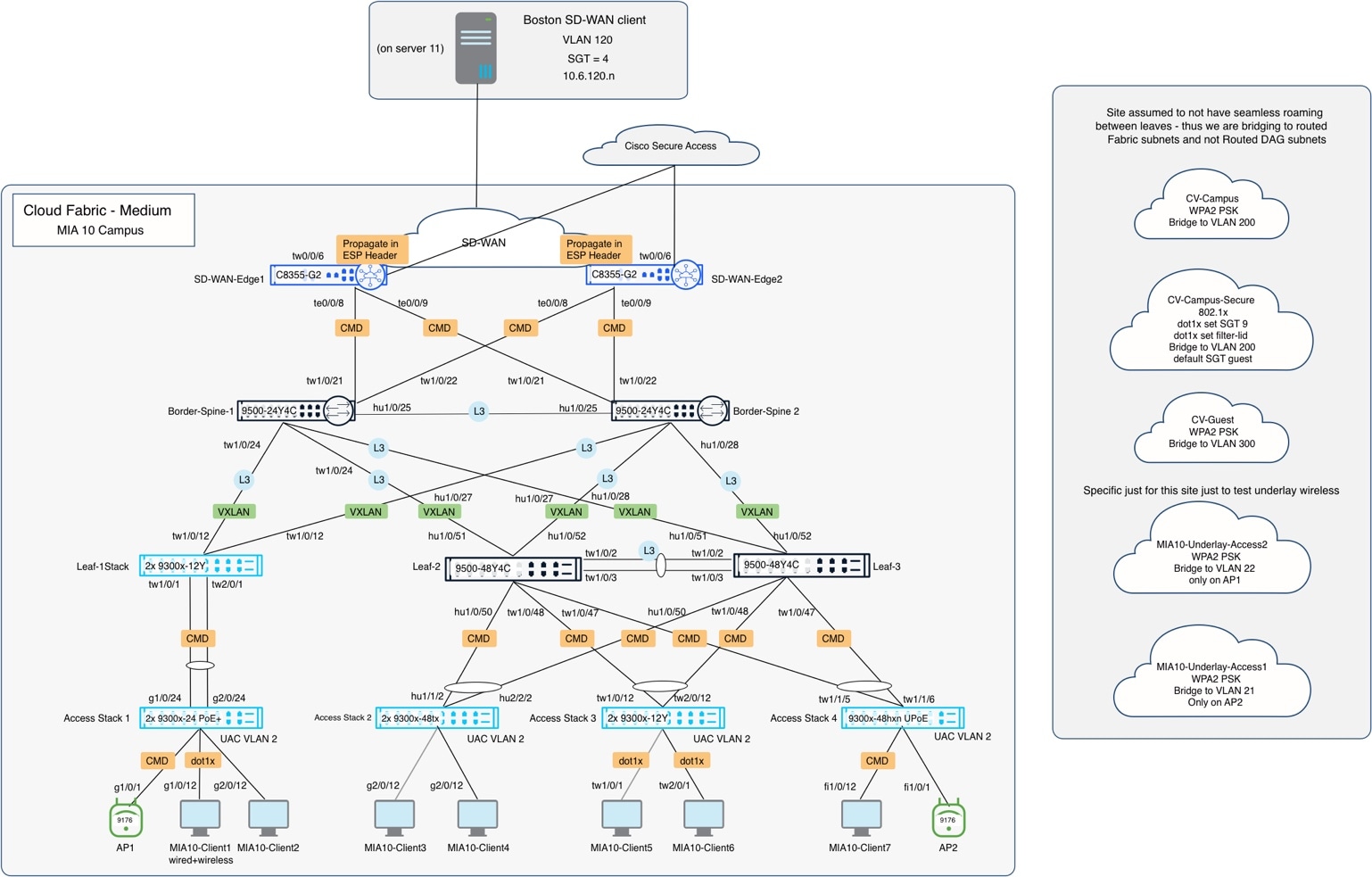
Cisco Identity Services Engine (ISE) integration
Integrate Cisco ISE with the Cisco Meraki Dashboard, enable pxGrid and ERS, establish the trust relationship, and configure authorization policies that assign appropriate VLAN and SGT attributes to campus and guest sessions across wired and wireless networks.
1. Log in to the Cisco Identity Services Engine admin portal.
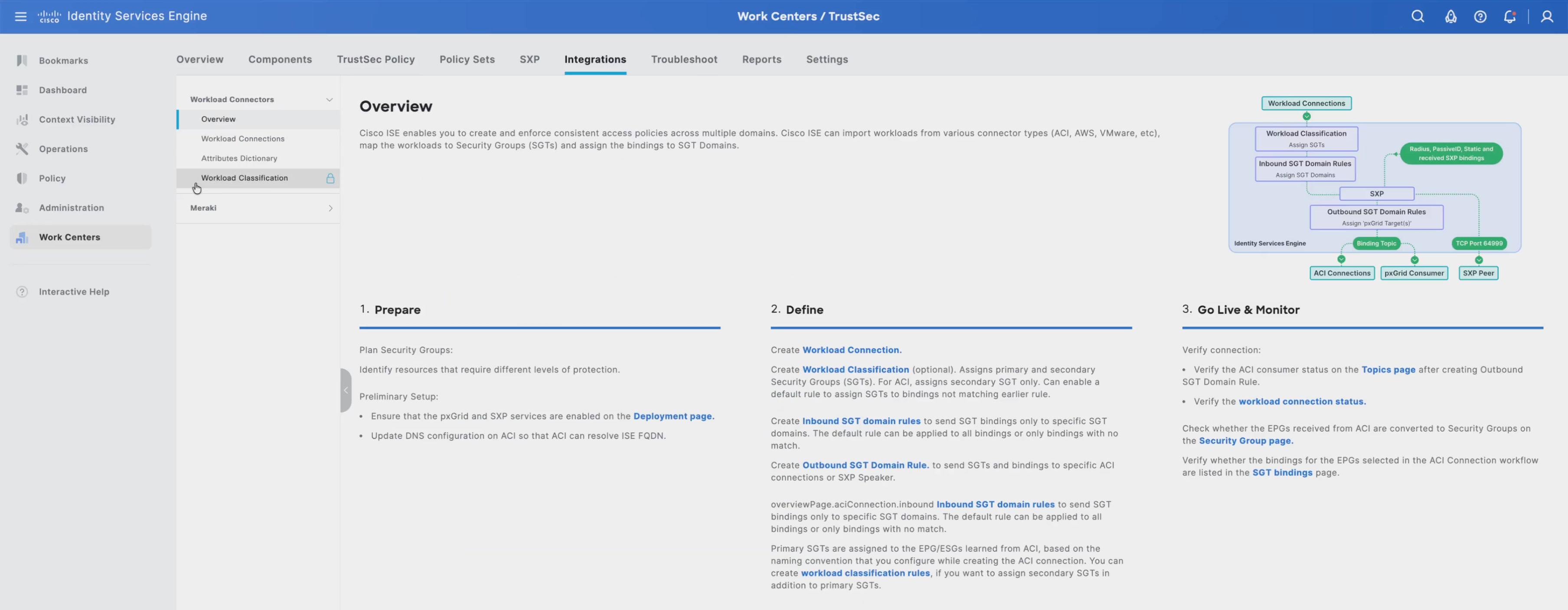
2. Navigate to Administration > System > Deployment to enable required Cisco ISE Services, including pxGrid and ERS
3. Select the Cisco ISE node used for the integration.
4. Enable the required services and personas:
◦ Policy Administration Node (PAN)
◦ Policy Service Node (PSN)
◦ pxGrid
5. Click Save.
6. Navigate to Administration > System > Settings > ERS Settings.
7. Enable ERS for Read/Write access.
8. Click Save.
9. Navigate to Administration > pxGrid Services > Summary.
10. Verify pxGrid services are running and available.
11. Navigate to Administration > pxGrid Services > Settings.
12. Enable Automatically approve new certificate-based accounts.
13. In the Cisco Meraki Dashboard UI, navigate to Settings > External Services > Authentication and Policy Servers to confirm Cisco ISE is reachable from Cisco Meraki Dashboard
14. Click Add server.
15. Select Cisco ISE as the policy server type.
16. Enter the Cisco ISE server IP address.
17. Enter the required Cisco ISE administrator credentials.
18. Confirm the Cisco ISE node role information, such as PAN and PSN, based on the deployment.
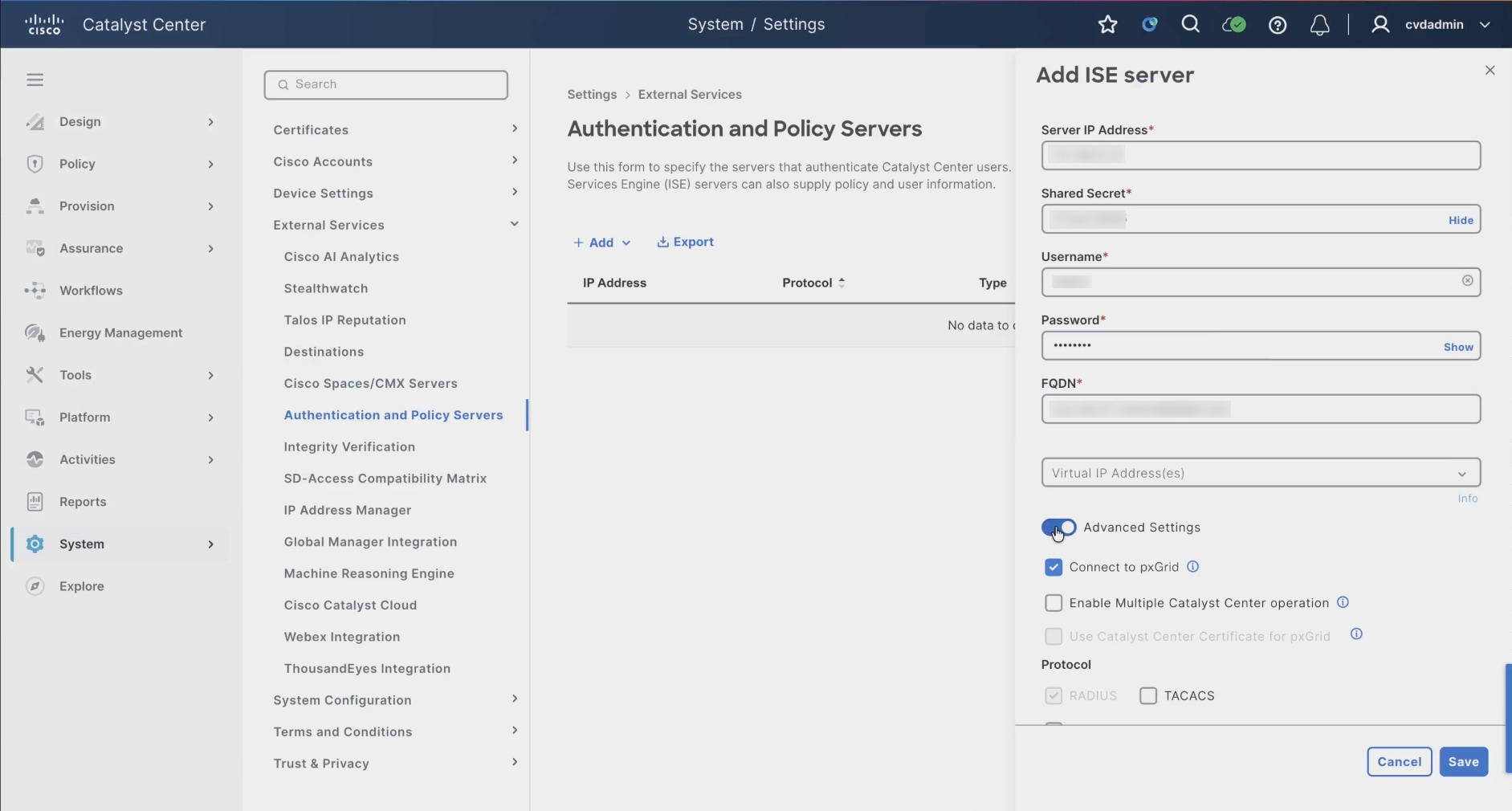
19. Open Advanced Settings.
20. Verify that pxGrid is enabled.
21. Leave optional multi-controller or advanced integration settings at the default values unless required by the deployment.
22. Click Save.
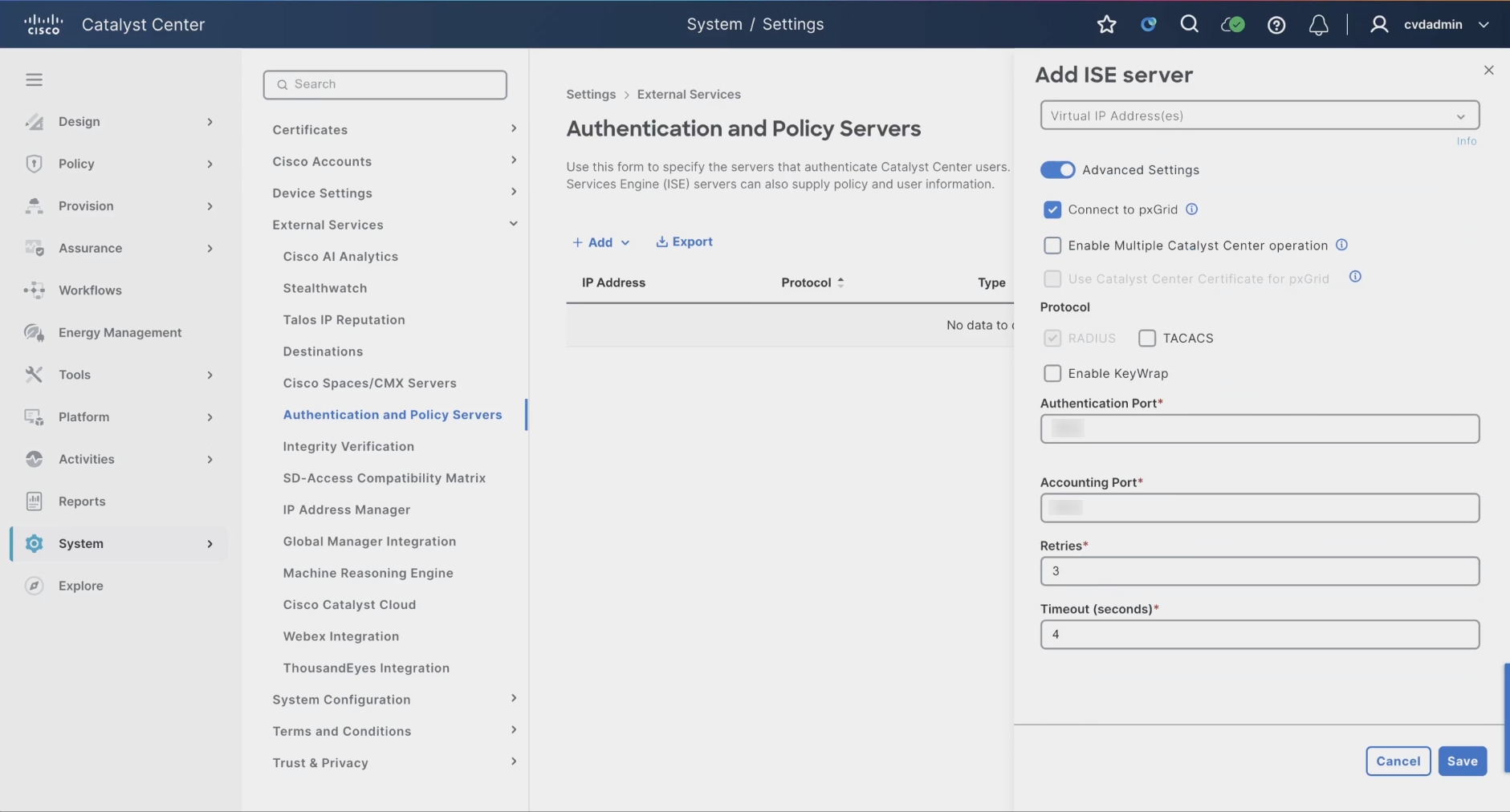
23. Wait for the dashboard to establish trust and complete the pxGrid connection.
24. Confirm the Cisco ISE integration status shows Active.
Note: Successful integration status confirms that the dashboard can reach Cisco ISE and that pxGrid trust was established.
ISE authorization policy matches attribute for campus (typically AD or Entra ID users) or a guest designation (via guest portal). When either of these conditions are matched then ISE can supply an authorization profile that attach the campus or guest VLAN and SGT to the authentication session to wired or wireless networks.
Create authorization profiles and policies
1. Navigate to Policy > Policy Elements > Results > Authorization > Authorization Profiles.
2. Click Add to create a Campus authorization profile.
3. Configure:
◦ Access Type = ACCESS_ACCEPT
◦ Campus VLAN assignment
◦ Campus Security Group Tag (SGT)
◦ Required access permissions and session controls
4. Click Save.
5. Click Add again to create a Guest authorization profile.
6. Configure:
◦ Access Type = ACCESS_ACCEPT
◦ Guest VLAN assignment
◦ Guest SGT assignment
◦ Guest-specific access restrictions or ACL policies
7. Click Save.
8. Navigate to Policy > Policy Sets.
9. Select the applicable wired or wireless policy set.
10. Under Authorization Policy, click Add Rule.
11. Create a Campus user authorization rule that matches:
◦ Active Directory or Entra ID user attributes
◦ 802.1X authentication results
◦ Corporate identity or posture conditions
12. Assign the Campus authorization profile to the rule.
13. Save the rule.
14. Create a Guest user authorization rule that matches:
◦ Guest portal authentication
◦ Guest identity groups
◦ Sponsored guest access conditions
15. Assign the Guest authorization profile to the rule.
16. Save the rule.
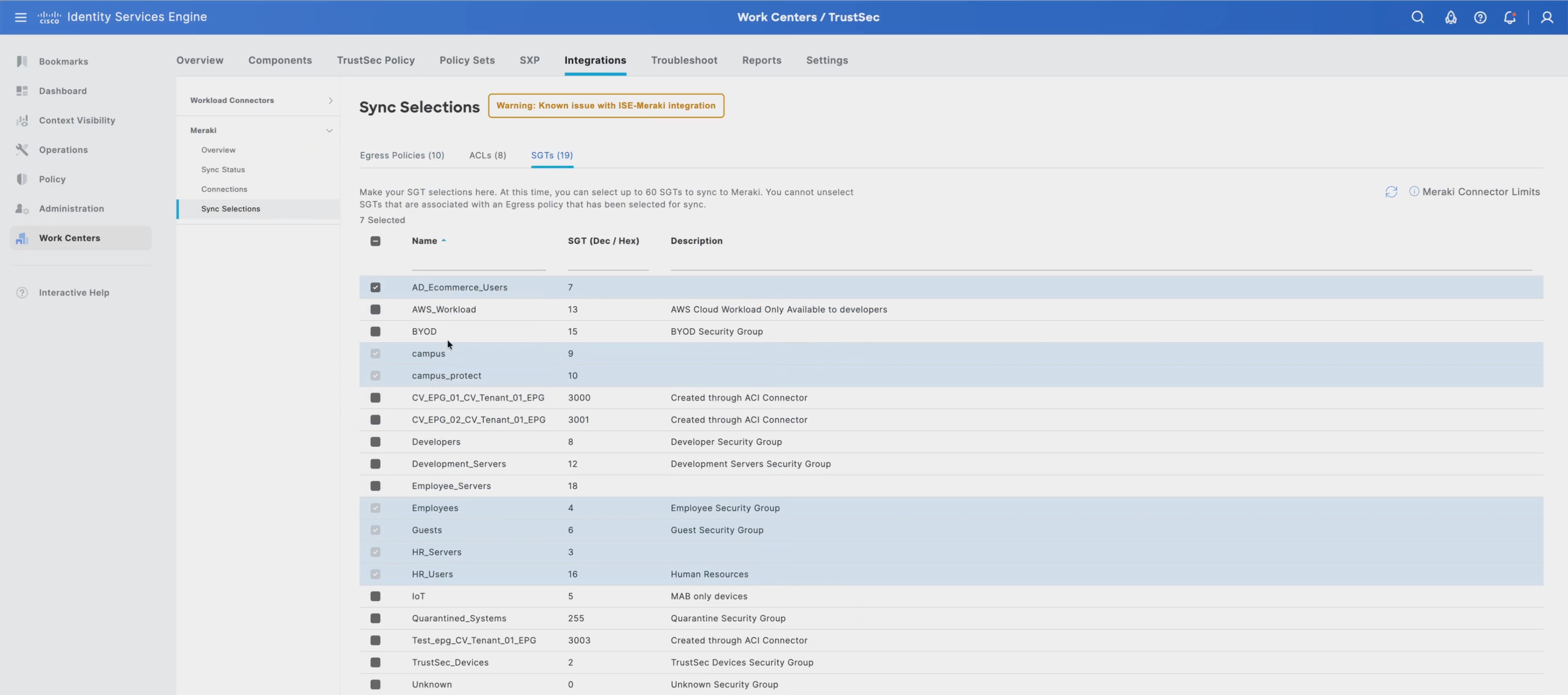
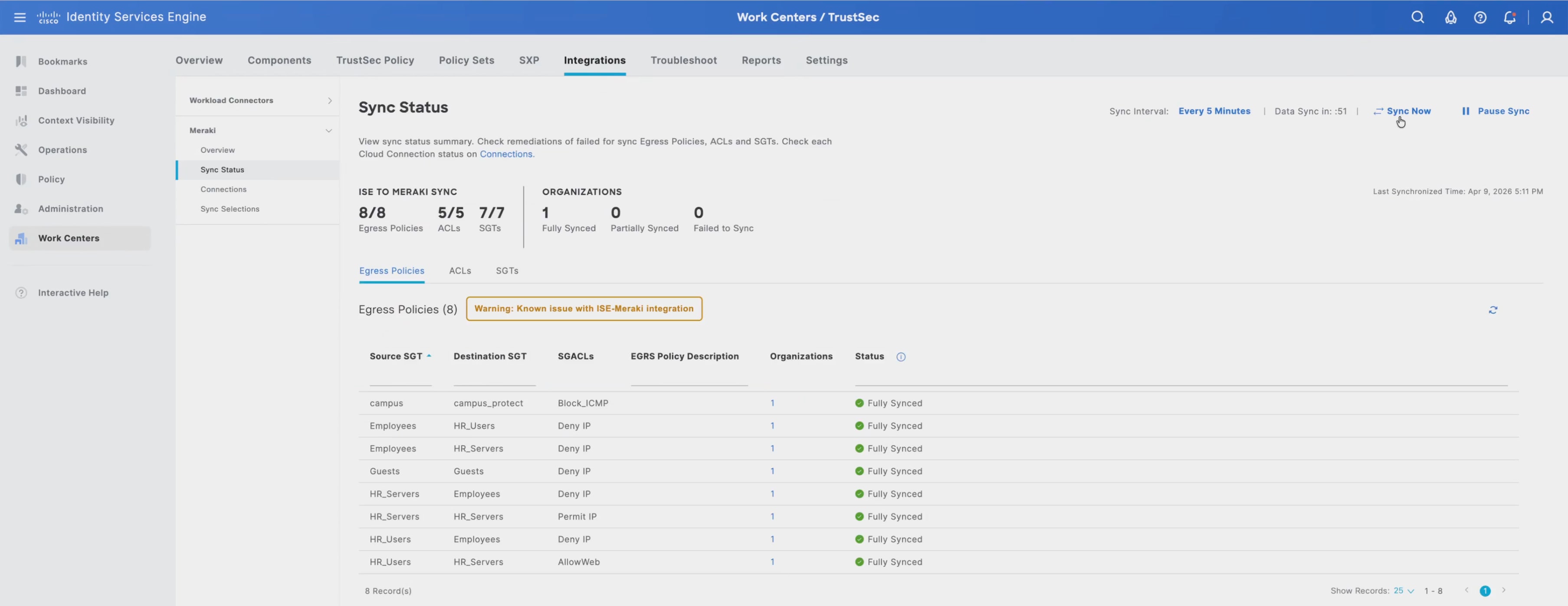
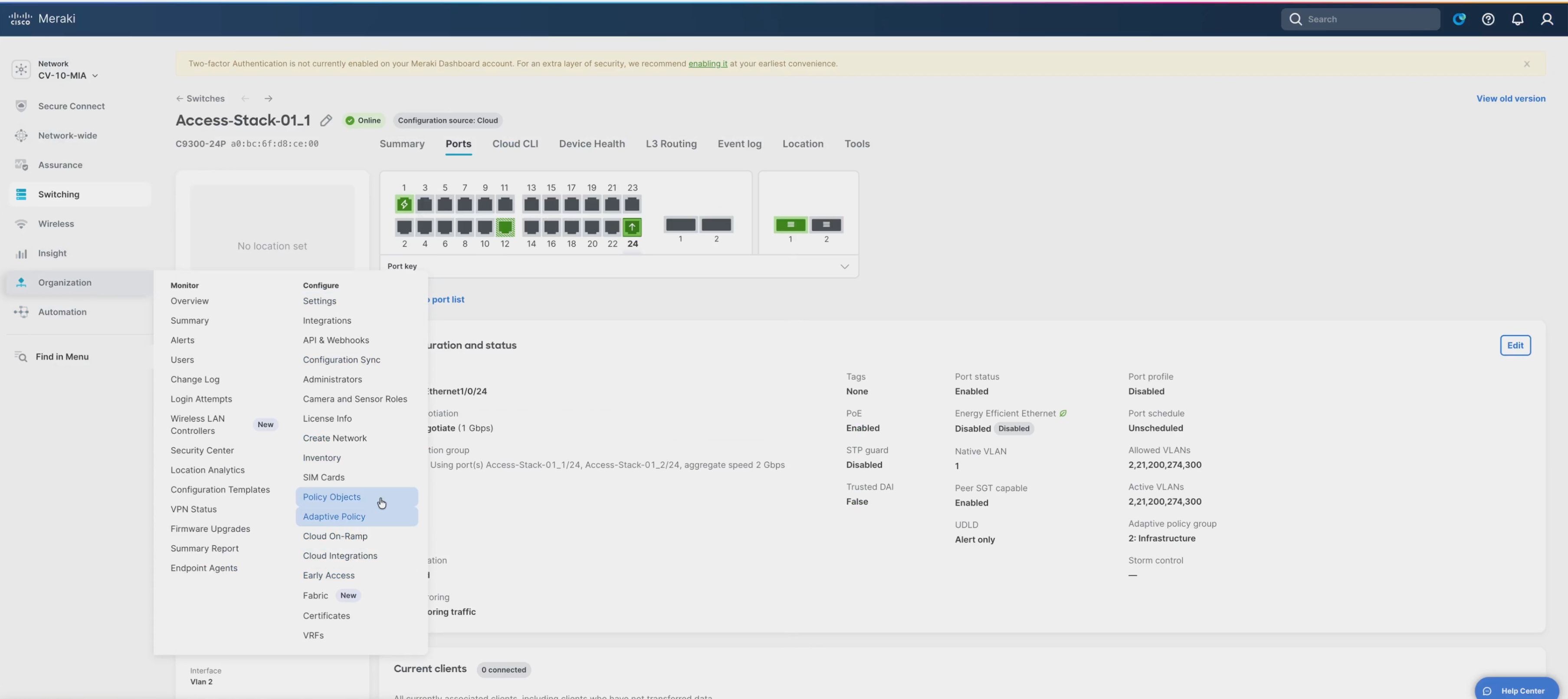
Define network authentication devices
1. Enter a descriptive device name and specify the device IP address or subnet.
2. Optionally assign device groups, location groups, and device type classifications to support administrative organization and policy mapping.
3. Configure the shared secret used for RADIUS or TACACS+ communication between the device and Cisco ISE.
4. Enable the required protocol services, including:
a. RADIUS Authentication
b. RADIUS Accounting
c. TACACS+ Administration
5. Define any required device-specific attributes, including:
a. Change of Authorization (CoA)
b. SNMP settings
c. Profiling configuration
d. Device profiling probes
6. Associate the device with the appropriate policy groups and administrative domains to support consistent policy enforcement and operational management.
7. Click Save to commit the configuration.
8. Verify that the device appears in the Cisco ISE Network Devices inventory.
9. Confirm successful communication between the device and Cisco ISE by:
a. Reviewing live authentication logs
b. Validating RADIUS connectivity
c. Testing administrator authentication workflows if TACACS+ is enabled
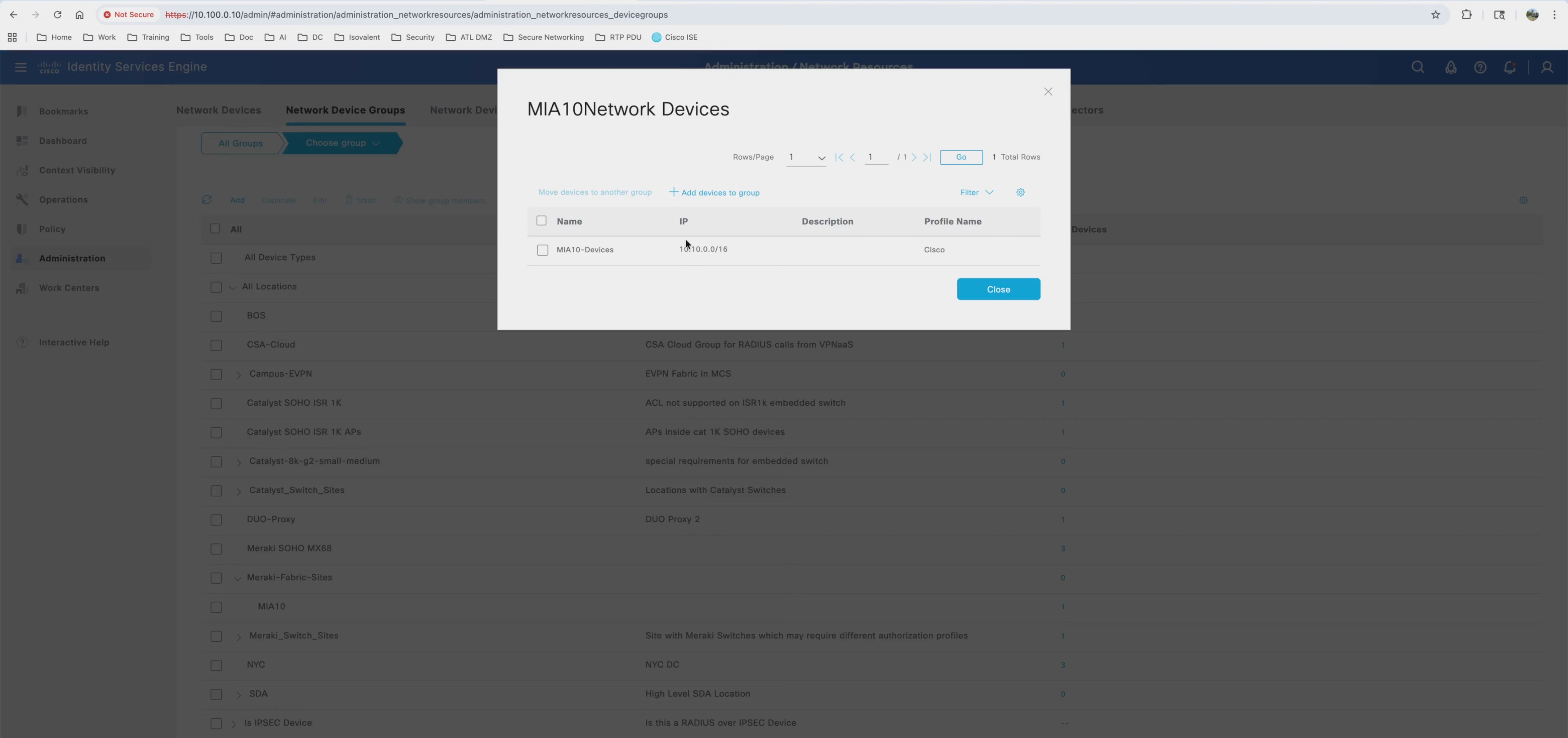
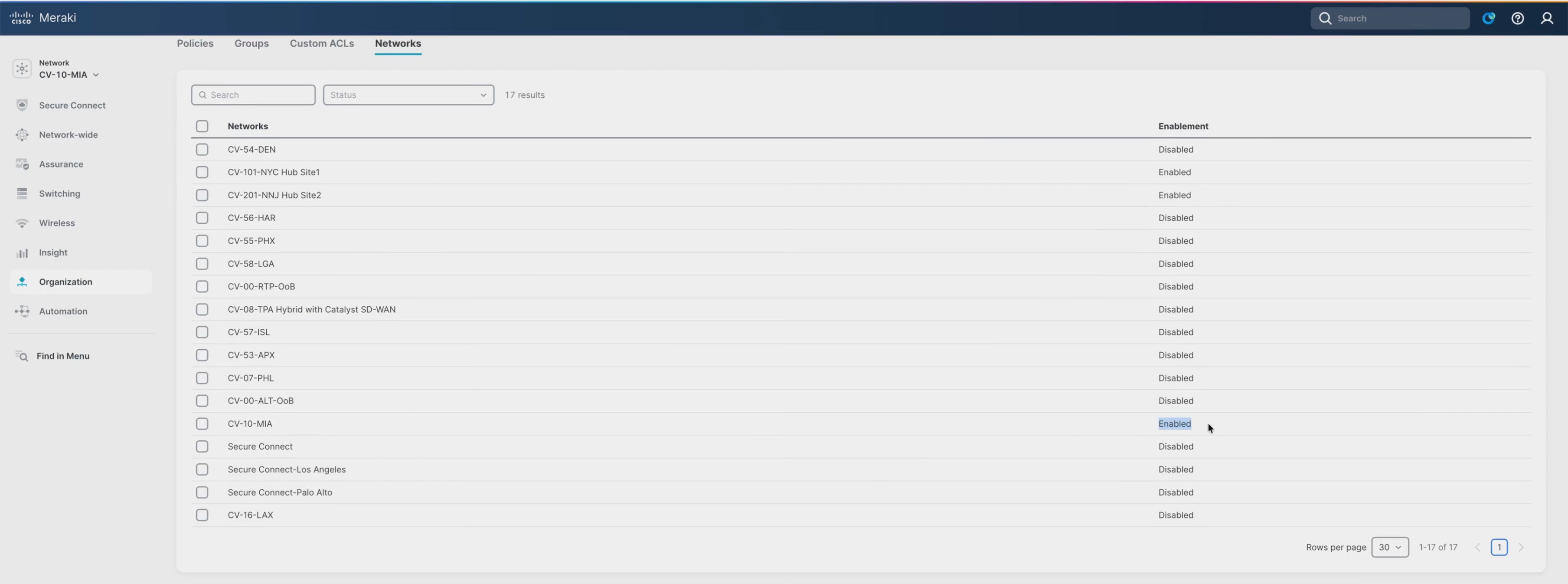
Define client authentication and authorization policies
1. From the Cisco ISE UI, navigate to Policy > Policy Sets.
2. Create separate policy sets including:
a. Corporate wired access
b. Corporate wireless access
c. Guest wireless access
d. Infrastructure administration access
e. IoT or non-802.1X device access
3. Configure policy set conditions by matching:
a. Meraki SSIDs
b. Wired access switch ports
c. RADIUS NAS identifiers
d. Device profiling results
e. Fabric location groups
f. User identity groups
4. Within the corporate wired and wireless policy sets, configure authentication rules to use these enterprise identity sources:
a. Microsoft Active Directory
b. Cisco ISE Internal Users
c. Certificate-based EAP-TLS authentication
d. PEAP for user-based authentication workflows
5. Configure MAC Authentication Bypass (MAB) rules for non-802.1X endpoints
6. Configure the authentication rule order so that certificate-based authentication and 802.1X methods are evaluated before fallback MAB policies.
7. Navigate to the Authorization Policy section within each policy set and select Add Rule to create authorization policies that determine access permissions after successful authentication.
8. Configure authorization conditions.
9. Navigate to Policy > Policy Elements > Results > Authorization > Authorization Profiles.
10. Click Add to create new authorization profiles.
11. Configure the corporate authorization profiles to dynamically assign:
a. VLANs where required
b. Security Group Tags (SGTs)
c. Downloadable ACLs (dACLs)
d. Adaptive Policy enforcement attributes
e. Session control parameters
12. Configure guest authorization profiles to redirect unauthenticated users to the Cisco ISE guest portal and assign guest users to the Guest VRF or guest segmentation policies.
13. Configure IoT and unmanaged endpoint authorization profiles to apply restricted-access policies aligned with Zero Trust segmentation principles and SNRA micro-segmentation guidance.
14. Associate the authorization profiles with the appropriate authorization rules to ensure users and devices are dynamically mapped into the correct segmentation and policy domains after successful authentication.
15. Verify that the authorization policies preserve segmentation consistency across the campus fabric by ensuring that SGT assignments and policy classifications propagate correctly between:
a. Meraki MS switches
b. Cisco cloud-managed wireless infrastructure
c. Fabric overlays
d. Upstream security enforcement points
e. External services integrated through the SNRA architecture
16. Click Save to commit the authentication and authorization policies.
17. Navigate to Operations > RADIUS > Live Logs.
18. Validate successful policy operation by confirming:
a. Successful user authentication
b. Correct authorization profile assignment
c. Proper SGT or VLAN mapping
d. Guest VRF assignment for guest users
e. Successful MAB processing for IoT devices
f. Consistent policy enforcement across wired and wireless access domains
g. Proper Adaptive Policy and TrustSec classification propagation
Define security groups
1. From the Cisco Identity Services Engine UI navigate to Work Centers > TrustSec > Components > Security Groups.
2. Click Add to create Security Group Tags (SGTs) that align with the operational domains used within the cloud-managed fabric deployment.
3. Create SGTs for the primary identity and endpoint classifications used within the validated deployment, including:
a. Corporate campus users
b. Infrastructure administration endpoints
c. Guest wireless users mapped to the Guest VRF
d. IoT and operational technology endpoints authenticated through MAB workflows
e. Shared collaboration and voice endpoints
f. Quarantine or restricted-access endpoints
4. For each SGT:
a. Define a descriptive Security Group Name
b. Assign the Security Group Tag value
c. Document the intended segmentation role within the fabric overlay environment
5. Configure SGT definitions where:
a. VRFs enforce macro-segmentation boundaries
b. SGTs enforce identity-based micro-segmentation policies across the EVPN/VXLAN fabric overlay
6. Click Save to commit the Security Group configuration.
7. Navigate to Work Centers > TrustSec > Components > Policy Matrix.
8. Define Adaptive Policy relationships that enforce east-west communication restrictions between SGTs.
9. Configure policy matrix rules including:
a. Restricting guest users to internet-only access within the Guest VRF
b. Limiting IoT endpoint communication to approved management and application services
c. Allowing administrative SGTs to access infrastructure-management services
d. Preventing unauthorized communication between operational domains across the fabric overlay
10. Configure policy relationships to preserve consistent identity-based enforcement across:
a. Wired access
b. Wireless access
c. Fabric overlays
d. Border-connected external networks
e. Upstream security enforcement domains
11. Log in to the Cisco Meraki Dashboard administrative interface.
12. Navigate to Organization > Configure > Adaptive Policy.
13. Verify that the SGTs created in Cisco ISE synchronize successfully into the Cisco Meraki Dashboard Adaptive Policy environment through pxGrid integration.
14. Confirm that synchronized SGTs are available for assignment within:
a. Fabric-enabled wired access policies
b. Corporate wireless SSIDs
c. Guest wireless services
d. Group policy assignments
e. Fabric-connected access VLANs
15. Navigate to Network-wide > Configure > Group Policies.
16. Associate the appropriate Adaptive Policy classifications and SGT mappings with:
a. Corporate user access workflows
b. Guest access services
c. IoT onboarding policies
d. Infrastructure administration workflows
e. Restricted or quarantine access domains
17. Verify that SGT classifications learned during Cisco ISE authentication workflows propagate correctly through:
a. Meraki MS fabric switches
b. Cisco cloud-managed wireless infrastructure
c. VXLAN fabric overlays
d. Border eBGP handoff boundaries
e. Upstream policy enforcement points
18. Navigate to Organization > Monitor > Adaptive Policy.
19. Validate that Adaptive Policy state, SGT propagation, and identity-based policy enforcement are functioning consistently.
20. Navigate to Operations > RADIUS > Live Logs in Cisco ISE and confirm:
a. Successful authentication and authorization processing
b. Proper SGT assignment
c. Correct authorization profile mapping
d. Guest VRF policy assignment
e. Consistent policy enforcement across wired and wireless fabric access domains
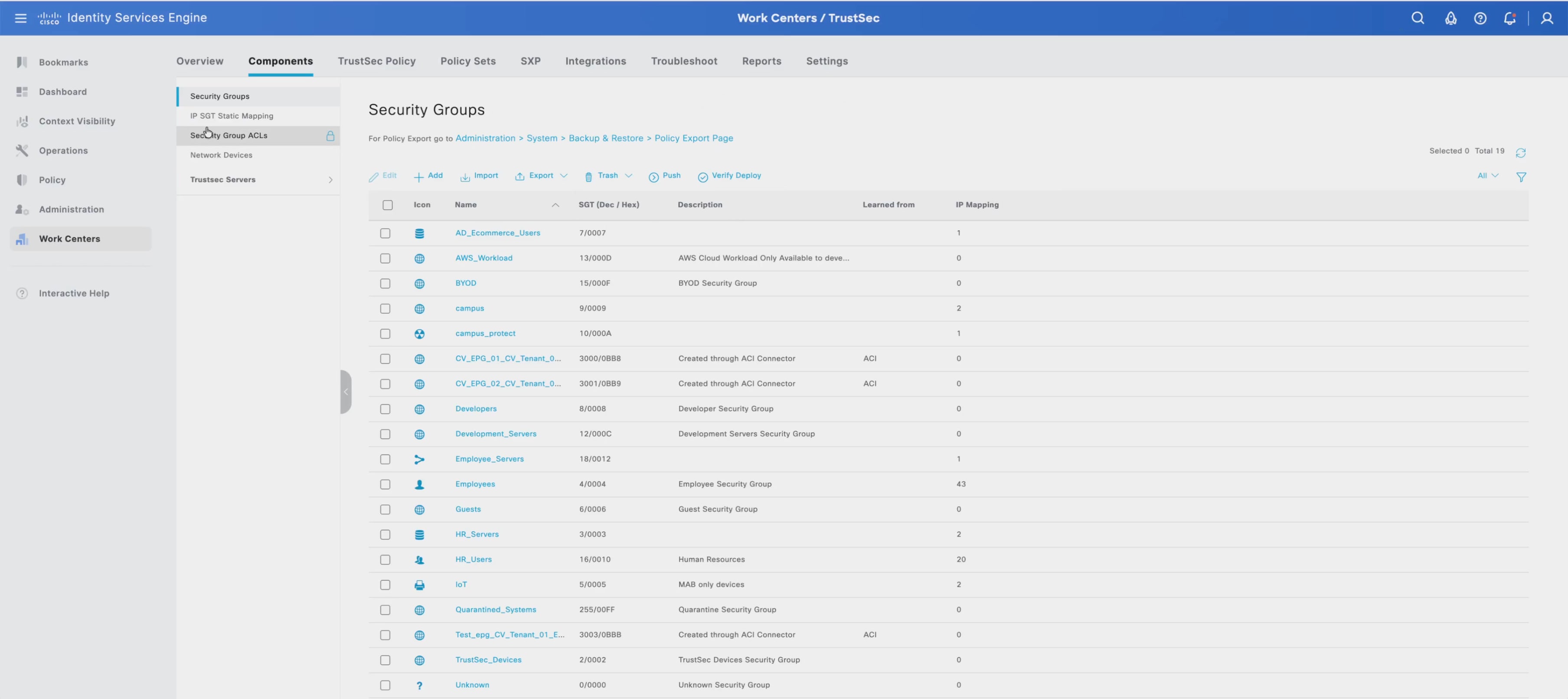
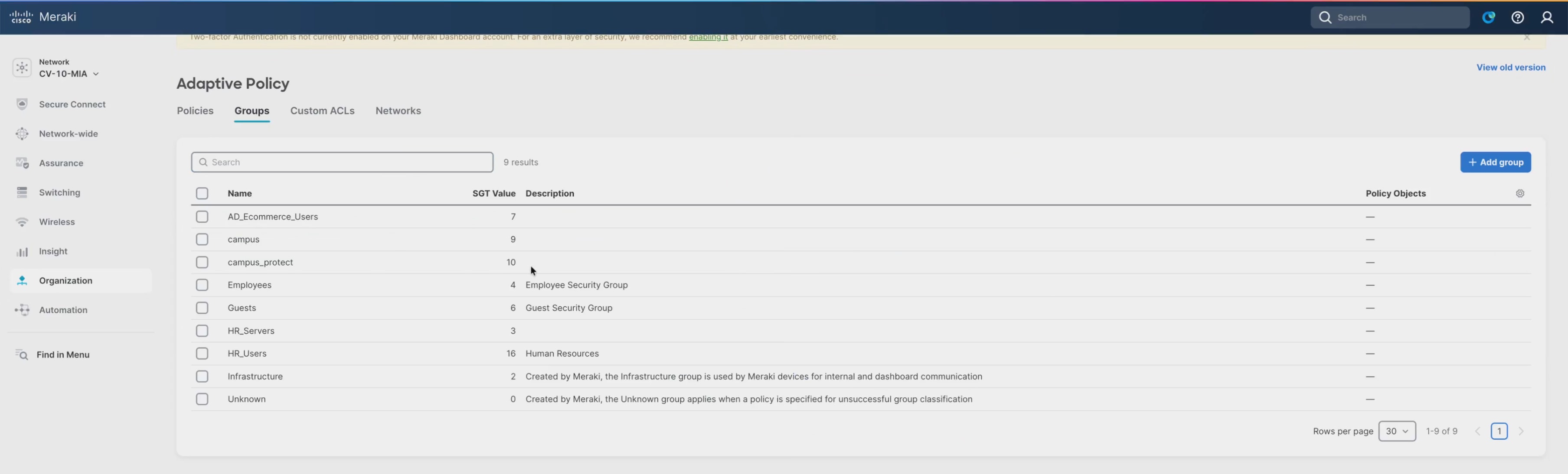
Define SGT-DGT access control policies
1. From the Cisco ISE UI, navigate to Work Centers > TrustSec > Components > Policy Matrix.
2. In the policy matrix, locate the Source Security Group Tag row for the traffic initiator.
3. Locate the Destination Security Group Tag column for the protected destination.
4. Select the SGT-to-DGT cell that represents the required traffic relationship.
5. Define the access control action for the selected SGT-DGT pair.
6. Configure the policy relationships required for the SNRA medium-scale fabric deployment:
| Source SGT |
Destination SGT |
Access Intent |
| Corporate Campus Users |
Enterprise Services |
Permit approved application access |
| Corporate Campus Users |
IoT / OT Endpoints |
Deny unnecessary east-west access |
| Guest Users |
Internal Campus Resources |
Deny |
| Guest Users |
Internet Edge / Guest VRF Services |
Permit only guest egress path |
| IoT / MAB Endpoints |
Enterprise Services |
Permit only required application services |
| IoT / MAB Endpoints |
Corporate Users |
Deny |
| Infrastructure Admins |
Network Infrastructure |
Permit management access |
| Quarantine Endpoints |
Remediation Services |
Permit remediation only |
| Quarantine Endpoints |
Corporate / Internal Resources |
Deny |
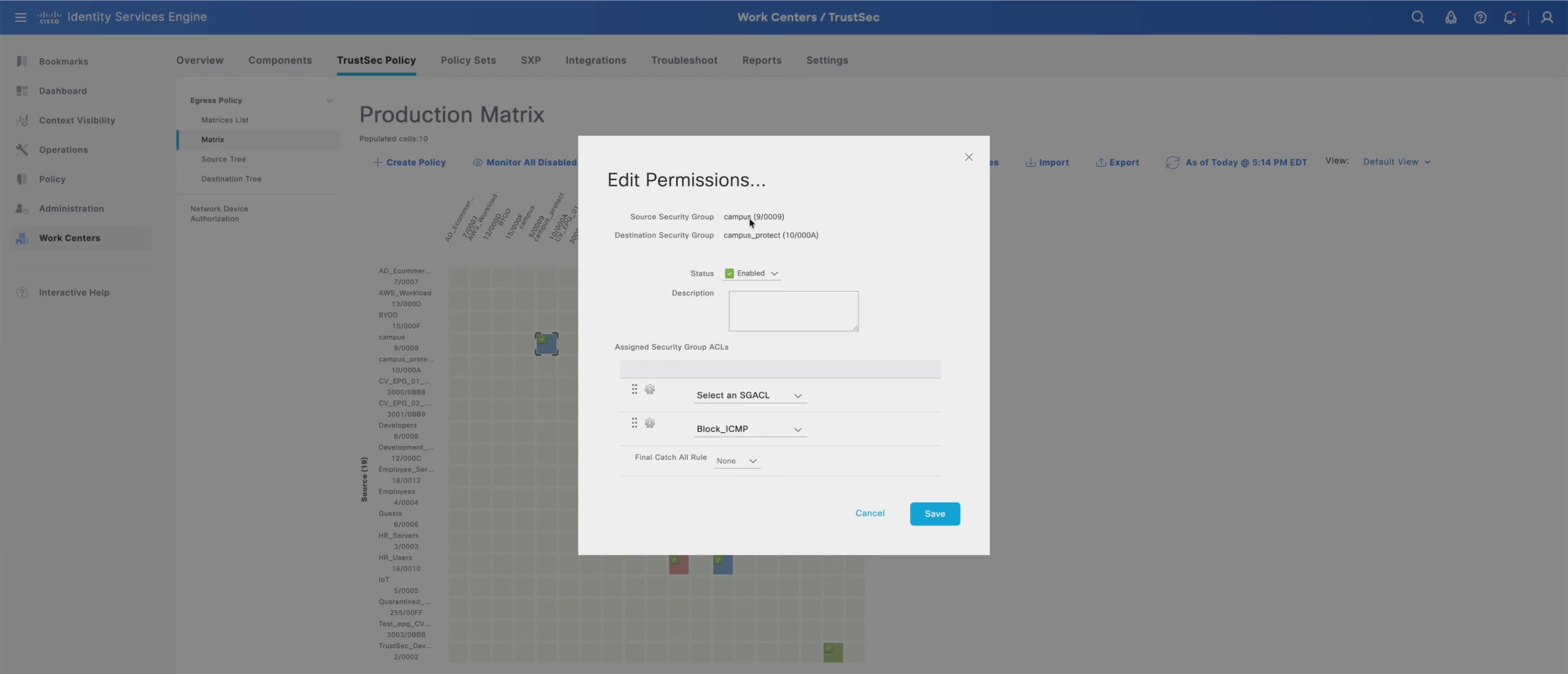
7. For permitted relationships, select or create the SGACL that matches the validated access intent.
8. For denied relationships, apply a deny policy that blocks unauthorized east-west communication across the fabric overlay.
9. Ensure the Guest SGT policies preserve the Guest VRF isolation model by allowing only the guest egress path and denying access to internal campus destinations.
10. Ensure IoT and MAB endpoint policies restrict communication to approved services only, instead of allowing broad access to corporate user or infrastructure domains.
11. Ensure Infrastructure Admin SGT policies allow management access only to infrastructure and shared services required for campus operations.
12. Save the TrustSec policy matrix changes in Cisco ISE.
13. Log in to Cisco Meraki Dashboard.
14. Navigate to Organization > Configure > Adaptive Policy.
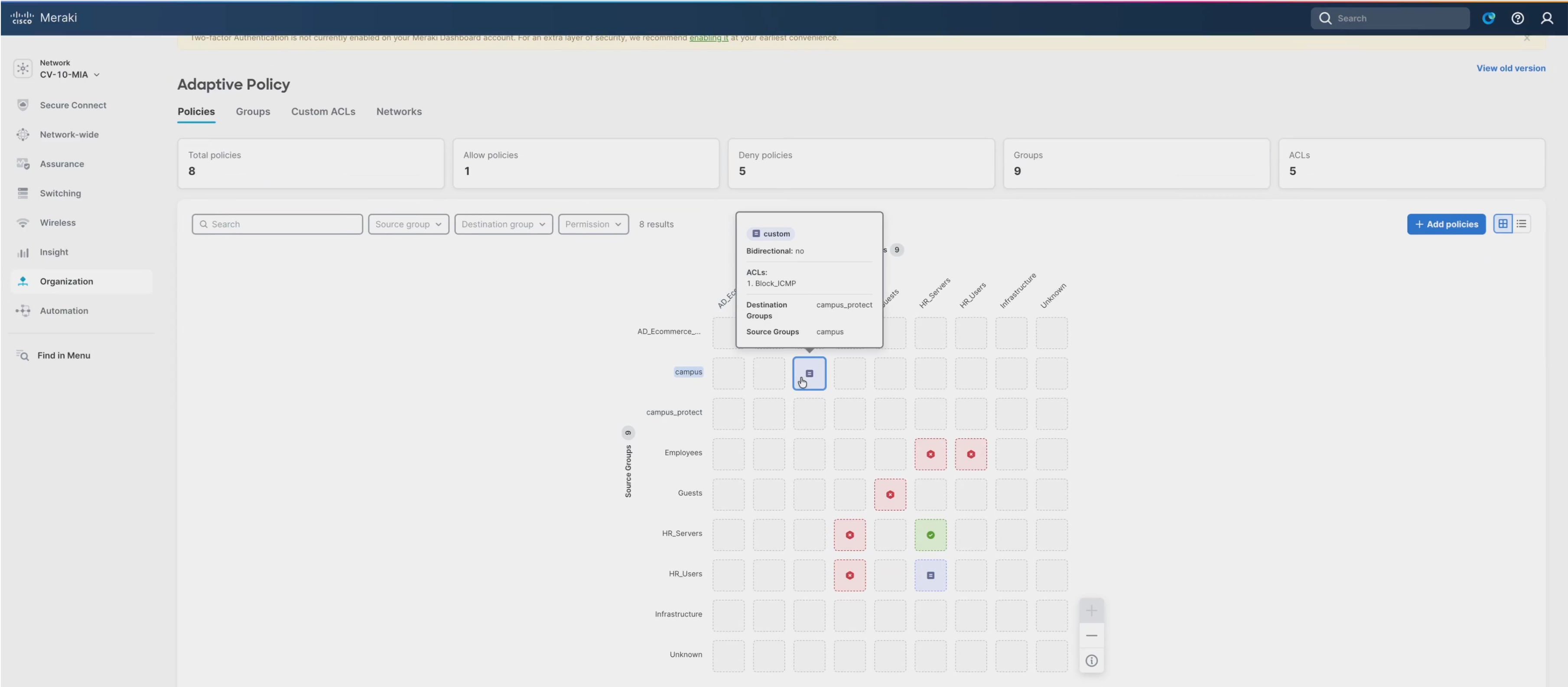
15. Verify that the ISE-defined SGTs, SGACLs, and SGT-DGT policy relationships are available in the Adaptive Policy configuration. Cisco documents Adaptive Policy as using SGTs for policy enforcement, including dynamic client tagging through RADIUS assignment.
16. Review the Adaptive Policy matrix and confirm that the SNRA policy relationships appear for:
a. Corporate campus users
b. Guest users mapped to the Guest VRF
c. IoT and MAB endpoints
d. Infrastructure administrators
e. Quarantine endpoints
17. Confirm that the policy matrix applies to the participating Meraki MS fabric switches and Cisco cloud-managed wireless infrastructure that enforce Adaptive Policy in the cloud-managed campus fabric.
18. Navigate to Organization > Monitor > Adaptive Policy.
19. Validate that SGT-DGT policy state is present and synchronized across the Adaptive Policy domain.
20. In Cisco ISE, navigate to Operations > RADIUS > Live Logs.
21. Validate that authenticated users and endpoints receive the expected SGT assignments.
22. Test traffic flows across the fabric to confirm that:
a. Corporate users reach approved services.
b. Guest users remain isolated in the Guest VRF path.
c. IoT endpoints cannot initiate unauthorized east-west access.
d. Infrastructure administrators can reach approved management services.
e. Quarantine endpoints reach remediation services only.
For more information on integrating Cisco ISE and Cisco Meraki:
· Adaptive_Policy_and_Cisco_ISE
· Adaptive_Policy_Group_Tag_(SGT)_Creation_in_Dashboard
Extended assurance and operational integrations, including Cisco ThousandEyes, cross-domain policy context, dashboards, alerts, and ITSM workflows, are described in Step 5.
Integrating SNA with XDR and ISE
This section explains the integration of Cisco Secure Network Analytics (SNA) with Extended Detection and Response (XDR) and Identity Services Engine (ISE).
SNA provides continuous visibility across the routed underlay, VXLAN fabric overlays, wireless infrastructure, WAN edge connectivity, and integrated security domains. Telemetry collected from cloud-managed fabric switches, wireless infrastructure, firewalls, NetFlow/IPFIX exports, and security event sources is correlated to identify anomalous behavior, east-west lateral movement, command-and-control activity, and potential data exfiltration within the campus fabric environment. SNA further enhances visibility by analyzing encrypted traffic patterns without requiring decryption, enabling threat detection while preserving encrypted application workflows commonly used across modern enterprise environments.
Cisco XDR extends this visibility model by aggregating telemetry from the SNRA cloud-managed campus fabric, security infrastructure, identity services, endpoints, DNS, cloud applications, and third-party integrations into a unified cloud-native operations platform. Integrated threat intelligence from Cisco Talos, combined with AI-driven analytics and automated correlation, enables the platform to prioritize incidents, reduce false positives, and accelerate detection and response workflows across the distributed SNRA architecture.
This operational model implements the Detect and Respond functions and uses Unified Management and Agentic Operations as the common operating model. SNA provides specialized network detection, XDR correlates evidence across domains and coordinates response, and ISE contributes identity and SGT context to improve investigation and containment.
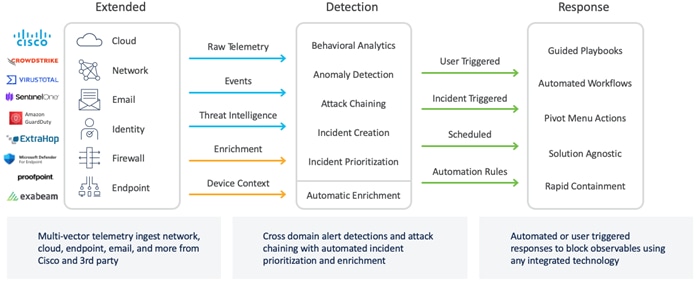
As complementary solutions, SNA can be used as an input to XDR, which further improves the value of the solution. SNA provides deep specialized network analytics and behavioral detection, while XDR offers a broader multi-source telemetry correlation and response platform. Integrating SNA with XDR enhances threat detection coverage and investigation capabilities by combining detailed network insights with endpoint, email, and identity data which enables more efficient and comprehensive security operations.
Integrating SNA with Cisco ISE via pxGrid enriches every SNA flow record with user, device profile, and Security Group Tag (SGT) context, and unlocks Host Group Automation driven by ISE endpoint attributes.
This section outlines the steps and values used for integrating the MIA10 SNA Manager with Cisco XDR in the SNRA reference topology. These hostnames, domains, and regions are examples and should be replaced with values specific to the deployment.
Reference values:
● SNA Manager: MIA10-SNA-MGR-01 (10.100.10.50)
● SNA Flow Collector: MIA10-SNA-FC-01 (10.100.10.51)
● SNA Domain: SNRA-MIA10
● Cisco XDR/SCC region: North America (api-sse.cisco.com)
● Software Version: Ensure the SNA Manager is running version 7.5.3 or later.
● Licensing: Enable the Threat Feed license under Central Management > Help > Appliance Configuration > Threat Feed. This is required to generate the "Bot Infected Host", “Suspect Data Loss” & “Suspect Data Hoarding” alarms that are sent to XDR for correlation.
● Connectivity: Confirm that outbound HTTPS (TCP/443) is permitted from MIA10-SNA-MGR-01 to api-sse.cisco.com and sensor.ext.obsrvbl.com.
● Cleanup: If alarms were previously promoted to XDR via a webhook, disable the action under Configure > Detection > Response Management > Actions.
Enable Security Cloud Control on the SNA Manager
1. On MIA10-SNA-MGR-01, navigate to Configure > Global > Central Management.
2. Open Edit Appliance Configuration on the Manager row.
3. Navigate to External Services > General tab and select Cisco Security Cloud Control.
4. Click Apply Settings.
5. On MIA10-SNA-MGR-01, navigate to Configure > Integrations > Cisco XDR > Device Registration > New Device Registration.
6. Select the Cloud Region as North America.
7. Select the Registration as Register Automatically.
8. Click Save.
The Manager will appear in the Security Cloud Control/Security Services Exchange portal (https://admin.sse.itd.cisco.com/) under Devices with a "Registered" status.
Note: For manual enrollment, the administrator logs in to the SCC/SSE portal, generates a device token under Devices > Generate Token by clicking the plus sign, and pastes it into the Register Using Device Token field on the SNA Manager.
Set alarm severity and policy
Only three specific SNA alarms are forwarded to XDR:
● Bot Infected Host – Successful C&C Activity
● Suspect Data Hoarding
● Suspect Data Loss
Note: Analytic Alerts (which are not the same as Alarms) are forwarded to XDR.
1. Navigate to Configure > Detection > Alarm Severity and set the severity for these three alarms to Critical or Major.
2. Alarms with lower severity are not forwarded.
3. Enable Policy for the Alarms.
4. Navigate to Configure > Detection > Policy Management > Core Events.
5. For each of the three alarms, set both When Host is Source and When Host is Target to On + Alarm.
6. Click Save.
Configure the SNA to XDR Data Feed:
1. On MIA10-SNA-MGR-01, navigate to Configure > Integrations > Cisco XDR > Cisco XDR Configuration.
2. Click Add New Configuration.
3. Enter the Domain as SNRA-MIA10.
4. Enable the following options:
a. Send security findings to Cisco XDR
b. Cisco XDR dashboard tiles service requests
c. Cisco XDR investigation enrichment requests
5. Set the Number of top security events to 100 and Period of time(days) to 7.
6. Click Save.
The API Status field on the configuration row will change to Connected, confirming the feed.
SNA Module integration with XDR and validation with CVD traffic
1. In Cisco XDR (https://xdr.security.cisco.com), navigate to Administration > Integrations > Cisco > Secure Network Analytics > Get Started.
2. Add the module and enable the SNA enrichment and dashboard tiles (Top Alarming Hosts, Top Alarms By Count, Top Inside Host Groups by Traffic, etc.).
3. In Cisco XDR, open Investigate and pivot on the IP address of a Corporate Campus user in MIA 10 to verify sightings sourced from the SNA module for the SNRA-MIA10 domain.
4. Trigger a "Suspect Data Loss" condition from an MIA10 host to the Internet via the NYC100 Secure Firewall.
5. Verify that the alarm raised in SNA and that the corresponding incident appears in Cisco XDR within few minutes.
6. Open Cisco XDR dashboard and verify that the "Top Alarming Hosts" and "Top Alarms By Count" tiles for MIA10-SNA-MGR-01 are populated with last-24-hour data.
For the complete procedure with screenshots, refer to:
● Cisco Secure Network Analytics - Cisco XDR Integration Guide 7.5.3
This section outlines the steps and values used for integrating the MIA10 SNA Manager with ISE in the SNRA reference topology.
Reference values:
● SNA Manager: MIA10-SNA-MGR-01 (10.100.10.50)
● ISE PAN (admin UI): NYC100-ISE-PAN-01 (10.100.20.10)
● ISE pxGrid primary: NYC100-ISE-PXG-01 (10.100.20.11)
● ISE pxGrid secondary: NYC100-ISE-PXG-02 (10.100.20.12)
● pxGrid client name (must be unique in ISE): sna-mia10-mgr01
● Certificate friendly name: sna-mia10-mgr01-pxgrid
● Ensure the SNA Manager can resolve the FQDNs of all ISE nodes (PAN, MnT, pxGrid).
● Verify that firewalls between the SNA Manager and the ISE cluster permit TCP/8910 (pxGrid) and TCP/443 (ERS/REST).
● Ensure ISE 3.x with pxGrid persona is enabled on NYC100-ISE-PXG-01 and NYC100-ISE-PXG-02.
Generate the Certificate Signing Request (CSR) on the SNA Manager
1. On MIA10-SNA-MGR-01, navigate to Configure > Global > Central Management > Edit Appliance Configuration > Appliance > Additional SSL/TLS Client Identities > Add New.
2. Select Yes (generate CSR), click Next and enter the following values.
◦ RSA Key Length: 4096
◦ Common Name (CN): sna-mia10-mgr01
◦ Organization: Cisco SNRA Lab
◦ OU: Security Operations
◦ Country / State / City: US / NC / RTP
3. Click Generate CSR.
4. Download CSR and save it as sna-mia10-mgr01.csr (Extended Key Usage clientAuth is included automatically).
Sign the CSR with the ISE internal CA (recommended):
1. On NYC100-ISE-PAN-01, navigate to Administration > pxGrid Services > Client Management > Certificates and fill in the Generate pxGrid Certificates form.
a. I want to: Generate a single certificate (with certificate signing request)
b. Certificate Signing Request Details: Paste the contents of sna-mia10-mgr01.csr
c. Description: SNA Manager pxGrid client (MIA10)
d. Certificate Download Format: PKCS12 (including certificate chain)
e. Certificate Password: <strong password — recorded in vault>
2. Click Create.
3. Download the resulting .zip which contains the signed client certificate and the ISE Internal Root CA chain.
Load the Signed Certificates to the SNA Manager:
1. On the MIA10-SNA-MGR-01, return to the Additional SSL/TLS Client Identities form, the post-CSR import dialog will be open. Enter the following values:
a. Friendly Name: sna-mia10-mgr01-pxgrid
b. File: sna-mia10-mgr01.p12 (extracted from the ISE zip)
c. Password: Certificate password set in Step 1 of Step 3.
2. Click Add Client Identity.
3. Click Apply Settings.
Add the ISE Root CA and ISE cluster to the SNA Trust Store
1. In the Edit Appliance Configuration view, navigate to General > Trust Store > Add New.
2. Upload the extracted ISE Internal Root CA chain with friendly name: ise-internal-root-ca and click Add Certificate.
3. Upload the extracted ISE pxGrid certificate with friendly name: ise-pxGrid-Cert and click Add Certificate.
4. On the SNA Manager, navigate to Configure > Integrations > Cisco ISE > Add new configuration.
5. Enter the following values:
a. Cluster Name: NYC100-ISE-Cluster
b. Certificate: sna-mia10-mgr01-pxgrid (the friendly name from Step 1 of Step 4)
c. PxGrid Node 1: NYC100-ISE-PXG-01.snra.lab (10.100.20.11)
d. PxGrid Node 2: NYC100-ISE-PXG-02.snra.lab (10.100.20.12)
e. Client Name: sna-mia10-mgr01
6. Verify that Enable Strict ISE Server Identity Verification is not checked.
7. Verify that integration options are enabled. Select the following:
a. Integration product: Cisco ISE
b. Adaptive Network Control
c. Static SGT Classification
d. Sessions
e. Track sessions derived from machine authentications
8. Click Save. The node status indicators next to the pxGrid nodes turn yellow (pending approval).
Approve the SNA pxGrid client in ISE
1. On NYC100-ISE-PAN-01, navigate to Administration > pxGrid Services > All Clients.
2. Locate sna-mia10-mgr01, select the row, and click Approve. After refreshing the SNA > Cisco ISE page, the node status indicators turn blue confirming the status as Connected.
Configure Host Group Automation from ISE
1. On MIA10-SNA-MGR-01, navigate to Configure > Detection > Host Group Management > Automation > Create > ISE. Enter the following:
a. Name: ISE-EndpointSync-MIA10
b. Description: Daily sync of ISE endpoints into SNA host groups
c. Parent Host Group: Inside Hosts
d. Host Group Name: ISE Endpoints (MIA10)
e. ISE Cluster Name: NYC100-ISE-Cluster
2. Verify that the following are selected/enabled in Advanced Options:
a. Enable baselining for hosts in the group
b. Disable security events using excluded services
3. Click Test Connection, then Create.
4. Enable the job in the table and click Run Now to initiate the first sync (will automatically sync once every 24 hours).
Validate identity enrichment across the CVD topology
Verify Session
1. Authenticate a wired Corporate Campus user via 802.1X on MIA10-Access-Stack-01 (Catalyst 9300)
2. Verify the session in NYC100-ISE-PAN-01 > Operations > RADIUS > Live Logs with the expected SGT.
Verify Enrichment
1. Navigate to SNA > Investigate > Flow Search.
2. Filter by the endpoint IP and verify that the flow record shows User, Endpoint Profile, and SGT fields are populated from ISE.
3. Repeat for a wireless user on a Cisco cloud-managed access point (Adaptive Policy SGT) in MIA10, and for users in BOS (SD-WAN branch) and DEN (Unified branch) to verify that all are returning enriched flows.
Verify Host Groups
1. Confirm that the host group tree under Inside Hosts > ISE Endpoints (MIA10) is populated with sub-groups by Endpoint OS, Endpoint Profile, and Security Group Tag after the Host Group Automation job completed.
For the complete procedure with screenshots, refer to:
● Cisco Secure Network Analytics:
◦ ISE and ISE-PIC Configuration Guide 7.5.3
◦ System Configuration Guide 7.5.3
● Troubleshoot SNA-ISE Integration Connection
Step 5: Integrate security and extended services
This step extends the cloud-managed deployment through assurance, telemetry, policy-context, and operational integrations beyond the core campus fabric. Cisco ThousandEyes provides end-to-end visibility into application reachability, network paths, WAN and Internet performance, availability, and user experience, while Common Policy Context and connected services carry identity, posture, group, workload, risk, and telemetry information across enforcement and management domains. These integrations support consistent policy application, centralized assurance, governed automation, and operational workflows across campus, branch, cloud, and data-center environments.
Cisco ThousandEyes provides end-to-end assurance for application reachability, path health, network performance, availability, and user experience. Its telemetry complements security analytics and operational response by showing whether security and network changes preserve reliable service delivery.
Integrate Cisco ThousandEyes
This section outlines the requirements and procedures for integrating Cisco ThousandEyes for the network infrastructure.
| SNRA Function or Capability |
Cloud Deployment Components |
| Secure Infrastructure |
Extends infrastructure telemetry and reachability into external assurance and management domains through ThousandEyes agents, NetFlow, Catalyst and Meraki devices, SD-WAN edges, and cloud connectivity. |
| Identify and Authorize |
Carries identity, posture, group, and endpoint context from Cisco ISE and pxGrid into connected policy, assurance, and operational platforms where supported. |
| Segment and Protect |
Extends policy intent and segmentation context across firewalls, ACI leaf switches, SD-WAN edges, and cloud workloads through Common Policy Context and connected services. |
| Detect and Respond |
Extends telemetry, alerting, threat intelligence, and incident workflows from ThousandEyes, Cisco Secure Network Analytics, and Cisco XDR to correlate experience and security events and support governed operational response. |
| Unified Management and Agentic Operations, Common Policy Context, and Extended Integrations |
Uses Cisco ThousandEyes, Meraki Dashboard, Catalyst Center, Cisco XDR, APIs, ITSM integration, and Common Policy Context to extend assurance, telemetry, automation, and governed workflows beyond the core campus fabric. |
● Catalyst Center
◦ Permissions: Network Admin or Super Admin login credentials to the Catalyst Center.
◦ Network: A dedicated VLAN for the Enterprise Agent.
◦ Connectivity: An IP address with a routable subnet capable of outgoing HTTPS connections to the ThousandEyes cloud (direct or via proxy).
◦ Management: Target devices must be reachable and managed by Catalyst Center.
● Catalyst 9000 series
◦ All Cisco Catalyst series switches are supported. Individual models will be added to the table below if the system requirements differ from previously documented models.
◦ All Cisco Catalyst series switches are supported. If a specific model has system requirements that differ from those previously documented, it will be added to the table below.
Note: Web tests require the switch to have an SSD. Switches without an SSD can still perform Network tests.
● Meraki MX and MS series
◦ Refer to the ThousandEyes documentation for the current list of supported models. MX105 and MX95 are part of this list.
● Licensing
◦ Meraki: Requires the SD-WAN+ license (for agent installation and test deployment) or the Advanced Security license (for agent installation only).
◦ For more information on Meraki licenses, see Meraki MX Security and SD-WAN Licensing.
● ThousandEyes
◦ Meraki SD-WAN+ customers can claim up to 50 free tests based on their licensing level and supported device count. For more information on how the licenses are calculated, refer to the Meraki MX ThousandEyes Configuration Guide.
● Connectivity
◦ Meraki devices must connect to the ThousandEyes cloud infrastructure.
◦ Refer to the Firewall Configuration for Enterprise Agents.
● Firewall Requirement
◦ In addition to standard firewall configurations, Meraki devices must be able to reach the registry.meraki-applications.com cloud endpoint via HTTPS.
Primary components
● Cisco ThousandEyes
Provides end-to-end assurance for application reachability, network paths, WAN and Internet performance, availability, and user experience across campus and branch environments.
● Cisco Catalyst Center
Provides centralized deployment and management of ThousandEyes Enterprise Agents on Catalyst infrastructure and supports integrated network assurance workflows.
● Cisco Catalyst 9000 Series switches
Host ThousandEyes Enterprise Agents and provide campus path, network, and application performance telemetry.
● Meraki MX and MS devices
Support ThousandEyes agent integration, network testing, and cloud-managed assurance for branch and campus connectivity.
● Cisco 8000 Series Secure Routers
Provide SD-WAN edge telemetry and NetFlow forwarding to ThousandEyes agents for WAN and traffic visibility.
● Cisco Identity Services Engine
Supplies identity, posture, endpoint, and group context for consistent policy decisions across connected enforcement and assurance domains.
● Cisco pxGrid
Shares real-time identity, posture, session, and Security Group Tag context between Cisco ISE, analytics platforms, and integrated security services.
● Cisco XDR
Receives ThousandEyes and security telemetry for cross-domain correlation, incident investigation, prioritization, and response workflows.
● Meraki Dashboard
Provides centralized management, monitoring, and operational visibility for cloud-managed devices and integrated assurance services.
● Cisco Data Fabric and Common Policy Context
Carry identity, posture, group, workload, risk, and telemetry information across policy domains to support consistent enforcement.
● ITSM platform integration
Extends ThousandEyes alerts into operational workflows for incident notification, escalation, and coordinated response.
High-level procedures
1. Integrate ThousandEyes with Meraki to activate the ThousandEyes Agent on the MIA 10 campus.
Follow the steps in the Enabling ThousandEyes Monitoring on the MX Platform section of the Meraki MX ThousandEyes Configuration Guide.
2. Deploy the ThousandEyes Agent to the BOS (branch).
There are multiple methods of installing the agent on the Catalyst switches, including installing with Docker and with Catalyst Center. This guide focuses specifically on the Catalyst Center deployment method. Refer to the walkthrough demo.
3. Configure Agent to Agent tests between MIA 10 and BOS sites.
● Path trace to BOS
● Path trace to DC
◦ Underlay
◦ Overlay
4. Create an HTTP test from branch locations to the ISE cluster to monitor reachability and response times.
5. Create a DNS test from branch locations to the DNS Server. Path trace to MIA
6. Create a dashboard to monitor site network performance and availability.
7. Configure network alerts and integrate them with ITSM platform for automated incident notifications.
8. (Optionally). Deploy virtual appliance ThousandEyes enterprise agents and enable the Traffic Monitoring module to receive NetFlow data.
9. Configure NetFlow on SD-WAN Edge devices to forward traffic data to the ThousandEyes agents.
10. Select the domain to be used for returning data to Cisco XDR. Confirm that the three default options are selected and click Save to complete the configuration.
For more information on deploying Cisco ThousandEyes:
● Cisco 8000 Series Secure Routers: Enhanced Visibility with ThousandEyes Traffic Insights
11. Select the domain that will be used to return data to XDR and confirm the three default options at the bottom of the screen are selected and click Save to continue.
Policy extension across domains
In multi-domain environments, inconsistent policy across siloed infrastructure increases operational complexity, creates security gaps, and can degrade user experience.
To address these challenges, Cisco provides the Common Policy Context. This framework enables consistent, centrally managed security policies to be translated and applied across diverse domains. In this deployment, Cisco ISE supplies identity, posture, and group context to the integrated enforcement and analytics systems; Cisco Data Fabric and connected services provide the mechanisms for sharing relevant facts across policy domains. The resulting context can be propagated to enforcement points—including firewalls, ACI leaf switches, SD-WAN edges, and cloud workloads—to support uniform policy application where those domains are in scope.
For example, a campus firewall can permit access to specific applications based on user identity while ACI enforces segmentation at the leaf-switch level for application workloads. Both actions can use the Common Policy Context so that policy decisions remain based on consistent identity and security facts.
This approach simplifies the security of distributed, multi-domain networks by eliminating policy fragmentation, increasing operational agility, and establishing a robust foundation for a Zero Trust architecture.
Step 6: Validate the deployment
Validate the deployed cloud-managed solution to confirm that Secure Infrastructure, identity-aware access, segmentation, detection and response, integrations, and operational workflows function as intended before production. This verification confirms that the architectural functions operate together as a complete solution and preserve the digital experience.
Within the SNRA framework, this validation encompasses the architectural functions and cross-cutting capabilities:
| SNRA Function or Capability |
Cloud Deployment Components |
| Secure Infrastructure |
Confirming core network reliability, resilient transport, reachability, and foundational telemetry. |
| Identify and Authorize |
Validating intended segmentation and least-privilege policy outcomes across domains. |
| Segment and Protect |
Validating intended segmentation and least-privilege policy outcomes across domains. |
| Detect and Respond |
Confirming telemetry, analytics, and governed response workflows. |
| Unified Management and Agentic Operations, Common Policy Context, and Extended Integrations |
Ensuring shared visibility, operational readiness, and integrated services function as expected. |
At a high level, this step includes the following procedures:
1. Verify reachability of all fabric devices in Inventory.
2. Verify underlay adjacency and routed connectivity.
3. Validate correct assignment of fabric roles.
4. Verify anycast gateways for Campus and Guest VN.
5. Confirm operational status of border handoff and BGP peering.
6. Validate wired and wireless 802.1X authentication.
7. Confirm correct assignment of endpoint VLAN, VN, IP address, and SGT assignment.
8. Test macro-segmentation between Campus and Guest VNs.
9. Test micro-segmentation policy enforcement via SGACLs.
10. Verify AP join status and SSID broadcast.
11. Validate multicast routing and traffic flow, if multicast is enabled.
12. Confirm onboarding of Extended Node or Policy Extended Nodes, if applicable.
13. Use Cisco ThousandEyes to validate application reachability, path health, WAN and Internet performance, availability, and end-user experience across representative campus and branch paths.
14. Document successful validation results and any deviations from the validated design.
Post-deployment validation outcomes
Post-deployment validation confirmed that guest VRF isolation from the primary fabric VRF while maintaining external connectivity through the configured border handoffs.
Validation covered both statically set guest ports with the guest VLAN and SGT hard coded, and dynamic 802.1x authentication with the VLAN and SGT set from the ISE policy.
Initial validation testing was performed without 802.1X enabled to establish a known-good baseline prior to implementing identity-based access control policies.
Static guest ports were set to guest VLAN 300 with guest SGT (6) set.
To validate the end-to-end deployment and confirm that the architectural functions operate together as intended, perform the following procedures:
● Verify the physical and logical underlay by confirming OSPF neighbor adjacencies, ensuring MTU consistency across all links, and validating that all fabric interfaces are correctly operating as Layer 3 routed ports.
● Confirm the overlay fabric setup by checking the MP-BGP EVPN control-plane status, verifying VTEP reachability, and ensuring that Anycast Gateways are correctly provisioned and active for all defined campus and guest subnets.
● Confirm that security and policy controls do not introduce unacceptable impact to application reachability, network performance, or user experience.
● Validate segmentation and identity-based policy
Validate segmentation by running the show vrf command on leaf switches to confirm the guest VRF is present and associated with the correct SVI. Use show run interface vlan 300 to ensure the DHCP helper address is configured, and the SVI is correctly bound to the guest VRF.
Verify the border configuration by running show ip bgp vpnv4 vrf guest-vrf summary on the border nodes to confirm the BGP VPNv4 state and ensure high availability through dual WAN edge peers.
1. Validate DHCP relay behavior, ensuring it is sourced from the underlay loopback (Loopback100) and that the DHCP server is VRF-aware. Check the status of the SVI using show ip interface brief to ensure interfaces are active and correctly mapped.
2. Validate identity-based policy by performing 802.1X authentication tests, confirming that endpoints receive the correct SGT and VLAN assignments from Cisco ISE, and verifying that Adaptive Policy enforcement is active across both wired and wireless domains.
3. Verify security service integration by checking that telemetry is successfully exported to Cisco Secure Network Analytics (SNA) and Cisco XDR and confirming that ThousandEyes agents are correctly reporting application performance and network path data.
4. Perform end-to-end functional testing to confirm that traffic is correctly isolated between VRFs, that DHCP relay is functioning for all subnets, and that failover behavior is predictable during link-failure simulations to ensure high availability.
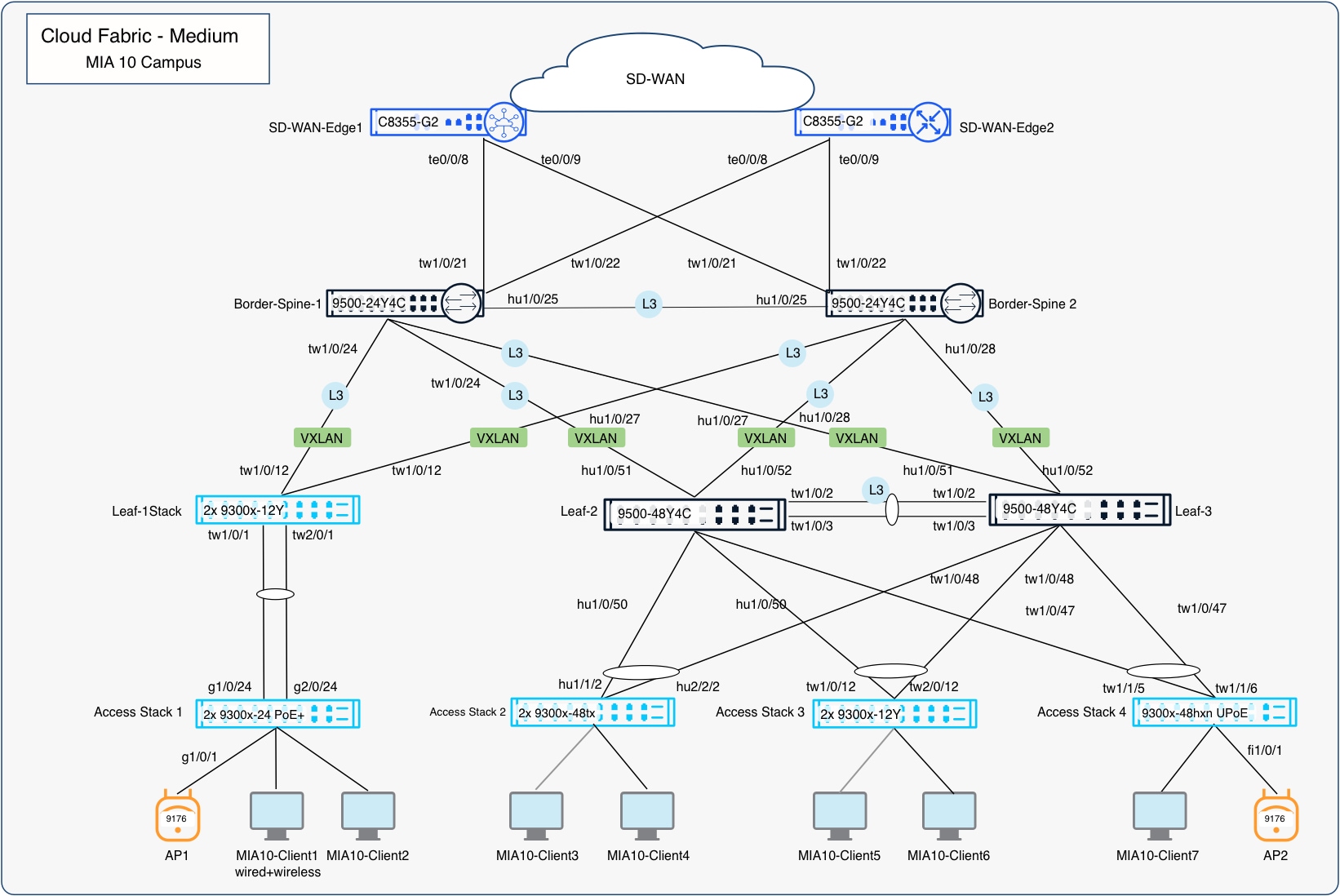
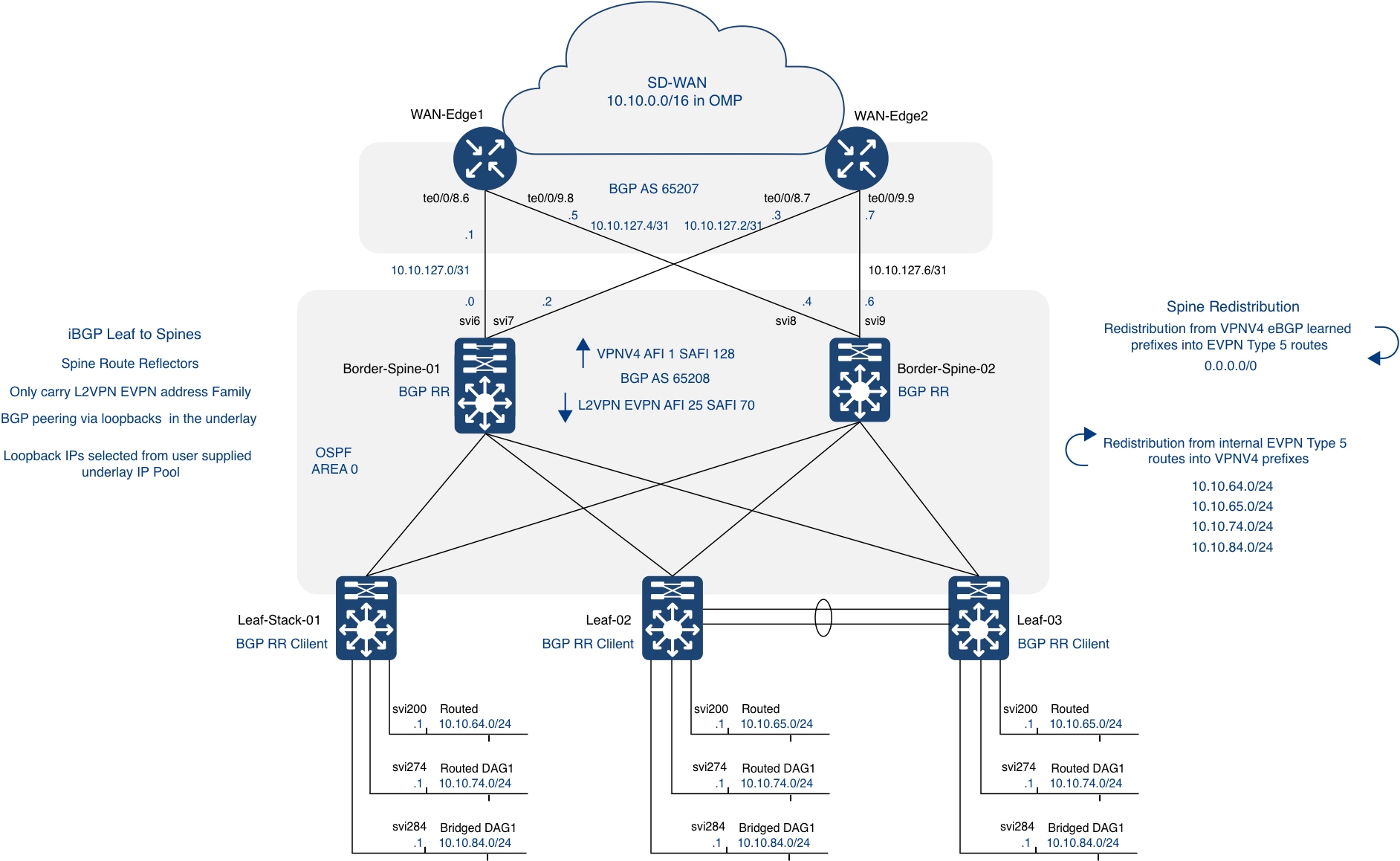
Through this Cisco Secure Networking validated deployment guide, Cisco provides a resilient foundation for mission-critical networks by combining deterministic routed transport, identity-aware access, policy-driven segmentation, integrated detection and response, and governed automation in a unified architecture. By decoupling physical transport from policy-driven overlays, enforcing validated trust boundaries, and standardizing on validated configurations, organizations can reduce risk, simplify operations, and scale securely across diverse environments. Enhanced by integrated observability, assurance, and orchestration, this architecture supports continuous availability, predictable operations, and long-term resilience.
MIA10 device inventory.
Note: The device roles in this table describe the physical and logical topology of the validated Cisco Cloud Fabric deployment. They are distinct from the Secure Networking implementation layers used to organize architecture capabilities.
| Layer |
Name |
Model |
| Wireless Access Points |
Access-Stack-01-AP01 |
CW9176I |
| Access3-L2only-AP02 |
CW9176I |
|
| Switches |
||
| Access Layer |
Access-Stack-01_1 |
C9300-24P |
| Access-Stack-01_2 |
C9300-24P |
|
| Access-Stack-02_1 |
C9300X-48TX |
|
| Access-Stack-02_2 |
C9300X-48TX |
|
| Access-Stack-03_1 |
C9300X-12Y |
|
| Access-Stack-03_2 |
C9300X-12Y |
|
| Access-Stack-04 |
C9300x-48hxn |
|
| Leaf/Distribution Layer |
Leaf-02 |
C9500-48Y4C |
| Leaf-03 |
C9500-48Y4C |
|
| Leaf-Stack-01_1 |
C9300X-12Y |
|
| Leaf-Stack-01_2 |
C9300X-12Y |
|
| Border/Spine Layer |
Border-Spine-01 |
C9500-24Y4C |
| Border-Spine-02 |
C9500-24Y4C |
|
● IOS XE / Meraki firmware versions (from Documentation Plan)
● SNRA Architecture Guide
● Solution Brief
● Meraki Documentation
● Cisco Unified Branch Medium Branch Deployment Guide
● Cisco Unified Branch Large Branch Deployment Guide