About the dynamic attributes connector
The dynamic attributes connector enables your access control and DNS policy to adapt in real time to the changes in public and private cloud workloads and business-critical software-as-a-service (SaaS) applications. It simplifies policy management by keeping rules up to date without tedious manual updates and policy deployment. Customers require policy rules to be defined based on non-network constructs such as VM name or security group, so that firewall policy is persistent even when the IP address or VLAN changes.
Supported connectors
We currently support the following connectors:
|
CSDAC version |
AWS |
AWS security groups |
AWS service tags |
Azure |
Azure Service Tags |
Cisco APIC |
Cisco Cyber Vision |
Generic Text |
GitHub |
Google Cloud |
Microsoft Office 365 |
vCenter |
Webex |
Zoom |
|---|---|---|---|---|---|---|---|---|---|---|---|---|---|---|
|
Version 1.1 (on-premises) |
Yes |
No |
No |
Yes |
Yes |
No |
No |
No |
No |
No |
Yes |
Yes |
No |
No |
|
Version 2.0 (on-premises) |
Yes |
No |
No |
Yes |
Yes |
No |
No |
No |
No |
Yes |
Yes |
Yes |
No |
No |
|
Version 2.2 (on-premises) |
Yes |
No |
No |
Yes |
Yes |
No |
No |
No |
Yes |
Yes |
Yes |
Yes |
No |
No |
|
Version 2.3 (on-premises) |
Yes |
No |
No |
Yes |
Yes |
No |
No |
No |
Yes |
Yes |
Yes |
Yes |
Yes |
Yes |
|
Version 3.0 (on-premises) |
Yes |
Yes |
Yes |
Yes |
Yes |
No |
Yes |
Yes |
Yes |
Yes |
Yes |
Yes |
Yes |
Yes |
|
Version 3.1 (on-premises) |
Yes |
Yes |
Yes |
Yes |
Yes |
Yes |
Yes |
Yes |
Yes |
Yes |
Yes |
Yes |
Yes |
Yes |
How it works
This topic discusses the architecture of the Dynamic Attributes Connector.
You can collect these tags and attributes using Docker containers running on an Ubuntu, CentOS, or Red Hat Enterprise Linux virtual machine. Install the Dynamic Attributes Connector on the Ubuntu host using an Ansible collection.
The following figure shows how the system functions at a high level.

-
Install the dynamic attributes connector on a supported Linux virtual machine.
For more information, see Supported operating systems and third-party software.
-
The system supports certain public cloud providers.
This topic discusses supported connectors (which are the connections to those providers).
-
The adapter defined by the dynamic attributes connector receives those dynamic attributes filters as dynamic objects and enables you to use them in access control rules.
You can create the following types of adapters:
-
ASA adapter used only by the Cisco APIC connector.
-
On-Prem Firewall Management Center for an on-premises Management Center device.
This type of Management Center device might be managed by Security Cloud Control or it might be a standalone.
-
Cloud-Delivered Firewall Management Center for devices managed by Security Cloud Control.
-
About the Cisco APIC integration with ASA
The dynamic attributes connector enables you to send Cisco APIC dynamic endpoint group (EPG) and endpoint security group (ESG) data from Cisco APIC tenants to . The following figure shows how this works at a high level.
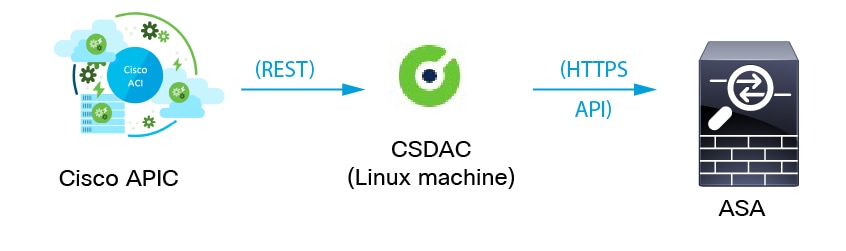
Cisco APIC defines endpoint groups (EPGs) and endpoint security groups (ESGs) that have network object groups. Create a connector in the dynamic attributes connector that pulls that data from Cisco APIC tenants to ASA on which you can use those objects in access control rules. An ASA adapter pushes network object groups in the configured security context.
(You have the option to specify the tenants from which retrieve EPG and ESG objects when you set up the ASA adapter in the dynamic attributes connector. The Cisco APIC user determines which tenants data can be pulled from.)
You can optionally create an empty network object in the ASA CLI under which to create additional network objects sent from Cisco APIC. For more information, see Access Control Lists.
 Note |
ASDM does not support creating empty network objects at this time. |
Sample configuration
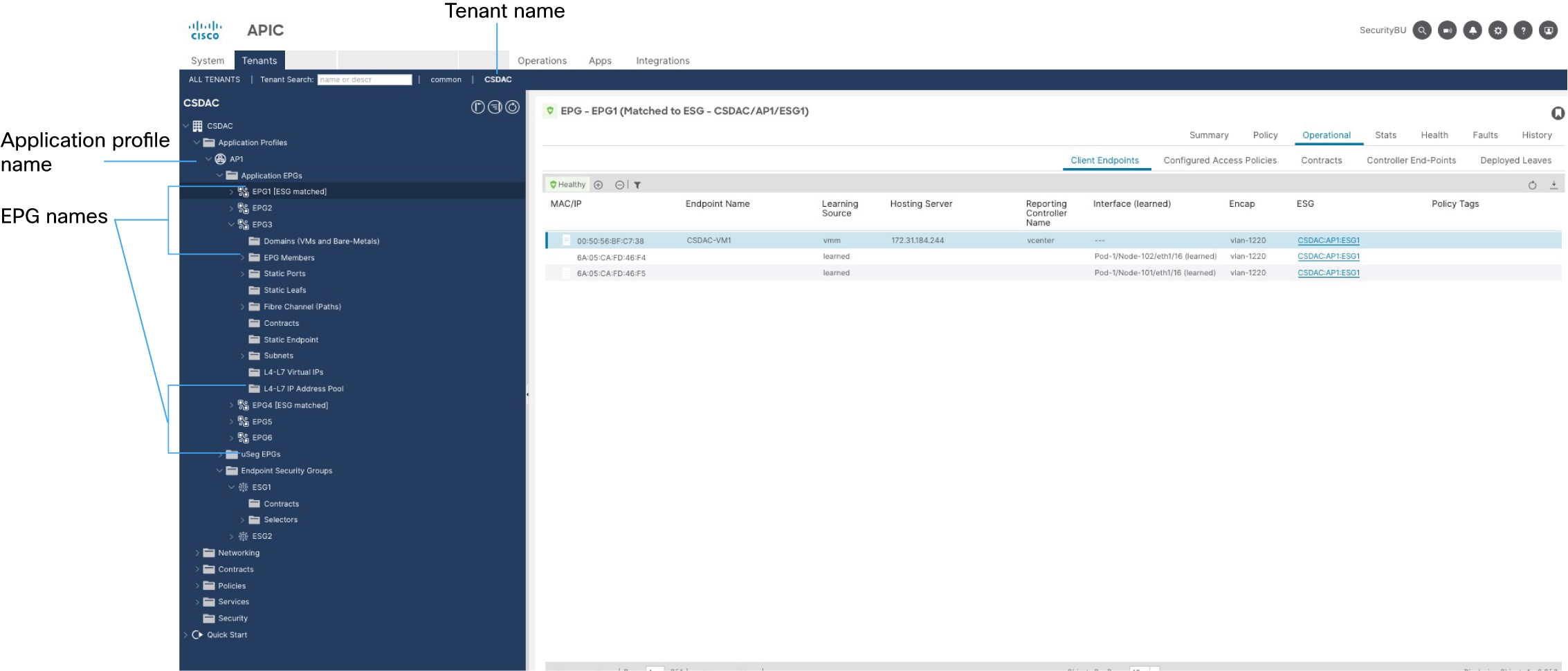
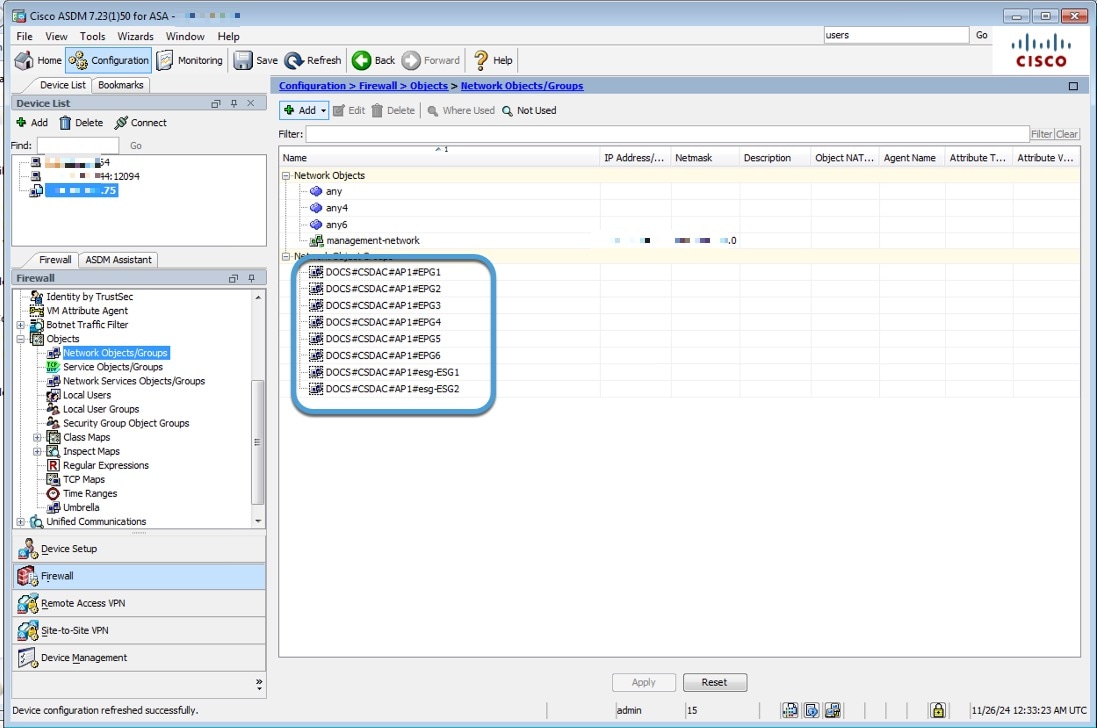
The following sample configuration shows how network object groups are named in ASA based on names in APIC and the APIC connector (not shown).
Network object group names are a concatenation of (in order):
-
Cisco ACI Endpoint Update App Site Prefix value
Cisco APIC tenant name); in this example,
CSDAC. -
Cisco APIC application profile name (in this example,
AP1) -
Cisco APIC EPG name (in this example,
EPG1throughEPG4)
Assuming the connector's Site Prefix is DOCS and the Cisco APIC tenant name the CSDAC user has rights to is CSDAC, network object groups on ASA are named as follows (in ASDM, ):
Additional information about Cisco APIC
What to do next
How to use network object groups from Cisco APIC in ASA access rules
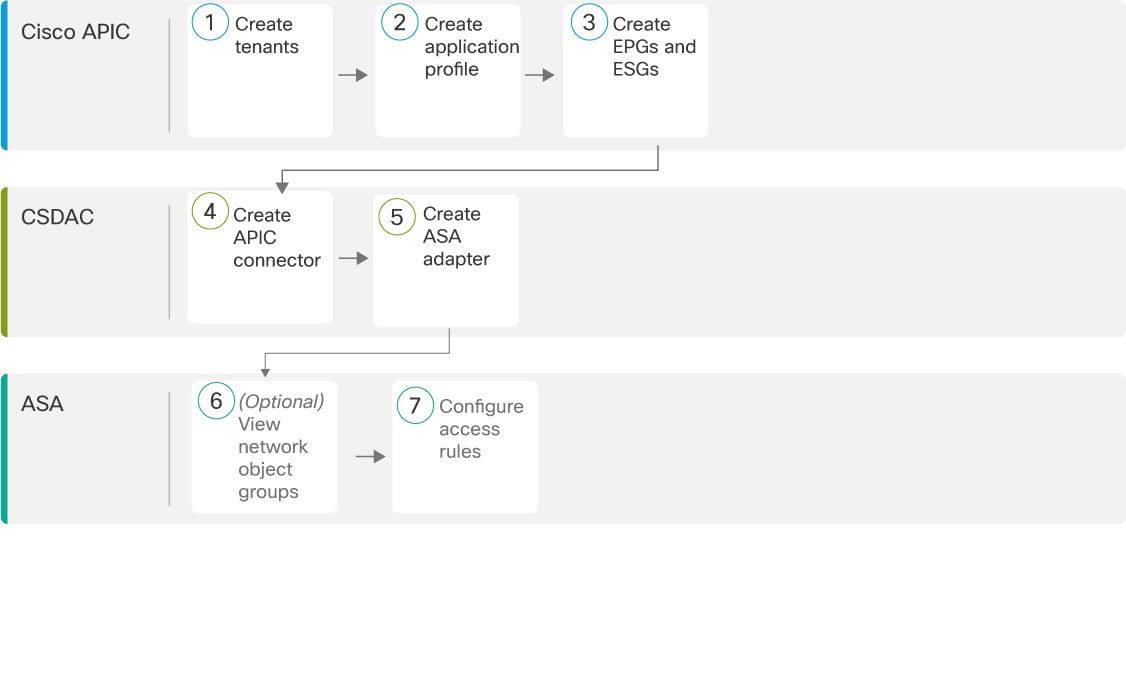
|
|
Cisco APIC |
A tenant allows a Cisco APIC administrator to set up domain-based access control. |
|
|
Cisco APIC |
An application profile is a container for other objects, such as an endpoint group (EPG). |
|
|
Cisco APIC |
An EPG is a container for network objects that serves as the way that devices connect to the network. An ESG is a logical entity that contains a collection of physical or virtual network endpoints. |
|
|
Dynamic Attributes Connector |
The Cisco APIC connector retrieves network object groups from Cisco APIC periodically. As the objects or the IP addresses in them change, ASA is updated dynamically without the need to redeploy access rules. |
|
|
Dynamic Attributes Connector |
The ASA adapter is responsible for updating objects on ASA. |
|
|
ASA |
(Optional.) View the network object groups fetched from Cisco APIC. (Optional). See View network object groups in ASDM |
|
|
ASA |
To use network object groups in access rules, you must add them as source criteria to those rules. |


 Feedback