Review how to get started with onboarding a device to Secure Access with the intent of focusing on DNS.
Cisco Secure Access provides flexible secure connectivity to the internet, Software-as-a Service (SaaS) applications, and your private digital and network resources. Secure Access enables you to connect seamlessly to on-premises data centers, public clouds, or private networks from both remote and on-network locations.
The Get Started with Cisco Secure Access workflow guides you through the initial setup of Secure Access. Sign in to Secure Access and navigate to Workflows. The first step in the Get Started workflow takes you through the setup of your organization's network connections. You can provision users and groups from your organization in Secure Access and set up integrations with Security Assertion Markup Language (SAML) identity providers (IdPs). From a DNS perspective, the following flow is a general guide on how to navigate through this guide and any affiliated doucmentation included here.
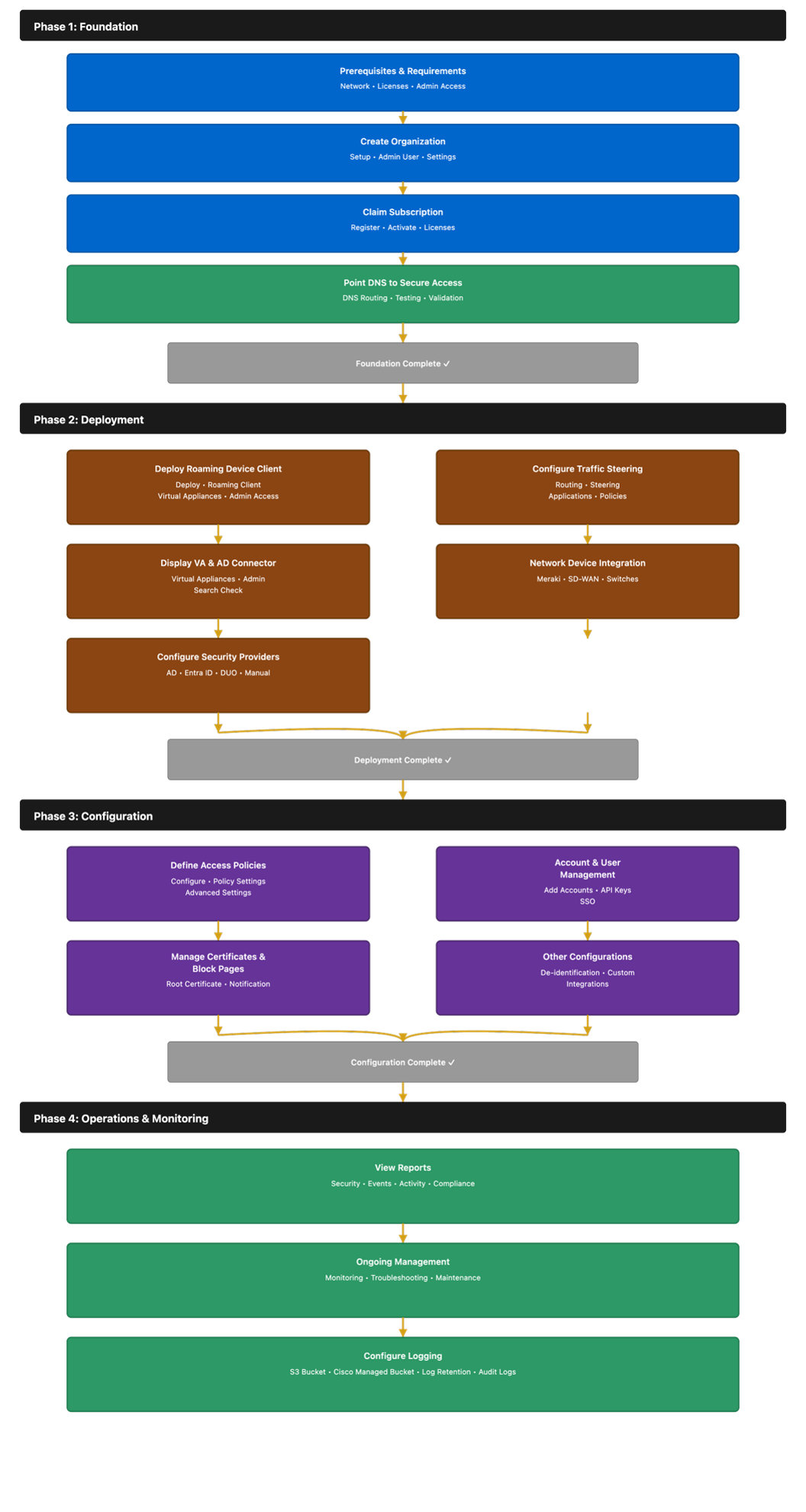
Before initiating the onboarding process, please ensure that all components are running supported software versions. You can verify the latest available version of the Cisco Secure Client via the Cisco Secure Access – Connect - Internet Security download page.
Traffic Redirection Methods
At the DNS level we recommend the following traffic redirection methods per deployment type. Review the table below and affirm the redirection method:
|
Deployment Type |
Description |
|---|---|
|
Registered Network |
Register the branch public IP for DNS requests. |
|
Cisco Secure Client- Roaming Module |
DNS redirection from roaming endpoint. |
|
VA- DNS Forwarders |
Lightweight conditional DNS forwarders. |
|
Network Device |
Intercept DNS request going through device – ISR, MX, SDWAN. |
|
Android/iOS App/Chromebook |
Mobile DNS protection. |
Consider the following pros and cons for DNS forwarders in regards to how they could affect redirection.
DNS Forwarders
Lightweight VM that works as a recursive DNS resolver for your endpoints. Provides domain-based protection only Best deployed on IoT, Servers, Guest Networks
Network Devices
API-based integration with certain network devices (Meraki, FTD, etc) for domain level inspection. Network device intercepts DNS request and rewrites headers to Cisco DNS resolvers Best deployed on IoT, Servers, Guest Networks Make sure it doesn’t conflict with other methods.
Android/iOS/Chromebook
Mobile devices leverage QUIC for better performance. Note that Chromebook uses DoH and an extension for DNS redirection.