Overview
Describes how to use Microsoft Intune to manage mobile devices connected by VPN.
To manage VPN-connected mobile devices, these configurations are required in Microsoft Intune:
VPN-connected android device settings in Microsoft Intune
-
Configure settings for VPN-connected Android endpoints according to the requirements detailed in Android enterprise device settings to configure VPN in Intune.
-
Create an app configuration policy in Microsoft Intune for endpoints that use the Cisco Secure Client-AnyConnect app. Include the Device Identifier configuration key in the Configuration Settings for this policy.
Figure 1. App configuration policy settings in Microsoft Intune 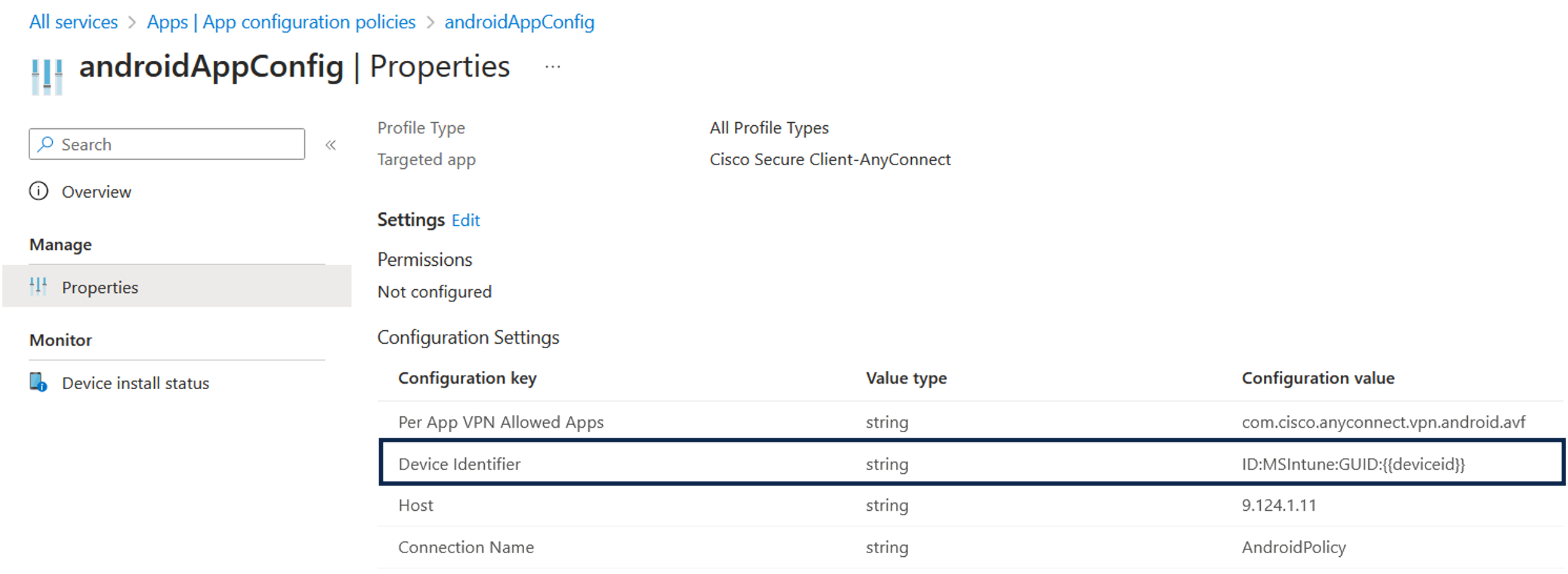
VPN-connected iOS device settings in Microsoft Intune
For VPN-connected iOS devices, you can find the required VPN settings for Microsoft Intune in Add VPN settings on iOS and iPad OS devices in Microsoft Intune.
When you create a VPN profile for iOS or iPadOS devices, you must choose the Enable network access control (NAC) setting to allow Microsoft Intune to include a device ID for the endpoint.
After you complete these configurations, Cisco AnyConnect logs the device identifier in the format ID:Intune:DeviceID:<device id>. Cisco ISE APIs retrieve this device ID for the endpoint. The system uses the device ID instead of the endpoint’s MAC address to check compliance.