The documentation set for this product strives to use bias-free language. For the purposes of this documentation set, bias-free is defined as language that does not imply discrimination based on age, disability, gender, racial identity, ethnic identity, sexual orientation, socioeconomic status, and intersectionality. Exceptions may be present in the documentation due to language that is hardcoded in the user interfaces of the product software, language used based on RFP documentation, or language that is used by a referenced third-party product. Learn more about how Cisco is using Inclusive Language.
Cisco ISE is a policy-based, network-access-control solution, which offers network access policy sets, allowing you to manage
several different network access use cases such as wireless, wired, guest, and client provisioning. Policy sets (both network
access and device administration sets) enable you to logically group authentication and authorization policies within the
same set. You can have several policy sets based on an area, such as policy sets based on location, access type, and similar
parameters. When you install Cisco ISE, there is always one policy set defined, which is the default policy set, and the default
policy set contains within it, predefined and default authentication, authorization and exception policy rules.
When creating policy sets, you can configure these rules (configured with conditions and results) in order to choose the network
access services on the policy set level, the identity sources on the authentication policy level, and network permissions
on the authorization policy levels. You can define one or more conditions using any of the attributes from the Cisco ISE-supported
dictionaries for different vendors. Cisco ISE allows you to create conditions as individual resuable policy elements.
The network access service to be used per policy set to communicate with the network devices is defined at the top level of
that policy set. Network access services include:
Allowed protocols—the protocols configured to handle the initial request and protocol negotiation.
A proxy service—sends requests to an external RADIUS server for processing.
Note
From the Work Centers > Device Administration, you can also select a relevant TACACS server sequence for your policy set. Use the TACACS server sequence to configure a
sequence of TACACS proxy servers for processing.
Policy sets are configured hierarchically, where the rule on the top level of the policy set, which can be viewed from the
Policy Set table, applies to the entire set and is matched before the rules for the rest of the policies and exceptions. Thereafter,
rules of the set are applied in this order:
Authentication policy rules
Local policy exceptions
Global policy exceptions
Authorization policy rules
Note
Policy Sets functionality is identical for network access and for device administration policies. All processes described
in this chapter can be applied when working with both the Network Access and the Device Administration work centers. This chapter specifically discusses the Network Access work center policy sets. In the Cisco ISE GUI, click the Menu icon () and chooseWork Centers > Network Access > Policy Sets.
The following table describes the fields in the Policy Sets window, from which you can configure policy sets, including authentication, exception and authorization policies. In the Cisco ISE GUI, click the Menu icon () and chooseWork Centers > Network Access > Policy Sets for network access policies.In the Cisco ISE GUI, click the Menu icon () and chooseWork Centers > Device Administration > Device Admin Policy Sets for device administration policies.
Table 1. Policy Set Configuration Settings
Field Name
Usage Guidelines
Status
Choose the status of this policy. It can be one of the following:
Enabled: This policy condition is active.
Disabled: This policy condition is inactive and will not be evaluated.
Monitor Only: This policy condition will not be evaluated.
Policy Set Name
Enter a unique name for this policy set.
Conditions
From a new policy row, click the plus (+) icon or from an existing policy row, click the Edit icon to open the Conditions
Studio.
Description
Enter a unique description for the policy.
Allowed Protocols or Server Sequence
Choose an allowed protocol that you have already created, or click the (+) sign to Create a New Allowed Protocol, to Create a New Radius Sequence, or to Create a TACACS Sequence.
Conditions
From a new exceptions row, click the plus (+) icon or from an existing exception row, click the Edit icon to open the Conditions
Studio.
Hits
Hits are a diagnostic tool indicating the number of times the conditions have matched. Hover over the icon to view when this
was last updated, reset to zero and to view the frequency of updates.
Actions
Click the cog icon from the Actions column to view and select different actions:
Insert new row above: Insert a new policy above the policy from which you opened the Actions menu.
Insert new row below: Insert a new policy below the policy from which you opened the Actions menu.
Duplicate above: Insert a duplicate policy above the policy from which you opened the Actions menu, above the original set.
Duplicate below: Insert a duplicate policy below the policy from which you opened the Actions menu, below the original set.
Delete: Delete the policy set.
View
Click the arrow icon to open the Set view of the specific policy set and view its authentication, exception, and authorization
sub-policies.
Authentication Policies
Each policy set can contain multiple authentication rules that together represent the authentication policy for that set.
Priority of the authentication policies is determined based on the order to those policies as they appear within the policy
set itself (from the Set view page in the Authentication Policy area).
Cisco ISE dynamically chooses the network access service (either an allowed protocol a server sequence) based on the settings
configured on the policy set level, and thereafter checks the identity sources and results from the authentication and authorization
policy levels. You can define one or more conditions using any of the attributes from the Cisco ISE dictionary. Cisco ISE
allows you to create conditions as individual policy elements that can be stored in the Library and then can be reused for
other rule-based policies.
The identity method, which is the result of the authentication policy, can be any one of the following:
Deny access—Access to the user is denied and no authentication is performed.
Identity database—A single identity database that can be any one of the following:
Identity source sequences—A sequence of identity databases that is used for authentication.
The default policy set implemented at initial Cisco ISE installation includes the default ISE authentication and authorization
rules. The default policy set also includes additional flexible built-in rules (that are not defaults) for authentication
and authorization. You can add additional rules to those policies and you can delete and change the built-in rules but you
cannot remove the default rules and you cannot remove the default policy set.
Authentication Policy Flow
In authentication policies, you can define multiple rules, which consist of conditions and results. ISE evaluates the conditions
that you have specified and based on the result of the evaluation, assigns the corresponding results. The identity database
is selected based on the first rule that matches the criteria.
You can also define an identity source sequence consisting of different databases. You can define the order in which you want
Cisco ISE to look up these databases. Cisco ISE will access these databases in sequence until the authentication succeeds.
If there are multiple instances of the same user in an external database, the authentication fails. There can only be one
user record in an identity source.
We recommend that you use only three, or at most four databases in an identity source sequence.
Figure 1. Authentication Policy Flow
Authentication Failures—Policy Result Options
If you choose the identity method as deny access, a reject message is sent as a response to the request. If you choose an
identity database or an identity source sequence and the authentication succeeds, the processing continues to the authorization
policy configured for the same policy set. Some of the authentications fail and these are classified as follows:
Authentication
failed—Received explicit response that authentication has failed such as bad
credentials, disabled user, and so on. The default course of action is reject.
User not found—No such user
was found in any of the identity databases. The default course of action is
reject.
Process failed—Unable to
access the identity database or databases. The default course of action is
drop.
Cisco ISE allows you to
configure any one of the following courses of action for authentication
failures:
Reject—A reject response is
sent.
Drop—No response is sent.
Continue—Cisco ISE continues
with the authorization policy.
Even when you choose the
Continue option, there might be instances where Cisco ISE cannot continue
processing the request due to restrictions on the protocol that is being used.
For authentications using PEAP, LEAP, EAP-FAST, EAP-TLS, or RADIUS MSCHAP, it
is not possible to continue processing the request when authentication fails or
user is not found.
When authentication fails, it is possible to continue to process
the authorization policy for PAP/ASCII and MAC authentication bypass (MAB or
host lookup). For all other authentication protocols, when authentication
fails, the following happens:
Authentication failed—A
reject response is sent.
User or host not found—A
reject response is sent.
Process failure—No response
is sent and the request is dropped.
Use Cases for Using Continue as the Course of Action for Authentication Failures
If you select the Continue option, Cisco ISE skips authentication and proceeds to evaluate the authorization policy in the following cases:
Lookup (MAB)- Cisco ISE proceeds with authorization policy evaluation even if the ‘User not found’ result is displayed.
PAP or ASCII
CHAP
EAP-MD5
EAP-TLS - Cisco ISE proceeds with authorization policy evaluation even if the user or certificate validation has failed in
AD or LDAP.
PEAP (EAP-TLS) - Cisco ISE proceeds with authorization policy evaluation even if the user or certificate validation has failed
in AD or LDAP.
TEAP (EAP-TLS) - Cisco ISE proceeds with authorization policy evaluation even if the user or certificate validation has failed
in AD or LDAP.
EAP-FAST (EAP-TLS) - Cisco ISE proceeds with authorization policy evaluation even if the user or certificate validation has
failed in AD or LDAP.
EAP-chaining TEAP (EAP-TLS, EAP-MS-CHAPv2) - Cisco ISE proceeds with authorization policy evaluation even if the user or certificate
validation has failed in AD or LDAP. Note that the Continue option is only applicable for the EAP-TLS inner method.
If there is an authentication failure in the following authentication protocols, all the chosen Advanced options are ignored, and Cisco ISE sends an Access-Reject response.
MS-CHAPv1
MS-CHAPv2
LEAP
PEAP (EAP-MS-CHAPv2)
TEAP (EAP-MS-CHAPv2)
EAP-FAST (EAP-MS-CHAPv2)
EAP-TTLS (PAP\ASCII)
EAP-TTLS (MS-CHAPv1)
EAP-TTLS (MS-CHAPv2)
EAP-TTLS (EAP-MD5)
EAP-TTLS (CHAP)
EAP-TTLS (EAP-MS-CHAPv2)
EAP-FAST (EAP-GTC)
PEAP (EAP-GTC)
Configure Authentication Policies
Define an authentication policy per policy set by configuring and maintaining multiple authentication rules, as necessary.
Before you begin
To perform the following
task, you must be a Super Admin or Policy Admin.
Procedure
Step 1
In the Cisco ISE GUI, click the Menu icon () and chooseWork Centers > Network Access > Policy Sets for network access policies. In the Cisco ISE GUI, click the Menu icon () and chooseWork Centers > Device Administration > Device Admin Policy Sets for device administration policies.
Step 2
From the row for the policy set from which you would like to add or update an authentication policy, click from the View column in the Policy Sets table, in order to access all of the policy set details and to create authentication
and authorization policies as well as policy exceptions.
Step 3
Click the arrow icon next to the Authentication Policy part of the page to expand and view all of the Authentication Policy
rules in the table.
Step 4
From the Actions column on any row, click the cog icon. From the dropdown menu, insert a new authentication policy rule by selecting any of
the insert or duplicate options, as necessary.
A new row appears in the Authentication Policy table.
Step 5
From the Status column, click the current Status icon and from the dropdown list update the status for the policy set as necessary. For more information about status, see
Authentication Policy Configuration Settings.
Step 6
For any rule in the table, click in the Rule Name or Description cells to make any free-text changes necessary.
Step 7
To add or change conditions, hover over the cell in the Conditions column and click . The Conditions Studio opens. For more information, see Special Network Access Conditions.
Not all attributes you select will include the “Equals”, “Not Equals", "In", "Not In", “Matches", “Starts With" or “Not Starts
With” operator options.
The “Matches” operator supports and uses regular expressions (REGEX) not wildcards.
Note
You must use the “equals” operator for straight forward comparison. “Contains” operator can be used for multi-value attributes.
“Matches” operator should be used for regular expression comparison. When “Matches” operator is used, regular expression will
be interpreted for both static and dynamic values. In case of lists, the "in" operator checks whether a particular value exists
in a list. In case of a single string the "in" operator checks whether the strings are same like the "equals" operator.
Step 8
Organize the policies within the table according to the order by which they are to be checked and matched. To change the order
of the rules, drag and drop the rows in to their correct position.
Step 9
Click Save to save and implement your changes.
What to do next
Configure authorization policies
Authentication Policy Configuration Settings
The following table describes the fields in the Authentication Policy section of the Policy Sets window, from which you can configure authentication subpolicies as part of your policy sets.In the Cisco ISE GUI, click the Menu icon () and chooseWork Centers > Network Access > Policy Sets for network access policies. In the Cisco ISE GUI, click the Menu icon () and chooseWork Centers > Device Administration > Device Admin Policy Setsfor device administration policies. In the Cisco ISE GUI, click the Menu icon () and choosePolicy Sets > View > Authentication Policy
Choose the status of this policy. It can be one of the following:
Enabled: This policy condition is active.
Disabled: This policy condition is inactive and will not be evaluated.
Monitor Only: This policy condition will be evaluated, but the result will not be enforced. You can view the results of this policy condition
in the Live Log authentication page. In this, see the detailed report which will have the monitored step and attribute. For
example, you may want to add a new policy condition, but are not sure if the condition would provide you with the correct
results. In this situation, you can create the policy condition in monitored mode to view the results and then enable it if
you are satisfied with the results.
Rule Name
Enter a name for this authentication policy.
Conditions
From a new policy row, click the plus (+) icon or from an existing policy row, click the Edit icon to open the Conditions Studio.
Use
Choose the identity source
that you want to use for authentication. You can also choose an identity source
sequence if you have configured it.
You can edit
the default identity source that you want Cisco ISE to use in case none of the
identity sources defined in this rule match the request.
Options
Define a further course of
action for authentication failure, user not found, or process failure events.
You can choose one of the following options:
Reject: A reject response is sent.
Drop: No response is sent.
Continue: Cisco ISE proceeds with the authorization policy.
Hits
Hits are a diagnostic tool indicating the number of times the conditions have matched.
Actions
Click the cog icon from the Actions column to view and select different actions:
Insert new row above: Insert a new authentication policy above the policy from which you opened the Actions menu.
Insert new row below: Insert a new authentication policy below the policy from which you opened the Actions menu.
Duplicate above: Insert a duplicate authentication policy above the policy from which you opened the Actions menu, above the
original set.
Duplicate below: Insert a duplicate authentication policy below the policy from which you opened the Actions menu, below the
original set.
Delete: Delete the policy set.
Password-Based Authentication
Authentication verifies user information to confirm user identity. Traditional authentication uses a name and a fixed password.
This is the most popular, simplest, and least-expensive method of authentication. The disadvantage is that this information
can be told to someone else, guessed, or captured. An approach that uses simple, unencrypted usernames and passwords is not
considered a strong authentication mechanism, but it can be sufficient for low-authorization or low-privilege levels such
as Internet access.
Secure Authentication Using Encrypted Passwords and Cryptographic Techniques
You should use encryption to reduce the risk of password capture on the network. Client and server access control protocols,
such as RADIUS, encrypt passwords to prevent them from being captured within a network. However, RADIUS operates only between
the authentication, authorization, and accounting (AAA) client and Cisco ISE. Before this point in the authentication process,
unauthorized persons can obtain cleartext passwords such as in the following examples:
In the communication between an end-user client that dials up over a phone line.
On an ISDN line that terminates at a network access server.
Over a Telnet session between an end-user client and the hosting device
More-secure methods use cryptographic techniques, such as those used inside the Challenge Authentication Handshake Protocol
(CHAP), one-time password (OTP), and advanced EAP-based protocols. Cisco ISE supports a variety of these authentication methods.
Authentication Methods and Authorization Privileges
A fundamental implicit relationship exists between authentication and authorization. The more authorization privileges that
are granted to a user, the stronger the authentication should be. Cisco ISE supports this relationship by providing various
methods of authentication.
Authentication Dashlet
The Cisco ISE dashboard provides a summary of all authentications that take place in your network and for your devices. It
provides at-a-glance information about authentications and authentication failures in the Authentications dashlet.
The RADIUS Authentications dashlet provides the following statistical information about the authentications that Cisco ISE has handled:
The total number of RADIUS
authentication requests that Cisco ISE has handled, including passed
authentications, failed authentications, and simultaneous logins by the same
user.
The total number of failed
RADIUS authentications requests that Cisco ISE has processed.
You can also view a summary of TACACS+ authentications. The TACACS+ Authentications dashlet provides statistical information
for device authentications.
For more information about device administration authentications,
see TACACS Live Logs. For additional information about RADIUS Live Logs settings,
see RADIUS Live Logs.
Cisco ISE provides various
ways to view real-time authentication summary.
Before you begin
To perform the following
task, you must be a Super Admin or System Admin.
Procedure
Step 1
In the Cisco ISE GUI, click the Menu icon () and chooseOperations > RADIUS > Live Logs for network authentications (RADIUS). In the Cisco ISE GUI, click the Menu icon () and chooseOperations > TACACS > Live Logs to view the real-time authentication summaries.
Step 2
You can view the authentication summary in the following ways:
Hover your mouse cursor over the Status icon to view the results of the authentication and a brief summary. A pop-up with
status details appears.
Enter your search criteria in any one or more of the text boxes that appear at the top of the list, and press Enter, to filter your results.
Click the magnifier icon in the Details column to view a detailed report.
Note
As the Authentication Summary report or dashboard collects and displays the latest data corresponding to failed or passed authentications, the contents
of the report appear after a delay of a few minutes.
Authentication Reports and Troubleshooting Tools
Apart from the authentication details, Cisco ISE provides various reports and troubleshooting tools that you can use to efficiently
manage your network.
There are various reports that you can run to understand the authentication trend and traffic in your network. You can generate
reports for historical as well as current data. The following is a list of authentication reports:
AAA Diagnostics
RADIUS Accounting
RADIUS Authentication
Authentication Summary
Note
You must enable IPv6 snooping on Cisco Catalyst 4000 Series switches, otherwise IPv6 address will not be mapped to the authentication
sessions and will not be displayed in the show output. Use the following commands to enable IPv6 snooping:
Authorization policies are a component of the Cisco ISE network authorization service. This service allows you to define authorization
policies and configure authorization profiles for specific users and groups that access your network resources.
Authorization policies can contain conditional requirements that combine one or more identity groups using a compound condition
that includes authorization checks that can return one or more authorization profiles. In addition, conditional requirements
can exist apart from the use of a specific identity group.
Authorization profiles are used when creating authorization policies in Cisco ISE. An authorization policy is composed of
authorization rules. Authorization rules have three elements: name, attributes, and permissions. The permission element maps
to an authorization profile.
Cisco ISE Authorization Profiles
Authorization policies associate rules with specific user and group identities to create the corresponding profiles. Whenever
these rules match the configured attributes, the corresponding authorization profile that grants permission is returned by
the policy and network access is authorized accordingly.
For example, authorization
profiles can include a range of permissions that are contained in the following
types:
Standard profiles
Exception profiles
Device-based profiles
Profiles consist of attributes chosen from a set of resources, which are stored in any of the available vendor dictionaries,
and these are returned when the condition for the specific authorization policy matches. Because authorization policies can
include
condition mapping to a single network service rule, these can also include a list of authorization checks.
authorization verifications must comply with the authorization profiles to be returned. Authorization verifications typically
comprise one or more conditions, including a user-defined name that can be added to a library, which can then be reused by
other authorization policies.
Permissions for Authorization Profiles
Before you start configuring
permissions for authorization profiles, make sure you:
Understand the relationship between authorization policies and profiles.
Are familiar with the Authorization Profile page.
Know the basic guidelines to follow when configuring policies and profiles.
Understand what comprises permissions in an authorization profile.
In the Cisco ISE GUI, click the Menu icon () and choosePolicy > Policy Elements > Results to work with authorization profiles. From the menu on the left, choose Authorization > Authorization Profiles.
Use the Results navigation pane as your starting point in the process for displaying, creating, modifying, deleting, duplicating, or searching
policy element permissions for the different types of authorization profiles on your network. The Results pane initially displays Authentication, Authorization, Profiling, Posture, Client Provisioning, and Trustsec options.
Authorization profiles let you choose the attributes to be returned when a RADIUS request is accepted. Cisco ISE provides
a mechanism where you can configure Common Tasks Settings to support commonly used attributes. You must enter the value for Common Tasks Attributes, which Cisco ISE translates to the underlying RADIUS values.
Cisco ISE integrates
with Cisco Mobility Services Engine (MSE) to introduce physical location-based
authorization. Cisco ISE uses information from MSE to provide differentiated
network access based on the actual location of the user, as reported by MSE.
With this feature, you
can use the endpoint location information to provide network access when a user
is in an appropriate zone. You can also add the endpoint location as an
additional attribute for policies to define more granulated policy
authorization sets based on device location. You can configure conditions
within authorization rules that use location-based attributes, for example:
You can define the
location hierarchy (campus/building/floor structure) and configure the secure
and non-secure zones using the Cisco Prime Infrastructure application. After
defining the location hierarchy, you must synchronize the location hierarchy
data with the MSE servers. For more information on Cisco Prime Infrastructure,
see:
http://www.cisco.com/c/en/us/support/cloud-systems-management/prime-infrastructure/products-user-guide-list.html.
You can add one or
multiple MSE instances to integrate MSE-based location data to the
authorization process. You can retrieve the location hierarchy data from these
MSEs and configure location-based authorization rules using this data.
To track the endpoint
movement, check the Track Movement check box while creating an authorization
profile. Cisco ISE will query the relevant MSE for the endpoint location every
5 minutes to verify if the location was changed.
Note
When adding an MSE device to Cisco ISE, copy the certificates from the MSE device over to ISE to facilitate authorization.
Tracking multiple users will impact the performance due to frequent updates. The Track Movement option can be used for high
security locations.
The Location Tree is created by using the location data retrieved from the MSE instances. You can select the location entries
that are exposed to the authorization policy by using the Location Tree.
You will need Cisco ISE Advantage licenses to use the Location Services.
Add an MSE server
Before you begin
To perform the
following task, you must be a Super Admin or System Admin.
Procedure
Step 1
In the Cisco ISE GUI, click the Menu icon () and choose Administration > Network Resources > Location Services > Location Servers
Step 2
Click
Add.
Step 3
Enter the MSE
server details, such as server name, hostname/IP address, password, and so on.
Step 4
Click
Test to test
MSE connectivity using the server details that you have provided.
Step 5
(Optional)
Enter the MAC address of an endpoint in the
Find
Location field and click
Find to
check whether the endpoint is currently connected to this MSE.
If the endpoint location is found, it is displayed in the
following format:
Campus:Building:Floor:Zone. Sometimes, more than one entry can
be displayed depending on the location hierarchy and zone settings. For
example, if all the floors of a building (building1) in a campus named
Campus1 are defined as non-secure zones, and the Lab Area in
the first floor is defined as a secure zone, the following entries will be
displayed when the endpoint is located in the Lab Area:
Found in:
Campus1#building1#floor1#LabArea
Campus1#building1#floor1#NonSecureZone
Step 6
Click
Submit.
After a
new MSE is added, go to the Location Tree page and click
Get Update to retrieve its location hierarchy and add it to
the Location Tree. If there are filters defined on this tree, these filters are
applied on the new MSE entries as well.
Location
Tree
The Location Tree is created by using the location data retrieved from the MSE instances. In the Cisco ISE GUI, click the Menu icon () and choose Administration > Network Resources > Location Services > Location Tree.
If one building has
multiple MSEs, Cisco ISE will collate the location details from all the MSEs
and present them as a single tree.
You can select the location entries that are exposed to the authorization policy by using the Location Tree. You can also
hide specific locations based on your requirements. It is recommended to update the Location Tree before hiding locations.
Hidden locations will remain hidden even when the tree is updated.
If the location
entries related to an authorization rule are modified or removed, you must
disable the affected rules and set these locations as Unknown or select a
replacement location for each affected rule. You must verify the new tree
structure before applying the change or canceling the update.
Click
Get Update to get the latest location hierarchy structure from all
MSEs. After verifying the new tree structure, click Save to apply your changes.
Downloadable ACLs
Access control lists (ACLs) are lists of access control entries (ACEs), which may be applied by a Policy Enforcement Point
(for example, a switch) to a resource. Each ACE identifies the permissions allowed per user for that object, such as read,
write, execute and more. For example, an ACL may be configured for 2 users in the Sales area of the network, with an ACE allowing
Read and Write permissions for one of the users and another ACE allowing only Read only permission for the other user.
With Cisco ISE, downloadable ACLs (DACLs) can be configured and implemented in your authorization policies for control of
how the network is accessed by different users and groups of users. DACLs can also be configured using the custom user attributes
and AD attributes.
Note
If a DACL used in an Identity Provider (IdP) authorization policy is empty, authorization will fail.
To implement DACLs in your network authorization policy in Cisco ISE:
Configure a new or existing authorization profile from Policy > Policy Elements > Results > Authorization Profiles, using any of the DACLs you already configured.
Implement the authorization profiles you have configured when creating and configuring new and existing policy sets from Policy > Policy Sets.
Note
While evaluating authorization profiles with per-user dynamic access control lists, if a DACL does not exist in Cisco ISE
configuration, authorization will fail, and Cisco ISE will send an Access-Reject response to that user. You can view this
information in the Live Log Details page and the AAA Diagnostics report.
With RADIUS protocol, ACLs grant authorization by filtering source and destination IP addresses, transport protocols, and
additional parameters. Static ACLs reside on and are directly configured from the switch and can be applied in your authorization
policies from the ISE GUI.
Configure Permissions for Downloadable ACLs
With Cisco ISE, downloadable ACLs (DACLs) can be configured and implemented in your authorization policies for control of
how the network is accessed by different users and groups of users. Default authorization DACLs are available with installation
of ISE, including the following default profiles:
DENY_ALL_IPV4_TRAFFIC
PERMIT_ALL_IPV4_TRAFFIC
DENY_ALL_IPV6_TRAFFIC
PERMIT_ALL_IPV6_TRAFFIC
When working with DACLs, these defaults cannot be changed, but you can duplicate them in order to create additional, similar,
DACLs.
Once you've configured the DACLs that you need, you can then apply those DACLs to relevant Authorization policies on your
network. Once you've applied a DACL to an authorization policy, you can no longer change its type, or delete it from ISE.
To change the DACL type after it has been used in a policy, create a duplicate DACL and update it. Alternatively, remove the
DACL from your policies, update it, and then reapply it as needed.
Procedure
Step 1
In the Cisco ISE GUI, click the Menu icon () and choosePolicy > Policy Elements > Results > Authorization > Downloadable ACLs.
Step 2
Click Add from the top of the Downloadable ACLs table or alternatively, choose any of the existing DACLs and click Duplicate from the top of the table.
Step 3
Enter or edit the desired values for the DACL, keeping in mind the following rules:
Supported characters for the name field are: alphanumeric, hyphen(-), dot( .) and underscore( _ )
IP formats are handled based on the selected IP version when you choose the DACL type as follows:
IPv4 to validate only IPv4 legal ACEs. You must enter a valid IPv4 format.
IPv6 to validate only IPv6 legal ACEs. You must enter a valid IPv6 format.
DACLs might show the Agnostic option as DACL type in the IP Version field. Enter any format as required. Use Agnostic to create a DACL for devices not supported by Cisco. When Agnostic is selected, formats are not validated and you cannot check DACL syntax.
The keyword Any must be the source in all ACEs in the DACL. Once the DACL is pushed, the Any in the source is replaced with the IP address of the client that is connecting to the switch.
Note
The IP Version field is noneditable when DACL is mapped to any authorization profile. In this case, remove the DACL reference from Authorization Profiles, edit the IP version and remap the DACL in Authorization Profiles.
Step 4
Optionally, when you finish creating the complete list of ACEs, click Check DACL Syntax to validate the list. If there are validation errors, the check returns specific instructions identifying the invalid syntax
in the window that opens automatically.
Step 5
Click
Submit.
Machine Access Restriction for Active Directory User
Authorization
Cisco ISE contains a Machine
Access Restriction (MAR) component that provides an additional means of
controlling authorization for Microsoft Active Directory-authentication users.
This form of authorization is based on the machine authentication of the
computer used to access the Cisco ISE network. For every successful machine
authentication, Cisco ISE caches the value that was received in the RADIUS
Calling-Station-ID attribute (attribute 31) as evidence of a successful machine
authentication.
Cisco ISE retains each
Calling-Station-ID attribute value in cache until the number of hours that was
configured in the “Time to Live” parameter in the Active Directory Settings
page expires. Once the parameter has expired, Cisco ISE deletes it from its
cache.
When a user authenticates
from an end-user client, Cisco ISE searches the cache for a Calling-Station-ID
value from successful machine authentications for the Calling-Station-ID value
that was received in the user authentication request. If Cisco ISE finds a
matching user-authentication Calling-Station-ID value in the cache, this
affects how Cisco ISE assigns permissions for the user that requests
authentication in the following ways:
If the Calling-Station-ID
value matches one found in the Cisco ISE cache, then the authorization profile
for a successful authorization is assigned.
If the Calling-Station-ID
value is not found to match one in the Cisco ISE cache, then the authorization
profile for a successful user authentication without machine authentication is
assigned.
Guidelines for Configuring Authorization Policies and
Profiles
Observe the following
guidelines when managing or administering authorization polices and profiles:
Rule names you create must
use only the following supported characters:
Symbols: plus (+), hyphen
(-), underscore (_), period (.), and a space ( ).
Alphabetic characters: A-Z
and a-z.
Numeric characters: 0-9.
Identity groups default to
“Any” (you can use this global default to apply to all users).
Conditions allow you to set one or more policy values. However, conditions are optional and are not required to create an
authorization policy. These are the two methods for creating conditions:
Choose an existing condition
or attribute from a corresponding dictionary of choices.
Create a custom condition
that allows you to select a suggested value or use a text box to enter a custom
value.
Condition names you create
must use only the following supported characters:
Symbols: hyphen (-),
underscore (_), and period (.).
Alphabetic characters: A-Z
and a-z.
Numeric characters: 0-9.
When you create or edit an authorization profile, if you choose to enable Web Redirection (CWA, MDM, NSP, CPP) with any other option than the Client Provisioning (Policy), you will not be able to configure IPv6 address as Static IP/Host name/FQDN for that authorization policy. This is because IPv6 Static IP/Host name/FQDN are not supported in Central Web Auth (CWA),
Mobile Device Management (MDM) redirect, and Native Supplicant Protocol (NSP).
Permissions are important
when choosing an authorization profile to use for a policy. A permission can
grant access to specific resources or allow you to perform specific tasks. For
example, if a user belongs to a specific identity group (such as Device
Admins), and the user meets the defined conditions (such as a site in Boston),
then this user is granted the permissions associated with that group (such as
access to a specific set of network resources or permission to perform a
specific operation on a device).
When you use the radius attribute Tunnel-Private-Group-ID in an authorization condition, you must mention both the tag and the value in the condition when the EQUALS operator is being used, for example:
Tunnel-Private-Group-ID EQUALS (tag=0) 77
Configure Authorization Policies
After creating attributes and building blocks for authorization policies from the Policy menu, create authorization policies
within policy sets from the Policy Sets menu.
Before you begin
Before you begin this procedure, you should have a basic understanding of the different building blocks used to create authorization
policies such as identify groups and conditions.
Procedure
Step 1
In the Cisco ISE GUI, click the Menu icon () and chooseWork Centers > Network Access > Policy Sets for network access policies. In the Cisco ISE GUI, click the Menu icon () and chooseWork Centers > Device Administration > Device Admin Policy Sets for device administration policies.
Step 2
From the View column, click to access all of the policy set details and to create authentication and authorization policies as well as policy exceptions.
Step 3
Click the arrow icon next to the Authorization Policy part of the page to expand and view the Authorization Policy table.
Step 4
From the Actions column on any row, click the cog icon. From the dropdown menu, insert a new authorization policy rule by selecting any of
the insert or duplicate options, as necessary.
A new row appears in the Authorization Policy table.
Step 5
To set the status for a policy, click the current Status icon and from the dropdown list select the necessary status from the Status column. For more information about statuses, see Authorization Policy Settings.
Step 6
For any policy in the table, click in the Rule Name cells to make any free-text changes necessary and to create a unique rule name.
Step 7
To add or change conditions, hover over the cell in the Conditions column and click . The Conditions Studio opens. For more information, see Policy Conditions.
Not all attributes you select will include the “Equals”, “Not Equals", "In", "Not In", “Matches", “Starts With" or “Not Starts
With” operator options.
The “Matches” operator supports and uses regular expressions (REGEX) not wildcards.
Note
You must use the “equals” operator for straight forward comparison. “Contains” operator can be used for multi-value attributes.
“Matches” operator should be used for regular expression comparison. When “Matches” operator is used, regular expression will
be interpreted for both static and dynamic values. In case of lists, the "in" operator checks whether a particular value exists
in a list. In case of a single string the "in" operator checks whether the strings are same like the "equals" operator.
Step 8
For network access results profiles, select the relevant authorization profile from the Results Profiles dropdown list or choose or click , choose Create a New Authorization Profile and when the Add New Standard Profile screen opens, perform the following steps:
Enter values as required to configure a new authorization profile. Keep the following in mind:
Supported characters for the name field are: space, ! # $ % & ‘ ( ) * + , - . / ; = ? @ _ {.
For Common Tasks, to enter a DACL, choose the relevant DACL Name option as follows and then select the necessary DACL from the dynamic dropdown list:
To use an IPv4 DACL, check DACL Name.
To enter an IPv6 DACL, check IPv6 DACL Name.
To enter any other DACL syntax, check either option. Agnostic DACLs appear in both the IPv4 and the IPv6 dropdown lists.
Note
If you select DACL Name, then the AVP type is for IPv4, even if the DACL itself is agnostic. If you select a DACL for the IPv6 DACL Name, then the AVP type is for IPv6, even if the DACL itself is agnostic.
Note
If you choose to use ACL for your policy, ensure your device is compatible with this feature. For more information, see the
Cisco Identity Services Engine Compatibility Guide.
For Common Tasks, to enter an ACL, choose the relevant ACL (Filter-ID) option as follows and then type the ACL name in the field:
To use an IPv4 ACL, check ACL (Filter-ID).
To enter an IPv6 ACL, check ACL IPv6 (Filter-ID).
To use an ACL for Airespace devices, check Airespace ACL Name or Airespace IPv6 ACL Name as necessary, and type the ACL name in the field.
You can double-check the authorization profile RADIUS syntax from the Attributes Details that dynamically appear at the bottom of the screen.
Click Save to save your changes to the Cisco ISE system database to create an authorization profile.
In the Cisco ISE GUI, click the Menu icon () and choosePolicy > Policy Elements > Results > Authorization > Authorization Profiles to create, manage, edit, and delete profiles outside of the Policy Sets area.
Step 9
For network access results security groups, select the relevant security group from the Results Security Groups dropdown list or click , choose Create a New Security Group and when the Create New Security Group screen opens, perform the following steps:
Enter a name and description (optional) for the new security group.
Check the Propagate to ACI check box if you want to propagate this SGT to Cisco ACI. The SXP mappings that are related to this SGT will be propagated
to Cisco ACI only if they belong to a VPN that is selected in the Cisco ACI Settings page.
This option is disabled by default.
Enter a Tag Value. Tag value can be set to be entered manually or autogenerate. You can also reserve a range for the SGT.
You can configure it from the In the Cisco ISE GUI, click the Menu icon () and chooseWork Centers > TrustSec > Settings > General TrustSec Settings
For TACACS+ results, select the relevant Command Sets and Shell Profiles from the Results drop-down lists or click in the Command Sets or Shell Profiles column to open the Add Commands Screen or Add Shell Profile respectively. Choose Create a New Command Set or Create a New Shell Profile and enter the fields.
Step 11
Organize the order by which the policies are to be checked and matched within the table.
Step 12
Click Save to save your changes to the Cisco ISE system database and create this new authorization policy.
Authorization Policy Settings
The following table describes the fields in the Authorization Policy section of the Policy Sets window, from which you can configure authorization policies as part of your policy sets. In the Cisco ISE GUI, click the Menu icon () and chooseWork Centers > Network Access > Policy Sets for network access policies. In the Cisco ISE GUI, click the Menu icon () and chooseWork Centers > Device Administration > Device Admin Policy Sets for device administration policies.
Choose the status of this policy. It can be one of the following:
Enabled: This policy condition is active.
Disabled: This policy condition is inactive and will not be evaluated.
Monitor Only: This policy condition will be evaluated, but the result will not be enforced. You can view the results of this policy condition
in the Live Log authentication page. In this, see the detailed report which will have the monitored step and attribute. For
example, you may want to add a new policy condition, but are not sure if the condition would provide you with the correct
results. In this situation, you can create the policy condition in monitored mode to view the results and then enable it if
you are satisfied with the results.
Rule Name
Enter a unique name for this policy.
Conditions
From a new policy row, click the plus (+) icon or from an existing policy row, click the Edit icon to open the Conditions
Studio.
Results or Profiles
Select the relevant authorization profile, which determines the different levels of permissions offered to the configured
security group. If you have not yet configured the relevant authorization profile, you can do so inline.
Results or Security Groups
Select the relevant security group, which determines the groups of users relevant to the specific rule. If you have not yet
configured the relevant security group, you can do so inline.
Results or Command Sets
Command sets enforce the specified list of commands that can be executed by a device administrator. When a device administrator
issues operational commands on a network device, ISE is queried to determine whether the administrator is authorized to issue
these commands. This is also referred to as command authorization.
Results or Shell Profiles
TACACS+ shell profiles control the initial login session of the device administrator.
Hits
Hits are a diagnostic tool indicating the number of times the conditions have matched.
Actions
Click the cog icon from the Actions column to view and select different actions:
Insert new row above: Insert a new authorization rule above the rule from which you opened the Actions menu.
Insert new row below: Insert a new authorization rule below the rule from which you opened the Actions menu.
Duplicate above: Insert a duplicate authorization rule above the rule from which you opened the Actions menu, above the original
set.
Duplicate below: Insert a duplicate authorization rule below the rule from which you opened the Actions menu, below the original
set.
Delete: Delete the rule.
Create Authorization Policies with Endpoint-Analytics Attributes
Cisco AI Endpoint Analytics is a Cisco DNA Center feature that enables nuanced visibility and profiling of endpoints, based
on Hardware Manufacturer, Hardware Model, Operating System, and Endpoint Type attributes. Cisco AI Endpoint Analytics receives
endpoint attribute data from multiple sources, such as Cisco Catalyst 9000 Series devices, CMBD connections, telemetry devices,
and more. Cisco AI Endpoint Analytics publishes these endpoint attributes to Cisco ISE, and a Cisco ISE administrator can
then create specific authorization rules using these values. See Cisco AI Endpoint Analytics.
Previously, Cisco ISE received attribute information from Cisco AI Endpoint Analytics through pxGrid using the IoTAsset topic.
You could then create a custom profiler policy using the Cisco AI Endpoint Analytics attribute, and then use the profiler
policy in an authorization policy.
Important
Starting with Catalyst Center version 2.3.5.x, the IoTAsset topic is deprecated. To ensure continued support and access to the latest profiling capabilities, it is recommended that
you migrate to the current Endpoint Analytics Framework.
Cisco AI Endpoint Analytics attributes are easily accessible in the Endpoint-Analytics dictionary and you can directly use
these attributes in your authorization policies.
The related topic subscriptions are added to the primary PAN, and all the active PSNs in the deployment. Each PSN only receives
attribute information for the endpoints that are connected to it to help optimize overall Cisco ISE performance.
The attributes that are part of the Endpoint-Analytics dictionary:
Profiling attributes: the Multi-Factor Classification attributes--Hardware Manufacturer, Hardware Model, Operating System,
and Endpoint Type
Trust Score attributes: Attributes related to Random MAC addresses, profiling changes, spoofing detection, and other behaviors
that are monitored by Cisco AI Endpoint Analytics to calculate comprehensive Trust Scores for endpoints. See Trust Scores.
Endpoint Trust Score
CMDB attributes: ServiceNow attributes collected by Cisco AI Endpoint Analytics.
Figure 3. ISE Integration Settings in Cisco AI Endpoint Analytics
Before you begin
Your Cisco ISE must have an active integration with a Cisco DNA Center
You must use Cisco ISE Release 3.1 or later releases
You must use Cisco DNA Center Release 2.2.3 or later releases
Procedure
Step 1
Log in to your Cisco DNA Center administration portal:
From the main menu, choose Policy > AI Endpoint Analytics.
In the Overview window, click Configurations.
In the Configurations window, click ISE Integration.
In the ISE Integration window:
To allow attribute publishing to Cisco ISE via the pxGrid, click the toggle button in the Endpoint Profile Publishing to ISE area.
Check the Enhanced Authorization Integration check box to allow Cisco AI Endpoint Analytics to publish endpoint attributes to Cisco ISE.
Click Save.
Step 2
Log in to your Cisco ISE administration portal.
Click the Menu icon () and choose Work Center > Profiler > Profiler Settings.
In the Endpoint Analytics Settings area, check one or both of the these check boxes to enable the corresponding functions.
Publish Endpoint Attributes to AI Endpoint Analytics: When you enable this setting, the PANs and PSNs in your deployment can share endpoint attribute data with Cisco AI Endpoint
Analytics.
Consume Endpoint Profiles from AI Endpoint Analytics: Enabling this setting creates a new topic subscription in the primary PAN and the PSNs in your deployment. As a result,
the primary PAN and PSNs can now receive endpoint attribute information from Cisco AI Endpoint Analytics.
(Optional) To configure a CoA action for an endpoint when there is a change in its Endpoint-Analytics attributes, in the Profiler Settings area, choose an option from the CoA Type drop-down list.
Step 3
Verify that the pxGrid connection between Cisco AI Endpoint Analytics and Cisco ISE:
In the Cisco ISE GUI, choose Administration > pxGrid > Diagnostics.
In the WebSocket window that is displayed, in the Clients tab, find the FQDN for the PSN and PAN node. The following subscriptions should be visible:
For PAN: /topic/com.cisco.endpointanalytics.data
For PSNs: /topic/com.cisco.ea.data.{{<FQDN>}}
What to do next
To receive debug logs to troubleshoot pxGrid issues related to Endpoints Analytics:
In the Cisco ISE GUI of your PAN, choose Operations > Troubleshoot > Debug Wizard > Debug Log Configuration.
Click the radio button next to the node you want to edit, and click Edit.
In the Debug Log Configuration window, click the radio button next to endpoint-analytics.
In the Log Level field for endpoint-analytics, choose DEBUG from the drop-down list.
Click Save.
Authorization Profile Settings
In the Cisco ISE GUI, click the Menu icon () and choosePolicy > Policy Elements > Results > Authorization > Authorization Profiles, the Authorization Profiles window define attributes for network access.
Note
When upgrading from a Cisco ISE 2.x release to a Cisco ISE 3.x release in a non-Cisco device, if an Authorization profile
contains a Network Device profile with a configured ACL value, an upgrade failure may occur. This occurs because a Network
Device profile is not supposed to have an ACL configured in it.
To work around this issue, you can either remove the value manually or delete the corresponding Authorization profile itself.
Authorization Profile Settings
Name: Enter a name for this new authorization profile.
Description: Enter a description for this authorization profile.
Access Type: Choose the access type: ACCESS_ACCEPT or ACCESS_REJECT.
Service Template: Enable this option to support sessions with SAnet-capable devices. Cisco ISE implements service templates in authorization
profiles using a special flag that marks them as Service Template compatible. Since the service template is also an authorization profile, it acts as a single policy that supports both SAnet
and non-SAnet devices.
Track Movement: Enable this option to track user location with Cisco Mobility Services Engine (MSE).
Note
This option may impact Cisco ISE performance, it is only intended for high-security locations.
Passive Identity Tracking: Enable this option to use the Easy Connect feature of Passive Identity for policy enforcement and user tracking.
Common Tasks
Common tasks are specific permissions and actions that apply to network access.
DACL Name : Enable this option to use a downloadable ACL. You can use the default values (PERMIT_ALL_IPV4_TRAFFIC, PERMIT_ALL_IPV6_TRAFFIC, DENY_ALL_IPV4_TRAFFIC, DENY_ALL_IPV6_TRAFFIC), or select an attribute from the following dictionaries:
External identity store (attributes)
Endpoints
Internal User
Internal Endpoint
For more information about adding DACLs or editing and managing existing DACLs, see Downloadable ACLs.
ACL (Filter-ID): Enable this option to configure a
RADIUS filter-ID attribute. The filter-ID specifies an ACL on the NAD. Your Filter-ID is displayed in
the Attributes Details pane. ACL IPv6 (Filter-ID)
works the same way for IPv6 connections to the NAD.
Note
You can enter the text or select the required attributes from the Attribute Values drop-down list for ACL Filter-ID. If you are entering the text for ACL Filter-ID, you must add the ".in" suffix for Cisco devices.
Security Group: Enable this option to assign a security group (SGT) part of authorization.
If Cisco ISE is not integrated with Cisco DNA Center, Cisco ISE assigns VLAN ID 1.
If Cisco ISE is integrated with Cisco DNA Center, then select the Virtual Network (VN) that Cisco DNA Center shared with Cisco
ISE, select the Data Type, and the subnet/address pool.
A Security Group task includes a security group and an optional VN. If you configure a security group, then you cannot configure
a VLAN separately. An endpoint device can only be assigned to one virtual network.
VLAN: Enable this option to specify a virtual LAN (VLAN) ID. You can enter integer or string values for the VLAN ID. The format
for this entry is Tunnel-Private-Group-ID:VLANnumber.
Voice Domain Permission: Enable this option to use a downloadable ACL. The vendor-specific attribute (VSA) of cisco-av-pair is associated with the value device-traffic-class=voice. In multidomain and multiauthentication authorization mode, if the network switch receives this VSA, the endpoint connects
to a voice domain after authorization.
Web Redirection (CWA, DRW, MDM, NSP, CPP): Enable this option to enable web redirection after authentication.
Select the type of redirection. The type of Web Redirection that you select displays additional options, which are described
below.
Enter an ACL to support the redirection that Cisco ISE sends to the NAD.
The ACL you enter to send to the NAD displays in the Attributes Details pane as a cisco-av pair. For example, if you enter acl119, it is displayed in the Attributes Details pane as: cisco-av-pair = url-redirect-acl = acl119.
Select the other settings for the selected web redirection type.
Select one of the following types web redirection:
Centralized Web Auth: Redirect to the portal you select from the Value drop-down.
Client Provisioning (Posture): Redirect to the client provisioning portal you select from the Value drop-down, to enable posture on the client.
Hot Spot: Redirect: Redirect to the hot spot portal you select from the Value drop-down.
MDM Redirect: Redirect to the MDM portal on the MDM server that you specify.
Native Supplicant Provisioning: Redirect to the BYOD portal you select from the Value drop-down.
After selecting the web redirection type, and entering the required parameters, configure the following options:
Display Certificates Renewal Message: Enable this option to display a certificate renewal message. The URL-redirect attribute value changes and includes the number
of days for which the certificate is valid. This option is only for Centralized Web Auth redirection.
Static IP/Host Name/FQDN: Enable this option to redirect a user to a different PSN. Enter the target IP address, hostname, or FQDN. If you do not
configure this option, the user is redirected to the FQDN of the policy service node that received this request.
Suppress Profiler CoA for endpoints in Logical Profile: Enable this option to cancel the redirect for a certain type of endpoint device.
Auto SmartPort: Enable this option to use Auto SmartPort functionality. Enter an event name, which creates a VSA cisco-av-pair with that
value as auto-smart-port=event_name. This value is displayed in the Attributes Details pane.
Access Vulnerabilities: Enable this option to run the Threat Centric NAC Vulnerability Assessment on this endpoint as part of authorization. Select
the adapter, and when to run the scan.
Reauthentication: Enable this option to keep the endpoint connected during reauthentication. You choose to maintain connectivity during reauthentication
by choosing to use RADIUS-Request (1). The default RADIUS-Request (0) disconnects the existing session. You can also set an inactivity timer.
MACSec Policy: Enable this option to use the MACSec encryption policy whenever a MACSec enabled client connects to Cisco ISE. Choose one
of the following options: must-secure, should-secure, or must-not-secure. Your settings are displayed in the Attributes Details pane as: cisco-av-pair = linksec-policy=must-secure.
NEAT: Enable this option to use Network Edge Access Topology (NEAT), which extends identity recognition between networks. Checking
this check box displays cisco-av-pair = device-traffic-class=switch in the Attributes Details pane.
Web Authentication (Local Web Auth): Enable this option to use local web authentication for this authorization profile. This value lets the switch recognize
authorization for web authentication by Cisco ISE sending a VSA along with a DACL. The VSA is cisco-av-pair = priv-lvl=15, which is displayed in the Attributes Details pane.
Airespace ACL Name: Enable this option to send an ACL name to Cisco Airespace wireless controller. The Airespace VSA uses this ACL to authorize
a locally defined ACL to a connection on the WLC. For example, if you entered rsa-1188, it is displayed as Airespace-ACL-Name = rsa-1188 in the Attributes Details pane.
ASA VPN: Enable this option to assign an Adaptive Security Appliances (ASA) VPN group policy. From the drop-down list, choose a VPN
group policy.
AVC Profile Name: Enable this option to run application visibility on this endpoint. Enter the AVC profile to use.
UDN Lookup: Enable this option if your Cisco ISE account is part of User Defined Network (UDN) solution. This enables the sharing of
UDN device configurations between Cisco ISE and Cisco WLCs.
When a RADIUS authentication request is received from a wireless controller, Cisco ISE checks its UDN database to perform
a lookup of the MAC address specified in the request. If the lookup is successful, Cisco ISE passes the RADIUS response back
to the wireless controller along with vendor specific attributes.
Advanced Attributes Settings
Dictionaries: Click the down arrow icon to view the available options
in the Dictionaries window. Select a dictionary and
an attribute that should be configured in the first field.
Attribute Values: Click the down-arrow icon to display the available
options in the Attribute Values window. Select the
desired attribute group and the attribute value. This value is matched with
the one selected in the first field. The Advanced
Attributes settings that you configure are displayed in the
Attribute Details panel.
Attributes Details: This pane displays the configured attribute values that you have set for Common Tasks and Advanced Attributes.
The values that are displayed
in the Attributes Details pane are read-only.
Note
To modify or delete any of
the read-only values that are displayed in the Attributes
Details pane, modify or delete these values in the
corresponding Common Tasks field, or in the
attribute that you selected in the Attribute
Values field in the Advanced Attributes
Settings pane.
Authorization Policy Exceptions
Within each policy set, you can define regular authorization policies, as well as local exception rules (defined from the
Authorization Policy Local Exceptions part in the Set view for each policy set) and global exception rules (defined from the
Authorization Policy Global Exceptions part in the Set view for each policy set).
Global authorization exception policies enable you to define rules that override all authorization rules in all of your policy
sets. Once you configure a global authorization exception policy, it is added to all policy sets. Global authorization exception
policies can then be updated from within any of the currently configured policy sets. Every time you update a global authorization
exception policy, those updates are applied to all policy sets.
The local authorization exception rule overwrites the global exception rule. The authorization rules are processed in the
following order: first the local exception rule, then the global exception rule, and finally, the regular rule of the authorization
policy.
Authorization exception policy rules are configured identically to authorization
policy rules. For information about authorization policies, see Configure Authorization Policies.
Note
Cisco ISE does not support the use of % character in the authorization policies
to avoid security issues.
Local and Global Exceptions Configuration Settings
In the Cisco ISE GUI, click the Menu icon () and chooseWork Centers > Network Access > Policy Sets for network access policies. In the Cisco ISE GUI, click the Menu icon () and chooseWork Centers > Device Administration > Device Admin Policy Sets for device administration policies. In the Cisco ISE GUI, click the Menu icon () and choosePolicy Sets > View > Local Exceptions Policy or Global Exceptions Policy.
Authorization exception settings are identical to the Authorization policy settings and are as described in Authorization Policy Settings.
Policy Conditions
Cisco ISE uses rule-based policies to provide network access. A policy is a set of rules and results, where the rules are
made up of conditions. Cisco ISE allows you to create conditions as individual policy elements that can be stored in the system
library and then reused for other rule-based policies from the Conditions Studio.
Conditions can be as simple or complex as necessary using an operator (equal to, not equal to, greater than, and so on), and
a value, or by including multiple attributes, operators and complex hierarchies. At runtime, Cisco ISE evaluates a policy
condition and then applies the result that you have defined based on whether the policy evaluation returns a true or a false
value.
After you create a condition and assign it a unique name, you can reuse this condition multiple times across various rules
and policies by selecting it from the Conditions Studio Library, for example:
Network Conditions.MyNetworkCondition EQUALS true
You cannot delete conditions from the Condition Studio that are used in a policy or are part of another condition.
Each condition defines a list of objects that can be included in policy conditions, resulting in a set of definitions that
are matched against those presented in the request.
You can use the operator, EQUALS true, to check if the network condition evaluates to true (whether the value presented in the request matches at least one entry
within the network condition) or EQUALS false to test whether the network condition evaluates to false (does not match any entry in the network condition).
Cisco ISE also offers predefined smart conditions that you can use in your policies separately or as building blocks in your
own customized conditions, and which you can update and change based on your needs.
You can create the following unique network conditions to restrict access to the network:
Endstation Network Conditions—Based on endstations that initiate and terminate the connection.
Cisco ISE evaluates the remote address TO field (which is obtained based on whether it is a TACACS+ or RADIUS request) to
identity whether it is the IP address, MAC address, calling line identification (CLI), or dialed number identification service
(DNIS) of the endpoint.
In a RADIUS request, this identifier is available in Attribute 31 (Calling-Station-Id).
In a TACACS+ request, if the remote address includes a slash (/), the part before the slash is taken as the FROM value and
the part after the slash is taken as the TO value. For example, if a request has CLI/DNIS, CLI is taken as the FROM value
and DNIS is taken as the TO value. If a slash is not included, the entire remote address is taken as the FROM value (whether
IP address, MAC address, or CLI).
Device Network Conditions—Based on the AAA client that processes the request.
A network device can be identified by its IP address, device name that is defined in the network device repository, or Network
Device Group.
In a RADIUS request, if Attribute 4 (NAS-IP-Address) is present, Cisco ISE obtains the IP address from this attribute. If
Attribute 32 (NAS-Identifier) is present, Cisco ISE obtains the IP address from Attribute 32. If these attributes are not
found, it obtains the IP address from the packet that it receives.
The device dictionary (NDG dictionary) contains network device group attributes such as Location, Device Type, or other dynamically
created attributes that represent NDGs. These attributes contain the groups that the current device is related to.
Device Port Network Conditions—Based on the device's IP address, name, NDG, and port (physical port of the device that the
endstation is connected to).
In a RADIUS request, if Attribute 5 (NAS-Port) is present in the request, Cisco ISE obtains the value from this attribute.
If Attribute 87 (NAS-Port-Id) is present in the request, Cisco ISE obtains the request from Attribute 87.
In a TACACS+ request, Cisco ISE obtains this identifier from the port field of the start request (of every phase).
Dictionaries are domain-specific catalogs of attributes and allowed values that can be used to define access policies for
a domain. An individual dictionary is a homogeneous collection of attribute type. Attributes that are defined in a dictionary
have the same attribute type and the type indicates the source or context of a given attribute.
Attribute types can be one of the following:
MSG_ATTR
ENTITY_ATTR
PIP_ATTR
In addition to attributes and allowed values, a dictionary contains information about the attributes such as the name and
description, data type, and the default values. An attribute can have one of the following data types: BOOLEAN, FLOAT, INTEGER,
IPv4, IPv6, OCTET_STRING, STRING, UNIT32, and UNIT64.
Cisco ISE creates system dictionaries during installation and allows you to create user dictionaries.
Attributes are
stored in different system dictionaries. Attributes are used to configure
conditions. Attributes can be reused in multiple conditions.
To reuse a valid attribute when creating policy conditions,
select it from a dictionary that contains the supported attributes. For
example, Cisco ISE provides an attribute named AuthenticationIdentityStore,
which is located in the NetworkAccess dictionary. This attribute identifies the
last identity source that was accessed during the authentication of a user:
When a single identity
source is used during authentication, this attribute includes the name of the
identity store in which the authentication succeeded.
When an identity source
sequence is used during authentication, this attribute includes the name of the
last identity source accessed.
You can use the AuthenticationStatus attribute in combination
with the AuthenticationIdentityStore attribute to define a condition that
identifies the identity source to which a user has successfully been
authenticated. For example, to check for a condition where a user authenticated
using an LDAP directory (LDAP13) in the authorization policy, you can define
the following reusable condition:
If NetworkAccess.AuthenticationStatus EQUALS AuthenticationPassed AND NetworkAccess.AuthenticationIdentityStore EQUALS LDAP13
Note
The AuthenticationIdentityStore represents a text field that
allows you to enter data for the condition. Ensure that you enter or copy the
name correctly into this field. If the name of the identity source changes, you
must ensure to modify this condition to match the change to the identity
source.
To define conditions that are based on an endpoint identity
group that has been previously authenticated, Cisco ISE supports authorization
that was defined during endpoint identity group 802.1X authentication status.
When Cisco ISE performs 802.1X authentication, it extracts the MAC address from
the “Calling-Station-ID” field in the RADIUS request and uses this value to
look up and populate the session cache for the device's endpoint identity group
(defined as an endpointIDgroup attribute). This process makes the
endpointIDgroup attribute available for use in creating authorization policy
conditions, and allows you to define an authorization policy based on endpoint
identity group information using this attribute, in addition to user
information.
The condition for the endpoint identity group can be defined in
the ID Groups column of the authorization policy configuration page. Conditions
that are based on user-related information need to be defined in the “Other
Conditions” section of the authorization policy. If user information is based
on internal user attributes, then use the ID Group attribute in the internal
user dictionary. For example, you can enter the full value path in the identity
group using a value like “User Identity Group:Employee:US”.
Supported
Dictionaries for Network Access Policies
Cisco ISE supports the
following system-stored dictionaries that contain the different attributes
necessary when building conditions and rules for your authentication and
authorization policies:
System-defined dictionaries
CERTIFICATE
DEVICE
RADIUS
RADIUS vendor dictionaries
Airespace
Cisco
Cisco-BBSM
Cisco-VPN3000
Microsoft
Network access
For authorization policy
types, the verification configured in the condition must comply with the
authorization profiles to be returned.
Verifications typically
include one or more conditions that include a user-defined name that can then
be added to a library and reused by other policies.
The following
sections describe the supported attributes and dictionaries available for
configuring conditions.
Attributes
Supported by Dictionaries
The table lists the fixed
attributes that are supported by dictionaries, which can be used in policy
conditions. Not all of these attributes are available for creating all types of
conditions.
For example, while creating a
condition to choose the access service in authentication policies, you will
only see the following network access attributes: Device IP Address, ISE Host
Name, Network Device Name, Protocol, and Use Case.
You can use the
attributes listed in the following table in policy conditions.
Dictionary
Attributes
Allowed Protocol Rules and
Proxy
Identity Rules
Device
Device Type (predefined
network device group)
Yes
Yes
Device Location (predefined
network device group)
Other Custom Network Device
Group
Software Version
Model Name
RADIUS
All attributes
Yes
Yes
Network Access
ISE Host Name
Yes
Yes
AuthenticationMethod
No
Yes
AuthenticationStatus
No
No
CTSDeviceID
No
No
Device IP Address
Yes
Yes
EapAuthentication (the EAP
method that is used during authentication of a user of a machine)
No
Yes
EapTunnel (the EAP method
that is used for tunnel establishment)
No
Yes
Protocol
Yes
Yes
UseCase
Yes
Yes
UserName
No
Yes
WasMachineAuthenticated
No
No
Certificate
Common Name
No
Yes
Country
E-mail
LocationSubject
Organization
Organization Unit
Serial Number
State or Province
Subject
Subject Alternative Name
Subject Alternative Name -
DNS
Subject Alternative Name -
E-mail
Subject Alternative Name -
Other Name
Subject Serial Number
Issuer
Issuer - Common Name
Issuer - Organization
Issuer - Organization Unit
Issuer - Location
Issuer - Country
Issuer - Email
Issuer - Serial Number
Issuer - State or Province
Issuer - Street Address
Issuer - Domain Component
Issuer - User ID
System Defined Dictionaries and Dictionary Attributes
Cisco ISE creates system
dictionaries during installation that you can find in the System Dictionaries
page. System-defined dictionary attributes are read-only attributes. Because of
their nature, you can only view existing system-defined dictionaries. You
cannot create, edit, or delete system-defined values or any attributes in a
system dictionary.
A system-defined dictionary
attribute is displayed with the descriptive name of the attribute, an internal
name as understood by the domain, and allowed values.
Cisco ISE also creates
dictionary defaults for the IETF RADIUS set of attributes that are also a part
of the system-defined dictionaries, which are defined by the Internet
Engineering Task Force (IETF). You can edit all free IETF RADIUS attribute
fields except the ID.
Display System Dictionaries and Dictionary Attributes
You cannot create, edit, or
delete any system-defined attribute in a system dictionary. You can only view
system-defined attributes. You can perform a quick search that is based on a
dictionary name and description or an advanced search that is based on a search
rule that you define.
Procedure
Step 1
Step 2
In the Cisco ISE GUI, click the Menu icon () and choosePolicy > Policy Elements > Dictionaries > System.
Step 3
Choose a system dictionary in
the System Dictionaries page, and click
View.
Step 4
Click
Dictionary
Attributes.
Step 5
Choose a system dictionary
attribute from the list, and click
View.
Step 6
Click the
Dictionaries link
to return to the System Dictionaries page.
User-Defined Dictionaries and Dictionary Attributes
Cisco ISE displays the
user-defined dictionaries that you create in the User Dictionaries page. You
cannot modify the values for Dictionary Name or Dictionary Type for an existing
user dictionary once created and saved in the system.
You can do the following in
the User Dictionaries page:
Edit and delete user
dictionaries.
Search user dictionaries
based on name and description.
Add, edit, and delete
user-defined dictionary attributes in the user dictionaries.
Delete attributes of the NMAP extension dictionary, using the NMAP
scan action. When custom ports are added or deleted in the NMAP Scan Actions
page, the corresponding custom ports attributes are added, deleted, or updated
in the dictionary.
Add or remove allowed values
for dictionary attributes.
Create User-Defined Dictionaries
You can create, edit, or
delete user-defined dictionaries.
Procedure
Step 1
In the Cisco ISE GUI, click the Menu icon () and choosePolicy > Policy Elements > Dictionaries > User
Step 2
Click
Add.
Step 3
Enter the name for the user
dictionary, an optional description, and a version for the user dictionary.
Step 4
Choose the attribute type
from the Dictionary Attribute Type drop-down list.
Step 5
Click
Submit.
Create User-Defined Dictionary Attributes
You can add, edit, and delete
user-defined dictionary attributes in user dictionaries as well as add or
remove allowed values for the dictionary attributes.
Procedure
Step 1
In the Cisco ISE GUI, click the Menu icon () and choosePolicy > Policy Elements > Dictionaries > User
Step 2
Choose a user dictionary from
the User Dictionaries page, and click
Edit.
Step 3
Click
Dictionary
Attributes.
Step 4
Click
Add.
Step 5
Enter the name for an
attribute name, an optional description, and an internal name for the
dictionary attribute.
Step 6
Choose a data type from the
Data Type drop-down list.
Step 7
Click
Add to configure
the name, allowed value, and set the default status in the Allowed Values
table.
Step 8
Click
Submit.
RADIUS-Vendor Dictionaries
Cisco ISE allows you to
define a set of RADIUS-vendor dictionaries, and define a set of attributes for
each one. Each vendor definition in the list contains the vendor name, the
vendor ID, and a brief description.
Cisco ISE provides you the
following RADIUS-vendor dictionaries by default:
Airespace
Cisco
Cisco-BBSM
Cisco-VPN3000
Microsoft
The RADIUS protocol supports
these vendor dictionaries, and the vendor-specific attributes that can be used
in authorization profiles and in policy conditions.
Create RADIUS-Vendor Dictionaries
You can also create, edit,
delete, export, and import RADIUS-vendor dictionaries.
Procedure
Step 1
In the Cisco ISE GUI, click the Menu icon () and choosePolicy > Policy Elements > Dictionaries > System > Radius > Radius Vendors.
Step 2
Click
Add.
Step 3
Enter a name for the RADIUS-vendor dictionary, an optional description, and the vendor ID as approved by the Internet Assigned
Numbers Authority (IANA) for the RADIUS vendor. The vendor ID must be unique across the global IANA vendor list and cannot
be in use by any existing vendor.
Step 4
Choose the number of bytes
taken from the attribute value to specify the attribute type from the Vendor
Attribute Type Field Length drop- down list. Valid values are 1, 2, and 4. The
default value is 1.
Step 5
Choose the number of bytes
taken from the attribute value to specify the attribute length from the Vendor
Attribute Size Field Length drop-down list. Valid values are 0 and 1. The
default value is 1.
Step 6
Click
Submit.
Create RADIUS-Vendor Dictionary Attributes
You can create, edit, and
delete RADIUS vendor attributes that Cisco ISE supports. Each RADIUS-vendor
attribute has a name, data type, description, and direction, which specifies
whether it is relevant to requests only, responses only, or both.
Procedure
Step 1
In the Cisco ISE GUI, click the Menu icon () and choosePolicy > Policy Elements > Dictionaries > System > Radius > Radius Vendors.
Step 2
Choose a RADIUS-vendor
dictionary from the RADIUS vendor dictionaries list, and click
Edit.
Step 3
Click
Dictionary
Attributes, and then click
Add.
Step 4
Enter the attribute name for
the RADIUS vendor attribute and an optional description.
Step 5
Choose the data type from the
Data Type drop-down list.
Step 6
Check the
Enable MAC option
check box.
Step 7
Choose the direction that
applies to RADIUS requests only, RADIUS responses only, or both from the
Direction drop-down list.
Step 8
Enter the vendor attribute ID
in the ID field.
Step 9
Check the
Allow Tagging
check box.
Step 10
Check the
Allow multiple instances of
this attribute in a profile check box.
Step 11
Click
Add to add the
allowed value for the vendor attribute in the Allowed Values table.
Step 12
Click
Submit.
HP RADIUS IETF
Service Type Attributes
Cisco ISE introduces two new values for the RADIUS IETF Service Type attribute. The RADIUS IETF service type attribute is available in Policy>Policy Elements> Dictionaries >System>RADIUS> IETFIn the Cisco ISE GUI, click the Menu icon () and choosePolicy>Policy Elements> Dictionaries >System>RADIUS> IETF. You can use these two values in policy conditions. These two values are specifically designed for HP devices to understand
permissions of the user.
Enumeration Name
Enumeration Value
HP-Oper
252
HP-User
255
RADIUS Vendor Dictionary Attribute Settings
This section describes RADIUS
vendor dictionaries used in Cisco ISE.
The following table describes the fields in the Dictionary window for RADIUS vendors, which allows you to configure dictionary
attributes for the RADIUS vendors. In the Cisco ISE GUI, click the Menu icon () and choosePolicy > Policy Elements > Dictionaries > System > RADIUS > RADIUS Vendors.
Enter the vendor specific
attribute name for the selected RADIUS vendor.
Description
Enter an optional description
for the vendor specific attribute.
Internal Name
Enter the name for the vendor
specific attribute that refers to it internally in the database.
Data Type
Choose one of the following
data types for the vendor specific attribute:
STRING
OCTET_STRING
UNIT32
UNIT64
IPV4
IPV6
Enable MAC option
Check this check box to
enable the comparison of RADIUS attribute as MAC address. By default, for the
RADIUS attribute calling-station-id this option is marked as enabled and you
cannot disable it. For other dictionary attributes (of string types) within the
RADIUS vendor dictionary, you can enable or disable this option.
Once you enable this option,
while setting the authentication and authorization conditions, you can define
whether the comparison is clear string by selecting the Text option or whether
it is MAC address by selecting the MAC address option.
Direction
Choose one of the options
that applies to RADIUS messages:
ID
Enter the vendor attribute
ID. The valid range is 0 to 255.
Allow Tagging
Check this check box to mark the attribute as being permitted to have a tag, as defined in RFC2868. The purpose of the tag
is to allow grouping of attributes for tunneled users. See RFC2868 for more details.
The tagged attributes support ensures that all attributes
pertaining to a given tunnel contain the same value in their respective tag
fields, and that each set includes an appropriately-valued instance of the
Tunnel-Preference attribute. This conforms to the tunnel attributes that are to
be used in a multi-vendor network environment, thereby eliminating
interoperability issues among Network Access Servers (NASs) manufactured by
different vendors.
Allow Multiple Instances of this Attribute in a Profile
Check this check box when you
want multiple instances of this RADIUS vendor specific attribute in profiles.
Navigate the Conditions Studio
Use the Conditions Studio to create, manage and re-use conditions. Conditions can include more than one rule, and can be built
with any complexity including only one level, or multiple hierarchical levels. When using the Conditions Studio to create
new conditions, you can use the condition blocks that you have already stored in the Library and you can also update and change
those stored condition blocks. While creating and managing conditions later, easily find the blocks and attributes that you
need by using quick category filters, and more.
In the Cisco ISE GUI, click the Menu icon () and chooseWork Centers > Network Access > Policy Sets for network access policies. In the Cisco ISE GUI, click the Menu icon () and chooseWork Centers > Device Administration > Device Admin Policy Sets for device administration policies.
To edit or change conditions that have already been applied to the specific rule in any of your policy sets, hover over the
cell in the Conditions column and click , or click the plus sign from the Conditions column in the Policy Set table in order to create a new condition, which you can then immediately apply to the same policy
set or alternatively you can also save in the Library for future use.
The following figure shows the main elements of the Conditions Studio.
Figure 4. Conditions Studio
The Condition Studio is divided into two main parts: the Library and the Editor. The Library stores condition blocks for reuse
while the Editor enables you to edit those saved blocks and create new ones.
The following table describes the different parts of the Conditions Studio:
Fields
Usage Guidelines
Library
Displays the list of all condition blocks that were created and saved in the ISE database for reuse. To use these condition
blocks as part of your currently edited condition, drag and drop them from the Library to the relevant level in the Editor
and update the operators as necessary.
Conditions stored in the Library are all represented by the Library icon , because conditions can be associated with more than one category.
Next to each condition in the Library you can also find the i icon. Hover over this icon to view a full description of the
condition, view the categories to which it is associated, and to delete the condition from the library entirely. You cannot
delete conditions if they are used by policies.
Drag and drop any of the Library conditions into the Editor in order to use it for the currently edited policy on its own
or as a building block for a more complex condition to be used in the current policy or saved as a new condition in the Library.
You can also drag and drop the condition in the Editor in order to make changes to that condition and then save it under the
same or a new name in the Library.
There are also predefined conditions upon installation. These conditions can also be changed and deleted.
Search and filter
Search conditions by name or filter them by category. In a similar manner, you can also search and filter attributes from
the Click to add an attribute field in the Editor. The icons on the toolbar represent different attribute categories such as subject, address and so forth.
Click an icon to view attributes related to the specific category and click a highlighted icon from the category toolbar in
order to deselect it, thereby removing the filter.
Conditions List
The complete list of all conditions in the Library, or the list of conditions in the Library based on the search or filter
results.
Editor
Create new conditions to use immediately as well as to save them in the system Library for future use, and edit existing conditions
and save those changes in the Library for immediate and future use.
When opening the Conditions Studio in order to create a new condition (click the plus sign from any of the policy set tables),
the Editor appears with only a single, empty, line to which you can add your first rule.
When the Editor opens with empty fields, no operator icons appear
The Editor is divided into different virtual columns and rows.
Columns represent different hierarchical levels, and each column is indented based on its position in the hierarchy; rows
represent individual rules. You can create single or multiple rules per level, and you can include multiple levels.
The example in the image above displays a condition that is in the process of being built or edited and includes a hierarchy
of rules, where both the first and second levels in the figure are marked with the number 5. The rules on the top parent level
use the operator OR.
In order to change the operator once you have selected it and created the hierarchical level, simply select the relevant option
from the dropdown list that appears in this column.
In addition to the operator dropdown list, each rule has a relevant icon in this column, indicating what category it belongs
to. If you hover over the icon, a tooltip indicates the name of the category.
Once saved to the library, all condition blocks are assigned the Library icon, replacing the category icons that appeared
in the Editor.
Finally, if a rule is configured to exclude all relevant matched items, then the Is-Not indicator also appears in this column. For example, if a location attribute with
the value London is set to Is-Not then all devices from London will be denied access.
This area displays the options available when working with hierarchical levels as well as multiple rules within a condition.
When you hover over any column or row the relevant actions appear. When you select an action, it is applied to that section
and all of the children sections. For example, with five levels in Hierarchy A, if you choose AND from any rule in the third
level, then a new hierarchy, Hierarchy B, is created under the original rule so that the original rule becomes the parent
rule for Hierarchy B, which is embedded in Hierarchy A.
When you first open the Condition Studio in order to create a new condition from scratch, the Editor area includes only one
line for a single rule that you can configure, as well as the option to select relevant operators or to drag and drop relevant
conditions from the Library.
Additional levels can be added to the condition with the AND and OR operator options. Choose New to create a new rule on the same level from which you clicked the option. The New option only appears once you have configured at least one rule on the top level of the hieararchy.
Configure, Edit and Manage Policy Conditions
Use the Conditions Studio to create, manage and re-use conditions. Conditions can include more than one rule, and can be built
with any complexity including only one level, or multiple hierarchical levels. Manage the condition hierarchy from the Editor
side of the Conditions Studio as in the following image:
Figure 5. Editor—Conditions Hierarchy
When creating new conditions, you can use the condition blocks that you have already stored in the Library and you can also
update and change those stored condition blocks. While creating and managing conditions, easily find the blocks and attributes
that you need by using quick category filters, and more.
When creating and managing condition rules, use attributes, operators and values.
Cisco ISE also includes predefined condition blocks for some of the most common use cases. You can edit these predefined conditions
to suit your requirements. Conditions saved for re-use, including the out-of-the-box blocks, are stored in the Library of
the Condition Studio, as described in this task.
To perform the following task, you must be a Super Admin or Policy Admin.
Procedure
Step 1
In the Cisco ISE GUI, click the Menu icon () and choosePolicy > Policy Sets
Step 2
Access the Conditions Studio to create a new condition and to edit existing condition blocks, in order to then use those conditions
as part of the rules you configure for the specific policy set (and its associated policies and rules), or in order to save
to the Library for future use:
Click from the Conditions column in the Policy Set table on the main Policy Set page in order to create conditions that are relevant for the entire
policy set (conditions that are checked prior to matching authentication policy rules).
Alternatively, click from a specific policy set row in order to view the Set view, including all rules for authentication and authorization. From
the Set view, hover over the cell in the Conditions column from any of the rule tables and click to open the Conditions Studio.
If you are editing conditions that have already been applied to the policy set, then click to access the Conditions Studio.
The Conditions Studio opens. If you have opened it in order to create new conditions, then it appears as in the following
image. For a description of the fields and to see an example of the Conditions Studio when you have opened it to edit conditions
that were already applied to the policy set, see Navigate the Conditions Studio.
Figure 6. Conditions Studio—Creating a New Condition
Step 3
Use an existing condition block from the Library as a rule in the condition that you are creating or editing.
Filter by selecting the relevant category from the category toolbar—in the Library, all blocks that contain an attribute from
the selected category are displayed. Condition blocks that contain more than one rule but that use an attribute from the selected
category for at least one of those rules, are also displayed. If there are additional filters added, then the results displayed
include only condition blocks from the specific filter that also match the other filters that were included. For example,
if you select the Ports category from the toolbar and you also enter "auth" as free text in the Search by Name field, then all blocks related to ports with "auth" in their names are displayed. Click the highlighted icon again from the
category toolbar in order to deselect it, thereby removing that filter.
Search for condition blocks with free text—in the Search by Name free text field, enter any term, or part of a term, that appears in the name of the block for which you are searching. As
you type, the system dynamically searches for relevant results in real time. If no category is selected (none of the icons
are highlighted) then the results include condition blocks from all categories. If a category icon is already selected (the
displayed list is already filtered), then the results displayed include only blocks in the specific category that use the
specific text.
Once you find the condition block, drag it to the Editor and drop it in the correct level of the block that you are building.
If you drop it in the incorrect location, you can drag and drop it again from within the Editor, until it is placed correctly.
Hover over the block from the Editor and click Edit to change the rule, in order make changes relevant for the condition you are working on, to overwrite the rule in the Library
with those changes or alternatively to save the rule as a new block in the Library.
The block, which is read-only when dropped into the Editor can now be edited and has the same fields, structures, lists and
actions as all other customized rules in the Editor. Continue to the next steps for more information in editing this rule.
Step 4
Add an operator to the current level in order to then add additional rules on the same level—choose AND, OR or Set to 'Is not'. Set to 'Is not' can also be applied to individual rules.
Step 5
Create and edit rules using the attribute dictionaries—click in the Click to add an attribute field. The Attribute Selector opens as in the following image:
The parts of the Attribute Selector are as described in the following table:
Fields
Usage Guidelines
Attribute Category toolbar
Contains a unique icon for each of the different attribute categories. Choose any attribute category icon to filter the view
by category.
Click a highlighted icon in order to deselect it, thereby removing the filter.
Dictionary
Indicates the name of the dictionary in which the attribute is stored. Select a specific dictionary from the dropdown in order
to filter attributes by vendor dictionary.
Attribute
Indicates the name of the attribute. Filter attributes by typing free text for the attribute name in the available field.
As you type, the system dynamically searches for relevant results in real time.
ID
Indicates the unique attribute identification number. Filter attributes by typing the ID number in the available field. As
you type, the system dynamically searches for relevant results in real time.
Info
Hover the information icon on the relevant attribute row to view extra details about the attribute.
From the Attribute Selector search, filter and search for the attribute you need. When you filter or enter free text in any
part of the Attribute Selector, if there are no other filters activated, then the results include all attributes relevant
for the selected filter only. If more than one filter is used, then the search results that are displayed match all filters.
For example, if you click the Port icon from the toolbar and type "auth" in the Attribute column, then only attributes from
the Port category that have "auth" in their name are displayed. When you choose a category, the icon in the toolbar is highlighted
in blue and the filtered list is displayed. Click the highlighted icon again from the category toolbar in order to deselect
it, thereby removing the filter.
Choose the relevant attribute in order to add it to the rule.
The Attribute Selector closes and the attribute you selected is added to the Click to add an attribute field.
From the Equals dropdown list, select the relevant operator.
Not all attributes you select will include the “Equals,” “Not Equals,” “Matches,” “Starts With,” or “Not Starts With” operator
options.
The “Matches” operator supports and uses regular expressions (REGEX) not wildcards.
You must use the “equals” operator for straight forward comparison. “Contains” operator can be used for multi-value attributes.
“Matches” operator should be used for regular expression comparison. When “Matches” operator is used, regular expression will
be interpreted for both static and dynamic values.
From the Attribute value field do one of the following:
Type a free text value in the field
Select a value from the list that dynamically loads ( when relevant—depending on the attribute selected in the previous step)
Use another attribute as the value for the condition rule—choose the table icon next to the field in order to open the Attribute
Selector and then search, filter and select the relevant attribute. The Attribute Selector closes and the attribute you selected
is added to the Attribute value field.
Step 6
Save rules in the Library as a condition block.
Hover over the rule or hierarchy of rules that you would like to save as a block in the Library. The Duplicate and Save buttons appear for any rule or group of rules that can be saved as a single condition block. If you would like to save a
group of rules as a block, choose the action button from the bottom of the entire hierarchy in the blocked area for the entire
hierarchy.
Click Save. The Save condition screen pops up.
Choose:
Save to Existing Library Condition—choose this option to overwrite an existing condition block in the Library with the new
rule you have created and then select the condition block that you want to overwrite from the Select from list dropdown list.
Save as a new Library Condition—type a unique name in the Condition Name field for the block.
Optionally, enter a description in the Description field. This description appears when you hover over the info icon for any condition block from within the Library, enabling
you to quickly identify the different condition blocks and their uses.
Click Save to save the condition block in the Library.
Step 7
To create a new rule on a new child level—click AND or OR to apply the correct operator between the existing parent hierarchy and the child hierarchy that you are creating. A new
section is added to the Editor hierarchy with the selected operator, as a child of the rule or hierarchy from which you chose
the operator.
Step 8
To create a new rule on a current existing level—click New from the relevant level. A new empty row appears for a new rule in the same level as the level from which you began.
Step 9
Click X to remove any condition from the Editor and all of its children.
Step 10
Click Duplicate to automatically copy and paste the specific condition within the hierarchy, thereby creating additional identical children
at the same level. You can duplicate individual rules with or without their children, depending on the level from which you
click the Duplicate button.
Step 11
Click Use from the bottom of the page to save the condition you created in the Editor and to implement that condition in your policy
set.
Note
When an AD attribute is needed in any policy set, the corresponding AD condition must be configured.
Special Network Access Conditions
This section describes unique conditions that can be useful when creating your policy sets. These conditions cannot be created
from the Conditions Studio and so have their own unique processes.
Configure Device
Network Conditions
Procedure
Step 1
In the Cisco ISE GUI, click the Menu icon () and choosePolicy > Policy Elements > Conditions > Network Conditions > Device Network Conditions
Step 2
Click
Add.
Step 3
Enter a name
and description for the network condition.
Step 4
Enter the
following details:
IP
Addresses—You can add a list of IP addresses or subnets, one per line. The IP
address/subnet can be in IPv4 or IPv6 format.
Device
Name—You can add a list of device names, one per line. You must enter the same
device name that is configured in the Network Device object.
Device
Groups—You can add a list of tuples in the following order: Root NDG, comma,
and an NDG (that it under the root NDG). There must be one tuple per line.
Step 5
Click
Submit.
Configure Device
Port Network Condition
Procedure
Step 1
In the Cisco ISE GUI, click the Menu icon () and choosePolicy > Policy Elements > Conditions > Network Conditions > Device Port Network Conditions
Step 2
Click
Add.
Step 3
Enter a name
and description for the network condition.
Step 4
Enter the
following details:
IP
Addresses—Enter the details in the following order: IP address or subnet,
comma, and a port (that is used by the device). There must be one tuple per
line.
Devices—
Enter the details in the following order: device name, comma, and a port. There
must be one tuple per line. You must enter the same device name that is
configured in the Network Device object.
Device
Groups— Enter the details in the following order: Root NDG, comma, NDG (that it
under the root), and a port. There must be one tuple per line.
Step 5
Click
Submit.
Configure Endstation
Network Conditions
Procedure
Step 1
In the Cisco ISE GUI, click the Menu icon () and choosePolicy > Policy Elements > Conditions > Network Conditions > Endstation Network Conditions
Step 2
Click
Add.
Step 3
Enter a name
and description for the network condition.
Step 4
Enter the
following details:
IP
Addresses—You can add a list of IP addresses or subnets, one per line. The IP
address/subnet can be in IPv4 or IPv6 format.
MAC
Addresses—You can enter a list of Endstation MAC addresses and Destination MAC
addresses, separated by a comma. Each MAC address must include 12 hexadecimal
digits and must be in one of the following formats: nn:nn:nn:nn:nn:nn,
nn-nn-nn-nn-nn-nn, nnnn.nnnn.nnnn, or nnnnnnnnnnnn.
If the
Endstation MAC or the Destination MAC is not required, use the token "-ANY-"
instead.
CLI/DNIS—You can add a list of Caller IDs (CLI) and Called IDs (DNIS),
separated by a comma. If the Caller ID (CLI) or the Called ID (DNIS) is not
required, use the token "-ANY-" instead.
Step 5
Click
Submit.
Create Time and Date Conditions
Use the Policy Elements Conditions page to display, create, modify, delete, duplicate, and search time and date policy element conditions. During policy evaluation,
the time and date conditions are compared to the current system time and date. Policy elements are shared objects that define
a condition that is based on specific time and date attribute settings that you configure.
The Policy Elements Conditions consists of these two sections:
Standard Settings: The values specified for the hours, days, and dates sections (Specific Hours and Specific Days) must all be met together to ensure proper functionality. If the current system date and time match the values defined in
Standard Settings, the condition is satisfied.
For example, if the Standard Settings specify the days Wednesday, Thursday, and Friday and the hours from 6:09 PM to 10:09 PM, the policy condition will be satisfied
only when the evaluation occurs on those specific days and within that time range.
Exceptions: The values specified for Time Range, Week Days, and Date Range operate independently. During policy evaluation, if the current system date and time match the values defined in Exceptions, the condition will not be satisfied.
For example, the Standard Settings do not specify particular days or hours, but the Exceptions list Monday, Tuesday, Wednesday, and Thursday, and specify the hours from 6:09 PM to 10:09 PM. If the policy evaluation occurs
on Monday, Tuesday, Wednesday, or Thursday, or between 6:09 PM and 10:09 PM on any day, the policy condition will not be satisfied.
Important
Cisco ISE prioritizes Exceptions, which override Standard Settings.
For example, if Tuesday is specified under Specific Days in the Standard Settings and also listed in the Exceptions, the policy condition will not be satisfied when evaluated on a Tuesday.
Time and date conditions let you set or limit permission to access Cisco ISE system resources to specific times and days as
directed by the attribute settings you make.
Before you begin
To perform the following task, you must be a Super Admin or Policy Admin.
Procedure
Step 1
In the Cisco ISE GUI, go to Policy > Policy Elements > Conditions > Common > Time and Date > Add
Step 2
Enter appropriate values in the fields.
In the Standard Settings area, specify the time and date to provide access.
In the Exceptions area, specify the time and date range to limit access.
Step 3
Click Submit.
Use IPv6 Condition Attributes in Authorization Policies
Cisco ISE can
detect, manage, and secure IPv6 traffic from endpoints.
When an IPv6-enabled endpoint connects to the Cisco ISE network, it communicates with the Network Access Device (NAD) over
an IPv6 network. The NAD conveys the accounting and profiling information from the endpoint (including IPv6 values) to Cisco
ISE over an IPv4 network. You can configure authorization profiles and policies in Cisco ISE using the IPv6 attributes in
your rule conditions to process such requests from IPv6-enabled endpoints and ensure that the endpoint is compliant.
You can use wildcard characters in IPv6 prefix and IPv6 interface values. For example: 2001:db8:1234::/48.
Supported IPv6
address formats include:
Full notation:
Eight groups of four hexadecimal digits separated by colons. For example,
2001:0db8:85a3:0000:0000:8a2e:0370:7334
Shortened
notation: Exclude leading zeros in a group; replace groups of zeros with two
consecutive colons. For example: 2001:db8:85a3::8a2e:370:7334
Dotted-quad
notation (IPv4-mapped and IPv4 compatible-IPv6 addresses): For example,
::ffff:192.0.2.128
Supported IPv6
attributes include:
NAS-IPv6-Address
Framed-Interface-Id
Framed-IPv6-Prefix
Login-IPv6-Host
Framed-IPv6-Route
Framed-IPv6-Pool
Delegated-IPv6-Prefix
Framed-IPv6-Address
DNS-Server-IPv6-Address
Route-IPv6-Information
Delegated-IPv6-Prefix-Pool
Stateful-IPv6-Address-Pool
The following table lists Supported Cisco Attribute-Value pairs and their equivalent IETF attributes:
Cisco
Attribute-Value Pairs
IETF
Attributes
ipv6:addrv6=<ipv6 address>
Framed-ipv6-Address
ipv6:stateful-ipv6-address-pool=<name>
Stateful-IPv6-Address-Pool
ipv6:delegated-ipv6-pool=<name>
Delegated-IPv6-Prefix-Pool
ipv6:ipv6-dns-servers-addr=<ipv6 address>
DNS-Server-IPv6-Address
The RADIUS Live Logs page, RADIUS Authentication report, RADIUS Accounting report, Current Active Session report, RADIUS Error
report, Misconfigured NAS report, Adaptive Network Control Audit, and Misconfigured Supplicant report support IPv6 addresses. You can view the details about these sessions from the RADIUS
Live Logs page or from any of these reports. You can filter the records by IPv4, IPv6, or MAC addresses.
Note
If you connect an Android device to an IPv6 enabled DHCPv6 network, it receives only the link-local IPv6 address from the
DHCP server. Hence, global IPv6 address is not displayed in the Live Logs and in the Endpoints page (In the Cisco ISE GUI, click the Menu icon () and chooseWork Centers > Network Access > Identities > Endpoints).
The following
procedure describes how to configure IPv6 attributes in authorization policies.
Before you begin
Ensure that the NADs in your deployment support AAA with IPv6. See AAA Support for IPv6 for information on how to enable AAA support for IPv6 on your NADs.
Procedure
Step 1
In the Cisco ISE GUI, click the Menu icon () and chooseWork Centers > Network Access > Policy Sets for network access policies. In the Cisco ISE GUI, click the Menu icon () and chooseWork Centers > Device Administration > Device Admin Policy Sets for device administration policies.
Step 2
Create authorization rules.
Step 3
When creating authorization rules, create a condition from the Conditon Studio. In the Condition Studio, from the RADIUS dictionary,
choose the RADIUS IPv6 attribute, the operator, and the value.
Step 4
Click Save to save the authorization rules in the policy set.
Policy Set Protocol Settings
You must define global protocol settings in Cisco ISE before you can use these protocols to create, save and implement a policy set. You can use the Protocol Settings page to define global options for the Extensible Authentication Protocol-Flexible Authentication
via Secure Tunneling (EAP-FAST), Extensible Authentication Protocol-Transport Layer Security (EAP-TLS), and Protected Extensible
Authentication Protocol (PEAP) protocols, which communicate with the other devices in your network.
Supported Network Access Policy Set Protocols
The following is a list of protocols that you can choose while defining your Network Access Policy Set policy:
Follow these guidelines when
using EAP-FAST as an authentication protocol:
It is highly recommended to
enable EAP-TLS inner method when the EAP-FAST accept client certificate is
enabled on authenticated provisioning. EAP-FAST accept client certificate on
authenticated provisioning is not a separate authentication method but a
shorter form of client certificate authentication that uses the same
certificate credentials type to authenticate a user but does not require to run
an inner method.
Accept client certificate on
authenticated provisioning works with PAC-less full handshake and authenticated
PAC provisioning. It does not work for PAC-less session resume, anonymous PAC
provisioning, and PAC-based authentication.
EAP attributes are displayed
per identity (so in EAP chaining displayed twice) are shown in authentication
details in monitoring tool in order user then machine even if authentication
happens in different order.
When EAP-FAST authorization
PAC is used then EAP authentication method shown in live logs is equal to the
authentication method used for full authentication (as in PEAP) and not as
Lookup.
In EAP chaining mode when
tunnel PAC is expired then ISE falls back to provisioning and AC requests User
and Machine authorization PACs - Machine Authorization PAC cannot be
provisioned. It will be provisioned in the subsequent PAC-based authentication
conversation when AC requests it.
When Cisco ISE is configured
for chaining and AC for single mode then AC response with IdentityType TLV to
ISE. However, the second identity authentication fails. You can see from this
conversation that client is suitable to perform chaining but currently is
configured for single mode.
Cisco ISE supports retrieval
attributes and groups for both machine and user in EAP-FAST chaining only for
AD. For LDAP and Internal DB ISE uses only the last identity attributes.
Note
“EAP-FAST cryptobinding verification failed” message might be seen if EAP-FAST authentication protocol is used for High Sierra,
Mojave, or Catalina MAC OSX devices. We recommend that you configure the Preferred EAP Protocol field in the Allowed Protocols
page to use PEAP or EAP-TLS instead of EAP-FAST for these MAC OSX devices.
Configure EAP-FAST Settings
Before you begin
To perform the following
task, you must be a Super Admin or System Admin.
Procedure
Step 1
Choose
Administration
> System
>
Settings > Protocols
> EAP-FAST
> EAP Fast Settings.
Step 2
Enter the details as required
to define the EAP-FAST protocol.
Step 3
Click Revoke if you want to revoke all the previously generated primary keys and PACs.
Step 4
Click
Save to save the
EAP-FAST settings.
Generate the PAC for EAP-FAST
You can use the Generate PAC
option in the Cisco ISE to generate a tunnel or machine PAC for the EAP-FAST
protocol.
Before you begin
To perform the following
task, you must be a Super Admin or System Admin.
Procedure
Step 1
Choose
Administration
> System
>
Settings.
Step 2
From the Settings navigation
pane on the left, click
Protocols.
Step 3
Choose
EAP-FAST
> Generate
PAC.
Step 4
Enter the details as required
to generate machine PAC for the EAP-FAST protocol.
Step 5
Click
Generate PAC.
EAP-FAST Settings
The following table
describes the fields on the Protocol Settings window, which you can use to configure
the EAP-FAST, EAP-TLS, and PEAP protocols. To view this window, click the Menu icon () and chooseAdministration > System > Settings > Protocols > EAP-FAST > EAP FAST Settings.
Table 5. Configuring EAP-FAST
Settings
Field Name
Usage Guidelines
Authority Identity Info Description
Enter a user-friendly string
that describes the Cisco ISE node that sends credentials to a client. The
client can discover this string in the Protected Access Credentials (PAC)
information for type, length, and value (TLV). The default value is Identity
Services Engine.
Master Key Generation Period
Specifies the primary key generation period in seconds, minutes, hours, days, or weeks. The value must be a positive integer
in the range 1 to 2147040000 seconds. The default is 604800 seconds, which is equivalent to one week.
Revoke all master keys and PACs
Click Revoke to revoke all primary keys and PACs.
Enable PAC-less Session Resume
Check this check box if you want to use EAP-FAST without the
PAC files.
PAC-less Session Timeout
Specifies the time in seconds after which the PAC-less session
resume times out. The default is 7200 seconds.
PAC Settings
The following table describes the fields on
the Generate PAC window, which you can use to configure protected access credentials for
EAP-FAST authentication. To view this window, click the Menu icon () and chooseAdministration > System > Settings > Protocols > EAP-FAST > Generate PAC.
Table 6. Generating PAC for EAP-FAST
Settings
Field Name
Usage Guidelines
Tunnel PAC
Click this radio button to generate a tunnel PAC.
Machine PAC
Click this radio button to generate a machine PAC.
Trustsec PAC
Click this radio button to generate a Trustsec PAC.
Identity
(For Tunnel and Machine PAC) Specifies the username or machine name that is presented as
the “inner username” by the EAP-FAST protocol. If the identity
string does not match that username, authentication fails.
This is the hostname as defined on the Adaptive Security
Appliance (ASA). The identity string must match the ASA hostname
otherwise, ASA cannot import the PAC file that is generated.
If you are generating a Trustsec PAC, the Identity field
specifies the Device ID of a Trustsec network device and is
provided with an initiator ID by the EAP-FAST protocol. If the
Identity string entered here does not match that Device ID,
authentication fails.
PAC Time to Live
(For Tunnel and Machine PAC) Enter a value in seconds that specifies the expiration time
for the PAC. The default is 604800 seconds, which is equivalent
to one week. This value must be a positive integer between 1 and
157680000 seconds. For the Trustsec PAC, enter a value in days,
weeks, months, or years. By default, the value is one year. The
minimum value is one day and the maximum is 10 years.
Encryption Key
Enter an encryption key. The length of the key must be between 8
and 256 characters. The key can contain uppercase or lowercase
letters, or numbers, or a combination of alphanumeric
characters.
Expiration Data
(For Trustsec PAC only) The expiration date is calculated based
on the PAC Time to Live.
Using EAP-TTLS as
Authentication Protocol
EAP-TTLS is a
two-phase protocol that extends the functionality of EAP-TLS protocol. Phase 1
builds the secure tunnel and derives the session keys used in Phase 2 to
securely tunnel attributes and inner method data between the server and the
client. You can use the attributes tunneled during Phase 2 to perform
additional authentications using a number of different mechanisms.
Cisco ISE can process
authentications from a variety of TTLS supplicants including:
Network Access Manager (NAM) on Windows
Windows 8.1
native supplicant
Secure W2 (also
called as JoinNow on MultiOS)
MAC OS X native
supplicant
IOS native
supplicant
Android based
native supplicant
Linux WPA
supplicant
Note
If cryptobinding is required, you must use EAP-FAST as the inner
method.
Configure EAP-TTLS
Settings
Before you begin
To perform the
following task, you must be a Super Admin or System Admin.
Procedure
Step 1
In the Cisco ISE GUI, click the Menu icon () and chooseAdministration > System > Settings > Protocols > EAP-TTLS
Step 2
Enter the
required details in the EAP-TTLS Settings page.
Step 3
Click
Save.
EAP-TTLS
Settings
The following table describes the fields on the EAP-TTLS Settings
window. To view this window, click the Menu icon () and chooseAdministration > System > Settings > Protocols >
EAP-TTLS.
Table 7. EAP-TTLS
Settings
Field Name
Usage
Guidelines
Enable EAP-TTLS Session Resume
If you check
this check box, Cisco ISE will cache the TLS session that is created during
phase one of EAP-TTLS authentication, provided the user successfully
authenticates in phase two of EAP-TTLS. If a user needs to reconnect and the
original EAP-TTLS session has not timed out, Cisco ISE uses the cached TLS
session, resulting in faster EAP-TTLS performance and a reduced AAA server
load.
Note
When the EAP-TTLS session is resumed, the inner method is
skipped.
EAP-TTLS Session Timeout
Specifies
the time in seconds after which the EAP-TTLS session times out. The default
value is 7200 seconds.
Configure EAP-TLS Settings
Before you begin
To perform the following
task, you must be a Super Admin or System Admin.
Procedure
Step 1
Choose
Administration
> System
>
Settings > Protocols
> EAP-TLS.
Step 2
Enter the details as required
to define the EAP-TLS protocol.
Step 3
Click
Save to save the
EAP-TLS settings.
EAP-TLS Settings
The following table describes the fields on the EAP-TLS Settings window, which you can use to configure the EAP-TLS protocol
settings. To view this window, click the Menu icon () and chooseAdministration > System > Settings > Protocols > EAP-TLS.
Table 8. EAP-TLS Settings
Fields
Usage Guidelines
Enable EAP-TLS Session Resume
Check this check box to support an abbreviated reauthentication of a user who has passed full EAP-TLS authentication. This
feature provides reauthentication of the user with only a Secure Sockets Layer (SSL) handshake and without applying the certificates.
EAP-TLS session resume works only if the EAP-TLS session has not timed out.
EAP-TLS Session Timeout
Specifies the time in seconds after which the EAP-TLS session times out. The default value is 7200 seconds.
Stateless Session Resume
Master Key Generation Period
Enter the time after which the primary key is regenerated. This value determines the duration that a primary key remains
active. You can enter the value in seconds, minutes, hours, days, or weeks.
Revoke
Click Revoke to cancel all previously generated primary keys and tickets. This option is disabled on the secondary node.
Configure PEAP Settings
Before you begin
To perform the following
task, you must be a Super Admin or System Admin.
Procedure
Step 1
Choose
Administration
> System
>
Settings.
Step 2
From the Settings navigation
pane on the left, click
Protocols.
Step 3
Choose
PEAP.
Step 4
Enter the details as required
to define the PEAP protocol.
Step 5
Click
Save to save the
PEAP settings.
PEAP Settings
The following table
describes the fields on the PEAP Settings window, which you can use to configure the
PEAP protocol settings. To view this window, click the Menu icon () and chooseAdministration > System > Settings > Protocols > PEAP.
Table 9. PEAP Settings
Field Name
Usage Guidelines
Enable PEAP Session Resume
Check this check box for the Cisco ISE to cache the TLS session
that is created during phase one of PEAP authentication,
provided the user successfully authenticates in phase two of
PEAP. If a user needs to reconnect and the original PEAP session
has not timed out, the Cisco ISE uses the cached TLS session,
resulting in faster PEAP performance and a reduced AAA server
load. You must specify a PEAP session timeout value for the PEAP
session resume features to work.
PEAP Session Timeout
Specifies the time in seconds after which the PEAP session times
out. The default value is 7200 seconds.
Enable Fast Reconnect
Check this check box to allow a PEAP session to resume in the
Cisco ISE without checking user credentials when the session
resume feature is enabled.
Configure RADIUS Settings
You can configure the RADIUS
settings to detect the clients that fail to authenticate and to suppress the
repeated reporting of successful authentications.
Procedure
Step 1
In the Cisco ISE GUI, click the Menu icon () and chooseAdministration > System > Settings
Step 2
From the Settings navigation
pane, click
Protocols.
Step 3
Choose
RADIUS.
Step 4
Enter the details as required
to define the RADIUS settings.
Step 5
Click
Save to save the
settings.
RADIUS Settings
The following table describes the fields on the RADIUS Settings page. To view this window, click the Menu icon () and chooseAdministration > System > Settings > Protocols > RADIUS.
If you enable the Suppress Repeated Failed Clients option, clients with repeated authentication failures will be suppressed from the audit logs, and requests from these clients
will be automatically rejected for the specified time period. You can also specify the number of authentication failures after
which requests from these clients should be rejected. For example, if this value is configured as 5, when a client authentication
fails five times, all requests received from that client will be rejected for the configured time period.
Note
If the cause of endpoint authentication failure is the entry of a wrong password and user type is internal user, the endpoint
is suppressed and enters rejection mode. However, if a wrong password is detected in the case of Active Directory users, the
endpoint is suppressed but does not enter rejection mode.
Client suppression in Cisco ISE works only if there is a MAC address associated with the calling station ID of the client.
An endpoint is released from the rejection mode at the end of the time specified in the Reject RADIUS Requests from Clients with Repeated Failures setting.
To release a rejected endpoint ahead of the Reject RADIUS Requests from Clients with Repeated Failures configuration:
In the Cisco ISE administration portal, go to the Context Visibility > Endpoints page. Check the check boxes adjacent to the endpoints you want to release and click Remove at the top of the endpoints table.
If you configure suppression of RADIUS failures, you may still receive the error "5440 Endpoint Abandoned EAP Session and started a new one" after you configure RADIUS log suppression. For more information, see the following ISE Community post:
Check this check box to suppress the clients for which the authentications fail repeatedly for the same reason. These clients
are suppressed from the audit logs and the requests from these clients are rejected for the specified time period if Reject RADIUS Requests from Clients with Repeated Failures option is enabled.
Note
CTS related logs are not suppressed even if this option is enabled and are always included in the Live Logs.
Detect Two Failures Within
Enter the time interval in minutes. If a client fails authentication twice for the same reason within this time period, it
will be suppressed from the audit logs, and the requests from this client will be rejected if Reject RADIUS Requests from Clients with Repeated Failures option is enabled.
Remember
If the Suppress Repeated Failed Clients check box is checked and two failures occur within the time specified in the Detect Two Failures Within field, the endpoint is considered misconfigured. A misconfigured endpoint requires the admin’s intervention to ensure successful
authentication. When an endpoint fails the first authentication, the relevant information is displayed in the admin’s dashboard.
Subsequent authentication failures with the same reasons do not contain any added information for the admin. Therefore, repeated
authentication failures of an endpoint for a particular reason during the duration specified in the Report Failures Once Every field are not reported in the audit logs.
After the duration specified in the Report Failures Once Every field,the TotalFailedAttempts and TotalFailedTime information about the misconfigured endpoint is reported to the monitoring node.
If the Suppress Repeated Failed Clients check box is checked and two failures occur after the time specified in the Detect Two Failures Within field, the failed authentication attempts of the endpoint will be reported in the audit logs as separate instances even if
the reason for the authentication failure remains the same.
Cisco ISE allows the endpoint to conduct several consecutive failures with different failure reasons because endpoints can
have various supplicant profiles. Therefore, if the endpoint fails to authenticate several times because of different failure
reasons, Cisco ISE counts each failure reason separately.
Report Failures Once Every
Enter the time interval in minutes for the failed authentications to be reported. For example, if this value is set as 15
minutes, clients that repeatedly fail authentication will be reported in the audit logs only once every 15 minutes, thereby
preventing over-reporting.
Reject RADIUS Requests from Clients with Repeated Failures
Check this check box to automatically reject the RADIUS requests from the clients for which the authentications fail repeatedly.
You can enable this option to avoid unnecessary processing by Cisco ISE and to protect against potential denial of service
attacks.
Remember
If the Reject RADIUS Requests from Clients with Repeated Failures check box is checked and the endpoint experiences authentication failures equal to the number mentioned in the Failures Prior to Automatic Rejection field, the endpoint is considered misconfigured and is rejected. Cisco ISE will immediately reject the first RADIUS message
with the authentication request from this endpoint, thus, not allowing the endpoint to complete the authentication. No audit
logs will be generated for the endpoint. The endpoint stays rejected for the duration given in the Continue Rejecting Requests for field. The endpoint can send an authentication request after the duration specified in the Continue Rejecting Requests for, and if the authentication is successful, the endpoint will be configured.
You can view and release the rejected endpoints on the Context Visibility (Context Visibility > Endpoints) page. Select the rejected endpoints and click Release Rejected to release the rejected endpoints. The audit logs for the released endpoints will be sent to the monitoring node.
If there is no activity from the misconfigured endpoint for a period of six hours, it will no longer be considered as misconfigured.
Failures Prior to Automatic Rejection
Enter the number of authentication failures after which requests from clients with repeated failures are automatically rejected.
All the requests received from these clients are automatically rejected for the configured time period (specified in Continue Rejecting Requests for field). After the interval expires, the authentication requests from these clients are processed.
Continue Rejecting Requests for
Enter the time interval (in minutes) for which the requests from clients with repeated failures are to be rejected.
Ignore Repeated Accounting Updates Within
Repeated accounting updates that occur within this period will be ignored.
Suppress Successful Reports
Suppress Repeated Successful Authentications
Check this check box to prevent repeated reporting of successful authentication requests in last 24 hours that have no change
in identity context, network device, and authorization.
Authentications Details
Highlight Steps Longer Than
Enter the time interval in milliseconds. If execution of a single step exceeds the specified threshold, it will be marked
with a clock icon in the authentication details page.
Detect High Rate of RADIUS Requests
Detect Steady High Rate of Radius Requests
Check this check box to raise an alarm for high RADIUS request load when the limit specified in the Duration of RADIUS requests and Total number of RADIUS requests fields is exceeded.
Duration of RADIUS Requests
Enter the period of time (in seconds) that will be used to calculate the RADIUS rate. The default is 60 seconds. The valid
range is from 20 to 86400 seconds.
Total Number of RADIUS Requests
Enter the request limit that will be used to calculate the RADIUS rate. The default is 72000 requests. The valid range is
from 24000 to 103680000 requests.
RADIUS UDP Ports
Authentication Ports
Specify the ports to be used for RADIUS UDP authentication flows. You can specify a maximum of 4 port numbers (separated by
a comma). By default, port 1812 and port 1645 are used. The valid range is from 1024 to 65535.
Accounting Ports
Specify the ports to be used for RADIUS UDP accounting flows. You can specify a maximum of 4 port numbers (separated by a
comma). By default, port 1813 and port 1646 are used. The valid range is from 1024 to 65535.
Note
Ensure that these ports are not used by other services.
RADIUS DTLS
Authentication and Accounting Port
Specify the port to be used for RADIUS DTLS authentication and accounting flows. By default, port 2083 is used. The valid
range is from 1024 to 65535.
Note
Ensure that this port is not used by other services.
Idle Timeout
Enter the time (in seconds) that you want Cisco ISE to wait before it closes the TLS session if no packets are received from
the network device. Default value is 120 seconds. The valid range is from 60 to 600 seconds.
Enable RADIUS/DTLS Client Identity Verification
Check this check box if you want Cisco ISE to verify the identity of the RADIUS/DTLS clients during the DTLS handshake. Cisco
ISE fails the handshake if the client identity is not valid. Identity check is skipped for the default network device, if
configured. Identity check is performed in the following sequence:
If the client certificate contains the subject alternative name (SAN) attribute:
If SAN contains the DNS name, the DNS name specified in the certificate is compared with the DNS name that is configured
for the network device in Cisco ISE.
If SAN contains the IP address (and does not contain the DNS name), the IP address specified in the certificate is compared
with all the device IP addresses configured in Cisco ISE.
If the certificate does not contain SAN, subject CN is compared with the DNS name that is configured for the network device
in Cisco ISE. Cisco ISE fails the handshake in the case of mismatch.
Configure Security
Settings
Perform the following procedure to configure the security settings.
Procedure
Step 1
In the Cisco ISE GUI, click the Menu icon () and chooseAdministration > System > Settings > Security Settings.
Step 2
In the Security Settings window, choose the required
options:
Allow TLS 1.0: Allows TLS 1.0 for
communication with legacy peers for the following workflows:
Cisco ISE is configured as an EAP server
Cisco ISE downloads CRL from HTTPS or a secure LDAP server
Cisco ISE is configured as a secure TCP syslog client
Cisco ISE is configured as a secure LDAP client
Cisco ISE is configured as an ERS server
Also allows TLS 1.0 for communication with the following Cisco ISE components:
All portals
Certificate Authority
MDM Client
pxGrid
PassiveID Agent
Note
We recommend that clients and servers negotiate to use a higher version of TLS for
enhanced security.
Allow TLS 1.1: Allows TLS 1.1 for
communication with legacy peers for the following workflows:
Cisco ISE is configured as an EAP server
Cisco ISE downloads CRL from HTTPS or a secure LDAP server
Cisco ISE is configured as a secure TCP syslog client
Cisco ISE is configured as a secure LDAP client
Cisco ISE is configured as an ERS server
Also allows TLS 1.1 for communication with the following Cisco ISE components:
All portals
Certificate Authority
External RESTful Services (ERS)
MDM Client
pxGrid
Note
We recommend that clients and servers negotiate to use a higher version of TLS for
enhanced security.
Allow SHA-1 Ciphers: Allows SHA-1 ciphers for communication with peers for the following workflows:
Cisco ISE is configured as an EAP server
Cisco ISE is configured as a RADIUS DTLS server
Cisco ISE is configured as a RADIUS DTLS client
Cisco ISE downloads CRL from HTTPS or a secure LDAP server
Cisco ISE is configured as a secure syslog client
Cisco ISE is configured as a secure LDAP client
Also allows SHA-1 ciphers for communication with the following Cisco ISE components:
Admin Access UI
All portals
ERS
pxGrid
Admin Access: 443
Cisco ISE Portals: 9002, 8443, 8444, 8445, 8449
ERS: 9060, 9061, 9063
pxGrid: 8910
Note
This option is disabled by default.
You must restart all the nodes in a deployment after enabling or disabling the Allow SHA-1 Ciphers option. If restart is not successful, the configuration changes are not applied. In such a scenario, you must restart all
the nodes manually using the following commands:
application stop ise and application start ise.
You can select one of the following options while allowing SHA-1 ciphers for communication with legacy peers:
Allow all SHA-1 Ciphers: Allows all SHA-1 ciphers for communication with legacy peers.
Allow only TLS_RSA_with_AES_128_CBC_SHA: Allows only TLS_RSA_with_AES_128_CBC_SHA cipher for communication with legacy peers.
Note
We recommend that you use SHA-256 or SHA-384 ciphers for enhanced security.
Allow ECDHE-RSA Ciphers: Allows ECDHE-RSA
ciphers for communication with peers for the following workflows:
Cisco ISE is configured as an EAP server
Cisco ISE is configured as a RADIUS DTLS server
Cisco ISE is configured as a RADIUS DTLS client
Cisco ISE downloads CRL from HTTPS or a secure LDAP server
Cisco ISE is configured as a secure syslog client
Cisco ISE is configured as a secure LDAP client
Allow 3DES ciphers: Allows 3DES ciphers for
communication with peers for the following workflows:
Cisco ISE is configured as an EAP server
Cisco ISE is configured as a RADIUS DTLS server
Cisco ISE is configured as a RADIUS DTLS client
Cisco ISE downloads CRL from HTTPS or a secure LDAP server
Cisco ISE is configured as a secure syslog client
Cisco ISE is configured as a secure LDAP client
Accept Certificates without Validating Purpose: When Cisco ISE acts as an EAP or RADIUS DTLS server, client certificates are accepted without checking whether:
The Key Usage extension contains the keyAgreement bit for ECDHE-ECDSA ciphers or the keyEncipherment bit for other ciphers
Extended Key Usage attribute value is ClientAuth
When this option is disabled, Cisco ISE will validate the purpose of all the client certificates. A certificate will be considered
valid only if one of the following conditions is met:
If there is no value for the Extended Key Usage attribute:
If the cipherGroup is ECDHE-ECDSA, then the Key Usage extension must contain the KeyAgreement value.
If the cipherGroup is not ECDHE-ECDSA, then the Key Usage extension must contain the keyEncipherment and digitalSignature
values.
If the Extended Key Usage attribute value is ClientAuth:
If the cipherGroup is ECDHE-ECDSA, then the Key Usage extension must contain the KeyAgreement value.
If the cipherGroup is not ECDHE-ECDSA, then the Key Usage extension must contain the keyEncipherment and digitalSignature
values.
The certificate validation will fail if none of the above conditions are met.
Allow DSS ciphers for ISE as a client: When Cisco ISE acts as a
client, allows DSS ciphers for communication with a server for the
following workflows:
Cisco ISE is configured as a RADIUS DTLS client
Cisco ISE downloads CRL from HTTPS or a secure LDAP server
Cisco ISE is configured as a secure syslog client
Cisco ISE is configured as a secure LDAP client
Allow Legacy Unsafe TLS Renegotiation for ISE as a
Client: Allows communication with legacy TLS servers
that do not support safe TLS renegotiation for the following
workflows:
Cisco ISE downloads CRL from HTTPS or a secure LDAP server
Cisco ISE is configured as a secure syslog client
Cisco ISE is configured as a secure LDAP client
Disclose invalid usernames: By default, Cisco ISE displays the invalid message for authentication failures because of incorrect usernames. To aid in debugging, this option forces Cisco ISE to
display usernames in reports, instead of the invalid message. Note that usernames are always displayed for failed authentications that are not because of incorrect usernames.
This feature is supported for Active Directory, Internal Users, LDAP, and ODBC identity sources. It is not supported for other
identity stores, such as RADIUS token, RSA, or SAML.
Step 3
Click
Save.
Supported Cipher Suites
Cisco ISE supports TLS versions 1.0, 1.1, and 1.2.
Cisco ISE supports RSA and ECDSA server certificates. The following elliptic curves are supported:
secp256r1
secp384r1
secp521r1
The following table lists the supported Cipher Suites:
Cipher Suite
When Cisco ISE is configured as an EAP server
When Cisco ISE is configured as a RADIUS DTLS server
When Cisco ISE downloads CRL from HTTPS or a secure LDAP server
When Cisco ISE is configured as a secure syslog client or a secure LDAP client
When Cisco ISE is configured as a RADIUS DTLS client for CoA
TLS 1.0 support
When TLS 1.0 is allowed
(DTLS server supports only DTLS 1.2)
Allow TLS 1.0 option is disabled by default. TLS 1.0 is not supported for TLS based EAP authentication methods (EAP-TLS,
EAP-FAST/TLS) and 802.1X supplicants when this option is disabled. If you want to use the TLS based EAP authentication methods
in TLS 1.0, check the Allow TLS 1.0 check box in the Security Settings window.
To view this window, click the Menu icon () and chooseAdministration > System > Settings > Protocols > Security Settings.
When TLS 1.0 is allowed
(DTLS client supports only DTLS 1.2)
TLS 1.1 support
When TLS 1.1 is allowed
When TLS 1.1 is allowed
ECC DSA ciphers
ECDHE-ECDSA-AES256-GCM-SHA384
Yes
Yes
ECDHE-ECDSA-AES128-GCM-SHA256
Yes
Yes
ECDHE-ECDSA-AES256-SHA384
Yes
Yes
ECDHE-ECDSA-AES128-SHA256
Yes
Yes
ECDHE-ECDSA-AES256-SHA
When SHA-1 is allowed
When SHA-1 is allowed
ECDHE-ECDSA-AES128-SHA
When SHA-1 is allowed
When SHA-1 is allowed
ECC RSA ciphers
ECDHE-RSA-AES256-GCM-SHA384
When ECDHE-RSA is allowed
When ECDHE-RSA is allowed
ECDHE-RSA-AES128-GCM-SHA256
When ECDHE-RSA is allowed
When ECDHE-RSA is allowed
ECDHE-RSA-AES256-SHA384
When ECDHE-RSA is allowed
When ECDHE-RSA is allowed
ECDHE-RSA-AES128-SHA256
When ECDHE-RSA is allowed
When ECDHE-RSA is allowed
ECDHE-RSA-AES256-SHA
When ECDHE-RSA/SHA-1 is allowed
When ECDHE-RSA/SHA-1 is allowed
ECDHE-RSA-AES128-SHA
When ECDHE-RSA/SHA-1 is allowed
When ECDHE-RSA/SHA-1 is allowed
DHE RSA ciphers
DHE-RSA-AES256-SHA256
No
Yes
DHE-RSA-AES128-SHA256
No
Yes
DHE-RSA-AES256-SHA
No
When SHA-1 is allowed
DHE-RSA-AES128-SHA
No
When SHA-1 is allowed
RSA ciphers
AES256-SHA256
Yes
Yes
AES128-SHA256
Yes
Yes
AES256-SHA
When SHA-1 is allowed
When SHA-1 is allowed
AES128-SHA
When SHA-1 is allowed
When SHA-1 is allowed
3DES ciphers
DES-CBC3-SHA
When 3DES/SHA-1 is allowed
When 3DES/DSS and SHA-1 are enabled
DSS ciphers
DHE-DSS-AES256-SHA
No
When 3DES/DSS and SHA-1 are enabled
DHE-DSS-AES128-SHA
No
When 3DES/DSS and SHA-1 are enabled
EDH-DSS-DES-CBC3-SHA
No
When 3DES/DSS and SHA-1 are enabled
Weak RC4 ciphers
RC4-SHA
When "Allow weak ciphers" option is enabled in the Allowed Protocols page and when SHA-1 is allowed
No
RC4-MD5
When "Allow weak ciphers" option is enabled in the Allowed Protocols page
No
EAP-FAST anonymous provisioning only:
ADH-AES-128-SHA
Yes
No
Peer certificate restrictions
Validate KeyUsage
Client certificate should have KeyUsage=Key Agreement and ExtendedKeyUsage=Client Authentication for the following ciphers:
ECDHE-ECDSA-AES128-GCM-SHA256
ECDHE-ECDSA-AES256-GCM-SHA384
ECDHE-ECDSA-AES128-SHA256
ECDHE-ECDSA-AES256-SHA384
Validate ExtendedKeyUsage
Client certificate should have KeyUsage=Key Encipherment and ExtendedKeyUsage=Client Authentication for the following ciphers:
AES256-SHA256
AES128-SHA256
AES256-SHA
AES128-SHA
DHE-RSA-AES128-SHA
DHE-RSA-AES256-SHA
DHE-RSA-AES128-SHA256
DHE-RSA-AES256-SHA256
ECDHE-RSA-AES256-GCM-SHA384
ECDHE-RSA-AES128-GCM-SHA256
ECDHE-RSA-AES256-SHA384
ECDHE-RSA-AES128-SHA256
ECDHE-RSA-AES256-SHA
ECDHE-RSA-AES128-SHA
EDH-RSA-DES-CBC3-SHA
DES-CBC3-SHA
RC4-SHA
RC4-MD5
Server certificate should have ExtendedKeyUsage=Server Authentication
RADIUS Protocol Support in Cisco ISE
RADIUS is a client/server
protocol through which remote-access servers communicate with a central server
to authenticate dial-in users and authorize their access to the requested
system or service. You can use RADIUS to maintain user profiles in a central
database that all remote servers can share. This protocol provides better
security, and you can use it to set up a policy that is applied at a single
administered network point.
RADIUS also functions as a
RADIUS client in Cisco ISE to proxy requests to a remote RADIUS server, and it
provides Change of Authorization (CoA) activities during an active session.
Cisco ISE supports RADIUS
protocol flow according to RFC 2865 and generic support for all general RADIUS
attributes as described in RFC 2865 and its extension. Cisco ISE supports
parsing of vendor-specific attributes only for vendors that are defined in the
Cisco ISE dictionary.
RADIUS interface supports the
following attribute data types that are defined in RFC 2865:
The following table describes the fields in the Allowed Protocols window, which allows you to configure the protocols to be used during authentication.
Policy > Policy Elements > Results > Authentication > Allowed Protocols.
Table 11. Allowed Protocols
Field Name
Usage Guidelines
Allowed Protocols > Authentication Bypass
Process Host Lookup
Check this check box if you want Cisco ISE to process the Host Lookup request. The Host Lookup request is processed for PAP/CHAP
protocol when the RADIUS Service-Type equals 10 (Call-Check) and the username is equal to Calling-Station-ID. The Host Lookup
request is processed for EAP-MD5 protocol when the Service-Type equals 1 (Framed) and the username is equal to Calling-Station-ID.
Uncheck this check box if you want Cisco ISE to ignore the Host Lookup request and use the original value of the system username
attribute for authentication. When unchecked, message processing is done according to the protocol (for example, PAP).
Note
Disabling this option could result in the failure of existing MAB authentications.
Allowed Protocols > Authentication Protocols
Allow PAP/ASCII
Check this check box to enable PAP/ASCII. PAP uses cleartext passwords (that is, unencrypted passwords) and is the least secure
authentication protocol.
Allow CHAP
This option enables CHAP authentication. CHAP uses a challenge-response mechanism with password encryption. CHAP does not
work with Microsoft Active Directory.
Allow MS-CHAPv1
Check this check box to enable MS-CHAPv1.
Allow MS-CHAPv2
Check this check box to enable MS-CHAPv2.
Allow EAP-MD5
Check this check box to enable EAP-based MD5 password hashed authentication.
Allow EAP-TLS
Check this check box to enable EAP-TLS Authentication protocol and configures EAP-TLS settings. You can specify how Cisco
ISE will verify the user identity as presented in the EAP identity response from the end-user client. User identity is verified
against information in the certificate that the end-user client presents. This comparison occurs after an EAP-TLS tunnel is
established between Cisco ISE and the end-user client.
Note
EAP-TLS is a certificate-based authentication protocol. EAP-TLS authentication can occur only after you have completed the
required steps to configure certificates.
Allow authentication of expired certificates to allow certificate renewal in Authorization Policy: Check this check box, if you want to allow users to renew certificates. If you check this check box, ensure that you configure
appropriate authorization policy rules to check if the certificate has been renewed before processing the request any further.
Enable Stateless Session Resume: Check this check box to allow EAP-TLS session resumption without requiring the session state to be stored at the server.
Cisco ISE supports session ticket extension as described in RFC 5077. Cisco ISE creates a ticket and sends it to an EAP-TLS
client. The client presents the ticket to ISE to resume a session.
Proactive Session Ticket update: Enter the value as a percentage to indicate how much of the Time To Live (TTL) must elapse before the session ticket is
updated. For example, if you enter the value 60, the session ticket is updated after 60 percent of the TTL has expired.
Session ticket Time to Live: Enter the time after which the session ticket expires. This value determines the duration that a session ticket remains
active. You can enter the value in seconds, minutes, hours, days, or weeks.
Allow LEAP
Check this check box to enable Lightweight Extensible Authentication Protocol (LEAP) authentication.
Allow PEAP
Check this check box to enable PEAP authentication protocol and PEAP settings. The default inner method is MS-CHAPv2.
When you check the Allow PEAP check box, you can configure the following PEAP inner methods:
Allow EAP-MS-CHAPv2: Check this check box to use EAP-MS-CHAPv2 as the inner method.
Allow Password Change: Check this check box for Cisco ISE to support password changes.
Retry Attempts: Specifies how many times Cisco ISE requests user credentials before returning login failure. Valid values are 0 to 3.
Allow EAP-GTC: Check this check box to use EAP-GTC as the inner method.
Allow Password Change: Check this check box for Cisco ISE to support password changes.
Retry Attempts: Specifies how many times Cisco ISE requests user credentials before returning login failure. The valid range is from 0 to
3.
Allow EAP-TLS: Check this check box to use EAP-TLS as the inner method.
Check the Allow authentication of expired certificates to allow certificate renewal in Authorization Policy check box, if you want to allow users to renew certificates. If you check this check box, ensure that you configure appropriate
authorization policy rules to check if the certificate has been renewed before processing the request any further.
Require Cryptobinding TLV: Check this check box if you want both the EAP peer and the EAP server to participate in the inner and outer EAP authentications
of the PEAP authentication.
Allow PEAPv0 Only for Legacy Clients: Check this check box to allow PEAP supplicants to negotiate using PEAPv0. Some legacy clients do not conform to the PEAPv1
protocol standards. To ensure that such PEAP conversations are not dropped, check this check box.
Allow EAP-FAST
Check this check box to enable EAP-FAST authentication protocol and EAP-FAST settings. The EAP-FAST protocol can support multiple
internal protocols on the same server. The default inner method is MS-CHAPv2.
When you check the Allow EAP-FAST check box, you can configure EAP-FAST as the inner method:
Allow EAP-MS-CHAPv2
Allow Password Change: Check this check box for Cisco ISE to support password changes.
Retry Attempts: Specifies how many times Cisco ISE requests user credentials before returning login failure. Valid values are 0-3.
Allow EAP-GTC
Allow Password Change: Check this check box for Cisco ISE to support password changes.
Retry Attempts: Specifies how many times Cisco ISE requests user credentials before returning login failure. Valid values are 0-3.
Use PACs: Choose this option to configure Cisco ISE to provision authorization Protected Access Credentials (PAC) for EAP-FAST clients.
Additional PAC options appear.
Don't Use PACs: Choose this option to configure Cisco ISE to use EAP-FAST without issuing or accepting any tunnel or machine PACs. All requests
for PACs are ignored and Cisco ISE responds with a Success-TLV without a PAC.
When you choose this option, you can configure Cisco ISE to perform machine authentication.
Allow EAP-TLS: Check this check box to use EAP-TLS as the inner method.
Check the Allow authentication of expired certificates to allow certificate renewal in Authorization Policy check box, if you want to allow users to renew certificates. If you check this check box, ensure that you configure appropriate
authorization policy rules to check if the certificate has been renewed before processing the request any further.
Enable EAP Chaining: Check this check box to enable EAP chaining.
EAP chaining allows Cisco ISE to correlate the results of user and machine authentication and apply the appropriate authorization
policy using the EAPChainingResult attribute.
EAP chaining requires a supplicant that supports EAP chaining on the client device. Choose the User and Machine Authentication
option in the supplicant.
EAP chaining is available when you choose the EAP-FAST protocol (both in PAC based and PAC less mode).
For PAC-based authentication, you can use user authorization PAC or machine authorization PAC, or both to skip the inner method.
For certificate-based authentication, if you enable the Accept Client Certificate for Provisioning option for the EAP-FAST
protocol (in the Allowed Protocol service), and if the endpoint (AnyConnect) is configured to send the user certificate inside the tunnel, then during tunnel establishment, ISE authenticates the user
using the certificate (the inner method is skipped), and machine authentication is done through the inner method. If these
options are not configured, EAP-TLS is used as the inner method for user authentication.
After you enable EAP chaining, update your authorization policy and add a condition using the NetworkAccess:EapChainingResult
attribute and assign appropriate permissions.
Allow EAP-TTLS
Check this check box to enable EAP-TTLS protocol.
You can configure the following inner methods:
Allow PAP/ASCII: Check this check box to use PAP/ASCII as the inner method. You can use EAP-TTLS PAP for token and OTP-based authentications.
Allow CHAP: Check this check box to use CHAP as the inner method. CHAP uses a challenge-response mechanism with password encryption.
CHAP does not work with Microsoft Active Directory.
Allow MS-CHAPv1: Check this check box to use MS-CHAPv1 as the inner method.
Allow MS-CHAPv2: Check this check box to use MS-CHAPv2 as the inner method.
Allow EAP-MD5: Check this check box to use EAP-MD5 as the inner method.
Allow EAP-MS-CHAPv2: Check this check box to use EAP-MS-CHAPv2 as the inner method.
Allow Password Change: Check this check box for Cisco ISE to support password changes.
Retry Attempts: Specifies how many times Cisco ISE requests user credentials before returning login failure. Valid values are 0 to 3.
Allow TEAP
Check this check box to enable the Tunnel Extensible Authentication Protocol (TEAP) and configure the TEAP settings. TEAP
is a tunnel-based EAP method that enables secure communication between a peer and a server by using the Transport Layer Security
(TLS) protocol to establish a tunnel. The type-length-value (TLV) objects are used within the TEAP tunnel to transport authentication-related
data between the EAP peer and the EAP server.
You can configure the following inner methods for TEAP:
Allow EAP-MS-CHAPv2: Check this check box to use EAP-MS-CHAPv2 as the inner method.
Allow Password Change: Check this check box for Cisco ISE to support password changes.
Retries: Enter the number of times that Cisco ISE will allow a user to enter the credentials before returning a login failure message.
The valid range is from 0 to 3.
Allow EAP-TLS: Check this check box to use EAP-TLS as the inner method.
Allow Authentication of Expired Certificates to Allow Certificate Renewal in Authorization Policy: Check this check box if you want to allow a user to renew certificates. If you enable this option, ensure that you configure
the appropriate authorization policy rules to verify whether the certificates have been renewed, before processing the authorization
request further.
Allow Downgrade to MSK: Check this check box if the inner method supports the Extended Master Session Key (EMSK), but the client device provides
only the Master Session Key (MSK). Note that while EMSK is more secure than MSK, some client devices might not support EMSK.
Accept Client Certificate during Tunnel Establishment: Check this check box if you want Cisco ISE to request for a client certificate during TEAP tunnel establishment. If the
certificate is not provided, Cisco ISE uses the configured inner methods for authentication.
Enable EAP Chaining: Check this check box to enable EAP chaining. EAP chaining allows Cisco ISE to run both the inner methods for user and machine
authentication inside the same TEAP tunnel. This enables Cisco ISE to correlate the authentication results and apply the appropriate
authorization policy, using the EAPChainingResult attribute.
After you enable EAP chaining, update your authorization policy, add a condition using the NetworkAccess:EapChainingResult
attribute, and assign the appropriate permissions.
Note
When EAP chaining is enabled, ensure that the user and machine certificates are copied in the supplicant if you want to do
both user and machine authentication.
Note
If EAP chaining is enabled in Cisco ISE, both the primary and secondary authentication method must be configured for the Microsoft
supplicant.
If EAP chaining is disabled in Cisco ISE, only the primary authentication method must be configured for the Microsoft supplicant.
If both the primary and secondary authentication method are configured as None, EAP negotiation might fail with the following
message:
Supplicant stopped responding to ISE
Preferred EAP Protocol
Check this check box to choose your preferred EAP protocols from any of the following options: EAP-FAST, PEAP, LEAP, EAP-TLS,
EAP-TTLS, and EAP-MD5. If you do not specify the preferred protocol, EAP-TLS is used by default.
EAP-TLS L-bit
Check this check box to support legacy EAP supplicants that expect length-included flag (L-bit flag) by default in TLS Change
Cipher Spec message and Encrypted Handshake message from ISE.
Note
Enable this option only for supplicants that require this flag. Windows native supplicant does not support this flag with
tunneled EAP protocols; such as PEAP, TEAP or EAP-FAST. If this option is enabled, and supplicant does not support it, and
tunneled EAP protocol is being used, ISE will enable this flag in Application Data after establishing TLS tunnel, then supplicant
will discard EAP session and will not complete EAP authentication for inner method of the tunnel which will result into a
failed authentication with "Endpoint abandoned EAP session and started new" failure reason.
Allow Weak Ciphers for EAP
If this option is enabled, legacy clients are allowed to negotiate using weak ciphers (such as RSA_RC4_128_SHA, RSA_RC4_128_MD5).
We recommend that you enable this option only if your legacy clients support only weak ciphers.
This option is disabled by default.
Note
Cisco ISE does not support EDH_RSA_DES_64_CBC_SHA and EDH_DSS_DES_64_CBC_SHA.
Require Message Authenticator for all RADIUS Requests
If this option is enabled, Cisco ISE verifies whether the RADIUS Message Authenticator attribute is present in the RADIUS
message. If the message authenticator attribute is not present, the RADIUS message is discarded.
Enabling this option provides protection from spoofed Access-Request messages and RADIUS message tampering.
The RADIUS Message Authenticator attribute is a Message Digest 5 (MD5) hash of the entire RADIUS message.
Note
EAP uses the Message Authenticator attribute by default and does not require that you enable it.
Allow 5G
Check this check box to enable Cisco Private 5G in Cisco ISE.
Note
You must already have Cisco Private 5G deployed in your network, prior to enabling 5G as a Service (5GaaS) in Cisco ISE
PAC Options
The following table describes the fields after you select Use PACs in the Allowed Protocols Services List window. To view this window, click the Menu icon () and choosePolicy > Policy Elements > Results > Authentication > Allowed Protocols.
Table 12. PAC Options
Field Name
Usage Guidelines
Use PAC
Tunnel PAC Time To Live: The Time to Live (TTL) value restricts the lifetime of the PAC. Specify the lifetime value and units.
The default is 90 days. The range is between 1 and 1825 days.
Proactive PAC Update When: <n%> of PAC TTL is Left: The Update value ensures that the client has a valid PAC. Cisco ISE initiates
an update after the first successful authentication but before the expiration time that is set by the TTL. The update value
is a percentage of the remaining time in the TTL. The default is 90%.
Allow Anonymous In-band PAC Provisioning: Check this check box for Cisco ISE to establish a secure anonymous TLS handshake
with the client and provision it with a PAC by using phase zero of EAP-FAST with EAP-MSCHAPv2. To enable anonymous PAC provisioning,
you must choose both of the inner methods, EAP-MSCHAPv2 and EAP-GTC.
Allow Authenticated In-band PAC Provisioning: Cisco ISE uses SSL server-side authentication to provision the client with a
PAC during phase zero of EAP-FAST. This option is more secure than anonymous provisioning but requires that a server certificate
and a trusted root CA be installed on Cisco ISE.
When you check this option, you can configure Cisco ISE to return an Access-Accept message to the client after successful
authenticated PAC provisioning.
Server Returns Access Accept After Authenticated Provisioning: Check this check box if you want Cisco ISE to return an access-accept
package after authenticated PAC provisioning.
Allow Machine Authenticatio: Check this check box for Cisco ISE to provision an end-user client with a machine PAC and perform
machine authentication (for end-user clients who do not have the machine credentials). The machine PAC can be provisioned
to the client by request (in-band) or by the administrator (out-of-band). When Cisco ISE receives a valid machine PAC from
the end-user client, the machine identity details are extracted from the PAC and verified in the Cisco ISE external identity
source. Cisco ISE only supports Active Directory as an external identity source for machine authentication. After these details
are correctly verified, no further authentication is performed.
When you check this option, you can enter a value for the amount of time that a machine PAC is acceptable for use. When Cisco
ISE receives an expired machine PAC, it automatically reprovisions the end-user client with a new machine PAC (without waiting
for a new machine PAC request from the end-user client).
Enable Stateless Session Resume: Check this check box for Cisco ISE to provision authorization PACs for EAP-FAST clients and
skip phase two of EAP-FAST (default = enabled).
Uncheck this check box in the following cases:
If you do not want Cisco ISE to provision authorization PACs for EAP-FAST clients
To always perform phase two of EAP-FAST
When you check this option, you can enter the authorization period of the user authorization PAC. After this period, the PAC
expires. When Cisco ISE receives an expired authorization PAC, it performs phase two EAP-FAST authentication.
Cisco ISE Acting as a RADIUS Proxy Server
Cisco ISE can function both
as a RADIUS server and as a RADIUS proxy server. When it acts as a proxy
server, Cisco ISE receives authentication and accounting requests from the
network access server (NAS) and forwards them to the external RADIUS server.
Cisco ISE accepts the results of the requests and returns them to the NAS.
Cisco ISE can simultaneously
act as a proxy server to multiple external RADIUS servers. You can use the
external RADIUS servers that you configure here in RADIUS server sequences. The
External RADIUS Server page lists all the external RADIUS servers that you have
defined in Cisco ISE. You can use the filter option to search for specific
RADIUS servers based on the name or description, or both. In both simple and
rule-based authentication policies, you can use the RADIUS server sequences to
proxy the requests to a RADIUS server.
The RADIUS server sequence
strips the domain name from the RADIUS-Username attribute for RADIUS
authentications. This domain stripping is not applicable for EAP
authentications, which use the EAP-Identity attribute. The RADIUS proxy server
obtains the username from the RADIUS-Username attribute and strips it from the
character that you specify when you configure the RADIUS server sequence. For
EAP authentications, the RADIUS proxy server obtains the username from the
EAP-Identity attribute. EAP authentications that use the RADIUS server sequence
will succeed only if the EAP-Identity and RADIUS-Username values are the same.
Configure External RADIUS Servers
You must configure the
external RADIUS servers in the Cisco ISE to enable it to forward requests to
the external RADIUS servers. You can define the timeout period and the number
of connection attempts.
Before you begin
You cannot use the external
RADIUS servers that you create in this section by themselves. You must create a
RADIUS server sequence and configure it to use the RADIUS server that you
create in this section. You can then use the RADIUS server sequence in
authentication policies.
To perform the following
task, you must be a Super Admin or System Admin.
Procedure
Step 1
In the Cisco ISE GUI, click the Menu icon () and chooseAdministration > Network Resources > External RADIUS Servers.
The RADIUS Servers page appears with a list of external RADIUS servers that are defined in Cisco ISE.
Step 2
Click
Add to add an
external RADIUS server.
Step 3
Enter the values as required.
Step 4
Click
Submit to save
the external RADIUS server configuration.
Define RADIUS Server Sequences
RADIUS server sequences in
Cisco ISE allow you to proxy requests from a NAD to an external RADIUS server
that will process the request and return the result to Cisco ISE, which
forwards the response to the NAD.
RADIUS Server Sequences
page lists all the RADIUS server sequences that you have defined in Cisco ISE.
You can create, edit, or duplicate RADIUS server sequences from this page.
Before you begin
Before you begin this
procedure, you should have a basic understanding of the Proxy Service and must
have successfully completed the task in the first entry of the Related Links.
To perform the following task, you must be a Super Admin or System Admin.
Procedure
Step 1
In the Cisco ISE GUI, click the Menu icon () and chooseAdministration > Network Resources > RADIUS Server Sequences.
Step 2
Click
Add.
Step 3
Enter the values as required.
Step 4
Click
Submit to save
the RADIUS server sequence to be used in policies.
Cisco ISE Acting as
a TACACS+ Proxy Client
Cisco ISE can act as
proxy client to external TACACS+ servers. When it acts as a proxy client, Cisco
ISE receives authentication, authorization, and accounting requests from the
Network Access Server (NAS) and forwards them to the external TACACS+ server.
Cisco ISE accepts the results of the requests and returns them to the NAS.
The TACACS+ External
Servers page lists all the external TACACS+ servers that you have defined in
Cisco ISE. You can use the filter option to search for specific TACACS+ servers
based on the name or description, or both.
Cisco ISE can
simultaneously act as a proxy client to multiple external TACACS+ servers. In
order to configure multiple external servers, you can use the TACACS+ server
sequence page. Refer to the
TACACS+
Server Sequence Settings page for more information.
Configure External
TACACS+ Servers
You must configure
the external TACACS servers in the Cisco ISE to enable it to forward requests
to the external TACACS servers. You can define the timeout period and the
number of connection attempts.
Before you begin
You cannot use
the external TACACS servers that you create in this section directly in the
policy. You must create a TACACS server sequence and configure it to use the
TACACS server that you create in this section. You can then use the TACACS
server sequence in the policy sets.
To perform the
following task, you must be a Super Admin or System Admin.
Procedure
Step 1
In the Cisco ISE GUI, click the Menu icon () and chooseWork Centers > Device Administration > Network Resources > TACACS External Servers.
The TACACS External Servers page appears with a list of external TACACS servers that are defined in Cisco ISE.
Step 2
Click
Add to add an external TACACS server.
Step 3
Enter the values
as required.
Step 4
Click
Submit to save the external TACACS server
configuration.
TACACS+ External
Server Settings
The following table describes the fields in the TACACS External Servers page. In the Cisco ISE GUI, click the Menu icon () and chooseWork Centers > Device Administration > Network Resources > TACACS External Servers page.
Table 13. TACACS+ External
Server Settings
Fields
Usage
Guidelines
Name
Enter the name of
the TACACS+ external server.
Description
Enter a
description for the TACACS+ external server setting.
Host IP
Enter the IP address (IPv4 or IPv6 address) of the remote TACACS+ external server.
Connection Port
Enter the port number of the remote TACACS+ external server.
The port number is 49.
Timeout
Specify the number of seconds that ISE should wait for a
response from the external TACACS+ server. The default is 5 seconds. Valid
values are from 1 to 120.
Shared Secret
A string of text that is used to secure a connection with the
TACACS+ External Server. The connection will be rejected by the TACACS+
External server if this is not configured correctly.
Use Single Connect
The TACACS protocol supports two modes for associating
sessions to connections: Single Connect and Non-Single Connect. Single connect
mode reuses a single TCP connection for many TACACS+ sessions that a client may
initiate. Non-Single Connect opens a new TCP connection for every TACACS+
session that a client initiates. The TCP connection is closed after each
session.
You can check the Use Single Connect check box for
high-traffic environment and uncheck it for low-traffic environment.
Define TACACS+
Server Sequences
TACACS+ server
sequences in Cisco ISE allow you to proxy requests from a NAD to an external
TACACS+ server that will process the request and return the result to Cisco
ISE, which forwards the response to the NAD. The TACACS+ Server Sequences page
lists all the TACACS+ server sequences that you have defined in Cisco ISE. You
can create, edit, or duplicate TACACS+ server sequences from this page.
Before you begin
You should have
a basic understanding of the Proxy Service, Cisco ISE Admin Groups, Access
Levels, Permissions, and Restrictions.
To perform the
following task, you must be a Super Admin or System Admin.
Ensure that the external TACACS+ servers that you intend to use in
the TACACS+ server sequence are already defined.
Procedure
Step 1
In the Cisco ISE GUI, click the Menu icon () and chooseWork Centers > Device Administration > Network Resources > TACACS External Server Sequence.
Step 2
Click
Add.
Step 3
Enter the
required values.
Step 4
Click
Submit to save the TACACS+ server sequence to be
used in policies.
TACACS+ Server
Sequence Settings
The following table describes the fields in the TACACS Server Sequence page. In the Cisco ISE GUI, click the Menu icon () and chooseWork Centers > Device Administration > Network Resources > TACACS Server Sequence page.
Table 14. TACACS+ Server Sequence
Settings
Fields
Usage Guidelines
Name
Enter the name of the TACACS
proxy server sequence.
Description
Enter a description for the
TACACS proxy server sequence.
Server List
Select the
required TACACS proxy servers from the Available list. The available list
contains the list of TACACS proxy servers configured in the TACACS External
Services Page.
Logging
Control
Check to
enable logging control:
Local
Accounting: Accounting messages are logged by the server that handles requests
from devices.
Remote
Accounting: Accounting messages are logged by the proxy server that handles
requests from devices.
Username
Stripping
Username
Prefix/Suffix Stripping:
Prefix
Strip: Check to strip the username from the prefix. For example, if the subject
name is acme\smith and the separator is \, the username becomes smith. The
default separator is \.
Suffix
Strip: Check to strip the username from the suffix. For example, if the subject
name is smith@acme.com and the separator is @, the username becomes smith. The
default separator is @.
Network Access Service
A network access service contains the authentication policy conditions for requests. You can create separate network access
services for different use cases, for example, Wired 802.1X, Wired MAB, and so on. To create a network access service, configure
allowed protocols or server sequences. The network access service for network access policies is then configured from the Policy Sets page.
Define Allowed Protocols for Network Access
Allowed protocols define the
set of protocols that Cisco ISE can use to communicate with the device that
requests access to the network resources. An allowed protocols access service
is an independent entity that you should create before you configure
authentication policies. Allowed protocols access service is an object that
contains your chosen protocols for a particular use case.
The Allowed Protocols
Services page lists all the allowed protocols services that you create. There
is a default network access service that is predefined in the Cisco ISE.
Before you begin
Before you begin this
procedure, you should have a basic understanding of the protocol services that
are used for authentication.
Review the Cisco ISE
Authentication Policies section in this chapter to understand authentication
type and the protocols that are supported by various databases.
Review the PAC Options to
understand the functions and options for each protocol service, so you can make
the selections that are appropriate for your network.
Ensure that you have defined
the global protocol settings.
To perform the following
task, you must be a Super Admin or System Admin.
If Cisco ISE is set to
operate in FIPS mode, some protocols are disabled by default and cannot be
configured.
Step 2
Click
Add.
Step 3
Enter the required
information.
Step 4
Select the appropriate
authentication protocols and options for your network.
Step 5
If you choose to use PACs,
make the appropriate selections.
To enable Anonymous PAC
Provisioning, you must choose both the inner methods, EAP-MSCHAPv2 and
Extensible Authentication Protocol-Generic Token Card (EAP-GTC). Also, be aware
that Cisco ISE only supports Active Directory as an external identity source
for machine authentication.
Step 6
Click
Submit to save
the allowed protocols service.
The allowed protocols service
appears as an independent object in the simple and rule-based authentication
policy pages. You can use this object in different rules.
You can now create a simple
or rule-based authentication policy.
If you disable EAP-MSCHAP as
inner method and enable EAP-GTC and EAP-TLS inner methods for PEAP or EAP-FAST,
ISE starts EAP-GTC inner method during inner method negotiation. Before the
first EAP-GTC message is sent to the client, ISE executes identity selection
policy to obtain GTC password from the identity store. During the execution of
this policy, EAP authentication is equal to EAP-GTC. If EAP-GTC inner method is
rejected by the client and EAP-TLS is negotiated, identity store policy is not
executed again. In case identity store policy is based on EAP authentication
attribute, it might have unexpected results since the real EAP authentication
is EAP-TLS but was set after identity policy evaluation.
Network Access for Users
For network access, a host connects to the network device and requests to use network resources. The network device identifies
the newly connected host, and, using the RADIUS protocol as a transport mechanism, requests Cisco ISE to authenticate and
authorize the user.
Cisco ISE supports network access flows depending on the protocol that is transported over the RADIUS protocol.
RADIUS-Based Protocols Without EAP
RADIUS-based protocols that do not include EAP include the following:
Password Authentication Protocol (PAP)
CHAP
Microsoft Challenge Handshake Authentication Protocol version 1 (MS-CHAPv1)
MS-CHAP version 2 (MS-CHAPv2)
RADIUS-Based Non-EAP Authentication Flow
This section describes RADIUS-based flow without EAP authentication. RADIUS-based flow with PAP authentication occurs in the
following process:
A host connects to a network device.
The network device sends a RADIUS request (Access-Request) to Cisco ISE that contains RADIUS attributes that are appropriate
to the specific protocol that is being used (PAP, CHAP, MS-CHAPv1, or MS-CHAPv2).
Cisco ISE uses an identity store to validate user credentials.
A RADIUS response (Access-Accept or Access-Reject) is sent to the network device that will apply the decision.
The following figure shows a RADIUS-based authentication without EAP.
Figure 7. RADIUS-Based Authentication Without EAP
The non-EAP protocols supported by Cisco ISE are:
Password Authentication Protocol
PAP provides a simple method for users to establish their identity by using a two-way handshake. The PAP password is encrypted
with a shared secret and is the least sophisticated authentication protocol. PAP is not a strong authentication method because
it offers little protection from repeated trial-and-error attacks.
RADIUS-Based PAP Authentication in Cisco ISE
Cisco ISE checks the username and password pair against the identity stores, until it eventually acknowledges the authentication
or terminates the connection.
You can use different levels of security concurrently with Cisco ISE for different requirements. PAP applies a two-way handshaking
procedure. If authentication succeeds, Cisco ISE returns an acknowledgment; otherwise, Cisco ISE terminates the connection
or gives the originator another chance.
The originator is in total control of the frequency and timing of the attempts. Therefore, any server that can use a stronger
authentication method will offer to negotiate that method prior to PAP. RFC 1334 defines PAP.
Cisco ISE supports standard RADIUS PAP authentication that is based on the RADIUS UserPassword attribute. RADIUS PAP authentication
is compatible with all identity stores.
The RADIUS-with-PAP-authentication flow includes logging of passed and failed attempts.
Challenge Handshake Authentication Protocol
CHAP uses a challenge-response mechanism with one-way encryption on the response. CHAP enables Cisco ISE to negotiate downward
from the most-secure to the least-secure encryption mechanism, and it protects passwords that are transmitted in the process.
CHAP passwords are reusable. If you are using the Cisco ISE internal database for authentication, you can use PAP or CHAP.
CHAP does not work with the Microsoft user database. Compared to RADIUS PAP, CHAP allows a higher level of security for encrypting
passwords when communicating from an end-user client to the AAA client.
Cisco ISE supports standard RADIUS CHAP authentication that is based on the RADIUS ChapPassword attribute. Cisco ISE supports
RADIUS CHAP authentication only with internal identity stores.
Microsoft Challenge Handshake Authentication Protocol Version 1
Cisco ISE supports the RADIUS MS-CHAPv1 authentication and change-password features. RADIUS MS-CHAPv1 contains two versions
of the change-password feature: Change-Password-V1 and Change-Password-V2.Cisco ISE does not support Change-Password-V1 based
on the RADIUS MS-CHAP-CPW-1 attribute, and supports only Change-Password-V2 based on the MS-CHAP-CPW-2 attribute.The RADIUS
MS-CHAPv1 authentication and change-password features are supported with the following identity sources:
Internal identity stores
Microsoft Active Directory identity store
Microsoft Challenge Handshake Authentication Protocol Version 2
The RADIUS MS-CHAPv2 authentication and change-password features are supported with the following identity sources:
Internal identity stores
Microsoft Active Directory identity store
RADIUS-Based EAP Protocols
EAP provides an extensible framework that supports various authentication types. This section describes the EAP methods supported
by Cisco ISE and contains the following topics:
Simple EAP Methods
EAP-Message Digest 5
Lightweight EAP
EAP Methods That Use Cisco ISE Server Certificate for Authentication
PEAP/EAP-MS-CHAPv2
PEAP/EAP-GTC
EAP-FAST/EAP-MS-CHAPv2
EAP-FAST/EAP-GTC
Apart from the methods listed above, there are EAP methods that use certificates for both server and client authentication.
RADIUS-Based EAP Authentication Flow
Whenever EAP is involved in the authentication process, the process is preceded by an EAP negotiation phase to determine which
specific EAP method (and inner method, if applicable) should be used. EAP-based authentication occurs in the following process:
A host connects to a network device.
The network device sends an EAP Request to the host.
The host replies with an EAP Response to the network device.
The network device encapsulates the EAP Response that it received from the host into a RADIUS Access-Request (using the EAP-Message
RADIUS attribute) and sends the RADIUS Access-Request to Cisco ISE.
Cisco ISE extracts the EAP Response from the RADIUS packet and creates a new EAP Request, encapsulates it into a RADIUS Access-Challenge
(again, using the EAP-Message RADIUS attribute), and sends it to the network device.
The network device extracts the EAP Request and sends it to the host.
In this way, the host and Cisco ISE indirectly exchange EAP messages (transported over RADIUS and passed through the network
device). The initial set of EAP messages that are exchanged in this manner negotiate the specific EAP method that will subsequently
be used to perform the authentication.
The EAP messages that are subsequently exchanged are then used to carry the data that is needed to perform the actual authentication.
If it is required by the specific EAP authentication method that is negotiated, Cisco ISE uses an identity store to validate
user credentials.
After Cisco ISE determines whether the authentication should pass or fail, it sends either an EAP-Success or EAP-Failure message,
encapsulated into a RADIUS Access-Accept or Access-Reject message to the network device (and ultimately also to the host).
The following figure shows a RADIUS-based authentication with EAP.
Extensible Authentication Protocol-Message Digest 5 (EAP-MD5) provides one-way client authentication. The server sends the
client a random challenge. The client proves its identity in a response by encrypting the challenge and its password with
MD5. Because a man in the middle could see the challenge and response, EAP-MD5 is vulnerable to dictionary attack when used
over an open medium. Because no server authentication occurs, it is also vulnerable to spoofing. Cisco ISE supports EAP-MD5
authentication against the Cisco ISE internal identity store. Host Lookup is also supported when using the EAP-MD5 protocol.
Lightweight Extensible Authentication Protocol
Cisco ISE currently uses Lightweight Extensible Authentication Protocol (LEAP) only for Cisco Aironet wireless networking.
If you do not enable this option, Cisco Aironet end-user clients who are configured to perform LEAP authentication cannot
access the network. If all Cisco Aironet end-user clients use a different authentication protocol, such as Extensible Authentication
Protocol-Transport Layer Security (EAP-TLS), we recommend that you disable this option.
Note
If users access your network by using a AAA client that is defined in the Network Devices section as a RADIUS (Cisco Aironet) device, then you must enable LEAP, EAP-TLS, or both; otherwise, Cisco Aironet users cannot
authenticate.
Protected Extensible Authentication Protocol
Protected Extensible Authentication Protocol (PEAP) provides mutual authentication, ensures confidentiality and integrity
to vulnerable user credentials, protects itself against passive (eavesdropping) and active (man-in-the-middle) attacks, and
securely generates cryptographic keying material. PEAP is compatible with the IEEE 802.1X standard and RADIUS protocol. Cisco
ISE supports PEAP version 0 (PEAPv0) and PEAP version 1 (PEAPv1) with Extensible Authentication Protocol-Microsoft Challenge
Handshake Authentication Protocol (EAP-MS-CHAP), Extensible Authentication Protocol-Generic Token Card (EAP-GTC), and EAP-TLS
inner methods. The Cisco Secure Services Client (SSC) supplicant supports all of the PEAPv1 inner methods that Cisco ISE supports.
Advantages of Using PEAP
Using PEAP presents these advantages: PEAP is based on TLS, which is widely implemented and has undergone extensive security
review. It establishes a key for methods that do not derive keys. It sends an identity within the tunnel. It protects inner
method exchanges and the result message. It supports fragmentation.
Supported Supplicants for the PEAP Protocol
PEAP supports these supplicants:
Microsoft Built-In Clients 802.1X XP
Microsoft Built-In Clients 802.1X Vista
Cisco Secure Services Client (SSC), Release 4.0
Cisco SSC, Release 5.1
Funk Odyssey Access Client, Release 4.72
Intel, Release 12.4.0.0
PEAP Protocol Flow
A PEAP conversation can be
divided into three parts:
Cisco ISE and the peer build
a TLS tunnel. Cisco ISE presents its certificate, but the peer does not. The
peer and Cisco ISE create a key to encrypt the data inside the tunnel.
The inner method determines
the flow within the tunnel:
EAP-MS-CHAPv2 inner method—EAP-MS-CHAPv2 packets travel inside
the tunnel without their headers. The first byte of the header contains the
type field. EAP-MS-CHAPv2 inner methods support the change-password feature.
You can configure the number of times that the user can attempt to change the
password through the Admin portal. User authentication attempts are limited by
this number.
EAP-GTC inner method—Both PEAPv0 and PEAPv1 support the
EAP-GTC inner method. The supported supplicants do not support PEAPv0 with the
EAP-GTC inner method. EAP-GTC supports the change-password feature. You can
configure the number of times that the user can attempt to change the password
through the Admin portal. User authentication attempts are limited by this
number.
EAP-TLS inner method—The Windows built-in supplicant does not
support fragmentation of messages after the tunnel is established, and this
affects the EAP-TLS inner method. Cisco ISE does not support fragmentation of
the outer PEAP message after the tunnel is established. During tunnel
establishment, fragmentation works as specified in PEAP documentation. In
PEAPv0, EAP-TLS packet headers are removed, and in PEAPv1, EAP-TLS packets are
transmitted unchanged.
Extensible Authentication Protocol-type, length, value
(EAP-TLV) extension—EAP-TLV packets are transmitted unchanged. EAP-TLV packets
travel with their headers inside the tunnel.
There is protected
acknowledgment of success and failure if the conversation has reached the
inner method.
The client EAP message is always carried in the RADIUS
Access-Request message, and the server EAP message is always carried in the
RADIUS Access-Challenge message. The EAP-Success message is always carried in
the RADIUS Access-Accept message. The EAP-Failure message is always carried in
the RADIUS Access-Reject message. Dropping the client PEAP message results in
dropping the RADIUS client message.
Note
Cisco ISE requires acknowledgment of the EAP-Success or EAP-Failure
message during PEAPv1 communication. The peer must send back a PEAP packet with
empty TLS data field to acknowledge the receipt of success or failure message.
Extensible Authentication Protocol-Flexible Authentication via Secure Tunneling
Extensible Authentication Protocol-Flexible Authentication via Secure Tunneling (EAP-FAST) is an authentication protocol that
provides mutual authentication and uses a shared secret to establish a tunnel. The tunnel is used to protect weak authentication
methods that are based on passwords. The shared secret, referred to as a Protected Access Credentials (PAC) key, is used to
mutually authenticate the client and server while securing the tunnel.
Benefits of EAP-FAST
EAP-FAST provides the following benefits over other authentication protocols:
Mutual authentication—The EAP server must be able to verify the identity and authenticity of the peer, and the peer must be
able to verify the authenticity of the EAP server.
Immunity to passive dictionary attacks—Many authentication protocols require a password to be explicitly provided, either
as cleartext or hashed, by the peer to the EAP server.
Immunity to man-in-the-middle attacks—In establishing a mutually authenticated protected tunnel, the protocol must prevent
adversaries from successfully interjecting information into the conversation between the peer and the EAP server.
Flexibility to enable support for many different password authentication interfaces such as MS-CHAPv2, Generic Token Card
(GTC), and others—EAP-FAST is an extensible framework that allows support of multiple internal protocols by the same server.
Efficiency—When using wireless media, peers are limited in computational and power resources. EAP-FAST enables the network
access communication to be computationally lightweight.
Minimization of the per-user authentication state requirements of the authentication server—With large deployments, it is
typical to have many servers acting as the authentication servers for many peers. It is also highly desirable for a peer to
use the same shared secret to secure a tunnel much the same way that it uses the username and password to gain access to the
network. EAP-FAST facilitates the use of a single, strong, shared secret by the peer, while enabling servers to minimize the
per-user and device state that it must cache and manage.
EAP-FAST Flow
The EAP-FAST protocol flow is always a combination of the following phases:
Provisioning phase—This is phase zero of EAP-FAST. During this phase, the peer is provisioned with a unique, strong secret
that is referred to as the PAC that is shared between the Cisco ISE and the peer.
Tunnel establishment phase—The client and server authenticate each other by using the PAC to establish a fresh tunnel key.
The tunnel key is then used to protect the rest of the conversation and provides message confidentiality and with authenticity.
Authentication phase—The authentication is processed inside the tunnel and includes the generation of session keys and protected
termination.Cisco ISE supports EAP-FAST versions 1 and 1a.
Enable MAB from Non-Cisco Devices
Configure the following
settings sequentially to configure MAB from non-Cisco devices.
Procedure
Step 1
Ensure that the
MAC address of the endpoints that are to be authenticated are available in the
Endpoints database. You can add these endpoints or have them profiled
automatically by the Profiler service.
Step 2
Create a
Network Device Profile based on the type of MAC authentication used by the
non-Cisco device (PAP, CHAP, or EAP-MD5).
Enter a
name and description for the network device profile.
Select
the vendor name from the
Vendor
drop-down list.
Check the
check boxes for the protocols that the device supports. If the device supports
RADIUS, select the RADIUS dictionary to use with the network device.
Expand the
Authentication/Authorization section to configure the
device's default settings for flow types, attribute aliasing, and host lookup.
In the
Host
Lookup (MAB) section, do the following:
Process Host Lookup—Check this check box to define the protocols
for host lookup used by the network device profile.
Network devices from different vendors perform MAB
authentication differently. Depending on the device type, check the
Check Password check box and/or
Check Calling-Station-Id equals MAC Address check box, for
the protocol you are using.
Via
PAP/ASCII—Check this check box to configure Cisco ISE to detect a PAP request
from the network device profile as a Host Lookup request.
Via
CHAP—Check this check box to configure Cisco ISE to detect this type of request
from the network devices as a Host Lookup request.
Via
EAP-MD5—Check this check box to enable EAP-based MD5 hashed authentication for
the network device profile.
Enter the
required details in the Permissions, Change of Authorization (CoA), and
Redirect sections, and then click
Submit.
In the Cisco ISE GUI, click the Menu icon () and chooseAdministration > Network Resources > Network Devices.
Step 4
Select the device for which you want to enable MAB, and then click
Edit.
Step 5
In the Network Device page, select the network device profile that
you created in step 2 from the
Device Profile drop-down list.
Step 6
Click
Save.
Note
For Cisco NADs,
the Service-Type values used for MAB and web/user authentication are different.
This allows ISE to differentiate MAB from web authentication when Cisco NADs
are used. Some non-Cisco NADs use the same value for the Service-Type attribute
for both MAB and web/user authentication; this may lead to security issues in
your access policies. If you are using MAB with non-Cisco devices, we recommend
that you configure additional authorization policy rules to ensure that your
network security is not compromised. For example, if a printer is using MAB,
you could configure an authorization policy rule to restrict it to printer
protocol ports in the ACL.
Enable MAB from Cisco Devices
Configure the
following settings sequentially to configure MAB from Cisco devices.
Procedure
Step 1
Ensure that the
MAC address of the endpoints that are to be authenticated are available in the
Endpoints database. You can add these endpoints or have them profiled
automatically by the Profiler service.
Step 2
Create a Network
Device Profile based on the type of MAC authentication used by the Cisco device
(PAP, CHAP, or EAP-MD5).
In the Cisco ISE GUI, click the Menu icon () and chooseAdministration > Network Resources > Network Device Profiles.
Click
Add.
Enter a name
and description for the network device profile.
Check the
check boxes for the protocols that the device supports. If the device supports
RADIUS, select the RADIUS dictionary to use with the network device.
Expand the
Authentication/Authorization section to configure the
device's default settings for flow types, attribute aliasing, and host lookup.
In the
Host
Lookup (MAB) section, do the following:
Process
Host Lookup—Check this check box to define the protocols for host lookup used
by the network device profile.
Depending on the device type, check the
Check Password check box and/or
Check Calling-Station-Id equals MAC Address
check box, for the protocol you are using.
Via
PAP/ASCII—Check this check box to configure Cisco ISE to detect a PAP request
from the network device profile as a Host Lookup request.
Via
CHAP—Check this check box to configure Cisco ISE to detect this type of request
from the network devices as a Host Lookup request.
Via
EAP-MD5—Check this check box to enable EAP-based MD5 hashed authentication for
the network device profile.
Enter the
required details in the Permissions, Change of Authorization (CoA), and
Redirect sections, and then click
Submit.
The Cisco TrustSec solution
establishes clouds of trusted network devices to build secure networks. Each
device in the Cisco TrustSec cloud is authenticated by its neighbors (peers).
Communication between the devices in the TrustSec cloud is secured with a
combination of encryption, message integrity checks, and data-path replay
protection mechanisms. The TrustSec solution uses the device and user identity
information that it obtains during authentication to classify, or color, the
packets as they enter the network. This packet classification is maintained by
tagging packets when they enter the TrustSec network so that they can be
properly identified for the purpose of applying security and other policy
criteria along the data path. The tag, also called the security group tag
(SGT), allows Cisco ISE to enforce access control policies by enabling the
endpoint device to act upon the SGT to filter traffic.
The following figure shows an
example of a TrustSec network cloud.
For a
complete list of support documentation available for TrustSec, see
Cisco TrustSec.
For a
complete list of TrustSec community resources, see
TrustSec Community.
TrustSec Components
The key TrustSec
components include:
Network Device Admission Control (NDAC)—In a trusted network, during authentication, each network device (for example Ethernet
switch) in a TrustSec cloud is verified for its credential and trustworthiness by its peer device. NDAC uses the IEEE 802.1X
port-based authentication and uses Extensible Authentication Protocol-Flexible Authentication via Secure Tunneling (EAP-FAST)
as its Extensible Authentication Protocol (EAP) method. Successful authentication and authorization in the NDAC process results
in Security Association Protocol negotiation for IEEE 802.1AE encryption. Cisco ISE has CTS Provisioning (EAP-FAST) TLSv1.2
support for switching platforms starting IOSXE 17.1, and for routing platforms starting IOSXE 17.6.
Endpoint Admission Control
(EAC)—An authentication process for an endpoint user or a device connecting to
the TrustSec cloud. EAC typically happens at the access level switch.
Successful authentication and authorization in EAC process results in SGT
assignment to the user or device. EAC access methods for authentication and
authorization includes:
802.1X port-based
authentication
MAC authentication bypass
(MAB)
Web authentication (WebAuth)
Security Group (SG)—A
grouping of users, endpoint devices, and resources that share access control
policies. SGs are defined by the administrator in Cisco ISE. As new users and
devices are added to the TrustSec domain, Cisco ISE assigns these new entities
to the appropriate security groups.
Security Group Tag
(SGT)—TrustSec service assigns to each security group a unique 16-bit security
group number whose scope is global within a TrustSec domain. The number of
security groups in the switch is limited to the number of authenticated network
entities. You do not have to manually configure security group numbers. They
are automatically generated, but you have the option to reserve a range of SGTs
for IP-to-SGT mapping.
Security Group Access Control
List (SGACL)—SGACLs allow you to control the access and permissions based on
the SGTs that are assigned. The grouping of permissions into a role simplifies
the management of security policy. As you add devices, you simply assign one or
more security groups, and they immediately receive the appropriate permissions.
You can modify the security groups to introduce new privileges or restrict
current permissions.
Security Exchange Protocol
(SXP)—SGT Exchange Protocol (SXP) is a protocol developed for TrustSec service
to propagate the IP-SGT bindings across network devices that do not have
SGT-capable hardware support to hardware that supports SGT/SGACL.
Environment Data Download—The
TrustSec device obtains its environment data from Cisco ISE when it first joins
a trusted network. You can also manually configure some of the data on the
device. The device must refresh the environment data before it expires. The
TrustSec device obtains the following environment data from Cisco ISE:
Server lists—List of servers
that the client can use for future RADIUS requests (for both authentication and
authorization)
Device SG—Security group to
which the device itself belongs
Expiry timeout—Interval that
controls how often the TrustSec device should download or refresh its
environment data
Identity-to-Port Mapping—A
method for a switch to define the identity on a port to which an endpoint is
connected, and to use this identity to look up a particular SGT value in the
Cisco ISE server.
TrustSec Terminology
The following table lists
some of the common terms that are used in the TrustSec solution and their
meaning in an TrustSec environment.
Table 15. TrustSec
Terminology
Term
Meaning
Supplicant
A device that tries
to join a trusted network.
Authentication
The process of
verifying the identity of each device before allowing it to be part of the
trusted network.
Authorization
The process of
deciding the level of access to a device that requests access to a resource on
a trusted network based on the authenticated identity of the device.
Access control
The process of
applying access control on a per-packet basis based on the SGT that is assigned
to each packet.
Secure communication
The process of
encryption, integrity, and data-path replay protection for securing the packets
that flow over each link in a trusted network.
TrustSec device
Any of the Cisco
Catalyst 6000 Series or Cisco Nexus 7000 Series switches that support the
TrustSec solution.
TrustSec-capable
device
A TrustSec-capable
device will have TrustSec-capable hardware and software. For example, the Nexus
7000 Series Switches with the Nexus operating system.
TrustSec seed device
The TrustSec device
that authenticates directly against the Cisco ISE server. It acts as both the
authenticator and supplicant.
Ingress
When packets first
encounter a TrustSec-capable device that is part of a network where the Cisco
TrustSec solution is enabled, they are tagged with an SGT. This point of entry
into the trusted network is called the ingress.
Egress
When packets pass
the last TrustSec-capable device that is part of a network where the Cisco
TrustSec solution is enabled, they are untagged. This point of exit from the
trusted network is called the egress.
Supported Switches and Required Components for TrustSec
To set up a Cisco ISE network
that is enabled with the Cisco TrustSec solution, you need switches that
support the TrustSec solution and other components. Apart from the switches,
you also need other components for identity-based user access control using the
IEEE 802.1X protocol. For a complete up-to-date list of the Trustsec-supported
Cisco switch platforms and the required components, see
Cisco TrustSec-Enabled
Infrastructure.
Integration with Cisco Catalyst Center
Catalyst Center provides a mechanism to create a trusted communications link with Cisco ISE and to share data with Cisco ISE in a secure
manner. After Cisco ISE is registered with Catalyst Center, any device that Catalyst Center discovers, along with relevant configuration and other data, is pushed to Cisco ISE. You can use Catalyst Center to discover devices and then apply both Catalyst Center and Cisco ISE functions to them because these devices will be displayed in both the applications. Catalyst Center and Cisco ISE devices are all uniquely identified by their device names.
This section provides additional information about the Cisco ISE configuration for Catalyst Center.
Passwords: Catalyst Center uses the Cisco ISE admin username and password when it connects to Cisco ISE. For information about system passwords, see
Administrative access to Cisco ISE.
Note
Catalyst Center versions earlier than 2.2.1.0 used Cisco ISE CLI to perform the initial integration steps. Hence, the Cisco ISE CLI and admin
usernames and passwords had to be the same. From Catalyst Center Release 2.2.1.0 onwards, the use of Cisco ISE CLI has been dropped, and hence the Cisco ISE CLI and admin usernames and passwords
need not be the same.
APIs: External RESTful Services (ERS) API service must be enabled in Cisco
ISE. Ensure that the Use CSRF Check for Enhanced
Security option is disabled in Cisco ISE.
pxGrid: Cisco ISE is a pxGrid controller, and Catalyst Center is a subscriber. Both Cisco ISE and Catalyst Center monitor the TrustSec (SD-Access) content, which contains SGT and SGACL information. Synchronize the system clocks between
Cisco ISE and Catalyst Center. For more information about pxGrid in Cisco ISE, see Cisco pxGrid node.
Note
Cisco ISE supports pxGrid 2.0 and pxGrid 1.0. Although pxGrid 2.0 allows up to 4 pxGrid nodes in the Cisco ISE deployment,
Catalyst Center does not currently support more than 2 pxGrid nodes.
Cisco ISE IP Address: The connection between the Cisco ISE PAN and Catalyst Center must be direct. It cannot be through a proxy, a load balancer, or virtual IP address.
Verify that Cisco ISE is not using a proxy. Otherwise, exclude the Catalyst Center IP from the proxy.
SXP: Catalyst Center does not require SXP. You may want to enable SXP when you connect Cisco ISE to the Catalyst Center-managed network, so that Cisco ISE can communicate with network devices that don’t have hardware support for TrustSec (SD-Access).
Note
When configuring your Cisco ISE deployment to support TrustSec, or when Cisco ISE is integrated with Catalyst Center, do not configure a Policy Service node as SXP-only. SXP is an interface between TrustSec and non-TrustSec devices. It does
not communicate with the TrustSec-enabled network devices.
Certificate for connections to Cisco ISE:
The Cisco ISE admin certificate must contain the Cisco ISE IP or FQDN in subject name or SAN.
ECDSA is not supported for SSH keys, ISE SSH access, or in certificates for the Catalyst Center and Cisco ISE connection.
Selfsigned certificates on Catalyst Center must have the Basic Constraint's extension with cA:TRUE (RFC5280 section-4.2.19).
Note
In Catalyst Center releases earlier than 2.2.1.0, there was a requirement to enable SSH. From Catalyst Center Release 2.2.1.0 onwards, the use of SSH been dropped, and hence, there is no need to enable SSH.
TrustSec
Dashboard
The TrustSec dashboard is a centralized monitoring tool for the TrustSec network.
The TrustSec dashboard contains the following dashlets:
Metrics: The Metrics dashlet displays statistics about the behavior of the TrustSec network.
Active SGT Sessions: The Active SGT Sessions dashlet displays the SGT sessions that are currently active in the network. The Alarms dashlet displays
alarms that are related to the TrustSec sessions.
Alarms
NAD / SGT/ACI Quick View: The Quick View dashlet displays TrustSec-related information for NADs and SGTs.
TrustSec Sessions / NAD Activity/ACI endpoint Activity Live Log: In the Live Log dashlet, click the TrustSec Sessions link to view the active TrustSec sessions. You can also view information
about TrustSec protocol data requests and responses from NADs to Cisco ISE.
Metrics
This section displays
statistics about the behavior of the TrustSec network. You can select the time
frame (for example, past 2 hours, past 2 days, and so on) and the chart type
(for example, bars, line, spline).
The latest bar values
are displayed on the graphs. It also displays the percentage change from the
previous bar. If there is an increase in the bar value, it will be displayed in
green with a plus sign. If there is a decrease in the value, it will be
displayed in red with a minus sign.
Place your cursor on
a bar of a graph to view the time at which the value was calculated and its
exact value in the following format: <Value:xxxx Date/Time: xxx>
You can view the
following metrics:
SGT sessions
Displays the
total number of SGT sessions created during the chosen time frame.
Note
SGT
sessions are the user sessions that received an SGT as part of the
authorization flow.
SGTs in use
Displays the
total number of unique SGTs that were used during the chosen time frame. For
example, in one hour, if there were 200 TrustSec sessions, but ISE responded
with only 6 types of SGTs in the authorization responses, the graph will
display a value 6 for this hour.
Alarms
Displays the
total number of alarms and errors that occurred during the chosen time frame.
Errors are displayed in red and alarms are displayed in yellow.
NADs in use
Displays the
number of unique NADs, which took part in TrustSec authentications during the
chosen time frame.
Current Network
Status
The middle section of
the dashboard displays information about the current status of the TrustSec
network. The values displayed in the graphs are updated when the page is loaded
and can be refreshed by using the Refresh Dashboard option.
Active SGT
Sessions
This dashlet displays
the SGT sessions that are currently active in the network. You can view the top
10 most used or least used SGTs. The X-axis shows the SGT usage and the Y-axis
displays the names of the SGTs.
To view the TrustSec
session details for an SGT, click on the bar corresponding to that SGT. The
details of the TrustSec sessions related to that SGT are displayed in the Live
Log dashlet.
Alarms
This dashlet displays
the alarms related to the TrustSec sessions. You can view the following
details:
Alarm Severity—Displays an icon that represents the severity level of the alarm.
High—Includes the alarms
that indicate failure in the TrustSec network (for example, device failed to
refresh its PAC). Marked with red icon.
Medium—Includes warnings that indicate wrong configuration of
the network device (for example, device failed to accept CoA message). Marked
with yellow.
Low—Includes
general information and update on network behavior (for example, configuration
changes in TrustSec). Marked with blue.
Alarm description
Number of times the alarm occurred since this alarm counter was last
reset.
Alarm last occurrence time
Quick View
The Quick View dashlet
displays TrustSec-related information for NADs. You can also view the
TrustSec-related information for an SGT.
NAD Quick
View
Enter the name of the TrustSec network device for which you want to view the details in the Search box and press Enter. The search box provides an autocomplete feature, which filters and shows the matched device names in a drop-down as the
user types into the text box.
The following information is displayed in this dashlet:
NDGs: Lists the Network Device Groups (NDGs) to which this network device belongs.
IP Address: Displays the IP address of the network device Click on this link to view the NAD activity details in the Live Logs dashlet.
Active sessions: Lists the number of active TrustSec sessions connected to this device.
PAC expiry: Displays the PAC expiry date.
Last Policy Refresh: Displays the policy last download date.
Last Authentication: Displays the last authentication report timestamp for this device.
Active SGTs: Lists the SGTs used in the active sessions that are related to this network device. The number displayed within the brackets
denotes the number of sessions that are currently using this SGT. Click on an SGT link to view the TrustSec session details
in the Live Log dashlet.
You can use the Show
Latest Logs option to view the NAD activity live logs for the device.
SGT Quick
View
Enter the name of
the SGT for which you want to view the details in the Search box and press
Enter.
The following information is displayed in this dashlet:
Value: Displays the SGT value (both decimal and hexadecimal).
Icon: Displays the icon that is assigned to this SGT.
Active sessions: Lists the number of active sessions that are currently using this SGT.
Unique users: Lists the number of unique usernames, which hold this SGT in their active sessions.
Updated NADs: Lists the number of NADs which downloaded policies for this SGT.
ACI Quick View
The following information is displayed in this dashlet:
SDA SGTs: Lists the number of SGTs sent by Cisco ISE to Cisco SD-Access.
ACI EPGs: Lists the number of EPGs learned by Cisco ISE from Cisco ACI.
SDA Bindings: Lists the number of bindings sent by Cisco ISE to Cisco SD-Access.
ACI Bindings: Lists the number of bindings learned by Cisco ISE from Cisco ACI.
SDA VNs: Lists the number of virtual networks learned by Cisco ISE from Cisco SD-Access.
ACI VNs: Lists the number of virtual networks learned by Cisco ISE from Cisco ACI.
SDA Extended VNs: Lists the number of extended virtual networks sent from the Cisco SD-Access domain to the Cisco ACI Domain.
SDA Tenant: Displays the name of the tenant shared by Cisco SD-Access with Cisco ISE.
ACI Tenants: Lists the number of tenants shared with Cisco SD-Access by Cisco ACI.
SDA Domain ID: Displays the domain ID number of Cisco SD-Access.
ACI Domain ID: Displays the domain ID number of Cisco ACI.
Peering State: Displays the current state of the peering relation between the Cisco SD-Access domain and the Cisco ACI Domain.
Click the TrustSec Sessions link to view the active TrustSec sessions (sessions that have SGT as part of their response).
Click the NAD Activity link to view information regarding TrustSec protocol data requests and responses from NADs to Cisco ISE.
Click the ACI endpoint Activity link to view the IP-SGT information learned by Cisco ISE from Cisco ACI.
Configure TrustSec Global Settings
For Cisco ISE to function as
an TrustSec server and provide TrustSec services, you must define some global
TrustSec settings.
Before you begin
Before you configure global
TrustSec settings, ensure that you have defined global EAP-FAST settings
(choose
Administration > System > Settings > Protocols > EAP-FAST > EAP-FAST
Settings).
You may change the Authority
Identity Info Description to your Cisco ISE server name. This description is a
user-friendly string that describes the Cisco ISE server that sends credentials
to an endpoint client. The client in a Cisco TrustSec architecture can be
either the endpoint running EAP-FAST as its EAP method for IEEE 802.1X
authentication or the supplicant network device performing Network Device
Access Control (NDAC). The client can discover this string in the protected
access credentials (PAC) type-length-value (TLV) information. The default value
is Identity Services Engine. You should change the value so that the Cisco ISE
PAC information can be uniquely identified on network devices upon NDAC
authentication.
To perform the following
task, you must be a Super Admin or System Admin.
Procedure
Step 1
In the Cisco ISE GUI, click the Menu icon () and chooseWork Centers > TrustSec > Settings > General TrustSec Settings
Define the global TrustSec settings for Cisco ISE to function as a TrustSec server and provide TrustSec services. To view this window, click the Menu icon () and chooseWork Centers > TrustSec > Settings > General TrustSec Settings.
Verify TrustSec Deployment
This option helps you to verify that the latest TrustSec policies are deployed on all network devices. Alarms are displayed
in the Alarms dashlet, under Work Centers > TrustSec > Dashboard and Home > Summary, if there are any discrepancies between the policies configured on Cisco ISE and on the network device. The following alarms
are displayed in the TrustSec dashboard:
An alarm displays with an Info icon whenever the verification process starts or completes.
An alarm displays with an Info icon if the verification process was canceled due to a new deployment request.
An alarm displays with a Warning icon if the verification process fails with an error. For example, failure to open the SSH connection with the network device,
or if the network device is unavailable, or if there is any discrepancy between the policies configured on Cisco ISE and on
the network device.
The Verify Deployment option is also available from the below windows. In the Cisco ISE GUI, click the Menu icon () and choose:
Work Centers > TrustSec > Components > Security Groups
Work Centers > TrustSec > Components > Security Group ACLs
Work Centers > TrustSec > TrustSec Policy > Egress Policy > Source Tree
Work Centers > TrustSec > TrustSec Policy > Egress Policy > Destination Tree
Automatic Verification After Every Deploy: Check this check box if you want Cisco ISE to verify the updates on all the network devices after every deployment. When
the deployment process is complete, the verification process starts after the time you specify in the Time after Deploy Process field.
Time After Deploy Process: Specify the time for which you want Cisco ISE to wait for after the deployment process is complete, before starting the
verification process. The valid range is 10–60 minutes.
The current verification process is canceled if a new deployment request is received during the waiting period or if another
verification is in progress.
Verify Now: Click this option to start the verification process immediately.
Protected Access Credential (PAC)
Note
PAC supports IPv4 address only.
Tunnel PAC Time to Live:
Specify the expiry time for the PAC. The tunnel PAC generates a tunnel for the EAP-FAST protocol. You can specify the time
in seconds, minutes, hours, days, or weeks. The default value is 90 days. The following are the valid ranges:
1–157680000 seconds
1–2628000 minutes
1–43800 hours
1–1825 days
1–260 weeks
Proactive PAC Update Will Occur After: Cisco ISE proactively provides a new PAC to a client after successful authentication when a configured percentage of the
Tunnel PAC TTL remains. The server starts the tunnel PAC update if the first successful authentication occurs before the PAC
expires. This mechanism updates the client with a valid PAC. The default value is 10%.
Security Group Tag Numbering
System will Assign SGT Numbers: Choose this option if you want Cisco ISE to automatically generate the SGT numbers.
Except Numbers in Range: Choose this option to reserve a range of SGT numbers for manual configuration. Cisco ISE will not use the values in this
range while generating the SGTs.
User Must Enter SGT Numbers Manually: Choose this option to define the SGT numbers manually.
Security Group Tag Numbering for APIC EPGs
Security Group Tag Numbering for APIC EPGs: Check this check box and specify the range of numbers to be used for the SGTs created based on the EPGs learned from APIC.
Automatic Security Group Creation
Auto Create Security Groups When Creating Authorization Rules: Check
this check box to create the SGTs automatically while creating the authorization
policy rules.
If you select this option, the following message displays at the top of the Authorization Policy window: Auto Security Group Creation is On
The auto created SGTs are named based on the rule attributes.
Note
The auto-created SGTs are not deleted if you delete the corresponding authorization policy rule.
By default, this option is disabled after a fresh install or upgrade.
Automatic Naming Options: Use this option to define the naming convention for the auto created SGTs.
(Mandatory) Name Will Include: Choose one of the following options:
Rule name
SGT number
Rule name and SGT number
By default, the Rule name option is selected.
Optionally, you can add the following information to the SGT name:
Policy Set Name (this option is available only if Policy Sets are enabled)
Prefix (up to 8 characters)
Suffix (up to 8 characters)
Cisco ISE displays a sample SGT name in the Example Name field, based on your selections.
If an SGT exists with the same name, ISE appends _x to the SGT name, where x is the first value, starting with 1 (if 1 is not used in the current name). If the new name is longer than 32 characters,
Cisco ISE truncates it to the first 32 characters.
IP SGT static mapping of hostnames
IP SGT Static Mapping of Hostnames: If you use FQDN and hostnames, Cisco ISE looks for the corresponding IP addresses in the PAN and PSN nodes while deploying
the mappings and checking the deployment status. You can use this option to specify the number of mappings that are created
for the IP addresses returned by the DNS query. You can select one of the following options:
Create mappings for all IP addresses returned by a DNS query
Create mappings only for the first IPv4 address and the first IPv6 address that is returned by a DNS query
TrustSec HTTP Service for Network Devices
Enable HTTP Service: Use HTTP to transfer TrustSec data to network devices over port 9063.
Include entire response payload body in Audit: Enable this option to display the entire TrustSec HTTP response payload body in the audit logs. This option may dramatically
decrease performance. When this option is disabled, only HTTP headers, status, and authentication information are logged.
Configure TrustSec
Matrix Settings
Before you begin
To perform the
following task, you must be a Super Admin or System Admin.
In the Cisco ISE GUI, click the Menu icon () and chooseWork Centers > TrustSec > Settings > TrustSec Matrix Settings.
Step 3
Enter the
required details in the TrustSec Matrix Settings page.
Step 4
Click
Save.
TrustSec Matrix
Settings
The following table describes the fields on the TrustSec Matrix
Settings window. To view this window, click the Menu icon () and chooseWork Centers > TrustSec > Settings > TrustSec Matrix
Settings.
Table 16. Configuring
TrustSec Matrix Settings
Field Name
Usage
Guidelines
Allow Multiple SGACLs
Check this
check box if you want to allow multiple SGACLs in a cell. If this option is not
selected, Cisco ISE will allow only one SGACL per cell.
By default,
this option is disabled upon fresh install.
After
upgrade, Cisco ISE will scan the Egress cells and if it identifies at least one
cell with multiple SGACLs assigned to it, it allows the admin to add multiple
SGACLs in a cell. Otherwise, it allows only one SGACL per cell.
Note
Before
disabling multiple SGACLs, you must edit the cells containing multiple SGACLs
to include only one SGACL.
Allow Monitoring
Check this
check box to enable monitoring for all cells in the matrix. If monitoring is
disabled, Monitor All icon is greyed out and the Monitor option is disabled in
the Edit Cell dialog.
By default,
monitoring is disabled upon fresh install.
Note
Before
disabling monitoring at matrix level, you must disable monitoring for the cells
that are currently being monitored.
Show SGT Numbers
Use this
option to display or hide the SGT values (both decimal and hexadecimal) in the
matrix cells.
By
default, the SGT values are displayed in the cells.
Appearance Settings
The
following options are available:
Custom settings: The default theme (colors with no patterns) is
displayed initially. You can set your own colors and
patterns.
Default settings: Predefined list of colors with no patterns (not
editable).
Accessibility settings: Predefined list of colors with patterns (not
editable).
Color/Pattern
To make the
matrix more readable, you can apply coloring and patterns to the matrix cells
based on the cell contents.
The
following display types are available:
Permit IP/Permit IP Log: Configured inside the cell
Deny IP/Deny IP Log: Configured inside the cell
SGACLs: For SGACLs configured inside the cell
Permit IP/Permit IP Log (Inherited): Taken from the default policy
(for non-configured cells)
Deny IP/Deny IP Log (Inherited): Taken from the default policy (for
non-configured cells)
SGACLs (Inherited): Taken from
the default policy (for non-configured cells)
Configure TrustSec Devices
For Cisco ISE to process
requests from TrustSec-enabled devices, you must define these TrustSec-enabled
devices in Cisco ISE.
Procedure
Step 1
In the Cisco ISE GUI, click the Menu icon () and chooseWork Centers > TrustSec > Components > Network Devices
Step 2
Click
Add.
Step 3
Enter the required
information in the
Network
Devices section.
Step 4
Check the
Advanced Trustsec
Settings check box to configure a Trustsec-enabled device.
Step 5
Click
Submit.
OOB TrustSec PAC
Note
TrustSec PAC supports IPv4 address only.
All TrustSec network devices
possess a TrustSec PAC as part of the EAP-FAST protocol. This is also utilized
by the secure RADIUS protocol where the RADIUS shared secret is derived from
parameters carried by the PAC. One of these parameters, Initiator-ID, holds the
TrustSec network device identity, namely the Device ID.
If a device is identified
using TrustSec PAC and there is no match between the Device ID, as configured
for that device on Cisco ISE, and the Initiator-ID on the PAC, the
authentication fails.
Some TrustSec devices (for
example, Cisco firewall ASA) do not support the EAP-FAST protocol. Therefore,
Cisco ISE cannot provision these devices with TrustSec PAC over EAP-FAST.
Instead, the TrustSec PAC is generated on Cisco ISE and manually copied to the
device; hence this is called as the Out of Band (OOB) TrustSec PAC generation.
When you generate a PAC from
Cisco ISE, a PAC file encrypted with the Encryption Key is generated.
This section describes the
following:
Generate a TrustSec PAC from the Settings Screen
You can generate a TrustSec
PAC from the Settings screen.
Procedure
Step 1
In the Cisco ISE GUI, click the Menu icon () and chooseAdministration > System > Settings
Step 2
From the Settings navigation
pane on the left, click
Protocols.
Step 3
Choose
EAP-FAST > Generate
PAC.
Step 4
Generate TrustSec PAC.
Generate a TrustSec PAC from the Network Devices Screen
You can generate a TrustSec
PAC from the Network Devices screen.
Procedure
Step 1
In the Cisco ISE GUI, click the Menu icon () and chooseWork Centers > TrustSec > Components > Network Devices
Step 2
Click
Add. You can also
click
Add new device
from the action icon on the Network Devices navigation pane.
Step 3
If you are adding a new
device, provide a device name.
Step 4
Check the
Advanced TrustSec
Settings check box to configure a TrustSec device.
Step 5
Under the
Out of Band (OOB) TrustSec
PAC sub section, click
Generate PAC.
Step 6
Provide the following
details:
PAC Time to Live—Enter a
value in days, weeks, months, or years. By default, the value is one year. The
minimum value is one day and the maximum is ten years.
Encryption Key—Enter an
encryption key. The length of the key must be between 8 and 256 characters. The
key can contain uppercase or lowercase letters, or numbers, or a combination of
alphanumeric characters.
The Encryption Key is used to
encrypt the PAC in the file that is generated. This key is also used to decrypt
the PAC file on the devices. Therefore, it is recommended that the
administrator saves the Encryption Key for later use.
The Identity field specifies
the Device ID of a TrustSec network device and is given an initiator ID by the
EAP-FAST protocol. If the Identity string entered here does not match that
Device ID defined under TrustSec section in the Network Device creation page,
authentication will fail.
The expiration date is
calculated based on the PAC Time to Live.
Step 7
Click
Generate PAC.
Generate a TrustSec
PAC from the Network Devices List Screen
You can generate a TrustSec
PAC from the Network Devices list screen.
Procedure
Step 1
In the Cisco ISE GUI, click the Menu icon () and chooseWork Centers > TrustSec > Components > Network Devices
Step 2
Click
Network Devices.
Step 3
Check the check box next to a
device for which you want to generate the TrustSec PAC and click
Generate PAC.
Step 4
Provide the details in the
fields.
Step 5
Click Generate PAC.
Push Button
The Push option in the egress
policy initiates a CoA notification that calls the Trustsec devices to
immediately request for updates from Cisco ISE regarding the configuration
changes in the egress policy.
Configure Cisco TrustSec AAA Servers
Note
TrustSec AAA Servers support IPv4 address only.
You can configure a list of Cisco TrustSec-enabled Cisco ISE servers in the AAA server list for Cisco TrustSec devices to
authenticate against any of these servers. When you click Push, the new servers in this list download to the TrustSec devices.
When a Cisco TrustSec device tries to authenticate, it chooses any Cisco ISE server from this list. If the first server is
down or busy, the Cisco TrustSec device can authenticate itself against any of the other servers from this list. By default,
the primary Cisco ISE server is a Cisco TrustSec AAA server. We recommend that you configure more Cisco ISE servers for a
more reliable Cisco TrustSec environment.
If an ISE node is configured as the TrustSec AAA server and that node is deregistered from the deployment, you must:
add an active PSN to the list, then remove the deregistered server, or
update the existing AAA server entry with the hostname and IP address of an active PSN.
Note
If the Cisco ISE primary PAN is configured through an Amazon Machine Image (AMI) in Amazon Web Services (AWS), it is automatically
added as a Cisco TrustSec AAA server with incorrect hostname and IP address values due to a known limitation. In the TrustSec AAA Servers window, add the Cisco ISE server by providing the correct hostname and IP address details. Then, delete the automatically
added server from the TrustSec AAA Servers window by checking the check box next to the server and click Delete. For more information on Cisco ISE servers configured through AWS, see the Chapter "Install Cisco ISE with Amazon Web Services"
in the Cisco ISE Installation Guide.
In distributed Cisco ISE deployments where the PAN and PSNs are deployed on separate nodes, you must configure the PSNs as
TrustSec AAA servers in the TrustSec AAA servers list (TrustSec Work Center > Components > TrustSec AAA servers).
By default, the TrustSec AAA servers list includes only the PAN. If the PAN is not RADIUS-enabled or is not intended to process
AAA requests, and if the PSNs are not added to the list, network devices attempt to send CTS-related requests only to the
PAN. This issue can cause failures in CTS requests needed for Protected Access Credential (PAC) provisioning. It can also
result in PAC provisioning failures or inconsistencies. Such issues can impact Cisco TrustSec and Software-Defined Access
(SD-Access) functionality.
The PSNs that you configure in Cisco ISE to handle TrustSec and PAC must also be defined in Work Centers > TrustSec > Components > TrustSec Servers > TrustSec AAA Servers.
Before you begin
To perform the following
task, you must be a Super Admin or System Admin.
Procedure
Step 1
In the Cisco ISE GUI, click the Menu icon () and chooseWork Centers > TrustSec > Components > TrustSec Servers > TrustSec AAA Servers.
Step 2
Click
Add.
Step 3
Enter the values as
described:
Name: Name that you want to assign to the Cisco ISE server in this AAA Server list. This name can be different from the hostname
of the Cisco ISE server.
Description: An optional description.
IP: IP address of the Cisco ISE server that you are adding to the AAA Server list.
Port: Port over which communication between the Cisco TrustSec device and server should take place. The default is 1812.
Step 4
Click Submit.
Step 5
In the AAA Servers window that is then displayed, click Push.
What to do next
Configure Security Groups.
TrustSec HTTPS Servers
By default, Cisco ISE exchanges Trustsec environment data between Cisco ISE and Trustsec NADs using RADIUS. You can configure
Cisco ISE to use HTTPS, which is faster and more reliable than RADIUS. Cisco ISE uses REST APIs to implement HTTP transfers.
HTTPS transfer requires:
Port 9603 must be open between the HTTPS servers and the Trustsec network devices.
The credentials of the HTTPS server on every network device that connects to a PSN must be unique.
Cisco switches are running version 16.12.2, 17.1.1 or higher.
To configure HTTPS transfer:
On each network device, enable HTTP file transfer, and require credentials.
In Cisco ISE, enable Trustsec REST API Service for Network Devices in General Trustsec Settings.
In Cisco ISE, edit each PSN's network device definition to check Enable HTTP REST API and enter the credentials to the network device's HTTP server.
In Cisco ISE, add that network device as a Trustsec HTTPs Server under Trustsec > Components.
Note
If you configure only one node for HTTPS, then the Trustsec servers that are not configured for HTTPS do not display in the
Trustsec servers list. You must configure all the other Trustsec-enabled nodes in your deployment for HTTPS. If no PSNs are
configured for HTTPS, then RADIUS is used, and all Cisco ISE lists all the PSN nodes in this Trustsec deployment.
After configuration is complete, Cisco ISE returns a list of configured servers in the TrustSec environment data under Trustsec > Network Devices.
Debug
Enable ERS in debug. This setting logs all ERS traffic. Don't leave this setting enabled for more than 30 mins to avoid overloading
the log file.
You can enable additional audit information by checking Include request payload body under Trustsec REST API Service for Network Devices on Trustsec > Settings > General Trustsec Settings.General Trustsec Settings
Add an External Server to Cisco ISE TrustSec HTTPS Servers
You can achieve load balancing of the HTTPS TrustSec service by adding one or more external servers to the HTTPS servers list.
The external server can act as a load balancer in one of the following ways:
SSL Termination
In this setup, the external server is the termination point for the SSL connection initiated by the TrustSec enabled network
device. At the same time, the server establishes its own SSL sessions with the PSN nodes, and acts as a proxy to relay the
information between the network device and a given PSN node. Hence, the external server must host a certificate containing
its IP address, FQDN, or both. This certificate must be trusted by the network devices.
For the SSL session between the external server and the PSN nodes, the external server must trust the certificates from the
PSN nodes. This establishment of trust is a device specific configuration aspect of the external server, depending on the
product used for this purpose.
SSL Passthrough
In this setup, the external server acts as an IP address translation device and simply lets the communication between the
network device and the PSN nodes pass through. As a result, there is no certificate present on the external server and the
certificate trust needs to be established between the network device and the PSN nodes.
The certificates used by the PSN nodes for this purpose must include the IP address of the external server, because the network
devices establish the SSL session using the IP address of the external server. This can be achieved by using a wild card certificate
or a universal certificate. You can add multiple FQDNs, IP addresses, or both, as SAN entries in a universal certificate.
Irrespective of the deployment option selected, whenever the external server directs communication from a network device to
a specific PSN node, it must ensure persistence of that connection. This means that all parts of that communication must take
place only between that network device and that specific PSN node.
Before you begin
To perform the following task, you must be a Super Admin or System Admin.
Procedure
Step 1
In the Cisco ISE GUI, click the Menu icon () and chooseWork Centers > TrustSec > Components > Trustsec Servers > HTTPS Servers
Step 2
Click Add External Server.
Step 3
Enter the following details:
Name: Name of the external server to be added to the Cisco ISE HTTPS servers list.
Hostname (FQDN): Hostname of the external server.
Note
You can choose to provide either the hostname or the IP address of the external server.
Description: An optional description.
Port: Port over which communication between the Cisco TrustSec device and the external server should take place.
IP Address: IP address of the external server that you are adding to the Cisco ISE HTTPS servers list.
Step 4
Click Add Certificate.
SSL certificates are required to enable the external server for load balancing operations and secure communication. Add certificates
in order of the chain of trust, starting with the root certificate.
Step 5
Enter a name in the Certificate name field.
Step 6
Add the SSL certificate in the Certificate field. You can do this by attaching a file or pasting the certificate from a clipboard.
Step 7
Click Save.
The notifications bar displays a dialog box with the following message:
There are TrustSec configuration changes that have not been notified to network devices. To notify the relevant network devices
                                                about these changes, click the push button.
Step 8
Click Push.
The relevant network devices are now notified of these configuration changes.
You can now see the external server in the Cisco ISE HTTPS servers list.
Security Groups Configuration
A Security Group (SG) or
Security Group Tag (SGT) is an element that is used in TrustSec policy
configuration. SGTs are attached to packets when they move within a trusted
network. These packets are tagged when they enter a trusted network (ingress)
and untagged when they leave the trusted network (egress).
SGTs are generated in a
sequential manner, but you have the option to reserve a range of SGTs for IP to
SGT mapping. Cisco ISE skips the reserved numbers while generating SGTs.
TrustSec service uses these
SGTs to enforce the TrustSec policy at egress.
You can configure security
groups from the following pages in the Admin portal:
In the Cisco ISE GUI, click the Menu icon () and chooseWork Centers > TrustSec > Components > Security Groups
Directly from egress policy
page at
Configure > Create New Security Group.
You can click the
Push button to initiate
an environment CoA notification after updating multiple SGTs. This environment
CoA notification goes to all TrustSec network devices forcing them to start a
policy/data refresh request.
Note
Frequent use of the Push or Deploy button is not advised. When there is a change in a matrix or SGACL, check the notification bar for any pending deployment
requests before performing the next deployment operation.
Managing Security Groups in Cisco ISE
Prerequisites
To create, edit or delete Security Groups, you must be a Super Admin or System Admin.
Add a Security Group
In the Cisco ISE GUI, click the Menu icon () and chooseWork Centers > TrustSec > Components > Security Groups.
Click Add to add a new security group.
Enter a name and description (optional) for the new security group.
Check the Propagate to ACI check box if you want to propagate this SGT to Cisco ACI. The SXP mappings that are related to this SGT will be propagated
to Cisco ACI only if they belong to a VPN that is selected in the Cisco ACI Settings page.
This option is disabled by default.
Enter a Tag Value. Tag value can be set to be entered manually or autogenerate. You can also reserve a range for the SGT.
You can configure it from the
General TrustSec Settings page (Work Centers > TrustSec > Settings > General TrustSec Settings).
Click Save.
Delete a Security Group
You can't delete security groups that are still in use by a source or destination. That includes the default groups, which
are mapped to a function in Cisco ISE:
BYOD
Guest
Trustsec Devices
Unknown
Import Security
Groups into Cisco ISE
You can import
security groups in to a Cisco ISE node using a comma-separated value (CSV)
file. You must first update the template before you can import security groups
into Cisco ISE. You cannot run import of the same resource type at the same
time. For example, you cannot concurrently import security groups from two
different import files.
You can download the CSV
template from the Admin portal, enter your security group details in the
template, and save the template as a CSV file, which you can then import back
into Cisco ISE.
While importing security
groups, you can stop the import process when Cisco ISE encounters the first
error.
Procedure
Step 1
In the Cisco ISE GUI, click the Menu icon () and chooseWork Centers > TrustSec > Components > Security Groups.
Step 2
Click
Import.
Step 3
Click
Browse to choose
the CSV file from the system that is running the client browser.
Step 4
Check the
Stop Import on First
Error check box.
Step 5
Click Import.
Export Security
Groups from Cisco ISE
You can export
security groups configured in Cisco ISE in the form of a CSV file that you can
use to import these security groups into another Cisco ISE node.
Procedure
Step 1
Choose
Work Centers > TrustSec > Components > Security
Groups.
Step 2
Click
Export.
Step 3
To export security groups,
you can do one of the following:
Check the check boxes next to
the group that you want to export, and choose
Export > Export
Selected.
Choose
Export > Export All
to export all the security groups
that are defined.
Step 4
Save the export.csv file to
your local hard disk.
Add IP SGT static mapping
You can use the IP-SGT static mappings to deploy the mappings on TrustSec devices and SXP domains in a unified manner. While creating a new IP SGT static mapping, you can specify the SXP domains and the devices on which you want to deploy this mapping. You can also associate the IP-SGTmapping to a mapping group.
Restriction
SXP domains created automatically through API calls (for example, using the Virtual Network API: /api/v1/trustsec/virtualnetwork)
are not available for selection when configuring Static IP-SGT Mappings. Only SXP or SGT domains that have been created manually
can be associated with static mappings.
Procedure
Step 1
In the Cisco ISE GUI, click the Menu icon () and chooseWork Centers > TrustSec > Components > IP SGT Static Mapping.
Step 2
Click Add.
Step 3
In the New area, choose either of these two options:IP Address or Hostname, and enter the corresponding value in the field next to it.
In the Map to SGT individually option, you can specify a SXP domain to map to. However, the Send to SXP Domain field is not accessible if you choose Hostname in this step. To add an SXP domain in the next step, you must choose IP Address here.
Step 4
Click Save.
Deploy IP SGT static mappings
After adding the mappings, use the Deploy option to deploy the mappings on the target network devices. The Deploy option is only used when the SSH function is enabled. This instructs Cisco ISE to log into the specified network devices
through SSH and add the mappings into the running-config through the CLI. If the mappings are only to be sent to the SGT Domain,
the Deploy function is not used. You must explicitly deploy the mappings even if you have saved them earlier. Click Check Status to verify the deployment status of the devices.
Procedure
Step 1
In the Cisco ISE GUI, click the Menu icon () and chooseWork Centers > TrustSec > Components > IP and hostname SGT static mappings.
Step 2
Check the check boxes near the mappings that you want to deploy. Check the check box at the top if you want to deploy all
the mappings.
Step 3
Click
Deploy.
All the TrustSec devices are listed in the Deploy IP and hostname SGT static mapping window.
Step 4
Check the check boxes near the devices or the device groups to which the selected mappings must be deployed.
Check the check box at the top if you want to choose all the devices.
Use the filter option to search for specific devices.
If you do not choose any device, the selected mappings are deployed on all the TrustSec devices.
When you choose devices to deploy new mapping, Cisco ISE chooses all the devices that will be affected by the new mapping.
Step 5
Click Deploy. The deploy button updates the mapping on all the devices affected by the new maps.
The Deployment status window shows the order in which the devices are updated and the devices that are not getting updated because of an error
or because the device is unreachable. After the deployment is complete, the window displays the total number of devices that
are successfully updated and the number of devices that are not updated.
Use the Check Status option in the IP SGT static mapping page to check if different SGTs are assigned to the same IP address for a specific device. You can use this option to locate
the devices that have conflicting mappings, IP addresses that are mapped to multiple SGTs, and the SGTs that are assigned
to the same IP address. The Check Status option can be used even if device groups, FQDN, hostname, or IPv6 addresses are used in the deployment. You must remove the
conflicting mappings or modify the scope of deployment before deploying these mappings.
IPv6 addresses can be used in IP and hostname SGT static mappings. These mappings can be propagated using SSH or SXP to specific
network devices or network device groups.
If FQDN and hostnames are used, Cisco ISE looks for the corresponding IP addresses in the PAN and PSN nodes while deploying
the mappings and checking the deployment status.
Use the IP SGT Static Mapping of Hostnames option in the General TrustSec Settings window to specify the number of mappings created for the IP addresses returned by the DNS query. Select one of the following
options:
Create mappings for all the IP addresses returned by a DNS query.
Create mappings only for the first IPv4 address and the first IPv6 address returned by a DNS query.
Import IP SGT static mappings into Cisco ISE
You can import IP SGT static mappings using a CSV file.
You can also
download the CSV template from the Admin portal, enter your mapping details,
save the template as a CSV file, and then import it back into Cisco ISE.
Procedure
Step 1
In the Cisco ISE GUI, click the Menu icon () and chooseWork Centers > TrustSec > Components > IP SGT static mapping.
Step 2
Click
Import.
Step 3
Click Browse to select the CSV file from the system that is running the client browser.
Step 4
Click
Upload.
Export IP SGT static mappings from Cisco ISE
You can export the IP SGT static mappings in the form of a CSV file. You can use this file to import these mappings into
another Cisco ISE node.
Procedure
Step 1
In the Cisco ISE GUI, click the Menu icon () and chooseWork Centers > TrustSec > Components > IP SGT static mapping.
Step 2
Follow these actions:
Check the check boxes next to the mappings that you want to export, and choose Export > Selected.
Choose Export > All to export all the mappings.
Step 3
Save the
mappings.csv file to your local hard disk.
Add SGT Mapping
Group
Before you begin
To perform this task, you must be a Super Admin or System Admin.
Procedure
Step 1
In the Cisco ISE GUI, click the Menu icon () and chooseWork Centers > TrustSec > Components > IPSGT Static Mapping > Manage Groups.
Step 2
Click
Add.
Step 3
Enter a name
and description for the mapping group.
Step 4
Follow these steps:
Choose an SGT from the SGT drop-down list.
Select the Virtual Network for the mapping from the drop-down list.
Select the SXP VPN groups on which the mappings must be deployed.
Specify the devices on which you want to deploy the mappings. You can deploy the mappings on all TrustSec devices, on selected
network device groups, or on selected network devices.
Step 5
Click
Save.
You can move an IP SGT mapping from one mapping group to another mapping group.
You can also update or delete the mappings and mapping groups. To update a mapping or mapping group, check the check box next
to the mapping or mapping group that you want to update, and then click Edit. To delete a mapping or mapping group, check the check box next to the mapping or mapping group that you want to delete,
and then click Trash > Selected. When a mapping group is deleted, the IP SGT mappings within that group are also deleted.
Add Security Group Access Control Lists
Before you begin
You must be a Super Admin or System Admin to perform this task.
Procedure
Step 1
In the Cisco ISE GUI, click the Menu icon () and chooseWork Centers > TrustSec > Components > Security Group ACLs.
Step 2
Click Add.
Step 3
Enter these details:
Name: Name of the Security Group Access Control List (SGACL)
Description: An optional description of the SGACL
IP Version: IP version that this SGACL supports:
IPv4: Supports IP version 4 (IPv4)
IPv6: Supports IP version 6 (IPv6)
Agnostic: Supports both IPv4 and IPv6
SGACL Content: Enter ACL commands, for example,
permit icmp
deny ip
The syntax of SGACL input is not checked within Cisco ISE. Make sure you are using the correct syntax so that switches, routers
and access points can apply them without errors. The default policy can be configured as permit IP, permit ip log, deny ip, or deny ip log. A TrustSec network device attaches the default policy to the end of the specific cell policy.
These are two examples of SGACLs to provide guidance. Each includes a final catch all rule. The first denies the final catch
all rule, and the second permits the traffic.
Hyphens are not allowed by some Cisco switches. So permit dst eq 32767-65535 is not valid. Use permit dst eq range 32767 65535. Some Cisco switches do not require eq in their command syntax. Thus, permit dst eq 32767-65535 is not valid in these switches. Use permit dst 32767-65535 or permit dst range 32767 65535 instead.
Step 4
Click Push.
The Push option initiates a CoA notification that tells the Trustsec devices to immediately request updates from Cisco ISE
about the configuration changes.
Note
Cisco ISE has the these predefined SGACLs namely Permit IP, Permit IP Log, Deny IP, and Deny IP Log. You can use these SGACLs
to configure the TrustSec Matrix using the GUI or ERS API. Though these SGACLs are not listed in the SGACLs listing page in
the GUI, these SGACLs will be listed when you use the ERS API to list the available SGACLs (ERS getAll call).
Egress Policy
The egress table lists the
source and destination SGTs, both reserved and unreserved. This page also
allows you to filter the egress table to view specific policies and also to
save these preset filters. When the source SGT tries to reach the destination
SGT, the TrustSec-capable device enforces the SGACLs based on the TrustSec
policy as defined in the Egress Policy. Cisco ISE creates and provisions the
policy.
After you create the SGTs and
SGACLs, which are the basic building blocks required to create a TrustSec
policy, you can establish a relationship between them by assigning SGACLs to
source and destination SGTs.
Each combination of a source
SGT to a destination SGT is a cell in the Egress Policy.
In the Cisco ISE GUI, click the Menu icon () and chooseWork Centers > TrustSec > TrustSec Policy > Egress Policy
You can view the Egress
policy in three different ways:
Source Tree View
Destination Tree
View
Matrix View
Source Tree View
The Source Tree view lists a compact and organized view of source SGTs in a collapsed state. You can expand any source SGT
to see the internal table that lists all information related to that selected source SGT. This view displays only the source
SGTs that are mapped to destination SGTs. If you expand a specific source SGT, it lists all destination SGTs that are mapped
to this source SGT and the corresponding policy (SGACLs) in a table.
You will see three dots (...)
next to some fields. This signifies that there is more information contained in
the cell. You can position the cursor over the three dots to view the rest of
the information in a quick view popup. When you position the cursor over an SGT
name or an SGACL name, a quick view popup opens to display the content of that
particular SGT or SGACL.
Destination Tree View
The Destination Tree view lists a compact and organized view of destination SGTs in a collapsed state. You can expand any
destination SGTs to see the internal table that lists all information related to that selected destination SGT. This view
displays only the destination SGTs that are mapped to source SGTs. If you expand a specific destination SGT, it lists all
source SGTs that are mapped to this destination SGT and the corresponding policy (SGACLs) in a table.
You will see three dots (...)
next to some fields. This signifies that there is more information contained in
the cell. You can position the cursor over the three dots to view the rest of
the information in a quick view popup. When you position the cursor over an SGT
name or an SGACL name, a quick view popup opens to display the content of that
particular SGT or SGACL.
Matrix View
The Matrix View of the Egress
policy looks like a spreadsheet. It contains two axis:
Source Axis—The vertical axis
lists all the source SGTs.
Destination Axis—The
horizontal axis lists all the destination SGTs.
The mapping of a source SGT
to a destination SGT is represented as a cell. If a cell contains data, then it
represents that there is a mapping between the corresponding source SGT and the
destination SGT. There are two types of cells in the matrix view:
Mapped cells—When a source
and destination pair of SGTs is related to a set of ordered SGACLs and has a
specified status.
Unmapped cells—When a source
and destination pair of SGTs is not related to any SGACLs and has no specified
status.
The Egress Policy cell
displays the source SGT, the destination SGT, and the Final Catch All Rule as a
single list under SGACLs, separated by commas. The Final Catch All Rule is not
displayed if it is set to None. An empty cell in a matrix represents an
unmapped cell.
In the Egress Policy matrix
view, you can scroll across the matrix to view the required set of cells. The
browser does not load the entire matrix data at once. The browser requests the
server for the data that falls in the area you are scrolling in. This prevents
memory overflow and performance issues.
You can use the following options in the
View drop-down
list to change the matrix view.
Condensed with
SGACL names—If you select this option, the empty cells are hidden and the SGACL
names are displayed in the cells.
Condensed
without SGACL names—The empty cells are hidden and the SGACL names are not
displayed in the cells. This view is useful when you want to see more matrix
cells and differentiate between the content of the cells using colors,
patterns, and icons (cell status).
Full with SGACL
names—If you select this option, the left and upper menus are hidden and the
SGACL names are displayed in the cells.
Full without
SGACL names—When this option is selected, the matrix is displayed in full
screen mode and the SGACL names are not displayed in the cells.
ISE allows you to create, name, and save the custom views. To
create custom views, choose
Show >
Create Custom View. You can also update the view criteria or delete
unused views.
The Matrix view has
the same GUI elements as the Source and Destination views. However, it has
these additional elements:
Matrix
Dimensions
The
Dimension drop-down list in the Matrix view
enables you to set the dimensions of the matrix.
Create Custom
View
Before you begin
To perform the
following task, you must be a Super Admin or System Admin.
Procedure
Step 1
In the Matrix
View page, select the
Create Custom
View option from the
Show
drop-down list.
Step 2
In the
Edit View
dialog box, enter the following details:
View Name—Enter a name for
the custom view.
Source
Security Groups—Move the SGTs that you want to include in the custom view to
the Show transfer box.
Show
Relevant for Destination—Check this check box if you want to override your
selection in the Source Security Group Show transfer box and copy all the
entries in the Destination Security Group Hide transfer box. If there are more
than 200 entries, the data will not be copied and a warning message will be
displayed.
Destination
Security Groups—Move the SGTs that you want to include in the custom view to
the Show transfer box.
Show
Relevant for Source—Check this check box if you want to override your selection
in the Destination Security Group Show transfer box and copy all the entries in
the Source Security Group Hide transfer box.
Sort Matrix By—Select one of
the following options:
Manual
Order
Tag Number
SGT Name
Step 3
Click
Save.
Matrix Operations
Navigating through the Matrix
You can navigate through the matrix either by dragging the matrix content area with the cursor or by using horizontal and
vertical scroll bars. You can click and hold on a cell to drag it along with the entire matrix content in any direction. The
source and destination bar moves along with the cells. The matrix view highlights the cell and the corresponding row (Source
SGT) and column (Destination SGT) when a cell is selected. The coordinates (Source SGT and Destination SGT) of the selected
cell are displayed below the matrix content area.
Selecting a Cell in the Matrix
To select a cell in the matrix view, click on it. The selected cell is displayed in different color, and the source and destination
SGTs are highlighted. You can deselect a cell either by clicking it again or by selecting another cell. Multiple cell selection
is not allowed in the matrix view. Double-click the cell to edit the cell configuration.
Configure SGACL from Egress Policy
You can create Security Group
ACLs directly from the Egress Policy page.
From the Source or
Destination Tree View page, choose
Configure > Create New
Security Group ACL.
Step 3
Enter the required details
and click
Submit.
Configure Work
Process Settings
Before you begin
To perform the
following task, you must be a Super Admin.
Procedure
Step 1
Choose
Work
Centers > TrustSec > Settings > Work Process Settings.
Step 2
Select one of
the following options:
Single
Matrix—Select this option if you want to create only one Policy matrix for all
the devices in the TrustSec network.
Multiple
Matrices—Allows you to create multiple policy matrices for different scenarios.
You can use these matrices to deploy different policies to different network
devices.
Note
The
matrices are independent and each network device can be assigned to only one
matrix.
Production
and Staging Matrices with Approval Process—Select this option if you want to
enable the Workflow mode. Select the users that are assigned to the editor and
approver roles. You can select the users only from the Policy Admin and Super
Admin groups. A user cannot be assigned to both editor and approver roles.
Ensure that
email addresses are configured for the users that are assigned to the editor
and approver roles, otherwise email notifications regarding the workflow
process will not be sent to these users.
When the
Workflow mode is enabled, a user that is assigned to the editor role can create
a staging matrix, select the devices on which he wants to deploy the staging
policy, and submit the staging policy to the approver for approval. The user
that is assigned to the approver role can review the staging policy and approve
or reject the request. The staging policy can be deployed on the selected
network devices only after the staging policy is reviewed and approved by the
approver.
Step 3
Check the
Use
DEFCONS check box if you want to create DEFCON matrices.
DEFCON matrices
are standby policy matrices that can be easily deployed in the event of network
security breaches.
You can create
DEFCON matrices for the following severity levels: Critical, Severe,
Substantial, and Moderate.
When a DEFCON
matrix is activated, the corresponding DEFCON policy is immediately deployed on
all the TrustSec network devices. You can use the Deactivate option to remove
the DEFCON policy from the network devices.
Step 4
Click
Save.
Matrices Listing
Page
TrustSec policy matrices and DEFCON matrices are listed in the Matrices Listing page. In the Cisco ISE GUI, click the Menu icon () and chooseWork Centers > TrustSec > TrustSec Policy > Egress Policy > Matrices List. You can also view the number of devices that are assigned to each matrix.
Note
Matrices Listing
page is not displayed when Single Matrix mode is enabled with DEFCON matrix
option disabled.
You can do the
following from the Matrices Listing page:
Add a new matrix
Edit an existing
matrix
Delete a matrix
Duplicate an
existing matrix
Assign NADs to a
matrix
You can assign NADs
to a matrix by using the Assign NADs option. To do this:
In the Assign
Network Devices window, select the network devices that you want to assign to a
matrix. You can also use the filter option to select the network devices.
Select the matrix
from the Matrix drop-down list. All the existing matrices and the default
matrix are listed in this drop-down list.
After assigning the
devices to a matrix, click Push to notify the TrustSec configuration changes to
the relevant network devices.
Note the following
points while working on the Matrices Listing page:
You cannot edit,
delete, or rename the default matrix.
While creating a
new matrix you can start with a blank matrix or copy the policy from an
existing matrix.
If you delete a
matrix, the NADs that are assigned to that matrix are automatically moved to
the default matrix.
When you copy an
existing matrix, a copy of the matrix will be created but devices are not
automatically assigned to the copied matrix.
In the Multiple
Matrices mode, all the devices are assigned to the default matrix at the
initial stage.
In the Multiple
Matrices mode, some of the SGACLs might be shared among the matrices. In such
cases, changing an SGACL content will affect all matrices that contain this
SGACL in one of their cells.
Multiple matrices
cannot be enabled if staging is in progress.
When you are
moving from Multiple Matrices mode to Single Matrix mode, all the NADs are
automatically assigned to the default matrix.
You cannot delete
a DEFCON matrix if it is currently activated.
TrustSec Matrix
Workflow Process
The Matrix Workflow
feature helps you to test a new policy on a limited set of devices by using a
draft version of the matrix (called staging matrix) before deploying the policy
on all the network devices. You can submit the staging policy for approval and
deploy the staging policy on the selected network devices after it is approved.
This feature helps you to deploy the new policy on a limited set of devices,
check whether it is working fine, and make any changes, if required. You can
continue deploying the policy on next set of devices or on all the devices.
When the staging policy is deployed on all the network devices, the staging
matrix can be set as the new production matrix.
When the Workflow
mode is enabled, a user that is assigned to the editor role can create a
staging matrix and edit the matrix cells. The staging matrix is a copy of the
production matrix that is currently deployed on the TrustSec network. The
editor can select the devices on which he wants to deploy the staging policy
and submit the staging policy to the approver for approval. The user that is
assigned to the approver role can review the staging policy and approve or
reject the request. The staging policy can be deployed on the selected network
devices only after the staging policy is reviewed and approved by the approver.
The following figure
describes the workflow process.
Figure 10. Matrix
Workflow Process
Super Admin user can select the users that are assigned to the editor and approver roles in the Workflow Process Settings page. In the Cisco ISE GUI, click the Menu icon () and chooseWork Centers > TrustSec > Settings > Workflow Process.
You cannot edit the
SGTs and SGACLs after the staging policy is deployed on the selected devices,
however, you can edit the matrix cells. You can use the Configuration Delta
report to track the difference between the production matrix and the staging
matrix. You can also click on the Delta icon on a cell to view the changes made
to that cell during the staging process.
The following table
describes the different stages of the workflow:
Stage
Description
Staging in
Edit
The matrix
is moved to Staging in Edit state, when an editor starts editing the staging
matrix. After editing the staging matrix, the editor can select the devices on
which he wants to deploy the new staging policy.
Staging
Awaiting Approval
After
editing the matrix, the editor submits the staging matrix to the approver for
review and approval.
While
submitting the staging matrix for approval, the editor can add the comments
that will be included in the email sent to the approver.
The
approver can review the staging policy and approve or reject the request. The
approver can also view the selected network devices and the Configuration Delta
report. While approving or rejecting a request, the approver can add the
comments that will be included in the email sent to the editor.
The editor
can cancel the approval request as long as the staging policy is not deployed
on any of the network devices.
Deploy
Approved
When the
approver approves the request, the staging matrix is moved to Deploy Approved
state. If the request is rejected, the matrix is moved back to Staging in Edit
state.
The editor
can deploy the staging policy on the selected network devices only after the
staging policy is approved by the approver.
Partially
Deployed
After the
staging matrix is deployed on the selected devices, the matrix is moved to
Partially Deployed state. The matrix remains in the Partially Deployed stage
till the staging policy is deployed on all the network devices.
You
cannot edit the SGTs and SGACLs at this stage, however, you can edit the matrix
cells.
The
devices that are not deployed with the latest policy (out-of-sync devices) are
displayed in orange (with italic font) in the Network Device Deployment window.
This status is also displayed on the deployment progress status bar. The editor
can select these devices and request approval to synchronize the devices that
were updated in different deployment cycles.
Fully
Deployed
The above
process is repeated till the staging policy is deployed on all the network
devices. When the staging matrix is deployed on all the network devices, the
approver can set the staging matrix as the production matrix.
We
recommend that you take a copy of the production matrix before setting the
staging matrix as the new production matrix, because after replacing the
production matrix with the staging matrix, you cannot rollback to the previous
version of the production matrix.
The options displayed
in the Workflow drop-down list vary based on the workflow state and the user
role (editor or approver). The following table lists the menu options displayed
for an editor and approver:
Workflow
state
Menu
displayed for Editor
Menu
displayed for Approver
Staging in
Edit
Select network devices
The following options are available in the Network Device Deployment window:
Request approval for selected devices
Request approval for all/filtered Staging list
Request approval for all/filtered Production list
Request approval for all/filtered devices
Request approval for all devices
Discard staging
View deltas
View network devices
View deltas
Staging
Awaiting Approval
Cancel approval request
View network devices
The following option is available in the Network Device Deployment window:
Cancel approval request
View deltas
Approve deploy
Reject deploy
View network devices
The following options are available in the Network Device Deployment window:
Approve deploy
Reject deploy
View deltas
Approved -
ready to deploy
Deploy
Cancel approval request
View network devices
The following options are available in the Network Device Deployment window:
Deploy
Cancel approval request
View deltas
Reject deploy
View network devices
The following option is available in the Network Device Deployment window:
Reject deploy
View deltas
Partially
deployed
Select network devices
The following options are available in the Network Device Deployment window:
Request approval for selected devices
Request approval for all/filtered Staging list
Request approval for all/filtered Production list
Request approval for all/filtered devices
Request approval for all devices
View deltas
View network devices
View deltas
Fully
deployed
Select network devices
The following options are available in the Network Device Deployment window:
Request approval for selected devices
Request approval for all/filtered Staging list
Request approval for all/filtered Production list
Request approval for all/filtered devices
Request approval for all devices
View deltas
Set as production
View network devices
View deltas
The workflow options
are also available in the Source and Destination Tree view.
You can view the
list of devices that downloaded the staging/production policy by using the
TrustSec Policy Download report (Work Centers > TrustSec > Reports). The
TrustSec Policy Download lists the requests sent by the network devices for
policy (SGT/SGACL) download and the details sent by ISE. If the Workflow mode
is enabled, the requests can be filtered for production or staging matrix.
Egress Policy Table Cells Configuration
Cisco ISE allows you to
configure cells using various options that are available in the tool bar. Cisco
ISE does not allow a cell configuration if the selected source and destination
SGTs are identical to a mapped cell.
Add the Mapping of Egress Policy Cells
You can add the mapping cell for Egress Policy from the Policy
page.
Procedure
Step 1
In the Cisco ISE GUI, click the Menu icon () and chooseWork Centers > TrustSec > TrustSec Policy > Egress Policy.
Step 2
To select the matrix cells,
do the following:
In the matrix view, click a
cell to select it.
In the Source and Destination
tree view, check the check box of a row in the internal table to select it.
Step 3
Click
Add to add a new mapping cell.
Step 4
Select
appropriate values for:
Source Security Group
Destination Security Group
Status, Security Group ACLs
Final Catch All Rule
Step 5
Click
Save.
Export Egress
Policy
Procedure
Step 1
In the Cisco ISE GUI, click the Menu icon () and chooseWork Centers > TrustSec > TrustSec Policy > Egress Policy > Matrix > Export.
Step 2
Check the
Include
Empty Cells check box if you want to include the empty cells (which
do not have any SGACL configured) in the exported file.
When this
option is enabled, the whole matrix is exported and the empty cells are marked
with the "Empty" keyword in the SGACL column.
Note
Ensure that
the exported file does not contain more than 500000 lines, otherwise the export
may fail.
Step 3
Select one of
the following options:
Local Disk—Select this option if you want to export the file to a local drive on your computer.
Repository—Select this option
if you want to export the file to a remote repository.
You must
configure the repositories before exporting the file. To configure the
repositories, choose
Administration > Maintenance >
Repository. Ensure that read and write access privileges are
provided for the repository that you have selected.
You can
encrypt the exported file by using an encryption key.
You can modify
the file name. File name should not include more than 50 characters. By
default, the file name includes the current time, however, if the same file
name exists on the remote repository, the file will be overwritten.
Step 4
Click
Export.
Import Egress
Policy
You can create the
egress policy offline and then import it in to Cisco ISE. If you have a large
number of security group tags, then creating the security group ACL mapping one
by one might take some time. Instead, creating the egress policy offline and
importing it in to Cisco ISE saves time for you. During import, Cisco ISE
appends the entries from the CSV file to the egress policy matrix and does not
overwrite the data.
Egress policy
import fails if the:
Source or
destination SGTs do not exist
SGACL does not
exist
Monitor status
is different than what is currently configured in Cisco ISE for that cell
Procedure
Step 1
In the Cisco ISE GUI, click the Menu icon () and chooseWork Centers > TrustSec > TrustSec Policy > Egress Policy > Matrix > Import.
Step 2
Click
Generate
a Template.
Step 3
Download the
template (CSV file) from the Egress Policy page and enter the following
information in the CSV file:
Source SGT
Destination SGT
SGACL
Monitor status (enabled,
disabled, or monitored)
Step 4
Check the
Overwrite Existing Data with New Data check box if
you want to overwrite the existing policy with the one that you are importing.
If empty cells (cells that are marked with the "Empty" keyword in the SGACL
column) are included in the imported file, the existing policy in the
corresponding matrix cells will be deleted.
While exporting
the egress policy, if you want to include the empty cells, check the
Include Empty Cells check box. For more information,
see
Export Egress Policy.
Step 5
Click
Validate
File to validate the imported file. Cisco ISE validates the CSV structure,
SGT names, SGACL, and file size before importing the file.
Step 6
Check the Stop Import on First Error check box for Cisco ISE to cancel the import if it encounters any errors.
Step 7
Click
Import.
Configure SGT from Egress Policy
You can create Security
Groups directly from the Egress Policy page.
Procedure
Step 1
In the Cisco ISE GUI, click the Menu icon () and chooseWork Centers > TrustSec > TrustSec Policy > Egress Policy.
Step 2
From the Source or
Destination Tree View page, choose
Configure > Create New
Security Group.
Step 3
Enter the required details
and click
Submit.
Monitor Mode
The Monitor All option in the egress policy allows you to change the entire egress policy configuration status to monitor
mode with a single click. Check the Monitor All check box in the egress policy page to change the egress policy configuration status of all the cells to monitor mode. When
you check the Monitor All check box, the following changes take place in the configuration status:
The cells whose status is Enabled will act as monitored but appears as if they are enabled.
The cells whose status is Disable will not be affected.
The cells whose status is Monitor will remain Monitored.
Uncheck the Monitor All check box to restore the original configuration status. It does not change the actual status of the cell in the database.
When you deselect Monitor All, each cell in the egress policy regains its original configuration status.
Features of Monitor Mode
The monitoring functionality
of the monitor mode helps you to:
Know how much traffic is
filtered but monitored by the monitor mode
Know that SGT-DGT pair is in
monitor mode or enforce mode, and observe if there is any unusual packet drop
is happening in the network
Understand that SGACL drop is
actually enforced by enforce mode or permitted by monitor mode
Create custom reports based
on the type of mode (monitor, enforce, or both)
Identify which SGACL has been
applied on NAD and display discrepancy, if any
The Unknown Security Group
The Unknown security group is
a pre-configured security group that cannot be modified and represents the
Trustsec with tag value 0.
The Cisco security group
network devices request for cells that refer to the unknown SGT when they do
not have an SGT of either source or destination. If only the source is unknown,
the request applies to the <unknown, Destination SGT> cell. If only the
destination is unknown, the request applies to the <source SGT, unknown>
cell. If both the source and destination are unknown, the request applies to
the <Unknown, Unknown> cell.
Default Policy
Default Policy refers to the
<ANY,ANY> cell. Any source SGT is mapped to any destination SGT. Here,
the ANY SGT cannot be modified and it is not listed in any source or
destination SGTs. The ANY SGT can only be paired with ANY SGT. It cannot be
paired with any other SGTs. A TrustSec network device attaches the default
policy to the end of the specific cell policy.
If a cell is empty, that
means it contains the default policy alone.
If a cell contains some
policy, the resulting policy is a combination of the cell specific policy
followed by the default policy.
According to Cisco ISE, the
cell policy and the default policy are two separate sets of SGACLs that the
devices get in response to two separate policy queries.
Configuration of the default
policy is different from other cells:
Status can take only two
values, Enabled or Monitored.
Security Group ACLs is an
optional field for the default policy, so can be left empty.
Final Catch All Rule can be
any of the following: Permit IP, Deny IP, Permit IP log, or Deny IP log.
Clearly the None option is not available here because there is no safety net
beyond the default policy.
SGT
Assignment
Cisco ISE allows you
to assign an SGT to a TrustSec device if you know the device hostname or IP
address. When a device with the specific hostname or IP address joins the
network, Cisco ISE will assign the SGT before authenticating it.
The following SGTs are created by default:
SGT_TrustSecDevices
SGT_NetworkServices
SGT_Employee
SGT_Contractor
SGT_Guest
SGT_ProductionUser
SGT_Developer
SGT_Auditor
SGT_PointofSale
SGT_ProductionServers
SGT_DevelopmentServers
SGT_TestServers
SGT_PCIServers
SGT_BYOD
SGT_Quarantine
Sometimes, devices need to be manually configured to map the security
group tags to the endpoint. You can create this mapping from the Security Group
Mappings page. Before you perform this action, ensure that you have reserved a
range of SGTs.
ISE allows you to
create up to 10,000 IP-to-SGT mappings. You can create IP-to-SGT mapping groups
to logically group such large scale mappings. Each group of IP-to-SGT mappings
contains a list of IP addresses, a single security group it would map to and a
network device or network device group which is the deployment target for those
mappings.
NDAC Authorization
You can configure the
TrustSec policy by assigning SGTs to devices. You can assign security groups to
devices based on TrustSec device ID attribute.
Configure NDAC Authorization
Before you begin
Ensure that you create the
security groups for use in the policy.
To perform the following
task, you must be a Super Admin or System Admin.
Procedure
Step 1
In the Cisco ISE GUI, click the Menu icon () and chooseWork Centers > TrustSec > TrustSec Policy > Network Device Authorization.
Step 2
Click the
Action icon on the right-hand side of the Default
Rule row, and click
Insert New Row
Above.
Step 3
Enter the name for this rule.
Step 4
Click the plus sign
(+) next to
Conditions to add
a policy condition.
Step 5
You can click
Create New Condition (Advance
Option) and create a new condition.
Step 6
From the
Security Group
drop-down list, select the SGT that you want to assign if
this condition evaluates to true.
Step 7
Click the
Action icon from this row to add additional rules
based on device attributes either above or below the current rule. You can
repeat this process to create all the rules that you need for the TrustSec
policy. You can drag and drop the rules to reorder them by clicking the
icon. You can also duplicate an existing condition, but ensure that you change
the policy name.
The first rule that evaluates
to true determines the result of the evaluation. If none of the rules match,
the default rule will be applied; you can edit the default rule to specify the
SGT that must be applied to the device if none of the rules match.
Step 8
Click
Save to save your
TrustSec policy.
If a TrustSec device tries to
authenticate after you have configured the network device policy, the device
will get its SGT and the SGT of its peers and will be able to download all the
relevant details.
Note
By default, the result of default Network Device Authorization policy is set to TrustSec_Devices.
Configure End User Authorization
Cisco ISE allows you to
assign a security group as the result of an authorization policy evaluation.
Using this option, you can assign a security group to users and end points.
Before you begin
Read the information on
authorization policies.
To perform the following
task, you must be a Super Admin or System Admin.
Procedure
Step 1
In the Cisco ISE GUI, click the Menu icon () and chooseWork Centers > TrustSec > Authorization Policy.
Step 2
Create a new authorization
policy.
Step 3
Select a security group, for
Permissions.
If the conditions specified
in this authorization policy is true for a user or endpoint, then this security
group will be assigned to that user or endpoint and all data packets that are
sent by this user or endpoint will be tagged with this particular SGT.
TrustSec Configuration and Policy Push
Cisco ISE supports Change of
Authorization (CoA) which allows Cisco ISE to notify TrustSec devices about
TrustSec configuration and policy changes, so that the devices can reply with
requests to get the relevant data.
A CoA notification can
trigger a TrustSec network device to send either an Environment CoA or a Policy
CoA.
You can also push a
configuration change to devices that do not intrinsically support the TrustSec
CoA feature.
CoA Supported Network Devices
Cisco ISE sends CoA
notifications to the following network devices:
Network device with single IP
address (subnets are not supported)
Network device configured as
a TrustSec device
Network device set as CoA
supported
When Cisco ISE is deployed in
a distributed environment where there are several secondaries that interoperate
with different sets of devices, CoA requests are sent from Cisco ISE primary
node to all the network devices. Therefore, TrustSec network devices need to be
configured with the Cisco ISE primary node as the CoA client.
The devices return CoA NAK or
ACK back to the Cisco ISE primary node. However, the following TrustSec session
coming from the network device would be sent to the Cisco ISE node to which the
network devise sends all it's other AAA requests and not necessarily to the
primary node.
Push Configuration Changes to Non-CoA Supporting Devices
Some platforms do
not support Cisco ISE's "Push" feature for Change of Authorization (CoA), for
example: some versions of the Nexus network device. For this case, ISE will
connect to the network device and make it to trigger an updated configuration
request towards ISE. To achieve this, ISE opens an SSHv2 tunnel to the network
device, and the Cisco ISE sends a command that triggers a refresh of the
TrustSec policy matrix. This method can also be carried out on network
platforms that support CoA pushing.
Procedure
Step 1
In the Cisco ISE GUI, click the Menu icon () and chooseWork Centers > Device Administration > Network Resources > Network Devices.
Step 2
Check the
checkbox next to the required network device and click
Edit.
Verify that the
network device's name, IP address, RADIUS and TrustSec settings are properly
configured.
Step 3
Scroll down to
Advanced
TrustSec Settings, and in the
TrustSec
Notifications and Updates section, check the
Send
configuration changes to device checkbox, and click the
CLI
(SSH) radio button.
Step 4
(Optional) Provide an SSH key.
Step 5
Check the
Include
this device when deploying Security Group Tag Mapping Updates check
box, for this SGA device to obtain the IP-SGT mappings using device interface
credentials.
Step 6
Enter the
username and password of the user having privileges to edit the device
configuration in the Exec mode.
Step 7
(Optional) Enter the password to enable Exec mode password for the device
that would allow you to edit its configuration. You can click
Show to display the Exec mode password that is
already configured for this device.
Step 8
Click
Submit at the bottom of the page.
The network device
is now configured to push Trustsec changes. After you change a Cisco ISE
policy, click
Push to have the new configuration reflected on the
network device.
SSH Key
Validation
You may want to
harden security by using an SSH key. Cisco ISE supports this with its SSH key
validation feature.
To use this feature,
you open an SSHv2 tunnel from the Cisco ISE to the network device, then use the
network device's own CLI to retrieve the SSH key. You then copy this key and
paste it into Cisco ISE for validation. Cisco ISE terminates the connection if
the SSH key is wrong.
Limitation: Currently,
Cisco ISE can validate only one IP (not on ranges of IP, or subnets within an
IP)
Before you begin
You will require:
Login credentials
CLI command to retrieve the SSH key
for the network
device with which you want the Cisco ISE to communicate securely.
Procedure
Step 1
On the network
device:
Log on to
the network device with which you want the Cisco ISE to communicate using SSH
key validation.
Use the
device's CLI to show the SSH key.
Example:
For
Catalyst devices, the command is:
sho ip
                                                      					 ssh
.
Copy the SSH
key which is displayed.
Step 2
From the Cisco
ISE user interface:
In the Cisco ISE GUI, click the Menu icon () and chooseWork Centers > Device Administration > Network Resources > Network Devices, and verify the required network device's name, IP address, RADIUS and TrustSec settings are properly configured.
Scroll down
to
Advanced TrustSec Settings, and in the
TrustSec Notifications and Updates section, check
the
Send
configuration changes to device checkbox, and click the
CLI
(SSH) radio button.
In the
SSH
Key field, paste the SSH key retrieved previously from the network
device.
Click
Submit at the bottom of the page.
The network device
is now communicating with the Cisco ISE using SSH key validation.
Environment CoA Notification Flow
The following figure depicts
the Environment CoA notification flow.
Figure 11. Environment CoA Notification Flow
Cisco ISE sends an environment CoA notification from the primary administration node (PAN) to the TrustSec network device.
The device returns an environment data request.
In response to the environment data request, Cisco ISE returns:
The environment data of the device that sent the request—This includes the TrustSec device’s SGT (as inferred from the NDAC
policy) and download environment TTL.
The name and generation ID of the TrustSec AAA server list.
The names and generation IDs of (potentially multiple) SGT tables—These tables list SGT name versus SGT value, and together
these tables hold the full list of SGTs.
If the device does not hold a TrustSec AAA server list, or the generation ID is different from the generation ID that is received,
the device sends another request to get the AAA server list content.
If the device does not hold an SGT table listed in the response, or the generation ID is different from the generation ID
that is received, the device sends another request to get the content of that SGT table.
Environment CoA Triggers
An Environment CoA can be
triggered for:
Network devices
Security groups
AAA servers
Trigger Environment CoA for Network Devices
To trigger an Environment CoA
for the Network devices, complete the following steps:
Procedure
Step 1
Choose In the Cisco ISE GUI, click the Menu icon () and chooseWork Centers > Device Administration > Network Resources > Network Devices.
Step 2
Add or edit a network device.
Step 3
Update TrustSec
Notifications and Updates parameters under the Advanced TrustSec Settings
section.
Changing the environment
attribute is notified only to the specific TrustSec network device where the
change took place.
Because only a single device
is impacted, an environmental CoA notification is sent immediately upon
submission. The result is a device update of its environment attribute.
Trigger Environment CoA for Security Groups
To trigger an Environment CoA
for the security groups, complete the following steps.
Procedure
Step 1
Work Centers > TrustSec > Components > Security Groups.
Step 2
In the Security Group page,
change the name of an SGT, which will change the name of the mapping value of
that SGT. This triggers an environmental change.
Step 3
Click the
Push button to
initiate an environment CoA notification after changing the names of multiple
SGTs. This environment CoA notification goes to all TrustSec network devices
and provides an update of all SGTs that were changed.
Trigger Environment CoA for TrustSec AAA Servers
To trigger an Environment CoA
for the TrustSec AAA servers, complete the following steps.
Procedure
Step 1
In the Cisco ISE GUI, click the Menu icon () and chooseWork Centers > TrustSec > Components > TrustSec AAA Servers.
Step 2
In the TrustSec AAA Servers
page create, delete or update the configuration of a TrustSec AAA server. This
triggers an environment change.
Step 3
Click the
Push button to
initiate an environment CoA notification after you configure multiple TrustSec
AAA servers. This environment CoA notification goes to all TrustSec network
devices and provides an update of all TrustSec AAA servers that were changed.
Trigger Environment CoA for NDAC Policy
To trigger an Environment CoA
for the NDAC Policies, complete the following steps.
In the NDAC policy page you can create, delete, or update rules of the NDAC policy. These environment changes are notified
to all network devices.
Step 2
In the Cisco ISE GUI, click the Menu icon () and chooseWork Centers > TrustSec > TrustSec Policy > Network Device Authorization.
In the NDAC policy page you can create, delete, or update rules of the NDAC policy. These environment changes are notified
to all network devices.
Step 3
You can initiate
an environment CoA notification by clicking the
Push button in the NDAC policy page. This
environment CoA notification goes to all TrustSec network devices and provides
an update of network device own SGT.
Update SGACL Content Flow
The following figure depicts
the Update SGACL Content flow.
Figure 12. Update SGACL Content Flow
Cisco ISE sends an update
SGACL named list CoA notification to a TrustSec network device. The
notification contains the SGACL name and the generation ID.
The device may replay with an
SGACL data request if both of the following terms are fulfilled:
If the SGACL is part of an
egress cell that the device holds. The device holds a subset of the egress
policy data, which are the cells related to the SGTs of its neighboring devices
and endpoints (egress policy columns of selected destination SGTs).
The generation ID in the CoA
notification is different from the generation ID that the device holds for this
SGACL.
In response to the SGACL data
request, Cisco ISE returns the content of the SGACL (the ACE).
Initiate an Update SGACL Named List CoA
To trigger an Update SGACL
Named List CoA, complete the following steps:
Procedure
Step 1
In the Cisco ISE GUI, click the Menu icon () and chooseWork Centers > TrustSec > Components > Security Group ACLs.
Step 2
Change the content of the
SGACL. After you submit a SGACL, it promotes the generation ID of the SGACL.
Step 3
Click the Push button to initiate an Update SGACL Named List
CoA notification after you change the content of multiple SGACLs. This
notification goes to all TrustSec network devices, and provides an update of
that SGACL content on the relevant devices.
Changing the name or the IP
version of an SGACL does not change its generation ID; hence it does not
require sending an update SGACL named list CoA notification.
However, changing the name or
IP version of an SGACL that is in use in the egress policy indicates a change
in the cell that contains that SGACL, and this changes the generation ID of the
destination SGT of that cell.
Policies Update CoA Notification Flow
The following figure depicts
the Policies CoA Notification flow.
Figure 13. Policies CoA Notification flow
Cisco ISE sends an update policies CoA notification to a TrustSec network device. The notification may contain multiple SGACL
names and their generation IDs, and multiple SGT values and their generation IDs.
The device may replay with multiple SGACL data requests and/or multiple SGT data.
In response to each SGACL data request or SGT data request, Cisco ISE returns the relevant data.
Update SGT Matrix CoA Flow
The following figure depicts
the Update SGT Matrix CoA flow.
Figure 14. Update SGT Matrix CoA flow
Cisco ISE sends an updated SGT matrix CoA notification to a TrustSec network device. The notification contains the SGT value
and the generation ID.
The device may replay with an SGT data request if both the following terms are fulfilled:
If the SGT is the SGT of a neighboring device or endpoint, the device downloads and hold the cells related to SGTs of neighboring
devices and endpoints (a destination SGT).
The generation ID in the CoA notification is different from the generation ID that the device holds for this SGT.
In response to the SGT data request, Cisco ISE returns the data of all egress cells, such as the source and destination SGTs,
the status of the cell, and an ordered list of the SGACL names configured in that cell.
Initiate Update SGT Matrix CoA from Egress Policy
Procedure
Step 1
In the Cisco ISE GUI, click the Menu icon () and chooseWork Centers > TrustSec > TrustSec Policy > Egress Policy.
Step 2
On the Egress Policy page,
change the content of a cell (status, SGACLs).
Step 3
After you submit the changes,
it promotes the generation ID of the destination SGT of that cell.
Step 4
Click the
Push button to
initiate the Update SGT matrix CoA notification after you change the content of
multiple egress cells. This notification goes to all TrustSec network devices,
and provides an update of cells content on the relevant devices.
TrustSec CoA Summary
The following table
summarizes the various scenarios that may require initiating a TrustSec CoA,
the type of CoA used in each scenario, and the related UI pages.
Table 17. TrustSec CoA Summary
UI Page
Operation that triggers CoA
How it is triggered
CoA type
Send to
Network Device
Changing the environment TTL
in the TrustSec section of the page
Upon successful Submit of
TrustSec network device
Environment
The specific network device
TrustSec AAA Server
Any change in the TrustSec
AAA server (create, update, delete, reorder)
Accumulative changes can be
pushed by clicking the Push button on the TrustSec AAA servers list page.
Environment
All TrustSec network devices
Security Group
Any change in the SGT
(create, rename, delete)
Accumulative changes can be
pushed by clicking the Push button on the SGT list page.
Environment
All TrustSec network devices
NDAC Policy
Any change in the NDAC policy
(create, update, delete)
Accumulative changes can be
pushed by clicking the Push button on the NDAC policy page.
Environment
All TrustSec network devices
SGACL
Changing SGACL ACE
Accumulative changes can be
pushed by clicking the Push button on the SGACL list page.
Update RBACL named list
All TrustSec network devices
Changing SGACL name or IP
version
Accumulative changes can be
pushed by clicking the Push button on the SGACL list page or the policy push
button in the Egress table.
Update SGT matrix
All TrustSec network devices
Egress Policy
Any operation that changes
the generation ID of an SGT
Accumulative changes can be
pushed by clicking the Push button on the egress policy page.
Update SGT matrix
All TrustSec network devices
Security Group Tag Exchange Protocol
Security Group Tag
(SGT) Exchange Protocol (SXP) is used to propagate the SGTs across network
devices that do not have hardware support for TrustSec. SXP is used to
transport an endpoint's SGT along with the IP address from one SGT-aware
network device to another. The data that SXP transports is called as IP-SGT
mapping. The SGT to which an endpoint belongs can be assigned statically or
dynamically, and the SGT can be used as a classifier in network policies.
To enable SXP service on a node, check the Enable SXP Service check box in the General Node Settings page. You must also
specify the interface to be used for SXP service.
SXP uses TCP as its
transport protocol to set up SXP connection between two separate network
devices. Each SXP connection has one peer designated as SXP speaker and the
other peer as SXP listener. The peers can also be configured in a
bi-directional mode where each of them act as both speaker and listener.
Connections can be initiated by either peers, but mapping information is always
propagated from a speaker to a listener.
Note
Session bindings are always propagated on the default
SXP domain.
The following table
lists some of the common terms used in the SXP environment:
IP-SGT
mapping
The IP
Address to SGT mapping that is exchanged over SXP connection.
To view all the mappings learned by the SXP devices (including static mappings and session mappings), choose Work Centers > TrustSec > SXP > All SXP Mappings.
SXP Speaker
The peer
that sends the IP-SGT mappings over the SXP connection.
SXP
Listener
The peer
that receives the IP-SGT mappings over the SXP connection.
To view the SXP peer devices that are added to Cisco ISE, choose Work centers > TrustSec > SXP > SXP Devices.
Note
We recommend that you run the SXP service on a standalone node.
Note the following
points while using the SXP service:
You must update the SXP device configuration with the connected PSN details in case of upgrade, node failure, or node configuration
updates.
When you deregister an SXP node and reregister it back to the existing deployment, the SXP
devices that are connected to that node are removed from the deployment.
These devices are not displayed in the SXP Devices
window (Work Centers > TrustSec > SXP > SXP Devices).
You must manually re-add these devices after reregistering the SXP node to
the deployment. However, the SXP devices are not removed if the SXP service
on an SXP node is disabled.
Cisco ISE does not
support multiple SXP session bindings with same IP address.
If the RADIUS
accounting updates are too frequent (for example, around 6 to 8 accounting
updates in few seconds), sometimes the accounting update packet might be
dropped and SXP might not receive the IP-SGT binding.
After upgrading
from a previous version of ISE, SXP does not start automatically. After the
upgrade, you must change the SXP password and restart the SXP process.
Add an SXP device
Before you begin
To perform the
following task, you must be a Super Admin or System Admin.
Procedure
Step 1
Choose
Work
Centers > TrustSec > SXP > SXP Devices.
Step 2
Click Add.
Step 3
Enter the device
details:
Click Upload from a CSV file to add the SXP devices using a CSV file. Browse and select the CSV file, and then click Upload.
You can
also download the CSV template file, fill in the details of the devices that
you want to add, and upload the CSV file.
Click Add Single Device to add the device details manually for each SXP device.
Enter these details for the peer device:
Name
IP address
SXP role (listener, speaker, or both)
Password type
SXP version
Connected PSNs
You must also specify the
SXP domain to which the peer device is connected.
Step 4
(Optional) Click Advanced Settings and enter the following details:
Minimum Acceptable Hold Timer—Specify the time, in seconds, a speaker will send keepalive messages for keeping the connection
alive. The valid range is from 1 to 65534.
Keep Alive Timer—Used by a speaker to trigger the dispatch of keepalive messages during intervals when no other information
is exported via update messages. The valid range is from 0 to 64000.
Step 5
Click Save.
Add an SXP Domain
Filter
You can view all the mappings learned by the SXP devices (including static mappings and session mappings). To view this window, click the Menu icon () and chooseWork Centers > TrustSec > SXP > All SXP Mappings.
By default, session mappings learnt from the network devices are sent only to the default VPN group (called default). You
can create SXP domain filters to send the mappings to different SXP domains (VPNs).
If the virtual network is not specified for a network device, Cisco ISE assigns that binding to the default virtual network
(called DEFAULT_VN). The SXP filter has an internal rule routing “DEFAULT_VN” to “default” VPN.
When a new virtual network is created in Catalyst Center or when a virtual network creation ERS request is received, a new VPN is created in Cisco ISE. For example, when VN1 is created
in Catalyst Center, a new VPN (SDA_VN1) is created in Cisco ISE. In addition, a new SXP filter rule (routing VN1 to SDA_VN1) is created internally
in Cisco ISE. If you want the bindings from VN1 to be propagated to SDA_VN1, then SDA_VN1 must be assigned to those SXP devices.
You can assign a virtual network to an authorization profile. When an authentication request (Access-Request) is accepted,
Cisco ISE adds the SGT, virtual network, and VLAN details in the response (Access-Accept). NADs must send the same SGT and
virtual network in later requests like accounting-start or accounting-interim as Cisco AV pairs as shown below:
cisco-av-pair=cts:security-group-tag
cisco-av-pair=cts:vn
A network device can be a part of more than one SXP domain.
To add an SXP domain
filter:
Before you begin
To perform the
following task, you must be a Super Admin or System Admin.
Procedure
Step 1
In the Cisco ISE GUI, click the Menu icon () and chooseWork Centers > TrustSec > SXP > All SXP Mappings.
Step 2
Click
Add SXP Domain
Filter.
Step 3
Do the
following:
Enter the
subnet details. The session mappings of the network devices with IP addresses
from this subnet are sent to the SXP domain (VPN) that is selected in the SXP Domain field.
Select an
SGT from the SGT drop-down list. The session mappings that are related to this
SGT are sent to the SXP domain that is selected in the
SXP
Domain field.
If you have
specified both Subnet and SGT, the session mappings that match this filter are
sent to the SXP domain that you have selected in the SXP Domain field.
Specify the virtual network in the VN field. The session mappings that are related to this virtual network are sent to the SXP domain that is selected in the SXP Domain field.
Select the
SXP domain to which the mappings must be sent.
Step 4
Click
Save.
You can also update or delete
the SXP domain filters. To update a filter, click
Manage SXP Domain
Filter, check the check box next to the filter that you want to update, and
then click
Edit. To delete
a filter, check the check box next to the filter that you want to delete, and
then click
Trash >
Selected.
Configure SXP
Settings
Before you begin
To perform the
following task, you must be a Super Admin or System Admin.
Procedure
Step 1
In the Cisco ISE GUI, click the Menu icon () and chooseWork Centers > TrustSec > Settings > SXP Settings.
Step 2
Check the following check boxes:
Publish SXP Bindings on pxGrid
Add Radius and PassiveID Mappings into SXP IP SGT Mapping Table
If you uncheck the Publish SXP Bindings on pxGrid check box, the IP-SGT mappings will not be published through the pxGrid SXP topics.
Step 3
Enter the
required details in the SXP Settings page.
Step 4
Click
Save.
Note
When the SXP settings are changed, the SXP service is restarted.
You must update the SXP device configuration with the connected PSN details in case of upgrade, node failure, or node configuration
updates.
Connect Cisco Application Centric Infrastructure with Cisco ISE
Cisco ISE can synchronize SGTs and SXP mappings with the Internal Endpoint Groups (IEPGs), External Endpoint Groups (EEPGs),
and endpoint (EP) configuration of Cisco Application Centric Infrastructure (Cisco ACI).
Cisco ISE supports packets coming from the Cisco ACI domain to the TrustSec domain by synchronizing the IEPGs, and creating
correlating read-only SGTs in ISE. These SGTs map the endpoints configured in Cisco ACI, and create correlating SXP mappings
in ISE. The SGTs displayed on the Security Groups page (with the value "Cisco ACI" in the Learned From field). You can view
the SXP mappings on the All SXP Mappings page. These mappings are sent to Cisco ACI only if the Policy Plane option is selected (in the Cisco ACI Settings page) and the SXP device belongs to an SXP domain, that you configured on the Cisco ACI Settings page.
Note
You can’t use read-only SGTs in IP-SGT mappings, mapping groups, and SXP local mappings.
When you add a Security Group, you can specify whether the SGT is sent to Cisco ACI by enabling the Propagate to ACI option. When this option is enabled, the SXP mappings that are related to this SGT are sent to Cisco ACI. But, only if the Policy Plane option is selected (in the Cisco ACI Settings page) and the SXP device belongs to an SXP Domain, which you configure on the Cisco ACI Settings page.
Cisco ACI supports the packets that are sent from the TrustSec domain to the Cisco ACI domain by synchronizing the SGTs, and
creating correlating EEPGs. Cisco ACI creates subnets under EEPG based on the SXP mappings from Cisco ISE. These subnets are
deleted from Cisco ACI, when the corresponding SXP mappings are deleted in Cisco ISE.
When an IEPG is updated in Cisco ACI, the corresponding SGT configuration is updated in Cisco ISE. A new EEPG is created
in Cisco ACI, when an SGT is added in Cisco ISE. When an SGT is deleted, the corresponding EEPG is deleted in Cisco ACI. When
an endpoint is updated in Cisco ACI, the corresponding SXP mapping is updated in Cisco ISE.
If the connection with the Cisco ACI server is lost, Cisco ISE re-synchronizes the data again when the connection is reestablished.
Note
You must enable the SXP service to use the Cisco ACI integration feature.
You can view all the bindings sent to Cisco ACI from Cisco ISE and vice
versa in the All ACI Mappings window. To view this window, click the Menu icon () and chooseWork Centers > TrustSec > ACI. When the binding is learned from the Cisco ACI, the Learned
By column displays ACI and the PSNs
involved column is empty. Whereas when the binding is sent to Cisco ACI
from Cisco ISE, the Learned By column displays the type of
binding such as static, SXP or session and the PSNs involved
column displays the FQDN of the PSNs involved. Tenant
information is also displayed for the bindings that are sent to ACI in the
VN column (in tenant:VN format).
To successfully integrate Cisco ISE and Cisco ACI, the signed certificate should have proper SAN fields. Cisco ISE will use
values specified in the SAN extension property of the certificate presented by the APIC server.
Note
Only IPv4-SXP bindings with Cisco ACI are currently supported by Cisco ISE. IPv6-SGT bindings from Cisco ACI are not supported.
Configure ACI Settings
Before you begin
To perform the following task, you must be a Super Admin or System Admin.
Procedure
Step 1
In the Cisco ISE GUI, click the Menu icon () and chooseAdministration > System > Certificates > Trusted Certificates > Import.
Step 2
Import the Cisco ACI certificate.
Step 3
In the Cisco ISE GUI, click the Menu icon () and chooseWork Centers > TrustSec > Settings > ACI Settings.
Step 4
Check the Enable ACI Integration check box to learn endpoints from Cisco ACI and propagate them using SXP.
Step 5
Select one of the following options:
Data Plane / Hardware Integration
Policy Plane / API Integration
Note
If you choose Data Plane / Hardware Integration, Cisco ISE must be integrated with Catalyst Center. If you choose Policy Plane / API Integration, SXP propagation is not possible without active SXP service. Activate SXP service in the Deployment window before selecting this option.
Step 6
Enter the following details if you select Data Plane / Hardware Integration:
IP address: Enter the IP address or hostname of the Cisco ACI server. You can enter three IP addresses or host names separated by commas.
Username: Enter the username of the Cisco ACI admin user.
Password: Enter the password of the Cisco ACI admin user.
Tenant name: Enter the name of the tenant that is configured on the Cisco ACI.
Test Connection to ACI: Click this button to check the connectivity with the Cisco ACI server.
Renew Certificate: Click this button to perform a domain manager refresh.
A certificate is typically valid for 10 years. Successful peering should be available in the system before renewing the certificate.
The Cisco ISE application has to be restarted from the CLI of all the nodes in the deployment after renewing the certificate.
The approximate time to renew the certificate is five minutes.
New SGT Suffix: This suffix will be added to the SGTs that are newly created based on the EPGs learnt from Cisco ACI.
Note
The EPG name will be truncated if it is greater than 32 characters. However, you can view the full name of the EPG, application profile name, and SGT suffix details in the Description
field in the Security Groups listing page.
New EPG Suffix: This suffix will be added to the EPGs that are newly created in Cisco ACI based on the SGTs learnt from Cisco ISE.
Enable Data Plane: Check this check box to download the translation table for the border routers. If you enable the check box, you must select
the default SGT name for the packets that cannot be matched to any other existing SGT.
Default SGT name: Choose the default name for the SGT from the drop-down list.
Enable Elements Limit: This option is available only if you enable the data plane.
Max number of IEPGs: Specify the maximum number of IEPGs that will be converted to SGTs. IEPGs are converted in alphabetical order. Default value
is 1000.
Max number of SGTs: Specify the maximum number of SGTs that will be converted to IEPGs. SGTs are converted in alphabetical order. Default value
is 500.
Step 7
Enter the following details if you have selected the Policy Plane / API Integration option:
IP address / Hostname: Enter the IP address or hostname of the Cisco ACI server. You can enter three IP addresses or host names separated by commas.
Admin name: Enter the username of the Cisco ACI admin user.
Admin password: Enter the password of the Cisco ACI admin user.
Tenant name: Enter the name of the tenant that is configured on the Cisco ACI.
L3 Route network name: Enter the name of the Layer 3 Route network that is configured on the Cisco ACI for synchronizing the policy elements.
Test Settings: Click this button to check the connectivity with the Cisco ACI server.
New SGT Suffix: This suffix will be added to the SGTs that are newly created based on the EPGs learnt from Cisco ACI.
New EPG Suffix: This suffix will be added to the EPGs that are newly created in Cisco ACI based on the SGTs learnt from Cisco ISE.
In the SXP Propagation area, you can select all the SXP domains or specify the SXP domains that will share the mappings with Cisco ACI.
Enable Data Plane: Check this check box to download the translation table for the border routers. If you enable the check box, you must select
the default SGT name for the packets that cannot be matched to any other existing SGT.
EEPG name for untagged packets: Cisco TrustSec packets that are not converted to an EEPG are tagged with this name in Cisco ACI.
Default SGT name: Choose the default name for the SGT from the drop-down list.
Enable Elements Limit: This option is available only if you enable the data plane.
Step 8
Click Save.
Note
You cannot change the EPG and SGT suffix when the ACI integration option is enabled. To change the EPG and SGT suffix, you
must first disable the Enable ACI Integration option.
Cisco ACI and Cisco SD-Access Integration with Virtual Network Awareness
Cisco ISE provides enhanced conversion of information exchange and cross-domain automation for a Cisco Software-Defined Access
(SD-Access) fabric with Cisco ACI infrastructure. This implementation supports the following:
Exchange and translation of EPG and SGT information
Extension of Cisco SD-Access virtual networks into the Cisco ACI fabric
Cisco SD-Access and Cisco ACI fabric data plane automation
Exchange of IP-SGT bindings
Send the bindings to pxGrid and SXP domains
Cisco ISE learns the virtual network information from RADIUS bindings or Cisco ACI bindings, and provides a local static mapping
for a specific virtual network. A virtual network can be used to enhance the SXP filter logic that is leveraged to coordinate
the sharing of IP-SGT bindings with Cisco ACI. Note that the SXP domains and virtual networks are closely linked, in the sense that the virtual networks that are extended to Cisco ACI are
the only constructs to share IP-SGT bindings with Cisco ACI. Therefore, specific SXP domains (denoted with the SD-Access- prefix) are mapped to the equivalent virtual network (SXP domain minus the SD-Access- prefix) in Cisco ISE.
In order to allow the Cisco SD-Access border node to know about the Cisco ACI bindings, the Cisco ACI bindings are replicated
as if they were originated from all the extended virtual networks before they are sent through the SXP filter logic. For example,
a binding from Cisco ACI with the original Cisco ACI virtual network is sent through the SXP filter four times, if Cisco SD-Access
virtual network 1, virtual network 2 and virtual network 3 are extended to Cisco ACI. This exact same binding goes through
the filter for all the four virtual networks. The filters can be modified and customized as per specific deployment requirements.
However, the replication will always happen for all extended virtual networks.
Cisco ISE learns about the IP-SGT, EPG bindings from Cisco ACI whenever possible. However, Cisco ISE cannot force Cisco ACI
to learn about any bindings. Cisco ACI has to explicitly request for the bindings from Cisco ISE.
The following table lists the source and destination combinations that are possible for IP-SGT or IP-EPG bindings in Cisco
ISE.
Source Domain
Destination Domain
Source Grouping
Destination Grouping
Notes
Cisco ACI
SXP
Cisco ACI virtual network
SXP domain
Cisco ACI virtual network can be used as a key in the SXP filter to share the binding with one or more SXP domains.
Cisco ACI
PxGrid
Cisco ACI virtual network
VPN for SXP topic on PxGrid
Cisco ACI virtual network can be used as a key in the SXP filter to share the binding with one or more SXP VPNs on pxGrid.
Cisco ACI
Cisco SD-Access border node
Cisco SD-Access extended virtual network
SXP domain
The Cisco ACI bindings are shared with all the SXP domains that are auto-created for the border node virtual network information exchange (“SD-Access-“ prefixed domains).
Cisco ISE static mapping
SXP
Cisco SD-Access virtual network or existing SXP domain
SXP domain
The static bindings can be sent to the SXP domain either directly (specify SXP domain in static mapping) or through the SXP filter (along with the virtual network information). If no virtual network is
specified, then the SXP filter uses the DEFAULT_VN for the virtual network.
Cisco ISE static mapping
pxGrid
Cisco SD-Access virtual network
SXP domain
The static bindings can be sent to the SXP domain either directly (specify SXP domain in static mapping) or through the SXP filter (along with the virtual network information). If no virtual network is
specified, then the SXP filter uses the DEFAULT_VN for the virtual network.
Cisco ISE static mapping
Cisco ACI
Cisco SD-Access virtual network
Cisco SD-Access virtual network
The Cisco SD-Access virtual network must be extended into Cisco ACI (mdpExtendvirtual networkReq) and the binding uses the
virtual network in the SXP filter to send the binding to Cisco ACI, with the SXP domain mapped to a virtual network.
SXP
pxGrid
SXP domain
SXP domain
The SXP domain shows up as a VPN in the SXP topic on pxGrid.
SXP
Cisco ACI
SXP domain
Cisco SD-Access virtual network
SXP domain sharing is selected under Cisco ACI settings.
Only the SXP Domain which is auto-created by the Cisco SD-Access virtual network (virtual network equivalent SXP Domain), is shared.
The Cisco SD-Access virtual network should be extended to Cisco ACI for the virtual network to have a chance of sharing the
bindings.
The bindings must be a part of the consumer service for which Cisco ACI requests endpoint data.
SXP
SXP
SXP Domain
SXP Domain
SXP bindings that make it through prioritization are shared.
RADIUS bindings
Cisco ACI
Cisco SD-Access virtual network
Cisco SD-Access virtual network
The RADIUS bindings are sent through SXP filter (along with the virtual network information). If no virtual network is specified
for the binding, then the SXP filter uses DEFAULT_VN for the virtual network.
RADIUS bindings
pxGrid
Cisco SD-Access virtual network
Cisco SD-Access virtual network
The RADIUS bindings make it to the session directory topic on pxGrid with the virtual network field added to the topic.
RADIUS bindings
SXP
Cisco SD-Access virtual network
SXP domain
Cisco SD-Access virtual network can be used as a key in the SXP filter to select an SXP domain to share the binding with.
To promote cross-domain support, you must have the ability to exchange and filter the various network forwarding domains,
for example, IP address, subnet mask, Security Group Tag, EPGs, virtual networks, Virtual Routing and Forwarding(VRF), from
one policy domain, or a forwarding domain within a policy domain, to another and vice versa. This is especially important
when a policy domain, for example Cisco SD-Access, Cisco ACI, SD-WAN, CPC, and Meraki, has multiple forwarding domains.
You can identify, capture, and store the policy domain’s network-specific forwarding domain and the domain-specific attributes
for all the sessions and bindings learned from other policy domains. These will be used by the policy administrator to filter
the sessions and bindings into specific SXP domains. In addition, it enables the administrator to create policies that map or filter only certain bindings from one forwarding
domain to another.
With every virtual network learned by Cisco ISE from Catalyst Center, you will find an automatically created SXP filter and an SXP domain in the SXP Devices window. To view this window, click the Menu icon () and chooseWork Centers > TrustSec > SXP > SXP Devices. These SXP domains will, in turn, be used to set the virtual networks in the bindings shared with Cisco ACI.
You can add and edit virtual networks to IP-SGT static mappings in the IP-SGT Static mapping window. To view this window, click the Menu icon () and chooseWork Centers > TrustSec > Components > IP SGT Static Mapping. Click Add to add a new mapping, or click Edit to modify an existing mapping.
Figure 15. Add virtual network in IP SGT Static Mapping
You can also include virtual networks in the SXP domain filter to specify which SXP domain to send the mapping to when the mapping received by Cisco ISE is mapped to a particular virtual network. To view this window, click the Menu icon () and chooseWork Centers > TrustSec > SXP > SXP Devices > SXP mappings and click Add SXP Domain Filter. The bindings learned by Cisco ACI have the original Cisco ACI virtual network, and these are sent to the SXP domain configured in the filter. This filter also influences how a binding is sent to the Cisco ACI.
Figure 16. Add virtual network information in SXP Device Filter
Configure Cisco ISE for Cisco ACI and Cisco SD-Access Integration
This task helps you to configure Cisco ISE to support Cisco ACI and Cisco SD-Access Integration.
Before you begin
Make sure Cisco ISE is integrated with the latest version of Catalyst Center, and the APIC version being used is 5.1 or later.
Procedure
Step 1
In the Cisco ISE GUI, click the Menu icon () and chooseAdministration > System > Deployment.
Step 2
From the nodes list, check the check box next to the node for which you want to enable the SXP and pxGrid services.
Step 3
Scroll down to the Policy Service section and enable the pxGrid and SXP services as shown in the following figure.
If you have more than one interface enabled on Cisco ISE, in the Enable SXP Service area, specify which interface will hold the SXP connection.
Figure 17. Enable SXP and pxGrid services
Step 4
Click Save.
Step 5
In the Cisco ISE GUI, click the Menu icon () and chooseAdministration > pxGrid Services > All Clients.
Step 6
Verify whether the pxGrid service is up and running.
The notification for a successful connection shows up at the bottom-left corner of the window as shown in the following figure:
Figure 18. Verify Connectivity to pxGrid Service
Step 7
Download the APIC certificates from the APIC controller browser. Click the lock icon in the address bar of the browser to
view the certificate and download it as a PEM file.
Step 8
In the Cisco ISE GUI, click the Menu icon () and chooseAdministration > System > Certificates > Trusted Certificates.
Step 9
Import the downloaded APIC certificate file in the Trusted Certificates window.
Step 10
In the Cisco ISE GUI, click the Menu icon () and chooseWork Centres > TrustSec > Settings > ACI Settings.
Step 11
Configure the ACI settings as required. For more information, see Configure ACI Settings.
Verify Cisco ACI and Cisco SD-Access Integration
To get detailed information between the Cisco ACI and Cisco SD-Access connectivity, choose Operations > Troubleshoot > Debug Wizard > Debug Log Configuration. Select the Cisco ISE node for which the SXP and pxGrid services are enabled and click Edit. Set the log level to DEBUG
for the spbhub, sxp and TrustSec components as shown in the following figure.
Figure 19. Enable debug logs
The logs can be downloaded from the Download Logs window. (To view this window, click the Menu icon () and chooseOperations > Troubleshoot > Download Logs.) You can choose to download either a support bundle from the Support Bundle tab or download specific debug logs from the Debug Logs tab.
In addition, the TrustSec Dashboard is enhanced with the information learned from the Cisco ACI integration, which is useful for troubleshooting Cisco ACI-related
issues.
After the Catalyst Center sends out the domain advertisement, confirm whether the APIC certificates are obtained from the APIC domain manager or not,
in the both the Trusted Certificates window and the System Certificates window of Cisco ISE.
Figure 20. Verify the Certificate in System Certificates window
Figure 21. Verify the Certificate in Trusted Certificates window
Run Top N RBACL Drops by User Report
You can run the Top N RBACL
Drops by User report to see the policy violations (based on packet drops) by
specific users.
Procedure
Step 1
In the Cisco ISE GUI, click the Menu icon () and chooseOperations > Reports > TrustSec.
Step 2
Click
Top N
RBACL Drops by User.
Step 3
From the
Filters drop-down
menu, add the required monitor modes.
Step 4
Enter the values
for the selected parameters accordingly. You can specify the mode from the
Enforcement mode drop-down list as Enforce, Monitor, or Both.
Step 5
From the
Time Range
drop-down menu, choose a time period over which the report data will be
collected.
Step 6
Click
Run
to run the report for a specific period, along with the
selected parameters.

 ) and choose
 from the Actions column to view and select different actions:
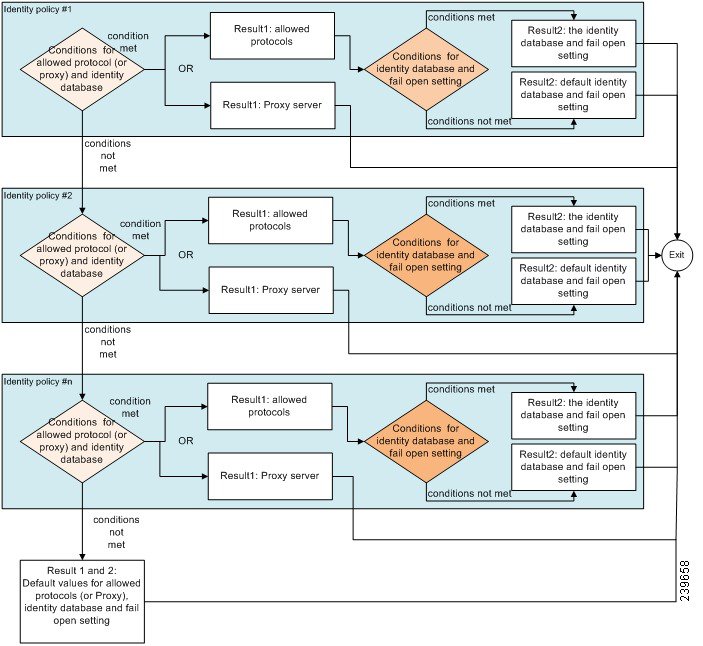
 from the View column in the Policy Sets table, in order to access all of the policy set details and to create authentication
and authorization policies as well as policy exceptions.
from the View column in the Policy Sets table, in order to access all of the policy set details and to create authentication
and authorization policies as well as policy exceptions.
 . The Conditions Studio opens. For more information, see
  , choose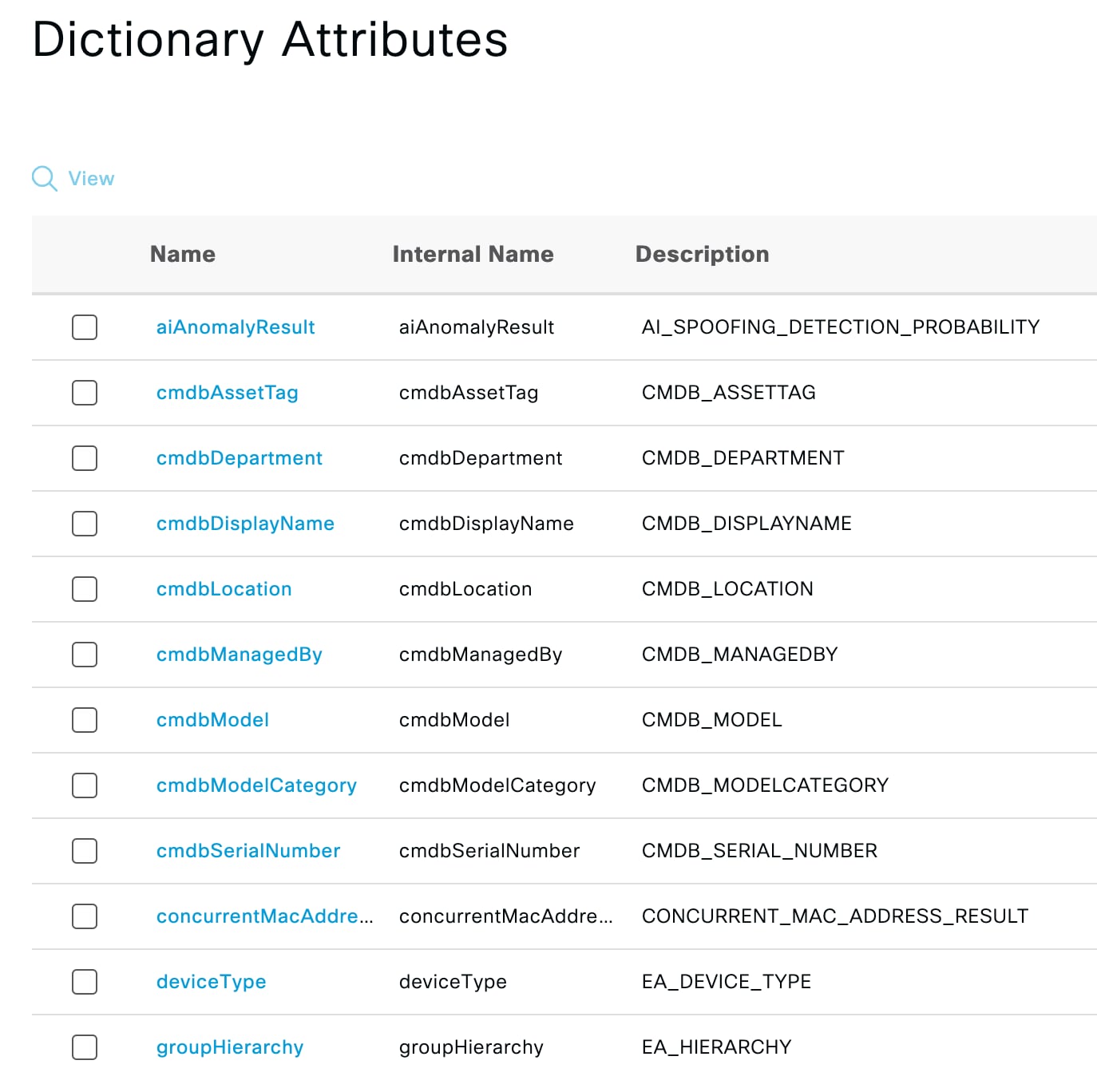
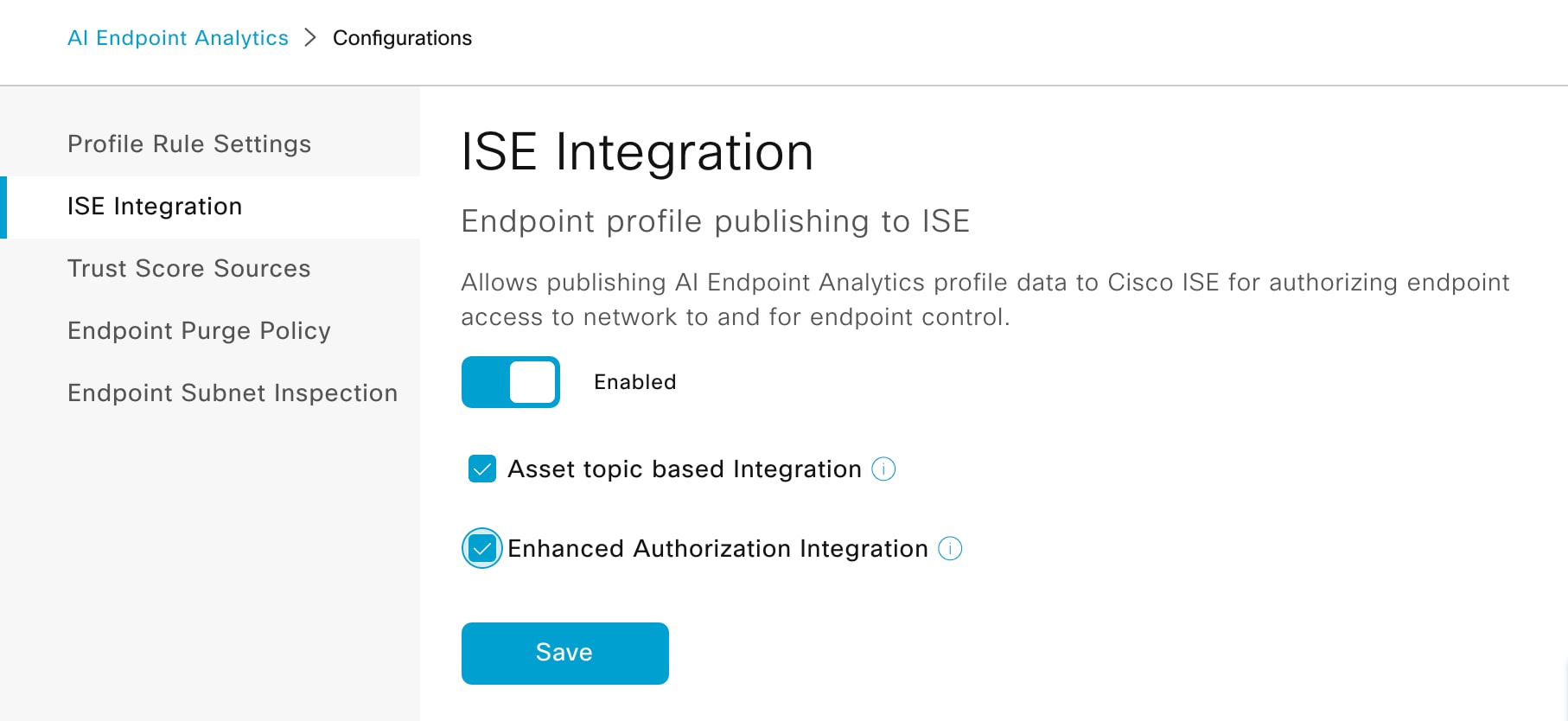
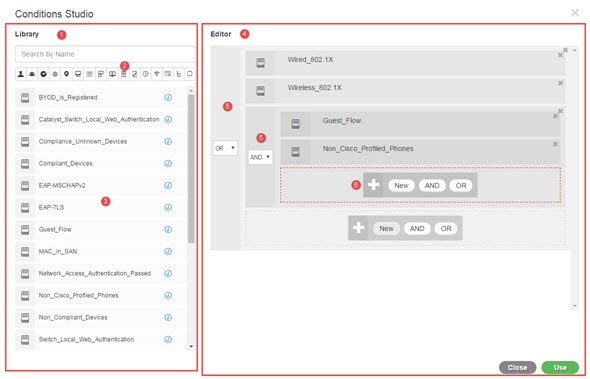
 , because conditions can be associated with more than one category.
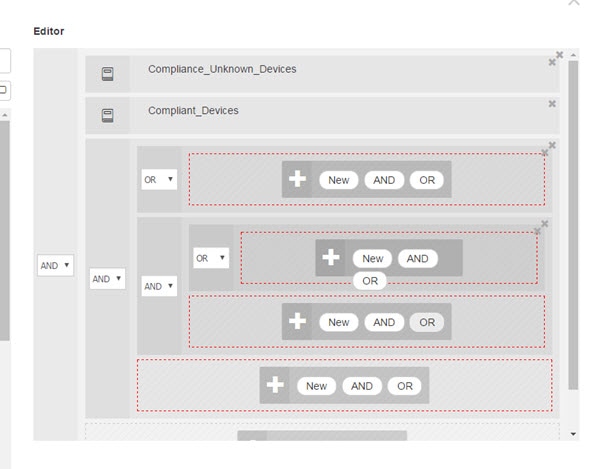
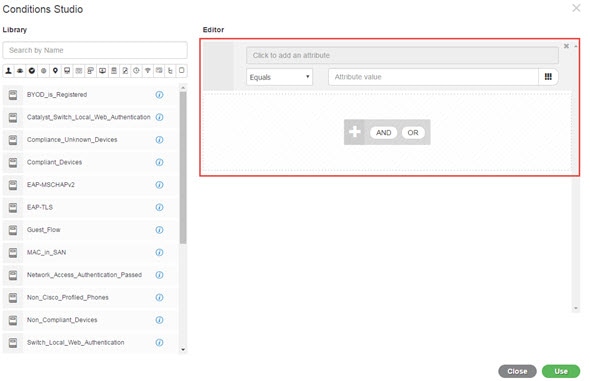
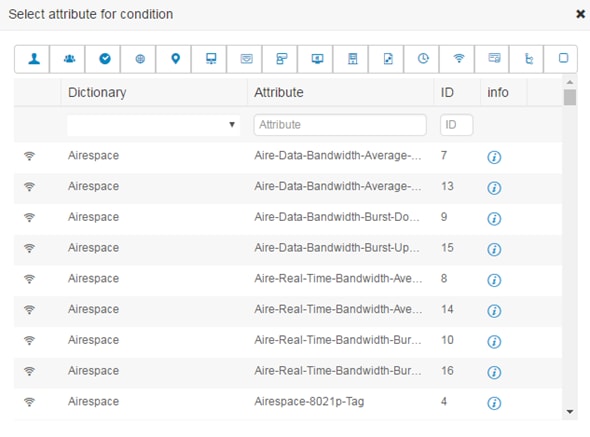
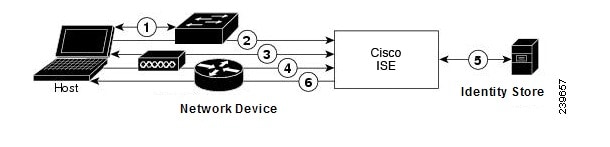
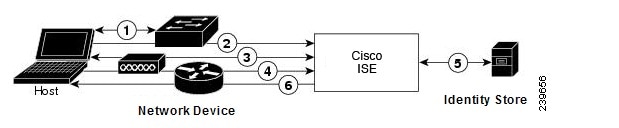
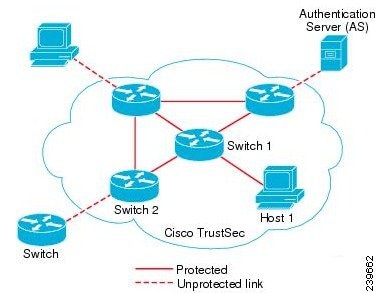
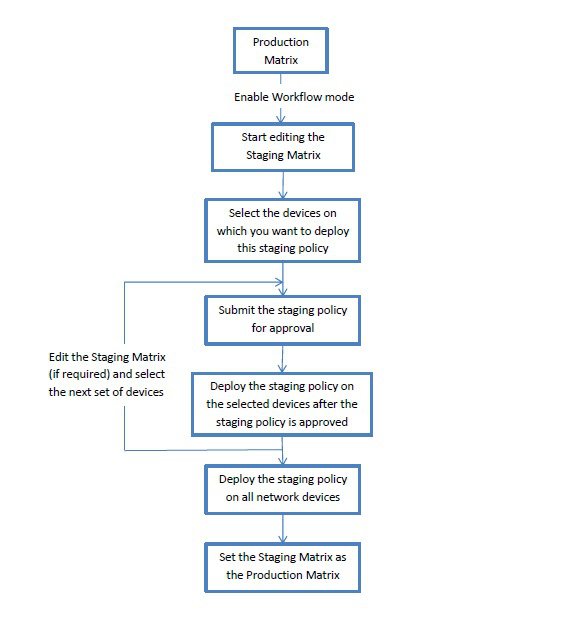
 icon. You can also duplicate an existing condition, but ensure that you change
the policy name.
icon. You can also duplicate an existing condition, but ensure that you change
the policy name.
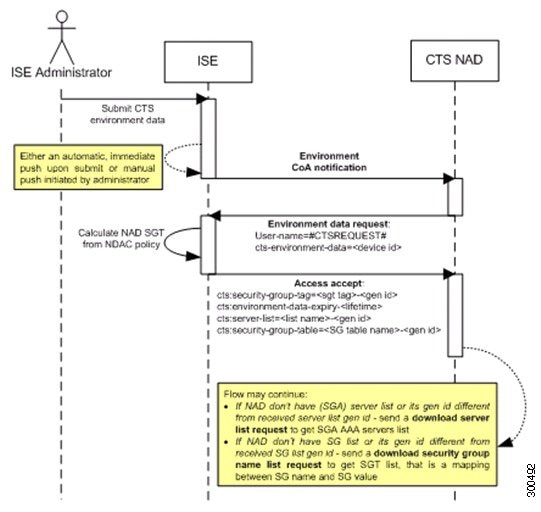
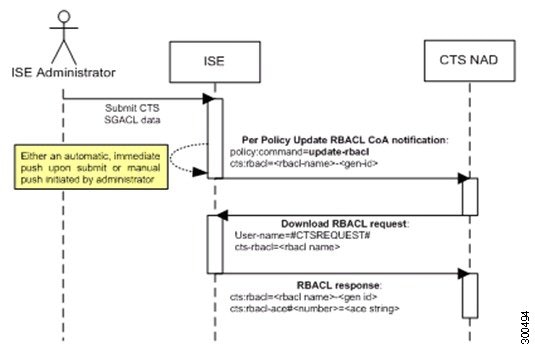
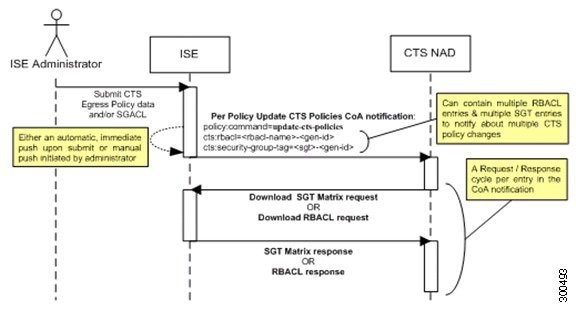
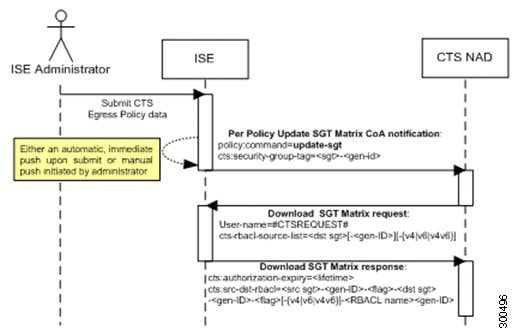
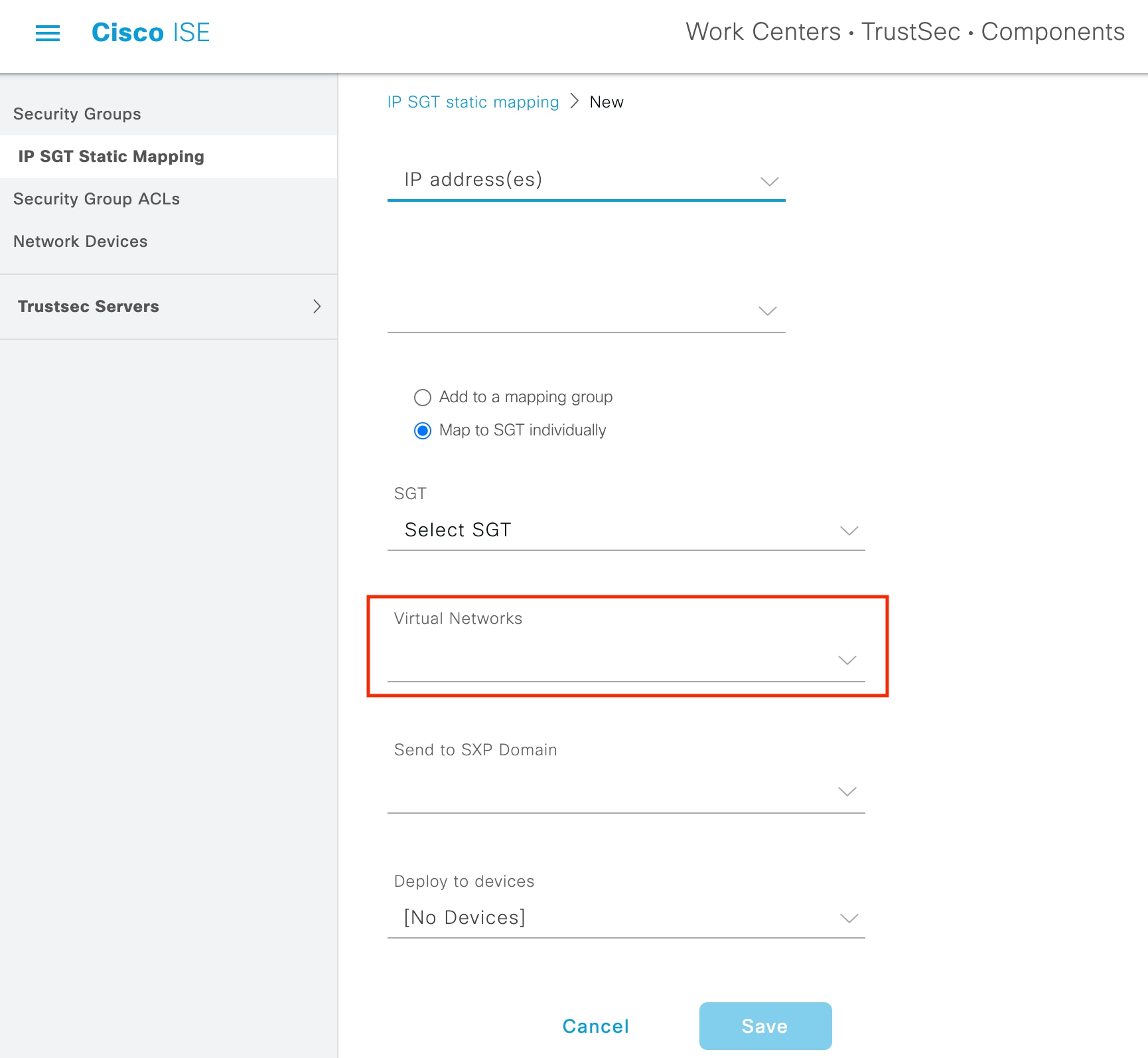
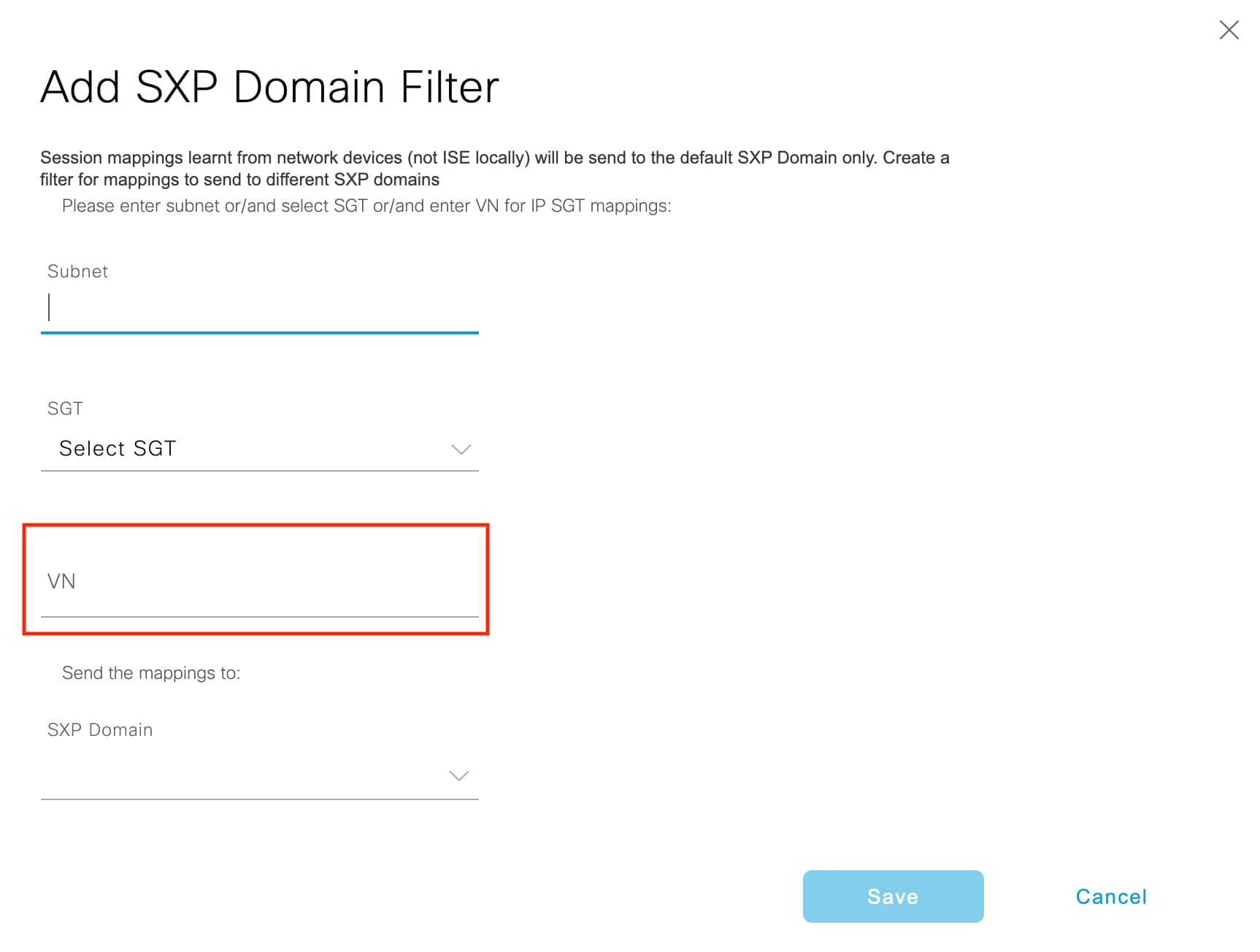
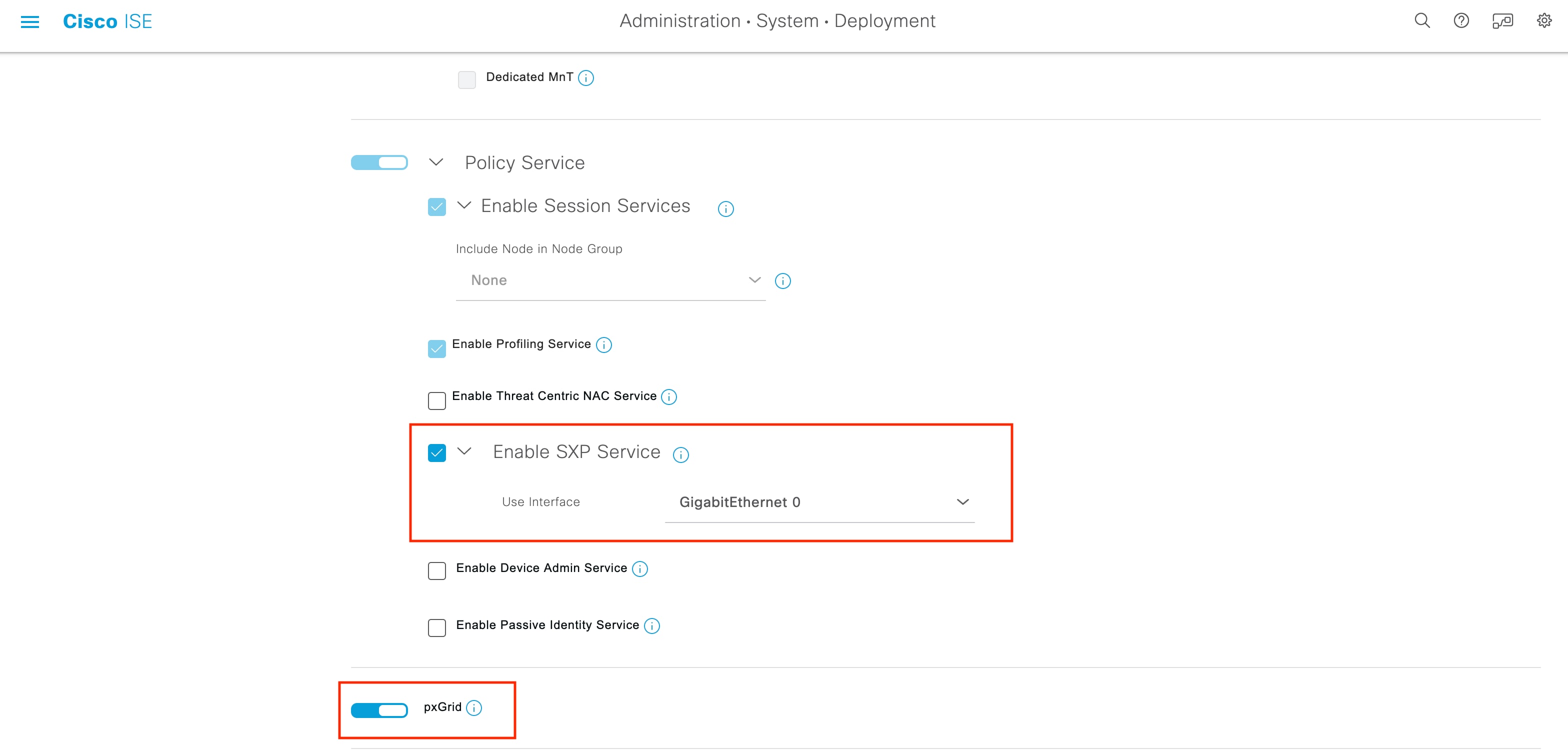
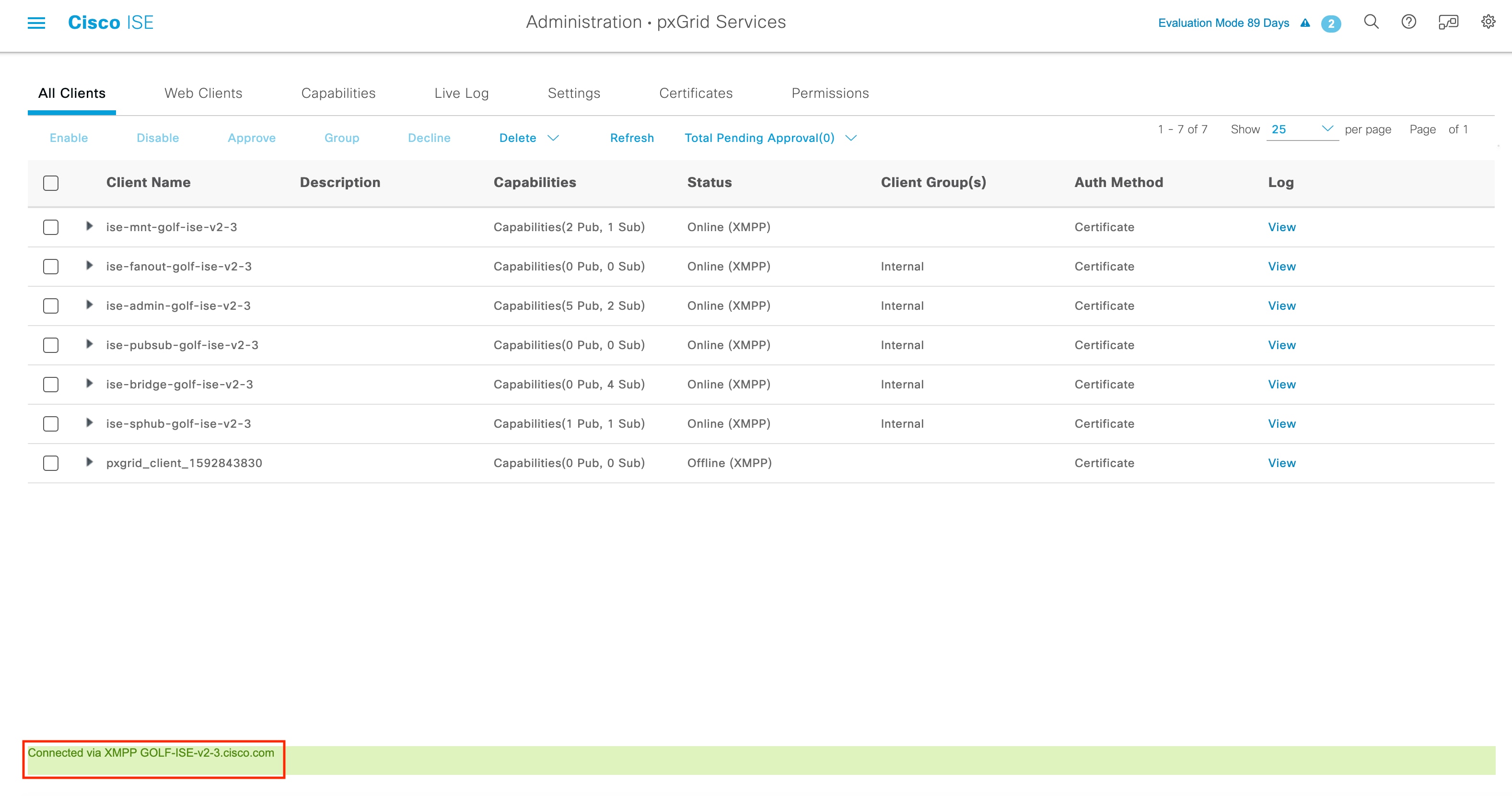
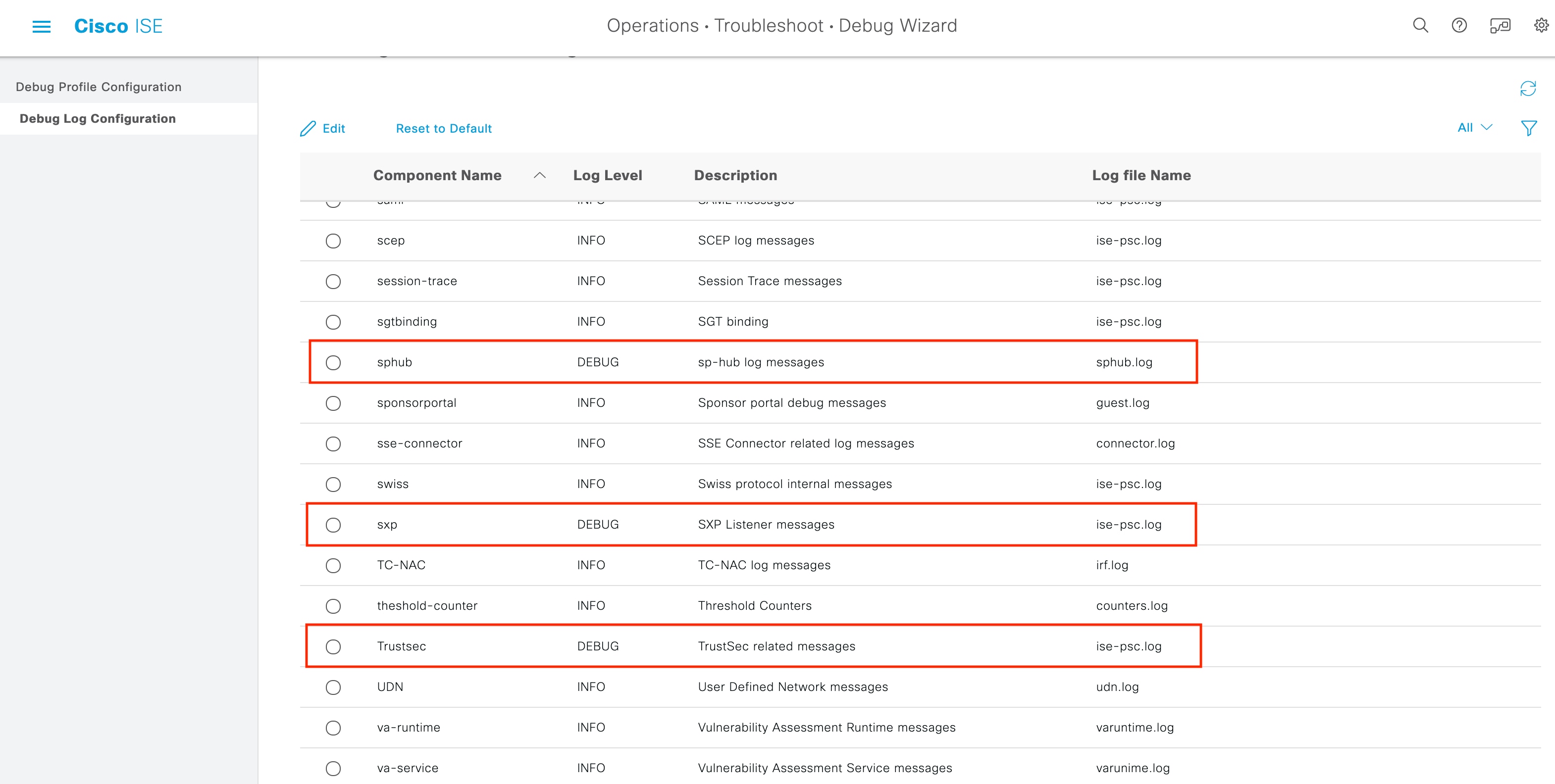
 Feedback