Events in Security Cloud Control
This chapter provides information about Security Analytics and Logging (SaaS) in Security Cloud Control.
About Security Analytics and Logging (SaaS) in Security Cloud Control
Terminology Note: In this documentation, when Cisco Security Analytics and Logging (a software as a service product) is used with Security Cloud Control for security event monitoring and analysis, you will see this integration referred to as Cisco Security Analytics and Logging (SaaS) or SAL (SaaS).
Cisco Security Analytics and Logging (SAL) allows you to capture supported types of security events from all of your firewall devices and view them in one place in Security Cloud Control. The events are stored in the Security Analytics and Logging cloud and viewable from the Event Logging page. The Event Logging page allows you to search, filter and analyze the security event data to understand which security rules are being triggered in your network.
Event types in Security Cloud Control
When filtering the security events logged in Secure Logging Analytics (SaaS), you can choose from a list of ASA, FTD, and event types that Security Cloud Control supports. From the Security Cloud Control menu, navigate and click the filter icon to choose events. These event types represent groups of syslog IDs. The table that follows shows which syslog IDs are included in which event type. To learn more about a specific syslog ID, you can search for it in the Cisco ASA Series Syslog Messages or the Cisco Secure Firewall Threat Defense Syslog Messages guides.
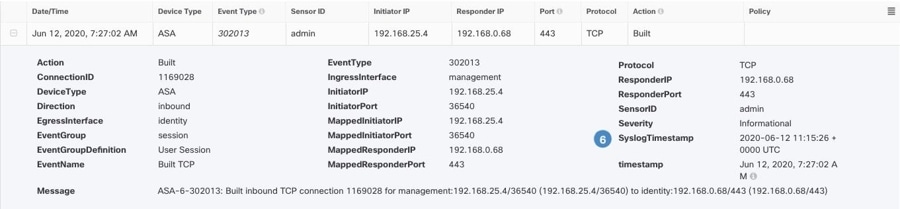
Some syslog events have the additional attribute "EventName." You can filter the events table to find events using the EventName attribute by filtering by attribute:value pairs. See Event Name Attributes for Syslog Events.
Some syslog events will have the additional attributes "EventGroup" and "EventGroupDefinition". You will be able to filter the events table to find events using these additional attributes by filtering by attribute:value pairs. See EventGroup and EventGroupDefinition Attributes for Some Syslog Messages.
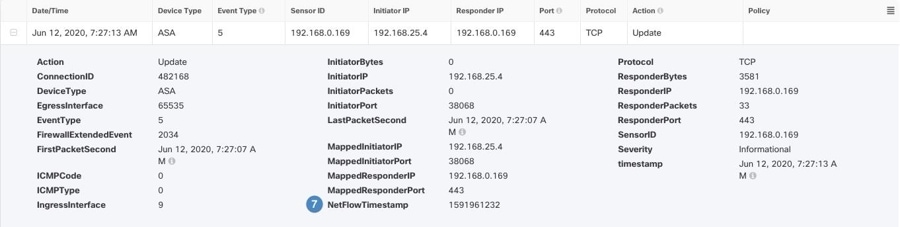
The NetFlow events are different from syslog events. The NetFlow filter searches for all NetFlow event IDs that resulted in an NSEL record. Those NetFlow event IDs are defined in the Cisco ASA NetFlow Implementation Guide.
The following table describes the event types that Security Cloud Control supports and lists the syslog or NetFlow event numbers that correspond to the event types:
|
Filter Name |
Description |
Corresponding Syslog Event or Netflow Event |
|---|---|---|
|
AAA |
These are events that the system generates when failed or invalid attempts happen to authenticate, authorize, or use up resources in the network, when AAA is configured. |
109001-109035 113001-113027 |
|
BotNet |
These events get logged when a user attempts to access a malicious network, which might contain a malware-infected host, possibly a BotNet, or when the system detects traffic to or from a domain or an IP address in the dynamic filter block list. |
338001-338310 |
|
Failover |
These events get logged when the system detects errors in stateful and stateless failover configurations or errors in the secondary firewall unit when a failover occurs. |
101001-101005, 102001, 103001-103007, 104001-104004, 105001-105048 210001-210022 311001-311004 709001-709007 |
|
Firewall Denied |
These events get generated when the firewall system denies traffic of a network packet for various reasons, ranging from a packet drop because of the security policy to a drop because the system received a packet with the same source IP and destination IP, which could potentially mean an attack on the network. Firewall Denied events may be contained in a NetFlow and may be reported with NetFlow event IDs as well as syslog IDs. |
106001, 106007, 106012, 106013, 106015, 106016, 106017, 106020, 106021, 106022, 106023, 106025, 106027 |
|
Firewall Traffic |
These are events that get logged depending on the various connection attempts in the network, user identities, time stamps, terminated sessions, and so on. Firewall Traffic events may be contained in a NetFlow and may be reported with NetFlow event IDs as well as syslog IDs. |
106001-106100, 108001-108007, 110002-110003 201002-201013, 209003-209005, 215001 302002-302304, 302022-302027, 303002-303005, 313001-313008, 317001-317006, 324000-324301, 337001-337009 400001-400050, 401001-401005, 406001-406003, 407001-407003, 408001-408003, 415001-415020, 416001, 418001-418002, 419001-419003, 424001-424002, 431001-431002, 450001 500001-500005, 508001-508002 607001-607003, 608001-608005, 609001-609002, 616001 703001-703003, 726001 |
|
IPsec VPN |
These events are logged in an IPsec VPN-configured firewall when mismatches occur in IPsec security associations or when the system detects an error in the IPsec packets it receives. |
402001-402148, 602102-602305, 702304-702307 |
|
NAT |
These events are logged in a NAT-configured firewall when NAT entries are created or deleted and when all the addresses in a NAT pool are used up and exhausted. |
201002-201013, 202001-202011, 305005-305012 |
|
SSL VPN |
These events are logged in an SSL VPN-configurated firewall when WebVPN sessions get created or terminated, user access errors, and user activities. |
716001-716060, 722001-722053, 723001-723014, 724001-724004, 725001-725015 |
|
NetFlow |
These events are logged around the IP network traffic as network packets enter and exit the interfaces, timestamps, user identities, and the amount of data transferred. |
0, 1, 2, 3, 5 |
|
Connection |
You can generate events for connections as users generate traffic that passes through the system. Enable connection logging on access rules to generate these events. You can also enable logging on Security Intelligence policies and SSL decryption rules to generate connection events. Connection events contain data about the detected sessions. The information available for any individual connection event depends on several factors, but in general includes:
|
430002, 430003 |
|
Intrusion |
The system examines the packets that traverse your network for malicious activity that could affect the availability, integrity, and confidentiality of a host and its data. When the system identifies a possible intrusion, it generates an intrusion event, which is a record of the date, time, type of exploit, and contextual information about the source of the attack and its target. Intrusion events are generated for any intrusion rule set to block or alert, regardless of the logging configuration of the invoking access control rule. |
430001 |
|
File |
File events represent files that the system detected, and optionally blocked, in network traffic based on your file policies. You must enable file logging on the access rule that applies the file policy to generate these events. When the system generates a file event, the system also logs the end of the associated connection regardless of the logging configuration of the invoking access control rule. |
430004 |
|
Malware |
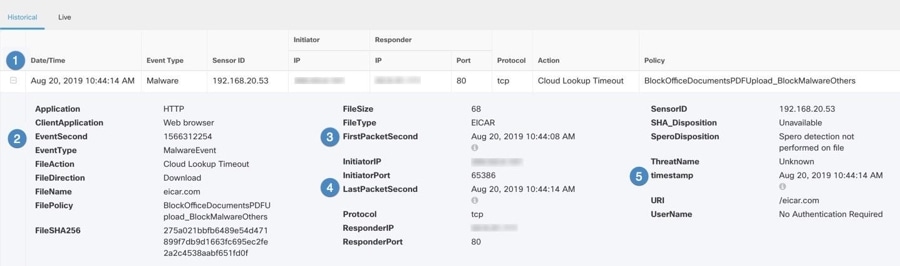
The system can detect malware in network traffic as part of your overall access control configuration. AMP for Firepower can generate a malware event, containing the disposition of the resulting event, and contextual data about how, where, and when the malware was detected. You must enable file logging on the access rule that applies the file policy to generate these events. The disposition of a file can change, for example, from clean to malware or from malware to clean. If AMP for Firepower queries the AMP cloud about a file, and the cloud determines the disposition has changed within a week of the query, the system generates retrospective malware events. |
430005 |
|
Security Intelligence |
Security Intelligence events are a type of connection event generated by the Security Intelligence policy for each connection that is blocked or monitored by the policy. All Security Intelligence events have a populated Security Intelligence Category field. For each of these events, there is a corresponding "regular" connection event. Because the Security Intelligence policy is evaluated before many other security policies, including access control, when a connection is blocked by Security Intelligence, the resulting event does not contain the information that the system would have gathered from subsequent evaluation, for example, user identity. |
430002, 430003 |
|
AI Defense |
AI Defense events provide a detailed record of activities within your AI environment, capturing interactions such as prompts submitted, responses generated, and any triggered AI Defense policy violations. These events include key information like timestamps, the application and AI model involved, the specific rule triggered, and the action taken. These event logs enable you to monitor AI usage in real time, detect threats, and enforce security policies effectively. |
Deprovisioning Cisco Security Analytics and Logging (SaaS)
If you allow your Cisco Security Analytics and Logging (SaaS) paid subscription to lapse, collection of new events stops immediately. After 90 days from expiry, you will no longer be able to view or query your existing event data. You have 180 days to renew your subscription.
If you allow the 180-day grace period to lapse, the system purges all of your event data. You can no longer view security events on the Event Logging page, nor have dynamic entity modeling (DEM) behavioral analytics applied to your security events and network flow data.

 icon and then click

 ).
).
 or "pause"
  live events as they stream in. If live events are "playing,"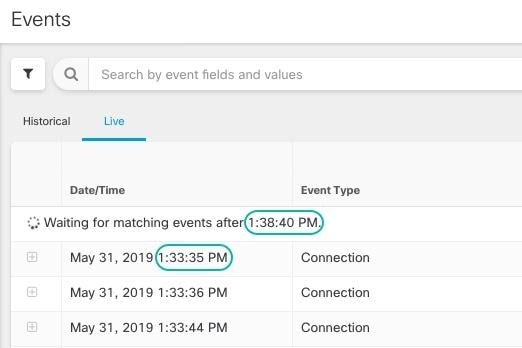
 located to the right of the columns, select or deselect the columns you want, and then click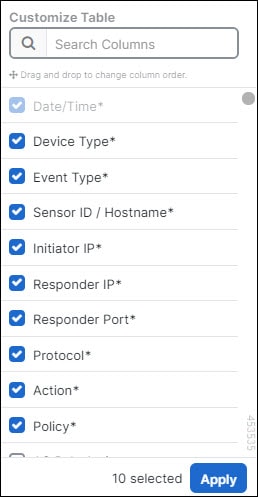
 .
.

 ) to pin the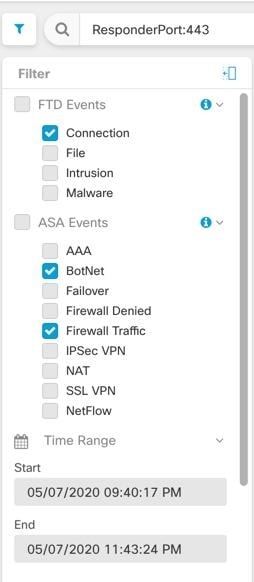
 Feedback