Get started with Security Cloud Control Firewall Management

This chapter explains the steps for provisioning the firewall management within Security Cloud Control Firewall Management and explains how to access it. Additionally, it presents an overview of the firewall dashboard.

Overview of Cisco Security Cloud Control

Security Cloud Control is a security platform that allows you to manage your security products and achieve security outcomes from a single integrated interface.

Integrating security products in the platform is a streamlined experience. After purchasing your subscriptions to Cisco security products, you receive a single email, with a single claim code for all the subscriptions you purchased. Entering the claim code in your new Security Cloud Control organization provisions all your products to Security Cloud Control simultaneously.

Within Security Cloud Control, user and group management occurs at the platform level. Roles are assigned to these users and groups to define their privileges for administering Security Cloud Control and the integrated products.

Navigation between products and tools is intuitive and standardized with a common platform menu and toolbar for all integrated products.

Security Cloud Control provides these additional core services to all integrated products on the platform:

  • Platform Management: Common services such as managing role-based access control, claiming subscriptions and standardized regional deployment of product instances are provided by Security Cloud Control. By centralizing these functions, Security Cloud Control ensures a consistent user experience in provisioning and managing access across all Cisco security products managed from the platform. Administrators reach these common services from the Platform Management menu in the main navigation bar of Security Cloud Control.

  • AI Assistant: The Cisco AI Assistant in Security Cloud Control is designed to streamline security operations by providing AI-driven insights, automation, and contextual guidance. It assists administrators in managing security policies, troubleshooting issues, and optimizing configurations across Cisco’s security products, including Firewall, Duo, , and Secure Access. By leveraging natural language processing and cross-platform intelligence, the assistant enhances efficiency, accelerates incident response, and simplifies security workflows.

  • Global Search: The ability to search for values across products in the platform.

  • Shared Objects: Creating and managing objects that can be shared across devices and policies.

  • Unified documentation portal: A documentation "Help" experience where all documentation is accessible in one portal.

Products You Can Integrate with Security Cloud Control

From Security Cloud Control, you can manage all of these security products:

  • AI Defense

  • Security Cloud Control Firewall Management

  • Multicloud Defense

  • Secure Access

Products You Can Launch from Security Cloud Control

From Security Cloud Control, you can launch these security products. After launch, these products operate as standalone products and you cannot manage them through Security Cloud Control. You can only claim or deactivate the licenses of such products from Security Cloud Control.

In the Security Cloud Control toolbar, click the nine-dot menu to launch these products:

  • Cisco Secure Email Threat Defense

  • Cisco Secure Endpoint

  • Cisco Duo

  • Cisco XDR

Products and Solutions Supported by Security Cloud ControlCisco Security Cloud Control for Government

Currently, these are the products you can integrate with Security Cloud ControlCisco Security Cloud Control for Government.

AI Defense: AI Defense addresses risks for users and providers of AI. Using network visibility and enforcement points in the Security Cloud Control, AI Defense adds detection and enforcement measures to discover sanctioned and unsanctioned AI workloads, applications, models, data, and user access across your distributed cloud environment. For organizations that develop and deliver AI-powered services, AI Defense detects vulnerabilities in your AI models before they're delivered. For your running AI applications, AI Defense guardrails intercept rapidly evolving threats, including prompt injections, denial of service, and data leakage. See AI Defense Documentation for more information.

Security Cloud Control Firewall Management: Security Cloud Control Firewall Management (formerly Cisco Defense Orchestrator) is a cloud-based security policy manager that simplifies and unifies policy across your Cisco firewalls and other devices. See Firewall in Security Cloud Control Documentation for more information.

Multicloud Defense: Multicloud Defense provides a simplified and highly automated approach to multicloud security. This solution allows organizations to manage and secure their multicloud environments using a single SaaS delivered control plane, and centralized or distributed PaaS-delivered data plane architectures. Multicloud Defense provides continuous visibility, unified protection and dynamic policy updates across all major cloud providers, thereby eliminating the need for separate point solutions for solutions for each cloud provider. See Multicloud Defense Documentation for more information.

Secure Access: Cisco Secure Access is a cloud-based platform that provides multiple levels of defense against internet-based threats. Connect securely to the internet, SaaS apps, and private digital resources from your organization's network or roaming off-network. Using policy rules, configure and enforce security controls on collections of resources, users, and devices. See Secure Access Documentation for more information. Secure Access subscriptions also include the Identity Intelligence integration via Security Cloud Control at no additional charge—this does not include access to the standalone Identity Intelligence dashboard. For more information, see Integrate Cisco Identity Intelligence with Secure Access.

Cisco XDR (Extended Detection and Response): Cisco XDR, is a cloud-native, extensible security solution designed to simplify security operations and accelerate incident response. It collects and analyzes telemetry from multiple sources—including endpoint, network, firewall, email, identity, and DNS—to detect sophisticated threats with enriched context and threat intelligence from Cisco Talos.

Cisco XDR prioritizes threats based on potential risk and impact, reduces false positives, and provides AI-driven guidance and automation to streamline investigations and remediation. This unified approach enables Security Operations Center (SOC) teams to act faster, improve productivity, and build security resilience by integrating both Cisco and third-party security tools in a multi-vector, multi-vendor environment. See Cisco XDR Help Center for more information.

Overview of Security Cloud Control Firewall Management

Security Cloud Control Firewall Management, formerly Cisco Defense Orchestrator, simplifies security policy management in distributed environments. It helps you maintain consistent policies across managed firewalls and devices. In Security Cloud Control, Firewall appears under Products.

Security Cloud Control Firewall Management helps optimize security policies by identifying inconsistencies and providing tools to resolve them. It also supports object sharing, policy sharing, and configuration templates so that you can apply consistent settings across devices.

Security Cloud Control Firewall Management can coexist with local device managers such as Adaptive Security Device Manager (ASDM). It tracks configuration changes that other managers make, then reconciles differences when needed.

The platform includes a guided Day 0 experience to help you onboard Threat Defense devices to your On-Premises Firewall Management Center or to Cloud-Delivered Firewall Management Center. It highlights key features and helps you activate and configure them.

Device onboarding requirements

Before you onboard a device, complete these prerequisites:

  • Complete the installation wizard.

  • License the device.

After you complete those prerequisites, use the Security Cloud Control Firewall Management onboarding wizard to onboard the device.

Refer to Onboard Devices and Services.

Keep these restrictions in mind:

  • After you onboard devices to a Security Cloud Control Firewall Management associated with an organization, you cannot migrate those devices to another organization.

  • To move devices to a new organization, you must re-onboard them to the new organization.

For a complete list of devices that Security Cloud Control supports and manages, see Supported devices, software, and hardware for Security Cloud Control Firewall Management.

Cisco Online Privacy Statement

Cisco Systems, Inc. and its subsidiaries (collectively referred to as "Cisco") are committed to protecting your privacy and providing you with a positive experience on Cisco websites and while using Cisco products and services ("Solutions"). Read the Cisco Online Privacy Statement carefully to get a clear understanding of how Cisco collects, uses, shares, and protects your personal information.

Security Cloud Control Firewall Management Platform Maintenance Schedule

Security Cloud Control Firewall Management updates its platform every week with new features and quality improvements. Updates are made during a 3-hour period according to this schedule:

Day of the week

Time of day

(24-hour time, UTC)

Thursday

09:00 UTC - 12:00 UTC

During the Security Cloud Control Firewall Management upgrade period, you can still access your organization and the Cloud-Delivered Firewall Management Center. Additionally, the devices that you have onboarded to Security Cloud Control Firewall Management continue to enforce their security policies.


Note


  • During the maintenance period of the Security Cloud Control Firewall Management, refrain from creating or deploying configurations to the devices it manages.

  • If there is any issue that stops Security Cloud Control Firewall Management from communicating, Cisco addresses that issue in all the affected tenants as quickly as possible, even if it is outside the maintenance window.


Security Cloud Control Firewall Management licenses

Security Cloud Control Firewall Management requires a base subscription for organization entitlement and device licenses for managing devices. You can buy one or more Security Cloud Control Firewall Management base subscriptions based on the number of tenants you require and device licenses based on the device model number and the quantity. In other words, purchasing the base subscription provides you with a Security Cloud Control Firewall Management organization. For every device you choose to manage using Security Cloud Control Firewall Management, you need separate device licenses.

To onboard and manage devices from Security Cloud Control Firewall Management, you must purchase a base subscription and device-specific, term-based subscriptions based on the devices you want to manage.

Subscriptions

Security Cloud Control Firewall Management subscriptions are term-based:

  • Base: Offers subscriptions for one, three, and five years, and provides entitlement to access the Security Cloud Control Firewall Management organization and onboard adequately licensed devices.

  • Device License: Offers subscriptions for one, three, and five years for any supported device you choose to manage. For example, you can choose to manage a Cisco Firepower 1010 device using Security Cloud Control Firewall Management for three years if you purchase a three-year software subscription for the Cisco Firepower 1010 device.

See Software and Hardware Supported by Security Cloud Control Firewall Management for more information on Cisco security devices that Security Cloud Control Firewall Management supports.


Important


You do not require two separate device licenses to manage a high-availability device pair in Security Cloud Control Firewall Management. If you have a high-availability pair, purchasing one device license is sufficient because Security Cloud Control Firewall Management considers the pair of high-availability devices as one single device.


Note


  • Catalyst SD-WAN does not require an additional license for integration with Security Cloud Control Firewall Management. Customers with Cisco Digital Network Architecture (DNA) or WAN Essentials licenses can use these existing licenses for integration without needing any other license.


Note


You cannot manage Security Cloud Control Firewall Management licensing through the Cisco Smart Licensing portal.


Software Subscription Support

The Security Cloud Control Firewall Management base subscription includes software subscription support that is valid for the term of the subscription and provides access to software updates, major upgrades, and Cisco Technical Assistance Center (TAC) at no extra cost. While software support is selected by default, you can also leverage Security Cloud Control Firewall Management solution support based on your requirement.

More Supported Devices and Licenses

In addition to supporting Secure Firewall Threat Defense devices through the Cloud-Delivered Firewall Management Center, Security Cloud Control also manages these devices:

  • Cisco Secure Firewall ASA

  • On-premises Cisco Secure Firewall Management Center

  • Cisco Meraki Security Appliance

  • Cisco IOS devices

  • Devices accessible using SSH

  • Amazon Web Services (AWS) virtual private cloud (VPC)

  • Umbrella Organization

You will need a Security Cloud Control base entitlement license and a license specific to the device you want to manage.

Overview of Cloud-Delivered Firewall Management Center

Cloud-Delivered Firewall Management Center is a software-as-a-service product that manages Secure Firewall Threat Defense devices through Security Cloud Control Firewall Management. It provides many of the same functions as an On-Premises Firewall Management Center.

Cloud-Delivered Firewall Management Center has the same appearance and behavior as an On-Premises Firewall Management Center and uses the same FMC API.

Because it is a SaaS product, the Security Cloud Control Firewall Management operations team deploys and maintains the Cloud-Delivered Firewall Management Center software. As new features are introduced, the operations team updates the Cloud-Delivered Firewall Management Center in your Security Cloud Control Firewall Management organization.

Migration and onboarding details

A migration wizard is available to help you migrate Threat Defense devices from an On-Premises Firewall Management Center to Cloud-Delivered Firewall Management Center.

Devices must run one of these Threat Defense software releases before you migrate them:

  • Minimum On-Premises Firewall Management Center: 7.2

  • Minimum Threat Defense: 7.2.x (not supported for Version 7.1)

Threat Defense 7.1 releases are not supported for migration.

You onboard Threat Defense devices in Security Cloud Control Firewall Management by using familiar methods, such as entering the serial number or using a CLI command that includes a registration key.

After onboarding:

  • The device appears in both Security Cloud Control Firewall Management and Cloud-Delivered Firewall Management Center.

  • You configure the device in Cloud-Delivered Firewall Management Center.

  • In Security Cloud Control Firewall Management, you can review device information such as version, configuration status, connectivity, health status, and node status.

  • When you click the health status in Security Cloud Control Firewall Management, the platform opens the device health monitoring page in the Cloud-Delivered Firewall Management Center user interface.

Availability and Security Analytics

Security Cloud Control Firewall Management supports high availability for the Threat Defense devices that it manages through the data interface. This feature is supported for devices that run software version 7.2 or later.

You can analyze security events from onboarded threat defense devices by using either Security Analytics and Logging (SaaS) or Security Analytics and Logging (On-Premises):

  • Security Analytics and Logging (SaaS) stores events in the cloud, and you view those events in Security Cloud Control Firewall Management.

  • Security Analytics and Logging (On-Premises) stores events on an on-premises Secure Network Analytics appliance, and analysis occurs in the On-Premises Firewall Management Center.

In both cases, you can still send logs directly from firewalls to a log collector of your choice.

Licenses

The license for Cloud-Delivered Firewall Management Center is a per-device-managed license and there is no license required for the Cloud-Delivered Firewall Management Center itself. Existing Secure Firewall Threat Defense devices re-use their existing smart licenses and new Secure Firewall Threat Defense devices provision new smart licenses for each feature implemented on the Secure Firewall Threat Defense For more information, see Cloud-Delivered Firewall Management Center license.

Existing customers can continue to use Security Cloud Control for managing other device types like, the Secure Firewall ASA, Meraki, Cisco IOS devices, Umbrella, and AWS virtual private clouds. If you use Security Cloud Control to manage a Secure Firewall Threat Defense device configured for local management with Firepower Device Manager, you can continue to manage them with Security Cloud Control as well.

To learn how to have a Cloud-Delivered Firewall Management Center provisioned on your tenant, see Enable Cloud-delivered Firewall Management Center on Your Security Cloud Control Tenant.

See Managing Cisco Secure Firewall Threat Defense with Cloud-delivered Firewall Management Center for the complete administrator guide to the Cloud-delivered Firewall Management Center.

Enable Cloud-Delivered Firewall Management Center

If you want to manage your Secure Firewall Threat Defense devices, you can enable the Cloud-Delivered Firewall Management Center on your tenant. You need to have an admin or a super admin user role to perform this task.

Procedure


Step 1

From the Security Cloud Control Home page, click Firewall.

Step 2

From the Security Cloud Control menu, click Administration > Integrations > Firewall Management Center and click Enable Cloud-Delivered FMC.

Security Cloud Control starts provisioning a Cloud-Delivered Firewall Management Center instance in the background; it typically takes 15 to 30 minutes for this to be complete. You can track the provisioning progress on the Status column of Cloud-Delivered FMC.

After the provisioning is complete, the status changes to Active. In addition, you get a Cloud-Delivered Firewall Management Center is Ready notification on the Security Cloud Control notifications panel and on the applications on which you have configured incoming webhooks. See Notification Settings for more information.

Note


After you receive the Cloud-Delivered Firewall Management Center is Ready notification, ensure that you log out of and log in back to your tenant once, to see the Cloud-Delivered FMC right pane options, such as Actions, Management, and System.


What to do next

  1. Register Cloud-Delivered Firewall Management Center with Cisco Smart Software Manager (CSSM) to activate smart license. For detailed steps, refer to Register the Cloud-Delivered Firewall Management Center with the Smart Software Manager.

  2. Onboard your Firewall Threat Defense devices to the Cloud-Delivered Firewall Management Center and manage them.

Determine the Cloud-Delivered Firewall Management Center Version in Security Cloud Control Firewall Management

Information about the Cloud-Delivered Firewall Management Center version is required primarily for migration planning, feature support verification, troubleshooting, licensing, and operational management.

Use this procedure to determine the current version of your Cloud-Delivered Firewall Management Center in Security Cloud Control Firewall Management.

Before you begin

Enable Enable Cloud-Delivered Firewall Management Center in your organzation.

SUMMARY STEPS

  1. From the Security Cloud Control Home page, click Firewall.
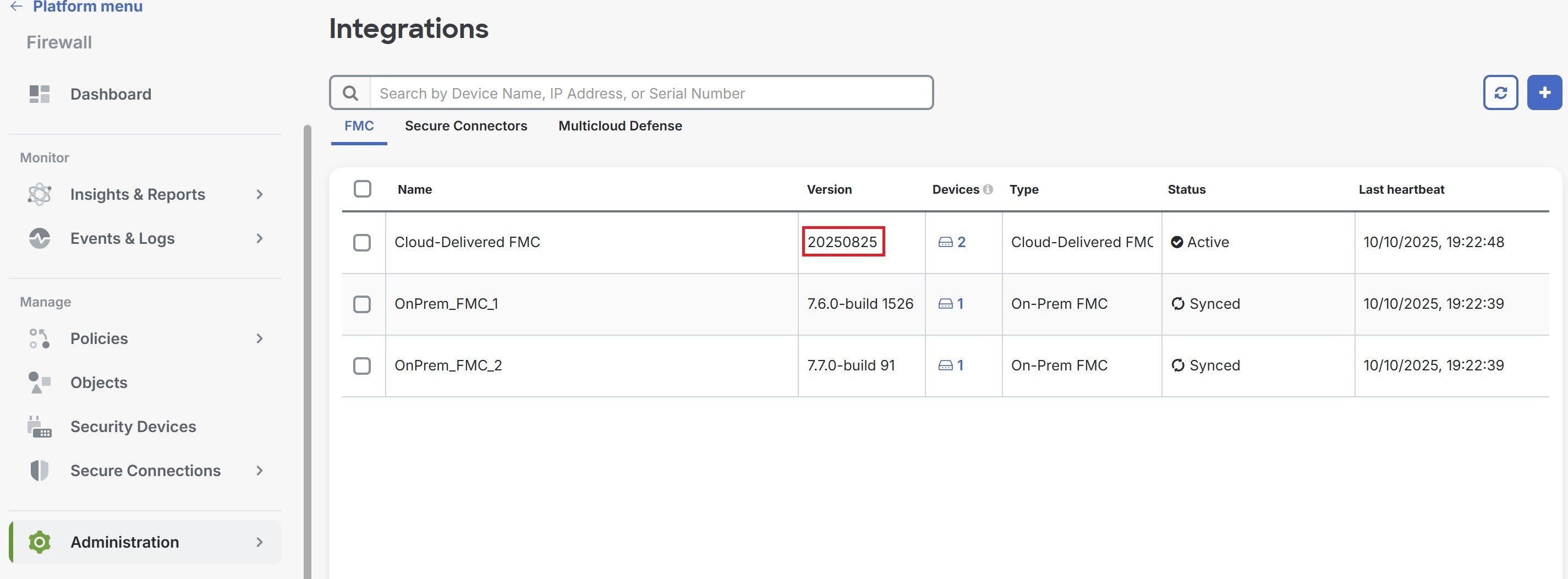
  2. In the left pane, click Administration > Integrations > Firewall Management Center.
  3. Under the FMC tab, the version is displayed under the Version column.

DETAILED STEPS


Step 1

From the Security Cloud Control Home page, click Firewall.

Step 2

In the left pane, click Administration > Integrations > Firewall Management Center.

Step 3

Under the FMC tab, the version is displayed under the Version column.

For more information about Cloud-Delivered Firewall Management Center versions, see Release Notes for Cloud-Delivered Firewall Management Center.

Cloud-Delivered Firewall Management Center licensing and registration

Register Cloud-Delivered Firewall Management Center with Cisco Smart Licensing the same way you would for On-Premises Firewall Management Center.

Overview

Cloud-Delivered Firewall Management Center is included with the base subscription and trial for Security Cloud Control Firewall Management. You do not need to purchase a separate license for Cloud-Delivered Firewall Management Center. The base subscription or trial covers Cloud-Delivered Firewall Management Center, enabling you to manage Firewall Threat Defense devices through the cloud.

Cloud-Delivered Firewall Management Center is provisioned with a 90-day evaluation license upon deployment.


Important


We strongly recommend registering Cloud-Delivered Firewall Management Center with Cisco Smart Software Manager immediately after deployment to access all features, including those requiring export encryption such as RAVPN and SSL VPN. Early registration prevents feature limitations and deployment interruptions.


Evaluation license

  • Features requiring export encryption, such as Remote Access VPN, SSL VPN, and other encryption-dependent options, remain disabled until you register Cloud-Delivered Firewall Management Center with Cisco Smart Software Manager (CSSM).

  • After the 90-day evaluation period ends, you can continue onboarding Firewall Threat Defense devices, but manually triggered or scheduled deployments are blocked until registration with CSSM is completed.

  • Security Cloud Control Firewall Management sends alert notifications as the evaluation license nears expiration.


    Note


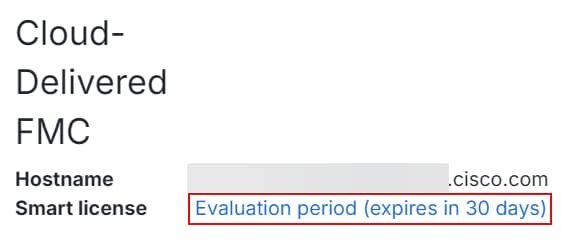
    The Smart license field displays a warning when the evaluation license is expiration.

    Cloud-delivered FMC Smart license warning message: Evaluation period (expires in 89 days)

    When the evaluation period ends, Cloud-Delivered Firewall Management Center is unregistered. Registering Cloud-Delivered Firewall Management Center with Cisco Smart Software Manager converts from evaluation mode to a fully licensed state.

    Click the evaluation warning link to open the smart licensing registration page and register Cloud-Delivered Firewall Management Center with Cisco Smart Software Manager.


Registration with Cisco Smart Software Manager (CSSM)

  • Connect Cloud-Delivered Firewall Management Center to your smart licensing account, following the same process as On-Premises Firewall Management Center. The high-level procedure is provided in this section.

  • No separate license purchase is needed for Cloud-Delivered Firewall Management Center; the license is automatically applied upon registration.

  • Registering with smart licensing enables encryption export features.

  • Registration ensures compliance and prevents deployment issues.

To learn how to get a Cloud-Delivered Firewall Management Center provisioned on your Security Cloud Control tenant, see Request a Cloud-Delivered Firewall Management Center for your Security Cloud Control Tenant.

Licensing for Firewall Threat Defense devices

  • No separate license purchase is needed for Cloud-Delivered Firewall Management Center.

  • Each Firewall Threat Defense device managed by Cloud-Delivered Firewall Management Center requires an individual license.

  • After registering Cloud-Delivered Firewall Management Center with CSSM, an administrator may apply feature licenses to security devices.

Step-by-step registration

A high-level procedure is provided here. For detailed steps, see Register the Management Center with the Smart Software Manager.

  1. Create or Access Your Smart Account:

    Ensure you have a Cisco Smart Software Manager account. If you do not have one, create it at Smart Software Manager.

  2. Generate a Registration Token or Use a Registration Token:

    In the Smart Software Manager, use an existing valid registration token or generate a registration token for the virtual account to which you want to register the Cloud-Delivered Firewall Management Center.

    1. Navigate to Inventory > New Token.

    2. Enter a description and set an expiration (Cisco recommends 30 days).

    3. Create and copy the token.

  3. Register Cloud-Delivered Firewall Management Center with the Token:

    1. Log in to the Cloud-Delivered Firewall Management Center interface.

    2. Navigate to System > Licenses > Smart Licenses.

    3. Click Register and paste the registration token into the Product Instance Registration Token field.

    4. Ensure there are no extra spaces or blank lines before or after the token.

    5. Click Apply Changes.

  4. Verify Registration:

    After registration, verify the license status under System > Licenses > Smart Licenses to confirm successful registration, license application, and that “Export-Controlled Features” are enabled.

Cloud-Delivered Firewall Management Center Maintenance Schedule

Customers who have a Cloud-Delivered Firewall Management Center deployed on their organization are notified approximately 1 week before Security Cloud Control updates the Cloud-Delivered Firewall Management Center environment.

Super Admin and Admin users of the tenant are notified by email. Security Cloud Control also displays a banner on its home page notifying all users of upcoming updates.


Note


  • During the maintenance period of the Cloud-Delivered Firewall Management Center, refrain from creating or deploying configurations to the devices it manages.

  • If there is any issue that stops Security Cloud Control or Cloud-Delivered Firewall Management Center from communicating, that failure is addressed on all affected tenants as quickly as possible, even if it is outside the maintenance window.


Provision Security Cloud Control Firewall Management

This topic provides the high-level steps required to provision a Firewall within Security Cloud Control. Provisioning a firewall involves enabling the firewall feature for your organization, claiming your subscription, and preparing your environment for secure network management. The process ensures that your organization’s firewall services are correctly set up and ready for configuration and policy deployment.

Procedure


Step 1

Sign in to Security Cloud Control using Security Cloud Sign on account. Create an account if you do not have one.

To create a Security Cloud Sign On account, you need to provide an email address where the account activation email will be sent. Every Security Cloud Sign On user account is required to use Duo multi-factor authentication (MFA). Duo MFA is included with Security Cloud Sign On account at no charge.

For information on how to create a Security Cloud Sign On account, see Security Cloud Sign On..

Note


If you already have a Security Cloud Sign on account, see Signing in to Security Cloud Control.

Step 2

Create an organization and set a preferred region. See Create an Organization.

Step 3

(Optional) Enable Firewall management in Security Cloud Control.

If you have a new Security Cloud Control organization and are entitled to Firewall in Security Cloud Control but do not yet have your subscription code, you will be able to enable the Firewall application using this procedure. For more information, see Enable Security Cloud Control Firewall Management.

Step 4

After you receive the subscription code, enter the claim code that you receive in the Security Cloud Control welcome email in order to claim subscriptions for the product instances. For more information, see Claim your Product Subscription. Activate the new product instances.

Note


In case you need to understand the claim subscription process, see the Overview of the Claim Subscription.

Step 5

Add a domain to your product organization. For more information, see Add and Claim your Domain.

Step 6

Integrate the identity provider with the Security Cloud Sign On account. For more information, see Integrate an Identity Provider.

Step 7

Create users and groups; assign them roles for precise product management and control. For information on role-based access, see Role-based Access Control.


The Firewall Management dashboard

The Firewall dashboard is your central hub for monitoring and managing tenant-level details across various categories. Upon logging in, you can access a customizable dashboard that offers critical insights and actions to optimize security and operational efficiency.

From the left pane, click Dashboard.

Customize the dashboard

Make your dashboard fit your specific needs by customizing the visible widgets.

  1. On the Home page, click Customize.

  2. Select or deselect the widgets you want to view on the dashboard.

  3. You can drag and drop the widgets to arrange them as you prefer.

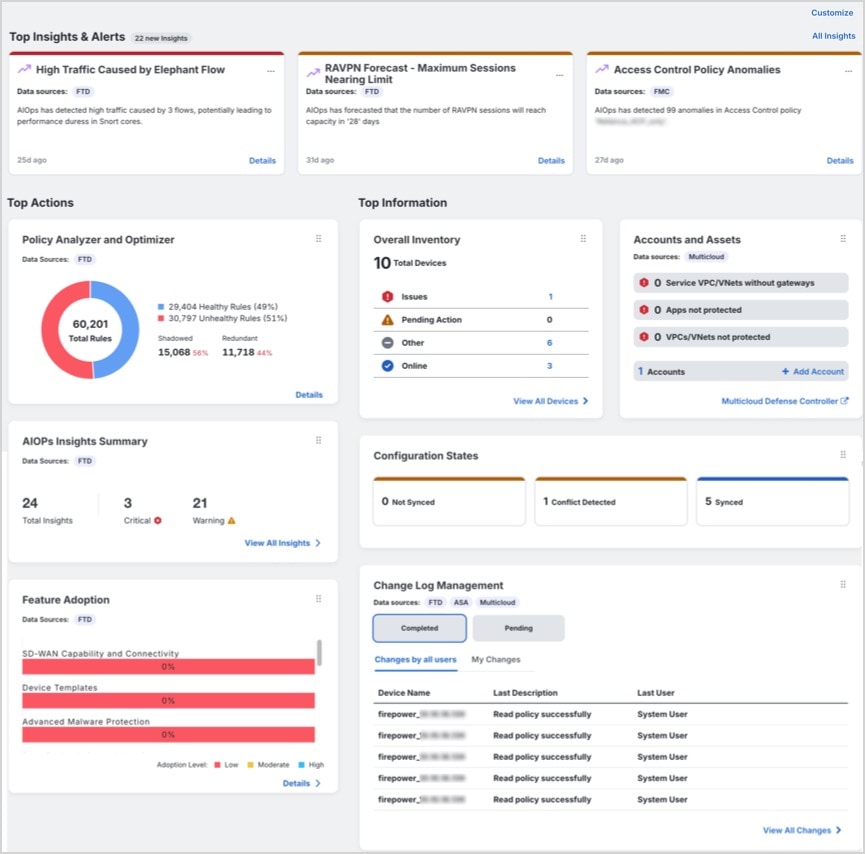
The dashboard is divided into three main sections: Top Insights & Alerts, Top Actions, and Top Information. Each section provides different categories of insights to help you maintain optimal security and operational control.

Top Insights & Alerts

This section is visible only if AIOps Insights is enabled for your tenant. You can view insights related to high traffic caused by elephant flows, RA VPN forecast, access control policy anomalies, high CPU and memory usage, snort CPU and memory usage.

Top Actions

This section is visible only if AIOps Insights is enabled for your tenant. If enabled, you can view the following widgets:

  • Policy Analyzer and Optimizer: Analyzes security policies, detects anomalies, and and recommends changes that can improve firewall performance.

    For more information, refer to Policy Analyzer and Optimizer.

  • AIOps Insights: Shows active insights and trends by category, including Configuration, Health & Operations, and Traffic & Capacity.

    For more information, refer to AIOps Insights.

  • Feature Adoption: Shows feature adoption rates so you can assess and improve usage.

    For more information, refer to Assess and Improve Feature Adoption.

Top Information

This section provides detailed insights into various tenant-level metrics. Depending on the features that are enabled for your tenant, you can view the following widgets:

  • Configuration States: Compares device configurations with the configurations maintained by Security Cloud Control so that you can identify inconsistencies or conflicts.

    For more information, refer to Device Management.

  • Change Log Management: Shows completed and pending change logs so that you can track operational changes. The widget displays Completed and Pending change logs.

    For more information, refer to Change Logs.

  • RA VPN Sessions: Shows Remote Access VPN session activity.

    For more information, refer to RA VPN Sessions.

  • Overall Inventory: Shows the total number of devices and groups them by Issues, Pending Actions, Other, and Online.

    For more information, refer to All Devices.

  • Site-to-Site VPN: Shows the total number of VPN tunnels and the percentage of tunnels that are Active and Idle. The widget displays the total number of VPN tunnels and the percentage that are Active and Idle.

    For more information, refer to Site-to-site VPN.

  • Accounts and Assets:

    • Helps you to track and manage your multicloud accounts and resources effectively. You can launch the Multicloud Defense Controller from here.

    • Click +Add Account to add a new account.

    For more information, refer to Multicloud Defense Controller.

  • Top Risky Destinations: Helps you identify and monitor the top risky destinations that are granted access. The widget lists Applications and URL Categories and allows you to filter data for the last 90, 60, or 30 days. You can filter between Allowed (default) and Blocked traffic.

  • Top Intrusion and Malware Events: Helps you to monitor and respond to top intrusion and malware events. The widget displays Intrusion Events and Malware Events and allows you to filter data for the last 90, 60, and 30 days. You can filter between Allowed (default) and Blocked events.

Announcements

Click the Announcements icon to look at the most recent Security Cloud Control features and updates. Links to related doucmentation is provided if you need more information on any of the items listed.