Install the software

This chapter includes these sections:

Install a software

Installing software on the router involves installing a consolidated package (bootable image). This consists of a bundle of subpackages (modular software units), with each subpackage controlling a different set of functions.

Manage and Configure a device to run using a consolidated package—This method allows for individual upgrade of subpackages and generally has reduced boot times compared to the method below. Use this method if you want to individually upgrade a module's software.

It is better to upgrade software in a planned period of maintenance when an interruption in service is acceptable. The router needs to be rebooted for a software upgrade to take effect.

ROMMON images

A ROMMON image is a software package used by ROM Monitor (ROMMON) software on a router. The software package is separate from the consolidated package normally used to boot the router. For more information on ROMMON, see Hardware Installation Guide for the Cisco 8200 Series Secure Routers.

An independent ROMMON image (software package) may occasionally be released and the router can be upgraded with the new ROMMON software. For detailed instructions, see the documentation that accompanies the ROMMON image.


Note


A new version of the ROMMON image is not necessarily released at the same time as a consolidated package for a router.


File systems

The table provides a list of file systems that can be seen on the Cisco 8200 Series Secure Routers.

Table 1. Device file systems

File System

Description

bootflash:

Boot flash memory file system.

flash:

Alias to the boot flash memory file system above.

harddisk:

Hard disk file system (NVME-M2-600G or USB-M2-16G or USB-M2-32G with the CLI command harddisk).

cns:

Cisco Networking Services file directory.

nvram:

Device NVRAM. You can copy the startup configuration to NVRAM or from NVRAM.

obfl:

File system for Onboard Failure Logging (OBFL) files.

system:

System memory file system, which includes the running configuration.

tar:

Archive file system.

tmpsys:

Temporary system files file system.

USB Type C

The Universal Serial Bus (USB) flash drive file systems.

Note


The USB flash drive file system is visible only if a USB drive is installed in usb0: or usb1: ports.

Use the ? help option, or use the copy command in command reference guides, if you find a file system that is not listed in the table above.

Autogenerated file directories and files

This section discusses the autogenerated files and directories that can be created, and how the files in these directories can be managed.

Table 2. Autogenerated files

File or Directory

Description

crashinfo files

Crashinfo files may appear in the bootflash: file system.

These files provide descriptive information of a crash and may be useful for tuning or troubleshooting purposes. However, the files are not part of device operations, and can be erased without impacting the functioning of the device.

core directory

The storage area for .core files.

If this directory is erased, it will automatically regenerate itself at bootup. The .core files in this directory can be erased without impacting any device functionality, but the directory itself should not be erased.

lost+found directory

This directory is created on bootup if a system check is performed. Its appearance is completely normal and does not indicate any issues with the device.

tracelogs directory

The storage area for trace files.

Trace files are useful for troubleshooting. If the Cisco IOS process fails, for instance, users or troubleshooting personnel can access trace files using diagnostic mode to gather information related to the Cisco IOS failure.

Trace files, however, are not a part of device operations, and can be erased without impacting the device's performance.

Important notes about autogenerated directories

Important information about autogenerated directories include:

  • Autogenerated files on the bootflash: directory should not be deleted, renamed, moved, or altered in any way unless directed by Cisco customer support.


    Note


    Altering autogenerating files on the bootflash: may have unpredictable consequences for system performance.


  • Crashinfo, core, and trace files can be deleted.

Flash storage

Subpackages are installed to local media storage, such as flash. For flash storage, use the dir bootflash: command to list the file names.


Note


Flash storage is required for successful operation of a device.


Configure the configuration register for autoboot

The configuration register can be used to change behavior. This includes controlling how the device boots. Set the configuration register to 0x0 to boot into ROM, by using one of the following commands:

  • In Cisco IOS configuration mode, use the config-reg 0x0 command.

  • From the ROMMON prompt, use the confreg 0x0 command.

For more information about the configuration register, see Use of the Configuration Register on All Cisco Routers.


Note


Setting the configuration register to 0x2102 will set the device to autoboot the Cisco IOS XE software.


Note


The console baud rate is set to 9600 after changing the confreg to 0x2102 or 0x0. If you cannot establish a console session after setting confreg, or garbage output appears, change the setting on your terminal emulation software to 9600.


How to install and upgrade the software

To install or upgrade the software, use Manage and Configure a device to run using a consolidated package method.. Also see the Install a software section.

Manage and Configure a device to run using a consolidated package

Manage and configure a device using a consolidated pacakage:

Manage and configure a consolidated package using copy and boot Commands

To upgrade a consolidated package, copy the consolidated package to the bootflash: directory on the router using the copy command. After making this copy of the consolidated package, configure the router to boot using the consolidated package file.

The example shows the consolidated package file being copied to the bootflash: file system via TFTP. The config register is then set to boot using boot system commands, and the boot system commands instruct the router to boot using the consolidated package stored in the bootflash: file system. The new configuration is then saved using the copy running-config startup-config command, and the system is then reloaded to complete the process.

Router# dir bootflash:
Router#dir bootflash:
Directory of bootflash:/

11      -rw-             6797  Nov 26 2025 03:24:35 +00:00  b2b-config.cfg
652802  drwx             4096  Nov 26 2025 03:23:03 +00:00  .installer
391700  drwx             4096  Nov 26 2025 03:23:02 +00:00  .images
261121  drwx          1003520  Nov 26 2025 01:47:42 +00:00  tracelogs
23      -rw-               30  Nov 25 2025 11:50:15 +00:00  throughput_monitor_params
21      drwx            20480  Nov 25 2025 11:49:53 +00:00  license_evlog
18      -rw-           143021  Nov 25 2025 11:49:49 +00:00  memleak.tcl
652801  drwx             4096  Nov 25 2025 11:49:39 +00:00  .prst_sync
15      -rwx            68850  Nov 25 2025 11:49:31 +00:00  mode_event_log
391681  drwx             4096  Nov 25 2025 11:48:53 +00:00  sysboot
913925  drwx             4096  Nov 25 2025 11:47:07 +00:00  .rollback_timer
62      -rw-             7929  Nov 25 2025 11:46:13 +00:00  packages.conf
342     -rw-             7929  Nov 25 2025 11:45:43 +00:00  c8kg2be-universalk9.17.18.01a.SPA.conf
391766  -rw-         67759904  Nov 25 2025 11:45:39 +00:00  c8kg2be-rpboot.17.18.01a.SPA.pkg
338     drwx             4096  Nov 25 2025 09:14:32 +00:00  pnp-tech
130561  drwx             4096  Nov 25 2025 09:08:48 +00:00  .dbpersist
337     -rw-              422  Nov 25 2025 06:45:31 +00:00  .iox_dir_list
335     drwx             4096  Nov 25 2025 06:21:52 +00:00  guest-share
334     drwx             4096  Nov 25 2025 06:21:34 +00:00  pnp-info
333     -rw-             7074  Nov 25 2025 06:18:08 +00:00  ciscortr.cfg
261219  drwx             4096  Nov 20 2025 01:38:54 +00:00  core
391693  drwx             4096   Oct 1 2025 13:08:44 +00:00  .product_analytics
40      -rw-             2793  Sep 19 2025 08:40:06 +00:00  _startup-config
913929  drwx             4096  Sep 19 2025 06:25:04 +00:00  .geo
261222  drwx             4096  Sep 19 2025 06:24:58 +00:00  virtual-instance
913927  drwx             4096  Sep 19 2025 05:29:54 +00:00  onep
19      -rw-            34967  Sep 19 2025 05:29:44 +00:00  ios_core.p7b
20      -rw-             1939  Sep 19 2025 05:29:44 +00:00  trustidrootx3_ca_062035.ca
16      drwx             4096  Sep 19 2025 05:28:53 +00:00  pcap
522241  drwx             4096  Sep 19 2025 05:28:53 +00:00  SHARED-IOX
913921  drwx             4096  Sep 19 2025 05:27:09 +00:00  pd_info
391778  -rw-        934547456  Aug 15 2025 07:34:02 +00:00  c8kg2be-mono-universalk9.17.18.01a.SPA.pkg
391774  -rw-            53248  Aug 15 2025 07:32:57 +00:00  c8kg2be-firmware_pse_si3470a.17.18.01a.SPA.pkg
391775  -rw-         13889536  Aug 15 2025 07:32:57 +00:00  c8kg2be-firmware_sm_1t3e3.17.18.01a.SPA.pkg
391777  -rw-           204800  Aug 15 2025 07:32:57 +00:00  c8kg2be-firmware_sm_nim_adpt.17.18.01a.SPA.pkg
391776  -rw-         14675968  Aug 15 2025 07:32:56 +00:00  c8kg2be-firmware_sm_async.17.18.01a.SPA.pkg
391771  -rw-         11804672  Aug 15 2025 07:32:56 +00:00  c8kg2be-firmware_nim_shdsl.17.18.01a.SPA.pkg
391769  -rw-         11956224  Aug 15 2025 07:32:56 +00:00  c8kg2be-firmware_ngwic_t1e1.17.18.01a.SPA.pkg
391770  -rw-         13258752  Aug 15 2025 07:32:56 +00:00  c8kg2be-firmware_nim_async.17.18.01a.SPA.pkg
391772  -rw-          5677056  Aug 15 2025 07:32:56 +00:00  c8kg2be-firmware_nim_xdsl.17.18.01a.SPA.pkg
391773  -rw-         10444800  Aug 15 2025 07:32:56 +00:00  c8kg2be-firmware_prince.17.18.01a.SPA.pkg
                                                                                                                                                                        20237881344 bytes total (1147678720 bytes free)        

Router# copy tftp: bootflash:Address or name of remote host []? 203.0.113.2
Source filename []? /auto/tftp-ngio/test/c8kg2be-universalk9.17.15.03prd1.SPA.bin
Destination filename [c8kg2be-universalk9.17.15.03prd1.SPA.bin]?
Accessing tftp://203.0.113.2//auto/tftp-ngio/test/c8kg2be-universalk9.17.15.03prd1.SPA.bin...
%Error opening tftp://203.0.113.2//auto/tftp-ngio/test/c8kg2be-universalk9.17.15.03prd1.SPA.bin (Timed out)
C8300-Router#
C8300-Router#copy tftp bootflash
Address or name of remote host [203.0.113.2]? 203.0.113.2
Source filename [/auto/tftp-ngio/test/c8kg2be-universalk9.17.15.03prd1.SPA.bin]?
Destination filename [c8kg2be-universalk9.17.15.03prd1.SPA.bin]?
Accessing tftp://203.0.113.2//auto/tftp-ngio/test/c8kg2be-universalk9.17.15.03prd1.SPA.bin...
Loading /auto/tftp-ngio/test/c8kg2be-universalk9.17.15.03prd1.SPA.bin from 203.0.113.2 (via GigabitEthernet0/0/0): !!!!!!!!!!!!!!!!!!!!!!!!!!!!!!!!!!!!!!!!!!!!!!!!!!!!!!!!!!!!!!!!!!!!!!!!!!
!!!!!!!!!!!!!!!!!!!!!!!!!!!!!!!!!!!!!!!!!!!!!!!!!!!!!!!!!!!!!!!!!!!!!!!!!!!!!!!!!!!!!!!!!!!!!!!!!!!!!!!!!!!!!!!!!!!!!!!!!!!!!!!!!!!!!!!!!!!!!!!!!!!!!!!!!!!!!!!!!!!!!!!!!!!!!!!!!!!!!!!!!!!!!
!!!!!!!!!!!!!!!!!!!!!!!!!!!!!!!!!!!!!!!!!!!!!!!!!!!!!!!!!!!!!!!!!!!!!!!!!!!!!!!!!!!!!!!!!!!!!!!!!!!!!!!!!!!!!!!!!!!!!!!!!!!!!!!!!!!!!!!!!!!!!!!!!!!!!!!!!!!!!!!!!!!!!!!!!!!!!!!!!!!!!!!!!!!!!
!!!!!!!!!!!!!!!!!!!!!!!!!!!!!!!!!!!!!!!!!!!!!!!!!!!!!!!!!!!!!!!!!!!!!!!!!!!!!!!!!!!!!!!!!!!!!!!!!!!!!!!!!!!!!!!!!!!!!!!!!!!!!!!!!!!!!!!!!!!!!!!!!!!!!!!!!!!!!!!!!!!!!!!!!!!!!!!!!!!!!!!!!!!!!
!!!!!!!!!!!!!!!!!!!!!!!!!!!!!!!!!!!!!!!!!!!!!!!!!!!!!!!!!!!!!!!!!!!!!!!!!!!!!!!!!!!!!!!!!!!!!!!!!!!!!!!!!!!!!!!!!!!!!!!!!!!!!!!!!!!!!!!!!!!!!!!!!!!!!!!!!!!!!!!!!!!!!!!!!!!!!!!!!!!!!!!!!!!!!
!!!!!!!!!!!!!!!!!!!!!!!!!!!!!!!!!!!!!!!!!!!!!!!!!!!!!!!!!!!!!!!!!!!!!!!!!!!!!!!!!!!!!!!!!!!!!!!!!!!!!!!!!!!!!!!!!!!!!!!!!!!!!!!!!!!!!!!!!!!!!!!!!!!!!!!!!!!!!!!!!!!!!!!!!!!!!!!!!!!!!!!!!!!!!
!!!!!!!!!!!!!!!!!!!!!!!!!!!!!!!!!!!!!!!!!!!!!!!!!!!!!!!!!!!!!!!!!!!!!!!!!!!!!!!!!!!!!!!!!!!!!!!!!!!!!!!!!!!!!!!!!!!!!!!!!!!!!!!!!!!!!!!!!!!!!!!!!!!!!!!!!!!!!!!!!!!!!!!!!!!!!!!!!!!!!!!!!!!!!
!!!!!!!!!!!!!!!!!!!!!!!!!!!!!!!!!!!!!!!!!!!!!!!!!!!!!!!!!!!!!!!!!!!!!!!!!!!!!!!!!!!!!!!!!!!!!!!!!!!!!!!!!!!!!!!!!!!!!!!!!!!!!!!!!!!!!!!!!!!!!!!!!!!!!!!!!!!!!!!!!!!!!!!!!!!!!!!!!!!!!!!!!!!!!
!!!!!!!!!!!!!!!!!!!!!!!!!!!!!!!!!!!!!!!!!!!!!!!!!!!!!!!!!!!!!!!!!!!!!!!!!!!!!!!!!!!!!!!!!!!!!!!!!!!!!!!!!!!!!!!!!!!!!!!!!!!!!!!!!!!!!!!!!!!!!!!!!!!!!!!!!!!!!!!!!!!!!!!!!!!!!!!!!!!!!!!!!!!!!
!!!!!!!!!!!!!!!!!!!!!!!!!!!!!!!!!!!!!!!!!!!!!!!!!!!!!!!!!!!!!!!!!!!!!!!!!!!!!!!!!!!!!!!!!!!!!!!!!!!!!!!!!!!!!!!!!!!!!!!!!!!!!!!!!!!!!!!!!!!!!!!!!!!!!!!!!!!!!!!!!!!!!!!!!!!!!!!!!!!!!!!!!!!!!
!!!!!!!!!!!!!!!!!!!!!!!!!!!!!!!!!!!!!!!!!!!!!!!!!!!!!!!!!!!!!!!!!!!!!!!!!!!!!!!!!!!!!!!!!!!!!!!!!!!!!!!!!!!!!!!!!!!!!!!!!!!!!!!!!!!!!!!!!!!!!!!!!!!!!!!!!!!!!!!!!!!!!!!!!!!!!!!!!!!!!!!!!!!!!
!!!!!!!!!!!!!!!!!!!!!!!!!!!!!!!!!!!!!!!!!!!!!!!!!!!!!!!!!!!!!!!!!!!!!!!!!!!!!!!!!!!!!!!!!!!!!!!!!!!!!!!!!!!!!!!!!!!!!!!!!!!!!!!!!!!!!!!!!!!!!!!!!!!!!!!!!!!!!!!!!!!!!!!!!!!!!!!!!!!!!!!!!!!!!
!!!!!!!!!!!!!!!!!!!!!!!!!!!!!!!!!!!!!!!!!!!!!!!!!!!!!!!!!!!!!!!!!!!!!!!!!!!!!!!!!!!!!!!!!!!!!!!!!!!!!!!!!!!!!!!!!!!!!!!!!!!!!!!!!!!!!!!!!!!!!!!!!!!!!!!!!!!!!!!!!!!!!!!!!!!!!!!!!!!!!!!!!!!!!
!!!!!!!!!!!!!!!!!!!!!!!!!!!!!!!!!!!!!!!!!!!!!!!!!!!!!!!!!!!!!!!!!!!!!!!!!!!!!!!!!!!!!!!!!!!!!!!!!!!!!!!!!!!!!!!!!!!!!!!!!!!!!!!!!!!!!!!!!!!!!!!!!!!!!!!!!!!!!!!!!!!!!!!!!!!!!!!!!!!!!!!!!!!!!
!!!!!!!
[OK - 696368193 bytes]

696368193 bytes copied in 478.600 secs (1455011 bytes/sec)

Router# dir bootflash:
Directory of bootflash:/

106497  drwx             4096   Jul 8 2020 11:38:27 -07:00  tracelogs
11      -rw-        696368193   Jul 8 2020 11:34:28 -07:00  c8kg2be-universalk9.17.15.03prd1.SPA.bin
458753  drwx             4096  Jun 24 2020 17:25:47 -07:00  sysboot

7693897728 bytes total (5950341120 bytes free)
Router# configure terminal
Enter configuration commands, one per line. End with CNTL/Z.
Router(config)# boot system flash bootflash:c8kg2be-universalk9.17.15.03prd1.SPA.bin
Router(config)# config-reg 0x2102
Router(config)# exit
Router# show run | include boot
boot-start-marker
boot system flash bootflash:c8kg2be-universalk9.17.15.03prd1.SPA.bin
boot-end-marker
diagnostic bootup level minimal
Router# copy run start
Destination filename [startup-config]?
Building configuration...
[OK]
Router# reload

Configure a device to boot the consolidated package via TFTP using the boot command: Example

Router#configure t
Enter configuration commands, one per line.  End with CNTL/Z.
Router(config)#boot system tftp://10.124.19.169/c8kg2be-universalk9.17.18.01a.SPA.bin
Router(config)#
Router(config)#end
Router#
Nov 26 06:08:58.852: %SYS-5-CONFIG_I: Configured from console by console
Router#
Router#write
Building configuration...
[OK]
Router#show bootvar
BOOT variable = tftp://10.124.19.169/c8kg2be-universalk9.17.18.01a.SPA.bin,12;
CONFIG_FILE variable does not exist
BOOTLDR variable does not exist
Configuration register is 0x2102

Standby not ready to show bootvar

Router#
Router#reload
Proceed with reload? [confirm]y
Nov 26 06:24:21.311: %SYS-5-RELOAD: Reload requested by console. Reload Reason: Reload Command.Nov 26 06:24:31.204: %PMAN-5-EXITACTION: R0/0: pvp: Process manager is exiting: process exit with reload chassis code


System integrity status: 0x0

System Bootstrap, Version 17.18(1.12r).s1.cp, RELEASE SOFTWARE
Copyright (c) 1994-2025 by cisco Systems, Inc.


Current image running: Boot ROM1

Last reset cause: LocalSoft
C8235-E-G2 platform with 16777216 Kbytes of main memory


........


h/w (environment):
 interface : eth4
 mac       : 80:AA:99:88:77:6A
n/w (environment):
 ip        : 10.75.167.62
 mask      : 255.255.255.0
 gateway   : 10.75.167.1

h/w:
 interface : eth4 (Ethernet)
 status    : connected
 mac       : 80:AA:99:88:77:6A
n/w (ip v4):
 ip        : 10.75.167.62
 mask      : 255.255.255.0
 route(s)  : 0.0.0.0 -> 10.75.167.0/255.255.255.0
           : 10.75.167.1 -> 0.0.0.0/0.0.0.0

tftp v4:
 server    : 10.124.19.169
 file      : c8kg2be-universalk9.17.18.01a.SPA.bin
 blocksize : 1460
!!!!!!!!!!!!!!!!!!!!!!!!!!!!!!!!!!!!!!!!!!!!!!!!!!!!!!!!!!!!!!!!!!!!!!!!!!!!!!!!!!!!!!!!!!!!!!!!!!!!!!!!!!!!!!!!!!!!!!!!!!!!!!!!!!!!!!!!!!!!!!!!!!!!!!!!!!!!!!!!!!!!!!!!!!!!!!!!!!!!!!!!!!!!!!!!!!!!!!!!!!!!!!!!!!!!!!!!!!!!!!!!!!!!!!!!!!!!!!!!!!!!!!!!!!!!!!!!!!!!!!!!!!!!!!!!!!!!!!!!!!!!!!!!!!!!!!!!!!!!!!!!!!!!!!!!!!!!!!!!!!!!!!!!!!!!!!!!!!!!!!!!!!!!!!!!!!!!!!!!!!!!!!!!!!!!!!!!!!!!!!!!!!!!!!!!!!!!!!!!!!!!!!!!!!!!!!!!!!!!!!!!!!!!!!!!!!!!!!!!!!!!!!!!!!!!!!!!!!!!!!!!!!!!!!!!!!!!!!!!!!!!!!!!!!!!!!!!!!!!!!!!!!!!!!!!!!!!!!!!!!!!!!!!!!!!!!!!!!!!!!!!!!!!!!!!!!!!!!!!!!!!!!!!!!!!!!!!!!!!!!!!!!!!!!!!!!!!!!!!!!!!!!!!!!!!!!!!!!!!!!!!!!!!!!!!!!!!!!!!!!!!!!!!!!!!!!!!!!!!!!!!!!!!!!!!!!!!!!!!!!!!!!!!!!!!!!!!!!!!!!!!!!!!!!!!!!!!!!!!!!!!!!!!!!!!!!!!!!!!!!!!!!!!!!!!!!!!!!!!!!!!!!!!!!!!!!!!!!!!!!!!!!!!!!!!!!!!!!!!!!!!!!!!!!!!!!!!!!!!!!!!!!!!!!!!!!!!!!!!!!!!!!!!!!!!!!!!!!!!!!!!!!!!!!!!!!!!!!!!!!!!!!!!!!!!!!!!!!!!!!!!!!!!!!!!!!!!!!!!!!!!!!!!!!!!!!!!!!!!!!!!!!!!!!!!!!!!!!!!!!!!!!!!!!!!!!!!!!!!!!!!!!!!!!!!!!!!!!!!!!!!!!!!!!!!!!!!!!!!!!!!!!!!!!!!!!!!!!!!!!!!!!!!!!!!!!!!!!!!!!!!!!!!!!!!!!!!!!!!!!!!!!!!!!!!!!!!!!!!!!!!!!!!!!!!!!!!!!!!!!!!!!!!!!!!!!!!!!!!!!!!!!!!!!!!!!!!!!!!!!!!!!!!!!!!!!!!!!!!!!!!!!!!!!!!!!!!!!!!!!!!!!!!!!!!!!!!!!!!!!!!!!!!!!!!!!!!!!!!!!!!!!!!!!!!!!!!!!!!!!!!!!!!!!!!!!!!!!!!!!!!!!!!!!!!!!!!!!!!!!!!!!!!!!!!!!!!!!!!!!!!!!!!!!!!!!!!!!!!!!!!!!!!!!!!!!!!!!!!!!!!!!!!!!!!!!!!!!!!!!!!!!!!!!!!!!!!!!!!!!!!!!!!!!!!!!!!!!!!!!!!!!!!!!!!!!!!!!!!!!!!!!!!!!!!!!!!!!!!!!!!!!!!!!!!!!!!!!!!!!!!!!!!!!!!!!!!!!!!!!!!!!!!!!!!!!!!!!!!!!!!!!!!!!!!!!!!!!!!!!!!!!!!!!!!!!!!!!!!!!!!!!!!!!!!!!!!!!!!!!!!!!!!!!!!!!!!!!!!!!!!!!!!!!!!!!!!!!!!!!!!!!!!!!!!!!!!!!!!!!!!!!!!!!!!!!!!!!!!!!!!!!!!!!!!!!!!!!!!!!!!!!!!!!!!!!!!!!!!!!!!!!!!!!!!!!!!!!!!!!!!!!!!!!!!!!!!!!!!!!!!!!!!!!!!!!!!!!!!!!!!!!!!!!!!!!!!!!!!!!!!!!!!!!!!!!!!!!!!!!!!!!!!!!!!!!!!!!!!!!!!!!!!!!!!!!!!!!!!!!!!!!!!!!!!!!!!!!!!!!!!!!!!!!!!!!!!!!!!!!!!!!!!!!!!!!!!!!!!!!!!!!!!!!!!!!!!!!!!!!!!!!!!!!!!!!!!!!!!!!!!!!!!!!!!!!!!!!!!!!!!!!!!!!!!!!!!!!!!!!!!!!!!!!!!!!!!!!!!!!!!!!!!!!!!!!!!!!!!!!!!!!!!!!!!!!!!!!!!!!!!!!!!!!!!!!!!!!!!!!!!!!!!!!!!!!!!!!!!!!!!!!!!!!!!!!!!!!!!!!!!!!!!!!!!!!!!!!!!!!!!!!!!!!!!!!!!!!!!!!!!!!!!!!!!!!!!!!!!!!!!!!!!!!!!!!!!!!!!!!!!!!!!!!!!!!!!!!!!!!!!!!!!!!!!!!!!!!!!!!!!!!!!!!!!!!!!!!!!!!!!!!!!!!!!!!!!!!!!!!!!!!!!!!!!!!!!!!!!!!!!!!!!!!!!!!!!!!!!!!!!!!!!!!!!!!!!!!!!!!!!!!!!!!!!!!!!!!!!!!!!!!!!!!!!!!!!!!!!!!!!!!!!!!!!!!!!!!!!!!!!!!!!!!!!!!!!!!!!!!!!!!!!!!!!!!!!!!!!!!!!!!!!!!!!!!!!!!!!!!!!!!!!!!!!!!!!!!!!!!!!!!!!!!!!!!!!!!!!!!!!!!!!!!!!!!!!!!!!!!!!!!!!!!!!!!!!!!!!!!!!!!!!!!!!!!!!!!!!!!!!!!!!!!!!!!!!!!!!!!!!!!!!!!!!!!!!!!!!!!!!!!!!!!!!!!!!!!!!!!!!!!!!!!!!!!!!!!!!!!!!!!!!!!!!!!!!!!!!!!!!!!!!!!!!!!!!!!!!!!!!!!!!!!!!!!!!!!!!!!!!!!!!!!!!!!!!!!!!!!!!!!!!!!!!!!!!!!!!!!!!!!!!!!!!!!!!!!!!!!!!!!!!!!!!!!!!!!!!!!!!!!!!!!!!!!!!!!!!!!!!!!!!!!!!!!!!!!!!!!!!!!!!!!!!!!!!!!!!!!!!!!!!!!!!!!!!!!!!!!!!!!!!!!!!!!!!!!!!!!!!!!!!!!!!!!!!!!!!!!!!!!!!!!!!!!!!!!!!!!!!!!!!!!!!!!!!!!!!!!!!!!!!!!!!!!!!!!!!!!!!!!!!!!!!!!!!!!!!!!!!!!!!!!!!!!!!!!!!!!!!!!!!!!!!!!!!!!!!!!!!!!!!!!!!!!!!!!!!!!!!!!!!!!!!!!!!!!!!!!!!!!!!!!!!!!!!!!!!!!!!!!!!!!!!!!!!!!!!!!!!!!!!!!!!!!!!!!!!!!!!!!!!!!!!!!!!!!!!!!!!!!!!!!!!!!!!!!!!!!!!!!!!!!!!!!!!!!!!!!!!!!!!!!!!!!!!!!!!!!!!!!!!!!!!!!!!!!!!!!!!!!!!!!!!!!!!!!!!!!!!!!!!!!!!!!!!!!!!!!!!!!!!!!!!!!!!!!!!!!!!!!!!!!!!!!!!!!!!!!!!!!!!!!!!!!!!!!!!!!!!!!!!!!!!!!!!!!!!!!!!!!!!!!!!!!!!!!!!!!!!!!!!!!!!!!!!!!!!!!!!!!!!!!!!!!!!!!!!!!!!!!!!!!!!!!!!!!!!!!!!!!!!!!!!!!!!!!!!!!!!!!!!!!!!!!!!!!!!!!!!!!!!!!!!!!!!!!!!!!!!!!!!!!!!!!!!!!!!!!!!!!!!!!!!!!!!!!!!!!!!!!!!!!!!!!!!!!!!!!!!!!!!!!!!!!!!!!!!!!!!!!!!!!!!!!!!!!!!!!!!!!!!!!!!!!!!!!!!!!!!!!!!!!!!!!!!!!!!!!!!!!!!!!!!!!!!!!!!!!!!!!!!!!!!!!!!!!!!!!!!!!!!!!!!!!!!!!!!!!!!!!!!!!!!!!!!!!!!!!!!!!!!!!!!!!!!!!!!!!!!!!!!!!!!!!!!!!!!!!!!!!!!!!!!!!!!!!!!!!!!!!!!!!!!!!!!!!!!!!!!!!!!!!!!!!!!!!!!!!!!!!!!!!!!!!!!!!!!!!!!!!!!!!!!!!!!!!!!!!!!!!!!!!!!!!!!!!!!!!!!!!!!!!!!!!!!!!!!!!!!!!!!!!!!!!!!!!!!!!!!!!!!!!!!!!!!!!!!!!!!!!!!!!!!!!!!!!!!!!!!!!!!!!!!!!!!!!!!!!!!!!!!!!!!!!!!!!!!!!!!!!!!!!!!!!!!!!!!!!!!!!!!!!!!!!!!!!!!!!!!!!!!!!!!!!!!!!!!!!!!!!!!!!!!!!!!!!!!!!!!!!!!!!!!!!!!!!!!!!!!!!!!!!!!!!!!!!!!!!!!!!!!!!!!!!!!!!!!!!!!!!!!!!!!!!!!!!!!!!!!!!!!!!!!!!!!!!!!!!!!!!!!!!!!!!!!!!!!!!!!!!!!!!!!!!!!!!!!!!!!!!!!!!!!!!!!!!!!!!!!!!!!!!!!!!!!!!!!!!!!!!!!!!!!!!!!!!!!!!!!!!!!!!!!!!!!!!!!!!!!!!!!!!!!!!!!!!!!!!!!!!!!!!!!!!!!!!!!!!!!!!!!!!!!!!!!!!!!!!!!!!!!!!!!!!!!!!!!!!!!!!!!!!!!!!!!!!!!!!!!!!!!!!!!!!!!!!!!!!!!!!!!!!!!!!!!!!!!!!!!!!!!!!!!!!!!!!!!!!!!!!!!!!!!!!!!!!!!!!!!!!!!!!!!!!!!!!!!!!!!!!!!!!!!!!!!!!!!!!!!!!!!!!!!!!!!!!!!!!!!!!!!!!!!!!!!!!!!!!!!!!!!!!!!!!!!!!!!!!!!!!!!!!!!!!!!!!!!!!!!!!!!!!!!!!!!!!!!!!!!!!!!!!!!!!!!!!!!!!!!!!!!!!!!!!!!!!!!!!!!!!!!!!!!!!!!!!!!!!!!!!!!!!!!!!!!!!!!!!!!!!!!!!!!!!!!!!!!!!!!!!!!!!!!!!!!!!!!!!!!!!!!!!!!!!!!!!!!!!!!!!!!!!!!!!!!!!!!!!!!!!!!!!!!!!!!!!!!!!!!!!!!!!!!!!!!!!!!!!!!!!!!!!!!!!!!!!!!!!!!!!!!!!!!!!!!!!!!!!!!!!!!!!!!!!!!!!!!!!!!!!!!!!!!!!!!!!!!!!!!!!!!!!!!!!!!!!!!!!!!!!!!!!!!!!!!!!!!!!!!!!!!!!!!!!!!!!!!!!!!!!!!!!!!!!!!!!!!!!!!!!!!!!!!!!!!!!!!!!!!!!!!!!!!!!!!!!!!!!!!!!!!!!!!!!!!!!!!!!!!!!!!!!!!!!!!!!!!!!!!!!!!!!!!!!!!!!!!!!!!!!!!!!!!!!!!!!!!!!!!!!!!!!!!!!!!!!!!!!!!!!!!!!!!!!!!!!!!!!!!!!!!!!!!!!!!!!!!!!!!!!!!!!!!!!!!!!!!!!!!!!!!!!!!!!!!!!!!!!!!!!!!!!!!!!!!!!!!!!!!!!!!!!!!!!!!!!!!!!!!!!!!!!!!!!!!!!!!!!!!!!!!!!!!!!!!!!!!!!!!!!!!!!!!!!!!!!!!!!!!!!!!!!!!!!!!!!!!!!!!!!!!!!!!!!!!!!!!!!!!!!!!!!!!!!!!!!!!!!!!!!!!!!!!!!!!!!!!!!!!!!!!!!!!!!!!!!!!!!!!!!!!!!!!!!!!!!!!!!!!!!!!!!!!!!!!!!!!!!!!!!!!!!!!!!!!!!!!!!!!!!!!!!!!!!!!!!!!!!!!!!!!!!!!!!!!!!!!!!!!!!!!!!!!!!!!!!!!!!!!!!!!!!!!!!!!!!!!!!!!!!!!!!!!!!!!!!!!!!!!!!!!!!!!!!!!!!!!!!!!!!!!!!!!!!!!!!!!!!!!!!!!!!!!!!!!!!!!!!!!!!!!!!!!!!!!!!!!!!!!!!!!!!!!!!!!!!!!!!!!!!!!!!!!!!!!!!!!!!!!!!!!!!!!!!!!!!!!!!!!!!!!!!!!!!!!!!!!!!!!!!!!!!!!!!!!!!!!!!!!!!!!!!!!!!!!!!!!!!!!!!!!!!!!!!!!!!!!!!!!!!!!!!!!!!!!!!!!!!!!!!!!!!!!!!!!!!!!!!!!!!!!!!!!!!!!!!!!!!!!!!!!!!!!!!!!!!!!!!!!!!!!!!!!!!!!!!!!!!!!!!!!!!!!!!!!!!!!!!!!!!!!!!!!!!!!!!!!!!!!!!!!!!!!!!!!!!!!!!!!!!!!!!!!!!!!!!!!!!!!!!!!!!!!!!!!!!!!!!!!!!!!!!!!!!!!!!!!!!!!!!!!!!!!!!!!!!!!!!!!!!!!!!!!!!!!!!!!!!!!!!!!!!!!!!!!!!!!!!!!!!!!!!!!!!!!!!!!!!!!!!!!!!!!!!!!!!!!!!!!!!!!!!!!!!!!!!!!!!!!!!!!!!!!!!!!!!!!!!!!!!!!!!!!!!!!!!!!!!!!!!!!!!!!!!!!!!!!!!!!!!!!!!!!!!!!!!!!!!!!!!!!!!!!!!!!!!!!!!!!!!!!!!!!!!!!!!!!!!!!!!!!!!!!!!!!!!!!!!!!!!!!!!!!!!!!!!!!!!!!!!!!!!!!!!!!!!!!!!!!!!!!!!!!!!!!!!!!!!!!!!!!!!!!!!!!!!!!!!!!!!!!!!!!!!!!!!!!!!!!!!!!!!!!!!!!!!!!!!!!!!!!!!!!!!!!!!!!!!!!!!!!!!!!!!!!!!!!!!!!!!!!!!!!!!!!!!!!!!!!!!!!!!!!!!!!!!!!!!!!!!!!!!!!!!!!!!!!!!!!!!!!!!!!!!!!!!!!!!!!!!!!!!!!!!!!!!!!!!!!!!!!!!!!!!!!!!!!!!!!!!!!!!!!!!!!!!!!!!!!!!!!!!!!!!!!!!!!!!!!!!!!!!!!!!!!!!!!!!!!!!!!!!!!!!!!!!!!!!!!!!!!!!!!!!!!!!!!!!!!!!!!!!!!!!!!!!!!!!!!!!!!!!!!!!!!!!!!!!!!!!!!!!!!!!!!!!!!!!!!!!!!!!!!!!!!!!!!!!!!!!!!!!!!!!!!!!!!!!!!!!!!!!!!!!!!!!!!!!!!!!!!!!!!!!!!!!!!!!!!!!!!!!!!!!!!!!!!!!!!!!!!!!!!!!!!!!!!!!!!!!!!!!!!!!!!!!!!!!!!!!!!!!!!!!!!!!!!!!!!!!!!!!!!!!!!!!!!!!!!!!!!!!!!!!!!!!!!!!!!!!!!!!!!!!!!!!!!!!!!!

Performing Signature Verification of OS image...
Warning: MFG Key Enabled !!!

RSA Signed RELEASE Image Signature Verification Successful
Image validated
Nov 26 06:36:28.511: %SYS-4-ROUTER_RUNNING_BUNDLE_BOOT_MODE: R0/0: Warning: Booting with bundle mode will be deprecated in the near future. Migration to install mode is required.
Nov 26 06:36:47.546: %BOOT-5-OPMODE_LOG: R0/0: binos: System booted in AUTONOMOUS mode

              Restricted Rights Legend

Use, duplication, or disclosure by the Government is
subject to restrictions as set forth in subparagraph
(c) of the Commercial Computer Software - Restricted
Rights clause at FAR sec. 52.227-19 and subparagraph
(c) (1) (ii) of the Rights in Technical Data and Computer
Software clause at DFARS sec. 252.227-7013.

           Cisco Systems, Inc.
           170 West Tasman Drive
           San Jose, California 95134-1706


Cisco IOS Software [IOSXE], c8kg2be Software (ARMV8EL_LINUX_IOSD-UNIVERSALK9-M), Version 17.18.1a, RELEASE SOFTWARE (fc5)
Technical Support: http://www.cisco.com/techsupport
Copyright (c) 1986-2025 by Cisco Systems, Inc.
Compiled Fri 15-Aug-25 07:11 by mcpre


This software version supports only Smart Licensing as the software licensing mechanism.


Please read the following carefully before proceeding. By downloading,
installing, and/or using any Cisco software product, application, feature,
license, or license key (collectively, the "Software"), you accept and
agree to the following terms. If you do not agree, do not proceed and do not
use this Software.

This Software and its use are governed by Cisco's General Terms and any
relevant supplemental terms found at
https://www.cisco.com/site/us/en/about/legal/contract-experience/index.html.
If you have a negotiated agreement with Cisco that includes this Software, the
terms of that agreement apply as well. In the event of a conflict, the order
of precedence stated in your negotiated agreement controls.

Cisco Software is licensed on a term and/or subscription-basis. The license to
the Software is valid only for the duration of the specified term, or in the
case of a subscription-based license, only so long as all required subscription
payments are current and fully paid-up. While Cisco may provide you
licensing-related alerts, it is your sole responsibility to monitor your usage.
Using Cisco Software without a valid license is not permitted and may result in
fees charged to your account. Cisco reserves the right to terminate access to,
or restrict the functionality of, any Cisco Software, or any features thereof,
that are being used without a valid license.


Nov 26 06:36:53.863: %FLASH_CHECK-3-DISK_QUOTA: R0/0: flash_check: bootflash quota exceeded [free space is 4850660 kB] - [recommended free space is 6030628 kB] - Please clean up files on bootflash.
cisco C8235-E-G2 (1RU) processor with 7799156K/6147K bytes of memory.
Processor board ID FGL2933L06J
Router operating mode: Autonomous
2 2.5 Gigabit Ethernet interfaces
2 Ten Gigabit Ethernet interfaces
32768K bytes of non-volatile configuration memory.
16777216K bytes of physical memory.
20601855K bytes of flash memory at bootflash:.
The process for the command is not responding or is otherwise unavailable


 WARNING: ** NOTICE **  The H.323 protocol is no longer supported from IOS-XE release 17.6.1. Please consider using SIP for multimedia applications.


Press RETURN to get started!

Install the software using install commands

From Cisco IOS XE 17.18.1a, Cisco 8200 Series Secure Routers are shipped in install mode by default. Users can boot the platform, and upgrade to Cisco IOS XE software versions using a set of install commands.

Restrictions

  • ISSU is not covered in this feature.

  • Install mode requires a reboot of the system.

Information about installing the software using install commands

From Cisco IOS XE 17.18.1a release, for routers shipped in install mode, a set of install commands can be used for starting, upgrading and downgrading of platforms in install mode. This update is applicable to the Cisco 8200 Series Secure Routers.

Install mode process flow

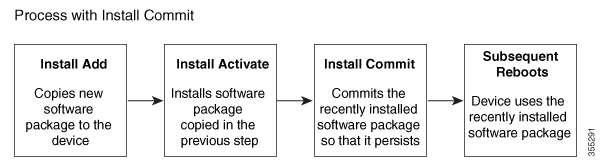
The install mode process flow comprises three commands to perform installation and upgrade of software on platforms–install add , install activate , and install commit .

The flow chart explains the install process with install commands:

The install add command copies the software package from a local or remote location to the platform. The location can be FTP, HTTP, HTTPs, or TFTP. The command extracts individual components of the .package file into subpackages and packages.conf files. It also validates the file to ensure that the image file is specific to the platform on which it is being installed.

The install activate command performs the required validations and provisions the packages previously added using the install add command. It also triggers a system reload.

The install commit command confirms the packages previously activated using the install activate command, and makes the updates persistent over reloads.


Note


Installing an update replaces any previously installed software image. At any time, only one image can be installed in a device.

A list install commands available:

Table 3. List of install commands

Command

Syntax

Purpose

install add

install add file location:filename.bin

Copies the contents of the image, package, and SMUs to the software repository. File location may be local or remote. This command does the following:

  • Validates the file–checksum, platform compatibility checks, and so on.

  • Extracts individual components of the package into subpackages and packages.conf

  • Copies the image into the local inventory and makes it available for the next steps.

install activate

install activate

Activates the package added using the install add command.

  • Use the show install summary command to see which image is inactive. This image will get activated.

  • System reloads on executing this command. Confirm if you want to proceed with the activation. Use this command with the prompt-level none keyword to automatically ignore any confirmation prompts.

(install activate) auto abort-timer

install activate auto-abort timer <30-1200>

The auto-abort timer starts automatically, with a default value of 120 minutes. If the install commit command is not executed within the time provided, the activation process is terminated, and the system returns to the last-committed state.

  • You can change the time value while executing the install activate command.

  • The install commit command stops the timer, and continues the installation process.

  • The install activate auto-abort timer stop command stops the timer without committing the package.

  • Use this command with the prompt-level none keyword to automatically ignore any confirmation prompts.

  • This command is valid only in the three-step install variant.

install commit

install commit

Commits the package activated using the install activate command, and makes it persistent over reloads.

  • Use the show install summary command to see which image is uncommitted. This image will get committed.

install abort

install abort

Terminates the installation and returns the system to the last-committed state.

  • This command is applicable only when the package is in activated status (uncommitted state).

  • If you have already committed the image using the install commit command, use the install rollback to command to return to the preferred version.

install remove

install remove {file <filename> | inactive}

Deletes inactive packages from the platform repository. Use this command to free up space.

  • file: Removes specified files.

  • inactive: Removes all the inactive files.

install rollback to

install rollback to {base | label | committed | id}

Rolls back the software set to a saved installation point or to the last-committed installation point. The following are the characteristics of this command:

  • Requires reload.

  • Is applicable only when the package is in committed state.

  • Use this command with the prompt-level none keyword to automatically ignore any confirmation prompts.

Note

 
If you are performing install rollback to a previous image, the previous image must be installed in install mode. Only SMU rollback is possible in bundle mode.

install deactivate

install deactivate file <filename>

Removes a package from the platform repository. This command is supported only for SMUs.

  • Use this command with the prompt-level none keyword to automatically ignore any confirmation prompts.

The following show commands are also available:

Table 4. List of show Commands

Command

Syntax

Purpose

show install log

show install log

Provides the history and details of all install operations that have been performed since the platform was booted.

show install package

show install package <filename>

Provides details about the .pkg/.bin file that is specified.

show install summary

show install summary

Provides an overview of the image versions and their corresponding install states for all the FRUs.

  • The table that is displayed will state for which FRUs this information is applicable.

  • If all the FRUs are in sync in terms of the images present and their state, only one table is displayed.

  • If, however, there is a difference in the image or state information among the FRUs, each FRU that differs from the rest of the stack is listed in a separate table.

show install active

show install active

Provides information about the active packages for all the FRUs.

If there is a difference in the information among the FRUs, each FRU that differs from the rest of the stack is listed in a separate table.

show install inactive

show install inactive

Provides information about the inactive packages, if any, for all the FRUs.

If there is a difference in the information among the FRUs, each FRU that differs from the rest of the stack is listed in a separate table.

show install committed

show install committed

Provides information about the committed packages for all the FRUs.

If there is a difference in the information among the FRUs, each FRU that differs from the rest of the stack is listed in a separate table.

show install uncommitted

show install uncommitted

Provides information about uncommitted packages, if any, for all the FRUs.

If there is a difference in the information among the FRUs, each FRU that differs from the rest of the stack is listed in a separate table.

show install rollback

show install rollback {point-id | label}

Displays the package associated with a saved installation point.

show version

show version [rp-slot] [installed [user-interface] | provisioned | running]

Displays information about the current package, along with hardware and platform information.

Boot the platform in install mode

You can install, activate, and commit a software package using a single command (one-step install) or multiple separate commands (three-step install).

If the platform is working in bundle mode, the one-step install procedure must be used to initially convert the platform from bundle mode to install mode. Subsequent installs and upgrades on the platform can be done with either one-step or three-step variants.

One-step installation or converting from bundle mode to install mode


Note


  • All the CLI actions (for example, add, activate, and so on) are executed on all the available FRUs.

  • The configuration save prompt will appear if an unsaved configuration is detected.

  • The reload prompt will appear after the second step in this workflow. Use the prompt-level none keyword to automatically ignore the confirmation prompts.

  • If the prompt-level is set to None, and there is an unsaved configuration, the install fails. You must save the configuration before reissuing the command.


Use the one-step install procedure described below to convert a platform running in bundle boot mode to install mode. After the command is executed, the platform reboots in install boot mode.

Later, the one-step install procedure can also be used to upgrade the platform.

This procedure uses the install add file activate commit command in privileged EXEC mode to install a software package, and to upgrade the platform to a new version.

Procedure


Step 1

enable

Example:

Device>enable

Enables privileged EXEC mode. Enter your password, if prompted.

Step 2

install add file location: filename [activate commit]

Example:

Device#install add file bootflash:c8kg2be-universalk9.17.15.03prd1.SPA.bin activate commit

Copies the software install package from a local or remote location (through FTP, HTTP, HTTPs, or TFTP) to the platform and extracts the individual components of the .package file into subpackages and packages.conf files. It also performs a validation and compatibility check for the platform and image versions, activates the package, and commits the package to make it persistent across reloads.

The platform reloads after this command is run.

Step 3

exit

Example:

Device#exit

Exits privileged EXEC mode and returns to user EXEC mode.


Three-step installation


Note


  • All the CLI actions (for example, add, activate, and so on) are executed on all the available FRUs.

  • The configuration save prompt will appear if an unsaved configuration is detected.

  • The reload prompt will appear after the install activate step in this workflow. Use the prompt-level none keyword to automatically ignore the confirmation prompts.


The three-step installation procedure can be used only after the platform is in install mode. This option provides more flexibility and control to the customer during installation.

This procedure uses individual install add , install activate , and install commit commands for installing a software package, and to upgrade the platform to a new version.

Procedure


Step 1

enable

Example:

Device>enable

Enables privileged EXEC mode. Enter your password, if prompted.

Step 2

install add file location: filename

Example:

Device#install add file bootflash:c8kg2be-universalk9.17.15.03prd1.SPA.bin 

Copies the software install package from a remote location (through FTP, HTTP, HTTPs, or TFTP) to the platform, and extracts the individual components of the .package file into subpackages and packages.conf files.

Step 3

show install summary

Example:

Device#show install summary

(Optional) Provides an overview of the image versions and their corresponding install state for all the FRUs.

Step 4

install activate [auto-abort-timer <time>]

Example:

Device# install activate auto-abort-timer 120

Activates the previously added package and reloads the platform.

  • When doing a full software install, do not provide a package filename.

  • In the three-step variant, auto-abort-timer starts automatically with the install activate command; the default for the timer is 120 minutes. If the install commit command is not run before the timer expires, the install process is automatically terminated. The platform reloads and boots up with the last committed version.

Step 5

install abort

Example:

Device#install abort

(Optional) Terminates the software install activation and returns the platform to the last committed version.

  • Use this command only when the image is in activated state, and not when the image is in committed state.

Step 6

install commit

Example:

Device#install commit

Commits the new package installation and makes the changes persistent over reloads.

Step 7

install rollback to committed

Example:

Device#install rollback to committed

(Optional) Rolls back the platform to the last committed state.

Step 8

install remove {file filesystem: filename | inactive}

Example:

Device#install remove inactive

(Optional) Deletes software installation files.

  • file: Deletes a specific file

  • inactive: Deletes all the unused and inactive installation files.

Step 9

show install summary

Example:

Device#show install summary

(Optional) Displays information about the current state of the system. The output of this command varies according to the install commands run prior to this command.

Step 10

exit

Example:

Device#exit

Exits privileged EXEC mode and returns to user EXEC mode.


Upgrade in install mode

Use either the one-step installation or the three-step installation to upgrade the platform in install mode.

Downgrade in install mode

Use the install rollback command to downgrade the platform to a previous version by pointing it to the appropriate image, provided the image you are downgrading to was installed in install mode.

The install rollback command reloads the platform and boots it with the previous image.


Note


The install rollback command succeeds only if you have not removed the previous file using the install remove inactive command.

Alternatively, you can downgrade by installing the older image using the install commands.

Terminate a software installation

You can terminate the activation of a software package in the following ways:

  • When the platform reloads after activating a new image, the auto-abort-timer is triggered (in the three-step install variant). If the timer expires before issuing the install commit command, the installation process is terminated, and the platform reloads and boots with the last committed version of the software image.

    Alternatively, use the install auto-abort-timer stop command to stop this timer, without using the install commit command. The new image remains uncommitted in this process.

  • Using the install abort command returns the platform to the version that was running before installing the new software. Use this command before issuing the install commit command.

Configuration examples for installing the software using install commands

This is an example of the one-step installation or converting from bundle mode to install mode:

Router#install add file bootflash:c8kg2be-universalk9.17.18.01eft30.SSA.bin activate commit
install_add_activate_commit: START Wed Jul 30 10:16:48 UTC 2025
install_add: START Wed Jul 30 10:16:48 UTC 2025
install_add: Adding IMG
--- Starting initial file syncing ---
Copying bootflash:c8kg2be-universalk9.17.18.01eft30.SSA.bin from  R0 to  R0
Info: Finished copying to the selected
Finished initial file syncing

--- Starting Add ---
Performing Add on all members
Checking status of Add on [R0]
Add: Passed on [R0]
Image added. Version: 17.18.01.0.133

Finished Add

install_activate: START Wed Jul 30 10:19:56 UTC 2025
install_activate: Activating IMG
Following packages shall be activated:
/bootflash/c8kg2be-firmware_nim_async.17.18.01eft30.SPA.pkg
/bootflash/c8kg2be-firmware_nim_xdsl.17.18.01eft30.SPA.pkg
/bootflash/c8kg2be-firmware_ngwic_t1e1.17.18.01eft30.SPA.pkg
/bootflash/c8kg2be-firmware_sm_1t3e3.17.18.01eft30.SPA.pkg
/bootflash/c8kg2be-firmware_nim_shdsl.17.18.01eft30.SPA.pkg
/bootflash/c8kg2be-rpboot.17.18.01eft30.SPA.pkg
/bootflash/c8kg2be-firmware_sm_nim_adpt.17.18.01eft30.SPA.pkg
/bootflash/c8kg2be-firmware_pse_si3470a.17.18.01eft30.SPA.pkg
/bootflash/c8kg2be-firmware_sm_async.17.18.01eft30.SPA.pkg
/bootflash/c8kg2be-firmware_prince.17.18.01eft30.SPA.pkg
/bootflash/c8kg2be-mono-universalk9.17.18.01eft30.SPA.pkg

This operation may require a reload of the system. Do you want to proceed? [y/n]y


--- Starting Activate ---
Performing Activate on all members
 [1] Activate package(s) on  R0
 [1] Finished Activate on  R0
Checking status of Activate on [R0]
Activate: Passed on [R0]
Finished Activate

--- Starting Commit ---
Performing Commit on all members
 [1] Commit package(s) on  R0
 [1] Finished Commit on  R0
Checking status of Commit on [R0]
Commit: Passed on [R0]
Finished Commit operation

SUCCESS: install_add_activate_commit Wed Jul 30 10:23:36 UTC 2025
Router#

Router#Jul 30 10:06:36.391: %PMAN-5-EXITACTION: R0/0: pvp: Process manager is exiting: reload action requested


show version | include operating mode
Router operating mode: Autonomous
Router#
A', 'bin']
show version
Cisco IOS XE Software, Version 17.18.01eft30
Cisco IOS Software [IOSXE], c8kg2be Software (ARMV8EL_LINUX_IOSD-UNIVERSALK9-M), Version 17.18.1eft30, RELEASE SOFTWARE (fc1)
Technical Support: http://www.cisco.com/techsupport
Copyright (c) 1986-2025 by Cisco Systems, Inc.
Compiled Fri 25-Jul-25 21:47 by mcpre


Cisco IOS-XE software, Copyright (c) 2005-2025 by cisco Systems, Inc.
All rights reserved.  Certain components of Cisco IOS-XE software are
licensed under the GNU General Public License ("GPL") Version 2.0.  The
software code licensed under GPL Version 2.0 is free software that comes
with ABSOLUTELY NO WARRANTY.  You can redistribute and/or modify such
GPL code under the terms of GPL Version 2.0.  For more details, see the
documentation or "License Notice" file accompanying the IOS-XE software,
or the applicable URL provided on the flyer accompanying the IOS-XE
software.


ROM: 17.18(1.5r).s1.cp

Router uptime is 1 minute
Uptime for this control processor is 2 minutes
 --More--         System returned to ROM by Image Install
System image file is "bootflash:packages.conf"
Last reload reason: Image Install


This product contains cryptographic features and is subject to United
States and local country laws governing import, export, transfer and
use. Delivery of Cisco cryptographic products does not imply
third-party authority to import, export, distribute or use encryption.
Importers, exporters, distributors and users are responsible for
compliance with U.S. and local country laws. By using this product you
agree to comply with applicable laws and regulations. If you are unable
to comply with U.S. and local laws, return this product immediately.

A summary of U.S. laws governing Cisco cryptographic products may be found at:
http://www.cisco.com/wwl/export/crypto/tool/stqrg.html

If you require further assistance please contact us by sending email to
export@cisco.com.


Technology Package License Information:
 --More--         
-----------------------------------------------------------------
Technology     Type         Technology-package Technology-package
                            Current            Next Reboot
-----------------------------------------------------------------
Smart License  Subscription advantage          advantage

The current crypto throughput level is unthrottled


Smart Licensing Status: Smart Licensing Using Policy

cisco C8231-G2 (1RU) processor with 3703156K/6147K bytes of memory.
Processor board ID FGL2913L5LF
Router operating mode: Autonomous
1 Virtual Ethernet interface
4 Gigabit Ethernet interfaces
4 2.5 Gigabit Ethernet interfaces
2 Ten Gigabit Ethernet interfaces
32768K bytes of non-volatile configuration memory.
8388608K bytes of physical memory.
18250751K bytes of flash memory at bootflash:.

This is an example of the three-step installation:

Router#install add file bootflash:c8kg2be-universalk9.17.18.01eft30.SSA.bin       
install_add: START Wed Jul 30 13:02:33 UTC 2025
install_add: Adding IMG
--- Starting initial file syncing ---
Copying bootflash:c8kg2be-universalk9.17.18.01eft30.SSA.bin from  R0 to  R0
Info: Finished copying to the selected
Finished initial file syncing

--- Starting Add ---
Performing Add on all members
Checking status of Add on [R0]
Add: Passed on [R0]
Image added. Version: 17.18.01.0.133

Finished Add

SUCCESS: install_add /bootflash/c8kg2be-universalk9.17.18.01eft30.SSA.bin Wed Jul 30 13:03:59 UTC 2025
Router#
wr mem
Building configuration...
[OK]
Router#
install_activate: START Wed Jul 30 13:04:13 UTC 2025
install_activate: Activating IMG
Following packages shall be activated:
/bootflash/c8kg2be-firmware_nim_async.17.18.01eft30.SPA.pkg
/bootflash/c8kg2be-firmware_nim_xdsl.17.18.01eft30.SPA.pkg
/bootflash/c8kg2be-firmware_ngwic_t1e1.17.18.01eft30.SPA.pkg
/bootflash/c8kg2be-firmware_sm_1t3e3.17.18.01eft30.SPA.pkg
/bootflash/c8kg2be-firmware_nim_shdsl.17.18.01eft30.SPA.pkg
/bootflash/c8kg2be-rpboot.17.18.01eft30.SPA.pkg
/bootflash/c8kg2be-firmware_sm_nim_adpt.17.18.01eft30.SPA.pkg
/bootflash/c8kg2be-firmware_pse_si3470a.17.18.01eft30.SPA.pkg
/bootflash/c8kg2be-firmware_sm_async.17.18.01eft30.SPA.pkg
/bootflash/c8kg2be-firmware_prince.17.18.01eft30.SPA.pkg
/bootflash/c8kg2be-mono-universalk9.17.18.01eft30.SPA.pkg

This operation may require a reload of the system. Do you want to proceed? [y/n]y


--- Starting Activate ---
Performing Activate on all members
 [1] Activate package(s) on  R0
 [1] Finished Activate on  R0
Checking status of Activate on [R0]
Activate: Passed on [R0]
Finished Activate

SUCCESS: install_activate Wed Jul 30 13:07:35 UTC 2025
Router#Jul 30 13:07:41.749: %PMAN-5-EXITACTION: R0/0: pvp: Process manager is exiting: reload action requested


.
.
.

System integrity status: 0x0

System Bootstrap, Version 17.18(1.5r).s1.cp, RELEASE SOFTWARE
Copyright (c) 1994-2025 by cisco Systems, Inc.


Current image running: Boot ROM0

Last reset cause: LocalSoft
C8231-G2 platform with 8388608 Kbytes of main memory


........

boot: reading file packages.conf
#

#################################################################

Performing Signature Verification of OS image...
Warning: MFG Key Enabled !!!

RSA Signed RELEASE Image Signature Verification Successful
Image validated
Jul 30 13:09:45.026: %BOOT-5-OPMODE_LOG: R0/0: binos: System booted in AUTONOMOUS mode

              Restricted Rights Legend

Use, duplication, or disclosure by the Government is
subject to restrictions as set forth in subparagraph
(c) of the Commercial Computer Software - Restricted
Rights clause at FAR sec. 52.227-19 and subparagraph
(c) (1) (ii) of the Rights in Technical Data and Computer
Software clause at DFARS sec. 252.227-7013.

           Cisco Systems, Inc.
           170 West Tasman Drive
           San Jose, California 95134-1706


Cisco IOS Software [IOSXE], c8kg2be Software (ARMV8EL_LINUX_IOSD-UNIVERSALK9-M), Version 17.18.1eft30, RELEASE SOFTWARE (fc1)
Technical Support: http://www.cisco.com/techsupport
Copyright (c) 1986-2025 by Cisco Systems, Inc.
Compiled Fri 25-Jul-25 21:47 by mcpre


This software version supports only Smart Licensing as the software licensing mechanism.


Please read the following carefully before proceeding. By downloading,
installing, and/or using any Cisco software product, application, feature,
license, or license key (collectively, the "Software"), you accept and
agree to the following terms. If you do not agree, do not proceed and do not
use this Software.

This Software and its use are governed by Cisco's General Terms and any
relevant supplemental terms found at
https://www.cisco.com/site/us/en/about/legal/contract-experience/index.html.
If you have a negotiated agreement with Cisco that includes this Software, the
terms of that agreement apply as well. In the event of a conflict, the order
of precedence stated in your negotiated agreement controls.

Cisco Software is licensed on a term and/or subscription-basis. The license to
the Software is valid only for the duration of the specified term, or in the
case of a subscription-based license, only so long as all required subscription
payments are current and fully paid-up. While Cisco may provide you
licensing-related alerts, it is your sole responsibility to monitor your usage.
Using Cisco Software without a valid license is not permitted and may result in
fees charged to your account. Cisco reserves the right to terminate access to,
or restrict the functionality of, any Cisco Software, or any features thereof,
that are being used without a valid license.


cisco C8231-G2 (1RU) processor with 3703156K/6147K bytes of memory.
Processor board ID FGL2913L5LF
Router operating mode: Autonomous
1 Virtual Ethernet interface
4 Gigabit Ethernet interfaces
4 2.5 Gigabit Ethernet interfaces
2 Ten Gigabit Ethernet interfaces
32768K bytes of non-volatile configuration memory.
8388608K bytes of physical memory.
18250751K bytes of flash memory at bootflash:.

 WARNING: Configured enable password CLI with weak encryption type 0 will be deprecated in future. Hence please migrate to enable secret CLI which accomplishes same functionality as enable password CLI and which also supports strong irreversible encryption type 9

 WARNING: ** NOTICE **  The H.323 protocol is no longer supported from IOS-XE release 17.6.1. Please consider using SIP for multimedia applications.


Press RETURN to get started!


Router#
show version | include operating mode
Router operating mode: Autonomous
Router#wr mem
Building configuration...
[OK]
Router#
install commit
install_commit: START Wed Jul 30 13:14:14 UTC 2025
--- Starting Commit ---
Performing Commit on all members
 [1] Commit packages(s) on  R0
 [1] Finished Commit packages(s) on  R0
Checking status of Commit on [R0]
Commit: Passed on [R0]
Finished Commit operation

SUCCESS: install_commit Wed Jul 30 13:14:20 UTC 2025
#


This is an example for terminating a software installation.

Performing Abort on all members
 [1] Abort packages(s) on  R0
Checking status of Abort on [R0]
Abort: Passed on [R0]
Finished Abort operation

SUCCESS: install_abort Wed Jul 30 16:32:51 UTC 2025
Router#Jul 30 16:32:57.913: %PMAN-5-EXITACTION: R0/0: pvp: Process manager is exiting: reload action requested

These are sample outputs for show commands:

show install log

Device# show install log
[0|install_op_boot]: START Thu Oct 28 22:09:29 Universal 2025
[0|install_op_boot(INFO, )]: Mount IMG INI state base image
[0|install_op_boot]: END SUCCESS  Thu Oct 28 22:09:30 Universal 2025

show install summary

Device# show install summary
[ R0 ] Installed Package(s) Information:                                                                                
State (St): I - Inactive, U - Activated & Uncommitted,                                                                              
C - Activated & Committed, D - Deactivated & Uncommitted                                                    
--------------------------------------------------------------------------------                                        
Type  St   Filename/Version                                                                                             
--------------------------------------------------------------------------------                                        
IMG   C    17.18.01.0.144                                                                                                                                                                                                                    --------------------------------------------------------------------------------                                        
Auto abort timer: inactive                                                                                              
--------------------------------------------------------------------------------   

show install active

Device# show install active
[ R0 ] Active Package(s) Information:                                                                       
State (St): I - Inactive, U - Activated & Uncommitted,                                                  
C - Activated & Committed, D - Deactivated & Uncommitted                                                    
--------------------------------------------------------------------------------                            
 Type  St   Filename/Version                                                                             
--------------------------------------------------------------------------------                            
 IMG   C    17.18.01.0.1410                                                                                 
--------------------------------------------------------------------------------                            
Auto abort timer: inactive 

show install inactive

Device# show install inactive
[ R0 ] Inactive Package(s) Information:  
State (St): I - Inactive, U - Activated & Uncommitted,
C - Activated & Committed, D - Deactivated & Uncommitted  
-------------------------------------------------------------------------------
Type  St   Filename/Version 
------------------------------------------------------------------------------- 
No Inactive Packages 

show install committed

Device# show install committed
[ R0 ] Committed Package(s) Information: 
State (St): I - Inactive, U - Activated & Uncommitted,
C - Activated & Committed, D - Deactivated & Uncommitted 
-------------------------------------------------------------------------------- 
Type  St   Filename/Version
--------------------------------------------------------------------------------
IMG    C   17.18.01a.0.1410
--------------------------------------------------------------------------------                                                                                                                                                                                                                    --------------------------------------------------------------------------------                                        
Auto abort timer: inactive                                                                                              
--------------------------------------------------------------------------------

show install uncommitted

Device# show install uncommitted
[ R0 ] Uncommitted Package(s) Information:
State (St): I - Inactive, U - Activated & Uncommitted,
            C - Activated & Committed, D - Deactivated & Uncommitted
--------------------------------------------------------------------
Type  St   Filename/Version
--------------------------------------------------------------------
No Uncommitted Packages

Troubleshoot software installation using install commands

Problem Troubleshooting the software installation

Solution Use these show commands to view installation summary, logs, and software versions.

  • show install summary

  • show install log

  • show version

  • show version running

Problem Other installation issues

Solution Use these commands to resolve installation issue:

  • dir <install directory>

  • more location:packages.conf

  • show tech-support install: this command automatically runs the show commands that display information specific to installation.

  • request platform software trace archive target bootflash <location>: this command archives all the trace logs relevant to all the processes running on the system since the last reload, and saves this information in the specified location.

Configuring No Service Password-Recovery

The Cisco IOS password recovery procedure allows you to to gain access, using the console, to the ROMMON mode by using the Break key during system startup and reload. When the device software is loaded from ROMMON mode, the configuration is updated with the new password. The password recovery procedure makes anyone with console access have the ability to access the device and its network.

The No Service Password-Recovery feature is designed to prevent the service password-recovery procedure from being used to gain access to the device and network.

Configuration registers and system boot configuration

The lowest four bits of the configuration register (bits 3, 2, 1, and 0) form the boot field. The boot field determines if the device boots manually from ROM or automatically from flash or the network. For example, when the configuration register boot field value is set to any value from 0x2 to 0xF, the device uses the register boot field value to form a default boot filename for autobooting from a network server.

Bit 8, when set to 1, ignores the startup configuration. Bit 6, when set to 1, enables break key detection. You must set the configuration register to autoboot to enable this feature. Any other configuration register setting will prevent the feature from being enabled.


Note


By default, the no confirm prompt and messages are not displayed after reloads.


How to enable No Service Password-Recovery

You can enable the No Service Password-Recovery in the following two ways:

  • Using the no service password-recovery command. This option allows password recovery once it is enabled.

  • Using the no service password-recovery strict command. This option does not allow for device recovery once it is enabled.


Note


As a precaution, a valid Cisco IOS image should reside in the bootflash: before this feature is enabled.


If you plan to enter the no service password-recovery command, Cisco recommends that you save a copy of the system configuration file in a location away from the device.

Befor you beging, ensure that this feature is disabled before making any change to the device regardless of the significance of the change—such as a configuration, module, software version, or ROMMON version change.

The configuration register boot bit must be enabled to load the startup configuration by setting bit-8 to 0, to ignore the break key in Cisco IOS XE by setting bit-6 to 0, and to auto boot a Cisco IOS XE image by setting the lowest four bits 3-0, to any value from 0x2 to 0xF. Changes to the configuration register are not saved after the No Service Password-Recovery feature is enabled.


Note


If Bit-8 is set to 1, the startup configuration is ignored. If Bit-6 is set to 1, break key detection is enabled in Cisco IOS XE. If both Bit-6 and Bit-8 are set to 0, the No Service Password-Recovery feature is enabled.


This example shows how to enable the No Service Password-Recovery feature:

Router> enable
Router# show version
Router# configure terminal
Router(config)# config-register 0x2012
Router(config)# no service password-recovery
Router(config)# exit

Recovering a Device with the No Service Password-Recovery Feature Enabled

To recover a device after the no service password-recovery feature is enabled using the no service password-recovery command, look out for the following message that appears during the boot: “PASSWORD RECOVERY FUNCTIONALITY IS DISABLED.” As soon as “.. ” appears, press the Break key. You are then prompted to confirm the Break key action:

  • If you confirm the action, the startup configuration is erased and the device boots with the factory default configuration with the No Service Password-Recovery enabled.

  • If you do not confirm the Break key action, the device boots normally with the No Service Password-Recovery feature enabled.


Note


You cannot recover a device if the No Service Password-Recovery feature was enabled using the no service password-recovery strict command.


This example shows a Break key action being entered during boot up, followed by confirmation of the break key action. The startup configuration is erased and the device then boots with the factory default configuration with the No Service Password-Recovery feature enabled.

System integrity status: 0x0

System Bootstrap, Version 17.18(1.12r).s1.cp, RELEASE SOFTWARE
Copyright (c) 1994-2025 by cisco Systems, Inc.


Current image running: Boot ROM1

Last reset cause: LocalSoft
C8235-E-G2 platform with 16777216 Kbytes of main memory

PASSWORD RECOVERY FUNCTIONALITY IS DISABLED

..
telnet> send break
...


PASSWORD RECOVERY IS DISABLED.
Do you want to reset the router to the factory default
configuration and proceed  y/n [n]: y

Router clearing configuration. Please wait for ROMMON prompt... 

<Booting IOS>
Performing Signature Verification of OS image...
RSA Signed RELEASE Image Signature Verification Successful
Image validated

*Nov 26 06:59:04.857: %IOSXEBOOT-4-PLATFORM_RECOVERY: (rp/0): Started platform recovery...

*Nov 26 06:59:09.480: %IOSXEBOOT-4-PLATFORM_RECOVERY: (rp/0): Finished platform recovery...


Both copies of Nvram are corrupted.

Warning: monitor Nvram area is corrupt ... using default values
Failed to obtain BaudIndex config setting (Not Found)
Confreg is corrupted, using default 0000
System integrity status: 0x0

System Bootstrap, Version 17.18(1.12r).s1.cp, RELEASE SOFTWARE
Copyright (c) 1994-2025 by cisco Systems, Inc.


Current image running: Boot ROM1

Last reset cause: LocalSoft
C8235-E-G2 platform with 16777216 Kbytes of main memory

rommon 1 > 

Configuration Examples for No Service Password-Recovery

The following example shows how to obtain the configuration register setting (which is set to autoboot), disable password recovery capability, and then verify that the configuration persists through a system reload:

Router>en
Router#show version 
Cisco IOS XE Software, Version 17.15.03
Cisco IOS Software [IOSXE], c8kg2be Software (ARMV8EL_LINUX_IOSD-UNIVERSALK9-M), Version 17.15.3, RELEASE SOFTWARE (fc1)
Technical Support: http://www.cisco.com/techsupport
Copyright (c) 1986-2025 by Cisco Systems, Inc.
Compiled Tue 25-Mar-25 23:37 by xxxx

Router(config)#no service password-recovery 
WARNING:
Executing this command will disable the password recovery mechanism.
Do not execute this command without another plan for
password recovery.

Are you sure you want to continue? [yes]: yes
Router(config)#end
Router#wr
Building configuration...
[OK]
Router#reload
Proceed with reload? [confirm]
Jun  9 
System integrity status: 0x0

System Bootstrap, Version 17.18(1.12r).s1.cp, RELEASE SOFTWARE
Copyright (c) 1994-2025 by cisco Systems, Inc.


Current image running: Boot ROM1

Last reset cause: LocalSoft
C8235-E-G2 platform with 16777216 Kbytes of main memory

PASSWORD RECOVERY FUNCTIONALITY IS DISABLED

.
telnet> send brk
.....


PASSWORD RECOVERY IS DISABLED.
Do you want to reset the router to the factory default
configuration and proceed  y/n [n]: n

Router continuing with existing configuration...

boot: reading file packages.conf
###########################################################

Performing Signature Verification of OS image...
Image validated

Jun  9 05:40:13.287: %BOOT-5-OPMODE_LOG: R0/0: binos: System booted in AUTONOMOUS mode

              Restricted Rights Legend

Use, duplication, or disclosure by the Government is
subject to restrictions as set forth in subparagraph
(c) of the Commercial Computer Software - Restricted
Rights clause at FAR sec. 52.227-19 and subparagraph
(c) (1) (ii) of the Rights in Technical Data and Computer
Software clause at DFARS sec. 252.227-7013.

           Cisco Systems, Inc.
           170 West Tasman Drive
           San Jose, California 95134-1706


Cisco IOS Software [IOSXE], c8kg2be Software (ARMV8EL_LINUX_IOSD-UNIVERSALK9-M), Version 17.15.3, RELEASE SOFTWARE (fc1)
Technical Support: http://www.cisco.com/techsupport
Copyright (c) 1986-2025 by Cisco Systems, Inc.
Compiled Tue 25-Mar-25 23:37 by xxxx


This software version supports only Smart Licensing as the software licensing mechanism.


Please read the following carefully before proceeding. By downloading,
installing, and/or using any Cisco software product, application, feature,
license, or license key (collectively, the "Software"), you accept and
agree to the following terms. If you do not agree, do not proceed and do not
use this Software.

This Software and its use are governed by Cisco's General Terms and any 
relevant supplemental terms found at
https://www.cisco.com/site/us/en/about/legal/contract-experience/index.html.
If you have a negotiated agreement with Cisco that includes this Software, the
terms of that agreement apply as well. In the event of a conflict, the order 
of precedence stated in your negotiated agreement controls.

Cisco Software is licensed on a term and/or subscription-basis. The license to
the Software is valid only for the duration of the specified term, or in the
case of a subscription-based license, only so long as all required subscription
payments are current and fully paid-up. While Cisco may provide you
licensing-related alerts, it is your sole responsibility to monitor your usage.
Using Cisco Software without a valid license is not permitted and may result in
fees charged to your account. Cisco reserves the right to terminate access to,
or restrict the functionality of, any Cisco Software, or any features thereof,
that are being used without a valid license.


Jun  9 05:40:16.793: %FLASH_CHECK-3-DISK_QUOTA: R0/0: flash_check: bootflash quota exceeded [free space is 115484 kB] - [recommended free space is 5929066 kB] - Please clean up files on bootflash.
cisco C8235-E-G2 processor with 11906887K/6147K bytes of memory.
Processor board ID FDO2833M01A
Router operating mode: Autonomous
1 Virtual Ethernet interface
12 2.5 Gigabit Ethernet interfaces
2 Ten Gigabit Ethernet interfaces
32768K bytes of non-volatile configuration memory.
33554432K bytes of physical memory.
20257791K bytes of flash memory at bootflash:.

Warning: When Cisco determines that a fault or defect can be traced to
the use of third-party transceivers installed by a customer or reseller,
then, at Cisco's discretion, Cisco may withhold support under warranty or
a Cisco support program. In the course of providing support for a Cisco
networking product Cisco may require that the end user install Cisco
transceivers if Cisco determines that removing third-party parts will
assist Cisco in diagnosing the cause of a support issue.
No processes could be found for the command

 WARNING: Command has been added to the configuration using a type 0 password. However, recommended to migrate to strong type-6 encryption

 WARNING: ** NOTICE **  The H.323 protocol is no longer supported from IOS-XE release 17.6.1. Please consider using SIP for multimedia applications.


Press RETURN to get started!

The following example shows how to disable password recovery capability using the no service password-recovery strict command:

Router# configure terminal

Router(config)# no service password-recovery strict

WARNING:
Executing this command will disable the password recovery mechanism.
Do not execute this command without another plan for
password recovery.

Are you sure you want to continue? [yes]: yes
Router(config)#end
Router#wr
Building configuration...
[OK]
..