Cisco Catalyst SD-WAN High Availability Configuration Guide, Releases 26.x and Later

PDF

Cisco Catalyst SD-WAN High Availability Configuration Guide, Releases 26.x and Later

Examples for affinity deployments

Want to summarize with AI?

Log in

Provides examples configuring high availability for different network scenarios.


Configure affinity for Cisco Catalyst SD-WAN Controller s on single data center

In a Cisco Catalyst SD-WAN overlay network with multiple Cisco SD-WAN Controller s, each tunnel interface on a Cisco IOS XE Catalyst SD-WAN device defaults to establishing control connections to two Cisco SD-WAN Controller s. You can use affinity to connect to a specific subset of Cisco SD-WAN Controller s by placing them in different controller groups and configuring the Cisco IOS XE Catalyst SD-WAN device with a list of allowed controller groups.

The diagram illustrates the configuration of affinity settings for virtual machines within a single data center, highlighting the relationships and dependencies between different components.
Note
If exclude-controller-group-list is configured on a tunnel interface, that tunnel interface may have different Cisco SD-WAN Controller s assigned to it.

Procedure

  1. Configure the Cisco SD-WAN Controllers into controller groups.

    Example:

    vSmart(config)# system controller-group-id 1
  2. Verify the configuration on the Cisco SD-WAN Controller.

    Example:

    vSmart# show running-config system
  3. Configure the remaining Cisco SD-WAN Controllers with their respective controller group IDs.

    Example:

    vSmart2(config)# system controller-group-id 2
                            vSmart3(config)# system controller-group-id 3
  4. Configure the Cisco IOS XE Catalyst SD-WAN device with the allowed controller group list.

    Example:

    Edge1(config)# system controller-group-list 2 3
  5. Verify the control connections.

    Edge1# show sdwan control connections
    Edge1# show sdwan control local-properties
    Edge1# show sdwan control affinity config

    Field

    Description

    Effective Required VS Count

    Shows that the interface is configured to create two control connections, and two control connections have been established.

    Effective Controller List

    Shows that affinity on the interface is configured to use one Cisco SD-WAN Controller from Controller Group 1 and one from Controller Group 2.

    Current Controller List

    Lists the actual affinity configuration for the interface. The “Y” indicates that the current and effective controller lists match.

    Equilibrium

    Indicates that the current controller lists match what is expected from the affinity configuration for that tunnel interface.

  6. Determine the specific Cisco SD-WAN Controllers with which the tunnel interface has established control connections.

    Example:

    Edge1# show sdwan control affinity status

Configure affinity for Cisco Catalyst SD-WAN Controllers on two data centers

You can use affinity to enable redundancy among data centers, for a network design in which multiple Cisco SD-WAN Controllers are spread across two or more data centers. Then, if the link between a Cisco IOS XE Catalyst SD-WAN device and one of the data centers goes down, the Cisco SD-WAN Controllers in the second data center are available to continue servicing the overlay network.

This scenario includes three Cisco SD-WAN Controllers in each of two data centers. Each of the three Cisco IOS XE Catalyst SD-WAN devices establishes a control connection to one controller in the West data center and one in the East data center.
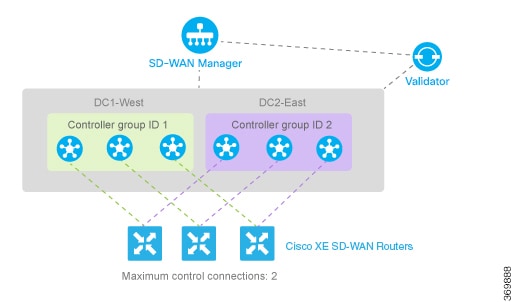
The diagram illustrates the configuration of affinity for three s in two data centers, showing their control connections to controllers in both the West and East data centers.

Procedure

  1. Configure controller group identifier 1 on controllers in DC1-West.

    Example:

    vSmart-DC1(config)# system controller-group-id 1
    
  2. Configure controller group identifier 2 on controllers in DC2-East.

    Example:

    vSmart-DC2(config)# system controller-group-id 2
    
  3. Set the controller group list on routers in the West to prefer DC1-West, then DC2-East.

    Example:

    ISR4331-West(config)#  system controller-group-list 1 2
    

    We want all the Cisco IOS XE Catalyst SD-WAN devices to have a maximum of two OMP sessions, and we want each tunnel interface to have a maximum of two control connections and to not exclude any controller groups. So the only configuration that needs to be done on the routers is to set the controller group list. We want Cisco IOS XE Catalyst SD-WAN devices in the west to prefer Cisco Catalyst SD-WAN Controllers in DC1-West over DC2-East:

    The software evaluates the controller group list in order, so with this configuration, the Cisco IOS XE Catalyst SD-WAN devices-West prefer Cisco SD-WAN Controller group 1 (which is the West data center), and the Cisco IOS XE Catalyst SD-WAN devices - East prefer Cisco SD-WAN Controller group 2.

    When a Cisco IOS XE Catalyst SD-WAN devices-West router needs to connect to only one Cisco SD-WAN Controller (based on configuration), it connects only to the West data center. If the router needs to connect to two Cisco SD-WAN Controllers, it connects to one Cisco SD-WAN Controller from the West data center and another Cisco SD-WAN Controller from the East data center.

  4. Set the controller group list on routers in the East to prefer DC2-East, then DC1-West.

    Example:

    ISR4331-East(config)# system controller-group-list 2 1
    
  5. Optionally fine-tune controller group preference.

    • Set the maximum number of OMP sessions allowed on the router to 1 (system max-OMP-sessions 1). To illustrate how this works, let's look at a Cisco IOS XE Catalyst SD-WAN devices - West. The router has only one tunnel interface, and that interface creates one control connection to Cisco SD-WAN Controller list 1. If all the Cisco SD-WAN Controllers in this group become unavailable, or if the connection between the router that the DC1-West data center goes down, the tunnel interface establishes one control connection to Cisco SD-WAN Controller list 2, because this group is listed in the system controller-group-list command.

    • Set the maximum number of control connections that the tunnel interface can establish to 1 (sdwan interface interface-nametunnel-interface max-control-connections 1 ). Because the software evaluates the controller group list in order, for a Cisco IOS XE Catalyst SD-WAN devices - West, this configuration forces the tunnel interface to establish a control connection to Cisco SD-WAN Controller group 1. Again, if this controller group or data center becomes unreachable, the tunnel establishes a control connection with controller group 2, because this group is configured in the system controller-group-list command.

    • Exclude the non-preferred Cisco SD-WAN Controller group for a particular tunnel. For example, for a Cisco IOS XE Catalyst SD-WAN devices -West to prefer controller group 1, you configure sdwan interface interface-nametunnel-interface exclude-controller-group-list 2 . As with the above configurations, if this controller group or West data center becomes unreachable, the tunnel establishes a control connection with controller group 2, because this group is configured in the system controller-group-list command.


Configure redundant control connections on a single device

This task achieves controller redundancy with the minimum number of OMP sessions by assigning each tunnel interface to a different controller group.

When a Cisco IOS XE Catalyst SD-WAN device has two tunnel connections and the network has two (or more) data centers, you can configure redundant control connections from the Cisco IOS XE Catalyst SD-WAN device to Cisco SD-WAN Controllers in two of the data centers. It is recommended that you do this using the minimum number of OMP sessions—in this case, two. To do this, you configure one of the tunnel interfaces to go only to one of the data centers and the other to go only to the second. This configuration provides Cisco SD-WAN Controller redundancy with the minimum number of OMP sessions.

The diagram illustrates the configuration of redundant control connections on a single device, highlighting the necessary connections and components involved in the setup.

Before you begin

Follow these steps to configure redundant control connections on a single device:

Procedure

  1. On the Cisco IOS XE Catalyst SD-WAN device router, define the controller group list and configure the maximum number of OMP sessions to be 2.

    Example:

    ISR4331(config)# system controller-group-list 1 2
    ISR4331(config)#  system max-omp-sessions 2
    
  2. On one tunnel, set the maximum number of control connections to 1.

    For one of the tunnels, you can use the default affinity configuration (that is, there is nothing to configure) to have this tunnel prefer a Cisco Catalyst SD-WAN Controller in group 1. You can also explicitly force this tunnel to prefer Cisco Catalyst SD-WAN Controller group 1.

    You do not need to configure exclude-controller-group-list 2 , because the software evaluates the controller group list in order, starting with group 1. However, you could choose to explicitly exclude Cisco SD-WAN Controller group 2.

    Example:

    ISR4331(config-tunnel-interface-1)# max-control-connections 1
    
  3. On the second tunnel, set the maximum number of control connections to 1 and exclude controller group 1.

    Then, on the second tunnel, configure it to prefer a Cisco SD-WAN Controller in group 2. As with the other tunnel, you limit the maximum number of control connections to 1. In addition, you have to exclude controller group 1 for this tunnel.

    Example:

    ISR4331(config-tunnel-interface-2)# max-control-connections 1
    ISR4331(config-tunnel-interface-2)# exclude-controller-group-list 1