FIPS mode on NFVIS
FIPS mode on NFVIS is a security compliance mechanism that
-
implements Federal Information Processing Standards (FIPS) Publication 140-3 for United States federal government and contractor use
-
attempts to prevent the use of non-FIPS compatible algorithms on the device, and
-
requires manual configuration to ensure only FIPS approved algorithms are used.
FIPS mode behavior
In FIPS mode, certain functions may fail silently if they attempt to use non-compliant algorithms. You must ensure that the device is configured to use only FIPS-approved algorithms. FIPS mode is enabled by default on BExK platforms.
Disable FIPS mode
To disable FIPS mode, you must first perform a factory reset. After the reset, disable FIPS mode and reboot the device. The same steps apply when re-enabling FIPS mode.
Configure FIPS mode
FIPS mode enables FIPS 140-3 compliant operation for SSH, TLS and SNMP protocols on NFVIS.
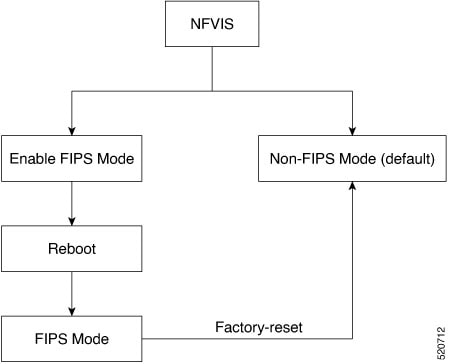
Before you begin
Ensure that SNMP v1, v2, or v3 with MD5 auth protocol is not configured, as FIPS mode configuration will be terminated if these are present.
Procedure
|
Step 1 |
Enable FIPS mode. Example:Only after NFVIS reboot after the configuration FIPS mode is enabled. FIPS mode can be disabled only with factory reset. If you try to disable FIPS mode with the no form of the command: Example:Example:The following is an example, where FIPS mode is successfully configured, but not enabled: |
||
|
Step 2 |
Verify the status of the FIPS mode after reboot: Example:FIPS mode configuration is terminated when:
|
FIPS mode is enabled and NFVIS operates in FIPS 140-3 compliant mode for SSH, TLS and SNMP protocols.
Backup and restore behavior for FIPS mode
This topic provides the details on how FIPS mode status is handled during NFVIS backup and restore operations.
If you back up NFVIS configurations when FIPS mode is enabled, then upon restore, FIPS mode is configured but needs a manual reboot to enable it.
Backup configuration
nfvis#
nfvis# show running-config security
security fips
nfvis# show security
security fips-status ENABLED
nfvis#
After restore
nfvis#
nfvis# show running-config security
security fips
nfvis# show security fips-status
security fips-status CONFIGURED_REBOOT_TO_ENABLE
nfvis#
After reboot
nfvis#
nfvis# show running-config security
security fips
nfvis# show security
security fips-status ENABLED
nfvis#
When you backup NFVIS configurations with FIPS mode disabled, but the system where you restore the configurations has FIPS mode enabled, upon restore, the NFVIS configurations disable FIPS mode but the system has to reboot for FIPS mode to be in DISABLED state.
Backup configurations
nfvis# show running-config security fips
% No entries found.
nfvis# show security fips-status
security fips-status DISABLED
nfvis#

Restore system configurations
nfvis#
nfvis# show running-config security
security fips
nfvis# show security
security fips-status ENABLED
nfvis#

After restore
nfvis# show running-config security
% No entries found.
nfvis# show security
security fips-status UNCONFIGURED_REBOOT_TO_DISABLE
nfvis#

After reboot
nfvis# show running-config security fips
% No entries found.
nfvis# show security fips-status
security fips-status DISABLED
nfvis#
FIPS operational status
This topic provides reference information about the operational states available when you try to ENABLE FIPS mode and the possible operational state transitions for FIPS mode.
These are the operational states when you try to ENABLE FIPS mode:
-
DISABLED
-
CONFIGURED-REBOOT-TO-ENABLE
-
ENABLED
-
UNCONFIGURED-REBOOT-TO-DISABLE
-
FAILED
|
From |
To |
Description |
|---|---|---|
|
DISABLED |
CONFIGURED-REBOOT-TO-ENABLE |
If the Oper data of FIPS-state leafs was previously set to DISABLED and if the security FIPS configuration is pushed |
|
DISABLED |
FAILED |
If there is an error while pushing the security FIPS configuration |
|
CONFIGURED-REBOOT-TO-ENABLE |
ENABLED |
If the FIPS-mode configuration is successful before and the Oper data was set to CONFIGURED-REBOOT-TO-ENABLE, then after REBOOT set the Oper data to ENABLED |
|
CONFIGURED-REBOOT-TO-ENABLE |
FAILED |
If the Oper data of FIPS-state leafs was previously set to CONFIGURED-REBOOT-TO-ENABLE and there was an error while removing FIPS-mode configuration |
|
CONFIGURED-REBOOT-TO-ENABLE |
DISABLED |
If the FIPS-mode is UNCONFIGURED while restoring from a backup package or factory-reset and the current FIPS-status is CONFIGURED-REBOOT-TO-ENABLE |
|
ENABLED |
DISABLED |
After factory-reset (of any type) |
|
ENABLED |
FAILED |
If there is an error while disabling the FIPS mode |
|
ENABLED |
UNCONFIGURED-REBOOT-TO-DISABLE |
If the FIPS-mode is UNCONFIGURED while restoring from a backup package and the current FIPS-status is ENABLED |
|
FAILED |
CONFIGURED-REBOOT-TO-ENABLE |
If the Oper date of FIPS-state leafs was previously set to FAILED and now configuring FIPS-mode |
|
FAILED |
DISABLED |
If the Oper date of FIPS-state leafs was previously set to FAILED and now issued factory-reset |
|
UNCONFIGURED-REBOOT-TO-DISABLE |
DISABLED |
If the Oper data of FIPS-state leafs was previously set to UNCONFIGURED-REBOOT-TO-DISABLE and then NFVIS is rebooted |
|
UNCONFIGURED-REBOOT-TO-DISABLE |
CONFIGURED-REBOOT-TO-ENABLE |
If the Oper data of FIPS-state leafs was previously set to UNCONFIGURED-REBOOT-TO-DISABLE and FIPS-mode config is successful |
|
UNCONFIGURED-REBOOT-TO-DISABLE |
FAILED |
If the Oper data of FIPS-state leafs was previously set to UNCONFIGURED-REBOOT-TO-DISABLE and if the FIPS-mode config was unsuccessful |
 Feedback