Overview
Cisco IoT FND sends the commands generated from processing the tunnel provisioning templates to FARs and HERs to provision secure tunnels between them. The default Cisco IoT FND templates contain CLI commands to set up and configure GRE and IPsec tunnels. One HER can serve up to 500 FARs, which may include multiple tunnels with the same HER EID and name.
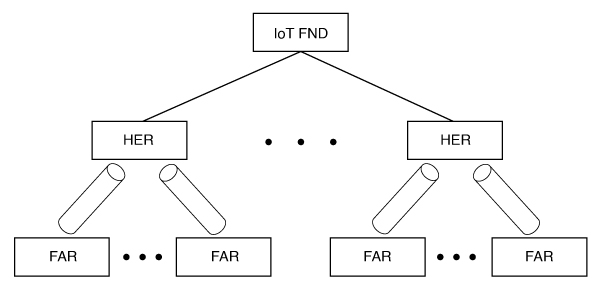
To provision tunnels between HERs and FARs, Cisco IoT FND executes CLI tunnel configuration commands on these devices. By default, Cisco IoT FND provides basic tunnel configuration templates containing the CLI tunnel configuration commands. You can also use your own templates. Although the tunnel provisioning process is automatic, you must first complete the configuration steps outlined in Tunnel Provisioning Configuration Process. After that, whenever a FAR comes online, Cisco IoT FND automatically provisions it with a tunnel. Before you configure Cisco IoT FND for tunnel provisioning, ensure that the Cisco IoT FND TPS Proxy is installed and running.
 Note |
Cisco IoT FND can handle a maximum of 12 Tunnel provisioning or reprovisioning requests in parallel. |
ZTD without IPSec
Beginning with Cisco IoT FND Release 3.1.x, you have the option to initiate ZTD with no IPSec configured by ensuring that the Tunnel Provisioning Template is empty of any CLI. This initial approach of bringing up your network without a factory configuration does not preclude subsequent use of IPSec in your network
Tunnel Provisioning Configuration Process
Before you begin
You must generate the keystore files on Cisco IoT FND and the TPS Proxy before
configuring tunnel provisioning. Then configure Cisco IoT FND and the TPS Proxy
to communicate with one another. Refer to
Setting Up TPS Proxy,
Configuring IoT FND to Use the TPS Proxy,
and
Starting the IoT FND TPS Proxy.
Use the systemctl command for the TPS Proxy if the OS version
is RHEL 8.x or later.
| RHEL Version | Command |
|---|---|
|
8.x |
|
|
7.x |
|
To configure Cisco IoT FND for tunnel provisioning:
|
1 |
Configure the DHCP servers. Configure DHCP servers to provide unique IP addresses to Cisco IoT FND. The default Cisco IoT FND tunnel provisioning templates configure a loopback interface and the IP addresses required to create the tunnels. Cisco IOS CGRs and FARs use FlexVPN. Ensure that the template contains only the addresses for the loopback interface. |
Configuring the DHCP Server for Tunnel Provisioning.
|
||
|
2 |
Configure the tunnel settings. Configure the NMS URL and DHCP proxy client settings on the Provisioning Settings page in Cisco IoT FND: . |
See Configuring Provisioning Settings in the Manage System Settings chapter. |
||
|
3 |
Cisco IOS CGRs use the CGNA service. |
See Managing Devices. |
||
|
4 |
Configure HER management. Configure HERs to allow management by Cisco IoT FND using NETCONF over SSH. |
Configure HERs before adding them to Cisco IoT FND. |
||
|
5 |
Add HERs to Cisco IoT FND. |
See Adding HERs to IoT FND in the Manage Devices chapter. |
||
|
6 |
Review the Cisco IoT FND tunnel provisioning templates to ensure that they create the correct type of tunnel. |
See Tunnel Provisioning Templates in the Manage Tunnel Provisioning chapter. |
||
|
7 |
Optional: If you plan to use your own templates for tunnel provisioning, create one or more tunnel provisioning groups and modify the default tunnel provisioning templates. |
|||
|
8 |
Configure FARs to contact Cisco IoT FND over HTTPS through the Cisco IoT FND TPS Proxy. |
This step is typically performed at the factory, where FARs are configured to contact the TPS Proxy. |
||
|
9 |
Add FARs to Cisco IoT FND. Import the FARs into Cisco IoT FND using the Notice-of-Shipment XML file. |
See Adding Routers to IoT FND in the Manage Devices chapter. |
||
|
10 |
Map FARs to their corresponding HER. |
After completing the previous steps, deploy the FARs and power them on. Tunnel provisioning occurs automatically.
This is the sequence of events after a FAR is turned on:
Procedure
|
Step 1 |
Upon joining the uplink network after being turned on, the FAR sends a request for certificate enrollment. |
|
Step 2 |
The FAR requests tunnel provisioning from Cisco IoT FND through the Cisco IoT FND TPS Proxy. |
|
Step 3 |
Cisco IoT FND looks up the FAR record in the database and determines which tunnel provisioning templates to use. Cisco IoT FND also determines which HERs to use to establish the tunnel. |
|
Step 4 |
For Cisco IOS CGRs, the default templates configure the CGR to use FlexVPN. The FlexVPN client is configured on the CGR, which contacts the HER and requests that a FlexVPN tunnel be dynamically constructed. |
|
Step 5 |
Before processing FAR templates, Cisco IoT FND processes the HER Tunnel Deletion template and sends the resulting commands to the HERs. This removes existing tunnel configuration that may be associated with the FAR. |
|
Step 6 |
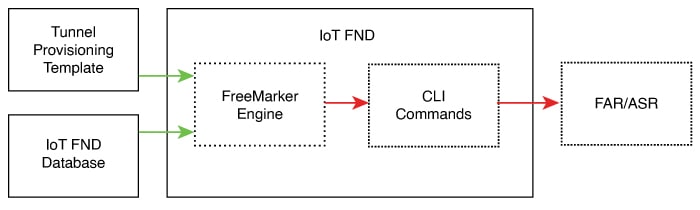
Cisco IoT FND uses the FreeMarker template engine to process the FAR Tunnel Addition template. The engine converts the template to CLI configuration commands, which Cisco IoT FND uses to configure and bring up one end of the tunnel on the FAR. |
|
Step 7 |
Cisco IoT FND uses the FreeMarker template engine to process the HER Tunnel Addition template. The engine converts the template to commands for configuring the tunnel on the HERs. |
|
Step 8 |
For Cisco IOS CGRs, if no errors occur while applying the commands generated by
the templates to the FAR and HERs, Cisco IoT FND configures a new active CGNA
profile named The specified URL uses the Cisco IoT FND registration port, which defaults to 9121, instead of the tunnel provisioning port. The fully qualified domain name in that URL is different and resolves to an IP address that is reachable only through the tunnels. |


 Feedback