Configuring 8/16-port 1 Gigabit Ethernet (SFP / SFP) + 1-port 10 Gigabit Ethernet (SFP+) / 2-port 1 Gigabit Ethernet (CSFP) Interface Module

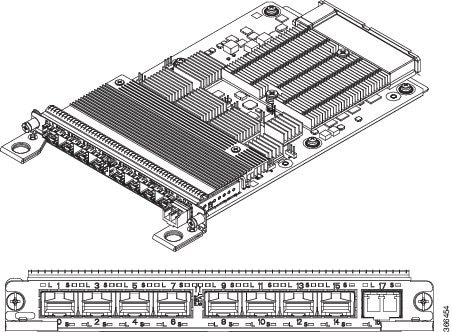
The 8/16-port 1 Gigabit Ethernet (SFP / SFP) + 1-port 10 Gigabit Ethernet (SFP+) / 2-port 1 Gigabit Ethernet (CSFP) Interface Module has 8 ports of 1 Gigabit Ethernet and 1 port of 10 Gigabit , similar to the Cisco ASR 900 Series 8-Port 1GE SFP and 1-Port 10GE SFP+ Module. The 8/16-port 1 Gigabit Ethernet (SFP / SFP) + 1-port 10 Gigabit Ethernet (SFP+) / 2-port 1 Gigabit Ethernet (CSFP) Interface Module operates on multiple port densities and operating modes. Each physical port can be extended to have 2 ports of 1 Gigabit Ethernet with the use of Compact Small Form-Factor Pluggable (CSFP) module to address high-density port requirements in FTTx deployments.
Figure 1. 8/16-port 1 Gigabit Ethernet (SFP / SFP) + 1-port 10 Gigabit Ethernet (SFP+) / 2-port 1 Gigabit Ethernet (CSFP) Interface Module

Each port on CSFP acts as Transmitter or Receiver and connects to GLC-BX-U SFPs using a single strand fiber. GLC-BX-U SFPs support digital optical monitoring (DOM) functions according to the industry-standard SFF-8472 multisource agreement (MSA). This feature gives the end user the ability to monitor real-time parameters of the SFP, such as optical output power, optical input power, temperature, laser bias current, and transceiver supply voltage.


Note


CSFP must be connected only to GLC-BX-U.


This interface module has 8 physical ports of 1 Gigabit Ethernet and 1 physical port of 10 Gigabit Ethernet, but with the support of CSFP, it can support a maximum of 18 ports of 1 Gigabit Ethernet. Thus, the interface module offers enhanced bandwidth.

The following table shows the type of SFPs for 1G and 10G Modules.

Table 1. Type of SFPs for 1G and 10G Modules

Module

Optics

1G Module

SFP

CSFP

10G Module

SFP+

SFP

CSFP

Operating Modes

The interface module supports the following two operating modes:

  • Full Subscription

  • Over Subscription


Note


The interface module supports 8 ports of 1 Gigabit Ethernet + 1 port of 10 Gigabit Ethernet mode by default (except the slots 0, 1, 6, and 9 with XFI Pass through mode).


Full Subscription Mode

Full subscription operating mode supports the bandwidth equal to the number of ports configured.

For example, if you configure 8-port 1GE + 1-port 10GE in full subscription operating mode, then the supported bandwidth is 8 Gigabit Ethernet and 10 Gigabit Ethernet.

The supported operating modes of Full Subscription for ASR 903 Routers are:

  • 16-port 1GE + 1-port 10GE

  • 8-port 1GE + 1-port 10 GE

  • 18-port 1GE

The supported operating modes of Full Subscription for ASR 907 Routers are:

  • 8-port 1GE + 1-port 10GE

  • 8-port 1GE + 1-port 1GE

  • 8-port 1GE

  • 1-port 10GE

Over Subscription Mode

Over Subscription operating mode is applicable to 1 Gigabit Ethernet ports only. 16-port 1GE and 16-port 1GE + 1-port 10GE operating modes support 8 Gigabit Ethernet and 18 Gigabit Ethernet bandwidth, respectively. 18-port 1GE supports 9 Gigabit Ethernet bandwidth. But, if the total bandwidth exceeds the supported bandwidth, it results in low priority traffic drop.

For example, if you configure 16-port 1GE + 1-port 10GE over subscription operating mode, then 8GE bandwidth is suported for 16 ports of 1 Giagabit Ethernet and 10GE bandwidth is supported for 10 Giagabit Ethernet ports.

The following are the supported operating modes of Over Subscription for ASR 907 Routers:

  • 16-port 1GE

  • 16-port 1GE + 1-port 10GE

  • 18-port 1GE


    Note


    In 18-port 1GE mode, 10 Gigabit Ethernet physical port slot becomes 2 ports of 1 Gigabit Ethernet with insertion of CSFP.


    Note


    By default, the interface module loads in 8-port 1GE + 1-port 10 GE modes (except the slots 0, 1, 6, and 9 with XFI-Pass Through mode. For more information, refer Optics Matrix.


Note


Over subscription mode is not supported on ASR 903 Routers.


Traffic is classified as follows:

  • High Priorty Traffic — Has high priority queue

    This is classified as follows:

    • DMAC=01-80-C2-xx-xx-xx

    • Etype=0x8100, 9100, 9200, 88A8 Cos values=5, 6, 7

    • Etype=0806 (ARP), 88F7 (PTP)

    • Etype=0x800, TOS 5, 6, 7

    • Etype=0x8847, MPLS EXP 5, 6, 7

  • Low Priority Traffic — Traffic that does not satisfy the above conditions has low priority queue

Egress Packet Classifiers

Table 2. Feature History

Feature Name

Release

Description

Oversubscription Support for A900-IMA8CS1Z-M

Cisco IOS XE Amsterdam 17.1.1

Egress packet classification is done based on priority-based flow-control (PFC) to ensure that there are no drop in packets.

During oversubscription, the egress direction classifies the packet based on the following:

  • The first 8 ports use the priority-based flow-control (PFC) to ensure that there are no drop in packets.

  • The remaining ports do strict priority between High Priority and Low Priority counters.


Note


The threshold value is 6 by default (packet with CoS/EXP/DSCP value greater than or equal to 6 is classified as High Priority.

SADT Mode

For more information on SADT mode, see IP SLAs Configuration Guide, Cisco IOS XE 17.

Bandwidth Mode

Each interface module subslot can be assigned a bandwidth. You can reserve the slots with specific bandwidth so that the inetrface module that consumes more than the configured bandwidth is not used.

Note


The bandwidth mode is not supported on ASR 903 Routers and is only supported on ASR 907 Routers.


The following table shows the interface module slots for the bandwidth mode.

IM Subslot

Bandwidth Mode

SADT Operating Mode

0

8 Gbps

Port Expansion Mode or XFI-Pass Through Mode

10 Gbps

XFI-Pass Through Mode

1

8 Gbps

Port Expansion Mode

10 Gbps

XFI-Pass Through Mode

2

8 Gbps

Port Expansion Mode

10 Gbps

Port Expansion Mode or XFI-Pass Through Mode

18 Gbps

Port Expansion Mode

20 Gbps

XFI-Pass Through Mode

3

Not Available

NA

4

Not Available

NA

5

8 Gbps

Port Expansion Mode

10 Gbps

Port Expansion Mode or XFI-Pass Through Mode

18 Gbps

Port Expansion Mode

20 Gbps

XFI-Pass Through Mode

6

8 Gbps

Port Expansion Mode

10 Gbps

Port Expansion Mode or XFI-Pass Through Mode

18 Gbps

Port Expansion Mode

7

80 Gbps

Port Expansion Mode or XFI-Pass Through Mode

100 Gbps

Port Expansion Mode or XFI-Pass Through Mode

8

80 Gbps

Port Expansion Mode or XFI-Pass Through Mode

100 Gbps

Port Expansion Mode or XFI-Pass Through Mode

9

8 Gbps

Port Expansion Mode

10 Gbps

Port Expansion Mode or XFI-Pass Through Mode

18 Gbps

Port Expansion Mode

10

8 Gbps

Port Expansion Mode

10 Gbps

Port Expansion Mode or XFI-Pass Through Mode

18 Gbps

Port Expansion Mode

20 Gbps

XFI-Pass Through Mode

11

Not Available

NA

12

Not Available

NA

13

8 Gbps

Port Expansion Mode

10 Gbps

Port Expansion Mode or XFI-Pass Through Mode

18 Gbps

Port Expansion Mode

20 Gbps

XFI-Pass Through Mode

14

8 Gbps

Port Expansion Mode

10 Gbps

Port Expansion Mode or XFI-Pass Through Mode

18 Gbps

Port Expansion Mode

20 Gbps

XFI-Pass Through Mode

15

8 Gbps

Port Expansion Mode

10 Gbps

Port Expansion Mode or XFI-Pass Through Mode

18 Gbps

Port Expansion Mode

20 Gbps

XFI-Pass Through Mode

Slot Support on Operating Modes

The following table shows the slots supported on different operating modes on ASR 907 Routers.

IM Subslot

SADT Operating Mode

IM Operating Modes

0, 1

Port Expansion Mode

Unsupported

XFI-Pass Through Mode

8-port 1GE + 1-port 1GE

8-port 1GE

16-port 1GE Over Subscribed

18-port 1GE Over Subscribed

2, 5, 10, 13, 14, 15

XFI-Pass Through Mode

8-port 1GE + 1-port 10GE

16-port 1GE + 1-port 10GE Over Subscribed

Any

8-port 1GE + 1-port 1GE

8-port 1GE

16-port 1GE Over Subscribed

18-port 1GE Over Subscribed

1-port 10GE

3, 4, 7, 8, 11, 12

Any

8-port 1GE + 1-port 10GE

8-port 1GE + 1-port 1GE

8-port 1GE

1-port 10GE

16-port 1GE + 1-port 10GE Over Subscribed

16-port 1GE Over Subscribed

18-port 1GE Over Subscribed

6, 9

Any

8-port 1GE + 1-port 1GE

8-port 1GE

1-port 10GE

16-port 1GE Over Subscribed

18-port 1GE Over Subscribed

The following table shows the slots supported for different operating modes for ASR 903 routers.

IM Subslot

IM Operating Modes

0, 3, 4, and 5

16-port 1GE + 1-port 10GE Fully Subscribed

8-port 1GE + 1-port 10GE

18-port 1GE Fully Subscribed

1, 2

Unsupported

IOS Port Numbering

The IOS port numbers are different from other typical interface module because of the flexibility of optics choices and operating modes. The IOS port number is even numbered for SFP optics (for example, Gigabit Ethernet 0/x/0) and the additional port on CSFP insertion introduces the odd number (for example, Gigabit Ethernet 0/x/0 and Gigabit Ethernet 0/x/1) as enumerated in the table below.

Table 3. IOS Port Number

1G Face Plate Port

SFP Optics

CSFP Optics

0

Gigabit Ethernet 0/x/0

Gigabit Ethernet 0/x/0 and Gigabit Ethernet 0/x/1

1

Gigabit Ethernet 0/x/2

Gigabit Ethernet 0/x/2 and Gigabit Ethernet 0/x/3

2

Gigabit Ethernet 0/x/4

Gigabit Ethernet 0/x/4 and Gigabit Ethernet 0/x/5

3

Gigabit Ethernet 0/x/6

Gigabit Ethernet 0/x/6 and Gigabit Ethernet 0/x/7

4

Gigabit Ethernet 0/x/8

Gigabit Ethernet 0/x/8 and Gigabit Ethernet 0/x/9

5

Gigabit Ethernet 0/x/10

Gigabit Ethernet 0/x/10 and Gigabit Ethernet 0/x/11

6

Gigabit Ethernet 0/x/12

Gigabit Ethernet 0/x/12 and Gigabit Ethernet 0/x/13

7

Gigabit Ethernet 0/x/14

Gigabit Ethernet 0/x/14 and Gigabit Ethernet 0/x/15

Similarly, the IOS port number on the 10G module also has an even number and the additional port on CSFP insertion is odd numbered as listed in the table below.

Table 4. IOS Port Number

10G Face Plate Port

SFP+

SFP (1G BW)

CSFP (1G BW)

8

Ten Gigabit Ethernet 0/x/16

Ten Gigabit Ethernet 0/x/16

Ten Gigabit ethernet 0/x/16 and Gigabit Ethernet 0/x/17

Suported Features on the Interface Module

  • Supports PTP implementation. PTP is supported on 1G SFP, 10G SFP+, and CSFP ports.
  • Supports SyncE.

  • Supports both full subscription and over subscription modes.

  • Provides multiple combinations of port density in Full subscription and Over Subscription modes.

Benefits

  • The interface module has enhanced port density.

  • 10 GE port can also operate in 1GE mode.

Restrictions

  • In XFI Pass through mode, the interface module goes out of service without any mode configuration on slots 0, 1, 6, and 9. Configure the supported modes on the slots before inserting the interface module.

  • This interface module is supported only on Cisco RSP3 module.

  • OTN, Wan Phy, and MACsec are not supported.

  • High Priority Traffic with frame size more than 4500 bytes is not supported for oversubscription mode.

  • COS, EXP, and DSCP fields in frames with values 5, 6, and 7 respectively, are considered as High Priority Traffic for Oversubscription mode than other control packets.

  • This interface module is not supported on Cisco ASR 902 Routers.

  • 1 G Module ports must have symmetric configuration on both local and peer ends for the ports to come up on the router. For example, if autonegotiation is configured on the local end, it must be configured on the peer end.

  • You must wait for 240 seconds between two successive mode changes.

Configuring Interface Module

To configure interface module:


enable
hw-module subslot 0/4 default
Proceed with setting all interfaces as default for the module? [confirm]%Setting all interfaces in 0/4 to default state
Interface GigabitEthernet 0/4/0 set to default configuration
Interface GigabitEthernet 0/4/1 set to default configuration
Interface GigabitEthernet 0/4/2 set to default configuration
Interface GigabitEthernet 0/4/3 set to default configuration
Interface GigabitEthernet 0/4/4 set to default configuration
Interface GigabitEthernet 0/4/5 set to default configuration
Interface GigabitEthernet 0/4/6 set to default configuration
Interface GigabitEthernet 0/4/7 set to default configuration
Interface GigabitEthernet 0/4/8 set to default configuration
Interface GigabitEthernet 0/4/9 set to default configuration
Interface GigabitEthernet 0/4/10 set to default configuration
Interface GigabitEthernet 0/4/11 set to default configuration
Interface GigabitEthernet 0/4/12 set to default configuration
Interface GigabitEthernet 0/4/13 set to default configuration
Interface GigabitEthernet 0/4/14 set to default configuration
Interface GigabitEthernet 0/4/15 set to default configuration
Interface GigabitEthernet 0/4/16 set to default configuration
Interface GigabitEthernet 0/4/17 set to default configuration
configure terminal
platform hw-module configuration
hw-module 0/4 A900-IMA8CS1Z-M  mode mode
Interface configs would be defaulted before mode change followed by a soft reset of IM, will take ~3min to complete initialization.
----------Do you wish to continue?----------? [yes]: y
Please wait ~3 mins before applying any configs on the IM
Interface GigabitEthernet 0/4/0 set to default configuration
Interface GigabitEthernet 0/4/1 set to default configuration
Interface GigabitEthernet 0/4/2 set to default configuration
Interface GigabitEthernet 0/4/3 set to default configuration
Interface GigabitEthernet 0/4/4 set to default configuration
Interface GigabitEthernet 0/4/5 set to default configuration
Interface GigabitEthernet 0/4/6 set to default configuration
Interface GigabitEthernet 0/4/7 set to default configuration
Interface GigabitEthernet 0/4/8 set to default configuration
Interface GigabitEthernet 0/4/9 set to default configuration
Interface GigabitEthernet 0/4/10 set to default configuration
Interface GigabitEthernet 0/4/11 set to default configuration
Interface GigabitEthernet 0/4/12 set to default configuration
Interface GigabitEthernet 0/4/13 set to default configuration
Interface GigabitEthernet 0/4/14 set to default configuration
Interface GigabitEthernet 0/4/15 set to default configuration
Interface GigabitEthernet 0/4/16 set to default configuration
Interface GigabitEthernet 0/4/17 set to default configuration

Example: Configuring Full Subscription Modes

The following are the examples to configure different modes of full subscription.

8-port 1GE + 1-port 10GE Full Subscription Mode Configuration:


Router# enable
Router#hw-module subslot 0/4 default
Proceed with setting all interfaces as default for the module? [confirm]%Setting all interfaces in 0/4 to default state
Interface GigabitEthernet 0/4/0 set to default configuration
Interface GigabitEthernet 0/4/1 set to default configuration
Interface GigabitEthernet 0/4/2 set to default configuration
Interface GigabitEthernet 0/4/3 set to default configuration
Interface GigabitEthernet 0/4/4 set to default configuration
Interface GigabitEthernet 0/4/5 set to default configuration
Interface GigabitEthernet 0/4/6 set to default configuration
Interface GigabitEthernet 0/4/7 set to default configuration
Interface GigabitEthernet 0/4/8 set to default configuration
Interface GigabitEthernet 0/4/9 set to default configuration
Interface GigabitEthernet 0/4/10 set to default configuration
Interface GigabitEthernet 0/4/11 set to default configuration
Interface GigabitEthernet 0/4/12 set to default configuration
Interface GigabitEthernet 0/4/13 set to default configuration
Interface GigabitEthernet 0/4/14 set to default configuration
Interface GigabitEthernet 0/4/15 set to default configuration
Interface TenGigabitEthernet 0/4/16 set to default configuration
Interface GigabitEthernet 0/4/17 set to default configuration

Router# configure terminal
Router(config)# platform hw-module configuration
Router(conf-plat-hw-conf)# hw-module 0/4 A900-IMA8CS1Z-M  mode 8x1G+1x10G-FS
Interface configs would be defaulted before mode change followed by a soft reset of IM, will take ~3min to complete initialization.
----------Do you wish to continue?----------? [yes]: y
Please wait ~3 mins before applying any configs on the IM
Interface GigabitEthernet 0/4/0 set to default configuration
Interface GigabitEthernet 0/4/1 set to default configuration
Interface GigabitEthernet 0/4/2 set to default configuration
Interface GigabitEthernet 0/4/3 set to default configuration
Interface GigabitEthernet 0/4/4 set to default configuration
Interface GigabitEthernet 0/4/5 set to default configuration
Interface GigabitEthernet 0/4/6 set to default configuration
Interface GigabitEthernet 0/4/7 set to default configuration
Interface GigabitEthernet 0/4/8 set to default configuration
Interface GigabitEthernet 0/4/9 set to default configuration
Interface GigabitEthernet 0/4/10 set to default configuration
Interface GigabitEthernet 0/4/11 set to default configuration
Interface GigabitEthernet 0/4/12 set to default configuration
Interface GigabitEthernet 0/4/13 set to default configuration
Interface GigabitEthernet 0/4/14 set to default configuration
Interface GigabitEthernet 0/4/15 set to default configuration
Interface TenGigabitEthernet 0/4/16 set to default configuration
Interface GigabitEthernet 0/4/17 set to default configuration
#

8-port 1GE + 1-port 1GE Full Subscription Mode Configuration:


Router# enable
Router#hw-module subslot 0/4 default
Proceed with setting all interfaces as default for the module? [confirm]%Setting all interfaces in 0/4 to default state
Interface GigabitEthernet 0/4/0 set to default configuration
Interface GigabitEthernet 0/4/1 set to default configuration
Interface GigabitEthernet 0/4/2 set to default configuration
Interface GigabitEthernet 0/4/3 set to default configuration
Interface GigabitEthernet 0/4/4 set to default configuration
Interface GigabitEthernet 0/4/5 set to default configuration
Interface GigabitEthernet 0/4/6 set to default configuration
Interface GigabitEthernet 0/4/7 set to default configuration
Interface GigabitEthernet 0/4/8 set to default configuration
Interface GigabitEthernet 0/4/9 set to default configuration
Interface GigabitEthernet 0/4/10 set to default configuration
Interface GigabitEthernet 0/4/11 set to default configuration
Interface GigabitEthernet 0/4/12 set to default configuration
Interface GigabitEthernet 0/4/13 set to default configuration
Interface GigabitEthernet 0/4/14 set to default configuration
Interface GigabitEthernet 0/4/15 set to default configuration
Interface TenGigabitEthernet 0/4/16 set to default configuration
Interface GigabitEthernet 0/4/17 set to default configuration

Router# configure terminal
Router(config)# platform hw-module configuration
Router(conf-plat-hw-conf)# hw-module 0/4 A900-IMA8CS1Z-M  mode 8x1G+1x1G-FS
Interface configs would be defaulted before mode change followed by a soft reset of IM, will take ~3 min to complete initialization.
----------Do you wish to continue?----------? [yes]: y
Please wait ~3 mins before applying any configs on the IM
Interface GigabitEthernet 0/4/0 set to default configuration
Interface GigabitEthernet 0/4/1 set to default configuration
Interface GigabitEthernet 0/4/2 set to default configuration
Interface GigabitEthernet 0/4/3 set to default configuration
Interface GigabitEthernet 0/4/4 set to default configuration
Interface GigabitEthernet 0/4/5 set to default configuration
Interface GigabitEthernet 0/4/6 set to default configuration
Interface GigabitEthernet 0/4/7 set to default configuration
Interface GigabitEthernet 0/4/8 set to default configuration
Interface GigabitEthernet 0/4/9 set to default configuration
Interface GigabitEthernet 0/4/10 set to default configuration
Interface GigabitEthernet 0/4/11 set to default configuration
Interface GigabitEthernet 0/4/12 set to default configuration
Interface GigabitEthernet 0/4/13 set to default configuration
Interface GigabitEthernet 0/4/14 set to default configuration
Interface GigabitEthernet 0/4/15 set to default configuration
Interface TenGigabitEthernet 0/4/16 set to default configuration
Interface GigabitEthernet 0/4/17 set to default configuration

8-port 1GE Full Subscription Mode Configuration:


Router# enable
Router#hw-module subslot 0/4 default
Proceed with setting all interfaces as default for the module? [confirm]%Setting all interfaces in 0/4 to default state
Interface GigabitEthernet 0/4/0 set to default configuration
Interface GigabitEthernet 0/4/1 set to default configuration
Interface GigabitEthernet 0/4/2 set to default configuration
Interface GigabitEthernet 0/4/3 set to default configuration
Interface GigabitEthernet 0/4/4 set to default configuration
Interface GigabitEthernet 0/4/5 set to default configuration
Interface GigabitEthernet 0/4/6 set to default configuration
Interface GigabitEthernet 0/4/7 set to default configuration
Interface GigabitEthernet 0/4/8 set to default configuration
Interface GigabitEthernet 0/4/9 set to default configuration
Interface GigabitEthernet 0/4/10 set to default configuration
Interface GigabitEthernet 0/4/11 set to default configuration
Interface GigabitEthernet 0/4/12 set to default configuration
Interface GigabitEthernet 0/4/13 set to default configuration
Interface GigabitEthernet 0/4/14 set to default configuration
Interface GigabitEthernet 0/4/15 set to default configuration
Interface TenGigabitEthernet 0/4/16 set to default configuration
Interface GigabitEthernet 0/4/17 set to default configuration

Router# configure terminal
Router(config)# platform hw-module configuration
Router(conf-plat-hw-conf)# hw-module 0/4 A900-IMA8CS1Z-M  mode 8x1G-FS
Interface configs would be defaulted before mode change followed by a soft reset of IM, will take ~3 min to complete initialization.
----------Do you wish to continue?----------? [yes]: y
Please wait ~3 mins before applying any configs on the IM
Interface GigabitEthernet 0/4/0 set to default configuration
Interface GigabitEthernet 0/4/1 set to default configuration
Interface GigabitEthernet 0/4/2 set to default configuration
Interface GigabitEthernet 0/4/3 set to default configuration
Interface GigabitEthernet 0/4/4 set to default configuration
Interface GigabitEthernet 0/4/5 set to default configuration
Interface GigabitEthernet 0/4/6 set to default configuration
Interface GigabitEthernet 0/4/7 set to default configuration
Interface GigabitEthernet 0/4/8 set to default configuration
Interface GigabitEthernet 0/4/9 set to default configuration
Interface GigabitEthernet 0/4/10 set to default configuration
Interface GigabitEthernet 0/4/11 set to default configuration
Interface GigabitEthernet 0/4/12 set to default configuration
Interface GigabitEthernet 0/4/13 set to default configuration
Interface GigabitEthernet 0/4/14 set to default configuration
Interface GigabitEthernet 0/4/15 set to default configuration
Interface TenGigabitEthernet 0/4/16 set to default configuration
Interface GigabitEthernet 0/4/17 set to default configuration
#

1-port 10GE Full Subscription Mode Configuration:


Router# enable
Router#hw-module subslot 0/4 default
Proceed with setting all interfaces as default for the module? [confirm]%Setting all interfaces in 0/4 to default state
Interface GigabitEthernet 0/4/0 set to default configuration
Interface GigabitEthernet 0/4/1 set to default configuration
Interface GigabitEthernet 0/4/2 set to default configuration
Interface GigabitEthernet 0/4/3 set to default configuration
Interface GigabitEthernet 0/4/4 set to default configuration
Interface GigabitEthernet 0/4/5 set to default configuration
Interface GigabitEthernet 0/4/6 set to default configuration
Interface GigabitEthernet 0/4/7 set to default configuration
Interface GigabitEthernet 0/4/8 set to default configuration
Interface GigabitEthernet 0/4/9 set to default configuration
Interface GigabitEthernet 0/4/10 set to default configuration
Interface GigabitEthernet 0/4/11 set to default configuration
Interface GigabitEthernet 0/4/12 set to default configuration
Interface GigabitEthernet 0/4/13 set to default configuration
Interface GigabitEthernet 0/4/14 set to default configuration
Interface GigabitEthernet 0/4/15 set to default configuration
Interface TenGigabitEthernet 0/4/16 set to default configuration
Interface GigabitEthernet 0/4/17 set to default configuration

Router# configure terminal
Router(config)# platform hw-module configuration
Router(conf-plat-hw-conf)# hw-module 0/4 A900-IMA8CS1Z-M  mode 1x10G-FS
Interface configs would be defaulted before mode change followed by a soft reset of IM, will take ~3min to complete initialization.
----------Do you wish to continue?----------? [yes]: y
Please wait ~3 mins before applying any configs on the IM
Interface GigabitEthernet 0/4/0 set to default configuration
Interface GigabitEthernet 0/4/1 set to default configuration
Interface GigabitEthernet 0/4/2 set to default configuration
Interface GigabitEthernet 0/4/3 set to default configuration
Interface GigabitEthernet 0/4/4 set to default configuration
Interface GigabitEthernet 0/4/5 set to default configuration
Interface GigabitEthernet 0/4/6 set to default configuration
Interface GigabitEthernet 0/4/7 set to default configuration
Interface GigabitEthernet 0/4/8 set to default configuration
Interface GigabitEthernet 0/4/9 set to default configuration
Interface GigabitEthernet 0/4/10 set to default configuration
Interface GigabitEthernet 0/4/11 set to default configuration
Interface GigabitEthernet 0/4/12 set to default configuration
Interface GigabitEthernet 0/4/13 set to default configuration
Interface GigabitEthernet 0/4/14 set to default configuration
Interface GigabitEthernet 0/4/15 set to default configuration
Interface TenGigabitEthernet 0/4/16 set to default configuration
Interface GigabitEthernet 0/4/17 set to default configuration
#

Example: Configuring Over Subscription Modes

The following are the examples to configure different modes of over subscription.

16-port 1GE + 1-port 10GE Over Subscription Mode Configuration:


Router# enable
Router#hw-module subslot 0/4 default
Proceed with setting all interfaces as default for the module? [confirm]%Setting all interfaces in 0/4 to default state
Interface GigabitEthernet 0/4/0 set to default configuration
Interface GigabitEthernet 0/4/1 set to default configuration
Interface GigabitEthernet 0/4/2 set to default configuration
Interface GigabitEthernet 0/4/3 set to default configuration
Interface GigabitEthernet 0/4/4 set to default configuration
Interface GigabitEthernet 0/4/5 set to default configuration
Interface GigabitEthernet 0/4/6 set to default configuration
Interface GigabitEthernet 0/4/7 set to default configuration
Interface GigabitEthernet 0/4/8 set to default configuration
Interface GigabitEthernet 0/4/9 set to default configuration
Interface GigabitEthernet 0/4/10 set to default configuration
Interface GigabitEthernet 0/4/11 set to default configuration
Interface GigabitEthernet 0/4/12 set to default configuration
Interface GigabitEthernet 0/4/13 set to default configuration
Interface GigabitEthernet 0/4/14 set to default configuration
Interface GigabitEthernet 0/4/15 set to default configuration
Interface TenGigabitEthernet 0/4/16 set to default configuration
Interface GigabitEthernet 0/4/17 set to default configuration

Router# configure terminal
Router(config)# platform hw-module configuration
Router(conf-plat-hw-conf)# hw-module 0/4 A900-IMA8CS1Z-M  mode 16x1G+1x10G-OS
Interface configs would be defaulted before mode change followed by a soft reset of IM, will take ~3 min to complete initialization.
----------Do you wish to continue?----------? [yes]: y
Please wait ~3 mins before applying any configs on the IM
Interface GigabitEthernet 0/4/0 set to default configuration
Interface GigabitEthernet 0/4/1 set to default configuration
Interface GigabitEthernet 0/4/2 set to default configuration
Interface GigabitEthernet 0/4/3 set to default configuration
Interface GigabitEthernet 0/4/4 set to default configuration
Interface GigabitEthernet 0/4/5 set to default configuration
Interface GigabitEthernet 0/4/6 set to default configuration
Interface GigabitEthernet 0/4/7 set to default configuration
Interface GigabitEthernet 0/4/8 set to default configuration
Interface GigabitEthernet 0/4/9 set to default configuration
Interface GigabitEthernet 0/4/10 set to default configuration
Interface GigabitEthernet 0/4/11 set to default configuration
Interface GigabitEthernet 0/4/12 set to default configuration
Interface GigabitEthernet 0/4/13 set to default configuration
Interface GigabitEthernet 0/4/14 set to default configuration
Interface GigabitEthernet 0/4/15 set to default configuration
Interface TenGigabitEthernet 0/4/16 set to default configuration
Interface GigabitEthernet 0/4/17 set to default configuration
#

18-port 1GE Over Subscription Mode Configuration:


Router# enable
Router#hw-module subslot 0/4 default
Proceed with setting all interfaces as default for the module? [confirm]%Setting all interfaces in 0/4 to default state
Interface GigabitEthernet 0/4/0 set to default configuration
Interface GigabitEthernet 0/4/1 set to default configuration
Interface GigabitEthernet 0/4/2 set to default configuration
Interface GigabitEthernet 0/4/3 set to default configuration
Interface GigabitEthernet 0/4/4 set to default configuration
Interface GigabitEthernet 0/4/5 set to default configuration
Interface GigabitEthernet 0/4/6 set to default configuration
Interface GigabitEthernet 0/4/7 set to default configuration
Interface GigabitEthernet 0/4/8 set to default configuration
Interface GigabitEthernet 0/4/9 set to default configuration
Interface GigabitEthernet 0/4/10 set to default configuration
Interface GigabitEthernet 0/4/11 set to default configuration
Interface GigabitEthernet 0/4/12 set to default configuration
Interface GigabitEthernet 0/4/13 set to default configuration
Interface GigabitEthernet 0/4/14 set to default configuration
Interface GigabitEthernet 0/4/15 set to default configuration
Interface TenGigabitEthernet 0/4/16 set to default configuration
Interface GigabitEthernet 0/4/17 set to default configuration

Router# configure terminal
Router(config)# platform hw-module configuration
Router(conf-plat-hw-conf)# hw-module 0/4 A900-IMA8CS1Z-M  mode 18x1G-OS
Interface configs would be defaulted before mode change followed by a soft reset of IM, will take ~3 min to complete initialization.
----------Do you wish to continue?----------? [yes]: y
Please wait ~3 mins before applying any configs on the IM
Interface GigabitEthernet 0/4/0 set to default configuration
Interface GigabitEthernet 0/4/1 set to default configuration
Interface GigabitEthernet 0/4/2 set to default configuration
Interface GigabitEthernet 0/4/3 set to default configuration
Interface GigabitEthernet 0/4/4 set to default configuration
Interface GigabitEthernet 0/4/5 set to default configuration
Interface GigabitEthernet 0/4/6 set to default configuration
Interface GigabitEthernet 0/4/7 set to default configuration
Interface GigabitEthernet 0/4/8 set to default configuration
Interface GigabitEthernet 0/4/9 set to default configuration
Interface GigabitEthernet 0/4/10 set to default configuration
Interface GigabitEthernet 0/4/11 set to default configuration
Interface GigabitEthernet 0/4/12 set to default configuration
Interface GigabitEthernet 0/4/13 set to default configuration
Interface GigabitEthernet 0/4/14 set to default configuration
Interface GigabitEthernet 0/4/15 set to default configuration
Interface TenGigabitEthernet 0/4/16 set to default configuration
Interface GigabitEthernet 0/4/17 set to default configuration
#

16-port 1GE Over Subscription Mode Configuration:


Router# enable
Router#hw-module subslot 0/4 default
Proceed with setting all interfaces as default for the module? [confirm]%Setting all interfaces in 0/4 to default state
Interface GigabitEthernet 0/4/0 set to default configuration
Interface GigabitEthernet 0/4/1 set to default configuration
Interface GigabitEthernet 0/4/2 set to default configuration
Interface GigabitEthernet 0/4/3 set to default configuration
Interface GigabitEthernet 0/4/4 set to default configuration
Interface GigabitEthernet 0/4/5 set to default configuration
Interface GigabitEthernet 0/4/6 set to default configuration
Interface GigabitEthernet 0/4/7 set to default configuration
Interface GigabitEthernet 0/4/8 set to default configuration
Interface GigabitEthernet 0/4/9 set to default configuration
Interface GigabitEthernet 0/4/10 set to default configuration
Interface GigabitEthernet 0/4/11 set to default configuration
Interface GigabitEthernet 0/4/12 set to default configuration
Interface GigabitEthernet 0/4/13 set to default configuration
Interface GigabitEthernet 0/4/14 set to default configuration
Interface GigabitEthernet 0/4/15 set to default configuration
Interface TenGigabitEthernet 0/4/16 set to default configuration
Interface GigabitEthernet 0/4/17 set to default configuration

Router# configure terminal
Router(config)#platform hw-module configuration
Router(conf-plat-hw-conf)# hw-module 0/4 A900-IMA8CS1Z-M  mode 16x1G-OS
Interface configs would be defaulted before mode change followed by a soft reset of IM, will take ~3 min to complete initialization.
----------Do you wish to continue?----------? [yes]: y
Please wait ~3 mins before applying any configs on the IM
Interface GigabitEthernet 0/4/0 set to default configuration
Interface GigabitEthernet 0/4/1 set to default configuration
Interface GigabitEthernet 0/4/2 set to default configuration
Interface GigabitEthernet 0/4/3 set to default configuration
Interface GigabitEthernet 0/4/4 set to default configuration
Interface GigabitEthernet 0/4/5 set to default configuration
Interface GigabitEthernet 0/4/6 set to default configuration
Interface GigabitEthernet 0/4/7 set to default configuration
Interface GigabitEthernet 0/4/8 set to default configuration
Interface GigabitEthernet 0/4/9 set to default configuration
Interface GigabitEthernet 0/4/10 set to default configuration
Interface GigabitEthernet 0/4/11 set to default configuration
Interface GigabitEthernet 0/4/12 set to default configuration
Interface GigabitEthernet 0/4/13 set to default configuration
Interface GigabitEthernet 0/4/14 set to default configuration
Interface GigabitEthernet 0/4/15 set to default configuration
Interface TenGigabitEthernet 0/4/16 set to default configuration
Interface GigabitEthernet 0/4/17 set to default configuration
#

Example: Configuring Egress Classification


Note


PFC (priority-based flow-control) and egress classification are enabled by default.

The following configuration shows how to modify an egress classification:

int gi 0/15/8
flowcontrol egress classify all threshold 7

flowcontrol egress classify ?  
            all   classify based on L2-CoS, MPLS-EXP and L3-DSCP  
            l2    classify based on L2-CoS 
            l3    classify based on L3-DSCP precedence bits 
            mpls  classify based on MPLS-EXP

qos-overhead-accounting enable gigabitEthernet 0/15/1
qos-overhead-accounting positive 4

Verifying PFC

Use the show platform hardware pp active bshell command to verify the PFC (priority-based flow-control).

show platform hardware pp active bshell "show counters full"
T_127.xl7                    :         1,410,242,436              +2,365
903/sTPOK.xl7                :         1,410,242,436              +2,365
903/sTPKT.xl7                :         1,410,242,436              +2,365
903/sTUCA.xl7                :         1,410,242,436              +2,365
903/sTBYT.xl7                :        95,896,485,648            +160,820
61,375/sR_64.xe134           :               390,320                +786
299/sRPKT.xe134              :               916,242                +786
299/sRXCF.xe134              :               390,320                +786
299/sRXPP.xe134              :               390,320                +786
299/sRPFC_0.xe134            :               362,115                +786
299/sRPFC_1.xe134            :               362,925                +786
299/sRPFC_2.xe134            :               361,555                +786
299/sRPFC_3.xe134            :               362,454                +786
299/sRPFC_4.xe134            :               363,298                +786
299/sRPFC_5.xe134            :               361,532                +786
299/sRPFC_6.xe134            :               362,606                +786
299/sRPFC_7.xe134            :               362,034                +786
299/sRBYT.xe134              :           100,972,834             +50,304

Verifying Configuration

Use the show platform hw-configuration command to verify the operating modes configured on the interface module.


Router#show platform hw-configuration
Slot   Cfg IM Type         Actual IM Type      Op State           Ad State Op Mode        BW        
------ ------------------- ------------------- ------------------ -------- ------------   ------------        -- 
 0/0   -                   -                   Empty              N/A      -                        
 0/1   A900-IMA8CS1Z-M     A900-IMA8CS1Z-M     IS-NR              IS       16x1G-OS                 
 0/2   A900-IMA8CS1Z-M     A900-IMA8CS1Z-M     IS-NR              IS       18x1G-OS                 
 0/3   A900-IMA8CS1Z-M     A900-IMA8CS1Z-M     IS-NR              IS       16x1G+1x10G              
 0/4   -                   -                   Empty              N/A      -                        
 0/5   A900-IMA8CS1Z-M     A900-IMA8CS1Z-M     IS-NR              IS       18x1G-OS                 
 0/6   A900-IMA8CS1Z-M     A900-IMA8CS1Z-M     IS-NR              IS       16x1G-OS                 
 0/7   -                   -                   Empty              N/A      -                        
 0/8   -                   -                   Empty              N/A      -                        
 0/9   -                   -                   Empty              N/A      -                        
 0/10  A900-IMA8CS1Z-M     A900-IMA8CS1Z-M     IS-NR              IS       16x1G+1x10G-OS           
 0/11  -                   -                   Empty              N/A      -                        
 0/12  -                   -                   Empty              N/A      -                        
 0/13  A900-IMA8CS1Z-M     A900-IMA8CS1Z-M     IS-NR              IS       16x1G+1x10G-OS           
 0/14  A900-IMA8CS1Z-M     A900-IMA8CS1Z-M     IS-NR              IS       16x1G+1x10G-OS           
 0/15  A900-IMA8CS1Z-M     A900-IMA8CS1Z-M     IS-NR              IS       16x1G+1x10G-OS        

Verifying High Priority and Low Priority Counters Configuration

Use show platform software agent iomd [IM module] fpga dump [port number] to display the packets of High Priority and Low Priority traffice queue in Over Subscription mode.

#show platform software agent iomd 0/8 fpga dump 4
OS LP Drop Q Pkt Cnt :0x0
OS HP Drop Q Pkt Cnt :0x0
OS LP Q Pkt Cnt :0x22906bd0
OS HP Q Pkt Cnt :0x55fdd731

Use show platform software agent iomd [IM module] fpga clear [port number] to clear High Priority and Low Priority counters in Over Subscription mode.

#show platform software agent iomd 0/8 fpga clear 4
OS LP Drop Q Pkt Cnt :0x0
OS HP Drop Q Pkt Cnt :0x0
OS LP Q Pkt Cnt :0x0
OS HP Q Pkt Cnt :0x0

Configuring Bandwidth Mode

To configure bandwidth mode:

enable
configure terminal
platform hw-module configuration
bandwidth 0/0 8-gbps
end

Verifying Bandwidth Mode Configuration

Use show platform hw-configuration command to verify bandwidth mode configuration.

#show platform hw-configuration 
Slot   Cfg IM Type         Actual IM Type      Op State           Ad State Op Mode      BW 
------ ------------------- ------------------- ------------------ -------- ------------ --
 0/0   -                   -                   Empty              N/A      -           
 0/1   A900-IMA8CS1Z-M     A900-IMA8CS1Z-M     IS-NR              IS       16x1G-OS
 0/2   A900-IMA8CS1Z-M     A900-IMA8CS1Z-M     IS-NR              IS       18x1G-OS
 0/3   A900-IMA8CS1Z-M     A900-IMA8CS1Z-M     IS-NR              IS       16x1G+1x10G
 0/4   -                   -                   Empty              N/A      -           
 0/5   A900-IMA8CS1Z-M     A900-IMA8CS1Z-M     IS-NR              IS       18x1G-OS     20-gbps
 0/6   A900-IMA8CS1Z-M     A900-IMA8CS1Z-M     IS-NR              IS       16x1G-OS
 0/7   -                   -                   Empty              N/A      - 
 0/8   -                   -                   Empty              N/A      - 
 0/9   -                   -                   Empty              N/A      - 
 0/10  A900-IMA8CS1Z-M     A900-IMA8CS1Z-M     IS-NR              IS       16x1G+1x10G-OS
 0/11  -                   -                   Empty              N/A      -
 0/12  -                   -                   Empty              N/A      -
 0/13  A900-IMA8CS1Z-M     A900-IMA8CS1Z-M     IS-NR              IS       16x1G+1x10G-OS
 0/14  A900-IMA8CS1Z-M     A900-IMA8CS1Z-M     IS-NR              IS       16x1G+1x10G-OS
 0/15  A900-IMA8CS1Z-M     A900-IMA8CS1Z-M     IS-NR              IS       16x1G+1x10G-OS
#

Interface Module Rules

ASR 903 Routers or Cisco RSP3C-400-S Rules for A900-IMA8CS1Z

Slot Number

Supported IM Operating Modes

Restrictions

0

  • 8-port 1GE (SFP) + 1-port 10GE (SFP+) Fully subscribed

  • 16 x 1GigE (CSFP) + 1 x 10GigE (SFP+) Fully subscribed

  • 18-port 1GE Fully subscribed

The IM cannot be in slot 0 if IMA1C is in slot 4.

If the IM is in slot 0, then it does not allow 100G IM to be inserted in slots 4 and 5.

1

Not Supported

2

Not Supported

3

  • 8-port 1GE (SFP) + 1-port 10GE (SFP+) Fully subscribed

  • 16-port 1GE (CSFP) + 1 x 10GE (SFP+) Fully subscribed

  • 18-port 1GE Fully subscribed

4

  • 8-port 1GE (SFP) + 1-port 10GE (SFP+) Fully subscribed

  • 16-port 1GE (CSFP) + 1-port 10GE (SFP+) Fully subscribed

  • 18-port 1GE Fully subscribed

5

  • 8-port 1GE (SFP) + 1-port 10GE (SFP+) Fully subscribed

  • 16-port 1GE (CSFP) + 1-port 10GE (SFP+) Fully subscribed

  • 18-port 1GE Fully subscribed

ASR 907 Routers or Cisco RSP3C (Port Expansion Mode) Rules for A900-IMA8CS1Z

Note


  • If IMA8S, IMA8T, IMA8S1Z, and IMA8T1Z are in any slot, SADT cannot be configured.

  • If the IMA8CS1Z interface module is not present in a slot, mode update through hw sub-slot mode is not allowed. The existing mode configuration applies to the interface module that is reinserted, and you can subsequently update the mode.


Slot Number

Supported IM Operating Modes

Restrictions

0

Not supported

1

Not supported

2

  • 8-port 1GE (SFP) Fully subscribed

  • 16-port 1GE (CSFP) Oversubscribed

  • 18-port 1GE (CSFP) Oversubscribed

  • 8-port 1GE + 1-port 1GE Fully subscribed

  • 1-port 10GE Fully subscribed

For Slot 2 in 8-port 1GE Fully Subscribed or 16-port/18-port 1GE Oversubscribed mode or 8-port 1GE + 1-port 1GE Fully subscribed mode or 1-port 10GE Fully subscribed mode, IMA8Z or IMA2F cannot be in slot 4.

3

All modes are supported

If IMA8Z or IMA2F is present in slot 3, the IM cannot be used in slots 5, 9, 13 and 15.

4

All modes are supported

If IMA8Z or IMA2F is present in slot 4, the IM cannot be used in slots 2, 6, 10 and 14.

5

  • 8-port 1GE (SFP) Fully subscribed

  • 16-port 1GE (CSFP) Oversubscribed

  • 18-port 1GE (CSFP) Oversubscribed

  • 8-port 1GE + 1-port 1GE Fully subscribed

  • 1-port 10G Fully subscribed

If IMA8Z or IMA2F is present in slot 3, the IM cannot be used in slots 5, 9, 13 and 15.

6

  • 8-port 1GE (SFP) Fully subscribed

  • 16-port 1GE (CSFP) Oversubscribed

  • 18-port 1GE (CSFP) Oversubscribed

  • 8-port 1GE + 1-port 1GE Fully subscribed

  • 1-port 10G Fully subscribed

If IMA8Z or IMA2F is present in slot 4, the IM cannot be used in slots 2, 6, 10 and 14.

7

All modes are supported

8

All modes are supported

9

  • 8-port 1GE (SFP) Fully subscribed

  • 16-port 1GE (CSFP) Oversubscribed

  • 18-port 1GE (CSFP) Oversubscribed

  • 8-port 1GE + 1-port 1GE Fully subscribed

  • 1-port 10G Fully subscribed

If IMA8Z or IMA2F is present in slot 3, the IM cannot be used in slots 5, 9, 13 and 15.

10

  • 8-port 1GE (SFP) Fully subscribed

  • 16-port 1GE (CSFP) Oversubscribed

  • 18-port 1GE (CSFP) Oversubscribed

  • 8-port 1GE + 1-port 1GE Fully subscribed

  • 1-port 10G Fully subscribed

If IMA8Z or IMA2F is present in slot 4, the IM cannot be used in slots 2, 6, 10 and 14.

11

All modes are supported

If the IM is in slot 11, IMA8S, IMA8T, IMA8S1Z, and IMA8T1Z cannot be used in slots 1, 5, 9, 13 and 15.

12

All modes are supported

If the IM is in slot 12, IMA8S, IMA8T, IMA8S1Z, and IMA8T1Z cannot be used in slots 0, 2, 6, 10 and 14.

13

  • 8-port 1GE (SFP) Fully subscribed

  • 16-port 1GE (CSFP) Oversubscribed

  • 18-port 1GE (CSFP) Oversubscribed

  • 8-port 1GE + 1-port 1GE Fully subscribed

  • 1-port 10G Fully subscribed

If IMA8Z or IMA2F is present in slot 3, the IM cannot be used in slots 5, 9, 13 and 15.

14

  • 8-port 1GE (SFP) Fully subscribed

  • 16-port 1GE (CSFP) Oversubscribed

  • 18-port 1GE (CSFP) Oversubscribed

  • 8-port 1GE + 1-port 1GE Fully subscribed

  • 1-port 10G Fully subscribed

If IMA8Z or IMA2F is present in slot 4, the IM cannot be used in slots 2, 6, 10 and 14.

15

  • 8-port 1GE (SFP) Fully subscribed

  • 16-port 1GE (CSFP) Oversubscribed

  • 18-port 1GE (CSFP) Oversubscribed

  • 8-port 1GE + 1-port 1GE Fully subscribed

  • 1-port 10G Fully subscribed

If IMA8Z or IMA2F is present in slot 3, the IM cannot be used in slots 5, 9, 13 and 15.

ASR 907 Routers or Cisco RSP3C (XFI-Pass Through Mode) for A900-IMA8CS1Z

Note


IMA8S, IMA8T, IMA8S1Z, and IMA8T1Z cannot be used in any slot.

Slot Number

Supported IM Operating Modes

Restrictions

0

  • 8-port 1GE (SFP) Fully subscribed

  • 16-port 1GE (CSFP) Oversubscribed

  • 18-port 1GE (CSFP) Oversubscribed

  • 8-port 1GE + 1-port 1GE Fully subscribed

  • If the IM is in slot 0 in 8-port 1GE Fully subscribed mode or in 16-port/18-port 1GE Oversubscribed mode or 8-port 1GE + 1-port 1GE Fully subscribed mode, the IM in Slot 12 can only be in 8-port 1GE (SFP) Fully subscribed mode or in 16-port/18-port 1GE (CSFP) Oversubscribed mode or 8-port 1GE + 1-port 1GE Fully subscribed mode, 1-port 10GE Fully subscribed mode.

  • If Slot 0 is in 8-port 1G Fully subscribed mode or 16-port/18-port 1GE, or 16-port/18-port 1G Over subscribed or 1-port 10G Fully subscribed mode or 8-port 1G + 1-port 1G Fully subscribed mode.

  • If Slot 0 is in 8-port 1G Fully subscribed mode or 16-port/18-port 1GE Oversubscribed mode or 8-port 1GE + 1-port 1GE Fully subscribed mode, then IMA8Z or IMA2F cannot be in slot 12.

1

  • 8-port 1GE (SFP) Fully subscribed

  • 16-port 1GE (CSFP) Oversubscribed

  • 18-port 1GE (CSFP) Oversubscribed

  • 8-port 1GE + 1-port 1GE Fully subscribed

  • If Slot 1 is in 8-port 1G Fully subscribed or 16-port/18-port 1GE Oversubscribed mode or 8-port 1GE + 1-port 1GE Fully subscribed mode, the IMA8Z or IMA2F or IMA2Z cannot be in slot 11.

2

  • 8-port 1GE (SFP) + 1-port 10GE (SFP+) Fully subscribed

  • 16-port 1GE (CSFP) + 1-port 10GE (SFP+) Oversubscribed

  • 16-port/18-port 1GE (CSFP) Oversubscribed

  • 8-port 1GE + 1-port 1GE Fully subscribed

  • 1-port 10G Fully subscribed

  • 8-port 1GE Fully subscribed

  • If Slot 2 is in 8-port 1G + 1-port 10G Fully subscribed mode, or 16-port 1G + 1-port 10G Over subscribed mode, then no IM can be present in slot 12.

  • If Slot 2 is in 8-port 1G + 1-port 10G Fully subscribed mode, or 16-port 1G + 1-port 10G Over subscribed mode, then IMA8Z or IMA2F cannot be in slot 4.

3

All modes are supported.

  • If IMA8Z or IMA2F is in slot 3, then the IM is not supported on slots 5, 9, 13, and 15.

  • If Slot 3 has IMA8Z or IMA2F, then no IM can be present in slots 5, 9, 13, and 15.

4

All modes are supported.

  • If IMA8Z or IMA2F is in slot 4, then the IM is not supported in slots 2, 6, 10, and 14.

  • If Slot 4 has IMA8Z or IMA2F, then no IM can be present in slots 2, 6, 10, and 14.

5

  • 8-port 1GE (SFP) + 1-port 10GE (SFP+) Fully subscribed

  • 16-port 1GE (CSFP) + 1-port 10GE (SFP+) Oversubscribed

  • 16-port 1GE (CSFP) Oversubscribed

  • 18-port 1GE (CSFP) Over subscribed

  • 8-port 1GE + 1-port 1GE Fully subscribed

  • 1-port 10GE Fully subscribed

  • 8-port 1GE Fully subscribed

  • If the IM is in slot 5 in 8-port 1GE + 1-port 10GE Fully subscribed mode or in 16-port 1GE + 1-port 10GE Oversubscribed mode, the the IM in slot 11 can only be in 8-port 1GE Fully subscribed mode or in 16-port/18-port 1GE (CSFP) Oversubscribed mode or 8-port 1GE + 1-port 1GE Fully subscribed mode, or 1-port 10 GE Fully subscribed mode.

  • If Slot 5 is in 8-port 1G + 1-port 10G Fully subscribed, or 16-port 1G + 1-port 10G Over subscribed mode, then IMA8Z or IMA2F cannot be in slot 3.

6

  • 8-port 1GE (SFP) Fully subscribed mode

  • 16-port 1GE (CSFP) Oversubscribed

  • 18-port 1GE (CSFP) Oversubscribed

  • 8-port 1GE + 1-port 1GE Fully subscribed

  • 1-port 10 GE Fully subscribed

  • If Slot 6 is in 8-port 1GE fully subscribed, or 16-port 1GE Over subscribed, or 18-port 1GE Over subscribed or 8-port 1GE + 1-port 1GE fully subscribed or 1-port 10GE Fully subscribed mode, then IMA8Z or IMA2F cannot be in slot 4.

7

All modes are supported

8

All modes are supported

9

  • 8-port 1GE (SFP) Fully subscribed

  • 16-port/18-port 1GE (CSFP) Oversubscribed

  • 16-port 1GE (CSFP) Oversubscribed

  • 8-port 1GE + 1-port 1GE Fully subscribed

  • 1-port 10 GE Fully subscribed

If Slot 9 is in 8-port 1GE fully subscribed, or 16-port 1GE Over subscribed mode, or 18-port 1GE Over subscribed mode or 8-port 1GE + 1-port 1GE fully subscribed or 1-port 10GE Fully subscribed mode, then IMA8Z or IMA2F cannot be in slot 3.

10

  • 8-port 1GE (SFP) + 1-port 10GE (SFP+) Fully subscribed

  • 16-port 1GE (CSFP) + 1-port 10GE (SFP+) Oversubscribed

  • 16-port/18-port 1GE (CSFP) Oversubscribed

  • 8-port 1GE+1-port 1GE Fully subscribed

  • 1-port 10 GE Fully subscribed

  • 8-port 1G Fully subscribed

  • If Slot 10 and 14 are in 8-port 1GE + 1-port 10GE Fully subscribed, or 16-port 1GE + 1-port 10GE Over subscribed mode, then IMA8Z IMA2F cannot be in Slot 4.

11

All modes are supported

  • IM can be in slot 11, only in 8-port 1GE (SFP) Fully subscribed mode, or in 16-port/18-port 1GE (CSFP) Oversubscribed mode or 8-port 1GE + 1-port 1GE Fully subscribed mode, or 1-port 10 GE Fully subscribed mode if IPSEC is used (FLSASR907-IPSEC).

  • If the IM is slot 11, and in 8-port 1GE + 1 x 10GigE Fully subscribed mode, or in 16-port 1GE + 1-port 10GE Oversubscribed mode, then the IM in Slots 5 and 15 can only be in 8-port 1GE (SFP) Fully subscribed mode, or in 16-port/18-port 1GE (CSFP) Oversubscribed mode or 8-port 1GE +1-port 1GE Fully subscribed or 1-port 10GE Fully subscribed mode.

  • If the IM is in slot 11, and in 8-port 1GE Fully subscribed mode, or in 16-port 1GE Oversubscribed mode, or in 18-port 1GE Oversubscribed mode or in 8-port 1GE + 1-port 1GE Fully subscribed or 1-port 10GE Fully subscribed, then the IM in Slot 15 can only be in 8-port 1GE (SFP) Fully subscribed mode, OR in 16-port/18-port 1GE (CSFP) Oversubscribed mode or 1-port 10GE Fully subscribed mode or 8-port 1GE + 1-port 1GE Fully subscribed mode.

  • IF IMA2Z is in slot 11, then the IM is in slot 15 only in 8-port 1GE (SFP) Fully subscribed mode, OR in 16-port/18-port 1GE (CSFP) Oversubscribed mode or 8-port 1GE + 1-port 1GE Fully subscribed mode or 1-port 10GE Fully subscribed mode, and no IM can be present in slot 1.

  • If IMA8Z or IMA2Fis in slot 11, then the IM is in slots 5, 13 and 15 in 8-port 1GE Fully Subscribed, or in 16-port/18-port 1GE Oversubscribed mode or 8-port 1GE + 1-port 1GE Fully subscribed mode or 1-port 10GE Fully subscribed mode, and no IM can be present in slot 1.

12

All modes are supported

  • If the IM is in slot 12, and in 8-port 1GE + 1-port 10GE Fully subscribed mode, or in 16-port 1GE + 1-port 10GE Oversubscribed mode, then no IM can be present in Slot 0, and the IM in Slot 2 can only be in 8-port 1GE (SFP) Fully subscribed mode, OR in 16-port/18-port 1GE (CSFP) Oversubscribed mode or 8-port 1GE + 1-port 1GE Fully subscribed mode or 1-port 10GE Fully subscribed mode.

  • If the IM is in slot 12 and in 8-port 1GE Fully subscribed mode or in 16-port 1GE Oversubscribed mode, or in 18-port 1GE Oversubscribed mode or 8-port 1GE + 1-port 1GE Fully subscribed mode or 1-port 10GE Fully subscribed mode, then the IM in Slot 2 can only be in 8-port 1GE (SFP) Fully subscribed mode, OR in 16-port/18-port 1GE (CSFP) Oversubscribed mode or 8-port 1GE + 1-port 1GE Fully subscribed mode or 1-port 10GE Fully subscribed mode.

  • IF IMA2Z is in slot 12, then the IM is in slots 2 and 10 in 8-port 1GE (SFP) Fully subscribed mode, or in 16-port/18-port 1GE (CSFP) Oversubscribed mode or 8-port 1GE + 1-port 1GE Fully subscribed mode or 1-port 10GE Fully subscribed mode.

  • If Slot 12 has IMA2Z, then slots 2 and 10 in 8-port 1GE Fully subscribed mode, or 16-port/18-port 1GE Over subscribed mode or 1-port 10GE Fully subscribed mode or 8-port 1G + 1-port 1GE Fully subscribed mode.

  • If IMA8Z OR IMA2F is in slot 12, then the IM in slots 2, 10 and 14 in 8-port 1GE Fully Subscribed, or in 16-port/18-port 1GE Oversubscribed mode and 1-port 10GE Fully subscribed mode or 8-port 1GE + 1-port 1GE Fully subscribed mode, and no IM can be present from Slot 1 to Slot 0.

13

  • 8-port 1GE (SFP) + 1-port 10GE (SFP+) Fully subscribed

  • 16-port 1GE (CSFP) + 1-port 10GE (SFP+) Oversubscribed

  • 16-port/18-port 1GE (CSFP Oversubscribed

  • 8-port 1GE + 1-port 1GE Fully subscribed

  • 1-port 10 GE Fully subscribed

  • 8-port 1G Fully subscribed

  • If IPSEC is used (FLSASR907-IPSEC) then the IM can be in slot 13, only in 8-port 1GE (SFP) Fully subscribed mode, or in 16-port/18-port 1GE (CSFP) Oversubscribed mode.

  • If the IM in slot 13 is configured in 8-port 1GE (SFP) + 1-port 10GE (SFP+) Fully subscribed mode, or in 16-port 1GE (CSFP) + 1-port 10GE (SFP+) Oversubscribed mode, or Fully Subscribed mode, then IPSEC cannot be configured.

    If Slot 13 is in 8-port 1GE + 1-port 10GE Fully subscribed mode, or 16-port 1GE + 1-port 10GE Over subscribed mode, then IMA8Z or IMA2F cannot be in slot 3.

14

  • 8-port 1GE (SFP) + 1-port 10GE (SFP+) Fully subscribed

  • 16-port 1GE (CSFP) + 1-port 10GE (SFP+) Oversubscribed

  • 16-port/18-port 1GE (CSFP) Oversubscribed

  • 8-port 1GE + 1-port 1GE Fully subscribed

  • 1-port 10 GE Fully subscribed

  • 8-port 1GE Fully subscribed

  • IF 10G Y.1564/SADT is used, then the IM can be in slot 14 only in 8-port 1GE (SFP) Fully subscribed mode, or in 16-port/18-port 1GE (CSFP) Oversubscribed mode, or 8-port 1GE + 1-port 1GE Fully subscribed mode, or 1-port 10GE Fully subscribed mode.

  • If Slot 14 is in 8-port 1GE + 1-port 10GE Fully subscribed mode or 16-port 1GE + 1-port 10GE Over subscribed mode, then IMA8Z or IMA2F cannot be in slot 4.

15

  • 8-port 1GE (SFP) + 1-port 10GE (SFP+) Fully subscribed

  • 16-port 1GE (CSFP) + 1-port 10GE (SFP+) Oversubscribed

  • 16-port/18-port 1GE (CSFP) Oversubscribed

  • 8-port 1GE + 1-port 1GE Fully subscribed

  • 1-port 10 GE Fully subscribed

  • 8-port 1GE Fully subscribed

  • IF IMA8CS1Z-M is in slot 15 in 8-port 1GE + 1-port 10GE Fully subscribed mode, or in 16-port 1GE + 1-port 10GE Oversubscribed mode, then the IM cannot be present in slot 11.

  • If Slot 15 is in 8-port 1GE + 1-port 10GE Fully subscribed mode, or 16-port 1GE + 1-port 10GE Over subscribed mode, then no IM is supported on slot 11.

  • If Slot 15 is in 8-port 1GE + 1-port 10GE Fully subscribed, Or 16-port 1GE + 1-port 10GE Over subscribed mode, then IMA8Z or IMA2F cannot be in slot 3.

8/16-port 1 Gigabit Ethernet (SFP/SFP) + 1-port 10 Gigabit Ethernet (SFP+) / 2-port 1 Gigabit Ethernet (CSFP) Interface Module Support in Slots 1 and 2 for NCS 4206 Router

Table 5. Feature History

Feature Name

Release Information

Feature Description

8/16-port 1 Gigabit Ethernet (SFP/SFP) + 1-port 10 Gigabit Ethernet (SFP+) / 2-port 1 Gigabit Ethernet (CSFP) Interface Module Support in Slots 1 and 2

Cisco IOS XE Cupertino 17.7.1

This feature introduces the support of the 8/16-port 1 Gigabit Ethernet (SFP/SFP) + 1-port 10 Gigabit Ethernet (SFP+) / 2-port 1 Gigabit Ethernet (CSFP) interface module on slots 1 and 2 and thus enables the port expansion in XFI pass through mode.

Prior to Cisco IOS XE Cupertino 17.7.1 release, the 8/16-port 1 Gigabit Ethernet (SFP/SFP) + 1-port 10 Gigabit Ethernet (SFP+) / 2-port 1 Gigabit Ethernet (CSFP) interface module was only supported on slots 0, 3, 4, and 5.

Starting with Cisco IOS XE Cupertino 17.7.1 release, the interface module is additionally supported on slots 1 and 2. This support enables port expansion and thus you can now use 16X1G and 18X1G ports.

Note


This feature is only supported on NCS 4206 routers.


Operating Modes

The following table lists the interface module operating modes for NCS 4206 router.

Table 6. Operating Modes

Per Slot Supported Operating Modes

Interface Module Subslots

Interface Module Operating Modes

0, 1, 2, 3, 4, and 5

16X1G+1X10G Fully Subscribed

8X1G+1X10G

18X1G Fully Subscribed

Restrictions

  • This feature is only supported in XFI pass through mode.

  • In port expansion mode, the interface module goes out of service on slots 1 and 2.

Configure XFI Pass Through Mode

To configure XFI pass through mode and bring up the interface module in slots 1 and 2:

Router(config)# license feature service-offload enable
Please write the configuration and issue reload for effecting the configuration
Router(config)# license feature service-offload bandwidth 10gbps npu-0
Router(config)#end

Verification of XFI Pass Through Mode Configuration

Use the show platform command to verify the XFI pass through mode configuration for slots 1 and 2:

Router#show platform 
Chassis type: NCS4206-SA

Slot      Type                State                 Insert time (ago) 
--------- ------------------- --------------------- ----------------- 
 0/0      NCS4200-1T16G-PS    ok                    00:02:01      
 0/1      NCS4200-1T16G-PS    ok                    00:02:01      
 0/2      NCS4200-1T16G-PS    ok                    00:02:01      
 0/3      NCS4200-8T-PS       ok                    00:02:01      
 0/5      NCS4200-1H-PK       ok                    00:02:01      
R0        NCS420X-RSP         ok, active            00:10:10      
R1        NCS420X-RSP         init, standby         00:10:10      
F0                            ok, active            00:10:10      
F1                            init, standby         00:10:10      
P0        A900-PWR550-A       ok                    00:06:26      
P1        A900-PWR550-A       ok                    00:06:22      
P2        A903-FAN-E          ok                    00:06:35      

Slot      CPLD Version        Firmware Version                        
--------- ------------------- --------------------------------------- 
R0        19052734            15.6(49r)S                          
R1        19052734            15.6(49r)S                          
F0        19052734            15.6(49r)S                          
F1        19052734            15.6(49r)S 

Additional References

Related Documents

Related Topic

Document Title

Cisco IOS commands

Cisco IOS Master Commands List, All Releases

Compact-SFP

Cisco SFP Modules for Gigabit Ethernet Applications Data Sheet

Standards and RFCs

Standard/RFC

Title

There are no standards and RFCs for this feature.

MIBs

MIB

MIBs Link

There are no MIBs for this feature.

http://www.cisco.com/go/mibs

Technical Assistance

Description

Link

The Cisco Support website provides extensive online resources, including documentation and tools for troubleshooting and resolving technical issues with Cisco products and technologies.

To receive security and technical information about your products, you can subscribe to various services, such as the Product Alert Tool (accessed from Field Notices), the Cisco Technical Services Newsletter, and Really Simple Syndication (RSS) Feeds.

Access to most tools on the Cisco Support website requires a Cisco.com user ID and password.

http://www.cisco.com/cisco/web/support/index.html