Software Entitlement

Cisco IOS XR software contains all the supported features for a given release. Before the introduction of software entitlement on Cisco IOS XR software, you could freely activate all available software packages on your network devices and could enable all the bundled features. Software entitlement has been introduced so you pay only for the features that you need today, but can upgrade when necessary while keeping your investment safe. Licensing enables you to purchase individual software features and upgrade hardware capacity in a safe and reliable way.

The licensing methods supported on Cisco IOS XR software are:
  • Smart Licensing
  • Default (traditional) Licensing

To locate documentation for other commands that might appear in the course of performing a configuration task, search online in Cisco ASR 9000 Series Aggregation Services Router Commands Master List.

This model contains the following topics:

What Is Software Entitlement?

Software entitlement is a system that consists of a license manager on a Cisco IOS XR device that manages licenses for various software and hardware features. The license manager parses and authenticates a license before accepting it. The software features on the router use the license manager APIs to check out and release licenses. Licenses are stored in persistent storage on the router.

Core routing features are available for use without any license. The following features can be enabled on your router using licenses:

Layer 3 VPN

Layer 3 (virtual private network) VPN can be configured only if there is an available Layer 3 VPN license for the line card slot on which the feature is being configured. If the advanced IP license is enabled, 4096 Layer 3 VPN routing and forwarding instances (VRFs) can be configured on a line card. If the infrastructure VRF license is enabled, eight Layer 3 VRFs can be configured on the line card.

To activate the Infrastructure VRF license, you need to configure two interfaces or sub-interfaces in separate VRFs, with at least one physical interface in each of the VRFs.

The key is to have multiple (two or more) user-defined VRFs configured in at least one slot and at least one physical interface in each user-defined VRF; and repeated for each slot.

In a non-consumption model line card, configuring a physical interface in multiple VRFs would consume a L3VPN license. However, configuring other virtual interfaces (such as management, or BVI interfaces) in multiple VRFs would'nt consume L3VPN license. Configuring VRFs under bundle main and sub-interfaces does consume L3VPN license.

See the following modules in MPLS Configuration Guide for Cisco ASR 9000 Series Routers for information about Layer 3 VPN configurations:

  • Implementing MPLS Layer 3 VPNs on the Cisco ASR 9000 Series Router

  • Implementing Virtual Private LAN Services on the Cisco ASR 9000 Series Router

G.709

If a G.709 license is available, G.709 can be enabled on 10-Gigabit Ethernet interfaces on the following line cards:

  • 2-port 10 Gigabit Ethernet / 20-port Gigabit Ethernet line card

  • 8-port 10 Gigabit Ethernet line card

  • 24-port 10 Gigabit Ethernet line card

  • 36-port 10 Gigabit Ethernet line card

  • 4-port 10 Gigabit Ethernet modular port adapter

  • 2-port 10 Gigabit Ethernet modular port adapter

Refer to the Configuring Dense Wavelength Division Multiplexing Controllers on the Cisco ASR 9000 Series Router module in Interface and Hardware Component Configuration Guide for Cisco ASR 9000 Series Routers.

Video Monitoring

Video monitoring can be enabled for the Cisco ASR 9000 chassis by using a video monitoring license.

Satellite Network Virtualization (nV)

The Satellite nV license entitles satellite devices to connect to the Cisco ASR 9000 chassis. Satellite licenses are chassis licenses, and can provide the ability for one, five or 20 satellites to connect to a Cisco ASR 9000 host remotely.


Note


Smart Licensing is supported on a cluster set-up. There are two A9K-NV-CLUSTR-LIC licenses required/requested, one for each of the chassis.
Consumption Model

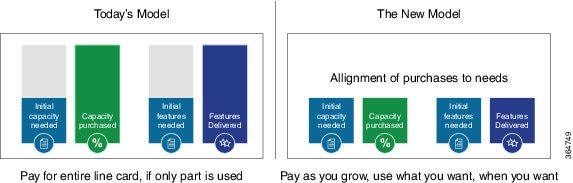
The consumption model is a new pricing model for line cards to align the initial purchase to your actual needs. This model provides the ability to deploy a line card on day 1 with minimum ports activated to meet the current traffic demands. Over time as the traffic grows, you can add additional ports in 10G port increments. This provides a flexible deployment model with the ability to increase bandwidth to meet your demands.

Figure 1. Comparison - Current Purchasing Model And The New Consumption Model


Note


The consumption model line cards require the users to deploy Smart Licensing to help track and provide visibility into license usage across their network. For information on Smart Licensing see https://www.cisco.com/c/en/us/td/docs/iosxr/collections/xr-licensing-content.html.

You must have a Smart Account created to place an order for the consumption model line card. You can create your Cisco Smart Account at this webpage: https://webapps.cisco.com/software/company/smartaccounts/home#accountcreation-account/request. For information on how to create a Cisco Smart Account, see: http://www.cisco.com/c/en/us/products/collateral/software/one-software/solution-overview-c22-733273.html.


Supported Consumption Model Line Cards

The line cards that can be deployed using consumption model are referred to as the consumption model line cards. The supported consumption model line cards are:

  • A9K-8X100GE-CM

  • A99-8X100GE-CM

  • A99-12X100GE-CM

  • A9K-MOD400-CM

Ordering the Consumption Model Line Card using the Consumption Model

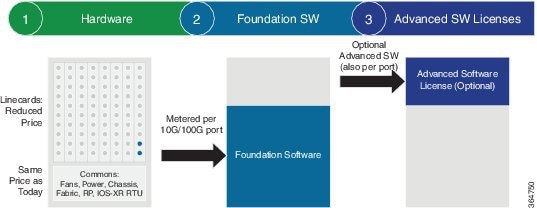
The three steps involved in ordering a consumption model line card using the Consumption Model are:

Figure 2. Steps involved in ordering the consumption model line card using the Consumption Model


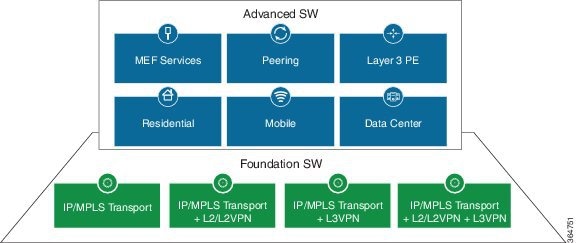
Figure 3. Foundation Software Licenses And Advanced Software Licenses


  1. Choose the hardware: Select a line card that supports Consumption Model.

    The consumption model line cards require Smart Licensing to be installed at your location to function. When placing an order, you must enter their Smart Account information. For more information on how to create a Cisco Smart Account, see: http://www.cisco.com/c/en/us/products/collateral/software/one-software/solution-overview-c22-733273.html.

    Table 1. Minimum Foundation Software Licenses for the CM line cards

    PID

    Minimum Foundation Software License Required

    A9K-8X100GE-CM 300G (30 x 10G)
    A99-8X100GE-CM 300G (30 x 10G)
    A99-12X100GE-CM 400G (40 x 10G)
    A9K-MOD400-CM-BUN 200G (20 x 10G)
  2. Choose your foundation software licenses: This provides the transport protocol (IP/MPLS, L2VPN, L3VPN, or L2VPN and L3VPN) as well as "per 10G" port activation.

    Pick your foundation software licenses based on the feature set and the scale required. The following is the list of the available licenses. The licenses listed are per 10G RTU (Right to Use) and are required to activate a port.

    Table 2. Foundation Software Licenses for Cisco IOS XR and Cisco IOS XR 64 bit

    Foundation License PID

    Description

    S-A9K-IPB-10G ASR 9000 IP/MPLS Basic 10G Foundational License
    S-A9K-IPP-10G ASR 9000 IP/MPLS Premium 10G Foundational License
    S-A9K-L2B-10G ASR 9000 IP/MPLS/L2VPN Basic 10G Foundational License
    S-A9K-L2P-10G ASR 9000 IP/MPLS/L2VPN Premium 10G Foundational License
    S-A9K-L3B-10G ASR 9000 IP/MPLS/L3VPN Basic 10G Foundational License
    S-A9K-L3P-10G ASR 9000 IP/MPLS/L3VPN Premium 10G Foundational License
    S-A9K-L2L3B-10G ASR 9000 IP/MPLS/L2VPN/L3VPN Basic 10G Foundational License
    S-A9K-L2L3P-10G ASR 9000 IP/MPLS/L2VPN/L3VPN Premium 10G Foundational License
  3. Choose your advanced software licenses: This provides the advanced feature support such as hierarchical QoS, OAM (Operations, Administration, and Maintenance), and virtual interfaces.

    Pick your advanced software licenses, optional, you can select one or more of them from the following list. The licenses listed are per 10G RTU (Right to Use).

    Below tables list supported advance software licenses for Cisco IOS XR and Cisco IOS XR 64 bit respectively:

    Table 3. Advanced Software Licenses for Cisco IOS XR

    Advanced Software License PID

    Description

    S-A9K-HQOS-RTU-10 ASR 9000 H-QoS 10G Right to Use License
    S-A9K-MAP-RTU-10 ASR 9000 CGN Stateless MAP 10G Right to Use License
    S-A9K-OAM-RTU-10 ASR 9000 OAM 10G Right to Use License
    S-A9K-VIRT-RTU-10 ASR 9000 Virtual Interfaces 10G Right to Use License
    S-A9K-EVPN-RTU-10 ASR 9000 E-VPN 10G Right to Use License
    S-A9K-VXLN-RTU-10 ASR 9000 VxLAN 10G Right to Use License
    S-A9K-DWDM-RTU-10 ASR 9000 IPoDWDM 10G Right to Use License
    S-A9K-MAC-RTU-10 ASR 9000 MACSec 10G Right to Use License
    S-A9K-MAC-RTU-40 ASR 9000 MACSec 40G (4x10G) Right to Use License
    S-A9K-MAC-RTU-100 ASR 9000 MACSec 100G (10x10G) Right to Use License
    Table 4. Advanced Software Licenses for Cisco IOS XR 64 bit

    Advanced Software License PID

    Description

    S-A9K-HQOS-RTU-10 ASR 9000 H-QoS 10G Right to Use License
    S-A9K-OAM-RTU-10 ASR 9000 OAM 10G Right to Use License
    S-A9K-VIRT-RTU-10 ASR 9000 Virtual Interfaces 10G Right to Use License
    S-A9K-EVPN-RTU-10 ASR 9000 E-VPN 10G Right to Use License
    S-A9K-VXLN-RTU-10 ASR 9000 VxLAN 10G Right to Use License
    S-A9K-DWDM-RTU-10 ASR 9000 IPoDWDM 10G Right to Use License
    S-A9K-MAC-RTU-10 ASR 9000 MACSec 10G Right to Use License
    A9K-NVSAT1-LIC ASR 9000 NV Satellite Right to Use License
    A9K-LI-LIC ASR 9000 Lawful Intercept Right to Use License

    A9K-MOBILE-LIC

    ASR 9000 Timing Advanced Mobile License Right to Use License

Table 5. Perpetual Licensing (BAU) Usage Pattern

License Name

Description

Hardware Supported

Consumption Pattern

S-A9K-24P10G-IVRF

VRF licence for upto 8 VRF instances per 24-port 10G/1G

A9K-24X10GE-1G-SE, A9K-24X10GE-1G-TR, A9K-48X10GE-1G-SE, and A9K-48X10GE-1G-TR

If number of VRFs are less than or equal to 8, IVRF license is consumed.

If number of VRFs are greater than 8, AIP license is consumed.

If customer has less than or equal to 8 VRFs, who purchased AIP license in their smart account, please contact your Cisco account representative if you see issues like insufficient IVRF licenses.

S-A9K-24P10G-AIP-TR

Advanced IP Licence for full scale VRFs for 24-port 10G A9K-24P10GAIPTR /1G TR LC

S-A9K-24P10G-AIP-SE

Advanced IP Licence for full scale VRFs for 24-port 10G/1G SE LC

S-A9K-48P10G-IVRF

Infrastructure VRF licence for upto 8 VRF instances per 48-port 10G/1G

S-A9K-48P10G-AIP-TR

Advanced IP Licence for full scale VRFs for 48-port 10G/1G TR LC

S-A9K-48P10G-AIP-SE

Advanced IP Licence for full scale VRFs for 48-port 10G/1G SE LC

S-A9K-48P1G-AIP-TR

Advanced IP Licence for full scale VRFs for 48-port 1G mode TR LC

S-A9K-48P1G-AIP-SE

Advanced IP Licence for full scale VRFs for 48-port 1G mode SE LC

S-A9K-48P10G-TR-UG

48-port 1G to 10G upgrade license for TR LC

S-A9K-48P10G-SE-UG

48-port 1G to 10G upgrade license for SE LC

S-A9K-24P-80G-RTU-SE

ASR9K 80G Upgrade license for 24-port 10G/1G dual rate SE LC

In 24 port PG, 80G licenses is consumed as shown below:

  • Capacity upto 80G – Consume 1x A9K-24P-80G-RTU-SE/ A9K-24P-80G-RTU-TR

  • Capacity upto 160G – Consume 2x A9K-24P-80G-RTU-SE/ A9K-24P-80G-RTU-TR

  • Capacity upto 240G – Consume 3x A9K-24P-80G-RTU-SE/ A9K-24P-80G-RTU-TR

S-A9K-24P-80G-RTU-TR

ASR9K 80G Upgrade license for 24-port 10G/1G dual rate TR LC

TR Equivalent Configuration

Configuration Examples:

The Consumption Model line cards provide the flexibility to configure the line card on a per 10G port basis. Here are a few examples of configurations of the existing TR and SE versions of line cards using the Consumption Model.

The TR equivalent configuration is a configuration with L2 Premium Foundation Software License plus OAM and Virtual Advanced Software licenses.

Line Card PID

Description

Quantity

A9K-8X100GE-CM

A99-8X100GE-CM

A9K-20X10GE-CM

A99-12X100GE-CM

ASR 9000 8-port 100GE Consumption Model Line Card

ASR 9900 8-port 100GE Consumption Model Line Card

ASR 9000 20-port 10GE Consumption Model Line Card

ASR 9900 12-port 100GE Consumption Model Line Card

1

Foundation Software PID

Scale

Quantity of 10G Licenses

S-A9K-L2P-10G L2-P (Layer 2 Premium Foundation Software License) 30

Advanced Software PID

Description

Quantity

S-A9K-OAM-RTU-10 ASR 9000 OAM 10Gbps Right to Use License 30
S-A9K-VIRT-RTU-10 ASR 9000 Virtual Interfaces 10Gbps Right to Use License 30

SE Equivalent Configuration

The SE equivalent configuration is a configuration with L2 Premium Foundation Software License plus H-QoS, OAM, and Virtual Advanced Software licenses.

Line Card PID

Description

Quantity

A9K-8X100GE-CM

A99-8X100GE-CM

ASR 9000 8-port 100GE Consumption Model Line Card

ASR 9900 8-port 100GE Consumption Model Line Card

1

Foundation Software PID

Scale

Quantity of 10G Licenses

S-A9K-L2P-10G L2-P (Layer 2 Premium Foundation Software License) 30

Advanced Software PID

Description

Quantity

S-A9K-HQOS-RTU-10 ASR 9000 H-QoS 10Gbps Right to Use License 30
S-A9K-OAM-RTU-10 ASR 9000 OAM 10Gbps Right to Use License 30
S-A9K-VIRT-RTU-10 ASR 9000 Virtual Interfaces 10Gbps Right to Use License 30

Implementing Default Licensing

Prerequisites for Configuring Software Entitlement

You must be in a user group associated with a task group that includes the proper task IDs. The command reference guides include the task IDs required for each command. If you suspect user group assignment is preventing you from using a command, contact your AAA administrator for assistance.

Information About Default (Traditional) Licensing

To configure software license entitlements using the default mode of licensing, you need to understand the concepts described in this module.

Types of Licenses

The following types of licenses are currently defined:

  • Permanent licenses—Licenses that enable a designated feature permanently, as long as the license resides on the router.

Router License Pools

License pools are maintained by the router. By default, all added licenses are allocated to the owner secure domain router (SDR) license pool, and they can be freely allocated to any slot in the router. Features on cards belonging to the owner SDR are granted licenses based on availability in the owner SDR license pool.

Chassis-Locked Licenses

Licenses are locked to a unique device identifier (UDI). The UDI is comprised of the chassis serial number, along with an additional identifier. The complete set of UDI information can be displayed using the show license udi command. The license manager parses the user-provided license and verifies that it is valid for the chassis it is running on and determines if the license is being readded.

Slot-Based Licenses

Feature licenses are allocated to router slots and not cards. Therefore, if a card is replaced, the existing license is applied to the newly inserted card. For example, if you have eight licenses for Layer 3 VPN in the system, you can configure Layer 3 VPN features on any eight cards in the router, and the licenses are allocated to the slots within which the cards are installed. If a card is removed from one of these licensed slots, say slot 3, and entered into an empty slot with no license, say slot 5, the license remains with slot 3 and the feature cannot be activated on slot 5 with the permanent license entered earlier by the user. In this case, you can release the license to the appropriate license pool by removing the configuration of the card (while it is inserted), or by using the license move slot command. When you configure the feature on slot 5, the license is checked out.

Configure Licenses Using Default Licensing

Adding a License for a New Feature

This task describes how to acquire a permanent license for a feature that you have purchased or an evaluation license for a feature that you have arranged with your sales representative to try. Use this procedure to replace evaluation licenses with permanent licenses.

Before you begin

You must have purchased the feature for which you are adding the license. When you purchase the feature, you are provided with a product authorization key (PAK) that you use to download the license.

SUMMARY STEPS

  1. admin
  2. show license udi
  3. http://www.cisco.com/go/license
  4. Copy the license to your TFTP server.
  5. admin
  6. license add license-name [ sdr sdr-name ]
  7. configure
  8. license license-name location {all | node-id}
  9. exit

DETAILED STEPS

  Command or Action Purpose

Step 1

admin

Example:


RP/0/RSP0/CPU0:router# admin 

Enters administration EXEC mode.

Step 2

show license udi

Example:


RP/0/RSP0/CPU0:router(admin)# show license udi

Mon Jul 13 04:36:32.715 PST

Local Chassis UDI Information:
  PID         : ASR-9010-AC
  S/N         : FOX1232H67M
  Operation ID: 1

Displays the UDI of the chassis. This consists of a product identifier (PID), serial number (S/N), and operation identifier (Operation ID).

Step 3

http://www.cisco.com/go/license

Go to the license tool on Cisco.com. You must log in to the site before you can access the license tool. Follow the instructions for product license registration. You are required to enter the feature PAK and the chassis UDI to acquire the license.

Note


If you are installing a permanent license, you should have received the PAK when you purchased the feature. If you are installing an evaluation license, your sales representative should provide you with the PAK.

Step 4

Copy the license to your TFTP server.

You will be issued a license. You can copy the license and store it on your computer, or alternatively, you can request that the license be sent to you in an e-mail. When you have received the license, copy it to a TFTP server that is accessible by your router.

Step 5

admin

Example:


RP/0/RSP0/CPU0:router# admin 

Enters administration EXEC mode.

Step 6

license add license-name [ sdr sdr-name ]

Example:

RP/0/RSP0/CPU0:router(admin)# license add tftp://192.10.10.10/mylicenses/lc40g_lic

Adds the license to the SDR license pool. By default, the license is added to the owner SDR license pool.

Step 7

configure

Example:


RP/0/RSP0/CPU0:router(admin)# configure

Enters administration configuration mode.

Step 8

license license-name location {all | node-id}

Example:


RP/0/RSP0/CPU0:router(admin-config)# license A9K-ADV-OPTIC-LIC 
location 0/0/CPU0

(Optional) Binds the license to the slot where it is to be used.

Note


Beginning with Cisco IOS XR Release 4.3.1, this command is optional. If you do not use this command, it is configured as though the license is bound to all slots.

Step 9

exit

Example:


RP/0/RSP0/CPU0:router(admin)# exit

Exits administration EXEC mode.

What to do next

To use the feature associated with the added license, you must configure it on your router. To configure Layer 3 VPN, see the Implementing MPLS Layer 3 VPNs on Cisco IOS XR Software module in MPLS Configuration Guide for Cisco ASR 9000 Series Routers.

To verify that your Layer 3 VPN configuration is operational, use the show rsi interface all global command.

Backing Up Licenses

When your router is configured with the licenses that you require, you should perform this task to back up all licenses. Backing up licenses makes it easier to restore them if there is a problem.

SUMMARY STEPS

  1. admin
  2. license backup backup-file
  3. show license backup backup-file

DETAILED STEPS

  Command or Action Purpose

Step 1

admin

Example:


RP/0/RSP0/CPU0:router# admin 

Enters administration EXEC mode.

Step 2

license backup backup-file

Example:

RP/0/RSP0/CPU0:router(admin)# license backup disk1:/license_back

License command "license backup disk1:/license_back" completed successfully.

Backs up all licenses on the router to a backup file in the specified location. The backup file can be a local file or a remote file on a TFTP or RCP server.

Step 3

show license backup backup-file

Example:


RP/0/RSP0/CPU0:router(admin)# show license backup disk1:/license_back

Displays the contents of the backup file.

Examples

The following example shows sample output from the show license backup command.


RP/0/RSP0/CPU0:router(admin)# show license backup disk1:/license_back

Local Chassis UDI Information:
  S/N         : TBA09370035
  Operation ID:   5
Licenses      :
FeatureID    Type                     #installed
CRS-MSC-40G  Slot based,    Permanent          2
XC-L3VPN     Slot based,    Permanent          1


RP/0/RSP0/CPU0:router(admin)# show license backup disk0:/lic_backup.pkg

Tue Jul 27 17:12:44.982 pst

Local Chassis UDI Information:
  S/N         : FOX1316G5TL  
  Operation ID:   9  

  FeatureID: A9K-ADV-OPTIC-LIC (Slot based, Permanent) 
  Total licenses  1
    Pool: Owner  1
    Allocated Node(s): 
      0/0/CPU0 1 [Owner]

  FeatureID: A9K-ADV-VIDEO-LIC (Slot based, Evaluation) 
  Total licenses  1
    Pool: Owner  1
    Allocated Node(s): 
      0/RSP0/CPU0 1 [Owner]

  FeatureID: A9K-iVRF-LIC (Slot based, Permanent) 
  Total licenses  1
    Pool: Owner  1

  FeatureID: A9K-iVRF-LIC (Slot based, Evaluation) 
  Total licenses  3
    Pool: Owner  3
    Allocated Node(s): 
      0/1/CPU0 1 [Owner]
  

Restoring Licenses

If your licenses become corrupted, and you have previously created a backup of your licenses, you can perform this task to restore the licenses to your router.

Before you begin

You must have created a backup file of your licenses before you can restore them on your router.

SUMMARY STEPS

  1. admin
  2. show license backup backup-file
  3. license restore backup-file

DETAILED STEPS

  Command or Action Purpose

Step 1

admin

Example:


RP/0/RSP0/CPU0:router# admin 

Enters administration EXEC mode.

Step 2

show license backup backup-file

Example:

RP/0/RSP0/CPU0:router(admin)# show license backup disk1:/license_back

Displays the contents of the backup file. You should verify the contents of the backup file before you restore your licenses.

Step 3

license restore backup-file

Example:

RP/0/RSP0/CPU0:router(admin)# license restore disk1:/license_back

Restores all licenses on the router from a backup file in the specified location. This can be a local file, or a remote file on a TFTP or RCP server.

Examples

This example shows sample output from the license restore command.


RP/0/RSP0/CPU0:router(admin)# license restore disk1:/license_back

Info: This command will erase all existing licenses.
Info: It is strongly recommended to backup existing licenses first.
Do you wish to proceed? [yes/no]: y

License command "license restore disk1:/license_back" completed successfully.

Troubleshooting License Issues after a Software Upgrade

In the instance that you were running Cisco IOS XR Release 3.9.0 and had the optic feature enabled on a interface and the A9K-ADV-OPTIC-LIC license was active on a particular slot, when you upgrade to Cisco IOS XR Release 4.0.0, the A9K-ADV-OPTIC-LIC license is still active, but you may get the following warning message:

RP/0/RSP0/CPU0:Jul 27 14:22:22.594 : licmgr[236]: 
%LICENSE-LICMGR-4-PACKAGE_LOCATION_LICENSE_INVALID : 
Feature associated to package A9K-ADV-OPTIC-LIC configured 
on node 0/4/CPU0 without a valid license
  

To solve this issue, configure the license command in administration EXEC mode. This binds the A9K-ADV-OPTIC-LIC license to the slot on which you are using the license. For example:


RP/0/RSP0/CPU0:router(admin-config)# license A9K-ADV-OPTIC-LIC location 0/4/CPU0 
RP/0/RSP0/CPU0:router(admin-config)# commit