Channel APC

This chapter describes channel APC.

Table 1. Feature History

Feature Name

Release Information

Feature Description

Automatic Power Control support for NCS1K14-EDFA2

Cisco IOS XR Release 25.2.1

Automatic power control maintains all channels at a consistent Power Spectral Density (PSD) target by regulating optical components. It keeps all channels at the same Power Spectral Density (PSD) target, ensuring equalized channel power regardless of different input powers. It compensates for changes in span loss over time by adjusting amplifier gain and variable optical attenuator (VOA) attenuation, maintaining stable total transmit and receive power.

Channel APC

From Release 25.2.1, Channel APC is supported on the EDFA2 card. It is an optical application that maintains all optical channels at a consistent Power Spectral Density (PSD) target by dynamically regulating optical components. This ensures a flat spectrum before transmission over the fiber span.

The purpose of the Channel APC control loop is to equalize the Power Spectral Density (PSD) of all channels to a defined Channel Target PSD.

  • Channel Target PSD:

    This is an optical-line-control (OLC) configuration parameter that defines the desired PSD level for all channels. By default, this value is –20 dBm, measured in dBm/12.5GHz.

  • Optical Channel Monitor (OCM):

    The OCM device provides readings of the channel power spectral density, dividing the spectrum into 6.25GHz slices. The Channel PSD is calculated based on readings from the OCM and is averaged over the central 25GHz bandwidth.

  • Input Channel Acceptance:

    Before a channel is transmitted, its input PSD is evaluated against the Channel PSD target plus a defined margin (PSD_MARGIN). A channel is accepted and unblocked by the Wavelength Blocker (WB) if its estimated PSD after initial amplification and WB insertion loss is greater than the target PSD plus the margin.

  • PSD Control Loop:

    Once a channel is accepted, the WB attenuation for the channel's slices is adjusted from maximum to an initial value calculated to bring the Channel PSD near or slightly below the target. The control loop then periodically monitors the Channel PSD at the WB output. If the discrepancy between the measured PSD and the target PSD exceeds a defined threshold (PSD Correction Tolerance), the WB attenuation is corrected incrementally. The loop continues until the discrepancy is small, applying a final correction equal to the residual error. The loop regulates again if the discrepancy later exceeds the threshold.

This diagram shows the NCS1K14-EDFA2 line card optical layout. Optical components controlled by channel APC are highlighted in green.
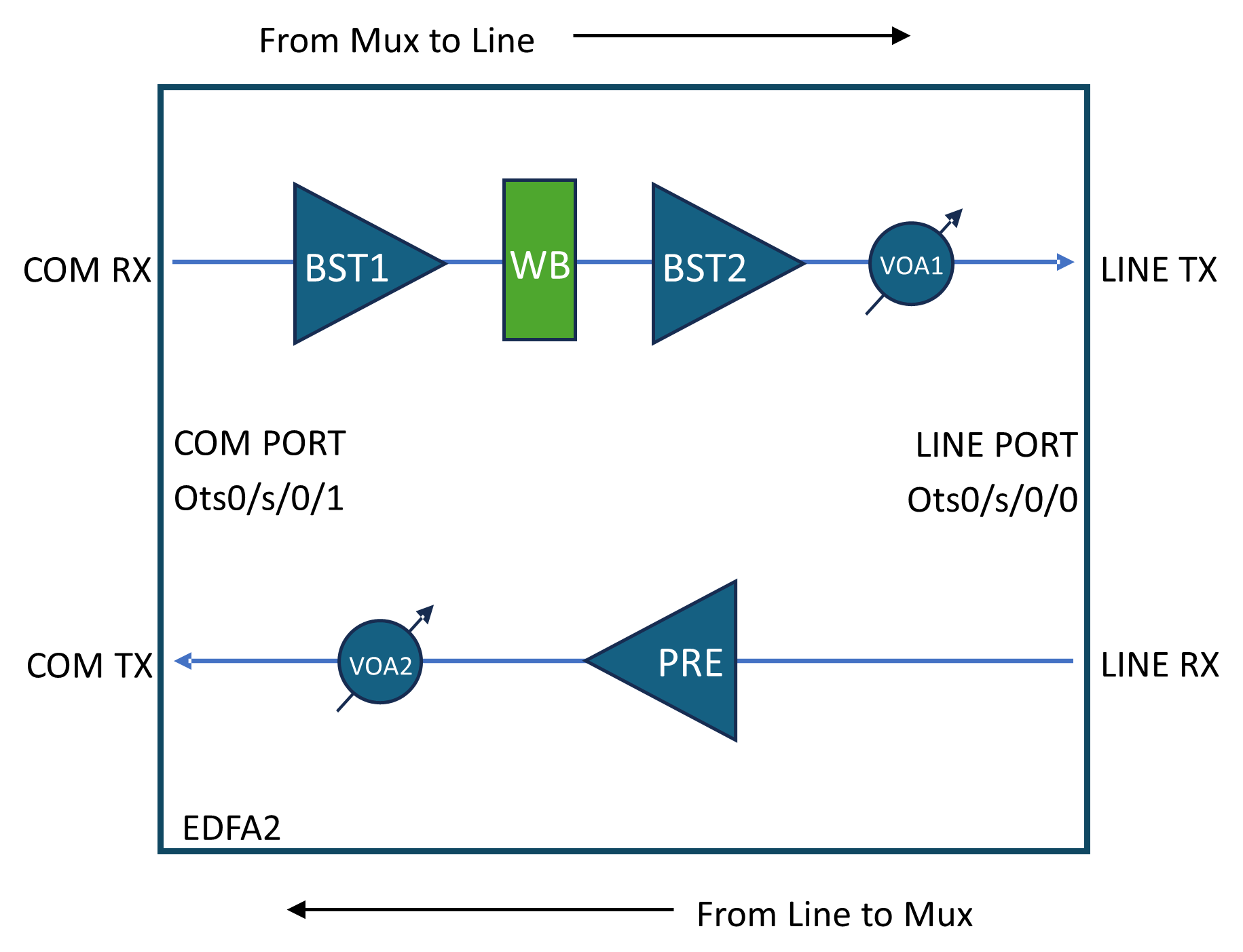
Figure 1. NCS1K14-EDFA2 line card optical layout
NCS1K14-EDFA2 line card optical layout

Channel Acceptance and Blocking Criteria

  • Acceptance:
    • By default, WB blocks all C-band spectrum.

    • Channels must have PSD after WB (0 attenuation) higher than the target PSD plus a 0.5 dBm/12.5 GHz margin to be accepted.

  • Blocking:
    • Channels with WB attenuation at 0 dB and PSD lower than target PSD minus 2.0 dBm/12.5 GHz tolerance are blocked by the control loop.

How channel APC works

Summary

Channel APC control loop equalizes the Power Spectral Density (PSD) of all channels to a defined Channel Target PSD.

Workflow

These stages describe channel APC process:

  1. Input and Amplification:
    • Channels enter via Controller Ots0/<slot>/0/1 (COM-RX).
    • First stage amplification by BST1.
    • Channel APC equalizes PSD across channels before the second stage amplifier (BST2 + VOA1).
  2. Wavelength Blocker (WB):
    • Controls attenuation per 6.25 GHz slice (0 to 15 dB or full block).
    • Channel power equalization is based on a configurable Channel Target PSD (default: -20 dBm/12.5 GHz).
    • PSD is averaged over the central 25 GHz bandwidth from OCM measurements.
  3. Channel APC Control:
    • When enabled, Channel APC overrides manual WB attenuation settings.
    • OSC channel is excluded from Channel APC control.

Enable channel APC

This topic describes how to enable channel APC.

This task describes how to configure channel APC. This configuration is in this topic:

  • Enable channel APC

Procedure


Use the following commands to enable channel APC:

configure
optical-line-control
controller ots <Rack/Slot/Instance/Port>
channel-apc flat-psd-eq-mode
commit
end

Disable channel APC

This topic describes how to disable channel APC.

This task describes how to configure channel APC. This configuration is in this topic:

  • Disable channel APC

Procedure


Use the following commands to disable channel APC:

configure
optical-line-control
controller ots <Rack/Slot/Instance/Port>
no channel-apc flat-psd-eq-mode
commit
end

Pause channel APC

This topic describes how to pause channel APC.

This task describes how to configure channel APC. This configuration is in this topic:

  • Pause channel APC

Procedure


Use the following commands to pause channel APC:

configure
optical-line-control
controller ots <Rack/Slot/Instance/Port>
channel-apc-pause
commit
end

Resume channel APC

This topic describes how to resume channel APC.

This task describes how to configure channel APC. This configuration is in this topic:

  • Resume channel APC

Procedure


Use the following commands to resume channel APC:

configure
optical-line-control
controller ots <Rack/Slot/Instance/Port>
no channel-apc-pause
commit
end

Set target PSD for channel APC

This topic describes how to set target PSD for channel APC.

This task describes how to configure channel APC. This configuration is in this topic:

  • Set target PSD for chanel

Procedure


Use the following commands to set target PSD for a channel:

configure
optical-line-control
controller ots <Rack/Slot/Instance/Port>
psd-target <value in dBm/12.5GHz>
commit
end

Example:

This sample configuration sets the target PSD to -22 dBm/12.5 GHz:

configure
optical-line-control
controller ots 0/0/0/0
psd-target -220
commit
end

Configure input amplifier

This topic describes how to configure channel APC.

In scenarios with low total input power, you must adjust BST1 amplifier gain and range. This table shows some typical scenarios:

Table 2. BST1 Amplifier Configuration
Optical Interfaces Spacing BST1 Total Input Power [dBm] BST1 range BST1 Gain [dB]
400ZR 75 GHz 0.2~2.3 Extended 18.5
mix 400ZR/800ZR 75/150 GHz -5~0.2 Extended 18.5
800ZR 150 GHz 0.6~1.2 Extended 18.5
DCI 75 GHz 6~6.9 Normal 8
mix DCI/DCI-1 75/150 GHz 5.3~6.9 Normal 8
DCI-1 150 GHz 9.8~10.4 Normal 8
DCI-2 (CIM8) 150 GHz 11.4~12.2 Normal 8

Procedure


Use the following commands to adjust BST1 amplifier gain and gain range:

configure
controller ots <Rack/Slot/Instance/Port>
ingress-ampli-gain-range <normal|extended>
ingress-ampli-gain <gain_value_in_tenths_of_dB>
commit
end

Example:

This sample configuration sets BST1 gain range to extended and the gain to 19.5 dB:

configure
controller ots 0/0/0/1
ingress-ampli-gain-range extended
ingress-ampli-gain 195
commit
end

View channel APC information

This task describes how to view channel APC information.

These tables describe the different parameters and status values in the output of the show command.
Table 3. Channel APC parameter definitions
Parameter Description
Controller Identifier of the optical controller managing the channel, formatted as Ots0/slot/interface/port.
Internal Status Current state of the Channel APC control loop, e.g., IDLE means regulation is complete and stable.
Input Gain Gain value (in dB) applied by the first stage amplifier (BST1) to the input signal.
Input Gain Range Gain range mode of the BST1 amplifier, e.g., Normal or Extended, indicating the amplifier’s operating range.
Input Gain Range Min - Max Minimum and maximum gain values (in dB) for the BST1 amplifier in the current gain range.
Last Correction Timestamp of the last adjustment made by the Channel APC control loop to equalize channel power.
Output PSD Target Target Power Spectral Density (PSD) value (in dBm/12.5 GHz) that the Channel APC aims to maintain for all channels.
PSD Correction Tolerance Allowed deviation margin (in dB) from the target PSD before the Channel APC initiates a correction.
Table 4. Channel APC status definitions
Status Description
BLOCKED

Triggered by amplifier safety events (APR, OSRI), RX-LOS alarms, or OTS controller shutdown.

The following reasons can cause this status:

  • INPUT-EDFA-OSRI-ENABLED

  • OUTPUT-EDFA-OSRI-ENABLED

  • INPUT-EDFA-RX-LOS

  • OUTPUT-OTS-SHUTDOWN

  • INPUT-OTS-SHUTDOWN

PAUSED Regulation paused via channel-apc-pause command; no adjustments occur.
IDLE Regulation complete; all channels meet target PSD within tolerance.
REGULATING Active regulation in progress to correct PSD discrepancies.
Table 5. Channel APC table parameters
Parameter Description
Controller Ots-Och r/s/i/p/<channel-id> Channel in input to the COM-RX
Center Frequency Central frequency of the channel
Width Width of the channel
Status Status of the Channel, see the Channel APC per-channel status definitions table.
Spectrum Set of spectrum slices belonging to the channel
Input PSD Channel Input power in term of PSD at COM-RX input port
Input Power Channel Input power at COM-RX input port
Channel PSD Channel power in term of PSD after the WB block. It should be next to the PSD target less than the PSD Correction Tolerance parameter shown by the command
Channel Power Channel power after the WB block
PSD Discrepancy Current error margin between the Channel PSD and the Configured Target PSD. It the value increases above the PSD Correction Tolerance, a new regulation sequence starts.
Attenuation The attenuation value configured on the WB to reach the target.
Table 6. Channel APC per-channel status definitions
Channel Status Description
Active Channel is managed and matches target PSD at WB output.
Not Active Channel power insufficient to reach target PSD; channel is blocked or inactive.
Regulating Channel is currently undergoing PSD adjustment.
Out Of Range Channel PSD too high or too low to be active even with max or zero attenuation.

Procedure


To view channel APC information, use the show olc channel-apc regulation-info command.

Example:

RP/0/RP0/CPU0:IOS#show olc channel-apc regulation-info

Thu Jul 17 16:06:13.213 CEST


Controller                               : Ots0/0/0/0

Internal Status                          : IDLE

Input Gain                               : 8.0 dB

Input Gain Range                         : Normal

Input Gain Range Min - Max               : 5.0 - 11.0 dB

Last Correction                          : 2025-07-17 14:23:18

Output PSD Target                        : -20.0 dBm/12.5GHz

PSD Correction Tolerance                 : 0.3 dB


Controller          Center       Width      Status          Spectrum       Input          Input       Channel        Channel     PSD           Attenuation

                     Frequency    (GHz)                      6.25 GHz       PSD            Power       PSD            Power       Discrepancy   (dB)

                     (THz)                                   Slices Range   (dBm/12.5GHz)  (dBm)       (dBm/12.5GHz)  (dBm)       (dBm)         

============================================================================================================================================================

Ots-Och0/0/0/0/1    196.100000   75.000     Not Active      779 - 790      -50.00         -50.00      -50.00         -50.00      -             25.00

Ots-Och0/0/0/0/2    196.025000   75.000     Active          767 - 778      -24.22         -18.10      -19.97         -14.00      0.03          0.10

Ots-Och0/0/0/0/3    195.950000   75.000     Not Active      755 - 766      -50.00         -50.00      -50.00         -50.00      -             25.00

Note


APC periodically monitors the per channel Power Spectral Density (PSD) discrepancy. If the measured discrepancy exceeds the PSD Correction Tolerance, the APC initiates regulation on the Line Controller to reduce each channel's discrepancy below the defined tolerance. This regulation ensures a flat spectrum before the EDFA facing the LINE port.

  • The regulation process may take a few seconds to complete.

  • During this time, the APC status transitions and eventually reaches the final state IDLE.

  • The values displayed by the command show olc channel-apc controller Ots0/0/0/0 regulation-info reflect the state of the LC at the moment the command is executed.

  • Because the regulation is ongoing during this period, some values shown may already reflect the final regulated state, while others may not yet have updated to the final values.

This behavior is important to understand when interpreting the output of the channel APC regulation status, as transient discrepancies in the displayed data can occur during the regulation process.


Channel input power management parameters

A channel input power management parameter is a configuration setting that

  • define and monitor channel input power levels,

  • enable logic for blocking or accepting channels based on minimum input power, and

  • facilitate automatic BST1 gain configuration and channel input power monitoring through alarms.

Table 7. Feature History

Feature Name

Release Information

Feature Description

Enhanced Channel Automatic Power Control (APC) support on EDFA2 Card Cisco IOS XR Release 25.4.1 This feature introduces enhanced channel control and management on the EDFA2 card, enhancing configuration and management capabilities. It allows users to configure the expected input power at full channel load as a single, unified parameter, streamlining previous legacy BST1 configurations with new CLI commands. These commands automatically configure BST1 gain and facilitate the raising or clearing of two new alarms per channel for improved monitoring.

Additionally, this feature enables users to control the initial setup of channels, amplifiers, and thresholds required for Metro Open Line System (MOLS) deployment.

New Alarms introduced:

  • OLC_APC_FM_CHANNEL_LOW_INPUT_POWER

  • OLC_APC_FM_CHANNEL_HIGH_INPUT_POWER

New CLI commands introduced:

  • channel-minimum-input-psd

  • expected-total-input-power

  • channel-rx-power-low-rel-thr

  • channel-rx-power-high-rel-thr

You can configure these commands using the OpenConfig model. The transport line common model is augmented to support channel configuration on the EDFA2 card.

These sections provide detailed information on specific channel input power management parameters and their functionalities:

Channel Minimum Input PSD: This parameter determines if a channel is blocked at the Wavelength Blocker or accepted and controlled to a configured PSD target. A channel is blocked if its input power is lower than the calculated channel_minimum_input_power. This configuration overrides legacy channel acceptance or blocking criteria. A hysteresis of 0.5 dBm is implemented to prevent continuous blocking or activation.

channel_minimum_input_power = channel-minimum-input-psd + 10*log10(channel_width/12.5)

Note


channel-minimum-input-psd misconfiguration may cause traffic to drop.


Channels Expected Total Input Power: This parameter allows for automatic BST1 configuration by the Channel APC application and enables monitoring of each channel's input power through low and high alarms. BST1 auto-configuration is active only when Channel APC is configured in flat-psd-eq-mode.

expected_channel_input_power = expected-total-input-power - 10*log10(full_spectrum_in_ghz / 12.5) + 10*log10(channel_width / 12.5)

Alarms are raised based on these conditions:

  • Channel low input power alarm: channel_input_power < expected_channel_input_power + channel-rx-power-low-rel-thr

    Example:0/S/NXR0        Minor        Software         01/08/2025 19:22:11 UTC    Ots0/S/0/1/C_ID - Input channel power below the minimum expected

  • Channel high input power alarm: channel_input_power > expected_channel_input_power + channel-rx-power-high-rel-thr

    Example:0/0/NXR0        Minor        Software         01/08/2025 19:22:11 UTC    Ots-Och0/0/0/1/1 - Input channel power above the maximum expected

A hysteresis of 0.5 dB is added to the clear threshold to prevent alarm flickering. Channel high/low input power alarms function independently and do not require Channel APC to be enabled.


Note


expected-total-input-power misconfiguration may cause traffic to drop.


This table illustrates how different configuration parameters enable specific functionalities.

Table 8. Configuration and features matrix

Configuration parameters

Default value

New channel blocking or activation policy

BST1 auto-config

Channel low/high input power alarms

channel-apc

NA

Must be set to flat-psd-eq-mode

Must be set to flat-psd-eq-mode

No impact

channel-minimum-input-psd

NA

Must be set to any valid value

No impact

No impact

expected-total-input-power

NA

No impact

Must be set to any valid value

Must be set to any valid value

channel-rx-power-low-rel-thr

-3 dB

No impact

No impact

Default or set to any valid value

channel-rx-power-high-rel-thr

+3 dB

No impact

No impact

Default or set to any valid value

BST1 gain settings

The BST1 gain is set by the Channel APC application based on the expected-total-input-power configured using this simple Look-Up Table (LUT):

Table 9. BST1 gain mode and setpoint

expected-total-input-power

BST1 gain mode

BST1 gain setpoint

> 3.5dBm

Normal

8 dB

<= 3.5dBm

Extended

18.5 dB

Configure channel input power management parameters

Use this task to configure the channel minimum input PSD, expected total input power, and channel RX power thresholds for optical line control.

These configurations enable new channel blocking and activation policies, automatic BST1 gain configuration, and channel input power monitoring.


Note


channel-minimum-input-psd or expected-total-input-power misconfiguration may cause traffic to drop.


Procedure


Step 1

Enter global configuration mode.

Example:

RP/0/RP0/CPU0:ios#conf

Step 2

Access optical line control configuration.

Example:

RP/0/RP0/CPU0:ios#(config)#optical-line-control

Step 3

Specify the controller for which you want to configure the parameters.

Example:

RP/0/RP0/CPU0:ios#(config-olc)#controller ots
0/0/0/1

Step 4

Configure the channel-minimum-input-psd. If not configured, the legacy channel policy is applied.

Example:

RP/0/RP0/CPU0:ios#(config-olc-ots)#channel-minimum-input-psd
<value>

Enter the channel-minimum-input-psd in the range -40.0 dBm per 12.5 GHz to 23.0 dBm per 12.5 GHz in increments of 0.1 dBm per 12.5 GHz.

Step 5

Configure the expected-total-input-power. If not configured, automatic BST1 configuration and input channel alarms are disabled.

Example:

RP/0/RP0/CPU0:ios#(config-olc-ots)#expected-total-input-power
<value>

Enter the expected-total-input-power in the range -40.0 dBm to 23.0 dBm in increments of 0.1 dBm.

Step 6

Configure the channel-rx-power-low-rel-thr.The default value is -3dB.

Example:

RP/0/RP0/CPU0:ios#(config-olc-ots)#channel-rx-power-low-rel-thr
<value>

Enter the threshold in the range -20.0 dB to -1.0 dB in increments of 0.1 dB.

Step 7

Configure the channel-rx-power-high-rel-thr. The default value is +3dB.

Example:

RP/0/RP0/CPU0:ios#(config-olc-ots)#channel-rx-power-high-rel-thr
<value>

Enter the threshold in the range 1.0 dB to 20.0 dB in increments of 0.1 dB.

Step 8

Commit the changes and exit configuration mode.

Example:


RP/0/RP0/CPU0:ios#(config-olc-ots)#commit
RP/0/RP0/CPU0:ios#(config-olc-ots)#root
RP/0/RP0/CPU0:ios#(config)#exit

The channel input power management parameters are configured, enabling new blocking/activation policies, BST1 auto-configuration, and channel RX power alarms based on your settings.

What to do next

Verify the configuration using the operational CLI show olc channel-apc controller.

Verify channel APC regulation information

Use this task to display the current Channel APC regulation status and channel-specific power information.

This command helps you monitor the effects of your channel input power management configurations. The output varies based on whether expected-total-input-power or channel-minimum-input-psd are configured.

  • If expected-total-input-power is not configured, the Expected Input Pwr column is not shown.

  • If expected-total-input-power is configured, the Input PSD column is not shown.

  • If channel-minimum-input-psd is not configured, the Minimum Input Pwr column is not shown.


Note


This command is valid only for NCS 1014 platforms; on other platforms, it produces an empty output.


The optical line controller must be active and configured.

Procedure


Execute the show olc channel-apc controller command to view regulation details.

Example:


RP/0/RP0/CPU0:kepler-4-1#show olc channel-apc controller Ots0/0/0/0 regulation-info
Thu Jun 12 15:30:52.855 CEST

Controller                               : Ots0/0/0/0
Internal Status                          : IDLE
Input Gain                               : 18.5 dB
Input Gain Range                         : Extended
Input Gain Range Min - Max               : 17.0 - 23.0 dB
Last Correction                          : 2025-06-12 15:29:51
Output PSD Target                        : -20.0 dBm/12.5Ghz
PSD Correction Tolerance                 : 0.3 dB

 Controller          Center       Width      Status          Spectrum       Input          Input       Expected    Minimum     Channel        Channel     PSD           Attenuation
                     Frequency    (GHz)                      6.25 GHz       PSD            Power       Input Pwr   Input Pwr   PSD            Power       Discrepancy   (dB)
                     (THz)                                   Slices Range   (dBm/12.5GHz)  (dBm)       (dBm)       (dBm)       (dBm/12.5GHz)  (dBm)       (dB)           
====================================================================================================================================================================================
 Ots-Och0/0/0/0/1    194.000000   100.000    Active          441 - 456      -23.27         -17.30      -14.81      -25.97      -20.27         -14.30      -0.27         12.60
 Ots-Och0/0/0/0/2    196.025000   100.000    Active          765 - 780      -24.15         -18.00      -14.81      -25.97      -20.17         -14.00      -0.17         10.30
 Ots-Och0/0/0/0/10   195.000000   150.000    Not Active      597 - 620      -90.00         -90.00      -13.05      -24.21      -90.00         -90.00      -             25.00
 Ots-Och0/0/0/0/50   191.375000   100.000    Not Active      21 - 36        -90.00         -90.00      -14.81      -25.97      -90.00         -90.00      -             25.00

The system displays detailed regulation information, including input gain, output PSD target, and per-channel power status, reflecting the configured channel input power management parameters.