GMPLS UNI
Generalized Multiprotocol Label Switching User Network Interface (GMPLS UNI) is a control plane technology that
-
enables packet networks to interact directly with the optical transport control plane,
-
coordinates packet network resource requirements with the optical transport network, and
-
uses open standards to optimize network resource use across packet and optical domains.
|
Feature Name |
Release Information |
Feature Description |
|---|---|---|
|
GMPLS UNI Support for OTN-XP and 2-QDD-C Cards |
Cisco IOS XR Release 7.10.1 |
Generalized Multiprotocol Label Switching (GMPLS) User Network Interface (UNI) support is enabled for OTN-XP and 2-QDD-C cards in NCS 1004. GMPLS UNI helps in optimizing the utilization of network resources. For OTN-XP card the following data paths are allowed.
For 2-QDD-C card only 200G/300G/400G trunk rates are allowed with 100GE or OTU4 client payloads in both the muxponder and muxponder slice configurations. |
Packet and optical integration
As cloud services become central to business operations, packet and optical network services must evolve to be more efficient and dynamic. Closer integration of packet and optical networks is critical, especially in the control plane. GMPLS UNI is a key enabling technology that supports this integration.
Channel spacing
The Dense Wavelength Division Multiplexing (DWDM) grid in the C-band (1530–1569 nm) of the optical spectrum is divided into multiple channels so that each channel can carry traffic independently. The number of channels available from the DWDM grid depends on the channel spacing: lower channel spacing yields more channels, and higher channel spacing yields fewer channels.
GMPLS supports two types of channel spacing.
-
Fixed grid channel spacing: The channel spacing is fixed at 50 GHz and supports 100 Gbps and 200 Gbps traffic.
-
Flexible grid channel spacing: The channel spacing is 6.25 GHz and supports all data rates. The channels are divided into finer slices so that the channel width can be defined as a multiple of these slices to fit the data bandwidth requirement.
NCS 1004 supports only flexible grid channel spacing.
The neighbor flexi-grid-capable command enables GMPLS UNI flexible grid channel spacing. This command is run during the LMP configuration.
GMPLS UNI tunnels
GMPLS UNI tunnels are end-to-end optical paths between two NCS 1004 nodes that
-
connects two nodes,
-
efficiently uses the Dense Wavelength Division Multiplexing (DWDM) grid with minimal wastage of spectral bandwidth, and
- carries mixed bit-rate or mixed modulation data in a flexible grid using different channel widths.
To address common packet and optical network requirements, you create a tunnel between two NCS 1004 nodes to carry traffic by using GMPLS UNI technology, as shown in the following figure.
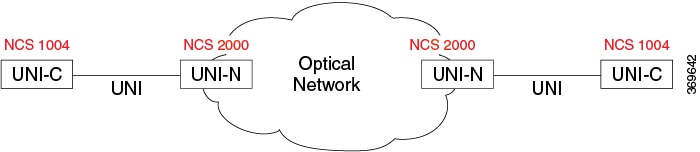
UNI-C is the client, packet, or router node, for example, an NCS 1004 node. UNI-N is the network or optical node, for example, an NCS 2000 node.
A Link Management Protocol (LMP) link is created to establish connectivity between an NCS 2000 node and an NCS 1004 node. The tunnel is then created between the trunk interfaces of the source and destination NCS 1004 nodes to carry traffic. When the tunnel is created between NCS 1004 nodes, a circuit is internally created between the NCS 2000 nodes to perform path computation, restoration, and reversion functions.
The tunnel can be created between the source and destination NCS 1004 nodes without involving NCS 2000 nodes in the middle. However, restoration and reversion capabilities are provided only by NCS 2000 nodes that use GMPLS UNI.
Licensing and configuration prerequisites for GMPLS UNI tunnels
Before you create a tunnel by using GMPLS UNI, ensure that the following prerequisites are met.
-
The NCS 1004 node has both the MPLS and MPLS-TE packages installed. The package names are ncs1004-mpls and ncs1004-mpls-te-rsvp .
-
The NCS 2000 node has a valid license for ROADM and Wavelength Switched Optical Network (WSON) support.
-
The management IP addresses of the NCS 1004 and NCS 2000 nodes are reachable.
-
The administrative state of the trunk port of the optics controller on the NCS 1004 node is not in the shutdown state.
Limitations for a GMPLS UNI tunnel
The following limitations apply when you create a GMPLS UNI tunnel.
Configuration workflow for a GMPLS UNI tunnel
Summary
Creating a GMPLS UNI tunnel involves the following actors.
-
NCS 2000 node (UNI-N): Provides the optical transport network and runs the Link Management Protocol (LMP) endpoint, alien wavelength, and ifindex provisioning.
-
NCS 1004 node (UNI-C): Acts as the client router that runs LMP, Resource Reservation Protocol (RSVP), and the MPLS traffic-engineering tunnel toward the destination node.
You complete the NCS 2000 node configuration first, then configure the source and destination NCS 1004 nodes to bring up the tunnel.
Workflow
These stages describe the GMPLS UNI tunnel configuration workflow.
- On the NCS 2000 node, perform the following configurations:
- On the NCS 1004 node, perform the following configurations:
Result
The GMPLS UNI tunnel is established between the source and destination NCS 1004 nodes, with the optical path computed by the NCS 2000 nodes.
Configure an LMP link and Alien Wavelength on an NCS 2000 node using CTC for signaled numbered circuit
Establish connectivity and enable advanced opUse this task to set up a static LMP link between a Cisco NCS 2000 node and either an NCS 1004 node. The CTC LMP creation wizard enables you to select source and destination endpoints, configure optical parameters, and set alien wavelength options. tical parameters and alien wavelength configurations for signaled numbered circuits between Cisco optical network nodes.
Use this task to set up a static LMP link between a Cisco NCS 2000 node and either an NCS 1002 or NCS 1004 node. The CTC LMP creation wizard enables you to select source and destination endpoints, configure optical parameters, and set alien wavelength options.
Procedure
|
Step 1 |
From the View menu, choose Go to Network View. |
|
Step 2 |
Click the Provisioning > LMP tabs. |
|
Step 3 |
Click Create. The LMP Creation window appears. |
|
Step 4 |
Click Signaled in the Router Not Managed by CTC area. A wizard appears with the following options: LMP Origination, LMP Termination, Optical Parameters, and Alien Wavelength |
|
Step 5 |
In the LMP Origination screen of the wizard, provision these parameters:
|
|
Step 6 |
In the LMP Termination screen of the wizard, provision these parameters:
|
|
Step 7 |
In the Optical Parameters screen of the wizard, provision these parameters:
|
|
Step 8 |
Click Next. |
|
Step 9 |
In the Alien wavelength screen of the wizard, provision these parameters.
|
The LMP link with specified optical parameters and alien wavelength settings is created and listed in CTC, ready for signaled numbered circuit provisioning.
Configure an LMP link with Alien Wavelength on NCS 2000 using CTC for signaled unnumbered circuits
Establish connectivity between NCS 2000 and NCS 1002/1004 nodes using a signaled, unnumbered LMP link with Alien Wavelength support.
Use the LMP creation wizard in Cisco Transport Controller (CTC) to provision link parameters, optical settings, and Alien Wavelength options for interoperability between managed and unmanaged router nodes.
Procedure
|
Step 1 |
From the View menu, choose Go to Network View. |
|
Step 2 |
Click the Provisioning > LMP tabs. |
|
Step 3 |
Click Create. The LMP Creation window appears. |
|
Step 4 |
Click Signaled in the Router Not Managed by CTC area. A wizard appears with options for LMP Origination, LMP Termination, Optical Parameters, and Alien Wavelength |
|
Step 5 |
On the LMP Origination screen, provision these parameters:
|
|
Step 6 |
On the LMP Termination screen of the wizard, provision these parameters:
|
|
Step 7 |
In the Optical Parameters screen of the wizard, provision these parameters:
|
|
Step 8 |
Click Next. |
|
Step 9 |
In the Alien wavelength screen of the wizard, provision these parameters.
|
The LMP link between NCS 2000 and NCS 1002/1004 is established, supporting signaled unnumbered circuits with full optical and Alien Wavelength configuration.
Retrieve ifindex from the NCS 2000 node
You can retrieve the ifindex value of all the LMP ports of the NCS 2000 node by using the Cisco Transport Controller (CTC) or the TL1 interface. Use this value in the neighbor interface-id unnumbered command during the LMP configuration on the NCS 1004 node.
Procedure
|
Retrieve the ifindex by using either CTC or TL1.
The following sample TL1 output shows the ifindex of two LMP ports. Example:In the sample output, the ifindex of port 81-1-9 is 7f000d12 in hexadecimal and 2130709778 in decimal. The ifindex of port 81-1-10 is 7f000d14 in hexadecimal and 2130709780 in decimal. |
Configure LMP on Cisco NCS 1004 node
Procedure
|
Step 1 |
Enter the LMP GMPLS optical UNI configuration mode. Example: |
|
Step 2 |
Specify the trunk optics controller. Example: |
|
Step 3 |
Configure the LMP neighbor name. Example: |
|
Step 4 |
Specify the neighbor link ID for numbered circuit. The neighbor link ID is the IP address of the Multiservice Transport Platform (MSTP) interface on the NCS 2000 node. Example: |
|
Step 5 |
Enable GMPLS UNI flexible grid channel spacing. Example: |
|
Step 6 |
Specify the neighbor optical interface ID, which is the ifindex value of the LMP port of the NCS 2000 node in decimal format. Example:To retrieve the ifindex value, see Retrieve ifindex from the NCS 2000 node. |
|
Step 7 |
Set the IPCC mode to routed. Example: |
|
Step 8 |
Specify the neighbor router ID for GMPLS UNI, and commit the configuration. Example: |
|
Step 9 |
View the configuration. Example:commit |
Configure the MPLS tunnel on the NCS 1004 node
Before you begin
Ensure that the administrative state of the trunk port of the optics controller on the NCS 1004 node is not in the shutdown state.
You configure the Multiprotocol Label Switching (MPLS) traffic-engineering tunnel under the GMPLS optical UNI controller. The destination IP address is the IP address of the optics controller on the destination NCS 1004 node.
The path option supports either an Explicit Route Object (ERO), which includes the routes to use through a specified list of nodes, or an Exclude Route Object (XRO), which excludes routes through a specified list of nodes.
Procedure
|
Step 1 |
Enter the MPLS traffic-engineering GMPLS optical UNI configuration mode. Example: |
|
Step 2 |
Specify the optics controller. Example: |
|
Step 3 |
Enter the tunnel-properties submode and set the tunnel ID. Example: |
|
Step 4 |
Specify the destination IP address of the optics controller on the destination NCS 1004 node. Example: |
|
Step 5 |
Set the path optiona and commit. Example: |
What to do next
The following sample shows the MPLS tunnel configuration on the source NCS 1004 node.
RP/0/RP0/CPU0:ios#configure
RP/0/RP0/CPU0:ios(config)#mpls traffic-eng
RP/0/RP0/CPU0:ios(config-mpls-te)#gmpls optical-uni
RP/0/RP0/CPU0:ios(config-te-gmpls-uni)#controller optics 0/0/0/6
RP/0/RP0/CPU0:ios(config-te-gmpls-cntl)#tunnel-properties
RP/0/RP0/CPU0:ios(config-te-gmpls-tun)#tunnel-id 100
RP/0/RP0/CPU0:ios(config-te-gmpls-tun)#destination ipv4 unicast 100.20.20.20
RP/0/RP0/CPU0:ios(config-te-gmpls-tun)#path-option 10 no-ero lockdown
RP/0/RP0/CPU0:ios(config-te-gmpls-tun)#commitThe following sample shows the MPLS tunnel configuration on the destination NCS 1004 node.
RP/0/RP0/CPU0:ios#configure
RP/0/RP0/CPU0:ios(config)#mpls traffic-eng
RP/0/RP0/CPU0:ios(config-mpls-te)#gmpls optical-uni
RP/0/RP0/CPU0:ios(config-te-gmpls-uni)#controller optics 0/0/0/6
RP/0/RP0/CPU0:ios(config-te-gmpls-uni)#commit
Configure RSVP on the NCS 1004 node
You configure the Resource Reservation Protocol (RSVP) with appropriate signaling timers on the source and destination NCS 1004 nodes of the tunnel.
Procedure
|
Step 1 |
Enter the global configuration mode and the RSVP configuration mode. Example: |
|
Step 2 |
Specify the optics controller. Example: |
|
Step 3 |
Set the out-of-band signaling refresh interval, in seconds. Example: |
|
Step 4 |
Set the maximum number of missed out-of-band signaling refreshes that are allowed before the session is removed, and commit. Example:signalling refresh out-of-band missed mis-count |
What to do next
The following sample shows the RSVP configuration on the source NCS 1004 node.
GMPLS UNI tunnel, RSVP, and LMP configuration commands and sample outputs
Use the show commands in the following table to verify the GMPLS UNI tunnel, RSVP, and LMP configuration.
|
Show command |
Description |
|---|---|
|
show mpls traffic-eng link-management optical-uni controller optics |
Displays detailed GMPLS information of a specific optics controller. |
|
show mpls traffic-eng link-management optical-uni |
Displays detailed GMPLS information of all the optics controllers. |
|
show mpls traffic-eng tunnels |
Displays information about tunnels. |
|
show mpls traffic-eng link-management optical-uni tabular |
Displays detailed GMPLS information of all the optics controllers in tabular format. |
|
show mpls traffic-eng tunnels tabular |
Displays information about all the tunnels in tabular format. |
|
show lmp gmpls optical-uni |
Verifies the LMP configuration and state. |
|
show rsvp neighbors |
Displays information about RSVP neighbors. |
Sample outputs
This sample out of the commnad show mpls traffic-eng link-management optical-uni controller optics command displays detailed GMPLS information of a specific optics controller.
Mon Jul  1 20:05:27.209 IST
Optical interface: Optics0/0/0/0
  Overview:
    IM state: Up
    Child interface: : IM state Unknown
    OLM/LMP state: Up
    Optical tunnel state: up
  Connection:
    Tunnel role: Tail
    Tunnel-id: 15, LSP-id 3, Extended tunnel-id 10.105.57.100
    Tunnel source: 10.105.57.100, destination: 11.1.1.1
    Optical router-ids: Local: 10.105.57.101, Remote: 10.127.60.48
    Label source: UNI-N
    Upstream label:
      Optical label:
      Grid                : DWDM
      Channel spacing     : 6.25 GHz
      Identifier          : 0
      Channel Number      : -277
    Downstream label:
      Optical label:
      Grid                : DWDM
      Channel spacing     : 6.25 GHz
      Identifier          : 0
      Channel Number      : -277
    SRLG discovery: Disabled
    SRLG announcement: None
    Switching Type: lsc
    MTU: 9212
  Admission Control:
    Upstream: Admitted (LSP ID: 3)
    Downstream: Admitted (LSP ID: 3)
  OLM/LMP adjacency information:
    Adjacency status: Up
    Local:
      node ID: 10.105.57.101
      link interface ID: 10
      link ID: 11.1.1.1
    Neighbor:
      node ID: 10.127.60.48 (VEGA2K-Site-3_48)
      link interface ID: 2130706976
      link ID: 10.1.1.1
      IPCC: Routed to 10.127.60.48
  Optical capabilities:
    Controller type: DWDM
    Channel spacing: 6.25 GHz
    Default channel: 0
    784 supported channels:
      -303, -302, -301, -300, -299, -298, -297, -296
      -295, -294, -293, -292, -291, -290, -289, -288
      -287, -286, -285, -284, -283, -282, -281, -280
      -279, -278, -277, -276, -275, -274, -273, -272
      -271, -270, -269, -268, -267, -266, -265, -264
      -263, -262, -261, -260, -259, -258, -257, -256
      -255, -254, -253, -252, -251, -250, -249, -248
      -247, -246, -245, -244, -243, -242, -241, -240
      -239, -238, -237, -236, -235, -234, -233, -232
      -231, -230, -229, -228, -227, -226, -225, -224
      -223, -222, -221, -220, -219, -218, -217, -216
      -215, -214, -213, -212, -211, -210, -209, -208
      -207, -206, -205, -204, -203, -202, -201, -200
      -199, -198, -197, -196, -195, -194, -193, -192
      -191, -190, -189, -188, -187, -186, -185, -184
      -183, -182, -181, -180, -179, -178, -177, -176
      -175, -174, -173, -172, -171, -170, -169, -168
      -167, -166, -165, -164, -163, -162, -161, -160
      -159, -158, -157, -156, -155, -154, -153, -152
      -151, -150, -149, -148, -147, -146, -145, -144
      -143, -142, -141, -140, -139, -138, -137, -136
      -135, -134, -133, -132, -131, -130, -129, -128
      -127, -126, -125, -124, -123, -122, -121, -120
      -119, -118, -117, -116, -115, -114, -113, -112
      -111, -110, -109, -108, -107, -106, -105, -104
      -103, -102, -101, -100, -99, -98, -97, -96
      -95, -94, -93, -92, -91, -90, -89, -88
      -87, -86, -85, -84, -83, -82, -81, -80
      -79, -78, -77, -76, -75, -74, -73, -72
      -71, -70, -69, -68, -67, -66, -65, -64
      -63, -62, -61, -60, -59, -58, -57, -56
      -55, -54, -53, -52, -51, -50, -49, -48
      -47, -46, -45, -44, -43, -42, -41, -40
      -39, -38, -37, -36, -35, -34, -33, -32
      -31, -30, -29, -28, -27, -26, -25, -24
      -23, -22, -21, -20, -19, -18, -17, -16
      -15, -14, -13, -12, -11, -10, -9, -8
      -7, -6, -5, -4, -3, -2, -1, 0
      1, 2, 3, 4, 5, 6, 7, 8
      9, 10, 11, 12, 13, 14, 15, 16
      17, 18, 19, 20, 21, 22, 23, 24
      25, 26, 27, 28, 29, 30, 31, 32
      33, 34, 35, 36, 37, 38, 39, 40
      41, 42, 43, 44, 45, 46, 47, 48
      49, 50, 51, 52, 53, 54, 55, 56
      57, 58, 59, 60, 61, 62, 63, 64
      65, 66, 67, 68, 69, 70, 71, 72
      73, 74, 75, 76, 77, 78, 79, 80
      81, 82, 83, 84, 85, 86, 87, 88
      89, 90, 91, 92, 93, 94, 95, 96
      97, 98, 99, 100, 101, 102, 103, 104
      105, 106, 107, 108, 109, 110, 111, 112
      113, 114, 115, 116, 117, 118, 119, 120
      121, 122, 123, 124, 125, 126, 127, 128
      129, 130, 131, 132, 133, 134, 135, 136
      137, 138, 139, 140, 141, 142, 143, 144
      145, 146, 147, 148, 149, 150, 151, 152
      153, 154, 155, 156, 157, 158, 159, 160
      161, 162, 163, 164, 165, 166, 167, 168
      169, 170, 171, 172, 173, 174, 175, 176
      177, 178, 179, 180, 181, 182, 183, 184
      185, 186, 187, 188, 189, 190, 191, 192
      193, 194, 195, 196, 197, 198, 199, 200
      201, 202, 203, 204, 205, 206, 207, 208
      209, 210, 211, 212, 213, 214, 215, 216
      217, 218, 219, 220, 221, 222, 223, 224
      225, 226, 227, 228, 229, 230, 231, 232
      233, 234, 235, 236, 237, 238, 239, 240
      241, 242, 243, 244, 245, 246, 247, 248
      249, 250, 251, 252, 253, 254, 255, 256
      257, 258, 259, 260, 261, 262, 263, 264
      265, 266, 267, 268, 269, 270, 271, 272
      273, 274, 275, 276, 277, 278, 279, 280
      281, 282, 283, 284, 285, 286, 287, 288
      289, 290, 291, 292, 293, 294, 295, 296
      297, 298, 299, 300, 301, 302, 303, 304
      305, 306, 307, 308, 309, 310, 311, 312
      313, 314, 315, 316, 317, 318, 319, 320
      321, 322, 323, 324, 325, 326, 327, 328
      329, 330, 331, 332, 333, 334, 335, 336
      337, 338, 339, 340, 341, 342, 343, 344
      345, 346, 347, 348, 349, 350, 351, 352
      353, 354, 355, 356, 357, 358, 359, 360
      361, 362, 363, 364, 365, 366, 367, 368
      369, 370, 371, 372, 373, 374, 375, 376
      377, 378, 379, 380, 381, 382, 383, 384
      385, 386, 387, 388, 389, 390, 391, 392
      393, 394, 395, 396, 397, 398, 399, 400
      401, 402, 403, 404, 405, 406, 407, 408
      409, 410, 411, 412, 413, 414, 415, 416
      417, 418, 419, 420, 421, 422, 423, 424
      425, 426, 427, 428, 429, 430, 431, 432
      433, 434, 435, 436, 437, 438, 439, 440
      441, 442, 443, 444, 445, 446, 447, 448
      449, 450, 451, 452, 453, 454, 455, 456
      457, 458, 459, 460, 461, 462, 463, 464
      465, 466, 467, 468, 469, 470, 471, 472
      473, 474, 475, 476, 477, 478, 479, 480
    Controller SRLGs
      None
show mpls traffic-eng link-management optical-uni
Displays detailed GMPLS information of all the optics controllers. MPLS tunnels are not created when the optics controller is in the shutdown state. The state is shown as "Admin down". Run the no shutdown command under the optics controller to initiate the tunnel creation.
Mon Jul  1 20:00:42.108 IST

System Information:
  Optical Links Count: 1 (Maximum Links Supported 100)

Optical interface: Optics0/0/0/0
  Overview:
    IM state: Up
    Child interface: : IM state Unknown
    OLM/LMP state: Up
    Optical tunnel state: up
  Connection:
    Tunnel role: Tail
    Tunnel-id: 15, LSP-id 3, Extended tunnel-id 10.105.57.100
    Tunnel source: 10.105.57.100, destination: 11.1.1.1
    Optical router-ids: Local: 10.105.57.101, Remote: 10.127.60.48
    Label source: UNI-N
    Upstream label:
      Optical label:
      Grid                : DWDM
      Channel spacing     : 6.25 GHz
      Identifier          : 0
      Channel Number      : -277
    Downstream label:
      Optical label:
      Grid                : DWDM
      Channel spacing     : 6.25 GHz
      Identifier          : 0
      Channel Number      : -277
    SRLG discovery: Disabled
    SRLG announcement: None
    Switching Type: lsc
    MTU: 9212
  Admission Control:
    Upstream: Admitted (LSP ID: 3)
    Downstream: Admitted (LSP ID: 3)
  OLM/LMP adjacency information:
    Adjacency status: Up
    Local:
      node ID: 10.105.57.101
      link interface ID: 10
      link ID: 11.1.1.1
    Neighbor:
      node ID: 10.127.60.48 (VEGA2K-Site-3_48)
      link interface ID: 2130706976
      link ID: 10.1.1.1
      IPCC: Routed to 10.127.60.48
  Optical capabilities:
    Controller type: DWDM
    Channel spacing: 6.25 GHz
    Default channel: 0
    784 supported channels:
      -303, -302, -301, -300, -299, -298, -297, -296
      -295, -294, -293, -292, -291, -290, -289, -288
      -287, -286, -285, -284, -283, -282, -281, -280
      -279, -278, -277, -276, -275, -274, -273, -272
      -271, -270, -269, -268, -267, -266, -265, -264
      -263, -262, -261, -260, -259, -258, -257, -256
      -255, -254, -253, -252, -251, -250, -249, -248
      -247, -246, -245, -244, -243, -242, -241, -240
      -239, -238, -237, -236, -235, -234, -233, -232
      -231, -230, -229, -228, -227, -226, -225, -224
      -223, -222, -221, -220, -219, -218, -217, -216
      -215, -214, -213, -212, -211, -210, -209, -208
      -207, -206, -205, -204, -203, -202, -201, -200
      -199, -198, -197, -196, -195, -194, -193, -192
      -191, -190, -189, -188, -187, -186, -185, -184
      -183, -182, -181, -180, -179, -178, -177, -176
      -175, -174, -173, -172, -171, -170, -169, -168
      -167, -166, -165, -164, -163, -162, -161, -160
      -159, -158, -157, -156, -155, -154, -153, -152
      -151, -150, -149, -148, -147, -146, -145, -144
      -143, -142, -141, -140, -139, -138, -137, -136
      -135, -134, -133, -132, -131, -130, -129, -128
      -127, -126, -125, -124, -123, -122, -121, -120
      -119, -118, -117, -116, -115, -114, -113, -112
      -111, -110, -109, -108, -107, -106, -105, -104
      -103, -102, -101, -100, -99, -98, -97, -96
      -95, -94, -93, -92, -91, -90, -89, -88
      -87, -86, -85, -84, -83, -82, -81, -80
      -79, -78, -77, -76, -75, -74, -73, -72
      -71, -70, -69, -68, -67, -66, -65, -64
      -63, -62, -61, -60, -59, -58, -57, -56
      -55, -54, -53, -52, -51, -50, -49, -48
      -47, -46, -45, -44, -43, -42, -41, -40
      -39, -38, -37, -36, -35, -34, -33, -32
      -31, -30, -29, -28, -27, -26, -25, -24
      -23, -22, -21, -20, -19, -18, -17, -16
      -15, -14, -13, -12, -11, -10, -9, -8
      -7, -6, -5, -4, -3, -2, -1, 0
      1, 2, 3, 4, 5, 6, 7, 8
      9, 10, 11, 12, 13, 14, 15, 16
      17, 18, 19, 20, 21, 22, 23, 24
      25, 26, 27, 28, 29, 30, 31, 32
      33, 34, 35, 36, 37, 38, 39, 40
      41, 42, 43, 44, 45, 46, 47, 48
      49, 50, 51, 52, 53, 54, 55, 56
      57, 58, 59, 60, 61, 62, 63, 64
      65, 66, 67, 68, 69, 70, 71, 72
      73, 74, 75, 76, 77, 78, 79, 80
      81, 82, 83, 84, 85, 86, 87, 88
      89, 90, 91, 92, 93, 94, 95, 96
      97, 98, 99, 100, 101, 102, 103, 104
      105, 106, 107, 108, 109, 110, 111, 112
      113, 114, 115, 116, 117, 118, 119, 120
      121, 122, 123, 124, 125, 126, 127, 128
      129, 130, 131, 132, 133, 134, 135, 136
      137, 138, 139, 140, 141, 142, 143, 144
      145, 146, 147, 148, 149, 150, 151, 152
      153, 154, 155, 156, 157, 158, 159, 160
      161, 162, 163, 164, 165, 166, 167, 168
      169, 170, 171, 172, 173, 174, 175, 176
      177, 178, 179, 180, 181, 182, 183, 184
      185, 186, 187, 188, 189, 190, 191, 192
      193, 194, 195, 196, 197, 198, 199, 200
      201, 202, 203, 204, 205, 206, 207, 208
      209, 210, 211, 212, 213, 214, 215, 216
      217, 218, 219, 220, 221, 222, 223, 224
      225, 226, 227, 228, 229, 230, 231, 232
      233, 234, 235, 236, 237, 238, 239, 240
      241, 242, 243, 244, 245, 246, 247, 248
      249, 250, 251, 252, 253, 254, 255, 256
      257, 258, 259, 260, 261, 262, 263, 264
      265, 266, 267, 268, 269, 270, 271, 272
      273, 274, 275, 276, 277, 278, 279, 280
      281, 282, 283, 284, 285, 286, 287, 288
      289, 290, 291, 292, 293, 294, 295, 296
      297, 298, 299, 300, 301, 302, 303, 304
      305, 306, 307, 308, 309, 310, 311, 312
      313, 314, 315, 316, 317, 318, 319, 320
      321, 322, 323, 324, 325, 326, 327, 328
      329, 330, 331, 332, 333, 334, 335, 336
      337, 338, 339, 340, 341, 342, 343, 344
      345, 346, 347, 348, 349, 350, 351, 352
      353, 354, 355, 356, 357, 358, 359, 360
      361, 362, 363, 364, 365, 366, 367, 368
      369, 370, 371, 372, 373, 374, 375, 376
      377, 378, 379, 380, 381, 382, 383, 384
      385, 386, 387, 388, 389, 390, 391, 392
      393, 394, 395, 396, 397, 398, 399, 400
      401, 402, 403, 404, 405, 406, 407, 408
      409, 410, 411, 412, 413, 414, 415, 416
      417, 418, 419, 420, 421, 422, 423, 424
      425, 426, 427, 428, 429, 430, 431, 432
      433, 434, 435, 436, 437, 438, 439, 440
      441, 442, 443, 444, 445, 446, 447, 448
      449, 450, 451, 452, 453, 454, 455, 456
      457, 458, 459, 460, 461, 462, 463, 464
      465, 466, 467, 468, 469, 470, 471, 472
      473, 474, 475, 476, 477, 478, 479, 480
    Controller SRLGs
      None
show mpls traffic-eng link-management optical-uni tabular
Displays detailed GMPLS information of all the optics controllers in tabular format.
Mon Jul  1 15:10:50.472 IST

System Information:
  Optical Links Count: 4 (Maximum Links Supported 100)

                  State          LMP          GMPLS tunnel
Interface      Admin  Oper    adjacency    role  tun-id  state
--------------------------------------------------------------
     Op0/0/0/0    up    up        up       Tail      15     up
     Op0/0/0/1    up    up        up       Tail      16     up
     Op0/1/0/0    up    up        up       Tail      17     up
     Op0/1/0/1    up    up        up       Tail      18     up
show mpls traffic-eng tunnels
Displays information about tunnels.
Mon Jul  1 15:03:58.490 IST


LSP Tunnel 10.105.57.100 15 [5] is signalled, Signaling State: up
  Tunnel Name: ckt0/0/0/0 Tunnel Role: Tail
  Upstream label:
    Optical label:
    Grid                : DWDM
    Channel spacing     : 6.25 GHz
    Identifier          : 0
    Channel Number      : -277
  Downstream label:
    Optical label:
    Grid                : DWDM
    Channel spacing     : 6.25 GHz
    Identifier          : 0
    Channel Number      : -277
  Signalling Info:
    Src 10.105.57.100 Dst 11.1.1.1, Tun ID 15, Tun Inst 5, Ext ID 10.105.57.100
    Router-IDs: upstream   10.127.60.48
                local      10.105.57.101
    Priority:  7  7
    SRLGs: not collected
    Path Info:
      Incoming Address: 10.1.1.1
      Incoming:
      Explicit Route:
        No ERO

      Route Exclusions:
        No XRO
      Record Route: Disabled
      Tspec: avg rate=4294967033 kbits, burst=1000 bytes, peak rate=4294967033 kbits
      Session Attributes: Local Prot: Not Set, Node Prot: Not Set, BW Prot: Not Set
    Resv Info: None
      Record Route: Disabled
      Fspec: avg rate=4294967033 kbits, burst=1000 bytes, peak rate=4294967033 kbits
Displayed 0 (of 0) heads, 0 (of 0) midpoints, 1 (of 1) tails
Displayed 0 up, 0 down, 0 recovering, 0 recovered heads
show rsvp neighbors
Displays information about RSVP neighbors.
Mon Jul  1 14:58:48.888 IST
Global Neighbor: 10.127.60.48
  Interface Neighbor   Interface
  -------------------- ------------
  10.127.60.48         MgmtEth0/RP0/CPU0/0
show lmp gmpls optical-uni
Verifies the LMP configuration and state.
Mon Jul  1 14:55:35.492 IST

GMPLS Optical-UNI LMP Router ID: 10.105.57.101

LMP Neighbor
Name: ncs1k, IP: 10.127.60.48, Owner: GMPLS Optical-UNI
LMP: Disabled
 IPCC ID: 1, State Up
 LMP UDP port: 701
  Known via             : Configuration
  Type                  : Routed
  Destination IP        : 10.127.60.48
  Source IP             : 10.105.57.101

    Interface I/F     |  Lcl Interface ID | Lcl Link    ID | Interface LMP state
----------------------+-------------------+----------------+-----------------------
         Optics0/1/0/1                   7         11.5.5.5                   Up
         Optics0/1/0/0                   6         11.4.4.4                   Up
         Optics0/0/0/1                  11         11.3.3.3                   Up
         Optics0/0/0/0                  10         11.1.1.1                   Up
GMPLS UNI tunnel troubleshooting commands and resolutions
Collect and analyze the output of the following commands for any software issues on the GMPLS UNI tunnel.
-
show tech-support mpls traffic-eng file filename
-
show tech-support mpls rsvp file filename
-
show lmp clients
-
show rsvp neighbors
-
show mpls traffic-eng link-management optical-uni controller optics Rack/Slot/Instance/Port
-
show mpls traffic-eng tunnels tunnel-id
|
Problem |
Solution |
|---|---|
|
When the NCS 2000 node cannot route the Dense Wavelength Division Multiplexing (DWDM) wavelength to the destination, it displays a generic error message: "No Route to destination". |
As a super user, collect and analyze the diagnostic information by entering the following address in the browser:
|
 Feedback