Telemetry Configuration Guide for Cisco 8000 Series Routers, IOS XR Releases

Telemetry Configuration Guide for Cisco 8000 Series Routers, IOS XR Releases

Telemetry data streaming mechanisms

Want to summarize with AI?

Log in

Explains how routers stream telemetry data using cadence-driven or event-driven mechanisms to support network monitoring and analysis.


Telemetry data streaming mechanisms are network features that enable routers to transmit operational data for monitoring and analysis.

  • Routers can stream telemetry data using cadence-driven or event-driven mechanisms.

  • Cadence-driven streaming sends data at regular intervals, while event-driven streaming transmits data when specific events occur.

  • Platform-specific documentation and monitoring of CPU and NPU utilization are important when configuring collection intervals.

Telemetry streaming types and operational considerations

Routers support two primary telemetry streaming mechanisms: cadence-driven and event-driven. Cadence-driven streaming transmits data at fixed intervals, while event-driven streaming sends data in response to specific network events.

Consider the following when selecting a streaming mechanism:

  • Cadence-driven streaming is suitable for continuous monitoring.

  • Event-driven streaming is efficient for capturing changes or anomalies.

To configure telemetry streaming, follow these general steps:

  1. Identify the sensor path and determine if it retrieves data from forwarding hardware (such as NPU or ASIC).

  2. Set the collection interval based on platform capabilities and operational requirements.

Sensor paths containing -npu- in their names are likely to require hardware database retrieval. Naming conventions and data sources can vary by platform and software release.

  • Cadence-driven: Sends data at regular intervals.

  • Event-driven: Sends data when specific events occur.

Comparison of streaming mechanisms:
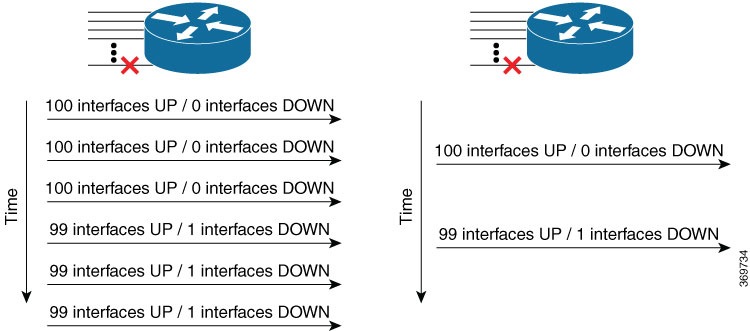
Figure 1. Cadence-driven and Event-driven Telemetry

Contrast between streaming mechanisms:

Table 1. Streaming Mechanism Contrast

Cadence-driven

Event-driven

Regular interval transmission

Event-based transmission

Lookup table for sensor path considerations:

Table 2. Sensor Path Lookup Table

Items

Attribute 1

Attribute 2

Sensor path with -npu-

Requires hardware database retrieval

Monitor CPU/NPU utilization

Other sensor paths

May use software database

Platform-dependent

Note

Short telemetry collection intervals can increase router load, especially when sensor paths retrieve data from forwarding hardware such as NPU or ASIC. Consult platform-specific documentation and monitor CPU and NPU utilization when configuring shorter collection intervals.

Visual representation of telemetry streaming mechanisms:
Figure 2. Cadence-driven and Event-driven Telemetry

Cadence-driven telemetry

Cadence-driven telemetry is a network feature that streams operational statistics and state transitions at a configured cadence to help identify network patterns.

  • Streams data, including operational statistics and state transitions, at a configured cadence.

  • Provides a continuous stream of data after a configured time interval.

  • Helps users identify emerging patterns in the network.

Cadence-driven telemetry streaming and pattern identification

Cadence-driven telemetry streams data, including operational statistics and state transitions, at a configured cadence. The higher frequency of continuously streamed data helps you identify emerging patterns in the network.

Cadence-driven telemetry provides a continuous stream of data after a configured time interval.

Stem sentence for unordered list

Stem sentence for ordered list.

Stem sentence for item description list.

  • Item: Description

Stem sentence for comparison table.

Figure 3. Cadence-driven Telemetry

Stem sentence for contrast table.

Stem sentence for lookup table.

Table 3. Look up Table Title

Items

Attribute 1

Attribute 2

Item 1

Item 2

Note

TIP: Choose the appropriate note type from the attributes.

Cadence-driven telemetry provides a visual representation of continuous data streaming after a configured time interval.

Figure 4. Cadence-driven Telemetry

Cadence-driven telemetry streaming example

Cadence-driven telemetry streams operational statistics and state transitions at a configured cadence, providing a typical instance of continuous data streaming for network pattern identification.

Cadence-driven telemetry counter-example

Cadence-driven telemetry analogy


Event-driven telemetry

Event-driven telemetry is a network feature that streams data to the receiver only when a state transition occurs.

  • optimizes the amount of data collected by sending updates only on state changes

  • provides information about interface state transitions and IP route updates, and

  • helps users understand when and how to apply event-driven telemetry for efficient monitoring.

Event-driven telemetry operation and use cases

Event-driven telemetry streams data only when a monitored state changes, reducing unnecessary data transmission and improving efficiency.

Common use cases include monitoring interface state transitions and IP route updates.

Event-driven telemetry provides the following benefits:

  • Reduces bandwidth usage by sending data only on relevant events.

  • Improves responsiveness to network changes.

Event-driven telemetry operation steps:

  1. Monitor network element for state changes.

  2. Stream data to receiver when a state transition occurs.

Event-driven telemetry attributes and descriptions:

  • State transition: Triggers data streaming.

  • Receiver: Collects streamed data.

Comparison of event-driven and periodic telemetry:

Figure 5. Event-driven Telemetry

Contrast between event-driven and periodic telemetry:

Table 4. Telemetry Mode Contrast

Event-driven telemetry

Periodic telemetry

Streams data only on events

Streams data at set intervals

Lookup table for telemetry modes:

Table 5. Telemetry Modes Lookup

Mode

Trigger

Data Frequency

Event-driven

State change

As needed

Periodic

Timer

Regular intervals

Note

TIP: Use event-driven telemetry to minimize unnecessary data transmission and improve network monitoring efficiency.

The following image shows a stream of data after a state change:

Figure 6. Event-driven Telemetry

Event-driven telemetry example

For example, event-driven telemetry streams data about interface state transitions and IP route updates only when these events occur, reducing the volume of transmitted data.