Establishing device ownership
Key components of the device ownership establishment process.
-
Owner Certificate: The owner certificate (OC) is an X.509 certificate [RFC5280] that is used to identify an owner, for example, an organization. The OC can be signed by any certificate authority (CA).
The OC is used by a device to verify the CA signature using the public key that is also in the owner certificate.
The OC structure must contain the owner certificate itself, as well as all intermediate certificates leading to the "pinned-domain-cert" (PDC) certificate specified in the ownership voucher.
-
Ownership Voucher: The ownership voucher (OV) [RFC8366] is used to securely identify the device's owner, as known to the manufacturer. The OV is signed by the device's manufacturer.
The OV is used to verify that the owner certificate has a chain of trust leading to the trusted certificate (PDC) included in the ownership voucher.
OVs are issued by Cisco's Manufacturer Authorized Signing Authority (MASA) service. For information on MASA, see the Manufacturer Authorized Signing Authority (MASA) chapter.
-
Serial Number: The serial number (SN) of the router is typically in the format of LLLYYWWSSSS. Here, LLL represents the location of manufacturing. YY and WW represent the year and week of manufacture respectively. SSSS is the unique code of your router.
You can find the serial number at the bottom of the router or by running the show platform security device-info location <location> command. Here, <location> provides the device information pertaining to the specified location.
Summary
Device Ownership Establishment (DOE) is required to allow the network to validate the router, and for the router to validate the network. DOE also helps to validate the signature of third-party applications before being installed on the router.
DOE is also required to perform some tasks securely and without Cisco’s intervention, such as:
-
Enable or disable Reimage Protection mechanism
-
Install and enable customer key package – a feature that provides a mechanism to verify and onboard third-party applications on Cisco IOS XR routers.
Workflow
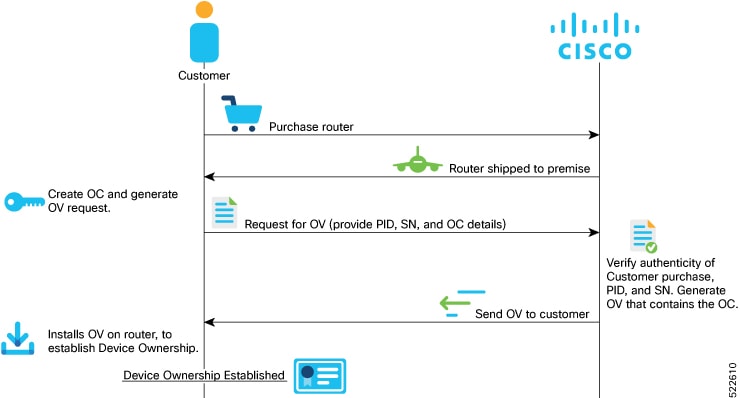
These are the stages involved in establishing device ownership:
- Create the OC (ownership certificate) using OpenSSL commands. The router verifies that the OC has a chain of trust leading to the trust certificate (pinned-domain-cert [PDC]) that is included in the OV.
-
Create request for OV (ownership voucher). For more information, see Interacting with the MASA server.

Note
Device ownership is based on a specific node or a serial number. Ownership voucher must be created for each serial number.
Note
Reference scripts to create OCs are available on Github at https://github.com/ios-xr/key-package-scripts.
-
Send the OV request to Cisco along with the serial number of the router.
Cisco verifies the authenticity of the artifacts and generates the OVs.
Note
Modifying the .vcj file created as output from MASA may cause delays and reports errors when processing the file. If duplicate .vcj files are generated for the same serial number or card, the first valid file is applied and the duplicate files are rejected.
Note
If multiple serial numbers are provided to Cisco MASA web interface to create OVs, separate .vcj output files may be archived using the standard TAR tool and provided as input to the GISO script or XR interfaces. There is no structure or directory hierarchy required within the TAR file as it is stored as a flat archive of individual Ownership Voucher files from the MASA output.
-
Execute the platform security device-owership <OV or OC filepath> location<location> command to install the OVs on the router.
RP/0/RP0/CPU0:router# platform security device-ownership /disk0:/testing2/deliverable/bulk_ovs.tar.gz /disk0:/testing2/oc-single.cms location all
Mon Jun 14 16:05:15.008 UTC
The router verifies that the OC has a chain of trust leading to the trust certificate (pinned-domain-cert [PDC]) that is included in the OV. The router adds the PDC and OC to a special trust point as a CA certificate. This trust point configuration appears by default in the router configuration and can be used by any third-party application to establish trust. If a PDC or OC has expired or has been revoked, re-run the platform security device-ownership command with new certificates.Note
- This command requires you to provide a tar ball of OVs, with each OV representing a route processor (RP) on the router. You can choose to include an OV for the chassis in the tar ball. You can also choose to maintain a single tar ball of OVs of all the route processors you have purchased that you can then provide as input to the command.
- The OC must have its trust chain leading to the PDC in the OV.
- The command accepts only the latest OV. The installation fails if you install a version of the OV that is older than the version of the currently-installed OV.
-
Run the show platform security device-ownership to verify device ownership is established.
Run the show logging command to view the log for device ownership.RP/0/RP0/CPU0:ios# show platform security device-ownership Performing operation on all nodes.. ========================= Location : 0/RP0/CPU0 ========================= Trustpoint : device_ownership ================================================== CA certificate Certificate: Data: Version: 3 (0x2) Serial Number: f6:20:61:bd:db:22:30:74 ...truncated...
For information on establishing device ownership through Secure Zero touch provisioning (sZTP), see the Securely Provision Your Network Devices chapter in the System Setup and Software Installation Guide for Cisco NCS 540 Series Routers.RP/0/RP0/CPU0:router# show logging RP/0/RP1/CPU0:Oct 13 13:10:26.086 UTC: ownership_app[66652]: %SECURITY-OWNERSHIP-6-INFO : Device ownership established.Note
OC and OV can also be included in a GISO.
Result
Device ownership is established, enabling secure validation between network and device.
Clear device ownership
Before you begin
Make sure that the customer consent token (CT) key is enabled before running the clear device-ownership command.Clear device ownership uses the consent token workflow. For more information, see Consent Tokens for Privileged Operations.
You can use the clear device-ownership command to clear PDC, OC and other artifacts such as key packages associated with an ownership voucher.
Procedure
|
Step 1 |
Execute the clear device-ownership to clear device ownership for all applications using the OC. Example:Once your clear device ownership, all applications that depend on the OC will not function. |
|
Step 2 |
Execute the show platform security device-ownership to verify whether the device ownership is cleared or not. Example: |
 Feedback