About VRRP
VRRP (Virtual Router Redundancy Protocol) is a protocol that allows a group of routers to share a virtual IP address, providing transparent failover at the first-hop IP router.
-
Configures a group of routers to share a virtual IP address.
-
Elects one router in the group to handle all packets for the virtual IP address.
-
Other routers remain in standby and take over if the active router fails.
VRRP operation
VRRP (Virtual Router Redundancy Protocol) is a protocol that allows multiple routers to form a group and share a single virtual IP address, which is used as the default gateway for LAN clients.
-
Enables a group of routers (VRRP group) to share a virtual IP address.
-
Provides redundancy for the default gateway, ensuring continuous network access if the primary router fails.
-
Allows LAN clients to be configured with a single default gateway IP address, simplifying configuration and improving reliability.
How VRRP operation provides gateway redundancy for LAN clients
LAN clients can determine their first-hop router to a remote destination using either dynamic discovery protocols or static configuration. Dynamic methods include Proxy ARP, routing protocols, and ICMP Router Discovery Protocol (IRDP). However, these methods can introduce configuration and processing overhead, and may result in slow failover if a router becomes unavailable. Static configuration of a default router simplifies client setup but creates a single point of failure, potentially isolating the client from the network if the default gateway fails. VRRP addresses this by allowing multiple routers to share a virtual IP address, which clients use as their default gateway, thus providing redundancy and seamless failover.
-
Proxy ARP: The client uses ARP to resolve the destination, and a router responds with its MAC address.
-
Routing protocol: The client listens to dynamic routing protocol updates (such as RIP) to build its routing table.
-
ICMP Router Discovery Protocol (IRDP): The client runs an ICMP router discovery client.
When using VRRP, a group of routers share a virtual IP address. The primary router (IP address owner) forwards packets sent to this address, while backup routers monitor the primary's status. If the primary fails, the backup with the highest priority takes over the virtual IP address, ensuring uninterrupted service. When the original primary recovers, it resumes its role.
 Note |
Packets received on a routed port destined for the VRRP virtual IP address terminate on the local router, regardless of whether it is the primary or a backup. These include ping and Telnet traffic. Packets received on a Layer 2 (VLAN) interface destined for the VRRP virtual IP address terminate on the primary router. |
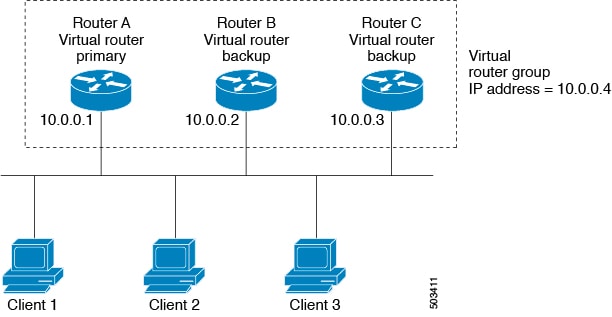
Example: VRRP in a VLAN topology
In a basic VLAN topology, Routers A, B, and C form a VRRP group. The group's IP address matches the Ethernet interface address of Router A (10.0.0.1). Clients 1 through 3 are configured with 10.0.0.1 as their default gateway. Router A acts as the primary and forwards packets sent to the virtual IP address. If Router A fails, the backup router with the highest priority becomes the new primary and takes over the virtual IP address, maintaining network connectivity for the clients. When Router A recovers, it resumes its role as primary.
VRRP benefits
-
Redundancy: Enables configuration of multiple routers as the default gateway, reducing the possibility of a single point of failure in a network.
-
Load sharing: Allows traffic to and from LAN clients to be shared by multiple routers, distributing the load more equitably.
-
Multiple VRRP groups: Supports multiple VRRP groups on a router interface, enabling redundancy and load sharing in LAN topology.
-
Multiple IP addresses: Allows management of multiple IP addresses, including secondary addresses, and supports VRRP configuration on each subnet.
-
Preemption: Enables a higher priority backup router to preempt a backup that has taken over for a failing primary.
-
Advertisement protocol: Uses a dedicated IANA standard multicast address (224.0.0.18) and protocol number 112 for VRRP advertisements, minimizing unnecessary multicasts and aiding in packet identification.
-
VRRP tracking: Ensures the best VRRP router is primary by altering priorities based on interface states.
Multiple VRRP groups
Multiple VRRP groups refer to the configuration of more than one Virtual Router Redundancy Protocol (VRRP) group on a single physical router interface.
-
Router interfaces can support multiple VRRP groups simultaneously.
-
The number of supported VRRP groups depends on router processing and memory capabilities.
-
An interface can act as a primary for one VRRP group and as a backup for one or more other groups.
Multiple VRRP groups can be configured on a single router interface, allowing for flexible redundancy and load sharing in network topologies.
-
Router processing capability affects the number of VRRP groups supported.
-
Router memory capability also impacts the number of supported groups.
In a topology with multiple VRRP groups, the interface can serve as a primary for one group and as a backup for others.
|
Group |
Primary Router |
Backup Router |
|---|---|---|
|
VRRP group 1 |
Router A (IP 10.0.0.1) |
Router B |
|
VRRP group 2 |
Router B (IP 10.0.0.2) |
Router A |
Note |
For the number of supported VRRP groups, see the Cisco Nexus 9000 Series NX-OS Verified Scalability Guide . |
The following image shows a LAN topology in which VRRP is configured so that Routers A and B share the traffic to and from clients 1 through 4. Routers A and B act as backups to each other if either router fails.
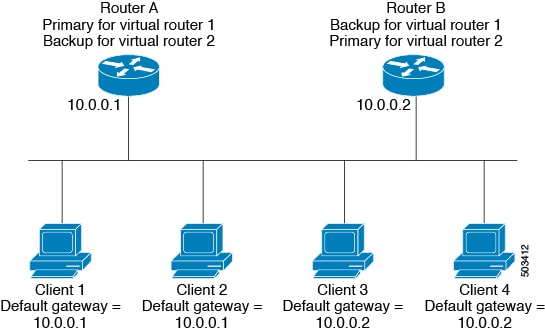
Example: Overlapping VRRP groups in a LAN topology
This topology contains two virtual IP addresses for two VRRP groups that overlap. For VRRP group 1, Router A is the owner of IP address 10.0.0.1 and is the primary. Router B is the backup to Router A. Clients 1 and 2 are configured with the default gateway IP address of 10.0.0.1. For VRRP group 2, Router B is the owner of IP address 10.0.0.2 and is the primary. Router A is the backup to Router B. Clients 3 and 4 are configured with the default gateway IP address of 10.0.0.2.
VRRP router priority and preemption
VRRP router priority is a key attribute in the VRRP redundancy scheme that determines the role of each router and the behavior during failover and preemption.
-
The router that owns both the virtual IP address and the physical interface IP address functions as the primary, with a priority of 255.
-
Backup routers are selected based on their configured priority; the router with the highest priority becomes the new primary if the current primary fails.
-
Preemption allows a backup router with a higher priority to take over as primary, even if the current primary has not failed, unless preemption is disabled.
How VRRP router priority and preemption work
VRRP uses router priority to determine which router acts as primary and how failover occurs when the primary fails. Preemption controls whether a higher-priority backup can take over as primary.
-
If the primary router fails, VRRP selects the backup router with the highest priority to become the new primary.
-
If multiple backups have the same priority, the router with the higher IP address is selected as the new primary.
-
Primary router fails.
-
VRRP evaluates backup routers' priorities.
-
Backup with highest priority (or highest IP address if priorities are equal) becomes new primary.
-
Priority 255: Assigned to the router owning the virtual and physical IP addresses (primary).
-
Default priority: 100 (for backup routers unless configured otherwise).
|
Router |
Configured Priority |
Selected as Primary? |
|---|---|---|
|
Router A |
255 |
Yes (initial primary) |
|
Router B |
101 |
Yes (if Router A fails and B has higher priority than C) |
|
Router C |
100 (default) |
Yes (if B and C have same priority, higher IP address wins) |
Note |
TIP: If preemption is disabled, a backup router with a higher priority will not take over as primary unless the current primary fails or recovers. |
VRRP priority and preemption in action
For example, if Router A (primary) fails, VRRP selects Router B (priority 101) over Router C (priority 100) as the new primary. If both backups have the same priority, the router with the higher IP address becomes primary. If preemption is enabled and Router C comes online with a higher priority than the current primary, VRRP selects Router C as the new primary, even if the current primary has not failed.
vPCs and VRRP
vPCs and VRRP are technologies that work together to provide high availability and redundancy in Cisco Nexus 9000 Series switches.
-
vPCs allow links physically connected to two different switches to appear as a single port channel to a third device.
-
VRRP provides router redundancy by designating primary and backup routers.
-
vPCs forward traffic through both the primary and backup VRRP routers.
vPCs and VRRP are used together to ensure continuous network connectivity and redundancy in Cisco Nexus 9000 Series switches.
Note |
You should configure VRRP on the primary vPC peer device as active and VRRP on the vPC secondary device as standby. |
For more information on vPCs, see the Cisco Nexus 9000 Series NX-OS Layer 2 Switching Configuration Guide .
For details on configuring VRRP priority, see the Configuring VRRP Priority section.
VRRP advertisements
VRRP advertisements are periodic messages sent by the VRRP primary router to other VRRP routers in the same group to communicate its priority and state.
-
The VRRP primary sends advertisements to other routers in the same group.
-
Advertisements communicate the priority and state of the primary.
-
Advertisements are encapsulated in IP packets and sent to the IP multicast address assigned to the VRRP group.
The VRRP primary sends advertisements once every second by default, but you can configure a different advertisement interval.
VRRP authentication
-
VRRP supports two authentication functions: no authentication and plain text authentication.
-
Authentication ensures that only valid VRRP packets are accepted by the router.
-
Packets are rejected if authentication schemes or text strings differ between the router and incoming packets.
VRRP authentication methods and packet rejection criteria
VRRP provides two authentication options and enforces strict packet validation based on authentication configuration.
-
No authentication
-
Plain text authentication
VRRP rejects packets in the following cases:
-
The authentication schemes differ on the router and in the incoming packet.
-
Text authentication strings differ on the router and in the incoming packet.
VRRP tracking
VRRP tracking is a mechanism that enables a VRRP router to monitor the state of interfaces or configured objects and adjust its priority in a VRRP group accordingly.
-
Tracks the state of an interface or a configured object.
-
Adjusts the VRRP router's priority based on the tracked state.
-
Restores the original priority when the tracked state returns to up.
VRRP tracking options
VRRP supports the following options for tracking:
-
Native interface tracking—Tracks the state of an interface and uses that state to determine the priority of the VRRP router in a VRRP group. The tracked state is down if the interface is down or if the interface does not have a primary IP address.
-
Object tracking—Tracks the state of a configured object and uses that state to determine the priority of the VRRP router in a VRRP group. See Configuring Object Tracking for more information on object tracking.
If the tracked state (interface or object) goes down, VRRP updates the priority based on what you configure the new priority to be for the tracked state. When the tracked state comes up, VRRP restores the original priority for the virtual router group.
Note |
VRRP does not support Layer 2 interface tracking. |
VRRP tracking in use
For example, you might want to lower the priority of a VRRP group member if its uplink to the network goes down so another group member can take over as primary for the VRRP group. See the Configuring VRRP Interface State Tracking section for more information.
BFD for VRRP
BFD for VRRP is a protocol integration that enables rapid detection of forwarding and path failures between two adjacent devices in a VRRP environment.
-
Provides subsecond failure detection between two adjacent devices.
-
Can be less CPU-intensive than protocol hello messages.
-
Some BFD load can be distributed onto the data plane on supported modules.
BFD (Bidirectional Forwarding Detection) is a detection protocol that provides fast-forwarding and path-failure detection times. For more information, see the Cisco Nexus 9000 Series NX-OS Interfaces Configuration Guide .
 Feedback