About HSRP
HSRP is a protocol that enables a group of routers to provide first-hop routing redundancy by selecting an active router and a standby router, ensuring continuous packet routing even if the active router fails.
-
Allows transparent failover of the first-hop IP router.
-
Provides redundancy for IP hosts on Ethernet networks with a default router IP address.
-
Uses a group of routers to select an active router (routes packets) and a standby router (takes over if the active fails).
Many host implementations do not support dynamic router discovery mechanisms but can be configured with a default router. HSRP provides failover services to these hosts, addressing administrative, processing, and security concerns associated with running dynamic router discovery on every host.
HSRP overview
HSRP (Hot Standby Router Protocol) is a redundancy protocol that allows a group of routers to share a virtual IP address and virtual MAC address , so that hosts can use a single default gateway for reliable network connectivity.
-
Routers in an HSRP group share a virtual IP address and virtual MAC address as the default gateway for hosts.
-
One router is elected as the active router to forward packets, while another is selected as the standby router to take over if the active router fails.
-
HSRP uses priority values and hello messages to determine active and standby roles and to detect failures.
HSRP operates by configuring a virtual IP and MAC address on each participating router interface. The active router handles traffic for the virtual addresses, while the standby router monitors the active router and takes over if it fails.
-
Each HSRP-enabled interface is configured with the same virtual IP and MAC address, and a unique real IP and MAC address.
-
Routers send and receive multicast UDP-based hello messages to detect failures and manage role transitions.
-
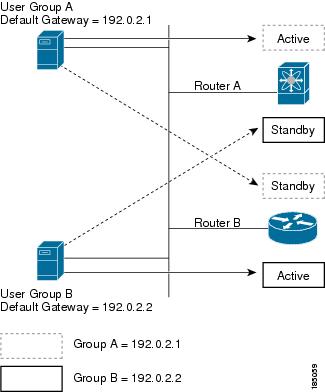
HSRP can support multiple groups on a single interface for additional redundancy.
-
Configure the virtual IP and MAC address on all HSRP-enabled interfaces.
-
Assign a higher priority to the interface you want to be the default active router (default priority is 100).
-
HSRP selects the active and standby routers based on priority and hello message status.
-
Active router: Forwards packets sent to the virtual IP/MAC address.
-
Standby router: Monitors the active router and takes over if it fails.
-
Virtual router: Represents the shared default gateway for hosts, even though it does not physically exist.
 Note |
Packets destined for the HSRP virtual IP address on a routed port terminate on the local router, regardless of its HSRP role. On a Layer 2 (VLAN) interface, such packets terminate on the active router. |
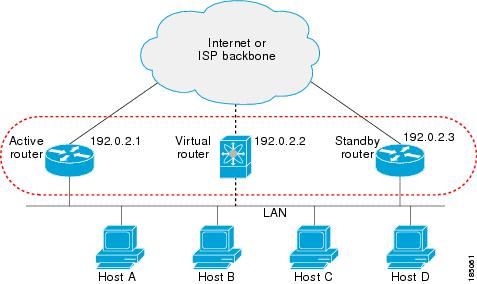
Example: HSRP in a Redundant Network
In a network with two routers configured for HSRP, both share a virtual IP and MAC address. Hosts are configured to use the virtual IP as their default gateway. If the active router fails to send hello messages within the configured time, the standby router automatically takes over, ensuring uninterrupted connectivity for hosts.
HSRP versions
-
HSRP version 1 is supported by default; interfaces can be configured to use HSRP version 2.
-
HSRP version 2 expands the group number range from 0–255 (version 1) to 0–4095.
-
HSRP version 2 uses different multicast and MAC address ranges, supports MD5 authentication, and introduces a TLV packet format.
HSRP version 2 introduces several enhancements over version 1, including expanded group numbers, updated multicast and MAC addresses, MD5 authentication, and a new packet format.
-
HSRP version 2 supports group numbers from 0 to 4095; version 1 supports 0 to 255.
-
For IPv4, HSRP version 2 uses multicast address 224.0.0.102; for IPv6, FF02::66. HSRP version 1 uses 224.0.0.2.
-
HSRP version 2 uses MAC address range 0000.0C9F.F000–0000.0C9F.FFFF for IPv4 and 0005.73A0.0000–0005.73A0.0FFF for IPv6. Version 1 uses 0000.0C07.AC00–0000.0C07.ACFF.
-
HSRP version 2 adds support for MD5 authentication.
-
HSRP version 2 uses a type-length-value (TLV) packet format; version 1 routers ignore version 2 packets.
-
Changing the HSRP version reinitializes the group due to a new virtual MAC address.
HSRP for IPv4
HSRP for IPv4 is a protocol that enables routers to provide a virtual default gateway for hosts, ensuring high availability and redundancy on a network segment.
-
Routers exchange HSRP hello packets using multicast addresses and UDP port 1985.
-
Hosts use the HSRP virtual IP and MAC addresses as their default gateway.
-
HSRP version 2 supports an expanded group number range and new multicast and MAC addresses.
How HSRP for IPv4 Works
HSRP routers communicate by exchanging hello packets to maintain the status of the active and standby routers. These packets are sent to specific multicast addresses and use UDP port 1985. The active router uses the HSRP virtual MAC address, while the standby router uses its interface MAC address. Hosts are configured to use the HSRP virtual IP address as their default gateway and resolve the associated virtual MAC address using ARP.
-
HSRP hello packets are sent to 224.0.0.2 (version 1) or 224.0.0.102 (version 2).
-
The active router sources hello packets from its configured IP and the HSRP virtual MAC address.
-
The standby router sources hello packets from its configured IP and the interface MAC address (BIA).
-
Hosts use ARP to resolve the HSRP virtual IP to the virtual MAC address.
-
HSRP group number determines the virtual MAC address (e.g., 0000.0C07.ACxy for version 1, 0000.0C9F.F000–0000.0C9F.FFFF for version 2).
HSRP for IPv6
HSRP for IPv6 is a protocol that provides a virtual first hop for IPv6 hosts, enabling rapid failover to an alternate default router in the event of a failure.
-
Offers faster switchover than standard IPv6 neighbor discovery, with failover in less than a second when using millisecond timers.
-
Provides a virtual IPv6 link-local address for hosts as the default gateway.
-
Uses a virtual MAC address and specific protocol parameters for group messaging and redundancy.
HSRP for IPv6 enhances the default router redundancy for IPv6 hosts by providing a virtual first hop and rapid failover capabilities.
-
HSRP for IPv6 provides a much faster switchover to an alternate default router than the IPv6 ND protocol provides.
-
When HSRP is configured on an IPv6 interface, periodic router advertisements (RAs) for the interface link-local address stop after a final RA with a router lifetime of zero is sent.
-
IPv6 ND sends periodic RAs for the HSRP virtual IPv6 link-local address when the HSRP group is active, and these RAs stop after a final RA is sent with a router lifetime of 0 when the group leaves the active state.
-
HSRP uses the virtual MAC address for active group messages only (hello, coup, and resign).
HSRP for IPv6 uses the following parameters:
-
HSRP version 2
-
UDP port 2029
-
Virtual MAC address range from 0005.73A0.0000 through 0005.73A0.0FFF
-
Multicast link-local IP destination address of FF02::66
-
Hop limit set to 255
HSRP for IPv6 addresses
An HSRP IPv6 group is defined by a virtual MAC address derived from the HSRP group number and a virtual IPv6 link-local address, which is by default derived from the HSRP virtual MAC address. The default virtual MAC address is always used to form the virtual IPv6 link-local address, regardless of the actual virtual MAC address used by the group.
-
Each HSRP IPv6 group has a virtual MAC address based on the group number.
-
The virtual IPv6 link-local address is derived from the default virtual MAC address.
-
The default virtual MAC address is always used to form the link-local address, even if the group uses a different MAC address.
HSRP for IPv6 uses specific MAC and IPv6 addresses for neighbor discovery and HSRP packets. The following table summarizes the MAC and IP addresses used for different packet types.
|
Packet |
MAC Source Address |
IPv6 Source Address |
IPv6 Destination Address |
Link-Layer Address Option |
|---|---|---|---|---|
|
Neighbor solicitation (NS) |
Interface MAC address |
Interface IPv6 address |
— |
Interface MAC address |
|
Router solicitation (RS) |
Interface MAC address |
Interface IPv6 address |
— |
Interface MAC address |
|
Neighbor advertisement (NA) |
Interface MAC address |
Interface IPv6 address |
Virtual IPv6 address |
HSRP virtual MAC address |
|
Route advertisement (RA) |
Interface MAC address |
Virtual IPv6 address |
— |
HSRP virtual MAC address |
|
HSRP (inactive) |
Interface MAC address |
Interface IPv6 address |
— |
— |
|
HSRP (active) |
Virtual MAC address |
Interface IPv6 address |
— |
— |
HSRP does not add IPv6 link-local addresses to the Unicast Routing Information Base (URIB). Link-local addresses do not have secondary virtual IP addresses. For global unicast addresses, HSRP adds the virtual IPv6 address to the URIB and IPv6.
 Feedback