When assigning Access (802.1p or Untagged) modes, follow these guidelines to ensure that devices that require untagged or
802.1p packets operate as expected when they are connected to access ports of an ACI leaf switch.
These guidelines apply to EPGs deployed on ports on a single leaf switch. When EPGs are deployed on different switches, these
restrictions do not apply.
-
In the APIC GUI, when you assign VLANs on ports to EPGs, you can assign one of the following VLAN modes: Trunk, Access (802.1p), or Access (Untagged).
-
Only one 802.1p VLAN or one untagged VLAN is allowed on a port. It can be one or the other but not both.
-
For generation 1 switches, if an EPG deployed on any port on a leaf switch is configured with Access (Untagged) mode, all
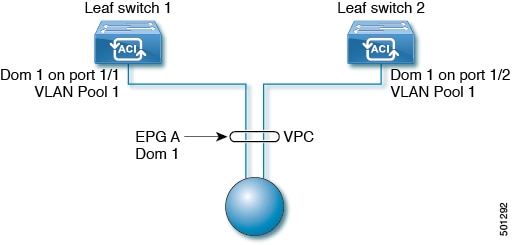
the ports used by the EPG should be untagged on the same leaf switch and its VPC peer (if there is one). You can have a combination
of untagged and tagged ports on generation 2 switches (with -EX, -FX, or -FX2 suffixes).
-
You can deploy different EPGs using (tagged) VLAN numbers in Trunk mode on the same port, with an EPG deployed on the port in Access (Untagged) mode.
There are some differences in traffic handling, depending on the switch, when a leaf switch port is associated with a single
EPG that is configured as Access (802.1p) or Access (Untagged) modes.
Generation 2 Switches
Generation 2 switches, or later, do not distinguish between the Access (Untagged) and Access (802.1p) modes. When EPGs are deployed on Generation 2 ports configured with either Untagged or 802.1p mode:
-
On egress, traffic is always untagged on a node where this is deployed.
-
The port accepts ingress traffic that is untagged, tagged, or in 802.1p mode.
VLAN Mode Combinations on Ports: First Generation and Second Generation Hardware Running Cisco APIC Releases Prior to 3.2(3i)
VLAN Mode Combinations Supported for One EPG
|
EPG 1 on Port 1, with VLAN mode:
|
EPG 1 on different ports, the following VLAN modes are allowed:
|
|
Trunk
|
Trunk or 802.1p
|
|
Untagged
|
Untagged
|
|
802.1p
|
Trunk or 802.1p
|
VLAN Mode Combinations Supported for Multiple EPGs
|
EPG 1 on port 1 with VLAN mode:
|
EPG 1 on port 2, the following modes are allowed:
|
EPG 2 on port 1, the following modes are allowed:
|
|
Untagged
|
Untagged
|
Trunk
|
|
802.1p
|
Trunk or 802.1p
|
Trunk
|
|
Trunk
|
802.1p or Trunk
|
Trunk or 802.1p or untagged
|
VLAN Mode Combinations on Ports: Second Generation Hardware Running Cisco APIC Release 3.2(3i) or Later
VLAN Mode Combinations Supported for One EPG
|
EPG 1 on Port 1, with VLAN mode:
|
EPG 1 on different ports, the following VLAN modes are allowed:
|
|
Trunk
|
Trunk (tagged) or untagged or 802.1p
|
|
Untagged
|
Untagged or 802.1p or trunk (tagged)
|
|
802.1p
|
Trunk (tagged) or 802.1p or untagged
|
VLAN Mode Combinations Supported for Multiple EPGs
|
EPG 1 on port 1 with VLAN mode:
|
EPG 1 on port 2, the following modes are allowed:
|
EPG 2 on port 1, the following modes are allowed:
|
|
Untagged
|
Untagged or 802.1p or trunk (tagged)
|
Trunk (tagged)
|
|
802.1p
|
Trunk (tagged) or 802.1p or untagged
|
Trunk (tagged)
|
|
Trunk
|
802.1p or trunk (tagged) or untagged
|
Trunk (tagged) or 802.1p or untagged
|

Note
|
Certain older network interface cards (NICs) that send traffic on the native VLAN untagged, drop return traffic that is tagged
as VLAN 0. This is normally only a problem on interfaces configured as trunk ports. However, if an Attachable Entity Profile
(AEP) for an access port is configured to carry the infra VLAN, then it is treated as a trunk port, even though it is configured
as an access port. In these circumstances, packets sent on the native VLAN from the switch with Network Flow Engine (NFE)
cards will be tagged as VLAN 0, and older switch NICs may drop them. Options to address this issue include:
-
Removing the infra VLAN from the AEP.
-
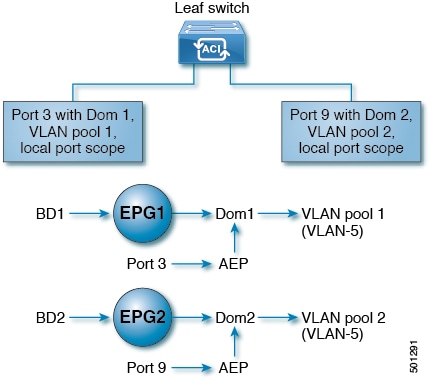
Configuring "port local scope" on the port. This enables per-port VLAN definition and allows the switch equipped with NFE
to send packets on the native VLAN, untagged.
|


 Feedback