Validated Profile: Financial (Non-Fabric and Traditional WAN) Vertical
Available Languages
Bias-Free Language
The documentation set for this product strives to use bias-free language. For the purposes of this documentation set, bias-free is defined as language that does not imply discrimination based on age, disability, gender, racial identity, ethnic identity, sexual orientation, socioeconomic status, and intersectionality. Exceptions may be present in the documentation due to language that is hardcoded in the user interfaces of the product software, language used based on RFP documentation, or language that is used by a referenced third-party product. Learn more about how Cisco is using Inclusive Language.
- US/Canada 800-553-2447
- Worldwide Support Phone Numbers
- All Tools
 Feedback
 Feedback
Note: For the Financial SD-Access Cisco Validated Profile, refer to Validated Profile: Financial (SD-Access and SD-WAN) Vertical.
Document purpose and use
This document describes a typical finance deployment profile recommended by Cisco. It provides guidelines for a non-SDA, controller-based deployment that uses Cisco Catalyst Center, and serves as a validation reference throughout the deployment process.
Deployment engineers can use the theoretical and practical sections together to understand service requirements and make informed decisions when deploying and configuring their networks.
Target audience
This document is intended for technical staff responsible for engineering and operating the network, as well as implementation teams.
Scope
This document is a reference for understanding available solutions. It includes common use cases, challenges, and explanations of how Cisco Catalyst Center and a traditional Wide Area Network (WAN) deployment address the requirements for financial deployments.
This document does not provide step-by-step instructions.
Business outcomes and challenges
These environments require robust security, high resiliency, and strict adherence to regulatory compliance standards.
To achieve key business objectives, financial organizations rely on these critical network capabilities:
Financials
Financial companies aim to optimize operational costs and enhance profitability by implementing deployment automation across thousands of sites, minimizing the need for onsite network interventions whenever possible.
Large-scale multisite deployments
Financial institutions typically operate large-scale, multisite networks that span thousands of locations across wide geographic areas. Managing and deploying these networks on a site-by-site or device-by-device basis—especially with onsite network management teams—presents significant challenges. Automation is essential to handle complex deployments efficiently and reduce manual intervention.
Automation and monitoring
Because large financial organizations operate globally, solutions must enable rapid site deployment and remote management by a streamlined IT team. Network automation and assurance are critical to minimize complexity, accelerate site onboarding, and reduce deployment and troubleshooting times.
Security
To strengthen security, manage risk, and maintain regulatory compliance, financial networks must deploy comprehensive security protocols, perform regular risk assessments, and follow industry-specific standards.
As digital business services expand and hybrid work models grow, financial institutions face an increased attack surface. Cybersecurity threats remain a top concern for Chief Information Security Officers (CISOs), who continuously review and update foundational security practices and processes.
Compliance regulations
Financial systems safeguard highly sensitive customer financial information and are subject to stringent regulatory requirements. For example, the Payment Card Industry Data Security Standard (PCI-DSS) mandates encrypting data in transit, enforcing secure storage practices for customer information, and maintaining comprehensive monitoring of network resources and cardholder data. To meet these requirements, financial networks must deliver continuous, end-to-end visibility for network management and monitoring.
Because multiple departments and guest users often share the same network infrastructure, you must isolate each group and restrict access to authorized resources only, while enabling secure access to shared services.
User experience
Application access must address the distinct needs of both employees and guests:
● Employees require optimized, secure, and compliant connectivity to critical financial applications to support productivity and ensure uninterrupted business operations.
● Guest users should receive isolated, restricted access—focused on essential functionality and security—to protect core network assets.
This approach enables financial institutions to maintain robust security and high performance while serving different user groups effectively.
Operational
Enable greater productivity and support digital transformation initiatives by streamlining network management, while safeguarding organizational reputation and strengthening brand value.
High availability
Because financial systems play an essential role in everyday operations, maximum network uptime is a top priority. The industry benchmark of "five-nines" (99.999%) availability equates to less than six minutes of downtime per year, closely approaching continuous service. To meet or exceed this standard, financial institutions rely on strategies such as automation, real-time monitoring, load balancing, and robust failover mechanisms.
Centralized and consistent policy management
As the number of network endpoints grows and financial organizations expand globally, managing security policies across multiple geographic regions becomes increasingly complex. The need to comply with varying local regulations adds to this complexity. To address these challenges, implement solutions that simplify the grouping of users and devices, enabling intuitive and efficient security policy management across diverse environments.
Solution components
Financial network architecture
This section provides design guidance tailored to financial company environments. It outlines key requirements and demonstrates how Cisco Catalyst Center and traditional WAN architectures can build a network that is simple, secure, and adaptable. The recommended topologies, use cases, and solutions align with the typical needs and standards of financial sector deployments.
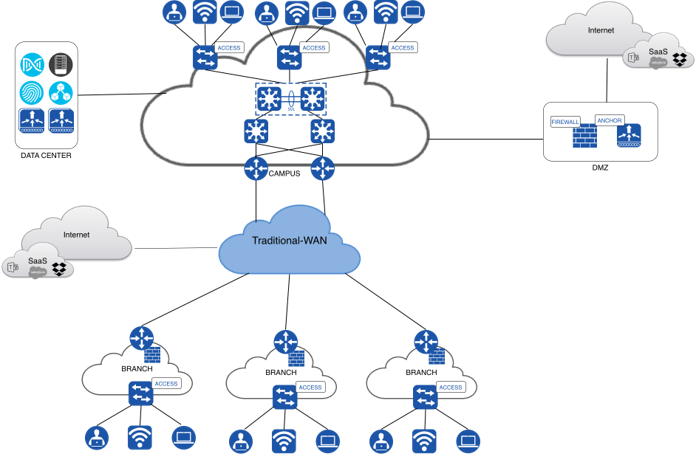
This diagram illustrates a large, multi-regional campus and branch deployment within a financial organization:
Campus network
The campus network uses a traditional three-tier architecture that consists of core, distribution, and access layers:
Core switches connect redundantly to the campus routers and provide high-speed transport between the distribution layer and the WAN.
Distribution switches sit between the core and access layers and handle policy enforcement, packet filtering, and route summarization within the campus. Each distribution switch is configured as a switch stack to ensure redundancy and to regulate traffic flow between the core and access switches.
Access switches connect all endpoints at the network edge and handle VLAN membership, port security, and QoS classification.
Data center and high availability
The campus network has direct access to the data center, which hosts critical components such as Wireless LAN Controllers (WLCs), Cisco Catalyst Center, Cisco Identity Services Engine (ISE), and company-wide servers.
Because financial operations are mission-critical, high availability (HA) is implemented at all levels—including controllers and network infrastructure—to ensure business continuity with minimal disruption:
Cisco Catalyst Center, deployed in the data center, provides centralized network management, automation for wireless deployment and modification, and assurance capabilities for in-depth network, client, and service performance insights.
WLC redundancy requires WLC Stateful Switchover (SSO) and N+1 HA configurations, which enable seamless failover and minimize downtime if a controller fails.
Cisco ISE is deployed as a distributed cluster to support scalability and redundancy.
WAN redundancy complements these measures to maintain continuous operation and rapid recovery during network component failures.
This comprehensive HA strategy ensures network stability and operational continuity, and it supports the stringent uptime and reliability demands of financial services.
Internet and guest traffic
Internet-bound campus traffic traverses a DMZ that contains the firewall. Guest traffic is anchored to a dedicated guest WLC located in the DMZ. The firewall in the DMZ applies the required security controls and filters malicious traffic before it reaches the public internet or SaaS applications.
Branch deployments
Because financial companies operate many branches, Cisco recommends that each branch deploy a router with firewall capabilities at the WAN edge. Branch traffic destined for the public internet or SaaS applications exits directly through the WAN without passing through the DMZ.
Direct Internet Access (DIA) considerations
The growth of cloud-based applications and Software-as-a-Service (SaaS) platforms—such as Salesforce and Dropbox shown in the network topology—significantly changes traditional network traffic patterns. Financial enterprises increasingly use these services for operational efficiency and customer engagement.
Historically, the hub-and-spoke topology served as the backbone of financial WANs. In this model, branch offices (spokes) route all traffic through a central data center (the hub) over a traditional WAN to communicate with each other and the internet. While this centralized approach simplifies security management and policy enforcement, backhauling all internet-bound traffic from branches to the hub introduces considerable latency and bandwidth constraints, especially as cloud adoption grows.
Direct Internet Access (DIA) from branch endpoints is a critical architectural consideration that optimizes performance for cloud-centric workflows and enhances the user experience, moving away from the limitations of a purely hub-and-spoke internet egress strategy.
Benefits of DIA
DIA at branch locations offers several advantages that directly address the inefficiencies of the hub-and-spoke model for cloud access:
● Improved application performance: When branch users access cloud services directly, latency drops dramatically, creating a more responsive and productive experience, especially for real-time applications.
● Reduced network congestion: DIA offloads internet-bound traffic from the core WAN infrastructure, freeing bandwidth for critical internal applications that still rely on the central data center and potentially reducing overall WAN costs.
● Increased resilience: In a well-designed architecture, DIA adds a layer of resilience for cloud service access, ensuring business continuity even if the primary WAN link to the central data center is disrupted.
Challenges of DIA
DIA also presents significant challenges, particularly for financial enterprises with stringent security and compliance requirements:
● Expanded attack surface: While the hub-and-spoke model centralizes security enforcement at the data center, distributing internet egress points across numerous branches expands the network's attack surface. This requires robust, consistent security controls at each location, including advanced firewalls, intrusion prevention systems, and URL filtering.
● Increased management complexity: Enforcing uniform security policies across a decentralized environment can become complex and resource-intensive without a centralized management framework, such as a Secure Access Service Edge (SASE) architecture.
● Higher cost and visibility requirements: Deploying and maintaining security infrastructure and dedicated internet circuits at each branch—combined with the need for comprehensive visibility and monitoring across all egress points—requires careful planning and investment to ensure regulatory compliance and maintain a strong security posture.
Overview of an existing overlay DMVPN
Cisco DMVPN is widely used to combine enterprise branch, teleworker, and extranet connectivity. Major benefits include:
On-demand full-mesh connectivity with simple hub-and-spoke configuration
Automatic IP Security (IPsec) triggering to build an IPsec tunnel
Zero-touch deployment for adding remote sites
Reduced latency and bandwidth savings
Deployment scenario
Hub-and-spoke deployment model
In this traditional topology, remote sites (spokes) aggregate into a headend VPN device at the corporate headquarters or campus (hub). Traffic from any remote site to other remote sites can pass through the headend device. The campus also provides redundancy with a dual-hub router.
Spoke-to-spoke deployment model
Cisco DMVPN supports a full-mesh VPN, in which traditional hub-and-spoke connectivity is supplemented by dynamically created IPsec tunnels directly between spokes. With direct spoke-to-spoke tunnels, traffic between remote sites does not need to traverse the hub, which eliminates additional delays and conserves WAN bandwidth.
Hub-and-spoke is the default and safest control model, while spoke-to-spoke provides the main scalability and performance advantages of DMVPN and on-demand connectivity.
Recommendation
Use hub-and-spoke for control-plane simplicity, policy enforcement, and predictable bring-up.
Enable spoke-to-spoke when branches need direct branch-to-branch traffic and you want to avoid hairpinning through the hub.
Cisco Catalyst Center
Cisco Catalyst Center is a central network controller and management dashboard that delivers an enterprise-scale, secure, and consistent user experience across wired and wireless networks. The Catalyst Center high availability (HA) framework minimizes downtime and enhances network resilience by synchronizing changes across all cluster nodes in near real time. This approach provides robust redundancy and enables the network to handle failures effectively. Catalyst Center supports a three-node cluster configuration that provides high availability for both software and hardware components.
Catalyst Center empowers financial companies in these ways:
● Automated provisioning: Streamlines tasks such as device onboarding through Plug and Play, comprehensive device discovery, and the deployment of network topology diagrams within Catalyst Center.
● Software Image Management (SWIM): Provides robust tools to manage and schedule system image upgrades for all Cisco devices and facilitates efficient device replacement.
● Cisco DNA Assurance: Offers comprehensive monitoring of network, client, and service health, along with actionable insights for effective troubleshooting.
● Network architecture: Enables you to create and manage the network hierarchy, map physical and logical topologies, configure network settings, place floor maps and access points, and configure wireless network profiles.
Cisco Identity Services Engine
Cisco Identity Services Engine (ISE) is a secure network access platform that gives network administrators enhanced visibility and control over the users and devices that connect to the organizational network. ISE is required to define and enforce access control policies. It automates the mapping of users and endpoints to scalable security groups, which greatly simplifies end-to-end policy deployment and enforcement.
You can deploy ISE in standalone or distributed models, which allows you to scale and build redundancy by deploying multiple nodes. This approach supports environments that range from small networks to those with hundreds of thousands of endpoints. To ensure high availability, Cisco recommends a minimum of four ISE nodes:
● Two nodes that run the Policy Service and pxGrid personas
● Two nodes that run the Administration, Monitoring, and Policy Service personas
Although basic network deployments can operate without ISE integration, full policy management and dynamic group mapping are available only when ISE is integrated with Catalyst Center.
Secure client onboarding
ISE and 802.1X authentication are foundational for secure client onboarding. When a client, whether a corporate asset or a Bring Your Own Device (BYOD), attempts to connect to the network through a switch or wireless access point, the network access device (NAD) uses 802.1X to hold the port in an unauthorized state and allow only Extensible Authentication Protocol (EAP) traffic to pass. The NAD then forwards this EAP traffic to ISE, which functions as the central RADIUS authentication server.
For unknown or personal devices, ISE can dynamically redirect the client to a captive portal, which provides a self-service onboarding process where users register their devices and authenticate with corporate credentials. For secure access, ISE then provisions client certificates (EAP-TLS) and configures the device's network settings to ensure robust, certificate-based authentication for subsequent connections.
After successful authentication and provisioning, ISE performs comprehensive posture assessments to verify that the device complies with corporate security policies, checking elements such as antivirus status, OS updates, and required applications. Based on the authentication, authorization, and posture results, ISE dynamically assigns granular network access policies—such as specific VLANs and Downloadable Access Control Lists (dACLs) to ensure that all clients gain appropriate and compliant access to sensitive financial resources, regardless of device type. This streamlined, identity-driven onboarding process is critical to maintain the stringent security and regulatory compliance that financial environments require.
Guest access
Guest access is an increasingly common requirement in financial institutions, enabling internet connectivity for individuals who fall outside the organization's standard IT governance. To meet regulatory and business needs, you must assign guest traffic a lower priority than critical financial applications to preserve the performance and security of core services.
In addition to the traditional guest user profile, financial companies may require a distinct guest user class for external consultants, auditors, or partners. These users often require access beyond basic internet connectivity and may need temporary access to selected internal resources. Because these guests are not full-time employees, they are likely to use unmanaged or non-corporate devices, which introduces specific security challenges.
To prevent security threats such as malware introduction or unauthorized network access, you must implement comprehensive security controls. Solutions such as Cisco Catalyst Center provide a guest anchoring feature for wireless guest users. This feature creates a secure tunnel from the internal wireless controller to a dedicated guest controller located in a DMZ, which segregates guest traffic and ensures that it does not traverse the core enterprise network.
Cisco Catalyst 9000 Series switches
Cisco Catalyst 9000 Series switches offer flexible and scalable design options. For more information, refer to the Catalyst 9000 switching family data sheets.
Cisco Catalyst Wireless LAN Controllers and access points
Cisco Catalyst 9800 Series Wireless LAN Controllers and access points provide robust network management and flexible deployment options for both on-premises and cloud-based wireless environments. For complete specifications and details about the Catalyst 9800 and 9100 Series devices, refer to these data sheets:
● Cisco Access Point and Wireless Controller Selector
Wireless deployment
SSID deployment
For a financial company, the design and management of wireless networks must prioritize security, segmentation, and operational efficiency. These SSID types support these goals across diverse user groups and locations.
802.1X SSIDs
802.1X SSIDs, based on IEEE 802.1X authentication, provide secure, authenticated access for employees and authorized users through RADIUS servers. These SSIDs support WPA2/WPA3 Enterprise with AES encryption, offer strong identity-based access control, and include transition modes for compatibility with legacy devices.
Operationally, 802.1X SSIDs enable dynamic VLAN assignment and granular policy enforcement based on user identity, which improves network segmentation and overall security posture. This capability is essential to protect sensitive financial data and ensure that only authorized personnel can access the corporate network, supporting compliance with strict security standards and audit requirements.
PSK SSIDs
PSK SSIDs support devices or users that do not support 802.1X authentication, such as IoT devices or handhelds in retail branches. While PSK provides a shared secret for authentication, advanced implementations such as Multi-PSK (MPSK) or Identity PSK (IPSK) allow you to differentiate keys per user or device, which enhances security and manageability.
These SSIDs are often locally switched, which reduces latency and dependency on central controllers, but they require careful key management to avoid security risks. For financial companies, PSK SSIDs enable secure connectivity for legacy or specialized devices while maintaining network segmentation and control, particularly for branch deployments with local switching needs.
FlexConnect SSIDs
FlexConnect SSIDs are designed for branch or remote site deployments where access points operate in FlexConnect mode, which allows local switching of traffic. In the campus, access points are configured in central switching mode and use a CAPWAP tunnel to the Wireless LAN Controller.
FlexConnect SSIDs support both local and central authentication, VLAN overrides, and dynamic VLAN assignment through AAA overrides. By enabling local switching at the access point, they provide resilience and optimized traffic flow, reduce WAN bandwidth usage, and improve the user experience during WAN outages. For financial companies, FlexConnect SSIDs are critical in branch offices to maintain secure, efficient wireless access with high availability and policy consistency, even when connectivity to central controllers is limited.
Together, these SSID types enable a financial company to balance security, usability, and operational efficiency across diverse user groups and locations, ensuring robust protection of sensitive data while supporting flexible and scalable wireless network operations.
Creating SSIDs in Cisco Catalyst Center
Creating SSIDs in Cisco Catalyst Center is a streamlined process that is central to establishing secure, segmented wireless access across a financial company. To create SSIDs, go to Design > Network Settings > Wireless, where you define SSIDs that encapsulate all the configurations required for a given wireless network. These processes include:
● Specify a unique SSID name.
● Associate the SSID with a particular VLAN ID for network segmentation—a critical security practice in financial environments.
● Configure robust security protocols, such as WPA2/WPA3 with 802.1X authentication, often using Cisco ISE for identity-based access control.
These profiles also support advanced settings, such as FlexConnect for local data switching at branch offices to optimize traffic flow, and features such as FastLane for enhanced application performance.
After you configure the wireless network profiles, you assign them to specific sites, buildings, and floors within the Catalyst Center network hierarchy, which ensures that the appropriate SSIDs broadcast in the correct physical locations. This centralized, template-driven approach simplifies the deployment and consistent enforcement of wireless policies, which is essential to maintain the strict security, compliance, and operational efficiency that financial institutions require.
Guest SSIDs
Guest SSIDs provide network access to visitors and non-employee users without compromising the corporate network. These SSIDs are typically configured as open or with web portal authentication. In some cases, a pre-shared key (PSK) can prevent automatic connections and improve security.
Guest SSIDs are often centrally switched and use web authentication portals to control access, which balances scalability and user experience, particularly in branch offices. This segregation of guest traffic from sensitive corporate data reduces the risk of unauthorized access and helps ensure compliance with regulatory requirements.
WLC deployment
In this deployment, two Cisco Catalyst 9800 WLCs reside in the data center and provide centralized wireless management across the entire company. Each WLC is configured for WLC Stateful Switchover (SSO).
The High Availability Stateful Switchover (HA SSO) feature ensures that access points (APs) connect to the active WLC, while configuration and session state information synchronize continuously with the standby controller. If a failure occurs, the standby WLC seamlessly assumes the active role and maintains AP and client connectivity without interruption. Throughout this process, a single CAPWAP tunnel is maintained between the APs and the active controller.
N+1 redundancy
Both WLCs in the data center are configured with N+1 redundancy so that each WLC acts as the secondary controller for the other. In a financial enterprise network, an N+1 redundancy model is critical to ensure continuous network availability and operational resilience.
The N+1 architecture provides an additional standby controller beyond the active and standby SSO pair, which serves as a fail-safe to handle unexpected failures that could affect both primary controllers simultaneously. This approach is especially important in financial environments, where network downtime can lead to significant operational disruptions and financial losses. The extra WLC in an N+1 setup provides these benefits:
● Enables seamless failover
● Supports testing of new software versions without affecting production
● Facilitates progressive migration of access points during maintenance or troubleshooting
By deploying N+1 redundancy, engineering, operations, and implementation teams can maintain high availability, minimize service interruptions, and ensure the network meets the stringent reliability demands of financial institutions.
To deploy N+1, select secondary sites during the WLC provisioning workflow. The WLC being provisioned then acts as the secondary controller for the selected sites. All control-plane functions are centralized and maintained in real-time synchronization between the primary and secondary WLCs. For more information, refer to C9800 WLC N+1 High Availability.
Site and configuration management
Cisco Catalyst Center uses a hierarchical, site-based design for configuration management, including network profiles and AAA settings. You must define sites in Catalyst Center before you deploy any configuration. To create a site, go to the network hierarchy page in Catalyst Center and establish the required site structure.
After you define sites and SSIDs, associate them with the appropriate network profiles to generate site-specific wireless configurations. After you complete these associations, provision the new WLC so that it receives all relevant configurations generated by Catalyst Center. During provisioning, verify that the managed sites are up to date.
Onboarding access points with Plug and Play
Catalyst Center offers a Plug and Play (PnP) workflow to onboard and provision new access points. To onboard an AP with PnP, ensure that the subnet scope for APs in the DHCP server has DHCP Option 43 configured correctly to initiate the workflow.
DHCP Option 43 plays a critical role in Catalyst Center PnP provisioning by enabling new network devices, such as access points, to automatically discover the Catalyst Center controller at startup when they have no initial configuration. This is how the process works:
1. When a device boots, it sends a DHCP discover message that includes Option 60 with the string "ciscopnp" (or the appropriate Vendor Class Identifier for lightweight APs).
2. The DHCP server, configured with Option 43, responds with the IP address of the Catalyst Center controller.
3. The device locates and communicates with the controller for automated provisioning.
This setup ensures seamless onboarding and configuration of APs, reduces manual intervention, and accelerates deployment in financial enterprise networks where uptime and security are paramount. After you claim the APs, provision them to complete their integration. Confirm that all APs are assigned to the correct floors managed by the WLC to ensure centralized management and consistent policy enforcement.
Software upgrade and image management (SWIM)
Cisco Catalyst Center provides a comprehensive automation solution for software upgrades across WLCs, switches, and routers. The SWIM workflow streamlines the entire upgrade process by deploying new software images to devices and then activating them. This automation supports simultaneous upgrades on multiple devices, which enhances operational efficiency and reduces manual intervention.
The SWIM workflow includes these stages:
1. Pre-upgrade readiness checks
2. Image distribution
3. Activation, which requires a device reboot
4. Post-upgrade validation to ensure network stability
Catalyst Center also lets you schedule upgrades to minimize disruption during peak operational hours, making it an effective tool to manage software consistency and compliance across enterprise networks. For more information, refer to Software Image Management.
SWIM with N+1 WLCs
Catalyst Center handles SWIM with N+1 WLCs by automating and orchestrating the upgrade process to ensure high availability and minimal disruption in a financial company's network. Because the N+1 architecture provisions one additional WLC beyond the required number, Catalyst Center uses this redundancy to upgrade WLCs sequentially, allowing one controller to take over wireless services while another is upgraded. This failover capability ensures continuous wireless connectivity during software image deployment.
Catalyst Center centrally manages the storage, import, and deployment of software images, performs compliance checks against golden images, and verifies image integrity using Known Good Values (KGV). It also supports scheduling upgrades during maintenance windows to avoid affecting business operations. This approach reduces manual errors, enhances network security, and maintains the operational continuity critical for financial institutions.
AP rolling upgrade
The AP rolling upgrade feature in Catalyst Center is crucial to maintain continuous wireless service during software upgrades. It supports an N+1 high availability setup with two wireless controllers, allowing APs to upgrade in staggered batches to avoid network downtime. This is how the process works:
1. The primary controller downloads the software image and preloads it to candidate APs.
2. These APs upgrade and reboot sequentially, joining the secondary controller during the upgrade to ensure uninterrupted client connectivity.
3. After all APs move, the primary controller reboots, and the APs rejoin it in a staggered manner.
This process uses radio resource management neighbor AP maps to select upgrade candidates and includes client steering to move clients away from APs being upgraded. The rolling upgrade minimizes disruption, enhances network reliability, and supports the high availability required in financial environments where continuous uptime and security are paramount.
In-Service Software Upgrade (ISSU)
In Catalyst Center, the In-Service Software Upgrade (ISSU) enables software upgrades on high availability (HA)-enabled devices without disrupting network data forwarding. ISSU upgrades the controller or switch software image to a newer release while maintaining continuous network operation, which avoids the outages typically associated with software upgrades. The process involves these steps:
1. Onboard the new software image to flash memory.
2. Download the appropriate access point images.
3. Install the controller software.
4. Commit the changes.
ISSU is supported on Cisco Catalyst 9800 Series Wireless Controllers, with prerequisites that include both the active and standby controllers running in install mode and booting from the appropriate packages. ISSU supports upgrades within the same major release train but does not support downgrades or upgrades across major releases.
This upgrade method is essential in financial and enterprise environments where uptime and service continuity are paramount, because it minimizes downtime and operational impact during software maintenance. To ensure a successful ISSU process, schedule the upgrade during stable network conditions and ensure an uninterrupted power supply.
Solution key notes
Plug and Play
The Plug and Play (PnP) feature in Cisco Catalyst Center automates and simplifies the deployment of Catalyst 9000 Series switches, routers, and wireless access points, which is vital for a financial company network. PnP enables devices to onboard easily by automatically calling home to Catalyst Center, downloading the required software, and applying the correct configuration without manual intervention.
This automation reduces the complexity and risk of errors during device replacement or initial deployment, which is critical in financial environments where network stability, security, and uptime are paramount. Catalyst Center also provides a complete workflow to seamlessly identify, replace, and configure hardware, ensuring consistent and efficient network operations. By streamlining device onboarding and replacement, PnP helps financial companies maintain high operational efficiency and network reliability while minimizing downtime and administrative overhead.
Assurance
The Cisco Catalyst Center Assurance dashboard provides extensive insights into wireless network performance and health. For APs, the Assurance dashboard displays critical metrics, such as operational status (up/down count), top APs by client count, and APs that experience high interference levels. You can also monitor device health in the Network Devices section of the Network Assurance page. From there, select a specific device to launch its comprehensive Device 360 view, which offers a deeper view of its status and performance.
Catalyst Center also delivers essential assurance data for critical network services: Authentication, Authorization, and Accounting (AAA), Domain Name System (DNS), and Dynamic Host Configuration Protocol (DHCP). You can readily access vital information for these services, including latency metrics, transaction volumes over time, and detailed site-level performance insights. You can also configure the data reporting duration to focus on relevant timeframes.
The Catalyst Center Client Assurance page provides comprehensive, detailed insights into both wired and wireless client performance. This dashboard lets you monitor key metrics, such as:
● Total number of onboarded clients and their connectivity status (good, fair, or poor)
● Client onboarding times and roaming times
● Radio Signal Strength Indicator (RSSI) and Signal-to-Noise Ratio (SNR)
● Client count per SSID and per band
● Connectivity physical link details and client data rates
For more granular analysis, the dedicated Client 360 page offers an in-depth view of an individual client's network details.
Quality of Service
Quality of Service (QoS) policies enable network administrators to prioritize and manage traffic effectively to ensure optimal performance for critical applications. QoS provides bandwidth guarantees, controls latency, and differentiates traffic by assigning priorities through mechanisms such as class maps and policy maps.
These policies classify traffic into classes based on criteria such as DSCP values, IP precedence, or ACLs, and then apply service levels such as high, medium, or low priority. Policy maps define the order of class maps and specify actions such as policing, shaping, or marking packets to enforce these priorities. Cisco devices support hierarchical QoS, which allows classification, policing, and shaping at multiple levels for granular control.
You deploy QoS policies on interfaces using service-policy commands, which enable traffic management at ingress or egress points. QoS policy accounting also provides detailed traffic statistics and supports high availability to maintain accurate accounting during device failovers. QoS ensures predictable network behavior, efficient bandwidth utilization, and an improved user experience for latency-sensitive and critical traffic in enterprise environments.
Onboarding a new site
Catalyst Center helps you onboard a new site into your network with site-based configurations. To onboard a new location, complete these steps:
1. Create a new site in the Catalyst Center network hierarchy.
2. Assign the new site to the network profile so that it inherits all configurations generated by the network profile.
3. Assign the new site to the Wireless LAN Controller that will manage it. You can do this at the configuration step of the WLC provisioning workflow.
4. Onboard new APs with PnP, which discovers each access point and provisions it with the new site configurations.
AI-Enhanced RRM
AI-Enhanced Radio Resource Management (AI-Enhanced RRM) optimizes wireless network performance through intelligent, automated management of radio resources, which is critical in financial company networks. In a financial environment—where low latency, high reliability, and secure connectivity are paramount for mission-critical applications such as real-time trading, transaction processing, and customer interactions—AI-Enhanced RRM ensures efficient spectrum utilization and dynamic adaptation to changing network conditions.
This capability enhances network stability and performance, reduces manual intervention, and supports seamless scalability and agility. By using AI-Enhanced RRM, implementation teams can deploy and maintain wireless networks that deliver consistent, high-quality service, enabling the company to maintain operational continuity and comply with regulatory requirements in a highly competitive, security-sensitive sector. For more information, refer to the AI-Enhanced RRM Deployment Guide.
Return Material Authorization (RMA)
The Return Material Authorization (RMA) feature in Catalyst Center streamlines the management of hardware replacement and failure processes, which is crucial for financial company networks. In complex financial environments, replacing older or faulty network hardware requires precise coordination to ensure compatibility, accurate configuration, and minimal disruption to network stability and performance.
Catalyst Center automates this workflow by enabling administrators to generate RMA requests, track their status, and manage device replacements through a centralized interface. This capability reduces operational complexity, minimizes downtime, and supports continuous network availability, which is vital to maintain the high reliability and security standards that financial institutions demand. For more information, refer to Network Device Onboarding.
AP refresh
The AP refresh feature in Catalyst Center enables seamless replacement of older AP models with newer ones, ensuring the network remains up to date with the latest technology and performance enhancements. This workflow supports both provisioned and unprovisioned APs, allowing network teams to efficiently manage the AP lifecycle without disrupting network operations.
In a financial environment where network reliability, security, and performance are critical, AP refresh helps maintain optimal wireless coverage and capacity, reduces operational complexity, and supports continuous availability. Catalyst Center ensures that the old AP is properly decommissioned and the new AP is correctly onboarded and configured, using integration with wireless controllers and PnP capabilities. This automation minimizes manual errors and downtime, which is vital to maintain the stringent service levels that financial institutions require. For more information, refer to the Wireless Automation Cisco Validated Design.
CLI templates
Provisioning a device with a CLI template in Catalyst Center ensures consistent, secure, and compliant device configurations across the entire infrastructure, which is critical for financial company networks. This process allows network engineers and implementation teams to automate the deployment of standardized configurations, reducing manual errors and operational complexity.
CLI templates support variables that you can customize per device, enabling precise control over device-specific settings such as hostnames and interface names. With the Catalyst Center provisioning workflow, teams can preview configurations before deployment, schedule provisioning tasks, and monitor deployment status, which is essential to maintain network stability and compliance with stringent financial regulations. This automation accelerates device onboarding and configuration changes, helping financial institutions maintain high availability, security, and operational efficiency. For more information, refer to the 3.1.X Release User Guide.
Secure onboarding
Secure onboarding with Catalyst Center provides a streamlined, scalable, and secure method to provision and authenticate network devices and endpoints, ensuring that only authorized devices gain network access. Catalyst Center integrates tightly with Cisco Identity Services Engine (ISE) to enforce network access control policies, using protocols such as 802.1X, MAC Authentication Bypass (MAB), and certificate-based authentication.
The onboarding process includes device discovery, authentication, and policy assignment, all managed centrally through the Catalyst Center interface. This integration enables automated device provisioning, policy enforcement, and continuous monitoring, which reduces manual configuration errors and accelerates deployment timelines.
For implementation, Catalyst Center uses Plug and Play (PnP) and Secure Zero Touch Provisioning (SZTP) to automate device onboarding. Devices initially connect to the network and securely communicate with Catalyst Center to download their configuration and software images over encrypted channels. DHCP options (such as Option 43 or Option 143) guide devices to the provisioning server to ensure secure, authenticated onboarding. The integration with ISE allows Catalyst Center to synchronize endpoint identity and policy information through pxGrid and REST APIs, enabling dynamic policy enforcement based on device posture and user roles.
This secure onboarding approach supports a zero-trust network model by continuously validating device identity and compliance, which simplifies network operations for engineering, operations, and implementation teams. It ensures that devices are authenticated before they gain network access, policies are consistently applied, and unauthorized devices are quickly identified and quarantined. The Catalyst Center automation capabilities reduce operational overhead while enhancing the security posture across wired and wireless networks.
Report generation
The report generation tool in Catalyst Center is a flexible, comprehensive feature that provides technical staff, implementation teams, and executives with actionable insights into network operations. It supports customized reports for wired and wireless networks, allowing you to select entities, attributes, aggregation, and filters to tailor reports to specific operational needs. You can schedule reports and deliver them in various formats, such as CSV, with options for email or webhook notifications.
Use cases include capacity planning, pattern change analysis, operational reporting, and network health assessment. The tool enables teams to monitor device utilization, track usage trends, review network operations such as upgrade completions and provisioning failures, and evaluate overall network health. This capability enhances operational efficiency by providing detailed, customizable data that supports proactive network management and informed decision-making in complex environments such as financial company networks. For more information, refer to the 3.1.X Release User Guide.
AP configuration workflow
Provisioning and managing APs through the AP configuration workflow in Cisco Catalyst Center is essential for financial company networks to maintain precise control and consistency over wireless infrastructure. This workflow enables technical staff and implementation teams to efficiently configure AP-specific settings—such as AP admin status, AP name, LED status, and radio parameters—regardless of whether the APs are provisioned or assigned to a site.
The ability to save and reuse AP configuration templates streamlines repetitive tasks, reduces configuration errors, and accelerates deployment times. Catalyst Center also supports advanced features such as band-specific CleanAir configurations and automated tagging of flapping APs to enhance wireless performance and stability. These capabilities are critical in financial environments where network reliability, security, and compliance are paramount, ensuring that wireless access points are optimally configured to support secure, high-availability connectivity for business-critical applications. For more information, refer to the Wireless Automation White Paper.
DTLS
In traditional WAN environments, the control plane determines the network topology and directs packets. Historically, routing and switching protocols in these networks provided limited or no mechanisms to authenticate devices or encrypt routing updates and control information. Security methods were often manual and lacked scalability—for example, manually installed certificates or preshared keys, which are not secure.
Datagram Transport Layer Security (DTLS), derived from the Transport Layer Security (TLS) protocol, provides a transport privacy protocol for connectionless datagram protocols such as UDP. DTLS secures control-plane communications in traditional WANs by encrypting control traffic and providing authentication and integrity. By running over UDP while handling packet reordering, loss, and fragmentation, DTLS avoids some of the issues associated with TCP-based TLS, such as delays and connection overhead.
In Cisco traditional WAN solutions, DTLS establishes secure, encrypted tunnels between WAN edge routers, controllers, and management systems. These DTLS tunnels carry control-plane traffic, including routing protocols and policy distribution, and ensure communication privacy through AES-256 encryption. Devices perform authentication by exchanging digital certificates, which allows automatic verification of legitimate network participants. DTLS maintains integrity using AES-256-GCM, which provides authenticated encryption that ensures control and data traffic are not tampered with.
Compliance checks
Cisco Catalyst Center compliance checks provide a comprehensive overview of device health and adherence to established network policies. These checks proactively identify potential issues, including:
● Network setting violations
● End-of-Life (EoL) or End-of-Sale (EoS) status
● Discrepancies between startup and running configurations
● Network profile violations
● Deviations from expected software image versions
● Critical security advisory non-compliance
Specifically, the software image check compares the running software version on a device against the golden-tagged image designated in Catalyst Center. For more information, refer to the 3.1.X Release User Guide.
Managing device certificates
Managing device certificates in Catalyst Center is crucial to maintain a secure, trusted network environment in a financial company. Catalyst Center acts as a Certificate Authority (CA) for devices, issuing and managing X.509 certificates that authenticate and identify network devices to ensure secure communication and trust within the network.
The system automatically handles certificate issuance, renewal, and rollover, which reduces administrative overhead and minimizes the risk of expired or invalid certificates that could disrupt network operations. Proper certificate management supports secure device onboarding, authentication, and encrypted communication, which are essential to protect sensitive financial data and comply with stringent regulatory requirements.
Catalyst Center also lets you import certificates from internal CAs, enabling integration with existing security infrastructures. This centralized certificate management capability helps maintain network integrity, prevent unauthorized access, and ensure continuous secure connectivity across the financial company network. For more information, refer to the Catalyst Center Security Best Practices Guide.
AP zones
AP zones optimize wireless network management and enhance security by allowing you to segment access points based on floor location or function within the same floor. AP zones enable technical staff to associate different SSIDs and RF profiles with specific groups of APs, which facilitates tailored wireless policies for distinct user groups—such as corporate and guest users on the same floor.
This segmentation supports granular control over network access and performance, which is vital in financial environments where security, compliance, and service quality are paramount. By using AP zones, provisioning and managing APs become more efficient, which reduces configuration errors and ensures consistent application of policies across the network. AP zones also help localize traffic and optimize RF management, contributing to the improved network scalability and reliability essential for uninterrupted financial operations.
Note: Note: All SSIDs assigned to an AP zone must also be part of the same network profile that manages the AP.
Wireless troubleshooting
Cisco Intelligent Capture (iCAP)
Cisco Intelligent Capture (iCAP) provides real-time, detailed technical insights into wireless network performance from both the client and access point perspectives. iCAP establishes a direct communication channel between Cisco Catalyst Center and access points, which enables the collection of packet capture (PCAP) data, client and AP statistics, and spectrum analysis data that are not typically available through wireless controllers.
This capability allows technical staff to efficiently diagnose and resolve complex wireless issues, ensuring the high network reliability and performance critical to financial operations. By using iCAP, network engineers and implementation teams gain enhanced visibility and control, which supports proactive troubleshooting and helps maintain the stringent availability and security requirements of financial enterprise environments. For more information, refer to Wireless Automation with Cisco Catalyst Center (CVD).
Network Reasoner
The Network Reasoner in Catalyst Center provides AI-driven insights and automated troubleshooting workflows that enable technical staff to quickly identify and resolve network issues. In a financial environment where uptime, security, and performance are paramount, the Network Reasoner helps minimize downtime by proactively detecting potential problems and guiding engineers through root cause analysis.
This capability supports business continuity by reducing the time to resolution for network incidents, ensuring reliable connectivity for critical financial applications. The Network Reasoner also integrates with the broader Catalyst Center automation and assurance features, which enhances operational efficiency and enables consistent policy enforcement across the network infrastructure. Its role in simplifying complex network operations and accelerating issue resolution makes it indispensable for engineering, operations, and implementation teams that manage financial company networks with Catalyst Center.
Cisco Secure Network Analytics (Stealthwatch)
Cisco Secure Network Analytics (formerly Stealthwatch) is a network detection and response solution that delivers comprehensive visibility across on-premises, data center, branch, endpoint, and cloud environments, including encrypted traffic without decryption. It collects telemetry, such as NetFlow and IPFIX, from existing network devices and applies advanced analytics—using behavioral modeling, machine learning, and Cisco Talos threat intelligence—to detect threats such as ransomware, DDoS, malware, and insider attacks. Secure Network Analytics supports forensic investigations and continuous zero-trust verification by monitoring network behavior after access is granted.
Integration with Catalyst Center enables automated deployment, configuration, and management with role-based access controls. It also provides cloud security posture management for AWS, Azure, and Google Cloud, which helps monitor risk and ensure compliance.
By offering detailed visibility enriched with user, device, location, and application context, Secure Network Analytics empowers security teams to quickly detect and respond to threats, simplify segmentation, meet compliance requirements, and optimize network performance. Combined with Cisco Secure Workload (formerly Tetration), it supports microsegmentation and policy enforcement to prevent lateral threat movement, enabling a zero-trust security model.
This table outlines key use cases validated for financial network environments. These designs have been rigorously tested to meet the specific business and operational needs of financial organizations, providing confidence in their deployment across both IT and OT infrastructures.
| Focus area |
Use cases |
| Day zero to day 1 |
|
| New site bringup |
Bring up a new site with wired devices in Catalyst Center:
● Discover devices and topologies
● Provision Switches and WLCs
● Deploy device configuration templates
Deploy wireless networks for a new site in Catalyst Center:
● Upload a floor map under a Catalyst Center site
● Add new APs with Plug and Play, assign new APs to the new site location, and locate them on the floor map
● Create and provision FlexConnect wireless profiles and policies on the new site
|
| WAN Deployment |
Create a WAN Deployment:
● •Add Branch Routers to Branch Sites
● •Add DMVPN configuration provisioning from the CLI
● •Creation and formation of DMVPN IPsec Tunnels
● •Ability to deploy any site with any WAN Transport
● •Direct access to Saas applications and Internet traffic from financial branch locations
● •Segmentation of user traffic based on personas (guest, employee, ATM, IoT, vendor, IT/Ops)
● •Seamless Application experience for all branch and HQ locations
● •Provide preferential treatment for key financial applications
● •Apply unified policy across the network
|
| Day-n operation |
|
| Wireless |
Manage and provision wireless networks with Catalyst Center:
● Modify wireless settings and network profiles
● Create new SSIDs and update existing SSIDs
● Update profiles, site tags, policy tags, AP zones
● Onboard new APs with Plug and Play
● RMA or refresh APs through Catalyst Center workflows
● Guest/Anchor wireless deployment for guests
Change AP locations and reprovision APs |
| Security |
Manage and provision network security with Catalyst Center:
● Configure guest access Wi-Fi with traffic segmentation (remove)
● Apply MAB authentication for AP onboarding
● Configure wireless endpoint security policies, Dot1X and PSK
● Scan network devices and provide security advisories
|
| Inventory management |
Manage network inventory with Catalyst Center, including:
● Onboard devices via Plug and Play
● Discover devices by IP address or Cisco Discovery Protocol (CDP)
● RMA broken devices
● Run compliance checks
● Move devices between locations
● Manage device certificates
● Manage password changes
● AP Refresh
|
| Device configuration |
Manage device configurations with Catalyst Center, including:
● Use device templates to deploy new configurations
● Track device configuration changes
● Use Assurance audit logs to monitor any errors that occurred during configuration
|
| Software image management (SWIM) |
Manage device software and schedules upgrades with Catalyst Center, including:
● Upgrade network routers and switches
● Upgrade wireless devices, including wireless controller SSO pairs and C9800-CL virtual machines
● Schedule AP rolling upgrades
● WLC ISSU upgrade
● Generate SWIM reports
|
| System health and utilization monitoring |
Monitor network and device health, client endpoints, and network utilizations with Assurance, including:
● Monitor network device health and utilizations
● Monitor system health for each location
● Monitor network services, such as AAA and DHCP
● Monitor wireless controllers and APs
● Monitor the number of wired and wireless clients and details
● Monitor the number of wired and wireless clients and details with 200 ms latency
● Monitor Client Roaming
Generate AP Reports |
| Troubleshooting |
Troubleshoot network issues with Catalyst Center, including:
● SSH into devices and run CLI commands
● Compare device configuration changes
● Run a path trace and discover any link failures
● Analyze the root cause of high CPU utilization
● Check audit logs for troubleshooting applications or device PKI certificates
● Assurance Latency between campus and branch
|
| System and network robustness |
|
| Wireless |
Verify system-level resiliency during the following events:
● Wireless controller failover (N+1 wireless controller)
● Wireless controller SSO
● Single AP failure
|
| WAN |
Verify system-level resiliency during the following events:
● Remote sites lose WAN connectivity
● Remote sites recover WAN connectivity
When remote site APs cannot reach wireless controllers, FlexConnect APs enter standalone mode |
Scale considerations
This data are the scale numbers validated during testing. For the Catalyst Center scale numbers, refer to the Catalyst Center 2.3.7 Data Sheet.
| Attribute |
Scale numbers |
| Device inventory |
11,000 |
| Number of WLCs |
4 HA SSO pairs |
| Number of APs |
6000 |
| Number of SSIDs |
17 |
| WLC Managed Sites |
2400 |
| Number Of Endpoints |
27000 |
| Routers |
2400 |
| IPSEC tunnels/branch |
8 |
| VRFs/branch |
5 |
| BGP Peers/tunnel |
8 |
| Maximum NAT sessions/branch |
800 |
| ZBFW sessions/branch |
800 |
Hardware and software matrix
| Role |
Model name |
Hardware platform |
Software release |
|
| Cisco Catalyst Center |
DN2-HW-APL-XL |
Catalyst Center Appliance |
2.3.7.10 |
2.3.7.11 |
| Cisco Identity Service Management, RADIUS Server |
Physical/Virtual Appliance |
4 Node ISE Configuration |
3.4 Patch 5 |
3.4 Patch 6 |
| Cisco Wireless Controller |
C9800-CL |
Virtual wireless controller |
17.12.6, 17.15.4d, 17.18.3 |
17.12.8, 17.15.6, 17.18.4a |
| Access Points |
9130AXI, 9130AXE |
|
17.12.6, 17.15.4d, 17.18.3 |
17.12.8, 17.15.6, 17.18.4a |
| Switch |
C9300, C9500 |
|
17.12.6, 17.15.4d, 17.18.3 |
17.12.8, 17.15.6, 17.18.4 |
| Branch Router |
C8500L, C8300, C8200, C8500-12X, C1131X, ISR4461, ASR1002-HX, ASR1001-X |
|
17.12.6, 17.15.4c, 17.18.3 |
17.15.6, 17.12.8 |
| Campus Router |
C8500-20X6C, C8500-12X4QC, ASR1009-X |
|
17.12.6, 17.15.4c, 17.18.3 |
17.15.6, 17.12.8 |
References
● Catalyst 9000 switching family
● Cisco Access Point and Wireless Controller Selector
● Wireless Automation Cisco Validated Design
● Wireless Automation White Paper
● Catalyst Center Security Best Practices Guide
● Catalyst Center 2.3.7 Data Sheet
● C9800 WLC N+1 High Availability