Core Concepts
The following topics explain the main concepts and components used in CWM. Understanding these concepts will help you understand how the platform works and how to use it.
Activity
An activity is a CWM function that executes a single, specific action on an external system, such as another application or solution. You define activities in adapters, which allow communication with the outside system.
Adapter
Adapters are responsible for communication with external services, such as other applications, systems, or environments. The adapters define and expose activities that are consumed by workflow definitions. Each adapter can be associated with the worker that executes the adapter activities.
Adapter SDK
The adapter SDK automatically generates the structure for the required adapter's components. Developers can further define necessary activities they need and then extend integrations with the client environment.
Event
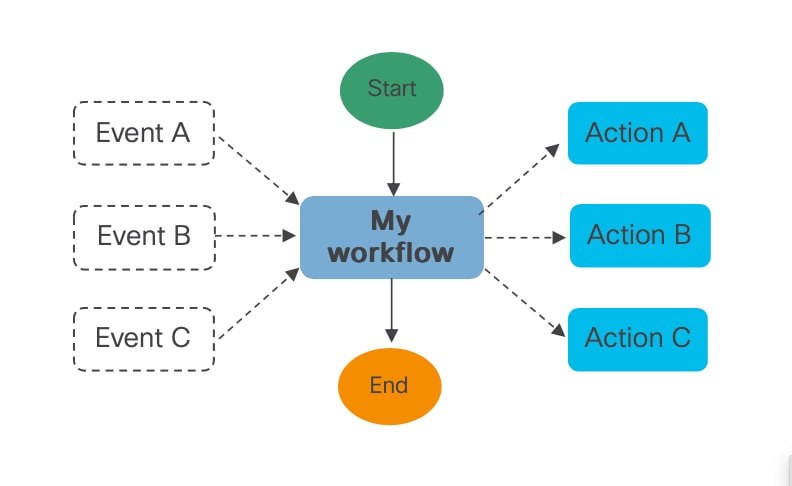
Events are signals from external sources with which CWM workflows can interact. This version of CWM adds support for an external Kafka data broker, so Kafka events can be either consumed or produced by an instantiated workflow job. A workflow can listen on one or multiple events and consume them to trigger one or more actions, as shown below:
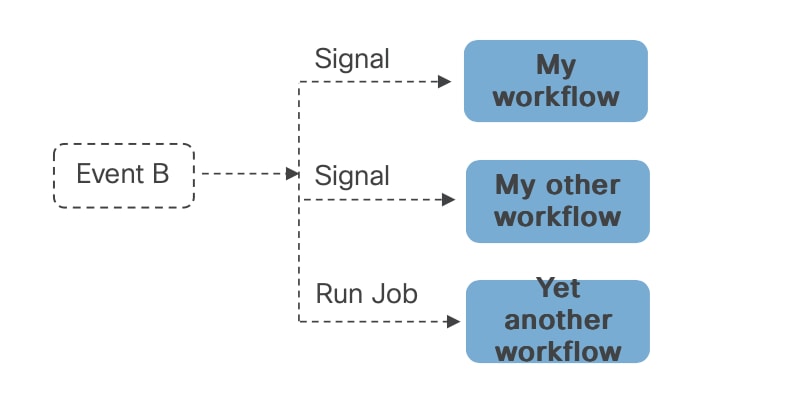
An event coming into the system can also trigger a workflow, as shown below:
Execution engine
CWM uses an internal worker called the execution engine. It enables the execution of all other workflow definitions and is not visible to you in the user interface.
Job
A job represents the single execution of a particular workflow definition. To run a job in CWM, you first need to add your workflow definition. Running a new job instantiates a workflow definition.
Before starting a job run, you enter the initial start data (input variables). This ensures that your workflow executions are isolated and may use different data from other executions of the same workflow definition.
Job event
Events are created during workflow execution based on the occurrences defined in the workflow definition. The Job Event Log table in the user interface records all events that occurred during workflow execution.
Schedule
Scheduling a job allows you to define a specific start time and date for a workflow, either once or on a recurring schedule. You can create a scheduled job using the CWM user interface or the API. Currently, some of the scheduling functions, such as editing or pausing/unpausing are available only through the API. Each scheduled job is a separate entity with a unique Run ID, but all runs within a schedule share the same Schedule ID.
Worker
Workers execute the workflow definition code, relevant adapter code, and activities defined in the workflow. Depending on your needs and scale, you can have multiple workers for each workflow definition. Your worker can be associated with one adapter and its activities or with multiple ones.
Workflow
Workflows help you capture, organize and automate processes with repeatable actions performed in a specified order. In the context of CWM, "workflow" can refer interchangeably to:
-
workflow definitions: A workflow definition is a segment of code, written in JSON or YAML, that is based on the Serverless Workflow Specification and a vendor-neutral, domain-specific language.
-
workflow jobs: A workflow job is single execution of a workflow definition.
Workflow engine
The workflow engine manages the way your workflow definitions are interpreted and conducted. It receives events, schedules tasks, and manages the execution of workflows.
 Feedback