SR Circuit-Style Manager (CSM)

Circuit-style manager

Circuit-style manager provides bandwidth-aware path computation and management for circuit-style SR-TE policy paths in large-scale networks. It is a network management tool that:

  • performs centralized bookkeeping to track and allocate bandwidth resources across the network,

  • computes policy paths that meet committed bandwidth requirements and service-level constraints,

  • enables users to monitor bandwidth resource levels and identify areas where resources are running low, and

  • manages and visualizes circuit-style SR-TE policies on the network topology map, ensuring proper failover, protection, and bidirectional operation.

Advantages of using circuit-style SR-TE policies

Key advantages of circuit-style SR-TE policies include:

  • Ensuring reliable, bidirectional transport for high-priority and critical services, with guaranteed bandwidth and protected paths.

  • Simplifying network operations with centralized bandwidth reservation and policy management without requiring extra protocols.

  • Enabling rapid service recovery through automatically computed working, protect, and restore paths.

  • Maintaining service-level agreements (SLAs) even as network loads change.

  • Not requiring maintenance of network states at intermediate routers.

  • Providing clear visibility and control of bandwidth resource allocation across the network.

Important considerations for circuit-style SR-TE policies

Circuit-Style SR-TE is subject to specific configuration requirements and operational constraints, including policy attribute compatibility.

Access requirements for circuit-style SR-TE policy provisioning

To provision a circuit-style SR-TE policy, you must have write-access to the head-end device based on Device Access Groups and assigned roles. Only circuit-style SR-TE admin users can modify circuit-style SR-TE configuration settings. For more information on Role-based Access Control (RBAC) and task permissions, see Cisco Crosswork Network Controller Administration Guide.

Attribute constraints

You set policy attribute values when you create a circuit-style SR-TE policy using either the device's command line interface (CLI) or through Crosswork Network Controller UI provisioning using Network Services Orchestration (NSO). To view a device CLI configuration example, see Configure circuit-style SR policies.

This table outlines the requirements for each policy attribute and how changes affect them. All attributes listed function as constraints. Each attribute aligns with configuration elements that Crosswork Network Controller utilizes to manage the computation of circuit-style path hops. Each value serves as a constraint for path computation or optimization, either defining a necessary path property or eliminating potential path options.

Table 1. Attribute constraints

Attribute

Description

Policy path protection

The path protection constraint is required for both sides of a circuit-style SR-TE policy.

Bandwidth constraint

  • The bandwidth constraint is required and must be the same on both sides of a circuit-style SR-TE policy. Changes to bandwidth can be applied to existing policies with the following outcomes:

    • After configuring the new bandwidth on both sides, the system evaluates the path without recomputing it.

    • If the new bandwidth is higher, the system checks the current path for sufficient resources. If all paths can support the new bandwidth, the same path is returned with the updated bandwidth value, indicating to the path computation client (PCC) that it was successful. If any path cannot support the new bandwidth, the old bandwidth value is returned, indicating failure. This evaluation is only retried if the bandwidth changes again.

    • If the bandwidth is lower, the system returns the same path with the new bandwidth value to indicate to the PCC that it was successful.

  • When you view the policy details, the user interface shows both the requested and reserved bandwidth under each candidate path. These values can differ if the requested bandwidth is increased but there is insufficient available circuit-style pool bandwidth along one or more paths.

Candidate paths and roles

  • The Working path is defined as the highest preference Candidate Path (CP).

  • The Protect path is defined as the CP of the second highest preference.

  • The Restore path is defined as the lowest preference CP. The headend must have backup-ineligible configured.

  • CPs of the same role in each direction must have the same CP preference.

Bi-directional paths

  • All paths must be configured as co-routed.

  • Paths of the same role on both sides must have the same globally unique bi-directional association ID.

Disjointness

The disjoint policy is used to compute two lists of segments that steer traffic from two source nodes to two destination nodes along disjoint paths. The disjoint type refers to the resources the two computed paths should not share.
  • The supported disjoint path types are:

    • Link: Links are not shared on the computed paths.

    • Node: Nodes are not shared on the computed paths.

    • SRLG: Links with the same Share Risk Link Group (SRLG) value are not shared on the computed paths. These links rely on a common resource, making them susceptible to the same potential failures. This setting specifies that the Working and Protect paths cannot use links that are part of the same SRLG.

    • SRLG-node: SRLG and nodes are not shared on the computed paths.

  • The disjoint type used must be the same in both directions of the same policy.

  • Working and Protect paths on the same PCC must be configured with a disjointness constraint using the same disjoint association ID and disjointness type.

  • The disjointness association ID for a Working and Protect path pair in one direction must be unique when compared with the corresponding pair in the opposite direction.

  • The Restore path must not have a disjointness constraint set.

  • Crosswork Network Controller follows strict fallback behavior for all Working and Protect path disjointness computations. This means that if node type disjointness is configured but no path is available, the system makes no automatic attempt to compute a less restrictive link type disjoint path.

Metric type

Only the TE, IGP, hop count, and latency metric types are supported. The metric type must match Working, Protect and Restore paths in both directions.

Segment constraints

  • All Working, Protect, and Restore paths must have the following segment constraints:

    • protection unprotected-only

    • adjacency-sid-only

  • To ensure persistency through link failures, configure static adjacency SIDs on all interfaces that might be used by circuit-style SR-TE policies.

Unsupported configurations

These configurations are not supported:

  • Metric bounds

  • SID-Algo contraints

  • Partial recovery for devices running IOS XR 7.8.x

  • Multiple circuit style SR-TE policies between the same nodes with the same color but different endpoint IP addresses

  • State-sync configuration between PCEs of a high availability pair

Path computation and reversion behaviors

The successful provisioning and continuity of circuit-style SR-TE policies depend on both the process of path computation and the precise handling of recovery and restoration scenarios. Path computation determines how the system establishes candidate paths that meet bandwidth, protection, and constraint requirements. Path reversion logic governs the transition between working, protect, and restore paths in response to network events and recoveries.

Path computation behavior

The SR Circuit-Style Manager (CSM) computes paths for circuit style policies only after a complete bi-directional, path-protected set of candidate paths has been delegated, including Working and Protect paths on both sides.

  • Bandwidth availability and path delegation: Path computation relies on bandwidth availability. If insufficient bandwidth prevents path establishment, the SR Circuit-Style Manager will retry every 30 minutes until a solution is found or circuit style SR-TE is disabled.

  • Restore path computation: The Restore path is computed only after the Working and Protect paths go down. Use the configurable delay timer to set the wait period post-delegation, allowing topology and policy state changes to propagate before computation.

  • Path optimization and limitations: Automatic path re-optimization is unavailable for topology or LSP state changes and periodic events. Path configurations must be manually adjusted as needed.

  • Supported path computation scenarios: Path computation supports Intra/Inter-area and Intra/Inter IGP Domain scenarios. Inter-AS path computation is not supported, requiring manual configuration for such cases.

Path reversion

Reversion behavior

Reversion behavior is controlled by the configuration of the WTR lock timer option under the Protect and Revert paths (it is not relevant for the Working path):

  • No lock configuration: Revert after a default 5-minute lock

  • Lock with no duration specified: No reversion

  • Lock duration: Revert after the specified number of seconds

Reversion logic

Path reversion depends on the initial state of the Working, Protect, and Restore paths and the events affecting each path. The scenarios in the following table provide examples of typical reversion behavior.

Table 2. Path reversion scenarios

Initial State

Events

Behavior

Working path is down, Protect path is up/active

Working path comes back up

  1. Working path recovers to up/standby state.

  2. Each PCC moves the Working path to active after the WTR timer expires.

  3. Protect path moves to up/standby.

Working path is down, Protect path is down, Restore path is up/active

Working path comes back up, then Protect path comes back up

  1. Working path recovers and goes to up/active state

  2. Restore path is removed

  3. Protect path recovers and goes to up/standby

Working path is down, Protect path is down, Restore path is up/active

Protect path comes back up, then Working path comes back up

On side A: The Working path failure is local (the first Adj SID in the SegList is invalid):

  1. Protect path recovers and goes to up/active.

  2. Restore path is removed.

  3. Working path recovers and goes to up/standby.

  4. Each PCC moves the Working path to active after the WTR timer expires, Protect path goes to up/standby.

On side Z: Working path failure is remote (first Adj SID in SegList is valid):

  1. Protect path recovers but is not brought up, Restore path remains up/active.

  2. Working path recovers and goes up/active.

  3. Restore path is removed.

  4. Protect path goes to up/standby.

Set up the CS SR-TE policy visualization workflow

Complete these steps to ensure CS SR-TE policies appear with correct bandwidth details:

Procedure


Step 1

Enable SR CSM.

Step 2

Configure circuit-style SR policies on the device.

Step 3

Verify that the CS SR-TE policies appear in the Traffic Engineering table.

Choose Services & Traffic Engineering > Traffic Engineering > SR-MPLS > Circuit-style.

Step 4

From the topology map, click a participating CS SR-TE node and verify that the reserved bandwidth pool settings you defined in the first step are configured properly.

Choose Links > link-type-entry > Traffic engineering > General. See Review circuit-style SR-TE policy bandwidth utilization.


Enable SR CSM

To manage and visualize circuit-style SR-TE policies on the topology map, you must first enable the SR-CSM and set bandwidth settings. When enabled, the CSM computes the best failover bidirectional paths with the requested bandwidth and other constraints defined in the circuit-style SR policy configuration between two nodes.

Complete these steps to enable SR Circuit-Style Manager.

Before you begin

Both CSM and BWoD cannot be enabled at the same time. If BWoD is enabled, you must disable it before enabling CSM.


Note


It is also recommended to delete the respective policies from the network before disabling the associated function pack (BWoD or CSM). If policies remain in the disabled function pack, it may cause issues with new policy delegation and increase processing time.


Procedure


Step 1

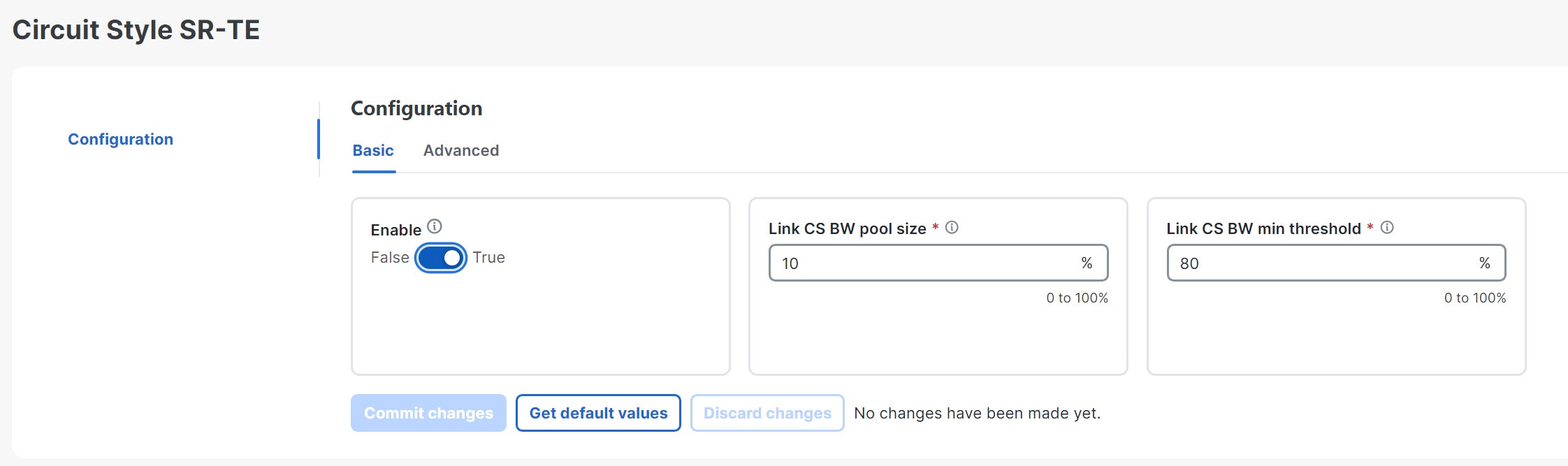
From the main menu, choose Services & Traffic Engineering > Circuit Style SR-TE > Configuration > Basic.

Step 2

Toggle the Enable switch to True.

Figure 1. Basic Circuit Style SR-TE configuration
Basic Circuit Style SR-TE Configuration

Step 3

Enter the required bandwidth pool size and threshold information. Additional field information is listed in this table. See Effects of surpassing bandwidth reservation limits.

Field Description

Link CS BW pool size

The percentage of each link's bandwidth reservable for circuit-style SR-TE policies.

Link CS BW min threshold

The Link CS BW Pool utilization percentage beyond which Crosswork Network Controller will generate a threshold-crossing event notification.

Step 4

Click Commit changes to save the Basic configuration.

Step 5

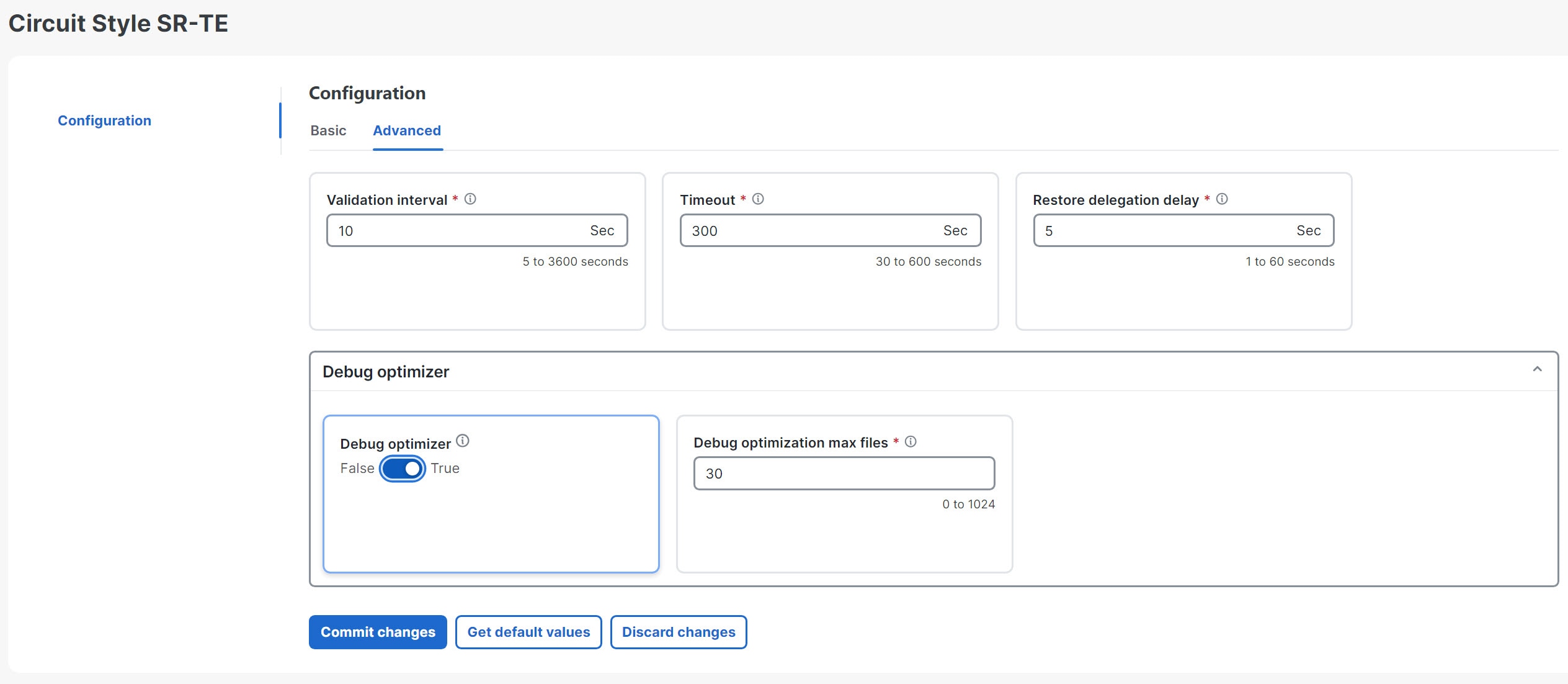
Click the Advanced tab to display additional CS-SR configuration values. Additional field information is listed in this table.

Figure 2. Circuit style SR-TE configuration - advanced tab
Circuit style SR-TE configuration - advanced tab
Field Description

Validation interval

This is the interval that the CSM policy will wait before the bandwidth that is reserved for an undelegated policy is returned to the circuit-style SR-TE policy bandwidth pool.

Timeout

The duration until which the CSM will wait for the delegation request, before generating a threshold-crossing alarm.

Restore delegation delay

The duration until which the CSM will pause before processing a restore path delegation.

Debug optimizer

Toggle the switch to True to turn on the Debug Optimizer for all CS-SR policies. The Debug Optimizer will write log files to the Crosswork Network Controller file system whenever it calculates routes up to the maximum number of files you specify.

Debug optimization max files

Enter the maximum number of log files the Debug Optimizer will write. Once the maximum is reached, the Optimizer will overwrite existing files.

Step 6

When you are finished entering Advanced configuration values, click Commit changes to save the configuration.


What to do next

Configure circuit-style SR policy configurations either manually on the device (see Configure circuit-style SR policies) or through Crosswork Network Controller.

Configure circuit-style SR policies

A circuit-style SR policy configuration must include the destination endpoint, the amount of requested bandwidth, and the bidirectional attribute (see Important considerations for circuit-style SR-TE policies for additional requirements or notable constraints). The configuration should also include a Performance Measurement Liveness (PM) profile. A PM profile enables proper detection of candidate path liveness and effective path protection. PCCs do not validate past the first SID, so without PM, the path protection will not occur if the failure in the circuit-style SR policy candidate path is not the first hop in the segment list. For more information, see Configuring SR Policy Liveness Monitoring.

Procedure


Step 1

If applicable, enable the hardware module on the device for PM configuration.

Example:

hw-module profile offload 4
reload location all

Step 2

Configure the PM profile.

Example:

performance-measurement
  liveness-profile sr-policy name CS-active-path
    probe
      tx-interval 3300
    !
    npu-offload enable   !! Required for hardware Offload only
    !
  !
  liveness-profile sr-policy name CS-protect-path
    probe
      tx-interval 3300
    !
    npu-offload enable   !! Required for hardware Offload only
    !
  !
!
     

Step 3

Configure the Circuit Style SR policy with the PM profile. All configurations shown in the example are required in order for CSM to manage the circuit-style SR-TE policy. Entries that are defined by the user are italicized. See Important considerations for circuit-style SR-TE policies for additional requirements or notable constraints.

Example:


segment-routing
  traffic-eng
    policy cs1-cs4
      performance-measurement
        liveness-detection
          liveness-profile backup name CS-protect  !! Name must match liveness profile defined for Protect path
          liveness-profile name CS-active  !! Name must match liveness profile defined for Active path
      !
      !
      bandwidth 10000
      color 1000
      end-point ipv4 192.168.20.4
      path-protection
      !
      candidate-paths
        preference 10
          dynamic
            pcep
          !
            metric
             type igp
            !
           !
          backup-ineligible
          !
          constraints
            segments
              protection unprotected-only
              adjacency-sid-only
            !
          !
          bidirectional
            co-routed
            association-id 1010
            !
          !
        preference 50
          dynamic
            pcep
            !
            metric
              type igp
              !
            !
          constraints
            segments
              protection unprotected-only
              adjacency-sid-only
              !
            disjoint-path group-id 3
            type node, srlg, or link
            !
            bidirectional
              co-routed
              association-id 1050
              !
             !
        preference 100
          dynamic
            pcep
           !
          metric
           type igp
           !
          !
          constraints
            segments
              protection unprotected-only
              adjacency-sid-only
             !
            disjoint-path group-id 3
            type node, srlg, or link
            !
            bidirectional
              co-routed
              association-id 1100
              !
            !
          !
        !
      !
    !

Review circuit-style SR-TE policy bandwidth utilization

Complete these steps to verify that the reserved bandwidth pool settings (defined when enabling CSM, see Enable SR CSM) are correctly configured. You can also view current circuit-style SR-TE bandwidth utilization and how much is still available for use.

Procedure


Step 1

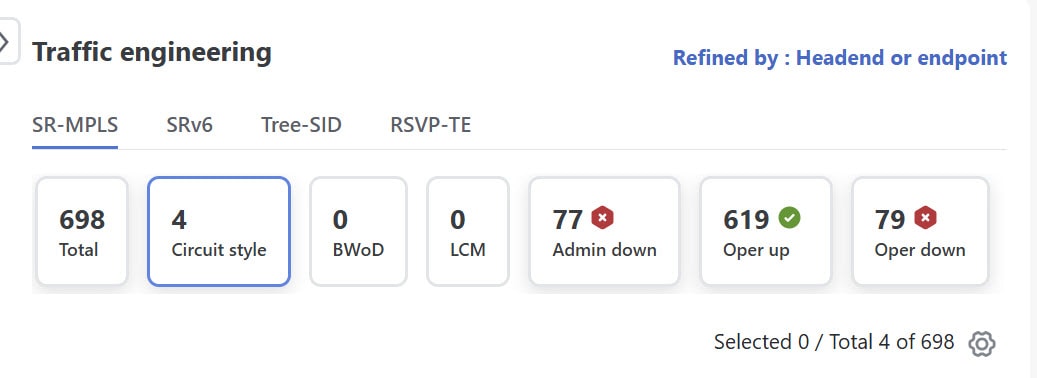
From the main menu, choose Services & Traffic Engineering > Traffic Engineering > SR-MPLS and click the Circuit style mini dashlet. The Traffic engineering table lists all circuit-style SR-TE policies.

Step 2

Check the check box next to the circuit-style SR-TE policy you are interested in.

Step 3

From the topology map, click a participating circuit-style SR-TE policy node.

Step 4

From the Device details page, choose Links > link-type-entry > Traffic engineering > General.

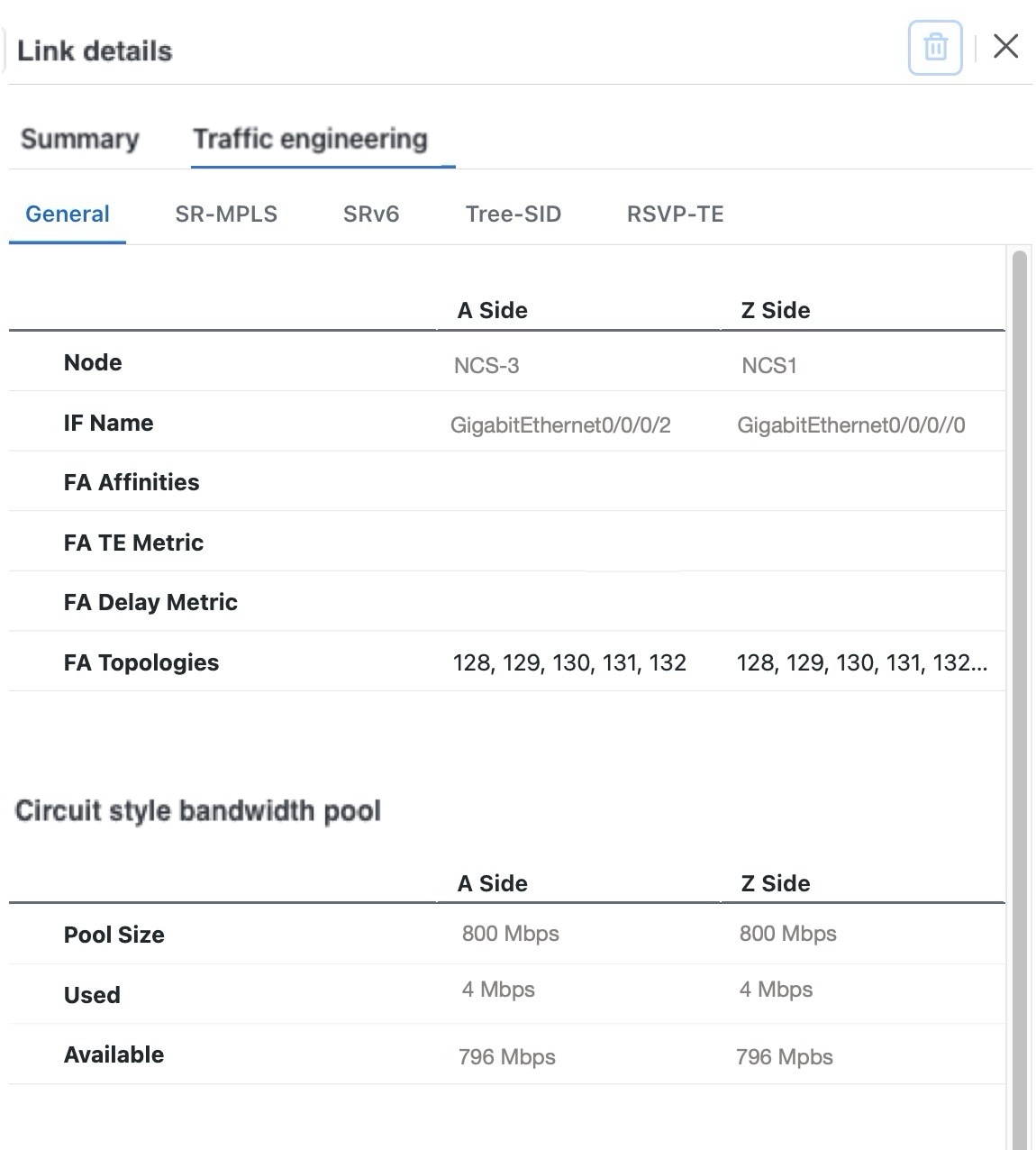
Under Circuit Style bandwidth pool, you can see

  • the reserved bandwidth pool size,

  • the amount of bandwidth currently being used, and

  • amount of bandwidth, allocated to circuit-style SR-TE policies, that is still available.

Figure 3. CS SR policy bandwidth pool

CS SR Policy Bandwidth Pool
This example shows the reserved bandwidth pool size as 800 Mbps for NCS-3 and NCS1. The configured settings were earlier defined as 80% for the bandwidth pool size. Since the interface is 1 Gbps, we can confirm that CSM has correctly allocated 80% of the bandwidth for circuit-style SR-TE policies for these interfaces.

View circuit-style SR-TE policy information

Complete these steps to view circuit-style SR-TE policy information:

Procedure


Step 1

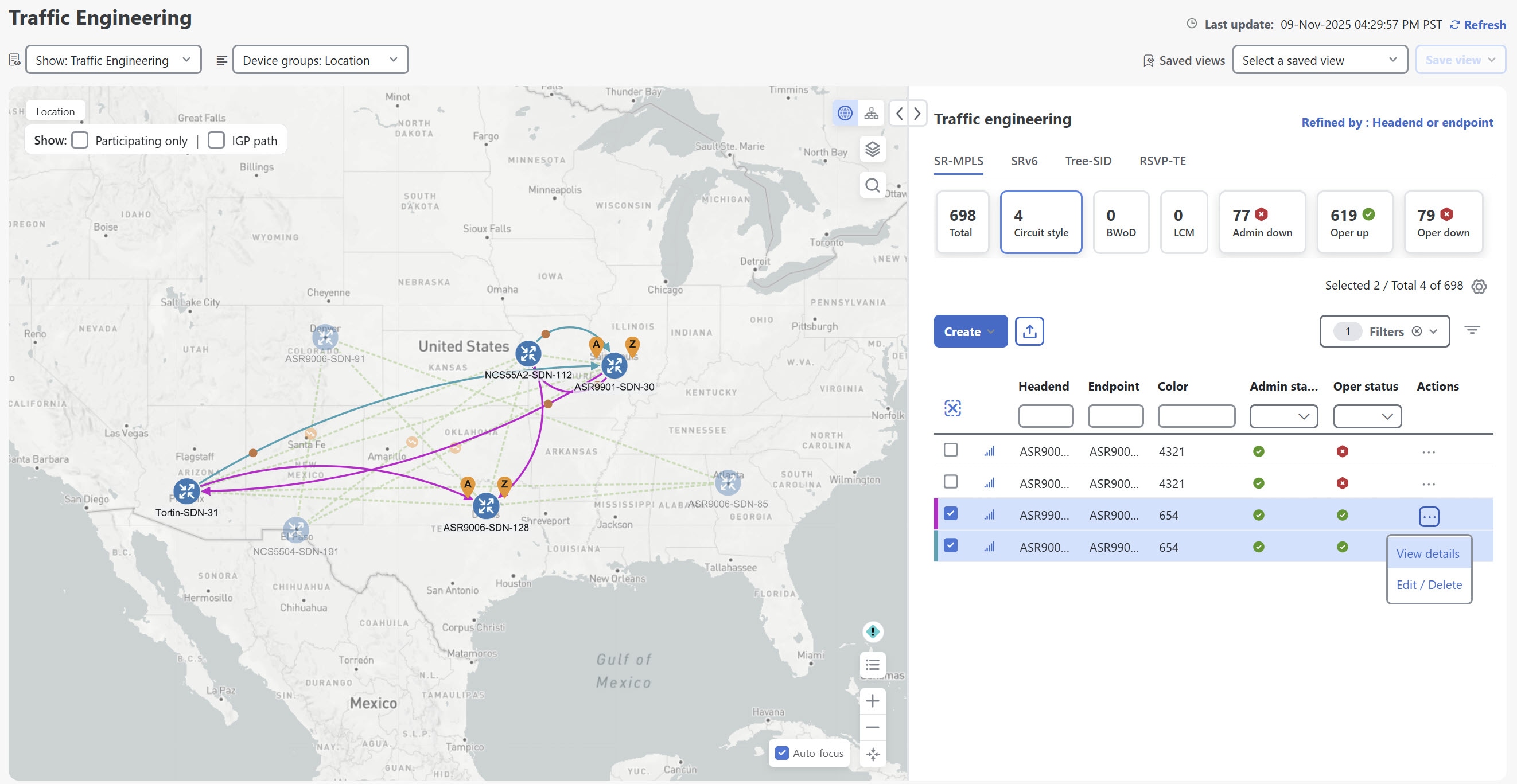
From the main menu, choose Services & Traffic Engineering > Traffic Engineering > SR-MPLS and click Circuit style.

Figure 4. Circuit style dashlet

Circuit style dashlet

The table lists all circuit-style SR-TE policies.

Step 2

From the Actions column, choose More icon > View Details for one of the circuit-style SR-TE policies.

Note


You cannot edit or remove circuit-style SR-TE policy configurations that have been created directly on the device.

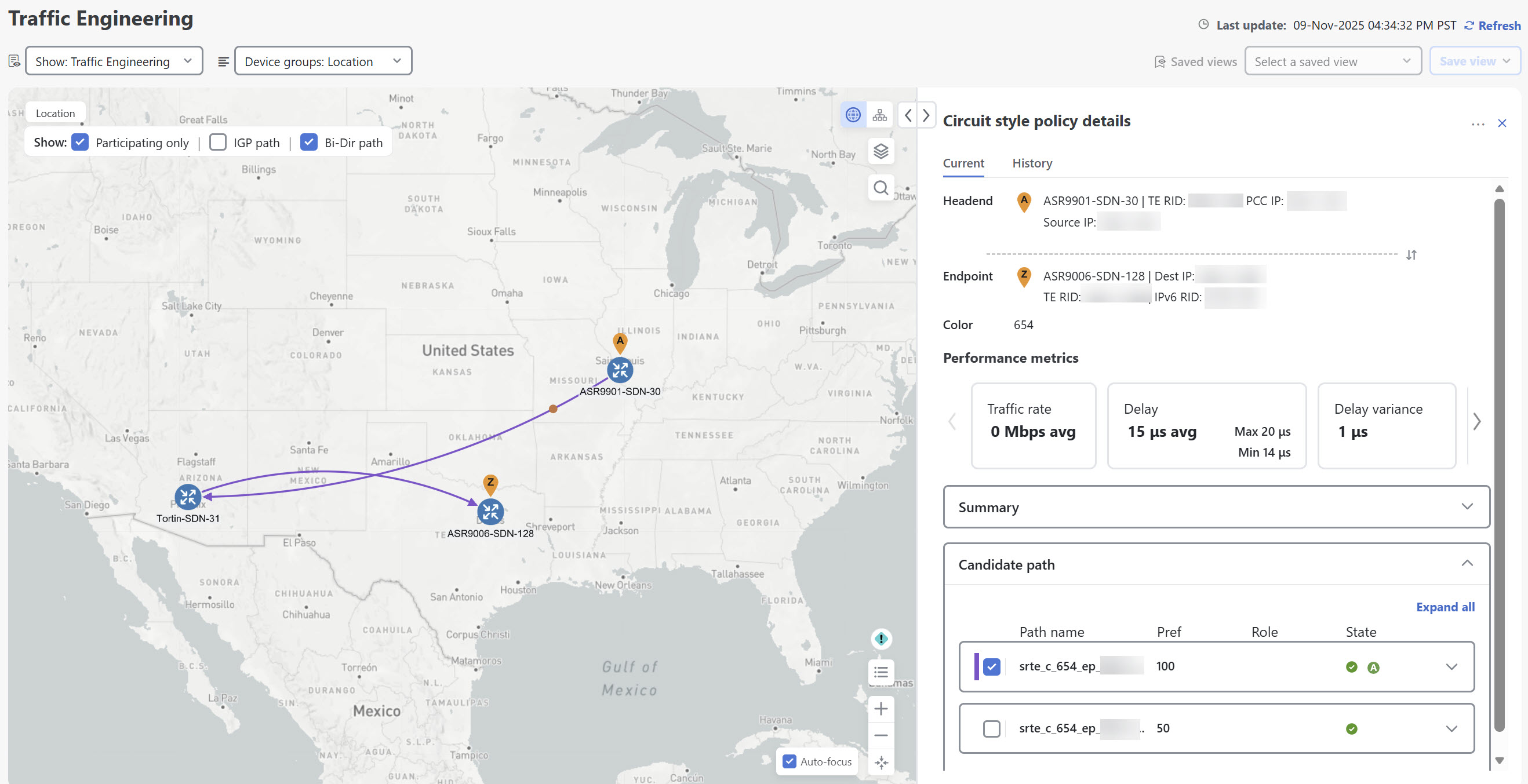
Figure 5. View circuit-style SR-TE policy details

View circuit-style SR-TE policy details

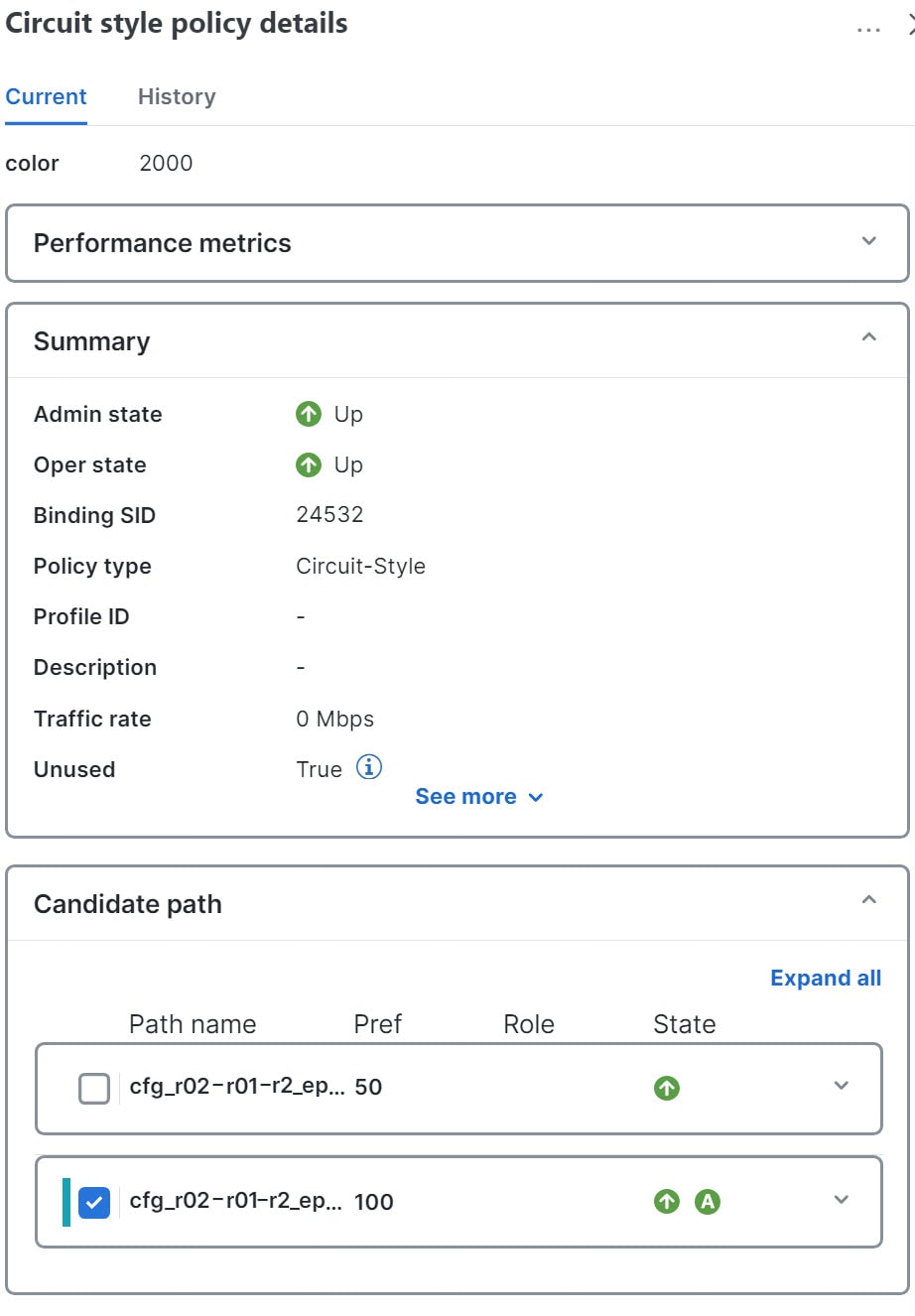
The Circuit style policy details page is displayed on the side panel. By default, the candidate path with an "active" state is displayed in the topology map. An active state is designated with a green "A" icon under State, indicating it is currently the operational active path. The map also has the Bi-Dir path checkbox checked by default, showing the bidirectional paths. The Candidate path list displays the candidate path with an active status (path that takes traffic) and other candidate paths.

Figure 6. CS-SR policy details summary

CS-SR policy details summary

Note


The bandwidth constraint value can differ from the bandwidth you requested if the value is increased and insufficient resources exist to satisfy demand on all Working and Protect candidate paths.

Step 3

View candidate path configuration details.

  1. The Circuit style policy details window allows you to drill down to view more information about the candidate paths. You can also copy the URL and share this information with others.

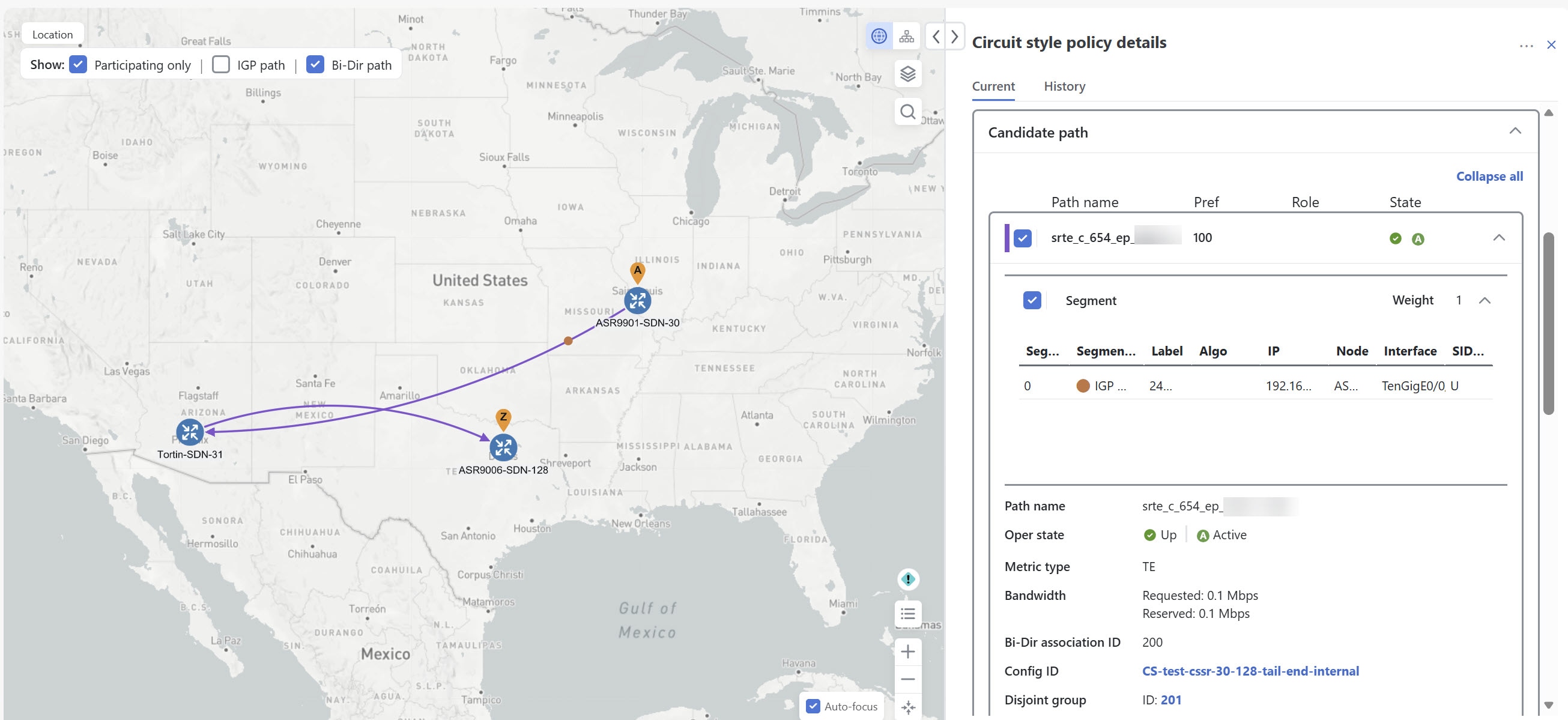
    The Working path (highest preference path) with an operational state (Oper state) "Up" will always have an active state indicating that it takes traffic (see CSM path failure management). If the Working path goes down, the Protect path is activated. In this example, the Protect path (with preference 50) is active and displayed on the topology map. Click Expand all to view more information about both paths.

    Figure 7. Candidate path on topology map

    Candidate path on topology map

    Note

     
    • First preference paths are shown as purple links.

    • Second preference paths are shown as blue links.

    • Third preference paths are shown as pink links.

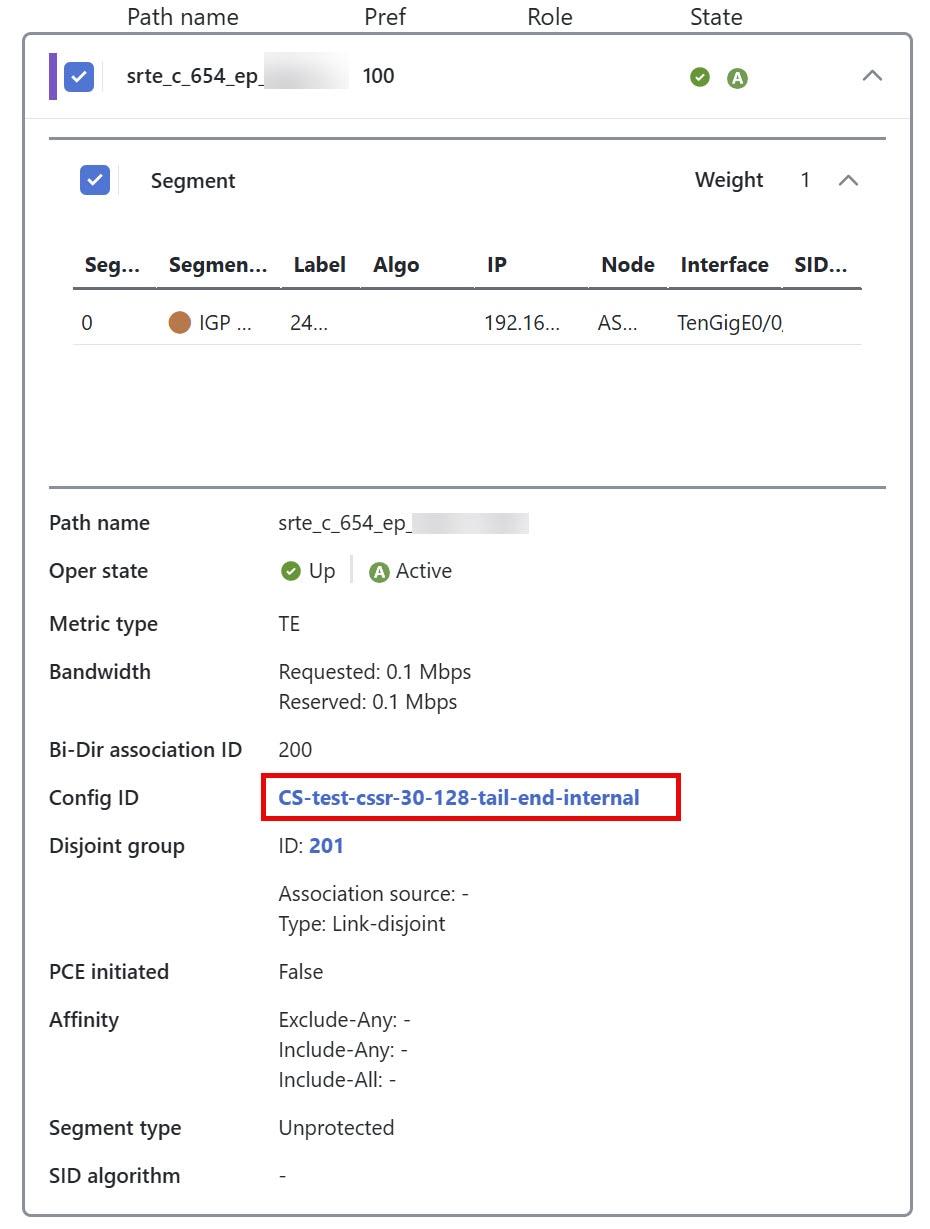
    If the circuit-style SR-TE policy configuration was done through Crosswork Network Controller, you have the option to view the circuit-style SR-TE policy configuration. To see the configuration, click the link next to Config ID.
    Figure 8. Config ID in candidate path details

    Config ID in candidate path details
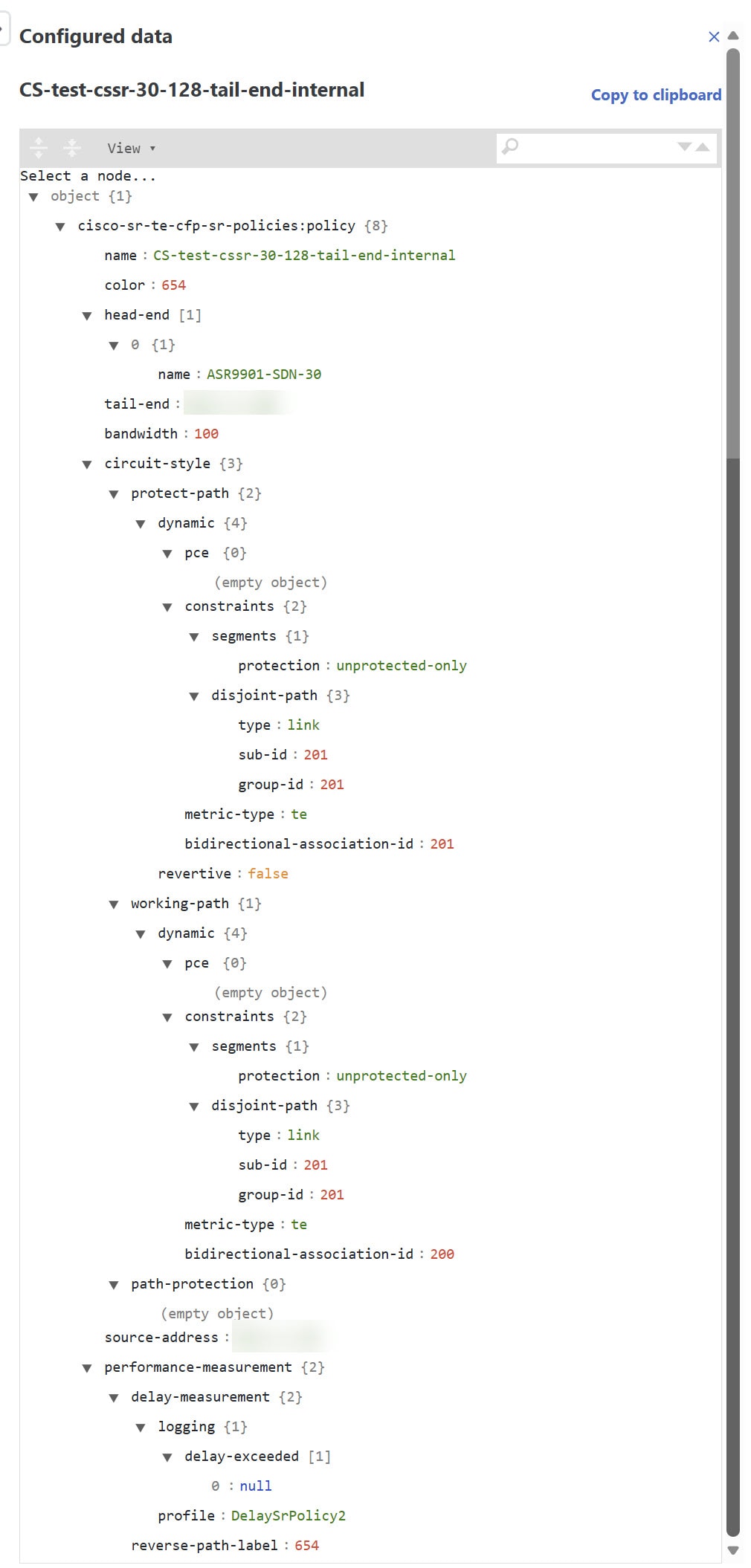
    Here is a sample of a circuit-style policy configuration. For information on configuring CS-SR policies, see Configure circuit-style SR policies.
    Figure 9. Circuit-style policy configuration example

    Circuit-style policy configuration example

Step 4

To view the physical path and metrics between endpoints of the selected circuit-style SR-TE policies, click Display Preferences icon to turn applicable metrics on and check the IGP path checkbox.
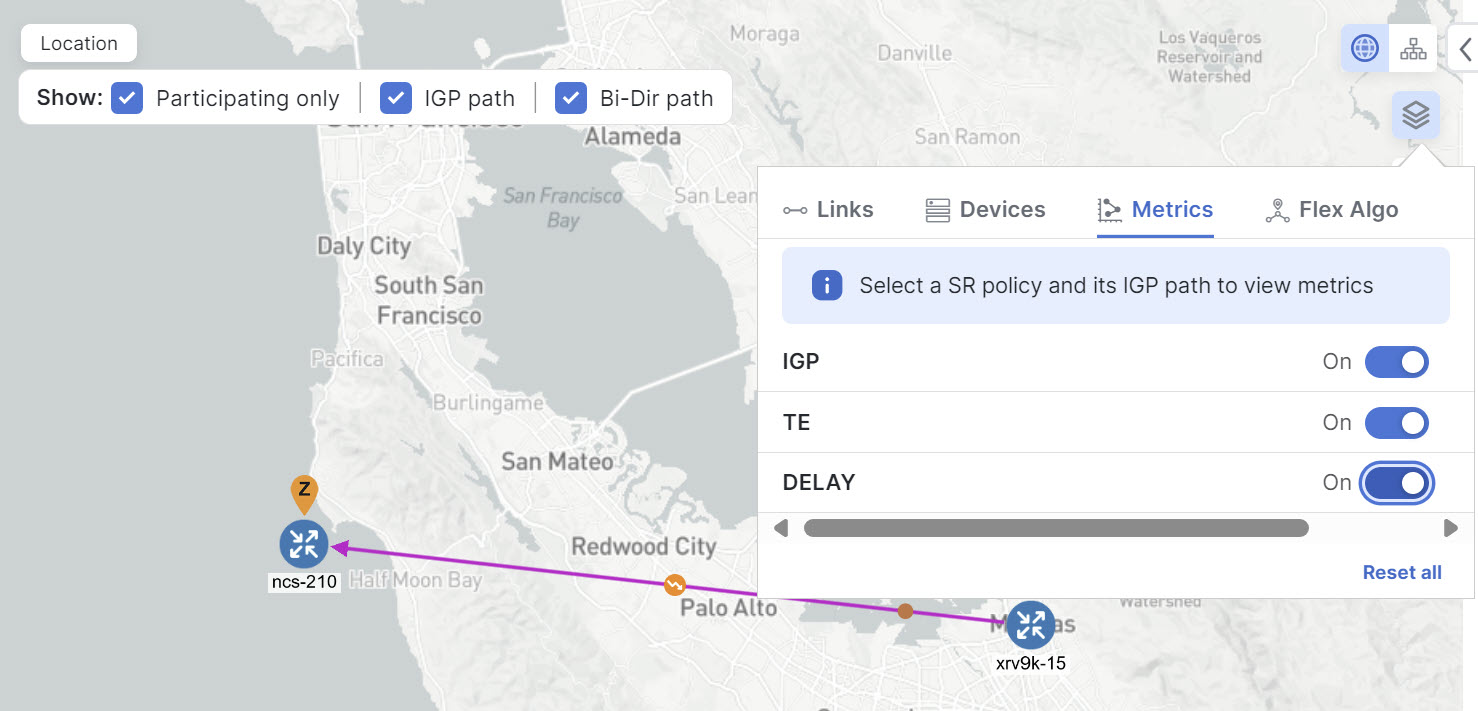
Figure 10. IGP metrics

IGP metrics

Trigger CSM to recalculate a circuit-style SR-TE policy

Circuit-style SR-TE policies are static in nature, meaning once the paths are computed, they will not be automatically reoptimized based on topology or operational status changes that may affect their paths. You can reoptimize a Working and Protect path (not a Restore path) after the policy's operational status went from down to up or if bandwidth size and requirement changes have been configured.

Complete these steps to manually trigger recalculation for a circuit-style SR-TE policy.

Procedure


Step 1

From the main menu, choose Services & Traffic Engineering > Traffic Engineering > SR-MPLS and click the Circuit style mini dashlet. The Traffic engineering table lists all circuit-style SR-TE policies.

Step 2

From the Actions column, choose More icon > View Details for the circuit-style SR-TE policies you want CSM to recalculate a path for again.

Step 3

From the top-right corner, choose More icon > Reoptimize.


Effects of surpassing bandwidth reservation limits

CSM discovers and updates the available and reservable bandwidth in the network. It maintains an accounting of all bandwidth reservations provided for CS SR-TE policies to ensure that the total reserved bandwidth on all interfaces remains at or below the network-wide resource pool (bandwidth pool size). When the bandwidth exceeds either the configured pool or the threshold, the system responds by:

  • generating threshold-crossing event notifications for visibility and operational response,

  • denying the policy establishment or bandwidth increase until resources become available,

  • repeatedly retrying path computations at regular intervals (for example, every 30 minutes) until a solution is found or the policy is disabled.

Example: Bandwidth utilization surpasses defined threshold

In this example, we assume the reserved bandwidth settings are as follows:

  • Link CS Bandwidth Pool Size: 10%

  • Link CS Bandwidth Minimum Threshold: 10%

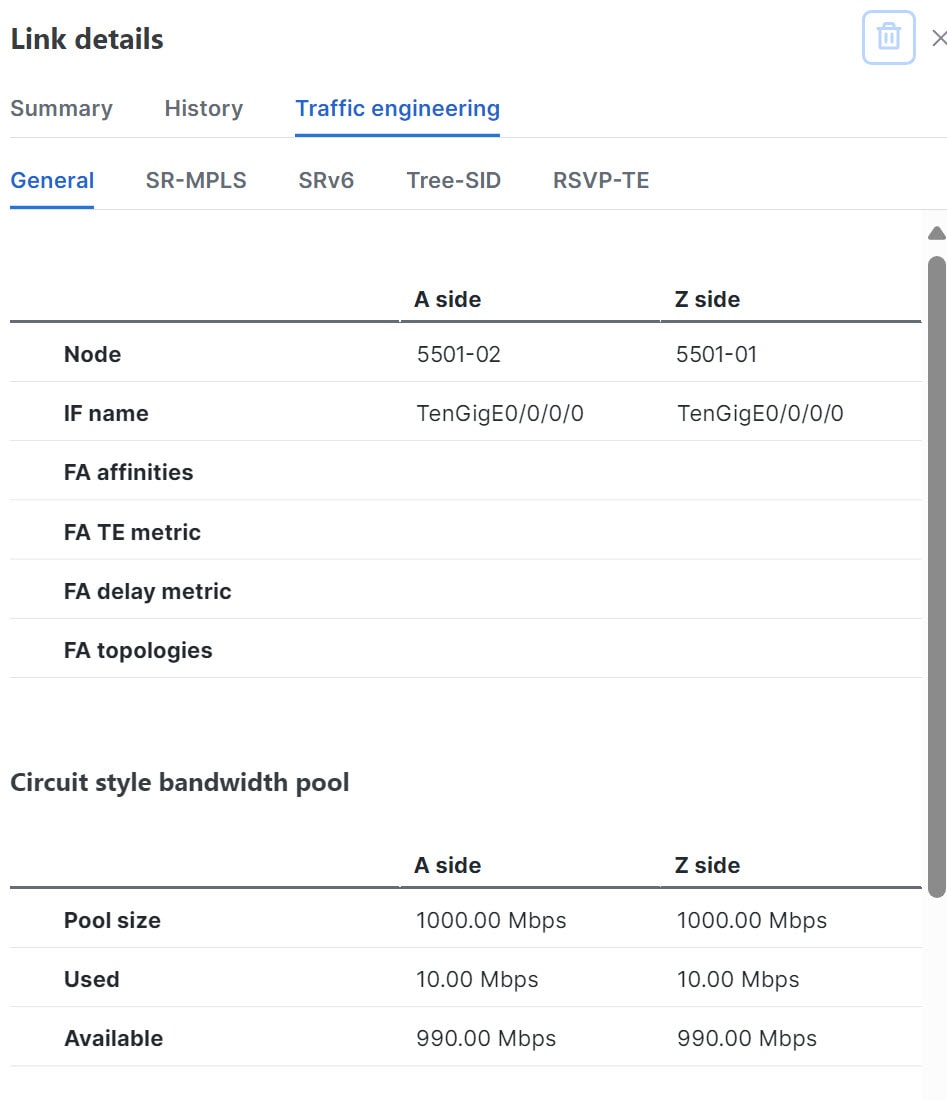
In this example, the bandwidth pool size for the 10 Gbps ethernet interfaces is 1Gbps and the alarm threshold is set at 100 Mbps (10% of pool size).

  1. A circuit-style SR-TE policy from node 5501-02 to node 5501-01 (r02 - r01) is created with a bandwidth of 100 Mbps.

    Figure 11. CS-SR policy 10 mbps up
    CS-SR policy 10 mbps up
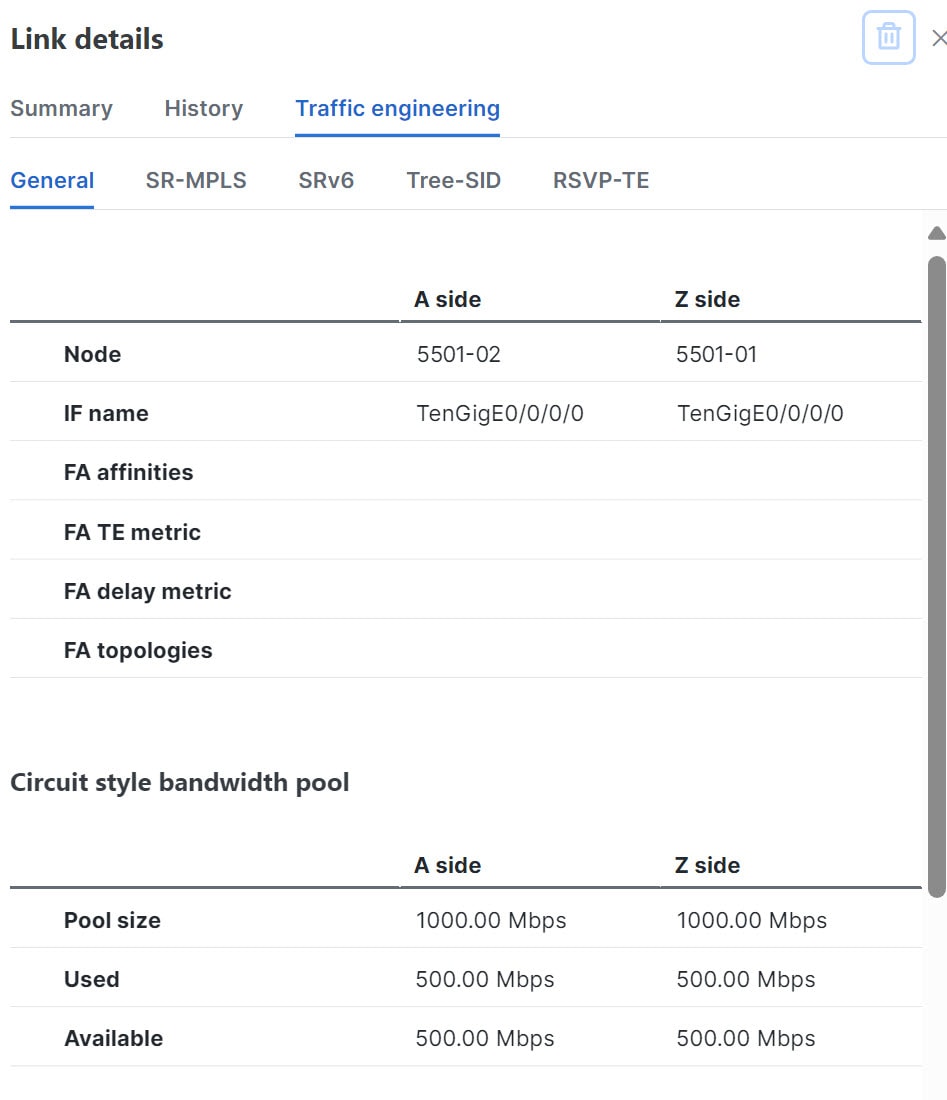
  2. Later, the requested bandwidth configured for the policy is increased to 500 Mbps. CSM determines the additional bandwidth along the existing path is available and reserves it.

    Figure 12. CS-SR policy 500 mbps up
    CS-SR Policy 500 mbps up
  3. Since the bandwidth utilization (500 Mbps) with the updated policy is above the configured pool utilization threshold (100 Mbps), an event is triggered.

    Figure 13. Threshold alerts

    Threshold alerts

Example: Bandwidth pool size and utilization exceeded

In this example, we assume the reserved bandwidth settings are as follows:

  • Link CS Bandwidth Pool Size: 10%

  • Link CS Bandwidth Minimum Threshold: 90%

In this example, the bandwidth pool size for the 10 Gbps ethernet interfaces is 1Gbs and the alarm threshold is set for 900 Mbps.

  1. An existing circuit-style SR-TE policy from node 5501-02 to node 5501-01 (r02 - r01) uses a bandwidth of 500 Mbps.

  2. Later, a new policy requiring a bandwidth of 750 Mbps with a path from node 5501-02 to node 5501-01 to 5501-2 (r02 - r01- r2) is requested. Since the existing policy and this new policy together exceed the bandwidth pool size, and alarm threshold of 1 Gbps (750 Mbps + 500 Mbps = 1250 Mbps), the following behaviors occur:

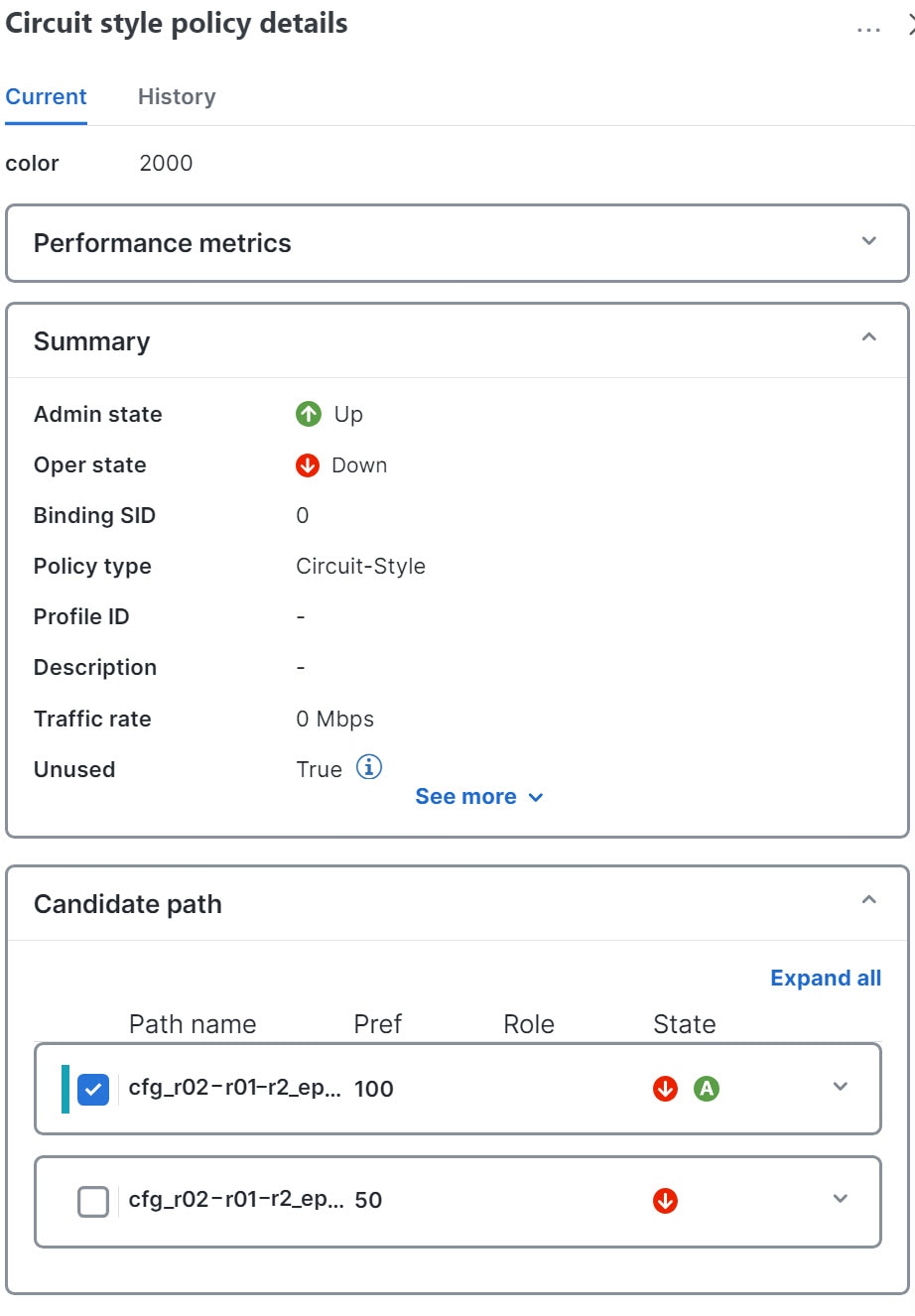
    • The new CS-SR policy r02 - r01 - r2 has been created, but remains operationally down because CSM cannot compute a path for the new policy. CSM will try again every 30 minutes to find a path that meets the bandwidth requirements.

      Figure 14. CS-SR policy exceeds bandwidth pool size
      CS-SR policy exceeds bandwidth pool size
    • Alerts are triggered.

      Figure 15. Threshold alerts

      Threshold alerts
  3. Later, the circuit-style SR-TE policy r02 - r01- r2 is updated and only requires 10 Mbps. The following behaviors occur:

    • Since the total bandwidth required for the two policies (10 Mbps + 500 Mbps = 510 Mbps) now requires less than the bandwidth pool size (1Gbps), circuit-style SR-TE policy r02 - r01 - r2 receives a path computed by CSM and becomes operationally up.

      Figure 16. Updated CS-SR policy operational
      Updated CS-SR policy operational
    • Since the second circuit-style SR-TE policy with the reduced bandwidth is now provided a path by CSM , alerts are cleared.

      Figure 17. Cleared alerts

      Cleared alerts

CSM path failure management

Crosswork Network Controller computes paths for circuit-style SR-TE policies only after a complete bidirectional, path-protected set of candidate paths has been delegated. Three types of candidate paths are used during path failures:

  • Working — This candidate path has the highest preference value.

  • Protect — This candidate path has the second-highest preference value. If the Working path goes down, the Protect path (with the lower preference value) is activated. After the Working path recovers, the Protect path remains active until the default lock duration expires.

  • Restore — This candidate path has the lowest preference value. Crosswork Network Controller computes the Restore path only after the Working and Protect paths are down. You can control how long after Restore paths are delegated from both sides to wait before the path is computed (see Enable SR CSM). This delay allows topology and policy state changes to fully propagate to Crosswork Network Controller in cases where these changes triggered the Restore path delegation.

You can configure Performance Measurement (PM) to address path failures effectively and switch from the Working path to the Protect path. For more information, see Configure circuit-style SR policies.

Examples


Note


Illustrations are for demonstration purposes only and may not always reflect the exact UI or data described in the workflow content. If you are viewing the HTML version of this guide, click the images to view them in full size.


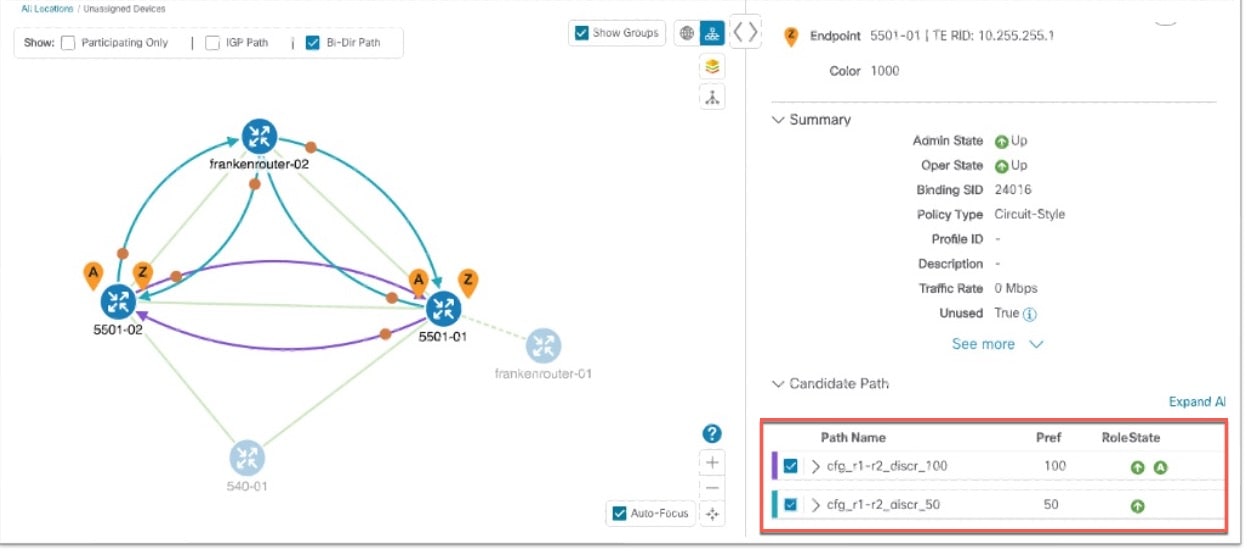
The following image shows that the Working and Protect paths of the circuit-style SR-TE policy are operational. The active path is indicated by the "A" icon.

Figure 18. Initial candidate paths

Initial candidate paths

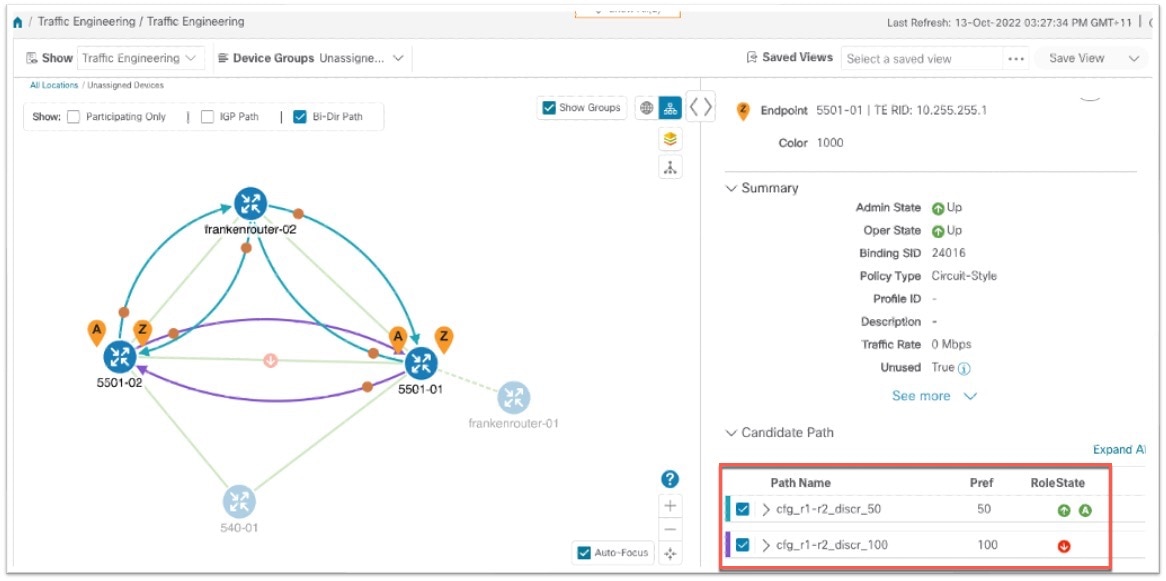
When a Working path having an active status goes down, the Protect path immediately becomes "active." When the Working path recovers, the Protect path moves to up/standby, and the Working path (with preference 100 in the example) becomes active.

Figure 19. Protected path becomes active

Protected path becomes active
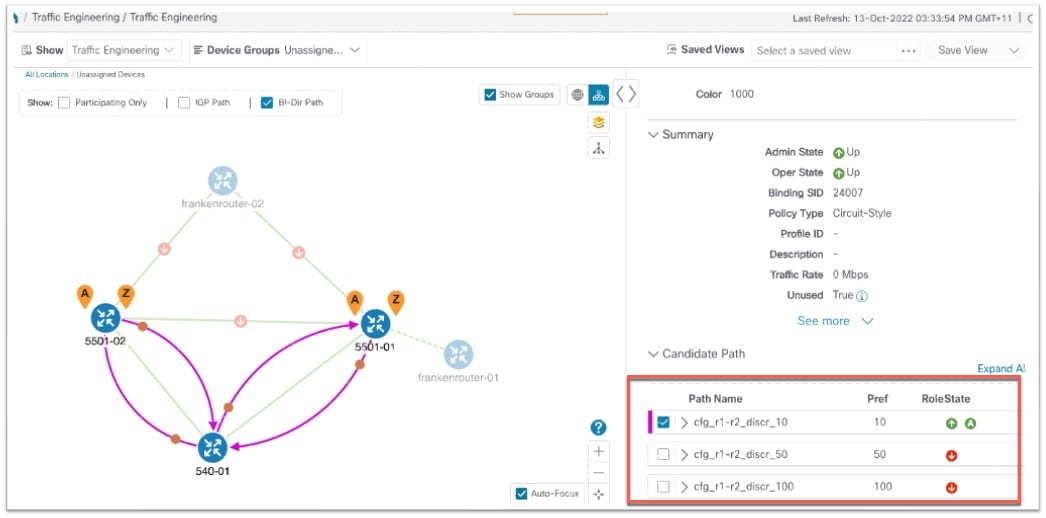
When both the Working and Protect paths go down, CSM calculates a Restore path, which becomes active. The Restore path only appears in this specific scenario. Note that the Restore path has the lowest preference value of 10 in the example. If the Working or Protected paths become operational again, the Restore path will no longer be visible on the topology map and will be removed from the Candidate path list.
Figure 20. Restore path

Restore path