Crosswork Cloud APIs

Overview of the Crosswork Cloud APIs

Crosswork Cloud APIs are for programmers who want to use the APIs with their network management and operations applications.

The Crosswork Cloud Network Insights API allows you to perform configuration tasks such as subscribing to prefixes or ASNs, configuring notification endpoints, and specifying conditions under which an alarm is triggered. The Crosswork Cloud Traffic Analysis API retrieves traffic statistics.

API Help and Documentation

You must be logged into Crosswork Cloud to access the Crosswork Cloud API documentation. To view API call definitions and documentation, either navigate to Help and Support icon > APIs or go to https://crosswork.cisco.com/apiDoc/CiscoCrossworkCloudAPI.

Join the Cisco Community Here to access the Crosswork Developer Hub. You can also access the Cisco Community by navigating to Help and Support icon > Support > Community Forum. Make sure to use and subscribe to the "Crosswork" label to help identify Crosswork Cloud discussions.

Get Started with APIs

You must have Admin privileges to access Crosswork Cloud APIs. The API options will not appear if you do not have Admin privileges. See Change User Permissions for information about changing user permissions.

To view API call definitions and documentation, you must be logged into Crosswork Cloud and either click Help & Support > APIs or go to https://crosswork.cisco.com/apiDoc/CiscoCrossworkCloudAPI.

To get started with the APIs, perform the following tasks:

Procedure


Step 1

To request an API Key, click your user initials in the top-right corner of the Crosswork Cloud Network Insights window, then click API Key/Tokens.

Step 2

Click Add API Key.

Step 3

Enter a name for the API Key, a description (optional), and a Start and Finish date for the API key, then click Save.

Step 4

Click Create.

The new API key is created and the Crosswork Cloud application displays the key details. This is the only time that the key is displayed.

Step 5

Click Copy to copy the API key so you can save it somewhere secure.

Note


Protect your API Key as if it is a password. Because the API Key provides access to your account, make sure you store it securely.

Step 6

See the Crosswork Cloud Network Insights Client Script Example and Crosswork Traffic Analysis Client Script Example sections for examples on how to get started.


API Key Definition

A Crosswork Cloud API Key consists of:

  • An API Key, which is a hex encoded, 32-byte symmetric key. Client applications use the API Key to sign REST API requests destined for Crosswork Cloud Network Insights or Crosswork Cloud Traffic Analysis.

  • An API Key identifier (ID), which is a unique value for the key and must be included with each signed request. Crosswork Cloud services use the Key ID to retrieve a copy of the API Key to verify the incoming request.


Note


Protect your API Key as you would a password. Because the API Key provides access to your account, make sure you store it securely.


A client application uses the API Key to sign all requests that are sent to Crosswork Cloud. Each request includes:

  • The request signature

  • The API Key ID

  • Metadata detailing the fields used to determine the signature

After Crosswork Cloud receives a REST API request, it performs the following steps:

  1. Extracts the requested parameters.

  2. Uses the API Key ID to retrieve the API Key and associated metadata.

  3. Recalculates the signature.

  4. Compares the calculated signature with the requested signature.

  5. If the calculated and requested signatures match, Crosswork Cloud forwards the request. If the signatures do not match, Crosswork Cloud rejects the request.

Crosswork Cloud Network Insights Client Script

This section contains examples and information on how to use the Crosswork Cloud Network Insights client script.

Client Script Options

The following options are available when running the client script.

(ramius) ~> ./crosswork.py -h
usage: crosswork.py [-h] [--uri URI] --key KEY --keyid KEYID
                    [--payload PAYLOAD] [--method {GET,POST}] [--host HOST]
                    [--port PORT]
 
Exercise the REST API.
 
optional arguments:
  -h, --help           show this help message and exit
  --uri URI            The URI to run
  --key KEY            A Cisco Crosswork Network Insights API Key
  --keyid KEYID        A Cisco Crosswork Network Insights API Key ID
  --payload PAYLOAD    The name of a file containing JSON data for POST API
                       requests. Note: This option is available only for POST
                       commands.
  --method {GET,POST}  The HTTP method for the request
  --host HOST          The Cisco Crosswork Network Insights URL
  --port PORT          The Cisco Crosswork Network Insights port number
(ramius) ~> 

Crosswork Cloud Network Insights Client Script Example

The following client script example is written in Python and shows how to create, sign, and execute the Crosswork Cloud Network Insights REST API calls.

#!/usr/bin/env python3

#
# Copyright 2019 Cisco Systems Inc.
# 
# Licensed under the Apache License, Version 2.0 (the "License");
# you may not use this file except in compliance with the License.
# You may obtain a copy of the License at
# 
#     http://www.apache.org/licenses/LICENSE-2.0
# 
# Unless required by applicable law or agreed to in writing, software
# distributed under the License is distributed on an "AS IS" BASIS,
# WITHOUT WARRANTIES OR CONDITIONS OF ANY KIND, either express or implied.
# See the License for the specific language governing permissions and
# limitations under the License.
#

import argparse
import binascii
import datetime
import hashlib
import hmac
import json
from typing import Dict, Any

import requests
import rfc3339
import sys
import urllib

from string import Template
from urllib.parse import urlparse


class Signature(object):
    # The order and white space usage is very important. Any change
    # can alter the signature and cause the request to fail.
    SIGNATURE_TEMPLATE = Template("""\
$param_method
$param_uri
$param_query_parameters
$param_key_id
$param_timestamp
$param_signature_version
$param_content_sha256
$param_content_type
$param_content_length""")

    def __init__(self, exrest):
        self.exrest = exrest

    def sign(self):
        exrest = self.exrest

        string_to_sign = self.SIGNATURE_TEMPLATE.substitute({
            "param_method": exrest.method.upper(),
            "param_uri": exrest.url_encoded_uri,
            "param_query_parameters": exrest.url_encoded_query_parameters,
            "param_key_id": exrest.key_id,
            "param_timestamp": exrest.timestamp,
            "param_signature_version": exrest.signature_version,
            "param_content_sha256": exrest.content_sha256,
            "param_content_type": exrest.content_type,
            "param_content_length": exrest.content_length
        })

        # Decode the key and create the signature.
        secret_key_data = binascii.unhexlify(exrest.key)
        hasher = hmac.new(secret_key_data, msg=string_to_sign.encode('utf-8'), digestmod=hashlib.sha256)
        signature = binascii.hexlify(hasher.digest())
        return signature.decode('utf-8')


class ExRest(object):
    SIGNATURE_VERSION = "1.0"
    CONTENT_TYPE = "application/json"

    HEADER_CONTENT_TYPE = "Content-Type"
    HEADER_CONTENT_LENGTH = "Content-Length"
    HEADER_SIGNATURE_VERSION = "X-Cisco-Crosswork-Cloud-Signature-Version"
    HEADER_TIMESTAMP = "Timestamp"
    HEADER_AUTHORIZATION = "Authorization"

    def __init__(self):
        # Input arguments to the script.
        self.uri = None
        self.payload = None
        self.method = None
        self.host = None
        self.port = None
        self.key = None
        self.key_id = None

        # Values used to calculate the signature.
        self.url_encoded_uri = None
        self.url_encoded_query_parameters = None
        self.timestamp = None
        self.content_sha256 = None
        self.content_length = 0
        self.content_type = self.CONTENT_TYPE
        self.signature_version = self.SIGNATURE_VERSION

    def run(self):
        # Calculate the full URI to be run.
        uri = self.uri[1:] if self.uri.startswith("/") else self.uri
        self.uri = f"https://{self.host}:{self.port}/{uri}"

        # The url encoded uri is used when calculating the request signature.
        parsed_uri = urlparse(self.uri)
        self.url_encoded_uri = urllib.parse.quote(parsed_uri.path, safe="")
        self.url_encoded_query_parameters = urllib.parse.quote(parsed_uri.query)

        # Calculate the rfc3339 timestamp for the request.
        now = datetime.datetime.now()
        self.timestamp = rfc3339.rfc3339(now)

        # Calculate the SHA256 of the body of the request, even if the body is empty.
        self.content_sha256, self.content_length, payload_contents = self.calculate_content_sha256(self.payload)

        # Calculate a signature for the request.
        signer = Signature(self)
        request_signature_b64 = signer.sign()

        # Create the request object and set the required http headers.
        headers = dict()

        headers[self.HEADER_AUTHORIZATION] = "hmac {}:{}".format(self.key_id, request_signature_b64)
        headers[self.HEADER_TIMESTAMP] = self.timestamp
        headers[self.HEADER_CONTENT_TYPE] = self.content_type
        headers[self.HEADER_SIGNATURE_VERSION] = self.SIGNATURE_VERSION

        session = requests.Session()

        response = session.request(self.method, self.uri, data=payload_contents, headers=headers)

        parsed_response: Dict[str, Any] = dict()
        if len(response.content) > 0:
            content = response.content.decode('utf-8')
            try:
                parsed_response = json.loads(content)
            except ValueError:
                parsed_response = dict()
                parsed_response["Message"] = content.strip()

        if response.status_code != 200:
            parsed_response["HttpStatus"] = response.status_code

        print(json.dumps(parsed_response, indent=2))

    def calculate_content_sha256(self, payload):
        if payload:
            try:
                with open(payload) as fd:
                    payload_contents = fd.read()
            except Exception as error:
                raise Exception(f'Cannot read payload file {payload}: {error}')
        else:
            payload_contents = ""

        hasher = hashlib.sha256()
        hasher.update(payload_contents.encode('utf-8'))

        content_sha256 = binascii.hexlify(hasher.digest())

        return content_sha256.decode('utf-8'), len(payload_contents), payload_contents


def main():
    parser = argparse.ArgumentParser(description="Exercise the REST API.")

    parser.add_argument("--uri", default="/api/beta/truefalse/1/200",
                        help="The URI to run")

    parser.add_argument("--key", required=True,
                        help="A Cisco Crosswork Network Insights API Key")

    parser.add_argument("--keyid", required=True,
                        help="A Cisco Crosswork Network Insights API Key ID")

    parser.add_argument("--payload",
                        help="The name of a file containing JSON data for POST API requests")

    parser.add_argument("--method", choices=["GET", "POST"], default="GET",
                        help="The HTTP method for the request")

    parser.add_argument("--host", default="crosswork.cisco.com",
                        help="The Cisco Crosswork Network Insights URL")

    parser.add_argument("--port", type=int, default=443,
                        help="The Cisco Crosswork Network Insights port number")

    # Parse the arguments
    args = parser.parse_args()

    exrest = ExRest()

    exrest.uri = args.uri
    exrest.payload = args.payload
    exrest.method = args.method
    exrest.host = args.host
    exrest.port = args.port
    exrest.key = args.key
    exrest.key_id = args.keyid

    exrest.run()


if __name__ == "__main__":
    sys.exit(main())

How to Use the Client Script

This example walks you through the following tasks:

  • Making a simple call from the client script.

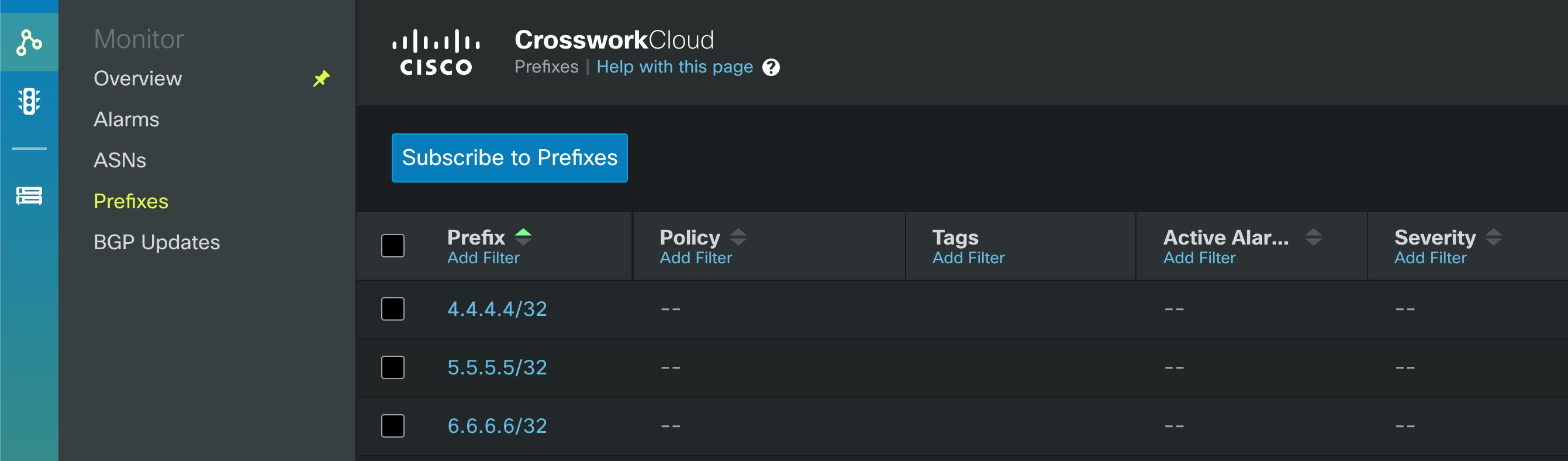
  • Adding prefixes with a POST command using the payload option and a configuration file.

Before you begin

Before running the script, request the API key (see Get Started with APIs). For more information on APIs, click Help Icon from the Crosswork Cloud UI and click the APIs link.

Procedure


Step 1

Run the script:

crosswork.py --uri '/api/beta/sourcedata?prefix=64.54.195.0%2F24&max=5' --key '<yourKeyHere>' --keyid '<yourKeyIdHere>' 
Example result:
{
  "data": [
    {
      "prefix": "64.54.195.0/24",
      "action": "ADD",
      "peerRemoteAsn": 22024,
      "timestamp": "2021-10-20T18:32:03Z",
      "origin": "IGP",
      "originAs": 5653,
      "asPath": [
        {
          "asn": [
            22024
          ]
        },
        {
          "asn": [
            6461
          ]
        },
        {
          "asn": [
            5653
          ]
        }
      ],
      "unicastPrefixType": "ADJ_RIB_IN",
      "nextHop": "4.4.94.118/32",
      "peerRemoteId": "549",
      "roaGenTime": "2021-06-29T05:25:53.844840001Z"
    },
    {
      "prefix": "64.54.195.0/24",
      "action": "ADD",
      "peerRemoteAsn": 202365,
      "timestamp": "2022-01-21T10:25:58Z",
      "origin": "IGP",
      "originAs": 5653,
      "med": {},
      "communities": [
        3792306480,
        3792306677,
        57866,
        41441,
        41441
      ],
      "asPath": [
        {
          "asn": [
            202365
          ]
        },
        {
          "asn": [
            57866
          ]
        },
        {
          "asn": [
            6461
          ]
        },
        {
          "asn": [
            5653
          ]
        }
      ],
      "unicastPrefixType": "ADJ_RIB_IN",
      "nextHop": "5.255.90.109/32",
      "peerRemoteId": "248",
      "roaGenTime": "2021-10-05T10:07:45.504885118Z"
    },
(truncated) 

Step 2

Add prefixes with a POST command and a configuration file:

crosswork.py --uri '/api/beta/provision' --key '<yourKeyHere>' --keyid '<yourKeyIdHere>' --payload "config.json" --method "POST" 
Example of config.json file contents:
{
  "operations": [
    {
      "setPrefixRequest": {
        "prefix": "4.4.4.4/32"
      },
      "o_creat": true,
      "o_excl": true
    },
    {
      "setPrefixRequest": {
        "prefix": "5.5.5.5/32"
      },
      "o_creat": true,
      "o_excl": true
    },
    {
      "setPrefixRequest": {
        "prefix": "6.6.6.6/32"
      },
      "o_creat": true,
      "o_excl": true
    },
    {
      "setPrefixRequest": {
        "prefix": "2001:30:102::/48"
      },
      "o_creat": true,
      "o_excl": true
    }
  ]
}  

Results example:

{
  "results": [
    {
      "setPrefixResponse": {
        "prefix": "4.4.4.4/32"
      }
    },
    {
      "setPrefixResponse": {
        "prefix": "5.5.5.5/32"
      }
    },
    {
      "setPrefixResponse": {
        "prefix": "6.6.6.6/32"
      }
    },
    {
      "setPrefixResponse": {
        "prefix": "2001:30:102::/48"
      }
    }
  ]
} 

UI Results example:


Crosswork Traffic Analysis Client Script Example

The following script examples are written in Python. You will need python/get_traffic_example.py and python/cctraffic/cctraffic.py to execute the Crosswork Traffic Analysis APIs. Prior to running get_traffic_example.py, you must do the following:

  1. Install python dependencies: pip3 install -r requirements.txt

  2. Set the API bearer token: export TOKEN=<token string>

  3. Edit the get_traffic_example.py file. Replace the following with the correct values: api_version, device_name, start and end.

After editing the get_traffic_example.py file, run the script: python3 get_traffic_example.py

Script Example: get_traffic_example.py

# get_traffic_example.py

import os
import sys
from cctraffic import CCTrafficRestClient

host = "https://crosswork.cisco.com"
api_version = "beta"
device_name = "flow-automation-1"

# start and end may be supplied as:
#   - ISO 8601 datetime string
#   - unix timestamp in seconds since 1970
#   - now
#   - "<number> <unit> ago" where unit can be: "seconds", "minutes", "hours", "days".
start = "7 days ago"
end = "now"

if "TOKEN" in os.environ:
    token = os.environ["TOKEN"]
else:
    print("Bearer token not found. Set bearer token with: export TOKEN=<token string>")
    sys.exit(-1)

client = CCTrafficRestClient(host, token, version=api_version, debug=False)

print(f"GetDevice for {device_name}")
device_info = client.GetDevice(device_name)
device_id = device_info["deviceId"]
print(f"Found device ID for {device_name}: {device_id}")

print(f"Traffic by interface for {device_name}")
traffic_for_my_device = client.GetInterfaceCounterTrafficTotals(start, end, device_id)
interface_name = traffic_for_my_device[0]["interfaces"][0]["interfaceName"]

print(f"Traffic by ASN for {device_name}/{interface_name}")
asn_traffic_for_my_device_interface = client.GetNetFlowTrafficTotalsByDevice(start, end, device_id, interface=interface_name, asn_breakdown=True)

print(f"Traffic by Prefix for {device_name}/{interface_name}")
prefix_traffic_for_my_device_interface = client.GetNetFlowTrafficTotalsByDevice(start, end, device_id, interface=interface_name, prefix_breakdown=True)

asn = asn_traffic_for_my_device_interface[0]["interfaces"][0]["asns"][0]["asn"]
device_prefix = prefix_traffic_for_my_device_interface[0]["interfaces"][0]["prefixes"][0]["prefix"]

print(f"Traffic by Prefix for {device_name}/{interface_name} ASN {asn}")
prefix_traffic_for_my_device_interface_asn = client.GetNetFlowTrafficTotalsByDevice(
    start, end, device_id, interface=interface_name, asn=asn, asn_breakdown=True)

print(f"Traffic by Prefix")
prefix_traffic = client.GetNetFlowTrafficTotalsByPrefix(start, end)
prefix = prefix_traffic[0]["prefix"]

print(f"Traffic by Device for {prefix}")
device_traffic_for_prefix = client.GetNetFlowTrafficTotalsByPrefix(start, end, prefix)

print(f"Time series for {device_name}")
time_series_for_device = client.GetInterfaceCounterTrafficTimeSeries(start, end, device_id)

print(f"Time series for {device_name}/{interface_name}")
time_series_for_interface = client.GetInterfaceCounterTrafficTimeSeries(start, end, device_id, interface=interface_name)

print(f"Time series for {device_name}/{interface_name} {device_prefix}")
time_series_for_prefix = client.GetNetFlowTrafficTimeSeriesByDevice(start, end, device_id, interface=interface_name, prefix=device_prefix)

print(f"Time series for {device_name}/{interface_name} {asn}")
time_series_for_asn = client.GetNetFlowTrafficTimeSeriesByDevice(start, end, device_id, interface=interface_name, asn=asn)

Script Example: cctraffic.py

# cctraffic.py
# Contains a very simple REST client to demonstrate how to call the Crosswork Cloud Traffic APIs
# Copyright (c) 2021 Cisco Systems, Inc. and others.  All rights reserved.

import requests
from .util import UrlEncode

import urllib3
urllib3.disable_warnings(urllib3.exceptions.InsecureRequestWarning)


class CCTrafficRestClient:

    def __init__(self, host: str, token, version: str = "v1", debug: bool = False):
        self.version = version
        self.host = host
        self.debug = debug
        self.headers = {"content-type": "application/json", "Authorization": f"Bearer {token}"}

    def DoApiCall(self, url):
        if self.debug == True:
            print(url)
        response = requests.get(url, headers=self.headers, verify=False)
        if self.debug == True:
            print(response.status_code)
            print(response.content)
        return response

    def GetDevice(self, device_name: str):
        url = f"{self.host}/api/{self.version}/devices?name={device_name}"
        response = self.DoApiCall(url)
        if response.status_code != 200:
            return ""
        return response.json()["devices"][0]["deviceInfo"]

    def GetInterfaceCounterTrafficTotals(self, start: str, end: str, device_id: str = ""):
        start = UrlEncode(start)
        end = UrlEncode(end)

        if device_id == "":
            url = f"{self.host}/api/{self.version}/devices/statistics/totals"
        else:
            url = f"{self.host}/api/{self.version}/devices/{device_id}/interfaces/statistics/totals"

        url += f"?format=totals&timeStart={start}&timeEnd={end}"
        response = self.DoApiCall(url)
        if response.status_code != 200:
            return ""
        return response.json()["devices"]

    def GetNetFlowTrafficTotalsByDevice(self, start: str, end: str, device_id: str, interface: str,
                                        asn: int = 0, prefix: str = "", asn_breakdown: bool = False, prefix_breakdown: bool = False):
        interface = UrlEncode(UrlEncode(interface))
        prefix = UrlEncode(UrlEncode(prefix))
        start = UrlEncode(start)
        end = UrlEncode(end)

        if asn != 0:
            url = f"{self.host}/api/{self.version}/traffic/devices/{device_id}/interfaces/{interface}/asns/{asn}/prefixes"
        elif asn_breakdown:
            url = f"{self.host}/api/{self.version}/traffic/devices/{device_id}/interfaces/{interface}/asns"
        elif prefix_breakdown:
            url = f"{self.host}/api/{self.version}/traffic/devices/{device_id}/interfaces/{interface}/prefixes"

        url += f"?format=totals&timeStart={start}&timeEnd={end}"
        response = self.DoApiCall(url)
        if response.status_code != 200:
            return ""
        return response.json()["devices"]

    def GetNetFlowTrafficTotalsByPrefix(self, start: str, end: str, prefix: str = "", device_id: str = ""):
        prefix = UrlEncode(UrlEncode(prefix))
        start = UrlEncode(start)
        end = UrlEncode(end)

        if prefix == "":
            url = f"{self.host}/api/{self.version}/traffic/prefixes"
        elif device_id == "":
            url = f"{self.host}/api/{self.version}/traffic/prefixes/{prefix}/devices"
        else:
            url = f"{self.host}/api/{self.version}/traffic/prefixes/{prefix}/devices/{device_id}/interfaces"

        url += f"?format=totals&timeStart={start}&timeEnd={end}"
        response = requests.get(url, headers=self.headers, verify=False)
        if response.status_code != 200:
            return ""
        return response.json()["prefixes"]

    def GetInterfaceCounterTrafficTimeSeries(self, start: str, end: str, device_id: str, interface: str = ""):
        interface = UrlEncode(UrlEncode(interface))
        start = UrlEncode(start)
        end = UrlEncode(end)

        if interface == "":
            url = f"{self.host}/api/{self.version}/devices/{device_id}/statistics/totals"
        else:
            url = f"{self.host}/api/{self.version}/devices/{device_id}/interfaces/{interface}/statistics/totals"

        url += f"?format=timeseries&timeStart={start}&timeEnd={end}"
        response = requests.get(url, headers=self.headers, verify=False)
        if response.status_code != 200:
            return ""
        return response.json()["devices"]

    def GetNetFlowTrafficTimeSeriesByDevice(self, start: str, end: str, device_id: str, interface: str, asn: int = 0, prefix: str = ""):
        interface = UrlEncode(UrlEncode(interface))
        prefix = UrlEncode(UrlEncode(prefix))
        start = UrlEncode(start)
        end = UrlEncode(end)

        if asn == 0 and prefix != "":
            url = f"{self.host}/api/{self.version}/traffic/devices/{device_id}/interfaces/{interface}/prefixes/{prefix}"
        elif asn != 0 and prefix == "":
            url = f"{self.host}/api/{self.version}/traffic/devices/{device_id}/interfaces/{interface}/asns/{asn}"
        else:
            url = f"{self.host}/api/{self.version}/traffic/devices/{device_id}/interfaces/{interface}/asns/{asn}/prefixes/{prefix}"

        url += f"?format=timeseries&timeStart={start}&timeEnd={end}"
        response = self.DoApiCall(url)
        if response.status_code != 200:
            return ""
        return response.json()["devices"]