Installation Requirements

This section contains the following topics:

Cisco Crosswork Change Automation and Health Insights Network Requirements

The following figures show the different topology models, and the corresponding network components and connections needed to install and use Cisco Crosswork Change Automation and Health Insights.
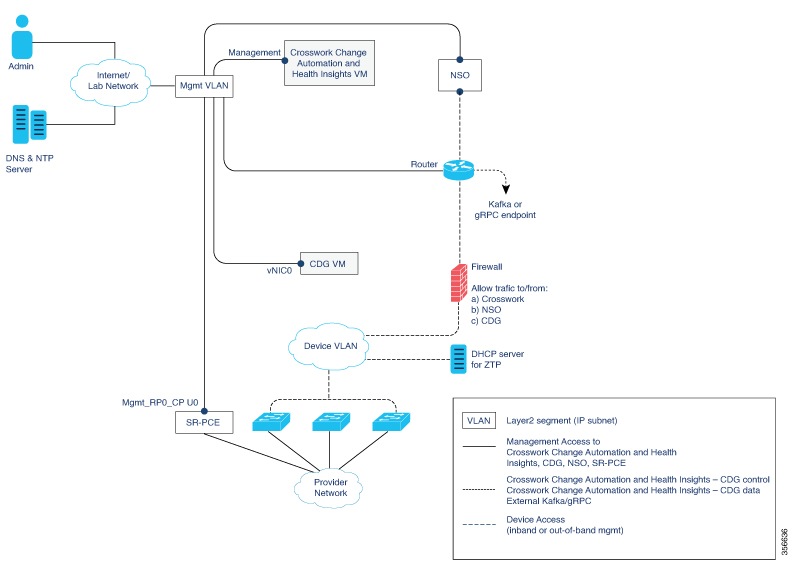
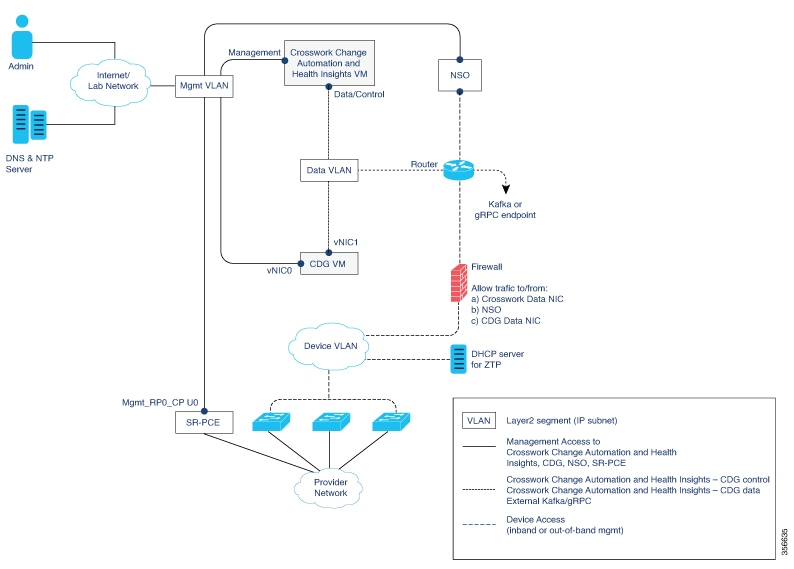
Figure 1. Crosswork Change Automation and Health Insights Components - 1 NIC Network Topology
Figure 2. Crosswork Change Automation and Health Insights Components - 2 NIC Network Topology
Figure 3. Crosswork Change Automation and Health Insights Components - 3 NIC Network Topology

There are three types of traffic flowing between the network components, as explained in the following table.

Table 1. Types of Network Traffic

Traffic

Description

Management

For accessing the UI and command line, and passing Data/Control information between servers (for example, Cisco Crosswork Change Automation and Health Insights to Crosswork Data Gateway or NSO)

Data/Control

Data and configuration transfer between CDG and Cisco Crosswork Change Automation and Health Insights, and other data destinations (external Kafka/gRPC).

Device Access

Device configuration and management (NSO or Cisco Crosswork Change Automation and Health Insights to the devices as a result of KPI configuration or playbook execution) and telemetry data being forwarded to the CDG.

Cisco Crosswork Change Automation and Health Insights Virtual Machine (VM)

The Cisco Crosswork Change Automation and Health Insights VM has the following vNIC deployment options:

Table 2. Cisco Crosswork Change Automation and Health Insights vNIC deployment modes

No. of vNICs

vNIC

Description

1

Management

Management, Data/Control and Device access passing through a single NIC

2

Management

Management

Data/Control

Data/Control and Device access

Cisco Crosswork Data Gateway (CDG) VM

The Cisco Crosswork Data Gateway VM has the following vNIC deployment options:

Table 3. CDG vNIC deployment modes

No. of vNICs

vNIC

Description

1

vNIC0

Management, Data/Control and Device access passing through a single NIC

2

vNIC0

Management

vNIC1

Data/Control and Device access

3

vNIC0

Management

vNIC1

Device Access

vNIC2

Data/Control

Cisco Network Services Orchestrator (NSO) VM

The NSO VM has the following vNICs:

  • Management: Used for Crosswork applications to reach NSO.

  • Device Access: Used for NSO to reach devices or NSO Resource Facing Services (RFS).


Note

Preference for the number of vNICs can vary from one deployment to another. The number of vNICs can be dependent on the security and traffic isolation needs of the deployment. CDG and Crosswork accommodates this variability by introducing a variable number of vNICs.


Routed and Device Networks

Connectivity between the various components should be accomplished via an external routing entity. The figures show various line styles suggesting possible routing domains within the routed network.

  • Solid—Management routing domain.

  • Dotted—Data/Control routing domain (information transferred between Cisco Crosswork Change Automation and Health Insights and Cisco Crosswork Data Gateway, and other data destinations (external Kafka/gRPC)).

  • Dashes—Device access routing domain (from Cisco Crosswork Data Gateway and NSO).

The IP/subnet addressing scheme on each of these domains depends on the type of deployment.

Routing between domains is needed for Crosswork and NSO to reach the devices. However, proper firewall rules need to be in place to allow only select sources (for example, Crosswork and NSO) to reach the devices.

On the device network, devices can be reached in-band or using out-of-band management interfaces, depending on the local security policies of each deployment.

A controller supporting Segment Routing Path Computation Element (SR-PCE) is both a device and a Software-Defined Networking (SDN) controller. Some deployments may want to treat an SR-PCE instance as a device, in which case they would need access via the device network. Some deployments may want to treat an SR-PCE instance as an SDN controller and access it on the Management routing domain. Crosswork supports both models. By default, Crosswork will use eth0 (Management) to access SR-PCE as an SDN controller on the Management domain (shown in the figures). To enable Crosswork access to an SR-PCE instance as a device on the device network (not shown in the figures): When adding an SR-PCE as a provider, add the Property Key and Property Value as outgoing-interface and eth1 (Data/Control) respectively.

If you plan to use Zero Touch Provisioning, the device network needs to be equipped with a DHCP server.

Cisco Crosswork Change Automation and Health Insights Installation Requirements

Cisco Crosswork Change Automation and Health Insights installation requirements vary, depending on the overall deployment model, which of the platform's components are installed together, and the number of hosts. This section provides general guidelines and minimum requirements for installing Cisco Crosswork Change Automation and Health Insights on a single host, unless otherwise specified.


Note

Cisco Crosswork Change Automation and Health Insights 3.2.2 is designed and tested to be used with the Cisco Crosswork Data Gateway 1.1.3 release.


This section contains the following topics:

Virtual Machine Requirements

You can deploy Cisco Crosswork Change Automation and Health Insights as a VM on a host that meets the minimum requirements specified in Table 1.


Note

Upgrading Cisco Crosswork Change Automation and Health Insights generally requires additional storage apart from the minimum requirements specified in Table 1. For more information, see Upgrade Cisco Crosswork Change Automation and Health Insights.
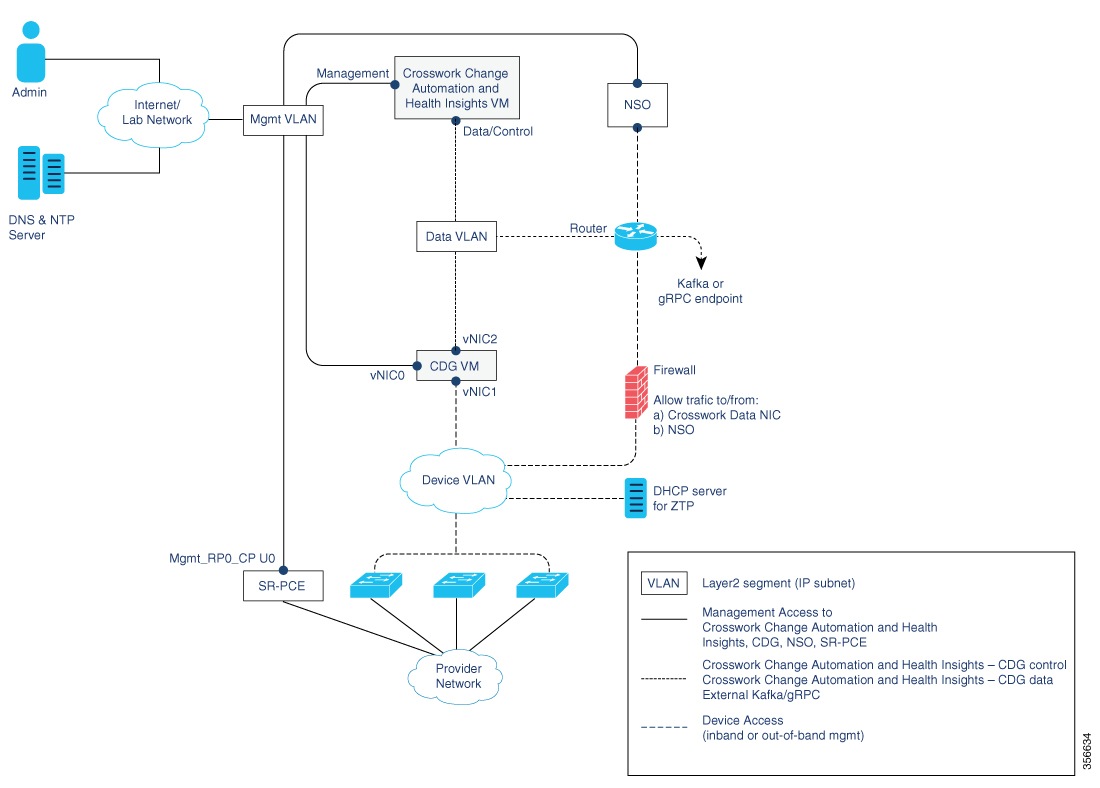

Table 4. Cisco Crosswork Change Automation and Health Insights VM Requirements

Requirement

Description

Hypervisor and vCenter

  • VMware vCenter Server 6.7 Update 3g or later (ESXi 6.7 Update 1 installed on hosts).

  • VMware vCenter Server 6.5 Update 2d or later (ESXi 6.5 Update 2 installed on hosts)

Memory

96 GB

Storage

Storage requirements vary based on factors such as the number of devices being supported , the amount of KPI data being collected, and the type of deployment selected.

Due to their performance, solid state drives (SSD) are preferred over traditional hard disk drives (HDD). If you are using HDD, the minimum speed should be 10,000 RPM.

For demonstration and lab environments, we recommend the thin provision format because it requires the least amount of storage on the host machine. This deployment configuration uses roughly 23 GB of storage. For live systems, we recommend the Thick provision eager zeroed format that allocates 1 TB of storage by default. This should be sufficient for most customer use cases.

For more information, see the volume requirements displayed in the VMware GUI when configuring disk space, as shown in Install Cisco Crosswork Change Automation and Health Insights using vCenter.

vCPU

16 vCPUs

Network Connections

For live deployments, we recommend that you use dual interfaces, one for the Management network and one for the Data network, between Cisco Crosswork Change Automation and Health Insights and Cisco Crosswork Data Gateway.

For demos and lab deployments, you can choose between using a single interface or dual interfaces.

IP Addresses

  • You have a public IP address (IPv4 or IPv6) to assign to the Cisco Crosswork Change Automation and Health Insights VM's Management network. The default gateway must be reachable using this IP address.

    Note 

    It is preferred that the DNS and NTP servers are reachable using the Management network. However, it is not mandatory. The only requirement is that these servers are reachable on one of the networks connected to the server.

  • You have a public or private IP address (IPv4 or IPv6) to assign to the Cisco Crosswork Change Automation and Health Insights VM's Data network. This IP address must be able to reach the gateway address for the network where Cisco Crosswork Data Gateway will be installed.

NTP Servers

The IPv4 or IPv6 addresses or host names of the NTP servers you plan to use. If you want to enter multiple NTP servers, separate them with spaces. These should be the same NTP servers you use to synchronize the Cisco Crosswork Change Automation and Health Insights VM clock, devices, clients, and servers across your network. Confirm that the NTP servers are reachable on the network before attempting installation. The installation will fail if the servers cannot be reached.

DNS Servers

The IPv4 or IPv6 addresses of the DNS servers you plan to use. These should be the same DNS servers you use to resolve host names across your network. Confirm that the DNS servers are reachable on the network before attempting installation. The installation will fail if the servers cannot be reached.

DNS Search Domain

The search domain you want to use with the DNS servers, for example, cisco.com. You can have only one search domain.

Disclaimer

The text of the legal disclaimer displayed to clients accessing the VM using the CLI. Consult your organization's IT or legal department for this content.

Important Notes

  • The VM runs Ubuntu Server 18.04.1 (ubuntu-18.04.1-server).

  • Kubernetes runs within the Cisco Crosswork Change Automation and Health Insights VM and uses Docker for containerization. The number of containers varies as applications are added or deleted.


Note

Dual stack configuration is not supported in Cisco Crosswork Change Automation and Health Insights. Therefore, all addresses for the environment must be either IPv4 or IPv6. Do not attempt to configure both in a single interface.


Platform Support for Telemetry

Cisco Crosswork Change Automation and Health Insights supports model-driven telemetry (MDT) and SNMP protocols on the platforms specified in Table 2.

Table 5. Platform Support Information
OS Platform Software Version1 Collection Protocol MDT Encoding

Cisco IOS-XR

Cisco ASR 9K (ASR 9001, ASR 9004)

6.4.1, 6.5.1, 6.5.2, 6.5.3, 6.6.2

MDT

SNMP

KVGPB/TCP

Cisco NCS 5500

6.4.1, 6.5.3, 6.6.2

Cisco XRV9K

6.5.1, 6.5.2, 6.5.3, 6.6.2

Cisco NCS 6000

6.4.1, 6.4.2

Cisco NCS 1K (NCS 1004)

7.0.1

Cisco CRS (CRS 1K, CRS 3K)

6.4.2

Cisco IOS-XE

Cisco CSR 1Kv

16.10

SNMP

NA

Cisco ASR 1K (ASR 1006)

16.9.2, 16.10

Cisco NX-OS

Cisco Nexus 9K

7.0(3).7(2)

NA

Cisco Nexus 7K

8.4(1).SK(1)

1 Includes any later version that is backward-compatible with the 6.2.1 (device-native) or 6.1.4 XR YANG model, as appropriate. Before attempting to deploy with a particular later version, check for compatibility with your Cisco Customer Experience team.

Note

The platform support information is provided with the assumption that you plan to stream telemetry in-band with other traffic. If you want to stream telemetry using a separate management VRF, you must use Cisco IOS XR version 6.4.1 or later.

Cisco Crosswork Data Gateway Compatibility

Software

Version

Cisco Crosswork Data Gateway

1.1.3

Supported Web Browsers

This version of Cisco Crosswork Change Automation and Health Insights supports the web browsers shown in Table 4.

The recommended display resolution: 1600 x 900 pixels or higher (minimum: 1366 x 768).

Table 7. Supported Web Browsers
Browser Version

Google Chrome

70 or later

Mozilla Firefox

70 or later

In addition to using a supported browser, all client desktops accessing geographical map information in the Cisco Crosswork Change Automation and Health Insights topology maps must be able to reach the mapbox.com map data URL directly, using the standard HTTPS port 443. Similar guidance may apply if you choose a different map data provider, as explained in "Configure Geographical Map Settings" in the Cisco Crosswork Change Automation and Health Insights User Guide.

Ports Used

As a general policy, ports that are not needed should be disabled. To view a list of all the open listening ports, log in as a Linux CLI admin user and run the netstat -aln command.

Table 4 lists the external ports that are open on the Cisco Crosswork Change Automation and Health Insights VM.

Table 8. External Ports Open on the VM
Port Protocol Usage

22

TCP

Remote SSH traffic

323

UDP

Network Time Protocol (NTP) listener

30603

TCP

User interface (NGINX server listens for secure connections on port 443)

30607

TCP

To collect vitals from and download images to Cisco Crosswork Data Gateway

30649

TCP

To setup and monitor Cisco Crosswork Data Gateway collection status.

30993

TCP

Cisco Crosswork Data Gateway sends the collected data to Crosswork Kafka destination.

30604

TCP

used for Zero Touch Provisioning (ZTP) on the NGINX server.

Table 5 lists the destination ports on external devices that may be protected by a firewall. Cisco Crosswork Change Automation and Health Insights uses these ports to connect to network devices. You must open the required ports to allow Cisco Crosswork Change Automation and Health Insights to connect to these devices.

Table 9. Destination Ports Used by Cisco Crosswork Change Automation and Health Insights
Port Protocol Usage

7

TCP/UDP

Discover endpoints using ICMP

22

TCP

Initiate SSH connections with managed devices

53

TCP/UDP

Connect to DNS

123

UDP

Network Time Protocol (NTP)

830

TCP

Initiate NETCONF

Cisco Crosswork Data Gateway Installation Requirements

This section provides information about the general guidelines and minimum requirements for installing Cisco Crosswork Data Gateway.

This section contains the following topics:

Virtual Machine (VM) Requirements

You can deploy Cisco Crosswork Data Gateway as a VM on a host that meets the following minimum requirements:

Table 10. Cisco Crosswork Data Gateway VM requirements

Requirement

Description

Hypervisor

  • VMware vCenter Server 6.7 Update 3g or later (ESXi 6.7 Update 1 installed on hosts)

  • VMware vCenter Server 6.5 Update 2d or later (ESXi 6.5 Update 2 installed on hosts)

Memory

32 GB

Disk space

50 GB

vCPU

8 vCPUs

Interfaces

Minimum: 1

Maximum: 3

Cisco Crosswork Data Gateway 1.1.3 can be deployed with either 1, 2, or 3 interfaces as per the combinations below:

Combination #

vNIC0

vNIC1

vNIC2

1
  • Management Traffic

  • Device Access Traffic

  • Control/Data Traffic

2
  • Management Traffic

  • Device Access Traffic

  • Control/Data Traffic

3
  • Management Traffic

  • Device Access Traffic

  • Control/Data Traffic

  • Management traffic: for accessing the UIs and command line and passing Control/Data information between servers (for example, Cisco Crosswork Change Automation and Health Insights to Cisco Crosswork Data Gateway or NSO).

  • Device access traffic: for device configuration and management (NSO or Cisco Crosswork Change Automation and Health Insights to the devices as a result of KPI configuration or playbook execution) and telemetry data being forwarded to the Cisco Crosswork Data Gateway.

  • Control/Data traffic: for data and configuration transfer between Cisco Crosswork Data Gateway and Cisco Crosswork Change Automation and Health Insights and other data destinations.

IP Addresses

1, 2, or 3 IPv4/IPv6 addresses based on the number of interfaces you choose to use.

Note 

Crosswork does not support dual stack configurations. Therefore, ALL addresses for the environment must be either IPv4 or IPv6.

NTP Servers

The IPv4/IPv6 addresses or host names of the NTP servers you plan to use. If you want to enter multiple NTP servers, separate them with spaces. These should be the same NTP servers you use to synchronize devices, clients, and servers across your network. Confirm that the NTP IP address or host name is reachable on the network or installation will fail.

Also, the ESXi hosts that will run the Cisco Crosswork Change Automation and Health Insights and Cisco Crosswork Data Gateway VM must have NTP configured, or the initial handshake may fail with "certificate not valid" errors.

DNS Servers

The IPv4/IPv6 addresses of the DNS servers you plan to use. These should be the same DNS servers you use to resolve host names across your network.

DNS Search Domain

The search domain you want to use with the DNS servers (for example, cisco.com). You can only have one search domain.

Destination Networks

For live deployments, we recommend one virtual switch for the Data Network (connection between the Cisco Crosswork Change Automation and Health Insights VM and the Cisco Crosswork Data Gateway VM) and second virtual switch for all the management traffic (vms to dns, ntp and the network you will use to access and manage the applications).


Note

The VM runs Ubuntu Server 18.04.3 (ubuntu-18.04.3-server).


Tested Cisco Operating Systems

Table 7 lists the software versions on which Cisco Crosswork Data Gateway 1.1.3 was tested. Cisco Crosswork Data Gateway allows you to expand device coverage by means of custom packages. See the section "Manage Custom Software Packages" in the Cisco Crosswork Change Automation and Health Insights 3.2.2 User Guide for information on how to expand the device coverage.

Table 11. Tested IOS and NX-OS Versions
OS Software Version Collection Protocols MDT Encoding
Cisco IOS-XR*

6.4.1, 6.4.2, 6.5.1, 6.5.2, 6.5.3, 6.6.2, 6.6.3, 7.0.1

MDT2

CLI

SNMP

KVGPB, TCP
Cisco IOS-XE

16.9.2, 16.10, 17.1.1

SNMP

CLI

Cisco NX-OS

7.0(3).7(2), 8.4(0).SK(1)

2 For MDT configuration via NSO on IOS-XR, use NSO XR NED 7.18.3 or 7.21.

Note

All collection types support IPv4 and IPv6. For IPv4, IPv6, day-zero configurations, and limitations for different device platforms, contact your network administrator and refer to the corresponding platform configuration guide.


Ports Used

As a general policy, ports that are not needed should be disabled.

Tables 8, 9 and 10 show the minimum set of ports needed for Cisco Crosswork Data Gateway to operate correctly.


Note

SCP port can be tuned.


Table 12. Ports to be Opened for Management Traffic

Port

Protocol

Used for...

Direction

22

TCP

SSH server

Inbound

22

TCP

SCP client

Outbound

123

UDP

NTP Client

Outbound

53

UDP

DNS Client

Outbound

30607

TCP

Crosswork Controller

Outbound

Table 13. Ports to be Opened for Control/Data Traffic

Port

Protocol

Used for...

Direction

161

UDP

SNMP Collector

Inbound

1062

UDP

SNMP Trap Collector

Inbound

9010

TCP

MDT Collector

Inbound

22

TCP

CLI Collector

Outbound

Table 14. Ports to be Opened for Device Access Traffic

Port

Protocol

Used for...

Direction

30649

TCP

Crosswork Controller

Outbound

30993

TCP

Crosswork Kafka

Outbound

Site Specific

Site Specific

Kafka and gRPC Destination

Outbound