Cisco Crosswork Hierarchical Controller 10.0 Release Notes
Available Languages
Bias-Free Language
The documentation set for this product strives to use bias-free language. For the purposes of this documentation set, bias-free is defined as language that does not imply discrimination based on age, disability, gender, racial identity, ethnic identity, sexual orientation, socioeconomic status, and intersectionality. Exceptions may be present in the documentation due to language that is hardcoded in the user interfaces of the product software, language used based on RFP documentation, or language that is used by a referenced third-party product. Learn more about how Cisco is using Inclusive Language.
- US/Canada 800-553-2447
- Worldwide Support Phone Numbers
- All Tools
 Feedback
 Feedback
Cisco Crosswork Hierarchical Controller version 10.0 includes new functions and enhancements, as well as bug fixes.
Geo Redundancy Support
This release introduces the geo redundancy solution for Crosswork Hierarchical Controller and its components in case of a region or data center failure.
For geo-redundancy, a supercluster may be deployed in a 1+1+1 scenario, which includes:
● active single-node cluster
● standby single-node cluster
● single witness (arbitrator) node
For more information, see the Cisco Crosswork Hierarchical Controller Installation Guide.
The Service Attachment Points (SAP) API provides information on the L2 and L3 network topology including the following service-types:
● L3 VPN: ietf-vpn-common:l3vpn
● E-LINE: ietf-vpn-common:vpws
● L2 VPN (vpls): ietf-vpn-common:vpls
● L2 VPN (evpn): ietf-vpn-common:vpws-evpn
Use the API to get a list of all SAP items tagged as L2VPN or L3VPN in the Model Settings application. You can specify how many routers to return and from which router guid onwards to list the SAPs.
The APIs include:
● Get Help
● Get SAPS
Note: The SAP API requires you to tag the device interface objects in the Model Settings application.
For more details, see the Cisco Crosswork Hierarchical Controller NBI and SHQL Reference Guide.
Status Change Notification Messages API
Crosswork Hierarchical Controller generates notification messages for various types of events:
● Service Assurance:
◦ Service UNIs admin/oper status change
◦ Service health status change
◦ Service deployment status change
● Model Changes:
◦ Link admin/oper status change
Table 1. Supported Service Types
| Service Type |
Model Port Subtype |
| OTN |
ODU |
| SDH |
STM/OC/STS |
| E-Line |
ETH for Circuit E-Line |
| E-Line |
Crosswork Hierarchical Controller UNI/VUNI for Packet E-Line |
| L2VPN |
Crosswork Hierarchical Controller UNI/VUNI |
| L3VPN |
Crosswork Hierarchical Controller UNI/VUNI |
The APIs include:
● Get Change ID
● Register to Notification Streams
● Listen to Notifications
● Retrieve Service Change Events
● Retrieve Model Change Events
● Get Data Dump
For more details, see the Cisco Crosswork Hierarchical Controller NBI and SHQL Reference Guide.
PCE API
Crosswork Hierarchical Controller provides an API for calculating the path(s) for a Packet E-Line (PCE) service.
Use the Path Request API to calculate the specified number of paths for a Packet E-Line service between the source and destination ports. The API optimizes the paths based on the number of hops. Optionally, specify ports and links to exclude from the path. The API body accepts JSON payloads.
For more details, see the Cisco Crosswork Hierarchical Controller NBI and SHQL Reference Guide.
Service Manager API Updates
Endpoints were added to update Circuit E-Line, OTN Line, and Packet E-Line services.
For more details, see the Cisco Crosswork Hierarchical Controller NBI and SHQL Reference Guide.
OTN Switches over WDM - OTU Cross Links
Cisco Crosswork Hierarchical Controller now supports OTN switches running over a WDM transport network. As the OTN→OCH transponders are not covered by the OTN switch controller, an independent OTU cross link definition with path stitching is required. This OTU cross link connects the ODU trunk (bottom of the OTN domain) to the connectivity service on the WDM domain.
The top port of the cross link should be a terminated port, while the bottom is non-terminated. Non-terminated in this context means the connection is simply a "pipe", that is, acts as a transport layer to the upper connection (instead of a handoff of services between two domains).
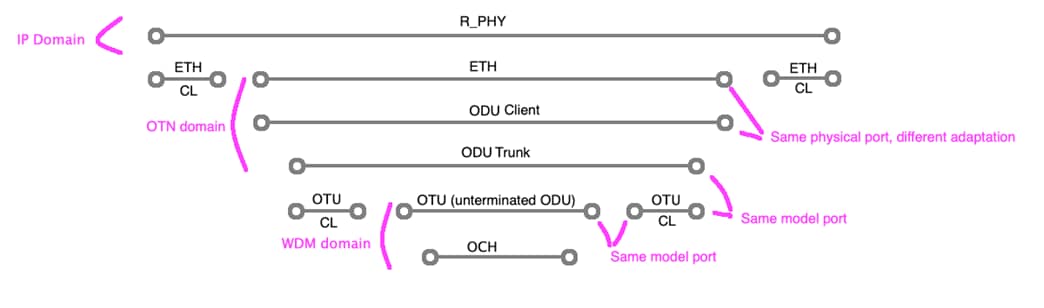
OTN Switches over WDM – OTU Cross Link
To support this scenario, you must:
● Install an adapter that discovers the OTN domain, for example, the Ciena MCP adapter.
● Install an adapter that discovers the WDM domain, for example, the Cisco EPNM adapter.
● In Link Manager, create an OTU cross link connecting the two required OTU ports.
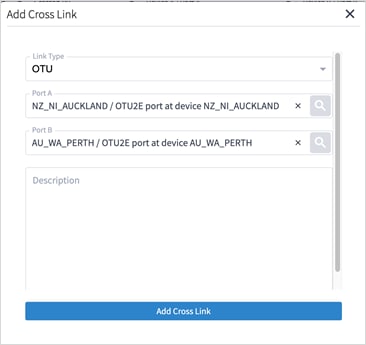
Link Manager – OTU Cross Link
Network Inventory – Source Port and Destination Port
For all Links (except Fiber and SR Segment), Source Port and Destination Port columns were added.
Note: For IGP links, the Source Port and Destination Port columns already existed in v9.0, and the Source Address and Destination Address columns which were redundant have been deprecated in v10.0.
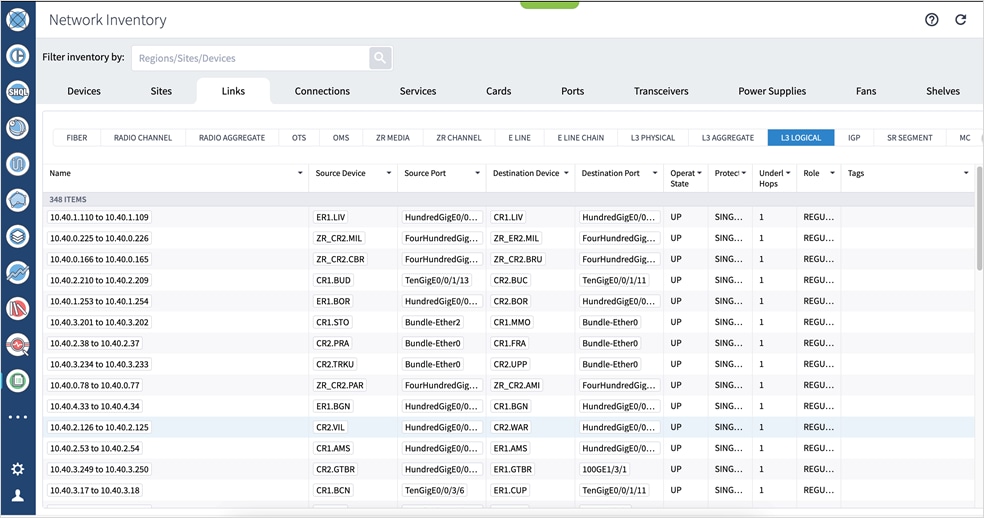
Network Inventory – Links – Source Port and Destination Port
Network Inventory – Services – RSVP Tunnel and SDH Line
Network inventory tables were added for RSVP Tunnel and SDH Line services.
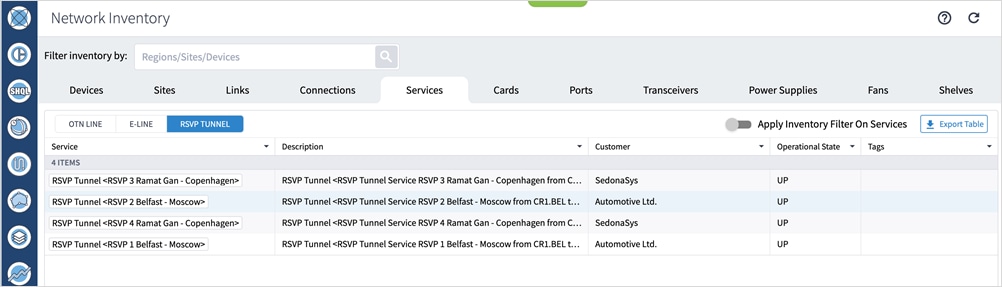
Network Inventory – Services – RSVP Tunnel
Network Inventory – Ports – OTU
An OTU Type column was added to the OTU ports table.
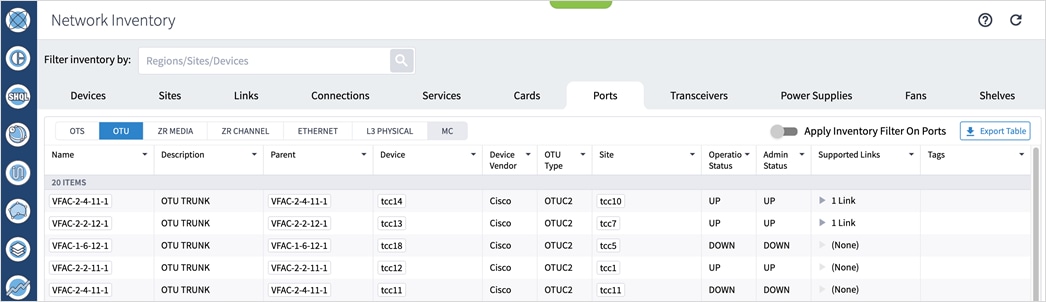
Network Inventory – OTU Ports – OTU Type
3D Explorer - History
For all types of objects, a History tab was added to the sidebar with the last 20 events for the selected element.
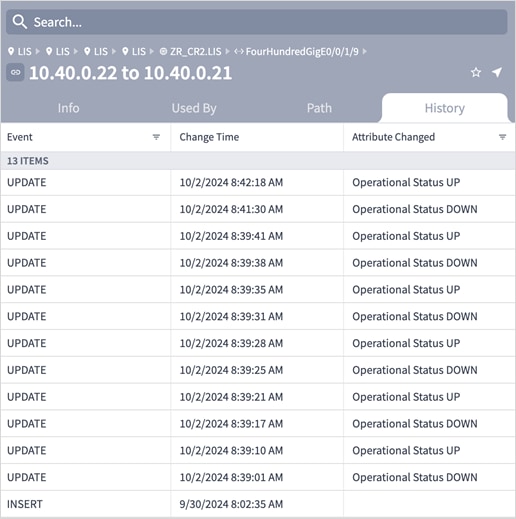
3D Explorer – History
You can filter by event type in the History tab, for example, Operational Status UP or Operational Status DOWN.
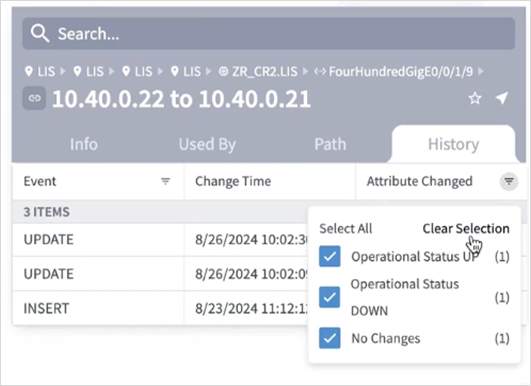
3D Explorer – History – Filter
3D Explorer – Optical Ports Performance
For OTS, OMS, OCH, and NMC optical ports, a performance graph was added for the last 24 hours showing TX Power and RX Power.
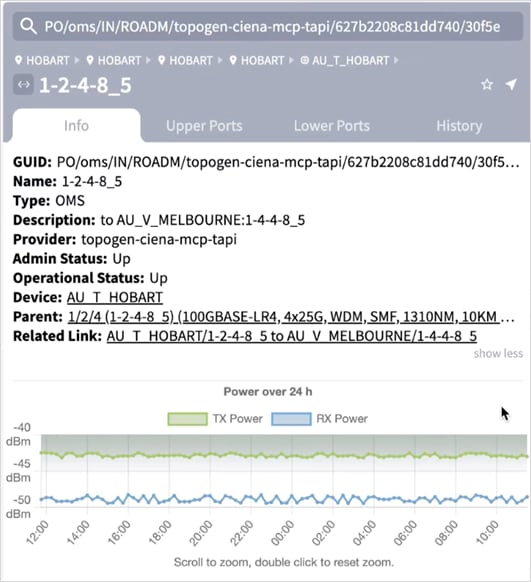
3D Explorer – Optical Ports – TX Power/RX Power
For ZR Media and OTU optical ports, a performance graph was added for the last 24 hours showing Pre FEC BER, Post FEC BER, Q Factor, and Q Margin.
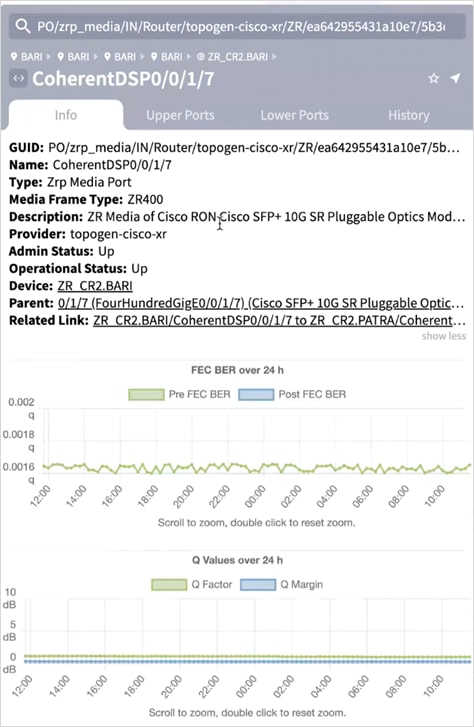
3D Explorer – Optical Ports – Pre FEC BER, Post FEC BER, Q Factor, and Q Margin
3D Explorer – Number of Sites
For services, the Info tab includes the Number of Sites.

3D Explorer – Services – Number of Sites
3D Explorer – Used By – Links and Services
For links and ports, the Used By tab now has two chips: Links and Services. For point-to-point services the Services chip lists the services using the selected link or port, and for multi-point services it lists the VPN tunnels using the selected link or port.
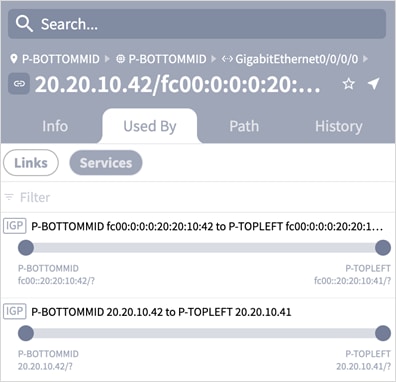
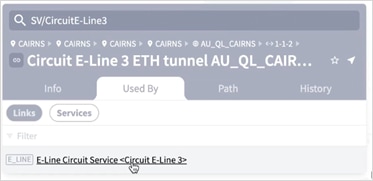
3D Explorer – Used By – Links and Services
Network Vulnerability
The Crosswork Hierarchical Controller Network Vulnerability application checks for router segmentation in the event of any combination of L1-3 device/link failures. The testing can be executed for current conditions, as well as for simulated failures (single and dual), and identifies very specific failures.
Each failure can be a simulation of a failure for resource types or for specific resources. You can choose whether to test all routers, optical nodes, IP links, and/or optical links, or you can specify a list of up to 20 resources to test by adding their entity names.
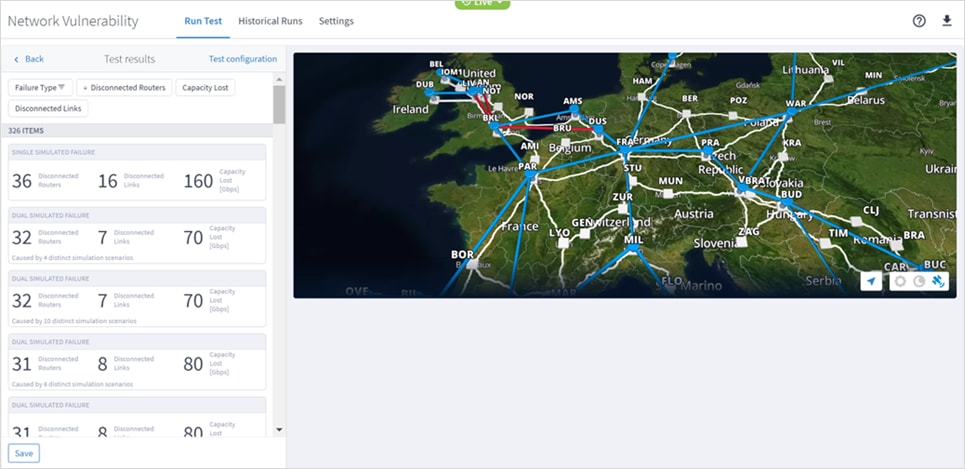
Network Vulnerability
Path Analysis
This application analyses the potential IGP or Ethernet paths between two endpoints. Each path is analyzed and broken down into links, and the cost of each path is calculated. The path-selection decision is based on the minimum cost, where the cost is the:
● Total of the IGP metric values for the IGP links in the path.
● The number of hops for the Ethernet links in the path.
All paths with a similar cost are returned.
You can now add an:
● ETH cross link between two R_PHYSICAL ports.
● OTU cross link between two OTU ports, that is, OTN switches running over a WDM transport network.
Note: Creating an OTU cross link requires the installation of the appropriate two adapters that discover the OTN domain and WDM domain.
Adapter Status in Device Manager
Following on from version 9.0 where adapter status was added for the Cisco EPNM and Cisco CNC adapters, the status is now available for the following adapters:
● Cisco IOS-XR
● Cisco ONC
● Cisco NSO
Edit P2P Services in Service Manager
For Circuit E-Line and OTN Line services, you can edit the ODUFlex Time Slot. The time slot quantity parameter is only available if the Service Capacity is set to ODU FLEX Allocated Slots and the adapter supports this feature.
For Packet E-Line services, you can modify various endpoint and path parameters.
Circuit E-Line Service Enhanced Protection Schemes
In Service Manager, added new protection schemes for Circuit E-Line provisioning with the following additional options:
● Protection 1+ Restoration
● Protection 1+1+Restoration
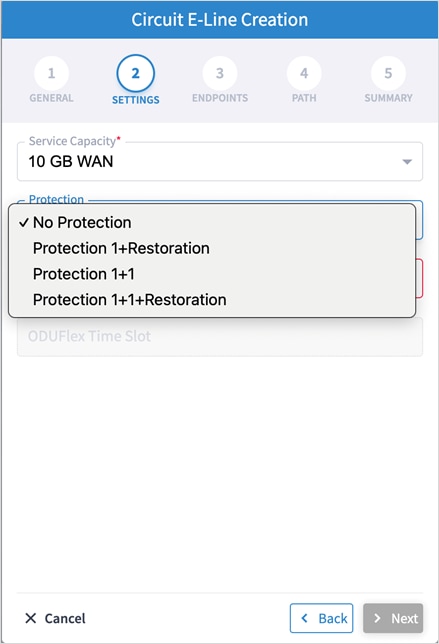
Circuit E-Line Line Creation – Restoration Protection
Support IPv6
Crosswork Hierarchical Controller now supports IPv6. This is phased implementation, and this release supports IPv6 logical topology discovery for ISIS networks. Specifically, this covers single or dual stack topologies (underlay interfaces and IGP links) discovered via the Cisco CNC adapter.
The following are enabled for IPv6:
● Port: IGP, UNI, and L3 VPN
● Links: IGP and L3VPN
● Services: L3 VPN
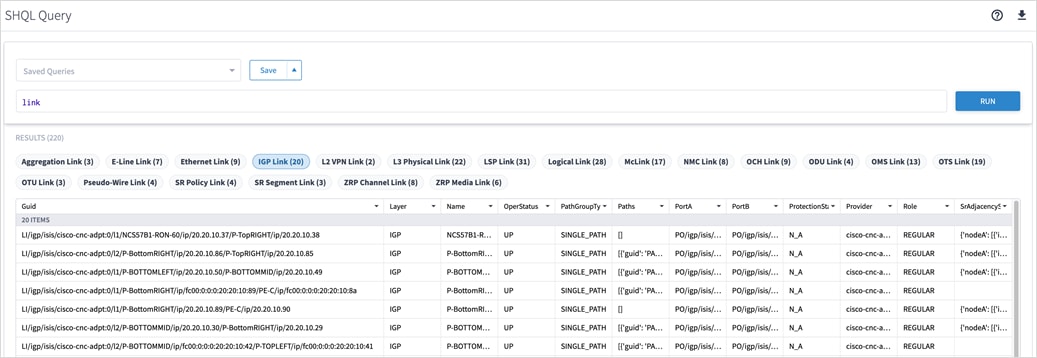
IGP Link - IPv6
SRLG Manager
The SRLG Manager is offered with limited availability and the end-to-end capability of calculating SRLG needs a fiber import procedure that requires Cisco Services Support. This will be implemented via API in a future Crosswork Hierarchical Controller release.
A pre-requisite for SRLG working between Crosswork Hierarchical Controller and EPNM, is that EPNM is properly configured as described in Manage Shared Risk Resource Groups (SRRGs) in the Geo Map section of the EPNM User Guide.
Cisco Crosswork Network Controller Adapter
● CSCwk30338. Adapter starts to sync with network after any change of configuration done by user, even if this change is not related to sync.
● CSCwk30340. When the Full Data Fetch Interval [sec] and Max run time for a single discovery cycle [sec] are configured with the same values, a change notification is not sent to the adapter. No new collection request is triggered, and the Events tab does not show any status changes for this update.
● CSCwm04994: Adapter incorrectly models TE tunnel ports as logical ports.
● CSCwk26535. The Cisco CNC adapter status in Device Manager (which reflects the sync status) is not updated after sync is complete. It takes 20 minutes to be updated.
● CSCwk88434: The Cisco Crosswork Network Controller adapter may fail to discover VPN services in the event of a Cisco Crosswork Network Controller session timeout.
● CSCwk52897: In a scale environment, changing the adapter configuration does not take effect. The adapter remains with the old configuration. Workaround:
1. Disable the specific adapter.
2. Make the necessary configuration changes in the adapter General tab.
3. Enable the adapter and click Save.
4. In the new collection cycle pop up message, select No.
5. Check the Events tab for the collection job details. There should be only one “Adapter Cycle started” event.
3D Explorer
● CSCwd22764. The tooltip map fails to show a manually added cross-link. The site with the cross-link is shown on the map without the pipe between the optical and router layers.
● CSCwk80239: Map popup sometimes briefly shows links that vanish after zooming out.
● CSCwk80241: Initial map popup does not zoom completely on first click but works on subsequent attempts.
● CSCwk68885: Changes to latitude or longitude settings do not take effect immediately.
● SDN-4396. The list of tags in the filter of 3D explorer are currently not displayed in alphabetical order.
Geo Redundancy
● CSCwj31406. No geo redundancy support for Cisco Crosswork Hierarchical Controller 9.0. HA in this version is limited to a case where latency between nodes is maximum 10 milliseconds.
● SDN-4016. Usage events for the 3D Explorer application appear with subtype as Frontier.
● CSCwk56610. SHQL queries using \"as\" and \";\" not being accepted .
● SDN-3945. Selecting a site on the map of Sites tab does not work properly in Firefox.
● CSCwk63153. Model settings app displays incorrect locations on the map when selecting sites.
● CSCwk07601. The UI stays in loading mode when the Parent attribute is missing.
● CSCwd36562. On rare occasions, a manual switchover between the main and standby nodes fails with a message that the standby cannot be found.
Network Inventory
● CSCwk69623: Service and connection status in multilayer view does not update automatically.
● CSCwk11778: The Export Table operation in the Network Inventory application frequently fails to save files.
Installation
● In Cisco Crosswork Hierarchical Controller, adding an adapter uses the ‘sedo service install <adapter-service-pack-file>’ command. At times it may be required to run more instances per adapter. In such a case it is required to manually input the DYNAMIC_APP_GUID and make sure it is different than the default. In Cisco Crosswork Hierarchical Controller, there is no validation of the param used, hence there is a potential for the param used to be an illegal param which could lead to adapter not loading properly until removed and re-added correctly. For details on how to manually validate the param, see the Cisco Crosswork Hierarchical Controller Administration Guide.
Upgrading with Embedded NSO
● CSCwm80715. NSO configuration is not persistent after upgrading to Crosswork Hierarchical Controller v10. For NSO, complete the following procedure while upgrading:
1. Create a backup of NSO using the command on the source version:
sedo nso backup create
Verify that a new backup was created and exported.
For example: ncs-6.1.6@2024-12-12T10:43:52.backup.gz
2. Upgrade Crosswork Hierarchical Controller to v10.
3. Before restoring NSO, modify the backup file name to match the current NSO version. For example:
mv ncs-6.1.6@2024-12-12T10:43:52.backup.gz ncs-6.1.11.2@2024-12-11T11_34_54.backup.gz
4. Copy the renamed file to the pod using the command:
kubectl cp ncs-6.1.11.2@2024-12-11T11_34_54.backup.gz hco/nso-manager-srv-0:/nso/run/backups/
5. Restore NSO using the command:
sedo nso backup restore ncs-6.1.11.2@2024-12-11T11_34_54.backup.gz
6. Verify that NSO was restored successfully (using sedo logs) and wait for NSO to reload.
7. For devices, login to the NSO pod and create the authgroup.
High Availability
● CSCwn53432. Embedded NSO HA is disabled after switchover in a supercluster configuration. Workaround: Re-enable the HA config on Embedded NSO on the standby cluster:
sedo shell <zone-a/zone-b>/nso-manager-srv
request high-availability enable
request high-availability be-secondary-to node <cluster_id>
● CSCwk49932. Using the Export to File option in the Network Inventory app may take time when it comes to large tables. The generation of the file may take 20 minutes and more without a progress bar to let user know of the status.
● CSCwk49782. Changing the logging level of Brain not taking effect.
● CSCwn35964. WSON Circuit name not updated in case of modification name in Cisco Crosswork Hierarchical Controller. Workaround: Full polling.
● SDN-3244. For a device with multiple shelves, the device attributes displayed are those of the first shelf. Attributes of other shelves are not displayed.
● CSCwn09136. For RON assurance on EPNM, cannot see optical stats on NMC ports of an IP link.
● CSCwm91843. restconf-notification-srv. A number format exception is thrown when providing invalid values.
● CSCwn20985. RON assurance. For IP link creation, an IP address (this may be a dummy IP address) must be provided.
● FRB-57. Currently, only links on the main path of a selected prime object are displayed. The related objects used in the protection path of the prime objects are not displayed (for example, when showing all L3 links over OMS, the displayed L3 links are only those over the main path of the OMS).
● CSCwn32684. Violations are not displayed in the Delta Report tab after a provisioning failure.
● CSCwn40822. After switchover the Delta Report under Risks tab hangs.
● CSCwn36417. SRLG provisioning fails after the resource pool is full. Workaround: enlarge the pool size or free existing slots.
3D Explorer
● CSCwm66756. The History tab has no record for IGP layer link changes.
● CSCwj78397. When user searchers in the 3D Explorer, there is no way to close the sidebar by clicking on the map. Sidebar will remain open.
● FLD-617. An OCH link between two ZR pluggables is displayed in metro view but its wavelength number is not displayed as a label on the link. Such label appears for other OCH links between transponders.
● FLD-603. Filter map by tags does not work properly when the network model contains fiber paths.
● SDN-4684. The satellite view option in 3D map only works when the client machine has an internet connection. The satellite view button is still enabled even when no internet connection is detected.
● SDN-4221. Service ports that appear under Ports in the sidebar for a selected service may show inconsistent association with a link. A link can sometimes be the service or the PW.
● CSCwd65311. The ZR channel and media ports are not displayed in the Ports tab for selected router in the sidebar.
● CSCwf10902. The filter on the “Type” column in the Failure Impact test result does not work properly. It does not filter the table by the resource type.
● CSCwk09122. The API to get the device status using the REST APIs for Device Manager doesn't work properly and throws an error.
● CSCwk85913. Cached data prevents Device Manager from displaying adapters after tab refresh or user login.
● Application currently does not support adding router-to-router links.
● CSCwe64457. If the last cross-link in the table is deleted, then it is wrongly added to the table although it was removed by the user.
● The Reachability column for devices is displayed in Device Manager or in 3D explorer when selecting the device. This is due to an improper and misleading report on reachability per device when managed by SDN controllers.
● CSCwf33767. Under the network inventory app for connections and path in the Explorer app, you can't see the wavelength column being populated for OCH.
● Creation of SDH line service is part of the release content, however it was not tested properly with an Optical Controller. Hence its quality and proper functioning cannot be guaranteed.
● CSCwj19933. NSO Manager. The Transport Mode sent in VPWS service request is not pushed to Cisco Crosswork Network Controller as Cisco Crosswork Network Controller does not handle this parameter.
● CSCwj93481. Service Manager REST APIs can be used only with Admin user credentials.
Cisco Crosswork Network Controller Adapter
● CSCwj08637. Different APIs used for integration have different pagination size defined. Polling of network info from Cisco Crosswork Network Controller may face some slowness due to issues in pagination of response.
● CSCwj08306. Polling of network info from Cisco Crosswork Network Controller may face some slowness due to issues in pagination of response.
● CSCwj40068. On some occasions, L3VPN services discovered from Cisco Crosswork Network Controller based on notifications and frequent polling, may have some of the service endpoints missing. The full list of service endpoints for all services is synced once in 24 hours.
● CSCwj38618. Service Assurance: Service Health parameter is not discovered from Cisco Crosswork Network Controller for LxVPN services.
● CSCwk89105. If there are more than one L3VPN wrongly configured on the same interface, the discovery of L3VPN services in Cisco Crosswork Hierarchical Controller may be impacted and no services will be discovered.
Cisco ONC Adapter
● CSCwk07350. Some Add/Drop ports are discovered and modeled by Crosswork Hierarchical Controller but are not displayed in the Network Inventory ports table.
● CSCwj24829. NSO Manager. LxVPN services provisioned to Cisco Crosswork Network Controller get the route target values automatically from Cisco Crosswork Network Controller, the values included in service intent are ignored.
● SDN-3440. When querying for an inventory item, the children references are missing. Need to use the “downward” command as transformation to object/s children.
● FLD-214. System or user-driven events can be viewed using the SHQL command ‘event’ in SHQL app. The application is currently limited and cannot display more than a few thousand events in a single view. Hence it is recommended to filter the view by event type, sub type, or object guid.
● FLD-382. The sidebar window in the 3D explorer shows a visual view of aggregated links (LAG) and IP logical links. This view is disabled by default. To enable it, please contact your Cisco support team.
● SDN-3867. The View option in SHQL does not allow setting a column name with spaces.
● CSCwf42365. Make sure that the size of the imported GeoJSON file with sites info does not exceed 20Mb. For a larger file, it is recommended to split the file into multiple files.
● CSCwc80510. The new filter in the Network Inventory application allows for filtering the inventory resources by a site or device. The Model Selector allows for selecting other resource type as filters. This should be avoided. Only sites and devices can be used as filters.
● CSCwd09835. REST APIs exposed by Link Manager application can be used only by the admin user.
● CSCwd96670. It is recommended to use sedo commands to enable or disable an adapter. Doing it from the Device Manager application would work but the wrong status may be shown, and the container will still be running although the adapter will be paused.
● Services Manager. Note that the Packet E-Line wizard works for this service in an optical network, under MPLS-TP tunnel. The menu to create Packet E-Line as T-LDP PW over an IP network is supported in the link referring to the NSO page.
● CSCwe71587. When restarting an application using the sedo command (‘sedo system restart’), it is recommended to disable and then enable all apps, so that the restarted app will be launched immediately. Use ‘sedo apps disable all’; wait 10 seconds, then run ‘sedo apps enable all’.
Crosswork Hierarchical Controller 9.0 comes with a list of network adapters that are updated to work with this version. Adapters are also released independently of the Crosswork Hierarchical Controller version.
Note: Not all adapters are generally available (GA). Some are available for specific customers but not as GA, and hence, need BU involvement before use.
Note: Third-party adapters have their own documentation and are not part of the Crosswork Hierarchical Controller 9.0 release documentation.
Table 2. Adapters
| Vendor |
Protocol/Product |
Availability |
Version |
Content and Use Cases |
| Cisco |
Cisco Crosswork Network Controller (CNC) |
GA |
6.0 |
General use case (no RON): Inventory: Physical and logical, L2 topology, IGP, SR, LxVPN Topology: ETH and IGP Discovery: LxVPN services Provisioning: LxVPN services Assurance: ETH (with CDG) |
| Cisco |
CDG |
GA |
|
Works in conjunction with Cisco CNC to collect and stream PM stats from devices to Crosswork Hierarchical Controller. |
| Cisco |
EPNM |
GA |
6.1.1 7.1 |
Discovery: Full inventory and optical topology discovery over NCS 1, 2, 4K. OTS, OMS, MC NMC, OCH, OTU, ODU Links between ROADMs and Amplifiers. OCH-NC (Wavelength) between ROADM services. Full IP inventory, topology, IGP-ISIS, RSVP-TE |
● VMware vSphere server and client version 7.0.3
● High Availability, version 9.0, requires a latency of P95 15ms between nodes.
● The three VMs for HA can run on any single or multiple ESXi hosts. In case of multiple ESXi hosts, 10 Gbps is required for connecting each host. The control plane network is also associated with the same 10 Gbps interface and a 10 Gbps communication channel between the hosts is required.
Crosswork Hierarchical Controller 7.1 can be upgraded to version 8.0. Version 8.0 can be upgraded to version 9.0.
Hardware Requirements
Primary, Secondary or Standalone Nodes
This spec is for nodes (active, standby, or standalone instances of Crosswork Hierarchical Controller).
| Hardware |
Requirement |
| CPU |
10 Cores |
| Memory |
96 GB |
| Multiple ESXi hosts |
10 Gbps between hosts |
| Storage |
500 GB SSD to 2 TB (Scale requirement) Note: This is without considering RAID configurations |
| HW Reservation |
80% for CPU and memory |
| NICs |
2 |
This spec is for the witness (arbitrator) instance of Crosswork Hierarchical Controller.
| Hardware |
Requirement |
| CPU |
4 Cores |
| Memory |
32 GB |
| Storage |
200 GB SSD |
| HW Reservation |
80% for CPU and memory |
| NICs |
2 |
| Network Bandwidth |
100 Mbps between the Primary/Secondary and Arbitrator. |
Chrome version 75 or later is recommended.
Client Machine
The PC or MAC used for the web client with Google Chrome must be equipped with GPU. This is mandatory to run the 3D visualization map in Crosswork Hierarchical Controller.
Build Numbers
<>
In this release, all Cisco Crosswork Hierarchical Controller documents are relevant and can be used.
This includes: