WAP100 Product Family
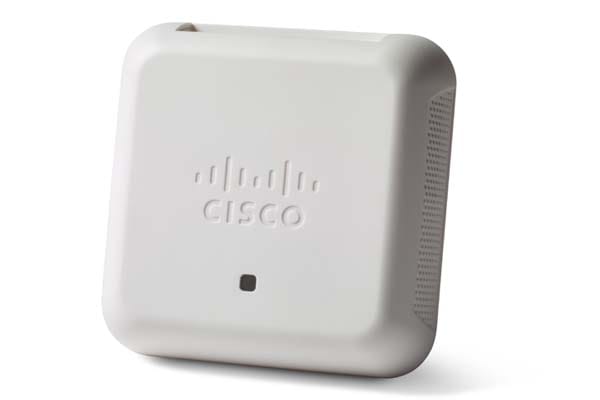
Simplify deployment with affordable Wi-Fi
Get the performance you need with sleek, affordable, easy-to-deploy Cisco Small Business 100 Series Wireless Access Points.
-
Design
-
New to Cisco Business: How to Download and Upgrade Firmware on any Device
-
Associated Client Statistics on the WAP121 and WAP321 Access Points
-
Get to Know the WAP125 Wireless-AC/N Dual Band Desktop Access Point with PoE
-
Frequently Asked Questions About Management Frame Protection (MFP)
-
Get to Know the WAP150 Wireless AC/N Dual Radio Access Point with PoE
-
Getting Started on the WAP125 Wireless-AC/N Dual Band Desktop Access Point with PoE
Install and Upgrade
Configure
-
Reboot and Factory Default Reset on WAP121 and WAP321 Access Points
-
Setup Wizard Configuration on the WAP121 and WAP321 Access Points
-
Configure Guest Web Portal Locale Table on the WAP125 or WAP581
-
Configure Packet Capture to Optimize Performance on a Wireless Access Point
-
Add a Wireless Network to an Existing Wired Network using a Wireless Access Point (WAP)
Maintain and Operate
-
-
Design
Cisco Tech Talk: Discover The New Features on the Cisco WAP125 and WAP581
This video will walk you through the new features on the WAP125 and WAP581 Wireless Access Points. These new features include support for Social Media Login, CloudShark and Umbrella. For additional information, visit the Cisco WAP Product Page: http://cs.co/9001ErSmP.
Cisco Tech Talk: EOS and EOL Announcements for Beginners | Understand Product Lifecycle & Support
In this Cisco Tech Talk, we break down the basics of End of Sale (EOS) and End of Life (EOL) announcements for beginners. Learn how to interpret these important product lifecycle milestones and how they impact your network planning, upgrades, and support decisions.
Cisco Tech Talk: Fast Roaming on WAP125 and WAP581
Fast roaming, also known as IEEE 802.11r or Fast BSS Transition (FT), allows a client device to roam quickly in environments implementing the WPA2 Enterprise security, by ensuring that the client device does not need to re-authenticate to the RADIUS server every time it roams from one access point to another.
Cisco Tech Talk: Tracking Cisco Business EOS/EOL Announcements Easily
In this Cisco Tech Talk, learn how to access and interpret Cisco’s End of Sale (EOS) and End of Life (EOL) announcements for business-class products.
Compare Cisco Business Wireless Primary AP Models | CBW Access Point Buying Guide
In this Cisco Tech Talk, we compare Cisco Business Wireless (CBW) primary access point models to help you choose the right one for your small or medium business.
Understanding IP Addresses on Cisco Business Wireless Primary APs
In this edition of Cisco Tech Talk, we explain the purpose of the two different IP addresses on a Cisco Business Wireless (CBW) Primary Access Point.
Install & Upgrade
How to Upgrade Firmware on the Cisco WAP125 Access Point
In this video, we guide you through the process of upgrading the firmware on the Cisco WAP125 Wireless Access Point. Learn how to ensure your device is running the latest software version for improved performance, security, and feature enhancements.
Configuration
Cisco Tech Talk: Advanced Radio Settings on Wireless Access Points
Instructions on configuring Advanced Radio Settings for smooth communications and optimal performance in Multiple Wireless Access Point Environments. To learn more, visit http://cs.co/nr030818a.
Cisco Tech Talk: Configure a MAC ACL on WAP125-581
Learn how to configure a MAC ACL on a WAP125-581 access point. For more, visit http://cs.co/nr0426a.
Cisco Tech Talk: Configuring a Virtual Access Point on WAP125
Learn how to configure a virtual access point on WAP125 routers. To learn more, visit http://cs.co/6001DP0Z1.
Cisco Tech Talk: Configuring Client Filter Lists on WAP125 and WAP581
Learn how to configure Client Filter Lists on Cisco Wireless Access Points. For additional support information, visit the Cisco Small Business Support Community: http://cs.co/9009DApPv.
Cisco Tech Talk: Configuring Policy Maps on WAP125 and WAP581
Learn how to configure policy maps on Cisco WAP125 and WAP581 Wireless Access Points. For additional support information, visit the Cisco Small Business Support Community: http://cs.co/9009DAEjP.
Cisco Tech Talk:Configuring the Advanced Radio Settings on the WAP125
In this edition of Tech Talks, we’ll show how to configure the Advanced Radio Settings on the WAP125.
Cisco Tech Talk: Configuring Wireless Multicast Forwarding on Cisco WAP125
Learn how to configure wireless multicast forwarding.
Cisco Tech Talk: Configuring Wireless Security Settings on Cisco WAP125
Learn how to configure Wireless Settings on WAP125. This video describes the security settings that can be configured on the WAP device on the Networks page. There are three security settings options to choose from: None, WPA Personal and WPA Enterprise.
Cisco Tech Talk: Enabling Captive Portal on WAP371 Wireless Access Point
Learn how to set up Guest access by enabling Captive Portal on Cisco WAP371 Wireless Access Point. The Captive Portal (CP) feature allows you to block the wireless clients from accessing the network until user verification has been established.
Cisco Tech Talk: How to Use Social Media for Wireless Access Points (WAP)
Cisco Wireless Access points can use third party credentials from social media to authenticate network users. Learn how to set up third party social media authentication here. For additional support visit http://cs.co/9001E5J1S.
Cisco Tech Talk: Setting Up a Wireless Bridge on WAP125
"In this video, we guide you through the process of setting up a wireless bridge on the Cisco WAP125 access point. Learn how to connect two or more networks wirelessly, extending your network's reach without the need for physical cables.
Cisco Tech Talk: Setting up Captive Portal on Cisco Small Business Wireless Access Points
Learn how to set up Captive Portal on Cisco Small Business Wireless Access Points. For additional support information, visit the Cisco Small Business Support Community: http://cs.co/9003ErnFz.
How to Configure CBW RADIUS for AP Login | Secure Your Wireless Network
In this Cisco Tech Talk, learn how to configure RADIUS authentication for Access Point (AP) login on Cisco Business Wireless (CBW) devices. This step-by-step tutorial will guide you through securing your wireless network by ensuring only authorized devices can connect, providing enterprise-grade security.
How to Configure Guest Access Instance Table on Cisco WAP125 Access Point
In this video, we walk you through the process of configuring the Guest Access Instance Table on the Cisco WAP125 access point. Learn how to set up and manage guest networks, providing secure and isolated access for visitors.
How to Configure Guest Web Portal Locale on Cisco WAP125 Access Point
In this video, we demonstrate how to configure the guest web portal locale on the Cisco WAP125 access point. Learn how to customize the language and regional settings for your guest portal, providing a seamless and localized experience for users connecting to your network.
How to Configure WDS on Cisco WAP125 & WAP581 Access Points
In this video, we show you how to configure Wireless Distribution System (WDS) on Cisco WAP125 and WAP581 access points. Learn how WDS can help extend the coverage of your wireless network by allowing access points to wirelessly communicate with each other.
Maintain & Operate
Cisco Business Wireless Primary AP Tools | Manage and Monitor Your Network with Ease
In this Cisco Tech Talk, we explore the built-in tools available on Cisco Business Wireless (CBW) primary access points.
Cisco Tech Talk: Remote AP Packet Capture on Cisco WAP125
Learn how to enable and run access point packet capture on the Cisco WAP125. To learn more, visit http://cs.co/9001DllVb
How to Factory Reset CBW150AX or CBW151AXM Devices | Cisco Business Wireless Reset Guide
In this Cisco Tech Talk, learn how to perform a factory reset on the Cisco Business Wireless 150AX access point (AP) or the 151AXM mesh extender. Whether you’re redeploying, troubleshooting, or wiping credentials, this guide shows you exactly how to reset your device safely and efficiently.
 Feedback