Cisco Catalyst 1200 Series
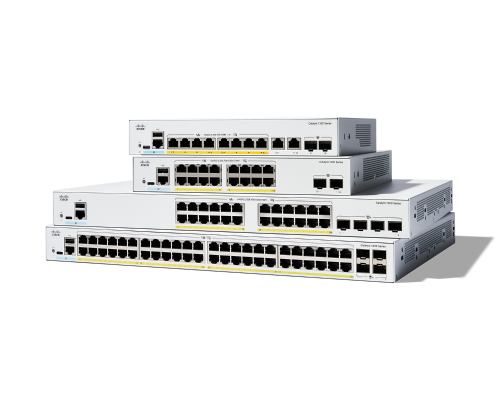
Reliability, security, and affordability continue to be top of mind, while ongoing management and operations add complexity that takes time and resources.The Cisco Catalyst™ 1200 Series Switches are affordable smart switches designed and built for small and medium-sized businesses.
-
Install and Upgrade
Configure
-
Configure Onboard Packet Capture in Catalyst 1200 and 1300 Switches using Web User Interface
-
Intermediate Certificates and Certificate Chain in Catalyst 1200 and 1300 Switches
-
Configure Onboard Packet Capture in Catalyst 1200 and 1300 Switches using CLI
-
Configure Dying Gasp on Catalyst 1300 Switches using the Web User Interface
-
Configure Bluetooth Settings in Catalyst 1200 and 1300 Switches
Maintain and Operate
Troubleshoot and Alerts
-
-
Design
Bluetooth on Cisco Catalyst 1200/1300 Switches (Part 1) | Setup & Management Access
In this Cisco Tech Talk, we introduce Bluetooth functionality on Cisco Catalyst 1200 and 1300 switches. Learn how to pair your mobile device or laptop and use Bluetooth for secure out-of-band switch management and initial setup.
Bluetooth on Catalyst 1200/1300 Switches (Part 2) | Advanced Setup & Troubleshooting
In Part 2 of this Cisco Tech Talk, we take a deeper look at configuring Bluetooth on Catalyst 1200 and 1300 switches. Learn how to troubleshoot connectivity, verify pairing, and use Bluetooth as a secure and convenient out-of-band management interface.
Catalyst 1200 & 1300 Switches (Part 1) | FAQ
In this Cisco Tech Talk, we answer the most common questions about Catalyst 1200 and 1300 Series switches. This FAQ covers product positioning, license requirements, management options, and setup guidance—ideal for new and existing customers.
Catalyst 1200 & 1300 Switches (Part 2) | FAQ
In this Cisco Tech Talk, we continue our FAQ series on the Catalyst 1200 and 1300 switches. In Part 2, we cover advanced topics such as firmware upgrades, remote management, common support questions, and troubleshooting tools.
Cisco Business Switches (CBS) vs Catalyst 1200/1300 Series | Feature Comparison
In this Cisco Tech Talk, we compare the features and performance of Cisco CBS and Catalyst series switches. Learn about the differences between these two powerful switch families, including their capabilities, scalability, and ideal use cases for your network environment.
Cisco Tech Talk: Cisco Business Mobile App Overview
In this edition of Cisco Tech Talk, we’ll give you an overview of the Cisco Business Mobile App, the devices it supports, and its benefits.
Cisco Tech Talk: Power over Ethernet (PoE) for Beginners
Setting up your office with devices like IP phones, wireless access points, and security cameras can get messy with all those cables and power sources. But what if you could simplify it all? In this edition of Cisco Tech Talk, we’ll explain the basics of Power over Ethernet (PoE).
Port Security on Cisco Catalyst 1200/1300 – Part 1 | Introduction & Basic Configuration
"In Part 1 of this Cisco Tech Talk series, get an introduction to port security on Cisco Catalyst 1200 and 1300 Series Switches. Learn what port security is, why it’s important for protecting access at the edge, and how to apply basic configurations that limit unauthorized devices on your network.
Port Security on Cisco Catalyst 1200/1300 – Part 2 | Configure Sticky MAC & Violation Actions
In Part 2 of this Cisco Tech Talk, learn how to configure advanced port security settings on Cisco Catalyst 1200 and 1300 Series Switches.
Install & Upgrade
Catalyst 1200 & 1300 Day Zero Setup via Web UI | Cisco Switch Quick Start Guide
In this Cisco Tech Talk, we walk you through Day Zero setup of Cisco Catalyst 1200 and 1300 switches using the intuitive Web UI. Perfect for beginners, this video shows how to quickly configure IP settings, VLANs, and basic security policies through your browser.
Cisco Tech Talk: How to Upgrade Firmware on Catalyst 1200/1300 Switch via CLI | Firmware Management
In this Cisco Tech Talk, learn how to upgrade the firmware on a Catalyst 1200 or 1300 switch using the CLI. This step-by-step guide ensures that your switch is running the latest firmware, improving performance, security, and stability. Follow along to keep your network infrastructure up to date and running smoothly.
Day Zero Setup for Catalyst 1200 & 1300 via CLI | Cisco Networking for Pros
In this Cisco Tech Talk, we cover how to perform Day Zero configuration of Catalyst 1200 and 1300 switches using the command-line interface (CLI). Ideal for IT professionals, this walkthrough includes IP setup, VLAN config, and securing the switch from the terminal.
How to Upgrade Firmware on Cisco Catalyst 1200/1300 Switches
In this Cisco Tech Talk, we walk you through the process of upgrading the firmware on Cisco Catalyst 1200 and 1300 switches. Learn how to ensure your switches are running the latest firmware to improve performance, security, and reliability.
Provision CBS & Catalyst 1200/1300 Switches with PNP Connect | Streamlined Setup Guide
In this Cisco Tech Talk, learn how to provision Cisco CBS and Catalyst 1200/1300 Series switches using PNP Connect (Plug and Play). This video covers the steps for setting up and configuring your switches automatically, reducing manual effort and speeding up network deployment in SMB environments.
Unboxing Cisco Catalyst 1200 & 1300 Switches | What’s in the Box + Key Specs
In this Cisco Tech Talk, we unbox the Catalyst 1200 and 1300 Series switches and show you what to expect when your hardware arrives. From ports to power supplies, we break down key specs, package contents, and the differences between models to help you prepare for deployment.
Configuration
Cisco Tech Talk: Bandwidth Shaping on Catalyst 1200 and 1300 Switches
In this Cisco Tech Talk, we explore how to configure bandwidth shaping on Cisco Catalyst 1200 and 1300 switches. Learn how to manage and control bandwidth usage, ensuring optimal network performance, prioritizing traffic, and preventing network congestion.
Cisco Tech Talk: Boot Integrity Visibility on Catalyst 1200/1300 Switches
In this Cisco Tech Talk, we explore Boot Integrity Visibility (BIV) on Catalyst 1200 and 1300 switches. Learn how BIV enhances network security by verifying the integrity of boot sequences, ensuring that your network devices are free from unauthorized changes and maintaining a secure environment for your operations.
Cisco Tech Talk: Centralize Management & Enhance Internet Access with a C1200/1300 Switch – Part 1
Is your router struggling with the load of managing your local network traffic? You can offload these tasks to your Cisco Catalyst 1200 or 1300 series switch.
Cisco Tech Talk: Centralize Management & Enhance Internet Access with a C1200/1300 Switch – Part 2
In the second part of our series, we complete the network setup by linking your Catalyst 1200 or 1300 switch to a router for internet access.
Cisco Tech Talk: Cisco Catalyst 1000 and 1300 Voice VLAN Configuration Differences - Part 1
Struggling to set up a voice VLAN on your Cisco Catalyst 1200 or 1300 switches after being familiar with the Catalyst 1000? You’re in the right place!
Cisco Tech Talk: Cisco Catalyst 1000 and 1300 Voice VLAN Configuration Differences - Part 2
Ready to set up voice VLANs on your Cisco Catalyst 1200 or 1300 switches? In this episode of Cisco Tech Talk, we provide a hands-on demonstration of configuring a voice VLAN on Catalyst 1200 and 1300 series switches and highlight the key differences from the Catalyst 1000.
Cisco Tech Talk: Part 2 - Connect CBD Embedded Switch Probe in C1200 and C1300
In this second, of a two-part edition of Cisco Tech Talk, I'll complete the process of connecting the Cisco Business Dashboard (CBD) embedded switch probe on Cisco Catalyst 1200 and 1300 switches.
Cisco Tech Talk: Create VLANs via GUI on Catalyst 1200 or 1300 Switches
Virtual Local Area Networks (VLANs) are a fundamental tool for network organization, allowing you to segment your infrastructure for improved performance and security.
Cisco Tech Talk: Disable Weak Ciphers via CLI on C1200 and C1300 Switches
Securing remote access to your network devices is a fundamental requirement for any robust security strategy. In this episode of Cisco Tech Talk, we demonstrate how to view and fine-tune Secure Shell (SSH) encryption ciphers on your Cisco Catalyst 1200 and 1300 series switches using the Command Line Interface (CLI).
Cisco Tech Talk: How to Configure Dynamic Link Aggregation (LACP) on SB Cisco Catalyst Switches
Is your network experiencing congestion? A Link Aggregation Group (LAG) is an excellent way to combine multiple physical cables into a single logical "super-link," increasing your bandwidth and providing network redundancy.
Cisco Tech Talk: How to Configure SNMPv2x on Cisco Catalyst 1200/1300 Switch - Part 1
Welcome to part 1 of our 2-part Cisco Tech Talk series on configuring Simple Network Management Protocol (SNMPv2c) on Cisco Catalyst 1200 and 1300 switches.
Cisco Tech Talk: How to Configure SNMPv2x on Cisco Catalyst 1200/1300 Switch - Part 2
Welcome to part 2 of our Cisco Tech Talk series on configuring Simple Network Management Protocol (SNMPv2c) on Cisco Catalyst 1200 and 1300 switches.!
Cisco Tech Talk: How to Configure Static Link Aggregation Groups (LAG) on SB Cisco Catalyst Switches
Is your network traffic hitting a bottleneck? When you have multiple switches connected, a single network cable can quickly become a point of congestion.
Cisco Tech Talk: Port-to-VLAN Membership on C1200 & C1300 – Part 1
Organizing your network into VLANs is a fundamental step in building a secure and efficient infrastructure. However, the real work begins when you map your switch ports to those VLANs.
Cisco Tech Talk: Port-to-VLAN Membership on C1200 & C1300 – Part 2
In the second part of our series on VLAN management, we move from interface settings to the final step: mapping your switch ports to your VLANs. Properly assigning ports is the key to ensuring your network design is enforced and your traffic is correctly segmented.
RADIUS and Duo Authentication on Cisco C1200/C1300 Switches – Part 1 | Cisco Tech Talk
In this first part of Cisco Tech Talk, we walk through the process of configuring Radius and Duo multi-factor authentication (MFA) on Cisco C1200 and C1300 switches. Learn how to secure network access, enhance user authentication, and improve overall network security using these powerful tools.
Cisco Tech Talk: Radius & Duo Authentication C1200/C1300 Switch Part 2 | Enhanced Network Security
In this second part of the Cisco Tech Talk series, learn how to configure Radius and Duo authentication on Cisco C1200 and C1300 switches.
Cisco Tech Talk: SNMPv3 via CLI on Cisco Catalyst 1200 and 1300 Switches
Looking to securely monitor and manage your Cisco switches? In this Cisco Tech Talk episode, learn how to configure SNMPv3—the most secure version of Simple Network Management Protocol—on Cisco Catalyst 1200 and 1300 series switches using the Command Line Interface (CLI).
Cisco Tech Talk: Upgrading SNTP Authentication on Catalyst 1200 and 1300 Switches
Accurate and secure time synchronization is a cornerstone of effective network management. Without it, log integrity, compliance audits, and troubleshooting become significantly more difficult.
Configure SNTP on Cisco CBS & Catalyst 1200/1300 Switches | Time Synchronization Setup
"In this Cisco Tech Talk, learn how to configure SNTP (Simple Network Time Protocol) on Cisco CBS and Catalyst 1200/1300 Series Switches.
Configuring Voice VLAN on Catalyst 1200/1300 Switches via CLI | Part 1 - Expert Setup
In this first edition of a two-part Cisco Tech Talk, I'll guide you through the process of configuring Voice VLAN on Cisco Catalyst 1200 and 1300 series switches using the Command Line Interface (CLI).
Configuring Voice VLAN on Catalyst 1200/1300 Switches via CLI | Part 2 - Advanced Setup
In this second part of Cisco Tech Talk, we dive deeper into configuring Voice VLAN on Cisco Catalyst 1200 and 1300 switches using the command-line interface (CLI). Learn advanced configuration steps, troubleshooting tips, and how to ensure optimal voice traffic management for your network.
Create VLANs via CLI on Catalyst 1200 or 1300 Switches
Virtual Local Area Networks (VLANs) are essential for organizing your network, improving security, and streamlining traffic management by grouping devices by function or department.
How to Change the Default Native VLAN on Cisco Catalyst 1200/1300 Switches
In this Cisco Tech Talk, we demonstrate how to change the default native VLAN on Cisco Catalyst 1200 and 1300 switches. Learn the step-by-step process for configuring a new native VLAN to improve network security and traffic management.
How to Configure Access and Trunk Ports on Cisco Catalyst 1200/1300 Switches
In this Cisco Tech Talk, we demonstrate how to configure access and trunk ports on Cisco Catalyst 1200 and 1300 switches. Learn the differences between access and trunk ports, when to use each, and how to properly configure them to ensure optimal network performance.
How to Configure Auto Surveillance VLAN on Cisco Catalyst 1200/1300 Switches
In this Cisco Tech Talk, we demonstrate how to configure Auto Surveillance VLAN (ASV) on Cisco Catalyst 1200/1300 switches. Learn how this powerful feature helps optimize network performance by prioritizing surveillance traffic, ensuring reliable and secure video feeds.
How to Configure Port to VLAN Interface Settings via CLI on Cisco Catalyst 1200/1300 Switches
In this Cisco Tech Talk, we walk you through the process of configuring port to VLAN interface settings using the CLI on Cisco Catalyst 1200/1300 Switches. Learn how to assign ports to specific VLANs and set up VLAN interfaces for efficient network traffic management.
Mastering Advanced Voice QoS on C1200/C1300 Switches | Part 1 - Optimizing Voice Traffic
In this first edition of a two-part Cisco Tech Talk, I’ll show you how to configure advanced Voice QoS settings on Catalyst 1200 and 1300 switches. Learn how to prioritize voice traffic, optimize call quality, and manage network resources for seamless real-time communication.
Mastering Advanced Voice QoS on C1200/C1300 Switches | Part 2 - Enhancing Voice Traffic
In this second part of Cisco Tech Talk, we dive deeper into advanced Voice Quality of Service (QoS) configurations on Cisco C1200 and C1300 switches. Learn how to prioritize voice traffic, improve call quality, and manage network resources efficiently to support real-time communication across your network.
Retrieving Network Information with SNMP on Catalyst 1200/1300 Switches | Part 2
In this second part of Cisco Tech Talk, we dive into the advanced features of Simple Network Management Protocol (SNMP). Learn how to configure SNMP for effective network monitoring, troubleshooting, and management, including the use of SNMP traps and polling for better performance insights.
SSH Public Key Authentication on Cisco Catalyst 1200/1300 | Secure CLI Access Made Simple
In this Cisco Tech Talk, learn how to configure SSH authentication using a public key on Cisco Catalyst 1200 and 1300 Series Switches. Public key authentication strengthens CLI security by eliminating passwords, reducing brute-force risk, and streamlining secure remote access for administrators.
Using Configuration Wizards on Catalyst 1200 & 1300 Switches | Simplifying Network Setup
In this Cisco Tech Talk, we explore the powerful configuration wizards available on Cisco Catalyst 1200 and 1300 switches. Learn how to streamline your network setup with step-by-step wizards, allowing for quick and easy configurations for optimal network performance and management.
Maintain & Operate
Cisco Tech Talk: CBD Connection & Key LED Indicators on Cisco Catalyst C1200 and C1300 Switches
Did you know the tiny LED lights on your Cisco switch can give you instant insight into your network’s health? In this episode of Cisco Tech Talk, learn how to interpret the system LED and other key indicators on Cisco Catalyst 1200 and 1300 switches—especially when managed with Cisco Business Dashboard (CBD).
Cisco Tech Talk: Password Recovery on Cisco Catalyst 1200 and 1300 Switches
In this edition of Cisco Tech Talk, we’ll show you how to perform password recovery and password reset for the Cisco Catalyst 1200 and 1300 series switches.
Cisco Tech Talk: Verify Device Integrity in Cisco Business Dashboard (CBD)
Keep your business network secure and reliable with the Device Integrity feature in Cisco Business Dashboard (CBD). In this Cisco Tech Talk episode, we guide you through verifying the authenticity and health of your Cisco Catalyst 1200 and 1300 series switches.
Essential CLI Commands for Catalyst 1200 & 1300 Switches Part 1 | Cisco Tech Talk
In this first part of our Cisco Tech Talk series, we dive into the most commonly used CLI commands for Catalyst 1200 and 1300 switches. Learn how to navigate and configure your switches efficiently, manage network settings, and troubleshoot common issues using the command-line interface (CLI).
Essential CLI Commands for Catalyst 1200 & 1300 Switches Part 2 | Cisco Tech Talk
In this second part of our Cisco Tech Talk series, we dive into the most commonly used CLI commands for Catalyst 1200 and 1300 switches. Learn how to navigate and configure your switches efficiently, manage network settings, and troubleshoot common issues using the command-line interface (CLI).
Getting to Know Cisco Catalyst 1200 & 1300 Switches | Feature Overview & Use Cases
In this Cisco Tech Talk, we give you a guided tour of the Catalyst 1200 and 1300 Series switches. Learn about key features, hardware options, deployment benefits, and how they support SMB and edge network needs with enterprise-class reliability.
How to Factory Reset Catalyst 1200/1300 Switches via CLI | Step-by-Step Guide
In this Cisco Tech Talk, I’ll guide you through the process of performing a factory reset on Cisco Catalyst 1200 and 1300 switches using the command-line interface (CLI). Learn how to restore your switch to its default settings, clear configurations, and prepare it for a fresh setup or troubleshooting.
How to Reboot or Factory Reset Cisco Catalyst 1200/1300 Switches | Quick Recovery Guide
In this Cisco Tech Talk, we walk you through how to reboot or perform a factory reset on Cisco Catalyst 1200 and 1300 Series switches. Whether you're troubleshooting an issue or preparing a device for redeployment, this video shows you the exact steps to safely reset your switch to default settings.
Understanding System LED Lights on CBS 350 & Catalyst 1200/1300 Switches | Cisco Tech Talk
In this Cisco Tech Talk, learn how to interpret the system LED lights on Cisco CBS 350 and Catalyst 1200/1300 Series Switches. Understanding the status and error indicators of the LED lights is crucial for diagnosing issues and ensuring your switches are operating optimally.
Troubleshooting
Packet Capture on Cisco Catalyst 1200/1300 via CLI | Troubleshoot with Built-in Tools
In this Cisco Tech Talk, learn how to perform onboard packet capture via the command-line interface (CLI) on Cisco Catalyst 1200 and 1300 Series Switches.
Troubleshoot Bootloop Issues on CBS & Catalyst 1200/1300 Switches | Cisco Tech Talk Guide
In this Cisco Tech Talk, learn how to troubleshoot and resolve bootloop issues on Cisco CBS and Catalyst 1200/1300 Series Switches. This video walks you through diagnostic steps, common causes of bootloops, and practical solutions to restore stability to your network switches.
 Feedback