Cisco Catalyst 9000 to Cisco C9000 QoS Migration Guide
Available Languages
Bias-Free Language
The documentation set for this product strives to use bias-free language. For the purposes of this documentation set, bias-free is defined as language that does not imply discrimination based on age, disability, gender, racial identity, ethnic identity, sexual orientation, socioeconomic status, and intersectionality. Exceptions may be present in the documentation due to language that is hardcoded in the user interfaces of the product software, language used based on RFP documentation, or language that is used by a referenced third-party product. Learn more about how Cisco is using Inclusive Language.
- US/Canada 800-553-2447
- Worldwide Support Phone Numbers
- All Tools
 Feedback
 Feedback
Cisco Catalyst 9000 to Cisco C9000 QoS Migration Guide
Queue Buffers and Queue Limits
Hierarchical QoS (HQoS) Conversion
ACL and Classification Guidance
SVI, Port-Channel, and Interface Attachment
Worked Example: Campus 1P7Q3T Policy
Cisco Catalyst 9000 to Cisco C9000 QoS Migration Guide
Migrating QoS configurations from UADP-based Catalyst 9000 switches to Silicon One-based Cisco C9000 switches.
This guide helps network engineers migrate Cisco Catalyst 9000 QoS configurations to Cisco C9000 switches. It focuses on the behavior changes that matter during configuration conversion, especially egress queuing, classification, policing, WRED/WTD, queue buffers, and policy attachment points.
This guide assumes the reader is already familiar with general QoS configurations, as well as the Cisco UADP and Silicon One ASIC architectures on Cisco C9000 Series Smart Switches. Refer References for more information on these topics.
The key migration principle is simple: a Catalyst 9000 QoS policy should be converted by preserving the original traffic intent, not by copying each command directly.
Use this document as a migration planning and configuration-conversion guide. Always validate the final configuration on the exact target software release before production deployment.
The largest Catalyst 9000 to Cisco C9000 QoS change is the move from egress classification-based queue selection to ingress traffic-class-based queue selection.
Queue-selection rule used throughout this guide: On Catalyst 9000, egress queueing can match packet-carried QoS fields that are already present or trusted, such as ToS, DSCP, IP precedence, CoS, or EXP; a separate ingress policy is not always required for those fields. Catalyst 9000 egress queueing can also match internal labels such as qos-group, but those labels must be set earlier, typically by an ingress policy. On Cisco C9000, egress queueing selects queues by matching only on the internal traffic-class field, so migrated queueing designs need a corresponding ingress policy to assign traffic-class before the packet reaches egress queueing.
| QoS area |
Catalyst 9000 behavior |
Cisco C9000 migration behavior |
| Queue selection |
Egress queueing policy can select queues from packet fields, or from internal labels that were set earlier |
Egress queueing policy must match only traffic-class; assign traffic-class before egress |
| Ingress policy requirement |
Not always required for egress queue selection when packet fields are already present or trusted |
Required for migrated user-defined queueing behavior because it assigns traffic-class |
| Egress policy structure |
A single egress policy may combine classification, queue selection, scheduling, and congestion behavior |
Split into ingress classification and policy-map type queueing egress scheduling |
| WRED/WTD |
DSCP/CoS-based queue limits and WTD/WRED can use multiple thresholds per queue |
Use discard-class-based two-threshold behavior for non-priority queues |
| Egress ACL classification |
Supported for normal egress marking policies, but not for egress queueing policies |
Not supported for egress queueing or egress marking; move ACL classification to ingress |
| Policing and shaping |
Egress policing may be present |
Egress policing is not supported; use ingress policing for true policing or egress shaping for bandwidth management |
| Queue buffers |
queue-buffers ratio tunes UADP shared buffer behavior; see Reference 6 |
Use default Cisco C9000 queue limits first, then tune queue-limit if required |
| SVI QoS attachment |
Common in campus configurations |
Redesign for physical or port-channel ingress attachment |
| MAC ACL classification |
Supported in some designs |
Supported starting in release 27.1.1; use alternatives on earlier releases |
The migration is therefore a policy split. The Cisco C9000 egress queueing policy depends on the ingress policy for queue-selection metadata:
1. Ingress policy: classify traffic, set traffic-class for egress queue selection, optionally mark DSCP/CoS/qos-group/discard-class for non-priority WRED queues, and apply ingress policing.
2. Egress queueing policy: match traffic-class and configure priority, bandwidth remaining ratio, shape, queue-limit, and discard-class-based WRED for non-priority queues.
3. Optional egress marking policy: use a separate non-queueing egress policy if post-queue marking is required and supported by the target release.
This section introduces the architectural and configuration differences at a high level. For the detailed migration sequence and explanations behind each conversion step, see Migration Workflow.
Before looking at configuration syntax, it is important to understand where each QoS decision is made. The Catalyst 9000 model can make several queueing decisions in the egress policy itself by matching packet-carried fields or previously assigned internal labels. The Cisco C9000 model expects traffic-class assignment before egress; the egress queueing policy then uses that internal field for VoQ selection, scheduling, and congestion behavior.
| QoS function |
Catalyst 9000 UADP egress-based AFD/WFQ model |
Cisco C9000 Silicon One ingress-based VoQ model |
| Classification point |
Egress queueing can classify by packet-carried QoS fields, or by internal labels that were set earlier. Normal egress marking policies can use ACL-based classification |
Traffic should be classified at ingress before queue selection. Egress queueing must match traffic-class, and egress ACL classification is not supported |
| Internal queue-selection metadata |
Egress class membership can directly imply queue treatment |
traffic-class must be assigned before egress and drives VoQ selection |
| Congestion/drop metadata |
DSCP/CoS queue-limit and WTD/WRED thresholds can be configured per egress queue |
discard-class is assigned before egress and drives discard-class-based WRED behavior for non-priority queues |
| Egress policy role |
A single egress policy may combine classification, queue selection, scheduling, and congestion behavior |
Egress queueing policy should match traffic-class and configure scheduling, shaping, queue-limit, and WRED for non-priority queues |
| Migration effect |
Source policy can often operate as an egress-only queueing policy when it matches already-present packet fields. If it matches internal labels, the earlier marking step must also be considered |
Target policy normally requires a paired ingress traffic-class assignment policy and an egress queueing policy |
Catalyst 9000 UADP Egress-Based AFD/WFQ QoS Model
Catalyst 9000 platforms use a UADP egress-based AFD/WFQ QoS model.
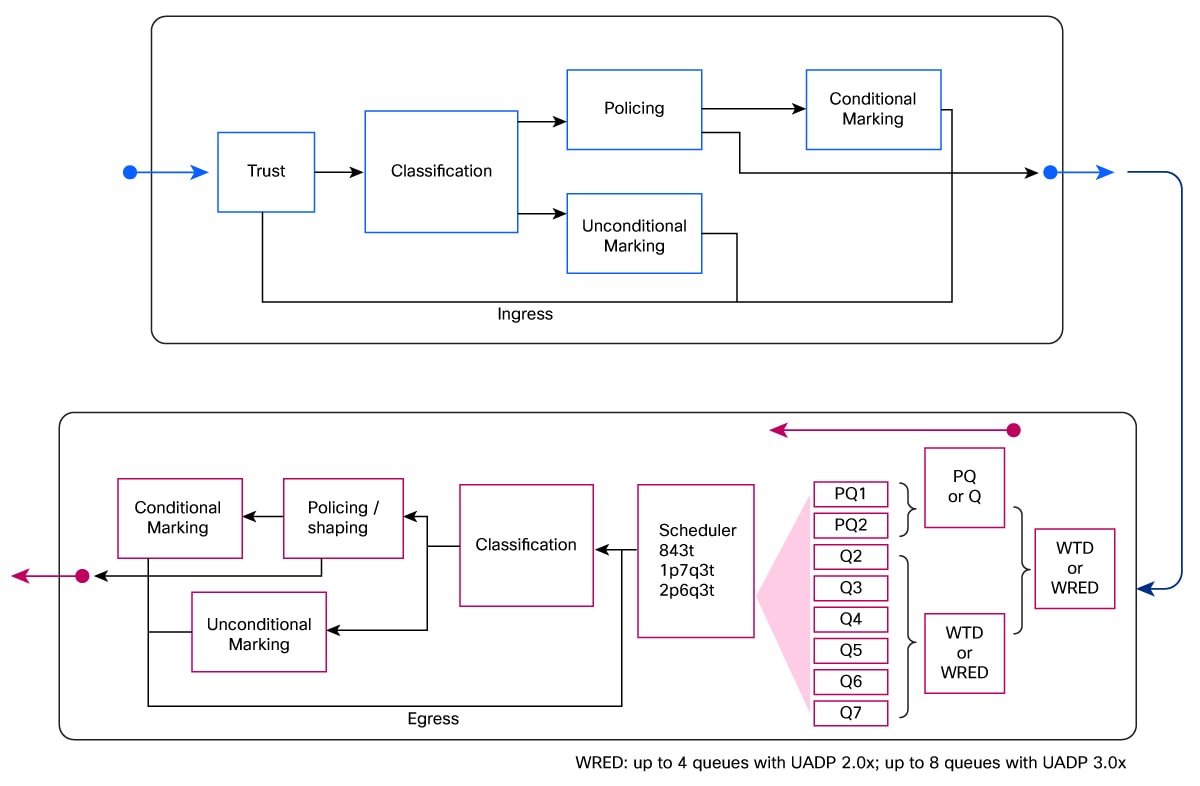
For example, assume a campus deployment has the PM-C9000-1p7q3t-out uplink policy used in the worked example later in this guide. Real-time traffic marked EF, CS5, or CS4 must receive strict priority treatment. Transactional traffic marked AF21, AF22, and AF23 must share non-priority bandwidth, but AF21 should be protected longer during congestion than AF22 and AF23.
On Catalyst 9000, that intent can be expressed directly in an egress policy. The egress policy matches the DSCP values, selects the class, applies scheduler treatment, and applies DSCP-specific queue-limit thresholds in the same policy:
class-map match-any CM-REALTIME-MATCH
match dscp ef
match dscp cs5
match dscp cs4
class-map match-any CM-TRANSACTIONAL-MATCH
match dscp af21 af22 af23
policy-map PM-C9000-1p7q3t-out
class CM-REALTIME-MATCH
priority level 1
class CM-TRANSACTIONAL-MATCH
bandwidth remaining percent 20
queue-buffers ratio 20
queue-limit dscp af21 percent 90
queue-limit dscp af22 percent 80
queue-limit dscp af23 percent 70
class class-default
bandwidth remaining percent 25
interface TenGigabitEthernet1/1/1
service-policy output PM-C9000-1p7q3t-out
That model works because the egress queueing policy can classify by packet-carried QoS fields such as DSCP and can directly map those classes to egress queue behavior. For the broader packet-field and qos-group distinction, use the queue-selection rule in Executive Summary.
When an ingress policy is present on Catalyst 9000, it may be used to trust, map, or mark the labels that the egress queueing policy later matches. The important migration point is that the ingress policy is optional for Catalyst 9000 queue selection if the required labels are already present, but it becomes required in the Cisco C9000 design to assign the internal traffic-class.
If the source configuration includes an ingress trust or marking policy, include that policy in the migration analysis. On Cisco C9000, the ingress policy is also where the migration should assign traffic-class for queue selection and, when WRED behavior must be preserved for non-priority queues, discard-class for drop behavior. See Step 4: Convert Ingress Classification and Marking provides the detailed conversion steps.
Cisco C9000 Silicon One Ingress-Based VoQ QoS Model
Cisco C9000 uses Silicon One ingress-based Virtual Output Queuing (VoQ) QoS model. The ingress virtual output queue selected for a packet is determined by the traffic class assigned to the packet. The traffic class is a 3-bit internal value, 0 through 7.
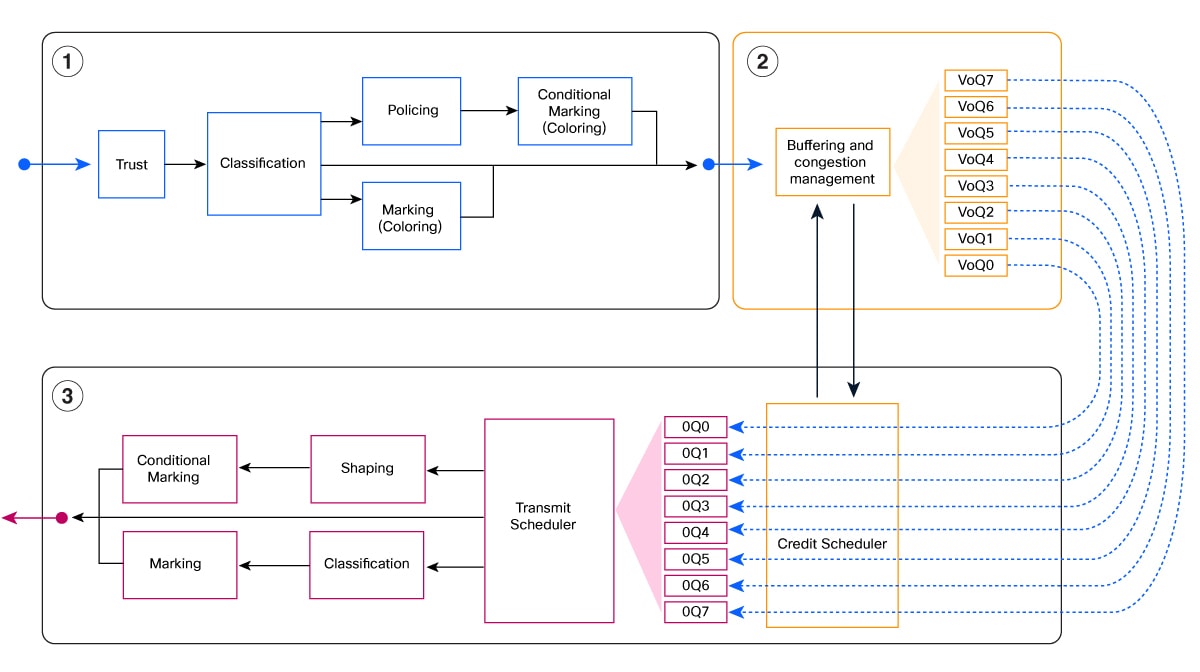
Important Cisco C9000 behavior:
· Traffic class 7 is the highest priority traffic class.
· Traffic class 0 maps to class-default.
· Classification into traffic classes must happen before egress queueing, normally in an ingress policy.
· Packet color, represented by discard-class, is used for congestion/drop behavior on non-priority queues where WRED is configured. WRED, WTD, and Discard Class explains the threshold conversion.
Notes:
· Cisco C9000 queue selection is driven by traffic-class, not by egress ToS, DSCP, IP precedence, CoS, EXP, qos-group, or ACL matching.
· On S1, TC7 is always a priority queue. Priority queues do not support WRED or random-detect, so TC7 does not need discard-class assignment in the ingress policy.
· Because of this queue-selection rule, a Catalyst 9000 egress-only queueing policy normally becomes two Cisco C9000 policies: an ingress classifier that sets traffic-class, and an egress queueing policy that matches traffic-class.
To achieve similar results on Cisco C9000, preserve the same intent in two stages. First, use the ingress policy to classify traffic and assign internal metadata such as traffic-class and, for non-priority queues where congestion/drop behavior must be preserved, discard-class. This ingress policy may be new even when the source Catalyst 9000 queueing design did not need one. Second, configure the egress queueing policy to match those traffic classes and apply scheduling, shaping, and WRED behavior.
The example below shows the resulting policy split at a high level. WRED, WTD, and Discard Class explains how to map Catalyst 9000 DSCP/CoS queue-limit or WRED thresholds to Cisco C9000 discard-class thresholds.
In the example below, the classification intent is a one-to-two conversion: the single Catalyst 9000 CM-TRANSACTIONAL-MATCH class map is split into Cisco C9000 CM-TRANSACTIONAL-GREEN and CM-TRANSACTIONAL-YELLOW class maps.
class-map match-any CM-REALTIME-MATCH
match dscp ef
match dscp cs5
match dscp cs4
class-map match-any CM-TRANSACTIONAL-GREEN
match dscp af21
class-map match-any CM-TRANSACTIONAL-YELLOW
match dscp af22 af23
policy-map PM-C9350-1P7Q-IN
class CM-REALTIME-MATCH
set traffic-class 7
class CM-TRANSACTIONAL-GREEN
set traffic-class 3
set discard-class 0
class CM-TRANSACTIONAL-YELLOW
set traffic-class 3
set discard-class 1
class class-default
set traffic-class 0
class-map match-any TC7
match traffic-class 7
class-map match-any TC3
match traffic-class 3
policy-map type queueing PM-C9350-1P7Q-OUT
class TC7
priority level 1
shape average percent 10
class TC3
bandwidth remaining ratio 20
random-detect discard-class-based
random-detect discard-class 0 percent 90 90 1
random-detect discard-class 1 percent 70 80 1
class class-default
bandwidth remaining ratio 25
interface TenGigabitEthernet1/1/1
service-policy input PM-C9350-1P7Q-IN
service-policy type queueing output PM-C9350-1P7Q-OUT
Note: The shape average percent 10 line is intentionally added in the Cisco C9000 priority queue. It is not copied from the Catalyst 9000 source policy. Always consider adding a shaper for all priority traffic queues so priority traffic cannot starve non-priority queues; choose the value based on the expected real-time traffic and link speed. Step 6 covers priority queue conversion in more detail.
Queueing Sub-Features
| Area |
Catalyst 9000 behavior |
Cisco C9000 migration behavior |
| Egress queue selection |
Can match packet-carried QoS fields directly, or internal labels after earlier marking. ACL matching is not used for egress queueing |
Must be traffic-class based in policy-map type queueing; a corresponding ingress policy must set traffic-class for the migrated classes |
| Priority queues |
Two priority levels on typical Catalyst 9000 deployments |
Up to seven priority levels; priority levels must map contiguously from TC7 downward |
| Bandwidth |
bandwidth percent or bandwidth remaining percent |
Use bandwidth remaining ratio in queueing policy after preserving the intended relative scheduler weight |
| Queue buffers |
queue-buffers ratio tunes UADP shared buffer behavior |
Express the equivalent queue-depth intent with Cisco C9000 queue-limit; use default Cisco C9000 queue limits as the starting point, then tune queue-limit if required |
| Queue softmax |
Some Catalyst 9000 deployments maximize softmax as part of buffer tuning guidance |
No Cisco C9000 softmax equivalent is available or required; use Cisco C9000 queue limits and validation instead |
| WTD/WRED |
DSCP/CoS/precedence-based thresholds |
discard-class based two-threshold behavior; choose values that approximate the source thresholds as closely as possible |
| Queue-limit DSCP |
Supported on Catalyst 9000 egress queues |
Not supported directly; collapse to discard-class-based thresholds while preserving the Catalyst 9000 threshold values as closely as possible |
Note: bandwidth remaining ratio is not the same as bandwidth percent. A practical one-to-one mapping may be possible for simple flat policies when the original percentages were being used only as relative weights, but HQoS, shaping, and priority designs require explicit validation. A full explanation of bandwidth percent versus bandwidth ratio behavior is outside the scope of this migration guide and should be covered in a separate reference.
| Area |
Catalyst 9000 behavior |
Cisco C9000 migration behavior |
| Ingress classification |
Supported |
Supported. Avoid unsupported mixed L2/L3 class maps |
| Ingress marking |
Supported |
Supported; add set traffic-class for queue selection and set discard-class only for non-priority queues that use WRED two-threshold behavior |
| Ingress policing |
Supported |
Supported; validate the target release for the 1.2 Mbps minimum rate and lack of explicit burst control |
| Egress ACL classification for marking |
Supported in normal egress marking policies; not used for egress queueing |
Not supported for egress queueing or egress marking |
| Egress policing |
Supported |
Not supported. Use egress shaping for bandwidth management; use ingress policing only when the requirement is strict policing and traffic can be identified at ingress |
| Egress marking |
Can use QoS-tag classification and, in normal egress marking policies, ACL-based classification |
Use a separate non-queueing egress policy when egress marking is needed; do not use ACL-based egress classification |
| User-defined table maps |
May be referenced by marking or policer actions |
Preserve supported same-domain table-map definitions, their default behavior, and every action that references them; validate policy direction and platform restrictions |
| MAC ACL QoS classification |
Can be used on some Catalyst 9000 designs |
Supported starting in release 27.1.1. For earlier releases, use IP ACLs, DSCP/CoS, VLAN, or upstream marking |
Interface and Other Feature Sub-Features
| Area |
Catalyst 9000 behavior |
Cisco C9000 migration behavior |
| SVI QoS |
Commonly used in campus configs |
Not supported for Cisco C9000 QoS attachment; move classification to physical or port-channel ingress points |
| Sub-interface QoS |
Supported on some UADP platforms |
Not currently supported on Cisco C9000 |
Step 1: Inventory the Existing QoS Configuration
Collect the full QoS-related configuration from the Catalyst 9000:
show running-config | section class-map
show running-config | section policy-map
show running-config | section table-map
show running-config | include service-policy
show running-config | section ^interface
show access-lists
Build an inventory with:
· All class maps used by QoS policies.
· All policy maps and whether they are used on input or output.
· All interfaces with service-policy input or service-policy output.
· Any SVI, tunnel, sub-interface, or port-channel policy attachments.
· Any table maps referenced by set or policer actions.
· Any ACLs referenced by QoS class maps.
· Any queueing features: priority, bandwidth, shape, queue-limit, queue-buffers, WRED, or random-detect.
· Any policers, their rates, and their conform/exceed/violate actions.
Before conversion, check for duplicate definitions, missing referenced objects, and incomplete policy attachments. Resolve ambiguous source configuration before treating the result as deployable.
Exclude Platform-Managed QoS Configuration
Class maps, policy maps, table maps, and referenced service-policy names containing AutoQos, AutoConf, or system-cpp are platform-managed and should not be manually translated. Copy every interface configuration command that begins with auto qos to the corresponding Cisco C9000 interface; the generic form is “auto qos <options>”. Applying that interface command automatically generates the platform-specific Cisco C9000 AutoQoS objects and attachments. Validate the exact command on the target release.
Step 2: Flag Breaking Differences
Before translating the policy, flag commands that cannot be carried forward directly:
| Pattern to search for |
Why it matters on Cisco C9000 |
Migration action |
| Class-map, policy-map, table-map, or referenced service-policy name containing AutoQos, AutoConf, or system-cpp |
Platform-managed QoS must be generated for the target platform rather than translated as user-defined CLI |
Exclude it from manual conversion and copy each interface command beginning with auto qos, generically “auto qos <options>”, to the corresponding Cisco C9000 interface |
| service-policy output where policy has police |
Egress policing is not supported |
Move policer to ingress or remove |
| Egress marking policy class with match access-group |
Cisco C9000 egress ACL classification is not supported |
Move ACL classification to ingress and set traffic-class or qos-group |
| mac access-list referenced by QoS class map |
MAC ACL QoS classification requires release 27.1.1 or later |
For release 27.1.1 or later, validate the MAC ACL policy on the target switch. For earlier releases, replace with IP ACL, VLAN, DSCP/CoS, or upstream marking |
| interface Vlan with service-policy |
SVI QoS attachment is not supported on Cisco C9000 |
Move policy to physical or port-channel ingress points |
| queue-buffers ratio |
Buffer intent is expressed differently on Silicon One |
Convert the queue-depth intent to Cisco C9000 queue-limit, or start with the Cisco C9000 default queue limits and tune after validation |
| Any bandwidth remaining percent or bandwidth remaining ratio value greater than 63 |
Cisco C9000 accepts bandwidth remaining ratio values only in the range 1-63 |
Normalize the complete non-priority vector, including class-default, so every resulting ratio is in the supported range |
| Softmax buffer tuning |
Some Catalyst 9000 deployments use softmax tuning recommendations |
Do not migrate softmax tuning. No Cisco C9000 softmax equivalent is available or required |
| queue-limit dscp, random-detect dscp-based, random-detect cos-based |
Cisco C9000 queue thresholds are discard-class based |
Convert to discard-class model and match the original threshold values as closely as possible |
| priority level without a shaper |
Priority queues must be rate-controlled to avoid starvation |
Add shape average or shape average percent |
| Non-contiguous priority levels |
Cisco C9000 priority levels must be contiguous |
Use P1, then P2, then P3, without gaps |
| police ... bc <burst> ... be <peak-burst> |
Cisco C9000 policer burst values are platform calculated in current syntax |
Remove inline bc and be, preserve supported CIR/PIR intent, and validate platform-calculated burst behavior |
| Policer rate below current Cisco C9000 minimum |
Some Cisco C9000 releases enforce a 1.2 Mbps policer minimum |
Raise, remove, or redesign the policer |
| set ... table <name> or a policer action containing table <name> |
The action depends on a separate user-defined table map |
Preserve the supported table-map definition, its default behavior, and every table-referencing action together |
| Mixed match cos with DSCP/ACL/precedence in one class |
Mixed L2/L3 filters may fail on Silicon One |
Split into separate class maps |
| Cross-domain table-map such as DSCP->CoS |
Cross-domain mappings are not portable |
Replace with explicit class-based marking |
Step 3: Define the Traffic-Class Plan
Create an explicit traffic-class plan before writing the Cisco C9000 policy. This is the core design decision in the migration because the Cisco C9000 egress queueing policy cannot select queues from Catalyst 9000-style packet fields or qos-group directly.
The table below is a common starting point. Select different mappings when required by the existing QoS design, especially when CS6/CS7 are assigned to routing/control protocols and EF is assigned to voice.
| Traffic type |
Typical DSCP examples |
Suggested TC |
Queue intent |
| Voice, real-time, critical control |
EF, CS5, CS4 |
7 |
Highest priority, priority level 1 |
| Network control and signaling |
CS6, CS7, CS3 |
6 |
High priority or high bandwidth queue |
| Multimedia video |
AF41, AF42, AF43 |
5 |
Assured queue with color-based drop |
| Mission-critical data |
AF31, AF32, AF33 |
4 |
Assured queue with color-based drop |
| Transactional data |
AF21, AF22, AF23, CS2 |
3 |
Assured queue with color-based drop |
| Bulk data |
AF11, AF12, AF13 |
2 |
Lower bandwidth queue with color-based drop |
| Scavenger |
CS1 |
1 |
Minimal bandwidth queue |
| Best effort |
Default/0 |
0 |
class-default |
Step 4: Convert Ingress Classification and Marking
Any Catalyst 9000 policy that classifies or marks traffic at ingress should be updated to set the internal traffic class. If the Catalyst 9000 design relied on egress-only packet-field matches, add a corresponding Cisco C9000 ingress policy to classify the same traffic and set traffic-class. If the Catalyst 9000 design matched qos-group, migrate the earlier internal-marking policy into a Cisco C9000 policy that assigns traffic-class. If congestion/drop behavior must be preserved for non-priority queues, WRED, WTD, and Discard Class describes how to add discard-class for WRED/WTD migration.
Catalyst 9000 source egress classification excerpt from the worked example:
class-map match-any CM-REALTIME-MATCH
match dscp ef
match dscp cs5
match dscp cs4
class-map match-any CM-TRANSACTIONAL-MATCH
match dscp af21 af22 af23
policy-map PM-C9000-1p7q3t-out
class CM-REALTIME-MATCH
priority level 1
class CM-TRANSACTIONAL-MATCH
bandwidth remaining percent 20
queue-buffers ratio 20
queue-limit dscp af21 percent 90
queue-limit dscp af22 percent 80
queue-limit dscp af23 percent 70
class class-default
bandwidth remaining percent 25
Cisco C9000-style ingress classification and traffic-class assignment:
class-map match-any CM-REALTIME-MATCH
match dscp ef
match dscp cs5
match dscp cs4
class-map match-any CM-TRANSACTIONAL-GREEN
match dscp af21
class-map match-any CM-TRANSACTIONAL-YELLOW
match dscp af22 af23
policy-map PM-C9350-1P7Q-IN
class CM-REALTIME-MATCH
set traffic-class 7
class CM-TRANSACTIONAL-GREEN
set traffic-class 3
set discard-class 0
class CM-TRANSACTIONAL-YELLOW
set traffic-class 3
set discard-class 1
class class-default
set traffic-class 0
Apply the ingress classification policy to the ingress interface where the traffic enters the Cisco C9000:
interface TenGigabitEthernet1/1/1
service-policy input PM-C9350-1P7Q-IN
Note: If no ingress policy is applied, only traffic classes 7 and 0 are chosen based on the trust type and trusted tag value.
The example includes discard-class assignment only for the non-priority transactional queue to show where Cisco C9000 packet color is set. TC7 does not need discard-class because it is a priority queue and does not use WRED. WRED, WTD, and Discard Class covers how to choose the green/yellow WRED thresholds for non-priority queues.
Step 5: Convert Egress Queuing
Egress queueing policy maps on Cisco C9000 should match traffic class only. They must be paired with ingress classification that assigns the traffic classes used by the queueing classes.
Create one class map per traffic class:
class-map match-any TC7
match traffic-class 7
class-map match-any TC6
match traffic-class 6
class-map match-any TC5
match traffic-class 5
class-map match-any TC4
match traffic-class 4
class-map match-any TC3
match traffic-class 3
class-map match-any TC2
match traffic-class 2
class-map match-any TC1
match traffic-class 1
Then create the queueing policy:
policy-map type queueing PM-C9350-1P7Q-OUT
class TC7
priority level 1
shape average percent 10
class TC6
bandwidth remaining ratio 10
class TC5
bandwidth remaining ratio 10
class TC4
bandwidth remaining ratio 30
class TC3
bandwidth remaining ratio 20
class TC2
bandwidth remaining ratio 4
class TC1
bandwidth remaining ratio 1
class class-default
bandwidth remaining ratio 25
bandwidth remaining ratio is a relative scheduler weight, not a direct percent reservation. On Cisco C9000, the configured ratio value must be in the range 1 to 63. For a simple flat policy, the cleanest starting point is to preserve the relative relationship between the Catalyst 9000 non-priority classes, normalize the values into the 1-63 range, and then validate the result under congestion.
The 1-63 limit applies to each configured class ratio value. The sum of all configured ratios can be greater than 63.
For the best-case flat-policy conversion:
1. Exclude strict-priority classes from the ratio calculation.
2. List the Catalyst 9000 bandwidth remaining percent values for the remaining scheduled classes.
3. Use the same numbers as the initial Cisco C9000 bandwidth remaining ratio values only when every value is within the 1-63 parser range.
4. If any value is greater than 63, divide all values by a common factor or otherwise scale them down while preserving the same relative relationship.
5. Calculate each class’s best-case share of the remaining scheduler bandwidth as:
class best-case share = class ratio / sum(all non-priority ratios)
For example, a Catalyst 9000 flat-policy relationship of 20 and 80 should not be configured as Cisco C9000 ratios 20 and 80, because 80 is outside the supported range. Normalize the same 1:4 relationship to valid Cisco C9000 values, such as 10 and 40.
If a priority class is shaped, first subtract that shaped portion from the link capacity, then apply the ratio calculation to the remaining bandwidth. For the example above, TC7 is shaped to 10 percent, leaving 90 percent for the non-priority scheduler. The non-priority ratios are 10 + 10 + 30 + 20 + 4 + 1 + 25 = 100.
| Class |
Ratio |
Best-case share of remaining bandwidth |
Best-case share of link bandwidth with TC7 shaped to 10 percent |
| TC6 |
10 |
10% |
9% |
| TC5 |
10 |
10% |
9% |
| TC4 |
30 |
30% |
27% |
| TC3 |
20 |
20% |
18% |
| TC2 |
4 |
4% |
3.6% |
| TC1 |
1 |
1% |
0.9% |
| class-default |
25 |
25% |
22.5% |
This calculation is a planning aid, not a substitute for validation. HQoS, parent shaping, priority queues, oversubscription, and platform-specific scheduler behavior can change the effective bandwidth seen by a class.
Apply it with the typed queueing attachment:
interface TenGigabitEthernet1/1/1
service-policy type queueing output PM-C9350-1P7Q-OUT
This output policy is not a standalone replacement for the Catalyst 9000 output policy. It depends on the ingress policy from Step 4 to assign the traffic-class values that the egress queueing class maps match.
Note: If the original Catalyst 9000 policy had egress marking in the same policy as queueing, split egress marking into a separate non-queueing policy.
Step 6: Convert Priority Queues
Catalyst 9000 designs commonly use one or two priority queues. Cisco C9000 supports up to seven priority levels, mapped to traffic classes from highest to lowest:
| Priority level |
1 |
2 |
3 |
4 |
5 |
6 |
7 |
Normal queue |
| Traffic class |
7 |
6 |
5 |
4 |
3 |
2 |
1 |
0 |
Rules to follow:
· If any priority queue is configured, priority level 1 must be present.
· Priority levels must be contiguous. For example, P1 and P3 without P2 is not valid.
· Do not configure multiple classes with the same priority level.
· TC7 should be treated as the highest priority queue.
· TC7 is always a priority queue on S1 and cannot use WRED or random-detect.
· Configure an explicit shaper for priority traffic. This prevents priority traffic from starving non-priority queues.
Note: Choose shape average percent <value> based on the expected traffic that belongs in the priority queue and the link speed. The percent value has 1 percent granularity; if the required cap is less than 1 percent of the link, use shape average <rate> instead.
Example:
policy-map type queueing PRIORITY-SYNTAX-EXAMPLE
class TC7
priority level 1
shape average percent 10
class TC6
priority level 2
shape average percent 5
class TC5
bandwidth remaining ratio 4
class class-default
bandwidth remaining ratio 15
The non-priority ratios in this example are normalized values. A source relationship such as 20:75 can be expressed as 4:15 so every configured Cisco C9000 ratio remains within the 1-63 range.
What Changes
The worked example’s Catalyst 9000 egress policy uses DSCP-based queue limits for several classes. The mission-critical class is one representative example:
class-map match-any CM-MISSION-CRITICAL-MATCH
match dscp af31 af32 af33
policy-map PM-C9000-1p7q3t-out
class CM-MISSION-CRITICAL-MATCH
bandwidth remaining percent 30
queue-buffers ratio 20
queue-limit dscp af31 percent 100
queue-limit dscp af32 percent 90
queue-limit dscp af33 percent 80
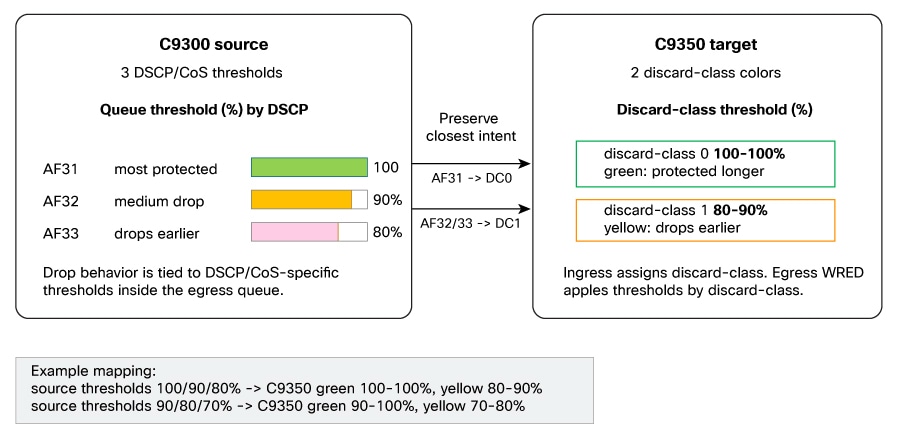
Cisco C9000 does not provide a direct DSCP-per-threshold queue-limit model. Instead, use the internal discard class:
· discard-class 0: green, normally protected longer.
· discard-class 1: yellow, normally dropped earlier.
Apply discard-class-based WRED only to non-priority queues. On S1, TC7 is always a priority queue. In addition, any other traffic class configured with priority level <value> is a priority queue. Do not configure random-detect under TC7 or under any other class configured as a priority queue, regardless of its traffic-class number.
This means a Catalyst 9000 three-threshold model must usually be collapsed into two Cisco C9000 drop colors. The migrated Cisco C9000 thresholds should preserve the Catalyst 9000 threshold values as closely as the two-threshold model allows.
At ingress, split the traffic into green and yellow groups:
class-map match-any CM-MISSION-CRIT-GREEN
match dscp af31
class-map match-any CM-MISSION-CRIT-YELLOW
match dscp af32 af33
policy-map PM-C9350-1P7Q-IN
class CM-MISSION-CRIT-GREEN
set traffic-class 4
set discard-class 0
class CM-MISSION-CRIT-YELLOW
set traffic-class 4
set discard-class 1
At egress, configure discard-class-based thresholds. For the Catalyst 9000 example above, the source thresholds are 100, 90, and 80 percent; the closest Cisco C9000 two-threshold mapping is green at 100 to 100 percent and yellow at 80 to 90 percent:
policy-map type queueing PM-C9350-1P7Q-OUT
class TC4
bandwidth remaining ratio 30
random-detect discard-class-based
random-detect discard-class 0 percent 100 100 1
random-detect discard-class 1 percent 80 90 1
queue-limit 2000000 bytes
For dense DSCP WTD configurations, choose the mapping intentionally. A common approach is:
· Map the most protected DSCP values to discard-class 0.
· Map the DSCP values that should drop first to discard-class 1.
· Choose the Cisco C9000 discard-class min/max values to match the Catalyst 9000 queue-limit dscp values as closely as possible.
· Document the behavior change because three or more Catalyst 9000 thresholds become two Cisco C9000 colors.
Catalyst 9000 WRED Configuration Example
Catalyst 9000 can configure DSCP-based WRED with an explicit minimum and maximum threshold for each DSCP. The following source class uses three WRED profiles:
class-map match-any CM-AF2-DATA
match dscp af21 af22 af23
policy-map C9300-EGRESS
class CM-AF2-DATA
bandwidth remaining percent 20
random-detect dscp-based
random-detect dscp 18 percent 80 100
random-detect dscp 20 percent 70 100
random-detect dscp 22 percent 60 100
The numeric DSCP values 18, 20, and 22 represent AF21, AF22, and AF23. Each Catalyst 9000 command supplies one minimum/maximum pair: AF21 uses 80 100, AF22 uses 70 100, and AF23 uses 60 100.
On Cisco C9000, first assign the queue and discard class at ingress. This example keeps AF21 as the protected green traffic and groups AF22 and AF23 as yellow traffic:
class-map match-any CM-AF2-GREEN
match dscp af21
class-map match-any CM-AF2-YELLOW
match dscp af22 af23
policy-map C9350-INGRESS
class CM-AF2-GREEN
set traffic-class 3
set discard-class 0
class CM-AF2-YELLOW
set traffic-class 3
set discard-class 1
Then configure WRED under the non-priority TC3 queue. When several source profiles are grouped into one discard class, a conservative starting point is the lowest member minimum and the highest member maximum. AF22 70 100 and AF23 60 100 therefore become the yellow envelope 60 100; do not form 60 70 from two source minimum thresholds.
class-map match-any TC3
match traffic-class 3
policy-map type queueing C9350-EGRESS
class TC3
bandwidth remaining ratio 20
random-detect discard-class-based
random-detect discard-class 0 percent 80 100 1
random-detect discard-class 1 percent 60 100 1
If this source class is instead migrated to a Cisco C9000 priority queue, omit every random-detect command from that target queue. This prohibition applies to every class configured with priority level, not only TC7. Preserve the queue’s priority and shaping intent, but do not attempt to retain the source WRED under that priority queue.
Queue Buffers and Queue Limits
The Catalyst 9000 queue-buffers ratio command and the Cisco C9000 queue-limit command express similar queue-depth intent through different models.
Why:
· Catalyst 9000 UADP uses dynamic shared buffering.
· queue-buffers ratio is a share of a dynamic pool, not a fixed byte value.
· Softmax buffer tuning on Catalyst 9000 does not have a Cisco C9000 equivalent and is not required.
· Cisco C9000 uses static per-VoQ queue limits.
· Cisco C9000 queue-limit is configured in bytes.
Recommended migration behavior:
1. Treat the source queue-buffers ratio as an indication of queue-depth intent, not as a value to copy.
2. Use Cisco C9000 default queue limits as the starting point unless the source design has a clear queue-depth objective.
3. When a queue-depth objective is known, express it with Cisco C9000 queue-limit.
4. Monitor queue drops and latency after traffic validation.
5. Tune queue-limit for queues that show real congestion or burst-loss symptoms.
If tuning is required, base it on traffic objective rather than trying to numerically convert the UADP ratio:
| Traffic type |
Tuning approach |
| Voice |
Keep buffering small to protect latency; prioritize and shape intentionally |
| Video |
Allow moderate burst absorption but monitor latency |
| Mission-critical data |
Increase only if drops are observed under expected bursts |
| Bulk data |
Prefer lower priority and controlled queue limits |
| Scavenger |
Keep limited; it should yield first |
Egress Policing and Egress Shaping
Do not treat every Catalyst 9000 egress policer as an ingress policer during migration. First identify the original intent. Many Catalyst 9000 egress policers were used as a practical way to manage egress bandwidth because that was the available design option. For that use case, Cisco C9000 egress shaping is usually the closest operational migration.
Use this decision rule:
| Original intent |
Cisco C9000 migration direction |
Notes |
| Strict policing for selected traffic, where the flow can be identified before it reaches the egress queue |
Convert to ingress policers |
Apply the policer at every relevant ingress point. If the goal is to approximate an aggregate egress cap, divide the intended rate across the ingress points and validate the result. |
| Egress bandwidth management, smoothing, or rate capping for traffic leaving an interface or queue |
Convert to egress shaping |
This is usually the best migration path for Catalyst 9000 egress policers that were being used to control output bandwidth. |
| Egress policing that depends on post-routing or post-load-balancing output-interface state |
Redesign |
Prefer egress shaping where it satisfies the requirement. If strict policing is still required, classify earlier, mark the traffic, and police at ingress where the flow can be identified. |
Catalyst 9000 egress policing used for bandwidth management:
class-map match-any GUEST-TRAFFIC
match access-group name GUEST-ACL
policy-map EGRESS-POLICE
class GUEST-TRAFFIC
police cir 50000000
interface GigabitEthernet1/0/1
service-policy output EGRESS-POLICE
Cisco C9000 egress shaping replacement:
policy-map INGRESS-CLASSIFY
class GUEST-TRAFFIC
set traffic-class 2
interface GigabitEthernet1/0/1
service-policy input INGRESS-CLASSIFY
class-map match-any TC2
match traffic-class 2
policy-map type queueing EGRESS-SHAPE
class TC2
shape average 50000000
interface GigabitEthernet1/0/1
service-policy type queueing output EGRESS-SHAPE
If the original requirement is strict policing rather than egress bandwidth management, use ingress policing only where the traffic can be identified before egress queueing. When approximating a single aggregate egress policer with multiple ingress policers, divide the intended aggregate rate across the ingress interfaces. For example, a 50 Mbps aggregate cap across two ingress interfaces starts as 25 Mbps per ingress interface:
policy-map INGRESS-POLICE-25M
class GUEST-TRAFFIC
police cir 25000000
conform-action transmit
exceed-action drop
set traffic-class 2
interface GigabitEthernet1/0/1
service-policy input INGRESS-POLICE-25M
interface GigabitEthernet1/0/2
service-policy input INGRESS-POLICE-25M
This divided-rate approach is still not equivalent to one aggregate egress policer because traffic may not be evenly distributed across ingress interfaces. In that case, use egress shaping when the intent is bandwidth management, or redesign the policy with explicit ingress classification and policing where strict policing is required.
Policer Rate and Burst Syntax
For current Cisco C9000 migration planning, validate the target release for policer rate limits. Source migration material identifies a 1.2 Mbps minimum policer rate on Cisco C9000 software used for validation. Policies with lower Catalyst 9000 policer rates, such as 32 kbps or 128 kbps Auto QoS policers, should be flagged.
Migration options:
· Raise the policer rate to the target Cisco C9000 minimum.
· Remove the low-rate policer if it no longer provides useful protection.
· Redesign the classification and policing at a coarser aggregate level.
Catalyst 9000 policers may also specify explicit conform and peak burst values with bc and be. Treat burst as a separate migration check from the policer rate. Current Cisco C9000/S1 policer syntax does not expose equivalent explicit burst knobs; the platform selects burst values based on the configured rates. Do not add a Cisco C9000 bc equivalent such as bc 39250, and do not retain source be on a dual-rate policer.
For a Catalyst 9000 policer below the Cisco C9000 minimum rate:
! Avoid carrying this over directly:
police cir 128000 bc 8000
! Use target rate syntax and validate platform-calculated burst behavior:
police cir 1200000
conform-action transmit
exceed-action drop
Note: In this example, the explicit source bc 8000 is not translated separately. The Cisco C9000 burst is automatically selected from the configured policer rate. For a dual-rate source, apply the same rule to both bc and be.
For a Catalyst 9000 policer whose CIR is already supported, keep the intended CIR but still remove explicit burst syntax:
! C9300 source:
police cir 50000000 bc 1562500
! C9350 target:
police cir 50000000
conform-action transmit
exceed-action drop
Use explicit policer actions in migrated configurations. This makes the intended behavior clear and avoids relying on platform defaults.
Preserve the complete policer structure unless the migration design intentionally changes it. A dual-rate policer containing CIR, PIR, conform, exceed, and violate behavior must not be reduced silently to a single-rate policer. If a minimum-rate fallback raises a dual-rate policer, scale CIR and PIR by the same factor so the relative CIR:PIR ratio is retained, keep PIR greater than CIR, and preserve each supported action.
Treat a user-defined table map and every policy action that references it as one migration unit. For a supported same-domain map such as DSCP-to-DSCP, retain the table-map definition, its explicit entries, default copy or other default behavior, and both exceed and violate references. Only platform-managed table maps identified by the AutoQoS exclusion rule should be omitted automatically.
Hierarchical QoS (HQoS) Conversion
Cisco C9000 supports the two-level egress port-shaper form of HQoS: a parent queueing policy shapes the aggregate traffic in class-default and invokes a child queueing policy. Preserve that parent/child structure instead of flattening the source policy. Convert the child policy with the same Cisco C9000 rules used for a flat queueing policy: classify and assign traffic-class at ingress, match traffic-class in the child, shape every priority queue, normalize non-priority ratios to the 1-63 range, and apply WRED only to non-priority queues.
For example, consider this Catalyst 9000 parent shaper and child queueing policy:
policy-map C9300-HQOS-CHILD
class VOICE
priority level 1
police rate percent 10
class BUSINESS
bandwidth remaining percent 20
class class-default
bandwidth remaining percent 80
policy-map C9300-HQOS-PARENT
class class-default
shape average 1000000000
service-policy C9300-HQOS-CHILD
After VOICE and BUSINESS have been assigned to TC7 and TC3 at ingress, the corresponding Cisco C9000 egress HQoS pattern is:
policy-map type queueing C9350-HQOS-CHILD
class TC7
priority level 1
shape average percent 10
class TC3
bandwidth remaining ratio 10
class class-default
bandwidth remaining ratio 40
policy-map type queueing C9350-HQOS-PARENT
class class-default
shape average 1000000000
service-policy C9350-HQOS-CHILD
Apply the parent HQoS policy as the typed output queueing policy on the Cisco C9000 egress interface:
interface <C9350-egress-interface>
service-policy type queueing output C9350-HQOS-PARENT
In this example, the child source relationship 20:80 is normalized to 10:40. The parent contains only class-default, the aggregate shaper, and the child service-policy; do not place bandwidth remaining ratio in the parent. Validate the supported parent shape range, child actions, attachment type, and HQoS statistics on the exact Cisco C9000 software release. HQoS designs that use other Catalyst 9000 hierarchy forms require redesign rather than a direct syntax conversion.
ACL and Classification Guidance
Ingress ACL Classification
IPv4 and IPv6 ACL-based QoS classification can be used at ingress. This is the preferred replacement when a Catalyst 9000 egress marking policy used ACLs, or when a Cisco C9000 migration needs ACL matching before egress queueing or marking.
Pattern:
class-map match-any APP-TRAFFIC
match access-group name APP-ACL
policy-map INGRESS-CLASSIFY
class APP-TRAFFIC
set traffic-class 4
set qos-group 4
The traffic-class selects the egress queue. The optional qos-group can be used as an internal label if a separate egress marking policy needs to identify the traffic later.
Egress ACL Classification
Do not use ACL-based class maps in Cisco C9000 egress queueing or marking policies. On Catalyst 9000, ACL-based classification may appear in normal egress marking policies, while egress queueing policy maps follow the packet-field and internal-label behavior described earlier. For Cisco C9000, move egress ACL classification to ingress and set an internal field:
class-map match-any ACL-MATCHED-TRAFFIC
match access-group name ACL-MATCHED-TRAFFIC
class-map match-any QG4
match qos-group 4
policy-map INGRESS-CLASSIFY
class ACL-MATCHED-TRAFFIC
set traffic-class 4
set qos-group 4
policy-map EGRESS-MARKING
class QG4
set dscp af31
MAC ACL Classification
MAC ACL based QoS classification will be supported on Cisco C9000 starting in release 27.1.1. For target releases before 27.1.1, replace MAC ACL QoS classification with one of the following:
· IP ACL classification if the traffic has predictable IP source, destination, or L4 ports.
· VLAN-based classification if the traffic is separated by VLAN.
· DSCP/CoS trust or remarking at the access edge.
· Upstream marking before the Cisco C9000.
SVI, Port-Channel, and Interface Attachment
SVI Attachment
Many Catalyst 9000 campus configurations attach ingress marking policies to many VLAN interfaces:
interface Vlan25
service-policy input PM-LAN-VOICE-FACILITY-MARKING
interface Vlan500
service-policy input PM-IDF-DATA-FACILITY-MARKING
This does not migrate directly to Cisco C9000. For Cisco C9000, move classification and marking to the physical or port-channel ingress points carrying the traffic.
Migration approach:
1. Identify which physical ports and port-channels feed each VLAN.
2. Apply the appropriate ingress classification policy to those ingress interfaces.
3. Preserve VLAN-specific behavior by splitting policies by physical access role, trunk role, or VLAN match where supported.
4. Use DSCP/CoS trust at the access boundary if the design depends on endpoints marking traffic correctly.
Port-Channel Attachment
Cisco C9000 uses a split behavior for port-channels:
· Queueing policies are applied to member interfaces with service-policy type queueing output.
· Non-queueing policies, such as ingress marking or policing, can be applied at the port-channel attachment point where supported.
Example:
interface Port-channel1
service-policy input PM-C9350-1P7Q-IN
interface TenGigabitEthernet1/1/1
channel-group 1 mode active
service-policy type queueing output PM-C9350-1P7Q-OUT
interface TenGigabitEthernet2/1/1
channel-group 1 mode active
service-policy type queueing output PM-C9350-1P7Q-OUT
Worked Example: Campus 1P7Q3T Policy
The sample Catalyst 9000 configuration used for this guide has three major QoS elements:
· Ingress marking policies applied to many SVI interfaces.
· A PM-C9000-1p7q3t-out egress policy applied to uplink members.
· Traffic classes for real-time, control, multimedia video, mission-critical data, transactional data, bulk data, scavenger, and default traffic.
The source Catalyst 9000 egress policy can select queues directly from DSCP values. The migrated Cisco C9000 design intentionally splits that behavior into two policies: the ingress policy maps those DSCP values into internal traffic classes, and the egress queueing policy matches only those traffic classes.
Source Catalyst 9000 Egress Policy Pattern
The Catalyst 9000 class maps and egress policy follow this structure:
class-map match-any CM-REALTIME-MATCH
match dscp ef
match dscp cs5
match dscp cs4
class-map match-any CM-CONTROL-MATCH
match dscp cs6
match dscp cs7
match dscp cs3
class-map match-any CM-MULTIMEDIA-VIDEO-MATCH
match dscp af41 af42 af43
class-map match-any CM-MISSION-CRITICAL-MATCH
match dscp af31 af32 af33
class-map match-any CM-TRANSACTIONAL-MATCH
match dscp af21 af22 af23
class-map match-any CM-BULK-DATA-MATCH
match dscp af11 af12 af13
class-map match-any CM-SCAVENGER-MATCH
match dscp cs1
policy-map PM-C9000-1p7q3t-out
class CM-REALTIME-MATCH
priority level 1
class CM-CONTROL-MATCH
bandwidth remaining percent 10
queue-buffers ratio 10
class CM-MULTIMEDIA-VIDEO-MATCH
bandwidth remaining percent 10
queue-buffers ratio 10
queue-limit dscp af41 percent 100
queue-limit dscp af42 percent 90
queue-limit dscp af43 percent 80
class CM-MISSION-CRITICAL-MATCH
bandwidth remaining percent 30
queue-buffers ratio 20
queue-limit dscp af31 percent 100
queue-limit dscp af32 percent 90
queue-limit dscp af33 percent 80
class CM-TRANSACTIONAL-MATCH
bandwidth remaining percent 20
queue-buffers ratio 20
queue-limit dscp af21 percent 90
queue-limit dscp af22 percent 80
queue-limit dscp af23 percent 70
class CM-BULK-DATA-MATCH
bandwidth remaining percent 4
queue-buffers ratio 20
queue-limit dscp af11 percent 100
queue-limit dscp af12 percent 90
queue-limit dscp af13 percent 80
class CM-SCAVENGER-MATCH
bandwidth remaining percent 1
queue-buffers ratio 5
class class-default
bandwidth remaining percent 25
Target Traffic-Class Mapping
These target traffic classes are not selected by matching DSCP in the Cisco C9000 egress queueing policy. They must be assigned by the corresponding ingress classification policy.
| Source class |
Source DSCP values |
Target TC |
Target discard-class behavior |
| Real-time |
EF, CS5, CS4 |
7 |
Not used; TC7 is a priority queue and does not support WRED |
| Control |
CS6, CS7, CS3 |
6 |
Not required unless TC6 is used as a non-priority WRED queue |
| Multimedia video |
AF41 / AF42 AF43 |
5 |
AF41 green, AF42/AF43 yellow |
| Mission-critical |
AF31 / AF32 AF33 |
4 |
AF31 green, AF32/AF33 yellow |
| Transactional |
AF21 / AF22 AF23 |
3 |
AF21 green, AF22/AF23 yellow |
| Bulk data |
AF11 / AF12 AF13 |
2 |
AF11 green, AF12/AF13 yellow |
| Scavenger |
CS1 |
1 |
Not required unless TC1 is used as a non-priority WRED queue |
| Default |
Default/other |
0 |
Not required unless TC0 is used as a non-priority WRED queue |
Cisco C9000 Ingress Classification Example
class-map match-any CM-REALTIME-MATCH
match dscp ef
match dscp cs5
match dscp cs4
class-map match-any CM-CONTROL-MATCH
match dscp cs6
match dscp cs7
match dscp cs3
class-map match-any CM-MM-VIDEO-GREEN
match dscp af41
class-map match-any CM-MM-VIDEO-YELLOW
match dscp af42 af43
class-map match-any CM-MISSION-CRIT-GREEN
match dscp af31
class-map match-any CM-MISSION-CRIT-YELLOW
match dscp af32 af33
class-map match-any CM-TRANSACTIONAL-GREEN
match dscp af21
class-map match-any CM-TRANSACTIONAL-YELLOW
match dscp af22 af23
class-map match-any CM-BULK-DATA-GREEN
match dscp af11
class-map match-any CM-BULK-DATA-YELLOW
match dscp af12 af13
class-map match-any CM-SCAVENGER-MATCH
match dscp cs1
policy-map PM-C9350-1P7Q-IN
class CM-REALTIME-MATCH
set traffic-class 7
class CM-CONTROL-MATCH
set traffic-class 6
class CM-MM-VIDEO-GREEN
set traffic-class 5
set discard-class 0
class CM-MM-VIDEO-YELLOW
set traffic-class 5
set discard-class 1
class CM-MISSION-CRIT-GREEN
set traffic-class 4
set discard-class 0
class CM-MISSION-CRIT-YELLOW
set traffic-class 4
set discard-class 1
class CM-TRANSACTIONAL-GREEN
set traffic-class 3
set discard-class 0
class CM-TRANSACTIONAL-YELLOW
set traffic-class 3
set discard-class 1
class CM-BULK-DATA-GREEN
set traffic-class 2
set discard-class 0
class CM-BULK-DATA-YELLOW
set traffic-class 2
set discard-class 1
class CM-SCAVENGER-MATCH
set traffic-class 1
class class-default
set traffic-class 0
Cisco C9000 Egress Queueing Example
This egress queueing policy assumes that PM-C9350-1P7Q-IN has already classified the traffic and assigned the traffic-class values. Without that corresponding ingress policy, the TC7 through TC1 queueing classes do not match packets merely because the packets carry the source QoS markings. If the source Catalyst 9000 design used qos-group, remember that it was an internal label assigned earlier, not a packet-carried marking.
class-map match-any TC7
match traffic-class 7
class-map match-any TC6
match traffic-class 6
class-map match-any TC5
match traffic-class 5
class-map match-any TC4
match traffic-class 4
class-map match-any TC3
match traffic-class 3
class-map match-any TC2
match traffic-class 2
class-map match-any TC1
match traffic-class 1
policy-map type queueing PM-C9350-1P7Q-OUT
class TC7
priority level 1
shape average percent 10
class TC6
bandwidth remaining ratio 10
queue-limit 1000000 bytes
class TC5
bandwidth remaining ratio 10
random-detect discard-class-based
random-detect discard-class 0 percent 100 100 1
random-detect discard-class 1 percent 80 90 1
queue-limit 1000000 bytes
class TC4
bandwidth remaining ratio 30
random-detect discard-class-based
random-detect discard-class 0 percent 100 100 1
random-detect discard-class 1 percent 80 90 1
queue-limit 2000000 bytes
class TC3
bandwidth remaining ratio 20
random-detect discard-class-based
random-detect discard-class 0 percent 90 90 1
random-detect discard-class 1 percent 70 80 1
queue-limit 2000000 bytes
class TC2
bandwidth remaining ratio 4
random-detect discard-class-based
random-detect discard-class 0 percent 100 100 1
random-detect discard-class 1 percent 80 90 1
queue-limit 2000000 bytes
class TC1
bandwidth remaining ratio 1
queue-limit 500000 bytes
class class-default
bandwidth remaining ratio 25
Notes for this example:
· The Catalyst 9000 queue-buffers ratio commands are not copied.
· The example uses explicit queue-limit values from the conversion attempt; validate these under expected traffic.
· Priority traffic is shaped at 10 percent as an example. Choose a shaper value that matches the intended voice/video design and link speed.
Applying the Worked Example
For uplink or routed physical interfaces:
interface TenGigabitEthernet1/1/1
service-policy input PM-C9350-1P7Q-IN
service-policy type queueing output PM-C9350-1P7Q-OUT
For port-channel designs:
interface Port-channel1
service-policy input PM-C9350-1P7Q-IN
interface TenGigabitEthernet1/1/1
channel-group 1 mode active
service-policy type queueing output PM-C9350-1P7Q-OUT
interface TenGigabitEthernet2/1/1
channel-group 1 mode active
service-policy type queueing output PM-C9350-1P7Q-OUT
Do not attach the migrated QoS policy directly to interface Vlan on Cisco C9000. Move that classification closer to the ingress physical or logical port where the traffic enters the switch.
Parser Validation
Apply the converted configuration in a lab on the target Cisco C9000 release. Check for:
· Rejected policy-map type queueing syntax.
· Rejected egress ACL classification.
· Rejected egress policing.
· Rejected SVI or sub-interface QoS attachments.
· Rejected MAC ACL QoS classification on target releases before 27.1.1.
· Mixed L2/L3 class-map errors.
· Non-contiguous priority-level errors.
· Priority classes missing required shapers.
· Policer rates below the platform minimum.
Operational Validation
Use these commands as a starting point. Cisco C9000 supports FED QoS queue and interface validation commands; use them to confirm that the migrated traffic-class, queueing, WRED, and policy attachments programmed as intended. Exact fields can vary by software release.
show policy-map interface <interface>
show policy-map type queueing interface <interface>
show policy-map type queueing <policy-name>
show platform hardware fed switch active qos queue stats interface <interface>
show platform hardware fed switch active qos queue config interface <interface>
show platform software fed switch active qos interface <interface> ingress npd detailed
show logging | include QOS|FED|PANGEA_QOS|POLICY
Expected validation outcomes:
· Ingress policy counters increment for expected classes.
· Traffic-class assignment appears in hardware programming.
· Egress queueing policy is attached with the typed queueing attachment and has a corresponding ingress policy assigning every non-default traffic class it matches.
· TC7 traffic is mapped to the intended priority queue.
· Non-priority queue weights match the intended bandwidth remaining ratio design.
· Discard-class-based WRED entries appear for queues where WRED was configured.
· No policy installation failure syslogs appear.
· Queue drops are consistent with the intended service model.
Use this checklist for each migration:
| Item |
Status |
| All QoS policy attachments inventoried |
|
| Source queue topology inventoried, including every priority class, non-priority class, and class-default |
|
| Each distinct source queue maps to a distinct target traffic class unless an intentional merge is documented |
|
| All egress queueing policies converted to policy-map type queueing |
|
| All egress queueing class maps changed to match traffic-class |
|
| Corresponding ingress policies assign set traffic-class for all configured traffic classes used by egress queueing |
|
| Every Catalyst 9000 packet-field queue-selection match has a corresponding Cisco C9000 ingress classification rule |
|
| Every Catalyst 9000 qos-group queue-selection match has a corresponding migrated internal-marking rule that assigns Cisco C9000 traffic-class |
|
| TC7 reserved for traffic that should truly receive highest priority |
|
| Priority levels are contiguous and shaped |
|
| Explicit source priority rate values preserved in the initial shaper where applicable |
|
| Egress policers converted to ingress policing, egress shaping, or removed according to their original intent |
|
| Egress ACL classification moved to ingress with traffic-class/qos-group marking |
|
| MAC ACL QoS classification checked against target release; release 27.1.1 or later required |
|
| SVI QoS attachments redesigned for physical or port-channel ingress |
|
| queue-buffers ratio removed or replaced with validated queue-limit tuning |
|
| Every bandwidth remaining ratio, including class-default, is in the 1-63 range and normalization loss is documented |
|
| DSCP/CoS WRED converted to discard-class-based thresholds |
|
| Explicit WRED minimum and maximum pairs preserved or consolidated with documented bounding-envelope behavior |
|
| class-default WRED retained when present in the source policy |
|
| No WRED or random-detect configured under TC7 or any other priority queue |
|
| Every source DSCP/CoS/precedence match remains represented after discard-class grouping |
|
| Table-map usage checked for unsupported cross-domain mappings |
|
| Table-map direction, markdown consistency, and switch/stack scale restrictions validated |
|
| No traffic-class value invented for a marking/policing policy without a corresponding queue-selection requirement |
|
| Policer CIR and PIR checked against the target Cisco C9000 minimum; any fallback rate increase quantified and validated |
|
| Source policer bc and be removed from Cisco C9000 syntax |
|
| Queueing and non-queueing egress policies split where needed |
|
| HQoS parent/child structure retained for supported port-shaper designs; unsupported hierarchy forms redesigned |
|
| Lab parser validation completed |
|
| Hardware programming and counter validation completed |
|
| Production rollout and rollback plan prepared |
|
Do:
· Preserve the intended behavior, not every Catalyst 9000 command.
· Classify once at ingress and set traffic-class explicitly for every egress queueing class.
· Convert Catalyst 9000 packet-field queue-selection matches into Cisco C9000 ingress classification rules.
· Convert Catalyst 9000 egress qos-group queue-selection matches by migrating the earlier internal marking step to assign Cisco C9000 traffic-class.
· Use traffic-class-only class maps for egress queueing.
· Use separate policies for ingress classification, egress queueing, and egress marking.
· Keep TC7 for truly high-priority traffic.
· Shape priority queues.
· Validate under real traffic and tune queue-limit only when needed.
Do not:
· Copy a Catalyst 9000 egress policy directly into Cisco C9000.
· Attach only the Cisco C9000 output queueing policy when migrated queue selection depends on source packet-field or qos-group matches.
· Use egress ACL classification for queueing or marking on Cisco C9000.
· Use egress policing.
· Attach QoS policies to SVIs on Cisco C9000.
· Assume queue-buffers ratio converts to a fixed byte value.
· Keep DSCP/CoS WRED syntax unchanged.
· Assume MAC ACL QoS classification works on releases before 27.1.1.
· Assign bulk or best-effort traffic to TC7.
· Rely on implicit policer actions in a migration document.
Catalyst 9000 to Cisco C9000 QoS migration is primarily an architecture migration. The Catalyst 9000 policy model lets egress queueing policies classify and select queues directly from packet fields or previously assigned internal labels. The Cisco C9000 model expects ingress classification into traffic classes to enable the advantages of Silicon One ingress-based VoQ behavior, which requires a corresponding ingress traffic-class assignment policy for the egress queueing policy.
A successful migration therefore starts with a traffic-class plan, then rewrites policies around three separate responsibilities:
1. Ingress: classify, mark, color, and police.
2. Egress queueing: schedule and manage congestion by traffic class.
3. Optional egress marking: remark traffic using supported non-queueing policy classification.
Some behavior changes should be expected, but a migration that preserves the original traffic intent, assigns traffic classes deliberately, and validates queue behavior can confidently deliver equivalent and often better QoS experiences on Cisco C9000.
· Cisco Silicon One QoS White Paper: https://www.cisco.com/c/en/us/products/collateral/switches/catalyst-9500-series-switches/catalyst-9500x-9600x-qos-q200-wp.html
· Cisco Live 2025 BRKARC-2039, S1 QoS on Cisco9K: https://www.ciscolive.com/c/dam/r/ciscolive/global-event/docs/2025/pdf/BRKARC-2039.pdf
· Cisco Live 2024 BRKARC-2096, Migrating to S1 Q200 Platforms: https://www.ciscolive.com/c/dam/r/ciscolive/global-event/docs/2024/pdf/BRKARC-2096.pdf
· Cisco IOS XE Quality of Service Configuration Guide: https://www.cisco.com/c/en/us/td/docs/switches/lan/c9000/qos/quality-of-service-configuration-guide.html
· Cisco IOS XE Quality of Service Configuration Guide, Quality of Service chapter: https://www.cisco.com/c/en/us/td/docs/switches/lan/c9000/qos/quality-of-service-configuration-guide/m-quality-of-service.html
· Cisco Catalyst 9300 QoS queue buffer allocation command reference: https://www.cisco.com/c/en/us/td/docs/switches/lan/catalyst9300/software/release/17-18/configuration_guide/qos/b_1718_qos_9300_cg/configuring_qos.html#queue_buffer_allocation
· Cisco Catalyst Center User Guide, Configure Application Policies: https://www.cisco.com/c/en/us/td/docs/cloud-systems-management/network-automation-and-management/catalyst-center/3-2-x/user-guide/cisco-catalyst-center-user-guide-3-2-x/m_configure-application-policies.html
· Cisco Meraki Documentation, QoS Configuration: https://documentation.meraki.com/Switching/MS_-_Switches/Operate_and_Maintain/How-Tos/QoS_(Quality_of_Service)
Revision History
| Revision | Publish Date | Comments |
|---|---|---|
1.0 |
29-Sep-2026
|
Initial Release |