Cisco Secure Firewall Impact of the Public CA Client Authentication EKU Changes Starting on May 2026 for Secure Communications
Available Languages
Contents
Introduction
This document describes the impact of the restrictions on certificate issuance criteria imposed by certificate authorities that comply with the Chrome Root Certificate program, specifically as they relate to the Cisco Secure Firewall products.
Background Information
Publicly trusted TLS certificates are issued by CAs that must comply with industry policies that governs certificate issuance and usage.
TheChrome Root Program Policy, operated by Google, defines requirements that CAs must follow for their certificates to be trusted by the Google Chrome browser. These requirements influence how publicly trusted certificates are issued across the industry. As part of evolving security practices, the Chrome Root Program is introducing stricter guidance around certificate usage.
Many public CAs are therefore moving away from issuing certificates that include Client Authentication EKU and are transitioning toward issuing certificates intended only for server authentication. As a result, newly issued certificates from many public CAs are expected to include Server Authentication EKU only.
The Extended Key Usage (EKU), is a certificate extension that defines the intended function of a public key within a digital certificate. It establishes a structured set of permitted applications, ensuring that the key is used only for specific cryptographic operations. This functionality is governed by Object Identifiers (OIDs)—unique numerical identifiers that categorize each allowed usage, such as code signing, server authentication, client authentication, or secure email.
When authentication is certificate-based, the verifying entity reviews the cert to identify the Object Identifier (OID) within the EKU. By embedding the EKU extension, a Certificate Authority (CA) restricts the certificate’s scope to predefined roles, with each designated purpose explicitly mapped to an OID.
Purpose of EKU Attributes
• Define Usage: EKU attributes clarify what types of authentication or encryption the certificate is permitted to perform.
• Enhance Security: By restricting certificates to specific uses, EKU helps prevent misuse or unintended application (e.g., a server certificate cannot be used for client authentication).
• Compliance: Ensures certificates are used in accordance with security policies and industry standards.
Main Uses of EKU Attributes
1. TLS Web Client Authentication
• Allows certificates to be used for identifying and authenticating users or devices to a server.
• OID: 1.3.6.1.5.5.7.3.2
• Used in VPNs, mutual TLS, and secure login scenarios.
2. TLS Web Server Authentication
• Permits certificates to be used by servers to prove their identity to clients.
• OID: 1.3.6.1.5.5.7.3.1
• Used in HTTPS, SSL/TLS web servers, and secure API endpoints.
3. Code Signing
• Indicates that the certificate can be used to sign software or executables.
• OID: 1.3.6.1.5.5.7.3.3
• Used in software distribution and integrity checks.
4. Email Protection
• Enables certificates to be used for signing and encrypting email messages.
• OID: 1.3.6.1.5.5.7.3.4
• Used in S/MIME email security.
5. Other Purposes
• Document signing, time stamping, smart card logon, etc., each with their own OIDs.
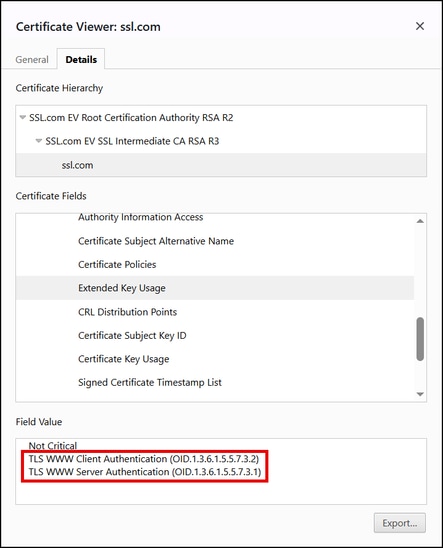
Browsers and servers only need the serverAuth EKU to establish a secure connection for HTTPS but historically, many TLS server certificates included both the serverAuth and clientAuth EKUs, below is an example of such a certificate:
Why the removal of the Client Authentication EKU from server certs?
- Security and Scope: Public TLS certificates are only supposed to authenticate servers on the web. The removal provides a clear separation between server and client functionality. The ClientAuth EKU is used for authentication of machines and users with Mutual TLS (mTLS) and other authentication scenarios.
- Prevent Misconfiguration: Some systems might trust any certificate from a public CA for client authentication if the EKU is present, which could be a security risk.
- Browser Requirements: Major browsers do not require or check the clientAuth EKU in a website’s certificate.
- Simplified PKI Architecture: By separating usages, CAs can maintain distinct certificate hierarchies for server TLS vs. other purposes.
This is particularly important for products like the Cisco Secure Firewall Adaptive Security Appliance (ASA), the Cisco Secure Firewall Threat Defense (FTD), the Cisco Secure Firewall Device Manager (FDM) and the Cisco Secure Firewall Management Center (FMC) that could act as either server or client during the TLS authentication, depending on the use case.
Impact on Server Environments
For the vast majority of server deployments, this change will be low-impact or no-impact. Here’s what to expect:
- Standard Web Servers (HTTPS): No impact. The updated certificates will continue to function normally.
- Existing Certificates: Any certificate issued before the cutoff will continue to function until it expires.
- Mutual TLS (mTLS) and Client Cert Scenarios: If you were using a TLS server certificate for client authentication, you will need to obtain a separate certificate with the clientAuth EKU from another source.
- Enterprise Systems Requiring Both EKUs: Some legacy or enterprise systems expected both EKUs. You should verify if updates are needed to comply with the new rules.
Problem Description
Beginning in May 2026, many public certificate authorities (CAs) will stop issuing Transport Layer Security (TLS) certificates that include the Client Authentication Extended Key Usage (EKU). Newly issued certificates will typically include Server Authentication EKU only.
As a result, if certificates issued by a public CA are renewed under the updated CA policies and then deployed in the Cisco Secure Firewall Products, services where Client Authentication EKU is required will fail. The specific services being impacted are the following:
-
When the ASA, FTD, FDM or FMC acts as a client—for example, when connecting to identity providers or authentication servers such as ISE (pxGrid), RADIUS, LDAPS, or Active Directory—certificate-based authentication may fail if the client certificate was generated by a public CA and is missing the Client Authentication EKU. In these scenarios, if the authentication server rejects certificates without the required EKU, connection failures may occur.
-
The Cisco Secure Client (formerly AnyConnect) can authenticate to ASA or FTD servers using certificates. However, if the client certificate was generated by a public CA and is missing the Client Authentication EKU, then the Remote Access VPN (RAVPN) connection will fail.
-
When the FTD or ASA establishes a site-to-site VPN tunnel—whether to another FTD, ASA, Cisco router, or a third-party VPN peer—using certificate authentication (RSA or ECDSA), the tunnel will fail if the identity certificate generated by a public CA is missing the Client Authentication EKU attribute. This occurs because the remote VPN peer requires the Client Authentication EKU to be present in the identity certificate.
Chrome Root Program Policy Change
The implementation of the EKU depends on the CA signing the certificate. The use of both Server Authentication and Client Authentication EKU was a common practice. However, as part of the Chrome Root Program Policy Change CAs aligning to this certificate issuance criteria are discontinuing the signing of TLS certificates that include the Client Authentication Extended Key Usage (EKU). Newly issued certificates include Server Authentication EKU only.
Key Policy Requirements
- Public Root CAs must assert Extended Key Usage (EKU) ONLY for Server Authentication (id-kp-serverAuth)
- Certificates must include ONLY Server Authentication EKU.
- Including Client Authentication EKU in these certificates are prohibited
- Root CAs that continue to issue certificates with Client Authentication EKU are eventually removed from the Chrome Root Store causing the flagging of such certificates as "Untrusted" by the Chrome Browser
Timelines
- September 2025, SSL.com will issue TLS certificates that only include the ServerAuth EKU (and not ClientAuth) for server certificates. In other words, new SSL/TLS certs for your website or server will explicitly be for “Server Authentication” only.
- October 2025: CAs aligning to the program (E.g: DigiCert, Sectigo, and so on.) began issuing server-only certificates by default.
- May 2026: CAs aligning to the program stop issuing Client Authentication EKU certificates
- March 2027: Chrome Root Program Policy becomes fully effective
Impact on Cisco Secure Firewall Products
After the public CAs start to include only the Server Authentication EKU in the issued certificates. This could have the following impact on the next Cisco Secure Firewall product scenarios:
- When the ASA, FTD, FDM or FMC acts as a client—for example, when connecting to identity providers or authentication servers such as ISE (pxGrid), RADIUS, LDAPS, or Active Directory—certificate-based authentication may fail if the client certificate was generated by a public CA and is missing the Client Authentication EKU. In these scenarios, if the authentication server rejects certificates without the required EKU, connection failures may occur.
- The Cisco Secure Client (formerly AnyConnect) can authenticate to ASA or FTD servers using certificates. However, if the client certificate was generated by a public CA and is missing the Client Authentication EKU, then the Remote Access VPN (RAVPN) connection will fail.
- When the FTD or ASA establishes a site-to-site VPN tunnel—whether to another FTD, ASA, Cisco router, or a third-party VPN peer—using certificate authentication (RSA or ECDSA), the tunnel will fail if the identity certificate generated by a public CA is missing the Client Authentication EKU attribute. This occurs because the remote VPN peer requires the Client Authentication EKU to be present in the identity certificate.
Affected Products
| Cisco Secure Firewall Product | Software Version | Impacted Scenarios | Remediations |
| FTD | All versions | When acts as a client—for example, when connecting to identity providers or authentication servers such as ISE (pxGrid), RADIUS, LDAPS, or Active Directory—certificate-based authentication may fail if the client certificate was generated by a public CA and is missing the Client Authentication EKU. In this scenario, if the authentication server rejects certificates without the required EKU, connection failures may occur. | Option 1. If you are using a TLS server certificate for client authentication, you will need to obtain a certificate with the ClientAuth EKU from another source. OR Option2. Switch to public root CAs (Certificate Authorities) that provide combined EKU (ClientAuth and ServerAuth) certificates. NOTE: Please refer to the Workarounds section of this document for additional options. |
| FDM | All versions | ||
| FMC | All versions | ||
| ASA | All versions | ||
| Cisco Secure Client (formerly AnyConnect) | All versions | The Cisco Secure Client can authenticate to the ASA or FTD servers using certificates. However, if client certificate was generated by a public CA and is missing the Client Authentication EKU, then the Remote Access VPN (RAVPN) connection will fail. | |
| FTD or ASA | All versions | When the FTD or ASA establishes a site-to-site VPN tunnel—whether to another FTD, ASA, Cisco router, or a third-party VPN peer—using certificate authentication (RSA or ECDSA), the VPN tunnel will fail if the identity certificate generated by a public CA is missing the Client Authentication EKU attribute. This occurs because the remote VPN peer requires the Client Authentication EKU to be present in the identity certificate. |
Problem 1. pxGrid integration problem between FMC and ISE, when the FMC certificate lacks of the Client Authentication EKU attribute
In this scenario, the certificate used by the FMC for pxGrid integration with ISE lacks the Client Authentication EKU attribute. As a result, the pxGrid integration fails because the ISE server expects this attribute to be present in the certificate presented by the FMC.
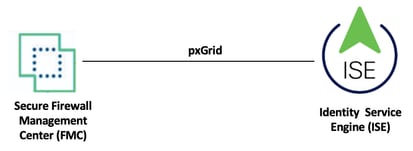
Topology
FMC UI Errors: This is the error message displayed in the FMC, when the certificate used by the FMC lacks of the Client Authentication EKU attribute for the pxGrid integration with ISE.
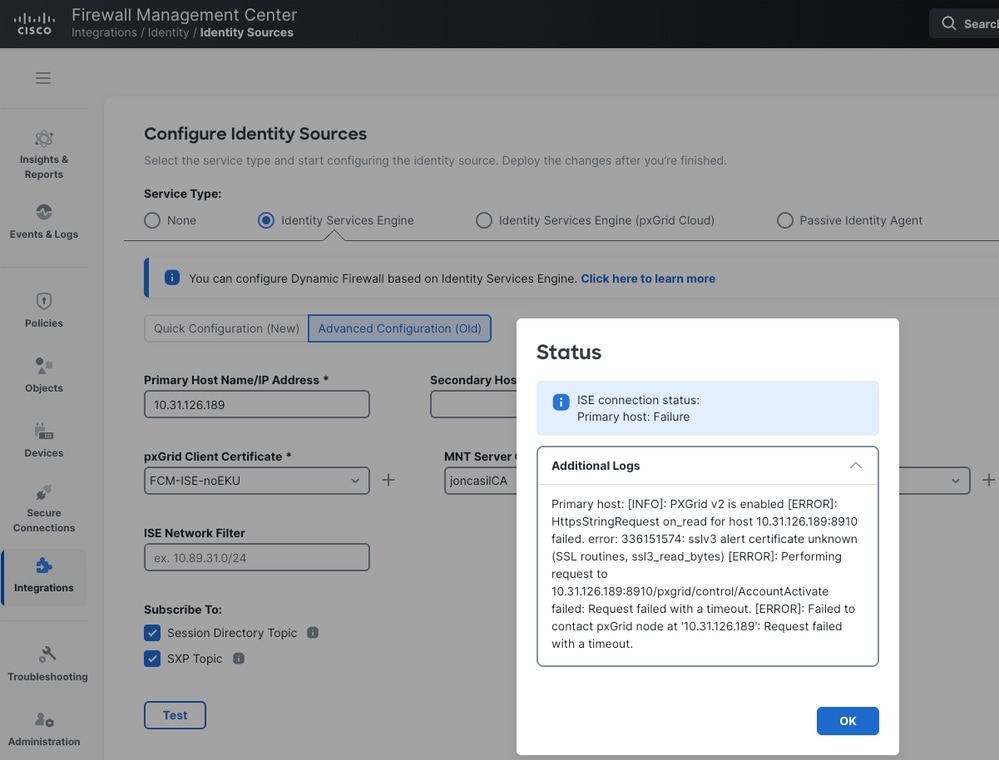
FMC CLI Errors: Same error messages are found in the FMC /var/log/messages directory.
HttpsStringRequest on_read for host 10.31.126.189:8910 failed. error: 336151574: sslv3 alert certificate unknown (SSL routines, ssl3_read_bytes)
Mar 27 23:17:17 vFMC3-chherna2 SF-IMS[8074]: [7514] ADI:HttpsEndpoint [ERROR] Performing request to 10.31.126.189:8910/pxgrid/control/AccountActivate failed: Request failed with a timeout.
Mar 27 23:17:17 vFMC3-chherna2 SF-IMS[8074]: [7514] ADI:ise_connector.PXGrid2ThreadedService [ERROR] pxgrid2_service was not created for 10.31.126.189. Reason - Request failed with a timeout.
Mar 27 23:17:47 vFMC3-chherna2 SF-IMS[8074]: [7514] ADI:ise_connector.PXGrid2ThreadedService [INFO] pxgrid2_service not connected. Attempting connect to hosts
Mar 27 23:17:47 vFMC3-chherna2 SF-IMS[8074]: [7514] ADI:ise_connector.PXGrid2ThreadedService [INFO] pxgrid2_service not connected. Attempting connect to host: 10.31.126.189
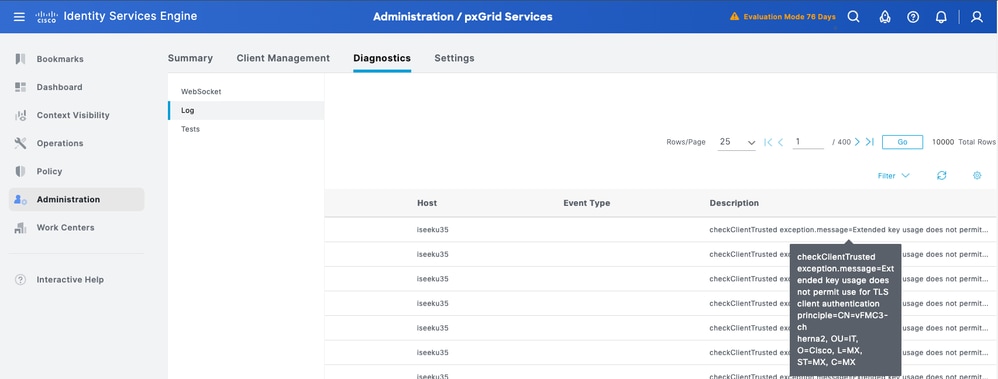
ISE Error: This is the error message displayed in ISE, "checkClientTrusted exception.message=Extended key usage does not permit use for TLS client authentication principle=CN=vFMC3-chherna2, OU=IT, O=Cisco, L=MX, ST=MX, C=MX".
Solution: If you are integrating FMC or FDM with ISE through pxGrid and the certificate installed in your FMC/FDM lack the Client Authentication EKU attribute, then review the proposed in this document and the next ISE references: FN74392 and Prepare Identity Services Engine for Extended Key Usage Restrictions in Certificates Issued by Public Certification Authorities for a successful pxGrid integration.
Problem 2. FTD or ASA integration problem with an LDAPS server, when the certificate presented lacks of the Client Authentication EKU attribute
In this scenario, the FTD or ASA acts as a client to integrate with an LDAPS server using certificate authentication. If the certificate used by the FTD or ASA lacks the Client Authentication EKU attribute, the integration fails because the LDAPS server requires this attribute to be present in the certificate.
Topology
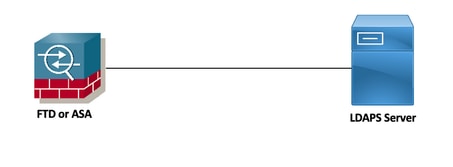
LDAPS Server Errors: 'TLS certificate verification: Error, unsupported certificate purpose' and 'TLS trace: SSL3 alert write:fatal:unsupported certificate'
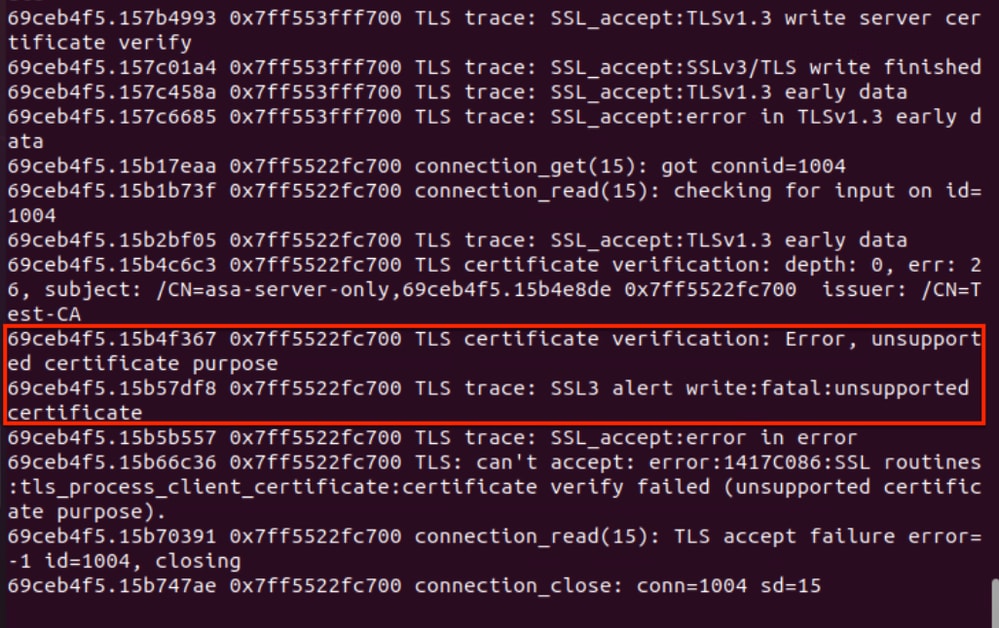
Solution: Review the proposed in this document to ensure the FTD or ASA uses the correct identity certificate—including the Client Authentication EKU attribute—for a successful certificate-based authentication with the LDAPS server.
Problem 3. Cisco Secure Client (formerly AnyConnect) may experience connection issues to an FTD or ASA if the client certificate lacks the Client Authentication EKU attribute
In this scenario, the Cisco Secure Client is using certificate authentication to establish an RAVPN tunnel to the FTD or ASA. However, if the client certificate lacks the Client Authentication EKU attribute, the RAVPN session will fail because the ASA or FTD requires this attribute to be present in the client certificate.
Topology
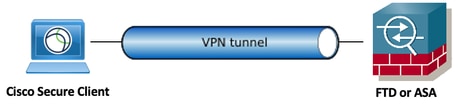
Cisco Secure Client Error: 'Certificate Validation Failure'
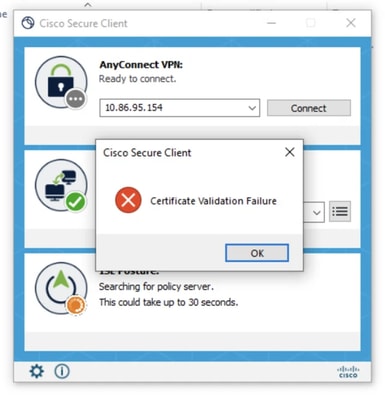
Cisco Secure Client DART Errors:The following logs from the AnyConnectVPN.txt file in the DART bundle confirm that the Cisco Secure Client rejected the certificate used for the RAVPN certificate-based authentication to the FTD/ASA due to the absence of the Client Authentication EKU attribute (in order to locate the AnyConnectVPN.txt file in the DART bundle, Navigate to Cisco Secure Client > AnyConnect VPN > Logs > AnyConnectVPN.txt.).
******************************************

Date : 04/07/2026
Time : 03:35:22
Type : Error
Source : csc_vpnapi

Description : Function: CVerifyExtKeyUsage::compareEKUs
File: C:\temp\build\thehoff\Raccoon_MR40.765445939442\Raccoon_MR4\vpn\CommonCrypt\Certificates\VerifyExtKeyUsage.cpp
Line: 330
EKU not found in certificate: 1.3.6.1.5.5.7.3.2

******************************************

Date : 04/07/2026
Time : 03:35:22
Type : Information
Source : csc_vpnapi

Description : Function: CCertStore::GetCertificates
File: C:\temp\build\thehoff\Raccoon_MR40.765445939442\Raccoon_MR4\vpn\CommonCrypt\Certificates\CertStore.cpp
Line: 225
Ignoring client certificate because it does not contain the required EKU extension. Certificate details:
Store: [Omitted Output]

******************************************
Solution: Review the proposed in this document to ensure the Cisco Secure Client uses the correct certificate—including the Client Authentication EKU attribute—for a successful certificate-based authentication with the FTD or ASA.
Problem 4. Site-to-site VPN tunnels with certificate-based authentication fails if the identity certificate is missing the Client Authentication EKU attribute
In this scenario, which involves certificate-based authentication for an IKEv2 site-to-site VPN tunnel, the identity certificate used by FTD/ASA (1) to establish the tunnel to the FTD/ASA (2) peer lacks the Client Authentication EKU attribute. As a result, the VPN tunnel cannot be established because the remote peer, FTD/ASA (2), requires this attribute to be present in the certificate.
Topology

FTD or ASA CLI errors: These are the errors observed on the FTD/ASA (2) during the IKEv2 certificate-based authentication when it rejects the FTD/ASA (1) identity certificate that lacks the Client Authentication EKU attribute.
Apr 09 2026 15:59:50: %ASA-3-717027: Certificate chain failed validation. Certi. Peer certificate key usage is invalid, subject name: CN=ASAv3.cisco.com,OU=IT,O=Cisco,C=US,unstructuredName=ASAv3.cisco.com.
Apr 09 2026 15:59:50: %ASA-3-717027: Certificate chain failed validation. Certificate chain is either invalid or not authorized.
Apr 09 2026 15:59:50: %ASA-3-751006: Local:10.3.3.6:500 Remote:10.3.3.5:500 Username:10.3.3.5 IKEv2 Certificate authentication failed. Error: Certificate authentication failed
Apr 09 2026 15:59:50: %ASA-4-750003: Local:10.3.3.6:500 Remote:10.3.3.5:500 Username:10.3.3.5 IKEv2 Negotiation aborted due to ERROR: Auth exchange failed
Apr 09 2026 15:59:50: %ASA-4-752012: IKEv2 was unsuccessful at setting up a tunnel.  Map Tag = CMAP.  Map Sequence Number = 10.
Apr 09 2026 15:59:50: %ASA-3-752015: Tunnel Manager has failed to establish an L2L SA.  All configured IKE versions failed to establish the tunnel. Map Tag= CMAP.  Map Sequence Number = 10.
Apr 09 2026 15:59:55: %ASA-5-752003: Tunnel Manager dispatching a KEY_ACQUIRE message to IKEv2.  Map Tag = CMAP.  Map Sequence Number = 10.
Apr 09 2026 15:59:55: %ASA-5-750001: Local:10.3.3.6:500 Remote:10.3.3.5:500 Username:Unknown IKEv2 Received request to establish an IPsec tunnel; local traffic selector = Address Range: 11.11.11.1-11.11.11.1 Protocol: 0 Port Range: 0-65535; remote traffic selector = Address Range: 10.10.10.1-10.10.10.1 Protocol: 0 Port Range: 0-65535
Solution: Review the proposed in this document to ensure that FTD/ASA (1) uses the correct identity certificate—including the Client Authentication EKU attribute—for a successful site-to-site VPN tunnel with certificate-based authentication.
Instructions to Confirm Whether Your Certificate Lacks the Client Authentication EKU Attribute
Verify the EKU Attributes from a .cer Certificate using Windows Certificate Manager
Follow next steps to verify the EKU attributes from a .cer certificate using Windows Certificate Manager:
Step 1. Double-click the .cer file to open it in Windows Certificate Manager.
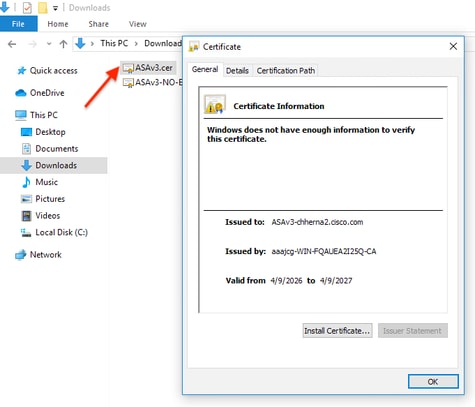
Step 2. Handle Security Warning (if any), If a security warning prompt appears, click Open to proceed.
Step 3. In the certificate window, click the Details tab.
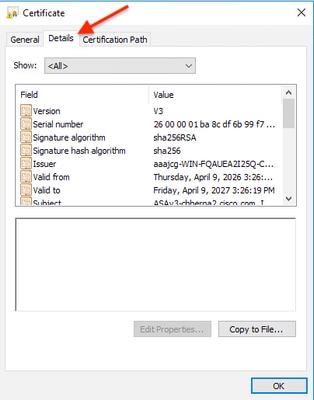
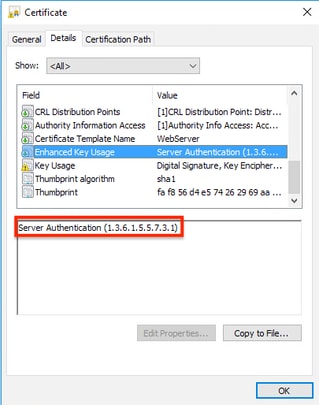
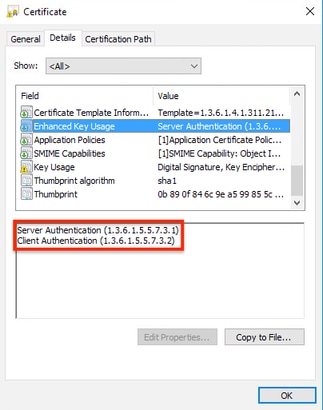
Step 4. Scroll through the list of fields and select "Enhanced Key Usage" (or Extended Key Usage).
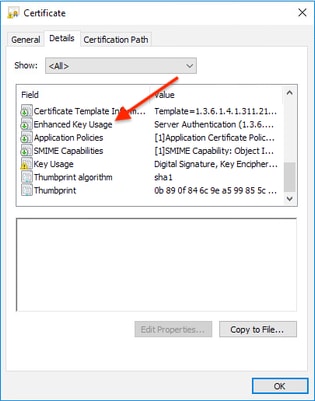
Step 5. Verify the EKU Attributes, you might see entries like "Server Authentication" and "Client Authentication" indicating the EKU values present in the certificate.
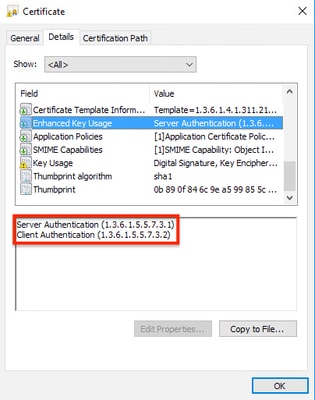
Step 6. After verification, click OK to close the certificate window.
Example 1: This .cer certificate is missing the Client Authentication EKU attribute and includes only the Server Authentication EKU attribute.
Example 2: This .cer certificate includes both the Server and Client Authentication EKU attributes.
Verify the EKU Attributes from a PKCS#12, PEM and .cer Certificate using OpenSSL
Follow the next steps to verify the EKU attributes from a .p12 (PKCS#12), .pem (PEM) and .cer certificate:
Step 1. Locate the certificate you need to check, and export it out in .p12 (PKCS#12), .pem (PEM) or .cer format.
For .p12 (PKCS#12) certificates, use openssl to extract the certificate from the .p12 (PKCS#12) file, the .p12 (PKCS#12) file may contain the private key, certificate, and CA certificates.
Use the following command to extract the certificate from a .p12 (PKCS#12) file into a .pem (PEM) file (without the private key or CA chain):
openssl pkcs12 -in yourfile.p12 -nokeys -clcerts -out cert.pem
- yourfile.p12: Replace with your actual file name.
- You may need to enter the password for the .p12 file.
- cert.pem: Is the certificate extracted (without the private key or CA chain) in .pem (PEM) format.
Step 2. Use the next openssl commands to display the certificate details and EKU attributes.
a) For .pem files, use the next openssl command to display the certificate details and EKU attributes:
openssl x509 -in cert.pem -text -noout
- cert.pem: Replace with your actual file name.
b) For .cer files, use the next openssl command to display the certificate details and EKU attributes:
openssl x509 -in yourfile.cer -text -noout
- yourfile.cer: Replace with your actual file name.
Step 3. Then, look for the X509v3Extended Key Usage section in the output, you might see entries like "TLS Web Server Authentication" and "TLS Web Client Authentication" indicating the EKU values present in the certificate.
X509v3 Extended Key Usage:
TLS Web Server Authentication, TLS Web Client Authentication
OR the EKU attribute OIDs (Object Identifiers):
X509v3 Extended Key Usage:
1.3.6.1.5.5.7.3.1, 1.3.6.1.5.5.7.3.2
- Server Authentication EKU OID: 1.3.6.1.5.5.7.3.1
- Client Authentication EKU OID: 1.3.6.1.5.5.7.3.2
Example 1: This .pem (PEM) certificate is missing the Client Authentication EKU attribute and includes only the Server Authentication EKU attribute.
MyHost$ openssl x509 -in cert.pem -text -noout
Certificate:
    Data:
        Version: 3 (0x2)
        Serial Number:
            26:00:00:01:b7:e7:90:48:d6:f9:41:d3:54:00:01:00:00:01:b7
    Signature Algorithm: sha256WithRSAEncryption
        Issuer: DC=com, DC=aaajcg, CN=aaajcg-WIN-FQAUEA2I25Q-CA
        Validity
            Not Before: Mar 27 00:31:40 2026 GMT
            Not After : Mar 26 00:31:40 2028 GMT
        Subject: C=MX, ST=MX, L=MX, O=Cisco, OU=IT, CN=vFMC3-chherna2
        Subject Public Key Info:
            Public Key Algorithm: rsaEncryption
                RSA Public-Key: (2048 bit)
                Modulus:
                    00:cf:a8:a0:ff:dd:34:73:7d:46:86:85:05:b6:0c:
                    5e:32:8c:6f:6f:88:52:03:58:63:c6:89:d8:fc:55:
                    c5:58:ba:eb:45:88:b2:21:9e:c5:d8:67:57:39:0f:
                    91:a5:41:61:fa:94:b1:ad:9e:71:26:87:b6:30:ae:
                    a7:f6:89:b1:6d:61:ce:fa:47:7f:2a:d8:e8:4d:26:
                    4f:a7:d3:eb:5a:69:16:46:71:c7:55:cf:87:b4:10:
                    96:f2:10:6b:c0:a7:3d:3c:49:9d:ee:77:8c:b5:95:
                    9b:69:81:e0:2d:a0:6e:5c:78:73:22:5a:38:d0:74:
                    38:b2:ba:e0:ab:c5:44:eb:e1:3c:52:86:b8:2a:4e:
                    37:44:9c:34:d8:d8:6c:ae:3e:df:12:57:0e:28:52:
                    57:dc:6d:62:ea:b6:ec:19:4e:90:8f:3f:2c:23:1b:
                    e2:39:f0:ba:07:08:9a:0b:97:96:05:2e:69:fe:9a:
                    b2:b2:74:9a:ba:06:25:bc:38:1c:94:87:8e:2a:dc:
                    2f:0b:a6:31:6c:bf:11:96:2a:71:b3:87:e5:f5:cb:
                    88:f1:73:cf:88:d7:30:78:24:77:7c:b7:2c:7c:83:
                    6d:69:5b:bd:d4:21:b9:ee:19:c4:02:be:7b:44:a2:
                    55:d6:b2:95:11:46:bf:db:3e:4f:9a:8c:d4:ad:8d:
                    82:f5
                Exponent: 65537 (0x10001)
        X509v3 extensions:
            X509v3 Subject Key Identifier:
                0D:8E:DA:07:6D:49:EA:51:D2:C7:EF:50:CE:CE:2B:8E:7C:DF:A6:8D
            X509v3 Authority Key Identifier:
                keyid:3A:45:60:22:F7:C8:2C:0D:D2:98:5A:BC:E0:98:D4:91:1D:67:32:22

            X509v3 CRL Distribution Points:

                Full Name:
                  URI:ldap:///CN=aaajcg-WIN-FQAUEA2I25Q-CA,CN=WIN-FQAUEA2I25Q,CN=CDP,CN=Public%20Key%20Services,CN=Services,CN=Configuration,DC=aaajcg,DC=com?certificateRevocationList?base?objectClass=cRLDistributionPoint

            Authority Information Access:
                CA Issuers - URI:ldap:///CN=aaajcg-WIN-FQAUEA2I25Q-CA,CN=AIA,CN=Public%20Key%20Services,CN=Services,CN=Configuration,DC=aaajcg,DC=com?cACertificate?base?objectClass=certificationAuthority

            1.3.6.1.4.1.311.20.2:
                ...W.e.b.S.e.r.v.e.r
            X509v3 Key Usage: critical
                Digital Signature, Key Encipherment
            X509v3 Extended Key Usage:         <———————— "EKU SECTION"
                TLS Web Server Authentication  <———————— "Server Authentication EKU Attribute Included"
    Signature Algorithm: sha256WithRSAEncryption
         2f:27:cd:95:7d:5c:40:fa:29:64:df:75:7d:7a:87:9b:b0:94:
         0e:6b:07:4d:d2:7e:83:da:03:08:f3:50:0d:5b:05:8c:1f:54:
         46:fe:53:f3:e2:d4:0a:ba:37:4f:cd:a4:49:04:74:79:09:23:
         d6:06:af:69:d2:7b:f5:bc:ec:fe:ce:e4:c9:07:31:d7:85:45:
         55:78:d3:42:45:f9:ce:cd:bf:43:53:b4:8e:4c:af:64:4b:a6:
         dc:47:d0:16:4e:73:62:fd:c8:5e:37:74:cb:68:48:29:7d:f9:
         41:b3:d1:46:56:24:83:23:5c:bd:b0:e3:7c:f9:8a:af:da:09:
         d0:c2:7d:4a:e6:24:0f:e6:fc:6e:0d:65:8c:96:8c:af:21:b2:
         7f:4b:bb:1c:17:33:b1:db:00:f3:12:e3:53:39:d0:e7:6a:48:
         4c:c6:4f:29:6f:74:ff:2d:a7:e5:ea:e8:89:fe:a4:2b:cd:e3:
         61:6a:9e:11:52:15:57:f2:b8:e8:fa:78:31:20:49:d9:50:f9:
         70:3f:1e:aa:9c:1a:bb:0b:59:66:1e:85:bd:76:e7:73:6f:ec:
         86:30:b0:dd:86:3c:b3:a0:7b:fb:b7:74:5d:38:88:82:3d:a3:
         2d:8c:a5:e4:db:37:eb:be:7f:62:bc:87:7c:35:17:32:fc:52:
         c5:d3:c5:8f
Example 2: This .pem (PEM) certificate includes both the Client and Server Authentication EKU attributes.
MyHost$ openssl x509 -in cert.pem -text -noout
Certificate:
    Data:
        Version: 3 (0x2)
        Serial Number:
            26:00:00:01:b6:74:fc:b4:1e:99:be:7a:10:00:01:00:00:01:b6
    Signature Algorithm: sha256WithRSAEncryption
        Issuer: DC=com, DC=aaajcg, CN=aaajcg-WIN-FQAUEA2I25Q-CA
        Validity
            Not Before: Mar 26 23:44:58 2026 GMT
            Not After : Mar 26 23:44:58 2027 GMT
        Subject: C=MX, ST=AD, L=AD, O=Cisco, OU=IT, CN=vFMC3-chherna2
        Subject Public Key Info:
            Public Key Algorithm: rsaEncryption
                RSA Public-Key: (2048 bit)
                Modulus:
                    00:ab:aa:67:4e:55:19:3b:38:6c:33:2e:ba:fd:19:
                    56:e7:68:f8:f7:e9:53:95:1f:53:b4:f1:ce:94:c8:
                    ca:41:f1:52:15:eb:a5:35:9f:07:95:9f:c3:8a:5e:
                    62:d6:e1:5c:04:c5:c0:27:1c:84:ed:3d:1b:42:50:
                    91:4a:a6:86:90:e0:6e:26:7e:37:fd:17:0c:2f:bb:
                    fe:58:81:ec:3b:9d:0b:fc:dd:8c:6b:dd:ab:d3:96:
                    74:23:0d:78:d7:09:53:61:f9:b0:29:c6:7c:e2:9c:
                    2f:74:30:42:0f:45:47:cd:16:59:ed:53:62:8f:60:
                    75:f8:24:f5:1f:77:fb:89:85:4b:49:ad:93:43:04:
                    6e:4a:b3:59:fc:eb:75:70:39:67:71:60:be:b3:b7:
                    86:f7:c5:53:28:1e:bf:8f:b2:52:ec:79:d6:12:b0:
                    33:9c:6d:46:7a:9c:5d:53:a5:44:24:da:4b:36:7d:
                    c2:ec:61:d7:a0:01:c3:d2:bc:0a:df:a8:f6:0c:82:
                    48:30:fb:c6:3e:4a:48:a9:01:13:f5:4e:f2:03:24:
                    38:ee:aa:d9:60:78:30:45:ed:3b:76:16:fd:7a:d3:
                    b0:16:10:28:75:fc:41:32:e6:6d:cb:c3:96:58:77:
                    9e:11:0a:9b:33:c7:92:8d:75:1f:e5:30:29:a4:a5:
                    ba:7d
                Exponent: 65537 (0x10001)
        X509v3 extensions:
            X509v3 Subject Key Identifier:
                D2:DF:62:25:17:DB:72:31:D8:D2:D0:41:CB:FB:DD:00:FF:38:BD:BB
            X509v3 Authority Key Identifier:
                keyid:3A:45:60:22:F7:C8:2C:0D:D2:98:5A:BC:E0:98:D4:91:1D:67:32:22

            X509v3 CRL Distribution Points:

                Full Name:
                  URI:ldap:///CN=aaajcg-WIN-FQAUEA2I25Q-CA,CN=WIN-FQAUEA2I25Q,CN=CDP,CN=Public%20Key%20Services,CN=Services,CN=Configuration,DC=aaajcg,DC=com?certificateRevocationList?base?objectClass=cRLDistributionPoint

            Authority Information Access:
                CA Issuers - URI:ldap:///CN=aaajcg-WIN-FQAUEA2I25Q-CA,CN=AIA,CN=Public%20Key%20Services,CN=Services,CN=Configuration,DC=aaajcg,DC=com?cACertificate?base?objectClass=certificationAuthority

            X509v3 Key Usage: critical
                Digital Signature, Key Encipherment
            1.3.6.1.4.1.311.21.7:
                0-.%+.....7.....^..9...
...b.../ ...R...Z..d...
            X509v3 Extended Key Usage:         <———————— "EKU SECTION"
                TLS Web Server Authentication, TLS Web Client Authentication  <————— "Server & Client EKU Attributes Included"
            1.3.6.1.4.1.311.21.10:
                0.0
..+.......0
..+.......
            S/MIME Capabilities:
......0...+....0050...*.H..
..*.H..
    Signature Algorithm: sha256WithRSAEncryption
         3f:66:b1:35:7e:05:b4:69:f1:81:95:b8:18:90:f2:20:bd:8d:
         ff:03:5a:59:ca:02:ba:2d:1d:e0:8d:3f:63:e9:fe:71:3c:9a:
         11:15:5c:3b:fc:62:e4:cf:15:25:4c:74:5e:ad:3f:09:e9:3b:
         d5:08:95:7d:97:7a:ef:c1:16:6d:e0:7a:0b:21:81:46:bc:15:
         c3:76:8c:fe:fb:14:94:36:92:0d:3b:4a:c9:8f:6a:bd:dc:4b:
         0b:24:c3:32:35:27:e7:aa:23:95:85:e4:a9:64:71:f0:98:9e:
         33:aa:6e:bd:7c:dd:dc:4b:cf:dd:0e:a7:ea:e8:aa:61:8f:67:
         84:da:5b:be:8e:05:75:c8:eb:46:13:6f:14:4d:fe:4e:57:3c:
         29:27:cc:0b:5b:25:87:37:24:12:79:b1:c3:78:c8:94:fe:df:
         3c:77:aa:fc:f2:ee:ae:9b:ab:88:29:f9:ee:04:c2:48:5f:21:
         9e:1c:25:cc:c9:c5:9c:23:8f:af:87:76:5e:46:74:ac:73:57:
         01:ba:71:ae:46:e1:87:3c:94:6c:19:f7:fe:8e:66:9d:c7:1f:
         b0:87:4b:65:e2:fc:d6:10:7c:44:57:56:5d:68:bb:df:f0:36:
         0e:07:c5:8a:be:56:86:97:3d:a7:1c:8b:86:df:0b:51:b5:97:
         cc:67:09:8e
Workarounds
Administrators can choose from one of the following workaround options.
Option 1. Switch to public root CAs that provide combined EKU certificates
Some public root CAs, such as DigiCert and IdenTrust, issue certificates with combined EKU types (server and client certificates) from an alternative root, which may not be included in the Chrome Root Store. Coordinate with the CA provider to check the availability of such certificates, and, before deploying them, ensure that both the server presenting the certificate and the clients consuming it trust the corresponding root CA.
This approach alleviates the need to upgrade server software to mitigate sunsetting of Client Authentication EKU enforced by the Chrome Root Program Policy.
The following table, which shows examples of public root CAs and EKU types, is not an exhaustive list and is for illustrative purposes only.
| CA Vendor | EKU Type | Root CA | Issuing/Sub CA |
|---|---|---|---|
| IdenTrust | clientAuth + serverAuth | IdenTrust Public Sector Root CA 1 | IdenTrust Public Sector Server CA 1 |
| IdenTrust | clientAuth | IdenTrust Public Sector Root CA 1 | TrustID RSA ClientAuth CA 2 |
| IdenTrust | serverAuth (browser trusted) | IdenTrust Commercial Root CA 1 | HydrantID Server CA O1 |
| DigiCert | clientAuth + serverAuth | DigiCert Assured ID Root G2 | DigiCert Assured ID CA G2 |
| DigiCert | clientAuth | DigiCert Assured ID Root G2 | DigiCert Assured ID Client CA G2 |
| DigiCert | serverAuth (browser trusted) | DigiCert Global Root G2 | DigiCert Global G2 TLS RSA SHA256 |
Option 2. Renew Current Certificates to Extend Their Validity
Certificates that are issued by public root CAs before May 2026 that have both Server and Client Authentication EKU will continue to be honored until their term expires. However, it is best to renew combined EKU certificates before the policy sunsetting occurs.
- Public CA policy and implementation dates may vary by vendor.
- Check with the CA and plan certificate renewal accordingly.
- After March 15th 2026, public CA-issued certificates are valid only for 200 days.
- Take into consideration that some public CAs have stopped issuing combined EKU certificates.
Option 3. Migrate to private PKI to issue combined EKU (Server and Client) Certificates
Evaluate the feasibility of transitioning to a Private Public Key Infrastructure (PKI) and then set up a private CA to issue single certificates with combined EKU (Server and Client certificates with the required EKUs).
Before issuing or deploying a certificate, ensure that both the server presenting the certificate and all clients consuming it trust the corresponding root CA.
Option 4. Get a publicly trusted certificate with only Client Authentication EKU
Some CAs, like SSL.com, offer dedicated client authentication certificates. These are separate from TLS certificates and typically used for enterprise authentication.
Frequently Asked Questions (FAQ)
Q1. Do I need to worry about this if I use a private PKI?
A: The policy enforced by private CAs is determined by each organization. If your private CA adopts the same issuance criteria—such as removing the Client Authentication EKU attribute from certificates—the guidelines provided in this document are applicable.
Q2. Can I continue using my existing certificates?
A: Yes, valid certificates with combined EKUcan be used until theexpirationtime.
Q3. What options are available for integrating my FMC or FDM with ISE through pxGrid if the certificate installed on the FMC/FDM lack the Client Authentication EKU attribute?
A: Besides the workarounds proposed in this document, we highly recommend you to check the following ISE references:
Q4. What is the “Client Authentication” EKU and why was it in my certificate?
A: The “Client Authentication” EKU indicates a certificate can be used by a client to authenticate to a server. Some CAs historically included it in TLS certificates by default, but it was never required for normal website security.
Q5. My current TLS certificate says “Client Authentication” under its Extended Key Usage. Is it now invalid?
A: No, it remains valid. You don’t need to replace it immediately. When you renew, the new certificate simply won’t include the clientAuth EKU.
Q6. How can I check if a certificate has the clientAuth EKU?
A: You can inspect the certificate details using OpenSSL, PowerShell, or GUI tools to check for the Extended Key Usage extension.
Q7. Can I still get a publicly trusted certificate with only Client Authentication EKU?
A: Some CAs, like SSL.com, offer dedicated client authentication certificates. These are separate from TLS certificates and typically used for enterprise authentication.
Q8. Does this affect other EKUs or certificate types (code signing, email, etc.)?
A: No, this change is specific to TLS server certificates. Code signing and email certificates have their own EKU requirements.
Q9. Where can I see the official requirements about this change?
A: The Google Chrome Root Program Policy provides guidelines on the prohibition of the clientAuth EKU in TLS server certificates.
Q10. Is it safe to use certificates without Client and Server EKU attributes in my production enviroment?
A: For production environments, it is strongly recommended that customers use certificates with the appropriate EKU attributes. This practice ensures security, compatibility, and adherence to industry standards and best practices. Certificates without EKU attributes should only be considered as a temporary workaround, and only with a clear understanding of the associated risks.
Related Information
- For additional assistance, please contact the Cisco Technical Assistance Center (TAC). A valid support contract is required: Cisco Worldwide Support Contacts.
-
Cisco Support & Downloads: Cisco Technical Support & Downloads
Related Bugs
- CSCwt94492 ENH: FMC should validate presence of Client Authentication EKU attribute in the client certificate used for pxGrid Integration
- CSCwt94509 ENH: FMC should display a message indicating that the Client Authentication EKU attribute is required in the client certificate used for pxGrid integration
- CSCwt61767 May 2026 EKU Server-Only Change - Issue ASA configuration warning if inadequate EKU
- CSCws83036 EKU: Impact assesment of ClientAuth EKU enforcement in ISE
Cisco ISE References
External References
Revision History
| Revision | Publish Date | Comments |
|---|---|---|
2.0 |
21-Apr-2026
|
Initial Release |
1.0 |
21-Apr-2026
|
Initial Release |

 Feedback
Contact Cisco
- Open a Support Case

- (Requires a Cisco Service Contract)