Prepare Identity Services Engine for Extended Key Usage Restrictions in Certificates Issued by Public Certification Authorities.
Available Languages
Contents
Introduction
This document describes the impact of the restrictions applied to the issuance criteria of certificates issued by certification authorities aligning to the Chrome Root Certificate programin the Cisco Identity Services Engine (ISE).
Background Information
Digital certificates are electronic credentials issued by Certification Authorities (CAs) that secure communication between servers and clients by ensuring authentication, data integrity, and confidentiality. Extended Key Usage (EKU) are attributes that define the purpose of the certificate public key. Two of the available EKU values are:
- Server Authentication EKU (id-kp-serverAuth): Used when a server presents its certificate to prove identity
- Client Authentication EKU (id-kp-clientAuth): Used in mutual TLS (mTLS) connections where both parties authenticate each other
A single certificate could contain both Server and Client Authentication EKUs, allowing it to serve dual purposes. This is particularly important for products like ISE that act as either server or client depending on the use case.
Problem Definition
Chrome Root Program Policy Change
The implementation of the EKU depends on the CA signing the certificate. The use of both Server Authentication and Client Authentication EKU was a common practice.
However, as part of the Chrome Root Program Policy Change CAs aligning to this certificate issuance criteria are discontinuing the signing of TLS certificates that include the Client Authentication Extended Key Usage (EKU). Newly issued certificates include Server Authentication EKU only.
Key Policy Requirements
- Public Root CAs must assert Extended Key Usage (EKU) ONLY for Server Authentication (id-kp-serverAuth)
- Certificates must include ONLY Server Authentication EKU
- Including Client Authentication EKU in these certificates is prohibited
- Root CAs that continue to issue certificates with Client Authentication EKU are eventually removed from the Chrome Root Store causing the flagging of such certificates as "Untrusted" by the Chrome Browser
Timeline
- October 2025: CAs aligning to the program (E.g: DigiCert, Sectigo, and so on.) began issuing server-only certificates by default.
- May 2026: CAs aligning to the program stop issuing Client Authentication EKU certificates
- March 2027: Chrome Root Program Policy becomes fully effective
How It Affects Cisco ISE
All Cisco ISE releases are affected:
- ISE 3.1
- ISE 3.2
- ISE 3.3
- ISE 3.4
- ISE 3.5

Note: The mentioned change impacts all ISE versions, including versions lower than 3.x. However, code changes are released only for the versions mentioned in the previous section. Cisco recommends upgrading ISE to prevent any impact.
Specific Affected Use Cases
Table 1 summarizes the services affected by the upcoming Client Authentication EKU changes, along with the expected impact for each service.
| Service |
Impact |
| pxGrid |
ISE pxGrid Service requires inter-node communication over the pxGrid channel. This means that some nodes work as servers and others as clients. Hence, the presence of both Server Authentication EKU and Client Authentication EKU are required for the installation of the pxGrid certificate. As a result, the installation of newly issued Public CA certificates containing only the Server Authentication EKU is restricted. 
Caution: ISE pxGrid service does certificate EKU validation. External pxGrid client certificates must include the Client Authentication EKU when communicating with ISE or the connection is rejected. Cisco recommends the verification of Public CA-signed certificates used in external pxGrid clients to prevent impact on the integration, to learn more about this please review Cisco Secure Firewall Impact of the Public CA Client Authentication EKU Changes Starting on May 2026 for Secure Communications. |
| ISE Messaging Service(IMS) |
ISE Messaging Services (IMS) is a secure channel enforcing strict mTLS validtation and used for inter-node communication. Hence, the presence of both Server Authentication EKU and Client Authentication EKU is required for the proper functioning of the service. The installation of newly issued Public CA certificates not containing both EKUs is restricted only on ISE 3.4 and 3.5. Lower versions does not restrict the installation. However, the operation of the service is impacted if both EKUs are not present on the certificates. |
| TC-NAC |
When selecting the TC-NAC vendor Tenable Security Center: VA in Administration > Threat Centric NAC > Add a new TC-NAC connector is created. After the connector is ready to be configured, it is possible to select the "Certificate Based Authentication" as the authentication method for the TC-NAC connector and then select the "ISE Admin Certificate". TC-NAC connection is established between the ISE PSN and the VA DB so the Admin Certificate of the specific PSN is the one being used as a Client Certificate. If strict mTLS is enabled on Tenable then the Client Authentication EKU is required. The lack of the Client Authentication EKU can cause the rejection of the ISE TC-NAC Client certificate by the server. |
| LDAPs, Secure Syslog, RADIUS DTLs for CoA |
These three services provide the possibility of using specific certificates as "Client Certificates" for TLS authentication. ISE does not do any EKU validation. Hence, the impact to these services depends completely on the server side. if certificate EKU validation is enforced on the Server then the specific certificate used by ISE requires the Client Authentication EKU or the TLS authentication fails. |
Table 1: Impacted services
Problem Symptoms
Attempting to install a certificate with Server Authentication EKU only for services with specific EKU requirements generates the error shown in Image 1.
pxGrid and ISE Messaging Service (IMS) are services with such EKU requirements.
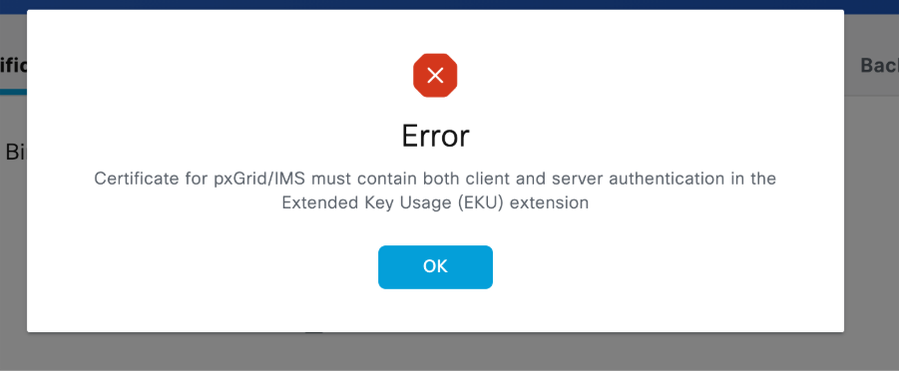
Image 1: Error displayed when trying to install a certificate not complying with EKU requirements
Recommendations
Audit Certificates with potential impact and comply with the recommendations
- Use Table 1 to find the ISE services with potential impact. Check which of the mentioned services rely on Public CA-signed certificates or CAs aligning to the chrome root program.
- Document the CA chain for each certificate and validate if such CA is implementing the changes in the issuance criteria.
- Check expiration dates: Plan renewals strategically before policy enforcement. Bear in mind that Client Authentication EKU can be restricted depending on the CA policy.
- Use Table 2 to get specific recommendations for the services being impacted by the change in the issuance criteria.
- ISE does not display the EKU information on the certificates. If this needs to be validated, the specific ISE certificate must be exported and read with external tools.
- To export ISE System Certificates, go to Administration > System > Certificates > System Certificates > Select the specific node you want to export > Click in Export > Select Export Certificate Only > Click the Export button.
You can take the next command as reference to check the information of a certificate file with filename "certnew.cer" and sigh both Server Authentication and Client Authentication EKU using openSSL.
mymachine% openssl x509 -noout -text -in "certnew.cer"

Certificate:

     Data:

         Version: 3 (0x2)

         Serial Number:

             XX:XX:XX:XX:XX:XX:XX:XX:XX:XX:XX:XX:XX:XX:XX:XX:XX:XX:XX

     Signature Algorithm: sha256WithRSAEncryption

         Issuer: DC=com, DC=mydc, CN=mycert-MYDC-DC-CA

         Validity

             Not Before: Mar 10 22:01:51 2026 GMT

             Not After : Mar 10 22:11:51 2027 GMT

         Subject: L=XX, O=XX, OU=XXX, CN=XXXX

         Subject Public Key Info:

             Public Key Algorithm: rsaEncryption

                 RSA Public-Key: (4096 bit)

                 Modulus:

                    <HEX STRING>

                 Exponent: XXXXX (0xXXXX)

         X509v3 extensions:

             X509v3 Key Usage:

                 Digital Signature, Non Repudiation, Key Encipherment

             X509v3 Subject Key Identifier:

                 XX:XX:XX:XX:XX:XX:XX:XX:XX:XX:XX:XX:XX:XX:XX:XX:XX:XX:XX:XX

             X509v3 Extended Key Usage:

                 TLS Web Server Authentication, TLS Web Client Authentication

             X509v3 Subject Alternative Name:

                 IP Address:x.x.x.x

             X509v3 Authority Key Identifier:

                 keyid:XX:XX:XX:XX:XX:XX:XX:XX:XX:XX:XX:XX:XX:XX:XX:XX:XX:XX:XX:XX

            .

            .

            .
| Service |
Recommended actions |
| pxGrid |
If the pxGrid certificate on ISE is issued by a Public CA and a renewal or a migration to a Public CA is planned, we recommend the next: 1. Verify if currently both Server Authentication EKU and Client Authentication EKU are present in the cert and if it is possible to keep both depending on your CA policy 2. If CA policy does not allow the presence of both EKUs, then we recommend migrating the certificate to be signed by the ISE internal CA. To do the migration go to: Administration > System > Certificates > System Certificates > Select the certificate issued by the ISE internal CA of the specific node you want to modify > Edit > Check the pxGrid box under the usage section > Save. If a certificate issued by the ISE internal CA does not exist, generate one. Use the next video as guidance to generate the certificate. |
| ISE Messaging Certificate(IMS) |
If the ISE Messaging Service certificate is currently signed by a Public CA and a renewal or migration to a Public CA is planned, we recommend the next: 1. Verify if the Public CA you are migrating to or using for renewal accepts the use of both Server Authentication and Client Authentication EKUs. 2. If the Public CA does not allow this then migrate the ISE Messaging Certificate to use the ISE Internal CA. Go to Administration > System > Certificates > Certificate Signing Request > Generate Certificate Signing Request (CSR) > select "ISE Messaging Service" in the Certificate(s) for drop down > check the box Regenerate ISE Messaging Service Certificate > press the Generate ISE Messaging Service Certificate button. No service restart is needed. Please make sure all the ISE nodes are up, running and reachable from the PAN on ports 12001 and 443 perspective, so the certificate change is propagated properly to all the nodes. |
| TC-NAC |
TC-NAC Service relies on the specific node ISE Admin certificate for mTLS authentication. If the certificate is issued by a Public CA and a renewal or a migration to a Public CA is planned, we recommend the next: 1. Verify if currently both Server Authentication EKU and Client Authentication EKU are present in the cert and if it is possible to keep both depending on your CA policy 2. Verify if strict mTLS is enabled on Tenable. Disabling strict mTLS allows the use of a certificate with Server Authentication EKU only. |
| LDAPs, Secure Syslog, RADIUS DTLs for CoA |
ISE does not do EKU validation for the client certificates of these services. If a renewal or a migration to a Public CA is planned, validate if the certificate EKU must change after the renewal/migration and if that has conflicts with the TLS policy on the server side. |
Table 2: Recommended actions to prevent impact on the specific services.
Short-Term Workarounds (Before June 2026)
Administrators can choose from one of these workaround options:
Option 1: Switch to Public Root CAs Providing Combined EKU Certificates
Some Public Root CAs (such as DigiCert and IdenTrust) issue certificates with combined EKU from an alternative root, which can not be included in the Chrome browser trust store.
Examples of Public Root CAs and EKU Types:
| CA Vendor |
EKU Type |
Root CA |
Issuing/Sub CA |
| IdenTrust |
clientAuth + serverAuth |
IdenTrust Public Sector Root CA 1 |
IdenTrust Public Sector Server CA 1 |
| DigiCert |
clientAuth + serverAuth |
DigiCert Assured ID Root G2 |
DigiCert Assured ID CA G2 |
Prerequisites for this approach:
- Coordinate with your CA provider to check the availability of such certificates.
- Before deploying certificates, ensure that both the server presenting the certificate and all clients consuming it trust the corresponding Root CA.
- If the CA chain is not pre-installed then install the CA chain where needed.
- This approach avoids immediate need for software upgrades.
Certificate Management References:
- Cisco Identity Services Engine Administrator Guide, Release 3.3
- Configure Certificate Renewals on ISE
Option 2: Renew Current Certificates to Extend Their Validity
Certificates issued by Public Root CAs before May 2026 that have both Server and Client Authentication EKU continue to be honored until their term expires.
Renewal Strategy
General guidelines:
- Renew combined EKU certificates before policy sunsetting occurs.
- After March 15 2026, Public CA-issued certificates are valid only for 200 days.
- Public CA policy and implementation dates can vary.
- Some Public CAs have stopped issuing combined EKU certificates.
Option 3: Evaluate and Migrate to Alternative CA Providers
General Guidelines:
- Migrate to an alternative CA allowing the presence of both Server and Client Authentication EKU
- Provides long-term control over certificate policies
- When issuing a private CA-signed certificate, you need to share root certificate information with the peer
- Before issuing or deploying a certificate, ensure that both the server presenting the certificate and all clients consuming it trust the corresponding CA chain
Long-Term Solution (Software Upgrade Required)
Customers can upgrade ISE to a patch release that introduces updated certificate handling to support certificates issued under the new CA policies.
The next patch releases include behavior changes to align ISE with the new restrictions. Planned release date is April 2026:
| Cisco ISE Version | Patch Version |
|---|---|
| ISE 3.1 | Patch 11 |
| ISE 3.2 | Patch 10 |
| ISE 3.3 | Patch 11 |
| ISE 3.4 | Patch 6 |
| ISE 3.5 | Patch 3 |
Behaviour Change After Patch Installation
Caution: This patch introduces behavior changes in the certificate management logic.
Back up the ISE and IMS certificates along with their private keys before replacing them with new certificates. Uninstalling this patch after installing certificates with Server Authentication EKU only affects the TLS communication of both services.
pxGrid Certificate
After installing the patch release:
- The import of pxGrid certificates containing Server Authentication EKU only, both Server and Client Authentication EKUs, or no EKU extension is allowed.
- Certificates containing Client Authentication EKU only are rejected.
ISE Messaging Service (IMS) Certificate
ISE 3.1, 3.2 and 3.3
For Cisco ISE releases 3.1, 3.2, and 3.3, IMS continues to require a certificate with both Server Authentication and Client Authentication EKUs. After patch installation, EKU validation is enforced, which means certificates that do not have both Server Authentication and Client Authentication EKUs are rejected for installation.
Customers must plan the migration to an ISE Internal CA-signed certificate once the current certificate expires.
ISE 3.4 and 3.5
After patch installation the EKU restriction on ISE is reduced. The use of a CA-signed certificates containing Server Authentication EKU only , both Server and Client Authentication EKUs, or no EKU is allowed.
Certificates containing Client Authentication EKU only are rejected.
IMS certificate is used for both Server and Client authentication in the ISE inter-node communication.
Note: Even though the use of a Public CA-signed certificated is supported for IMS. Cisco recommends using the ISE Internal CA certificate since this communication is only for internal transactions.
Frequently Asked Questions (FAQ)
Do I need to worry about this if I use a private PKI?
The policy enforced by private CAs is defined by each organization. If your private CA is using the same issuance criteria then the guidelines on this document can be used.
Can I continue using my existing certificates?
Yes, valid certificates with combined EKU can be used until the expiration time.
How do I know if I am using mTLS or standard TLS?
Review Specific Affected Use Cases section.
Additional Resources
- Cisco bug ID CSCws83036 - Impact assessment of ClientAuth EKU enforcement in ISE
- Cisco Secure Firewall Impact of the Public CA Client Authentication EKU Changes Starting on May 2026 for Secure Communications
External References
Certificate Authority Resources
Conclusion
The sunsetting of Client Authentication EKU in public CA certificates represents a significant security policy shift that impacts Cisco ISE deployments using mTLS connections. While this is an industry-wide change, the impact rating is CRITICAL, and immediate action is required to prevent service disruptions.
Revision History
| Revision | Publish Date | Comments |
|---|---|---|
2.0 |
19-Mar-2026
|
Corrected QA section |
1.0 |
12-Mar-2026
|
Initial Release |

 Feedback
Contact Cisco
- Open a Support Case

- (Requires a Cisco Service Contract)