Configure Route Based Site to Site VPN on FMC Managed FTD
Available Languages
Contents
Introduction
This document describes how to configure a static route-based site-to-site VPN tunnel on Cisco Secure FTD managed by FMC.
Prerequisites
Requirements
Cisco recommends that you have knowledge of these topics:
- Navigation of the FMC Web UI (Devices, Policies, Deploy)
- Basic IPsec Site-to-Site VPN Operation (IKE Phase 1/2, tunnel establishment)
- Static Routing on FTD (optionally BGP/OSPF/EIGRP for dynamic route-based designs)
Components Used
Route-based VPN uses Virtual Tunnel Interfaces (VTIs) and routing (static or dynamic) instead of crypto ACLs to determine which traffic is encrypted. This document focuses on Static VTI (SVTI) point-to-point or extranet peering. For scalable hub-and-spoke designs, refer to Dynamic VTI (DVTI) in the related documents listed at the end of this article.
Lab versions used in examples:
| Component | Version |
|---|---|
| Cisco Secure Firewall Management Center |
7.4 or later (examples compatible with 7.6) |
| Cisco Secure Firewall Threat Defense |
7.4 or later (examples compatible with 7.6) |
Static VTI route-based VPN was introduced on FTD 6.7. DVTI, expanded routing protocol support IPv6 VTI and higher, and VTI scale requires FTD 7.3+ / FMC 7.3+. Version-specific differences are called out under the Limitations and Restrictions section.
The information in this document was created from the devices in a specific lab environment. All of the devices used in this document started with a cleared (default) configuration. If your network is live, ensure that you understand the potential impact of any command.
Background Information
Route-based VPN (VTI-based) encrypts traffic that is routed into the tunnel interface. Unlike policy-based (crypto-map) VPN, unique traffic is not selected by ACL on the headend. Instead, the routing table directs traffic to the VTI. For static VTI, IPsec traffic selectors are effectively any-to-any (0.0.0.0/0.0.0.0 for IPv4). Any packet routed to the tunnel interface is encrypted regardless of source/destination subnet, subject to access control and routing on the peer.
Policy-based VPN still uses explicit proxy-IDs/crypto ACLs. Route-based VPN is preferred for:
- Dynamic routing (BGP, OSPF, EIGRP) over the tunnel
- Cloud connectivity (AWS, Azure, GCP)
- Simplified encryption domain management
- Migration from legacy crypto-map designs
Static VTI vs Dynamic VTI
| Type | Use Case | FTD Minimum |
|---|---|---|
| Static VTI (SVTI) |
Point-to-point, extranet peer, spoke in hub-and-spoke |
6.7 |
| Dynamic VTI (DVTI) |
Hub with many spokes (single virtual template on hub) |
7.3 |
This document covers SVTI step-by-step. For DVTI hub-and-spoke with Multi-SA, refer to Configure DVTI with Multi-SA on Secure Firewall (Document ID 220322.)
Limitations and Restrictions
Review current platform limits in the FMC Device Configuration Guide — Site-to-Site VPN / VTI guidelines for your FMC release. The summary in the next section reflects FMC/FTD 7.4–7.6 unless otherwise noted.
General VTI Limitations (FTD)
| Limitation | Detail |
|---|---|
| Tunnel Mode |
IPsec only. GRE over VTI is not supported on FTD. |
| Firewall Mode |
VTI is supported in routed mode only. |
| Clustering |
VTI is not supported on FTD cluster deployments. |
| HA (Active/Standby) |
Static VTI is supported in FTD HA (High Availability) pairs. Dynamic routing over VTI in HA: it is possible standby does not reach subnets via VTI tunnels created with the active unit IP (plan routing accordingly.) For >400 VTIs in HA, set unit hold-time to 45 seconds. |
| Scale |
Up to 1024 static and dynamic VTIs per device (7.x). Original 6.7 documentation cited 100 VTIs per interface; current guidance is 1024 per device, ensure you verify against your platform and release. |
| IPsec Profiles |
Maximum 20 unique IPsec profiles (static VTI). |
| sysopt connection permit-vpn |
Does not apply to route-based VPN. You must configure Access Control Policy (ACP) rules for decrypted traffic in both directions. |
| Platform Settings |
VTI tunnel interfaces are not supported for SNMP or Syslog selection in Platform Settings. |
| Remote Access VPN |
A VTI interface cannot be used as the network interface for a remote access VPN policy. |
Routing Protocol Support (7.x — Updated from 6.7)
Original FTD 6.7 documentation stated BGP only. Current FTD supports these routing methods over VTI:
| Protocol | Support |
|---|---|
| Static Routes |
Yes |
| BGP |
IPv4 and IPv6 |
| OSPF |
OSPFv2 and OSPFv3 |
| EIGRP |
IPv4 |
BGP Guidelines: When using BGP over VTI, set TTL hop count > 1 on the routing configuration.
ECMP: Spoke static VTIs can be placed in an ECMP zone for load balancing and failover. Dynamic VTI does not support ECMP.
IPv6 (7.x — Updated from 6.7)
Original FTD 6.7 documentation stated IPv4 only and current releases support:
- IPv6 addresses on tunnel source and VTI endpoints
- Combinations: IPv4 over IPv4, IPv6 over IPv6, IPv4 over IPv6, IPv6 over IPv4
- Static and dynamic IPv6 addresses on tunnel source
Verify peer capability and FMC release notes before deploying IPv6 VTI.
Dynamic VTI Additional Limits (7.3+)
- IKEv2 only (no IKEv1)
- Hub-and-spoke topology in FMC (single hub recommended per topology)
- No ECMP, no QoS, no clustering, no VRF-in-multi-instance on DVTI
- Maximum 1000 DVTI sessions per device (platform-dependent)
- DVTI hub requires loopback (or borrow-IP) addressing in most designs
NAT, QoS, and Policies
| Policy/Feature | Static VTI | Dynamic VTI |
|---|---|---|
| Access Control Policy |
Required (both directions.) |
Required |
| NAT |
VPN traffic can be exempted in the topology wizard; NAT rules can apply to non-VPN traffic. Do not NAT encrypt IKE/ESP incorrectly. |
Similar; see FMC NAT exemption options |
| QoS |
Limited platform support; DVTI does not support QoS. |
Not supported |
| Platform Settings (SNMP/Syslog on VTI) |
Not supported. |
Not supported |
Original 6.7 text stated VTI is "not supported" in NAT/QoS/Platform Settings policies. Current guidance: ACP is mandatory; SNMP/Syslog on VTI remains unsupported; QoS on DVTI is unsupported, consult FMC for NAT interaction on your release.
Weak Cryptographic Algorithms
Weak algorithms were removed for new VPN tunnels starting in FMC/FTD 6.7. Later releases maintain strong-crypto defaults and these are unsupported for new tunnel configurations on FTD 6.7+:
IKE Policy — not supported for new tunnels:
- Encryption: 3DES, DES, NULL
- Integrity: MD5
- PRF: MD5
- DH groups: 1, 2, 24
IPsec Proposal — not supported for new tunnels:
ESP encryption: DES, 3DES, AES-GMAC, AES-GMAC-192, AES-GMAC-256
Upgrade impact (6.7+): Upgrading an FTD managed by FMC from a release before 6.7 can trigger a pre-validation check if an existing VPN policy uses removed ciphers. Reconfigure IKE/IPsec policies with strong algorithms before you upgrade.
| Scenario | Configuration UI | Tunnel after Upgrade |
|---|---|---|
| Fresh install (6.7+) |
Weak ciphers visible but cannot be applied to FTD 6.7+ |
N/A |
| Upgrade: FTD uses only weak ciphers |
Upgrade blocked until reconfiguration |
Tunnel down if forced |
| Upgrade: Mixed weak/strong ciphers |
Upgrade blocked until reconfiguration |
Tunnel can re-establish if peer uses strong ciphers |
| Export-controlled (Class C) license |
DES can be the only option without strong crypto license |
DES-only tunnels |
Recommendation: Use IKEv2, AES-256, SHA-256 or SHA-512, and DH group 19/20/21 (or higher supported group) for new deployments.
Licensing
No additional license is required beyond base FTD capability for the route-based VPN in Licensed or Evaluation mode. Without Export Controlled Features (strong crypto) enabled, only DES is possibly available as an encryption algorithm in restricted deployments.
Configuration Steps on FMC
These steps are configured in a static route-based (VTI) site-to-site VPN between an FTD (Node A) and an extranet peer such as an ASA (Node B):
Lab Demonstration Values
| Parameter | Value |
|---|---|
| Topology Name |
VTI-ASA |
| IKE Version |
IKEv2 |
| VTI Name |
VTI-ASA |
| VTI Zone |
VTI-Zone |
| Tunnel ID |
1 |
| VTI IP (FTD) |
192.168.100.1/30 |
| Tunnel Source |
GigabitEthernet0/0 (Outside) |
| Peer Device |
Extranet ASA |
| Peer Name |
ASA-Peer |
| Peer Endpoint IP |
10.106.67.252 |
| IKE Policy Name |
ASA-IKEv2-Policy |
| IPsec Proposal Name |
ASA-IPSec-Policy |
| PSK (Lab-Only) |
(use a strong key in production) |
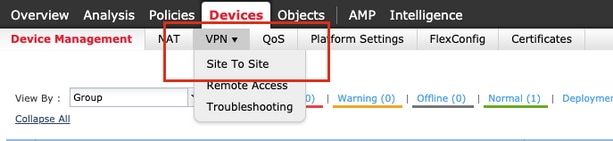
Step 1. Open a Site-to-Site VPN
- Navigate to Devices > VPN > Site To Site
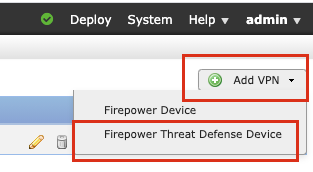
Step 2. Add VPN Topology
- Click Add VPN and choose Firewall Threat Defense Device (or Secure Firewall Threat Defense Device, depending on FMC UI version.)
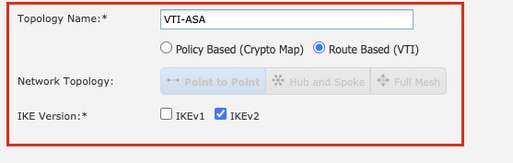
Step 3. Topology Name, Type, and IKE Version
- Provide a Topology Name and select VPN type Route Based (VTI). Choose IKE Version (recommended: IKEv2.)
- Topology Name: VTI-ASA
- Type: Route Based (VTI)
- IKE Version: IKEv2

Note: IKEv1 does not support CC/UCAPL-compliant devices. Cisco recommends IKEv2 for new designs.
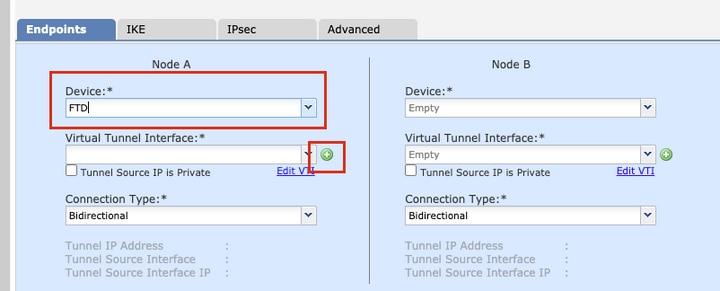
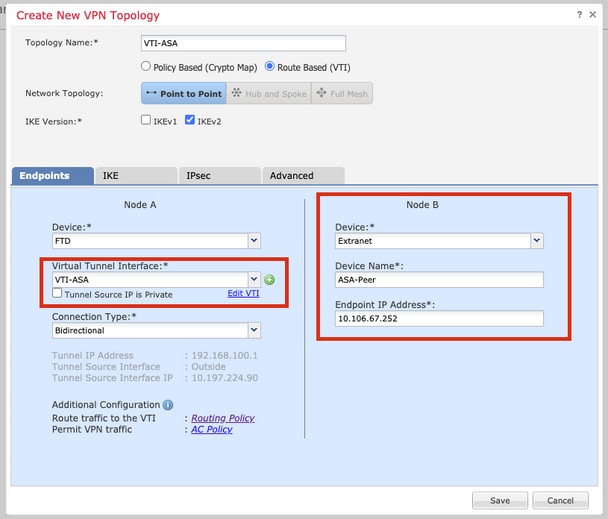
Step 4. Select FTD Device and VTI
- Choose the FTD Device for Node A.
- Add a new Virtual Tunnel Interface (click +) or select an existing VTI. For hub-and-spoke with DVTI on the hub, the hub uses Dynamic VTI.
Step 5. Create Static Virtual Tunnel Interface
- Define the new VTI parameters and click OK.
| Field | Example |
|---|---|
| Name |
VTI-ASA |
| Description |
VTI tunnel with extranet ASA |
| Security Zone |
VTI-Zone |
| Tunnel ID |
1 |
| IP Address |
192.168.100.1/30 |
| Tunnel Source |
GigabitEthernet0/0 (Outside) |
| Tunnel Mode |
ipsec ipv4 |
2.
- Assign the VTI to a dedicated security zone used in ACP rules.
- For IPv6, select appropriate tunnel mode and addressing (7.x).
- Do not use a borrow-IP interface as the tunnel source address.
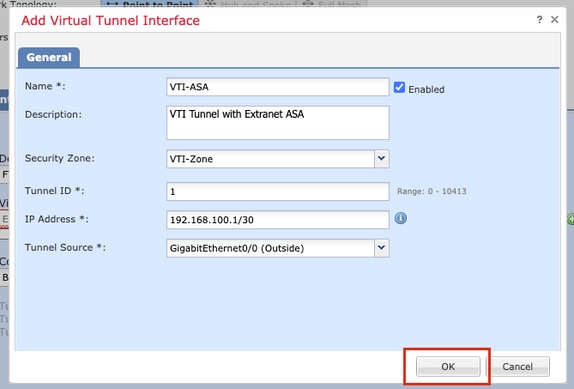
Step 6. Confirm VTI Creation
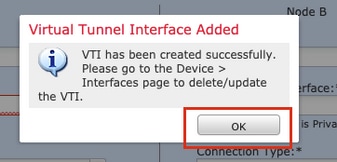
- Click OK on the confirmation that the VTI was created.
Step 7. Configure Peer (Node B — Extranet)
- Select the VTI created in Step 5. Configure Node B (peer):
| Field | Example |
|---|---|
| Device Type |
Extranet |
| Device Name |
ASA-Peer |
| Endpoint IP Address |
10.106.67.252 |
2. Configure Protected Networks for subnets behind each peer. Protected networks define traffic that can use VPN; route-based VPN still requires routes pointing into the VTI.
Optional (7.x):
- Enable NAT Traversal if a NAT device exists between peers.
- Exempt VPN traffic from NAT in the topology wizard when required.
- Send Virtual Tunnel Interface IP to peers when the peer needs the VTI IP for routing (common with BGP/OSPF.)
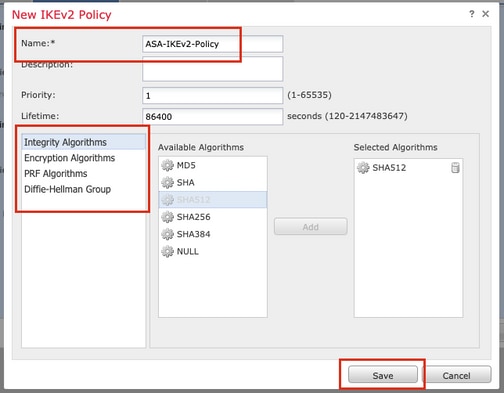
Step 8. IKE Tab — Select or Create IKE Policy
- Open the IKE tab and select an existing IKEv2 policy or click + to create a new one.
Step 9. (Optional) Create IKEv2 Policy
| Field | Recommended Example |
|---|---|
| Name |
ASA-IKEv2-Policy |
| Integrity |
SHA-512 (or SHA-256) |
| Encryption |
AES-256 |
| PRF |
SHA-512 (or SHA-256) |
| DH Group |
21 (or 19/20 per policy) |
- Click Save.
Step 10. IKE Authentication
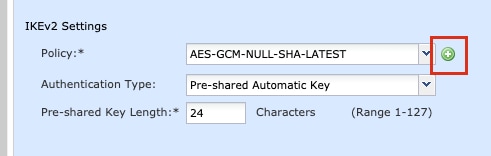
- Select the IKE policy. Choose the Authentication Type:
- Pre-shared Manual Key: Enter and confirm the key (lab/demo only; use strong PSK in production.)
- Pre-shared Automatic Key: Available when both endpoints are managed by the same FMC.
- Certificate: For PKI-based authentication.
Example (lab):
- Policy: ASA-IKEv2-Policy
- Authentication: Pre-shared Manual Key
Step 11. IPsec Tab — IPsec Proposal
- Open the IPsec tab. Select or create an IKEv2 IPsec Proposal (click Edit or +).
Step 12. (Optional) Create IKEv2 IPsec Proposal
| Field | Recommended Example |
|---|---|
| Name |
ASA-IPSec-Policy |
| ESP Hash |
SHA-512 (or SHA-256) |
| ESP Encryption |
AES-256 |
- Click Save.
Step 13. Select IPsec Proposal
- Choose the proposal and click OK.
Step 14. Perfect Forward Secrecy and Lifetimes
- Configure optional PFS and lifetimes:
| Field | Example |
|---|---|
| Perfect Forward Secrecy |
Group 21 |
| Lifetime Duration |
28800 seconds (default) |
| Lifetime Size |
4608000 KB (default) |
2. Adjust to match peer requirements and organizational crypto standards.
Step 15. Save VPN Topology
Review the summary and click Save.
Step 16. Configure Access Control Policy (Required)
- Navigate to Policies > Access Control > Access Control. Edit the policy applied to FTD.
Note: sysopt connection permit-vpn - The Bypass Access Control policy for decrypted VPN traffic does not work with route-based VPN. Configure explicit Allow rules for traffic traversing the VTI zone in both directions. The next table provides the create rules example.
| Direction | Source Zone | Dest Zone | Source Networks | Dest Networks |
|---|---|---|---|---|
| Internal → Remote |
In-Zone |
VTI-Zone (or Out-Zone) |
In-Network |
Remote-Network |
| Remote → Internal |
VTI-Zone |
In-Zone |
Remote-Network |
In-Network |
2. Adjust zone names to match your design. Bidirectional rules are required for full connectivity.
Step 17. Add Static Route via VTI
- Navigate to Devices > Device Management. Edit the FTD device.
- Open Routing > Static Route. Click Add Route.
| Field | Example |
|---|---|
| Interface |
VTI-ASA |
| Network |
Remote-Network |
| Gateway |
192.168.100.2 (peer VTI IP) |
3. Use the peer tunnel IP as the gateway, unless your design uses another next-hop reachable over the VTI.
4. For dynamic routing, configure BGP, OSPF, or EIGRP on the VTI instead of (or in addition to) static routes.
5. ECMP (optional, 7.x): Place multiple static VTIs in an ECMP zone and configure ECMP static routes for load sharing.
Step 18. Deploy Configuration
- Navigate to Deploy > Deployment (or Deploy > Deployment Manager, depending on FMC version). Select the FTD and click Deploy. Wait for successful deployment before verification.
Example CLI After Deployment
After successful deployment, FTD CLI configuration resembles:
crypto ikev2 policy 1
 encryption aes-256
 integrity sha512
 group 21
 prf sha512
 lifetime seconds 86400
crypto ikev2 enable Outside

crypto ipsec ikev2 ipsec-proposal CSM_IP_1
 protocol esp encryption aes-256
 protocol esp integrity sha-512

crypto ipsec profile FMC_IPSEC_PROFILE_1
 set ikev2 ipsec-proposal CSM_IP_1
 set pfs group21

group-policy .DefaultS2SGroupPolicy internal
group-policy .DefaultS2SGroupPolicy attributes
 vpn-idle-timeout 30
 vpn-idle-timeout alert-interval 1
 vpn-session-timeout none
 vpn-session-timeout alert-interval 1
 vpn-filter none
 vpn-tunnel-protocol ikev1 ikev2

tunnel-group 10.106.67.252 type ipsec-l2l
tunnel-group 10.106.67.252 general-attributes
 default-group-policy .DefaultS2SGroupPolicy
tunnel-group 10.106.67.252 ipsec-attributes
 ikev2 remote-authentication pre-shared-key *****
 ikev2 local-authentication pre-shared-key *****

interface Tunnel1
 description VTI Tunnel with Extranet ASA
 nameif VTI-ASA
 ip address 192.168.100.1 255.255.255.252
 tunnel source interface Outside
 tunnel destination 10.106.67.252
 tunnel mode ipsec ipv4
 tunnel protection ipsec profile FMC_IPSEC_PROFILE_1
Actual object names and policy numbers vary by FMC deployment.
Verify
From FMC GUI
- Open Devices > VPN > Site To Site and select the topology.
- Use Check Status or the site-to-site monitoring dashboard to view tunnel state.
Note: FMC VPN tunnel status cannot update in real-time on all releases (intervals of several minutes have been documented.) Confirm with CLI if the GUI shows ambiguous status. Equivalent CLI checks (it is possible FMC can run these for status).
show crypto ipsec sa peer <Peer_IP>
show vpn-sessiondb detail l2l filter ipaddress <Peer_IP>
From FTD CLI
show running-config crypto
show running-config interface Tunnel
show running-config route
show crypto ikev2 sa detailed
show crypto ipsec sa detailed
show crypto ipsec sa peer <Peer_IP>
show vpn-sessiondb detail l2l
show vpn-sessiondb detail l2l filter ipaddress <Peer_IP>
For legacy peers still using IKEv1:
show crypto ikev1 sa detailed
Routing Verification:
show route
show bgp summary
show ospfv3 neighbor
Replace commands with those appropriate for your configured routing protocol.
Troubleshooting Quick Reference
| Symptom | Common Cause | Action |
|---|---|---|
| IKE fails |
PSK mismatch, UDP 500/4500 blocked, cipher mismatch |
Compare IKE policy/proposal with peer; verify NAT-T |
| IPsec up, no traffic |
Missing ACP rule |
Add Allow rules for VTI zone both directions |
| IPsec up, no traffic |
Missing or wrong static route |
Verify route via VTI to remote protected network |
| Tunnel down after FMC upgrade |
Weak ciphers removed |
Reconfigure IKE/IPsec with AES-256/SHA-256+ |
| BGP not peering over VTI |
TTL/security zone |
Set TTL hop > 1; verify VTI IP reachability |
| GUI shows down, CLI shows up |
FMC status refresh delay |
Use CLI; redeploy if stale |
Related Documents
- Configure Route Based Site to Site VPN Tunnel on FTD Managed by FMC (Cisco.com) — Document ID 216276
- Configure DVTI with Multi-SA on Secure Firewall — Document ID 220322
- FMC 7.6 Device Configuration Guide — Site-to-Site VPN
- DVTI use case — Hub and Spoke with OSPF/BGP
- Guidelines for Virtual Tunnel Interfaces (Defense Orchestrator / FMC)
- Configure ASA/AnyConnect Dynamic Split Tunneling (Reference for FQDN Routing Concepts)
Revision History
| Revision | Date | Comments |
|---|---|---|
| 7.0 |
28-Jul-2026 |
Full substantive update: Secure Firewall branding, 7.x limitations (OSPF/EIGRP/IPv6/1024 VTI scale), DVTI cross-links, ACP emphasis, corrected typos, expanded verify/troubleshooting |
| 6.0 |
24-Sep-2024 |
Updated introduction and formatting (Cisco.com) |
| 5.0 |
27-Jun-2024 |
Limitations and DVTI reference update (Cisco.com) |
| 1.0 |
23-Nov-2020 |
Initial release |
Document Applies to
- Cisco Secure Firewall Threat Defense (FTD)
- Cisco Secure Firewall Management Center (FMC)
- Static route-based site-to-site VPN (SVTI)
- Extranet peers (ASA, third-party IPsec devices)
Does not cover: FTD cluster VTI, GRE tunnels, or full DVTI hub-and-spoke procedure (see Document ID 220322.)
Revision History
| Revision | Publish Date | Comments |
|---|---|---|
7.0 |
11-Aug-2026
|
Updated Title, Introduction, spelling, grammar, inserted horizontal lines to separate sections for readability, fixed CCW alerts, alt text. |
6.0 |
24-Sep-2024
|
Updated Introduction and Formatting. |
5.0 |
27-Jun-2024
|
Content updated for correctness.
Updated the "Limitations and Restrictions" section and referenced documentation for DVTI configuration. |
3.0 |
08-Aug-2023
|
Added Alt Text.
Updated Introduction and Formatting. |
2.0 |
19-Jul-2022
|
Content updated for correctness.
Updated for formatting, gerunds, legal disclaimer, machine translation, etc. to comply with Cisco guidelines. |
1.0 |
23-Nov-2020
|
Initial Release |

 Feedback
Contact Cisco
- Open a Support Case

- (Requires a Cisco Service Contract)