"Failed to Restart Task Server" Error in Splunk DB Connect v3.18.2 due to SSL/TLS Certificate Issues
Available Languages
Applicability
Splunk Apps & Add-ons Splunk Cloud Splunk EnterpriseDescription
After upgrading DB Connect to v3.18.2, Error "Failed to restart task server" appeared in Apps> Splunk DB Connect> Configuration> Settings> General in GUI page.
Investigation
The following image illustrates the error encountered on the General GUI page :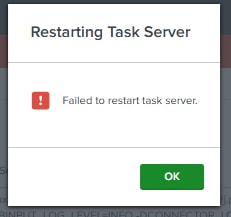
Upon further investigation, the following errors were found in the splunkd.log file located at "$SPLUNK_HOME/var/log/splunk/splunkd.log":
- "Certificates do not conform to algorithm constraints"
- "SSLv3 alert unsupported certificate"
One can use the following SPL query to check for relevant ERROR logs in Splunk:
SPL :
index=_internal *db* *ERROR*ERROR :
03-27-2025 14:14:43.727 +0100 WARN  SSLCommon [3678480 HTTPDispatch] - Received fatal SSL3 alert. ssl_state='SSLv3 read client key exchange A', alert_description='unsupported certificate'.
03-27-2025 14:14:43.727 +0100 WARN  HttpListener [3678480 HTTPDispatch] - Socket error from 127.0.0.1:60884 while idling: error:14094413:SSL routines:ssl3_read_bytes:sslv3 alert unsupported certificate
03-27-2025 14:14:43.728 +0100 ERROR ExecProcessor [3679228 ExecProcessorSchedulerThread] - message from "/app/splunk/etc/apps/splunk_app_db_connect/linux_x86_64/bin/server.sh" action=task_server_start_failed error=java.lang.RuntimeException: Certificates do not conform to algorithm constraints stack=com.splunk.DbxService.sendImpl(DbxService.java:112)\\com.splunk.DbxService.send(DbxService.java:51)\\com.splunk.HttpService.get(HttpService.java:172)\\com.splunk.Entity.refresh(Entity.java:381)\\com.splunk.Entity.refresh(Entity.java:24)\\com.splunk.Resource.validate(Resource.java:186)\\com.splunk.Entity.validate(Entity.java:462)\\com.splunk.Entity.getContent(Entity.java:157)\\com.splunk.Entity.getString(Entity.java:279)\\com.splunk.ServiceInfo.getVersion(ServiceInfo.java:155)\\com.splunk.DbxService.fetchInfo(DbxService.java:41)\\com.splunk.DbxService.connect(DbxService.java:34)\\com.splunk.dbx.splunkclient.SplunkServiceBuilder.build(SplunkServiceBuilder.java:69)\\com.splunk.dbx.server.bootstrap.TaskServerStart.startServer(TaskServerStart.java:77)\\com.splunk.DefaultServerStart.streamEvents(DefaultServerStart.java:60)\\com.splunk.modularinput.Script.run(Script.java:66)\\com.splunk.modularinput.Script.run(Script.java:44)\\com.splunk.dbx.server.bootstrap.TaskServerStart.main(TaskServerStart.java:36)\\
This error typically occurs when a security certificate, which is compatible with Splunk, has been disabled in Java. This can prevent SSL/TLS connections from being established properly, resulting in the "unsupported certificate" error.
Resolution
To resolve this issue, Follow below steps :
- Remove below security algorithms from "jdk.certpath.disabledAlgorithms" and "jdk.tls.disabledAlgorithms" parameters present in "$JAVA_HOME/conf/security/java.security" file.
Parameters : SSLv3, TLSv1, TLSv1.1, SHA1 - Set RSA key size to according to your "$SPLUNK_HOME/etc/auth/server.pem" file.
(NOTE : You can check RSA size by running command : "openssl x509 -noout -in $SPLUNK_HOME/etc/auth/server.pem -text") - Set crypto policy to legacy by executing below command :
Command : update-crypto-policies --set LEGACY
(NOTE : To review the current crypto-polices run command : update-crypto-policies --show ) - Go to "$JAVA_HOME/conf/security/java.security" file and add SSLv3 algorithm into "jdk.security.legacyAlgorithms" parameter.
- Restart the splunk service.
Revision History
| Revision | Publish Date | Comments |
|---|---|---|
1.0 |
30-Sep-2026
|
Initial Release |
 Feedback
Contact Cisco
- Open a Support Case

- (Requires a Cisco Service Contract)
This Document Applies to These Products
Related Articles
- Splunk DB Connect: Task server error after upgrading the DB Connect.
- Cannot communicate with the task server error in the Splunk DB Connect due to dbx-migration
- [Splunk DB Connect] DB Connect Task Server Fails to Start after OS Upgrade
- ERROR "Cannot Communicate with Task Server" in Splunk DB Connect