Splunk DB Connect: Task server error after upgrading the DB Connect.
Available Languages
Applicability
Splunk Cloud Splunk Enterprise Splunk DB Connect Splunk Apps & Add-onDescription
Splunk DB Connect add-on encounters the error as shown in the screenshot below.
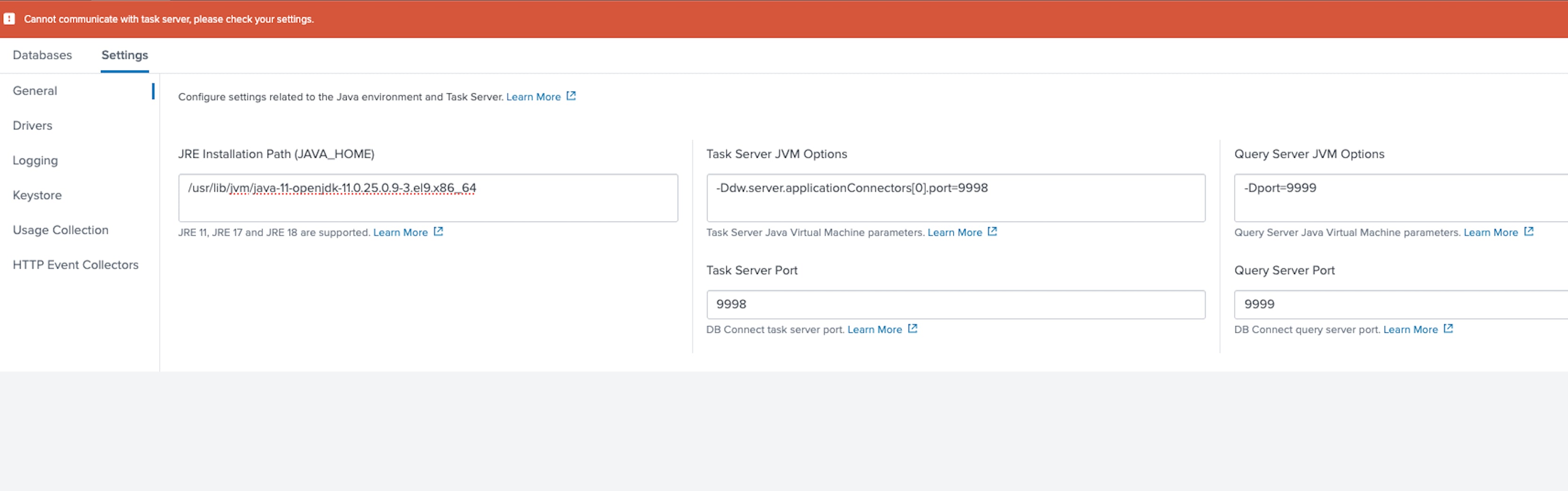
Investigation
Search below SPL in the Search and Reporting App.
index="_internal" sourcetype=splunkd log_level=ERROR *task_server*WARN HttpListener [3869848 HttpDedicatedIoThread-7] - Socket error from 127.0.0.1:33106 while idling: error:14094413:SSL routines:ssl3_read_bytes:sslv3 alert unsupported certificateERROR ExecProcessor [3869119 ExecProcessor] - message from "/opt/splunk/etc/apps/splunk_app_db_connect/linux_x86_64/bin/dbxquery.sh" action=dbxquery_server_start_failed error=java.lang.RuntimeException: Certificates do not conform to algorithm constraintsERROR ExecProcessor [3869119 ExecProcessor] - message from "/opt/splunk/etc/apps/splunk_app_db_connect/linux_x86_64/bin/server.sh" action=task_server_start_failed error=java.lang.RuntimeException: Certificates do not conform to algorithm constraints
Resolution
To resolve the issue, please follow these steps:
1. Navigate to the directory: /usr/lib/jvm/java-supportedversion-openjdk-11.0.13.0.8 4.el8_5.x86_64/conf/security/.
2. Locate the file having the name java.security.
3. Modify the below parameter to false.
"security.useSystemPropertiesFile=false"
4. Save the java.security file.
5. Restart the Splunk services.
If this parameter is set to true, priority will be given to the /etc/crypto-policies/back-ends directory. However, if the option is set to false, DB Connect will give priority to the following path:
/usr/lib/jvm/java-supportedversion-openjdk-11.0.13.0.8 4.el8_5.x86_64/conf/security/
NOTE: Please make sure to check with the OS team before making the above changes.
Revision History
| Revision | Publish Date | Comments |
|---|---|---|
1.0 |
01-Oct-2026
|
Initial Release |
 Feedback
Contact Cisco
- Open a Support Case

- (Requires a Cisco Service Contract)