[Splunk DB Connect] DB Connect Task Server Fails to Start after OS Upgrade
Available Languages
Applicability
Splunk Cloud Splunk Enterprise Splunk DB ConnectDescription
Following the OS upgrade, the Java version was also upgraded, which has caused Splunk DB Connect to fail in recognizing the new Java installation. As a result, a task server error is being encountered.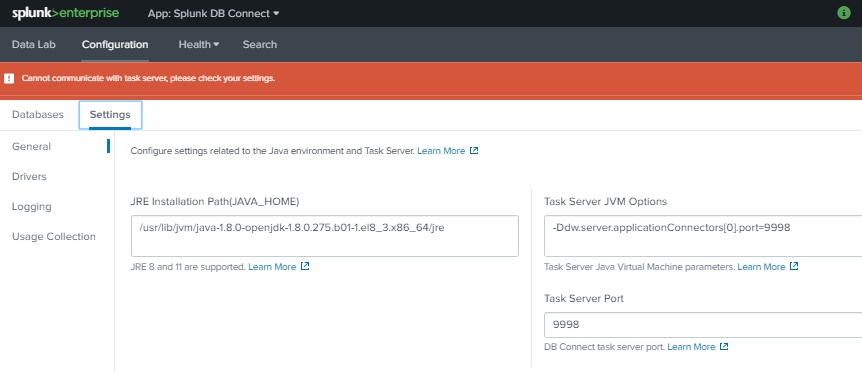
Investigation
During the investigation, it was found that an OS upgrade had led to an update in the OS-level Java version, which caused Splunk DB Connect to fail to recognize the new Java installation. Previously, Splunk DB Connect was configured to use an older Java version.
10-21-2024 13:27:41.904 +0000 ERROR ModularInputs [2890230 MainThread] - <stderr> Introspecting scheme=server: /opt/splunk/etc/apps/splunk_app_db_connect/bin/server.sh: line 33: exec: java: not found
The investigation also examined the Java preference settings in the server.sh script located at:
$SPLUNK_HOME/etc/apps/splunk_app_db_connect/linux_64x/bin/.
The script contains three methods for selecting the Java runtime for the task server:
-
CUSTOMIZED_JAVA_PATH_FILE: This file, located in the
linux_x86_64,linux_x86,windows, anddarwinfolders' bin directories, has the highest precedence. If a Java path is defined in this file, it will be used by DB Connect. -
JAVA_HOME Variable: If the
CUSTOMIZED_JAVA_PATH_FILEdoes not contain a Java path, the script checks theJAVA_HOMEenvironment variable. IfJAVA_HOMEis set and points to a Java executable, that Java version will be used. -
OS-Level Java: If neither the
CUSTOMIZED_JAVA_PATH_FILEnorJAVA_HOMEspecifies a Java executable, DB Connect will default to using any Java version installed at the OS level. If Java 11 is present on the OS, it will be used.
Despite adding the latest Java path in the Splunk DB Connect UI, the task server error persists.
Resolution
To address this issue, please follow the steps below:
1) Add the latest JAVA home path in the Splunk DB Connect UI.
2) Restart the Splunk service.
Following these steps should resolve the issue.
Note: After an OS upgrade, the Java version is also updated. As Splunk DB Connect may not automatically recognise the new Java installation, it is necessary to restart the Splunk service to address this issue.
Revision History
| Revision | Publish Date | Comments |
|---|---|---|
1.0 |
29-Sep-2026
|
Initial Release |
 Feedback
Contact Cisco
- Open a Support Case

- (Requires a Cisco Service Contract)