Splunk DB Connect Task Server process fails to start after migrating to RHEL 8
Available Languages
Applicability
Splunk DB ConnectDescription
Splunk DB Connect's task server process fails to start after the OS version is migrated from RHEL 6 to 8. Splunk DB Connect app's Configuration tab is showing the "Cannot communicate with task server" error. 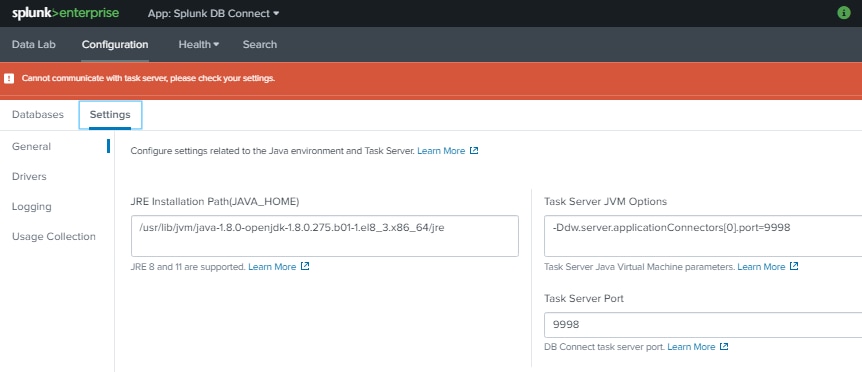
Error messages in splunkd.log:
xx-xx-xxxx xx:xx:xx.xxx +xxxx INFO loader - Splunkd starting (build 86fd62efc3d7).
...
6CE-24A4-4C3B-8E06-C8B3B1674FD4 listener=0x7fca3934ac00
xx-xx-xxxx xx:xx:xx.xxx +xxxx WARN SSLCommon - Received fatal SSL3 alert. ssl_state='SSLv3 read client key exchange A', alert_description='unsupported certificate'.
xx-xx-xxxx xx:xx:xx.xxx +xxxx WARN HttpListener - Socket error from 127.0.0.1:55546 while idling: error:14094413:SSL routines:ssl3_read_bytes:sslv3 alert unsupported certificate
xx-xx-xxxx xx:xx:xx.xxx +xxxx ERROR ExecProcessor - message from "/opt/splunk/etc/apps/splunk_app_db_connect/linux_x86_64/bin/server.sh" java.lang.RuntimeException: Certificates do not conform to algorithm constraints
...
Error: xx-xx-xxxx xx:xx:xx.xxx +xxxx ERROR ExecProcessor - message from "/opt/splunk/etc/apps/splunk_app_db_connect/linux_x86_64/bin/server.sh" Caused by: java.security.cert.CertPathValidatorException: Algorithm constraints check failed on keysize limits. RSA 1024bit key used with certificate: EMAILADDRESS=support@splunk.com, CN=SplunkCommonCA, O=Splunk, L=San Francisco, ST=CA, C=US.  Usage was tls server
Investigation
$SPLUNK_HOME/etc/auth/cacert.pem bundled in older version of Splunk installation was created with RSA 1024-bit key. RHEL 8 has a hardened system-wide cryptographic policy mechanism which is not compatible with RSA 1024-bit key. Refer to - https://www.redhat.com/en/blog/consistent-security-crypto-policies-red-hat-enterprise-linux-8.
Resolution
Resolution: Install self-signed certificate with RSA 2048-bit key and update the certificate file path in server.conf.
1. Refer here for the instruction to generate the self-signed certificate: https://docs.splunk.com/Documentation/Splunk/latest/Security/Howtoself-signcertificates.
2. Edit the [sslConfig] stanza in $SPLUNK_HOME/etc/system/local/server.conf:
[sslConfig]
caCertFile = <new-cacert-path.pem>
serverCert = <new-server-path.pem>
3. Restart Splunk.
Workaround: Set RHEL 8 cryptographic policy to LEGACY mode. Refer to: https://www.redhat.com/en/blog/consistent-security-crypto-policies-red-hat-enterprise-linux-8.
# update-crypto-policies --set LEGACY
Related Links
https://www.redhat.com/en/blog/consistent-security-crypto-policies-red-hat-enterprise-linux-8https://docs.splunk.com/Documentation/Splunk/latest/Security/Howtoself-signcertificates.
Revision History
| Revision | Publish Date | Comments |
|---|---|---|
1.0 |
29-Sep-2026
|
Initial Release |
 Feedback
Contact Cisco
- Open a Support Case

- (Requires a Cisco Service Contract)